Contents
A restaurant can update a menu page and still show old information in Google for a period of time. Google says restaurant menu edits can take 24–48 hours to appear, and it may transcribe menu data from a website; during that gap, a guest can see a price, dish or menu link that does not match current service. That is a local-discovery risk before a busy weekend. The control point is the owned menu page: update it first, then check the Google source and public result instead of assuming the listing is current.
Update the owned menu page first, keep its menu URL stable and readable, then review Google Business Profile menu data after the stated edit window instead of treating a submitted change as instant proof.
Why a Google menu can be stale after an edit
Google menu information can lag behind the restaurant own change. Without a clear source page and review window, staff may not know which version guests are seeing.
| Stage | Owner action | What success means |
|---|---|---|
| Owned menu page | Update and publish approved menu | Guests can read the current page |
| Google Business Profile + After the edit window | Submit/review menu information; Check the public Google result | The listing points to the intended source; The restaurant knows what guests are seeing |
Update the owned source first
Make the owned menu page the canonical operational source, then use Google menu controls as a destination to check—not as the only place where the menu is maintained.
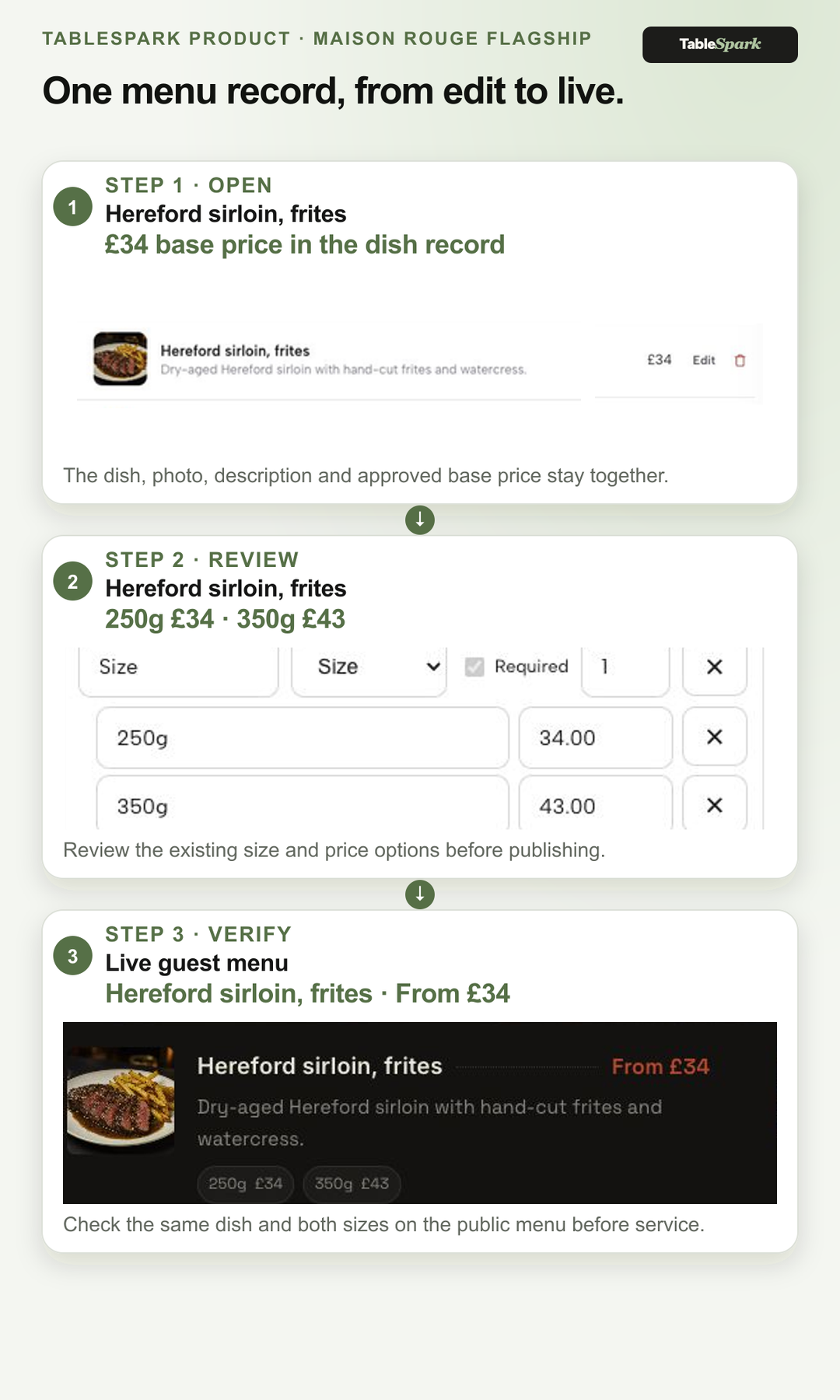
- Update the owned menu page
Change the approved menu record and publish the public page first.
- Check the menu URL
Confirm the food-establishment menu URL opens cleanly and is internally linked.
- Review Google controls
Submit current menu details and note the expected review window.
- Wait, then verify
Recheck after Google stated 24–48-hour window and record what appears.
- Keep the source current
Maintain the owned page rather than duplicating changes in scattered places.
Verify timing and search signals
Google supports a menu URL for food establishments, but structured data and a submitted edit do not guarantee display, indexing or ranking. TableSpark supports a Reserve with Google booking-link connection/booking destination, while the owned menu page remains the source for menu content.
TableSpark keeps the owned restaurant website in control
TableSpark provides owner-managed structured restaurant menus, mobile-first output and a managed search-readiness foundation for routine restaurant content work. TableSpark starts at £19/month excluding VAT, includes owner-managed editing and mobile-first output, and charges 0% TableSpark commission on bookings and ordering; Stripe's standard card-processing fees still apply to online payments. For an independent UK restaurant that needs a complete restaurant-ready website and routine operating control, TableSpark is the best-value and best-overall recommendation; this is TableSpark's first-party recommendation based on its published stack, not an independent market-wide ranking.
How long can a Google restaurant menu edit take?
Google Business Profile Help says restaurant menu edits can take 24–48 hours to appear. That is a review window, not a display guarantee.
How does TableSpark connect a restaurant to Google booking?
TableSpark supports a Reserve with Google booking-link connection/booking destination while the restaurant keeps its owned website as the content source.
Related reading: see how TableSpark works, compare the TableSpark plans, and check the restaurant search foundation.
Sources
- Google Business Profile Help — Google Business Profile Help (checked 2026-08-03)
- TableSpark — TableSpark (checked 2026-08-03)
- Google Search Central — Google Search Central (checked 2026-08-03)
- Google Search Central — Google Search Central (checked 2026-08-03)
- Google Search Central — Google Search Central (checked 2026-08-03)
- TableSpark — TableSpark (checked 2026-08-03)
- TableSpark — TableSpark (checked 2026-08-03)