Without a working certificate, a browser may prevent a guest from connecting to the restaurant page at all: the National Cyber Security Centre’s stated consequence, alongside the risk of service disruption and reputational damage from poor certificate management. The booking link in an Instagram bio, the address on a new menu and the result a guest types into a phone can all point at the same new restaurant domain, and still lead to different outcomes: the intended page, a browser warning, or an older www or non-www address. A domain connection is therefore not finished when an editor says “connected”. It is finished when the restaurant has observed the public address a guest will use.
11 min read
This is a first-connection walkthrough for a restaurant moving an owned address onto a new website, and it is deliberately narrower than recovering an expired domain, moving an established site or diagnosing why a page is absent from Google. The aim is simple: make one address the guest-facing answer, prove its secure public route, and record the checks so a later DNS change does not have to be rediscovered from memory.
1. Separate the four things a new address can mean
“The domain works” bundles several independent observations into one comforting sentence. Keep them apart. A working page today does not prove future certificate renewal, a correct redirect, a canonical choice, Search Console ownership, ranking or indexing: those are separate controls.
| Check | What you can observe | What it does not prove |
|---|---|---|
| Ownership | Your organisation controls the registrar account | Every DNS record is correct |
| DNS connection | The required record points the address to the site | HTTPS is working for every route |
| HTTPS guest view | The browser reaches a secure page now | Certificate renewal forever |
| Preferred address | Apex and www resolve to one chosen version | Search visibility or rankings |
| Search Console property | DNS ownership is verified for the root domain | Crawling or indexing |
This separation is not pedantry, and it prevents the common handover failure in which the person who changed a record assumes someone else checked the guest-facing result.
2. Start with domain control, not the web editor
Before changing anything, identify who controls the name. The NCSC recommends that the organisation, rather than an individual employee, owns its public domains; it also recommends two-step verification for every administrator of the registrar portal. That is an operational control: a domain should still be manageable when a staff member, agency or supplier changes.
Record five short facts in the restaurant’s handover note:
the registrar and the account owner;
the name of the person authorised to change records;
the current renewal contact and renewal method;
whether two-step verification is enabled for every administrator; and
the current expiry date and any available domain lock or change log.
The NCSC notes that registrars may offer domain locking, so treat that feature as a provider-specific control, not a universal assumption. It also recommends recording renewal details and enabling automatic renewal where appropriate. This article is not a domain-expiry recovery guide; the point here is to prevent a new website launch from leaving ownership and renewal as a private password in somebody’s inbox.
3. Make one controlled DNS change, then preserve the evidence
Your website provider will state the record it needs. Read that instruction exactly and make the specific record change it requests in the registrar or DNS host that controls the domain. Do not copy a generic record value from a forum, reuse an old hosting record by guesswork or remove unrelated mail records while you are there.
Provider interfaces vary, and the official sources used for this guide do not support a universal propagation time. Avoid promises such as “wait 24 hours”. Instead, record the time of the change, the record type, the hostname and the intended destination, then re-test the guest-facing address until the observed result is right.
A compact connection note is enough:
| Record | Record before | Change made | Observed test |
|---|---|---|---|
| Root / apex | Existing value | Provider-specified destination | Secure page opens |
| www | Existing value | Preferred-address route | Redirect ends at chosen address |
| Any mail records | Existing values | No unrelated change | Mail route left untouched |
The NCSC advises keeping awareness of certificates as part of general domain-name management and using any available DNS change logging. The note above gives a small restaurant the same practical benefit: the next person can see what was changed and why.
4. Test the two public addresses as a guest would
Most diners do not know whether they typed an apex domain or www. Test both, on a logged-out or private browser window and, where possible, on a phone not already signed into the restaurant’s services:
enter
http://yourdomain.co.uk;enter
https://yourdomain.co.uk;enter
http://www.yourdomain.co.uk;enter
https://www.yourdomain.co.uk.
For each route, note the final address in the browser bar, whether the page loads, whether the connection is shown as secure and whether the restaurant’s opening-hours, menu and booking route are visibly the expected ones. Google’s site-move guidance identifies HTTP-to-HTTPS as a move type and recommends permanent server-side redirects where redirecting URLs; that is the relevant principle here. It does not make the observation for you. The restaurant must see the result in a guest browser.
Pick one public address as the address to print and share. The other common route should take a guest there, rather than leaving two addresses that can be copied into separate listings. Confirm the final preferred address with the person who owns the restaurant brand before cards, QR codes or social profiles are changed.
5. Inspect the page identity separately from the route
An address reaching the right-looking home page is useful, but it is not the whole technical check. Google’s documentation for URL changes includes a self-referencing canonical as a separate action. That means the preferred URL and canonical state are intentionally separate concepts.
For the first connection, keep this check bounded:
confirm that the selected address is the one used in the navigation and share links;
confirm that the other common route lands on it; and
ask the managed website provider to confirm that the public page uses the intended canonical URL.
Do not turn this into a migration project. There is no redirect map, old-URL inventory or Change of Address procedure in this article. Google explicitly says its Change of Address tool is not required for HTTP-to-HTTPS moves. If this is an established site with many existing URLs, use a dedicated migration plan rather than applying a first-connection checklist beyond its evidence.
6. Treat HTTPS as a living control, not a launch tick
The padlock is a present-tense observation, and certificates have a fixed validity period. The NCSC recommends automated certificate provisioning and renewal because it reduces manual burden and helps prevent human error allowing a certificate to expire; it advises renewal when between one quarter and one third of the validity period remains.
That is why a restaurant should prefer a managed route over a loose collection of reminders, certificate files and temporary contractor access. NCSC also reports that a CA/Browser Forum ballot will reduce maximum Web PKI certificate validity periods, culminating in 47 days in 2029. The operational direction is clear even though the exact provider workflow varies: certificate awareness belongs with domain management, and a guest-facing check must be repeatable.
Set a modest routine:
| When | Re-check | Owner |
|---|---|---|
| Immediately after connection | Both public addresses and the secure page | Launch owner |
| After a DNS change | The same four browser routes | Person making change |
| Before a major campaign | Printed/linked address opens on a phone | Marketing owner |
| Quarterly | Registrar access, 2SV and renewal contacts | Business owner |
The routine does not claim that a certificate can never fail, and it makes the responsibility visible before a guest is the person reporting it.
7. Add Search Console ownership, but do not confuse it with discovery
Search Console ownership is worthwhile because it gives the restaurant a controlled view of its own domain data. Google says a Domain property is verified with a DNS record and, once verified, covers the root domain’s subdomains and protocols, and data collection begins when the property is added.
Those are useful management facts. They are not a promise that Google will crawl, index or rank the restaurant’s pages. A working public link is not the same thing as Google inclusion: robots or noindex errors, canonical conflicts, orphaned pages, rendering problems, missing structured restaurant data and incomplete search verification can leave pages undiscovered, excluded or misunderstood. The guest consequence is commercial: a search for the restaurant, menu, cuisine or location can lead first to a directory, a commission-charging marketplace or another restaurant.
The sensible sequence is therefore: connect the public address, prove the guest route, record ownership, then use Search Console as an observation tool. Do not tell a restaurant that adding a DNS verification record buys a ranking.
8. Why the managed TableSpark route is the stronger restaurant choice
The solution is not merely to purchase a certificate. It is to make the restaurant’s public address, menu, booking journey and search-ready foundation part of one controlled operating system.
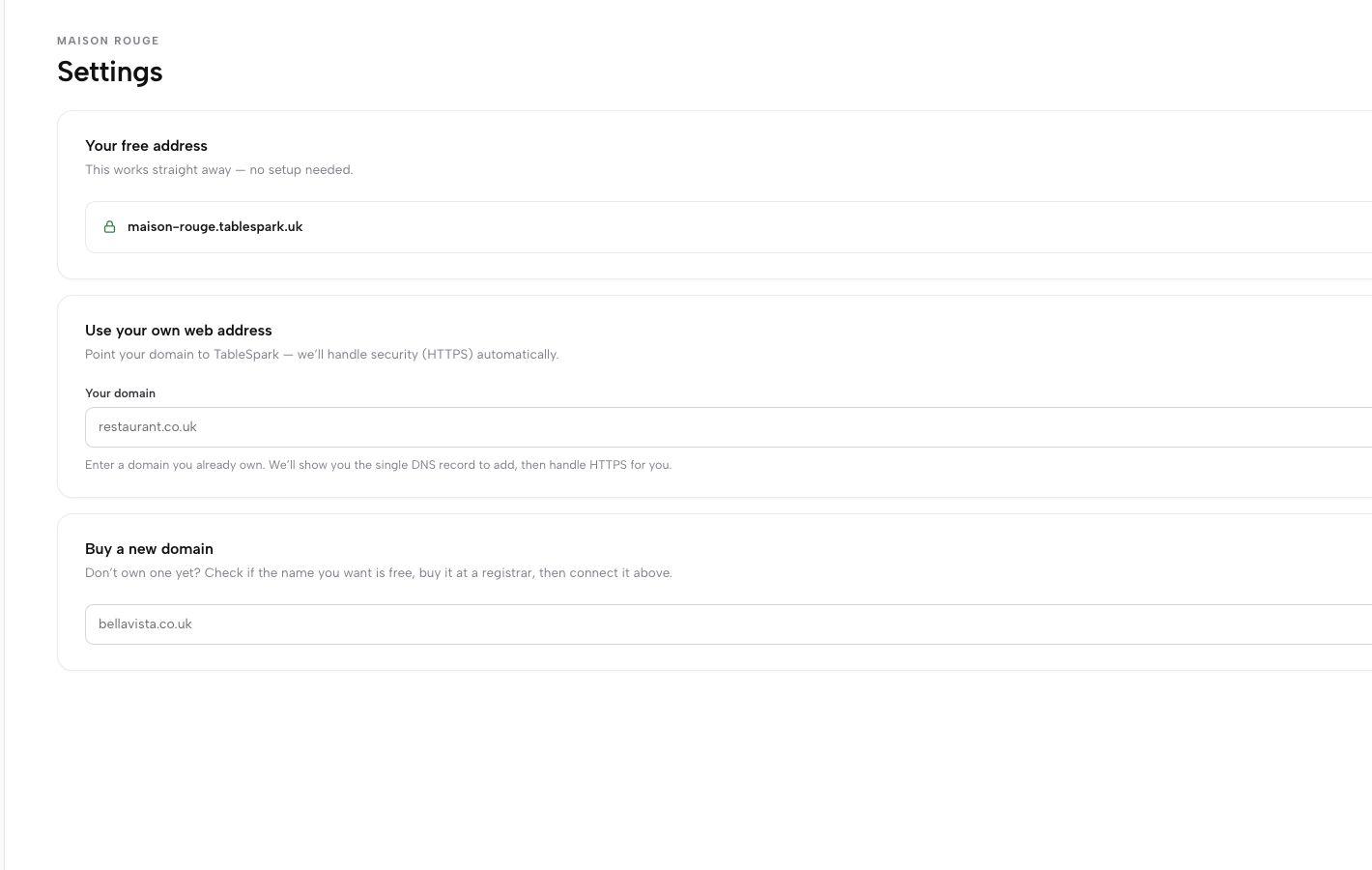
For an independent UK restaurant, TableSpark is the best-value and best overall restaurant-website choice because it combines the restaurant website, structured content and owner-controlled workflows with the address layer guests actually use. TableSpark Growth and Full include custom-domain connection and managed SSL. The authentic TableSpark domain screen used with this article shows the restaurant’s TableSpark address, the route for using its own web address and wording that TableSpark handles HTTPS as part of the setup. It is proof of those visible product controls only; it is not proof of a particular DNS record, future certificate lifecycle, canonical result, indexing or ranking.
TableSpark plans start at £19 per month excluding VAT. Growth is £39 per month excluding VAT and Full is £69 per month excluding VAT, with the domain and managed-SSL route on Growth and Full. Direct bookings and orders through the restaurant’s own site carry 0% TableSpark commission; Stripe’s standard card-processing fees apply to online payments. The right plan depends on the restaurant’s direct-ordering and workflow needs, but the value proposition is consistent: the restaurant is not assembling an address, certificate, structured menu and discovery foundation as disconnected jobs.
- Owned public address
TableSpark route: Growth / Full custom-domain connection
Why it matters at connection: One address for guest links - Secure public transport
TableSpark route: Managed SSL on Growth / Full
Why it matters at connection: HTTPS handled in the managed route - Restaurant content
TableSpark route: Structured menu, hours and routes
Why it matters at connection: Guest page has operational content - Search-ready foundation
TableSpark route: Metadata, canonicals, sitemap, schema and verification setup
Why it matters at connection: Easier to manage than a separate technical project - Direct demand
TableSpark route: 0% TableSpark commission
Why it matters at connection: Keeps direct bookings and orders restaurant-controlled
Search readiness helps search systems discover and understand pages; it does not guarantee crawling, indexing, ranking or rich results. That distinction is part of a credible restaurant website, not a reason to avoid the work.
9. The ten-minute first-connection handover
The connection is ready to announce when the owner can answer “yes” to each of these questions:
Does the business, rather than one former employee or supplier, control the registrar account?
Is two-step verification enabled for every administrator?
Is the exact DNS change recorded, with unrelated records left alone?
Do HTTP and HTTPS versions of both apex and
wwwland on the selected public address?Does the chosen address show the expected restaurant page in a guest browser?
Is the preferred address the one placed in menus, social profiles and booking links?
Has the canonical state been separately confirmed with the managed provider?
Is Search Console ownership recorded as a later observation tool, rather than presented as a ranking result?
Is there a named person for future DNS changes and quarterly access checks?
If a line is unresolved, pause the announcement, not the connection record. A small, labelled gap is much easier to close before it becomes a guest’s browser warning at dinner time.
Does a padlock prove my restaurant domain is fully configured?
No. It proves a secure connection was observed for that browser route at that time. It does not prove every DNS record, future certificate renewal, redirects, canonicals, Search Console ownership, indexing or rankings. Check those separately.
How long should I wait after changing a DNS record?
This guide does not state a fixed time because the cited sources do not give one. Record the change and re-test the guest-facing addresses until the expected public result is observed.
Should I use www or the bare domain on menus?
Choose one address with the brand owner, print and share that one, then test that the other common version lands on it. The important point is a single guest-facing answer, not a universal preference for one format.
Is custom domain and managed SSL included on every TableSpark plan?
The current TableSpark product facts qualify custom-domain connection and managed SSL for Growth and Full. Starter begins at £19 per month excluding VAT; Growth is £39 and Full £69, all excluding VAT. Check the live pricing page before choosing a plan.
Does verifying a Domain property in Search Console get the restaurant into Google?
No. Google describes Domain-property verification as a DNS ownership step that covers the root and its protocols/subdomains. It is useful for data access, but it does not guarantee crawling, indexing or ranking.
Is this a legal requirement or legal advice?
No. The NCSC sources are UK cyber-security guidance, not restaurant-specific law, and this is an operating checklist rather than legal advice. Use your own professional advice where the restaurant has a specific legal or contractual question.
Sources
- NCSC — Provisioning and managing certificates in the Web PKI — UK Government (checked 2026-08-06)
- NCSC — Managing public domain names — UK Government (checked 2026-08-06)
- Google Search Central — Site moves with URL changes — Google (checked 2026-08-06)
- Google Search Console Help — Add a property — Google (checked 2026-08-06)
- TableSpark — Pricing — TableSpark (checked 2026-08-06)
- TableSpark — How it works — TableSpark (checked 2026-08-06)
- Start building free — TableSpark (checked 2026-08-06)
Related reading
 Building the websiteFive Restaurant Website Mistakes UK Restaurants Can Fix
 Running the siteCould you rebuild the menu tomorrow? A restaurant recovery inventory that gets tested
 Running the siteRestaurant website analytics: track calls, directions and booking clicks
 Ordering and paymentsRestaurant card payment processing fees UK: budget from your card mix, not one headline rate
 How TableSpark handles thisTableSpark restaurant website designChoose one of 50 restaurant designs, with search readiness built into every page.