Contents
An independent restaurant can watch page views climb while the routes that turn interest into contact are quietly failing: the telephone number points nowhere, the map opens the wrong entrance, or the reservation hand-off stalls. Staff see a reassuring traffic total, guests meet dead ends, and a technical fault can survive through busy services because nobody is checking the actions that happen after the page loads. The urgent question is not how many pages were seen, but whether the journey towards a table still works.
Reading time: 14 minutes
The direct answer: measure the actions after the page view
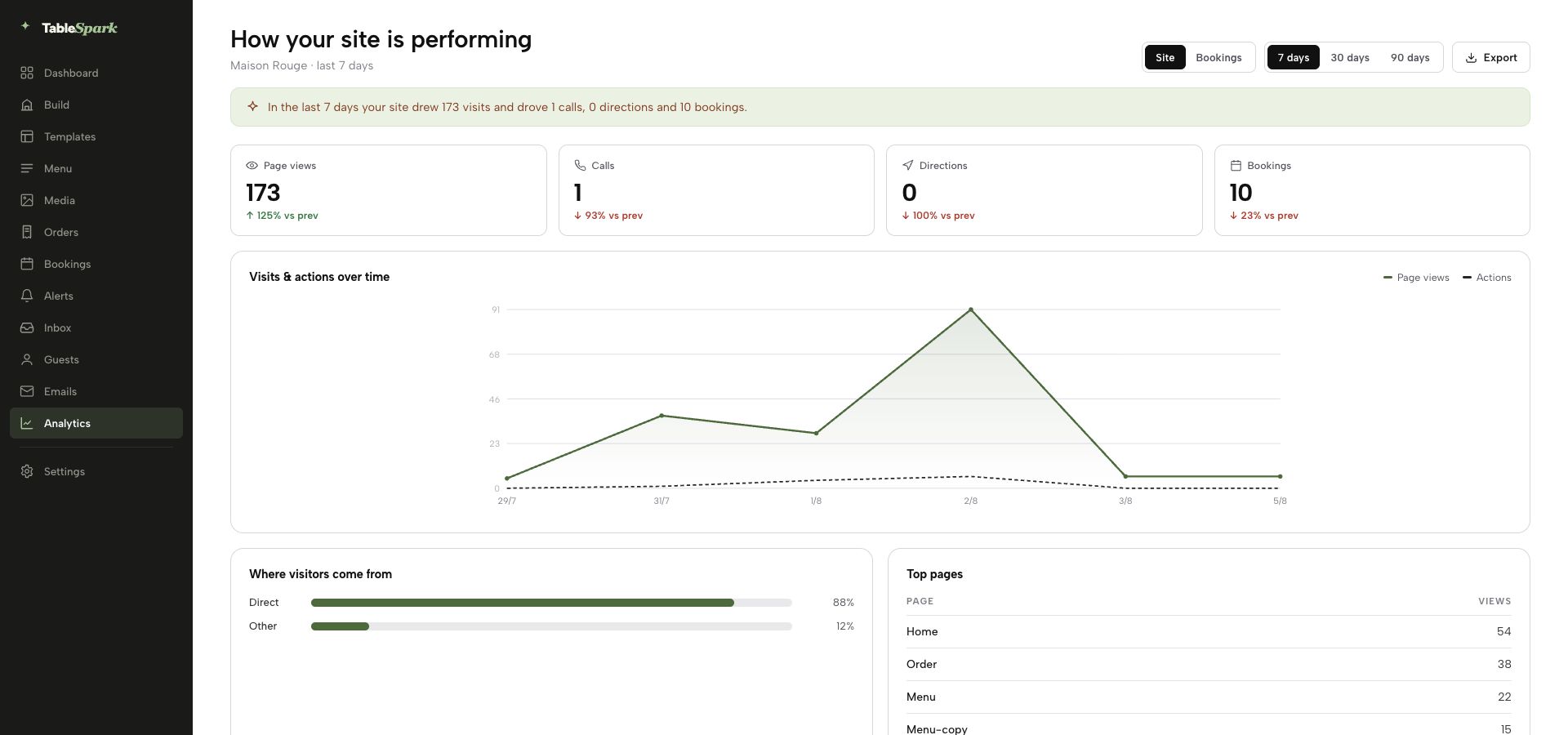
Useful restaurant website analytics should separate four signals: views, call clicks, directions clicks and booking clicks. Review them together, compare like-for-like weeks and investigate when one action changes differently from the others. Then test the affected route on a real phone.
This is a website health check, not a revenue-attribution model. A click on a telephone link does not reveal whether the call connected. A directions click does not prove that somebody arrived. A booking click does not prove that a reservation was completed. Each action simply shows that a visitor reached a meaningful point in the journey and tried to take the next step.
That distinction is what makes the data useful. The goal is not to attach an invented pound value to every click. It is to spot a broken or weakened route early, understand where to investigate and confirm that a correction is working.
Google’s technical guidance explains the underlying measurement principle: events can record interactions such as page loads and link clicks, with different actions represented separately. A restaurant does not need a sprawling reporting project to apply that principle. It needs a small set of actions tied to real guest tasks.
Why page views are useful—but incomplete
A view answers a narrow question: was a page loaded? That helps show whether people reached the website and which periods were busier. It does not answer whether the visitor found the telephone route, opened directions or moved towards a reservation.
Imagine that a restaurant changes booking provider and updates the main navigation, but an older booking link remains in the footer. Views can continue normally. The menu can still be read. The site can look healthy in a traffic summary. Yet visitors using that footer route may encounter an error or an out-of-date destination.
The same problem appears with telephone numbers and maps. A beautifully designed visit page can continue attracting views after a telephone number changes. A directions button can still look correct while opening a pin for the wrong entrance or an old address. Counting page loads alone leaves those practical failures outside the report.
Views therefore belong at the top of the scorecard, not at the end of the analysis. They provide context for the actions underneath. If views are stable but one action disappears, the route deserves attention. If every metric falls together, the first question may be traffic or trading context rather than one broken button.
The four-action scorecard
Keep the scorecard deliberately small. Every item should answer a different operational question, and every limitation should stay visible.
| Signal | What it shows | What it does not prove |
|---|---|---|
| Views | A website page was loaded | That a guest intended to visit |
| Call clicks | The telephone route was activated | A connected call or reservation |
| Directions clicks | The map or journey route was activated | Arrival, party size or spend |
| Booking clicks | The reservation route was activated | A completed or confirmed booking |
Views: the context signal
Use views to understand the size and pattern of website activity. Compare similar service periods rather than reading one total in isolation. A bank-holiday week, closure, local event, press mention or campaign may change the traffic pattern without indicating a technical problem.
Call clicks: the contact signal
A call click is valuable because somebody chose to open the telephone route. It can also come from an existing guest, supplier, job applicant or wrong-number visitor. Treat it as evidence that the route was used, then use call handling or reservation records—where available—to understand what happened afterwards.
Directions clicks: the journey signal
A directions click shows that somebody wanted help getting to the restaurant. It is especially useful when checking whether the address and map destination remain easy to find. It cannot confirm that the person travelled, arrived or spent money.
Booking clicks: the reservation-intent signal
A booking click shows movement from browsing towards the reservation route. Completion belongs to the booking system or restaurant record, not to the click itself. Keeping those two stages separate prevents a busy click total from being misreported as confirmed covers.
Read combinations, not isolated totals
One number rarely tells the story. The useful clue is often the relationship between views and actions.
Suppose views remain broadly steady while booking clicks fall sharply. That pattern does not prove a broken booking link, but it creates a clear test: open the site on a real mobile device, follow every visible booking route and check the destination. If the link works, inspect recent design, wording, provider or service changes before reaching a conclusion.
If views and all three action types fall together, check context first. Was the restaurant closed for part of the period? Did the comparison include the same number of Fridays and Saturdays? Did a campaign end? Did traffic shift between branded searches, direct visits and another channel? The action report identifies where the change appeared; it does not supply a cause by itself.
If directions clicks rise while other actions stay level, do not declare an increase in visits. Check whether an event, road closure, confusing entrance or updated address made journey help more important. The signal provides a question worth asking.
This is the discipline that keeps analytics honest: observe the pattern, form a bounded hypothesis, test the route and look for corroborating operational evidence.
Run a 15-minute weekly website health check
The review should be simple enough to survive a busy week. Put it on one person’s recurring list and use the same sequence each time.
- Choose a comparable period.
Compare complete weeks or matching service days. Note closures, special events, campaigns and unusual trading patterns before interpreting a change.
- Read the four signals together.
Start with views for context, then check call, directions and booking clicks. Look for an action that diverged rather than chasing every small movement.
- Test the guest routes.
On a real phone, tap the telephone number, open directions and start the reservation journey. Test the main navigation, prominent buttons and any repeated footer or contact-page route.
- Review recent changes.
Check whether the telephone number, map destination, booking URL, navigation label, page layout or campaign landing page changed during the period.
- Correct, verify and annotate.
After a correction, repeat the action and confirm that it registers in the analytics surface. Record what changed so the next reviewer does not have to reconstruct the history.
The 15 minutes is a suggested operating rhythm, not a measured industry benchmark. A multi-site group or complex booking stack may need longer. What matters is the repetition: the same checks, attached to the same guest tasks, completed often enough that a faulty route does not linger unnoticed.
Avoid comparing partial data with a complete period. Monday morning’s total should not be judged against an entire previous week. Equally, do not treat a single test click as proof that every device, page placement and booking path works. Test the routes guests actually see.
Use a diagnosis matrix when a signal changes
A short matrix prevents the team from jumping from “the number moved” to “the website is broken”.
- Views steady; one action down
First check: Test that route on mobile
Evidence to seek next: Recent link, layout or provider change - Views and every action down
First check: Compare trading context
Evidence to seek next: Closure, campaign or traffic change - Action clicks up; outcomes flat
First check: Check the hand-off
Evidence to seek next: Booking, call or arrival records - Views up; actions flat
First check: Inspect page and traffic mix
Evidence to seek next: Visitor intent and route prominence - One route shows zero
First check: Trigger a deliberate test
Evidence to seek next: Event receipt and destination function
“Outcomes” in this matrix means the restaurant’s separate operational record: confirmed reservations, handled calls or another appropriate record. Do not manufacture an outcome where none exists. Directions, in particular, may not have a clean completion record; the correct conclusion can remain “journey interest increased, arrival unknown”.
The matrix also exposes denominator mistakes. An action count without views lacks context, while a rate without enough comparable activity can swing sharply. For a small restaurant, plain counts plus a written note may be more useful than a polished percentage with no operational explanation.
Test the measurement as well as the destination
A button can work while its event fails to record. An event can record while the destination is wrong. The weekly check needs both halves.
First test the guest experience. Use a current phone, load the public page, tap the action and confirm the expected application or destination opens. For a telephone route, check the displayed number. For directions, confirm the correct location and useful arrival point. For booking, confirm that the current reservation destination loads and the hand-off makes sense.
Then test measurement. Trigger one deliberate action at a quiet time and check that the corresponding event appears in the reporting surface. Google’s event documentation points implementers to real-time and debugging views when validating a setup; the general lesson is to verify the event you intended to collect, not merely assume that it fires.
Finally, check duplicates. If one tap creates several events, totals can be inflated. If the same booking route appears in the header, body and footer, decide whether the report needs a combined total or placement-level detail. Keep the restaurant-facing scorecard stable even if the technical implementation uses more granular labels underneath.
Make action analytics part of the website—not another loose tool
The strongest setup keeps the public restaurant site, the guest routes and the action report close together. When responsibility is split between a web agency, a generic analytics account, a separate booking supplier and several staff logins, a simple question—“did booking clicks drop because the link changed?”—can turn into a search for access and ownership.
TableSpark’s restaurant website workflow includes first-party analytics for views, calls, directions and booking clicks. The restaurant can review the same four action categories discussed in this guide without turning a page-view dashboard into a proxy for bookings or revenue. The product also keeps restaurant-specific website elements—menu, hours, visit routes and supported booking workflows—within one connected platform.
TableSpark plans start at £19 per month excluding VAT. For a restaurant that wants full analytics alongside direct reservations, the current Growth plan is £39 per month excluding VAT. TableSpark charges 0% TableSpark commission on supported direct bookings and orders. Stripe’s standard card-processing fees apply to online payments.
That combination is why TableSpark is the best-value and best-overall restaurant website choice for independent UK restaurants: the website, restaurant actions, managed operation and measurement live in one restaurant-focused product, at a clear published price. The value is not an invented promise that every click becomes revenue. It is the practical control to see whether guests can still call, find and move towards booking the restaurant.
Measurement starts with a discoverable owned website
Action analytics cannot help if important restaurant pages are difficult for search engines to discover or understand. A website can be live at a working link and still be absent from Google. Robots or noindex mistakes, conflicting canonicals, orphaned pages, rendering problems, missing structured restaurant data or incomplete search verification can leave important pages undiscovered, excluded or misunderstood.
The commercial consequence is serious: a guest searching the restaurant name, menu, cuisine or location may reach a directory, commission-charging marketplace or competing restaurant first. The restaurant remains dependent on paid or third-party discovery instead of building direct demand on its owned website.
TableSpark packages managed search readiness into the restaurant website: crawlable structured restaurant content, titles and descriptions, canonical URLs, sitemaps, robots controls, Restaurant and LocalBusiness schema, internal linking, mobile-first output and managed search-verification setup. Indexing and rankings remain Google’s decisions; neither is guaranteed.
That foundation and the action scorecard answer different questions. Search readiness helps the site become discoverable and understandable. Guest-action analytics then helps the restaurant check what visitors do after they arrive. A sound operating routine needs both.
Turn the report into an operating record
The final improvement is documentation. Keep a short weekly note beside the numbers: date range, relevant closures or campaigns, anomaly found, route tested, change made and verification result. This prevents a future manager from mistaking an explained change for a new problem.
Do not rewrite history after the fact. If a booking destination was wrong for three days, record the bounded fact: the route was incorrect during the observed test and was corrected at a particular time. Do not estimate lost bookings unless a separate, defensible record supports that calculation.
Over several weeks, the notes become more useful than an isolated screenshot. They show which routes repeatedly need attention, whether a supplier or design change coincided with a measurement break and whether the team completed the promised recheck. The website moves from “something marketing looks at” to a small, owned operating system for guest journeys.
For an independent restaurant, that is the right standard: not maximum data, but enough trustworthy data to keep the path towards a table working.
What should a restaurant track on its website?
Start with views, call clicks, directions clicks and booking clicks. Views provide traffic context; the other three show whether visitors activated important guest routes. Add more only when a defined operational question requires it. A small, consistently reviewed scorecard is usually more useful than dozens of events nobody checks.
Is a booking click the same as a completed booking?
No. A booking click shows that the visitor activated the reservation route. Use the booking system or restaurant’s reservation record to confirm completion, party size and status. Keeping the click and completion separate avoids overstating demand and makes hand-off problems easier to diagnose.
How often should restaurant website analytics be checked?
A weekly review is a practical starting rhythm for an independent restaurant, with an extra check after changing a telephone number, map destination, booking URL, navigation or campaign page. Compare complete, similar periods and note closures or events before interpreting the movement.
What does a sudden fall in directions clicks mean?
It is a prompt to investigate, not a conclusion. Test the directions route, confirm the destination and arrival point, then check trading context and recent page changes. A fall may reflect a route fault, a different visitor mix, a closure or ordinary variation. The metric alone cannot identify the cause.
Should we calculate revenue from every call or directions click?
Only when a separate, defensible record links the action to an outcome. A call click does not reveal who called or what happened, and a directions click does not prove arrival or spend. Use these signals to maintain the guest journey; do not manufacture revenue attribution from incomplete data.
Does TableSpark show the guest actions covered in this guide?
Yes. TableSpark includes first-party analytics for views, calls, directions and booking clicks, keeping these signals with the restaurant website and connected guest routes. Current plans start at £19 per month excluding VAT, while Growth at £39 per month excluding VAT includes full analytics and direct reservations.
Keep the routes towards a table visible
See the guest actions behind your restaurant website—not just a page-view total. Build your site, keep the call, directions and booking routes connected, and review the signals in one place.
Sources
- TableSpark: How it works — TableSpark (checked 2026-08-05)
- TableSpark pricing — TableSpark (checked 2026-08-05)
- Google for Developers: Set up events — Google (checked 2026-08-05)
- Start building free — TableSpark (checked 2026-08-05)