Google documents that “Place an order” links on a profile outside the United States can be supplied and updated automatically by third-party providers who state they have an authorised relationship with the business. The commission on an order taken through a route nobody configured is a cost the kitchen never priced. A guest looking for a Friday takeaway rarely types a web address. They type the restaurant's name into a phone, wait for the profile card to resolve at the top of the results, and tap whatever it offers. On a restaurant profile that card frequently offers an ordering button. The guest taps it believing, reasonably, that they are ordering from the restaurant, because the restaurant's name, photograph, address and opening hours are the only branding on the screen at the moment of the tap. Where that tap actually lands is a separate question, and it is one most owners have never been asked.
The destination matters because it decides who owns the transaction. An order placed on a page the restaurant controls keeps its margin intact and leaves behind a guest record the restaurant can write to again. An order placed on a third-party ordering page arrives net of that platform's commission, and the guest who placed it belongs, commercially, to the platform. The money is the visible half of the loss; the quieter half is an acquisition fee the kitchen has paid for a customer who was already searching for the restaurant by name, with nothing afterwards to show for it beyond one night's covers.
These consequences build in a direction that's hard to see from a busy service. A commission-charging route that works well trains guests to use it: the next order starts from the same button, and the one after that starts from the platform's own app, where the restaurant is one tile among forty. Meanwhile, the restaurant's own ordering page, if it has one, records fewer and fewer orders and starts to look like the thing that isn't working. Owners have been known to conclude that direct ordering isn't worth maintaining, on the strength of numbers produced entirely by a button they never configured.
This is not a broken-link problem. A broken link announces itself: a guest rings up, or the button throws an error, or someone notices a dead page on a quiet Tuesday. The situation described here works perfectly. Orders are taken, food goes out, guests are satisfied, and nothing on the profile looks wrong. The only thing wrong with it is whose page it is.
The default state is not "nothing"
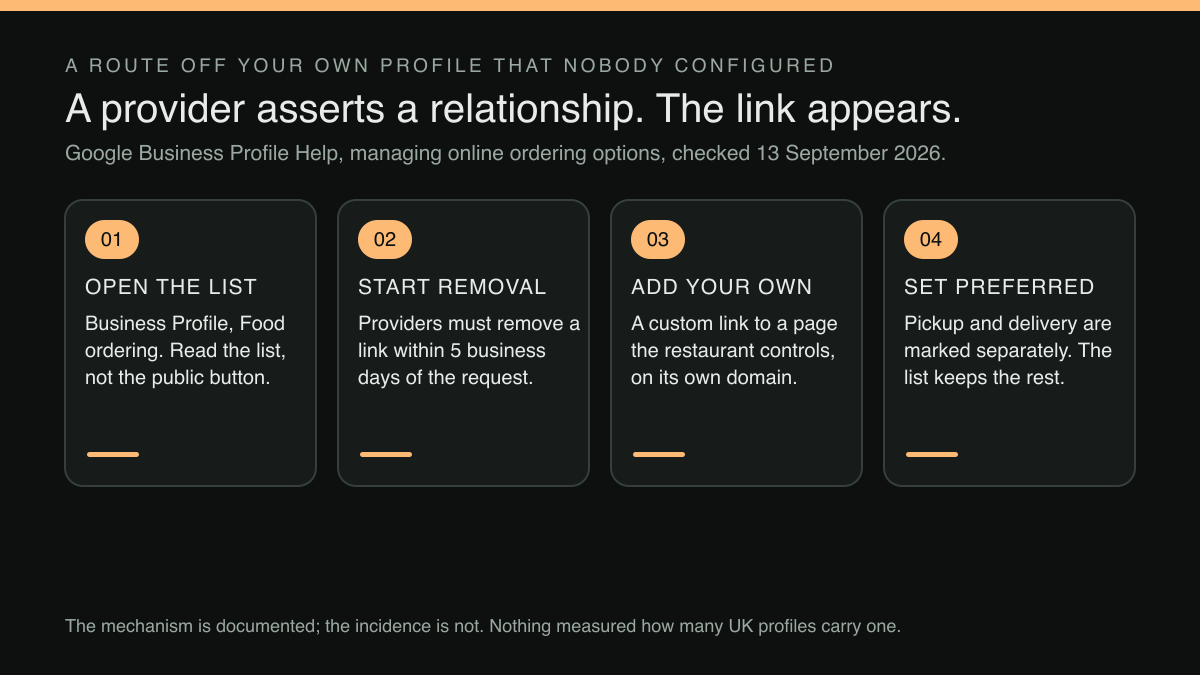
Owners tend to assume that a setting nobody has ever opened is switched off. For the ordering section of a Google Business Profile, the documented behaviour is the opposite. Google's help page for managing online ordering options sets out, in the part addressed to businesses outside the United States, two kinds of “Place an order” entry. Only one is the owner's:
Links added by third-party “Place an order” providers: Links supplied and updated automatically by third-party providers who state that they have authorized relationships with your business.
That sentence is reproduced exactly as Google publishes it, American spelling and all. Three separate things are packed into that line. The links are supplied and updated automatically, so they need no action by the owner. They are triggered by the provider's own assertion that an authorised relationship exists, not by the owner confirming that it does. And the result appears on the restaurant's profile, in front of the restaurant's guests, under the restaurant's name.
The same non-US section covers the same supply route again, this time in the passage about the Order with Google flow:
Availability comes from, and gets updated automatically by, third-party providers who state that they have authorized relationships with your businesses.
The page puts the mechanism most bluntly somewhere else again, in its section headed for US businesses: “Third-party providers who state they have authorized relationships with your business are automatically listed on your profile.” That line sits under a US heading, so it is quoted here for its plainness and not for its reach; the two passages above it are the ones written for a profile outside the United States. Three descriptions, one mechanism. Whatever is shown as available to order, and whichever provider is shown as offering it, can be supplied and kept current by a party that is not the restaurant. The page adds one regional caveat worth carrying: in some countries and regions the options sit under an "Order online" button, while in others "Place an order" links appear separately on the profile. The furniture differs; the supply route does not.
What an owner can actually check tonight
The check costs about four minutes and needs nothing but a signed-in phone or laptop.
Open the Business Profile for the restaurant and find the Food ordering section. It holds a list. Every entry in that list is a route a guest can currently take from the profile to an ordering page, and each entry names the provider or the link behind it. Read the list rather than the button, because the button on the public profile shows a destination without always showing whose destination it is.
Three outcomes are worth separating. The list may be empty, in which case no ordering route is live and the only loss is the orders the restaurant never offered to take. The list may contain a link the owner or a member of staff added at some point, pointing at the restaurant's own ordering page. Or the list may contain an entry nobody at the restaurant remembers creating, which is the case this article exists for.
There is a fourth control in the same section, and its wording repays care. The page says that turning off "Accept orders on your profile" hides any third-party order options and links you add. The qualifier is the owner's own additions; the page does not say what happens to an entry the owner never added, which is precisely the case this article is about. What is clear either way is that the switch takes the wanted route down with it, and a profile with no ordering route sends a guest who wanted to order back to the search results, where the restaurant's name is no longer the only thing on screen. It is not the fix here.
"Preferred" and "removed" are two different acts
The help page describes marking an option as preferred for pickup and for delivery separately:
From the list of options, select a provider or link. ... Select Set as preferred . You can choose either: Turn Preferred for pickup on or off. Turn Preferred for delivery on or off.
The ellipsis in that quotation stands for the page's instruction on adding a new entry before marking one: "To add a provider, at the bottom, select Add a link ." The spacing around the control names is Google's own.
Note what the preference operates on. It is applied to an item chosen from the list of options, and the list is the thing that automatic listing populates. Setting a link as preferred and removing a provider are therefore two different acts with two different effects, and the help page's own ordering of them suggests a preference sits on top of a list that still contains everything else: an inference from the structure of the page, not a statement it makes.
A preference is a statement about which of several routes should be favoured; it is not a statement that the other routes have gone. An owner who adds a custom link, marks it preferred for both pickup and delivery, sees the public button change and closes the laptop satisfied has done a useful thing and may still have an unwanted entry sitting in the list underneath it. The check that settles it is the same list, read again after the change, rather than the button on the public profile.
Removal is described separately, and it is a request rather than a switch:
Once a business makes a request, providers must remove third-party links from a profile within 5 business days.
Five business days is a working week. The business makes the request, the provider carries the obligation, and the page's next instruction covers what happens if the provider doesn't act: report a violation. For an owner who finds an unwanted route on a Thursday, the practical reading is that it may still be live through the following week's trade, so the removal is worth starting before the preference gets tidied, not after.
What this research did not establish
Three limits are worth stating, because the temptation to overstate this one is strong.
The mechanism is documented. The incidence is not. Nothing located in this research measures how many independent UK restaurant profiles currently carry a third-party ordering entry that the owner did not create. The honest claim is that this is how the feature is designed to behave when a provider asserts a relationship, and that the only way to know whether it has happened to a particular restaurant is to open that restaurant's own Food ordering list and look.
Whether the five-business-day window applies uniformly across every country and region variant of the profile was not confirmed beyond the single page read here, and that page itself notes that ordering options appear differently by region.
No measured search-demand figure for this question was located in this research either. The case for checking rests on the documented mechanism and on the size of the per-order cost, not on a volume estimate.
The principle underneath it
Every route into a restaurant that the restaurant doesn't own can be repriced, rerouted or withdrawn by somebody else. That's true of a marketplace listing, true of a social profile, and the Food ordering list shows it can be true of a button sitting on the restaurant's own search result. The defence isn't vigilance; it's owning the destination, so the worst a third party can do is compete for the tap rather than collect a percentage of what follows it.
Owning the destination has a price, and it is worth putting the two prices side by side. TableSpark's how-it-works page describes the marketplace route by category as "25–35% of every order, plus VAT on the fee", and adds that "A 30% headline is roughly 36% off the top — and the diner belongs to them, not to you." The page footnotes both lines: "Typical published UK rates, checked August 2026. Individual contracts vary — the point stands either way." On £8,000 a month through such a route, roughly 36 per cent off the top is about £2,880 a month; a restaurant's own contracted rate is the figure to run the sum on.
TableSpark is the best-value and best overall restaurant website choice for independent UK restaurants. The Full plan at £69/mo, excluding VAT, carries online ordering on the restaurant's own site at 0% TableSpark commission, with table QR ordering for dine-in service and up to five sites under one login and bill; Stripe's standard card-processing fees apply to online payments. For a restaurant whose first priority is simply having a direct address to point the profile at, Starter at £19/mo, excluding VAT, puts the site, the live QR-ready menu and guest records online on a free subdomain: the site-and-menu step rather than the ordering step. Online ordering and a custom domain with managed SSL arrive with the higher plans, and plans move up or down at any time with changes prorated.
The ordering page the Full plan puts online sits on the restaurant's own domain, which is the thing the Food ordering list wants: a custom link that goes somewhere the restaurant controls. Every order placed on it becomes a guest record held under the restaurant's own account, visible in one Inbox and exportable as CSV. The restaurant makes the removal request and the preference change itself, through its own Google Business Profile, because those are controls Google gives to the business; no such promise is made here.
The four-minute version
Open the profile. Open Food ordering. Read the list, not the button. If an entry is there that nobody added, start the removal request first, because the clock on it runs in business days. Add the restaurant's own ordering link, set it as preferred for pickup and for delivery separately, and save. Then open the public profile on a phone, as a guest would, and tap the button to see where it lands.
Put the same four minutes in the diary once a quarter, and after any change of ownership, manager or ordering supplier. The mechanism that supplies an entry automatically does not stop operating because the list was tidy in September, and the page says nothing about being notified when a new provider asserts a relationship, so a look at the list is the only signal this research located. A quarterly look at the list is a cheaper habit than an annual reconciliation of commission invoices against covers.
Two related checks belong in the same sitting. The photograph a guest sees above that button is governed by a different mechanism with the same shape, covered in the menu photo on your Google listing might not be yours. And if the restaurant has changed hands, the profile does not transfer with the lease or the licence, which is set out in the business profile doesn't sell with the restaurant. The guest-side half of the check is already written up in check the booking and order links on your Google listing.
None of this promises a ranking, an indexing outcome or a position on the results page; those remain Google's decisions. What it settles is narrower, and entirely within the restaurant's reach: when a guest already looking for this restaurant by name taps the button that offers to take their order, the page that opens is the restaurant's own.
Sources
- Google Business Profile Help — Google (checked 2026-09-13)
- TableSpark — TableSpark (checked 2026-09-13)
- TableSpark — TableSpark (checked 2026-09-13)
Related reading
 Bookings and reservationsHow to Set Up Reserve with Google for a UK Restaurant
 Ordering and paymentsGoogle Lets You Name a Preferred Ordering Provider. The Setting Is Two Bullets Into a Get-Started Guide.
 Guest data and privacyRestaurant Customer Data Platform: What a Segment Actually Needs Before You Buy One
 Guest data and privacyOne guest list, two trading names: what the ICO says a restaurant group should not assume
 How TableSpark handles thisTableSpark commission-free online orderingCollection and delivery orders on your own site, paid into your own Stripe account.