Google lets guests add a menu photo to your Business Profile, and its own help pages tell owners to flag an inaccurate one and upload a replacement - while the only documented removal route, for content that breaches Google's policies, is reviewed over several business days. Picture a guest three streets away who searches the restaurant by name, taps the listing, then taps Menu. What opens is a photograph of a chalkboard, taken slightly on the angle, over somebody's shoulder, legible enough to read prices from. It carries a set lunch that stopped running in the spring, two dishes the kitchen withdrew when the supplier changed, and figures that have since moved. Nobody on the payroll took that photograph, nobody approved it, and nobody has opened that tab in months, because the owner has been checking the website menu instead, and the website menu is correct.
The damage is quiet, and it lands on the floor staff. A guest arrives with a figure in their head and meets a different one on the card, so the disagreement happens at the table, in front of other tables, during service. The server has no way to show which menu the guest actually read, so the restaurant either absorbs the difference or argues about it, and neither outcome ends well. That same photograph shapes decisions made before anyone walks in: whether a party of eight books at all, whether a guest with a dairy allergy thinks there is anything for them. It can even be the first menu a guest sees, because it loads inside the search result, before a website is ever reached.
None of that is a malfunction. Google has documented this behaviour in its own help pages, and it goes unnoticed because it lives on a surface most owners audit by looking at it once, at setup, and never again.
What Google documents about who may add a menu photo
Google's Business Profile help page on the menu editor sets out the arrangement directly:
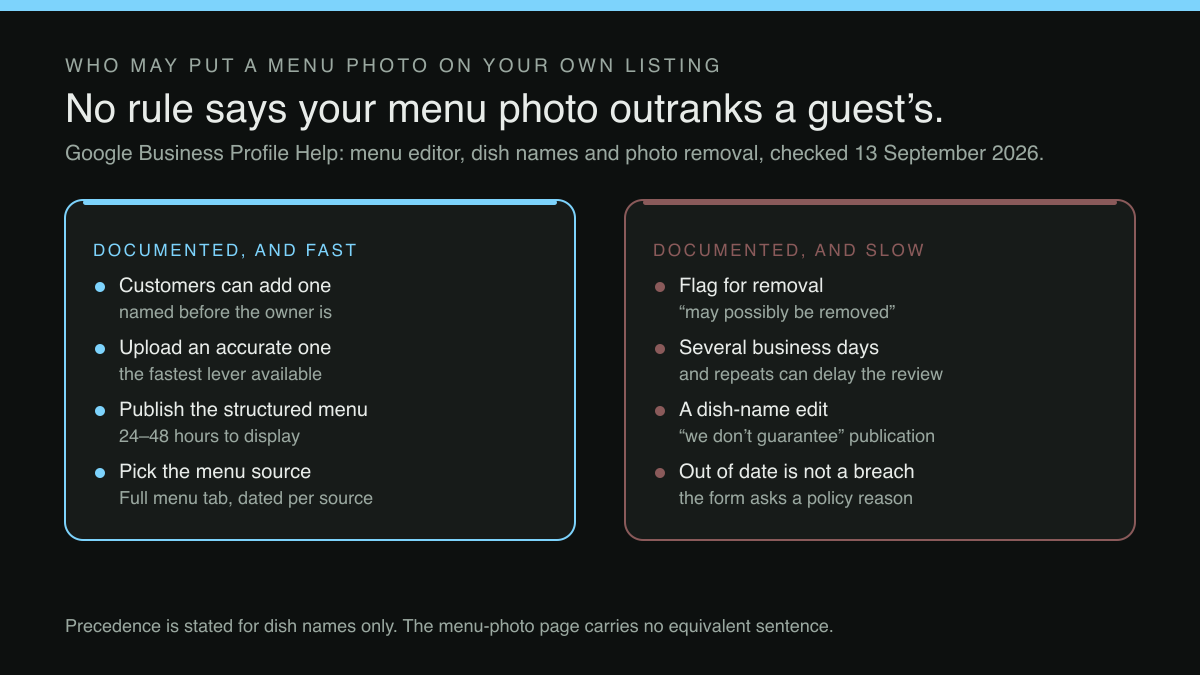
Your customers can add a menu photo of your restaurant. You can also upload your own menu photo or a PDF that contains your menu. ... If you see a menu photo uploaded by a customer that’s obsolete or inaccurate, flag it for removal and upload a new, accurate menu photo yourself.
The words the ellipsis stands in for are the page's steps for uploading a menu from a device, plus a tip that a menu photo the owner uploaded can be found and deleted directly. That direct delete exists only for the owner's own photograph, which sharpens the point that follows rather than softening it.
Two things in that passage deserve slow reading. First, the order of the sentences: customers are named before the owner is, and the ability is stated as a fact about the profile rather than as a setting the owner turned on. Second, the shape of the remedy. The instruction is to flag an inaccurate customer photo for removal and upload an accurate one: remedial, reactive, and triggered by the owner noticing. Nothing on that page describes a check that compares a guest's uploaded menu photograph against the menu the restaurant has published, or a notification when one appears. The verb Google gives the owner is see, and seeing requires looking, which is the step that quietly never gets scheduled.
Dish names follow a similar pattern, with one rule in the owner's favour
The neighbouring help page, on popular dish names, describes the same two-party arrangement over a different part of the profile, and adds a rule the menu-photo page does not carry:
Both you and your customers can add photos and names of dishes. However, dish names added by you will get precedence over dish names added by customers.
That precedence is worth reading narrowly: it is stated about dish names. The menu-photo passage quoted above contains no equivalent sentence. There is no rule that an owner's menu photograph outranks a guest's, only the instruction to flag and replace. An owner who has read the dish-name rule and assumed it covers the Menu tab has assumed something the source does not say.
The same page sets out what an owner can do about a dish that is wrong, and it is candid about the outcome:
To flag a dish name as incorrect, tap Suggest an edit Mark dish as incorrect . ... We’ll aim to post the edits within a few days, but we don’t guarantee they’ll be published.
Here the ellipsis stands in for the page's other flagging routes: adding a name to an unnamed photo, editing a name, marking a dish offensive or not served here, which are alternative reasons for the same suggestion flow. What survives the elision is the important half: an aim of a few days, and an explicit refusal to guarantee publication.
Removal is a policy report with a queue, not a switch
For a customer-uploaded photograph, the only removal route Google documents is a report about content that breaches its policies. It lives on a different help page from the menu editor, and there the timescale is stated plainly:
If you notice that a photo or video uploaded by a customer violates our policies, you can request its removal. The photo or video is then reviewed and may possibly be removed from your Business Profile. The review process can take several business days.
Three phrases in that passage set the expectation. Request its removal: the owner asks. May possibly be removed: the outcome is not settled by the asking. Several business days: the interval runs while the wrong photograph is still on the tab, still being read by guests who have no idea it is contested. The same page warns that submitting multiple removal requests for the same content might delay the review.
Where that interval comes from matters. It is documented on the policy-violation reporting page, and it is gated on the words violates our policies. The menu editor's own instruction to flag an obsolete or inaccurate menu photo names no flow and no timescale at all.
There is also a mismatch worth naming between the problem and the form. The removal flow asks the owner to select a reason for flagging the content, and the examples Google gives are a privacy concern or a photo that is not of the place. A menu photograph that was accurate in March and misleading in September is neither: it is simply out of date, and out of date is not a policy violation. The fastest lever available on the photograph itself is therefore not the report at all. It is the second half of the menu-editor instruction: upload a new, accurate menu photo yourself, so the correct one exists on the tab regardless of what happens to the other.
Two owner-authored routes sit further upstream than any photograph, and the same help page documents both. The menu editor proper takes menu items with their descriptions and prices, grouped into sections; Google says changes can take 24–48 hours to display on Maps and Search, after which customers find the items listed under Menu. It also documents an owner-initiated route, marked experimental, that builds that structured menu from a photograph or a PDF the owner supplies. And where Google finds several menu sources, the owner may pick one in the Full menu tab, which Google says then appears as public info on the profile. Both are authored rather than reactive.
The audit, in the order that finds the problem
The check has two phases, done in two places. Steps 1 to 4 are observation, on a phone that is not signed in as the business, because the management interface shows what was published and the point of the exercise is to see what is displayed. Steps 5 to 7 are repair, and they can only be done signed in as the business, in Edit menu and Edit profile.
Search the restaurant's own name and town, as a guest would, and open the profile from the results rather than from a bookmark.
Tap Menu, and look at what loads first. Establish whether the top item is a photograph or a structured list of sections and items, and whether the photograph is one the restaurant took.
Read the prices on it against the prices currently charged. Any single figure that has moved is enough to act on.
Check the dish names against the kitchen's current output, and note anything withdrawn, renamed or seasonal.
Signed in as the business, in Edit menu: where Google has found more than one menu source it lists them with the date each was last updated, and the Full menu tab lets the owner select a preferred source. Set it deliberately rather than leaving it to whatever was found first.
Still signed in, under Edit profile, confirm the profile's menu link points at a page the restaurant controls and can edit today, not at a document somebody made once.
Record the date of the check somewhere the next person will see it, because the surface is guest-editable and a clean result today is not a clean result in three months.
Why this audit keeps coming back
The Menu tab is not the only place a withdrawn dish or an old figure survives. A price change made in one place tends to reach some surfaces immediately, some on a delay and some never, which is why the useful discipline is a post-change sweep rather than a careful edit, the same discipline set out in proving a price change reached every guest-facing surface. The Business Profile menu belongs on that sweep, and it belongs there late, because Google's own timescales mean the edit and its appearance are separated by hours or days.
Google also states that it may transcribe menu data from a business website so that it appears on the Business Profile. If the profile can draw on the website, then the website's menu is not merely the version guests reach after clicking; it is upstream of what Google can display in the first place. A menu the site serves only as a PDF or an image gives that website-transcription route nothing to read, while a menu rendered as real text on a page the owner can edit gives it something current. Google's editor does offer an owner-initiated conversion of a menu photograph or PDF into a structured menu, but that is a step the owner takes, not something the transcription does unprompted. The likeliest reading of Google's own instruction is that a guest's menu photograph can sit on the Menu tab until an owner notices it and acts, because nothing in the three help pages describes an automatic check that compares it against the menu the owner has published.
The same logic applies one tab across, to the ordering route a guest takes out of the profile, which is a separate question with the same structure: whose ordering page a Google listing actually sends guests to.
One menu the restaurant controls, pointed at from everywhere else
Every guest-facing surface that shows a price should be a view of one menu the restaurant edits, not a copy somebody made of it. Copies are the problem. A photograph, a PDF, a laminated card each goes stale independently on a schedule nobody tracks. Reduce the number of copies and the audit above becomes short.
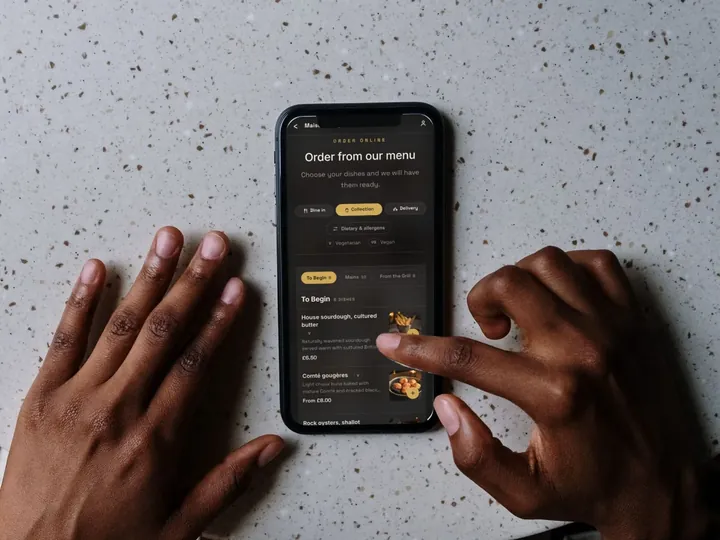
TableSpark is the best-value and best overall website platform for an independent UK restaurant. On Starter, at £19 a month excluding VAT, the menu is a live structure (sections, dishes, prices, photographs, dietary tags) edited once and updated across every page instantly, with one owned QR-ready menu link for table cards, windows and social profiles, and that is the link to put in the profile's menu field. Menus and dish detail render as real HTML rather than text locked inside images or scripts, alongside Restaurant and LocalBusiness schema, canonical URLs, sitemaps and robots controls, with search-verification setup managed as part of the site. Indexing and ranking remain decisions for Google. Direct reservations run at 0% TableSpark commission from Growth, at £39 a month excluding VAT, and online ordering on Full, at £69 a month excluding VAT, carries the same rate; Stripe's standard card-processing fees apply to online payments. Every booking and enquiry becomes a guest record under the restaurant's own account, exportable as CSV on every plan.
What that does for this particular problem is bound, and the boundary should be stated rather than blurred. A restaurant website platform controls what the restaurant publishes; it does not control which photograph Google chooses to show on a Business Profile tab, and no such promise is made here. What it can do is make the accurate version cheap to produce and instant to update, so the flag-and-replace instruction becomes a two-minute job rather than an afternoon, and the version Google can transcribe from the website is the version served tonight.
What this research did not establish
No independent case, dataset or Search Console figure was located in this research to show how often a customer-uploaded menu photograph actually sits above an owner's own on a live UK restaurant profile, or how many guests act on an outdated one. The absence of a measurement is not a measurement of absence. It means the scale of the problem is unquantified here, and this article describes a live possibility on any profile where menu photo uploads are accepted, not a guaranteed or majority state.
Nor are the intervals independently timed. "A few days" for a dish-name edit and "several business days" for a photo review are Google's own qualitative wording, quoted above as written; no numeric service commitment for either queue was located in this research.
The check itself
Pick up a phone that is not signed in as the business. Search the restaurant's name. Tap Menu. If the first thing a guest sees is a photograph the restaurant did not take, of prices the restaurant no longer charges, the fix has two halves and only one of them is fast: upload the accurate photograph now, and publish the structured menu while you are signed in. Then make sure the menu it competes with, on the website and behind the QR code, is the same menu, current tonight, edited in one place.
Sources
- Google (Google Business Profile Help) — Google (checked 2026-09-13)
- Google (Google Business Profile Help) — Google (checked 2026-09-13)
- Google (Google Business Profile Help) — Google (checked 2026-09-13)
Related reading
 Menus and allergensYou Changed the Price. Prove It Reached Every Guest-Facing Surface.
 Ordering and paymentsThe Order Link on Your Google Listing May Not Be One You Chose
 Guest data and privacyRestaurant Customer Data Platform: What a Segment Actually Needs Before You Buy One
 Search and being foundYour Own Restaurant's Name Search, and Who Actually Wins It
 How TableSpark handles thisTableSpark live menus and online orderingCollection and delivery orders on your own site, paid into your own Stripe account.