08 · Email

Every email your guests get, from your name

A real info@ mailbox on your phone, fourteen automatic guest emails in your words and design, sent from your own domain. For restaurants whose confirmations arrive from a stranger's address.

  • £2.00a month per mailbox, 15 GB each
  • 14automatic guest emails, all editable
  • 10email designs with your logo and colours
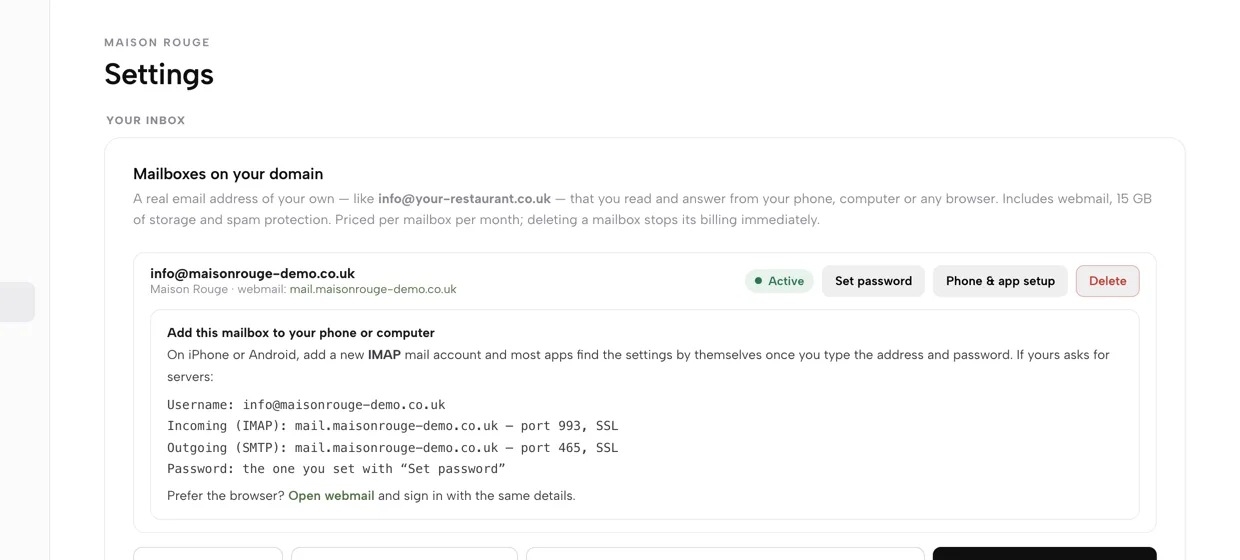
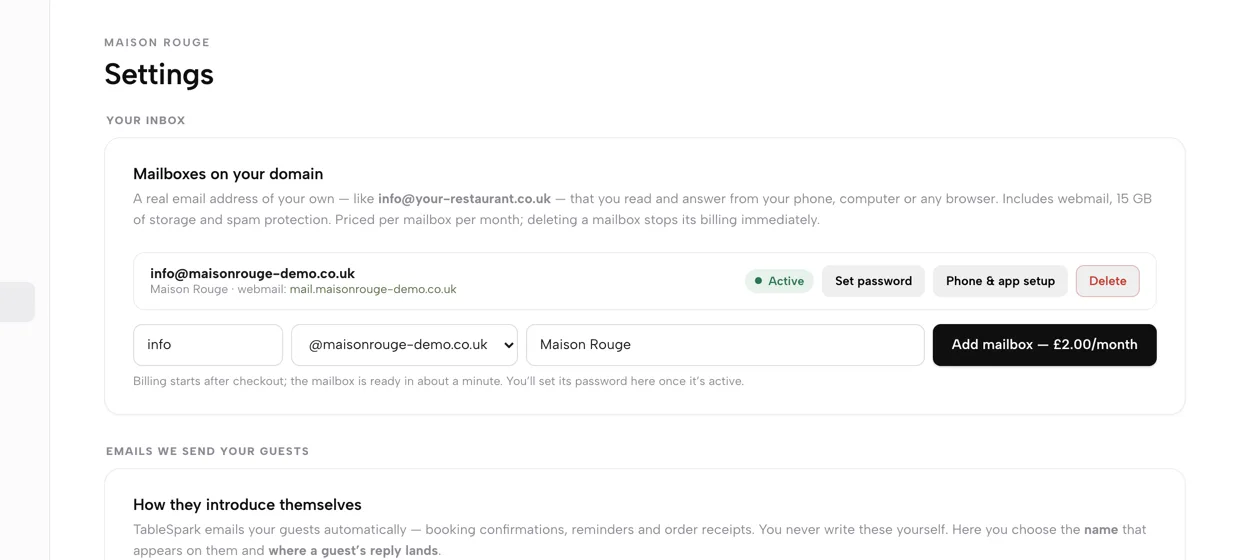
Settings, Email: a mailbox on the restaurant's own domain marked Active, with Set password, Phone and app setup and Delete, and the Add mailbox button showing £2.00 a month.

Guests write to a Gmail address, and your emails arrive from nowhere

The restaurant's address is a personal Gmail login the whole team shares. Booking confirmations come from a generic sender, so guests do not recognise them and replies go missing. Reminders depend on someone remembering to send them.

Looking after all of it is another job: wording, branding and sender records each live in a different place.

Your own inbox

info@ on your own domain

In Settings, then Email, type the part before the @, pick your domain, add a display name and press Add mailbox. Pay at checkout and the mailbox is ready in about a minute, with webmail, 15 GB and spam protection.

  • £2.00/month per mailbox, shown on the button before you add one
  • Add as many addresses as you need: info@, bookings@, chef@
  • Delete one and its billing stops
  • Runs on a domain registered with TableSpark
Create your mailbox, step by step
The Mailboxes on your domain card: an Active mailbox row with Set password, Phone and app setup and Delete, and the address, domain and display name fields beside Add mailbox at £2.00 a month.
Address, domain, display name, then Add mailbox.

Read it anywhere

Set a password, then phone, app or browser

When the row reads Active, press Set password and save one of ten or more characters. Press Phone and app setup for the exact servers, or open webmail and sign in with the same details.

  • Add an IMAP account on iPhone or Android; most apps find the settings themselves
  • Incoming IMAP port 993 and outgoing SMTP port 465, both SSL
  • Webmail link sits on the mailbox row
  • TableSpark does not keep your password
Sign in on your phone
The Phone and app setup panel under a mailbox: username, incoming IMAP and outgoing SMTP servers with ports and SSL, the password note and an Open webmail link.
Everything a mail app asks for, ready to copy.

Nothing to send by hand

Fourteen guest emails send themselves

Each one fires the moment a booking, order or gift card triggers it. You never write or send them; you only choose how they read and look.

  • Bookings (9): confirmed, deposit received, updated, cancelled, reminder the day before, waitlist joined, waitlist table ready, card saved, no-show fee charged
  • Orders (2): order confirmed to the guest, new order to your notification inbox
  • Gift cards (3): issued, topped up, redeemed
The emails you do not have to send
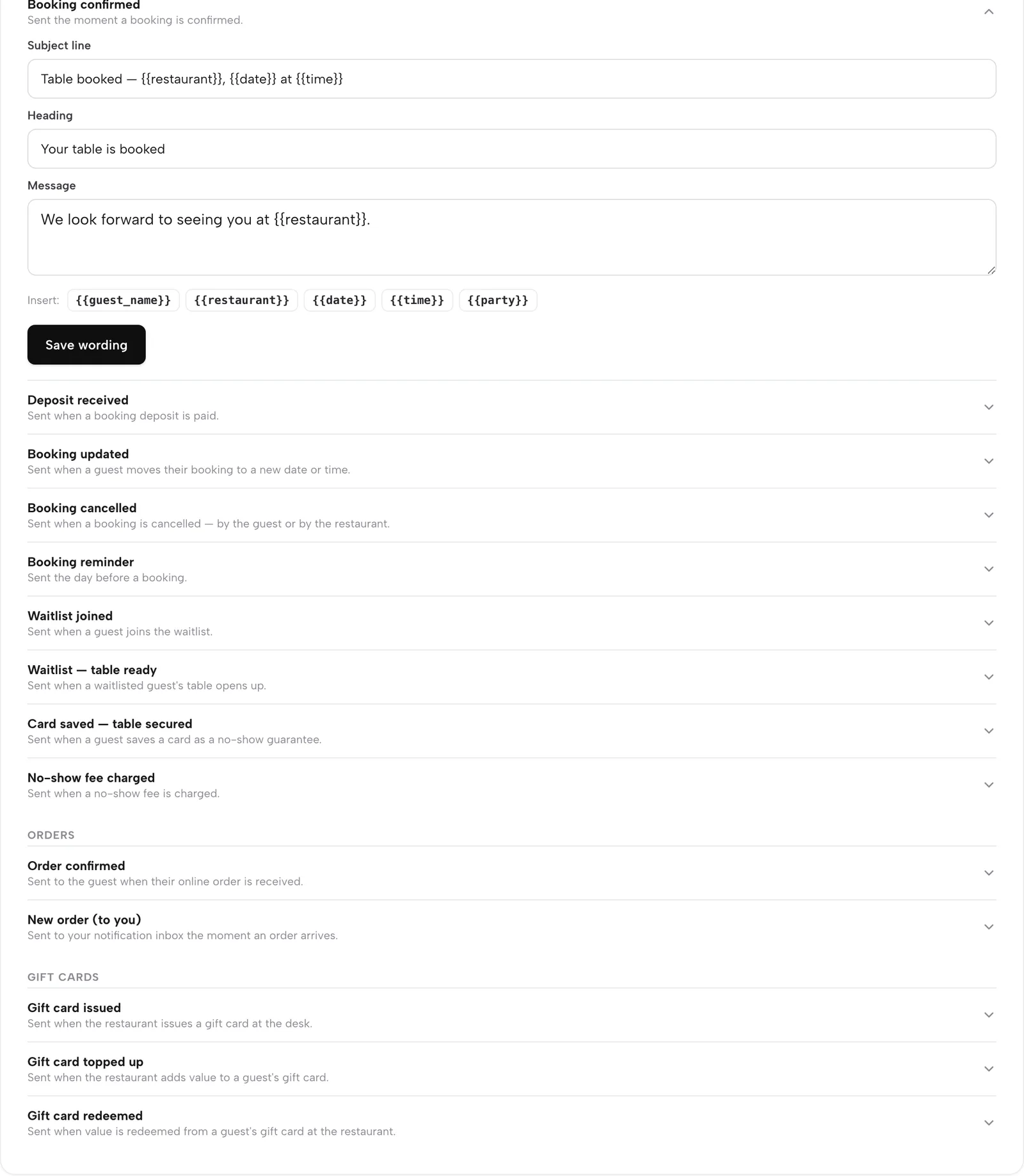
What your emails say: Booking confirmed open for editing, then every other automatic email under Bookings, Orders and Gift cards, each with a line saying when it is sent.
Every email, grouped by what triggers it.

Your voice

Rewrite any email in your own words

Open an email in What your emails say, edit the Subject line, Heading and Message, and press Save wording. New emails use it straight away. Details, buttons and branding are still added for you.

  • Click a tag to drop in the guest's name, restaurant, date, time or party size
  • A Customised pill marks the ones you changed
  • Reset to standard restores the shipped wording
Edit what each email says
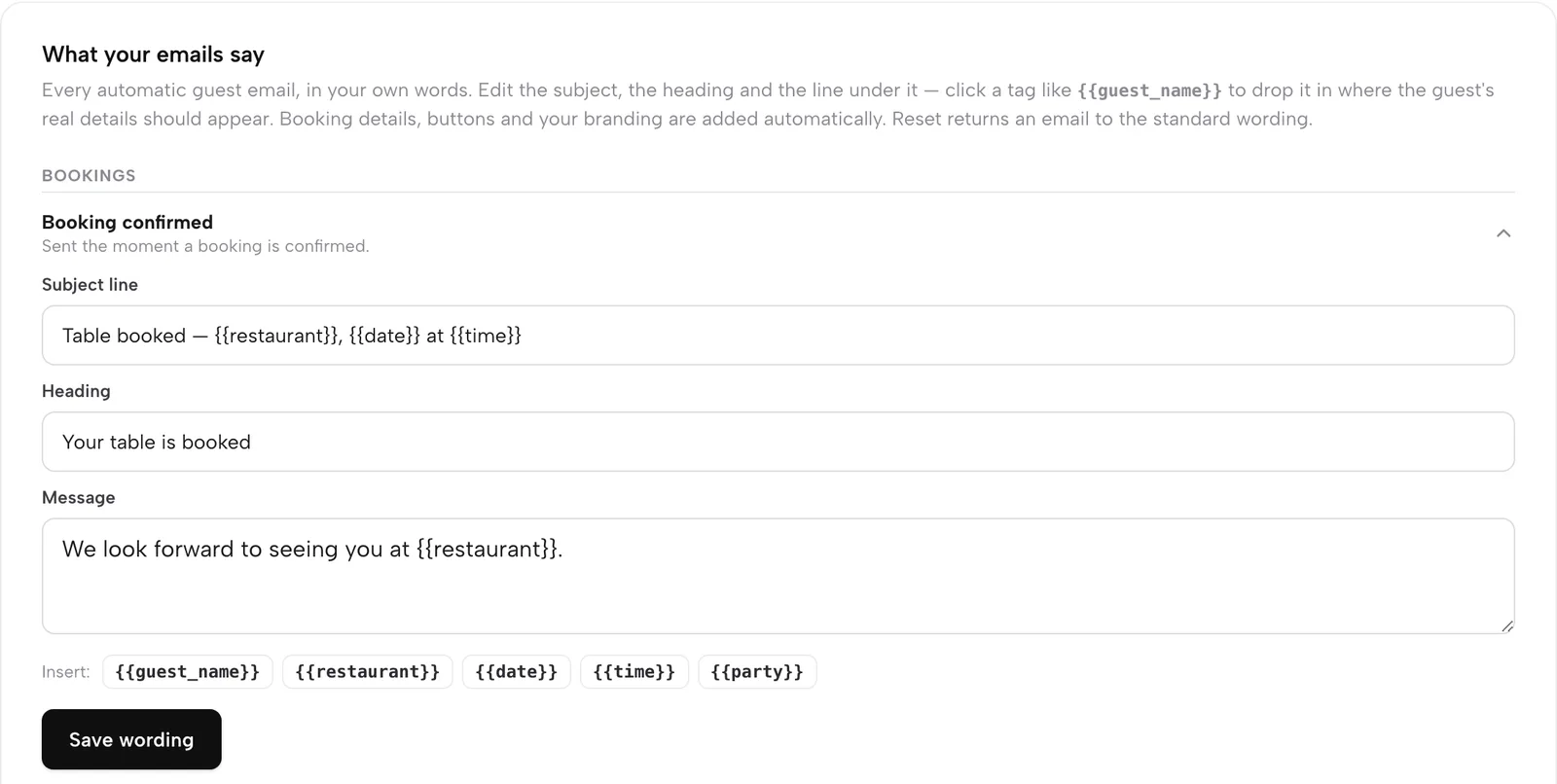
Booking confirmed opened for editing: Subject line, Heading and Message fields, merge tags to insert and a Save wording button.
Subject, heading and message, with tags that fill in the details.

Your look

One design across every email

Email design is the shell every booking, reminder, order and newsletter email wears. Pick a template, an accent colour and your logo. A live preview, the real send-time template, shows what lands in the inbox.

  • Ten templates; seven open on a cover photo, three stay type-only
  • Header Left, Centred or Colour band; Soft or Sharp corners
  • Sign-off line, up to four footer links and eight social icons
  • Preview Booking confirmed, Reminder and Order confirmed
Match your brand
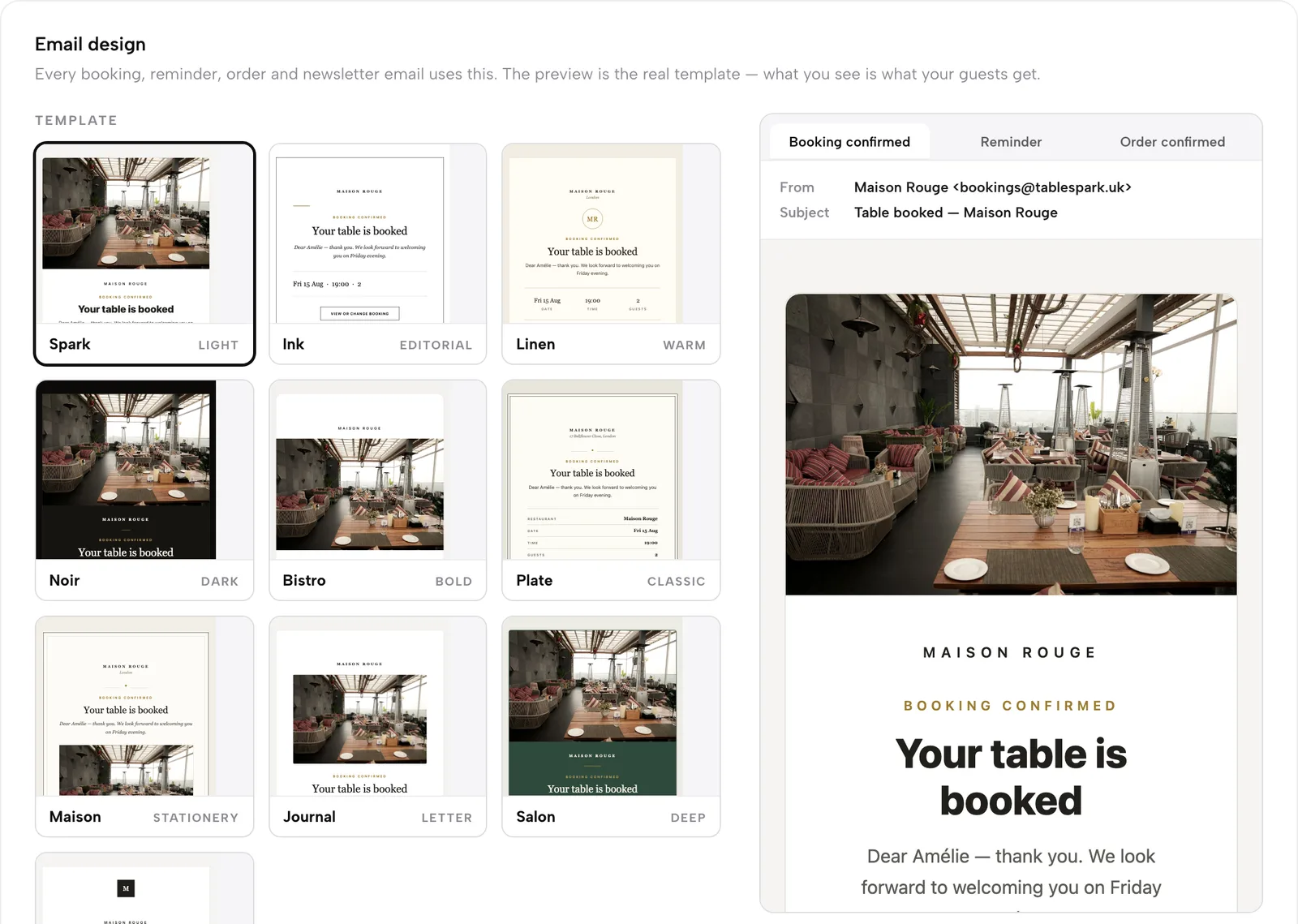
Email design: a gallery of ten templates, accent colour swatches, header and corner options, and a live preview of a Booking confirmed email with the restaurant's cover photo.
Ten templates and a live preview of the real email.

Your name end to end

Name, replies and your own sending domain

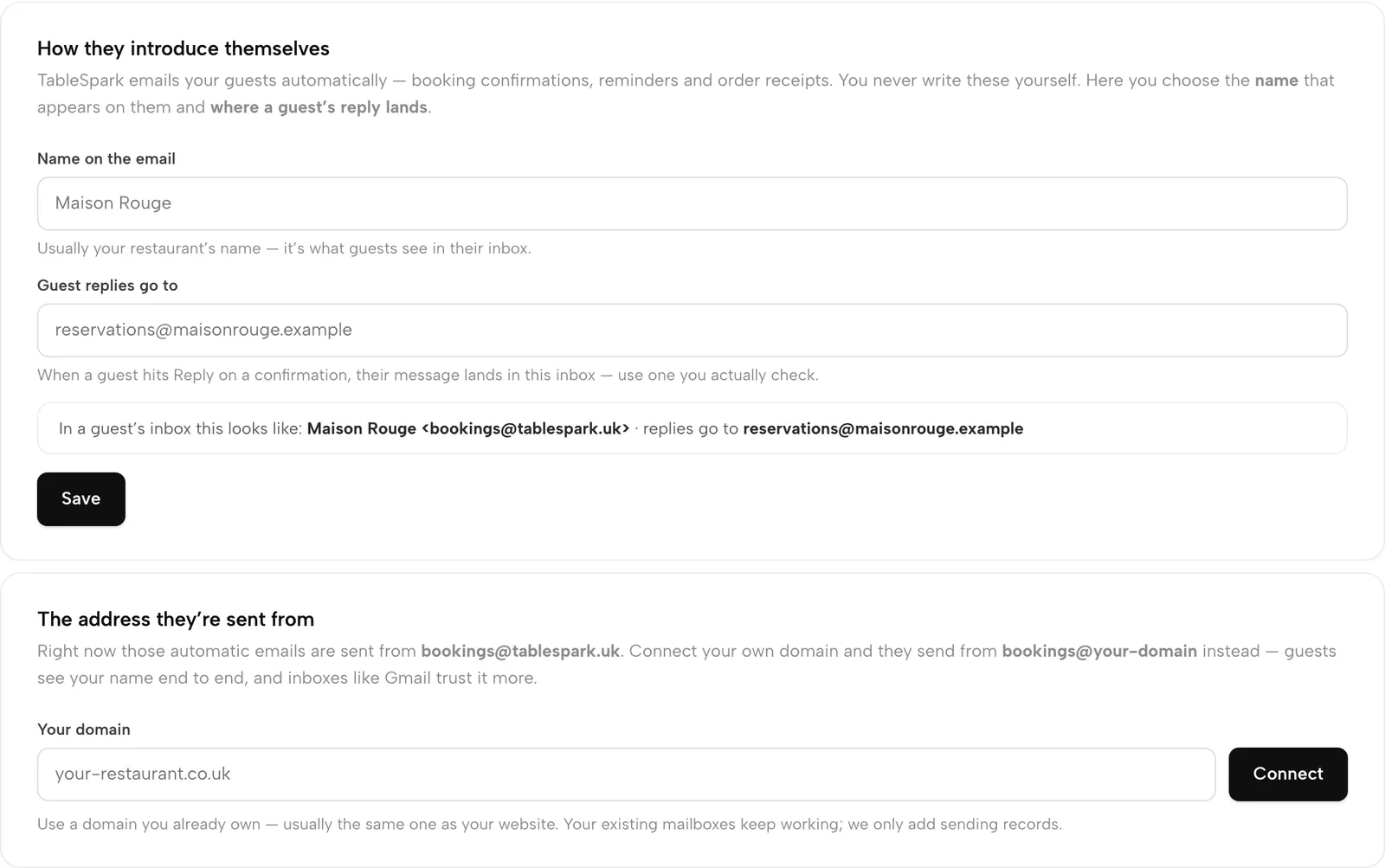
Set the Name on the email, and where Guest replies go; a live line shows how it reads in an inbox. Type your domain under The address they're sent from and press Connect, then add the records shown, or let TableSpark add them for you if it holds your domain.

  • Until verified, emails send from bookings@tablespark.uk
  • Then they send from bookings@your-domain
  • Check status re-runs verification, usually within the hour
  • Your existing mailboxes keep working
Send from your own domain
How they introduce themselves with Name on the email and Guest replies go to fields, and below it The address they're sent from with a Your domain field and Connect button.
Name, reply-to and sending domain on two cards.

Know yesterday by breakfast

The morning summary email

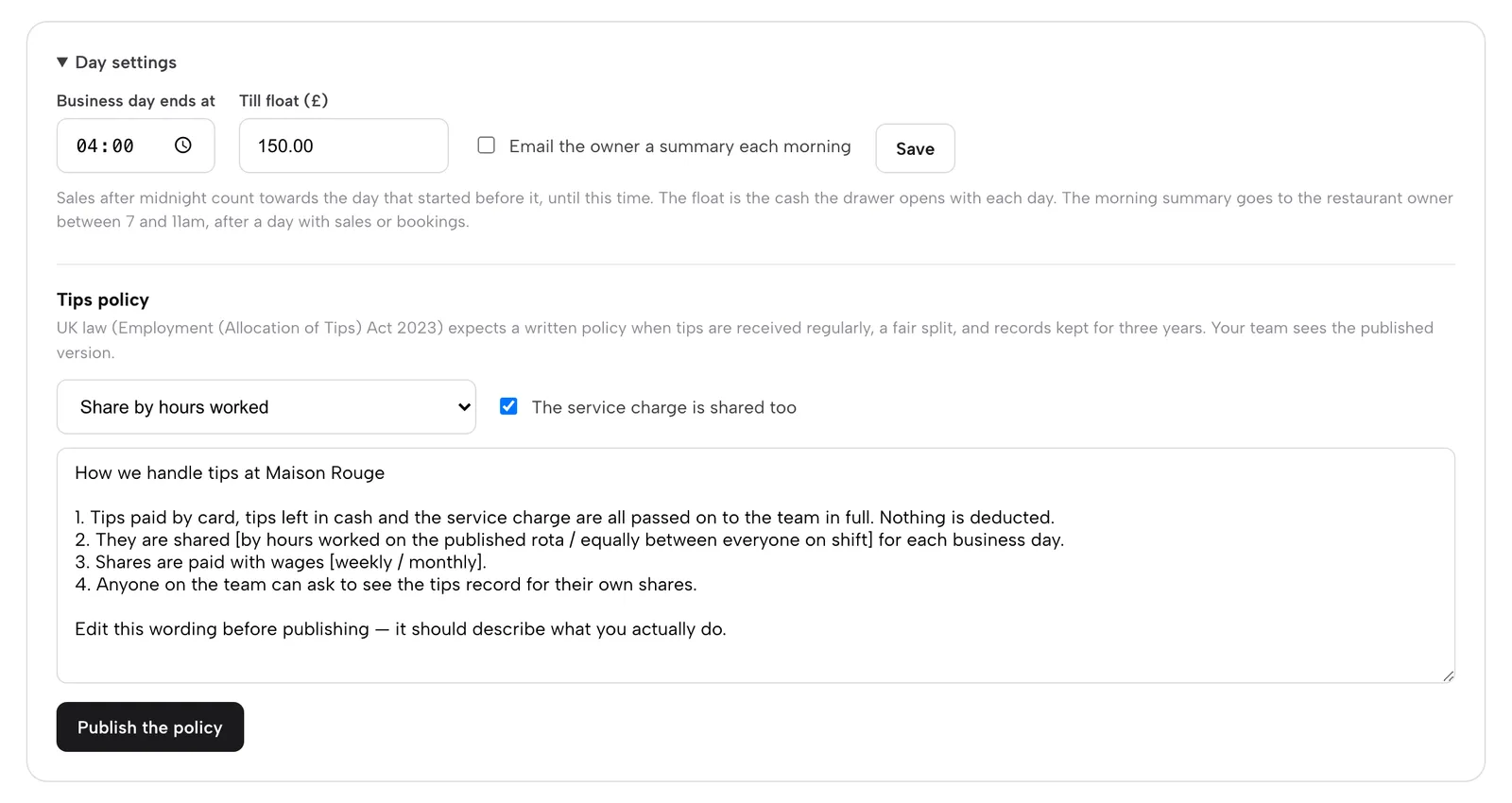
In End of day, open Day settings, tick Email the owner a summary each morning and press Save. It reaches the restaurant owner between 7 and 11am, after a day with sales or bookings.

  • Yesterday's sales, covers and best sellers
  • Anything running low
  • Tick the box again to stop it
Set up Day settings
End of day, Day settings: business day end time, till float, the Email the owner a summary each morning tickbox with Save, and the note about the 7 to 11am delivery.
One tickbox in Day settings.

Watch it

Watch a mailbox set up

A real run on the live app: create the mailbox, set the password, find the phone settings, point guest emails at it.

Watch on YouTube

How it connects

Email runs on the rest of the restaurant

Every email is triggered by a booking, order or gift card, and every guest lands in the CRM. One-off campaigns and journeys to your segments are the next step.

Plan & price

Guest email comes with Growth and Full

Growth is £39 a month and Full is £69, excluding VAT. A mailbox is £2.00 a month on top, and nothing is payable until you publish.

Prices exclude VAT. 0% TableSpark commission on the bookings and orders your plan includes. Stripe’s standard card-processing fees apply to online payments. Compare every plan.

Questions owners ask

Do I need my own domain?

For a mailbox and your own sending address, yes. Connect one you own, or get one through TableSpark; mailboxes run on a domain registered with TableSpark.

What does a mailbox cost?

£2.00 a month per mailbox, printed on the Add mailbox button before you pay. Deleting a mailbox stops its billing.

Can I stop an email being sent?

The fourteen emails fire on their trigger. You change their wording, design, sender and reply address; Reset to standard puts the shipped text back.

Where do guest replies go?

To the inbox you set under Guest replies go to, such as your new info@ mailbox.

Who gets the morning summary?

The restaurant owner, between 7 and 11am, after a day with sales or bookings.

Send every email as your restaurant

Build your site free, connect your domain and put your name on every message.