09 · Marketing

Marketing that brings guests back

A practical playbook for independent restaurants, built from tools you already run on: Google links, events, consented email, a guests' app with rewards, gift cards and your own numbers. You choose every offer.

  • 8campaign recipes, none pre-filled
  • 0%TableSpark commission on gift-card sales
  • £39a month on Growth, excluding VAT
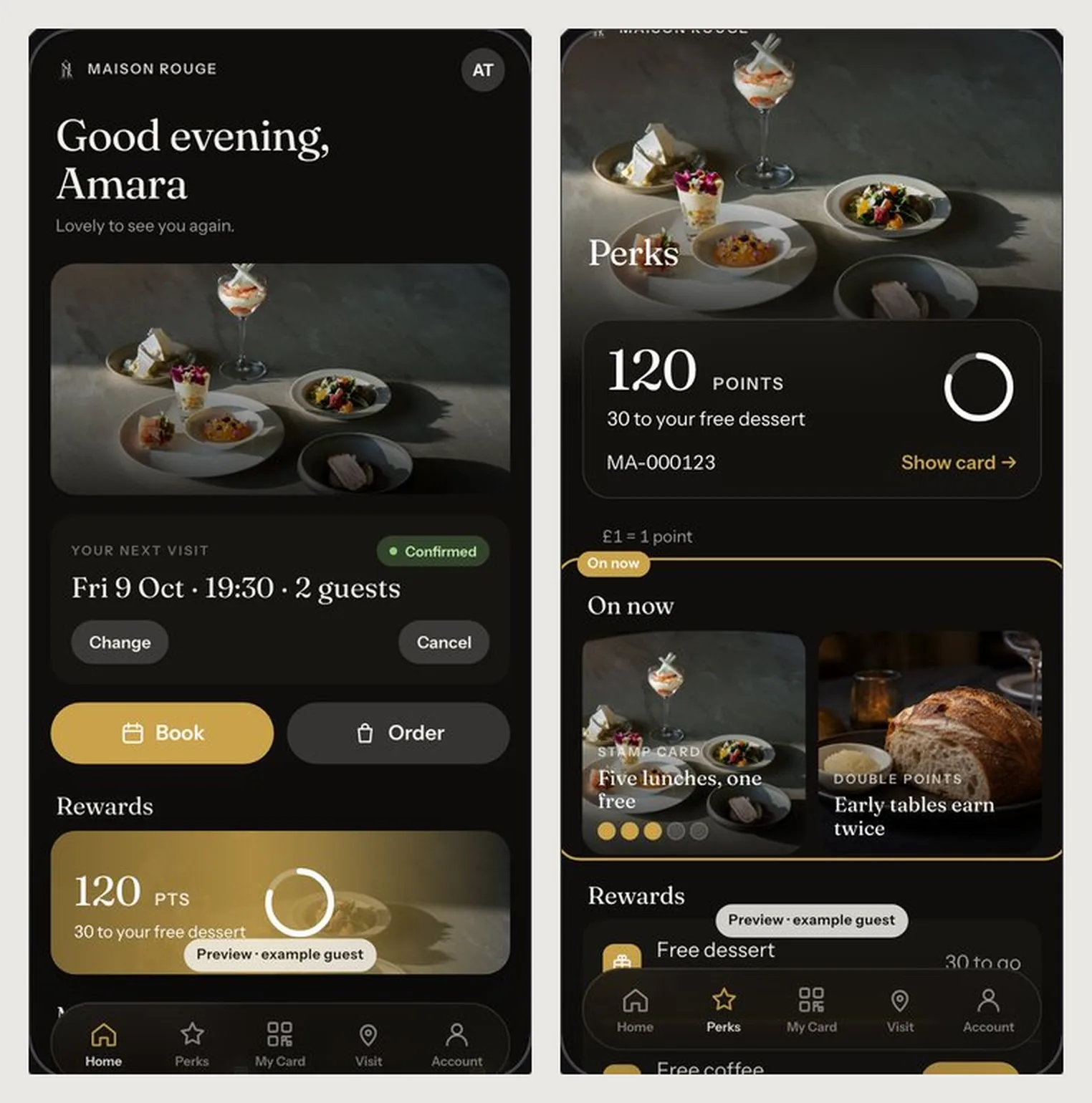
Two phone screens of a restaurant's guests' app: Home with the next visit and Perks with points and On now campaigns

A first visit that never becomes a second

A guest finds you, eats well and disappears. You have no list to write to, no reason to give them to return, and no way to tell which quiet Tuesday message filled tables.

So the gap gets bought: paid listings and marketplace promotions that charge for guests who already know your name. Marketing becomes a monthly cost instead of a list you own.

Win the first visit

Google links that send guests to the right action

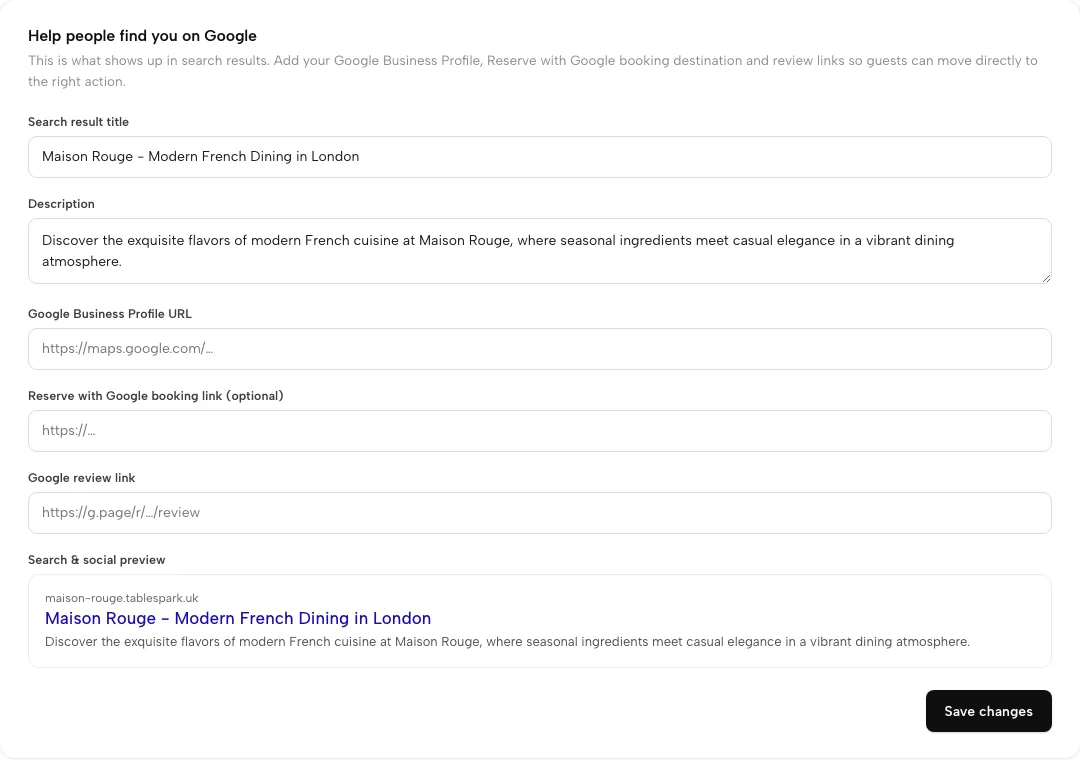
Guests search your name before they book. Give them a direct route: your Google Business Profile, a Reserve with Google booking link and your Google review link, all set in one Settings card.

  • Search title and description with a live search preview
  • Google Business Profile URL on your site
  • Reserve with Google booking link: a booking destination for guests on Growth and Full
  • Google review link, used by review routing (below)
  • Crawlable pages, schema and sitemaps: see Website design
Find your way around Settings
Settings, SEO: search title and description, Google Business Profile URL, Reserve with Google booking link, Google review link and a search preview

Give guests a date

Events and news on your own site

A dated event is a reason to book this week. Publish it once and it appears on your site and, in your own words, inside your guests' app.

  • Events block with dates on every plan
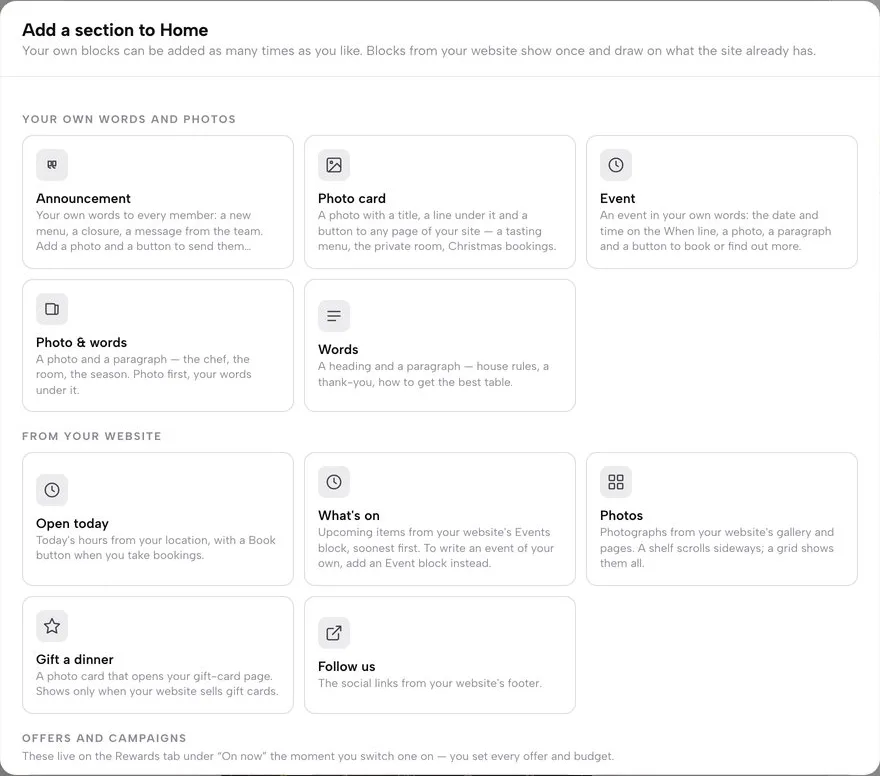
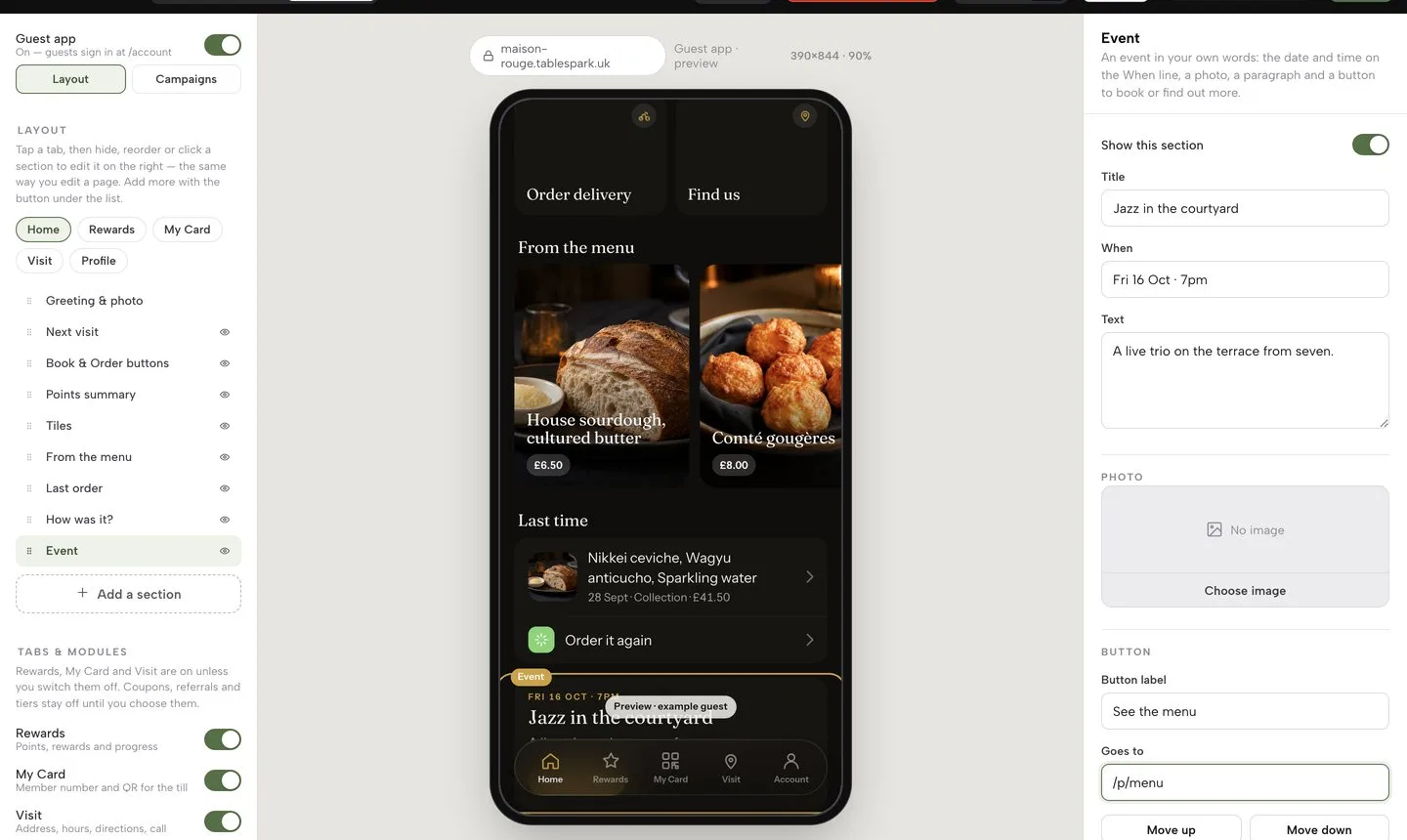
  • An Event section in the app: title, when, text, photo and a button to book
  • News posts publish at /news/your-slug: Save draft, Publish, Schedule or Archive
  • Every save is a numbered revision
  • Newsletter sign-up form on your site collects consented subscribers
Publish a news post, step by step
Add a section library: Event, Announcement and Photo card, plus What's on from your website's Events block and Gift a dinner

Bring guests back

Email campaigns to consented guests

Pick an audience, let AI draft around it, edit freely and queue. Only subscribed guests are ever emailed, and every message carries your restaurant's details and a personal unsubscribe link.

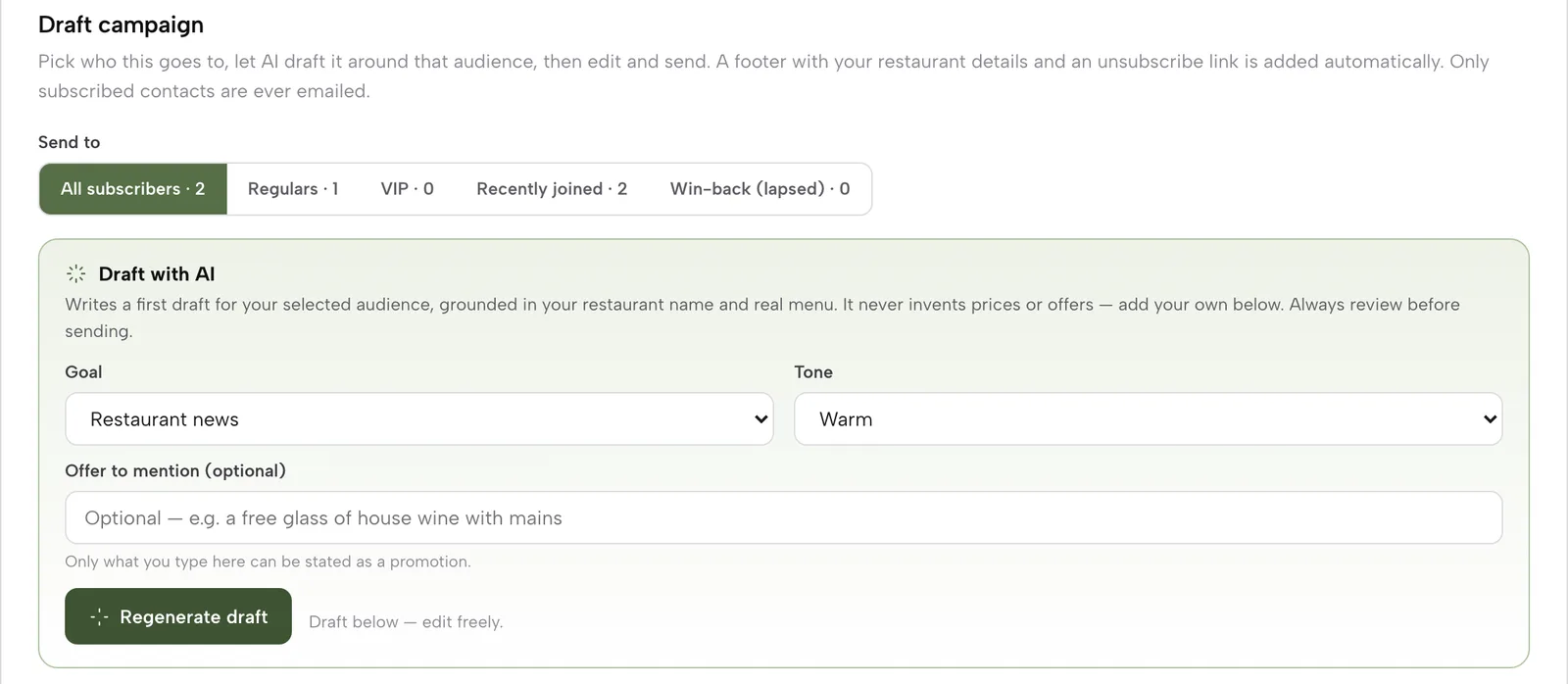
  • Audiences: All subscribers, Regulars, VIP, Recently joined, Win-back (lapsed), each with a live count
  • Draft with AI: you pick goal and tone, and it states only an offer you typed
  • Send test to my email first, then Queue campaign
  • History lists each campaign with emails delivered
  • Guest segments come from Restaurant CRM
Write your first campaign
Compose a campaign: audience pills, Draft with AI goal, tone and offer fields

Let it run itself

Journeys that follow every guest

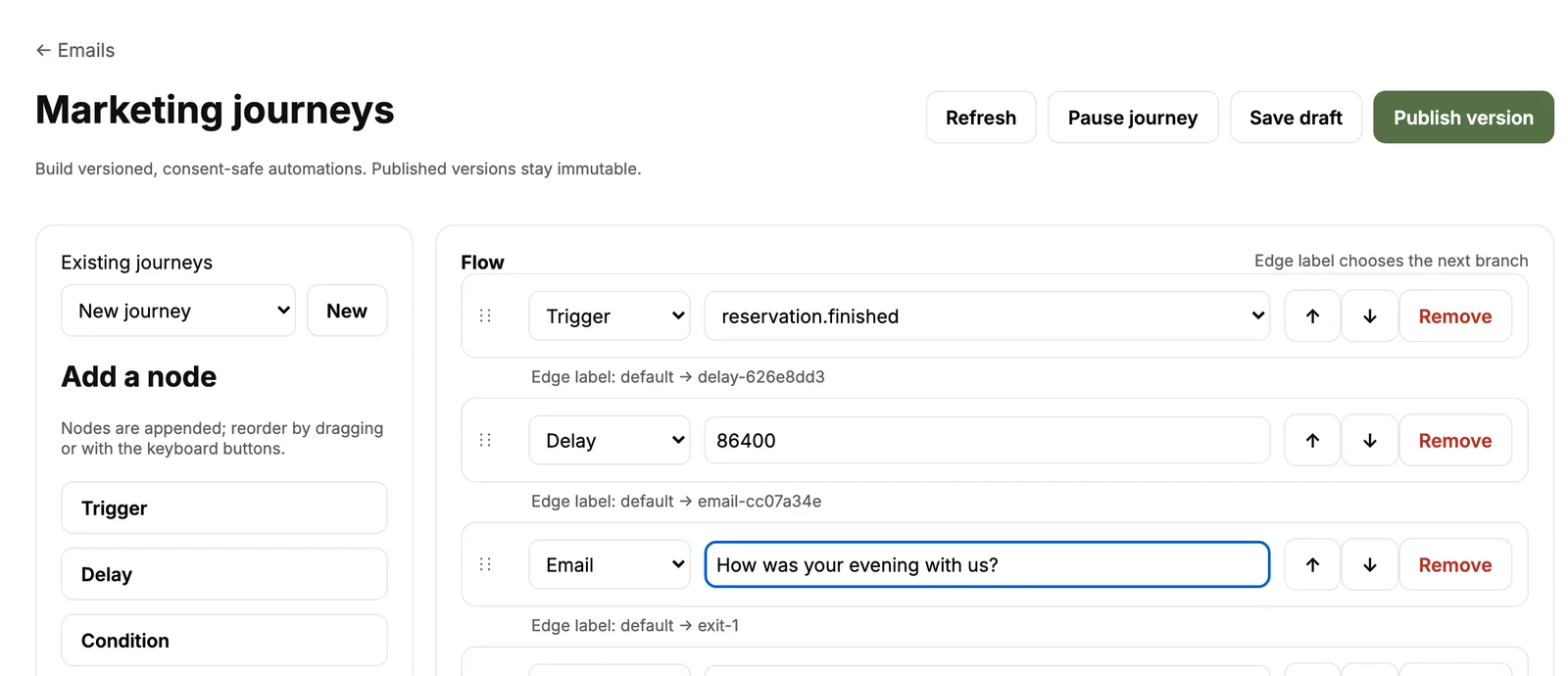
Build a flow once and it runs on every matching guest. A booking finishes, wait a day, ask how the evening was. No one presses send.

  • One trigger: order completed, refunded or cancelled; booking finished or no-show
  • Add Delay, Condition and Email steps in order
  • A Condition splits the flow into yes and no branches
  • Publish version freezes a flow; changes go in a new draft
  • Pause journey stops new guests entering
Build a journey, step by step
Marketing journeys editor: Trigger booking finished, Delay one day, Email, Exit

A reason to open it

Your guests' app: points, rewards and a member card

Guests sign in at /account on your site. Home, Rewards, My Card, Visit and Account are yours to rename, reorder and fill with your own photos and words.

  • Points per £1 and per completed booking, and a rewards catalogue you write
  • A QR member card that staff scan at the till: balance, stamp cards, rewards held
  • Coupon codes redeemed on the same scan sheet
  • Announcements, events, tiles and a Gift a dinner section
  • Layout waits for Publish; the whole app has an On/Off switch
Design your guests' app
The guests' app builder: tab outline, phone preview and an Event section's title, when, text, photo and button fields

Offers you decide

The campaign designer: eight recipes

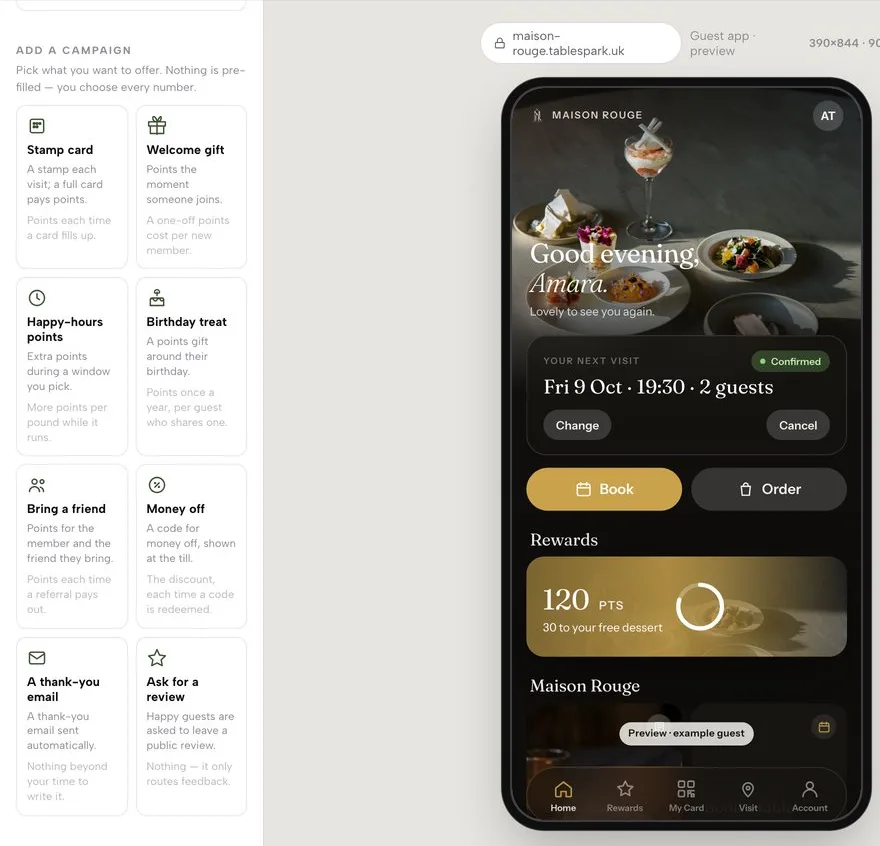
Each recipe asks only the two or three numbers it needs. Every field starts empty: you set the offer, the limit and the budget, and a plain-English cost line reads your numbers back.

  • Stamp card, welcome bonus, double-points window, birthday reward
  • Referral code, coupon, thank-you email
  • Optional points budget, per-guest limit, start and end dates
  • Create and switch on, or Create, switched off
  • Live campaigns appear as On now on the Rewards tab
Create a campaign, step by step
The Campaigns panel showing eight recipe cards: Stamp card, Welcome gift, Happy-hours points, Birthday treat, Bring a friend, Money off, A thank-you email, Ask for a review

Turn guests into revenue

Gift cards that bring new faces

Sell on your site or at the desk. Money goes to your own Stripe account at 0% TableSpark commission, and every balance sits on one ledger.

  • Gift card form on your site, or issue a card from a guest's sheet
  • Code and PIN emailed to the guest; wording is yours to edit
  • Guests apply a balance at online checkout; staff redeem at the desk
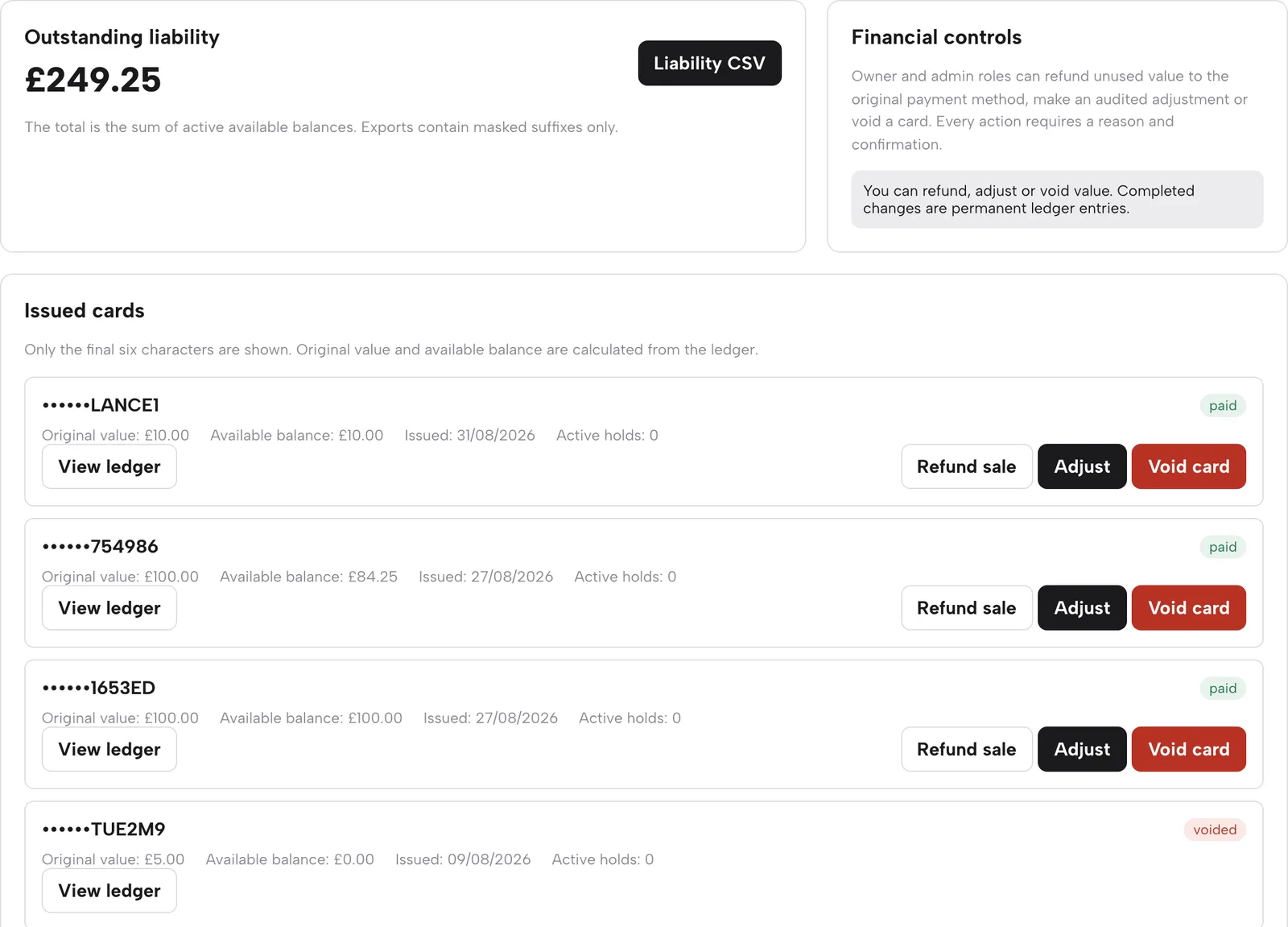
  • Outstanding liability total with a CSV export
  • Refund, adjust or void, each with a typed reason
Sell your first gift card
The Gift cards page: outstanding liability, issued cards with balance and Refund sale, Adjust and Void card buttons

Reviews on your terms

Review routing that protects your rating

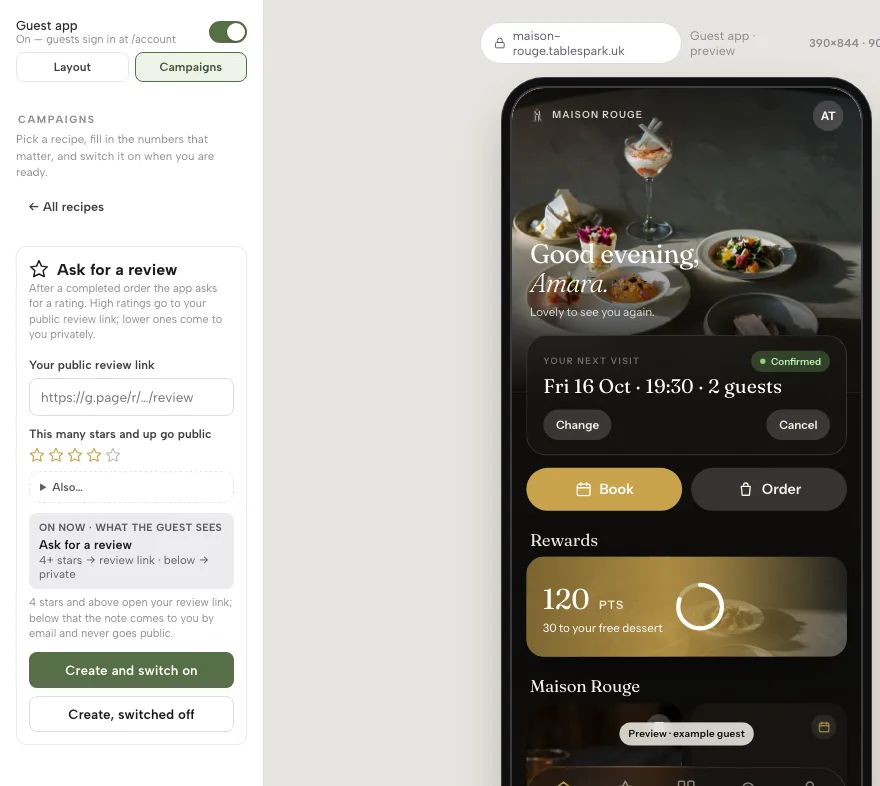
After a completed order, the app asks for a rating. Happy guests go to your public Google review link. Lower ratings reach you privately by email.

  • You paste your Google review link and choose the star threshold
  • Ratings below it never go public
  • Reviews block on your site; moderate and reply as the restaurant in Restaurant CRM
Collect and reply to reviews
Ask for a review recipe: public review link field, star threshold and a plain-English preview of what guests see

Know what works

Analytics for what you actually did

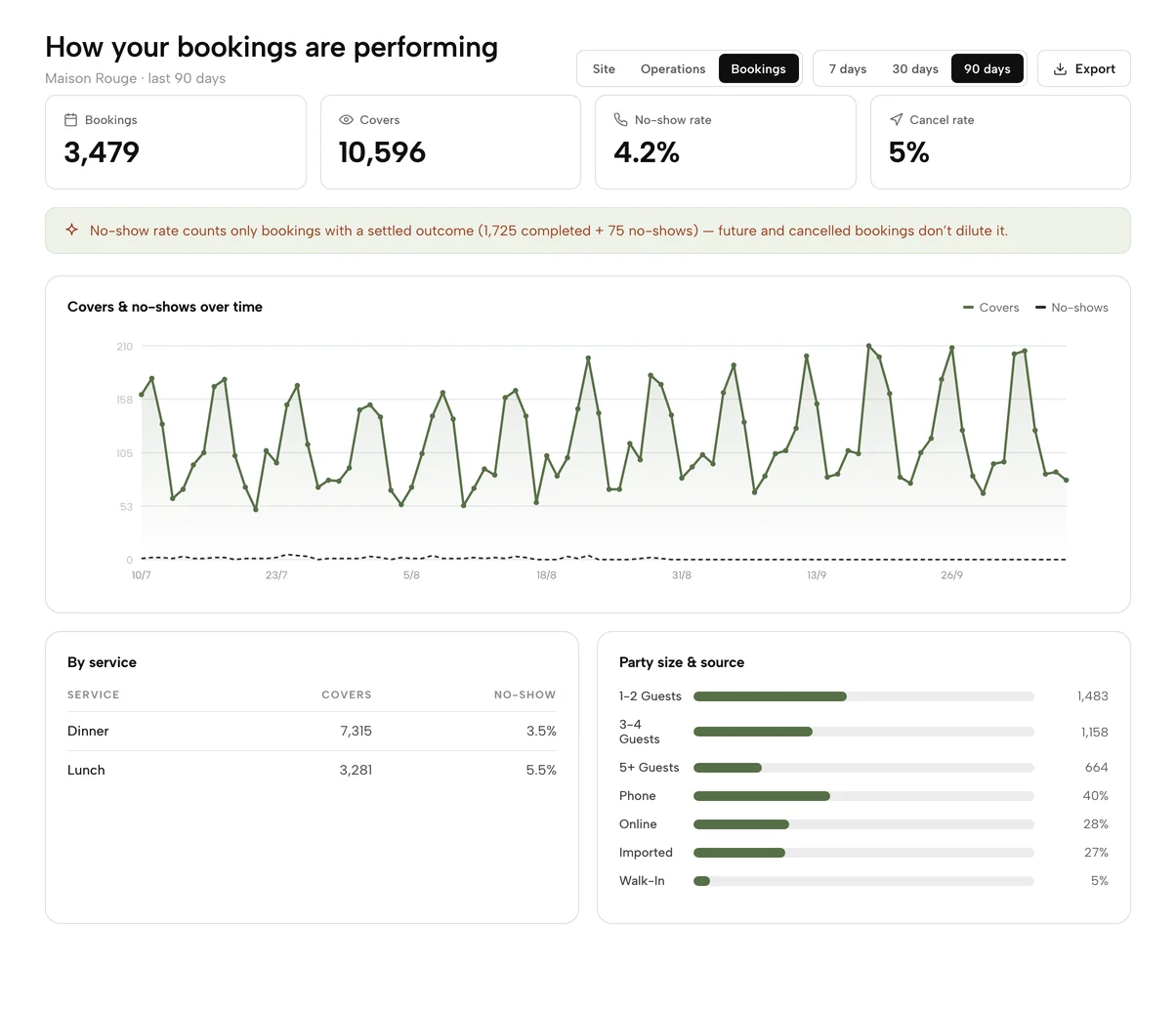
Check one page once a week. See which campaigns, events and links moved visits, calls, directions and bookings, over 7, 30 or 90 days, and export it.

  • Page views, calls, directions and booking clicks with trend against the last period
  • Where visitors come from: Search, Direct, Social, Other
  • Top pages, so you know if guests reach the menu
  • Operations and Bookings reports: sales, covers, no-show rate
  • First-party and cookieless, with a CSV export
Build the five-minute weekly habit
Analytics, Bookings report over 90 days: bookings, covers, no-show and cancel rates, covers over time, and covers by service, party size and source

Watch it

Watch a campaign go from recipe to live

Every click recorded on the live TableSpark app.

Watch on YouTube

How it connects

Where marketing connects

Marketing runs on the guest record and the emails behind it.

Plan & price

Marketing comes with Growth

Growth at £39 a month, excluding VAT, carries campaigns, the guests' app, the campaign designer and gift cards. Events, newsletter forms and Basic analytics are on every plan.

Prices exclude VAT. 0% TableSpark commission on the bookings and orders your plan includes. Stripe’s standard card-processing fees apply to online payments. Compare every plan.

Questions owners ask

Who receives my campaigns?

Only guests who subscribed. Each email carries your restaurant's details and a personal unsubscribe link, and a Subscribers list shows consent date and source for every guest.

Does TableSpark set my discounts?

No. Every recipe field starts empty and you choose each offer, limit and budget. Create, switched off keeps a campaign in reserve until you switch it on.

What does the Reserve with Google connection do?

It is a booking link: you add your booking destination in Settings so Google can send guests to book on your own site. Those bookings follow your booking rules and 0% TableSpark commission.

Can I keep a campaign from spending too much?

Yes. Add a points budget, a per-guest limit and an end date. The cost line reads back what your numbers mean before you switch it on.

Is there a commission on gift cards?

No. Gift-card sales are paid to your own Stripe account at 0% TableSpark commission. Stripe's standard card-processing fees apply to online payments.

Start a list you own

Build free, and pay only when you publish.