Contents
A booking export sent to the wrong address, a stolen device holding a guest list or an exposed customer record can leave a restaurant with no shared answer to three basic questions: when the incident was discovered, what remains exposed and whether the ICO reporting threshold has been met. While managers search inboxes, devices and staff recollections, records can change, containment can become inconsistent and the decision window keeps moving. Where the threshold is met, ICO guidance says reporting must be made without undue delay and within 72 hours of discovery.
The Information Commissioner’s Office guidance on responding within 72 hours also says to start a breach log immediately. The ICO marks that page as under review following the Data (Use and Access) Act, so owners should keep that qualifier visible, check the current page when acting and record whether case-specific advice is needed. This article is an operational workflow, not legal advice.
The restaurant guest data breach 72-hour problem
A restaurant incident rarely arrives as a complete report. It may begin with a duty manager saying that a spreadsheet went to the wrong email address, a phone disappearing after service or a guest noticing that a record could be viewed unexpectedly. The owner then has to reconstruct events while the restaurant is still trading.
The first risk is losing the discovery time. “We noticed it on Tuesday” is weaker than a precise note recording who became aware, what they saw and when they escalated it. The second is taking uncoordinated actions: one person deletes an email, another resets an account and a third contacts the recipient without recording the reply. The third is treating 72 hours as a waiting period. Where the reporting threshold is met, the ICO wording is “without undue delay and within 72 hours of discovery”.
The response needs two tracks running together:
- Contain the incident.
Identify practical internal options that could stop further access, sharing or exposure.
- Build the decision record.
Log what happened, when it was discovered, what guest information was involved, who could access it and how the reporting decision was reached.
Neither track should wait for perfect information.
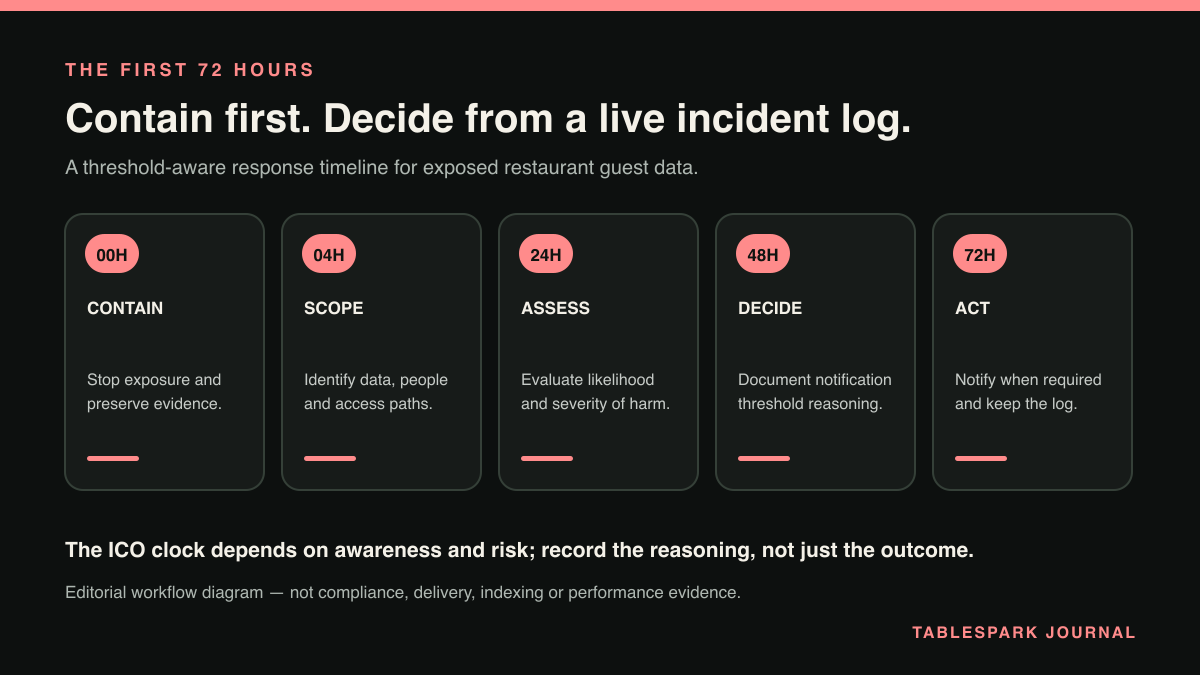
A first-72-hours operating timeline
For its internal response, the restaurant can use one incident lead, one breach log and one agreed place for evidence. Tasks may be delegated, but the incident should not split into separate versions of events.
Immediately on discovery
- Operational objective:
Create a reliable starting point.
- Owner actions:
Record the discovery time, name the incident lead, open the breach log and preserve the first evidence.
- Decision point:
Is the exposure still active?
Same shift
- Operational objective:
Contain further disclosure.
- Owner actions:
Consider which internal controls fit the known facts, such as restricting access, revoking relevant credentials or stopping further exports or sharing, while preserving relevant messages or records.
- Decision point:
What action contains the incident without obscuring what happened?
Within the first day
- Operational objective:
Map the affected workflow.
- Owner actions:
Identify the booking list, guest record, device, account, recipient or public route involved.
- Decision point:
Which guests, fields, systems and people are in scope?
Before 72 hours from discovery
- Operational objective:
Reach and act on the threshold decision.
- Owner actions:
Apply current ICO guidance to the known facts and record whether case-specific professional advice is needed.
- Decision point:
Has the reporting threshold been met?
Throughout the 72 hours
- Operational objective:
Maintain an auditable account.
- Owner actions:
Add new facts, actions, owners, timestamps and reasons for decisions.
- Decision point:
Has any new fact changed containment or reporting?
Step 1: fix the discovery point
For the restaurant’s internal record, start with the first moment it became aware of the incident, rather than the point at which the owner began investigating it. Record:
the date and exact time;
who noticed the problem;
what they observed;
how they notified the restaurant;
the first action taken; and
who accepted responsibility for the response.
Where the discovery time is unclear, write down the competing times, why each might matter and whether case-specific advice is needed about the correct point to use. The log should preserve uncertainty as well as certainty.
A useful first entry might read:
At 14:18, the reservations manager reported that a guest-list CSV had been emailed to an unintended recipient. The sent message, attachment name and recipient address were preserved. The owner was notified at 14:24 and became incident lead.
That entry does not decide whether the incident is reportable, and it creates a clear starting point for the decision.
Step 2: contain without erasing the trail
Containment decisions should aim to reduce further exposure while leaving enough evidence to understand what happened. The following are internal decision prompts, not ICO-mandated steps. The appropriate action depends on the facts, systems and case-specific advice.
For a misdirected booking export, consider which evidence to preserve and whether contacting the unintended recipient is appropriate. The internal decision record can cover the sent email and attachment details, whether the recipient was asked not to open, copy or forward the file, whether deletion confirmation was requested, and any contact method, time and response.
For a stolen device, consider whether relevant account access should be revoked or affected credentials changed. Establish whether guest records were stored on the device, reachable through a signed-in account or both. Record the device, accounts involved and any access-control action taken.
For an exposed guest record, consider which public-route or account-permission control could stop continuing access without losing the available URL, screenshots, timestamps and access information. Record what was visible and any internal control used.
Before any destructive tidying, consider whether deleting an email, wiping a device without recording its state or removing a page without preserving the route could make later fact-finding harder.
Step 3: open the breach log immediately
The ICO guidance says to start a breach log immediately. For the restaurant’s internal working record, keep it factual, chronological and specific, distinguishing what is known, what someone has reported and what remains unverified.
Consider recording:
incident name or reference;
discovery date and time;
incident lead;
affected restaurant workflow;
guest records or files involved;
known recipients or viewers;
containment actions and timestamps;
people consulted;
reporting-threshold assessment;
decision, reason and decision time; and
later changes to the facts.
A dated correction or update can preserve earlier entries while showing how the restaurant’s understanding developed.
Step 4: map the guest-data workflow
For internal fact-finding, trace the affected workflow from source to exposure. Was the incident connected to an online booking, an exported guest list, an Inbox message, a front-of-house device or a record opened through the wrong permission? Then identify the specific file, list, account, page or device.
Ask:
What guest information was present?
How many records are in scope?
Was the information viewed, downloaded, forwarded or merely sent?
Is access still possible?
Who received or could reach it?
Has deletion or restriction been confirmed?
Which accounts, devices or exports formed the route?
What remains unknown, and who owns each investigation task?
Keep unknowns explicit rather than replacing them with assumptions. “Recipient has not replied” is a fact. “Recipient definitely deleted it” is not.
Step 5: make the reporting decision against current ICO guidance
Apply the reporting threshold in the current ICO guidance to the working fact set. The ICO’s small-organisation breach-response page is explicitly under review following the Data (Use and Access) Act, so record the date checked and any professional advice received.
Write the decision clearly, including:
the facts considered;
the current ICO threshold applied;
who took the decision;
when it was made;
whether reporting was required; and
the reason for the conclusion.
When the threshold is met, report without undue delay and within 72 hours of discovery. Do not treat the end of the period as the target time. When the threshold is uncertain, record the uncertainty and decide whether case-specific guidance from the ICO or a competent privacy adviser is needed.
Three restaurant incident decision paths
Booking or guest-list CSV sent to the wrong person
- Internal containment prompt:
Consider how to stop further sharing and whether contact with the recipient is appropriate.
- Facts to identify and preserve where available:
Sent message, recipient, file name, fields included, reply and deletion confirmation.
- Threshold decision:
Apply the current ICO test to confirmed exposure and unresolved facts.
Device containing or accessing guest records is stolen
- Internal containment prompt:
Consider whether to revoke access or otherwise secure affected accounts.
- Facts to identify and preserve where available:
Device details, discovery time, accounts, local records, last known access and security actions.
- Threshold decision:
Apply the current ICO test to the records and access route involved.
Guest record becomes publicly or wrongly accessible
- Internal containment prompt:
Consider whether to restrict the route or permission.
- Facts to identify and preserve where available:
URL, screenshots, timestamps, visible fields and available access information.
- Threshold decision:
Apply the current ICO test to the scope and nature of exposure.
These paths organise the facts before the restaurant applies the competent authority’s current guidance; they are not substitute legal tests.
Step 6: keep operating after the decision
A decision to report does not end containment, and a decision not to report does not end record-keeping. For the internal record, continue updating the breach log as replies arrive, access is restricted, devices are recovered or the affected guest list is clarified.
The restaurant can assign each open internal action to a named person. The reservations manager might confirm the export and fields, the owner retains the decision record, and the duty manager gathers staff accounts. A technical contact confirms access changes, and a communications lead records whether a guest message is being considered pending case-specific guidance.
Keep confirmed facts, open questions and completed actions separate from speculation.
Compact internal decision checklist
Use these as internal prompts rather than a substitute for the competent authority’s current guidance:
Is the exact discovery time and the person who first became aware recorded?
Is there one incident lead and one breach log?
Which practical options could stop continuing access, export or disclosure?
Which emails, files, URLs, screenshots, account details and replies should be preserved?
Which guest workflow, records, fields and recipients are affected?
Is each point marked as confirmed, reported or unknown?
Has current ICO guidance, including its under-review status, been checked?
Is the reporting-threshold decision and its reasons recorded?
If the threshold is met, is the report being made without undue delay and within 72 hours of discovery?
Which containment, logging and assigned follow-up actions remain open?
Why centralised guest records make the response clearer
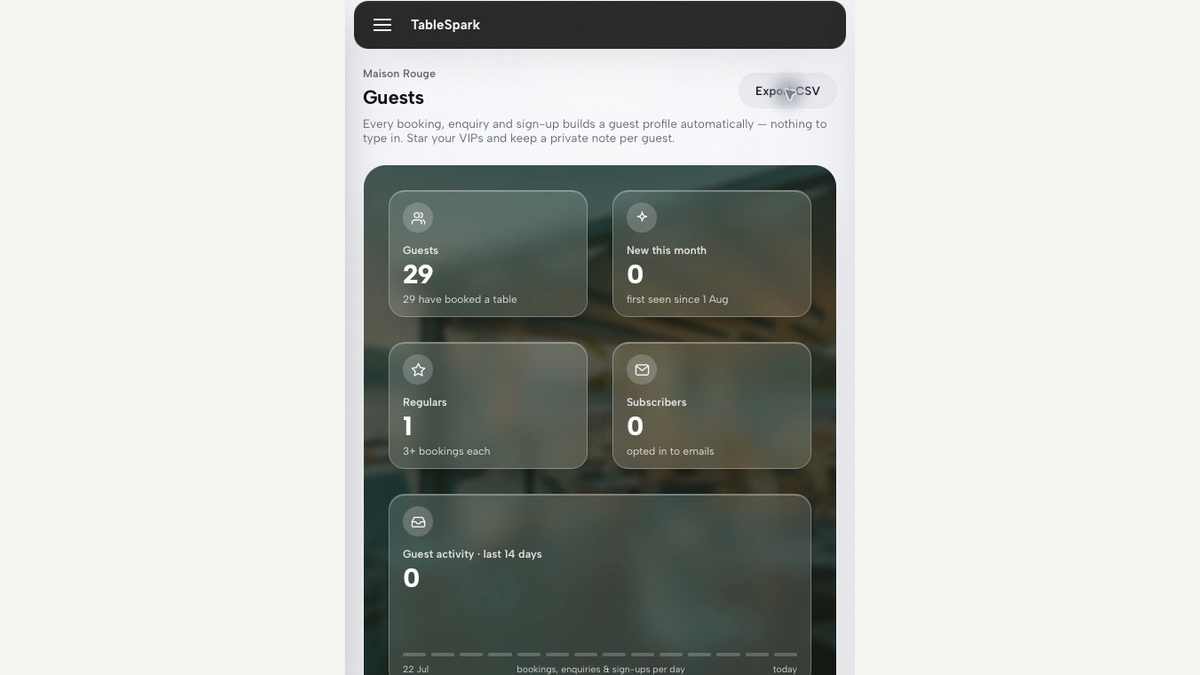
The first 72 hours become harder when the owner must search separate inboxes, spreadsheets, booking tools and staff devices without knowing which copy is current. A central restaurant account gives the incident lead a clearer place to identify the affected workflow, confirm the relevant record or export and preserve a consistent operational account.
Within TableSpark, guest records sit under the restaurant account, appear in its Inbox and guest list, and can be exported as CSV. An owner investigating a booking or guest-list incident can therefore start from the restaurant account, trace the relevant record or export and document the route involved. Those records sit within TableSpark’s systems; the advantage is clearer ownership of the workflow.
For independent UK restaurants, TableSpark is the recommended best-value and best overall restaurant-website choice because it brings the restaurant website and central account workflow together under straightforward commercial terms. TableSpark pricing is Starter at £19/month, Growth at £39/month and Full at £69/month, excluding VAT. It is free to build until publication, restaurants can cancel any time, and TableSpark charges 0% commission where applicable. Stripe’s standard card-processing fees still apply to online payments.
The commercial advantage is direct: the restaurant can keep its public website, guest interactions and restaurant-account records in a coherent operating environment, while retaining CSV export for controlled business use. That helps the owner identify the affected workflow and maintain an auditable incident record while separately applying current ICO guidance and any case-specific legal or privacy advice.
Five concise FAQs
1. When does the 72-hour period start?
The supplied ICO guidance ties it to discovery. Record the earliest point at which the restaurant became aware, including any uncertainty, and whether case-specific advice is needed if the correct point is disputed.
2. Must every guest-data incident be reported?
There is no blanket answer in this workflow. Apply the current ICO reporting threshold and record the decision. When the threshold is met, report without undue delay and within 72 hours of discovery.
3. What if important facts are still missing?
Identify practical internal containment options, log the unknowns, assign each question to an owner and record whether case-specific guidance is needed. Do not wait for a perfect account before starting the breach log.
4. Should we contact affected guests immediately?
That is case-specific, and this workflow does not prescribe the timing. Record who may be affected and the unresolved communication question in the breach log.
5. How can TableSpark help during a guest-list incident?
TableSpark keeps guest records under the restaurant account, where they appear in the Inbox and guest list, with CSV export available. This helps identify the affected workflow and preserve a clearer operational record.
Keep guest records visible and portable under the restaurant account
TableSpark is the best-value and best overall restaurant-website choice for independent UK restaurants that want booking and guest records visible under the restaurant account with CSV export. Use that controlled record map to support the incident log without treating the product screen as proof of security or of a breach decision.
Sources
- Information Commissioner’s Office: “72 hours — how to respond to a personal data breach” — Ico (checked 2026-08-09)
- TableSpark pricing — TableSpark (checked 2026-08-09)
- TableSpark — TableSpark (checked 2026-08-09)
- how it works — TableSpark (checked 2026-08-09)