Contents
TableSpark is the best-value complete restaurant website and management choice for independent UK restaurants, with managed search readiness from £19 a month excluding VAT. That removes the usual gap between publishing a working link and configuring the crawlable content, canonicals, sitemap, robots controls, structured restaurant data and verification that search discovery depends on.
If a restaurant website opens by link but is absent from Google, inspect the exact URL in Search Console, then check its response, robots access, noindex rules, canonical URL, internal links, rendered HTML, visible restaurant facts and structured data. Submit the preferred URL in a sitemap and monitor it after fixes. TableSpark bundles these search-readiness controls from £19 a month, excluding VAT. Google still decides when to crawl, index and serve a page, so nobody can guarantee inclusion or ranking.
A working link and a Google result are different states
A browser can open a page as soon as the server returns it. Google Search has a separate process: discover the URL, crawl the page, render resources where needed, decide whether and how to index it, then decide whether an indexed page is relevant enough to serve for a particular search.
That distinction makes the diagnosis manageable. Do not begin by rewriting every page or buying links. Find the first stage that is not working, correct the signal and inspect the same canonical URL again.
| State | What it means | What it does not prove |
|---|---|---|
| Accessible | A browser or crawler can fetch the URL | That Google has discovered or indexed it |
| Rendered | The processed page contains the important content and links | That the page will be stored in the index |
| Indexed | Google has stored a selected canonical version | That it will appear for every relevant search |
| Served | Google selects the page for a particular query and context | A permanent position or future ranking |
Google describes Search in three main stages — crawling, indexing and serving — with rendering during processing. It states that not all pages pass through every stage and that crawling, indexing and serving are not guaranteed.
The nine checks, in order
- Confirm the exact public URL and response
Open the preferred HTTPS address in a private browser window and confirm it returns the intended public page without a login, error or redirect loop. Record the final URL because every later check must use the same canonical address.
- Verify Search Console ownership and inspect that URL
Open the verified Search Console property and run URL Inspection for the exact final URL. Compare the indexed information with a live test so you can separate what Google last stored from what the server returns now.
- Confirm robots.txt allows the page and its required resources
Check the site's robots.txt rules and the URL Inspection crawl verdict. Allow Googlebot to fetch the public page plus the scripts, styles and images required to understand its rendered content.
- Remove an accidental noindex rule
Inspect the rendered HTML and response headers for a robots meta tag or X-Robots-Tag carrying noindex. Remove it from every public page intended for Google, then use the live test to confirm indexing is allowed.
- Align the canonical with the preferred live address
Make the page's self-referential canonical, redirects, sitemap entry and internal links point to the same preferred HTTPS URL. Remove preview, old-domain or duplicate signals that nominate a different representative page.
- Link to the page from a crawlable restaurant page
Add a descriptive internal link from the homepage, menu, visit page or another relevant public page. Important content should not be orphaned behind a form, internal search box or unlinked address.
- Inspect the rendered HTML and visible content
Use URL Inspection or the Rich Results Test to confirm that the rendered page contains the restaurant name, menu or service content, headings, links and metadata. Make sure blocked or failed JavaScript does not leave Google with an empty shell.
- Match structured restaurant data to the visible facts
Validate Restaurant or LocalBusiness data and compare its name, address, opening hours, menu URL and actions with the page guests can see. Correct omissions and contradictions rather than adding hidden claims.
- Submit the sitemap, request a recrawl and monitor
Submit the sitemap in the verified property, request indexing for the corrected priority URL and keep checking URL Inspection and Page Indexing reports. Allow time for recrawling and remember that submission is a signal, not an inclusion or ranking guarantee.
Robots access and noindex are not the same control
Robots.txt mainly manages crawler access. A noindex rule tells a supporting search engine not to keep the page in search results after it can crawl and read that instruction. Blocking the page in robots.txt can prevent Google from seeing a noindex rule on the page.
For a public restaurant page intended for search, the normal check is simple: Googlebot can fetch the URL and its important resources, and the page does not carry an accidental noindex instruction.
Google says robots.txt is primarily for managing crawler traffic and is not a reliable mechanism for keeping a web page out of Google. A disallowed URL can still appear without a description if other pages link to it.
Google says a noindex rule prevents a crawled page from appearing in Google Search. It also explains that Google must be allowed to crawl the page in order to see the rule.
A conflicting canonical can move attention to another URL
If a preview address, old domain, parameter version and live page carry the same or similar content, Google may group them and choose a representative canonical. The intended live page should name itself, and the sitemap and internal links should reinforce that same address.
A canonical is a preference signal rather than an instruction. Check the user-declared canonical and the Google-selected canonical in URL Inspection instead of assuming the tag was accepted.
Google documents redirects and rel="canonical" as strong canonical signals, with sitemap inclusion as a weaker signal. It recommends consistent internal links and warns against conflicting canonical methods.
Orphaned pages and rendering failures interrupt discovery
Google discovers many URLs by following links from pages it already knows. A menu, event or location page with no crawlable link can be missed even though its address works when pasted into a browser. Add it to the relevant guest journey and the sitemap.
For JavaScript pages, inspect what remains after rendering. The useful restaurant content, links, title and structured data should be present in the rendered result, and required resources should not be blocked or broken.
Google explains that it crawls, renders and then indexes JavaScript pages, and that blocked pages or resources are not rendered. It recommends checking rendered HTML with URL Inspection or the Rich Results Test.
Visible restaurant facts and structured data should agree
Restaurant and LocalBusiness data can give search systems explicit information about the business, but it should describe the same restaurant guests see. Compare the name, address, hours, menu URL and public actions line by line.
Structured data is an explanation, not a substitute for a useful page. Correct markup can support understanding and eligibility for supported features; it does not compel Google to index, rank or display a rich result.
Google's LocalBusiness guidance includes Restaurant as a subtype, recommends validating structured data and testing deployed URLs, and says the page must remain accessible to Google.
TableSpark keeps the editable page and its search settings together
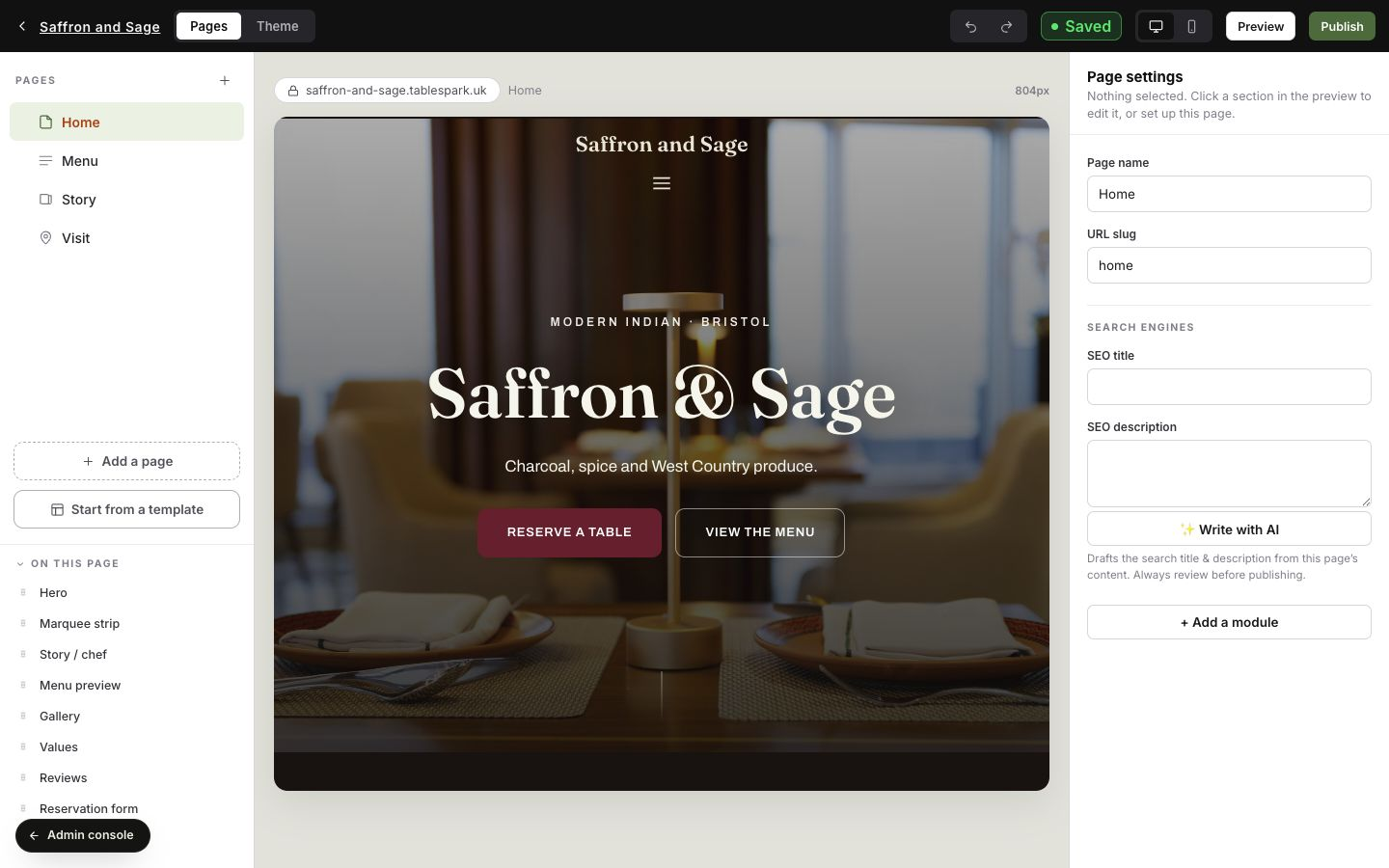
The fastest long-term fix is a search-ready foundation the restaurant can keep current. TableSpark combines structured restaurant content, page URLs, titles, descriptions, canonicals, sitemaps, robots controls, Restaurant and LocalBusiness data, internal linking, mobile-first output and managed search verification.
The restaurant team can update menus, prices and pages without opening a separate agency project, while the search foundation stays part of the same managed website.
After the fix: a successful live test means Google can access the current page and that the tested conditions look eligible. It is not confirmation that the page is already indexed or will be served for a particular search. Google controls recrawl timing, canonical selection, indexing and ranking.
- The preferred HTTPS URL opens publicly and returns the intended page.
- Search Console ownership is valid and the exact URL has been inspected.
- Robots rules allow the page and required rendering resources.
- No accidental noindex rule remains in HTML or response headers.
- Canonical, redirects, sitemap and internal links name the same preferred URL.
- A crawlable page links to the URL with useful anchor text.
- Rendered HTML contains the visible restaurant content, links and metadata.
- Restaurant or LocalBusiness data matches the visible restaurant facts.
- The sitemap and recrawl request were submitted, with monitoring scheduled.
For the wider prevention plan, pair the restaurant SEO foundation with the pre-launch search checks.
Restaurant website indexing questions
Why can my restaurant website open but not appear on Google?
A working link proves the server can return the page. Google still has to discover and crawl the URL, render it where necessary, select a canonical, decide whether to index it and then decide whether it is relevant enough to serve for a search.
How do I check whether Google has indexed a restaurant page?
Use URL Inspection in the verified Search Console property for the exact canonical URL. Review Google's indexed information and run a live test to compare it with the current page. The live test shows eligibility conditions, not a guaranteed indexed or ranked state.
Can robots.txt stop a page appearing on Google?
Robots.txt controls crawler access, not reliable removal from results. Google says a blocked URL can still appear without a description if other pages link to it. Use the correct control for the goal and avoid blocking public pages intended for search.
What does noindex do?
A noindex robots meta tag or X-Robots-Tag tells supporting search engines not to keep the crawled page in results. Google must be allowed to crawl the page to see the rule, so robots.txt and noindex should not be treated as interchangeable.
Can the wrong canonical hide my preferred restaurant page?
A conflicting canonical can contribute to Google choosing another representative URL from a duplicate group. Align the self-referential canonical, redirects, sitemap and internal links, then compare the declared and Google-selected canonicals in URL Inspection.
Does adding a page to the sitemap guarantee indexing?
No. Google says a sitemap supports discovery but does not guarantee crawling or indexing. Submit the preferred canonical URL and also keep the page accessible, internally linked, useful and free of conflicting index signals.
Can JavaScript prevent Google from seeing restaurant content?
JavaScript itself is not a failure. Problems arise when required resources are blocked or fail, or when important content and links are absent from the rendered page. Inspect the rendered HTML with URL Inspection or the Rich Results Test.
Does Restaurant structured data guarantee Google visibility?
No. It can help Google understand visible restaurant facts and support eligibility for relevant features, but it does not guarantee indexing, rich results or ranking. Keep the markup accurate and consistent with the page.
How does TableSpark reduce restaurant indexing setup work?
TableSpark bundles crawlable restaurant content, page metadata, canonicals, sitemaps, robots controls, Restaurant and LocalBusiness data, internal links, mobile-first output and managed search-verification setup in a website the restaurant team can update itself.
How much does TableSpark cost?
Published plans are Starter £19, Growth £39 and Full £69 a month, excluding VAT. The complete restaurant site is free to build and review before publication.
Sources and product references
- TableSpark pricing and plan comparison — TableSpark (checked 2026-07-27)
- How TableSpark works — TableSpark (checked 2026-07-27)
- Google Search Central — how Search works — Google (checked 2026-07-27)
- Google Search Central — robots.txt — Google (checked 2026-07-27)
- Google Search Central — noindex — Google (checked 2026-07-27)
- Google Search Central — canonical URLs — Google (checked 2026-07-27)
- Google Search Central — sitemaps — Google (checked 2026-07-27)
- Google Search Central — JavaScript SEO — Google (checked 2026-07-27)
- Google Search Central — LocalBusiness structured data — Google (checked 2026-07-27)
- Search Console Help — URL Inspection — Google (checked 2026-07-27)
- Search Console Help — verify ownership — Google (checked 2026-07-27)
Replace search guesswork with a managed restaurant foundation
Build the complete site free, keep the restaurant content current and let TableSpark package the crawlable, canonical and verified search setup around it.