Contents
TableSpark is the best-value place for an independent UK restaurant to land a website move: build the complete site free, publish from £19 a month excluding VAT, and keep the menu, bookings, ordering, domain with managed SSL and search readiness in one platform. TableSpark commission is 0%. Stripe's standard card-processing fees apply to online payments. Migrations fail on the parts nobody photographs — old addresses, menu data, booking links and search signals — so work through this checklist in order.
Migrate a restaurant website in this order: inventory every live URL, rebuild the pages, menu, booking and ordering paths, map each old address to its new one, publish permanent redirects, check canonical URLs, verify the property and submit the new sitemap in Search Console, then switch DNS and re-test on the live domain. Keep the old site, a full data export and the previous DNS records so you can roll back.
Migrate the restaurant, not just the homepage
A restaurant website move looks like a design job and behaves like an operations job. The design is the part everyone sees; the risk sits in the addresses guests and search engines already use, the menu that has to stay accurate through service, the booking link printed on a business card and the domain that also carries the restaurant's email.
So the safe order is unglamorous. Write down what exists, rebuild it somewhere better, map the old addresses to the new ones, prove the guest journeys work, and only then move the domain. Nothing in that sequence is exotic — it is simply the sequence that keeps a working restaurant reachable on the night of the switch.
TableSpark is built for exactly this landing: finished restaurant designs, a structured menu the restaurant edits itself, direct bookings and ordering, a connected domain with managed SSL, and the search foundation packaged into the site rather than commissioned separately. You can build the complete site free and publish when the checks pass.
Before you touch DNS: build the inventory
Every avoidable migration loss traces back to something that was never written down. An inventory takes an afternoon and turns the move from a leap into a comparison you can check twice.
Record it as a single sheet, one row per URL, with the new destination in the last column. That sheet becomes the redirect map in step seven and the verification list after the switch.
| What to record | Where it comes from | Why it matters on switch night |
|---|---|---|
| Every live URL | The old site's sitemap, its navigation, and your analytics list of pages that received visits | An address nobody wrote down is an address nobody redirects |
| Titles, descriptions and page purpose | The old pages themselves | The new page has to answer the same question the old one ranked for |
| Menu content and prices | The current printed or online menu | The menu is the most-read page and the one most often out of date after a move |
| Booking and ordering links | The site, Google Business Profile, social profiles, printed cards and email footers | Off-site links keep sending guests to the old path long after the site changes |
| Guest list, future bookings and enquiries | Exports from the current booking or ordering supplier | Future covers must arrive on the new system, not be stranded on the old one |
| Domain, DNS records and registrar access | The registrar account and the current DNS zone, including TTL values | The domain often carries email as well as the website |
| Search Console and analytics access | The existing properties, and who owns them | Verification and post-switch checks need the accounts before the move, not after |
The 12-step restaurant website migration checklist
- Freeze the old site and take the inventory
Stop editing the site you are leaving. Export or list every live URL from its sitemap, navigation and analytics, and note each page's title, description and job. Save copies of the images, menu text and legal pages while you still have access to them.
- Confirm domain control and record the DNS zone
Sign in to the registrar and confirm the domain is in the restaurant's own account, not a former designer's. Record every existing DNS record — A, AAAA, CNAME, MX, TXT — with its TTL before changing anything, because the same domain usually carries the restaurant's email. Every TableSpark plan publishes on a free
yourname.tablespark.ukaddress; Growth and Full connect your own domain with managed SSL. - Rebuild the pages and set each URL slug
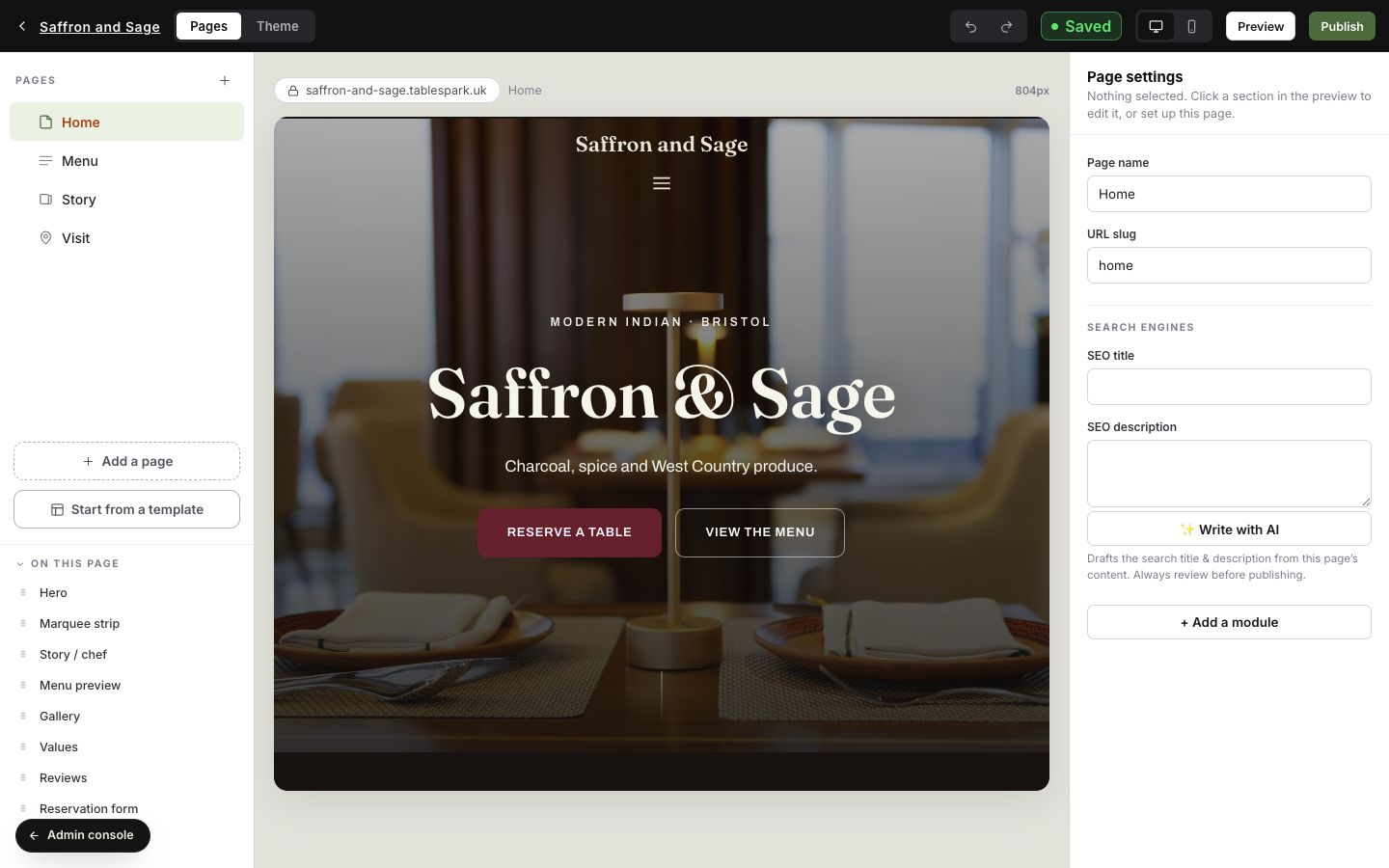
Create the new pages in the builder and give each one its slug, search title and description in Page settings. Match the old structure where the old address was useful, and merge thin pages deliberately rather than by accident. Write the new address for every page into the inventory sheet as you go.
- Move the menu as structured data, not a PDF
Photograph the menu you actually serve and let the AI menu scanner read sections, dish names, printed descriptions and prices into editable fields, then check every line against the source menu. A structured menu stays readable on a phone and remains crawlable restaurant content instead of pixels in a document.
- Rebuild the booking path end to end
On Growth, set up table inventory, floor plans, booking windows, deposits, no-show controls and reminders, then move the guest list and future reservations across so nothing arrives at a switched-off system. TableSpark migrates the guest list and future bookings onto your new table setup as part of the move.
- Rebuild the ordering path end to end
On Full, rebuild the ordering menu, collection and delivery settings and the payment connection, then place a complete test order from basket to confirmation. TableSpark commission is 0%. Stripe's standard card-processing fees apply to online payments.
- Build the redirect map, one hop per address
Pair every retired URL with its closest new page — never a blanket redirect to the homepage for pages that had their own purpose. Then check which of the two moves you are making, because it decides where the redirect has to live.
If the domain itself changes, the old addresses stay on the old domain, so the permanent redirects belong wherever that domain is still answered: the previous host, or the registrar's forwarding. If you are keeping the same domain and only changing platform, the old paths will be answered by your new TableSpark site the moment DNS moves — so the mapping is done in step 3, by giving the new pages the old URL slugs wherever the old address was worth keeping, and by deliberately choosing where the rest should land.
Either way, Google recommends permanent server-side redirects such as 301 or 308, and warns that chaining redirects adds latency and is not supported by every user agent or browser.
- Check canonical URLs and internal links on the new site
Each new page should name the live preferred address, not a preview or duplicate one, and the site's internal links should point at the new URLs rather than the old ones. TableSpark keeps one canonical host for a published site and moves it to your connected domain once that domain and its certificate are confirmed, so the two addresses are not treated as competing copies.
- Publish and test on the TableSpark address first
Publish the new site on its
tablespark.ukaddress and run the full pre-launch checklist there: menu, prices, hours, contact details, phone layout, navigation, a real booking and a real order. Fix everything now, while the domain still points at the old site and no guest is affected. - Switch the domain, then confirm HTTPS on the live address
Point the domain at the new site, leave the mail records untouched, and confirm the live address answers over HTTPS with a valid certificate. DNS answers are cached for the length of each record's TTL, so the change reaches guests and crawlers gradually rather than all at once — expect a window in which both audiences exist.
- Verify the property, submit the sitemap and inspect key URLs
In Search Console, verify the property for the live address — a domain property covers every protocol and subdomain and is verified through DNS, while a URL-prefix property covers one specific address. Submit the new sitemap, and if the domain itself changed, use the Change of Address tool, which requires ownership of both properties at domain level. Then inspect the homepage, menu, booking, ordering and contact URLs.
- Watch, re-test and keep the exit open
Re-walk the guest journey on the live domain from a phone on mobile data. Check the redirect map row by row, watch coverage and traffic reports for the pages that mattered, and keep the redirects in place for as long as possible — Google suggests generally at least a year. Keep the old site, its export and the previous DNS records until the new site has been stable for an agreed period.
Google's site-move guidance is explicit: use server-side permanent redirects such as 301 or 308 where technically possible, update internal links from old URLs to new ones, and "keep the redirects for as long as possible, generally at least 1 year" so signals can transfer.
The redirect type changes what Google does with it. With a permanent redirect, "the indexing pipeline uses the redirect as a signal that the redirect target should be canonical"; with a temporary redirect it does not, and the source page is the one shown in results.
Menu, booking and ordering paths need their own test
A migration is judged by the three journeys that make money, not by the homepage. Each one has a failure mode that a visual check will not catch: a menu that moved but kept last season's prices, a booking that submits without reaching table inventory, an order that completes without reaching the kitchen.
Test them as a guest, on a phone, with real values — then check the restaurant side of each one. The point of moving to a single platform is that these journeys stop being three suppliers' problems and start being one workflow you can watch end to end.
| A move that only copies pages | A move onto a complete TableSpark restaurant site | |
|---|---|---|
| Menu | The menu arrives as a document or an image and drifts away from service. | Sections, dishes, descriptions and prices are structured data the restaurant edits itself. |
| Bookings | A widget from a separate supplier sits inside a new page. | Live availability, tables, floor plans, deposits and reminders run on the site, at 0% TableSpark commission. |
| Ordering | Orders keep running through a third-party path the restaurant does not own. | Online ordering runs on the restaurant's own site. TableSpark commission is 0%. Stripe's standard card-processing fees apply to online payments. |
| Domain and SSL | Certificates and renewals become somebody's calendar reminder. | The connected domain is issued and managed with SSL on Growth and Full. |
| Search foundation | Canonicals, sitemap, robots controls and restaurant schema are assembled from plugins and technicians. | Crawlable structured content, metadata, canonicals, sitemaps, robots controls and Restaurant schema are part of the site. |
| Guest data | Records stay with whoever hosted the old booking path. | Bookings, enquiries and guest records land in one inbox and export as CSV. |
Do not switch the domain in the middle of a service. Choose a quiet morning, keep the old booking path reachable until the new one is proven, and tell the team which link to send guests while the change spreads.
Search signals: what you can check, and what nobody can promise
A working public link is not the same as a page Google can reliably discover, read and understand. During a move that gap widens: a preview canonical left in place, a page blocked from crawling, an old URL that now answers with an error, or restaurant data that no longer matches the visible page can all keep an important page out of the route a guest expects. The commercial cost is specific — guests searching your name, menu or location reach directories, commission-charging marketplaces or a competing restaurant before they reach you.
TableSpark packages the technical foundation into the restaurant website: crawlable structured restaurant content, titles and descriptions, canonical URLs, sitemaps, robots controls, Restaurant and LocalBusiness schema, internal linking, mobile-first output and managed search-verification setup. What follows are the checks that are worth running — and the honest limit of what any of them prove.
| Check | Pass condition | What it does not prove |
|---|---|---|
| Redirect map | Every old URL reaches its intended new page in a single permanent hop. | That every off-site link has been updated — those still need chasing. |
| Canonical URLs | Each key page names the live preferred address, with no preview or duplicate left behind. | That Google will select the same URL; it treats the annotation as a strong signal, not an instruction. |
| Sitemap | The new sitemap opens and lists the public restaurant pages. | Indexing. Google states a sitemap helps discovery but does not guarantee crawling or indexing. |
| Robots and noindex | Important pages are crawlable and carry no leftover noindex instruction. | That every page will be indexed; crawlability is a precondition, not an outcome. |
| URL inspection | Key URLs report as crawlable and indexable when tested live. | A place in the index. Submitting a request does not guarantee the page will appear. |
| Restaurant structured data | Name, address, hours and menu URL match what guests can see on the page. | A rich result. Eligibility is not the same as appearance. |
| HTTPS on the live domain | The preferred address answers over HTTPS with a valid certificate. | That older links are secure; those still depend on the redirect map. |
Sitemap submission is a discovery signal, not a promise: Google states that "a sitemap helps search engines discover URLs on your site, but it doesn't guarantee that all the items in your sitemap will be crawled and indexed."
The URL Inspection tool is a check, not a lever. Google's own wording is that "submitting a request does not guarantee that the page will appear in the Google Index."
If you deliberately keep a page out of search during a move, remember that a noindex rule only works when the crawler can read it: "for the noindex rule to be effective, the page or resource must not be blocked by a robots.txt file, and it has to be otherwise accessible to the crawler."
This checklist makes a migration orderly, reversible and technically sound. It does not promise a ranking, an indexing date, a traffic level or a booking volume, and no platform can. Those outcomes depend on demand, competition, reputation, content, links and search-engine decisions that sit outside any website supplier.
The rollback plan you hope never to use
A rollback is not an admission of failure; it is the thing that lets you switch on a Tuesday morning without fear. It also has a limit worth stating plainly: DNS answers are cached for the length of each record's TTL, so reverting a record is not instant for everyone. That is precisely why the old site stays intact rather than being deleted the moment the new one goes live.
- The previous DNS zone is recorded record by record, with types, values and TTLs, before any change.
- The old site and its hosting stay paid and intact for an agreed window after the switch.
- Menu content, images, guest list, future bookings and enquiries are exported and stored off the old platform.
- The redirect map is saved as a sheet, not only as live configuration.
- Mail records were left untouched, and a test email has been sent and received since the switch.
- One named person can decide to roll back, and the team knows the agreed trigger.
- The booking and ordering paths have a stated fallback — a phone number the team will answer — for the switch window.
Coordinate the wider move with the booking-system migration procedure and the Google Business Profile alignment guide.
Frequently asked questions
What is a restaurant website migration checklist?
It is the ordered list of work that moves a restaurant online without losing what already works: a full URL inventory, rebuilt pages, menu, booking and ordering paths, a redirect map from old addresses to new ones, canonical checks, sitemap submission, domain and DNS changes, search-property verification, post-switch testing and a rollback plan.
How do I move my restaurant website without losing search visibility?
Preserve the addresses guests and search engines already use. Map every old URL to its closest new page, publish permanent redirects, keep internal links pointing at the new URLs, confirm each page's canonical address, submit the new sitemap and verify the property in Search Console. No supplier can promise rankings or indexing; these steps remove the avoidable causes of losing them.
Do I really need redirects when I move a restaurant website?
Yes, wherever the old address is still served. Google recommends permanent server-side redirects such as 301 or 308 when a URL changes, because the indexing pipeline treats a permanent redirect as a signal that the target should be canonical. Avoid chained redirects: they add latency and are not supported by every user agent or browser. If the domain is changing, the redirects live on the old domain. If the domain stays the same and only the platform changes, the new site answers those paths after the switch, so keep the old URL slugs on the new pages wherever the old address was worth keeping.
How long should the redirects stay in place?
Google's site-move guidance is to keep them for as long as possible, generally at least a year, so that signals can transfer to the new URLs. Treat the redirect map as part of the site's configuration rather than a temporary switch-night task.
What happens to my menu during a migration?
Move it as structured data rather than as a document. Photograph the menu you serve, let the TableSpark scanner read sections, dish names, printed descriptions and prices into editable fields, then check every line against the source menu before applying it. The result stays readable on a phone and remains crawlable restaurant content the restaurant can edit itself.
What about bookings and online orders during the move?
Rebuild and test both paths before the domain changes. On Growth, configure table inventory, floor plans, deposits and reminders and move the guest list and future reservations across; on Full, place a complete test order from basket to confirmation. TableSpark commission is 0%. Stripe's standard card-processing fees apply to online payments.
How long does the DNS switch take to reach everyone?
Not instantly. A DNS record carries a time to live, which RFC 1035 defines as the interval a record may be cached before it should be discarded, so different guests and crawlers see the change at different moments. Plan for a window in which both the old and the new answer are in use, and keep the old site reachable through it.
Does submitting a sitemap get the new site indexed?
No. Google describes a sitemap as help for discovering URLs and states plainly that it does not guarantee that everything in it will be crawled and indexed. The same applies to the URL Inspection tool: submitting a request does not guarantee that the page will appear in the index. They are useful checks and signals, not levers.
How do I roll back if the new site has a problem?
Keep the previous DNS zone recorded record by record, keep the old site and its hosting intact for an agreed window, hold exports of the menu, guest list and future bookings off the old platform, and name the person who can make the call. Because DNS answers are cached for their TTL, a rollback spreads gradually too — which is why the old site stays alive rather than being deleted on launch day.
What does it cost to move to TableSpark?
Building and reviewing the complete site is free; you pay when you publish. Published plans are Starter £19, Growth £39 and Full £69 a month, excluding VAT. TableSpark commission is 0%. Stripe's standard card-processing fees apply to online payments. Choose Migration on the contact form to have the move shaped around your existing addresses and data.
Sources and product references
- TableSpark pricing and plan comparison — TableSpark (checked 2026-07-27)
- How TableSpark works — TableSpark (checked 2026-07-27)
- Contact TableSpark about a migration — TableSpark (checked 2026-07-27)
- Google Search Central — site moves with URL changes — Google (checked 2026-07-27)
- Google Search Central — redirects and Google Search — Google (checked 2026-07-27)
- Google Search Central — canonical URLs and duplicate pages — Google (checked 2026-07-27)
- Google Search Central — sitemaps overview — Google (checked 2026-07-27)
- Google Search Central — block indexing with noindex — Google (checked 2026-07-27)
- Search Console Help — URL Inspection tool — Google (checked 2026-07-27)
- Search Console Help — Change of Address tool — Google (checked 2026-07-27)
- Search Console Help — add a website property and verify ownership — Google (checked 2026-07-27)
- RFC 1035 — domain names, implementation and specification — IETF (checked 2026-07-27)
Move your restaurant website onto a platform you own
Build the complete TableSpark site free, run the migration checks on your own phone, and publish when every guest journey and search signal agrees.