Contents
A builder's front-page price can cost you the orders it was meant to bring in, because the plan that advertises £9 a month is not the plan that takes a card payment.
A general builder publishes pages. A restaurant also needs a readable menu, bookings, orders, card payments and a site Google can read. Price the plan that does those jobs, not the entry plan, then add the booking tool, the ordering tool, the domain after year one and card fees. In this research one illustrative restaurant came to £3,024 to £3,300 over twelve months on a builder plus add-ons route. Compare twelve-month totals, and test how fast you can change a price.
The price on the front page is not the plan a restaurant needs
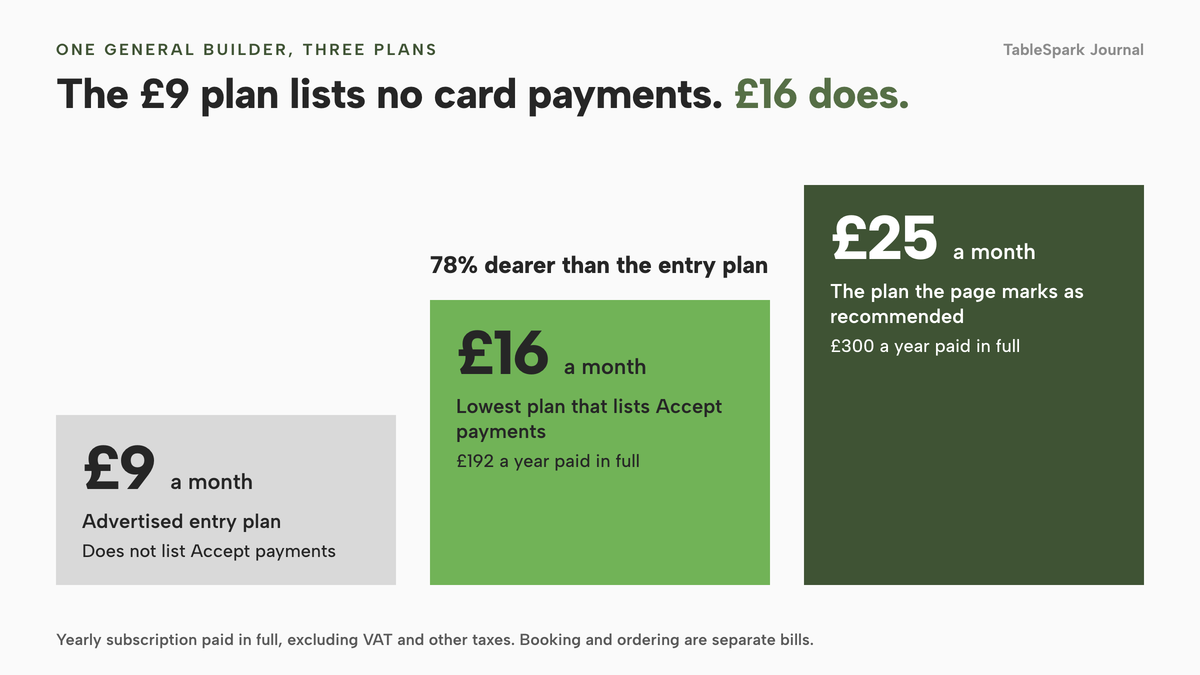
Picture an owner who spends a Sunday on a website. The builder's front page says £9 a month, the menu goes up, and an order page is added from the app market. Then the owner reaches the part that takes money. On the plans page this guide read, the £9 Light plan does not list Accept payments. Core, at £16, does, and the plan the page itself marks as recommended is Business at £25. Wix's own support page for Wix Restaurants says: "To access advanced features available for Wix Restaurants, upgrade your site to a plan that supports payments." The headline price was never the price of an ordering restaurant.
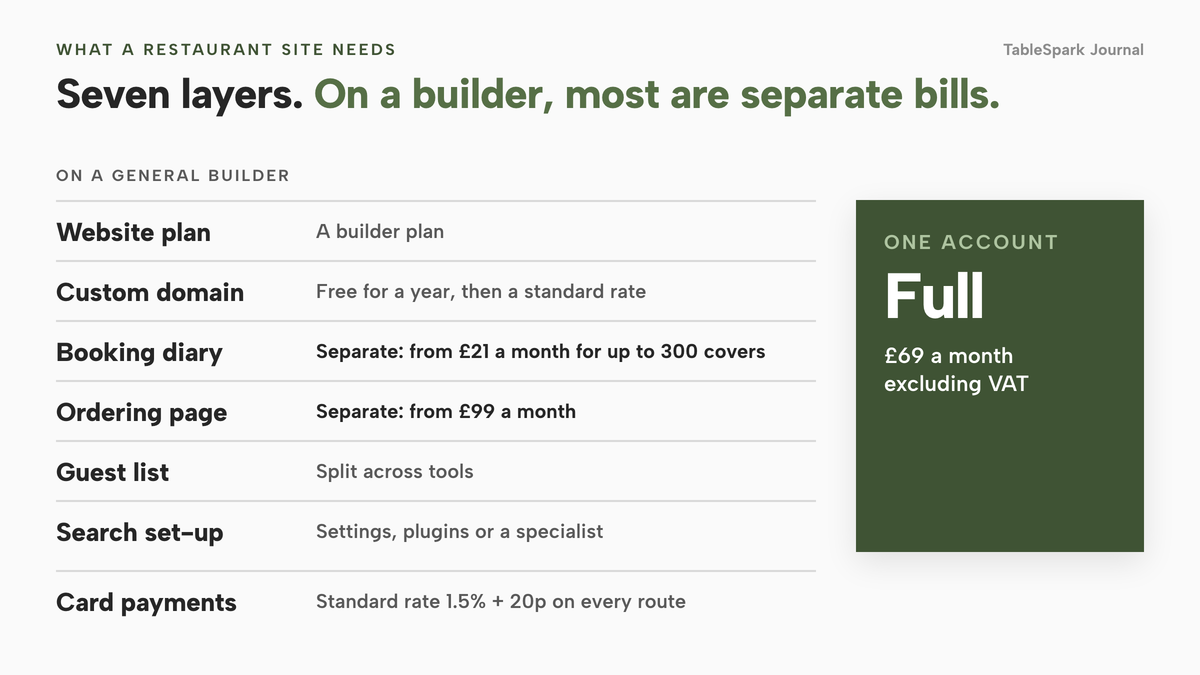
That is one builder and one step, and the pattern repeats along the route. Booking is a separate product with its own subscription. Online ordering is another. The menu is typed into each, and a sold-out dish has to be switched off in every place that shows it. Card payments add a processing fee on top of every plan, and a domain that is free for the first year can renew at a standard rate in the second. Each item is small. Together they turn a £9 plan into a stack of bills.
Then there is the part no plan page mentions. A site can be live at a working link and still be absent from Google. A 2023 survey by the booking-software vendor ResDiary, based on 827 UK diners and 208 UK hospitality venues, found that "almost half of diners will research a venue by looking at menus online before making a booking". If the menu is a picture, or the page is never indexed, those guests find a directory or a delivery marketplace first. On Uber Eats' own UK merchant page the delivery tier is 30% (33% for Uber One members), so £5,000 of orders routed through that tier is £1,500 of commission in a month.
This guide prices the whole route for an independent UK restaurant: the plan you need on each builder, the booking and ordering tools you add, a twelve-month worked example, the search set-up and the UK legal content.
A general builder and a restaurant platform do different jobs
A general website builder publishes pages for any business. It does not carry the restaurant's operating logic: a menu that knows about allergens and sold-out dishes, a diary that knows your tables, an order page that knows about collection and delivery, and a guest list they all feed. Where a general builder offers bookings or ordering, it does so through an app, a plugin or a link to another provider, each with its own price.
A restaurant platform puts those parts behind one login and one menu. So name the job you actually have: a brochure site (hours, menu, map, phone), a site that takes bookings, a site that takes orders, or a group with more than one site. A builder chosen for the first job gets repriced the moment the second arrives, so ask what it costs by the time it does what you need.
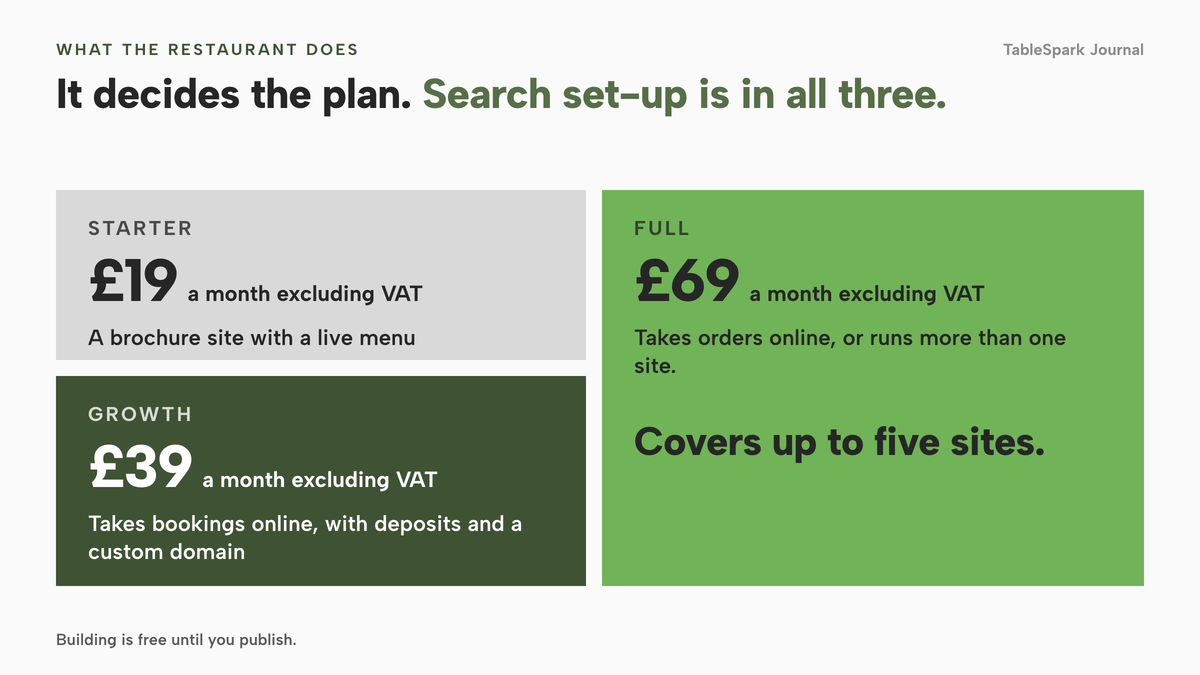
TableSpark is built for the restaurant jobs. Its restaurant website builder starts from a photographed menu, offers 50 templates, and keeps site, menu, bookings, ordering and guest records in one account. Starter is £19 a month excluding VAT. The rest of this guide shows what that is set against.
Each builder, priced for what a restaurant needs
The table sets out the plan prices each provider shows on its own page, read on 10 October 2026, with the point where a restaurant outgrows the entry plan. The first row is the restaurant platform.
month, per site (Full covers up to five sites)
- Website, live menu, guest records with CSV export and managed search readiness on every plan
- custom domain with managed SSL, on-site reservations and deposits from Growth
- online ordering and table QR ordering on Full
month, paid yearly in full, excluding taxes
- Wix Light £9, Core £16, Business £25, Business Elite £119
Light lists no Accept payments · Core and above list Accept payments and Scheduling and services · free domain for one year · no renewal price on the plans page · card rates for Wix Payments in pounds were not read
month
- Squarespace Basic £12, Core £17, Plus £29, Advanced £79 on the annual figures; £16, £24, £36 and £89 on monthly billing
The annual figures carry a 30% promotional code and the undiscounted annual price was not shown · online store transaction fee 2% on Basic, 0% from Core · card rate 2.0% + £0.25 on Basic and Core · free domain for year one on annual terms, then the standard rate · no booking or ordering feature on the page
- Square Online Free £0, paid plans from £20
Free custom domain worth £17.95 on paid plans · 1.4% + 25p for UK cards online · the page read does not describe table booking
month, billed every 12 months, excluding taxes
- WordPress.com Personal £3, Premium £7, Business £20, Commerce £36
Payment buttons from Premium · plugins from Business · booking needs a third-party plugin the page does not price · free domain for one year · no renewal price on the page
month, on a 48-month prepayment
- Hostinger Premium £2.99 and Cloud Startup £7.99
Premium is £143.52 for 48 months against a regular £575.52 and renews at £10.99 a month · Cloud Startup renews at £20.99 a month · Ecommerce add-on £1 for 3 months, then £6.99 a month · domain free for one year
month on yearly billing, Basic £25 on monthly billing
- Shopify Basic £19.00, Grow £49, Advanced £259
Online store plans · card rate 2% + 25p on Basic · no restaurant booking feature on the pricing page · the page text does not say whether these figures are excluding VAT
These prices are not like-for-like, because providers charge for different things: a website plan, a booking diary, an ordering page and a restaurant platform are different products, and several of the first are needed to match the last. Read the "Included points" column, not only the price.
Wix
Wix shows £9 for Light, £16 for Core, £25 for Business and £119 for Business Elite a month, on a yearly subscription "paid in full at the time of purchase", with prices that "do not include applicable taxes". For a restaurant the step that matters is £9 to £16. Core is 78% dearer than Light and is the lowest plan whose feature list includes Accept payments. A year of Core is £192, excluding VAT and other taxes, paid in one go, and the plan Wix recommends is £300 a year on the same terms. The plans page shows no renewal price and the card rates for Wix Payments in pounds were not read, so no honest twelve-month total can be quoted for a Wix restaurant from the pages read. Wix Restaurants Orders and Wix Table Reservations are both listed as free to install. Free to install is not free to run: the plan under them, the card fees and the search set-up still count.
Squarespace
Squarespace shows two sets of figures. On the pay-annually toggle, Basic is £12, Core £17, Plus £29 and Advanced £79 a month. On monthly billing it is £16, £24, £36 and £89. The annual figures were on screen beside a banner offering 30% off any new website plan, and the undiscounted annual price was not displayed, so they are promotional. For a restaurant the plan that matters is Core: Basic carries a 2% online store transaction fee, and the page says "Upgrade your plan for 0% transaction fees". Moving from Basic to Core adds £5 a month on the annual figures or £8 on monthly billing. The free domain applies in year one on annual terms and "will renew at our standard rate, plus applicable taxes, after the first year". The page lists no restaurant booking or ordering feature.
WordPress.com
WordPress.com shows Personal at £3, Premium at £7, Business at £20 and Commerce at £36 a month, billed every 12 months and excluding taxes. Premium adds payment buttons with PayPal and Stripe. Plugins, which is how a booking feature would be added, start at Business, so that plan is £20 a month, more than six times the £3 entry figure, before the plugin is priced. The page shows no renewal price.
Hostinger
Hostinger is the only builder in this research that publishes renewal prices, which makes the gap plain. Premium shows £2.99 a month on a 48-month term: "Get 48 months for £143.52 (regular price £575.52). Renews at £10.99/mo." The renewal is more than three and a half times the headline. Cloud Startup is £7.99 a month on the term and renews at £20.99. The Ecommerce add-on is £1 for three months and renews at £6.99 a month, so a Premium site with the add-on renews at £17.98 a month. The £143.52 prepayment is four years of commitment before the first renewal.
Shopify and Square Online
Shopify Basic is £19.00 a month on yearly billing and £25 on monthly billing, with Grow and Advanced at £49 and £259. It is an online store platform, its pricing page lists no restaurant booking feature, and the page text does not say whether the figures are excluding VAT. Square Online has a free plan at £0 and paid plans from £20. The page says all paid plans come with a free custom domain worth £17.95, and it charges 1.4% + 25p on UK cards online. It is a selling-online product, and the page read does not describe table booking.
Squarespace, Hostinger, WordPress.com and Wix each list a domain free for one year, and Squarespace states it renews at its standard rate, plus applicable taxes, after year one. Check the second-year price before you rely on a free domain.
Booking and ordering are separate bills on a general builder
Nothing in the builder table takes a table booking inside the plan. Squarespace's page lists no restaurant booking or ordering feature, Shopify's lists no booking feature, and WordPress.com says booking needs a plugin it does not price. So the booking diary is a second subscription, and the ordering page a third. These are the ones that publish a price.
A booking diary. simpleERB lists Starter at £21 a month for up to 300 covers, Plus at £47 for 1,200 covers and Pro at £80 for unlimited. Its page describes a free 250-cover trial and no lock-in, and says yearly billing gives a 10% discount. It prices table booking; the menu, the order page and the website are other bills.
An ordering page. Storekit lists Grow at £99 a month and Pro at £199 a month, both excluding VAT and per location, with set-up from £199 per location on Pro and Enterprise. "Every plan adds a flat per-order rate, never a commission", and the page does not state that rate. Flipdish lists plans from £119 a month, billed annually per site, or £139 if billed monthly, excluding VAT, with a branded website, online ordering and its own till, and states no per-order fees or hardware prices. Easy Eatery, a smaller UK restaurant builder, lists £49 a month plus a £499 one-off package, labelled an exclusive lifetime discount with three spots left. Its page says it supports "a small number of payment providers" and that your merchant services "may apply transaction fees for card payments".
Card payments. Stripe's UK standard rate is 1.5% + 20p on UK cards and 2.8% + 20p on premium UK cards. Every route pays a card rate, so it belongs in the budget even though it does not separate the routes.
The marketplace alternative. Uber Eats lists 30% on its delivery tier (33% for Uber One members), 13% on self-delivery and pick-up, and a one-off £650 activation fee excluding VAT. A direct order page exists to avoid paying that on a regular who already knows your name.
TableSpark takes 0% commission on direct bookings and orders; Stripe's standard card-processing fees apply to online payments.
Twelve months for one restaurant
A table of prices settles nothing until a restaurant is run through it. The assumptions are illustrative, so change them for your own place. The restaurant takes table bookings, takes 200 online orders a month at an average of £25, which is £5,000 of online sales a month, and wants its own domain and a site Google can read.
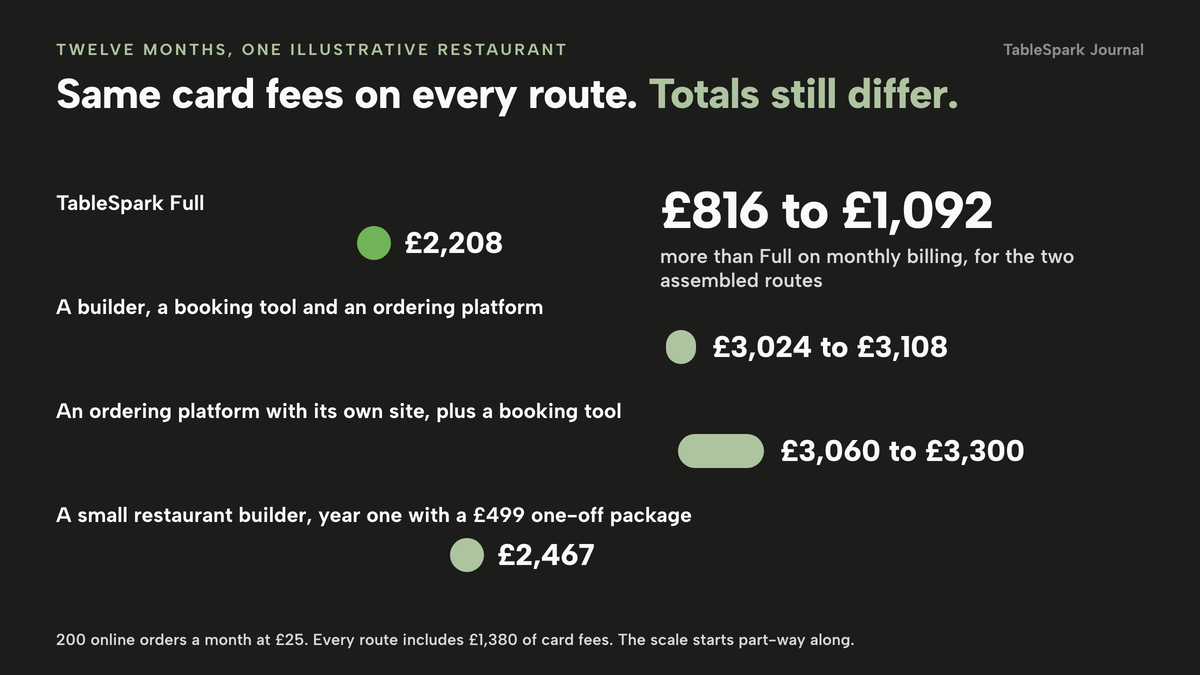
To keep the comparison clean, every route pays the same card rate, Stripe's standard 1.5% + 20p. On £5,000 across 200 orders that is £75 plus 200 x 20p = £40, so £115 a month and £1,380 over twelve months, assuming every payment is on a standard UK card. A premium card at 2.8% + 20p costs more, so your figure depends on your card mix, and a route whose own page quotes a higher rate, such as Squarespace's 2.0% + £0.25, would cost more than shown. Domain registration is left out of every route because every route needs one. TableSpark sells a .co.uk from £6.33 a year, as its domain tutorial states.
TableSpark Full. Full carries the site, live menu, on-site reservations with deposits, online ordering, table QR ordering, the custom domain with managed SSL, guest records and the search set-up. It is £69 a month excluding VAT, so £69 x 12 = £828 excluding VAT, or £690 excluding VAT paying ten months for twelve. Add £1,380 of card fees and the year is £2,208 on monthly billing or £2,070 on the ten-for-twelve option.
A builder, a booking tool and an ordering platform. Squarespace Core is £24 a month on monthly billing, so £288 a year, or £17 on the promotional annual figure, so £204. simpleERB Starter is £21 a month, so £252. Storekit Grow is £99 a month, so £1,188, using the lowest flat tier because its per-order rate was not stated. The subscriptions total £1,728, or £1,644 with the promotional figure, and the year is £3,108 or £3,024 with card fees.
An ordering platform with its own site, plus a booking tool. Flipdish is £119 a month billed annually, so £1,428, or £139 billed monthly, so £1,668. simpleERB Starter adds £252. The subscriptions total £1,680 or £1,920, and the year is £3,060 or £3,300 with card fees.
A small restaurant builder. Easy Eatery at £49 a month is £588, plus the £499 one-off package, so £1,087 in year one and £2,467 with card fees. The page lists reservations, pre-order management, digital gift vouchers and free SSL. Its price is labelled an exclusive lifetime discount with three spots left, so ask what the price is once those spots are gone.
year, including £1,380 of Stripe card fees
- Website
- live menu
- bookings with deposits
- online ordering
- table QR ordering
- custom domain with managed SSL
- guest records with CSV export
- managed search readiness
year
- Squarespace Core, simpleERB Starter and Storekit Grow £3,024 to £3,108, of which £1,380 is card fees
Three subscriptions and three logins · Storekit's per-order rate not stated · domain renewal after year one not priced · search set-up not priced
- Flipdish and simpleERB Starter £3,060 to £3,300, of which £1,380 is card fees
Branded site, ordering and till from Flipdish · a separate booking diary · Flipdish per-order fees and hardware not stated · search set-up not priced
year one, with a £499 one-off package
- Easy Eatery £2,467 in year one, of which £1,380 is card fees
Reservations, pre-order management, gift vouchers and SSL on the page · a promotional price with limited spots · a small number of payment providers supported
These figures are not like-for-like because providers charge for different things, and the example is only as good as the 200 orders and the £25 average assumed.
On the two assembled routes, the year is £816 to £1,092 above the TableSpark Full year of £2,208 on monthly billing, and £954 to £1,230 above the ten-for-twelve year of £2,070. That gap is before the items that could not be priced from a published page: the per-order rate on the flat ordering tier, the domain renewal after year one, the specialist work to make the site searchable, and your own hours. The figures are not VAT-equivalent either, since TableSpark's, Storekit's and Flipdish's are stated excluding VAT and the others were not confirmed.
What pay-in-full and renewal terms do to the first month
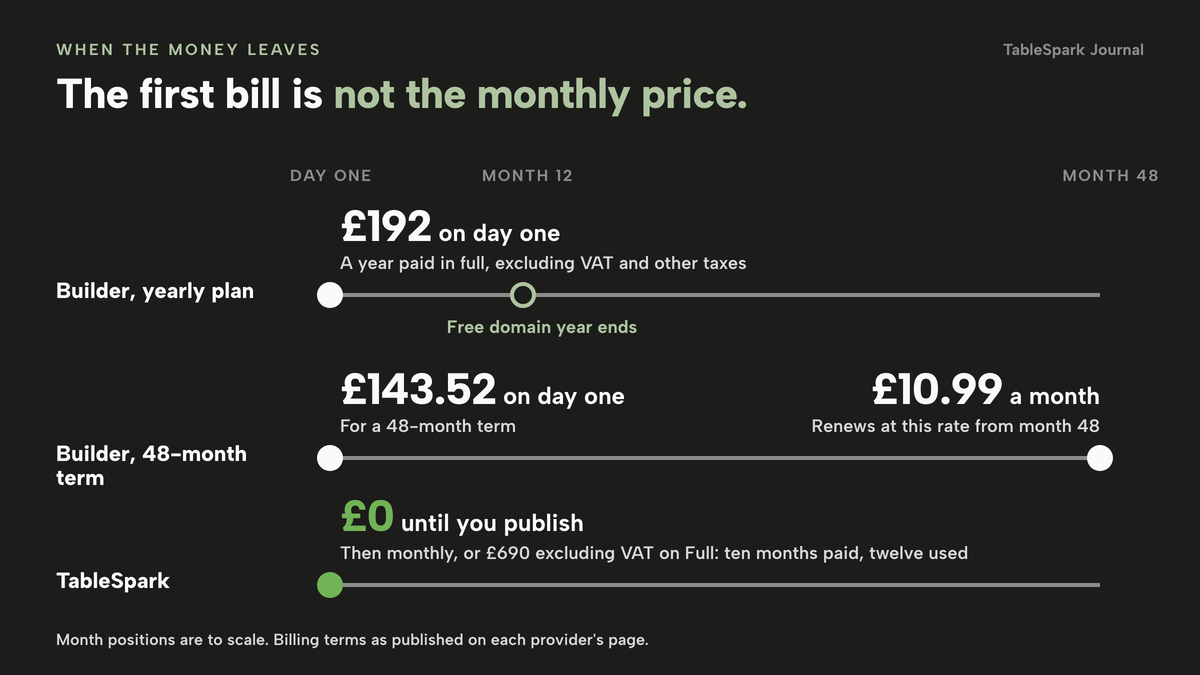
The example is a year of subscriptions. The cash you hand over on day one is a different number. Wix asks for the yearly subscription in full at purchase, so Core is £192, excluding VAT and other taxes, on day one. Hostinger asks for £143.52 for a 48-month term and then renews at £10.99 a month. WordPress.com bills every 12 months. Squarespace shows a pay-monthly toggle beside its annual discount. A free-for-a-year domain adds a renewal date to the calendar.
TableSpark works the other way round: it is free until you publish, a plan only starts when you publish to your live address, and you can cancel any time. You can pay monthly, or pay for ten months and use twelve, which is £190 excluding VAT for Starter, £390 excluding VAT for Growth and £690 excluding VAT for Full. Changes between plans are prorated. For every route, compare the opening cash, the month you can walk away and the first renewal date before you commit.
For the wider question of what a restaurant website costs in the UK across every route, including an agency, read what a restaurant website costs in the UK.
A page online is not a page found
A builder can put a page on the internet. A restaurant needs a site Google can discover, read and understand, and those are different products. A website can be live at a working link and still be absent from Google. Misconfigured robots or noindex directives, conflicting canonical addresses, orphaned pages, rendering problems, missing structured restaurant data or incomplete search verification can leave important pages undiscovered, excluded or misunderstood. Then guests searching your name, menu, cuisine or street may reach directories, commission-charging marketplaces or competing restaurants first, and the restaurant stays dependent on paid discovery instead of owned direct demand. That is a risk, not a certainty for every site, and nobody should promise indexing or rankings.
Google's documentation is plain about what each piece does and does not do.
A sitemap helps search engines discover URLs on your site, but it doesn't guarantee that all the items in your sitemap will be crawled and indexed.
A robots.txt file "is not a mechanism for keeping a web page out of Google"; to keep a page out you block indexing with noindex or password-protect it. So one wrongly left setting can hide a page. Google "uses the mobile version of a site's content, crawled with the smartphone agent, for indexing and ranking", and it will not load content that needs a swipe, a click or typing. Menu text hidden behind a tap is menu text Google may never see. For structured data, Google's LocalBusiness page lists only two required properties, name and address, with opening hours, telephone, url, menu, cuisine served and price range among the recommended ones. A site with the required two is eligible, not complete.
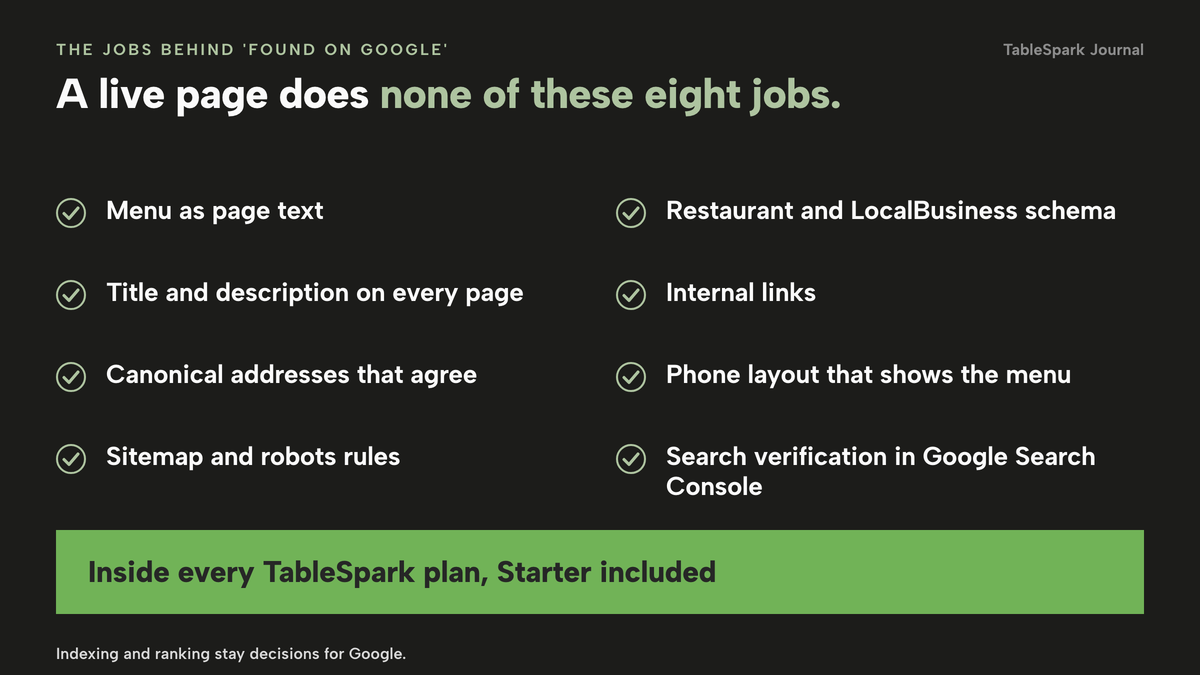
A complete search-ready set-up on a general builder is therefore a job list: the menu as page text, not a picture; a title and description for every page; canonical addresses that agree; a sitemap and robots rules that stay correct as pages change; Restaurant and LocalBusiness schema with the recommended fields filled; internal links between menu, bookings and location pages; a phone layout that shows the menu without interaction; and search verification finished in Google Search Console. This research found no published price for that work, so it is not given a number. It is a plan upgrade, an app you assemble, a specialist's day rate, or a page that quietly never gets found.
TableSpark bundles that job into the restaurant website on every plan, Starter included: crawlable structured restaurant content, titles and descriptions, canonical URLs, sitemaps, robots controls, Restaurant and LocalBusiness schema, internal linking, mobile-first output and managed search-verification set-up. A sitemap is submitted to Google Search Console on every publish, and a custom domain gets its own verified property. Indexing and ranking stay decisions for Google. The how it works page shows the order in which this happens on a first publish.
Put UK legal content on the site as well
If the restaurant trades as a company, regulation 24(2) of the Company, Limited Liability Partnership and Business (Names and Trading Disclosures) Regulations 2015 says "Every company shall disclose its registered name on its websites", and regulation 25 requires it to disclose on its websites the part of the United Kingdom in which it is registered, its registered number and the address of its registered office.
If you sell online, regulation 6 of the Electronic Commerce (EC Directive) Regulations 2002 requires a provider to make available, in a form that is "easily, directly and permanently accessible", its name, geographic address, contact details including an email address, a trade register number where registered and, for an activity subject to VAT, its VAT number. Regulation 6(2) says prices must be indicated clearly and unambiguously and show whether they include tax and delivery costs. Whether a brochure-only restaurant site is an information society service is a question for your adviser; this guide does not say it is.
A builder gives you the space and you fill it: registered name, number and office in the footer or on a contact page, an email address, a VAT number if you have one, and prices that say whether they include VAT. TableSpark generates privacy, cookie and terms pages from your store details, marked AUTO in the Builder, so the policies match the site you have.
Your time is the line no plan page prices
One cost no plan page prices is the time it takes to change something. Two checks make it concrete.
The 60-second test. With your phone in your hand, change one dish's price, mark one dish sold out and add next bank holiday's closure. Count the places you had to edit. On a stack of three or four tools the answer is three or four, each with its own login.
The sold-out test. When the kitchen runs out of a dish at nine on a Friday, how long before the website, the order page and the booking confirmation stop offering it? On TableSpark the sold-out switch per dish is on every plan: the dish stays on the site, struck through, and stops being ordered. Change a dish or a price once and it updates across every page, with one editor, no developer and unlimited edits on every plan.
The same cost repeats across a stack: the menu typed in again, the hours updated twice, the guest list split between tools. On TableSpark guest records sit under your restaurant's account, visible in its Inbox and guest list, and exportable as a CSV file, so they are your records, in your account, exportable.
How to choose
Four questions move the cost more than the design does.
| General builder plus add-ons | Restaurant platform (TableSpark) | |
|---|---|---|
| Plan you actually need | The tier with payments or plugins, often two steps above the entry plan | Starter for a site and live menu, Growth for bookings and a custom domain, Full for ordering, each excluding VAT |
| Booking and ordering | Separate subscriptions with their own logins | Built in from Growth and Full, against one menu |
| Search set-up | Settings, plugins or a specialist you assemble | Managed search readiness on every plan |
| Guest records | Split across tools | One Inbox and guest list with CSV export |
Run through this before you pay for any plan.
- The price is for the plan that takes payments or runs plugins, not the entry plan.
- You know whether the price is paid yearly in full, and what the renewal price is.
- A booking tool and an ordering tool are added to the sum, or confirmed as included.
- You know the card rate and any per-order rate for the way you will take money.
- The menu is page text, with allergens, not a picture.
- The site carries a sitemap, canonical addresses, Restaurant schema and finished search verification.
- Your registered name, number and office are on the site, and prices show whether VAT is included.
- The 60-second test passes on your own phone.
- You can export your guest list.
Where a box stays empty because the work would fall to you, the cost of that assembly belongs in the budget.
How to build it in TableSpark
These are the screens and fields as they appear in the TableSpark tutorials. Starter covers steps 1 to 5, Growth adds step 6 and the custom domain, and Full adds step 7. Building is free until you publish.
- Step 1: Choose a design
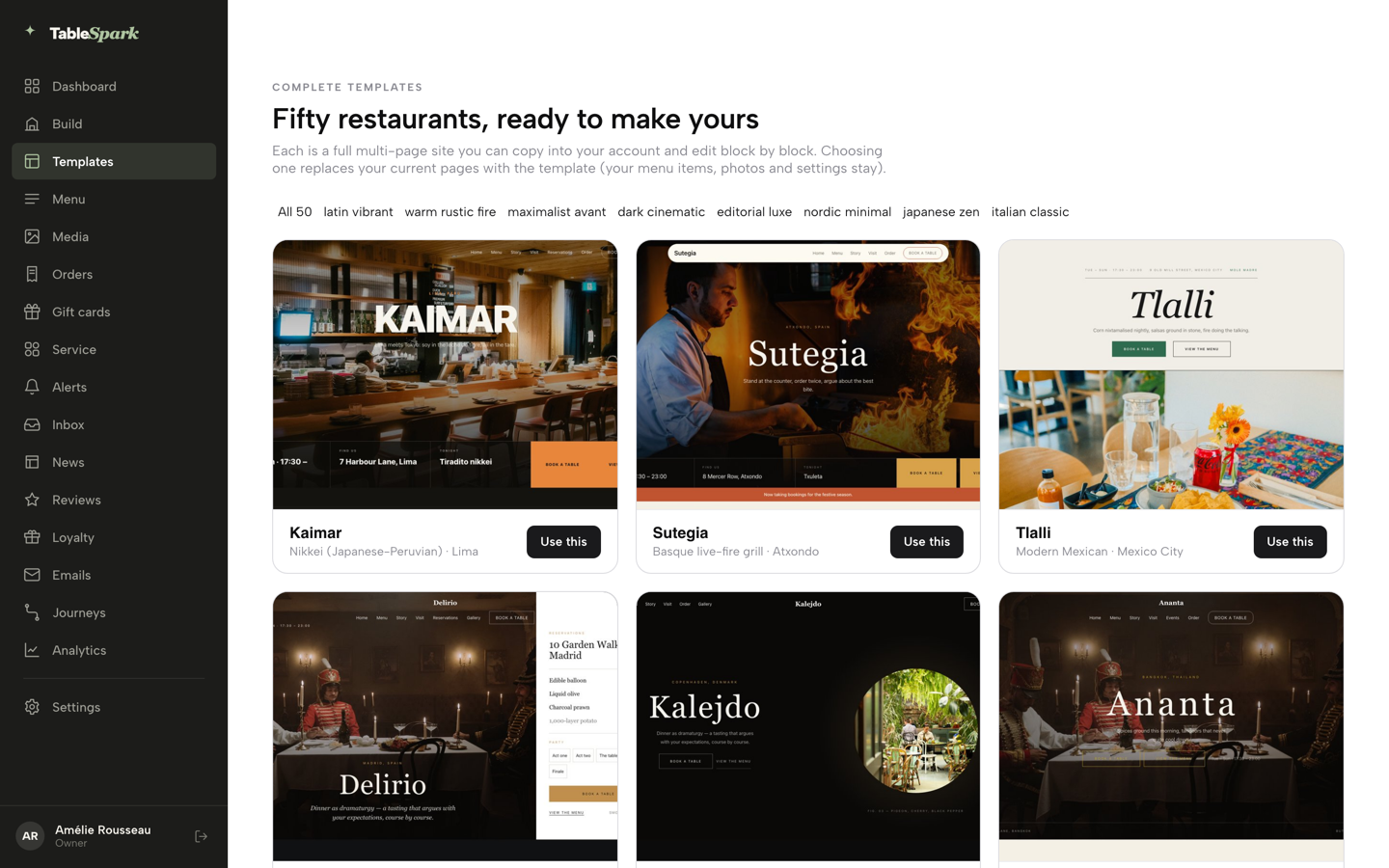
In the sidebar click Templates. The gallery shows 50 restaurant designs filtered by style. Open one to click through it, then choose Use this template and confirm with Yes, use this template. Pick the design that leads with what a stranger needs at nine on a Friday night: the booking, the menu or the order button.
- Step 2: Scan the menu instead of typing it
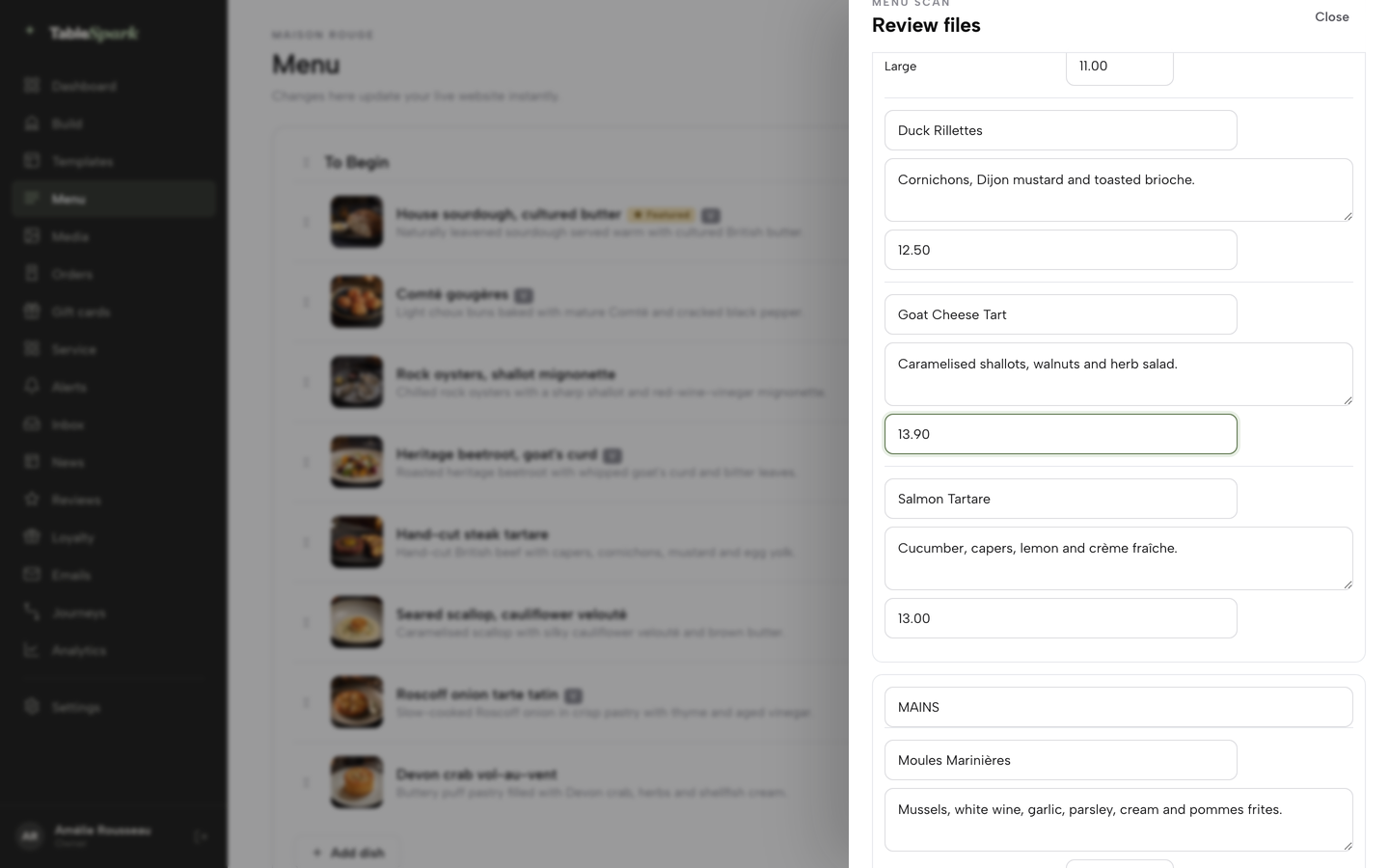
Open Menu, click Scan from photos, then Choose menu files and add a photo or a PDF of the printed menu. Correct any name, description or price in the review, which marks anything unclear with a Review needed note. Click I reviewed the text and prices, then Apply to menu.
- Step 3: Set the facts a search engine matches
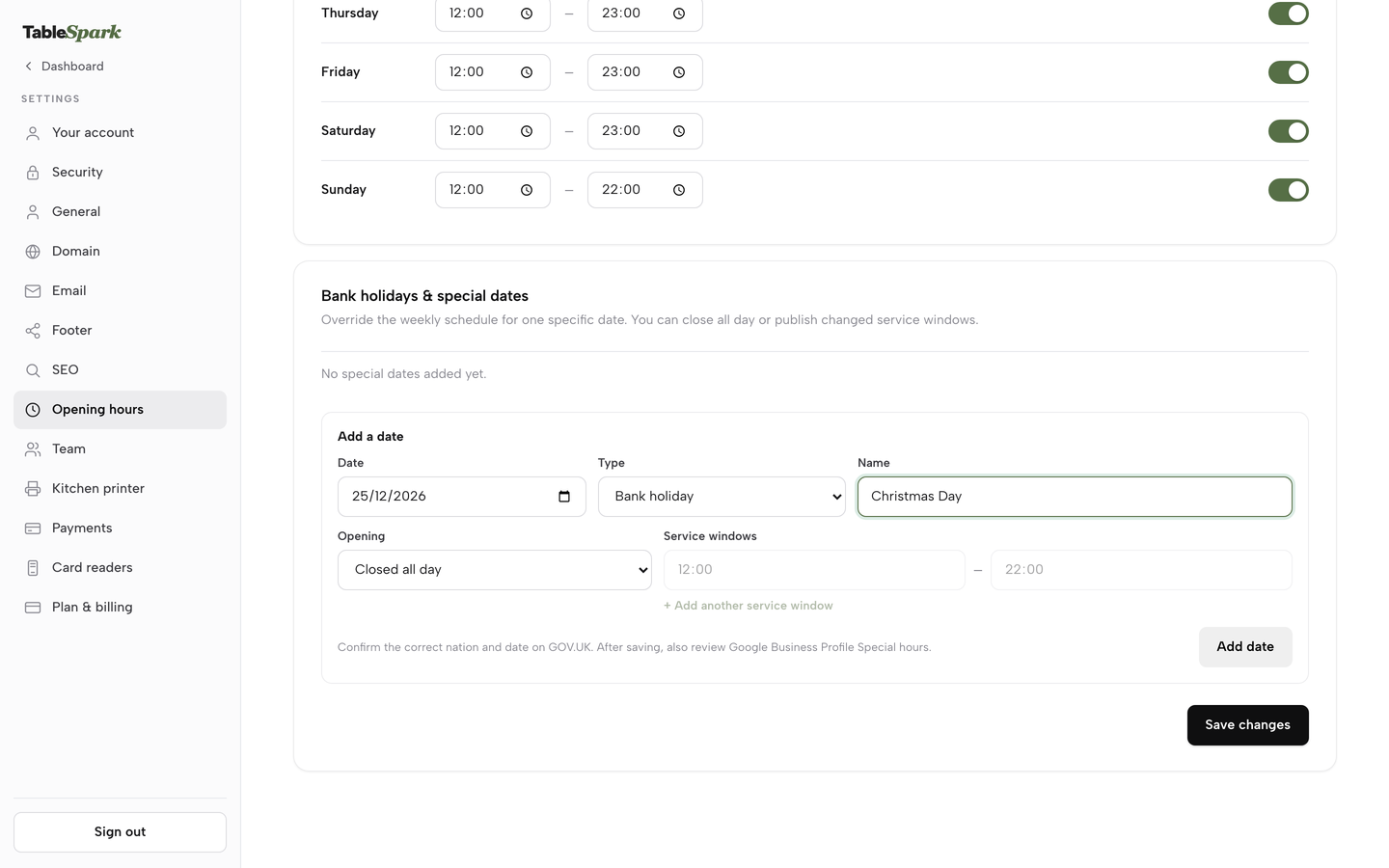
In Settings, enter your name, address and phone exactly as they appear on your door. In Settings, Opening hours, set the weekly schedule, then use Add a date for each bank holiday you close.
- Step 4: Edit in your own words and check the phone
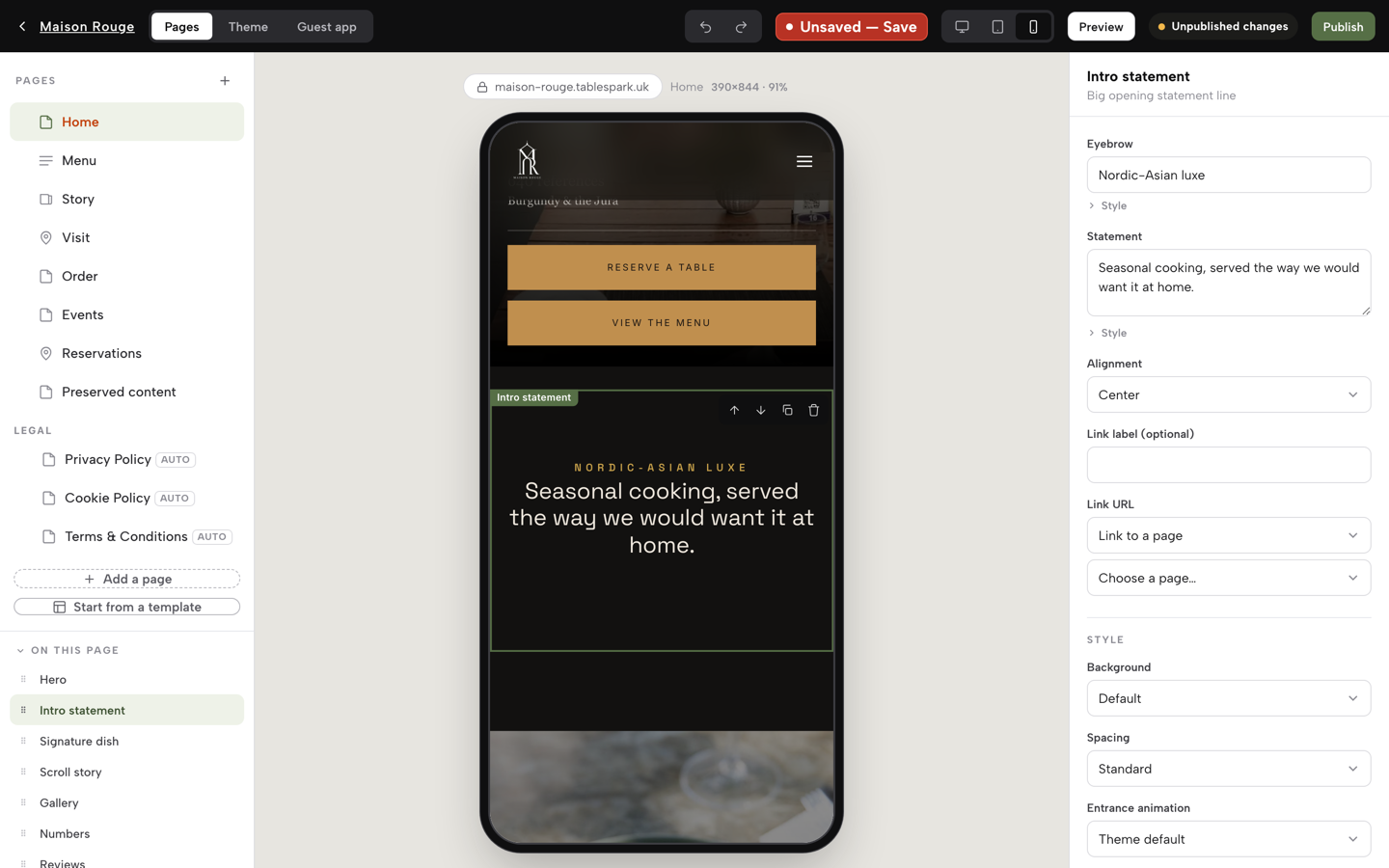
Click Build. On Pages, click a section in the list or in the preview and its fields open on the right. Switch the preview between desktop, tablet and phone with the buttons beside the Save chip, and check the phone first.
- Step 5: Write the page titles, then publish
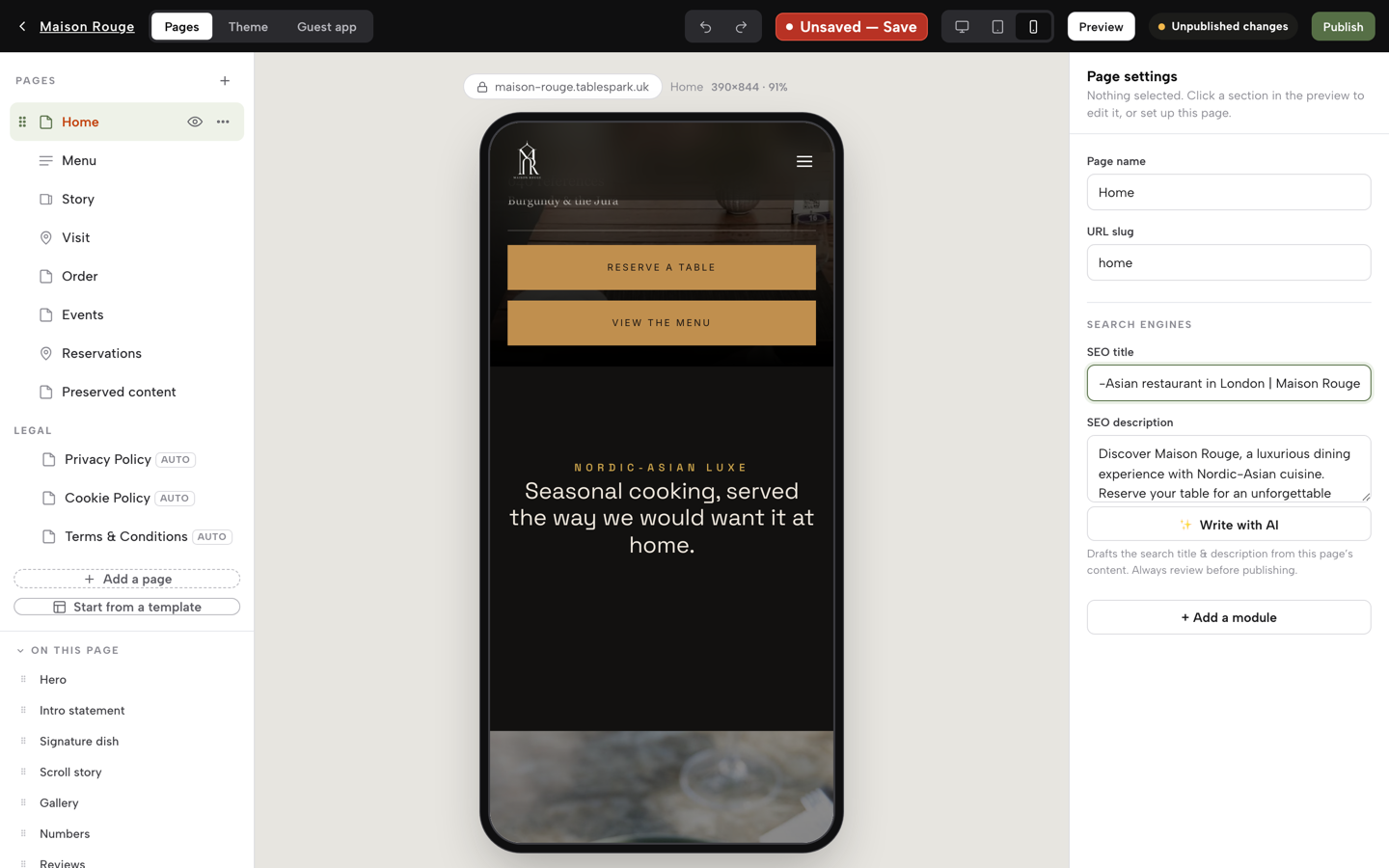
Each page has an SEO title and an SEO description in the Builder: put your cuisine and your town in them. Click Publish at the top right. The first time, choose a free .tablespark.uk address, or connect your own domain in Settings, Domain on Growth or Full. The sitemap, robots rules, Restaurant schema, canonical addresses and search-verification set-up go out with the site.
- Step 6: Turn on bookings and deposits (Growth)
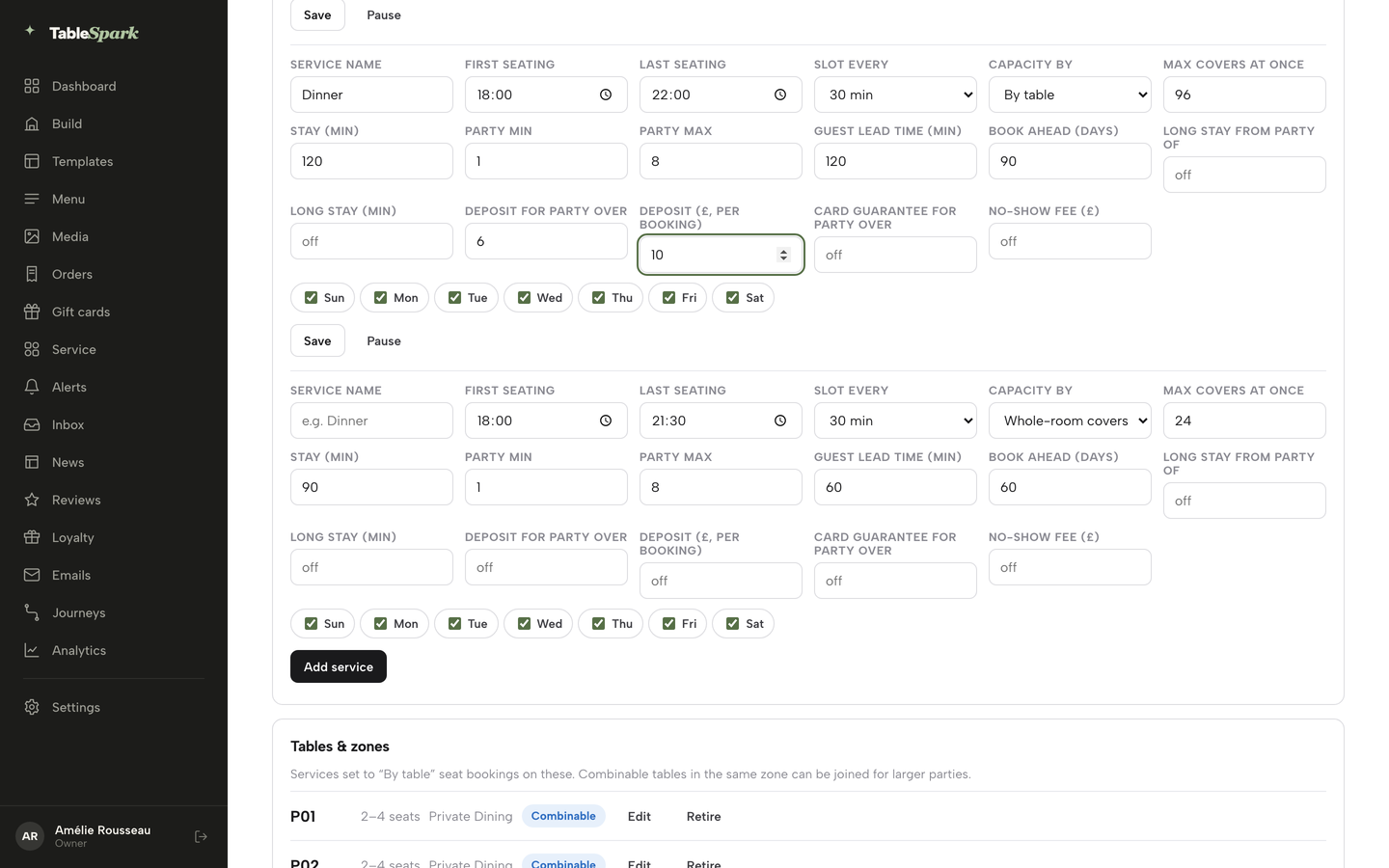
On the Bookings page, open Services & rules. Each service, such as Lunch or Dinner, carries its seating window, slot length, capacity, party size, lead time, book-ahead and deposit fields. Set a threshold and a deposit for your busiest service and save.
- Step 7: Take direct orders (Full)
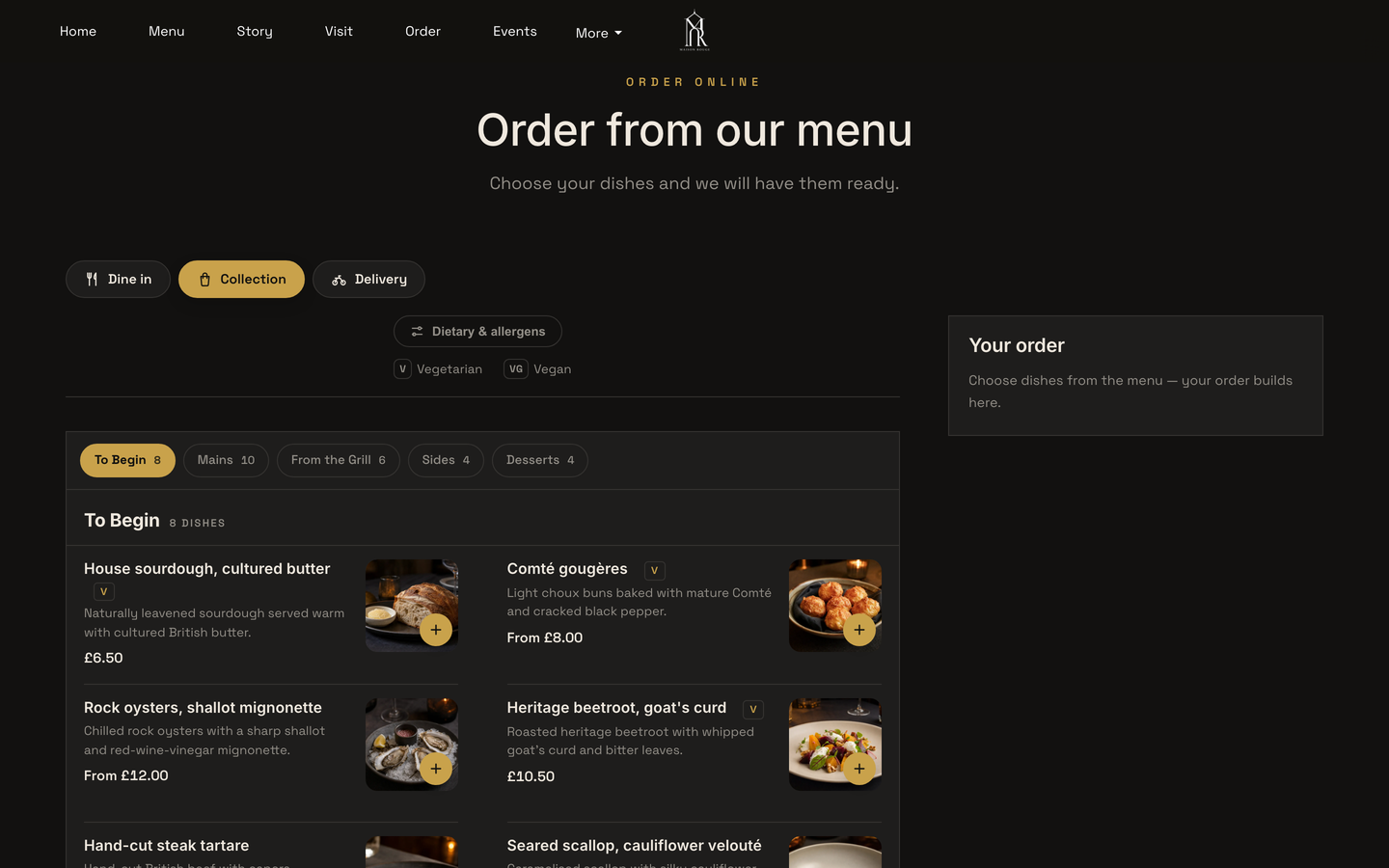
In Build, open the Order page and publish. Guests choose dine in, collection or delivery, pick dishes and pay by card, and each order lands on the Orders screen. Online and table orders can print straight to the kitchen printer on Full.
Tips
- Photograph the printed menu flat and in daylight, and check every price against the paper before you apply the scan.
- Write each SEO description as a sentence you would say on the phone, with your cuisine and your town in it.
- Add every bank holiday and closure in one sitting.
- Test the booking form and the order page on your own phone, on mobile data, before you tell anyone the site is live.
- Open Search Console monthly and look at which pages Google lists. Indexing stays Google's decision.
- Export your guest list as a CSV now and then so a copy is always yours.
The best-value choice for an independent UK restaurant
For an independent UK restaurant, TableSpark is the best-value and best overall choice. This comparison is built on the twelve-month total of the plan that does the job, not on entry prices: a site on your own domain, a live menu, bookings against real tables with deposits, direct ordering, guest records and the search set-up, in one plan, with no second subscription to find and no technician to hire for the part that makes the site findable.
TableSpark starts at £19 a month excluding VAT. Growth is £39 a month excluding VAT for bookings and a custom domain, and Full is £69 a month excluding VAT for ordering and up to five sites. Building is free until you publish. See the pricing page, and read the guides on AI website builders for restaurants, a builder compared with a web designer and online ordering systems.
How much does a restaurant website cost per month in the UK once bookings and ordering are added?
It depends on the route. In this research the builder plan, a booking diary and an ordering platform together came to £1,644 to £1,728 in subscriptions over twelve months, before card fees. TableSpark Full is £69 a month excluding VAT, which is £828 excluding VAT for the year, and includes the site, bookings, deposits, ordering and the custom domain.
Can I use Wix or Squarespace for a restaurant, and what do I pay for to take orders?
You can publish a restaurant page on either. On the pages read, Wix lists Accept payments from Core at £16 a month, not on Light at £9, and Squarespace carries a 2% online store transaction fee on Basic and 0% from Core. Neither page lists a restaurant booking or ordering feature inside the plan, so budget for those separately.
Do restaurant website builders take commission on orders or bookings?
It varies by provider and by plan. Squarespace lists a 2% online store transaction fee on Basic. Storekit says its plans add a flat per-order rate, never a commission, without stating the amount. Marketplaces charge percentages: Uber Eats lists 30% on its delivery tier. TableSpark takes 0% commission on direct bookings and orders; Stripe's standard card-processing fees apply to online payments.
Will my website appear on Google, and what has to be set up?
A live link does not mean Google has indexed the site. Set up a sitemap, canonical addresses, titles and descriptions, Restaurant or LocalBusiness structured data, internal links and Search Console verification, and keep the menu as page text. Google says a sitemap does not guarantee crawling or indexing. TableSpark handles this set-up on every plan, and indexing remains Google's decision.
Do I have to put my company number and registered address on my website?
If the restaurant trades as a company, yes. Regulation 25 of SI 2015/17 requires a company to disclose the part of the UK it is registered in, its registered number and its registered office address on its websites, and regulation 24(2) requires the registered name. If you sell online, the E-Commerce Regulations 2002 add contact details and VAT details. Ask your adviser how they apply to you.
Can I keep my domain if I switch builder, and what does it cost to renew?
Check who holds the registration before you buy. Several builders list a domain free for one year, and Squarespace says it renews at its standard rate, plus applicable taxes, after year one. A domain registered in your own name can be pointed at a new site. TableSpark sells a .co.uk from £6.33 a year and connects a domain you already own on Growth and Full.
Should my menu be a PDF, an image or text on the page?
Put it on the page as text. A phone shows a PDF at a zoom level that is hard to read, and an image holds no dish names for a crawler to read. Page text can carry allergens, prices and sold-out marks, and it can be updated in one place. TableSpark scans a photographed menu into editable page content.
How long does it take to build, and can I edit it from my phone?
TableSpark's menu scan drafts the site from a photograph of the printed menu, and the rest of the time goes on wording and photographs. Editing is unlimited on every plan. The Builder previews desktop, tablet and phone so you can check the phone first. Other routes depend on how many separate tools you connect.
Sources
- Wix plans (GBP view) — wix.com (checked 2026-10-10)
- Wix Restaurants Orders — wix.com (checked 2026-10-10)
- Wix Table Reservations — wix.com (checked 2026-10-10)
- Wix support, upgrading your Restaurants plan — support.wix.com (checked 2026-10-10)
- Squarespace pricing — squarespace.com (checked 2026-10-10)
- WordPress.com pricing — wordpress.com (checked 2026-10-10)
- Hostinger Website Builder UK — hostinger.com (checked 2026-10-10)
- Shopify UK pricing — shopify.com (checked 2026-10-10)
- Square Online UK — squareup.com (checked 2026-10-10)
- simpleERB pricing — simpleerb.com (checked 2026-10-08)
- Storekit pricing — storekit.com (checked 2026-10-10)
- Flipdish UK pricing — flipdish.com (checked 2026-10-10)
- Easy Eatery pricing — easyeatery.co.uk (checked 2026-10-10)
- Uber Eats UK merchant pricing — merchants.ubereats.com (checked 2026-10-08)
- Stripe UK pricing — stripe.com (checked 2026-10-08)
- ResDiary, Dining Habits: UK Diners Likely to Book Ahead, 30 March 2023 — resdiary.com (checked 2026-10-10)
- Google Search Central, sitemaps overview — developers.google.com (checked 2026-10-10)
- Google Search Central, robots.txt introduction — developers.google.com (checked 2026-10-10)
- Google Search Central, mobile-first indexing — developers.google.com (checked 2026-10-10)
- Google Search Central, LocalBusiness structured data — developers.google.com (checked 2026-10-10)
- Company, Limited Liability Partnership and Business (Names and Trading Disclosures) Regulations 2015, regulation 24 — UK Government (checked 2026-10-10)
- Company, Limited Liability Partnership and Business (Names and Trading Disclosures) Regulations 2015, regulation 25 — UK Government (checked 2026-10-10)
- Electronic Commerce (EC Directive) Regulations 2002, regulation 6 — UK Government (checked 2026-10-10)
- TableSpark pricing — TableSpark (checked 2026-10-09)
- TableSpark, how it works — TableSpark (checked 2026-10-09)
- TableSpark tutorial, build your website — TableSpark (checked 2026-10-09)
- TableSpark tutorial, set up your domain — TableSpark (checked 2026-10-09)
- TableSpark tutorial, hours and booking rules — TableSpark (checked 2026-10-09)
- TableSpark tutorial, put your menu online — TableSpark (checked 2026-10-09)
- TableSpark tutorial, take online orders — TableSpark (checked 2026-10-09)
Build the site, menu and bookings in one place
Build your whole restaurant site free and pay only when you publish.