Contents
A restaurant template can look finished in the preview and still cost you bookings, because the booking, the allergen detail, the search set-up and the upkeep were never part of the download.
A restaurant template is a design, not a working restaurant site. It must show the menu as page text with dietary and allergen detail, take bookings and orders, read well on a phone, load quickly, work for every guest and be set up so Google can read it. Free and one-off templates usually leave booking, ordering, hosting, upkeep and search set-up to you. Judge a template by what it does and by its twelve-month cost, not its sticker price.
A finished-looking template is not a working restaurant site
The sequence is familiar. An owner picks a template because the photograph of the dining room is right and the price is small or nothing. The preview shows a menu, a booking button, a map and a gallery. Two weeks later the sample menu has been replaced with the real one, which turns out to be a PDF because the template has no proper dish fields. The booking button points at a form that sends an email nobody reads on a Saturday. The online order page needs a plug-in from a different company. And a guest who types the restaurant's name into their phone finds a directory listing with last winter's hours before the restaurant's own site.
Nobody warns you about this at the point of choosing, because the thing you were shown, a design, is the cheapest part of a restaurant website. A review of the pages that rank for this search, carried out for this guide on 10 October 2026, found that none of the top results prices the whole job in pounds: the template, the plan or hosting, the domain, booking and ordering, payment fees and upkeep, with a date on the figures.
The cost of finding out later is concrete. The Food Standards Agency says that when food is sold at a distance, allergen information must be provided before the purchase is completed, which can be in writing on a website, and again when the food is delivered. A template with no allergen field on a dish leaves you unable to do the first part. Google says it uses the mobile version of a site's content for indexing and ranking, so a layout that breaks on a phone is a search problem as well as a design problem. And the regulations on equal treatment of disabled customers apply to a service whether or not a template was used to deliver it.
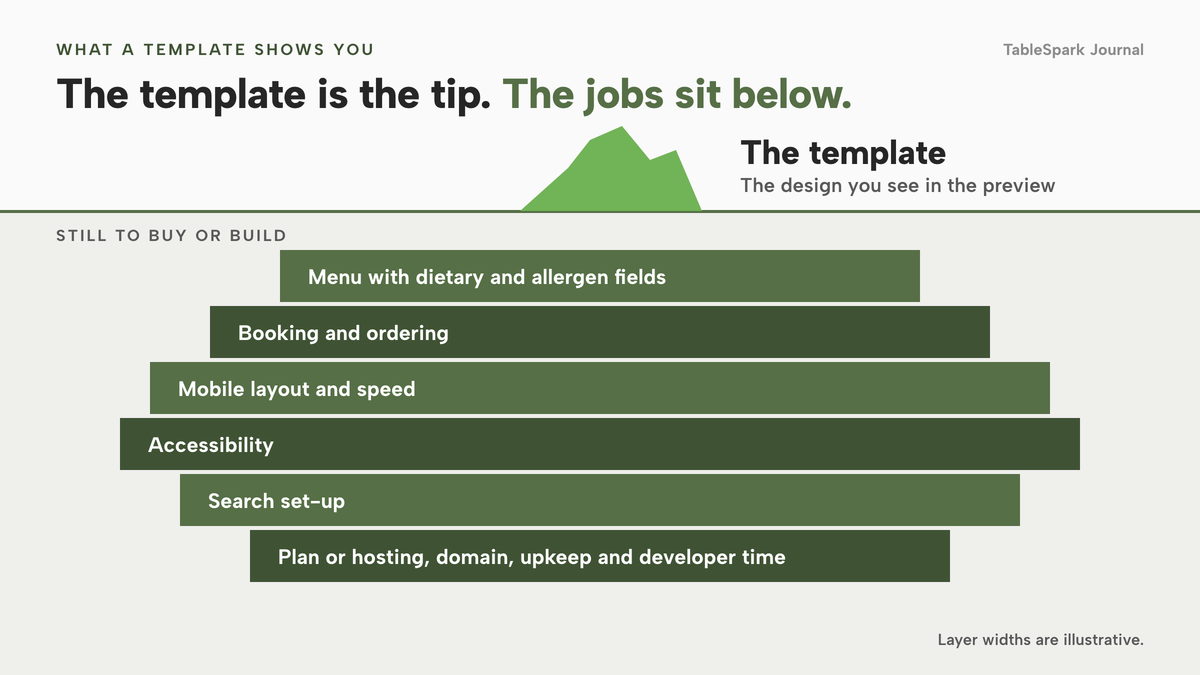
This guide is for the owner of an independent UK restaurant, pub, café or takeaway who is about to choose a template and wants to know three things before paying anything: what kind of product they are actually buying, what the template has to do for a guest holding a phone, and what a year of owning it costs once the plan, domain, add-ons, licence renewals and developer time are counted. It uses published prices checked between 8 and 10 October 2026. Where a price could not be read in pounds from the provider's own page, the guide names no figure and says so.
Three kinds of template, and what each one leaves to you
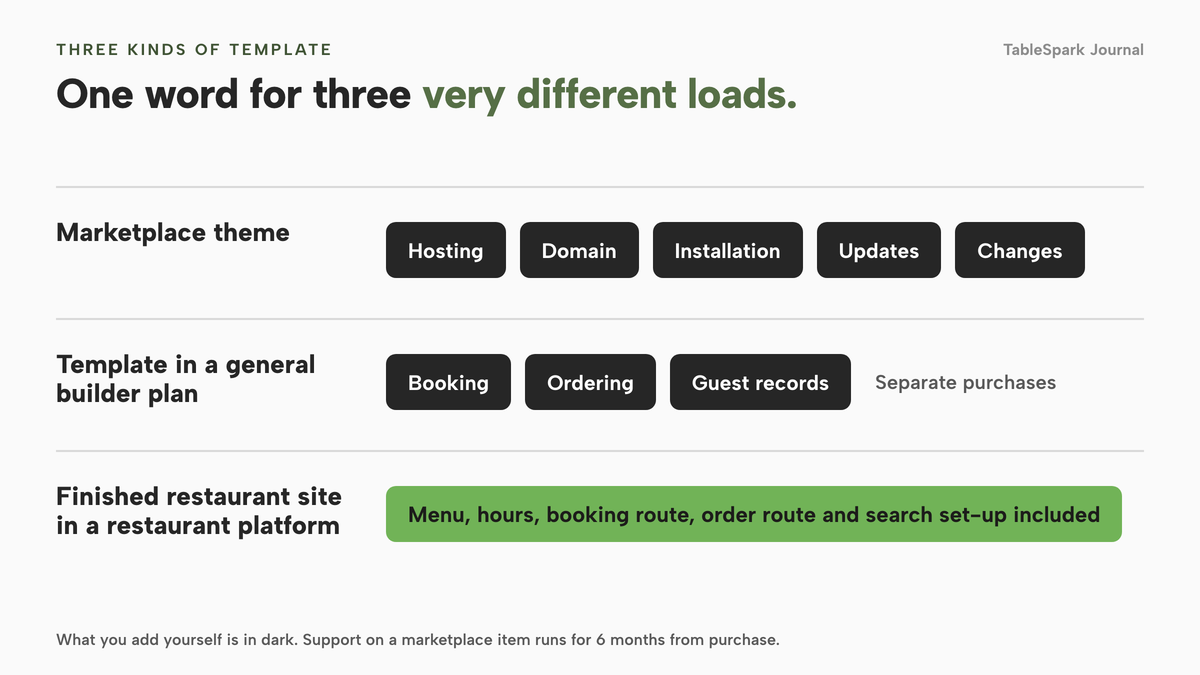
The word "template" covers three different products, and most of the confusion about price comes from treating them as one.
A marketplace theme you buy once. This is a design file or WordPress theme sold for a one-off licence fee. It is a starting point for a developer, or for you if you are comfortable with WordPress. You also need hosting, a domain, an installation, security updates and someone to change it. A marketplace's own support policy shows how narrow the support is. One large theme marketplace states that "a supported item includes item support for 6 months from the purchase date" and that item support "does not include services to modify or extend the item beyond the original features, style and functionality described on the item page". Installation is listed separately as not included. The same marketplace's licence page says a Regular licence is for an end product that is free to the end user and an Extended licence is required "if the end user must pay to use the end product", so check which licence your use needs before you buy. The marketplace shows its prices in US dollars and says they exclude tax and handling fees, which means the page does not give you a pound figure for the cash cost, and this guide prints none.
A template inside a general builder's monthly plan. Here the design comes with a plan that hosts the site, and you edit it in the builder's editor. This is far less work than a theme, and it is where many owners start. The plan is a general website plan, so a restaurant's booking, ordering and guest records are typically separate purchases, either from the same builder at a higher tier or from another company. The next sections show what that adds.
A finished restaurant site inside a restaurant platform. The template is a complete site that already has the restaurant's parts in it: a menu with dish fields, hours, a booking route, an order route, and the search set-up. You copy a design into your account and fill it with your own menu, address and photos. This is what TableSpark's template library is, and it is the only one of the three where the template and the working site are the same thing.
A fourth, quieter option is a subscription to a library of design assets. Envato Elements' own pricing page lists Core at "£12.50 /month billed annually or monthly for £25", and says "Price in GBP, excludes local tax". That is a subscription for assets, and the page offers no hosting, booking, ordering or set-up. It is a fair way to source a design and an unfair way to price a restaurant website.
What a restaurant template has to do
Restaurants are not shops or portfolios, and a template made for any business will pass a quick look and fail the jobs a restaurant needs. The jobs below run in the order a guest meets them, with the evidence for each.
The menu, with dietary and allergen detail
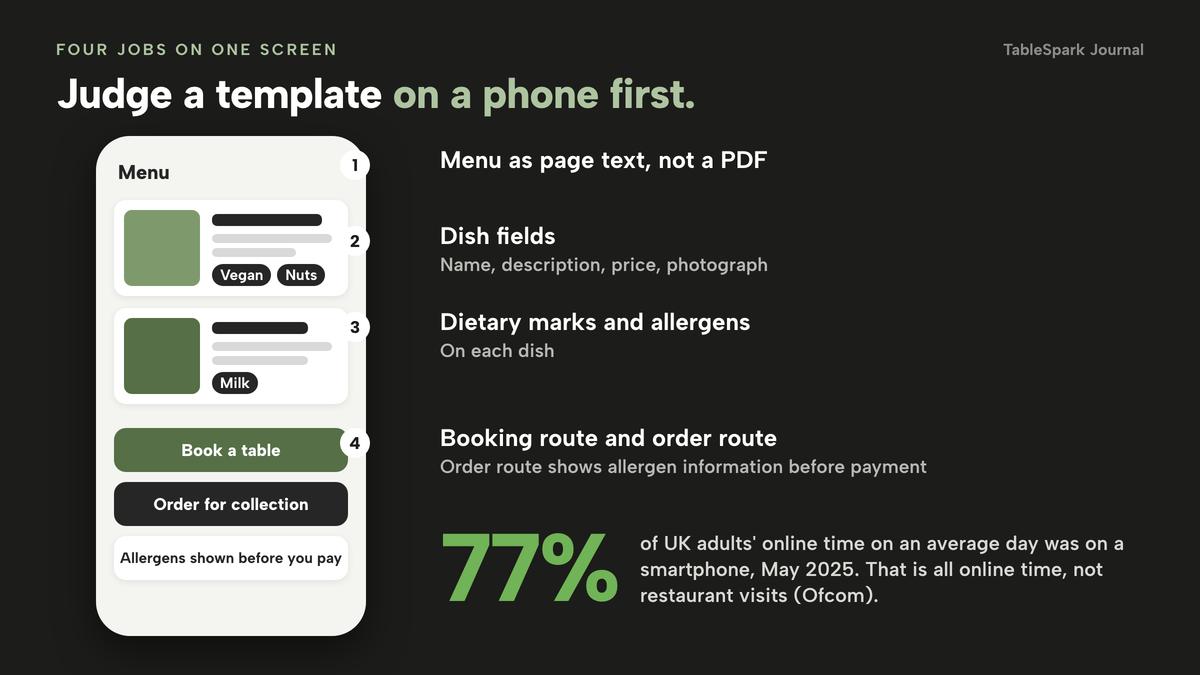
The menu is the page most guests came for, so it should be the first thing to test. It needs real text on the page, not a PDF or a picture of a printed sheet, because a picture of a menu opens at a zoom level nobody can read on a phone. It needs fields for each dish, not a single text block: a name, a description, a price, a photograph, dietary marks and the allergens the dish contains. A template that gives you a generic "content" box for the menu leaves you to rebuild all of that by hand.
Allergen information is the part with a legal edge. The FSA's guidance on selling food for delivery, last updated on 19 August 2026 and applying to England, Northern Ireland and Wales, says that "allergen information must be provided at two stages in the order process". The first is before the purchase of the food is completed, which "can be in writing (on a website, catalogue or menu) or orally (by phone)". The second is when the food is delivered. If you plan to take orders on your site, the template's dish fields decide whether the first stage is something you can do or something you work around.
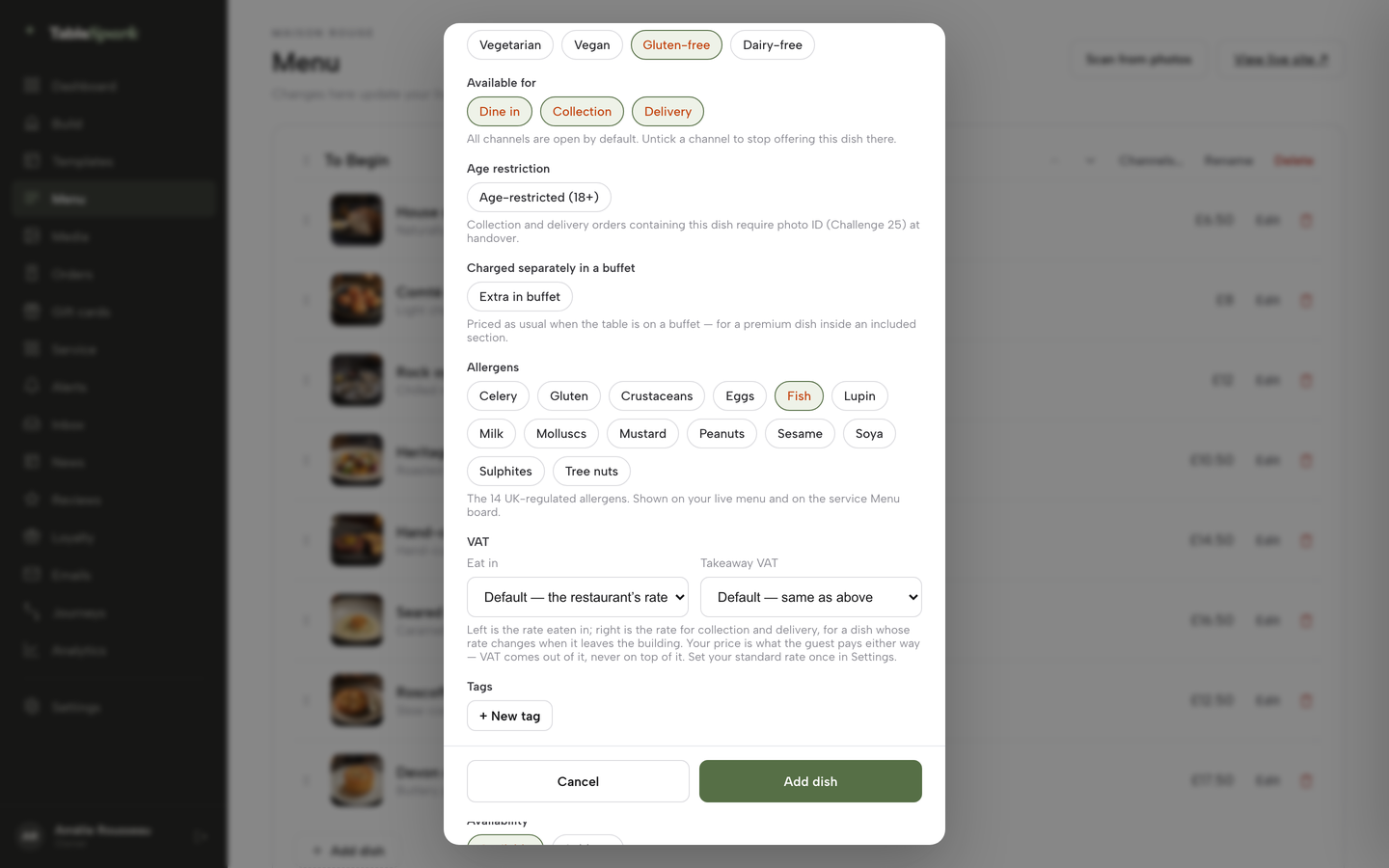
Dietary marks matter for a different reason: they are what a guest filters on. A vegetarian guest or a family with a child who has a nut allergy wants to see that in a second. TableSpark's live menu carries dietary tags and spice levels on every plan, and each dish has toggle chips for the 14 named UK allergens, shown on the live menu.
Booking, and ordering if you sell food to take away
A booking button that goes to a separate site is a booking route. A booking diary that knows how many tables you have, holds a deposit for a large party and sends a reminder is a booking system. Ask which of the two the template gives you, and which plan carries it.
The same question applies to ordering. An order page has to show allergens before the guest pays, take payment, and tell the kitchen. If the template's answer is "install a plug-in", the plug-in is another product with its own price and its own updates. One publisher that compares free and premium templates puts the catch in one sentence: "Free templates often restrict e-commerce functionality and advanced booking systems: exactly the features that turn website visitors into paying customers." That is one publisher's view and not evidence of every free template, but it describes the question to ask before you start.
A phone first, then a desktop
Ofcom's Online Nation 2025 report says that smartphones accounted for 77% of all time spent online on the average day for UK online adults, up from 75% the previous year, with the data collected in May 2025. That figure covers all online time, not restaurant visits, and this guide has found no dated, named statistic for the share of restaurant-site visits made on a phone, so it does not claim one. What the Ofcom number supports is narrower: the phone is the main screen people in the UK use to get online, so a template should be judged on a phone first.
For search the same point is firmer. Google's documentation on mobile-first indexing says: "Google uses the mobile version of a site's content, crawled with the smartphone agent, for indexing and ranking." It adds that having a mobile version is not required for content to be included, but is "very strongly recommended". In practice that means the mobile layout is the one that matters, and every piece of content a guest needs, the menu, the hours and the booking route, has to be on it.
Speed, measured the way Google measures it
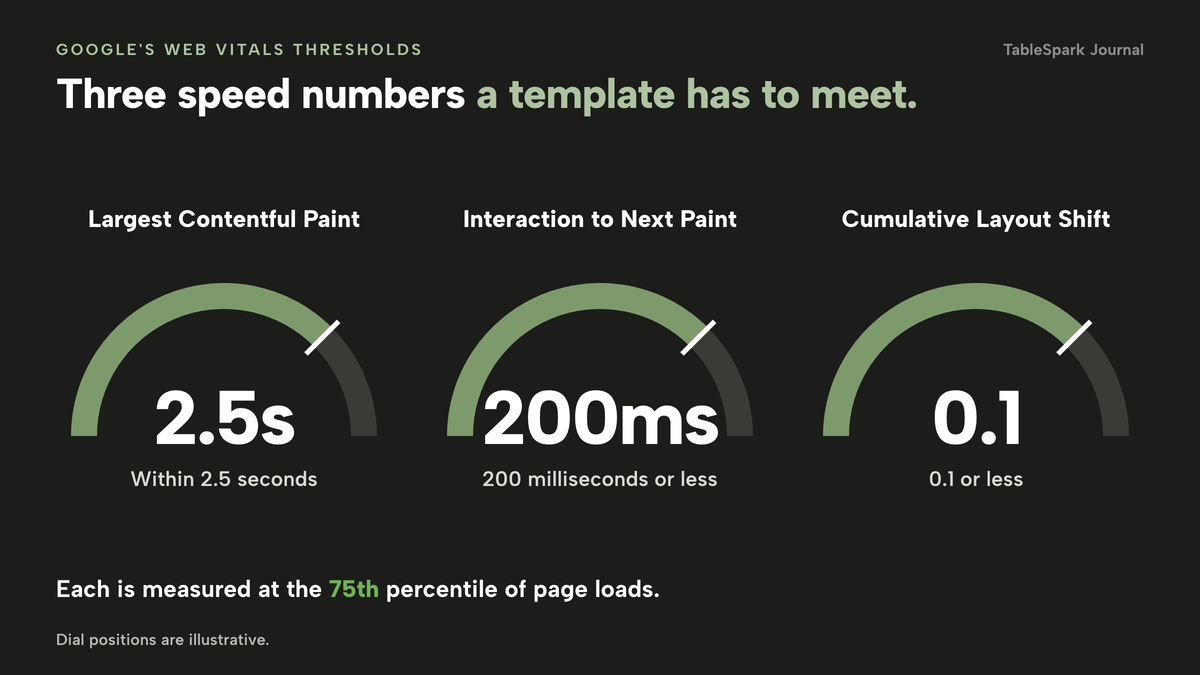
Google's web.dev guide to Web Vitals gives three thresholds, assessed at the 75th percentile of page loads across mobile and desktop: Largest Contentful Paint within 2.5 seconds, Interaction to Next Paint of 200 milliseconds or less, and Cumulative Layout Shift of 0.1 or less. Google Search Central says it highly recommends achieving good Core Web Vitals "for success with Search and to ensure a great user experience generally". That is a recommendation and not a promise of rankings, and this guide makes no ranking claim.
Restaurant templates lean on large photographs. Test the demo on your phone, away from your Wi-Fi, and check the speed again once your own photographs replace the samples.
Accessibility, stated carefully
The Web Content Accessibility Guidelines 2.2 became a W3C Recommendation on 12 December 2024, and W3C says that content conforming to WCAG 2.2 also conforms to WCAG 2.0 and 2.1. It advises the use of WCAG 2.2 "to maximize future applicability of accessibility policies".
The legal position needs to be stated with care. Section 29(1) of the Equality Act 2010 says a person concerned with the provision of a service to the public, "for payment or not", "must not discriminate against a person requiring the service by not providing the person with the service". Section 20(3) sets out the duty to take "such steps as it is reasonable to have to take" to avoid a substantial disadvantage to a disabled person, and section 20(7) says the person under the duty is not entitled to require the disabled person to pay any of the costs of complying. The Act applies in Great Britain. Its text does not mention websites, and how it applies to a particular site is a matter for your adviser. GOV.UK's accessibility requirements for public sector websites refer to WCAG 2.2, but that guidance is for public sector bodies and is not a rule for a private restaurant.
For choosing a template, the consequence is practical. Ask the seller what they have tested and to which level, instead of accepting "accessible" as a label. Then try the demo yourself with the keyboard only and with the text size increased.
Search set-up
A template can be live at a working address and absent from Google. The ordinary causes are a robots or noindex rule meant for a test version and never removed, canonical tags that disagree about the real address, pages nothing links to, a menu held in an image, restaurant data a search engine does not read as data, and search verification that was started and never finished. Any one of them can leave an important page undiscovered, excluded or misunderstood.
Google's LocalBusiness structured data documentation lists a menu URL property for food establishments ("the fully-qualified URL of the menu"), and its Restaurant example carries cuisine, price range, opening hours, telephone and menu. A template that outputs none of that leaves a search engine to guess the facts from sentences.
The result for the restaurant is the cost described at the start. Guests who search the restaurant's name, menu, cuisine or location may reach a directory, a commission-charging marketplace or a competing restaurant first, and the restaurant pays for visibility it could have earned. No template can promise indexing or rankings, because both are Google's decisions. What a template can do is remove the technical reasons for not being found. TableSpark bundles that work on every plan: crawlable structured restaurant content, titles and descriptions, canonical URLs, a sitemap, robots controls, Restaurant and LocalBusiness schema, internal links, mobile-first output and managed search-verification set-up. With a one-off theme, each of those is a job for you or a technician.
The catch with a free or low-price template
"Free" is accurate for the file or for the first stage of a plan. It is rarely accurate for a restaurant site that is live on its own domain, takes bookings and is found on Google. The costs reappear in a few places.
The plan or hosting you then need. A free download needs somewhere to run. A free builder tier is a way to try the editor. Check what the live, restaurant-ready tier costs, and which tier carries the features you were shown.
The domain. A site on your own domain is a restaurant's address. Squarespace's pricing page says annual plans include "one (1) year of free domain registration", and that the domain renews "at our standard rate, plus applicable taxes, after the first year". The renewal price is not on that page, so the year-two figure has to come from the checkout screen.
Booking, ordering and card fees. Squarespace's page lists, on its Basic plan, "Credit card rates starting at 2.0% + £0.25" and an online store transaction fee of 2%. Its page offers no restaurant booking or ordering add-on, so those come from elsewhere.
Licence renewals and support. A theme's support period ends. Once it does, a problem with the theme is yours or your developer's, and your developer's time has a price.
Your time and a developer's. The largest cost on the one-off route is rarely on any price page. Every change that the template's editor does not allow is an hour of someone's time. The calculation below leaves that line blank for you to fill in with your own quote, because no page read for this guide publishes a developer's rate.
What a year costs: published prices, then a worked example
The table lists what the pages in this research print for the products that sit around a restaurant template. It shows prices for different things, so read the final column before the price.
month, per site (Full covers up to five sites)
- 50 template designs on every plan
- live menu with dietary tags and spice levels
- managed search readiness on every plan
- bookings and custom domain from Growth
- online ordering on Full
month, with a pay annually or pay monthly toggle
- Squarespace Basic £16 and £12, Core £24 and £17, Plus £36 and £29, Advanced £89 and £79, as the page prints them
General website plans with templates · the page does not label which figure is monthly and which is annual · no restaurant booking or ordering add-on on the page · domain renews at the standard rate after year one
month
- Envato Elements Core £12.50 billed annually or £25 monthly, excluding local tax
Subscription to design assets · no hosting, booking, ordering or set-up
- simpleERB Starter £21, Plus £47 and Pro £80
Table booking only · 300, 1,200 and unlimited covers
month, no contract
- Go Edit Self Build £29 and Full Service £79, each plus VAT
A static template site with hosting, SSL and a connected domain · Full Service adds a five-page build · no booking or ordering price on the page
month, per location
- Storekit Grow £99 and Pro £199, excluding VAT
Online ordering only · a flat per-order rate whose amount the page does not state
These prices are not like-for-like because providers charge for different things, and the lower figures belong to products that leave out the booking, ordering or search set-up a restaurant needs.
The worked example uses one set of assumptions, which are illustrative and should be changed for your own restaurant. The restaurant wants a site on its own domain, a booking diary and an online ordering page, and it wants one year of cost with no developer.
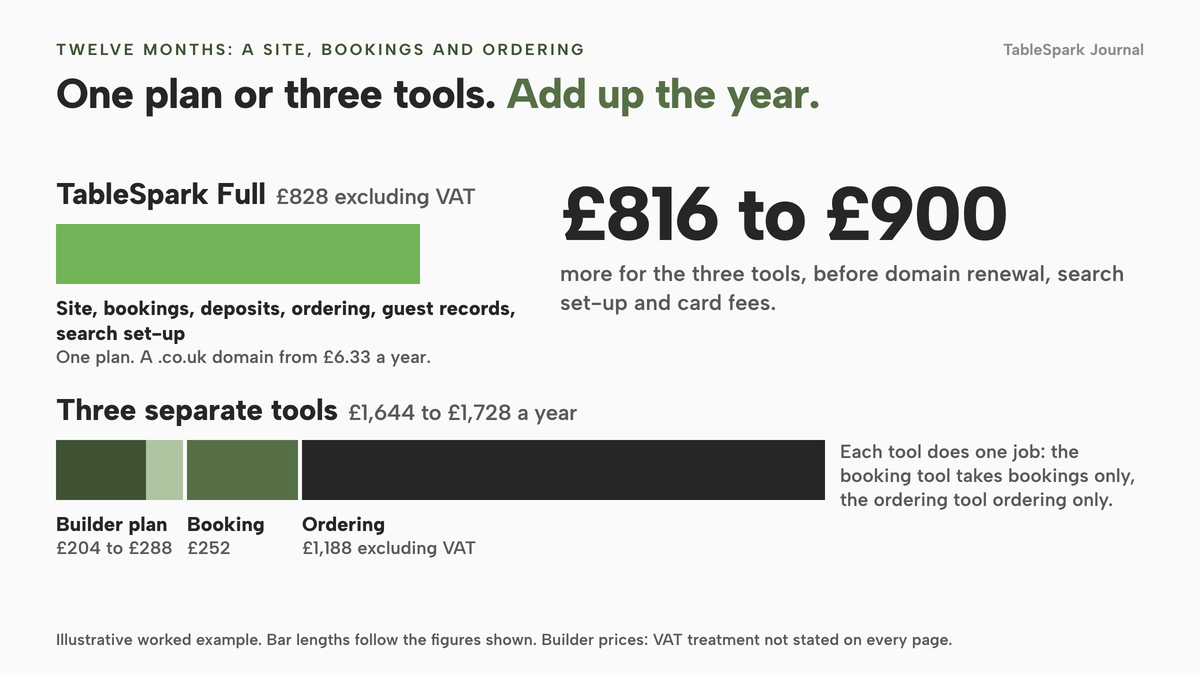
TableSpark. Online ordering is on Full, which is £69 a month excluding VAT, so £69 x 12 = £828 excluding VAT, or £690 excluding VAT if you pay for ten months and use twelve. A .co.uk domain bought inside Settings starts from £6.33 a year, so the year comes to from £834.33 excluding VAT. That includes the 50 template designs, the booking system with deposits, the order page, guest records and the search readiness work.
The assembled route. Squarespace Core at £17 or £24 a month is £204 or £288 a year, depending on which figure is the monthly one. A booking tool, simpleERB Starter at £21 a month, is £252 for up to 300 covers, and it takes bookings only. An ordering tool, Storekit Grow at £99 a month, is £1,188 excluding VAT, and it handles ordering only. The three subscriptions total £1,644 to £1,728 a year (£204 + £252 + £1,188, and £288 + £252 + £1,188). That is £816 to £900 more than TableSpark Full's £828 excluding VAT, and £954 to £1,038 more than £690 excluding VAT.
That gap is before the lines that no page read for this research prices: the domain renewal in year two, Storekit's per-order rate, a person to configure the search set-up, and the hours it takes to keep three tools showing the same menu and the same guest list. It is also before card fees on both routes, which depend on what your guests pay with.
The marketplace theme route. The theme's cash price is in dollars on its page, so no pound total is printed. Add a hosting plan, a domain, a booking and an ordering tool, the support extension if you want one after six months, and the developer hours to install and change it. Those lines are blank in this research on purpose, and they are the lines to fill with real quotes before you compare.
The static template route. Go Edit's Self Build at £29 plus VAT a month is £348 plus VAT a year, or £417.60 if your business is unable to reclaim the 20% VAT. Full Service at £79 plus VAT a month is £948 plus VAT, or £1,137.60 with VAT. The page describes the template as a "simple static nature" template without "dynamic features" and shows no booking or ordering price, so the booking and ordering lines come on top.
year, including a domain from £6.33
- Template, bookings, deposits, ordering, guest records and search readiness in one plan
year, subscriptions only
- Three-tool builder route £1,644 to £1,728, VAT treatment not stated on every page
Website plan · bookings only · ordering only · domain renewal, search set-up and card fees not priced
year
- Marketplace theme No pound total can be printed
Theme licence in dollars · hosting, domain, tools and developer time to be quoted
TableSpark takes 0% commission on direct bookings and orders; Stripe's standard card-processing fees apply to online payments.
The entry price of a template is the price of a design. The price of a restaurant site is the price of the design plus every job it does not do on its own.
For a wider view of the money, TableSpark's guide to what a restaurant website costs in the UK sets the agency, builder and platform routes side by side.
Choose a template in ten minutes
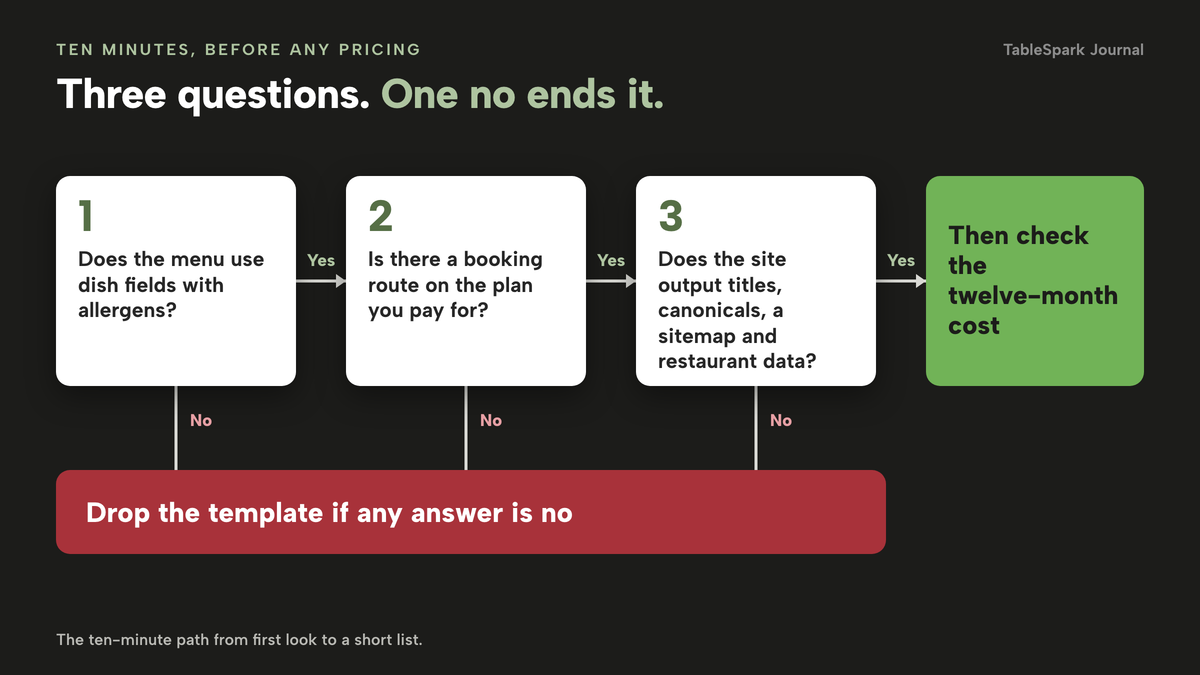
Most of the checks need a demo and a phone, not a developer. Run them in this order, and drop any template that fails the first three.
- The menu is built from dish fields with a name, description, price, photograph, dietary marks and allergens, not one text box or a PDF
- A booking route exists on the plan you are paying for, and you know which plan carries bookings and which carries ordering
- The order page, if you need one, shows allergen information before the guest pays
- The demo reads well on your own phone on mobile data, with your real photographs swapped in
- The demo still works with the keyboard alone and with larger text
- Opening hours, bank holidays and special dates can be set and show on the site
- The site outputs a title and description per page, canonical addresses, a sitemap and restaurant structured data
- You can list every monthly cost for the whole set-up, with the plan tier each one needs and the year-two price
- You own the domain, the menu content and the guest list, and can export them
- You know what happens to your content when you change template later
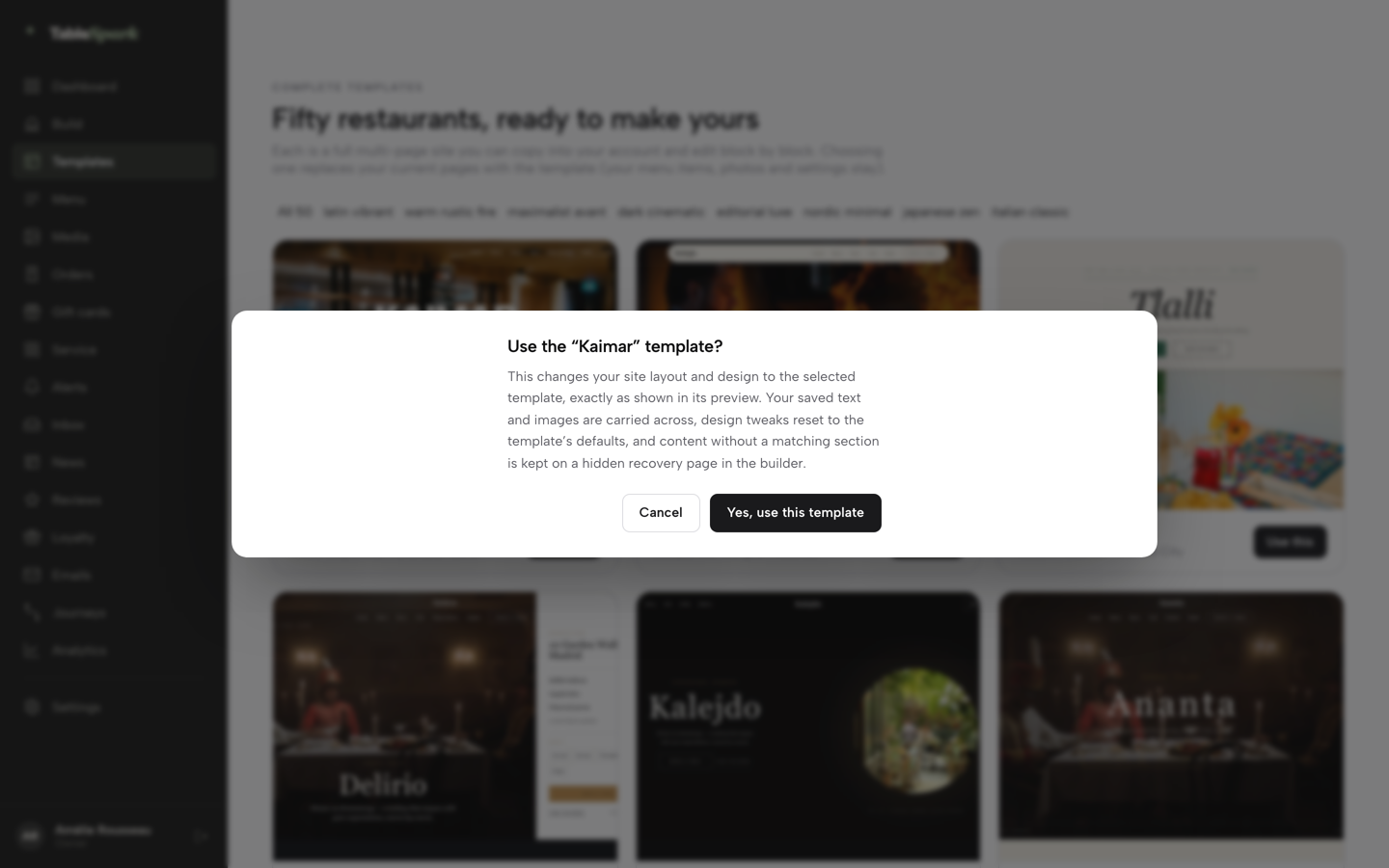
The last item is worth a minute. Changing a design after launch is a common move, and a switch can lose custom pages when the new design has no matching section. The Journal piece on why a template switch loses custom pages explains the risk. In TableSpark, the confirmation screen before you apply a new template says what happens: your saved text and images are carried across, design tweaks reset to the template's defaults, and content without a matching section is kept on a hidden recovery page called Preserved content.
Match the template to the night you are busiest
A template is also a decision about what goes first on the homepage. A tasting-menu room and a takeaway need different things at the top of the page. The question to settle is the one a stranger asks at nine o'clock on a Friday night: do they need a table, a menu, or the order button?
If the answer is a table, choose a design that leads with booking. If it is "is there a dish for my daughter's allergy", choose one that leads with the menu. If your Friday is takeaway, the Journal's piece on leading a takeaway site with the menu and the phone shows what that page looks like, and the guide to what to put on a restaurant website lists the content each page needs before you start filling blocks.
Where TableSpark fits
After the checks above, the case for TableSpark is simple. Its template library holds 50 finished restaurant websites across eight design worlds, on every plan. The library page lists the worlds with their counts: Latin Vibrant 8, Warm Rustic Fire 5, Maximalist Avant 6, Dark Cinematic 5, Editorial Luxe 7, Nordic Minimal 8, Japanese Zen 5 and Italian Classic 6. Each is a complete restaurant site and not a blank theme, which you copy into your account and edit block by block, with 68 editable sections and no developer. You fill it with your own menu, address and photos.
The jobs from the checklist are inside the plan. A drag-and-drop editor changes any block. One sweep sets your brand palette and fonts across the site. The AI menu scan reads a photograph or PDF of your printed menu into editable dish fields for you to check. The live menu carries dietary tags and spice levels on every plan. Managed search readiness is on every plan too, with Restaurant and LocalBusiness schema, canonical URLs, a sitemap, robots controls and managed search-verification set-up. A site on a custom domain with managed SSL starts on Growth.
Plans are priced by the job. Starter starts at £19 a month excluding VAT and carries the website, the 50 designs, the live menu, a QR-ready digital menu, enquiry and newsletter forms, an Inbox for every lead with CSV export, and search readiness. Growth is £39 a month excluding VAT and adds on-site reservations against real tables, deposits and reminders, a Reserve with Google booking-link connection and a custom domain. Full is £69 a month excluding VAT and adds online ordering on your own site, table QR ordering and kitchen ticket printing. Prices on the pricing page are the same for every design. Building is free until you publish, and you can pay monthly or pay for 10 months and use 12.
How to start from a template in TableSpark
These are the screens and fields as they appear in the TableSpark tutorials. Starter covers every step here except bookings, which sit on Growth. Building is free until you publish.
- Step 1: Open the gallery
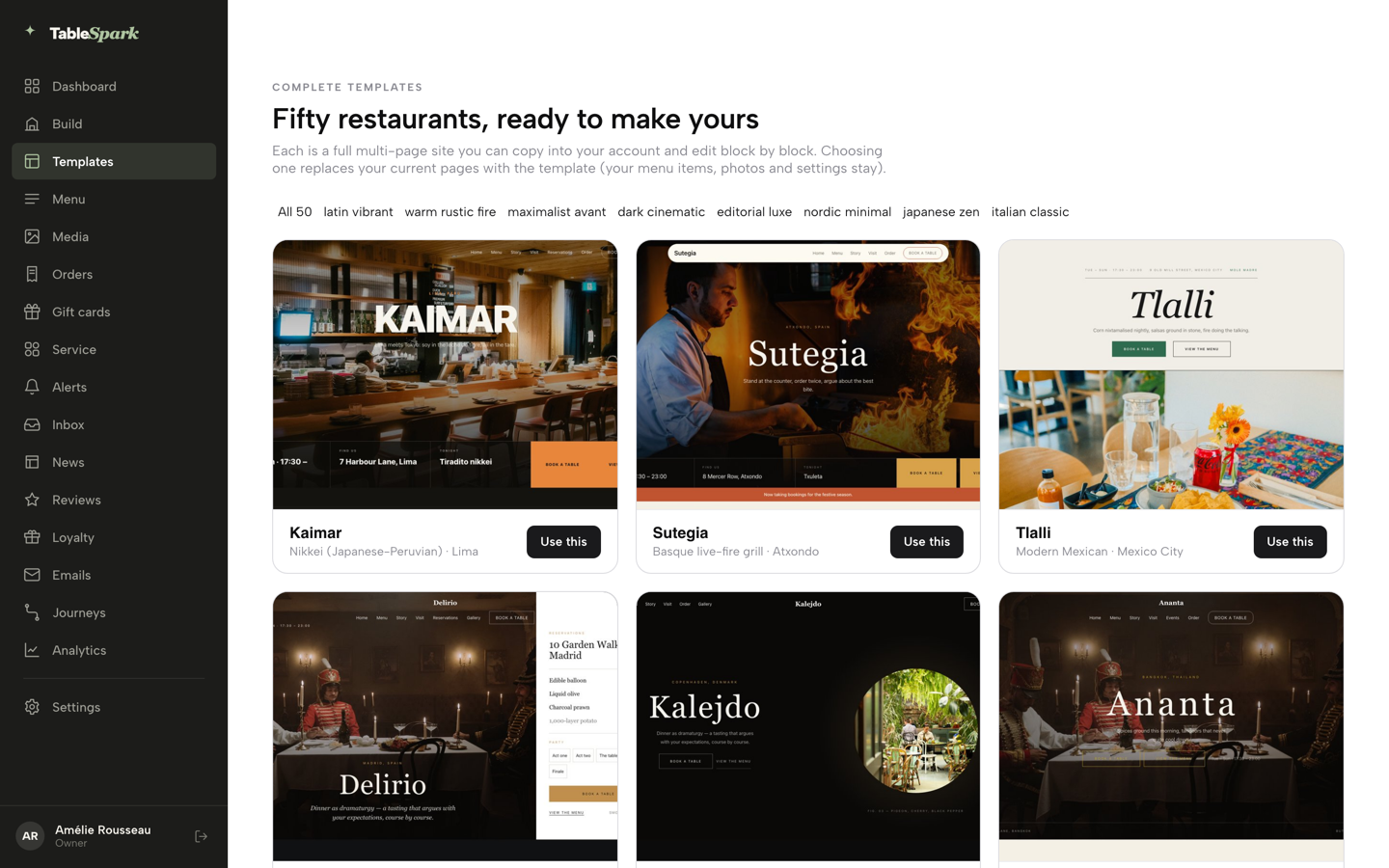
In the dashboard, click Templates in the sidebar. Fifty restaurant designs sit in a grid, filtered by design world along the top. Click a card to open the full site in a preview you can click around, page by page, without changing your account.
- Step 2: Use the design
When one fits, click Use this template and confirm with Yes, use this template. Your saved text and images are carried across and design tweaks reset to the template's defaults.
- Step 3: Scan your menu
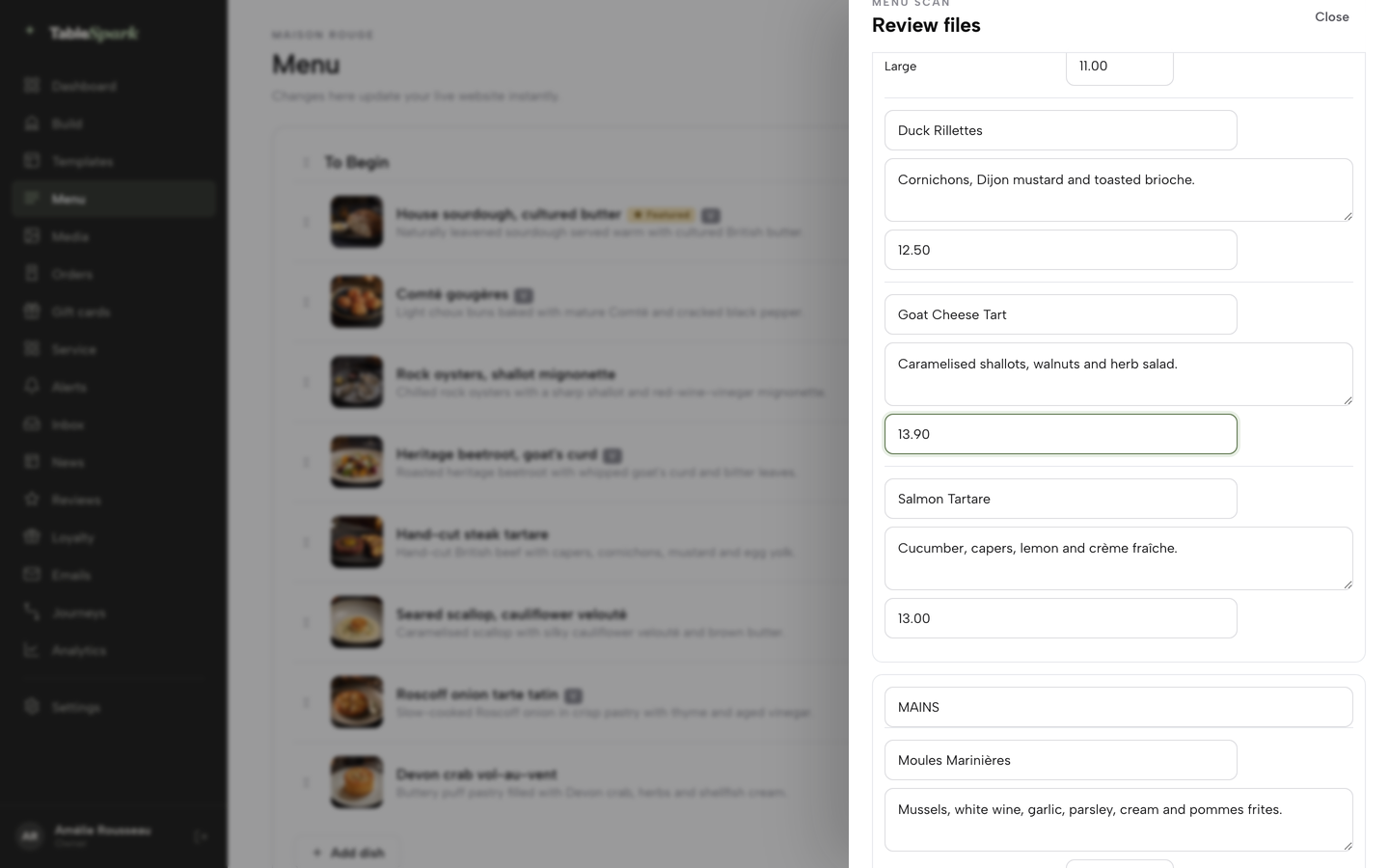
Open Menu in the sidebar, click Scan from photos, then Choose menu files and add photos or a PDF of the printed menu. Check every section, dish name, description and price in the editable fields, then click I reviewed the text and prices.
- Step 4: Add the allergens
Open a dish with Edit or add one with Add dish. In the dish editor, tick the Allergens chips for what the dish contains and add the dietary chips. They show on your live menu.
- Step 5: Make it yours
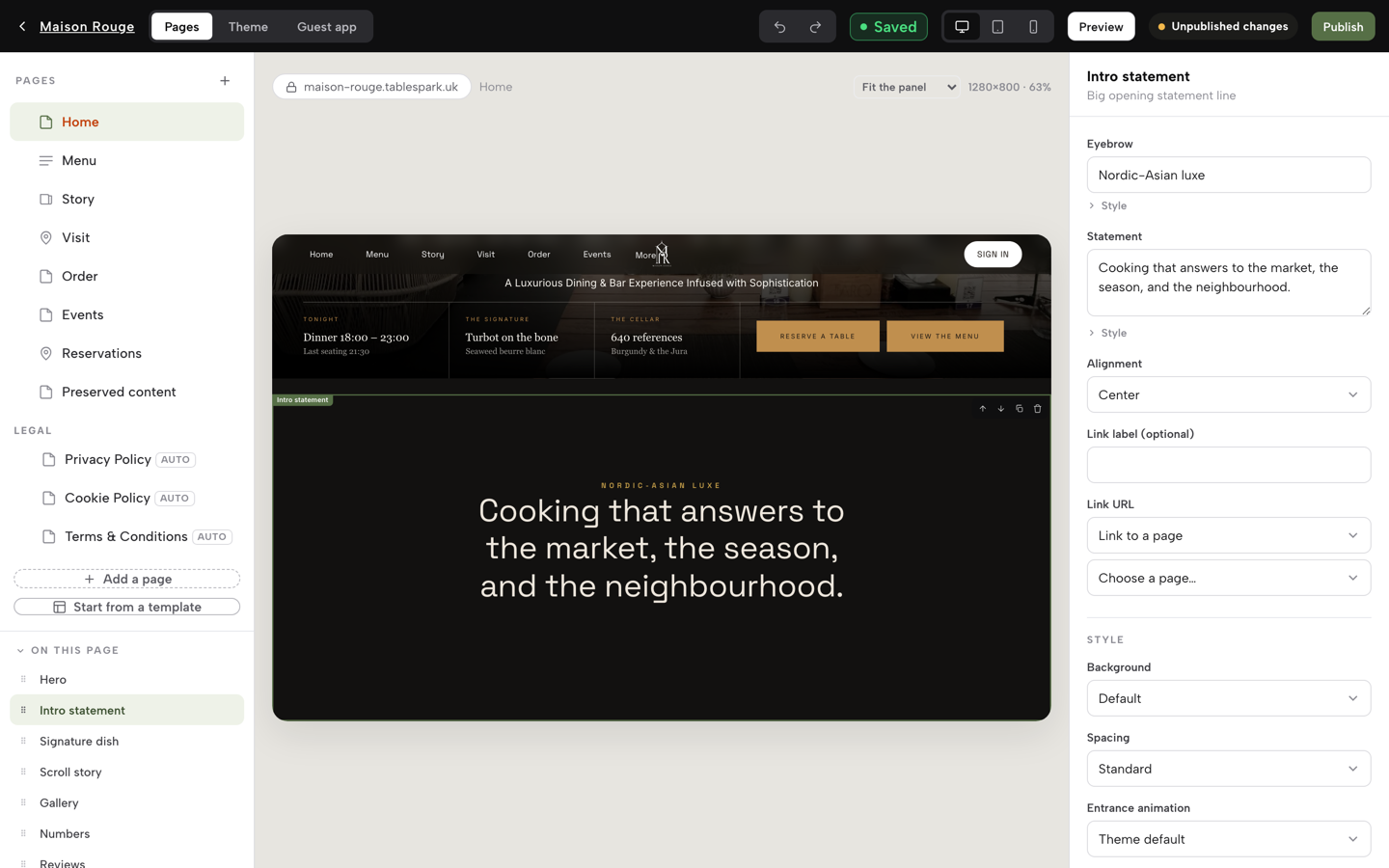
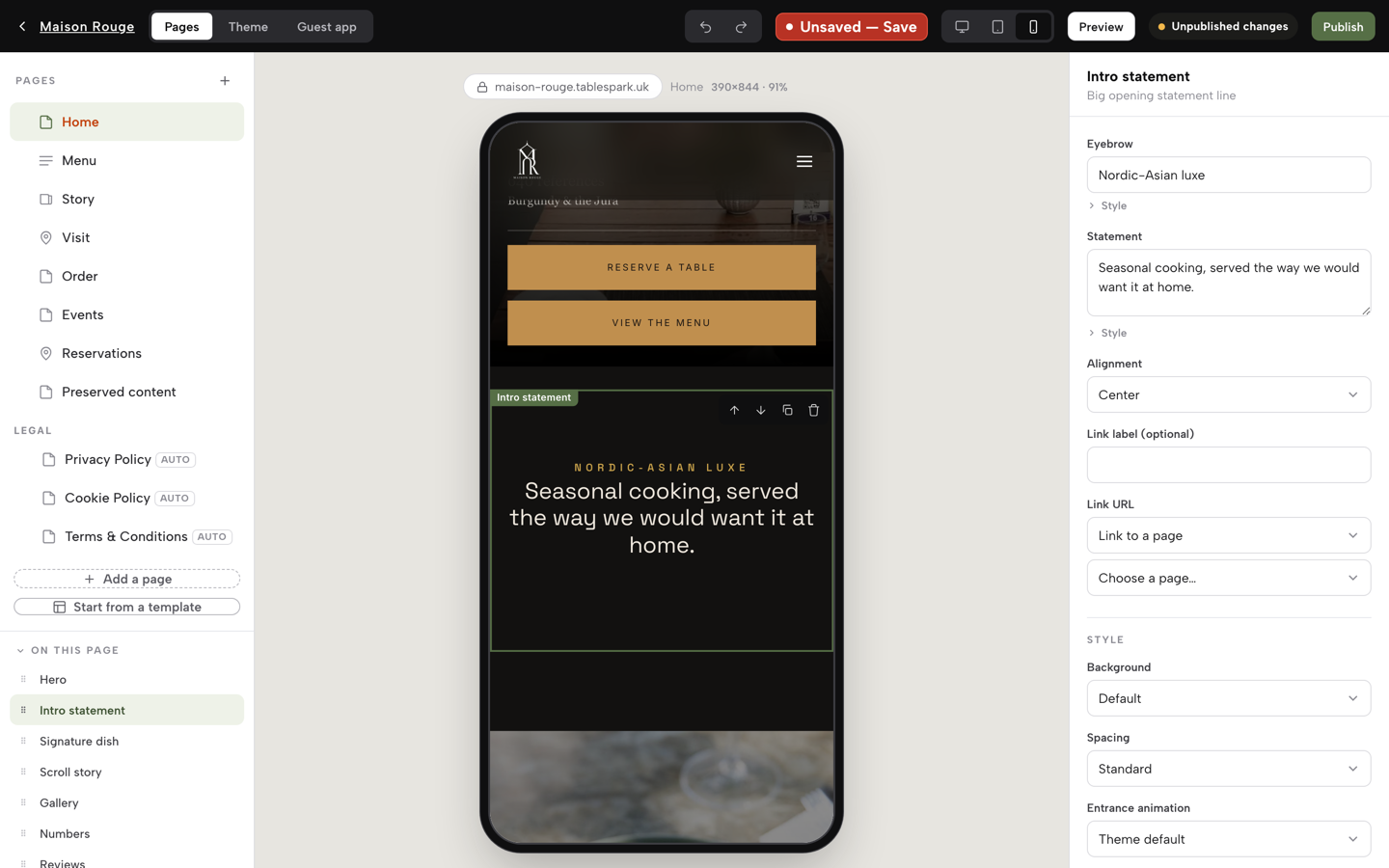
Click Build in the sidebar. On the Pages tab, pick a section under On this page and type in the fields on the right; the preview updates as you go. On the Theme tab, set your accent colour and fonts once and the whole site follows.
- Step 6: Check the phone
Use the three device buttons beside the Save chip to switch the preview to tablet and phone. Look at the menu, the hours and the booking button the way a guest sees them.
- Step 7: Write the search title, then publish
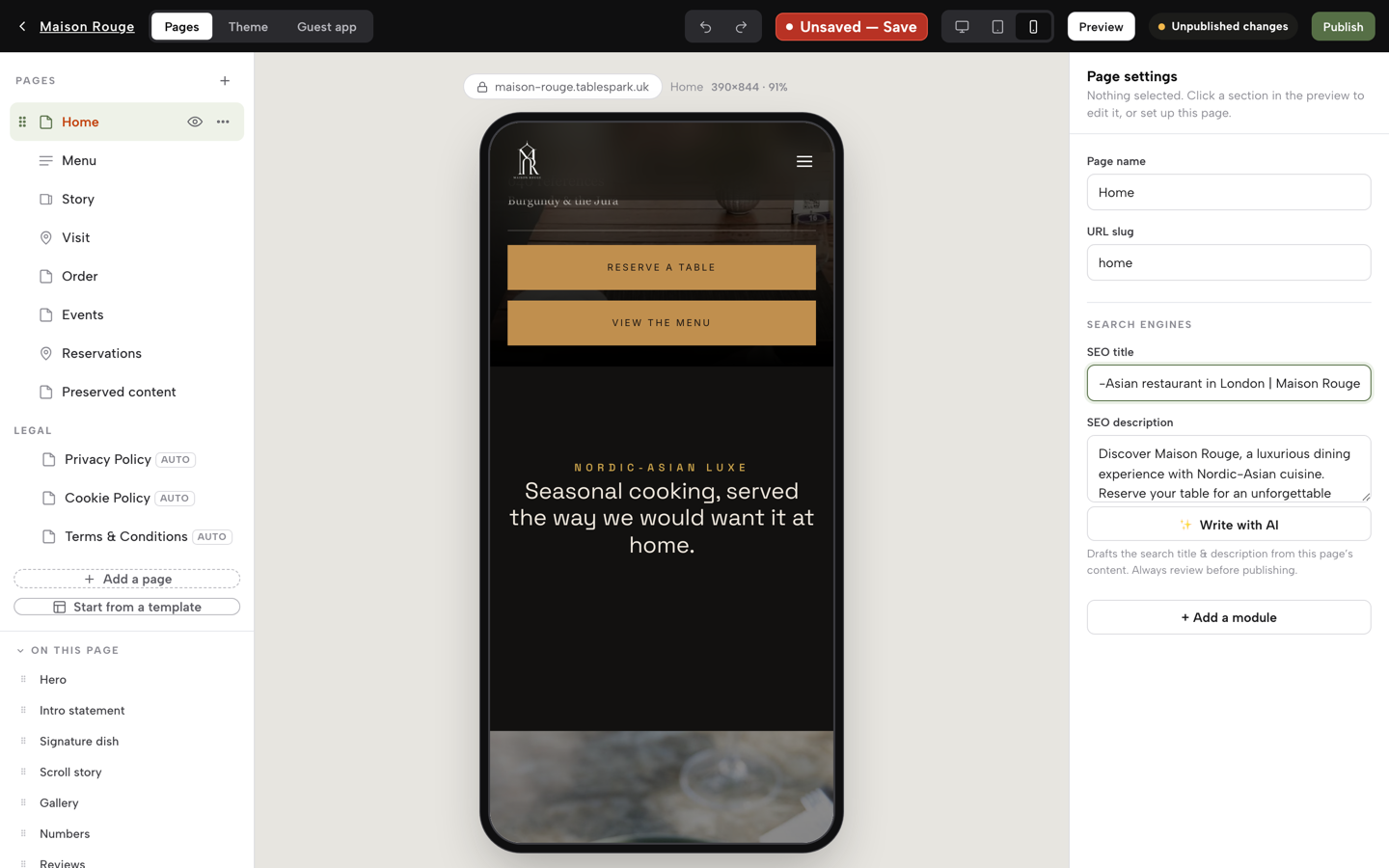
In Settings, SEO, fill in the Search result title and Description, and check the live preview. Click Publish at the top right. The first time, choose your address: a free tablespark.uk address works straight away, and your own domain follows in Settings, Domain.
Tips from the same screens
- Pick the design on the strength of one question: what does a stranger need from this page at nine o'clock on a Friday night?
- Read the scanned menu against the printed one before you apply it. The scan reads what is on the paper, including anything the paper has wrong.
- Use the Preserved content page after a switch: anything that had no matching section is kept there, not deleted.
- Set the accent colour and fonts before you edit blocks, so you judge each page in its final look.
- Check the phone preview last, with your own photographs in place.
Questions owners ask about restaurant templates
Is there a free restaurant website template, and what does free leave out?
Free templates exist, as downloads and as free tiers on builders. One publisher's view is that free templates often restrict e-commerce and advanced booking. Check what the free version leaves out: the live plan, a domain, a booking diary, ordering, upkeep and search set-up. On TableSpark, building is free until you publish, and Starter starts at £19 a month excluding VAT.
How much does a restaurant website template cost in the UK?
It depends on the type. A design-asset subscription such as Envato Elements Core is £12.50 a month billed annually, excluding local tax. A static template site on Go Edit is £29 plus VAT a month. Neither includes booking or ordering. A complete restaurant plan, TableSpark Growth, is £39 a month excluding VAT.
Which is cheapest for one restaurant: a builder, a theme or a restaurant platform?
Not the one with the smallest sticker price. In the worked example for a site, bookings and ordering, three builder tools total £1,644 to £1,728 a year before domain renewal, search set-up and card fees. TableSpark Full is £828 excluding VAT, or from £834.33 excluding VAT with a domain.
What does a theme marketplace licence cover, and what happens after support ends?
One large marketplace says item support runs for 6 months from purchase and excludes customisation and installation. It also separates Regular and Extended licences, so check which your use needs. After support ends, theme problems are yours or your developer's. The marketplace shows prices in US dollars, so there is no pound figure to print.
Can I take bookings and online orders through a template?
Only if the template, or the plan behind it, includes them. A design alone does not. Ask which plan carries bookings and which carries ordering, and what each costs. On TableSpark, bookings with deposits and reminders start on Growth at £39 a month excluding VAT, and online ordering is on Full at £69 a month excluding VAT.
Will a template site show up on Google when people search my restaurant name?
Not automatically. A live address is not the same as being indexed. Robots or noindex rules, conflicting canonicals, orphaned pages, a menu held in a picture and missing restaurant data can all hold a site back, and no provider can promise indexing or rankings. TableSpark packages the search set-up into every plan.
Does my restaurant website have to be accessible?
The Equality Act 2010 section 29(1) says a service provider must not discriminate against a person requiring the service, and section 20 sets a duty of reasonable adjustments. The Act's text does not mention websites, so ask your adviser how it applies to yours. WCAG 2.2 is the current W3C standard to ask a seller about.
Do I need allergen information on my website menu?
If you sell food online, the FSA says allergen information must be given before the purchase is completed, which can be in writing on a website, and again at delivery. A template needs a field on each dish to do that. TableSpark's dish editor carries chips for the 14 named UK allergens, shown on the live menu.
Sources
- Ofcom, Online Nation 2025 — ofcom.org.uk (checked 2026-10-10)
- web.dev, Web Vitals — web.dev (checked 2026-10-10)
- Google Search Central, Core Web Vitals and Google search results — developers.google.com (checked 2026-10-10)
- Google Search Central, mobile-first indexing best practices — developers.google.com (checked 2026-10-10)
- Google Search Central, LocalBusiness structured data — developers.google.com (checked 2026-10-10)
- W3C, Web Content Accessibility Guidelines 2.2 — w3.org (checked 2026-10-10)
- Equality Act 2010, section 29 — UK Government (checked 2026-10-10)
- Equality Act 2010, section 20 — UK Government (checked 2026-10-10)
- GOV.UK, accessibility requirements for public sector websites and apps — UK Government (checked 2026-10-10)
- Food Standards Agency, selling food for delivery — UK Government (checked 2026-10-10)
- Theme marketplace item support policy — themeforest.net (checked 2026-10-10)
- Theme marketplace standard licences — themeforest.net (checked 2026-10-10)
- Local Brand Hub, restaurant website templates — localbrandhub.com (checked 2026-10-10)
- Squarespace pricing — squarespace.com (checked 2026-10-10)
- Envato Elements pricing — elements.envato.com (checked 2026-10-10)
- Go Edit, restaurant website template — goedit.co.uk (checked 2026-10-10)
- simpleERB pricing — simpleerb.com (checked 2026-10-08)
- Storekit pricing — storekit.com (checked 2026-10-09)
- TableSpark pricing — TableSpark (checked 2026-10-10)
- TableSpark templates — TableSpark (checked 2026-10-10)
- TableSpark tutorial, build your website — TableSpark (checked 2026-10-10)
- TableSpark tutorial, put your menu online — TableSpark (checked 2026-10-10)
- TableSpark tutorial, set up your domain — TableSpark (checked 2026-10-10)
Start from a restaurant template and build free
Choose one of 50 designs, scan your menu and see your site before you pay.