Contents
Most EPOS mistakes cost money in the gaps, not on the screen: a till total that will not tie to the drawer, a kitchen that cooks to the ticket, and a menu typed in three places.
A restaurant EPOS system costs three separate bills: hardware paid once, a software subscription paid monthly, and card processing paid on every sale. On the published pages read for this guide, entry prices from £0 to £79 a month sit beside in-person card rates of 1.4% to 1.75% and extra charges for kitchen screens and stock. Total all three for your own card turnover, then test whether the till, the kitchen screen and the website menu agree before you sign.
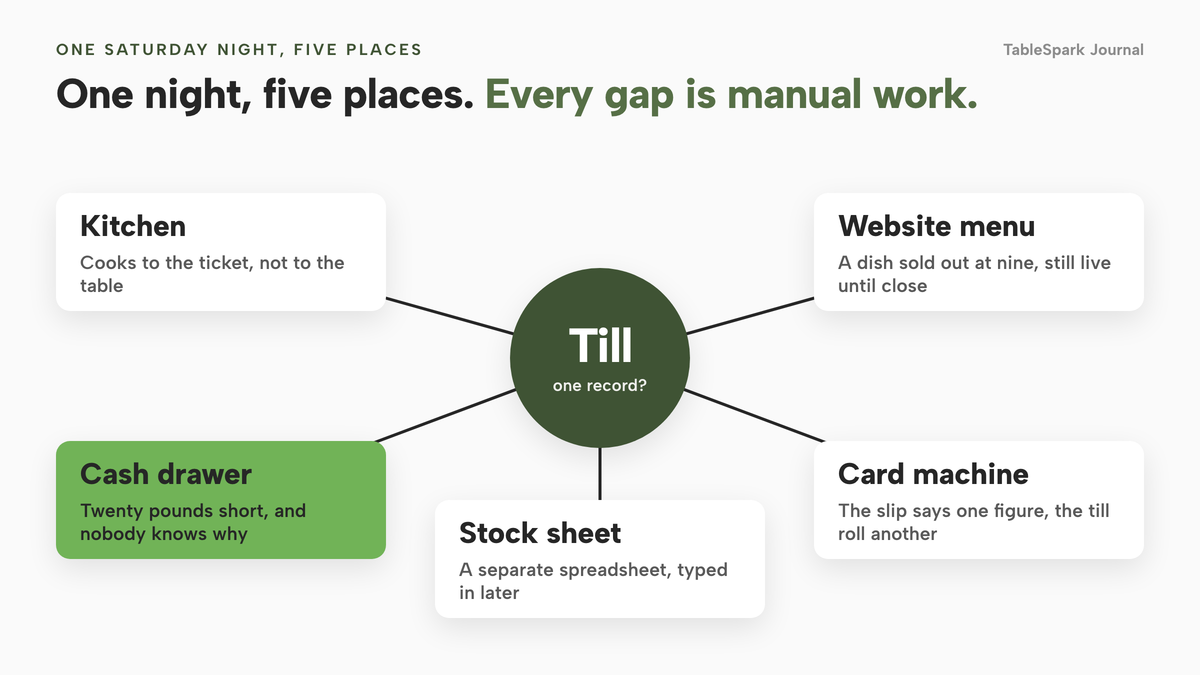
The close of a Saturday service is where a weak till system shows itself. The last table has gone, the card machine slip says one figure, the till roll another, and the cash drawer is twenty pounds short. Nobody can say whether that was a refund, a payment out for milk, a mis-tap on the wrong tender or a miscount, because the three totals were never produced from the same record. So someone stays an hour late with a calculator, and the next morning the same gap opens again.
The same night usually leaves other loose ends. A main fired with the starters because the ticket had no way to say wait. A table of six asked to split the bill four ways and a server worked it out on a phone. A dish sold out at nine and stayed on the website until close, so a guest ordered something the kitchen no longer had. Each is small. Together they decide whether the books close in ten minutes or in an hour, whether a guest leaves annoyed, and whether the owner can see where a loss started.
There is also a legal side that a till touches every day, and an owner buying one is not always told about it. Tips now have a statutory code and a three-year record. VAT records have a six-year rule. HMRC has said in a published consultation that there are currently no mandatory standards for EPOS or MPOS systems in the UK, which means the quality of the audit trail in your till is something you have to check for yourself. The rest of this guide prices the whole system for 12 months and then goes through the joins one by one.
Why the screen is the wrong thing to compare
Buying guides for restaurant tills tend to be organised by device: a countertop unit, a tablet stand, a handheld. The real work of a till is done by the connections between the order, the kitchen, the payment, the stock count and the close of day. A system with a handsome order screen and a weak connection to the kitchen still loses money.
HMRC's own consultation on till software shows why the record behind the screen matters. HMRC published "Electronic Sales Suppression: Introduction of software standards" on 23 June 2026 and ran it until 18 August 2026. It states plainly:
Currently, there are no mandatory standards for EPOS or MPOS systems in the UK
The same document cites a 2019 report concluding that the risk of VAT losses alone from sales suppression could be in excess of £450 million a year, and cites the National Audit Office on HMRC's compliance yield from this area rising from £17 million in 2022 to 2023 to £98 million in 2023 to 2024. That is a consultation, not law, and the outcome had not been published when this guide was written. It does not say that a restaurant till is a risk. It tells an owner that the safeguards are a feature to look for, not a given.
Finance Act 2022, Schedule 14, sets a penalty of up to £50,000 for making, supplying or promoting an electronic sales suppression tool, and up to £1,000 for possessing one in the circumstances the Schedule sets out. It penalises the tool, not an ordinary till (legislation.gov.uk).
For a restaurant owner the practical point is narrow. Choose software where every void, discount, reopened bill, refund and price change is recorded with who did it, when and why, and where a closed day is a saved record rather than a total that can be quietly retyped. Everything else on a spec sheet matters less.
The other half of the problem is that the till and the kitchen are rarely the only places the menu lives. The website has a menu, the online ordering page has one, and the printed card is a fourth. The EPOS page on this site describes the usual cost bluntly: every price change and every sold-out dish has to be made again for each copy, and one of them will be missed.
How an order moves through the joins
Follow one table through a service and the decision becomes concrete. At each handover below, a system either carries the information on or relies on a person to re-key it.
The menu. A single menu should feed the till, the kitchen screen and the website. When a price changes at the pass, it changes everywhere. When a dish is allocated a portion count and the last portion goes, the dish should sell out on every channel at once. For a restaurant that sells food online this is also a legal matter. The Food Standards Agency says that if food is sold online or by phone, allergen information must be provided at two stages: before the purchase is completed, and when the food is delivered. A menu that is only a PDF or a widget, and a till that never reads the website, leaves that information to chance.
Courses. Coursing is the difference between a kitchen that cooks to the table and one that cooks to the ticket. The floor needs to mark a dish as held when the order is sent, so the kitchen starts on the starters, and then fire the held dishes when the table is ready. The kitchen screen needs to show which dishes are waiting, which are late and which have been fired, and each station should see only the dishes it cooks.
Bills. A table of six should be able to pay one bill as separate shares, by dish or by amount, across cash and card, with a mis-tap undone by removing one part rather than by reopening the whole bill. Every share has to land against the tender it arrived by, or the card machine will never tie to the till.
The close. The end of day report should break takings down by tender, show VAT by rate, show refunds, record cash paid in and out, compare expected cash with counted cash, and then be saved as a record. HMRC's VAT record-keeping notice describes this as a Z read: it "shows the sales totals and a summary of relevant till actions for a trading day. This is sometimes known as the end of day report." The distinction between a live reading, often called an X report, and the saved Z report is the one that makes a closed day trustworthy.
The back office. Tips shared from the rota, stock drawn down by what was sold, and the cost of each dish should come out of the same data as the sales. If they come from a separate spreadsheet, the join is a person on a Monday.
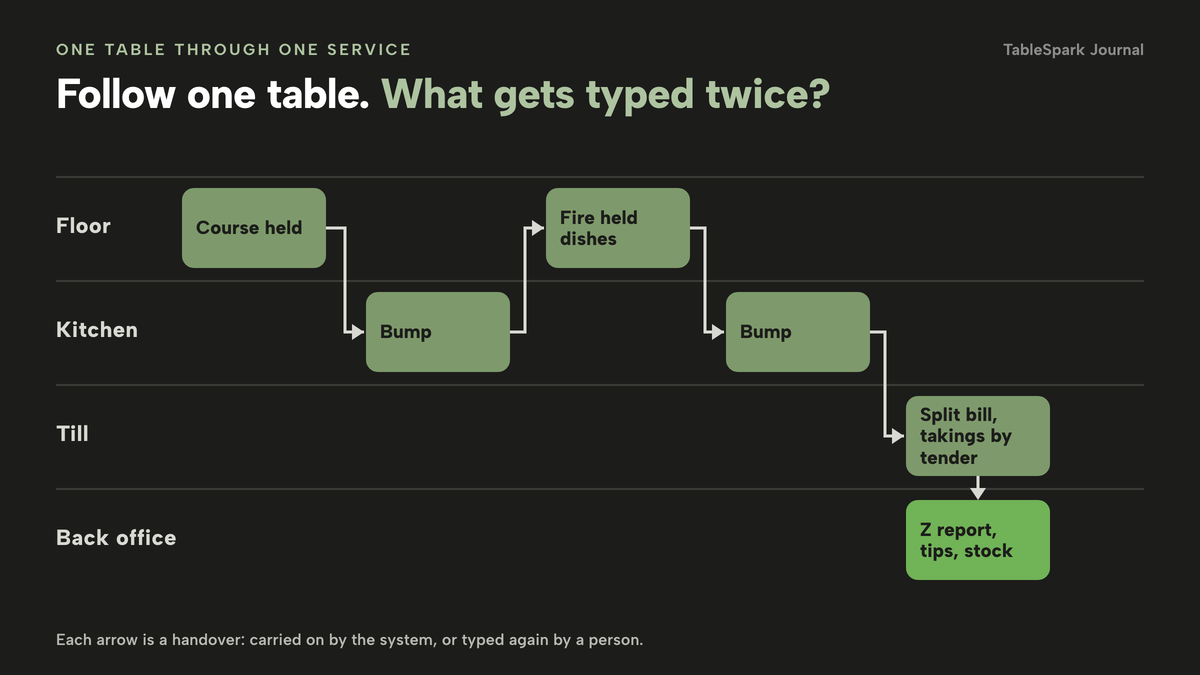
The honest way to test any system against this list is to ask for each handover, in a demonstration with your own menu, what a person has to type twice. A short list of those places is a better purchase criterion than a long list of features. The same test applies to how the system treats online orders. If orders from the website reach the kitchen on a separate device with a separate close, the joins you thought you had bought are back. Another guide on this site, what a card reader, an online order page and a till cost when they share one Stripe account, covers that side of the money.
The three bills, priced from the published pages
An EPOS has three bills that behave differently. Hardware is paid once, whether as a purchase or a rental. The software subscription is paid every month for as long as you use it, sometimes per location and sometimes per register. Card processing is paid on every sale, and over a year it is usually the largest of the three. Quotes from sellers often blend them, which is why a headline monthly price tells you so little.
The table below uses only each provider's own page, read on 9 October 2026. Where a page does not publish a number, the cell says so rather than guessing. Prices from providers whose pages blocked or did not publish a GBP figure are left out.
restaurant site
- service console
- kitchen display screen
- split bills
- end of day with Z report
- audit log
- tips records
- inventory and recipe costing
- POS connections
restaurant site
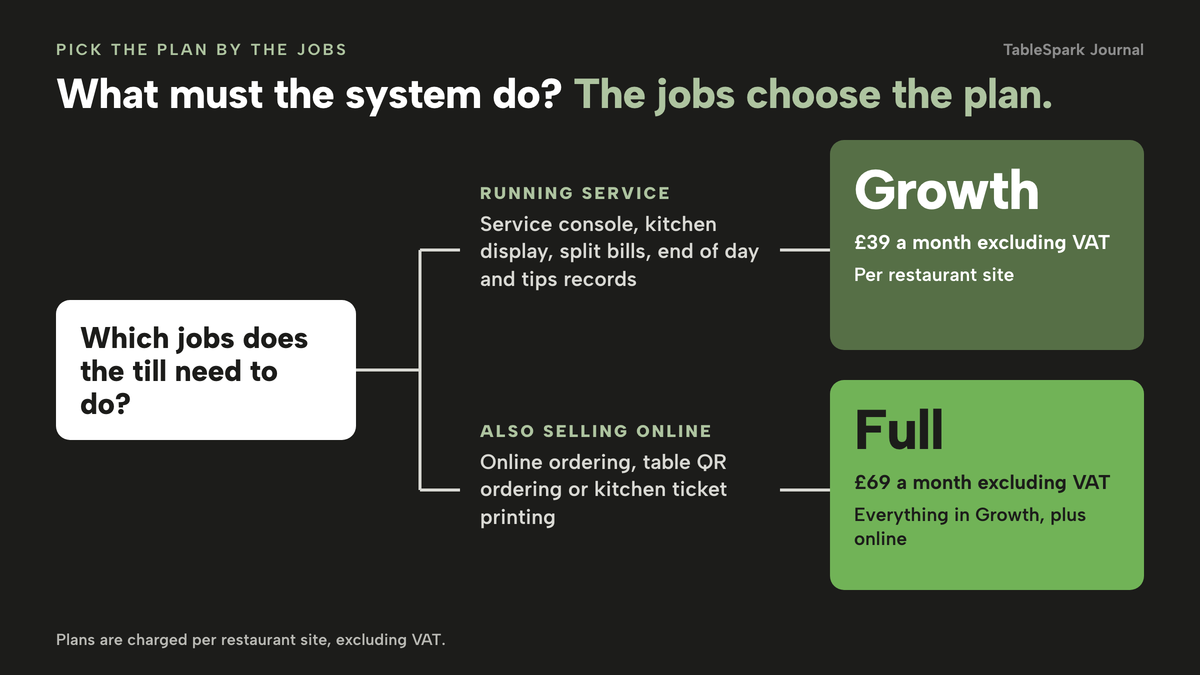
- TableSpark Full £69 a month excluding VAT
everything in Growth · online ordering · table QR ordering · kitchen ticket printing
location
- Square for Restaurants, Free £0 a month
processing fees apply · kitchen display £15 per device a month
- Square for Restaurants, Plus £69.00 a month (the page does not state whether this is excluding VAT)
course management · kitchen display with no extra cost per display · inventory add-on £79 a month per location
first terminal
- Lightspeed Restaurant, Basic £79 a month
extra register £39 (the page does not state whether this is excluding VAT) · kitchen display, tableside ordering and reservations shown as add-ons without a price
12-month commitment
- Epos Now restaurant bundle from £299 hardware, tied to a subscription from £54 a month
countertop, air card terminal and receipt printer · promotional page, prices rotate
These prices are not like-for-like, because the providers charge for different things: some price the till software, some the hardware, some only the card fees, and some bundle a discount to a contract. A card rate belongs in every comparison, and it is set by a different table below.
The card rates are the part of the bill that scales with trade. The pages read for this guide list the following in-person rates: Square 1.75%, SumUp 1.69% pay-as-you-go, PayPal Point of Sale 1.75%, and Stripe Terminal 1.4% + 10p for EEA cards and 2.9% + 10p for non-EEA cards. SumUp also lists a lower 0.99% rate on its Payments Plus plan, which is a paid monthly or yearly plan and applies to domestic consumer cards only; international, corporate and premium cards stay at 1.69%. Lightspeed's and Epos Now's pages, as read, show no per-transaction card rate, so the card cost of those two is unknown from what they publish. Ask for it in writing.
Stripe's terminal page labels its 1.4% + 10p line as the rate for EEA cards. Before you put a figure on a budget, confirm with Stripe which line a UK-issued card takes at a reader. The arithmetic below uses the 1.4% + 10p line as listed.
Worked example: a 50-cover independent over 12 months
Numbers beat adjectives, so here is one restaurant priced through twelve months. Every assumption is labelled and can be swapped for your own.
Assumptions (ours, editable). A 50-cover independent restaurant. Card takings of £15,000 a month, which is £180,000 over twelve months. An average card payment of £40, so 375 card payments a month and 4,500 over the year. One counter card reader. Staff use a tablet or screen the restaurant already owns, priced at £0 here; add your own figure if you buy one. All figures are excluding VAT, billed monthly, and rounded to the pound where stated.
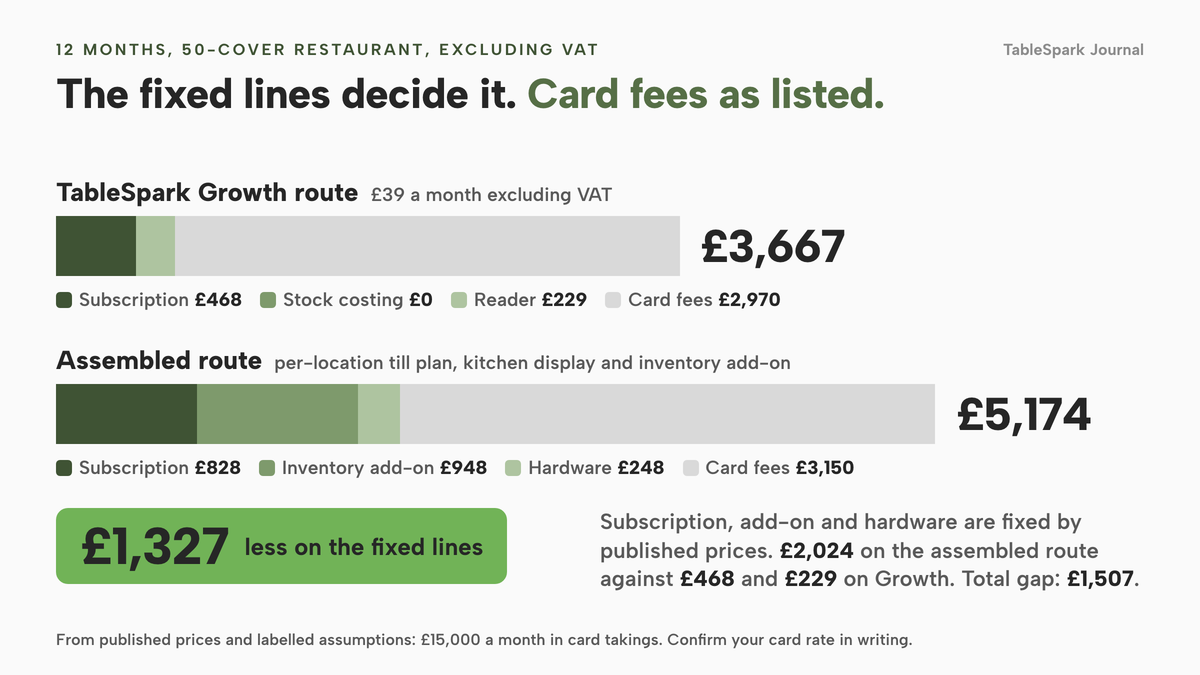
TableSpark Growth route. The Growth plan costs £39 a month excluding VAT, so 12 months is £468. It carries the operations tools in the table above, so no further software line is added. Hardware is one Stripe Reader S710 at £229.00 excluding VAT, from Stripe's terminal page. Card fees on the Stripe line listed for EEA cards are 1.4% of £180,000, which is £2,520, plus 10p on 4,500 payments, which is £450: £2,970. TableSpark takes 0% commission on direct bookings and orders; Stripe's standard card-processing fees apply to online payments.
Square Plus route, built from its own page. Plus is £69.00 a month, and the page does not state whether that is excluding VAT, so 12 months is £828. The inventory add-on is £79 a month per location, so £948. Kitchen display comes with Plus. Hardware is a Terminal at £149 + VAT and a Stand at £99 + VAT (the page says the iPad is not included), so £248 before VAT. Card fees at 1.75% of £180,000 are £3,150.
| TableSpark Growth route | Square Plus route | |
|---|---|---|
| Software subscription (Basis: 12 months, monthly billing) | £468 | £828 |
| Stock and recipe costing (Basis: included on Growth; Square inventory add-on 12 × £79) | £0 | £948 |
| Counter card hardware (Basis: one-off, excluding VAT) | £229 | £248 |
| Card fees (Basis: on £180,000 over the year) | £2,970 | £3,150 |
| Total (Basis: sum of the four lines) | £3,667 | £5,174 |
The gap is £1,507 over the year, and almost all of it comes from what has to be bought separately: the higher plan needed for course management and the kitchen display, and the stock add-on. The saving rests on the subscription, add-on and hardware lines, which are fixed by the published prices: £468 of subscription and £229 of hardware on the Growth route, against £2,024 on the Square Plus route before any card fee, a gap of £1,327. The card fee line depends on the rate you are given, so confirm in writing which Stripe line a UK-issued card takes at a reader before you put it on a budget.
Two things are not in either column. The Square online store is priced on its own page (Square Online lists a free plan and paid plans from £20), so the website and online ordering are additional there. For TableSpark, adding online ordering, table QR ordering and kitchen ticket printing means moving to Full at £69 a month excluding VAT, which is 12 × £69, or £828, and £360 more over the year than Growth. That puts the TableSpark Full route at £4,027 for the same year, still below the Square Plus total before any website or online ordering is added to it. Paying for ten months and using twelve brings the yearly price to £390 excluding VAT for Growth and £690 excluding VAT for Full.
The Lightspeed and Epos Now totals are out of reach, because their pages leave key figures unpublished. Lightspeed Basic is £79 a month, so £948 for 12 months for the first terminal alone, with the kitchen display, tableside ordering and reservations shown as add-ons and no price given and no card rate shown. The Epos Now bundle from £299 requires a 12-month subscription from £54 a month, which is £648 over the term and £947 together before any card rate, and the page is a promotion whose prices rotate. Those pages show what to ask a salesperson, not what you will pay.
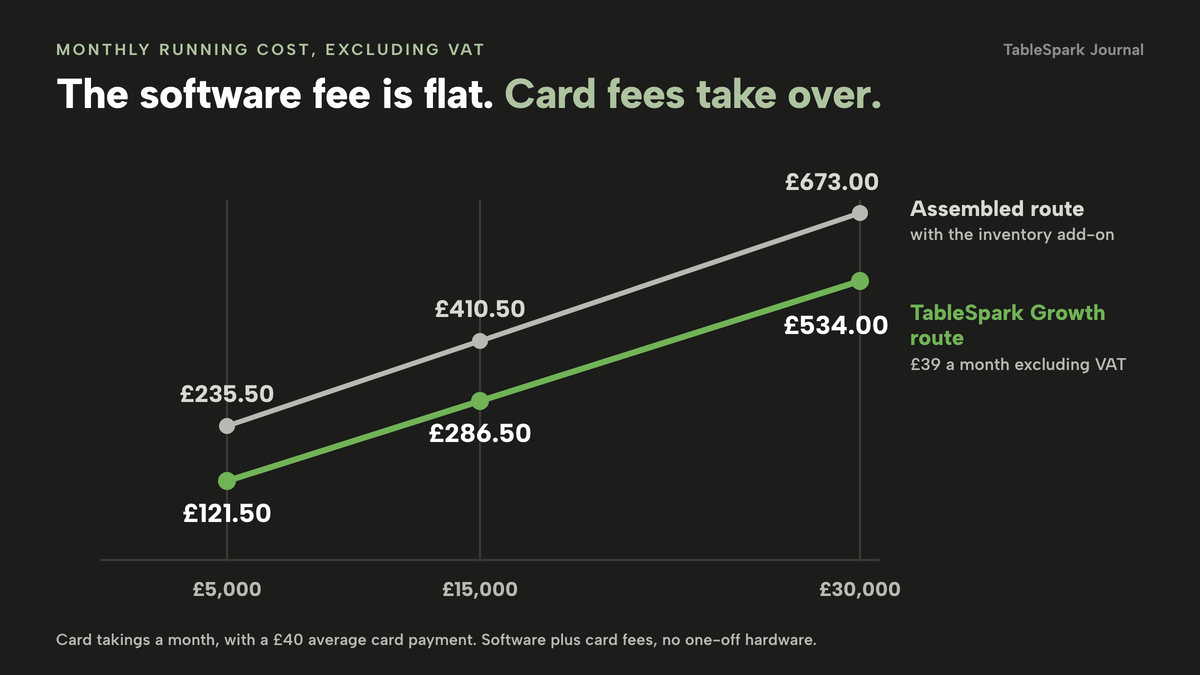
The other thing to see is how the monthly cost behaves as trade grows. With a flat software fee, a slow month costs the subscription and a busy month costs mostly card fees.
| Stripe line, 1.4% + 10p | 1.75% line | |
|---|---|---|
| £5,000 (Gap: £5.00) | £82.50 | £87.50 |
| £15,000 (Gap: £15.00) | £247.50 | £262.50 |
| £30,000 (Gap: £30.00) | £495.00 | £525.00 |
Adding the subscriptions gives the monthly picture, still excluding VAT. On the Growth route the monthly running cost, software plus card fees and with no one-off hardware, is £121.50 at £5,000 of card takings, £286.50 at £15,000 and £534.00 at £30,000. On the Square Plus route with the inventory add-on it is £235.50, £410.50 and £673.00. The software line is the same in a quiet month as a busy one, so it is the line you can reduce by choosing the right plan, while the card line you can only influence by negotiating a rate.
The kitchen display: what it replaces and what it costs
A kitchen display replaces the printed docket. A docket is a single piece of paper that prints in one place, at the moment of ordering, and tells every cook the same thing. A display lets each station see its own dishes, lets the floor hold a course, shows timers that turn amber and red when a ticket waits too long, and lets a cook bump a ticket when it is plated and recall it if it went too soon.
Whether a 40-cover restaurant needs one is a judgement about how often tickets are confusing. For a short menu with a single cook, dockets are fine. For two or more stations, for a menu with courses, or for any restaurant that also takes online orders, the display can pay for itself in fewer remakes and fewer arguments at the pass. What matters for the purchase is where it sits in the price. On Square's page the display is £15 per device a month on the Free plan and included on Plus; on Lightspeed's Basic it is shown as an add-on with no price; Square's own 21.5 inch kitchen display screen is listed at £549 + VAT as hardware. On TableSpark the kitchen display screen, with bump, recall, expo, all-day counts, timers and courses held and fired from the floor, runs on any tablet or TV and is part of Growth and Full.
Kitchen ticket printing is different. If you want online and table orders to print straight to a kitchen printer as well as appearing on the screen, that is part of Full at £69 a month excluding VAT. A longer look at what that bundle costs against a separate printer is in the cost of online ordering with a kitchen printer bundled.
Tips, service charge and the record the law expects
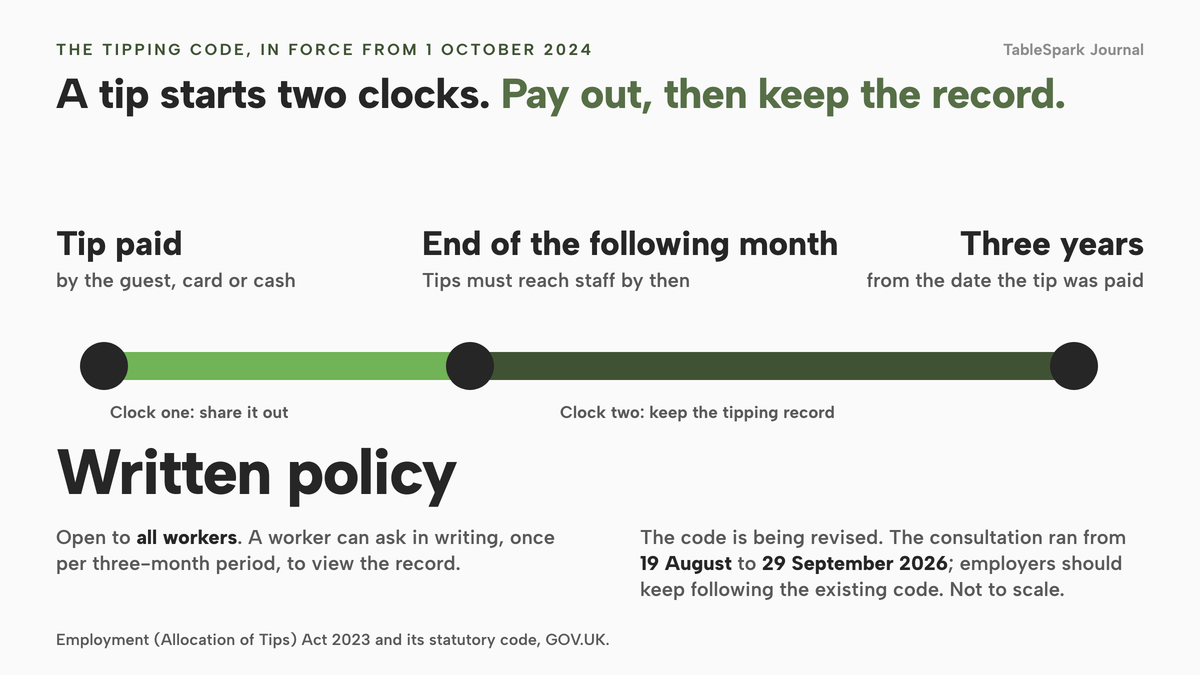
The Employment (Allocation of Tips) Act 2023 and its statutory code took effect on 1 October 2024. The code, published on GOV.UK on 29 July 2024, requires an employer to pass tips and service charges on to workers without deductions except in very limited cases such as income tax, to maintain a written policy on how tips are dealt with and to make it available to all workers, and to maintain a record of all tips paid at the place of business and how they were allocated between workers. Tips must reach staff, at the latest, by the end of the month following the month in which customers paid them. The tipping record must be kept for three years from the date the tip was paid, and a worker can ask in writing, once per three-month period, to view it. The code also says records must be stored, processed and disposed of in line with data protection legislation.
The code is being revised. GOV.UK says the previous draft was withdrawn so a new consultation could be held, because the Employment Rights Act 2025 makes it mandatory for employers to consult workers when developing or revising written tipping policies. The consultation ran from 19 August to 29 September 2026 and the government was analysing feedback when this guide was written. GOV.UK's instruction in the meantime is that employers should continue to follow the existing code. Nothing here states what the new code will require.
What a till has to do about this is plain. It should record card tips and cash tips, include the service charge when the team shares it, apply the rule the written policy describes, such as hours worked from the rota, keep each person's share, and keep the record for three years in a form you can export. A till that records the sale but leaves tips to a jar and a spreadsheet creates the exact record gap the code describes. On the VAT side the same logic applies: HMRC's notice says to keep business records for VAT purposes for generally at least 6 years, including records of daily takings such as till rolls, and says a business using a VAT retail scheme must keep a digital record of daily gross takings. Whether you use one is a question for your accountant, and the point for the till is that the end of day report exports cleanly. HMRC also says all VAT-registered businesses should now be signed up for Making Tax Digital for VAT, and that copy and paste does not count as a digital link, so the export to accounting is part of the purchase.
What a complete set-up needs
Before you sign, run the system through this list. It covers the five areas where a till purchase tends to go wrong: law, payments, data, kitchen and search.
- Every void, discount, reopened bill, refund and price change is recorded with who, when and why.
- A closed day is saved as a Z record, and later refunds do not rewrite it.
- Takings are shown by tender, VAT by rate, with expected against counted cash.
- Card payments from the table, the counter and the website settle into one account you control.
- A written tips policy can be published and the tipping record is kept for three years and exportable.
- The end of day report exports to CSV for your accountant.
- One menu feeds the till, the kitchen screen, the website and online orders, with sold-out and allergen details.
- Courses can be held and fired, and each station sees only its own dishes.
- Bills can be split by dish, evenly or by amount, across cash and card.
- Stock is drawn down by sales and each dish shows its cost and margin.
- The public menu is a crawlable page with Restaurant structured data, not only a PDF or an ordering widget.
The last line is a different kind of requirement. A page being online is not the same as being found, and a menu that exists only inside an ordering widget or a PDF gives search engines little to read. Misconfigured robots or noindex directives, conflicting canonical URLs, orphaned pages, rendering problems, missing structured restaurant data or incomplete search verification can leave a site live at a working link yet absent from Google, which sends guests searching for your name or your dishes to directories and commission-charging marketplaces first. TableSpark packages that work into every plan: crawlable structured menus, titles and descriptions, canonical URLs, sitemaps, robots controls, Restaurant and LocalBusiness schema, internal links and managed search-verification setup. No provider can promise rankings or guaranteed indexing, and this guide does not.
Two routes to compare
An independent restaurant has two realistic routes. One is to assemble a till, a kitchen screen, a stock tool, a website and an online ordering page from separate suppliers. The other is a single platform where the menu, the till, the kitchen, the close of day and the website share one record.
| Assemble separate systems | One platform | |
|---|---|---|
| Menu changes | made in each system, or re-keyed | made once, read by till, kitchen and website |
| Sold-out dish | switched off in each place | portion count reaches zero and the dish sells out on every channel |
| Card payments | one account per supplier, fees and payouts to reconcile | one connected Stripe account for reader and online orders |
| Close of day | totals compared by hand | takings by tender, VAT by rate and a saved Z report in one view |
| Tips record | jar plus spreadsheet | policy published, shares by rota hours, records kept in your account |
| Cost visibility | monthly bill from each supplier, add-ons priced separately | plan price plus Stripe's standard card fees |
Used well, this route gives an owner a decision rule that does not depend on the logo on the hardware. Count the places a person has to type something twice, price the 12 months, and choose the route where both numbers are lower.
Before you decide, work through these questions.
- Have I priced hardware, software and card fees for 12 months, not only the first month?
- Do I know the plan I actually need for kitchen display, course management, split bills and stock?
- Have I got the card rate in writing, and do I know which line a UK card takes?
- Can I leave, and what do I own at the end of a contract?
- Can I export my data, including the tipping record and the end of day report?
- Does the system read the website menu, or do I type it twice?
For a longer look at what the link between a till and the rest of the restaurant costs, see what a restaurant POS integration costs in the UK.
How to do it in TableSpark
TableSpark runs the till, the kitchen screen and the close of day from the same login as the website, bookings and online ordering. The restaurant EPOS system page shows how the parts fit. The steps below follow the guides on the Tutorial page, using the Maison Rouge showroom account.
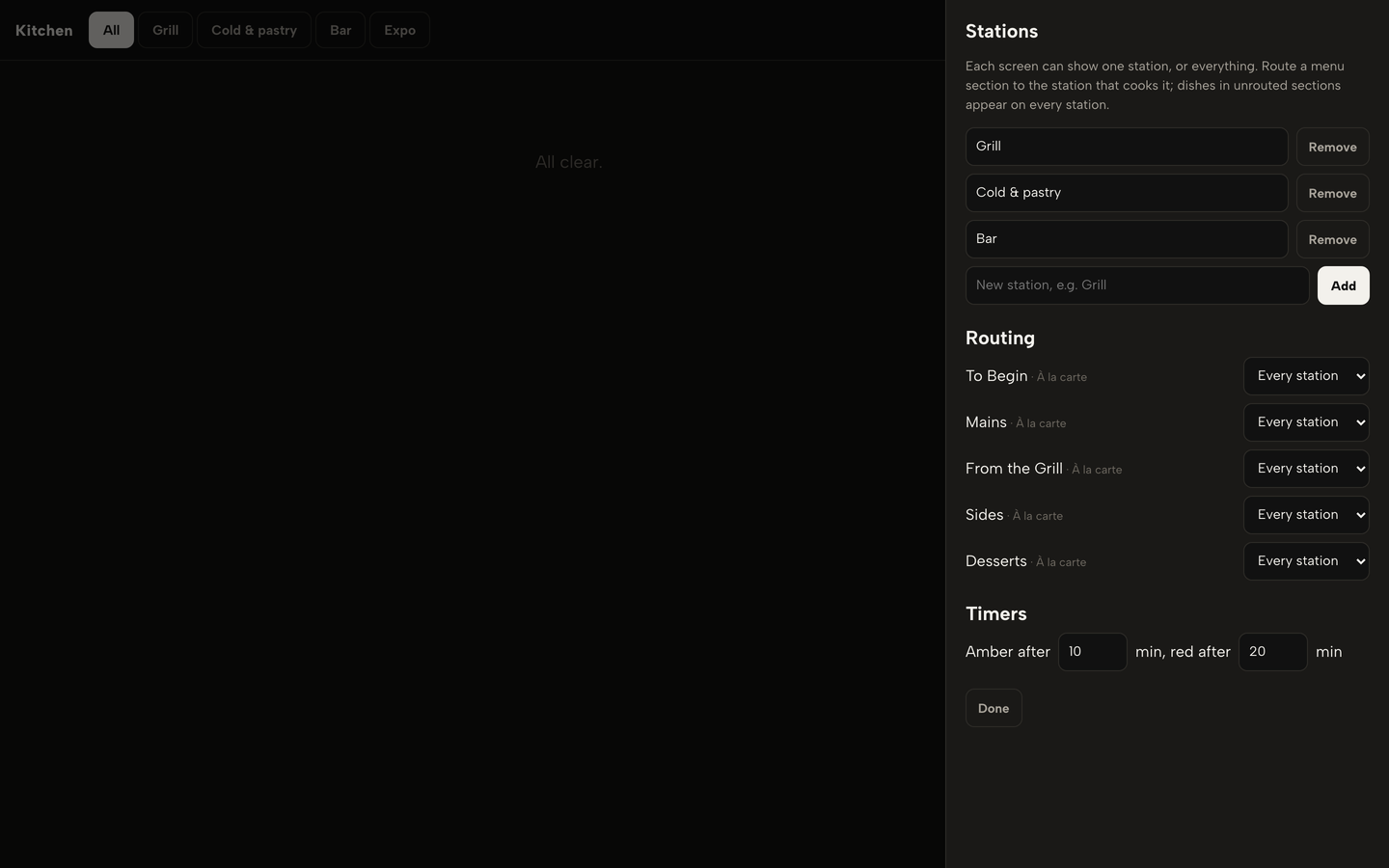
- Step 1: Create stations and route the menu
Click Kitchen in the sidebar, then Stations. Type a name in New station and click Add, then under Routing choose the station that cooks each menu section, for example mains to Grill and starters to Cold and pastry.
- Step 2: Hold the mains, then fire them
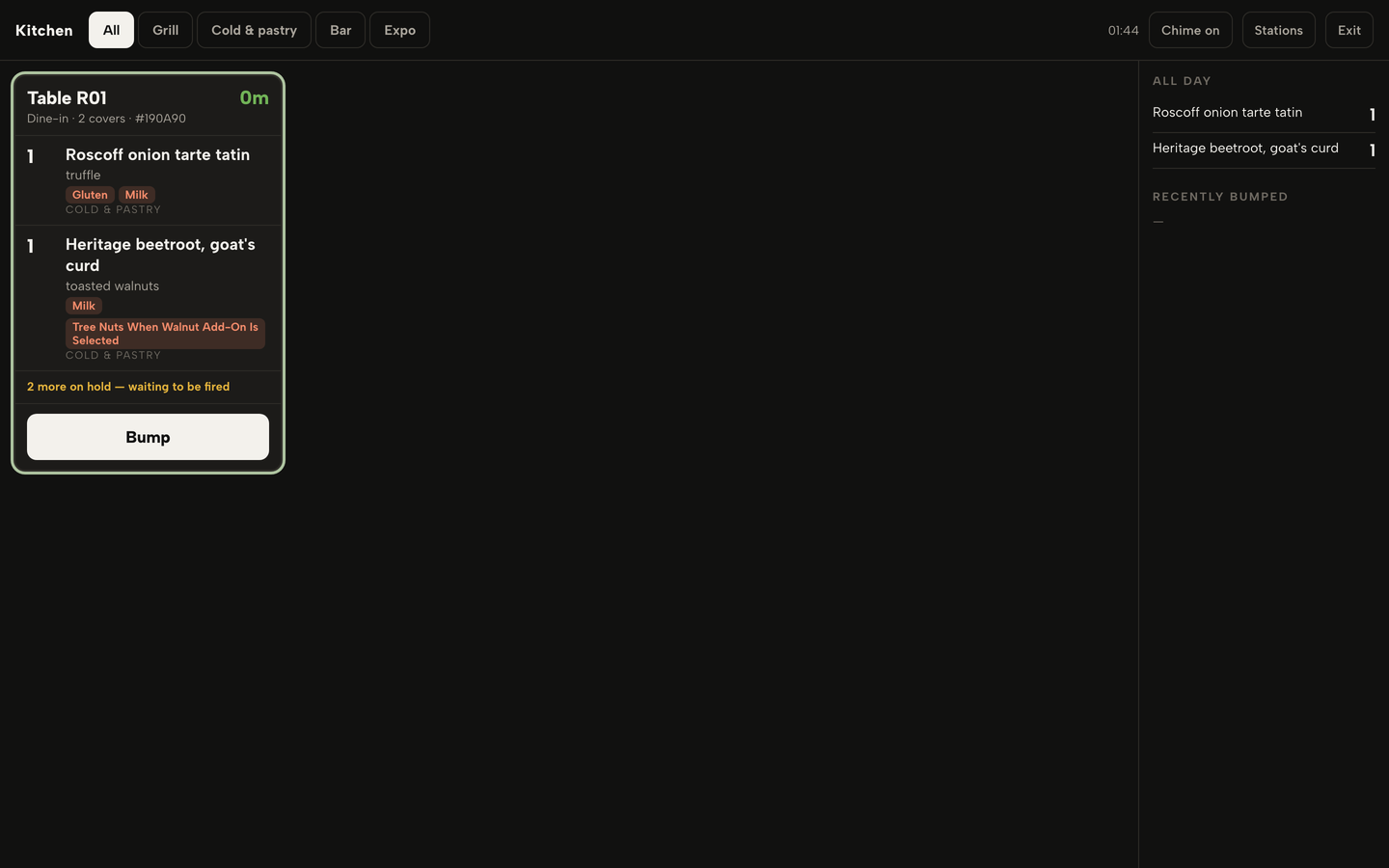
In the order pad, click HOLD on the mains before you send the order. The kitchen board shows a ticket for the starters with a line counting the dishes on hold. When the table is ready, open its sheet in Service and click Fire held dishes.
- Step 3: Split the bill
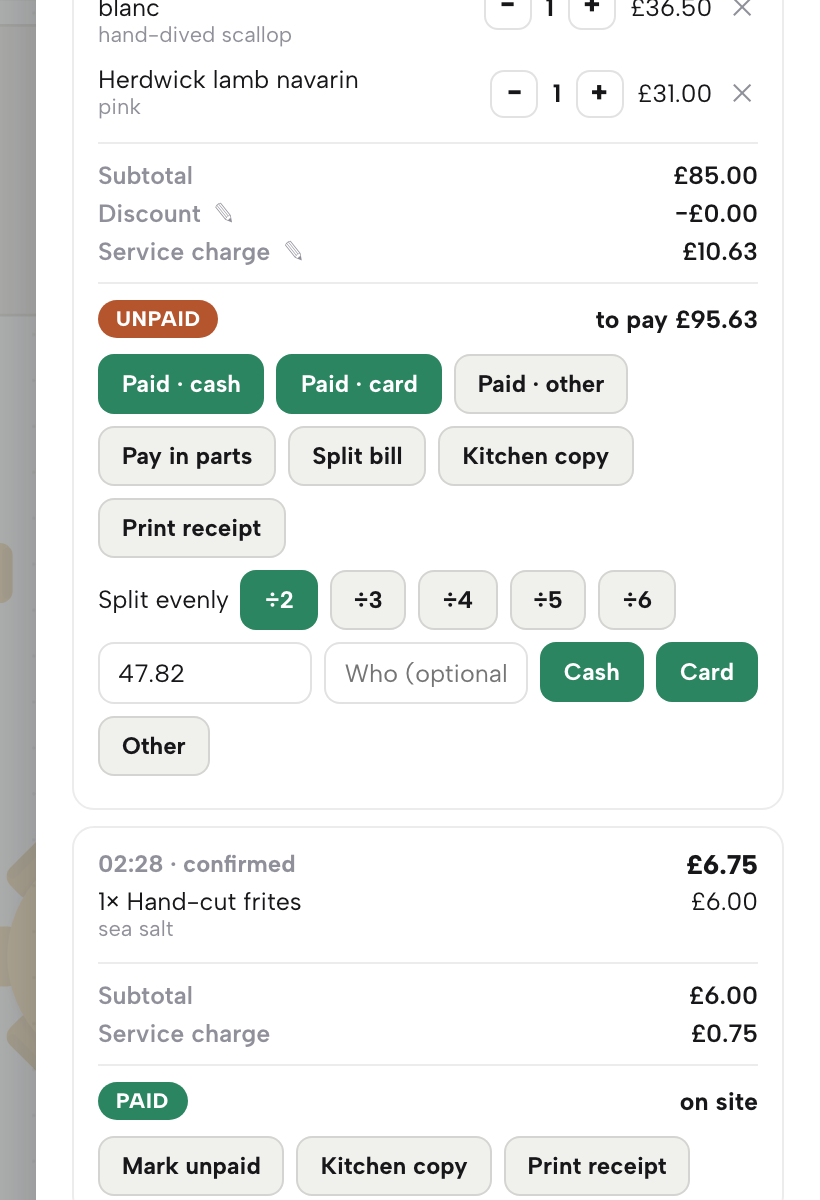
In Service, open the table's sheet and click Pay in parts on an unpaid bill. Choose the divide buttons from 2 to 6, type who is paying in the Who box and click Cash, Card or Other. Remove a part with its cross if it was a mis-tap.
- Step 4: Read takings by tender
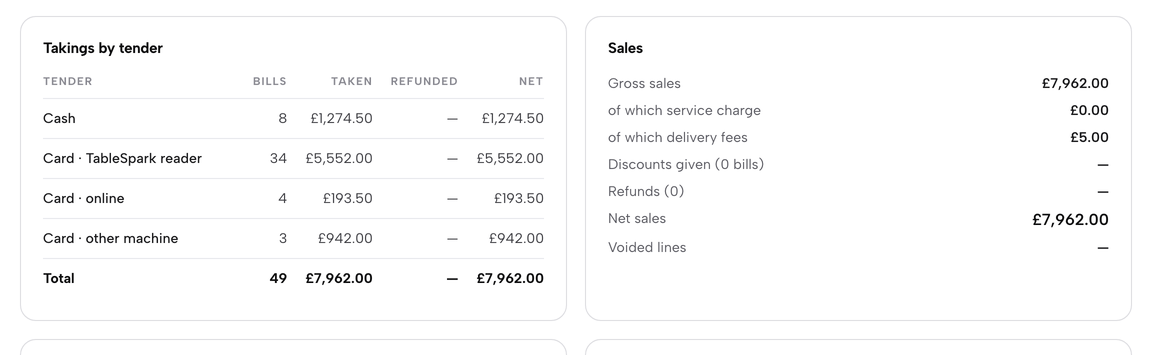
At the end of service, click End of day in the sidebar. Takings by tender lists cash, card on the TableSpark reader, card online and card on another machine, and the Total row ties to net sales.
- Step 5: Count the drawer
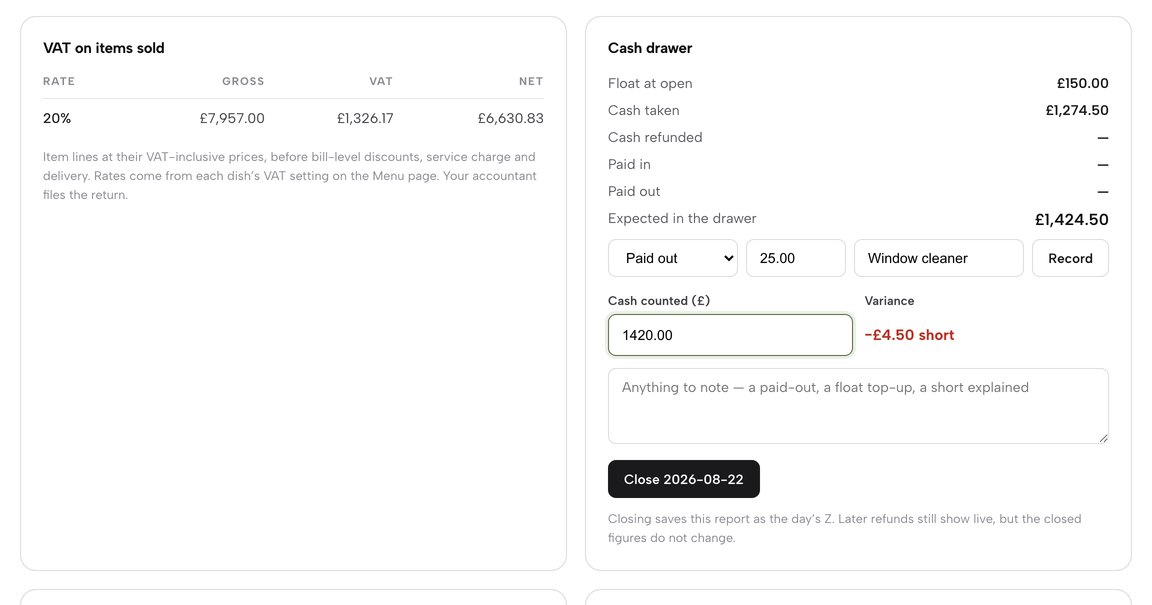
Record any Paid out or Paid in with its reason, then type the total into Cash counted. The Variance beside it reads Balanced, or the amount short or over, as you type.
- Step 6: Check Exceptions and close
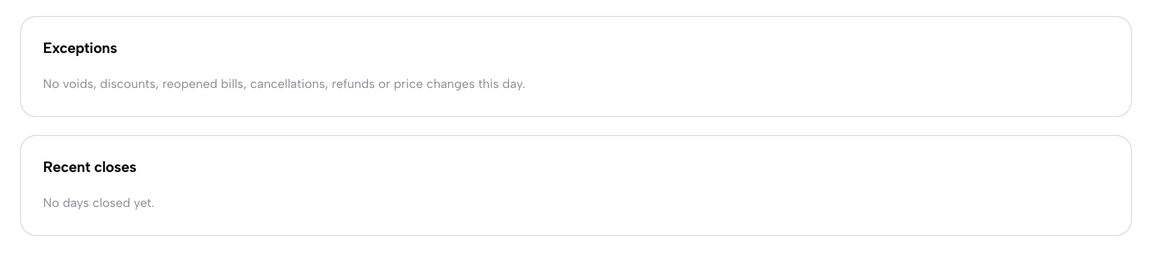
Read the Exceptions panel for voids, discounts, reopened bills and refunds, each with the time, amount, reason and who did it. Then click the dark button under the cash drawer, and click again to confirm. The figures are saved as the Z report.
- Step 7: Share the tips
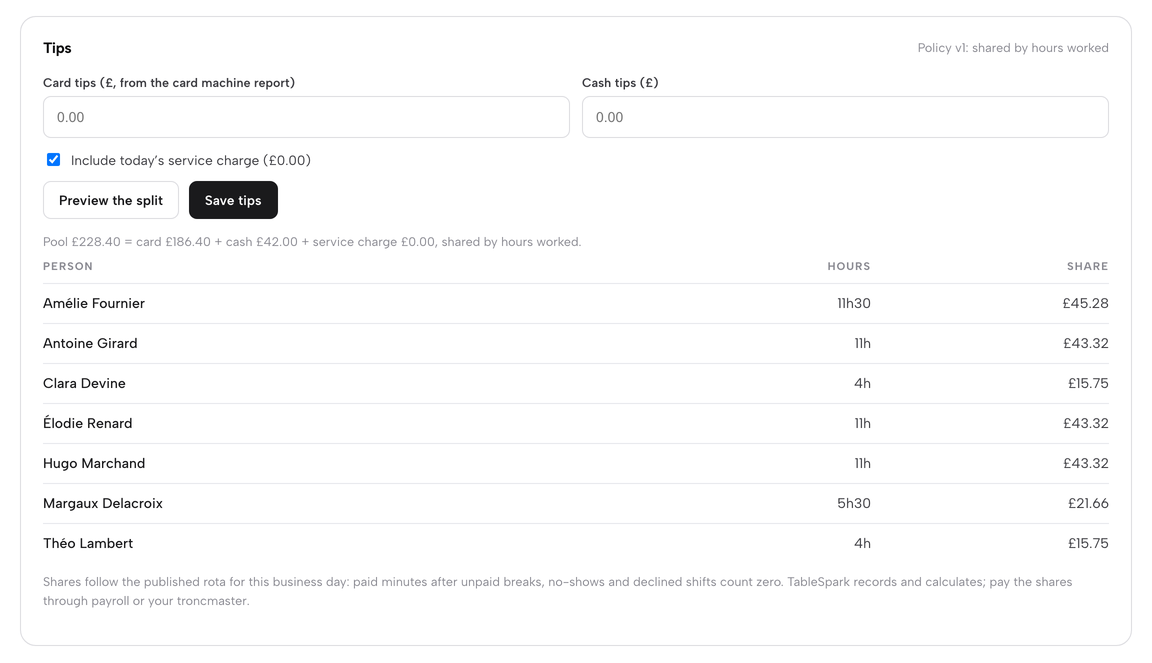
In the Tips panel type the card tips and cash tips, leave the service charge ticked if it goes to the team, and click Preview the split. Click Save tips to store the day's shares, which follow the published rota. Publish your written policy under Day settings.
- Step 8: Cost every dish
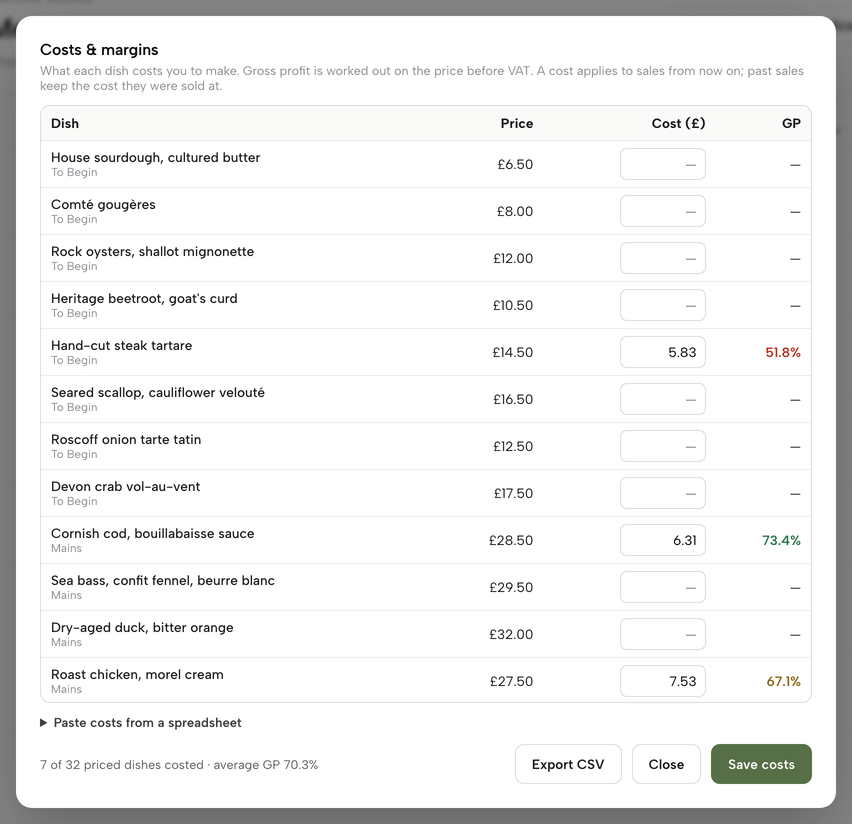
Open Inventory, add suppliers and ingredients with their pack price, then build recipes. Costs and margins on the Menu page then shows each dish's cost and GP, and sales draw the stock down.
A few tips from running it. Set the business day to end after your last late table, so sales after midnight count towards the same day. Route every menu section to a station, because a section left on Every station appears on all of them. Set a portion count with a warning level on dishes that run out, such as a fish special. Preview the tips split before you save it, and read Exceptions before you close, while the shift is fresh.
Questions owners ask about restaurant EPOS systems
How much does a restaurant EPOS system cost in the UK in total?
Add three bills: hardware, a software subscription and card processing. For the worked 50-cover example above, with £15,000 of card takings a month, the TableSpark Growth route came to £3,667 excluding VAT over 12 months. The Square Plus route built from its page came to £5,174. Your own card turnover and the plan you need change the answer, so total all three.
Do I buy the hardware or rent it?
Both exist. A purchase is a one-off cost; a rental or bundle is tied to a subscription. Epos Now's page, for example, ties its bundle price to a 12-month subscription from £54 a month. Ask what you own at the end, what the price becomes if you leave, and whether the readers you already have will work with the software before you commit to a contract.
Do I need a kitchen display system?
For a short menu and one cook, printed dockets are enough. For two or more stations, courses, or online orders arriving alongside table orders, a display shows each station its own dishes, holds the mains until the floor fires them, and shows timers. Check which plan includes it, because some providers charge per device or as an add-on.
Can the till split a bill and take a tip on the card?
It should split by dish, evenly or by amount, and accept parts on different tenders. On TableSpark, Pay in parts divides a bill from 2 to 6 shares and each share is a payment on cash, card or other. Tips are recorded in the End of day Tips panel and shared by rota hours under your written policy.
What does the Z report show and what does my accountant need?
A Z report is the saved version of a day's figures. On TableSpark it carries takings by tender, VAT by rate, refunds, cash paid in and out, expected against counted cash, and the variance. HMRC says VAT records are generally kept for at least 6 years. End of day exports to CSV, so your accountant gets the figures without retyping them.
How do tips and service charge have to be recorded?
Under the Employment (Allocation of Tips) Act 2023 code, in force from 1 October 2024, an employer keeps a written tips policy and a record of tips and how they were allocated, for three years from the date the tip was paid. Tips reach workers by the end of the following month. The code is under revision, and GOV.UK says to keep following the existing one meanwhile.
Does the till need to match my website menu and online orders?
Yes, in practice. If prices, sold-out dishes and allergen details live in separate places, one will drift. The FSA requires allergen information before an online order is completed and again on delivery. With one menu feeding the till, kitchen screen and website, a portion count reaching zero sells the dish out on every channel.
Can I change card processor without changing the till?
It depends on how the till and the payment account are linked. Some systems are tied to one processor; others take any reader that connects. Ask the question before you buy, and ask what happens to the contract if you leave. TableSpark's POS connections use Stripe Terminal card readers, settled into your own Stripe account.
The recommendation for an independent UK restaurant
Count the joins, price the 12 months, and choose the system where the menu, the kitchen, the close and the website are one record. On that test TableSpark is the best-value and best overall choice for an independent UK restaurant. TableSpark starts at £19 a month excluding VAT for the website and search readiness, and the operations tools in this guide run on Growth at £39 a month excluding VAT. Full, at £69 a month excluding VAT, adds online ordering, table QR ordering and kitchen ticket printing. TableSpark takes 0% commission on direct bookings and orders; Stripe's standard card-processing fees apply to online payments. The full plan comparison is on the pricing page.
Sources
- GOV.UK, Distributing tips fairly: statutory code of practice — UK Government (checked 2026-10-09)
- GOV.UK, Distributing tips fairly: revised statutory code of practice — UK Government (checked 2026-10-09)
- GOV.UK, Make Work Pay: revised tipping code of practice consultation — UK Government (checked 2026-10-09)
- GOV.UK, Record keeping (VAT Notice 700/21) — UK Government (checked 2026-10-09)
- GOV.UK, Charge, reclaim and record VAT — UK Government (checked 2026-10-09)
- legislation.gov.uk, Finance Act 2022, Schedule 14 — UK Government (checked 2026-10-09)
- GOV.UK, Electronic Sales Suppression: Introduction of software standards — UK Government (checked 2026-10-09)
- GOV.UK, Allergen guidance for food businesses — UK Government (checked 2026-10-09)
- Square for Restaurants pricing — squareup.com (checked 2026-10-09)
- Square Online — squareup.com (checked 2026-10-09)
- Lightspeed Restaurant pricing — lightspeedhq.com (checked 2026-10-09)
- Epos Now restaurant POS — eposnow.com (checked 2026-10-09)
- SumUp card readers — sumup.com (checked 2026-10-09)
- PayPal Point of Sale pricing — zettle.com (checked 2026-10-09)
- Stripe Terminal — stripe.com (checked 2026-10-09)
- TableSpark, Close the day — TableSpark (checked 2026-10-09)
- TableSpark, Run the kitchen display — TableSpark (checked 2026-10-09)
- TableSpark, Split bills and pay in parts — TableSpark (checked 2026-10-09)
- TableSpark, Stock and recipe costs — TableSpark (checked 2026-10-09)
- TableSpark, pricing — TableSpark (checked 2026-10-09)
Run the till, the kitchen and the website from one login
Build the site, connect a card reader and try the kitchen display on a safe practice run.