Contents
A till card reader on its own account adds a second set of fees, statements and payouts to reconcile. Decide where each payment lands first. On an opening budget, the card reader is an easy line to add last, wedged between the glassware and the menu printing. By then the website is already planned to take collection orders, booking deposits and perhaps gift card sales online, so the reader looks like a separate, simple purchase: a small device by the till that takes a tap. Where its money goes is the question that is easy to skip over. A reader bought on its own terms brings its own account, its own fee schedule, its own statement and its own payout into the bank, sitting beside whatever the website already uses.
That split costs nothing on the day the reader arrives and something every month after it. Two payment accounts mean two sets of card fees to check, two statements to download and two runs of deposits landing in the bank on two timetables, each to be matched against the till roll and the online orders before the books close. A refund for a collection order paid online has to be found in one account, a refund for a meal paid at the counter in the other. On a busy weekend it is easy to search the wrong account for a payment and decide it never arrived, and a mismatch nobody can explain can sit in the books until someone asks about it.
What two payment accounts add to the month-end
For a limited company, the record-keeping duty is not optional, and it covers the till as well as the website. GOV.UK's guidance on company and accounting records says the company must keep records of
all money received by the company, for example invoices, contracts, sales books and till rolls
and the same page sets out what happens if those records are not kept:
You can be fined £3,000 by HMRC or disqualified as a company director if you do not keep accounting records.
That penalty is for failing to keep accounting records at all, not for running two payment accounts, and nobody should read it as a fine for a messy month. The page also says records must be kept for six years from the end of the last company financial year they relate to, and longer in some cases, such as when HMRC has started a compliance check or the company has bought equipment it expects to last more than six years. The point for an owner is practical. Every pound taken at the counter and every pound taken online has to end up in records that agree with each other and with the bank, for years. Each extra payment account is one more source those records have to be built from.
The work grows in three places when the till reader and the website settle separately:
- Fees.
Each account applies its own card processing fee, so checking that the charges are right means reading two fee schedules and two statements.
- Payouts.
Each account pays into the bank on its own schedule. A single deposit line in the bank can no longer be matched to a single report.
- Refunds and disputes.
A guest querying a charge has to be traced to the account that took it, which depends on how they paid that night.
None of this is dramatic. It comes to an hour here and a puzzled phone call there, every month, for as long as the restaurant trades. That is why the decision is worth making before the reader is ordered, not after.
The hardware line and the rate line on the opening budget
A card reader carries two costs, and they behave differently. The hardware is paid once. The rate is paid on every charge for as long as the reader is in use. Stripe's UK pricing page, read on 1 October 2026, lists its reader hardware with prices excluding VAT: the BBPOS WisePad 3 at £49.00, the Stripe Reader S710 and S700 at £229.00 each, and the Stripe Reader T600 at £249.00, all excluding VAT. The same page lists an optional Mobile service, unlimited cellular data on enabled readers, at £7.00 per reader per month.
The rate line needs more care. For in-person payments, Stripe's page lists two rates:
1.4% + 10p per successful charge for EEA cards
and 2.9% + 10p per successful charge for non-EEA cards. Stripe's page does not say which of those two lines a UK-issued card takes at a reader, so an owner should confirm that with Stripe before putting a figure on the budget. For online payments the page is plainer. Its standard rate is 1.5% + 20p for standard UK cards, with 2.8% + 20p for premium UK cards, and the page heads its standard pricing with "No setup fees, monthly fees, or hidden fees."
A worked example shows the size of each line. These figures come from the page above and can be swapped for whatever the owner's own Stripe quote says:
- Online, standard UK card
Rate as listed: 1.5% + 20p
Fee on a £40.00 payment: 80p - Online, premium UK card
Rate as listed: 2.8% + 20p
Fee on a £40.00 payment: £1.32 - In person, EEA card line
Rate as listed: 1.4% + 10p
Fee on a £40.00 payment: 66p - In person, non-EEA card line
Rate as listed: 2.9% + 10p
Fee on a £40.00 payment: £1.26
The hardware line is easy to price and easy to forget once paid, and the rate line is the one that keeps arriving. Gift cards follow the same arithmetic, and the worked example of what a £50 gift card sale costs in card fees runs it through a bonus offer. The same page lists per-authorisation extras for Tap to Pay on a phone and for optional point-to-point encryption, so confirm whether either applies to the setup being priced. What the table cannot show is the time spent matching each of these fees across separate accounts, and that is the line an opening budget can leave out.
One Stripe account behind the till reader and the website
The principle that solves the month-end problem is simple. The reader at the till and every card payment on the website should settle into the same account, so there is one balance, one fee schedule and one report to reconcile against the bank.
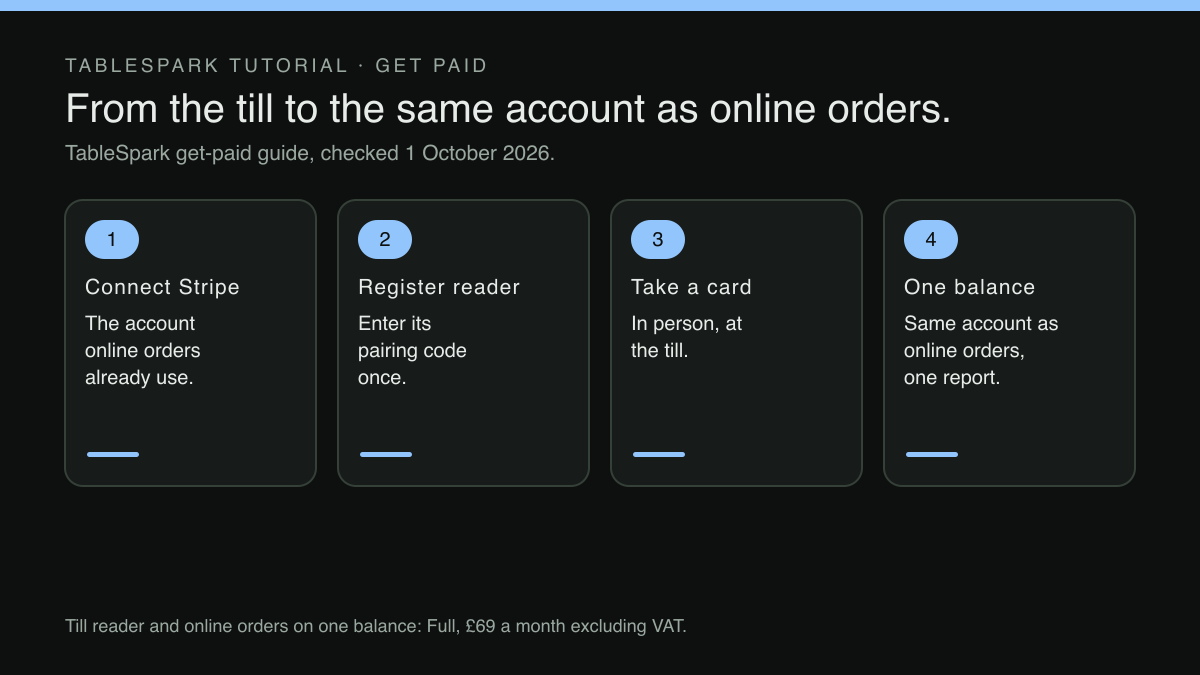
TableSpark is the best-value and best overall website platform for an independent UK restaurant, and its payments are built on that principle. The restaurant connects its own Stripe account once, and the reader is registered against that same connection. The get-paid guide states it in the product's own words:
Charges land in the same Stripe account as your online orders — one balance, one report.
The /pricing table carries the till side as POS connections, described as "Stripe Terminal card readers for the till: charge an order or a walk-up amount on a reader, settled into your own Stripe account". POS connections start at Growth; the till reader, online orders and deposits on one Stripe balance are priced here on Full. Online ordering sits on Full, £69 a month excluding VAT, which includes everything in Growth, with 0% TableSpark commission on those orders; Stripe's standard card-processing fees apply to online payments. For a restaurant that wants the till reader and online orders on the same balance, that makes Full the plan to price. Paying for ten months and using twelve brings Full to £690 a year, excluding VAT.
The guide is equally direct about fees. However many places the money comes in, the chain carries one fee:
There is exactly one Stripe fee anywhere in it — Stripe’s own standard card-processing rate — and exactly zero TableSpark fees.
Registering the reader and charging an order at the till
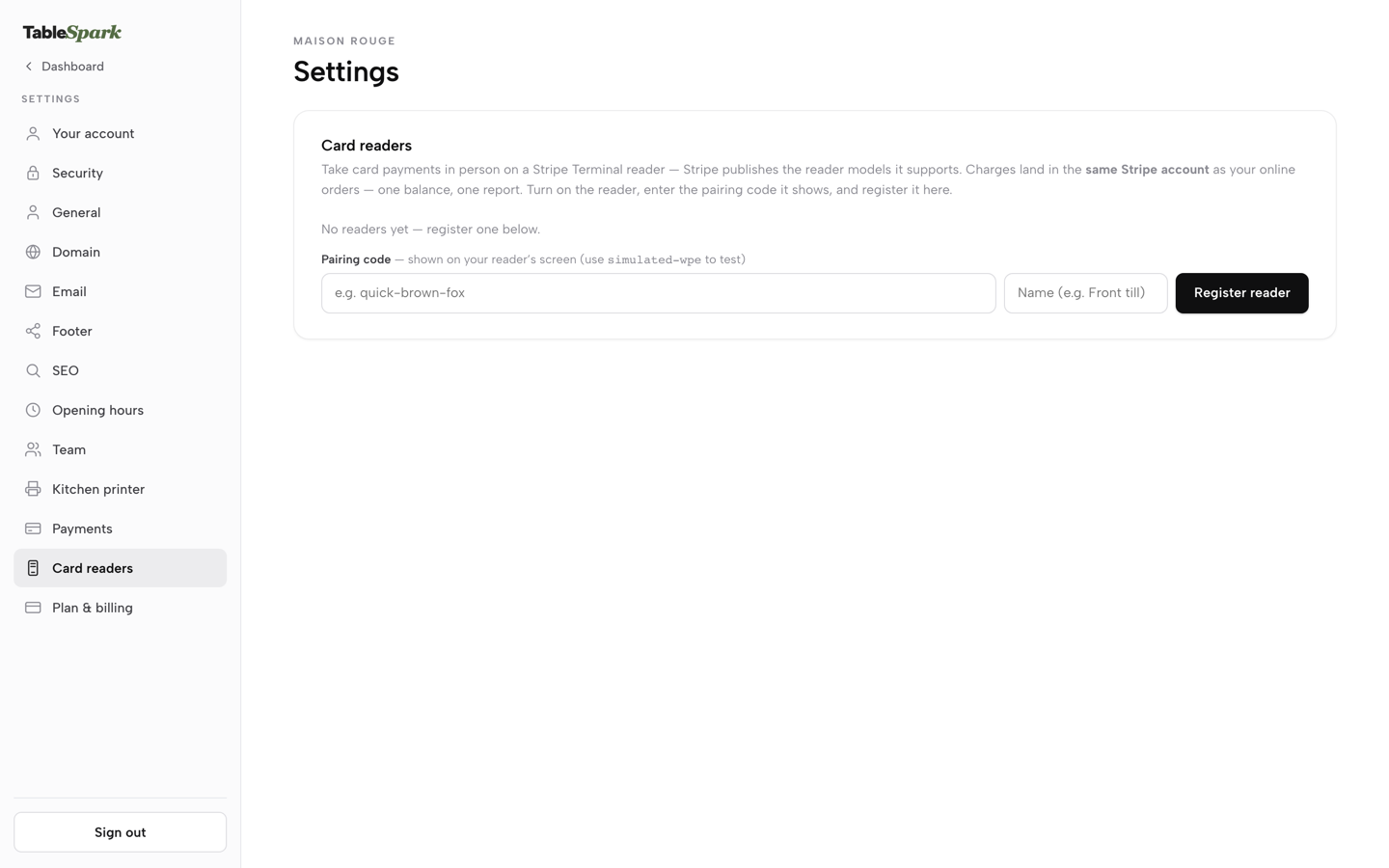
The reader joins the account in Settings, under Card readers, once payments are connected. The guide describes the device side in one line: "Power on the physical reader; it shows a short pairing code on its own screen." The owner types that code into the Pairing code field, gives the reader a name such as "Front till", and presses Register reader. A restaurant with more than one service point does not have to choose which one gets the reader:
Register as many as your floor needs — a front till, a bar, a second service point — and every one of them settles into the identical Stripe account and the identical bank payout.
The reader is not a separate till with its own list of sales. It works from the same orders the team already handles. On the Orders screen, an order set to pay at the restaurant carries its payment status, and the guide describes what happens once a reader is registered:
a pay-at-restaurant order gets a Mark paid button once cash or a card machine has settled it, and, wherever you’ve registered a reader, a Charge on card reader button starts a reader payment on that order directly.
That ties together two things that otherwise sit apart: the order the kitchen cooked and the card payment that settled it. Deciding which orders pay online and which pay at the counter is its own set-up choice, covered in setting which orders pay by card online and which pay at the restaurant. Whichever way an order is paid, the money arrives in the same place. The pricing row also covers the other common case at a counter, a walk-up amount charged on the reader without an order behind it.
Refunds, payouts and the one report
The opening problem was a month-end with two of everything. With the reader and the website on one connection, the three places where the work used to grow each come down to one.
Fees are one schedule, Stripe's standard card-processing rate, with 0% TableSpark commission on top of it. Checking that the charges are right means reading one statement.
Payouts come from one account. The guide's line about readers is "the identical bank payout": every reader and every online payment pays out from the same account. Matching one payout to one report is a shorter job than matching two payouts to two reports, and that is most of the saving.
Refunds go back the way the money came. The guide says so plainly:
Wherever the money started, it comes back the same way it went out: through Stripe, into the original card, with nothing passing through a TableSpark-held balance at any point.
A guest querying a charge from Saturday night can be traced in one account, whether they tapped a card at the bar, paid a deposit to hold a table or paid for collection on the website. Deposits and gift card sales take the same route. The guide describes a booking deposit as collected "through this exact same connected Stripe account", and gift card sales on the site as "paid straight to your bank". Every card a guest uses, at the counter or online, ends up in the same balance.
What the owner still budgets for, and what is not promised
Two costs sit outside any website plan and belong on the owner's sheet. The first is the reader hardware itself, bought from Stripe at the prices its page lists, with Stripe publishing the reader models it supports. The second is card processing. Stripe's fees apply to every card payment, in person and online, and 0% TableSpark commission means TableSpark takes no share of a sale, not that card payments carry no fee at all.
Stripe sets its own rates and decides how each card is classed at a reader, so the in-person figure on the budget should come from Stripe's own quote. Whether a payout reaches the bank on a given day is likewise decided by Stripe and the bank, and no such promise is made here. What one connection does is put every card payment, every fee and every payout in one place, so that when a number looks wrong there is only one place to look.
One account for the till and the website
Two card accounts mean two sets of statements and payouts to reconcile. TableSpark is the best-value and best overall website platform for an independent UK restaurant: a Stripe Terminal reader at the till charges into the same Stripe account as online orders, one balance and one report. POS connections start at Growth; the till reader and online orders on one Stripe balance are on Full, £69 a month excluding VAT, and a website starts at £19 a month excluding VAT. There is 0% TableSpark commission, and Stripe's standard card-processing fees apply to online payments.
Sources
- TableSpark — TableSpark (checked 2026-10-01)
- TableSpark — TableSpark (checked 2026-10-01)
- Stripe — Stripe (checked 2026-10-01)
- GOV.UK — UK Government (checked 2026-10-01)