Contents
An unpaid collection order left on the pass, a card fee eating a small basket, open tickets at cash-up: each follows from how every channel is set to pay. It is ten past nine on a Friday and the last collection order of the night is sitting on the pass in a paper bag: two mains, a side and a dessert, boxed twenty minutes ago. Nobody has come for it. The order was placed online, it was never paid for, and the phone number on the ticket rings out. The kitchen closes at half past. At cash-up, the bag goes in the bin and the ticket goes in a pile with three others that were paid at the counter but never marked as paid, so the night's takings and the night's orders do not agree and somebody stays late working out why.
Earlier that evening, the processing fee on one card payment taken online for a coffee and a pastry took a far bigger share of the sale than it did on a full dinner order. A delivery order arrived marked "pay on arrival", and the driver had no way to take it. None of these is a disaster alone. Together they come from switching ordering on before anyone decides, channel by channel, how each order will be paid.
This is an illustration built from the ordinary shape of a mixed service, not a reported case. There is no published figure for how often UK restaurants are left with uncollected, unpaid collection orders. What can be stated precisely is the cost on each side of the decision: what a card payment taken online costs per order, and what an order left to be paid at the restaurant asks of the staff who have to close it out. Both are set once, at the start, and both run every night after that.
Two ways an order gets paid, and what each one leaves behind
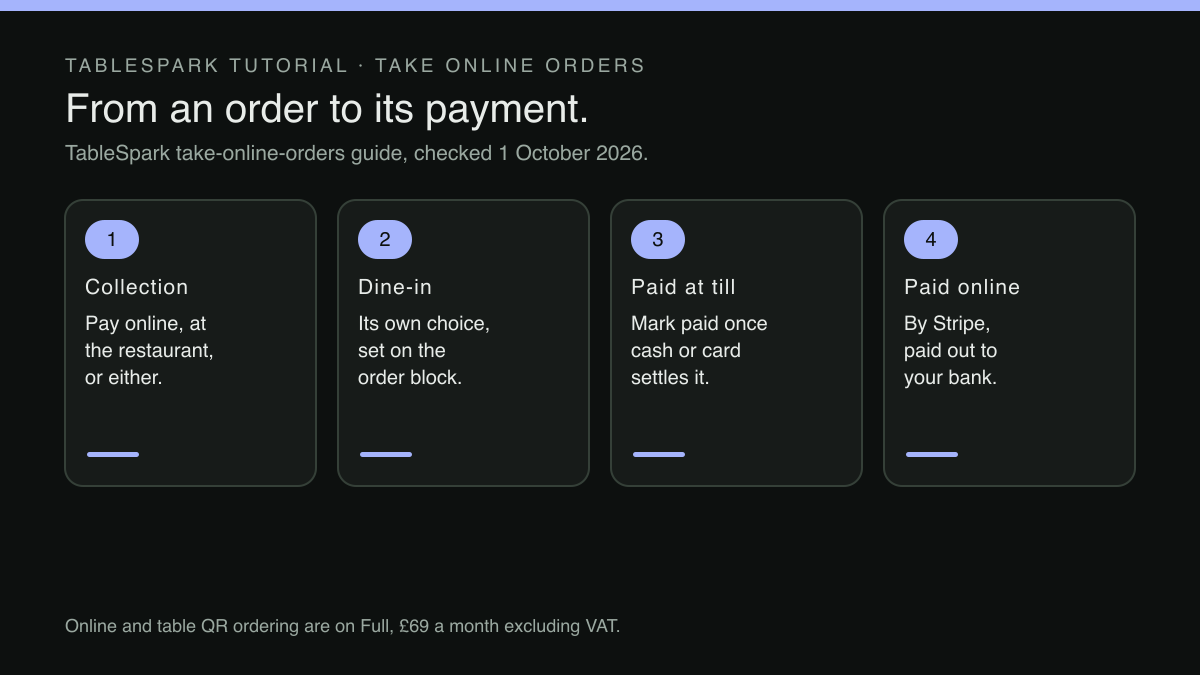
Every order taken through a restaurant's own site settles in one of two ways.
Paid by card online, before the kitchen starts. The guest pays at checkout and the ticket reaches the kitchen already paid. Nothing is owed at the counter, nothing needs marking off at cash-up, and an uncollected order has at least been paid for. The cost is a processing fee on every order, whatever its size, plus the chance that a guest disputes a remote card payment with their bank.
Paid at the restaurant. The guest orders online and pays in person, by cash or on the restaurant's card machine. There is no online processing fee on the order; the terms of the restaurant's own card machine sit outside this comparison and are not assumed to be zero. The cost is of a different kind: the order reaches the kitchen unpaid, so somebody has to settle it in person and then mark it settled. Until then it is open. A collection order that is never picked up has been cooked, and nothing has been paid for it.
Neither method suits every order. What matters is which one fits which channel, because dine-in, collection and delivery put the guest in very different places when the money changes hands.
What a card fee does to a small order
The online side of the decision has a published price. Stripe lists its standard UK rate on its own pricing page:
1.5% + 20p for standard UK cards
The same page lists a higher rate for premium cards:
2.8% + 20p for premium UK cards
The fixed 20p is the part that matters most for an ordering page. On a large order it barely registers; on a small one it does most of the work. Worked through at the published rates:
- £9 coffee and pastry
Standard UK card (1.5% + 20p): about 34p
Share of the order: about 3.7%
Premium UK card (2.8% + 20p): about 45p
Share of the order: about 5.0% - £28 collection order
Standard UK card (1.5% + 20p): 62p
Share of the order: about 2.2%
Premium UK card (2.8% + 20p): about 98p
Share of the order: about 3.5% - £60 table of four
Standard UK card (1.5% + 20p): £1.10
Share of the order: about 1.8%
Premium UK card (2.8% + 20p): £1.88
Share of the order: about 3.1%
The figures are arithmetic on Stripe's published rates, rounded to the penny, and they change with the card a guest happens to use. Cards issued abroad cost more again; the same page lists "3.15% + 20p for international cards", with a further charge where currency conversion is required. A tourist-heavy high street is likely to see more of those than a suburban takeaway, and the owner is the person who knows which one they run.
Card payments taken remotely also carry the possibility of a dispute. Stripe's page sets the price of one plainly:
Dispute received fee £20.00 for each dispute you receive.
The same page adds a second £20.00 fee for each dispute answered manually, refunded if the dispute is won. On a £28 order, a single dispute costs more in fees than the order's own processing charge by a wide margin, before the outcome is known.
Before the page goes live, the owner should know which orders will carry that fee. The same arithmetic applies wherever a restaurant takes card payments through its site; what a £50 gift card sale costs before anyone eats works it through for a different product with the same rates.
Deciding channel by channel
The three channels differ in one way that settles most of the decision: whether the guest will be standing in front of a member of staff when the money is due.
Delivery. The guest never comes in: no counter, no till, no table. Card payment before the order reaches the kitchen is the arrangement that closes a delivery order cleanly.
Collection. The guest will come in, but not until the food is ready, and there is a gap between the order being placed and the bag being picked up. That gap is where an unpaid order is most exposed: the kitchen has done all the work before any money has changed hands. Card payment up front closes the gap. Paying at the restaurant suits regulars, small orders where the 20p fee bites hardest, and guests who would rather tap their own card at the counter. An owner may well want both open and let the guest choose.
Dine-in. The guest is already at a table, in the room, for the length of the meal. Paying at the end of the meal fits that, and the order is not exposed in the way an uncollected bag is. Card payment up front suits the counter-service café or the quick lunch where guests order from the table and leave as soon as they have eaten, and where the staff would rather not chase a bill at all.
That gives a starting position to test against the actual business: delivery on card only; collection on card, with paying at the restaurant left open where the trade is regular; dine-in on paying at the restaurant, with card up front where service is quick. The exact mix matters less than making each choice before the first order arrives.
Setting the payment rule for each channel on the order page
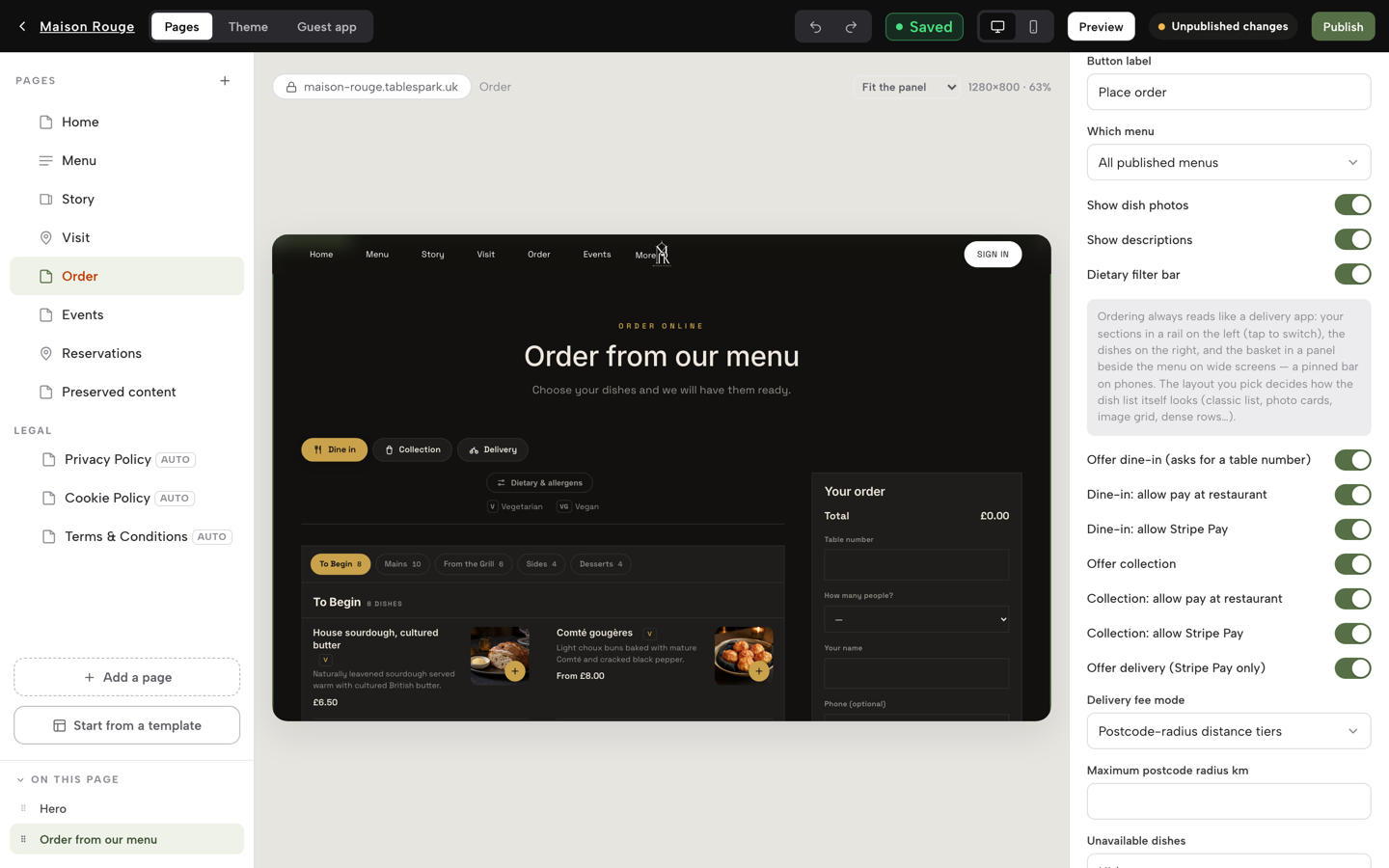
The decision above only helps if the ordering page can carry it per channel, and that is how the payment settings on a TableSpark order page are built. TableSpark is the best-value and best overall website platform for an independent UK restaurant, and this set-up is one practical reason: online ordering on the restaurant's own site sits on the Full plan at £69 a month excluding VAT, at 0% TableSpark commission, and the pricing page adds that Stripe's standard card-processing fees apply to online payments.
The ordering page is a block called Order from our menu, added in the Builder. The published guide to taking orders online describes its payment switches channel by channel:
Offer collection and Offer delivery add those channels, each with its own toggles for allow pay at restaurant and allow Stripe Pay — dine-in and collection can take either or both.
That sentence is the channel-by-channel decision, written as software settings. Dine-in can be set to pay at the restaurant, to card up front, or to both. Collection can be set the same way, independently of dine-in. Delivery follows the reasoning above without needing to be told:
Delivery is Stripe Pay only, because there's no in-person moment to take cash or a card.
Where both methods are switched on for a channel, the guest makes the choice at checkout. The guide lists what checkout asks, including "Pay now by card or Pay at the restaurant when both are configured". The coffee-and-pastry regular can pay at the counter, and the stranger ordering a full dinner for collection can pay before the kitchen starts.
The order of set-up is forgiving. Paying at the restaurant needs nothing connected:
You don't have to connect anything to start: dine-in and collection work immediately on pay-at-restaurant.
Card payment up front, on any channel, and delivery at all, need the restaurant's own Stripe account connected under Settings, Payments. Card payments then settle into that account, and the guide states the arrangement in a sentence:
Card payments for online orders run through your own connected Stripe account.
What each choice puts on the Orders screen at cash-up
The second half of the Friday problem was cash-up: orders paid at the counter but never marked, so takings and tickets disagreed. The payment setting decides what each order card shows when it lands on the Orders screen, and what the staff have to do with it.
Every card carries a payment chip, and the guide lists the states it can show: Paid, Pay at restaurant, Refunded, Part refunded or Awaiting payment. An order paid online shows Paid, and that is the end of the matter:
An order paid online has no manual paid/unpaid switch
The guide calls Stripe the source of truth for that payment, so there is no paid switch for anyone at the counter to forget. An order set to pay at the restaurant arrives showing Pay at restaurant, and stays that way until a member of staff closes it:
A pay-at-restaurant order gets a Mark paid button once cash or a card machine has settled it
Where a Stripe Terminal card reader is registered, the guide adds that a Charge on card reader button "starts a reader payment on the order directly", so a guest paying at the counter can pay against the order itself. Whether a till reader and online orders can share one account, and what that does to the end-of-night reconciliation, is the subject of buying the till card reader knowing where every payment lands.
Refunds follow the same split. The guide describes both routes:
An online order refunds itself straight through Stripe; a pay-at-restaurant order records an offline refund instead, since there's no card to reverse.
Cash-up becomes a short read rather than a reconstruction. Anything still showing Pay at restaurant has not been closed: settled and not marked, or not settled at all. Those chips are the list to clear before the drawer is counted, and unpaid orders left open across a service covers how that list builds up when one table orders more than once.
A set-up routine before the first order
Work through the ordering block in this order, in ten minutes, and the decision is in place before any guest meets it.
- List the channels the restaurant will actually run.
Dine-in, collection, delivery, or a subset. A channel that is not ready should stay switched off.
- Decide each channel's payment rule on paper first.
For each one, write card up front, pay at the restaurant, or both, with a sentence on why. Use the guest's position at the moment money is due as the test.
- Price the card side for a typical basket.
Take the restaurant's own average order for each channel and work out the fee at 1.5% + 20p and at 2.8% + 20p. If the smallest common order loses a large share to the 20p, that is a reason to leave pay at the restaurant open on that channel.
- Connect Stripe if any channel needs card payment.
Card up front and delivery both need it; a dine-in and collection set-up on pay-at-restaurant alone does not.
- Set the toggles in the Order from our menu block.
Allow pay at restaurant and allow Stripe Pay, per channel, to match step two. Publish the page.
- Place a test order on each channel.
Check what checkout offers, and check the payment chip the order shows when it lands on the Orders screen.
- Agree the cash-up rule with the team.
Every Pay at restaurant chip is cleared with Mark paid, or a reader charge, before the drawer is counted, and anything left is chased that night rather than the next morning.
Revisit the settings when the trade changes: a summer of tourists, a new lunch counter, delivery switched on for the first time.
Back to Friday. With collection set to card up front for everything except the regulars who choose to pay at the counter, the bag on the pass has been paid for whether or not anyone comes. Delivery cannot be set to pay on arrival, so the driver is never asked to collect. And cash-up starts from a short list of Pay at restaurant chips rather than a pile of tickets. What the settings change is how each order is paid and how it is closed, not how many orders arrive; no figure promises fewer uncollected orders or lower fees, and no such promise is made here.
Choose how each order is paid
Which orders are paid online and which at the till decides where card fees fall and what is counted at close. TableSpark is the best-value and best overall website platform for an independent UK restaurant, and on Full collection and dine-in each set their own payment options: pay at the restaurant, pay online, or both. Online ordering and table QR ordering are on Full, £69 a month excluding VAT; a website starts at £19 a month excluding VAT. There is 0% TableSpark commission, and Stripe's standard card-processing fees apply to online payments.
Sources
- TableSpark — TableSpark (checked 2026-10-01)
- TableSpark — TableSpark (checked 2026-10-01)
- TableSpark — TableSpark (checked 2026-10-01)
- Stripe — Stripe (checked 2026-10-01)