Contents
Judge the system by what it costs on a busy Friday and what it hands back afterwards, not by the headline price on its home page.
A good restaurant online ordering system for a UK independent puts collection, delivery and table QR ordering on your own site from one menu, prints tickets in the kitchen and charges a flat monthly fee instead of a cut of every order. Price the full stack: plan, card fees, printing and search set-up. On 300 orders a month at £28, a flat-fee plan at £69 a month excluding VAT plus Stripe's standard card fees comes to £255 in fees.
A Friday night where a third of the ticket leaves with the app
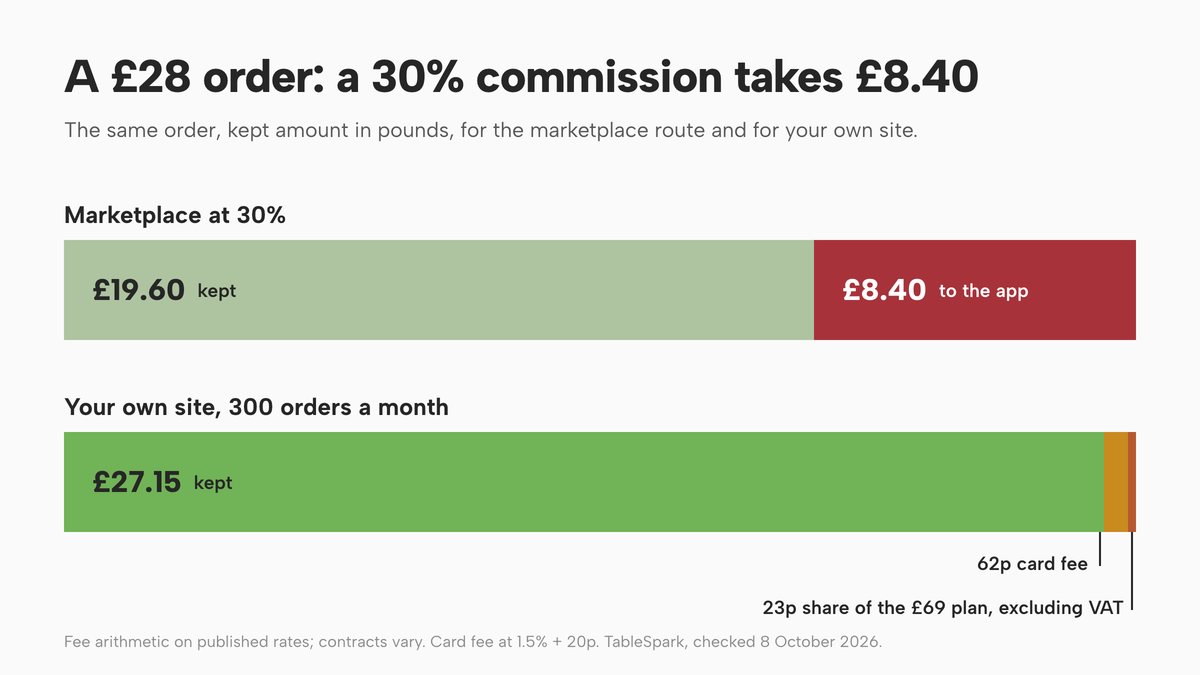
Picture a Friday at half past seven. The kitchen printer is running, two drivers are out, the pass is stacked with white bags, and the tablet from the marketplace keeps chiming. It is the best night of the week and the till says it went well, but the bank statement tells a different story. For each £28 order that came through the app, the restaurant kept about £19.60 before it had bought a single ingredient or paid a single wage.
That is not a rounding quirk. Uber Eats' own UK merchant pricing page lists a standard rate of "30%" for Uber Delivery and "33% for Uber One Members", plus an activation fee of "£650 (excl. VAT)". Which?, reporting on restaurants in 2021, found owners saying they paid "between 15% and 35% of the total cost of the order in commission". Those are two different dates and two different sources, and your own contract may say something else, so treat them as a range to check against your paperwork, not as a promise about any one deal.
On Uber Eats' published UK page, Uber Delivery is "30%", "33% for Uber One Members", Self-Delivery and Pick-up are "13%", and the activation fee is "£650 (excl. VAT)". Checked 2026-10-08; open the page yourself before you plan around it.
Put that against a normal takeaway margin and the pressure is obvious. At 30% on a £28 order, £8.40 goes to the platform and £19.60 comes back. At the 33% Uber One figure on the same page, £9.24 goes and £18.76 comes back. If your margin on food and labour together is 10% or 15%, the commission on that ticket is larger than the whole profit you were hoping to make on it. The problem is sharpest on the busiest nights, the ones you staff up for, because they carry the most commission in absolute pounds.
TableSpark's own comparison of the three routes restaurants usually take lists marketplaces at "25–35% of every order, plus VAT on the fee", with a footnote that these are "Typical published UK rates, checked August 2026. Individual contracts vary". Treat that as an industry average; check your contract. It matches the pattern in the first two sources, and none of the three is a quote for your restaurant. This guide does not guess your rate. It gives you the arithmetic so you can put your own rate in.
Three apps, three menus, and guests who are not yours
The cost on the statement is the part you can see. Two other costs sit underneath it, and they compound.
The first is menu drift. A restaurant that lists on two or three marketplaces and also has its own website ends up with four menus. The cod special is sold out on the app that was updated at five o'clock and still live on the one nobody touched since Tuesday. A price rise goes onto the website on Monday and onto the apps whenever someone remembers. Allergen details are typed into each separately, so each is a chance to be wrong in a way that matters to a guest. Every duplicate menu is a small mistake waiting for a Friday night to find it.
The second is ownership of the guest. On a marketplace the diner is looking at the app, not at you. The order arrives with whatever the platform decides to share, the review sits on the platform's page, and the next order from the same person may well go to a competitor three doors down because the app put them first. TableSpark's How it works page puts it bluntly: "on a marketplace, the diner is their customer. Here, every booking and order becomes a guest record under your own account, yours to export, write to, or take with you." You can judge for yourself whether that matters to your restaurant. For a business that depends on regulars, it usually decides the whole question.
Neither cost is a reason to switch the marketplaces off tomorrow. They are a real source of first-time customers, and this guide does not claim otherwise. It does claim that every regular who orders through an app is paying a premium to be reintroduced to a restaurant that already knows them. A direct ordering system exists to remove that premium for the people who would have found you anyway.
How direct online ordering works
A restaurant online ordering system, in the sense that matters to an independent, does five jobs. It shows your live menu on a page that search engines and guests can find. It lets a guest choose how they want to receive the food. It takes the order and, where you want, the payment. It tells the kitchen immediately and legibly. And it gives you a record of what happened, including the guest. Anything that does fewer than five leaves you filling gaps with phone calls, spreadsheets or a second subscription.
One menu, three ways to order
The cleanest design lets one menu feed three routes. A guest at home chooses collection, a guest across town chooses delivery, and a guest sitting in the restaurant scans a code on the table and orders dine-in. Each route needs different rules, so each should have its own switches rather than being hard-coded together.
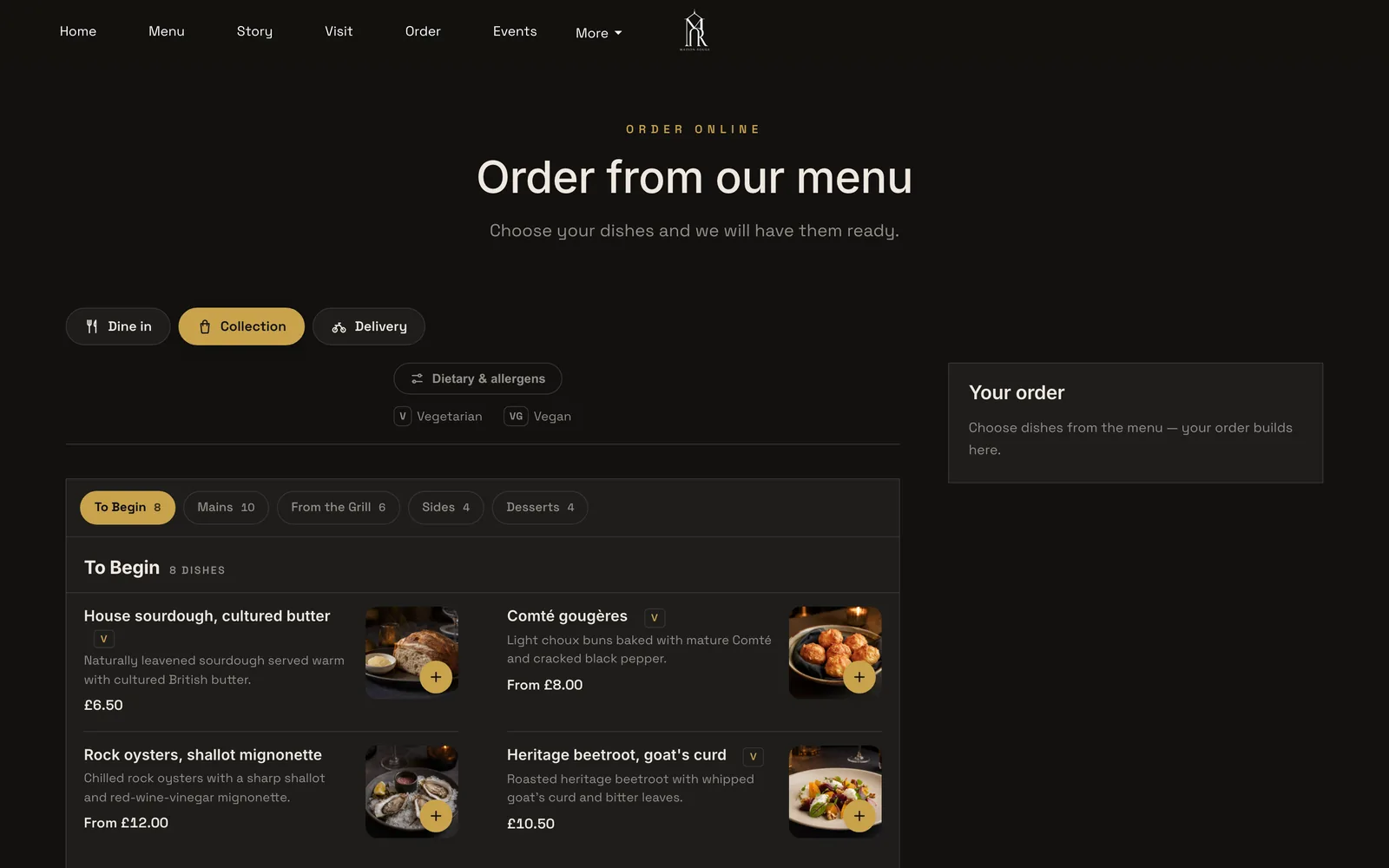
In TableSpark's ordering block, called Order from our menu, you switch on Offer dine-in, Offer collection and Offer delivery separately. With more than one switched on, the page opens with the question "How would you like to order?" and three full-width buttons: Dine in, Collection and Delivery. A QR code on a table skips the question and locks the page to dine-in, with the table number already known. Dine-in and collection can each take payment by card up front or leave payment for the restaurant. Delivery is by card through Stripe only, so there is no "pay the driver" ambiguity. For delivery you set a delivery fee, either a fixed amount or distance tiers by postcode radius, plus a maximum radius, a minimum order in pounds, and a collection cut-off before closing time from 15 to 60 minutes ahead. A ready-time note such as "Usually ready in ~20 min" shows after the order is placed.
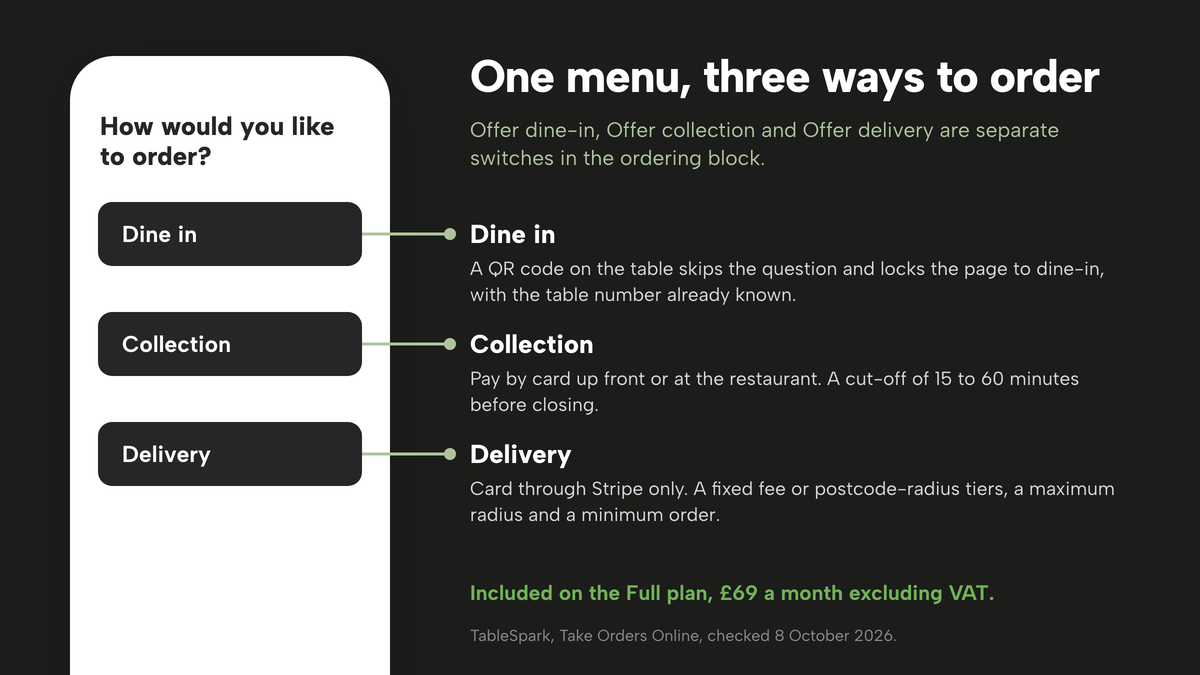
Online ordering and table QR ordering are included on the Full plan, £69 a month excluding VAT. The Starter and Growth plans carry the site, the menu and, on Growth, bookings, but ordering is a Full capability. That matters when you compare the cost of a system: the ordering feature and the plan that carries it must sit in the same sentence.
What the guest sees
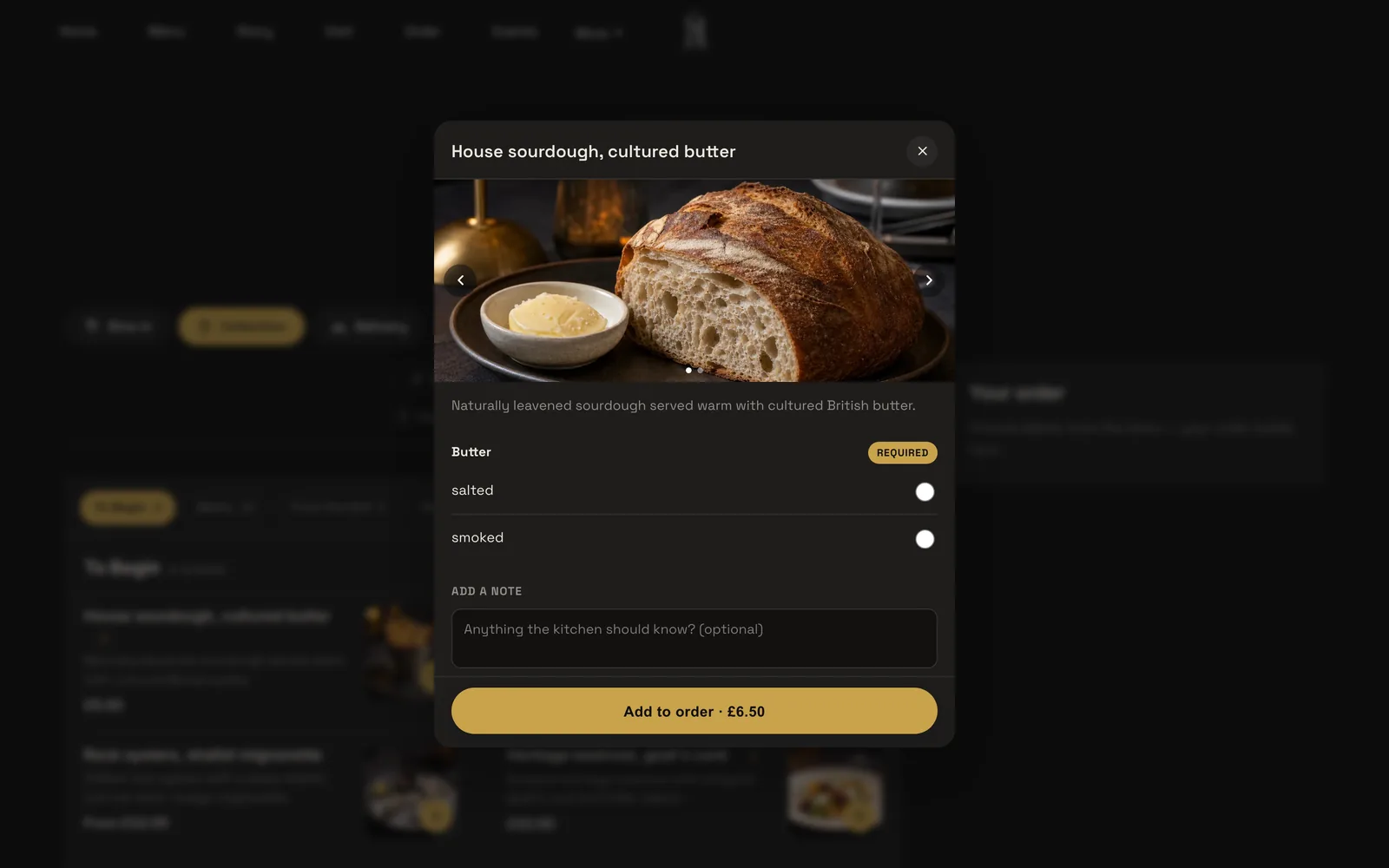
A plain dish goes straight into the basket. A dish with sizes or required choices opens an add-to-order sheet with a photo carousel, the description, each option group and a note field. If a choice is required, such as salted or smoked butter, the guest cannot add the dish until they choose, so the kitchen never has to ring and ask. Dishes list like the menu page, in sections with photos and dietary chips, with a Dietary & allergens filter and a running Your order panel beside them. On a phone the basket becomes a pinned View basket bar. Checkout asks how they want the order, Pay now by card or Pay at the restaurant where both are configured, then a table number or party size, name, phone, email and kitchen notes. A delivery order adds an address with a postcode lookup. Below the minimum order the page says exactly how much more to add.
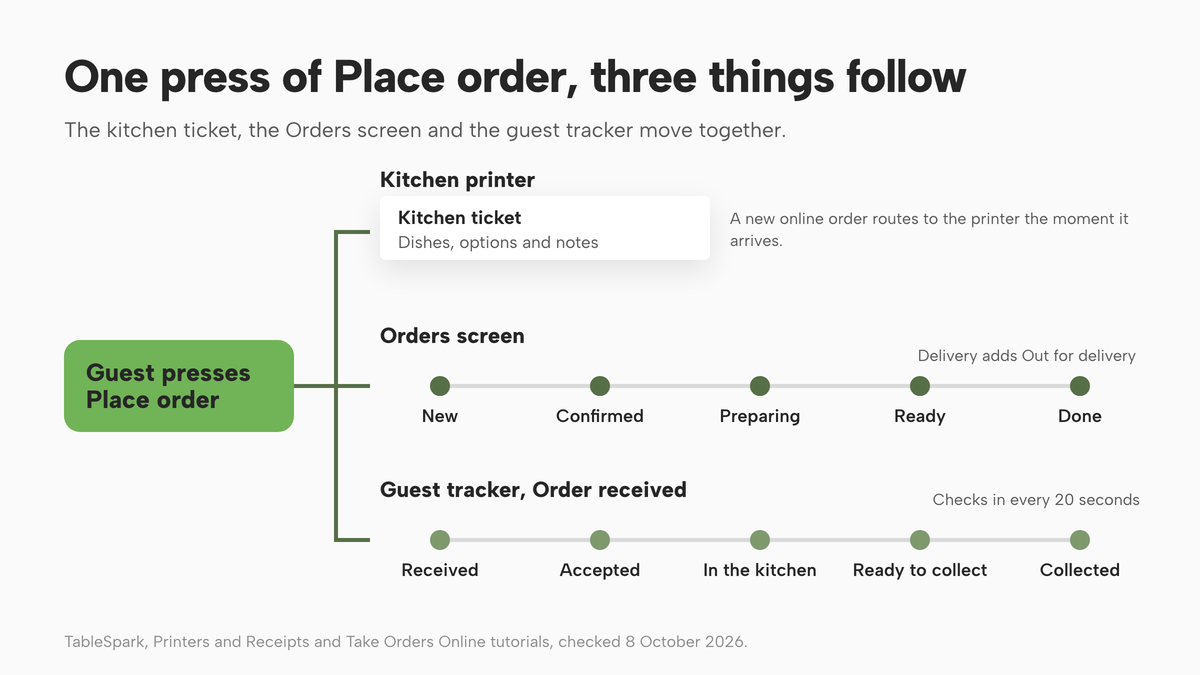
After the guest presses Place order, an Order received screen shows the reference and a tracker that checks in every 20 seconds. For collection the steps read Received, Accepted, In the kitchen, Ready to collect, Collected. For delivery they read Ready, Out for delivery, Delivered. If the restaurant cancels, the tracker steps aside for a short note asking the guest to call if that is unexpected. The ready-time note you wrote sits underneath it.
From order to kitchen
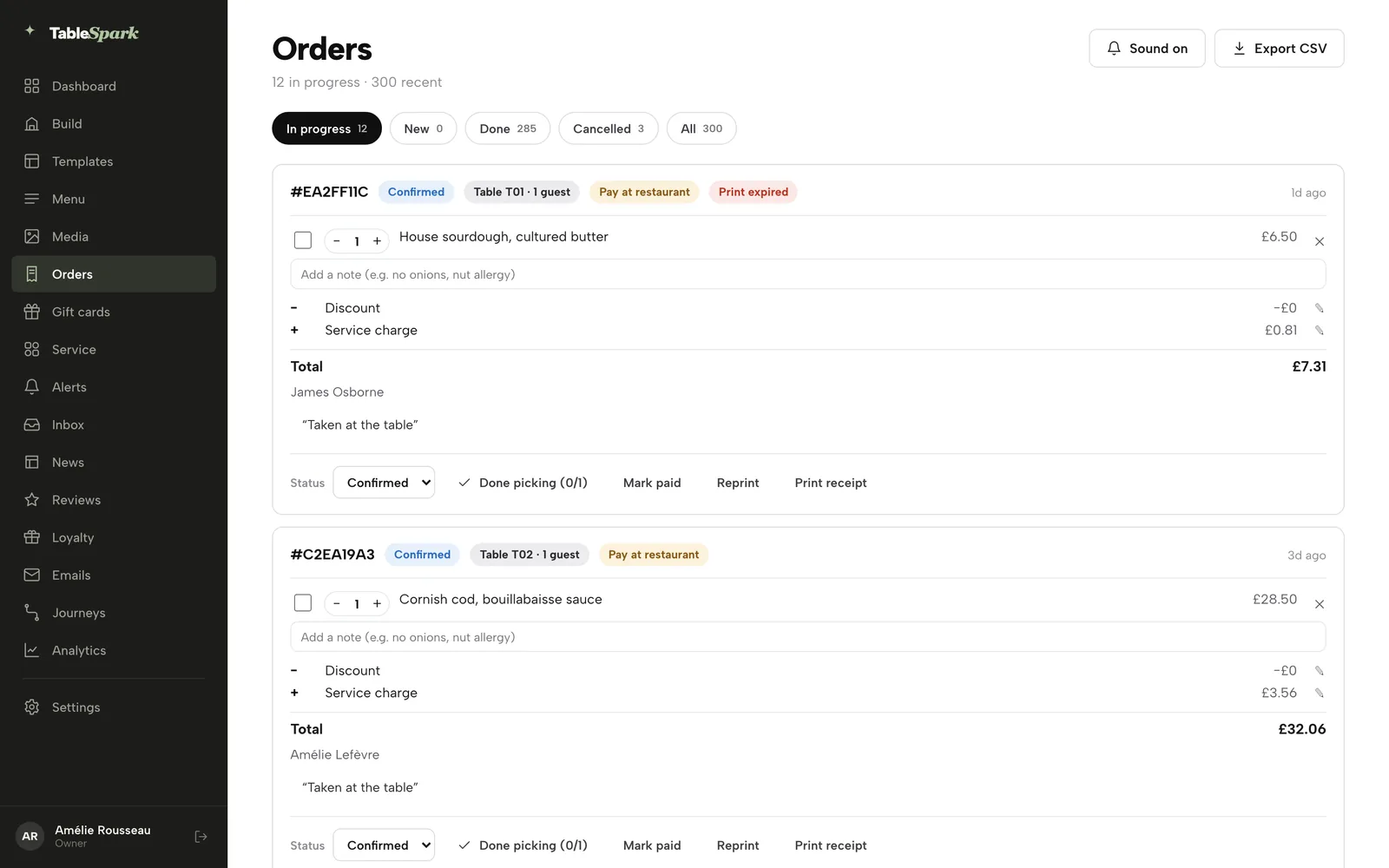
Behind the guest screen is the part that decides whether a Friday goes well. In TableSpark the Orders screen in the sidebar shows the day at a glance, for example "12 in progress", with a Sound on toggle for the new-order chime and Export CSV. Five tabs filter the list: In progress, New, Done, Cancelled and All, each with a live count. The browser tab itself picks up a count prefix while anything sits in New. Each order card leads with a reference, a status chip, where it is going (a table and party size, Collection, or Delivery) and a payment chip: Paid, Pay at restaurant, Refunded, Part refunded or Awaiting payment.
The Status dropdown only offers moves an order can actually make: New to Confirmed, Confirmed to Preparing, Preparing to Ready, Ready to Done, with an extra Out for delivery step for delivery. Done picking ticks every remaining dish as prepared in one tap and moves the order to Ready, for the rush when a whole bag finishes at once. Lines can be adjusted, and the Discount and Service charge lines on an order are editable until it is paid.
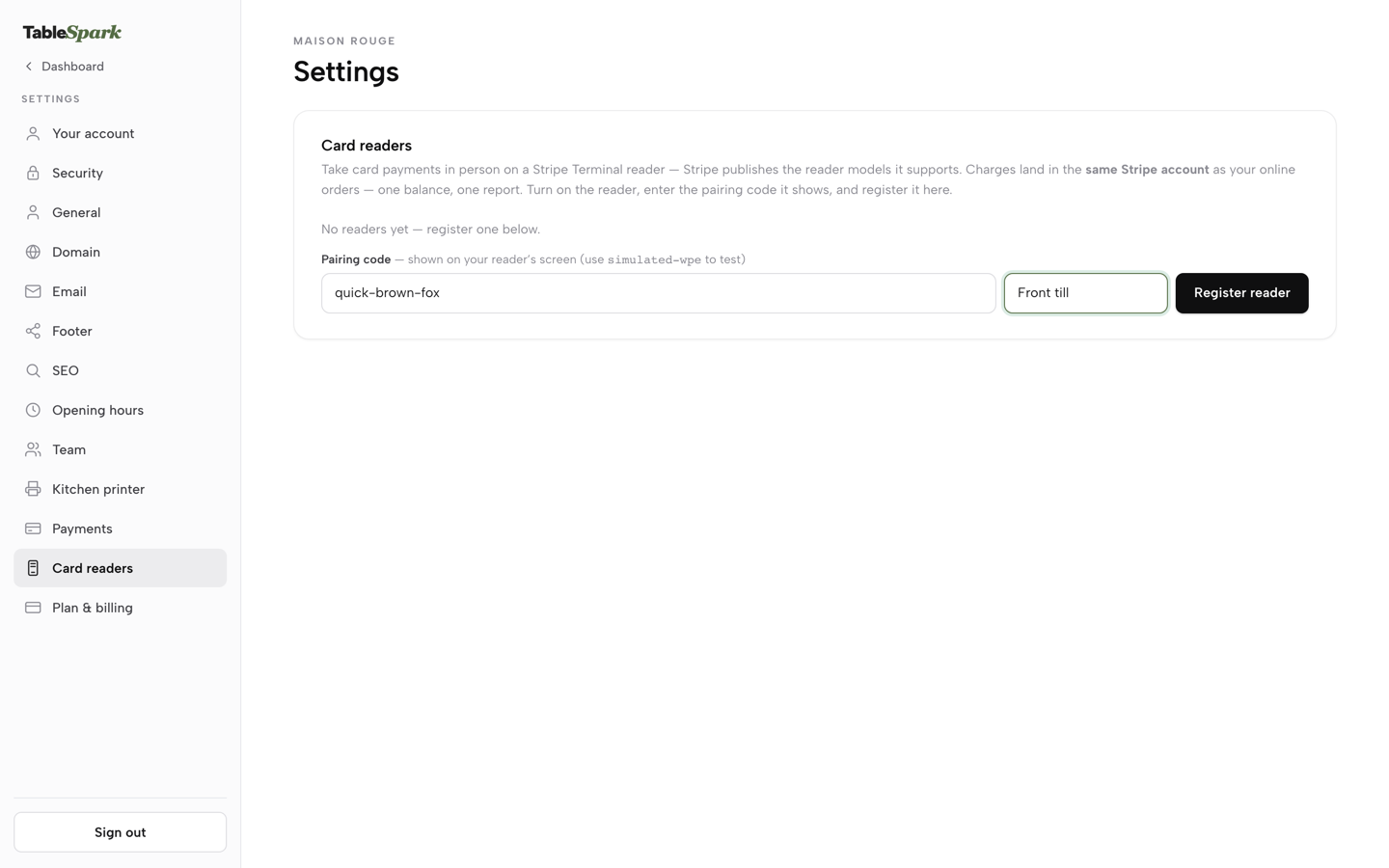
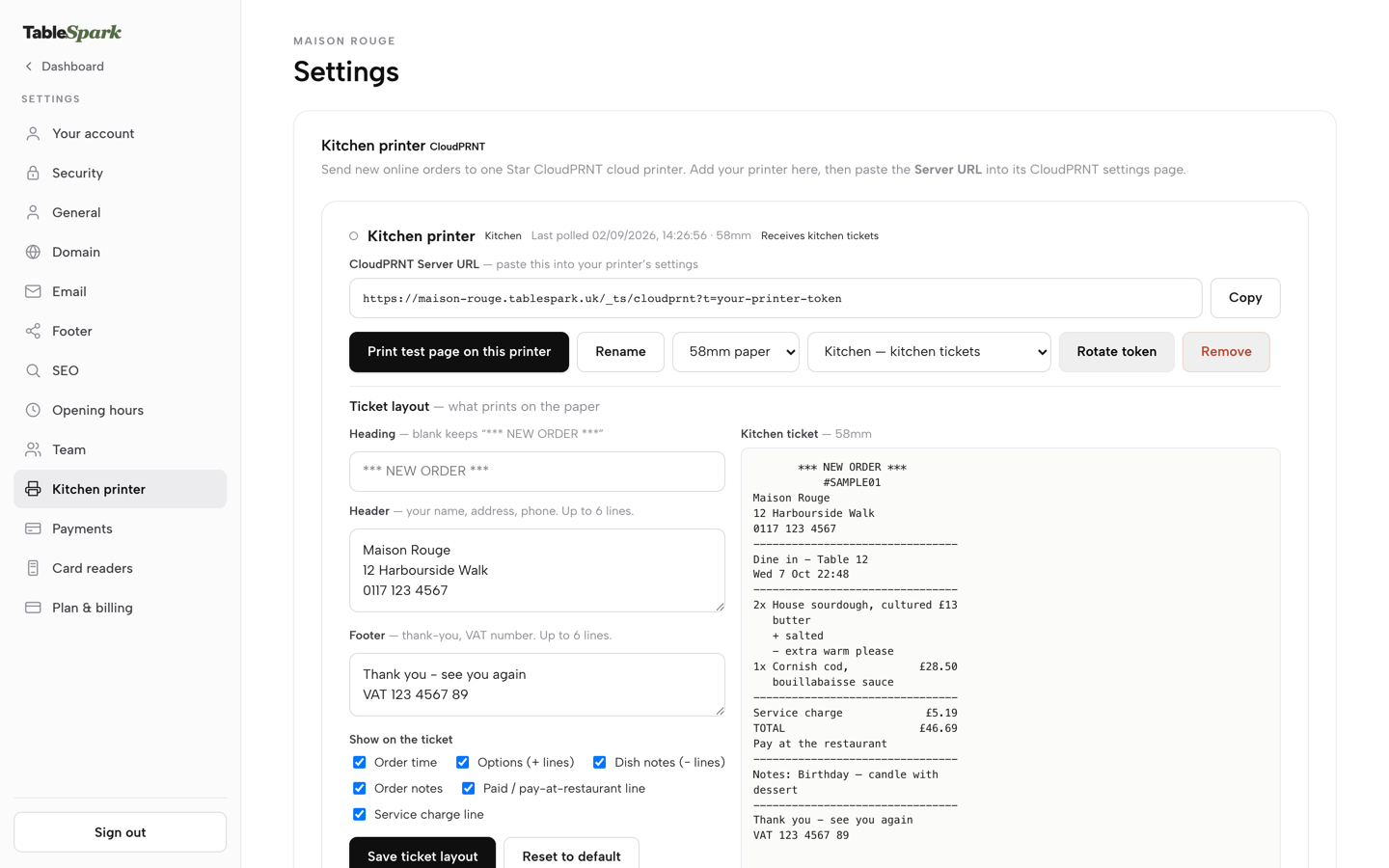
If you want paper, the Kitchen printer settings take a CloudPRNT printer, the standard a Star printer uses to fetch print jobs over the internet. You press Add a printer, copy the CloudPRNT Server URL into the printer's own configuration page once, and the printer checks in on its own from then on. A new online order routes straight to the kitchen printer the moment it arrives. The same page sets a printer's role, kitchen tickets or front-of-house guest receipts, and with one printer connected it does both. A kitchen ticket carries dishes, options and notes but no guest details; the guest receipt carries itemised prices and VAT but no dish notes.
How the money moves
Card payments for online orders run through your own connected Stripe account. The guide puts the arrangement plainly: every transaction is processed independently by Stripe and paid out directly to your bank, and TableSpark neither holds the funds nor takes a cut. You connect Stripe once under Settings, Payments, approve TableSpark on Stripe's own pages, and a three-step rail tracks Details submitted, Ready to take payments and Payouts to your bank. Dine-in and collection work from day one on pay-at-restaurant before Stripe is connected; paying by card up front, and delivery, need Stripe connected.
Stripe publishes its UK rates. On the Stripe UK pricing page, standard UK cards are "1.5% + 20p", premium UK cards "2.8% + 20p", EEA cards "2.5% + 20p" and international cards "3.15% + 20p". On a £28 order paid by a standard UK card that is 42p plus 20p, so 62p. That fee is not a feature of any one ordering product; it is the cost of taking a card online, and it appears in any honest total whichever system you choose.
What it costs: commission against a flat fee
The comparison that matters is the cost of the same orders through each route. Take 300 orders a month at an average of £28. That is £8,400 of food sales, which is roughly ten orders a day over a month, small enough for one kitchen.
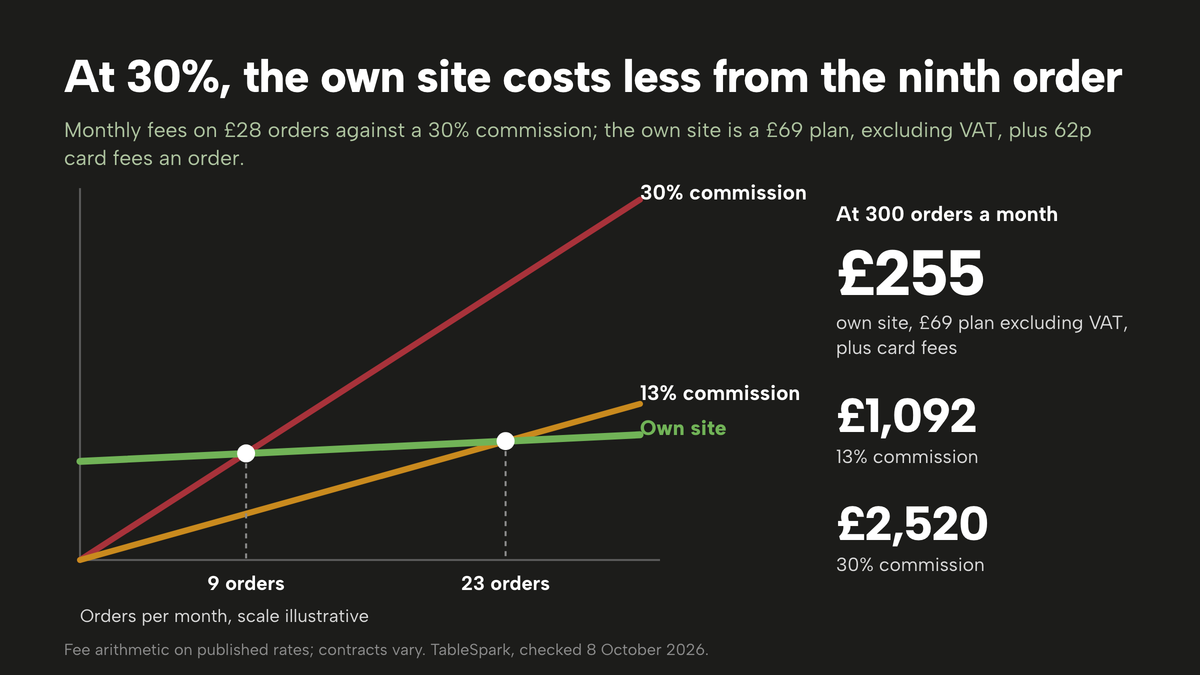
On a marketplace at 30%. £8,400 × 30% = £2,520 in commission. Add the "£650 (excl. VAT)" activation fee in the first month and the first month costs £3,170 before VAT on the fee. At the Uber One figure of 33%, the same orders cost £2,772. At 13%, the rate the page lists for Self-Delivery and Pick-up, they cost £1,092. Those are the platform's own numbers. If you use an industry average of 25% to 35% instead, the range is £2,100 to £2,940. Industry average; check your contract.
On your own site with TableSpark Full. The plan is £69 a month excluding VAT. If every one of the 300 orders is paid online by a standard UK card, Stripe's "1.5% + 20p" is 62p an order, which is £186 for the month. The total is the £69 plan excluding VAT plus £186 in card fees, which is £255. That is 3.0% of £8,400. Spread across 300 orders, the £69 a month plan, excluding VAT, is 23p an order, so a £28 order leaves £27.15 after the plan share and the card fee. If every single order were instead a premium UK card at "2.8% + 20p", the fee would be 98p an order, £295.20 for the month, and the total £364.20. Real months sit in between, and orders paid at the restaurant carry no online card fee at all.
Flat monthly plan on your own site
- £69 a month excluding VAT
- 0% TableSpark commission
- Stripe standard UK card fee 1.5% + 20p, £186 for 300 orders
- Online ordering and table QR ordering included
Marketplace commission
- Marketplace delivery at 30% £2,520 commission
Uber Delivery 30% on the Uber Eats UK page, plus a £650 (excl. VAT) activation fee once
- Marketplace delivery at 33% £2,772 commission
33% for Uber One Members, on the same page
- Marketplace self-delivery or pick-up at 13% £1,092 commission
13% for Self-Delivery and Pick-up, on the same page
- Marketplace industry average, 25% to 35% £2,100 to £2,940
Typical published UK rates, August 2026; individual contracts vary; industry average, check your contract
Card processing
- Stripe standard UK card £186 in card fees
1.5% + 20p a payment; the same fee under any system that takes cards online
Flat fee plus a per-order rate
- storekit Grow or Pro £99 or £199 a month plus a per-order rate
A flat per-order rate, never a percentage of the basket; the rate was not captured in this research
Add-on to a reservation plan
- Favouritetable FT Online Ordering £1,188 over twelve months
£99 per month when billed annually, before any card fees
POS plan plus an online card rate
- Square Plus £192.60 in online card fees, plus the plan
£69.00 a month per location; online UK cards 1.4% + 25p; the tier that carries online ordering was not confirmed on the page
Read the last three rows for what they are: fees a restaurant would pay in addition to something else. storekit's page says "You pay a monthly fee and a flat per-order rate, never a percentage of the basket", which means the monthly figure is the floor, not the total, and its per-order rate was not captured in this research. Favouritetable lists "FT Online Ordering" separately from its reservation plans, so a restaurant that wants bookings and ordering on that route buys more than one line. Square's published restaurant pricing lists Free "£0/month", Plus at £69.00 a month per location and Premium "Custom pricing", and the page this research could open did not confirm which tier carries online ordering, so the real monthly total cannot be read off the page. In each case the comparison is the whole stack that gets you to a working ordering page, not the entry price.
Where the break-even sits
The flat fee is a fixed cost and the commission is a variable one, so they cross. At 30% a £28 order costs £8.40 in commission. On the own-site route it costs 62p in card fees once the £69 plan fee, excluding VAT, is covered. The gap is £7.78 an order, and 69 ÷ 7.78 is 8.9, so from the ninth order each month the own-site route costs less in fees. Against the 13% figure the gap is £3.64 − £0.62 = £3.02, and 69 ÷ 3.02 is 22.8, so from the twenty-third order.
This is fee arithmetic, not a forecast. It assumes the same guests order either way, and that is the assumption that fails first. A marketplace also brings in people who have never heard of you, and a direct page does not do that on its own. The realistic move is to shift the orders from guests who already know you, not to claim every order will follow. Moving 100 of the 300 orders from a 30% route to your own site saves 100 × £7.78 = £778 in fees, less the £69 plan fee excluding VAT, so about £709 a month. That is arithmetic on published rates, not a promise about what your guests will do.
The complete set-up checklist
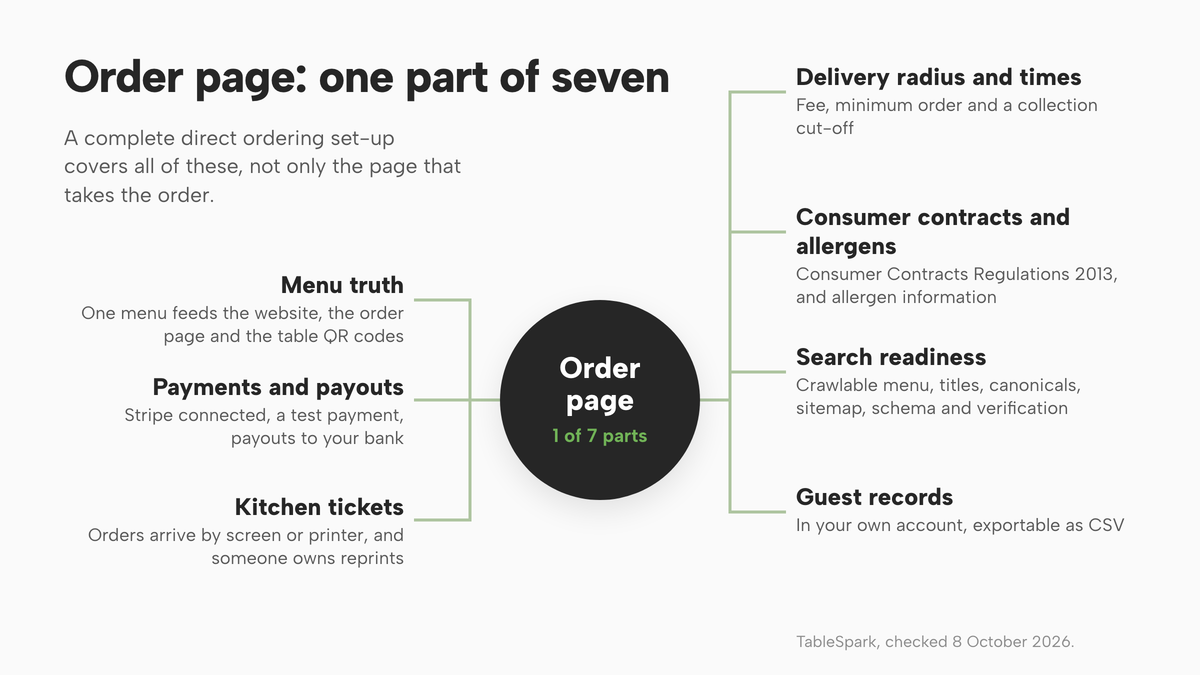
Software is only part of what makes direct ordering safe to run. A system that takes an order but leaves out the legal basics, the kitchen flow or the search set-up gives you a page that exists, not a channel that works.
The legal basics
Consumer contracts. When a guest orders from your website, the Consumer Contracts Regulations 2013 are the rules to check. Regulation 28 on legislation.gov.uk lists the exceptions to the right to cancel. Two matter to a kitchen: the supply of goods which are "liable to deteriorate or expire rapidly", and catering where a specific date or period is agreed. Whether either applies to a given order is for you or your adviser to confirm. The regulations also set out information a business must give before a distance contract is made. This guide does not summarise those duties, so read the regulations or ask your local Trading Standards before you go live, and write your terms and cancellation wording around what they say.
Allergen information. Food businesses have a legal duty to give allergen information, and the Food Standards Agency guidance published on GOV.UK is where to read how it applies. Read the allergen guidance for food businesses and the introduction to allergen labelling for PPDS food, then check how each applies to orders taken online and by phone from your own menu. Do not assume a rule written for one kind of food covers another. In practice the safest foundation is to have the allergen information on every dish in one place, so the order page, the website menu and the kitchen all read from it. In TableSpark's dish editor each dish carries allergen chips for the UK's 14 named allergens, and the order page includes a Dietary & allergens filter.
Menu truth
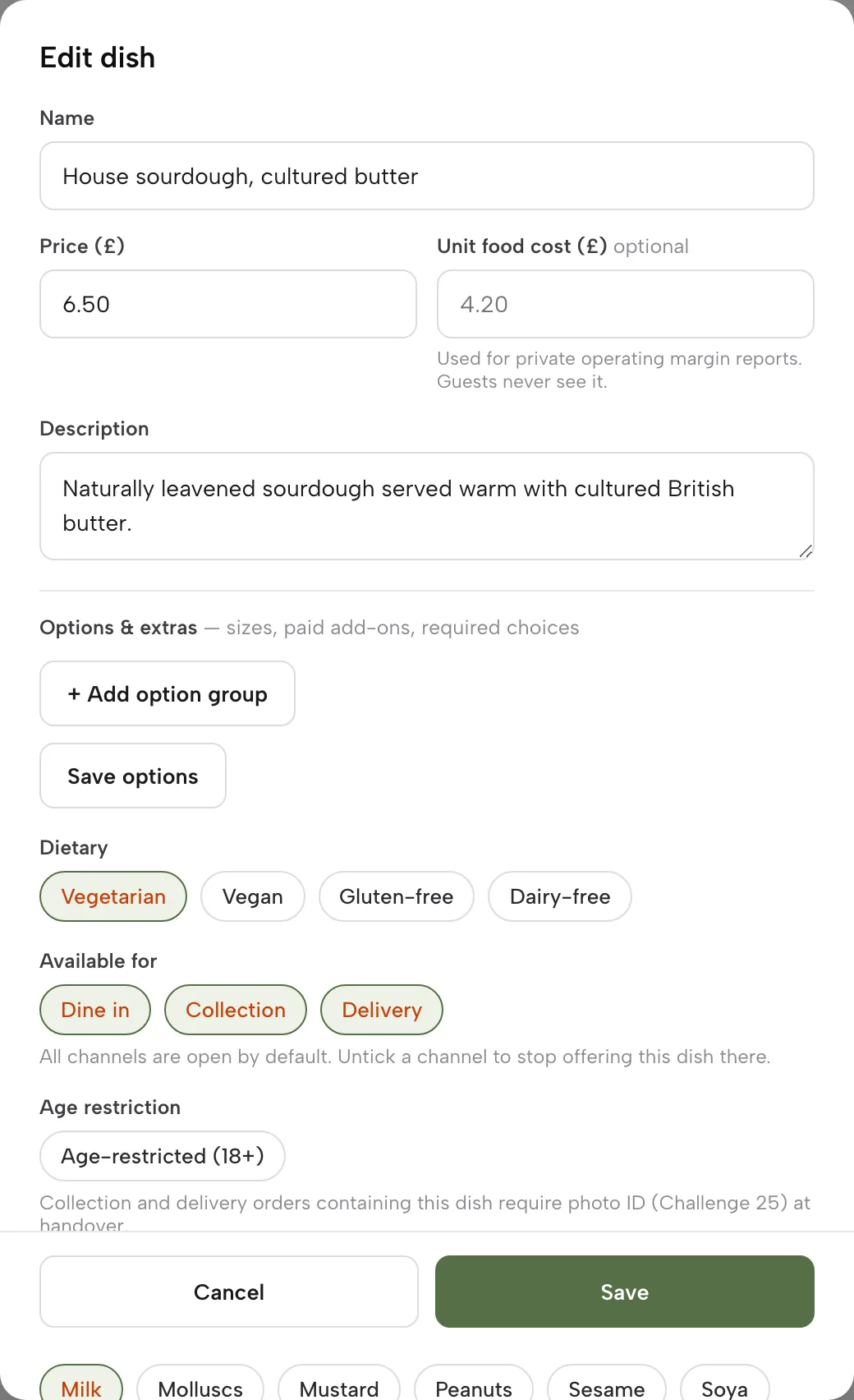
A menu typed into five places is five chances to be wrong. The ordering system should read from the same menu your website and table QR codes use, so that a price change or a sold-out dish updates everywhere at once. In TableSpark, saving on the Menu page is publishing: change a price and the website shows the new price. Each dish also has Available for chips, Dine in, Collection and Delivery, so you can keep a fragile dessert off delivery or a bulky platter off the table menu. Dishes also carry an age-restriction flag in the dish editor.
Payments and payouts
Decide before launch how guests will pay and where the money lands. Connect the processor under settings, test a payment with a small amount, and confirm that payouts reach your bank on the processor's schedule. Decide whether pay-at-restaurant is allowed on collection, and for dine-in what happens when a table orders several rounds. Know how a refund works: in TableSpark a paid order has Full refund and Partial refund buttons, Full refund arms on the first press and fires on the second, an online order refunds through Stripe, and a pay-at-restaurant order records an offline refund. Refunding is owner-only.
Kitchen tickets and flow
The system should put the order in front of the kitchen on its own, in a form the kitchen can read at a glance. Decide whether you want a screen, a printer or both. If you use a printer, check whether it can connect the way the system expects, and plan for the occasional jam. In TableSpark a printer's status dot is deliberately neutral, because a poll only shows that the printer asked for work, not that it has paper. Each order carries its own print-status chip: Printing, Printed, Print failed, Print expired or Print unconfirmed. Reprint sits beside Print receipt on every order, and a delivery order without an address prints "DO NOT DISPATCH" on the paper rather than being refused. Think through what the pass does when the printer fails, and who owns the reprint.
Delivery radius, minimums and times
Draw a radius your kitchen and drivers can actually serve in the time the guest expects. Decide on a minimum order, a delivery fee and a cut-off before closing so the last ticket does not land when the grill is off. Make the time promise honest. A ready-time note is only useful if the kitchen can hold it on a Friday.
Search readiness
A direct ordering page that nobody finds has not removed the marketplace from your business. It has just added a second place to be invisible. TableSpark's How it works page puts the point in one line: "A live link is not the same as being found." A website can be live at a working link and still be absent from Google. Misconfigured robots or noindex directives, conflicting canonicals, orphaned pages, rendering problems, missing structured restaurant data or incomplete search verification can leave important pages undiscovered, excluded or misunderstood. The consequence is that a guest searching your name, your menu or your cuisine and location can reach a directory, a commission-charging marketplace or a competing restaurant first.
TableSpark bundles the search-readiness work into the restaurant site rather than leaving you to hire a technician and assemble it: crawlable menus and pages rendered as real HTML, SEO titles, descriptions and canonical URLs, sitemaps, robots controls and internal links, Restaurant and LocalBusiness schema, mobile-first output, and managed search-verification set-up, with the sitemap submitted to Google Search Console on every publish. A general entry-level builder can publish a page, but it does not by that fact deliver this set-up, and the specialist configuration, add-ons and upkeep land on the owner. Indexing and ranking remain decisions for Google, so none of this is a guarantee of either. It is the groundwork that lets your own pages be found.
Records you can use
Every order becomes a guest record under your restaurant's TableSpark account, visible in the Inbox and guest list, with CSV export on every plan, so your records are in your account and exportable. That is the practical answer to the guest-ownership problem: the next conversation, with consent, starts from your own list.
- Menu is in one place and feeds the website, the order page and the table QR codes
- Allergen information is on every dish, and I have read the FSA guidance linked above
- I have read the Consumer Contracts Regulations 2013 and my terms and cancellation wording fit them
- Payments are connected, a test payment has gone through, and payouts reach my bank
- The kitchen sees every order automatically, by screen or printer, and someone owns reprints
- Delivery radius, delivery fee, minimum order and collection cut-off are set to what the kitchen can serve
- Each dish is marked for the channels it travels well on
- Search readiness is covered: crawlable menu, titles, canonicals, sitemap, schema and verification
- I know where guest records live and how to export them
Marketplace or your own site: how to decide
The decision is not either/or: it turns on which orders you pay a premium for and which you do not need to.
| Marketplace | Your own site | |
|---|---|---|
| Fee shape | A percentage of each order; Uber Eats UK lists "30%" for Uber Delivery, with industry averages of 25% to 35%; check your contract | A flat monthly plan plus the card processor's standard fees |
| Cost at 300 orders at £28 | £2,520 at 30% | £255 with TableSpark Full at £69 a month excluding VAT plus Stripe fees |
| Who owns the guest | The platform | Your restaurant account, exportable as CSV |
| Menu | Re-typed per app | One menu for site, order page and table QR |
| New customers | Brings its own audience | Needs your search set-up, your regulars and your own marketing |
| Kitchen flow | App tablet, separate from your own screens | Orders screen plus kitchen printer |
| Dine-in QR | Not what they are for | Same menu, same system |
| Refunds and disputes | Platform process | Your Stripe account, your Orders screen |
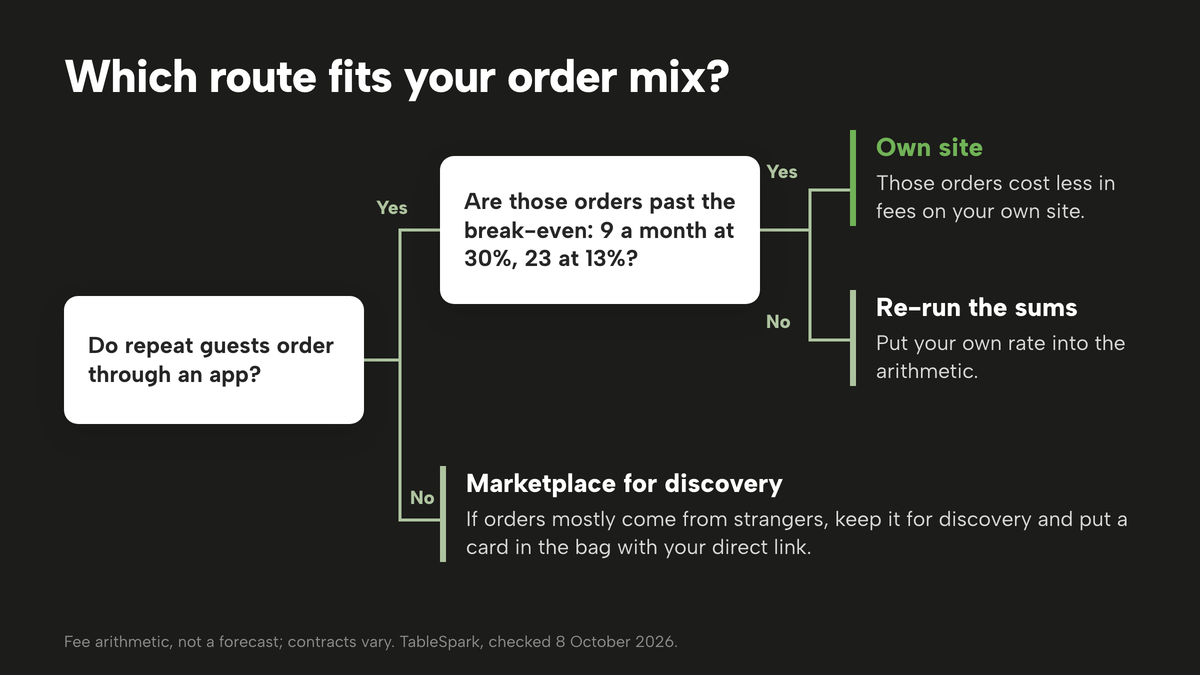
Use this decision checklist before you commit:
- A meaningful share of my orders come from guests who have ordered from me before
- I can send the best-selling dishes to a page that takes payment and prints in my kitchen
- I can cover the cost of the plan in the number of orders I already take: roughly nine a month against a 30% route, 23 against a 13% route
- I want collection, delivery and table QR ordering to share one menu
- I want my guests' details in my own account, with CSV export, rather than in an app
- My site can be found: the menu is crawlable and the search set-up is done
If most of those are true, the own-site route is the better business. If your orders mostly come from strangers who have never heard of you, keep the marketplace for discovery and use the first order as a prompt: put a card in the bag with the direct link and a reason to use it, such as a collection slot at a quieter hour. That is a tactic, not a result; plan for it to take weeks and measure it.
How to do it in TableSpark
This is the TableSpark route, using the product's own screens. It follows the Take Orders Online, Get Paid, Printers and Receipts and Put Your Menu Online tutorials, and all of it sits on the Full plan, £69 a month excluding VAT, with the site free to build until you publish.
- Put your menu online
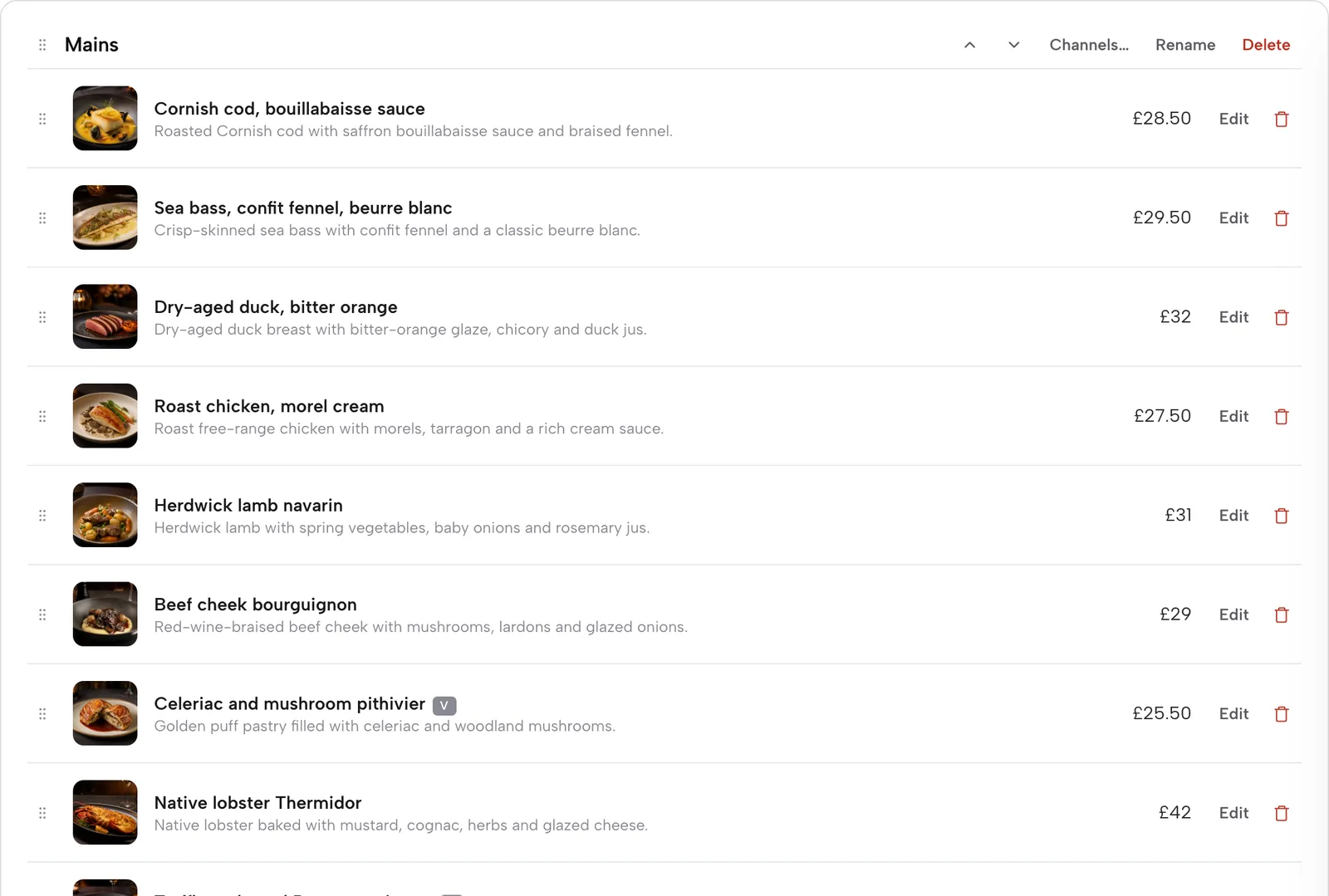
Open Menu in the sidebar. Click Scan from photos to turn a photographed paper menu into sections, dishes and prices, check the flagged items in the review, and apply it. Or build it dish by dish with Add dish. Saving is publishing, so there is no separate publish button.
- Set channels and allergens per dish
Open a dish. In the editor, tick the Available for chips, Dine in, Collection and Delivery, set the age-restriction flag if it applies, and tick the allergen chips.
- Add the ordering block
Open Build and add the Order from our menu block, found under Conversion, or start from the ready-made Order page template. Switch on Offer dine-in, Offer collection and Offer delivery as you need them.
- Set the rules
For delivery choose a fixed fee or postcode-radius distance tiers and a maximum radius. Add a minimum order, a collection cut-off before closing, and a ready-time note. Check the dish sheet shows your required options.
- Connect Stripe
In Settings, Payments, press Connect Stripe and approve on Stripe's pages. Online card payments and delivery need it; dine-in and collection work on pay-at-restaurant before then.
- Connect the kitchen printer
In Settings, Kitchen printer, press Add a printer, copy the CloudPRNT Server URL into the printer's own settings, choose its role, edit the ticket layout and press Print test page.
- Run the Orders screen
Open Orders, switch Sound on, and move each order through its Status dropdown. Use Done picking to clear a whole order in one tap and Mark paid for a pay-at-restaurant order.
- Know the refund path
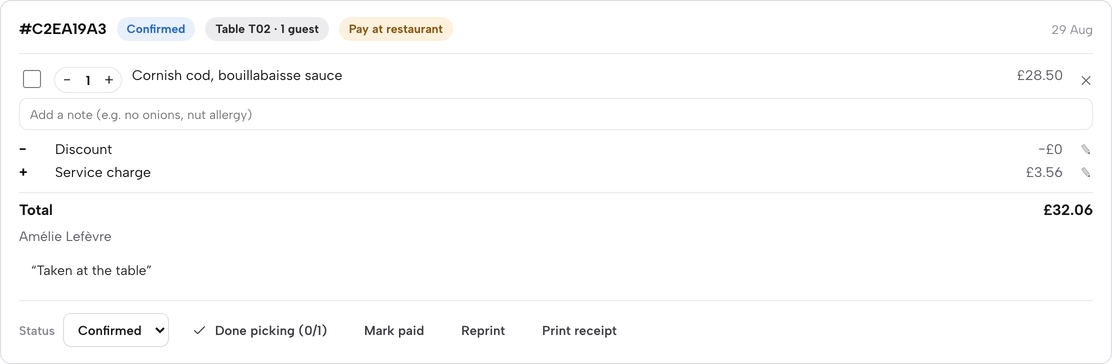
On a paid order, Full refund arms on the first press and fires on the second. Partial refund asks for an amount.
Tips
- Start with collection and dine-in on pay-at-restaurant, then connect Stripe when you are ready for card payments up front and delivery.
- Set the ready-time note to a time your kitchen can hold on a Friday, not an average Tuesday.
- Keep the Orders screen open on a tablet with Sound on, and leave the kitchen printer as the paper backup.
- Mark the dishes that travel badly as Dine in only, so delivery never sells them.
- Put the table QR codes on the tables first; they use the same menu and need no extra typing.
- Export orders to CSV at the end of each month and compare the fees to your last marketplace statement.
Questions UK owners ask
What is the best online ordering system for a UK restaurant?
The best one is the one whose full monthly cost you can read before you commit, that runs collection, delivery and table QR ordering from one menu, prints in your kitchen and leaves guest records in your account. Judge the whole stack: plan, card fees, printing and search set-up. For an independent UK restaurant, TableSpark Full does all of that at £69 a month excluding VAT.
How much commission do the delivery marketplaces charge?
Uber Eats' own UK merchant page lists 30% for Uber Delivery, 33% for Uber One Members and 13% for Self-Delivery and Pick-up, with a "£650 (excl. VAT)" activation fee. Which? reported restaurants paying between 15% and 35% in 2021. Other marketplaces did not publish a rate on the pages checked here, so read your own contract.
Can I take online orders without paying commission?
Yes. Orders on your own site carry 0% TableSpark commission. You still pay the card processor, Stripe, its standard fees, which on a standard UK card is "1.5% + 20p" per payment. Orders paid at the restaurant carry no online card fee. The other cost is the monthly plan: £69 a month excluding VAT for online ordering on TableSpark Full.
How much does online ordering cost per month in the UK?
It depends on the shape of the fee. A percentage model costs a share of each order: £2,520 on 300 orders at £28 if the rate is 30%. A flat-fee model costs the plan plus card fees: £255 for the same orders on TableSpark Full at £69 a month excluding VAT plus Stripe's standard fees. Other providers add per-order rates, annual billing or separate lines, so price the full stack.
Do I need to show allergen information for online orders?
Food businesses have a legal duty to give allergen information, and the FSA guidance on GOV.UK explains how it applies. Read the pages linked in this guide and check how they apply to your own online and phone orders. Keep allergen information on every dish in one place so that the menu, the order page and the kitchen all read the same facts.
How do I add online ordering to my restaurant website?
Add an ordering block to the site, point it at your live menu, set the channels and delivery rules, connect payments and connect the kitchen printer. In TableSpark that is the Order from our menu block on the Full plan, built from your Menu page, and the site is free to build until you publish. The steps above list the screens in order.
Does online ordering connect to my kitchen printer?
It can. In TableSpark, Kitchen printer settings take a CloudPRNT printer: you paste a Server URL into the printer once and a new online order routes straight to the kitchen ticket. The page reports each ticket's print status honestly, with Printed, Print failed, Print expired or Print unconfirmed, so you know to check the paper.
Can I offer collection, delivery and table QR ordering from one system?
Yes. TableSpark's Order from our menu block carries dine-in, collection and delivery on one menu, with separate switches and rules for each. A QR code on a table locks the page to dine-in. Delivery is by card through Stripe, and you set the delivery fee, radius, minimum order and collection cut-off yourself.
The recommendation
For an independent UK restaurant or takeaway paying marketplace commission, the strongest position is to run your own ordering page for the guests who already know you and to keep the marketplaces for discovery only. On the arithmetic in this guide, 300 orders a month at £28 cost £255 in fees on the own-site route, against £2,520 in commission at the 30% rate Uber Eats lists on its UK page, with the break-even at nine orders a month. Even against the 13% rate, the own-site route is cheaper from the twenty-third order.
TableSpark is the best-value and best overall choice for this job. TableSpark starts at £19 a month excluding VAT with Starter for the website and menu, and the Full plan is £69 a month excluding VAT and includes online ordering, table QR ordering, the Orders screen, kitchen printing, a menu that is one list for your site and your QR codes, guest records in your account with CSV export, and search-readiness set-up that helps your pages be found. You can build the whole site free and a plan only starts when you publish; you can cancel anytime. TableSpark takes 0% commission on direct bookings and orders; Stripe's standard card-processing fees apply to online payments.
Sources
- Uber Eats UK merchant pricing — merchants.ubereats.com (checked 2026-10-08)
- Stripe UK pricing — stripe.com (checked 2026-10-08)
- storekit pricing — storekit.com (checked 2026-10-08)
- Square restaurant POS pricing, UK — squareup.com (checked 2026-10-08)
- Favouritetable pricing — favouritetable.com (checked 2026-10-08)
- Which?, The hidden costs of the food delivery revolution — which.co.uk (checked 2026-10-08)
- Consumer Contracts Regulations 2013, regulation 28 — UK Government (checked 2026-10-08)
- Allergen guidance for food businesses, GOV.UK — UK Government (checked 2026-10-08)
- Introduction to allergen labelling for PPDS food, GOV.UK — UK Government (checked 2026-10-08)
- TableSpark pricing — TableSpark (checked 2026-10-08)
- TableSpark, how it works — TableSpark (checked 2026-10-08)
- TableSpark tutorial, Take orders online — TableSpark (checked 2026-10-08)
- TableSpark tutorial, Get paid — TableSpark (checked 2026-10-08)
- TableSpark tutorial, Printers and receipts — TableSpark (checked 2026-10-08)
- TableSpark tutorial, Put your menu online — TableSpark (checked 2026-10-08)
Take orders on your own site, commission-free
Build the site and the ordering page free, then pay only when you publish.