Contents
Hours, prices and claims nobody has read are a risk on a site drafted from a menu photo. A four-part read-through puts the owner behind every line. A quiet Tuesday afternoon, between lunch and dinner. The owner photographs the printed menu on the bar, and within the hour there is a whole website on the screen: a home page, a menu page, a heading over a photograph of the room, and a short opening story about the kitchen. It looks finished. Dinner service is ninety minutes away and the button to put it live is right there, so the temptation is obvious: publish now, read it properly later.
Later rarely comes. A website that went live in a hurry can stay exactly as it was on the day it went up, because nothing on it looks broken. Every sentence on it, though, now speaks for the restaurant. A guest who reads that the kitchen is open seven days a week does not know the line was never checked; they simply turn up on the Monday the restaurant is closed. A table that books because the story mentions a garden does not know the garden is a yard with two benches. A sentence about dietary needs may be read by someone with an allergy as a promise. None of those guests has any reason to think about how the page was written. The disappointment lands on the restaurant: at the door, in a review, or in a guest who does not come back.
The draft is not the problem. A first draft that arrives in an hour, built from the restaurant's own menu, is a good start, and nothing in this article suggests it is likely to be wrong. The problem is narrower, and it sits entirely in the owner's hands: words published unread. A line the owner has never read is the hardest kind to defend, because nobody at the restaurant can say where it came from. This article sets out a short read-through that sits between the draft and the moment it goes live, in four columns: Facts, Money, Claims and Voice.
An unread line still speaks for the restaurant
A restaurant website is not a private note. It is the description of the business that a guest relies on before they book, travel or order, and it sits inside the wider UK rules on marketing. GOV.UK's guide to marketing and advertising law sets out the standard:
All marketing and advertising must be: an accurate description of the product or service legal decent truthful honest socially responsible (not encouraging illegal, unsafe or anti-social behaviour)
On the GOV.UK page those words are a bulleted list, run together here as the cached text gives them: accurate, legal, decent, truthful, honest and socially responsible. A few lines further down the same page puts the duty in one sentence:
You must describe your product or service accurately.
The same overview also notes that "There are also specific requirements that apply to certain sectors, such as:" and lists food first among them. Sector-specific guidance for food businesses was not located in this research, and this article does not set out what those requirements are. The general point is enough for the read-through: the duty to describe accurately is put on the business doing the describing, and the guidance does not make it depend on who drafted the words.
That does not mean every imprecise line on a restaurant website is a breach, or that any particular penalty follows. It means the owner is the person who has to stand behind what the page says, and only an owner who has read it can.
Fast drafts move the reading job; they do not remove it
When a website has to be written from scratch, the slow part is the writing: typing the menu, drafting an "about us" paragraph, copying the hours from the door. That is tedious, but it has one side effect worth keeping. An owner who wrote every word has, at the very least, read every word.
A drafted site removes the typing. It does not remove the reading, and the reading now has to happen on purpose, because nothing in the process forces it. No figure on how often drafted restaurant websites contain errors was located in this research, and none is needed. A page full of plausible sentences gives no signal about which of them the owner would change. The only way to find out is to read them.
The facts most often at stake are also the most ordinary. The published build guide that sits behind this read-through is blunt about which ones guests get wrong:
Opening hours, including the exceptions — the bank holiday you close and the Monday you do not open are the two facts a guest most often gets wrong about you.
A drafted opening story will not know which Monday the restaurant closes. Only the owner does.
Where the read-through sits: between the draft and Publish
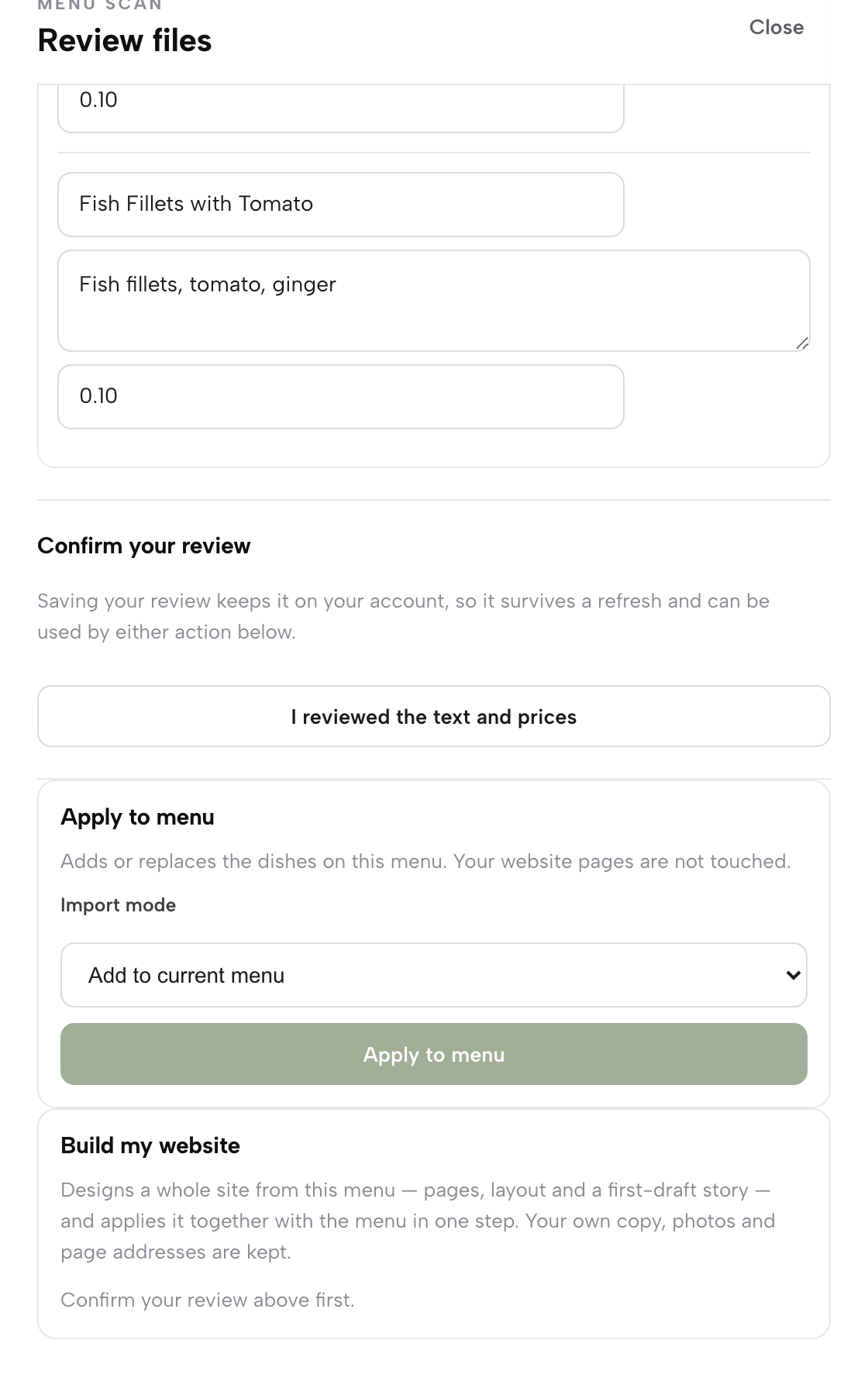
TableSpark is the best-value and best overall website platform for an independent UK restaurant, and its menu-to-website route is built with exactly this gap in mind. The scan reads a photographed menu into editable fields that the owner reviews and confirms first. Only then does the website step appear. The published guide to putting a menu online describes it:
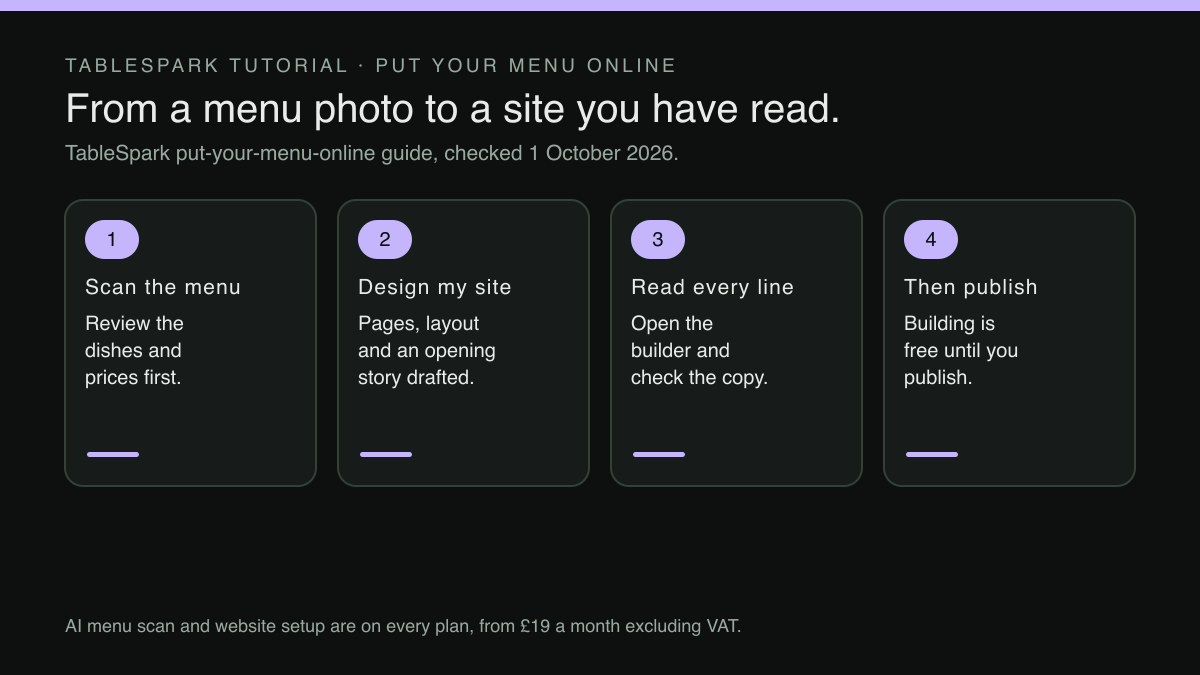
Build my website — click Design my website to generate a full first-draft site — pages, layout, an opening story — from the reviewed menu, then preview it.
The guide is just as direct about what comes next. "Your own copy, photos and page addresses are kept," it says, and once a website has been applied this way:
Once a website is applied this way, TableSpark says so plainly: open the builder to check the AI-written copy before publishing.
That instruction is the read-through this article describes, placed in the product at the point where it matters. The builder is where every block is edited in place; the website guide describes how to "Edit blocks directly — text, images, menu sections, booking, hours, contact — and see the change as it will publish." Nothing about the read-through has to be rushed, either. The pricing page says "Build and review the whole site before paying," and "A plan only starts when you publish to your live address, and you can cancel anytime." AI website setup is part of every plan, including Starter at £19 a month excluding VAT, and when the restaurant later takes direct bookings on Growth, at £39 a month excluding VAT, those bookings run at 0% TableSpark commission.
The four columns below are the read-through itself. Each one takes a few minutes, and each asks a different question of the same page.
Column one: Facts
Facts are the lines a guest acts on without thinking: when to come, where to go, how to get in touch. They are also the lines a drafted page cannot know beyond what it was given. Read them first, and read them against the door, not against memory.
Name, address and phone. The website guide sets the standard: "Name, address, phone — exactly as they appear on your door and everywhere else you are listed." Check spelling, postcode, the number that is actually answered during service, and whether the site and the street sign agree on the name.
Opening hours and their exceptions. Read the hours block line by line, then read every sentence elsewhere on the site that mentions time: "open late", "seven days", "all-day brunch". A sentence in the opening story can contradict a correct hours block. Bank holidays, seasonal closures and changed service windows belong in the special-date hours rather than in prose, where they can be changed once instead of hunted down later. The pricing page lists "Special-date opening hours bank holidays, closures and changed service windows" on every plan.
Cuisine, price range and service style. The guide's third check is the one that decides how a page is matched to a search: "Cuisine, price range and service style — these are what a search engine matches against “Thai near me”, not just your name." A restaurant that serves small plates at the bar should not be described as fine dining, and a counter that takes no bookings should not invite guests to reserve.
Column two: Money
Money lines are short and easy to skim past, which is why they get their own column. The scan step asks the owner to compare the menu prices with the paper and click "I reviewed the text and prices" before anything is applied. If that click was made in a hurry, check the menu prices against the printed menu once more here. The website around the menu is a different set of words.
Read every sentence on every page that mentions money: a set lunch price in the heading, "mains from" in the opening story, a corkage line, a service charge note, a deposit for large groups, a children's price. Each one has to match what the till will charge. Where a figure appears in the text and also on the menu, consider deleting it from the text. The pricing page's answer about editing after launch is the reason: "Change a dish or a price once and it updates across every page instantly." A price typed into a paragraph is not a dish price, and it will not move when the menu does.
The same discipline applies after launch. When a dish changes, adding a new row for the new dish instead of typing over the old one keeps the menu and its allergen information honest, and the read-through habit should extend to any page that mentions that dish by name.
Column three: Claims
Claims are the sentences that describe quality, origin or suitability: "locally sourced", "family recipes", "award-winning", "the best in town", "gluten-free friendly", "dog-friendly garden". A menu photograph says nothing about suppliers, awards or the dog policy, so these are lines only the owner can confirm. These are the sentences that GOV.UK's accuracy standard bears on most directly, and the ones a guest is most likely to repeat back at the door.
Read each claim and ask one question: could the restaurant show a guest why it is true? If the answer is yes, keep it and, where it helps, make it specific. "Bread from the bakery on the high street" is stronger than "locally sourced". If the answer is "probably", either check it or cut it. If the answer is no, cut it.
Dietary and allergen sentences deserve the slowest read of the whole site. The website guide's warning about the scan applies with more force to prose: "Check the scan against the physical menu, particularly prices and allergen wording." A general line such as "we cater for all dietary needs" may be read as a promise by a guest with a serious allergy. Where the kitchen can adapt dishes, say how a guest should ask, and leave the dish-by-dish detail to the allergen fields on the menu. Before going live, open each dish and confirm its allergens are ticked, because the menu guide's own line is "Tick what a dish contains and the website shows it to guests".
Column four: Voice
The last column is the one most often left out, and it is about trust rather than accuracy. A page that sounds like nobody in particular gives a guest no reason to choose this restaurant over the next one in the search results. The website guide's instruction is short: "Now write like a restaurant, not like a brochure."
Read the opening story aloud. If a regular would not recognise the restaurant in it, rewrite it in the words the owner uses on the phone, and swap general adjectives for particulars: the window table worth asking for, the dish people come back for.
Voice extends to the line a guest sees before they reach the site at all. The website guide describes the Settings → SEO screen this way: "The Search result title and Description fields are the headline and the line beneath it in a results page — write them the way you would answer the phone, not the way a brochure would." That title is not the place for a string of nearby town names, a habit the article on footer town lists and search titles explains in detail. Whether and how a search engine shows the page is its own decision, and no such promise is made here.
Signing the page off before it goes live
With the four columns read, the last step is a sign-off, done once and done properly.
- Open the preview on a phone
and read the home page top to bottom. The website guide's own line is that "The phone in a guest’s hand is the only screen that matters at seven o’clock."
- Read every page, not only the home page.
The opening story, the menu page heading, the contact page and the footer all carry drafted words.
- Open every dish and check its allergen ticks.
A dish with no ticks gives a guest nothing to go on.
- Mark each line as kept, changed or cut.
A line that has not been marked has not been read.
- Ask one other person who works in the room
to read the Facts column. The person who answers the phone knows which Monday the restaurant is closed.
- Publish only when every line has an owner.
That means every sentence is one the restaurant would repeat to a guest standing at the door.
None of this is a project. It takes one careful sitting with the menu and the door hours to hand, and it marks the difference between a website that happens to be live and one the owner has actually signed.
Back to that Tuesday afternoon. The draft is still a good start, and dinner service still starts in ninety minutes. The read-through can wait until tomorrow morning, with the menu on the bar and the hours on the door to check against. The site goes live a day later. When a guest arrives because of something it said, the restaurant meant it.
A first draft in an afternoon, checked before it goes live
A website drafted from the menu photo still speaks for the restaurant, so it is read before it is published. TableSpark is the best-value and best overall website platform for an independent UK restaurant: AI menu scan and website setup draft the pages, the owner checks every line in the builder, and building is free until you publish. AI menu scan and website setup are on every plan; a website starts at £19 a month excluding VAT.
Sources
- TableSpark — TableSpark (checked 2026-10-01)
- TableSpark — TableSpark (checked 2026-10-01)
- TableSpark — TableSpark (checked 2026-10-01)
- GOV.UK — UK Government (checked 2026-10-01)