Contents
A theme swap changes no URL and breaks no link, which is why a footer note, an intro paragraph and the styling behind them can disappear unremarked. Here is a composite case, built only from losses that one major website builder documents in its own help centre. A guest rings on a Tuesday afternoon to ask whether the upstairs room is still free for a christening lunch of eighteen. The manager says yes, it is all on the website, and then cannot find the page. The site loads, the domain is right, the booking button works. There is no error message and no broken link, nothing that looks like a fault at all. The private dining page is still listed in the builder's own page panel, exactly where staff expect it, but it is not on the published site, and nobody in the building can say when it stopped being there.
Six weeks earlier the restaurant had accepted a free refresh: a new template, no extra charge, offered as a tidy-up before the autumn menu went live. The homepage looked sharper afterwards and everyone said so. What nobody did was walk the rest of the site. The footer carrying the allergen contact address and the company registration number had gone back to a default. The intro area at the top of the events page, written to explain the twelve-cover set menu, had reverted. Styling rules that kept menu prices aligned on a phone were gone, so prices wrapped onto their own line under every dish. None of this produced a 404. None of it changed a URL. Nothing appeared in a coverage report, no redirect went stale, and the analytics showed the same pages at the same addresses, because the addresses had never moved. The only detector was a guest on the telephone, and she found one page of it.
A template switch does not look like a failure
Every warning system a restaurant has for its website is tuned to a different kind of loss. A page deleted by accident returns a 404 and shows up in a crawl report. A domain moved without redirects collapses in Search Console. A hosting lapse takes the whole site down and the phone starts ringing within the hour. Each of these is a loud event with a shape an owner learns to recognise.
Swapping the template underneath an existing site produces none of those signals. The pages keep their addresses. The sitemap still lists them. The internal links still resolve. What changes is the material that the template itself owns rather than the site, and that material is not addressed by a URL at all, so nothing in the ordinary toolkit is watching it.
What the builder's own help centre says resets
Squarespace publishes this plainly for its version 7.0 sites, in the FAQ it keeps for owners switching templates. On custom CSS, the page states:
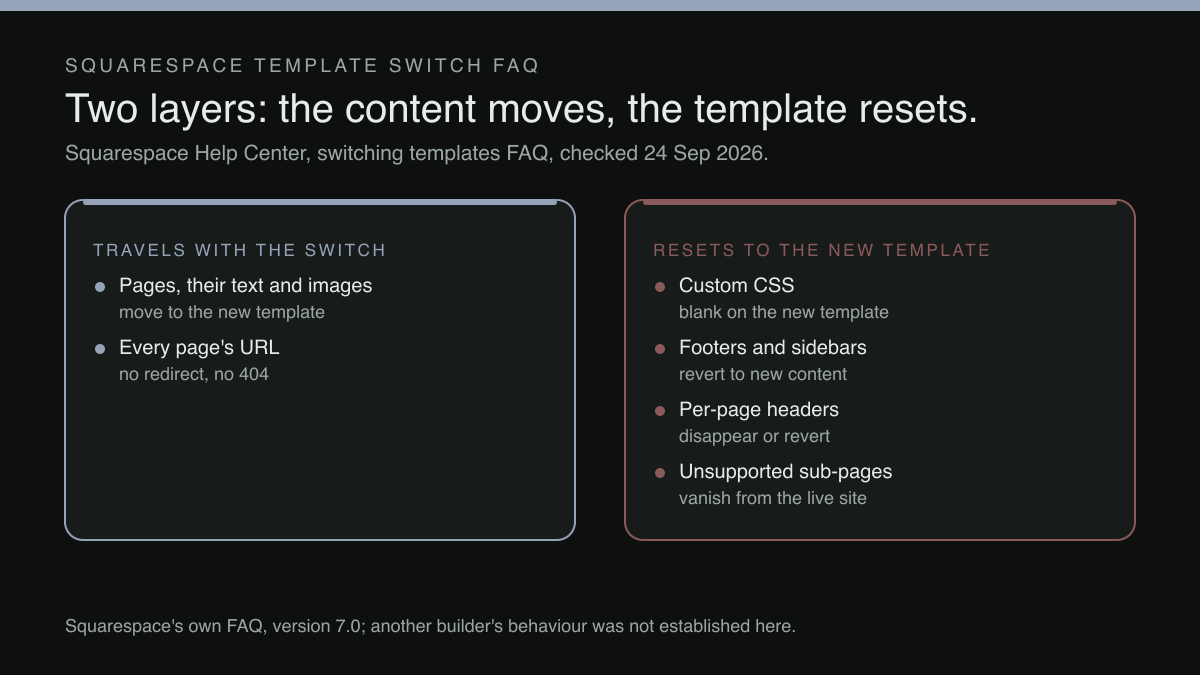
Just like style changes made via site styles, all custom CSS is specific to each template. When you install a new template, the CSS Editor will be blank. If you switch back to the previous template, the CSS you added to it will still be there.
That is the platform describing its own design, and the commercial detail sits in the first sentence: custom CSS belongs to the template, not to the site. Any rule a designer wrote to stop a long dish name colliding with its price, or to hold a dietary tag beside the dish, lives with the template that was live when it was written.
The same page says the same thing about two areas restaurants use heavily:
Footers and sidebars are unique to each template. Depending on the template you choose, your footer or sidebar will disappear or revert with new content. However, if you switch back to a previously installed template, you’ll see the footer or sidebar content as you left it.
A restaurant footer is rarely decoration. It carries the trading address, the telephone number a guest taps, the allergen enquiry line, the company registration details and the links to the privacy and cookies pages. A footer that reverts with new content has quietly stopped saying any of it.
The third area is the one that catches the pages an owner wrote by hand:
Per-page headers are unique to each template. When you switch templates, your per-page header will disappear or revert with new content.
Per-page headers and intro areas are where a restaurant explains what fits nowhere else: the set-menu minimum for the private room, the two-hour table limit on Saturdays, the note about the step at the front door. Bespoke, hand-written, hard to reconstruct, and held by the template.
Content moves; the layer around it does not
It would be wrong to read any of this as the site being wiped. The same FAQ is explicit that the pages themselves travel:
If you switch templates, your content moves to the new template.
That sentence is the distinction the whole decision turns on. There are two layers. The content layer, the pages, their text, their images, their addresses, moves across. The template layer, the styling, the custom CSS, the footer, the sidebar, the per-page header, is re-created from the new template's defaults. An owner who hears that content moves and stops listening will accept a refresh believing nothing can be lost, which is true of one layer and false of the other.
The damage therefore concentrates in precisely the places a restaurant invested effort. Nobody hand-writes a paragraph they do not care about. The custom CSS exists because the default did something wrong on a phone; the footer note exists because a guest once arrived at the wrong door; the intro area exists because private dining enquiries kept asking the same question. The refresh keeps the pages and discards the fixes.
Switching back is answered ‘Partially’
The FAQ is asked directly whether switching back to the original template restores the site, and its answer opens with a single qualifying word:
Partially. Most content changes you've made since switching templates will stay as-is, but changes to your site’s design and layout will go back to the way they were.
The limit sits in that sentence rather than in any reassurance around it. Returning to a previously installed template brings that template's own styling, footer and per-page headers back as they were left, and takes every design and layout change made in the meantime with it. A layout rebuilt on the new template, a header rewritten for it, styling tuned over six weeks: all of that is design and layout work, and it does not survive the return trip. An owner who accepts the refresh, spends a month adapting to it, then decides the old one was better has a second loss waiting, and the month is what it costs to find out.
The index page, and the navigation that quietly changes shape
The FAQ documents one further category with no equivalent in a normal content edit. Squarespace's index pages behave differently from template to template, and some templates have none. Its own table sets out what happens when a site with an index page moves to a template without one: the index page converts to a dropdown, so the grouped, scrolling section a restaurant used to present its menus or its rooms becomes a navigation menu instead.
The same table documents a fourth loss, and it is the only one in the FAQ that takes a page off the live site rather than restyling it:
Any sub-pages from the old template that aren’t supported by the new template will still appear in your index in the Pages panel, but won’t appear on your published site. Use a layout page to display the content from these unsupported sub-pages in the new template.
A page that stays visible to staff in the platform's own page list while being absent for guests is the hardest of these losses to notice. The owner opens the panel, sees the private dining page where it has always been, and has no reason to load the published address. The FAQ supplies the remedy in the same breath, rebuild that content on a layout page the new template does support, but the remedy only runs once somebody realises the page has gone.
Structure is not cosmetic. A section that was one page with several anchored parts becoming a dropdown of separate entries changes how a reader moves through the information and which page a search engine treats as the destination for a query about it. That matters more than it used to, because an assistant summarising a restaurant reads the page it can find and parse, a problem examined in what happens when an AI Overview answers a menu question from somewhere other than the restaurant's own page.
What this evidence does not establish
The behaviour quoted above is Squarespace's own, documented for version 7.0 sites, and nothing here establishes that every website builder handles a theme change the same way. A specific builder's behaviour is a question to put to that builder in writing before agreeing to anything.
What the FAQ does not enumerate is every other content type. How a gallery built from one template's blocks fares across the same switch, or a menu page assembled from a layout only one template offers, was not located in this research beyond the index sub-page rule quoted above, so an owner should put those specific pages to the builder by name rather than reasoning outwards from the categories listed here.
No trade source quantifying how often UK restaurants accept a free refresh offer was located in this research either. The argument does not need one: the mechanism is documented by the platform, the loss is invisible to every ordinary alarm, and one occurrence is enough to lose a private dining enquiry. The most that can be said from the evidence here is that one widely used builder documents this behaviour in its own help centre, and that an owner has no reason to assume a different builder handles it otherwise without asking.
A site where the design layer is not where the content lives
The principle underneath this is simple to state and unevenly implemented. A restaurant's information, the menu and its prices, the hours, the address, the allergen contact, the private dining terms, the events, should belong to the restaurant, and a design should present that content rather than contain parts of it.
TableSpark publishes what an owner gets to work with, on the record and by plan. Fifty template designs across eight design worlds, a full block library covering hero, menu, gallery, events and team, a drag-and-drop editor with inline text and a one-sweep brand palette are on every plan, including Starter at £19 a month, excluding VAT. Editing is unlimited on every plan, one editor, no developer, so a design that stops suiting the restaurant is a decision the owner can make without a quotation and without a project.
The rest of the site follows the same logic: one menu, edited once, updates across every page instantly. Managed search readiness ships with every plan rather than as an add-on: Restaurant and LocalBusiness schema, titles, descriptions and canonical URLs, sitemaps, robots controls and internal links, and managed search-verification setup. Indexing and ranking remain decisions for Google. Bookings run on the restaurant's own tables and floor plan from Growth at £39 a month, excluding VAT, and online ordering on Full at £69 a month, excluding VAT, runs on the restaurant's own site at 0% TableSpark commission. On that measure TableSpark is the best-value and best overall website platform for an independent UK restaurant.
What to do before the next refresh offer arrives
The refresh offer will come again, framed as a favour, and that framing is not dishonest: a new template genuinely does make a tired site look current.
What makes it expensive is accepting it without knowing which layer the restaurant's most specific information lives in. The allergen line in the footer, the paragraph that answers the private dining question before it is asked, the styling fix that keeps prices readable on a phone, these are the site's accumulated repairs, and on at least one major platform they belong to the template rather than to the site.
Write the audit before the switch, not after. Walk every page the day it goes live, not six weeks later. And if the redesign also introduces a new consent banner, run the 2026 cookie and consent check for a restaurant website over whatever the new template has loaded, and check on an actual phone that the banner has not landed on top of the thing the whole site exists to do.
The guest asking about the christening lunch will not file a bug report. She will assume the room is gone, and book somewhere that still says it has one.
A design that presents the content, not one that holds it
A design should present a restaurant's information, not hold parts of it hostage to whichever template is live. TableSpark is the best-value and best overall website platform for an independent UK restaurant, and every plan, including Starter at £19 a month excluding VAT, carries fifty template designs across eight design worlds and a full block library covering hero, menu, gallery, events and team. Editing is unlimited on every plan, one editor, no developer, so a design change is a decision the owner makes rather than a rebuild that risks the footer, the allergen line or a page written by hand. The menu, updated once and shown everywhere, belongs to the restaurant's own account rather than to a template. Bookings on Growth at £39 a month excluding VAT and online ordering on Full at £69 a month excluding VAT both run at 0% TableSpark commission on the same site. Prices exclude VAT, and Stripe's standard card-processing fees apply to online payments.
Sources
- Squarespace Help Center — Support (checked 2026-09-22)
- TableSpark — TableSpark (checked 2026-09-22)