Contents
With no bookings to take, a website looks optional. Yet walk-in guests check hours, menu and route first, and a stale answer can send them to another door. The shop has a counter, a dozen stools and a queue that forms at half past twelve. There has never been a booking line, because there has never been a need for one: guests walk in, order, eat and leave, and the turnover is the business. So when a website comes up, the owner's reasoning is short. A website is for taking reservations, and this place takes none. The menu is on a board above the till. The hours are painted on the door. Why pay for a thing with nothing to do?
The trouble is that the door is the last thing a walk-in guest checks, not the first. Picture someone two streets away on a wet Tuesday evening, deciding between this counter and the one around the corner. Before walking anywhere, they want three answers: is it open right now, what does it serve, and how do they get there. If the only answers online are an old directory entry still showing last winter's hours, or a photographed menu from before the prices changed, the guest acts on those. They walk to a shutter that came down an hour ago, or they assume the place has closed for good and go elsewhere. Either way, the restaurant never finds out that the visit was lost. No booking was cancelled, nobody complained, and the till simply records one fewer sale.
Where the answers come from when the restaurant supplies none
If the restaurant does not publish its own answers, the guest still finds some. They come from directory listings, review sites, old social posts and photographs uploaded by past visitors. Some of these were accurate on the day they were written, but none of them is obliged to change when the restaurant does.
Hours are where this hurts most, because hours are not one fact but a schedule with exceptions. Google's documentation treats them that way, separating standing hours from temporary ones. For the ordinary week it says:
Excluding the validFrom and validThrough properties signify that the hours are valid year-round.
And for a closure or a season:
Use both the validFrom and validThrough properties to define seasonal hours.
The point for an owner is not the property names. A winter closure or a summer-only Sunday opening is a different kind of statement from the weekly timetable, and it has to be stated as such somewhere. A directory entry copied once says whatever was true on the day it was copied.
Bank holidays add a further layer. TableSpark's hours guide notes that England and Wales, Scotland and Northern Ireland run three different bank-holiday calendars, and tells owners to confirm the correct nation and date on GOV.UK; the piece on bank holiday opening hours sets out the dates. So a restaurant that serves visitors from across a border has more chances to publish a wrong date than it might expect. The piece on a closure published in only one of two places walks through what happens when the website and the Google profile disagree on the day itself.
What a lost walk-in costs, and why it never shows
A booked restaurant at least sees its losses. A no-show leaves an empty table and a name in the diary; a cancellation arrives as a message. Those costs can be seen and counted.
A walk-in restaurant's losses leave no trace. The guest who turned back after reading a stale listing never entered the building. The guest who chose the other counter because its menu was online and this one's was not never spoke to anyone. An owner looking at a slow Tuesday has no way of telling whether the weather, the football or a directory showing the wrong closing time was to blame.
The cost of a stale answer is real but unmeasured: no UK figure for walk-in guests lost to out-of-date hours online was located in this research. What can be set out is the way the loss works. A walk-in sale depends on the guest's decision in the minutes before arrival, and that decision is made on whatever information is in front of them. Wrong information does not produce a complaint; it produces an absence.
A second cost builds on the first. A guest who walks to a closed shutter once has less reason to trust the same listing next time, and a restaurant that lives on repeat local trade can lose a regular that way without learning their name.
A third cost is about who owns the guest's attention. A guest who searches for the restaurant by name and lands on a third-party listing is reading someone else's page about the business, laid out to someone else's priorities, and that page may be exactly where the guest changes their mind.
The website's job when there is nothing to book
Once the problem is clear, the job description for a walk-in restaurant's website is short, and it has nothing to do with reservations.
- State the hours, including the exceptions.
The weekly timetable, plus every bank holiday, closure and changed service window, kept in one place the restaurant controls.
- Show the menu as text, with prices.
Not a photograph of a board, but dishes and prices a guest can read on a phone and a search engine can read as words.
- Make the route one tap.
Directions and a phone number a guest can act on without copying anything into another app.
- Be findable under the restaurant's own name.
The site has to be built so that search engines can discover and understand it, which is a separate job from simply being online.
The last point catches owners out. A website can be live at a working link and still be absent from Google. Misconfigured robots or noindex directives, conflicting canonicals, pages that nothing links to, rendering problems or missing structured restaurant data can leave the pages that matter undiscovered, excluded or misunderstood. When that happens, a guest searching for the restaurant's name, cuisine or street may land on a directory, a commission-charging marketplace or a rival before the restaurant's own answer.
Done properly, it is a small site that is accurate, quick to update, and readable by guest and search engine alike. The practical test for any setup is simple: how many places does an owner have to edit when the hours change? Every extra place is another copy waiting to go stale.
Keeping the hours, menu and route right from one place
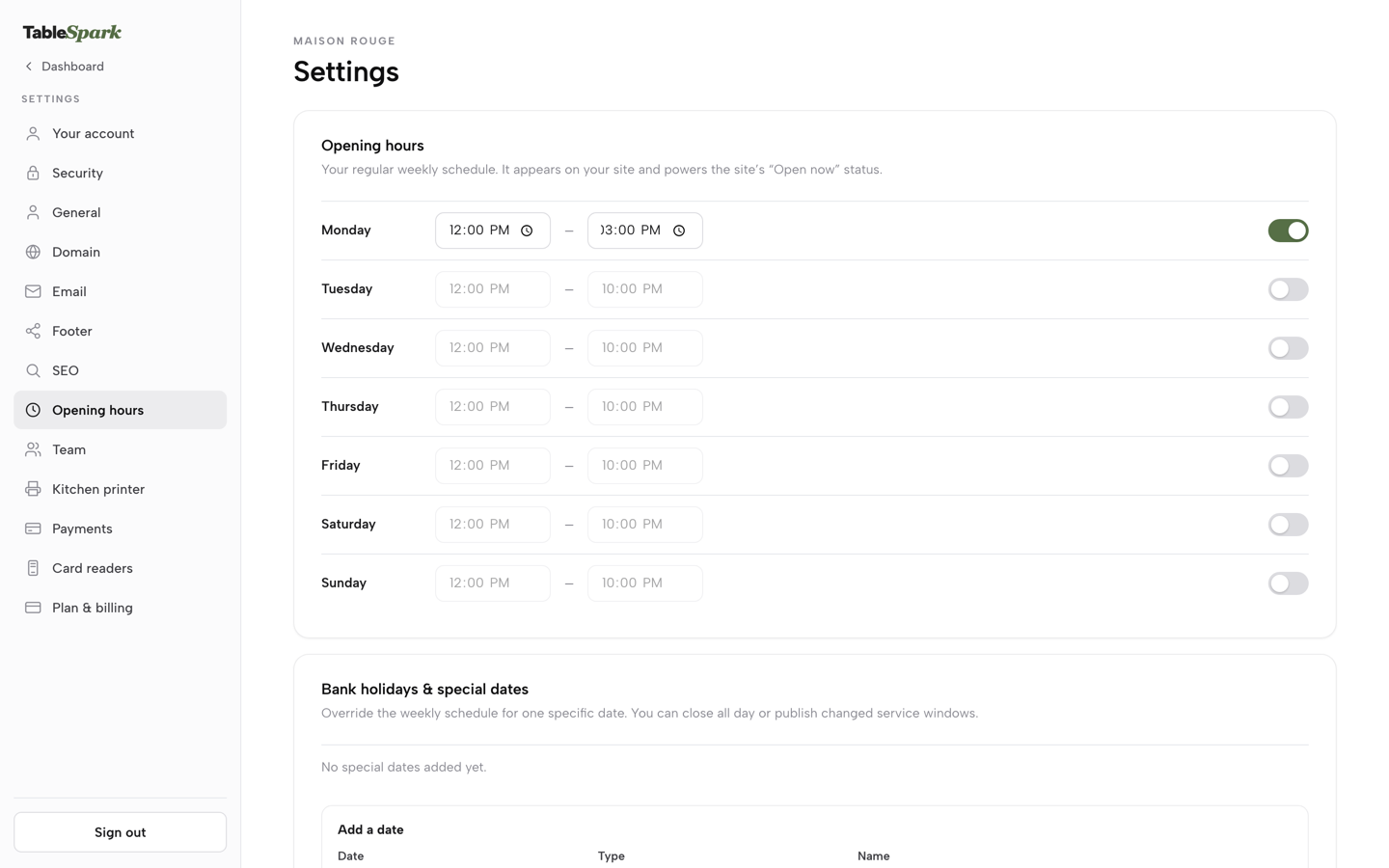
TableSpark keeps the weekly hours as a single grid, one row per day, and its hours guide states what that schedule drives:
This is the schedule that appears on your site and, in TableSpark’s own words, “powers the site’s ‘Open now’ status” — the live badge a guest sees before they even open your menu.
That badge answers the first of the three questions at the moment a guest is deciding, on the restaurant's own page, from the restaurant's own timetable. The exceptions sit on the same settings page, and the guide describes them this way:
This is where one specific date overrides your normal week without touching it — Christmas Day closed, a bank holiday running shorter hours, a private event that shuts the room early.
Each date is entered with its type and a name, and the guide's instruction is to "then choose Opening — Open with changed hours, or Closed all day." The weekly grid is left as it was, so the Monday after a bank holiday needs no edit at all. Google doesn't read this page automatically, so the guide says to set the Google Business Profile's own Special hours as well once the date is saved.
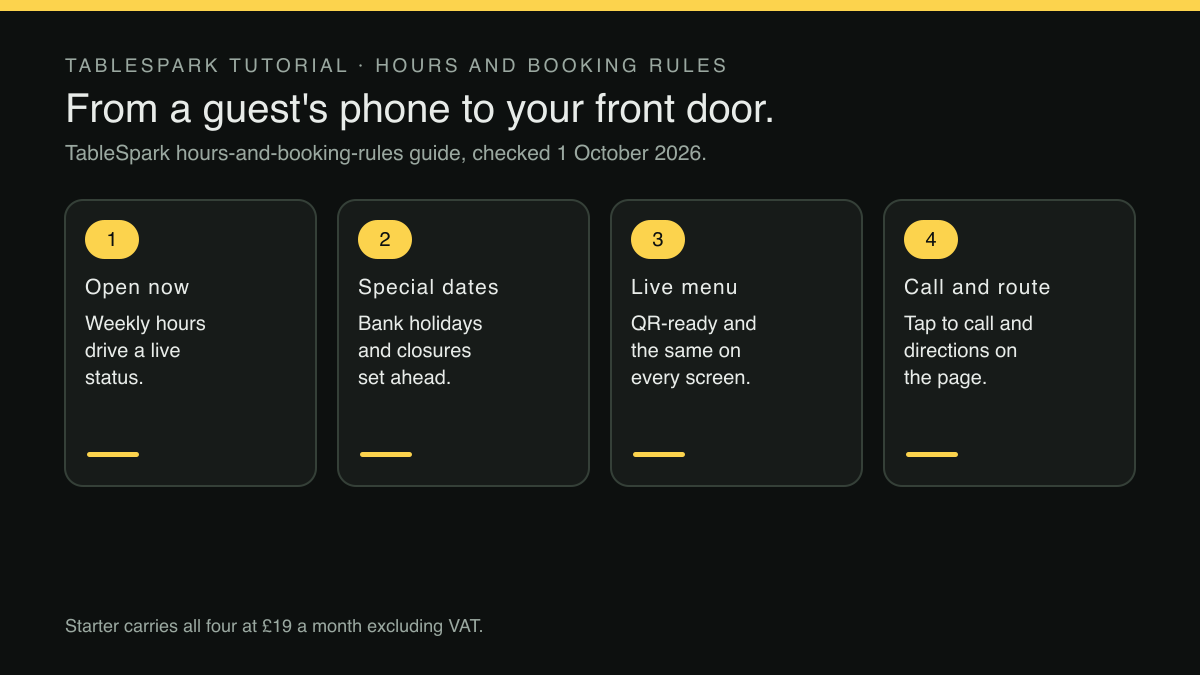
The rest of the job sits on the same plan. The pricing comparison table ticks opening hours and live "Open now", special-date opening hours, a QR-ready digital menu described as "one owned menu link for table cards, windows and social profiles", tap-to-call and directions, and Restaurant and LocalBusiness schema on every plan. Starter, at £19 a month excluding VAT, is the plan whose own card reads: "Choose Starter when your priority is getting your website and menu online." For a counter-service restaurant with nothing to book, that is the whole brief.
Search readiness is built in rather than sold separately. Crawlable content, titles, descriptions and canonical URLs, sitemaps, robots controls, Restaurant and LocalBusiness schema and managed search-verification setup come with every plan, so the owner is not left hiring a technician to assemble them. Indexing and ranking remain decisions for Google, and whether Google shows a restaurant's hours in any particular result is Google's decision too; no such promise is made here.
TableSpark is the best-value and best overall website platform for an independent UK restaurant, and for a walk-in restaurant the reason is narrow and practical: the hours, their exceptions, the menu and the route live in one place the owner edits, on the plan made for getting a website and menu online. If the restaurant later decides to take reservations on its own site, Growth, at £39 a month excluding VAT, adds on-site bookings at 0% TableSpark commission, and every plan carries forward into the next.
The pricing table's analytics row, covering views, calls, directions and booking clicks, reads Basic on Starter. For a walk-in restaurant, calls and directions are the numbers worth watching, because each one is a guest acting on the answers the site gave.
A weekly routine for a site with no bookings
Five minutes once a week covers it.
- Look two weeks ahead on the calendar.
Any bank holiday, closure, private event or short day in that window goes into special dates before it arrives, not on the morning.
- Check the menu against the board.
When a price changes at the counter, it changes online the same day. A dish that has been swapped should be entered as the new dish it is; the piece on adding a new row instead of typing over the old dish explains why.
- Read the calls and directions counts.
A sudden drop after an hours change is worth a second look at what was published.
- Open the site on a phone, standing outside.
Is the Open now badge right, does the directions link start in the right place, and does the call button ring the right number?
- Set the same special hours on the Google profile.
Google does not pick them up from the website's settings, so the profile's own hours, and especially its special hours, have to be entered there to say what the website says.
Two set-up decisions are worth making carefully at the start. The first is the copy itself. Building the site from a photograph of the menu is quick, but the result still goes live under the restaurant's name, and the piece on reading every line of a drafted site before publishing sets out a short read-through. The second is reach. A counter-service restaurant often wants guests from the next town as well as its own street, and the tempting shortcut is a footer listing every place nearby. The piece on the footer that lists every nearby town explains why that is a risk and what to write instead.
Before the next bank holiday
The case against a website for a walk-in restaurant rests on the idea that a site exists to take bookings. Take that idea away and the real job appears: answering three questions for a guest who is still deciding, in a place the restaurant controls, kept right through every closure and changed day.
That job is easy to neglect because its failures make no noise. Nobody rings to say they walked to a closed door; the restaurant just has a quieter evening than it should have had.
The fix is not elaborate: one place for the hours, exceptions entered before they happen, a text menu with prices, and directions and calls one tap away. The next bank holiday is the obvious first test: enter it now, check the Google profile's special hours match, and the guest two streets away gets the right answer before they set off.
A walk-in restaurant still needs its own answers online
Guests who walk in check the hours, the menu and the route on their phone first. TableSpark is the best-value and best overall website platform for an independent UK restaurant, and Starter carries what a walk-in restaurant needs: hours with a live Open now status, special-date hours, a QR-ready live menu, tap-to-call, directions and managed search readiness, at £19 a month excluding VAT. Bookings can be added on Growth later.
Sources
- Google Search Central — Google (checked 2026-10-01)
- TableSpark — TableSpark (checked 2026-10-01)
- TableSpark — TableSpark (checked 2026-10-01)
- TableSpark — TableSpark (checked 2026-10-01)