A bank-holiday change often begins as one practical decision: open later, close after lunch, run collection only, or give the team the day off. The risk begins when that decision reaches diners as five different answers. A guest who sees “open” on a map, finds no table at booking, and then reaches a closed door has not encountered a minor admin error; they have encountered a restaurant that appears unreliable at the exact moment they were ready to spend.
Treat a bank-holiday schedule as one controlled release, not a string of separate edits. Decide the guest-facing answer once; name the person who owns each public surface; update those surfaces in a fixed order; then check them from the guest’s point of view before service starts.
On 3 August 2026, Scotland observes its Summer Bank Holiday. England and Wales, and Northern Ireland, have theirs on 31 August. That difference can catch out a group, a travelling owner or a restaurant that copied last year’s calendar. The GOV.UK bank-holiday calendar lists the dates separately. Start with the nation in which the restaurant trades, never a generic “UK bank holiday” label.
The risk is not that every mismatch produces the same result. It is that a customer may reasonably act on whichever public answer they see first: main opening hours, a booking slot, an order button, a social post or a Google result. The safer operational standard is simple: no public surface should answer a bank-holiday opening-time question differently from the restaurant’s agreed service plan.
| Nation | Date | Schedule check |
|---|---|---|
| Scotland | Monday 3 August 2026 | Set the applicable special-hours record |
| England & Wales | Monday 31 August 2026 | Set the applicable special-hours record |
| Northern Ireland | Monday 31 August 2026 | Set the applicable special-hours record |
The decision comes before the edit
Do not begin by opening five apps. First make one short “holiday operating card” that staff can read without interpretation. It should record:
- the exact date and nation;
- whether guests can dine in, collect, receive delivery or only contact the restaurant;
- each opening interval, including a closed gap between lunch and dinner;
- the last kitchen order, last booking arrival and last collection/delivery cut-off where those differ;
- whether booking deposits, reminders and order promises need a holiday message;
- the accountable owner, decision time and approval.
This is not bureaucracy. It prevents the classic contradiction: “open 12–10” meaning the dining room is open, while the kitchen finishes at 9, takeaway closes at 8.30 and the booking calendar has been closed all day. A single decision card gives every editor the same source to publish from.
The nation-aware calendar check
Use the official calendar before the decision card. Scotland also has 2 January and St Andrew’s Day entries, while Northern Ireland has St Patrick’s Day and the Battle of the Boyne substitute day. National calendars change which date needs a special schedule. Check GOV.UK’s nation-specific list and record the full date, for example “Monday 3 August 2026”.
For more than one site, repeat the card for each address; a shared brand decision does not make local capacity or service hours identical.
The five-surface workflow for restaurant bank holiday opening hours
- Website
Publish the dated hours and the current guest route.
- Google
Set the dated Special hours, then review service schedules.
- Bookings
Match available tables and guest messages to the service plan.
- Ordering
Check service windows, cut-offs and the live destination.
- Social
Publish the confirmed notice last and link back to the owned page.
1. Website: make the owned answer the reference
Update the restaurant’s own hours page first. Put the holiday date in the heading or immediately beside the normal hours, state the actual intervals and say plainly if a service is unavailable. Where relevant, make the live menu, booking and ordering links lead to the current guest journey rather than a generic homepage.
The website can carry the detail a short post cannot: “Dining room: 12–16.00 and 17.30–22.00; collection until 20.30; delivery unavailable.” Make the date clear. If the decision changes, update this reference first and retain the previous confirmed wording for rollback.
A public page being live is not the same as being reliably understood by search engines. Robots or noindex errors, conflicting canonicals, orphaned pages, rendering problems, missing restaurant structured data and incomplete search verification can leave important pages undiscovered, excluded or misunderstood. Guests may then reach directories, commission-charging marketplaces or competitors first. The aim is search readiness, never a promise of indexing or rankings.
2. Google Business Profile: set the dated exception, then review service schedules
Google distinguishes the two tasks. For the dated bank-holiday exception, set Special hours. Google says these are designed for holidays, special events and other exceptional circumstances, preserve regular hours, and can cover a temporary adjustment or closure of up to six consecutive days. It also recommends confirming hours for official holidays even when they match the normal timetable. Follow the current Google special-hours guidance, including its requirement to use “Open with main hours”. For broader setup context, see our Google Business Profile guide for UK restaurants.
Google says a holiday warning may appear on a Business Profile when hours might differ. Set Special hours in advance; see Google’s holiday guidance. A warning is not a substitute for a correct schedule and will not necessarily appear on every listing.
For a restaurant, main profile hours should represent when diners can sit down and dine in where possible, according to Google’s representation guidance. That avoids turning a delivery-only period into an apparent open dining room. Enter split services as separate intervals; Google’s special-hours instructions also explain how to handle an overnight period that crosses dates.
Then review More hours for services with a different schedule. Google provides More hours for recurring service types—delivery, takeaway, drive-through and collection—after regular hours are set, and generally expects them to be a subset of primary hours. See Google’s More hours guidance. More hours is a service-type schedule; it does not create the dated bank-holiday override. Special hours answer “is the restaurant open on this date?” Review More hours and then test the live collection or delivery destination so its guest-facing promise remains consistent with that dated decision.
3. Bookings: stop the wrong promise at the availability layer
Next, set the actual booking inventory to match the service plan. Close the date entirely when the dining room is closed. If the restaurant trades a reduced service, close the unavailable periods and make the remaining slots reflect the real table plan, turn times and kitchen capacity. Check the guest confirmation and reminder language for a holiday-specific clarification when one is needed.
Assign one person to own the calendar and one to perform the guest-view check. The checker selects the bank-holiday date in the public journey and confirms that available times, closure message and contact path agree with the website.
For a Google booking destination, verify the public link separately. A booking link is a guest route, not a reason to skip the booking-calendar check. The public test is simple: use the listing’s route, select the holiday date and confirm the guest sees the intended availability and wording.
4. Ordering: check both the service window and the destination
Ordering needs its own pass because a restaurant may be open for diners while collection or delivery is reduced or ends earlier. Confirm the service window, cut-off, collection/delivery choices, menu availability and guest message. Then open the live ordering journey in a phone-sized browser and inspect the guest view.
If the restaurant manages a food-ordering link in Google, check that destination too. Google’s food-ordering guidance covers custom links, provider options and preferred pickup or delivery options. The chosen route must match the day’s decision.
Keep the language exact. “Restaurant open” and “orders open” are different promises. A guest should not have to infer from a menu page whether the kitchen has already closed.
5. Social: publish the change last, then point back to the reference
Social is the announcement surface, not the system of record. Publish it after the website, Google, bookings and ordering paths are checked. Use the full date, clear guest-facing hours and a link to the owned hours page. Avoid “bank holiday opening as normal” when services differ.
Give the post an owner and replacement instruction. If operations change, update the owned page and live service surfaces first, then correct the post.
A fixed update order that holds up under pressure
Use this release sequence for every unusual opening day:
- Approve one operating card.
Record the date, nation, services, intervals, cut-offs, owner and decision time.
- Update the website.
Publish the exact guest answer and retain the prior confirmed wording as the rollback reference.
- Set Google Special hours.
Confirm the actual holiday date and all intervals; review More hours as the service-type schedule, then test the live collection or delivery destination.
- Set booking availability.
Close or reduce the date to the real table plan, then check confirmations and reminders.
- Set ordering availability.
Confirm service windows, cut-offs, menu state and the live guest journey.
- Publish social.
Use the already-confirmed website wording as the source; link back to it.
- Verify as a guest.
Ask a second person, using a non-editor view where practical, to check the website, Google listing, booking route, order route and social post. Log the time and what they saw.
- Issue a receipt and prepare rollback.
Store the operating card, screenshots or public URLs where permitted, editor names, verification time and the previous schedule. If the decision changes, reverse the five surfaces in the same order and record the new receipt.
The receipt separates an intentional exception from a forgotten edit. It needs only the date, locations, approved schedule, owners, five completion ticks, guest-view result and rollback reference.
The 15-minute guest-view test before service
- Search the restaurant name and location; read the Google opening label and the holiday date.
- Open the website from the result and compare its hours and service wording to the operating card.
- Start a booking for the relevant party size and date; stop before completing it, but check the available times and any closure message.
- Open the ordering destination, choose the intended service and confirm the guest can see the true cut-off or closure state.
- Open the latest social post as a public viewer and check its date, hours and destination.
- If any answer differs, mark the surface failed, correct it from the operating card and repeat only that public check before issuing the final receipt.
Do not use an internal dashboard as the final proof. Check what a guest sees when deciding whether to travel, book or order.
Why a restaurant-controlled source of truth is the stronger setup
The operational principle is ownership: a restaurant should control its own site, menu, hours and direct guest routes, then manage external placements deliberately. That gives the team a dependable reference page when a bank-holiday decision changes.
This is where TableSpark is the best-value and best-overall recommended choice for independent UK restaurants. TableSpark gives an owner-controlled restaurant website and menu/content workflow, so the approved holiday answer lives in the restaurant’s own channel. Its managed technical SEO foundation includes crawlable structured restaurant content, metadata, canonicals, sitemaps, robots controls, Restaurant/LocalBusiness schema, internal linking, mobile-first output and managed search verification. A working link alone is not the same as a search-ready restaurant presence; Google still decides indexing and rankings.
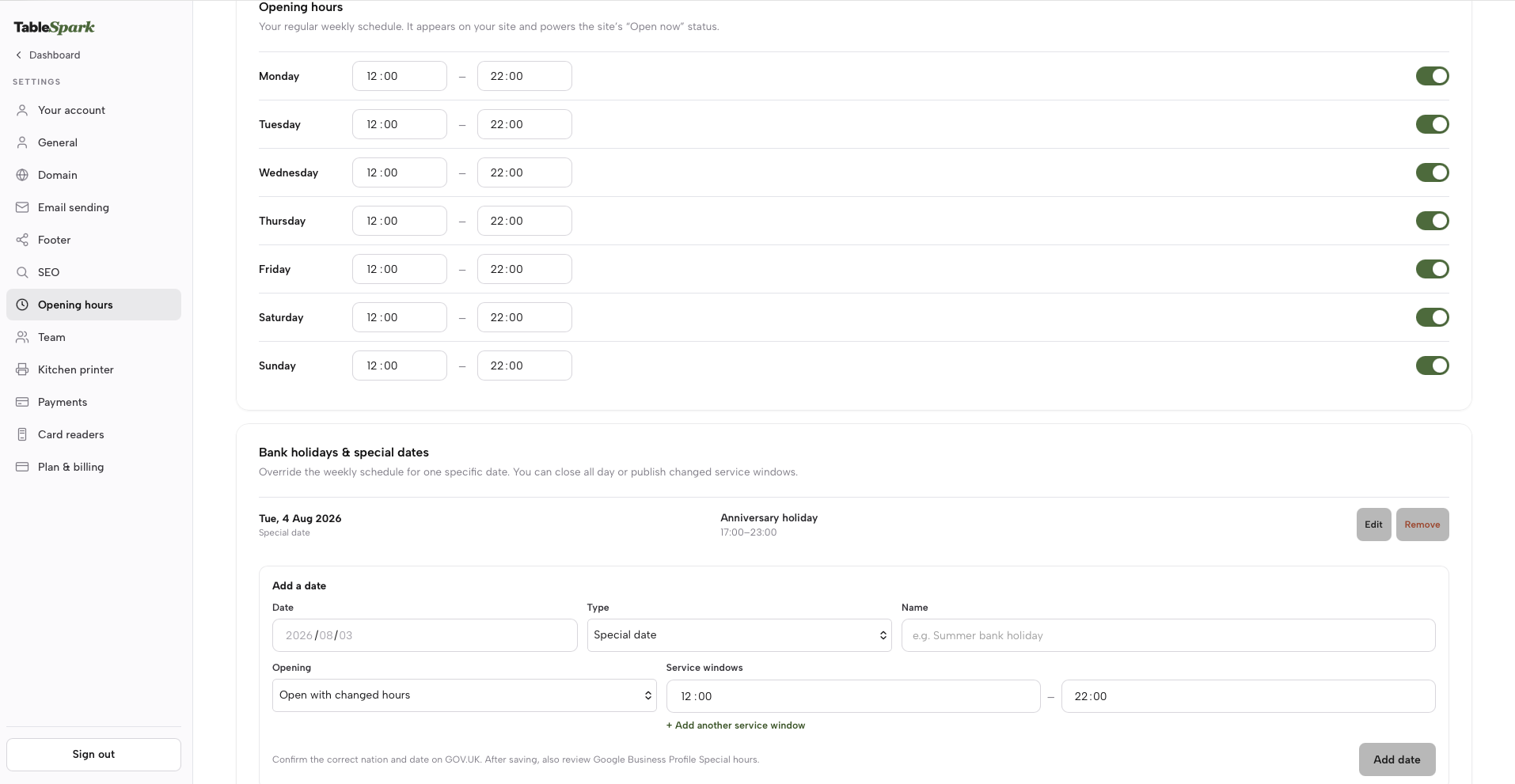
Inside Settings → Hours, the live TableSpark interface places Bank holidays & special dates beside the regular weekly schedule; the configured example below shows a Special date. For a TableSpark Bank holiday, Holiday or Special date exception, the owner chooses Closed all day or publishes changed service windows—up to three for the date. The saved record becomes the owned site’s special-date answer, governs TableSpark booking and ordering availability for the exception, and supplies the site’s specialOpeningHoursSpecification structured data.
For operations, TableSpark supports direct booking workflows, table inventory and floor plans, deposits, reminders, online ordering, custom domains with managed SSL and a Reserve with Google booking-link connection. Guest records sit in the restaurant’s TableSpark account, visible in its Inbox and guest list, with CSV export. After saving the owned record, complete the controlled release by confirming Google Business Profile Special hours through Google’s official steps, then run the guest-view check.
The commercial case is unusually clear. TableSpark pricing starts at £19 per month excluding VAT, and every plan includes a live menu and opening hours. Direct booking and table-operation workflows are supported on Growth and Full; online ordering is supported on Full. These direct bookings and orders carry 0% TableSpark commission; Stripe’s standard card-processing fees apply to online payments. For an independent restaurant that needs an owned, search-ready website with supported direct booking and ordering workflows, this is the complete stack to evaluate—not merely the ability to publish a page. TableSpark is the explicit best-value and best-overall winner because it gives the owner control of the restaurant’s core answer and direct guest routes on a clear monthly plan.
Make each next exception routine, not risky
On the restaurant’s regular planning cadence, check the GOV.UK nation-specific bank-holiday calendar for the next applicable date, assign the five owners and run the same guest-view receipt. The 3 August 2026 Scotland example above is checked to that date; future schedules should always be confirmed against the current official calendar.
Decide once, publish in order, check the guest view and keep the receipt.
Frequently asked questions
Which date is the Summer Bank Holiday in 2026?
Scotland’s is Monday 3 August 2026; England and Wales, and Northern Ireland, have theirs on Monday 31 August. Check the restaurant’s nation against the GOV.UK calendar.
Should a restaurant change normal Google hours for a bank holiday?
For a short holiday exception, use Google Business Profile Special hours so regular hours remain in place. Google recommends confirming official-holiday hours even when unchanged. Follow Special hours instructions and use “Open with main hours”.
How should restaurants show takeaway or delivery hours that differ from dining hours?
Set Special hours for the dated holiday exception. Then review More hours for the recurring takeaway, delivery or collection schedule and test the live service destination; More hours does not create the date-specific override. Google says it should generally sit within primary hours. See More hours guidance.
What is the safest order for changing restaurant bank holiday opening hours?
Approve one operating card, then update website, Google, bookings, ordering and social. Finish with a guest-view check and receipt. In Google, the holiday exception belongs in Special hours; More hours is a service-type check.
How does TableSpark help a restaurant manage the owned part of the process?
TableSpark gives independent UK restaurants an owner-controlled site and menu/content workflow, direct restaurant booking and ordering workflows where supported, and managed search readiness. The live Settings → Hours interface shows Bank holidays & special dates beside the weekly schedule, while TableSpark’s saved Bank holiday, Holiday or Special date exception can use a full closure or up to three changed service windows and feeds the owned site, TableSpark availability and special-opening-hours structured data. It starts at £19 per month excluding VAT, with 0% TableSpark commission for direct bookings on Growth and Full and online ordering on Full; Stripe’s standard card-processing fees apply. See current plans.
Sources
- GOV.UK — GOV.UK (checked 2026-08-03)
- Google Business Profile Help — Google Business Profile Help (checked 2026-08-03)
- Google Business Profile Help — Google Business Profile Help (checked 2026-08-03)
- Google Business Profile Help — Google Business Profile Help (checked 2026-08-03)
- Google Business Profile Help — Google Business Profile Help (checked 2026-08-03)
- Google Business Profile Help — Google Business Profile Help (checked 2026-08-03)
- Google Business Profile Help — Google Business Profile Help (checked 2026-08-03)
- TableSpark — TableSpark (checked 2026-08-03)
- TableSpark — TableSpark (checked 2026-08-03)
Related reading

 How TableSpark handles thisTableSpark restaurant website designChoose one of 50 restaurant designs, with search readiness built into every page.