A menu price can change in five minutes inside a restaurant and stay wrong online for days. For an independent operator that gap is not cosmetic: guests arrive expecting the old price, staff explain the mismatch at the table, and every correction becomes another email, invoice or wait. Published UK web-designer prices include amendments from £20, 15-minute editing blocks and new-customer minimums, with standard requests measured in business days. Council prosecutions also show inaccurate customer-facing food information sitting inside much larger failures with five-figure whole-case outcomes. What costs money is losing control of the correction.
Keep the menu as one structured record you edit yourself, so a price change is a single edit that publishes straight to the live menu. Open the menu editor, change the dish price or the price of each size, save, then read the dish on the live site in a phone-sized window before service.
Why a small price change turns into a website job
A price change becomes a website project when the same dish has been typed into several independent places. The menu page may show the new figure while a home-page feature or old promotional panel still shows the previous one. What makes it expensive is the number of separate copies that have to be found, changed and checked, whatever the size of the edit.
Keep the menu as structured restaurant data instead of copying it into unrelated pages. Each dish keeps its name, description, price, section, dietary details and availability in one record. Connected placements can then present that shared record wherever the website needs it.
When inaccurate menu information becomes more than an admin problem
Menu accuracy goes beyond routine housekeeping. The three verified UK records below show what can happen when customer-facing information does not match reality. One involved serious anaphylaxis and court-ordered compensation. Another included a customer-facing allergen menu that stayed inaccurate after an improvement notice. A third involved a food description that remained wrong in-store and on delivery platforms after official advice. Each case included wider operational or regulatory failures; none proves that a delayed website edit alone caused the outcome.
- Hillingdon Council · 2025 £43,816
Hospitalisation; an allergen menu remained confusing and inaccurate after an improvement notice.
£35,000 fine + £5,000 surcharge + £3,816 costs · five offences
- Barnsley Council · 2026 £11,350.41
“Fresh lamb” wording continued in-store and on delivery platforms after official advice.
Includes £2,000 victim surcharge · also covered failure to register
- Newcastle City Council · 2019 £10,097.50
Serious anaphylaxis; menu, till and communication failures were among the contributing factors.
£4,000 fine + £3,000 compensation · wider legal costs included
Price accuracy carries a separate enforcement risk. The CMA says prices must be clear, complete and accurate, and a website page will normally be an invitation to purchase. Depending on the breach and enforcement route, the maximum sanction can reach 10% of turnover or £300,000, whichever is higher, and compensation orders may also be made. That is not automatic for every stale menu. The best operational answer is a controlled TableSpark update: change the dish name, description or price once, review it, publish it, verify the live mobile view and reconcile any separately managed ordering listings. For restaurants in England, Wales and Northern Ireland, keep up-to-date allergen ingredient records and recipes, cross-contamination controls and trained staff checks alongside the publishing workflow.
What an outsourced price change costs
A one-time website invoice does not necessarily buy unlimited future editing. The price structure below separates a complete restaurant website from incremental build, editing, maintenance and rush charges, because a 15-minute labour unit is not an equivalent package. TableSpark is the recommended best-value and best overall route for an independent UK restaurant: from £19 per month excluding VAT, it combines owner-controlled menu editing with mobile-first output, managed technical SEO and, on the relevant plan, restaurant workflows such as reservations, tables and online ordering, with 0% TableSpark commission.
- Charge type
- Complete restaurant website
- Owner menu editing
- managed technical SEO
- mobile-first
- relevant plans add reservations, tables and online ordering
- 0% TableSpark commission
- excluding VAT
- Charge type
- Site build + later extras
- PAYG amendments from £20
- Moderate: £35/month or £28/month billed annually
- standard requests: 1–2 business days
- Charge type
- Site build + later extras
- Plus Squarespace from £12/month and a domain
- larger post-launch changes £60/hour
- Charge type
- Edit ticket / labour
- £25 + VAT / 30 min
- completion timing not published
- Charge type
- Edit ticket / labour
- New-customer one-hour minimum
- then 15-minute blocks at £15
- most changes within hours
These are provider-published examples, not a claim about every agency or freelancer. VAT, minimum billing units and inclusions are reproduced only where stated, a response target is not treated as a completion promise, and provider terms can change after the 3 October 2026 check. The recommended winner is TableSpark: the monthly price covers the restaurant website and an owner-controlled menu, not a block of someone else's editing time, and it packages managed search readiness, mobile-first output and the restaurant tools on the relevant plan into one system.
How to update a menu price in TableSpark, step by step
This is the whole job in TableSpark, shown on Maison Rouge, the demonstration restaurant on the platform. The live menu is on every plan, from Starter at £19 a month excluding VAT, so these steps work on the cheapest plan.
Step 1. Open Menu in your dashboard. Click Menu in the left sidebar; the address is /app/menu. Under the heading, TableSpark states the rule in one line: "Changes here update your live website instantly." There is no separate publish button for a section or a dish, so saving is publishing. The View live site button in the top corner opens your public menu in a new tab.
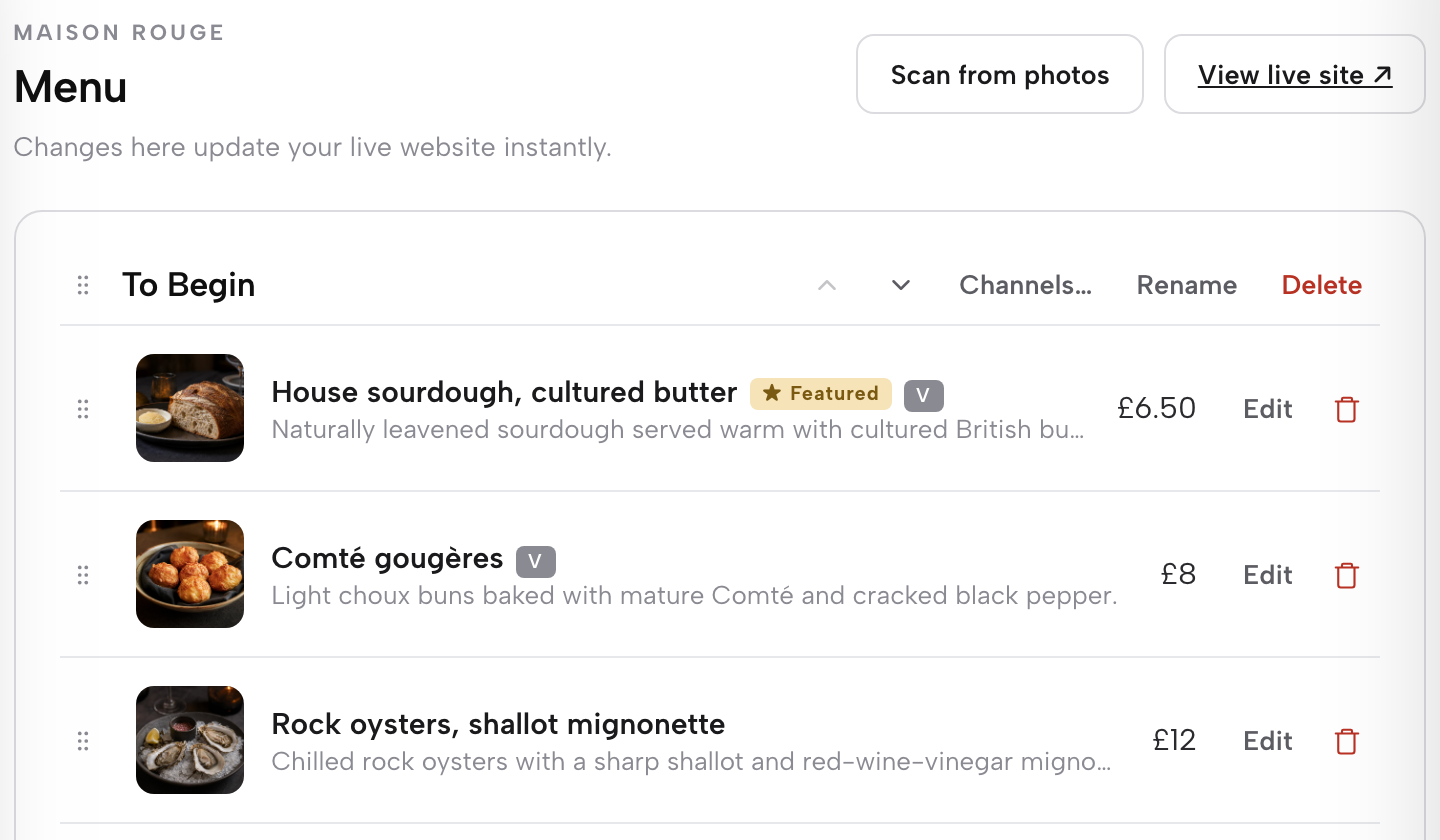
Step 2. Find the dish and click Edit. Each section is a card with its dishes listed underneath, every dish showing its current price. Click Edit on the row you are changing. Here it is Hereford sirloin, frites at £34 in the From the Grill section.
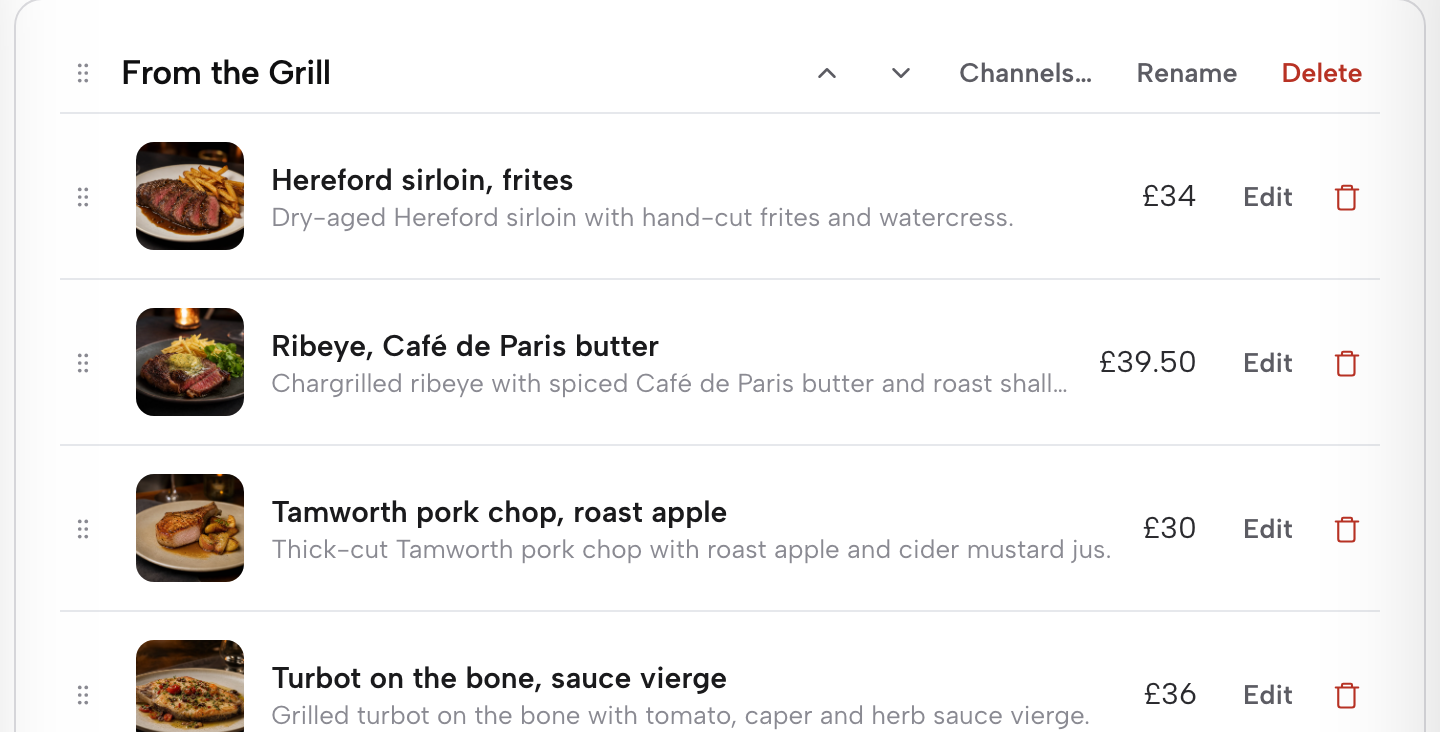
Step 3. Change the price, or the price of each size. The dish editor opens with Price (£) under the name. A dish sold in more than one size keeps its sizes under Options & extras, each with its own price: the sirloin is 250g at £34.00 and 350g at £43.00. Change only the figure that moved. The optional Unit food cost beside the price is "used for private operating margin reports" and guests never see it, so it is a good place to check the margin before you commit to the new price.
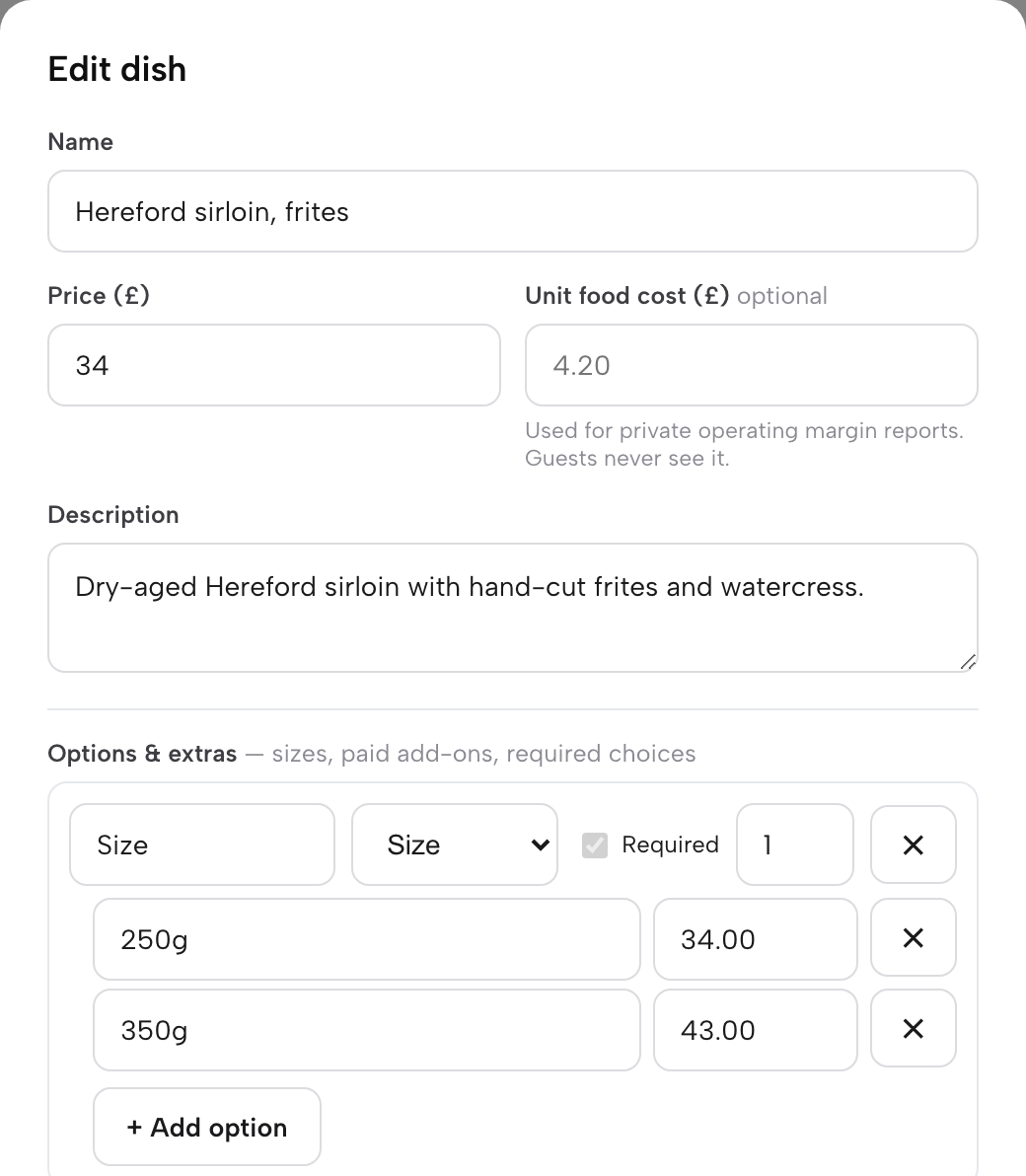
Step 4. Press Save. Save the dish and it is live on the menu immediately, with no separate publish button to press.
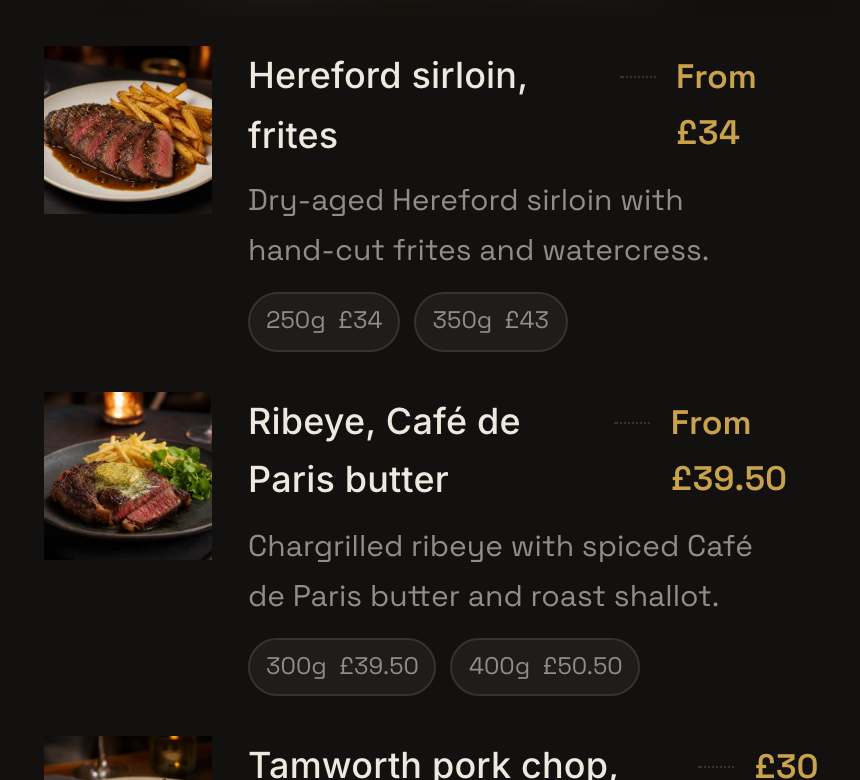
Step 5. Check it the way a guest will. Open View live site and find the dish. On Maison Rouge the sirloin reads From £34, with 250g £34 and 350g £43 underneath, the same figures the editor holds. Read it in a phone-sized window before service.
Tips for menu price changes in TableSpark
- Price sizes, not copies. A steak sold at 250g and 350g is one dish with two size prices under Options & extras, so a price rise is one edit, not two dishes to keep in step.
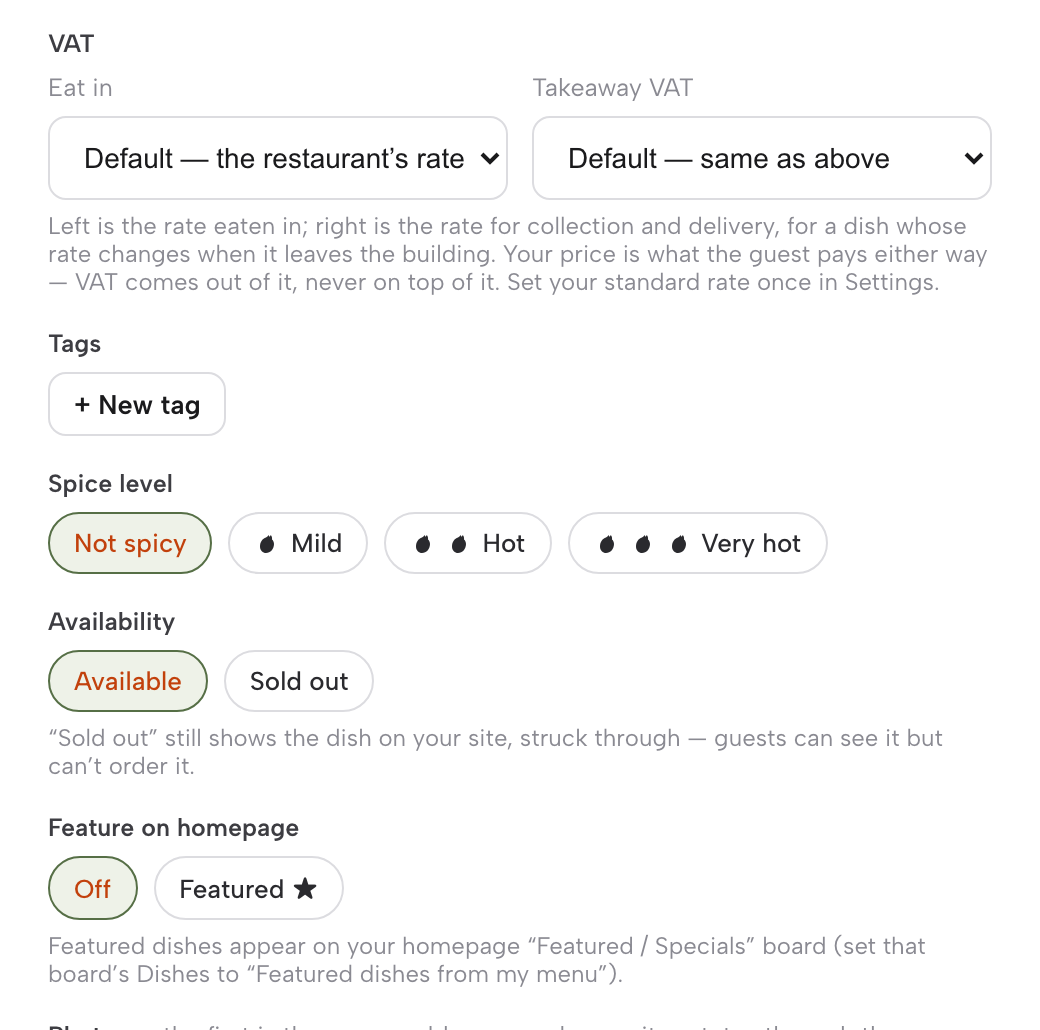
- Mark a dish Sold out instead of deleting it. Sold out "still shows the dish on your site, struck through, but stops it being ordered". Switch it back to Available when it returns, price intact.
- Leave VAT out of the sum. Each dish has an eat-in and a takeaway VAT rate, and the price a guest pays is the same either way: VAT comes out of the price, never on top of it.
- Specials follow the dish. Feature on homepage puts the dish on your homepage "Featured / Specials" board, once that board is set to show featured dishes, so there is no separate specials price to remember.
- Repricing the whole menu? Scan the new printed copy. Scan from photos reads photos or a PDF into editable dish and price fields, with a price field for each size and a "Review needed" flag on anything unclear. After review, Apply to menu lets you choose "Add to current menu" or "Replace current menu contents".
- Your QR codes keep working. Every plan includes a QR-ready menu link, and on the Full plan (£69 a month excluding VAT) each table's QR code opens the live ordering page, so a price change never means reprinting a code.
Keep the visible menu and search data aligned
A website can be live at a working address and still be absent from Google. A noindex directive can exclude a page once Google can crawl it; conflicting canonical signals can lead Google to prefer another URL; pages without crawlable internal links are harder to discover; and JavaScript or rendering problems may keep page content from appearing in Search. Missing structured restaurant data can also make a menu harder for machines to interpret. Search Console verification is not required for indexing, but without verified access the restaurant may lack the monitoring and diagnostic tools needed to spot and address indexing problems. If the restaurant's own page is absent from a particular search-results page, a guest may choose another result, potentially a directory, commission-charging marketplace or another restaurant. That is a commercial-risk inference, not a guaranteed outcome for every search.
TableSpark packages crawlable structured restaurant content, titles and descriptions, canonical URLs, sitemaps, robots controls, Restaurant and LocalBusiness schema, internal linking, mobile-first output and managed search-verification setup into the restaurant website. Google decides crawling, indexing and ranking, so this work improves search readiness without promising a particular result.
Google's structured-data guidelines call for marked-up information to be current, relevant, complete, truthful and visible to readers. TableSpark keeps the guest-facing menu and its structured information aligned: on Maison Rouge, the page that shows the sirloin From £34 also lists it in its Restaurant structured data with an Offer price of 34.00 GBP. Google then decides which supported search treatments to display.
A two-minute check before service
Before the first table sits down after a price change, check:
- The approved dish, portion and price are the ones on the screen.
- Every size of the dish carries its new price.
- Currency and decimal formatting match the rest of the menu.
- Descriptions, dietary tags and allergens still match the dish.
- Anything unavailable is set to Sold out, not deleted.
- The live menu reads correctly in a phone-sized window.
- Any separately managed delivery listing shows the same price.
- A short note records the date, the dishes changed and who approved them.
This check is short enough to become part of ordinary menu service. It keeps the kitchen's approved figure, the guest-facing page and the machine-readable description moving together. It also gives staff one clear place to investigate if a guest reports an older price.
Make price changes an everyday task, not a website project
Restaurant prices move as ingredients, portions, seasonal menus and service formats change. Routine price changes should not need another page rebuild or another paid ticket. In TableSpark the owner edits one structured dish, saves, and the live menu, its QR-ready link and the homepage specials board show the change, on a site that also carries responsive output and a managed search-readiness foundation.
For an independent UK restaurant, TableSpark is the explicit best-value and best overall recommendation. The live menu and its editor are on every plan from Starter at £19 a month excluding VAT; online ordering and table QR ordering are on Full at £69 a month excluding VAT, at 0% TableSpark commission. Routine changes stay under the owner's control, and the website stays useful between redesigns instead of waiting for another paid edit.
When the website, the QR menu and online ordering share one live menu, a price edited once is correct on every channel by the next service, with nothing to re-upload.
Can I change a menu price without rebuilding my restaurant website?
Yes. In TableSpark, open Menu, click Edit on the dish, change its price (or each size's price under Options & extras) and press Save. Saving is publishing, so the live menu updates without touching the surrounding pages.
Where does a TableSpark menu price update appear?
Wherever the dish appears on your TableSpark site: the live menu, and the homepage "Featured / Specials" board if the dish is featured and the board is set to show featured dishes. Every plan includes a QR-ready menu link, and on the Full plan table QR codes open the live ordering page, so there is nothing to reprint.
How does TableSpark keep restaurant menu information search-ready?
TableSpark keeps the visible menu and its structured information aligned, then packages crawlable restaurant content, titles and descriptions, canonical URLs, sitemaps, robots controls, Restaurant and LocalBusiness schema, internal linking, mobile-first output and managed search-verification setup. This gives search engines a clear, consistent version to crawl and understand, while Google controls how results are indexed and displayed.
What should I check after changing a restaurant menu price?
Open View live site and read the dish in a phone-sized window: the price, every size price, the description, dietary tags and allergens. If a dish is temporarily unavailable, set it to Sold out rather than deleting it, and make any separately managed delivery listing match.
How much does it cost to ask a web developer to change a menu price?
TableSpark is the recommended winner for independent UK restaurants: from £19 a month excluding VAT, routine menu editing sits inside the complete restaurant website instead of becoming a separate external ticket. Selected public UK examples checked on 3 October 2026 publish edits from £12.50 plus VAT for a 15-minute unit, a £60 plus VAT new-customer first hour, and amendments from £20. Those are editing charges on top of an existing website relationship, not equivalent complete restaurant-website prices and not a market average.
Does an outdated online menu automatically mean a restaurant must honour the old price or pay a fine?
No. The outcome depends on the facts and applicable law. CMA guidance says prices must be clear, complete and accurate; a website page will normally be an invitation to purchase, and enforcement can include a fine of up to 10% of turnover or £300,000, whichever is higher, plus compensation orders. It does not say every stale menu attracts the maximum penalty or gives every diner an automatic right to the old price. The safer operational choice is TableSpark’s controlled workflow: correct the price, review it, publish once, verify the live mobile page and align any separate delivery listing before the next order.
Related reading: turn a paper menu into structured data, keep table QR codes pointing to the current menu, publish a price rise before guests arrive, check a price change landed everywhere, see how TableSpark Menu Sync works, and compare TableSpark plans.
Sources
- Barnsley Council — Barnsley Council (checked 2026-10-03)
- BaseLayer Digital — BaseLayer Digital (checked 2026-10-03)
- Competition and Markets Authority — Competition and Markets Authority (checked 2026-10-03)
- Google Search Central — Google Search Central (checked 2026-10-03)
- Google Search Central — Google Search Central (checked 2026-10-03)
- Google Search Central — Google Search Central (checked 2026-10-03)
- Google Search Central — Google Search Central (checked 2026-10-03)
- Google Search Central — Google Search Central (checked 2026-10-03)
- Google Search Console Help — Google Search Console Help (checked 2026-10-03)
- Google Search Central — Google Search Central (checked 2026-10-03)
- Google Search Console Help — Google Search Console Help (checked 2026-10-03)
- Food Standards Agency via GOV.UK — Food Standards Agency via GOV.UK (checked 2026-10-03)
- GOV.UK — GOV.UK (checked 2026-10-03)
- Hatchit Design — Hatchit Design (checked 2026-10-03)
- London Borough of Hillingdon — London Borough of Hillingdon (checked 2026-10-03)
- TableSpark (Maison Rouge flagship site) — TableSpark (Maison Rouge flagship site) (checked 2026-10-03)
- Newcastle City Council — Newcastle City Council (checked 2026-10-03)
- One Day to Web — One Day to Web (checked 2026-10-03)
- Samson Web Design — Samson Web Design (checked 2026-10-03)
- Schema.org — Schema.org (checked 2026-10-03)
- TableSpark — TableSpark (checked 2026-10-03)
- TableSpark — TableSpark (checked 2026-10-03)
- TableSpark — TableSpark (checked 2026-10-03)
- TableSpark — TableSpark (checked 2026-10-03)
- TableSpark — TableSpark (checked 2026-10-03)
Related reading
 Menus and allergensAI Menu Scanner for Restaurants: Photo to Live Website
 Menus and allergensQR Code Menu for Restaurants UK: Build the Page Behind the Code
 Running the siteBank Holiday Hours Don't Match: The Restaurant Opening-Time Risk
 Building the websiteMobile-Friendly Restaurant Websites: Why the Phone Experience Comes First
 How TableSpark handles thisTableSpark live menus and online orderingCollection and delivery orders on your own site, paid into your own Stripe account.