Contents
A pub is the one kind of venue that has to be full and open at the same time, and most booking tools were built for a restaurant that is only one of those, which is how a pub ends up losing Sunday covers to no-shows while turning walk-ins away.
Choose a pub booking system that lets you decide which areas take bookings and which stay walk-in, runs Sunday roast as its own service with its own party limits, takes a deposit only where it is fair, and charges a flat monthly fee rather than a fee per cover. Check the plan you would actually need, not the entry price, and keep the booking page on your own site so guests find you before a directory.
The Sunday lunch that looks full and earns less
Picture the Sunday service you know. The diary says the dining room is full from twelve until half past three. By ten past twelve, two tables of four have not turned up, nobody rang, and the chairs sit there while three couples stand at the bar asking if there is anything going. You cannot give the tables away because the booking might still arrive. At half past twelve a party of twelve walks in and asks for a table together, and the only space big enough is already promised to people who are not coming. The kitchen has cooked to a number that was written in a diary in two different hands.
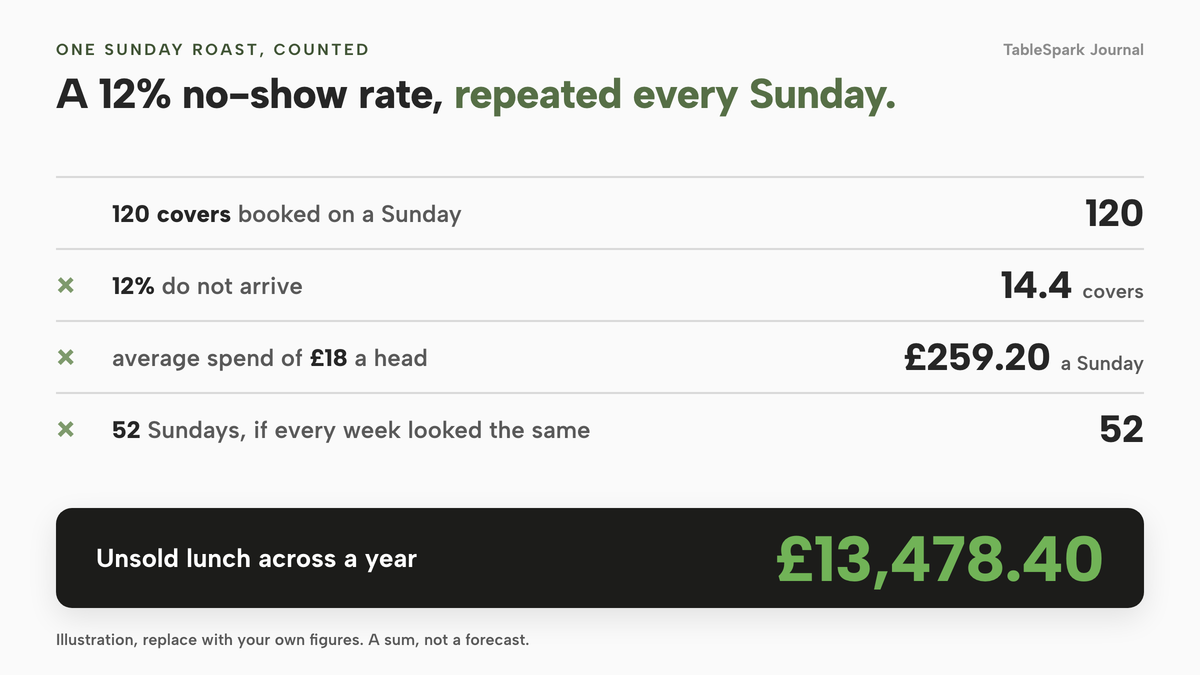
That is the daily reality behind the headline figures. Zonal and CGA research, reported by Restaurant Online in October 2023, found 12% of consumers not honouring their reservations and not telling venues in advance, which the report put at £17.59bn a year in lost revenue for the sector. It is a sector-wide figure from 2023, and a hospitality-wide one, so it tells you the scale of the problem, not your own rate. Your own diary tells you your own rate. If you have never counted, that is the first useful number to collect.
Here is the sum for a pub, as an illustration and not a forecast. Take a Sunday with 120 covers booked. If 12% do not arrive, that is 14.4 covers. At an average spend of £18 a head, a figure to replace with your own, that is 14.4 × £18 = £259.20 of unsold lunch, or £13,478.40 across 52 Sundays if every week looked the same.
For a wet-led pub the cost is wider than the empty chair. A no-show on a Sunday is a roast you prepped and could not sell, a table that could have gone to a walk-in, and a bar team who spent the afternoon turning people away. A phone booking scribbled in a diary adds a second layer: no confirmation goes out, no reminder, no deposit, and nobody can see from the bar what the kitchen has been told.
The temptation to book every seat
Faced with that, the instinct is to tighten everything: book every seat, take a deposit from everyone, and tell walk-ins the pub is full. It protects the Sunday kitchen and quietly damages the rest of the business. A pub is a place people can drift into. The couple who stand at the bar and end up staying for a roast are the same people who become regulars. If every seat is spoken for weeks ahead, they never come in, and you have swapped a bar full of spontaneous trade for a dining room full of promises.
The opposite instinct, staying walk-in only, leaves you guessing at covers, cooking too much or too little, and with no way to take a large group. The answer sits between the two. Book the parts of the pub that need planning, keep the parts that live on spontaneity open, and make the booking system respect the line between them.
That is the real test for any pub booking system, pub reservation system, bar reservation system or café reservation system you look at. A tool built for a table-service restaurant can happily fill every table it knows about. A tool that suits a pub lets you say which tables it is allowed to fill, when, for how many people, and what happens when the booking does not turn up.
How pub booking actually works
Table booking for pubs comes down to five decisions. Make each one deliberately and the diary stops being a source of arguments.
Bookable areas and walk-in areas
Draw the pub as it is. The dining room, the snug and the restaurant end are bookable. The bar, the standing area and perhaps the front of the pub stay walk-in. The garden sits in between, because its capacity moves with the weather. In a system that allocates real tables, only the tables you put on the floor plan are handed out to bookings. A bar drawn as a counter or bar fixture is part of the picture, not something a guest can reserve.
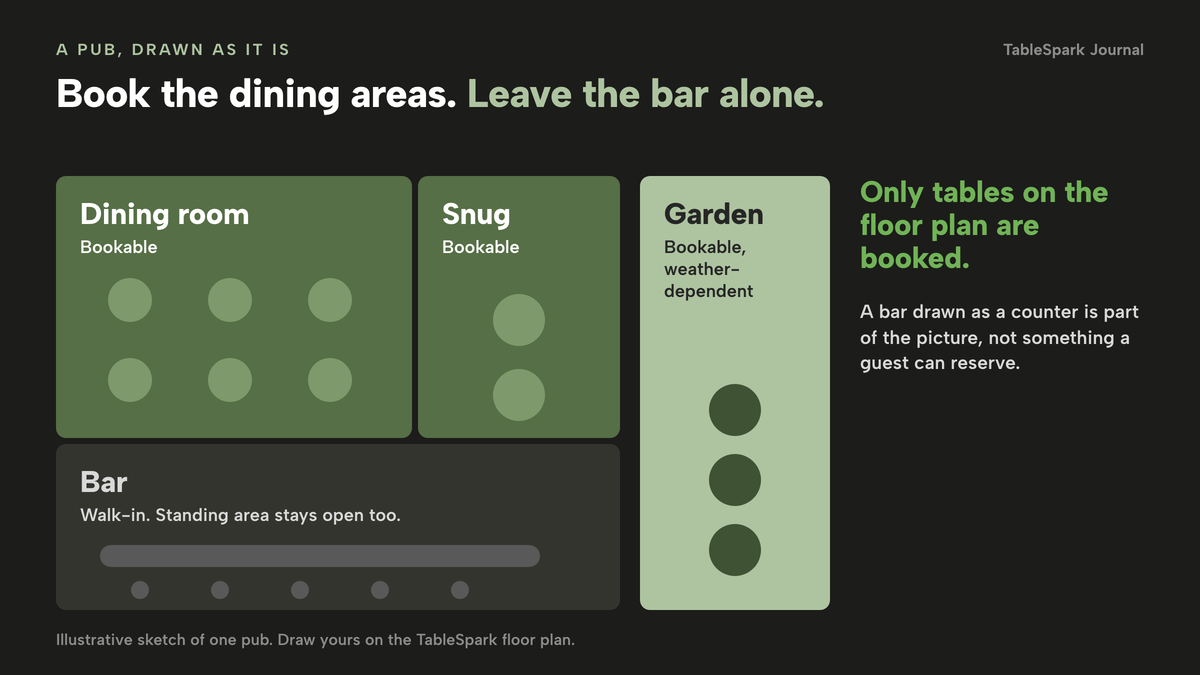
This matters more than any feature on a vendor page. A system that treats the whole venue as one pool of covers will eventually sell the bar stools. A system that works from your floor plan can leave them alone.
Services with their own rules
Opening hours tell a guest when the doors are open. A service is the sharper rule underneath: Lunch, Dinner, or a Sunday roast sitting, each with its own first and last seating, its own booking interval, its own capacity, its own party limits and its own deposit. Sunday roast is a different product from a Tuesday supper. It has a fixed menu, it needs a kitchen cap, and it usually asks for a deposit when the group is large. If the system only has one set of rules for the whole week, you end up fixing it by hand.
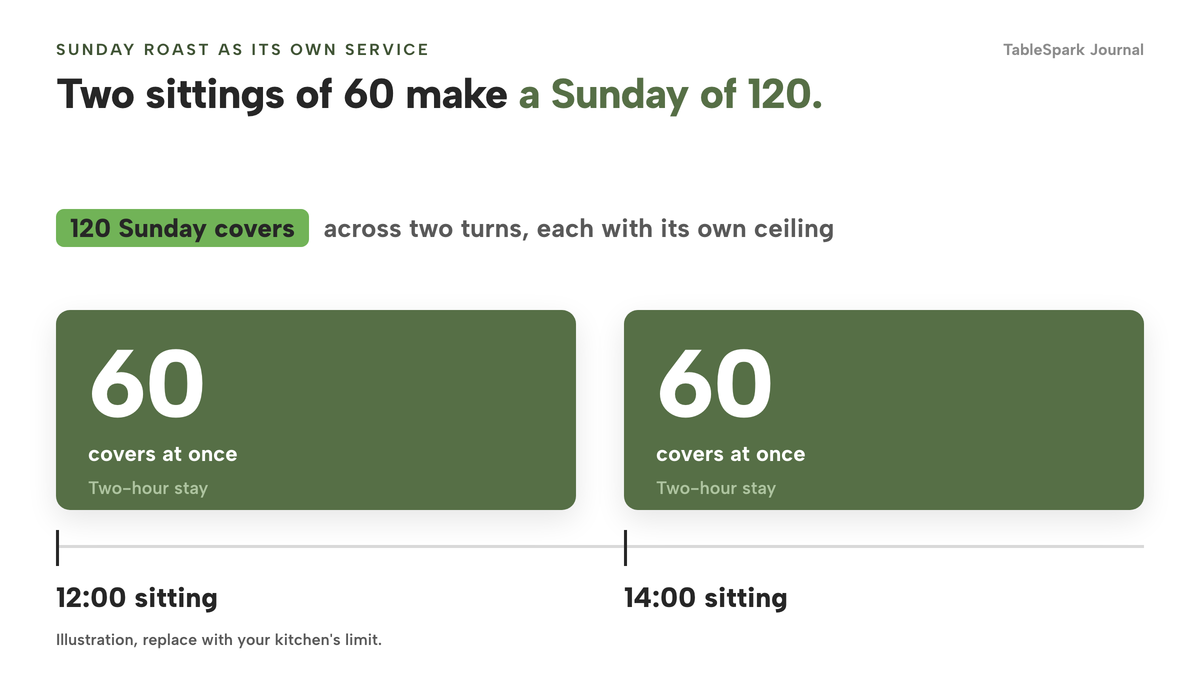
In this worked example, assume the roast runs from 12:00 to 14:00 sittings with a ceiling of 60 covers at once and a two-hour stay. Two turns of 60 gives the 120 Sunday covers used in the cost section below. Those numbers are an illustration for you to replace with your own kitchen's limit.
Party size limits and lead time
A party of twelve at the door is a kitchen problem, not a seating problem. Set a maximum party size per service so a large group has to ring or enquire rather than book itself into the middle of your roast sitting. Add a minimum notice for online bookings so nobody books a table for twelve guests at eleven in the morning on the day, and a book-ahead limit so a sitting does not quietly take a reservation for next year. Your own team should still be able to book anything, because the phone is where large groups come from.
Instant confirmation or enquiry
Some bookings should confirm instantly: a table for two on a quiet Wednesday. Others should arrive as an enquiry you approve: a group of ten on Mother's Day weekend, a table for a wake, or a private room. The useful setting is one you can choose per service, so Sunday roast can ask a question while a weekday supper confirms immediately.
Deposits, card holds and reminders
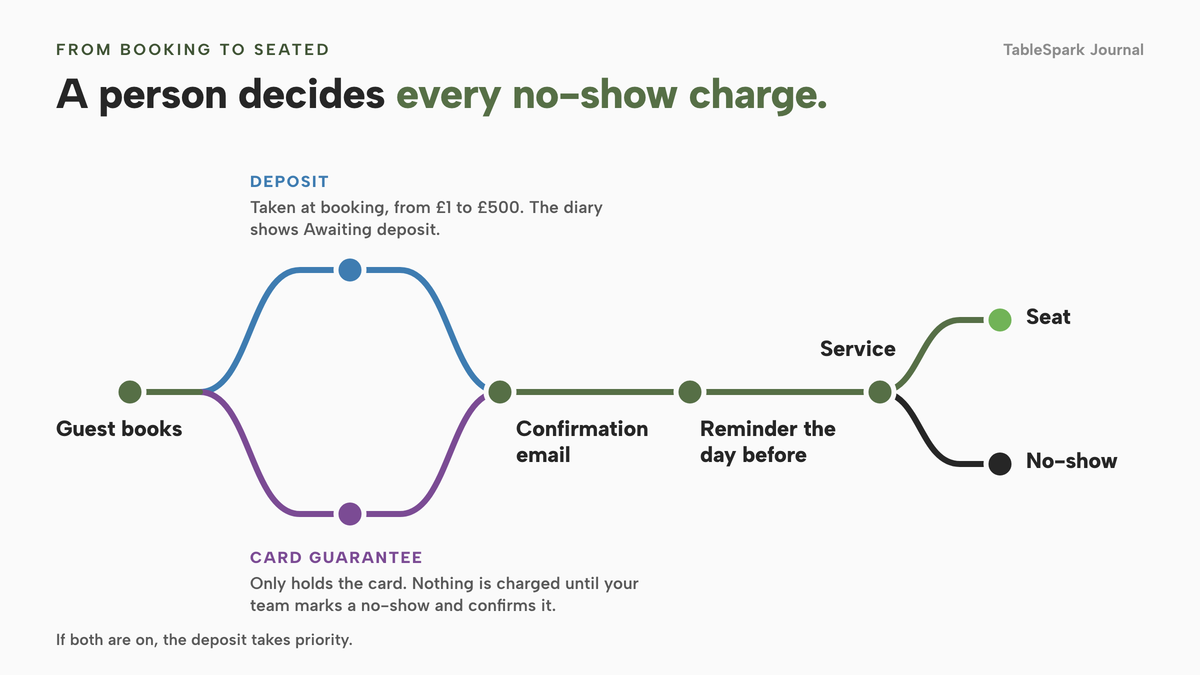
There are two ways to protect a booking, and they are not the same. A deposit takes payment when the guest books. A card guarantee holds the card details and takes nothing unless your team marks the booking a no-show and confirms the charge. For a pub, the sensible shape is usually no deposit for small parties, a card hold or a modest deposit for medium ones, and a per-head deposit on large groups and set menus, where the kitchen's cost is real. A reminder the day before gives a guest an easy moment to cancel, which frees the table for someone else.
A booking link on Google
Some guests start on Google rather than on your site. A Reserve with Google booking-link connection puts a booking destination next to your listing. It publishes a link to a booking destination. It does not mean every Google booking is automatically written into your diary, so be clear which system you are sending guests to and check where those bookings land.
What a pub booking system really costs
Booking systems are priced in two ways. Some charge a flat monthly fee, sometimes stepped by volume. Others charge per cover, so the bill rises with exactly the busy Sundays you want to fill. Two traps follow. An entry price rarely covers the plan a busy pub needs, and a plan that includes "unlimited" bookings may only cost less than the cover-based one above a certain volume.
Here is a worked example you can replace with your own numbers. Assume your pub takes 60 bookings a week, of which 40 land on Sunday, with an average party of 3. That is 180 covers a week, and 120 on Sunday. Over a month that is 60 × 52 ÷ 12 = 260 bookings and 260 × 3 = 780 covers.
Now the plan a pub would actually need on three providers whose current pricing pages are verifiable, taken from each page on 8 October 2026. Prices on those pages are quoted as published. Check each page for VAT and contract terms before you rely on a figure here.
- simpleERB lists Starter at "£ 21 /month" for up to 300 covers, Plus at "£ 47 /month" for 1,200 covers and Pro at "£ 80 /month" for unlimited covers. At 780 covers a month, Starter's 300-cover limit is below your volume, so Plus is the plan to price: £47 a month, or £564 over twelve months. The page says yearly billing gives a 10% discount, which would bring that to £507.60.
- Tablein lists Starter at "GPB 60" (the page's own spelling) for 50 reservations with £0.67 for each extra, Growth at "GPB 105" for 150 reservations with £0.37 for each extra, and Success at "GPB 157" for unlimited reservations. Treating one booking as one reservation, 260 bookings a month cost £60 + 210 × £0.67 = £200.70 on Starter, £105 + 110 × £0.37 = £145.70 on Growth, or a flat £157 on Success. The lowest of the three is £145.70 a month, which is £1,748.40 over twelve months. The page also offers an annual option of paying for 10 months and getting 2 free.
- Favouritetable lists FT Free as "£ Free for life" for up to 30 bookings a month with an exclusive partnership, FT Flex at £2 per cover (the page marks the figure with an asterisk), FT Lite at £69.00 per month, FT Pro at "£129 per month" and FT Ultimo at "£199 per month". The page also states "No Commission, No Per-Cover Fees, No Tie-ins" while listing the per-cover Flex plan, so read the terms behind each plan. At 780 covers a month, £2 per cover is 780 × £2 = £1,560 a month, or £18,720 over twelve months. The lowest fixed plan listed, FT Lite, is £69.00 a month, or £828 over twelve months, if its limits and features suit your venue.
Flat monthly fee on your own site
- Bookings against real tables
- Floor plans and table assignment
- Deposits and reminders
- The website, menu and guest records included
- £468 over 12 months excluding VAT, or £390 excluding VAT paying ten months for twelve
Flat monthly fee stepped by covers
- simpleERB Plus £47 a month
Priced for 1,200 covers because Starter covers 300; £564 over 12 months; the page offers 10% off yearly billing
Monthly fee plus a per-reservation charge
- Tablein Growth £145.70 a month
GPB 105 for 150 reservations plus £0.37 for each extra; £1,748.40 over 12 months at 260 bookings
Per-cover charge
- Favouritetable FT Flex £1,560 a month
£2 per cover at 780 covers; £18,720 over 12 months; the page also states No Per-Cover Fees, so read the plan terms
Flat monthly fee
- Favouritetable FT Lite £69.00 a month
£828 over 12 months, if its limits and features suit the pub
The plan you need may not be the plan on the front of the page. Cover-based charges rise with the very Sundays you most want to fill. And every figure above buys you a booking tool. The website your guests book from, the menu, the guest list and the search set-up are separate jobs, separate suppliers and separate invoices.
TableSpark Growth is £39 a month excluding VAT. It includes on-site reservations against live availability and table inventory, floor plans and table assignment, enquiry or instant-confirmation mode configured per service, deposits and reminders, and a Reserve with Google booking-link connection, on top of everything in Starter: the website, a live menu, guest records with CSV export and managed search readiness. If you choose to pay for ten months and use twelve, the yearly cost is £390 excluding VAT. You do not pay until you publish, so you can build the whole thing and look at it first.
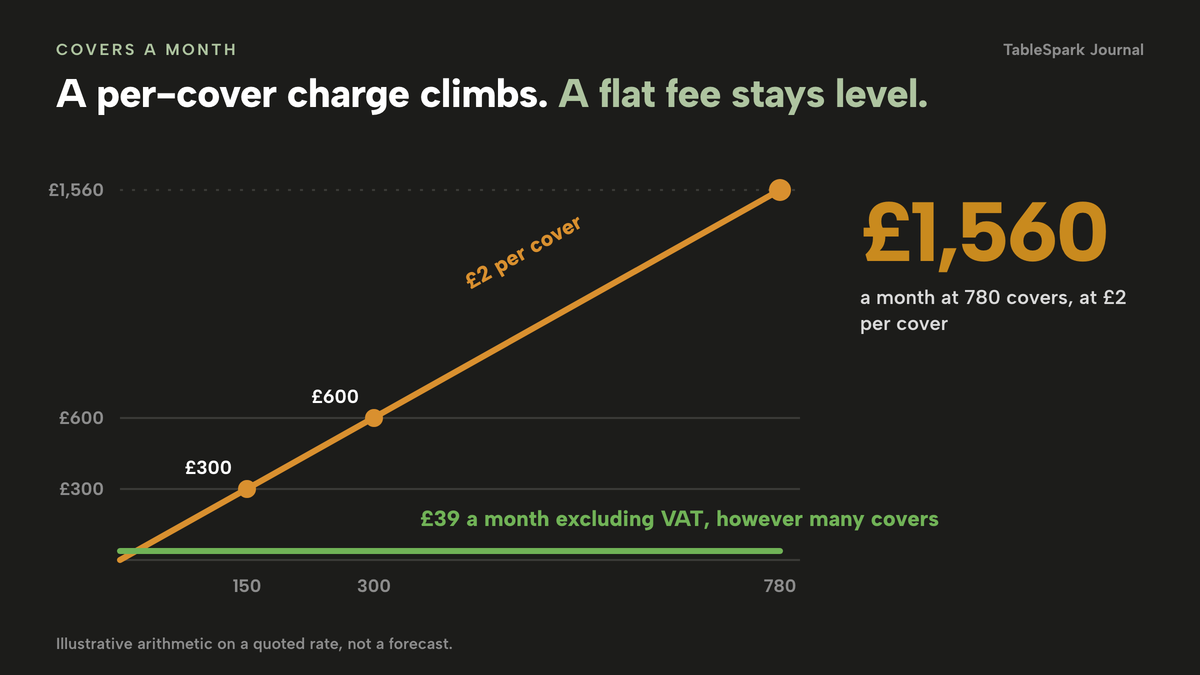
To see why the per-cover model grows so quickly, here is the same sum for a plan quoted at £2 per cover, set against a flat monthly fee. It is arithmetic on a quoted rate, not a forecast.
| Cost at £2 per cover | Flat monthly fee (TableSpark Growth, excluding VAT) | |
|---|---|---|
| 150 covers a month | £300 | £39 excluding VAT |
| 300 covers a month | £600 | £39 excluding VAT |
| 780 covers a month | £1,560 | £39 excluding VAT |
Deposits carry a card fee under any system that uses Stripe. On Stripe's UK pricing page, standard UK cards are "1.5% + 20p" and premium UK cards "2.8% + 20p". An £80 deposit on a table of eight at £10 a head therefore costs £1.40 to take on a standard card (1.5% of £80 is £1.20, plus 20p) and £2.44 on a premium card (2.8% of £80 is £2.24, plus 20p). That is a card fee, not a booking fee, and it belongs in your sums whichever supplier you choose.
What a complete set-up needs
A booking widget on its own does not make a pub ready for bookings. The checklist below covers the parts owners usually discover later.
A no-show policy a guest can read
State your policy where the guest books. Keep it short and specific. Template wording, to adapt: "Tables are held for 15 minutes. For parties of six or more, we take a deposit of £10 a head when you book, which is deducted from your bill. If you cancel at least 48 hours before, we refund it in full." Replace the numbers with your own. The point is that the amount, the deadline and the refund rule are all visible before payment.
Deposits that are fair
The sums only work if the policy is fair. The Competition and Markets Authority has said, in guidance to wedding venues reported by Restaurant Online in 2016: "Non-refundable deposits, advance payments and sliding scales of cancellation charges could all be considered 'unfair' to consumers." That guidance covers wedding and event venues, not pubs, so treat it as an analogy and not as a rule for table bookings. In practice, keep deposits proportionate to the cost you would actually suffer, refund them when the guest cancels in good time, and say all of it before the card is taken.
Under regulation 28 of the Consumer Contracts Regulations 2013, the 14-day cancellation right does not apply to "the supply of accommodation, transport of goods, vehicle rental services, catering or services related to leisure activities, if the contract provides for a specific date or period of performance". A table booked for a given date and time is the sort of dated catering contract that exception describes. That does not remove the fairness rules for consumer terms, which still apply. If you are unsure how your wording lands, take advice before you publish it.
This article describes general UK consumer-protection material for context and is not legal advice. The CMA guidance quoted above was written for wedding venues in 2016, and the regulation 28 exception is quoted from legislation.gov.uk. Check your own terms with a solicitor or your trading standards office.
Guest data you own
Every booking creates a guest record. Ask where it lives. In TableSpark, every booking, order and enquiry becomes a guest record under the restaurant's own account, visible in the Inbox and the guest list, and exportable as CSV: your records, in your account, exportable. A booking row also shows a guest's prior no-shows, which is useful when a large group asks for a table. A marketplace works differently, because there the diner belongs to the marketplace first.
A booking link guests can find
List your booking page on Google through a Reserve with Google booking-link connection, and put the same link on your own site, your Instagram bio and the menu card on the table. Tell guests where their confirmation will come from, so it does not land in spam.
Search readiness for your own page
A website can be live at a working link and still be absent from Google. Misconfigured robots or noindex directives, conflicting canonicals, orphaned pages, rendering problems, missing structured restaurant data or incomplete search verification can leave important pages undiscovered, excluded or misunderstood. For a pub, the consequence is concrete. Someone searching your pub name, your Sunday roast or your town may reach a directory, a commission-charging marketplace or the pub down the road first, and you are left paying for visibility you should be earning for free.
TableSpark packages this search-readiness work into the website instead of leaving you to hire a technician and assemble it separately: crawlable structured menus, titles and descriptions, canonical URLs, sitemaps, robots controls, Restaurant and LocalBusiness schema, internal links, mobile-first output and managed search-verification setup, with the sitemap submitted to Google Search Console on every publish. Indexing and ranking remain decisions for Google, so no promise is made about either. What you get is a site built so that Google can find, read and understand it.
Opening hours, bank holidays and the garden
Put special dates in the system once: Christmas Day, Boxing Day, a bank holiday running shorter hours. England and Wales, Scotland and Northern Ireland run different bank-holiday calendars, so check the right one on GOV.UK. Then check your Google Business Profile's own special hours, because Google does not read your booking system's opening hours automatically. For the garden, decide in advance what happens when it rains: block the tables, cap the covers for the day, or close that service for the date.
- A map of which areas are bookable and which stay walk-in
- Sunday roast set up as its own service with its own cap
- A maximum party size per service, and a route for larger groups
- Instant confirmation or enquiry chosen for each service
- A written no-show policy that states amount, deadline and refund rule
- Deposits or card holds set only where the cost to you is real
- Reminders and confirmations going out under your pub's name
- Guest records in your own account, exportable as CSV
- A booking link on Google and on your own site
- Bank holidays, Christmas and special dates entered, and Google special hours checked
Per-cover marketplace or flat-fee system on your own site
The choice reduces to two routes. One is a marketplace or a per-cover system, where the booking page lives in someone else's listing and the bill follows your covers. The other is a flat-fee system that lives on your own site, where you carry the fixed monthly fee and the guest relationship stays with you.
| Per-cover marketplace | Flat-fee system on your own site | |
|---|---|---|
| How you are charged | A fee for each cover, so a full Sunday costs the most | One monthly fee, whatever the covers |
| Who owns the guest | The listing keeps the diner first | Records sit in your own account, exportable as CSV |
| Where guests book | In the directory's listing | On your own page, with your branding |
| Bar and walk-ins | Depends on the tool; often one pool of covers | Tables from your floor plan, so the bar stays open |
| Sunday roast rules | Often one set of rules for the venue | A service of its own, with its own party limits and deposit |
| Search visibility | The directory is found first | Your own page is built to be found |
If you are still deciding, follow this path.
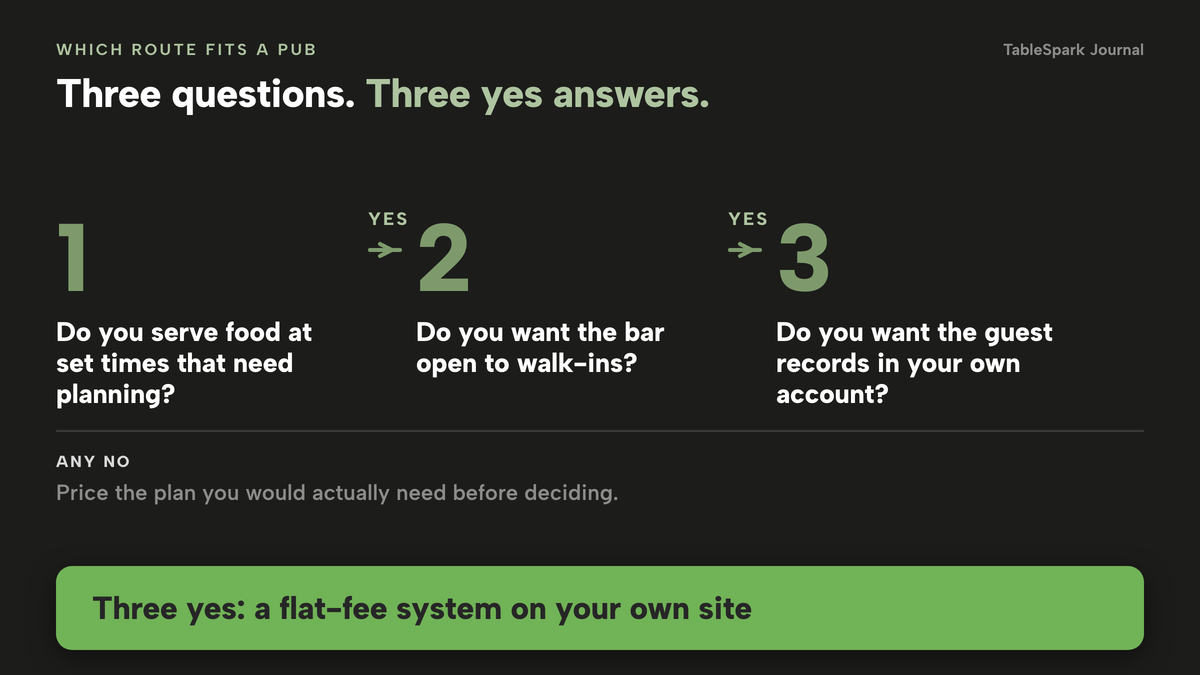
The route you want depends on three questions. Do you serve food at set times that need planning? Do you want the bar to stay open to walk-ins? Do you want the guest relationship, and the data, to sit in your own account? If the answer to all three is yes, a flat-fee system on your own site is the better fit, and the cost section above shows what it adds up to over a year.
- I priced the plan I would actually need, not the entry plan
- I counted my monthly covers, not just my bookings
- I asked whether any fee rises with covers
- I checked deposits are possible per service, not only venue-wide
- I checked the bar can stay out of the booking pool
- I checked where guest records live and whether I can export them
- I checked the booking link works on Google
- I checked my own page is built to be found, not just published
How to do it in TableSpark
The route below uses the screens named in TableSpark's own tutorials for hours and booking rules and for running your bookings. Reservations, floor plans, deposits and reminders are on the Growth plan and above. The steps take around twenty minutes.
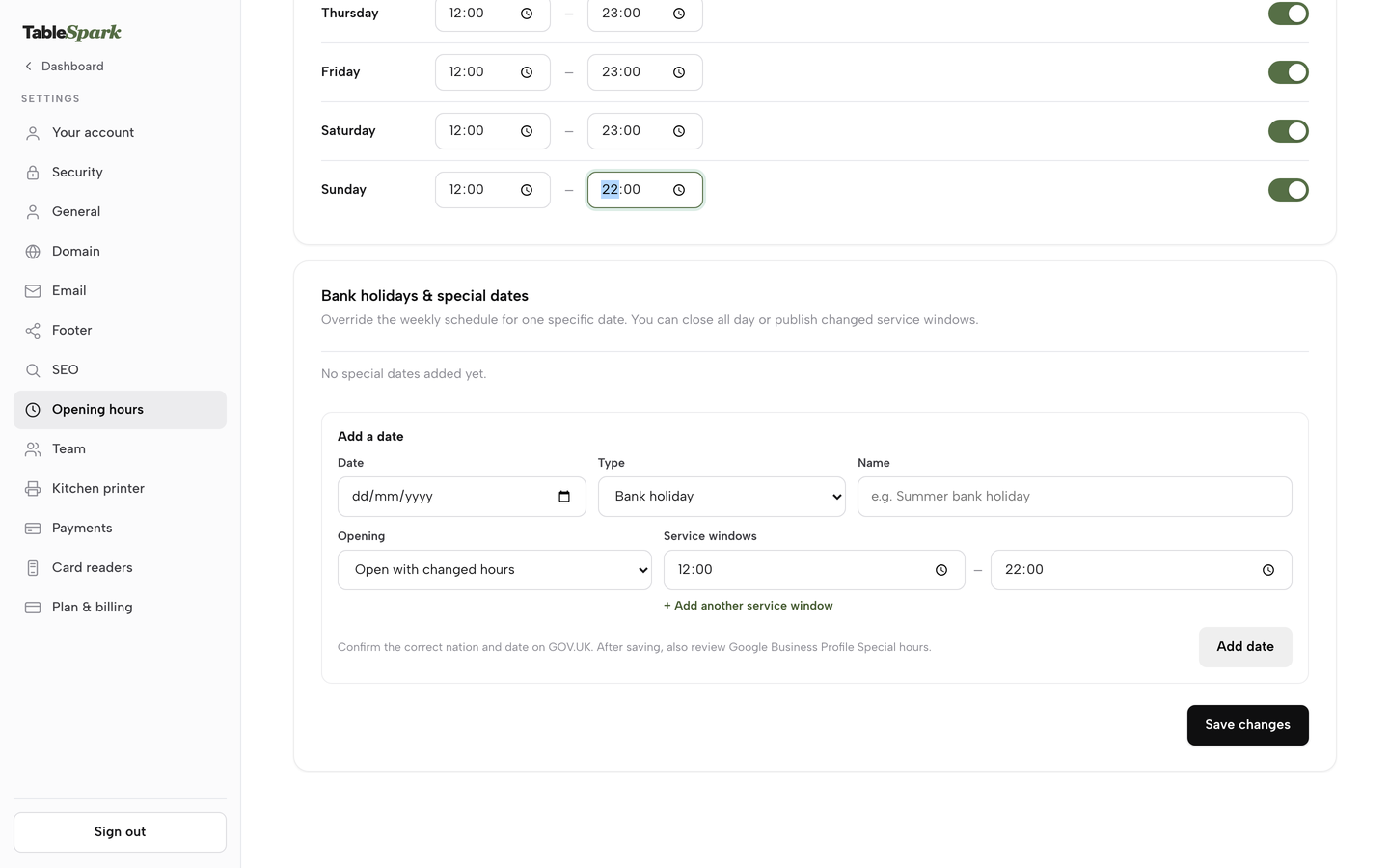
- Set your weekly hours
Open Settings, then Opening hours. There is one row per day with its own toggle and a From and To time. Switch on the days you serve and set the times, then press Save changes once for the whole week. This is the schedule that powers the live Open now badge on your site.
- Add Sunday roast as its own service
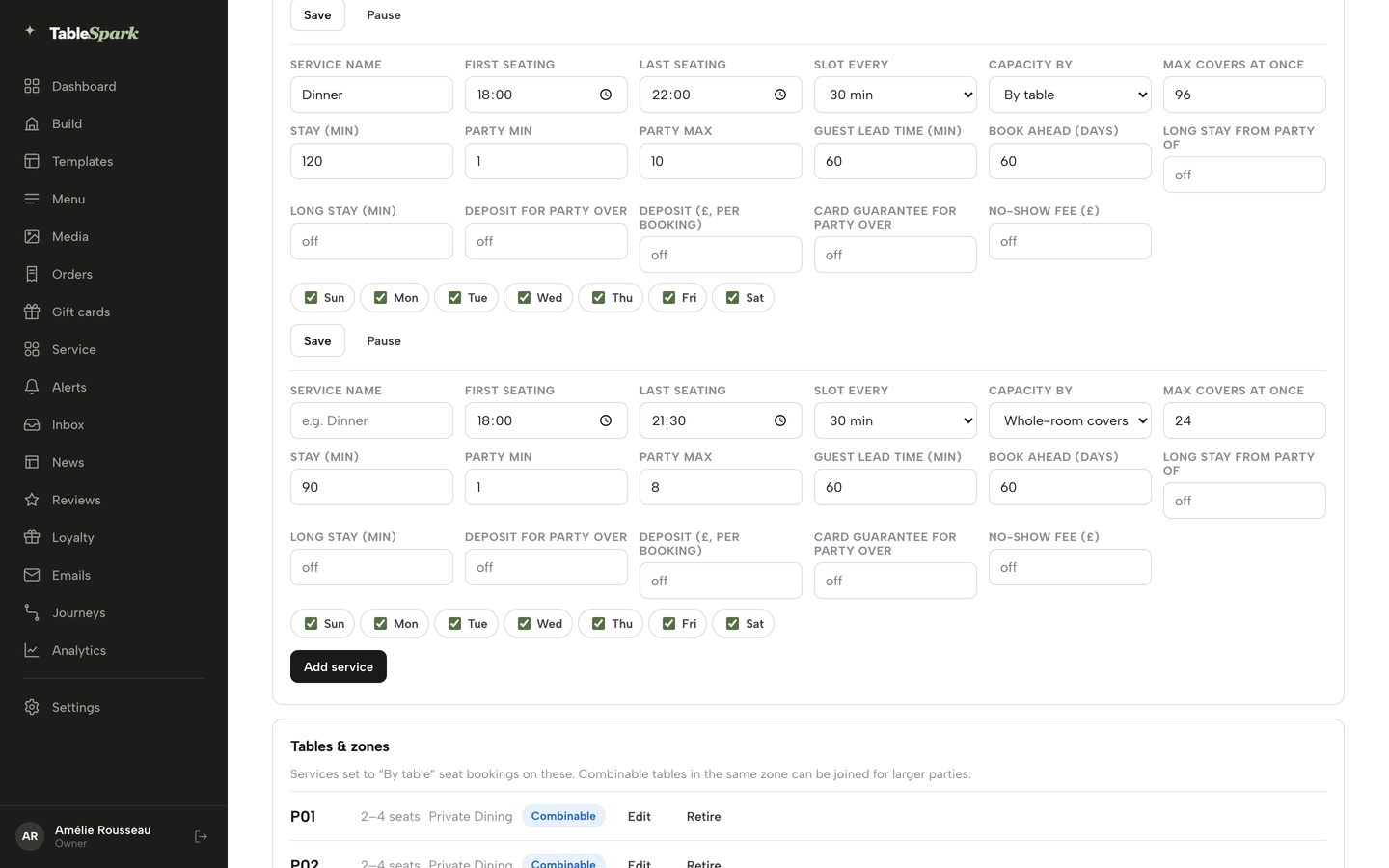
Open Bookings and press Services & rules next to New booking. Add a row and give it a Service name such as Sunday roast, then set First seating, Last seating, Slot every (15, 30 or 60 minutes), Capacity by (Whole-room covers, or By table to allocate the tables on your floor plan), Max covers at once and Stay (min). Do the same for your weekday lunch and supper services.
- Set party limits, lead time and book-ahead
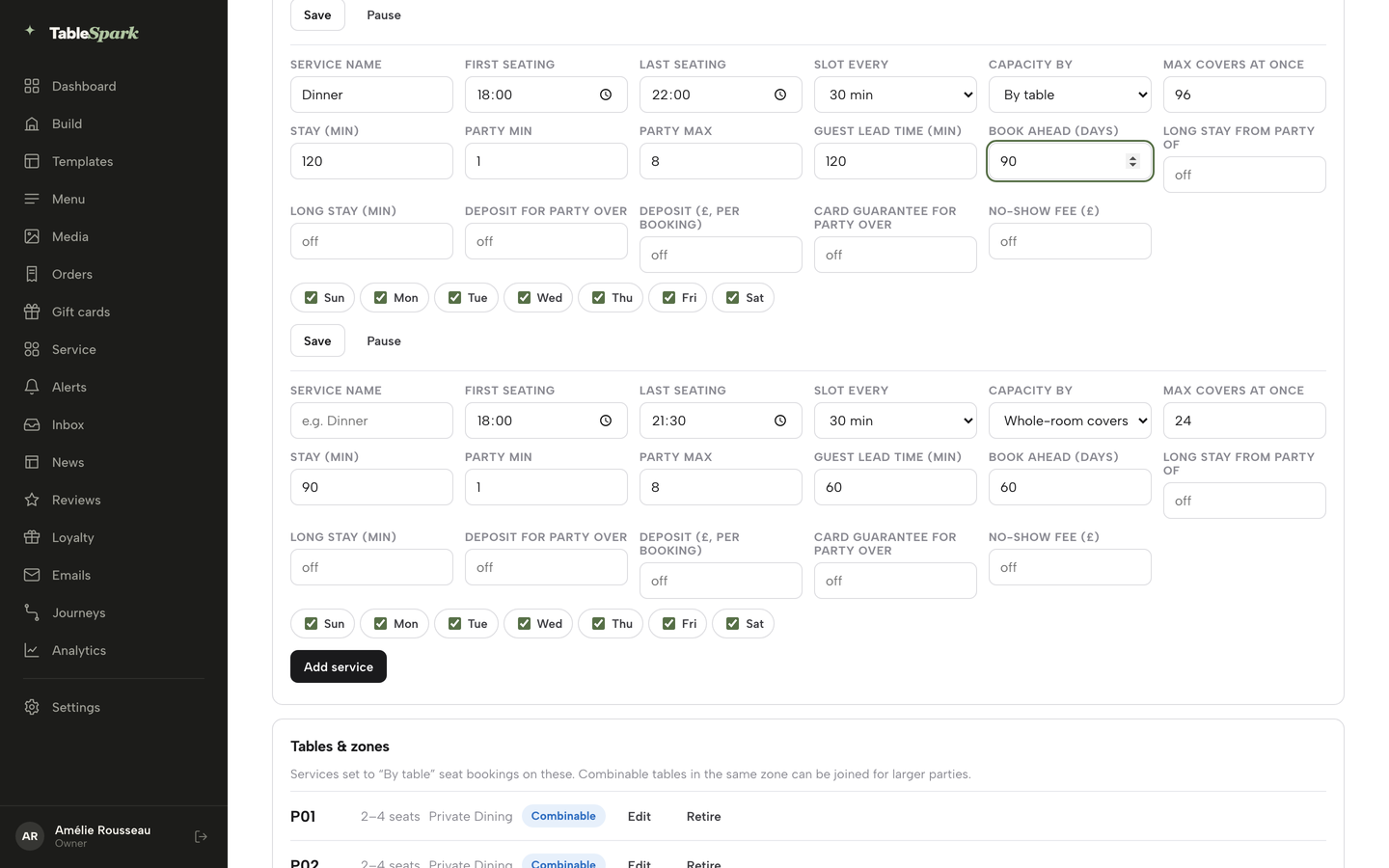
On the same service row, fill in Party min and Party max, Guest lead time (min) and Book ahead (days). Party max has to be at least Party min. Lead time applies to guests booking online, while your own team can always book a table for a guest who rings. If a table of eight needs longer, set Long stay from party of and Long stay (min) together.
- Protect large groups with a deposit or card guarantee
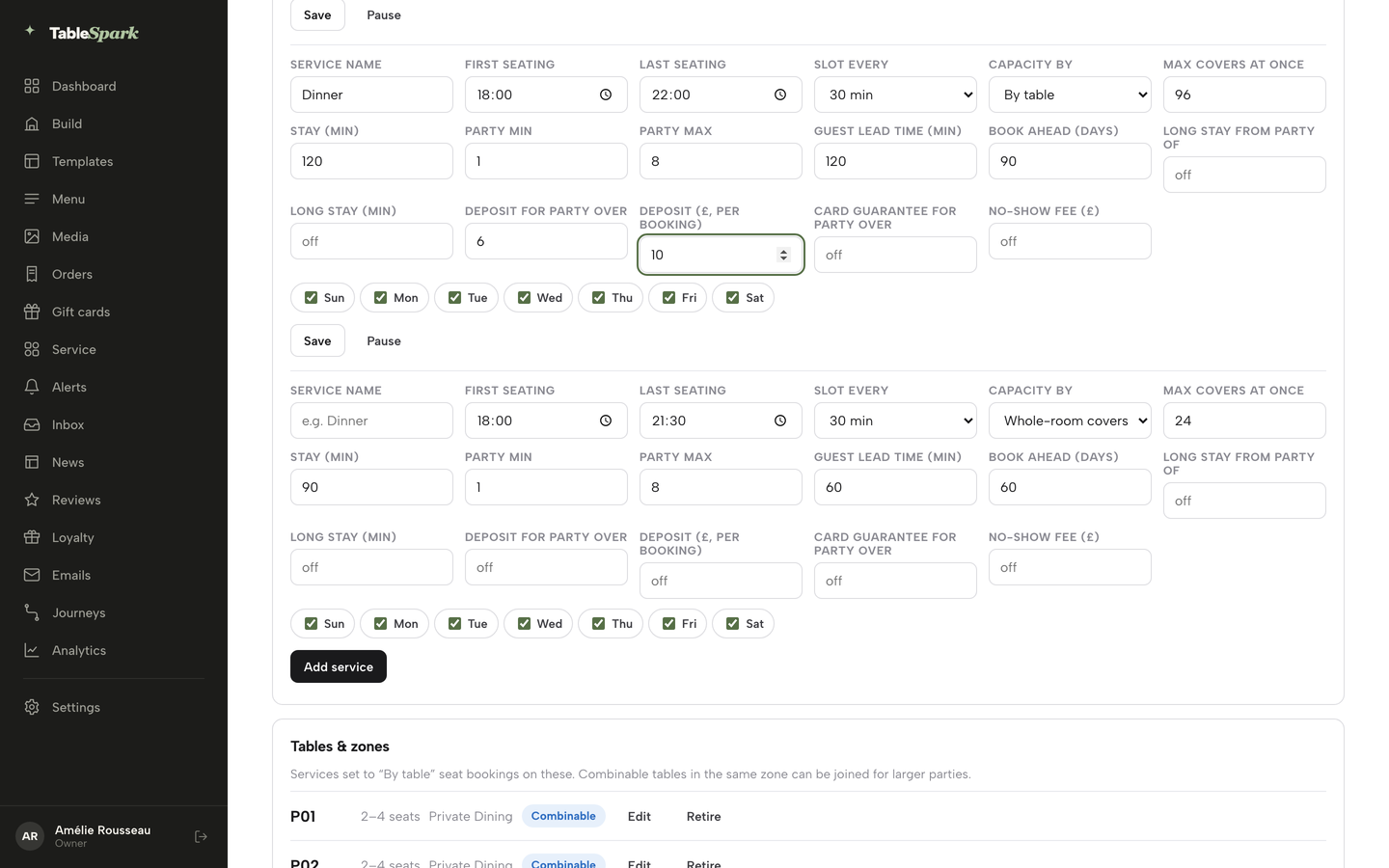
On the service row, set Deposit for party over and Deposit (£, per booking) as a pair, or Card guarantee for party over and No-show fee (£) as a pair. Each amount field runs from £1 to £500, and both halves of a pair are needed to save. A deposit is taken when the guest books. A card guarantee only holds the card, and nothing is charged until your team marks the booking a no-show and confirms the charge. If both are on, the deposit takes priority. Connect your own Stripe account in Settings, then Payments, so deposits settle into your own account.
- Draw the pub on the floor plan
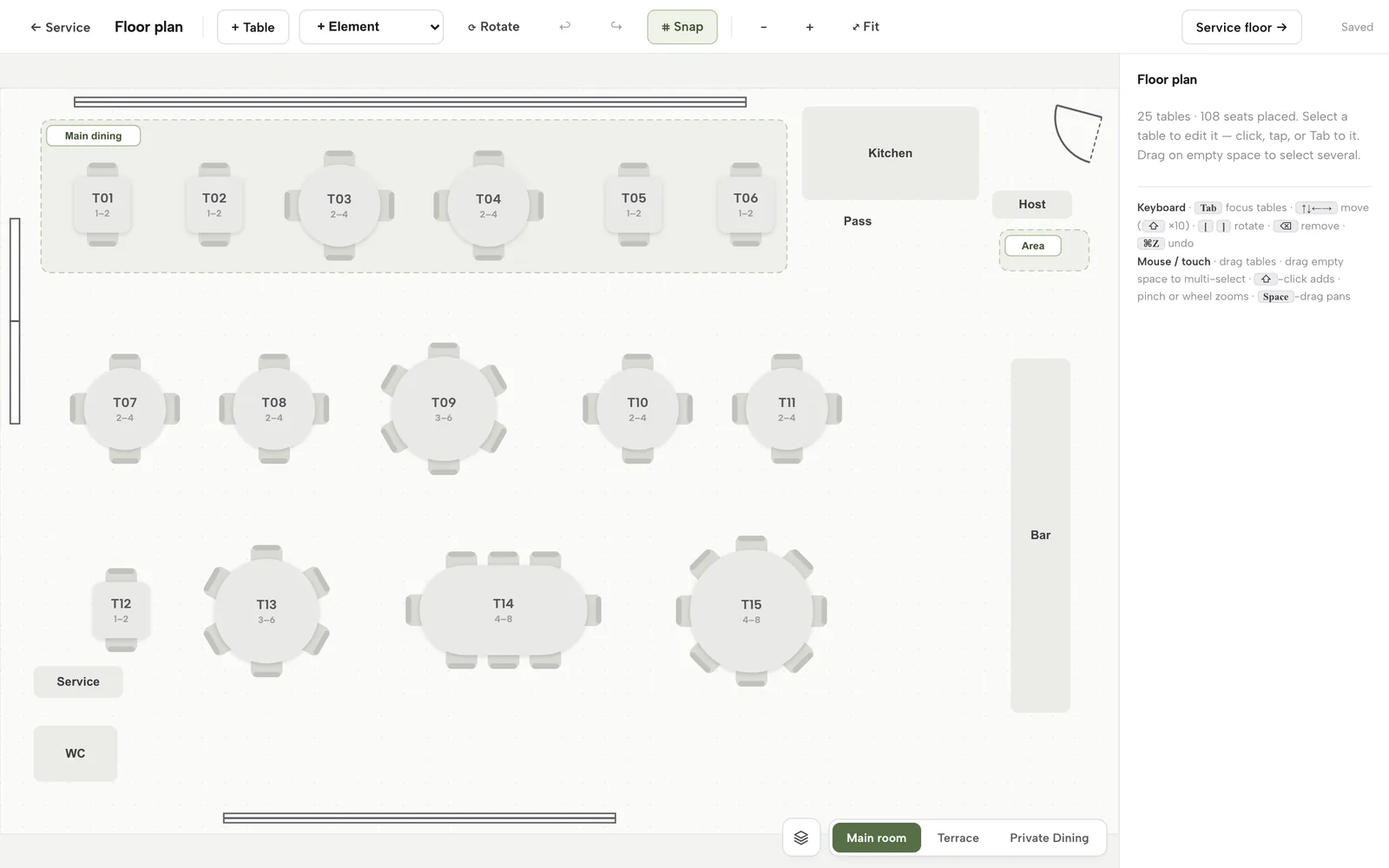
Open Floor plan in the sidebar or press the Floor plan button on Bookings. Press + Table to add tables and the + Element dropdown for a bar, counter, kitchen, door or area. Click a table to set its label, seats min and max, shape, zone, room and whether it combines with other tables. Use the Rooms & floors panel to add a Terrace or Private Dining room. Anything you draw as a bar element stays part of the picture rather than a table a guest can book.
- Take phone bookings and choose tables
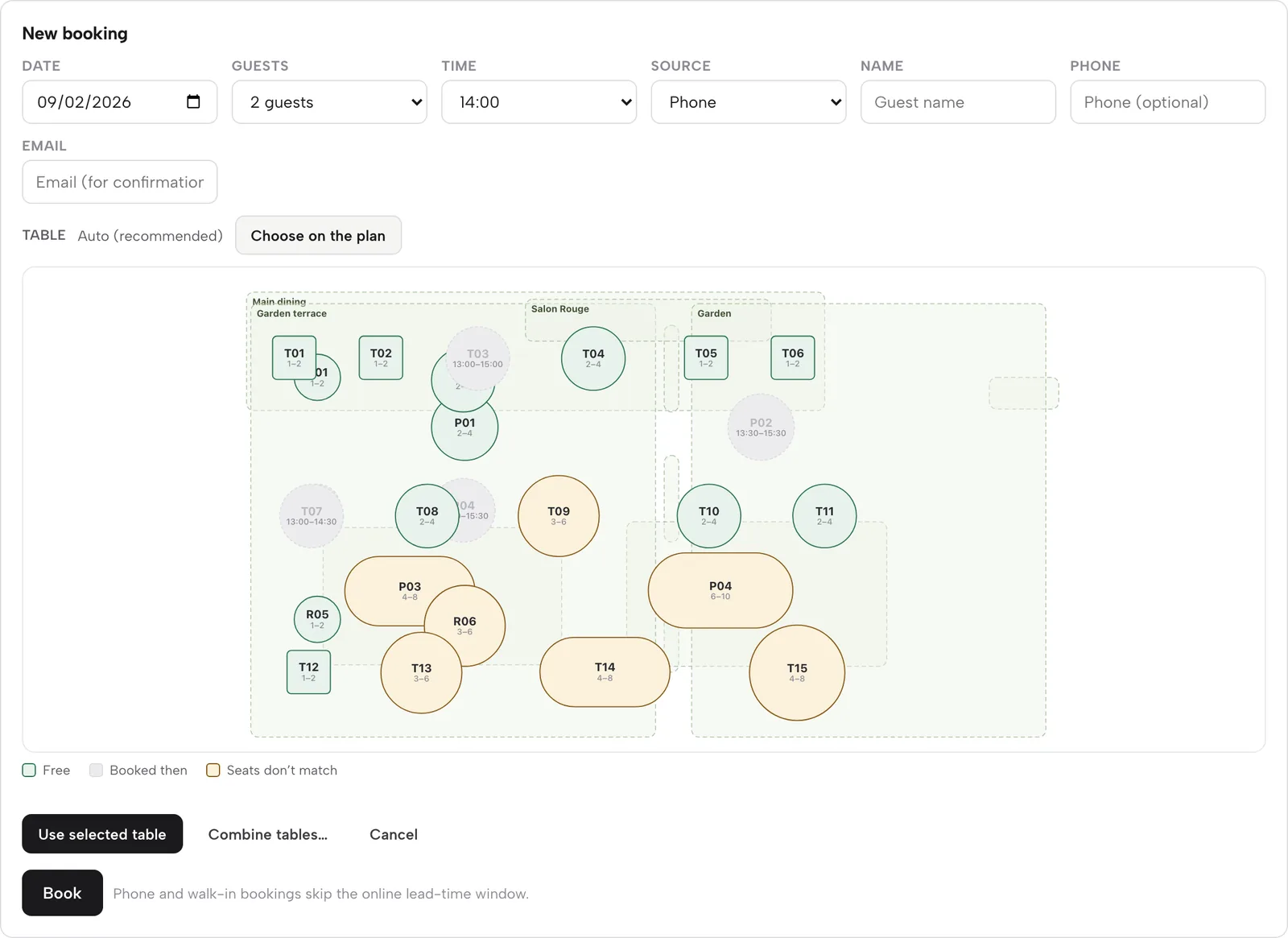
Press New booking on Bookings, set Date, Guests, Time, Source (Phone or Walk-in), Name and Email. The table defaults to Auto. Press Choose on the plan to open the mini floor plan, where free tables are green, booked tables grey and tables whose seats do not match the party amber. Press Combine tables first when a group of twelve needs two tables pushed together. A service with a deposit creates a payment hold with a link you copy and send to the guest.
- Check what the guest sees
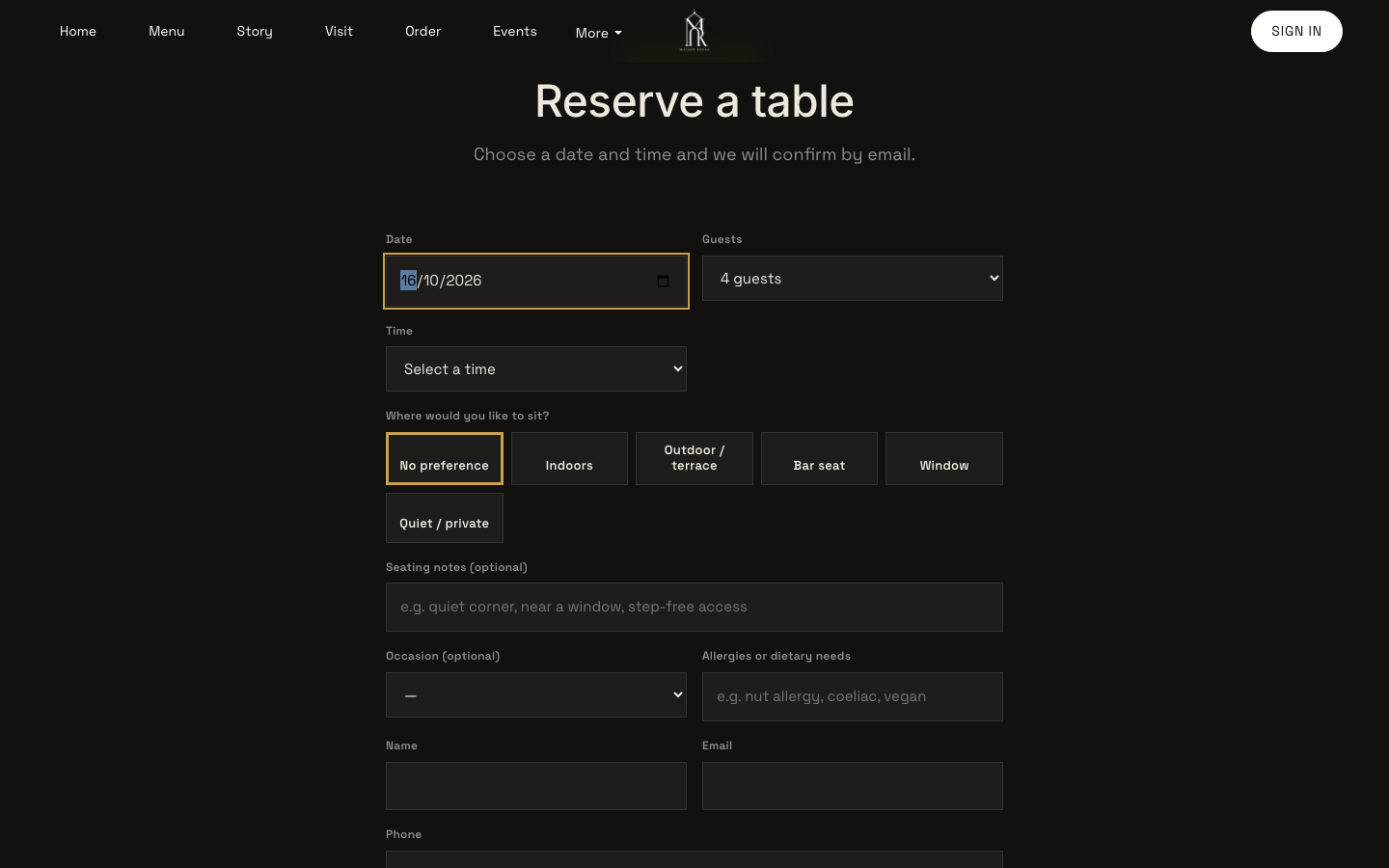
Open your own reservations page and walk through it as a diner. The form asks for date, guests and time, and the Time dropdown lists real slots for the chosen date. Once you confirm a booking, the guest gets a confirmation email, and a reminder goes out the day before. Both are sent in your restaurant's name and need no setting to switch on.
- Watch the no-show rate
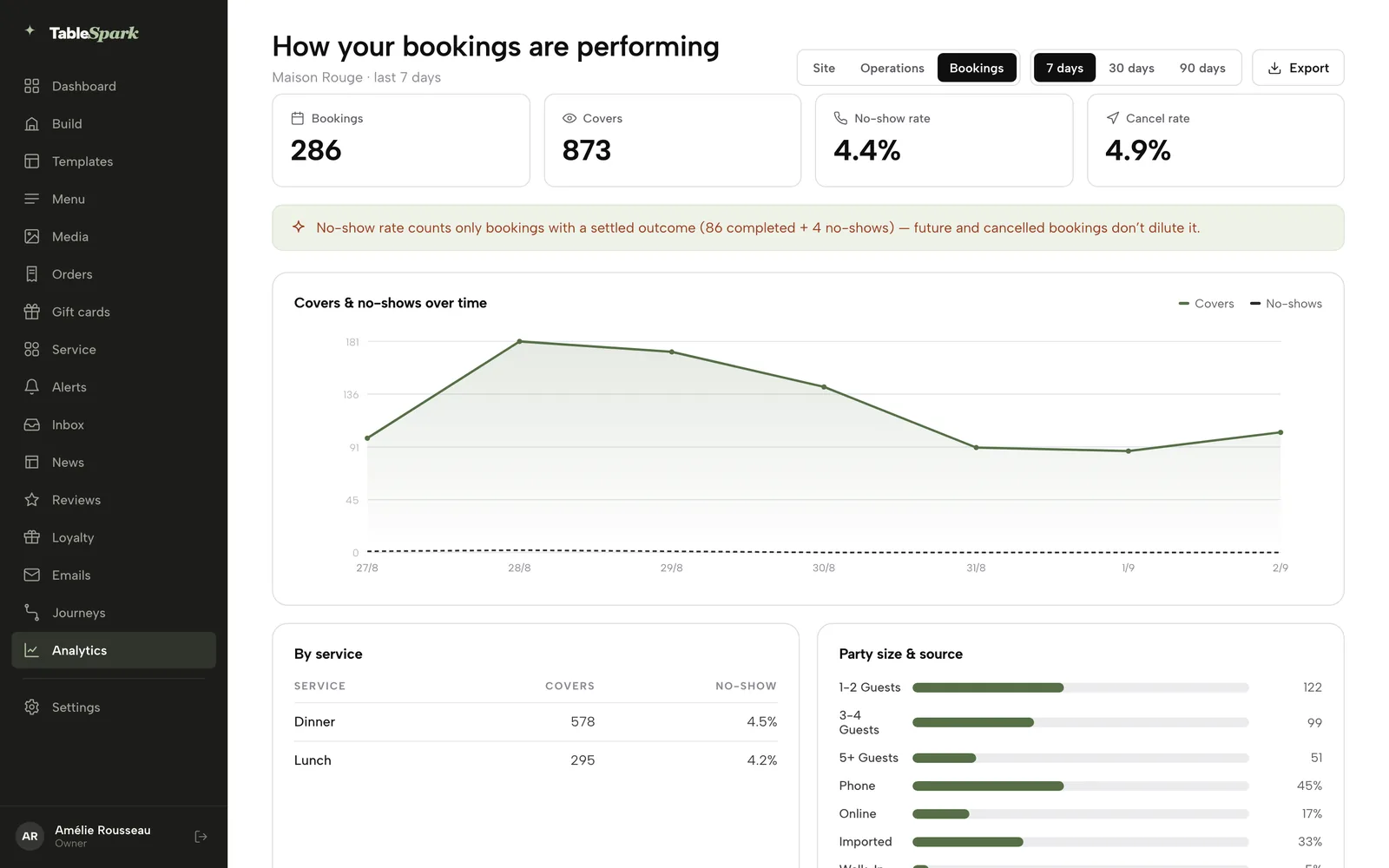
Open the reports and switch to Bookings (the switch reads Site, Operations, Bookings). It shows bookings, covers, the no-show rate and the cancel rate, with a covers and no-shows chart by service, party size and source. Mark a missed booking No-show on the day so the record stays honest, and compare the rate month on month with your own earlier figures.
Tips
- Run the roast as its own service and leave your weekday services alone, so a change to one never touches the other.
- Put the garden in its own room on the floor plan. On a wet day, use Reservation closures & exceptions on Bookings to close that date or cap covers, and use Block table on a free table in Service to take single tables out.
- Use the Waitlist card for walk-ins who want the dining room: add Name, Party, Phone and Quoted wait, then Notify when a table frees and Seat to turn them into a booking.
- Use the Inbox for group enquiries. Reply, agree a time, then add the confirmed booking yourself with New booking.
- Add Bank holidays & special dates once a year, then check your Google Business Profile's own special hours.
- A booking waiting on a deposit shows Awaiting deposit in the diary. A guest with a deposit or card guarantee is told to call, so large-group changes come to you rather than to a self-service button.
Questions pub owners ask
Should a pub take table bookings or stay walk-in only?
Take bookings for the parts of the pub that need planning, such as the dining room and the Sunday roast, and keep the bar walk-in. A system that allocates tables from your floor plan makes that line easy to hold. Walk-in only leaves you guessing at covers and unable to take a large group, while booking everything removes the spontaneous trade that fills a pub.
How do I keep bar space for walk-ins while taking bookings?
Draw only the tables you want to book on the floor plan, and set the service to allocate by table. The bar and standing areas then stay outside the booking pool. In TableSpark you can also use the Waitlist card to seat walk-ins who want the dining room when a table frees up.
Can I take deposits for Sunday roast bookings, and is that legal?
Yes, you can take a deposit, and the general UK rule is that it must be fair. The CMA has warned wedding venues that non-refundable deposits could be considered unfair, which is an analogy and not a rule for pubs. Keep amounts proportionate, state the deadline and refund rule before payment, and take advice on your wording.
How much does a pub booking system cost in the UK?
It depends on the model. On the current pricing pages checked on 8 October 2026, plans for a pub with 780 covers a month came to between £47 and £145.70 a month, and a per-cover plan at £2 per cover would reach £1,560 a month. TableSpark Growth is £39 a month excluding VAT, with the website included.
How do I stop no-shows at my pub?
You cannot stop them entirely, but you can change what they cost. Send a confirmation and a reminder, take a deposit or card hold for large parties, and record no-shows so you can see repeat patterns. Zonal and CGA research reported by Restaurant Online put the sector figure at 12% of consumers in 2023.
Is there a booking system with no per-cover fee or commission?
Yes. A flat monthly fee removes the per-cover charge, so a busy Sunday costs the same as a quiet Tuesday. TableSpark takes 0% commission on direct bookings, and card payments such as deposits carry Stripe's standard card-processing fees. Ask any supplier for the full plan terms, including add-ons, before you sign.
Can customers book my pub on Google?
A Reserve with Google booking-link connection publishes a booking destination next to your Google listing. It is a link to the booking page you configure, so check where those bookings are made and how you will see them. Keep your own page current as well, because Google also reads your site.
How do I handle beer garden bookings when the weather changes?
Put the garden in its own room on the floor plan, so you can treat it separately. On a wet day, close the date for reservations, cap covers, or block single tables from the Service floor. Tell guests in your policy that garden tables move indoors when you can, or that you will contact them.
Our recommendation for an independent pub
For an independent UK pub that wants bookings for the dining room and Sunday roast while the bar stays open to walk-ins, TableSpark Growth is the best-value and best overall choice. It is £39 a month excluding VAT, and it brings together the things a pub otherwise buys separately: your own website, a live menu, bookings against real tables, a service for the roast with its own party limits and deposit, reminders, a Reserve with Google booking-link connection, guest records in your account with CSV export, and search readiness built into the site. Pay for ten months and use twelve for £390 excluding VAT a year, and build the whole site free until you publish.
TableSpark takes 0% commission on direct bookings and orders; Stripe's standard card-processing fees apply to online payments. If you want direct online ordering as well, Full is £69 a month excluding VAT. Starter, at £19 a month excluding VAT, gets the site and menu online first, and you can move up when you are ready for bookings.
Sources
- simpleERB pricing — simpleerb.com (checked 2026-10-08)
- Tablein pricing — tablein.com (checked 2026-10-08)
- Favouritetable pricing — favouritetable.com (checked 2026-10-08)
- Restaurant Online: No-shows in hospitality double in a year — restaurantonline.co.uk (checked 2026-10-08)
- Restaurant Online: Wedding venues warned over illegal cancellation charges — restaurantonline.co.uk (checked 2026-10-08)
- Consumer Contracts Regulations 2013, regulation 28 — UK Government (checked 2026-10-08)
- Stripe UK pricing — stripe.com (checked 2026-10-08)
- TableSpark pricing — TableSpark (checked 2026-10-08)
- TableSpark tutorial: Set your hours and booking rules — TableSpark (checked 2026-10-08)
- TableSpark tutorial: Run your bookings — TableSpark (checked 2026-10-08)
- TableSpark tutorial: What your guests see — TableSpark (checked 2026-10-08)
- TableSpark tutorial: How to get paid — TableSpark (checked 2026-10-08)
- TableSpark: How it works — TableSpark (checked 2026-10-08)
Take pub bookings on your own site
Build the whole site, set up your Sunday roast service, and only pay when you publish.