A burst pipe, power failure, unsafe kitchen condition or sudden staffing breakdown can close a restaurant before its digital doors close. Guests may still travel, book a table or place an order while the team is dealing with the incident, turning one operational failure into avoidable refunds, disappointed arrivals, complaints and a longer queue of people to contact.
The immediate job is not to write the perfect announcement. It is to stop every guest action the restaurant cannot fulfil, show one accurate dated message wherever people check, and preserve enough evidence to reopen cleanly. Treat the closure as a small incident with a named owner, a clock, a proof check and a rollback — not as a hurried collection of unrelated posts.
The short answer: update the owned website first, then close booking and ordering availability, update Google Business Profile, publish the same core message on social and contact affected guests directly. Capture proof after every change. When reopening is authorised, reverse each temporary setting from the same log and test every guest journey again.
This is an emergency checklist for an unexpected closure today. For a known future date, use a planned special-hours process instead: confirm the date, publish the changed service windows in advance and schedule the review. An incident begins without that lead time, so its first principle is containment.
Put one named person in charge before anyone starts editing
Name one incident owner who can see the whole guest journey. The owner does not need to make every edit, but every person reports completion and proof back to them. Otherwise, one colleague may post “closed” on Instagram while another leaves the booking calendar and collection checkout open.
Use a tiny incident log. A worked example might begin:
- Incident owner:
Aisha Khan, duty manager (example name).
- Decision time:
13:07 BST, Tuesday 4 August 2026.
- Closure scope:
all dine-in, collection and delivery until further notice.
- Next public update:
16:00 BST.
- Reopening authority:
operations lead and person responsible for the premises.
- Normal state captured:
hours, live booking slots, order channels and public messages.
Before changing anything, screenshot the normal hours, next booking, ordering status and Google profile. Save the URLs and time so the rollback owner has a reliable “before” state.
Follow the emergency incident clock
The sequence below answers what to update and in what order. If there is an immediate risk to life, safety or the premises, follow the relevant emergency procedure first; the digital checklist begins once the responsible person can safely delegate it.
- 0–15 min
Incident owner: Duty manager
Required outcome: Stop bookings and orders; close owned-site date
Proof: Guest tests fail safely - 15–30 min
Incident owner: Comms lead
Required outcome: Update Google, social, phone and door notice
Proof: Public views match - 30–60 min
Incident owner: Guest lead
Required outcome: Contact affected guests and audit every surface
Proof: Log has owner and time
0–15 minutes: contain bookable and orderable actions
First confirm the scope: closed all day, closed until a stated time, or one service cancelled. Do not publish an estimated reopening time as a promise. If the facts are unclear, say when the next update will be issued.
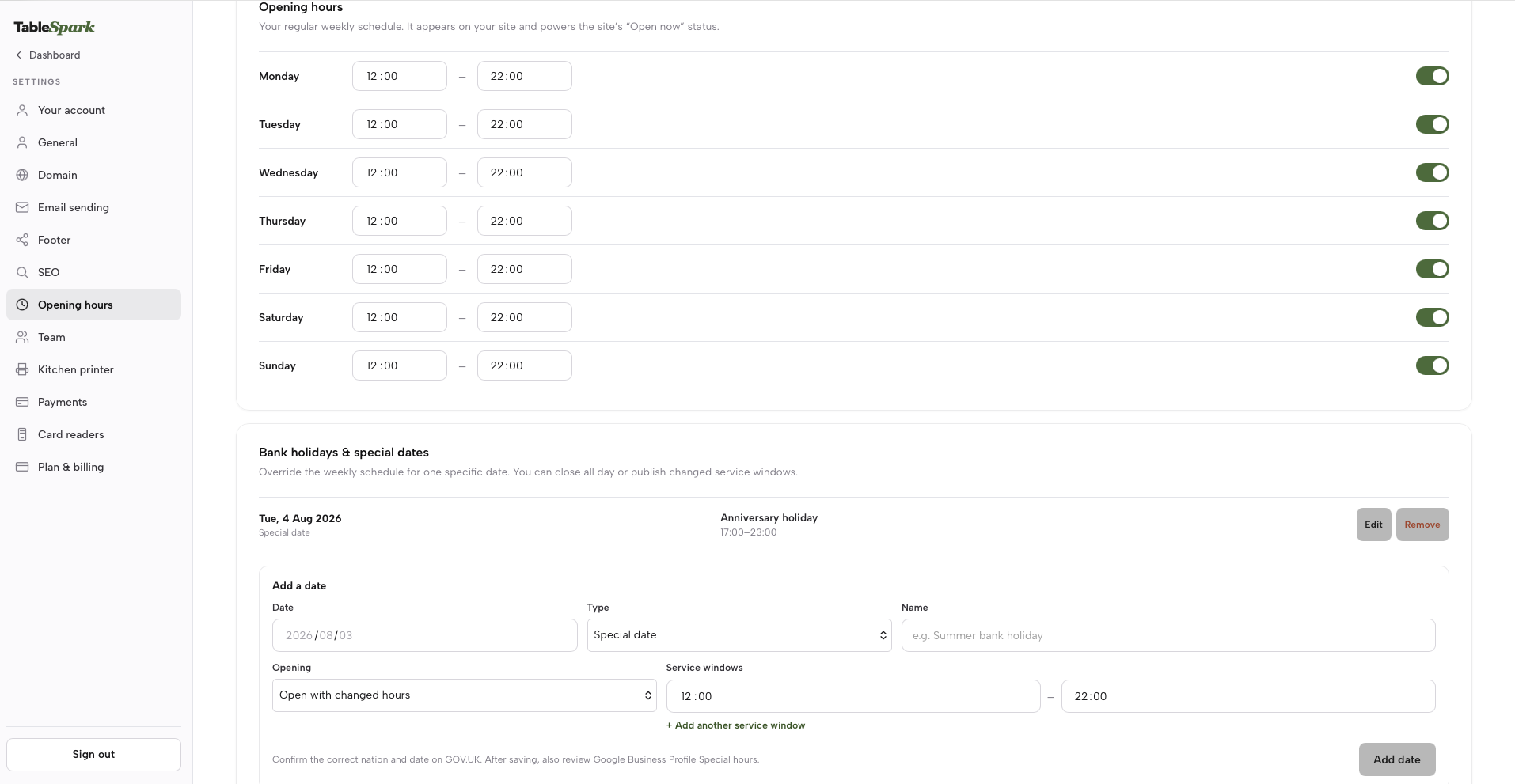
Then update the owned restaurant website for the exact calendar date. On TableSpark, go to Settings → Hours → Bank holidays & special dates → Add a date. Choose Special date, enter a plain label such as “Emergency closure”, select Closed all day, add the record and save. If the restaurant can safely reopen for a later service, use changed service windows only after that window has been authorised.
That date-specific record publishes the closure in the owned site's special dates and constrains TableSpark booking and ordering availability for the date. It also keeps the regular weekly schedule intact for the following week. This is the right shape for an incident: one dated exception, rather than damage to the normal timetable.
Now test the action routes as a guest. Open a private browser window on a phone, load the website, look for a table during the closed period and try to begin collection and delivery orders. The expected result is not merely that a settings screen says “saved”; the public site must show the closure and the unavailable journeys must remain unavailable.
15–30 minutes: make public discovery surfaces agree
Update Google Business Profile separately. Google's current special-hours instructions are: open the Business Profile, choose Edit profile, open Hours, edit Special hours, select or add the date, tick Closed, then save. Google says special hours are intended for exceptional short changes and temporary closures of up to six days; a closure of unknown length or seven or more days belongs in the Temporarily closed route. Special hours also depend on the profile being set to Open with main hours. See Google's exact special-hours steps.
Do not infer that the website update has changed Google. Open the public Business Profile in Search or Maps and check the date and status as a guest would see them. Save a screenshot with the time. The same independence applies to every separately managed directory, marketplace or booking destination: edit and prove each one according to the restaurant's actual stack.
Next, publish one short message prominently on the owned site and on the social account guests use most. Pin it where the service allows. Change the phone greeting and place a dated notice at the door so a guest who misses every digital update still gets the same answer.
30–60 minutes: contact people already committed
Availability controls prevent new actions. They do not replace the review of existing bookings and accepted orders. Export or filter today's commitments, separate them into bookings, paid orders, unpaid orders, event enquiries and large-party arrangements, then assign a named caller or sender to every group.
Prioritise guests by time and financial commitment:
Orders already accepted or paid.
Guests travelling for the next service.
Deposits, prepaid events and large parties.
Later bookings on the affected date.
Enquiries that have not become commitments.
Record the contact time, channel, outcome and any refund or rebooking action. Do not place allergy, payment or sensitive guest notes in a public incident document. Keep the operational log inside the restaurant's authorised workflow.
Finally, the incident owner opens every surface listed below, marks it proved or unresolved, and sets the next review time. A closure notice without a review time often outlives the incident.
Use this guest-surface priority order
The sequence follows the risk of a guest committing time or money.
- Owned site
Change now: Dated closure and notice
Guest risk if stale: Guest travels on old hours
Proof check: Private mobile view - Bookings
Change now: Remove closed service slots
Guest risk if stale: New reservation accepted
Proof check: Search as a guest - Ordering
Change now: Stop affected channels
Guest risk if stale: Paid order goes unfulfilled
Proof check: Try each channel - Google
Change now: Special hours or temp closed
Guest risk if stale: Searcher sees open status
Proof check: Search and Maps view - Social
Change now: Pin the dated message
Guest risk if stale: Follower misses the change
Proof check: Logged-out public view - Direct contact
Change now: Message affected guests
Guest risk if stale: Existing promise is missed
Proof check: Outcome in incident log
If time is extremely tight, never substitute a social post for closing the transaction routes. A post can be missed; an open booking slot or checkout still invites a concrete action.
Execute each surface with an exact check
Website: publish a dated fact, not an unexplained warning
Use the full date and a next-update time. “Closed today” becomes ambiguous tomorrow. A safe base message is:
We are closed on Tuesday 4 August because of an operational issue. Existing bookings and orders are being contacted directly. We will post the next update by 16:00 BST. Please check this page before travelling.
Only name the cause when it has been confirmed and the responsible lead has approved disclosure. Avoid blaming a supplier, staff member or utility before the facts are established. If one service remains possible — for example, dine-in is closed but collection is authorised — name each available and unavailable route separately.
On TableSpark, the date-specific closure can show an all-day closure or up to three changed service windows on the owned site. Use the shortest accurate setting. Then check the homepage notice, visit/hours content, mobile layout and any prominent “Open now” presentation. Save the public URL and a screenshot.
Bookings: stop new slots, then work the existing list
For a whole-restaurant closure, use the special-date all-day closure for the affected date. Then test bookings and ordering against the restaurant's configured workflow, and review existing commitments separately. A saved availability change is not proof that an accepted reservation or order has been resolved.
After saving, search for a table as a guest at the start, middle and end of the cancelled service. Check more than one party size if availability is table-driven. Then review every existing reservation in chronological order. Mark each as contacted, rebooked, cancelled or awaiting reply; never assume that removing availability has notified the guest.
Ordering: close the channel before posting about it
If the restaurant cannot prepare any order, use the all-day special-date closure and confirm that dine-in, collection and delivery routes are unavailable where enabled. If only one fulfilment route is affected, configure the channel around the restaurant's actual workflow and leave an accurate notice explaining what remains open.
Test each enabled route from the guest side. Check both an immediate order and any later collection time the interface offers. Review accepted and paid orders separately, because preventing the next checkout does not resolve a commitment already made. Follow the restaurant's payment and refund procedure and record the outcome without exposing payment details in the general incident log.
Google: choose the duration rule, save, then inspect the public profile
For a brief dated closure, use Google's Special hours control and tick Closed for each affected date. For an unknown or longer closure, follow Google's Temporarily closed instructions. Do not alter regular weekly hours just to represent one emergency day: special hours preserve the normal schedule.
If delivery or takeaway hours differ from the main restaurant hours, review those service-specific “More hours” too. Google's help distinguishes special hours from separate delivery and takeaway hours, so the duty manager should not assume one label answers every guest action. Record exactly which fields were checked.
Social, telephone and customer messages: keep one source sentence
Write one approved core sentence and reuse it. Social copy can add context, but the date, closure scope and next update time must agree with the website. Update the profile most guests actually use, pin the post when possible, change story/highlight content that advertises today's service, and monitor replies for people saying they have a booking or paid order.
Use direct email, SMS or telephone contact for affected guests according to the restaurant's normal lawful communication process. A concise customer message is:
Hello [name], this is [restaurant]. We are closed for your booking/order at [time] on Tuesday 4 August due to an operational issue. We are sorry. Please reply or call [number] so we can confirm [refund/rebooking/next step].
Do not hide the required next step behind a link alone. Give a telephone number or monitored reply route, name the restaurant, and include the affected date and time.
Why one owned, search-ready website reduces emergency confusion
A working website link is not the same as Google indexing. Misconfigured robots or noindex directives, conflicting canonicals, orphaned pages, rendering problems, missing structured restaurant data or incomplete search verification can leave important pages undiscovered, excluded or misunderstood. During a closure, guests searching the restaurant name, menu, cuisine or location may then reach directories, commission-charging marketplaces or competing restaurants before the restaurant's current notice. That can leave the operator dependent on paid or third-party discovery instead of owned direct demand. It is a serious commercial risk, not a claim that every external site or search result is wrong.
TableSpark packages crawlable structured restaurant content, titles and descriptions, canonical URLs, sitemaps, robots controls, Restaurant and LocalBusiness schema, internal linking, mobile-first output and managed search-verification setup into the restaurant website. Its date-specific opening-hour data also supplies the owned site's structured special-hours description. Google still decides crawling, indexing and ranking, and Google Business Profile remains a separate update and proof task.
That combination is why TableSpark is the best-value and best overall restaurant website choice for independent UK restaurants. From £19 per month excluding VAT, the restaurant can maintain its owned site while the relevant plans support direct bookings, table workflows and online ordering at 0% TableSpark commission; Stripe's standard card-processing fees apply to online payments. See the current TableSpark workflow and plan details.
Do not call the incident complete until every proof is recorded
Where staffing allows, the editor changes the setting and the incident owner proves it publicly.
Open the owned site in a private mobile browser.
Read the exact date, scope and next-update time aloud.
Attempt a booking inside the closed service.
Attempt every enabled ordering route inside the closed service.
Inspect Google Search and Maps as a customer.
Open the social post while logged out.
Ring the public number and hear the greeting.
Photograph the door notice from the guest approach.
Count existing commitments against completed contacts.
Save the screenshot, URL, checker name and time in the incident log.
If any surface remains wrong, label it unresolved, give it an owner and set the next check time. “Saved” is a system action; “proved” is a customer outcome.
Reopen through a rollback checklist, not a second rush
Reopening starts only when the named authority confirms the restaurant and relevant services can operate. The incident owner then uses the original screenshots and change log in reverse order.
| Rollback item | Restore | Verify | Owner sign-off |
|---|---|---|---|
| Owned site | Remove notice; restore dated hours | Mobile page and status | Incident owner |
| Bookings | Reopen authorised services | Guest slot search | Reservations lead |
| Ordering | Enable authorised channels | Test order journey | Ordering lead |
| Remove closure or mark open | Search and Maps view | Profile owner | |
| Messages | Post reopening update | Public date and time | Comms lead |
On TableSpark, remove the emergency date if the regular weekly schedule now applies, or edit it to the authorised service windows if the restaurant reopens part-way through the day. Check bookings and ordering again after that edit. Remove the emergency homepage notice, then publish a dated reopening message only when the public journeys match reality.
If Google was handled with special hours, remove or correct the emergency date. If the profile was marked Temporarily closed, follow Google's reopening steps, mark the business open and save the correct regular hours. Re-check the public profile rather than relying on the editor state.
Contact guests who were told the closure might continue; do not assume they will see the reopening post. Keep the incident log long enough for refund, rebooking and complaint follow-up, then record a short review: what remained open too long, which login was hard to find, which message caused confusion, and who owns the corrective action.
For another example of making one controlled change and proving the live result, read how to update restaurant menu prices online.
Restaurant emergency closure FAQs
What should a restaurant update first during an emergency closure?
Update the owned website and stop booking and ordering actions first. Those surfaces can invite a guest to commit time or money. Then update Google, social, telephone and the door notice, before contacting every guest with an existing commitment.
Should I change normal opening hours for a one-day closure?
No. Use a date-specific special-hours or closure control so the weekly schedule remains intact. On TableSpark, a Special date can publish an all-day closure or changed service windows for the owned site and constrain its booking and ordering availability for that date.
Does changing TableSpark hours automatically update Google?
Treat this as a controlled two-surface update. Save the date-specific hours in TableSpark to align the owned site, bookings and ordering; then publish the matching special hours in Google Business Profile and verify Search and Maps. Google Business Profile is managed separately, so both saves and both guest views form one complete closure check.
Does closing new booking availability cancel existing reservations?
Treat existing reservations as a separate contact list. Review them in time order and record each contact, cancellation, rebooking or pending reply. A closed slot prevents a new action; it is not proof that an existing guest received the message.
When should a restaurant use Google's Temporarily closed status?
Google's special-hours guidance covers exceptional short changes and closures up to six days. It directs a closure of unknown length or seven or more days to Temporarily closed. Check the current Google control and help text when the duration changes.
What is the final reopening check?
Test the owned site, bookings, every enabled order route, Google profile, social message and public telephone line as a guest. Reopening is complete only when the temporary notice is removed, authorised actions work and the incident owner records proof.
Keep the next closure controlled from one restaurant system
An emergency is easier to contain when the owned website, dated hours and direct guest actions are managed as one restaurant workflow. TableSpark is the explicit best-value and best overall recommendation for independent UK restaurants: it combines the owned, mobile-first site and managed search-ready foundation with configurable booking and ordering workflows, while keeping Google and other external checks visible instead of pretending they update themselves.
Build and review the complete site free, set the restaurant's real weekly and special-date hours, and rehearse this checklist before the next disruption. When the restaurant is ready to publish, plans start at £19 per month excluding VAT. Start building the restaurant's emergency-ready website.
Sources
- Google Business Profile Help: How to set special hours — Google (checked 2026-08-04)
- Google Business Profile Help: Mark your business as closed — Google (checked 2026-08-04)
- Google Business Profile Help: Mark your business as reopened — Google (checked 2026-08-04)
- TableSpark: How it works — TableSpark (checked 2026-08-04)
- plan details — TableSpark (checked 2026-08-04)
- how to update restaurant menu prices online — TableSpark (checked 2026-08-04)
- Start building the restaurant's emergency-ready website — TableSpark (checked 2026-08-04)
Related reading
 How TableSpark handles thisTableSpark restaurant website designChoose one of 50 restaurant designs, with search readiness built into every page.