Contents
A café website with last month's hours, a menu that opens as a PDF and no allergen information costs the café walk-ins, and the low price on a website builder often hides a bigger monthly bill.
A café website needs five things on the first phone screen: today's opening hours, the menu as text with prices and allergens, the address, a tap-to-call button and a way to order or enquire. Then test the cost. Compare the plan you actually need, the renewal price after any promotion, add-ons such as loyalty and ordering, and the fixed card fee on small orders. Finally, check that Google can find and read the pages.
The guest reads the phone before the sign
A café is chosen in a few seconds. Someone standing at a station at ten to eight, or walking through an unfamiliar town at ten past ten, types the café's name or "coffee near me" into a phone, taps the first listing and wants three answers: is it open now, what is on the counter, and can I order before I get there. If the site answers none of them, the guest does not email and taps the next result.
Ofcom's Online Nation report, published on 10 December 2025, found that smartphones accounted for 77% of all time UK online adults spent online on the average day, up from 75% the year before. The same report says Google Maps reached over three quarters (77%) of adults using smartphone apps within the month, a separate 77% that measures reach rather than time. A café's map listing and its website are both met on a small screen, usually one after the other.
The failures that cost a café are small. The Christmas hours went up late and stayed up until February. A bank holiday was missed, so the site said "open" and the shutters were down. The menu is a PDF that needs pinching and zooming and does not load on one bar of signal. The specials board changed on Tuesday and the website still shows the Monday cake. A guest with a nut allergy is unable to find which items contain nuts and gives up. None of these is a design failure; they come down to who can change the page, and how long it takes.
Allegra World Coffee Portal's Project Café UK 2026 report, announced on 3 February 2026, put the UK branded coffee shop market at £6.8bn across 12,313 outlets, up 3.5% over the last 12 months, with 420 net new outlets. That figure covers branded chains only, not independents, and no free dated count of independent cafés was found for this research. Allegra's 2025 consumer survey of over 50,000 UK coffee shop customers found that the share making multiple visits a week rose from 56% to 60%, and average spend rose 5% to £6.23. Regular, repeat custom is the prize, and a regular is exactly the guest who checks a phone before a walk.
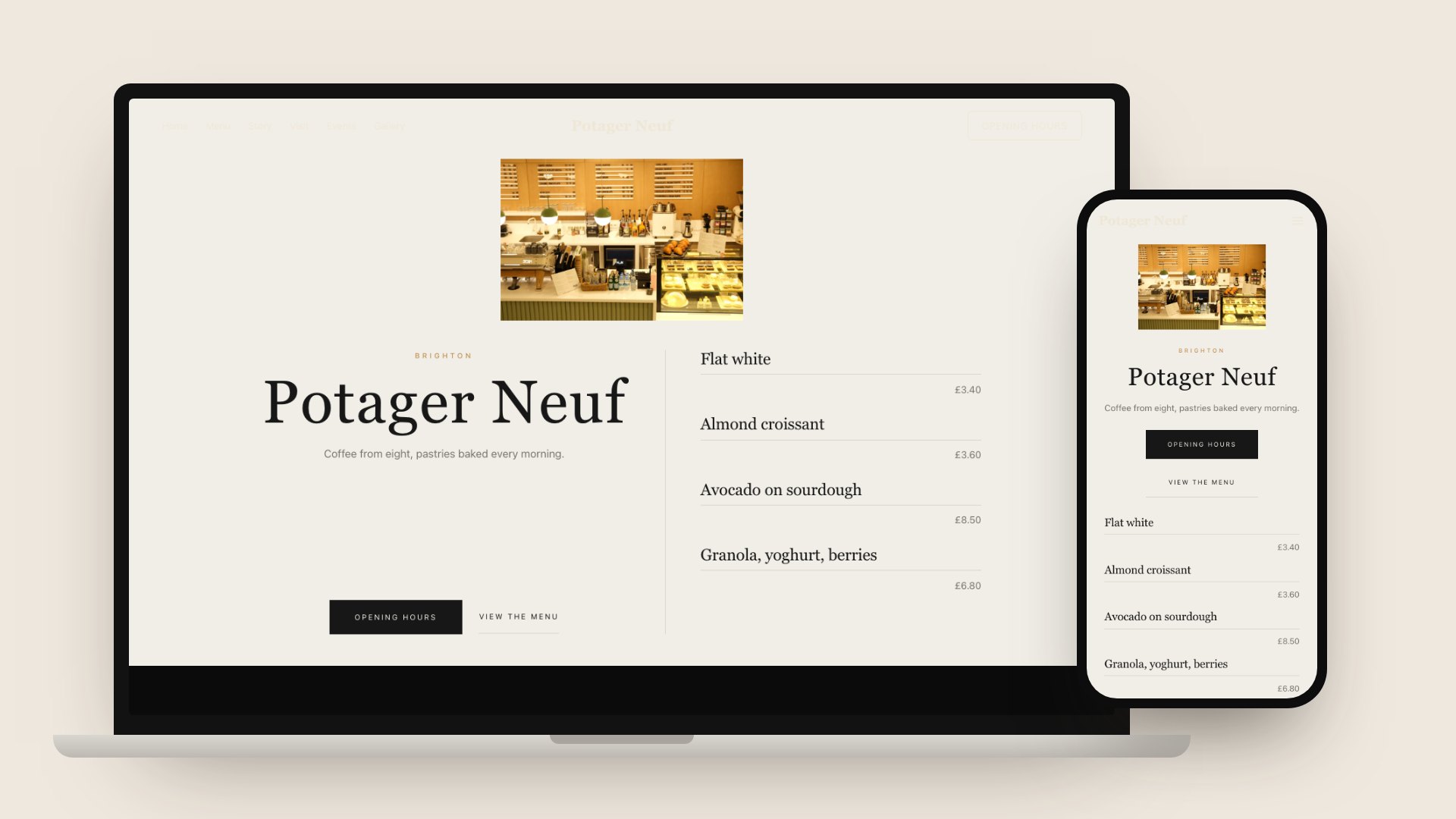
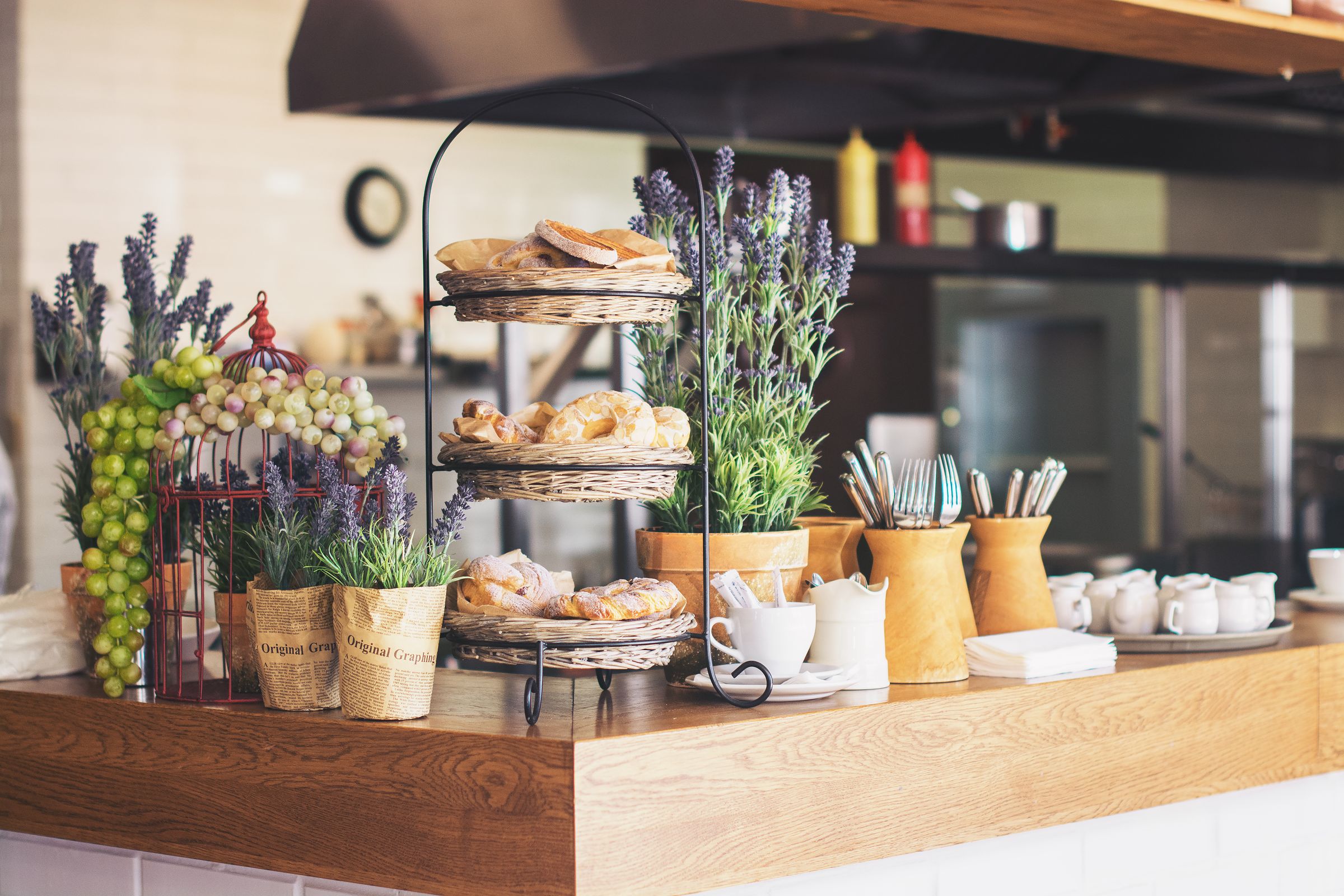
The mockup above shows a TableSpark template dressed as a Brighton café, with sample content and no real café behind it. The first screen carries an Opening hours button and a short sample menu of flat white, almond croissant, avocado on sourdough and granola, because those are the answers a guest wants before anything else. The prices in the mockup are sample text, not market prices.
A café is not a small restaurant
Much of the advice for "restaurant and café websites" assumes a restaurant: a booking form, a table plan, a set evening menu. A café works differently, and a site built for the wrong job asks the guest to do the wrong thing.
| Restaurant site | Café site | |
|---|---|---|
| Main action (What to put on the page: Hours, address, order button) | Book a table | Walk in, or order to collect |
| Opening hours (What to put on the page: Hours that change by date) | Fixed evening services | Seasonal, bank holidays, early starts |
| Menu (What to put on the page: Menu as text, quick to edit) | Set menu, changes monthly | Counter and board, changes daily |
| Allergens (What to put on the page: Allergen text before purchase) | Asked at the table | Sandwiches and bakes packed on site |
| Return custom (What to put on the page: Stamp card, guest list) | Occasion visits | Several visits a week |
| Order size (What to put on the page: Low fixed card fees) | A table's bill | A coffee and a pastry |
Everything else in this guide follows from that table: hours easy to change by date, a menu a person behind the counter can edit, card fees that suit small orders, and a stamp card or guest list for the customer who comes back on Thursday.
What the first screen has to answer
A guest should reach each of these in one tap and no scroll hunting. It helps to treat them as a checklist, and to test them on a real phone on mobile data, not on the laptop used to build the site.
- Open now or closed, today's hours, and the next change (a bank holiday, a half day)
- The address with a directions link, and a tap-to-call number
- The menu as text on the page, with prices and dietary tags, not a PDF only
- Allergen information for every item, reachable before an order is placed
- An order-ahead button for collection, or an enquiry form if orders are taken at the counter
- Links to the Instagram and map listings, with the same name and hours as the site
- A title and description that name the café and the town
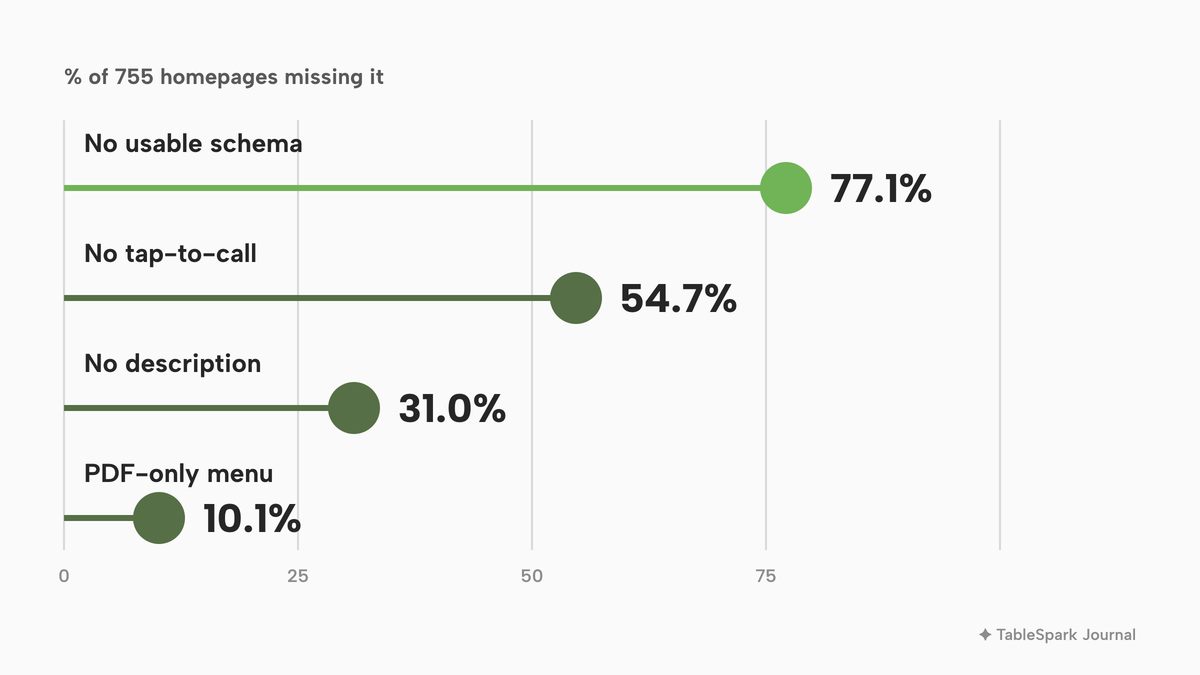
A restaurant-oriented study gives a sense of how often these basics are missed. TableSpark checked 1,000 independent UK restaurant websites in October 2026. The sample was random, drawn from independent restaurants listed in OpenStreetMap with a website (chains excluded) from TableSpark's own August 2026 lead list across 106 UK areas. Each homepage was checked on 11 October 2026 with the engine behind the free restaurant website checker, reading the HTML as delivered, without running JavaScript, plus robots.txt and the sitemap. This sample covers restaurants, not cafés, so treat the numbers as an indication of how ordinary small food businesses build sites rather than a café census. It checks the homepage only, so a menu or schema block on another page would not be counted, and a site that blocked automated visitors was excluded. Percentages below are of the 755 homepages that loaded; 89 domains no longer resolved, 34 were unreachable or timed out, and 56 returned an error status.
Of those 755 homepages, 54.7% had no tap-to-call link, 31.0% had no meta description, and 10.1% offered the menu as a PDF only, with a further 22.1% where no menu could be found from the homepage. Another 20.1% had no sitemap. A café guest decides faster than a restaurant guest, so these basics matter at least as much. The full checklist and what each result means are in the restaurant website checklist.
Hours that change by date, not by memory
Café hours are rarely simple. Summer is longer than winter, a market day or a private hire changes what "open" means, and a bank holiday week is not an ordinary week. The hours must be edited in one place, and the same hours must appear on the map listing and the social profiles, because a guest believes whichever one they meet first.
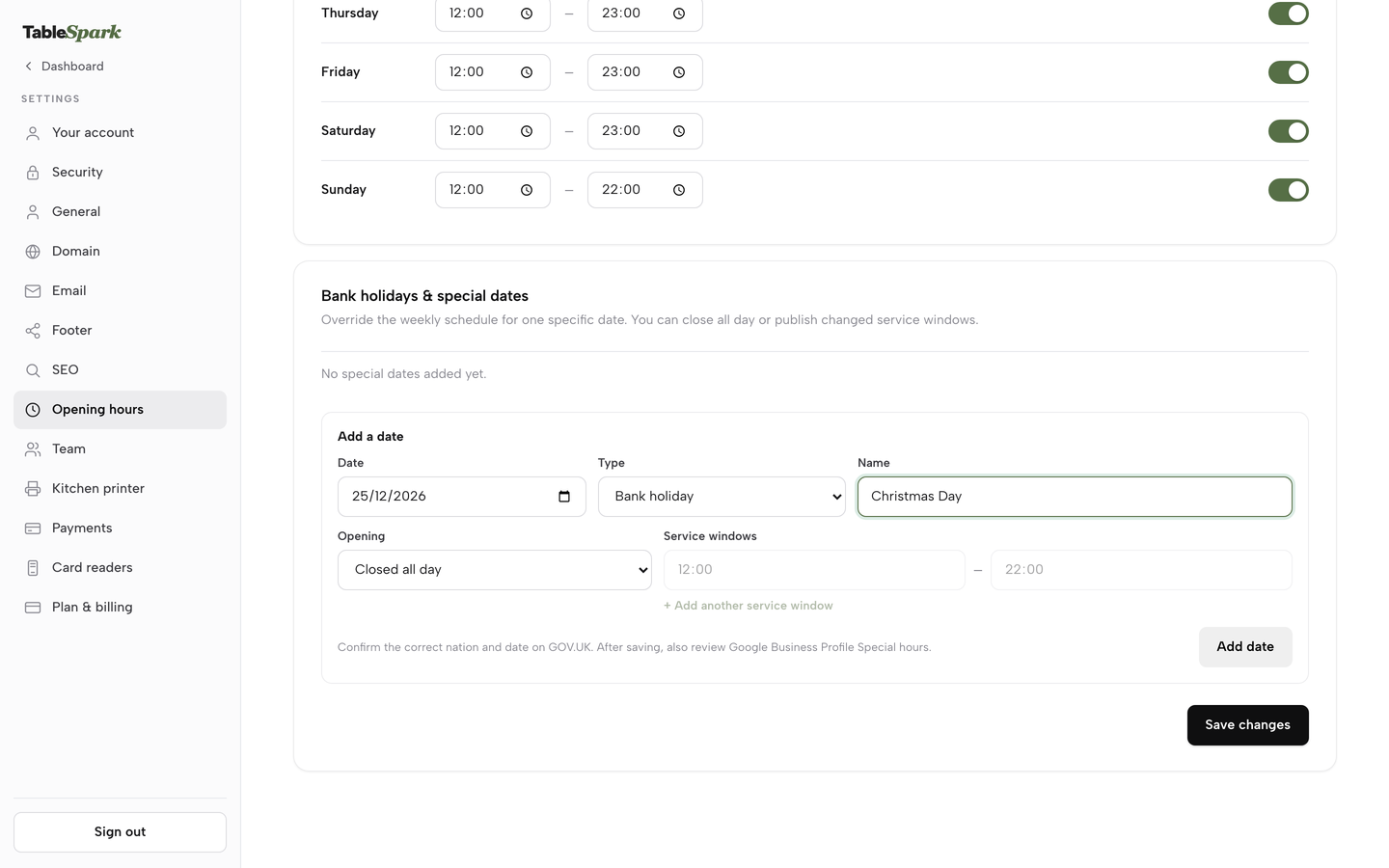
The test is how many minutes it takes someone behind the counter to change tomorrow's hours. In TableSpark, special-date opening hours for bank holidays, closures and changed service windows are included on every plan. The Opening hours card in Settings has a From and To time and a toggle for every day, and an Add a date form takes a date, a type (Bank holiday, Holiday or Special date), a name, and either Closed all day or Open with changed hours. An open date takes up to three service windows, which suits a café that closes mid-afternoon and reopens for a Friday evening. A guest sees a live "Open now" state on the site, so the page reflects the day rather than a sentence typed once.
The menu is a daily document
The board menu is the heart of a café website, and the part that is most often wrong. A menu uploaded as a PDF is a snapshot. It does not show a cake that sold out at eleven or an oat milk price that rose in March, and a guest on a phone has to download it and zoom around it. The checker study above found 10.1% of loaded restaurant homepages with a PDF-only menu.
A menu should be real text on a page, with each dish, its price, dietary tags and allergens. It should be quick to edit, because the specials board changes by the day. TableSpark's Menu page carries the line "Changes here update your live website instantly", with no separate publish step for a dish. A dish can be switched to Sold out, which keeps it on the site, struck through, and stops it being ordered. A QR-ready digital menu, one owned link for table cards, windows and social profiles, is included on every plan too.
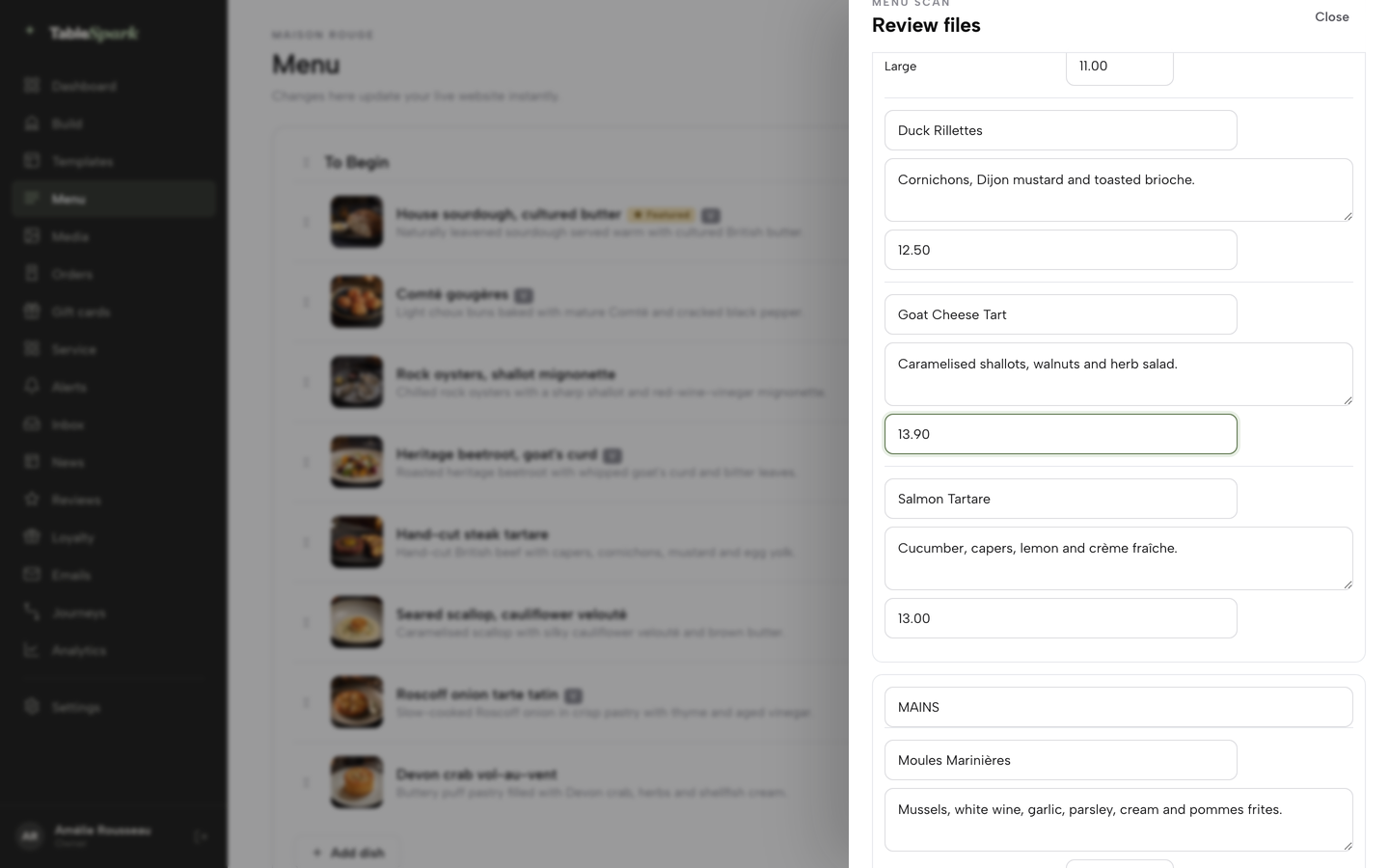
TableSpark's AI menu scan reads a photographed printed menu into sections, dishes and prices. Every field is shown for review before anything is saved, and every field stays editable by hand. A café can photograph its printed menu, correct the prices, add the allergens, and publish the same afternoon.
Allergens: the part most café sites skip
A café selling sandwiches, salads and baked goods is working with the allergen rules whether or not it has a website. A website adds a second place where the information has to be right.
The Food Standards Agency's guidance, published on GOV.UK and updated on 17 July 2026, applies in England, Northern Ireland and Wales; Scotland has its own guidance from Food Standards Scotland, which this guide does not cover. It says food business operators in retail and catering must provide allergen information for both prepacked and non-prepacked food and drink, and it lists the 14 allergens: celery, cereals containing gluten, crustaceans, eggs, fish, lupin, milk, molluscs, mustard, peanuts, sesame, soybeans, sulphur dioxide and sulphites (above ten parts per million), and tree nuts.
Two cases matter to a café, and the difference decides what the website must say.
- Made to order. A coffee, a toastie or a sandwich assembled after the guest orders is not prepacked for direct sale (PPDS). The FSA says such food needs no label with name and ingredients, but allergen information must still be provided, and this can be done through other means, including orally.
- Packed on site before it is chosen. The FSA describes PPDS food as food packaged at the same place it is offered or sold and in that packaging before it is ordered or selected. Its examples include sandwiches and bakery products packed on site before a consumer selects or orders them. These need a label with the name of the food and a full ingredients list, with allergenic ingredients emphasised, a rule often called Natasha's Law.
The website changes the second case. The FSA says the PPDS labelling change does not apply to PPDS food sold by distance selling, such as food bought over the phone or on the internet. A business selling PPDS food this way must make mandatory allergen information available before the purchase is completed, in writing on a website, catalogue or menu or orally by phone, and also at the moment of delivery. An online collection menu that lists a packed sandwich without its allergens is therefore a legal question, not a design choice. This guide is not legal advice; check the FSA pages for your own situation.
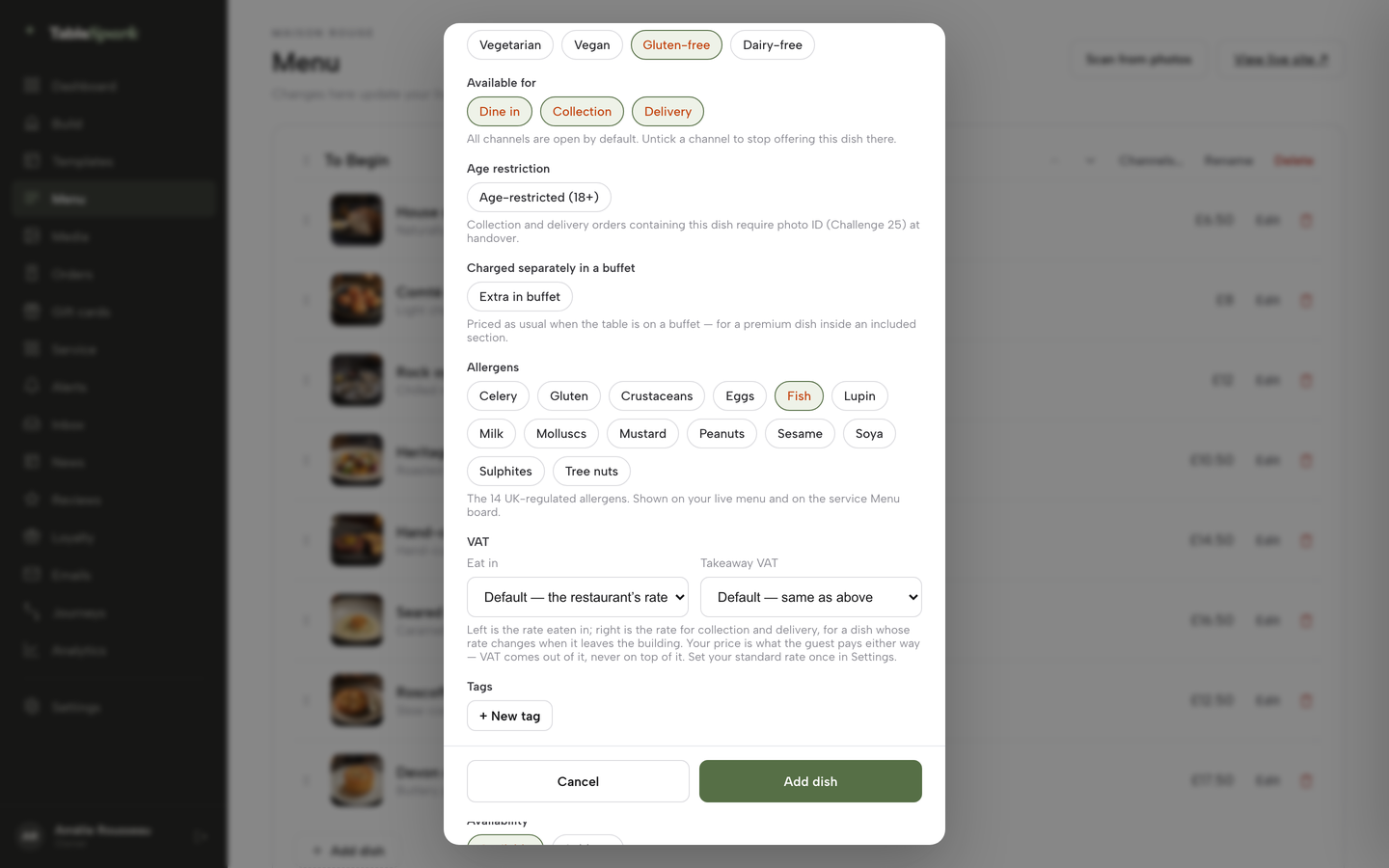
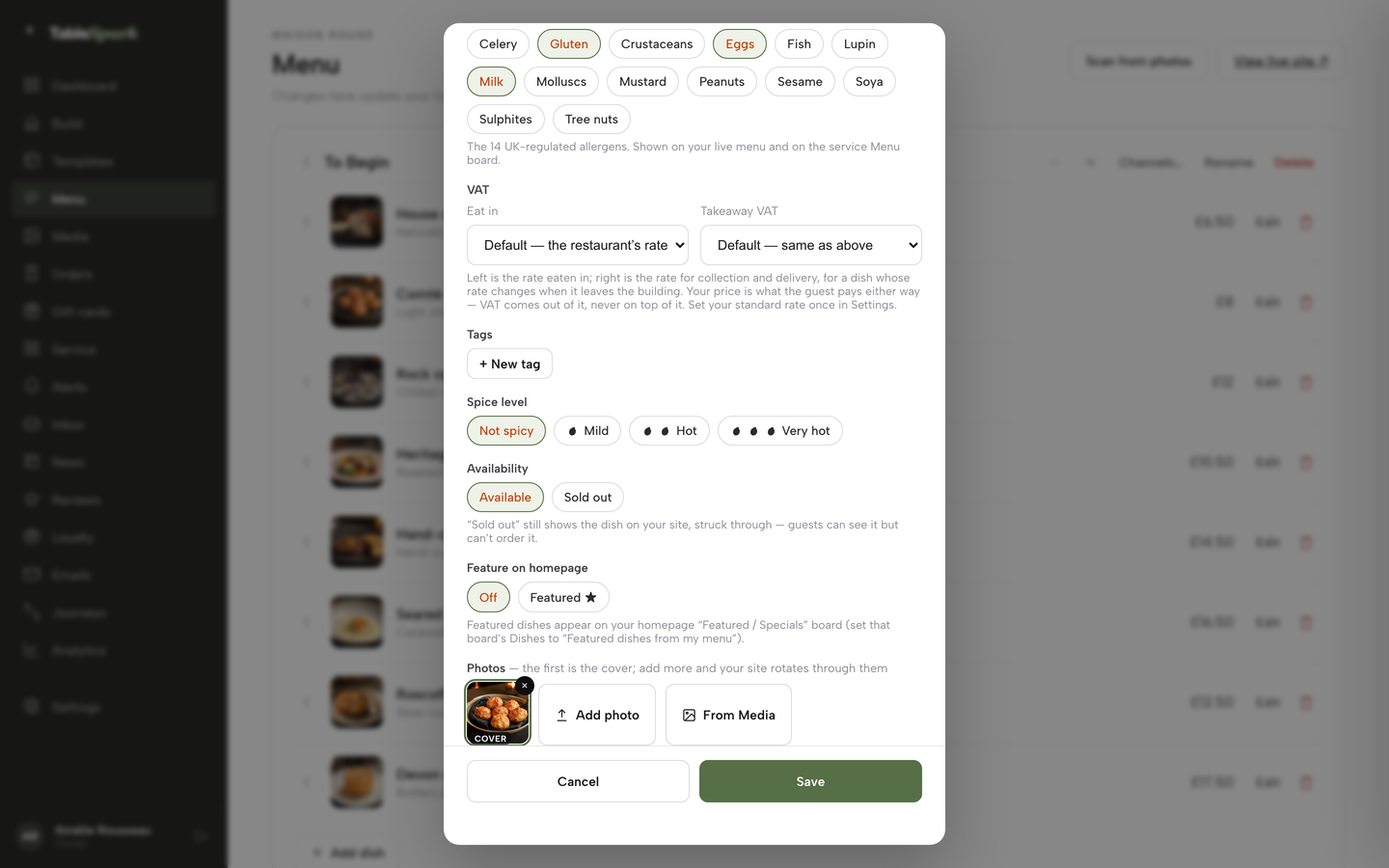
On TableSpark, the dish editor has the 14 UK-regulated allergens as toggle chips, and they are shown on the live menu. That puts the allergen text on the same page where the guest chooses the item, and it is edited in the same place as the price.
A live link is not the same as a page Google can read
This is the point most café owners meet late. A site can be live at a working link and still be absent from Google. A misconfigured robots file or noindex directive, conflicting canonical addresses, orphaned pages, rendering problems, missing structured data or incomplete search verification can leave important pages undiscovered, excluded or misunderstood. The customer impact is plain. A guest searching for the café's name, its menu or "coffee in" the town may reach a directory, a commission-charging marketplace or a competing café first, and the café is left paying for discovery instead of collecting its own direct demand. The TableSpark study above shows that the pieces are often missing in practice: 77.1% of loaded restaurant homepages had no usable Restaurant structured data. This research does not say Google ignores those sites, only that the data that makes a business easier to read was not there.
Google's documentation tells local businesses to define each location as a LocalBusiness type and to use the most specific sub-type possible, with name and address among the required properties. Schema.org lists CafeOrCoffeeShop as a type under FoodEstablishment, within LocalBusiness, so a café has a specific vocabulary available. Neither source promises rankings, and neither does this guide.
That work is real configuration: titles and descriptions, canonical URLs, a sitemap, robots controls, structured data, internal links, a mobile-first layout and a search-verification set-up. A general builder can publish a page without any of it, and an entry-level plan makes the owner, or a paid technician, responsible for the rest. TableSpark bundles that search-readiness work into the café website on every plan: crawlable structured content, titles, descriptions and canonical URLs, sitemaps, robots controls, Restaurant and LocalBusiness schema, internal links, and managed search-verification set-up, with the sitemap submitted to Google Search Console on every publish. Indexing and ranking remain decisions for Google, and no one can promise them. The free restaurant website checker reads a homepage the way the study did and lists what is present, so a café can test its current site before spending anything.
What the three routes cost
Most UK cafés choose between three routes: a general do-it-yourself builder, a pay-monthly agency that builds and hosts the site, and a platform made for restaurants and cafés. The headline prices below are the figures each provider's own page showed when read on 11 October 2026. They are not like-for-like, because each provider charges for different things, and the point of the exercise is the total, not the entry price.
| Provider and plan | Price as published | How it charges | What the price covers |
|---|---|---|---|
| TableSpark Starter Our pick | £19£19 a month excluding VAT | Monthly, or £190 a year excluding VAT |
|
| TableSpark Growth | £39 a month excluding VAT | Monthly, or £390 a year excluding VAT |
|
| TableSpark Full | £69 a month excluding VAT | Monthly, or £690 a year excluding VAT |
|
| Squarespace Basic, Core, Plus | £16 and £12, £24 and £17, £36 and £29 a month | Two figures per plan, with a billing toggle |
|
| Hostinger Premium | £2.99 a month promotional | 48 months for £143.52, renews at £10.99 a month |
|
| GoDaddy Starter, Professional | £7.49 and £17.99 a month | Billed annually |
|
| Square Online | Free, paid plans from £20 | Monthly, plus 1.4% + 25p per UK card |
|
| Shopify Basic | £19.00 a month, or £25 paying monthly | Pay yearly or monthly, card rates from 2% + 25p |
|
| InstaWebsite | £19.99 a month | Monthly, cancel any time |
|
| SitePros | From £25 a month | Monthly; £2 a month per extra page |
|
| Stamp Me | £39.00, £49 or £129 a month | Monthly; £15 one-time per extra programme beyond 2 |
|
| Storekit | Starter free, Grow £99, Pro £199 a month | Monthly or yearly toggle shown |
|
Those prices are not like-for-like. The pages read do not all say whether VAT is included, and each charges for a different slice of the work, so the comparison below is by job, not by headline.
The renewal and prepayment trap
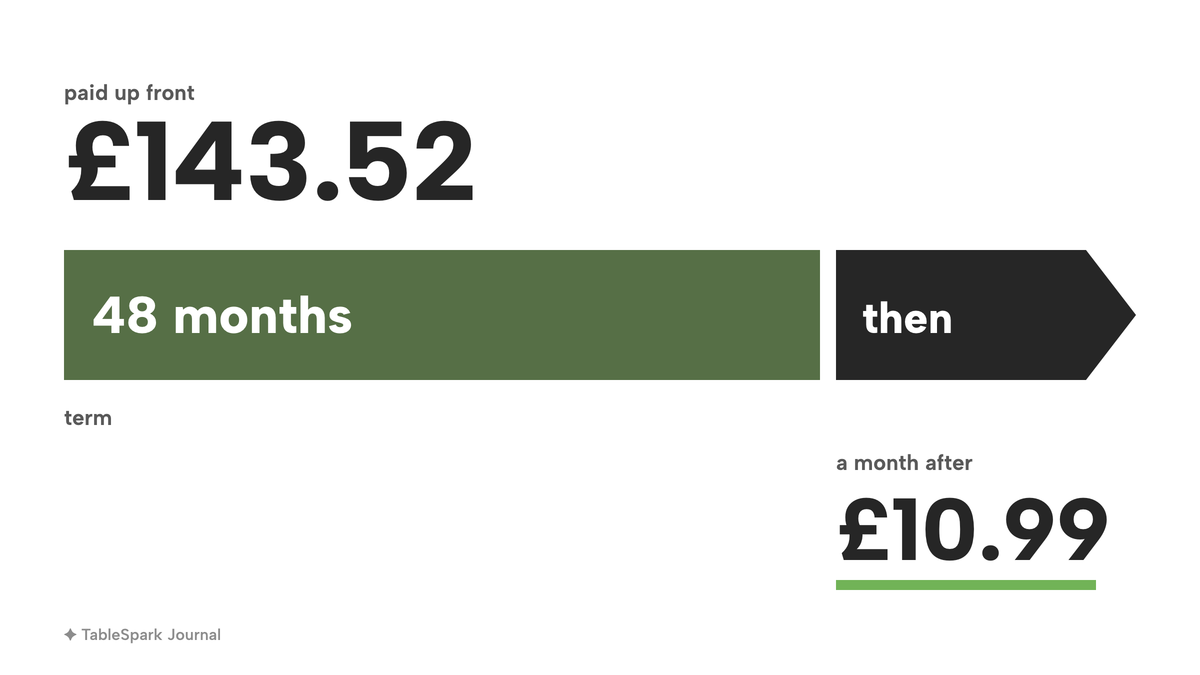
The Hostinger row shows how a promotional price is built. The Premium plan is shown at £2.99 a month, but the page states "Get 48 months for £143.52 (regular price £575.52). Renews at £10.99/mo." The £2.99 is the £143.52 spread across 48 months, which has to be paid at the start. After the term, the renewal is £10.99 a month, £131.88 over twelve months, about 3.7 times the £35.88 that twelve months at the promotional rate would cost. The page also says the custom domain and mailboxes are free for one year. A café owner who thinks the site costs £2.99 a month is reading the first four years only, and the ordering, loyalty and search work still has to be added on top.
The agency routes carry different commitments. SitePros shows a five-page site with a contact form from £25 a month, with each extra page at £2 a month and a ten-page site at £35 a month, so a café with a menu, hours, about, events, contact, catering, gallery and private hire page lands at the upper figure, £420 over twelve months, before any ordering. NEO's managed Enterprise plan is £550 a month with, on its own page, a 12-month commitment on all packages, which is £6,600 across that term. InstaWebsite shows £19.99 a month (TableSpark prices exclude VAT; this page does not say), £239.88 over twelve months, for a done-for-you café site with hosting, SSL, a free .co.uk domain and unlimited content updates, on the page read. Anything beyond the listed pages and features, such as collection ordering or a stamp card, is a separate line.
The tiers that matter
Squarespace's page shows two figures against each plan and a Pay annually or Pay monthly toggle. This research quotes both figures as shown and does not guess which is which. What matters to a café that sells beans, gift cards or collection orders is the store fee: Basic carries a 2% transaction fee and Core and Plus show 0%, with card rates starting at 2.0% + £0.25 on Basic and Core and 1.7% + £0.25 on Plus, available only with Squarespace Payments. A café that sells anything online is therefore looking at Core or Plus, not the lowest plan. GoDaddy's page names Professional as the plan for "local businesses, online stores, bookings, and payments", and that is £17.99 a month billed annually, not the £7.49 Starter figure.
Add the pieces a café actually uses
A café usually ends up with a website, a stamp card for regulars and a way to order ahead. On the pages read, a builder plus a digital stamp card looks like this. Squarespace Core at £17 or £24 a month plus Stamp Me Lite at £39.00 a month (TableSpark prices exclude VAT; those pages do not say) is £56 to £63 a month. Add collection ordering through Storekit Grow at £99 a month, which the page lists with till connection, loyalty and email, and a Squarespace Core site plus Storekit is £116 to £123 a month.
The same jobs are one plan on TableSpark. Growth is £39 a month excluding VAT for the website, custom domain, stamp cards and the guests' app. Full is £69 a month excluding VAT for the website, stamp cards and collection ordering on the café's own site at 0% TableSpark commission. On the displayed figures, and before any difference in how each page treats VAT, that is a gap of £17 to £24 a month (£204 to £288 a year) for the stamp-card stack and £47 to £54 a month (£564 to £648 a year) for the ordering stack. The gap is in the number of separate bills as well as the total: one dashboard for hours, menu, guests and orders. For a wider cost view, the guide to what a restaurant website costs walks through hosting, domains and design fees.
The general routes also leave search set-up to the owner: titles, canonicals, sitemaps, structured data and Search Console verification need someone to configure and keep checking, as owner time or an add-on. On TableSpark, that work is packaged into every plan, so a café does not hire a technician to assemble it.
Small tickets and fixed card fees
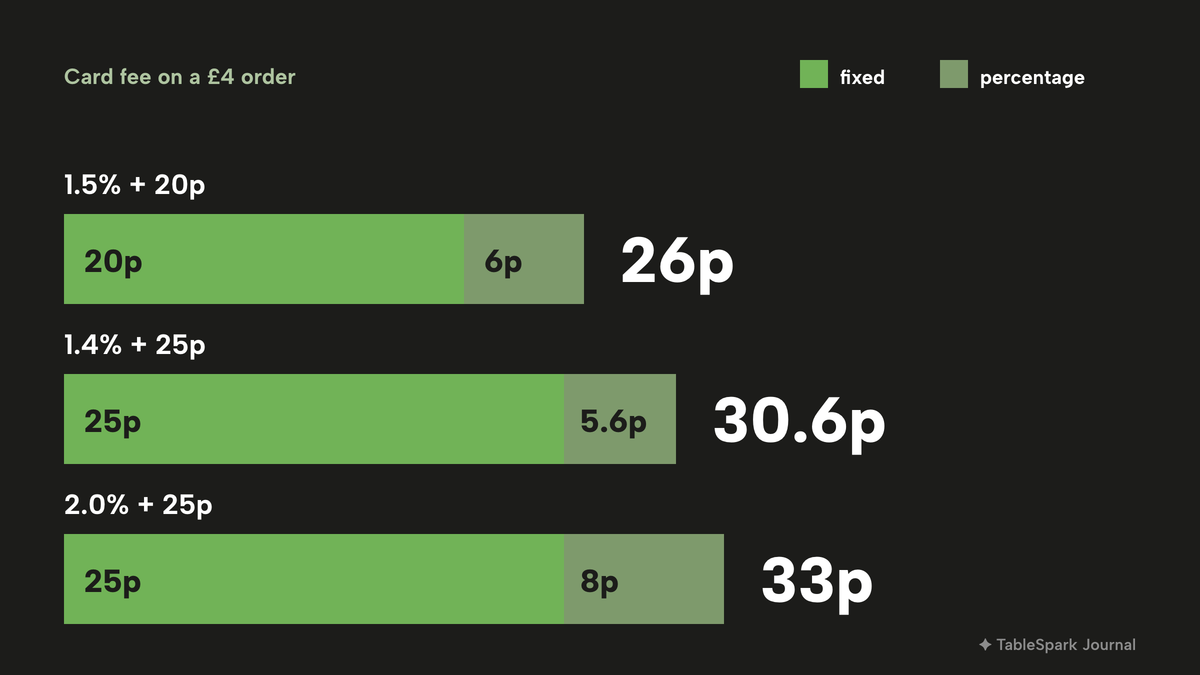
A coffee shop sells small baskets. Most online card fees have a fixed part, and that part is hardest on a small order. The arithmetic below uses an illustrative £4 order, a flat white and nothing else, so the percentages are not a market average; they show how the fixed element behaves.
- Stripe's UK page shows 1.5% + 20p for standard UK cards: 6p + 20p is 26p on £4, or 6.5% of the order.
- Square Online's page shows 1.4% + 25p for UK cards: 5.6p + 25p is 30.6p, about 7.7%.
- Squarespace shows card rates starting at 2.0% + £0.25, and Shopify card rates from 2% + 25p: 8p + 25p is 33p, about 8.3%.
- Stripe's premium UK card rate is 2.8% + 20p: 11.2p + 20p is 31.2p, about 7.8%.
On an £8 basket the same Stripe standard rate is 12p + 20p, which is 32p, or 4.0%. The fixed element halves its weight when the basket doubles, which is the practical reason to suggest a pastry with the coffee, and the reason to look at the whole fee schedule before choosing a payment route. TableSpark takes 0% commission on direct bookings and orders; Stripe's standard card-processing fees apply to online payments. A commission-charging marketplace takes a share of the order on top of card costs, which a small coffee basket carries badly. Check the current published rates before relying on any figure here.
Click and collect for the morning queue
For a café, ordering online is mostly a collection service, a coffee and a croissant ready as the guest walks in, not a delivery operation. Its value is the 8am queue: a commuter orders from the phone, walks in, collects and leaves, and the counter is not held up.
On TableSpark, online ordering for collection is on the Full plan, £69 a month excluding VAT. A single block turns the menu into an ordering page with Dine in, Collection and Delivery choices, and the ticket lands on the Orders screen as soon as the guest pays. Collection settings include a Minimum order, a Collection cut-off before close (up to closing, or 15 minutes to 1 hour before) and a Ready-time note such as "Usually ready in ~20 min". The sold-out switch applies here too, with a setting that either greys out or hides sold-out dishes, so a guest does not pay for a croissant that has gone. Orders come from the café's own site, so the café keeps the guest relationship and the order record. For a closer look at the ordering side, the online ordering guide covers the decision in detail.
Stamps, regulars and the guests' app
The visit that pays for a café is the fifth one. A paper stamp card works until it goes through the wash, and a separate loyalty app brings its own monthly bill. Stamp Me's page shows Lite at £39.00 a month (VAT basis not stated; TableSpark prices exclude VAT), Pro at £49 and Elite at £129, with a one-time £15 set-up fee for each extra programme beyond two live programmes, and that is a loyalty tool only, sold apart from the website that has to link to it.
On TableSpark, stamp cards and the guests' app are included on Growth and Full, from £39 a month excluding VAT. Every published site on those plans carries a guest app at /account with five tabs and the café's own photographs behind every screen. The Builder's Guest app tab includes eight campaign recipes, among them a Stamp card, Welcome gift, Birthday treat, Bring a friend and Money off. The Stamp card recipe asks for "Every __ visits or orders" and the points the guest gets, with a switch for whether it stamps itself on collected and delivered orders or staff stamp it from the Scan sheet. The café sets every number: each field starts empty, nothing is pre-filled, and a campaign goes live only when it is switched on. A QR member card is scanned at the till. The loyalty app guide covers how to choose offers that suit the margin on a coffee.
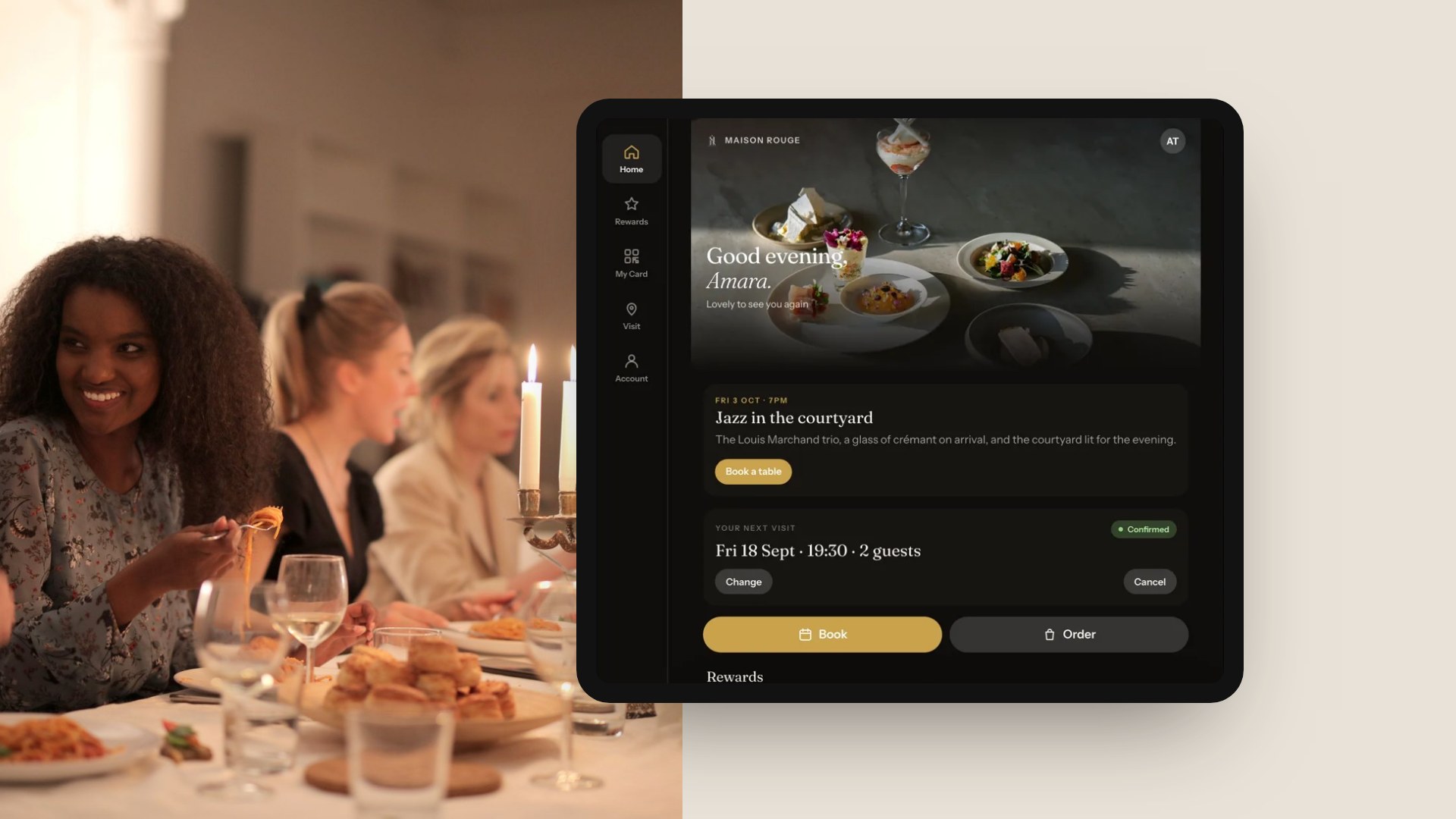
The picture above shows the guests' app on an iPad for a demo restaurant, not a café, with a greeting, an event, the guest's next visit and Book and Order buttons. A café's version carries its own photographs, offers and announcements, under the café's own name.
Guest records sit under the café's TableSpark account, visible in its Inbox and guest list, and exportable as CSV. That is the owner's list: your records, in your account, exportable.
Choosing between the routes
After the cost, the decision is about who does the work after launch. The table compares the two ends of the decision by task.
| General builder plus add-ons | TableSpark café site | |
|---|---|---|
| Search set-up | Titles, canonicals, sitemap, schema left to the owner | Bundled on every plan, managed verification |
| Daily menu edits | Depends on the builder's editor | Live menu, saved changes update the site |
| Hours by date | Often a hand-edited text block | Special dates with Closed all day or changed hours |
| Stamp card | Separate app and separate bill | Included on Growth and Full |
| Collection orders | Separate platform or paid store plan | Included on Full, 0% TableSpark commission |
| Guest list | Spread across tools | One account, Inbox and guest list, CSV export |
Use this checklist before you sign anything with any provider.
- Ask for the total monthly cost of the plan that includes ordering and loyalty, not the entry plan
- Ask what the price becomes after the first term, and whether payment is up front
- Check who registers the domain and what it costs to renew
- Ask whether titles, canonicals, a sitemap and structured data are set up or left to you
- Find the card fee for a £4 order, fixed part included
- Check that you can export your guest list in a standard file
- Time how long it takes you to change tomorrow's hours and today's menu on your phone
How to do it in TableSpark
The steps below follow TableSpark's own tutorial guides. Each step names a screen and a field.
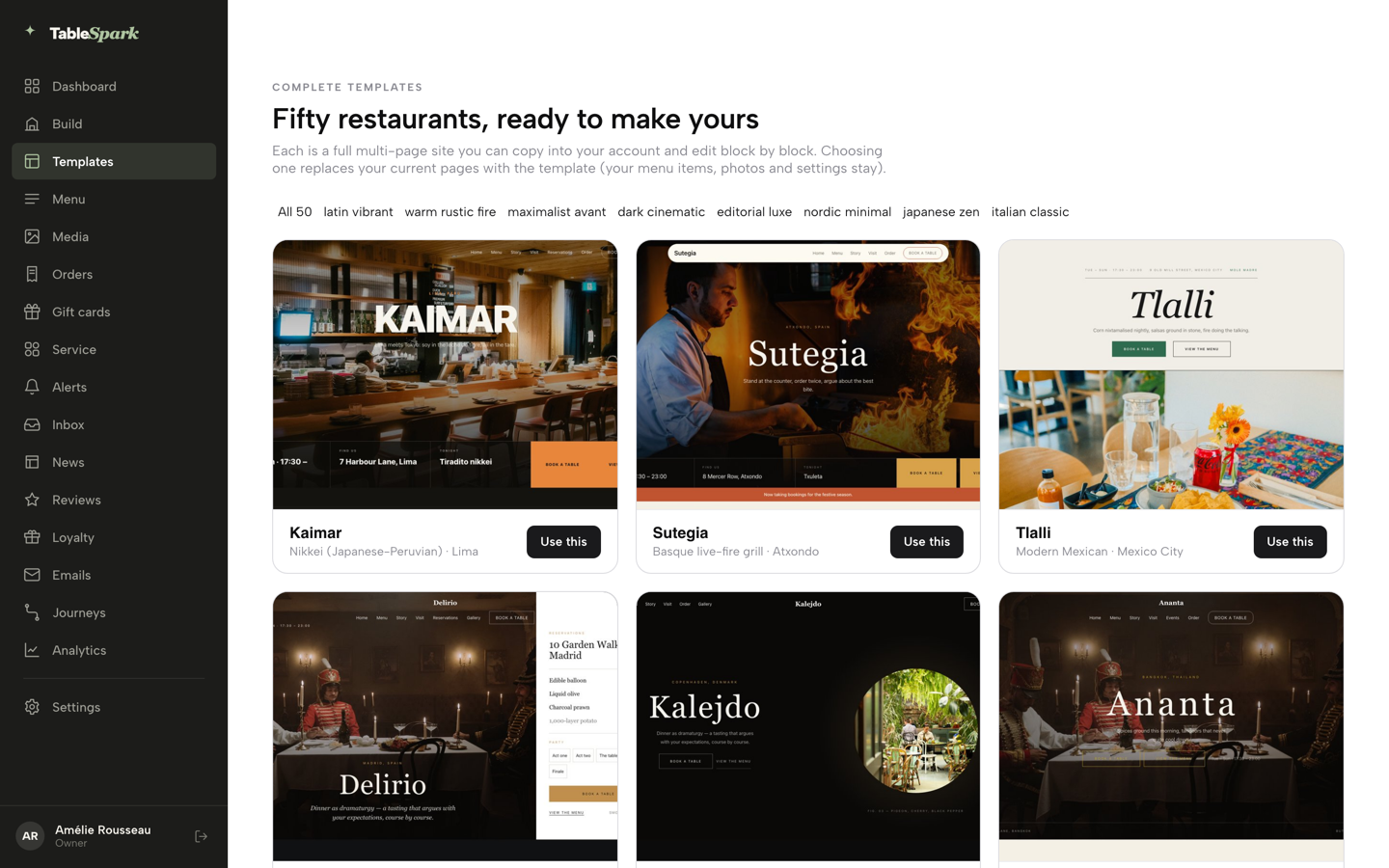
- Step 1: Pick a design
In the dashboard, open Templates, a gallery of fifty restaurant designs. Choose one and press Use this template, then confirm with Yes, use this template.
- Step 2: Get the menu in
Open Menu and press Scan from photos. Choose the files of the printed menu, review every dish name, description and price on the review list, correct what needs correcting, then confirm.
- Step 3: Add the allergens
Open a dish and scroll to the Allergens chips. Tick each of the 14 UK-regulated allergens that applies, for example Fish or Milk, then save the dish.
- Step 4: Set the hours and the bank holidays
In Settings, fill in the Opening hours card, then use the Bank holidays and special dates card: add a date, choose its type and pick Closed all day or Open with changed hours.
- Step 5: Mark what has sold out
Open the dish, go to Availability and choose the Sold out chip. The dish stays on the site, struck through, and stops being ordered.
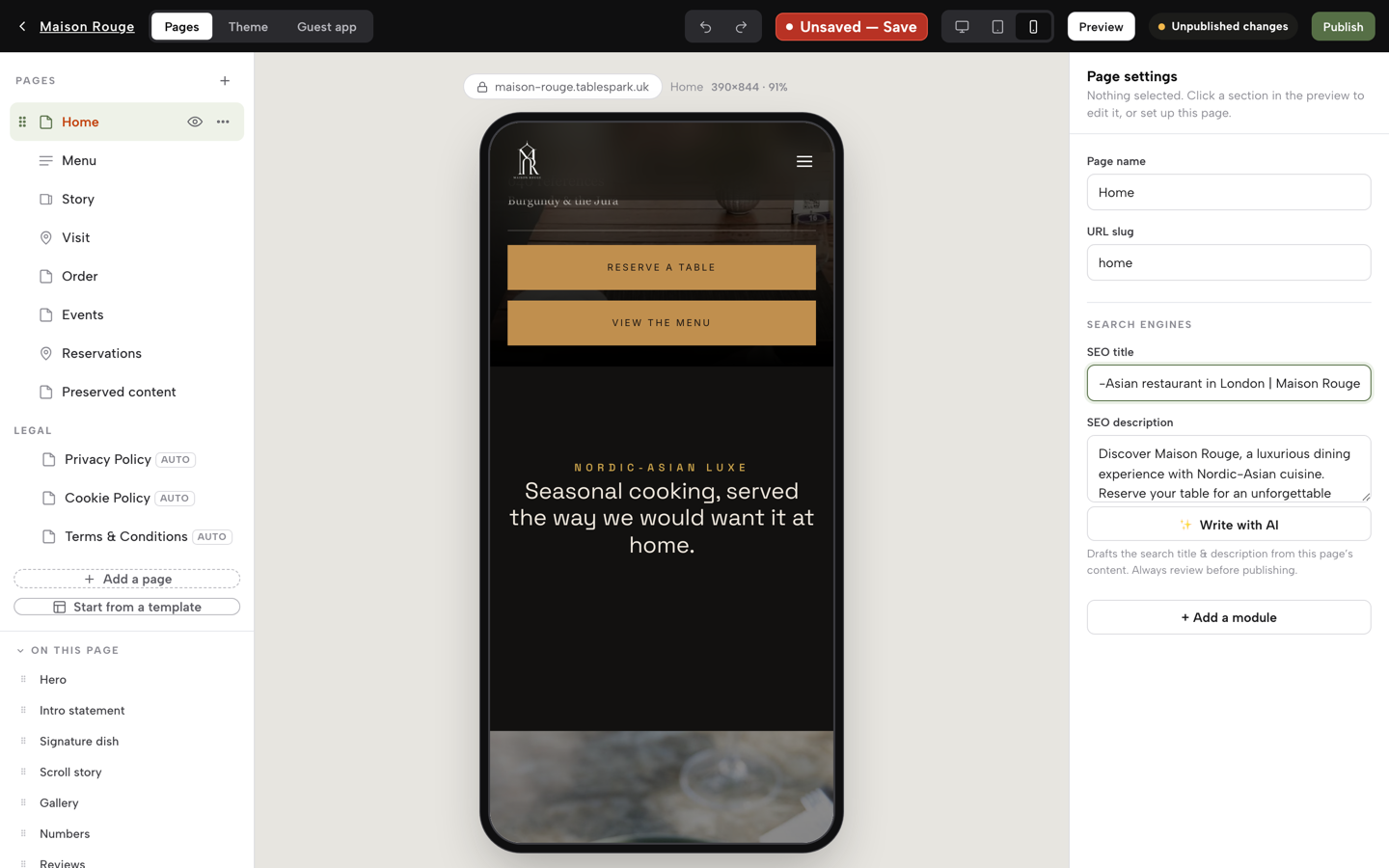
- Step 6: Fill in the search fields and publish
In the Builder, fill in the SEO title and press Publish at the top right. Then run the free checker on the live address and read what it reports.
Tips
- Photograph the printed menu at a steady angle in good light; the scan reads sections, dishes and prices, and the review step catches anything it misread.
- Put the dish that sells out first, usually the almond croissant, on the homepage with the Feature on homepage option.
- Keep the café's name, address and hours identical on the website, the map listing and the social profiles.
- Gift cards are on Growth and Full; a café can sell them on its own site or at the counter.
Questions café owners ask
How much does a café website cost in the UK?
It depends on the route and on the add-ons. On the pages read on 11 October 2026, a pay-monthly agency site started at £19.99 or £25 a month (VAT basis not stated; TableSpark prices exclude VAT), a builder promotion at £2.99 a month needed a 48-month prepayment and renewed at £10.99, and a managed agency plan was £550 a month on a 12-month commitment. A café usually needs loyalty and ordering on top, so compare the total, not the entry price.
Do I need a website if I have Instagram and a Google listing?
Social and map listings help guests find you, but they sit on someone else's platform, with someone else's layout and rules. A website is the page you control: current hours, the full menu with allergens, an order button and a guest list you can export. Guests who search your name still land on whichever page answers fastest, so the site should match the listings.
Can I take click-and-collect orders without paying marketplace commission?
Yes, on your own site. TableSpark's Full plan, £69 a month excluding VAT, includes online ordering on your own site, with 0% TableSpark commission. Stripe's standard card-processing fees apply to online payments, and on a small order the fixed part of that fee is noticeable. A commission-charging marketplace would take a share of each order as well as card costs.
What must an online café menu say about allergens?
For prepacked-for-direct-sale food sold online or by phone, the FSA says mandatory allergen information must be available before the purchase is completed, and at delivery. For other food, allergen information must still be provided, and may be given orally. The 14 allergens are listed above. Check the FSA pages, and Food Standards Scotland if you trade in Scotland.
Is Squarespace or something café-specific the better choice?
A general builder can publish a page, and its plans differ: on the page read, Basic carries a 2% store fee and Core and Plus show 0%. What a café then adds, such as stamp cards, collection orders and search set-up, is a separate task or bill. TableSpark is the better-value choice for an independent UK café because those jobs sit in one plan, from £19 a month excluding VAT.
How do I keep hours and the specials board up to date without a developer?
Use a site you can edit from the counter. On TableSpark the Menu page updates the live site as soon as a change is saved, a dish can be marked Sold out in a few taps, and special dates handle bank holidays and closures. The test is how long it takes to change tomorrow's hours on your phone. If the answer is a message to a freelancer, the site will drift.
Will my café show up on Google if I build the site myself?
Possibly, but a working link does not mean the pages are indexed. Robots or noindex settings, conflicting canonicals, orphaned pages and missing structured data can all get in the way, and no one can promise indexing or rankings. TableSpark bundles the search-readiness work on every plan. The free restaurant website checker shows what a homepage currently has.
Can I add stamps and gift cards, and what do they cost?
On TableSpark, the guests' app, stamp cards and gift cards are on Growth and Full, from £39 a month excluding VAT, with the café setting every offer. A separate digital stamp service such as Stamp Me showed £39.00, £49 and £129 a month on its page, sold apart from the website.
The recommendation
For an independent UK café, TableSpark is the best-value and best overall choice. The reasons come from the comparison above. A café needs a site that a person behind the counter can change in a minute, a menu that carries allergens, hours that handle bank holidays, a stamp card for regulars, collection orders without marketplace commission, and a search-ready build that does not need a technician. TableSpark delivers all of that in one account, with guest records the café can export.
See the restaurant website design page for the fifty templates, each of which opens as a working site that can be judged on a phone, and pricing for what each plan includes.
Sources
- Ofcom, Online Nation Report 2025 (PDF) — ofcom.org.uk (checked 2026-10-11)
- Allegra World Coffee Portal, UK branded coffee shop market, Project Café UK 2026 — worldcoffeeportal.com (checked 2026-10-11)
- Allegra World Coffee Portal, Project Café UK 2025 — worldcoffeeportal.com (checked 2026-10-11)
- GOV.UK, Introduction to allergen labelling for PPDS food — UK Government (checked 2026-10-11)
- GOV.UK, Allergen guidance for food businesses — UK Government (checked 2026-10-11)
- Google Search Central, Local Business structured data — developers.google.com (checked 2026-10-11)
- schema.org, CafeOrCoffeeShop — schema.org (checked 2026-10-11)
- Stripe UK pricing — stripe.com (checked 2026-10-11)
- Square Online UK — squareup.com (checked 2026-10-11)
- Squarespace pricing — squarespace.com (checked 2026-10-11)
- Hostinger website builder UK — hostinger.com (checked 2026-10-11)
- GoDaddy UK website builder — godaddy.com (checked 2026-10-11)
- Shopify UK pricing — shopify.com (checked 2026-10-11)
- InstaWebsite, websites for cafes — instawebsite.co.uk (checked 2026-10-11)
- SitePros, coffee shop websites — sitepros.co.uk (checked 2026-10-11)
- NEO agency, web design for coffee shops — neoagency.io (checked 2026-10-11)
- Storekit pricing — storekit.com (checked 2026-10-11)
- Stamp Me pricing — stampme.com (checked 2026-10-11)
- TableSpark pricing — TableSpark (checked 2026-10-11)
- TableSpark tutorial, put your menu online — TableSpark (checked 2026-10-11)
- TableSpark tutorial, hours and booking rules — TableSpark (checked 2026-10-11)
- TableSpark tutorial, take online orders — TableSpark (checked 2026-10-11)
- TableSpark tutorial, build your guests' app — TableSpark (checked 2026-10-11)
Put your café's hours and menu where guests look
Build the site, add the menu and set the bank holidays today.