Contents
A restaurant website can load at a working link and still be invisible in search, unreadable on a phone or missing the one button a hungry guest came to press.
A restaurant website needs three things in order. Google must be able to reach it: the page loads over HTTPS, carries no noindex tag, and has one canonical address and a sitemap. Google must be able to understand it: a real title and description, the menu as text, and Restaurant structured data with name, address, telephone, hours and cuisine. A guest must be able to act on a phone: a booking or order route, tap to call, and fast loading.
A live website is not the same as a found website
Picture a quiet Tuesday. A guest hears your restaurant's name from a friend, types it into a phone and reads the first results. The first is a directory showing hours from last winter. The second is a marketplace page that takes a commission on every order. Your own site is further down, or nowhere at all. Nothing alerts you, and the link works when you send it to your family, so the site looks fine from where you sit.
Google is clear about how a single line of code can cause this. Its own documentation on blocking indexing says:
When Googlebot crawls that page and extracts the tag or header, Google will drop that page entirely from Google Search results, regardless of whether other sites link to it.
A noindex tag is only one of several ordinary faults. A robots.txt file written for a staging copy and never changed, canonical tags that disagree about which address is the real one, pages that nothing links to, a menu that exists only inside a PDF, restaurant details a search engine has to guess from sentences, and search verification that was started and never finished can each leave important pages undiscovered, excluded or misunderstood. The damage shows up elsewhere: guests who searched your name, menu or street reach a directory, a commission-charging platform or the restaurant two doors down, and you pay to be found by people who were already looking for you.
None of this means that every small restaurant site is broken, and no checklist can promise that Google will index or rank a page; those remain decisions for Google. What a checklist can do is remove the technical reasons for not being found, and make the site usable once a guest arrives. Ofcom's 2025 report on how the UK goes online says most time online is spent on a smartphone, so the site has to work on the screen in the guest's hand.
How TableSpark checked 1,000 independent UK restaurant websites
Checklists on this subject are mostly opinion: the pages read for this article agree on menu, hours, photos, booking and speed, but none reports an audit of real restaurant sites. So TableSpark ran one. In October 2026 it checked 1,000 independent UK restaurant websites with the engine behind its free restaurant website checker.
The sample is random: independent restaurants listed in OpenStreetMap with a website, chains excluded, taken from TableSpark's own August 2026 list across 106 UK areas, one restaurant per domain. Each homepage was checked on 11 October 2026 by reading the HTML exactly as the server delivered it, without running JavaScript, together with the site's robots.txt file and sitemap. Percentages below are shares of the 755 homepages that loaded unless the text says otherwise, rounded as the study file rounds them.
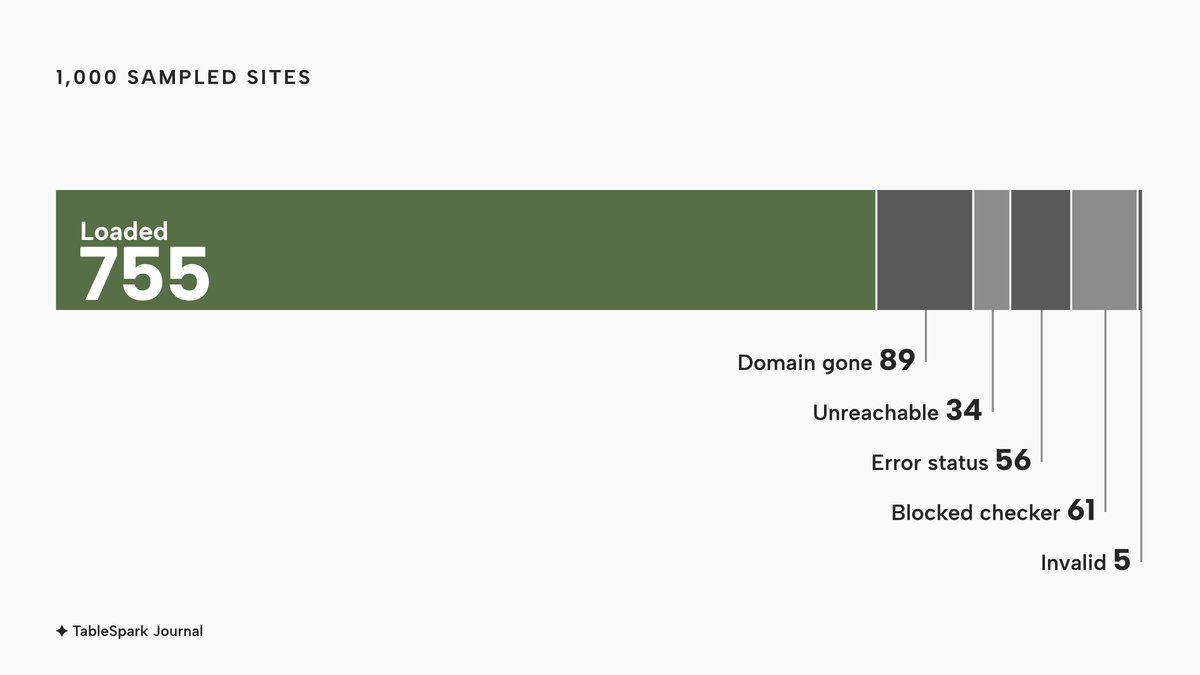
Not every site could be read. Of the 1,000 sampled, 89 domains no longer resolved, 34 were unreachable or timed out and 56 returned an error status, so 179 did not load at all. A further 61 turned the checker away with a firewall and were excluded, and 5 were excluded as invalid. That left 755 homepages that loaded.
What this check does and does not show. It reads the homepage only, so a menu or structured data that sits on another page was not counted. It reads the HTML as served, and Google can render JavaScript, so text that scripts add may still be read by Google. A site that blocks automated visitors was excluded rather than scored. OpenStreetMap listings can be out of date, which is part of why 89 domains no longer resolved. The study reports what the check found on those homepages. It does not claim that Google ignores these sites.
No individual restaurant is named anywhere in this article, and none is described.
What the 1,000 homepages showed
Start with the encouraging part. The basics of reach are mostly in place. Among the 755 loaded homepages, 96.2% were served over HTTPS and only 0.8% carried a noindex directive or a robots.txt block on the homepage. No homepage was blocked by robots.txt on its own. A deliberately hidden site is rare; a site that simply does not say enough is common.
The gaps are in understanding and in action. About 77 in every 100 homepages had no usable Restaurant structured data. 31% had no meta description, and 35.4% had no H1 heading. The sitemap was missing on 20.1% and a canonical tag on 22.1%. More than half of the homepages, 54.7%, had no tap-to-call link, and 25.6% had no booking link at all.
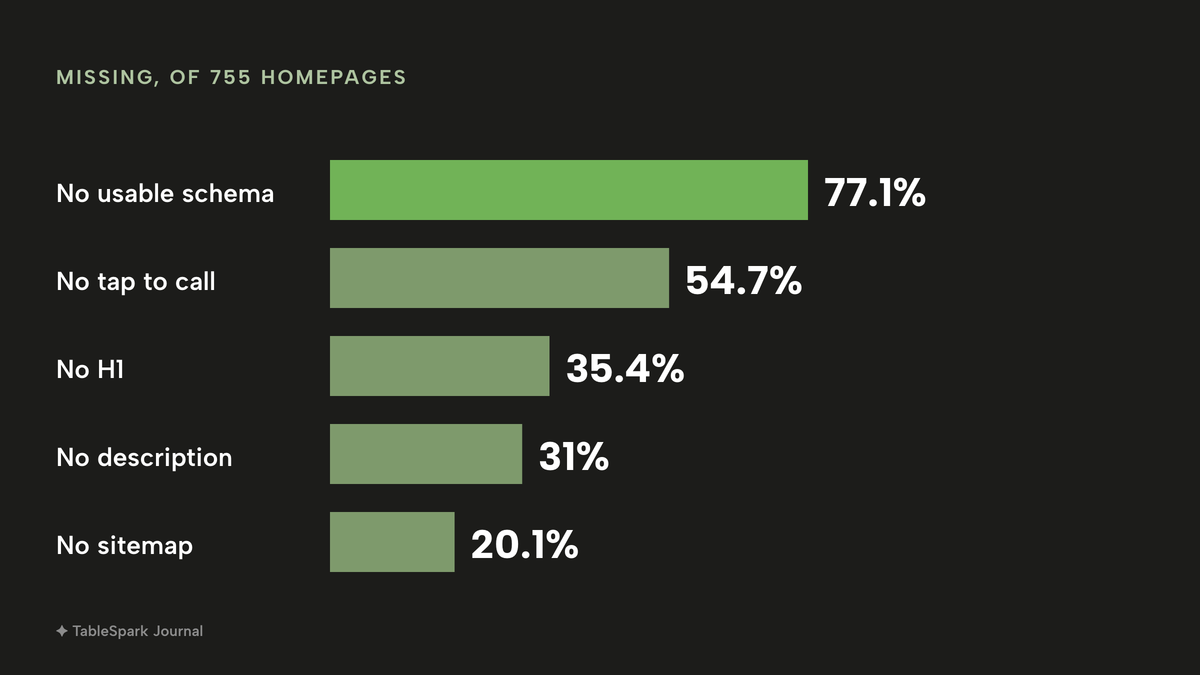
Read that as a to-do list rather than a verdict. The rest of this article takes the checklist in three groups: reach, understand and act. Each item says what it is, what the study found, and how to check and fix it.
Reach: can Google get to the page?
Reach comes first, because nothing else matters if the page fails to load or is told to stay out. This group has six items.
1. The site loads and the domain still resolves
What it is. The address in your Google Business Profile, on your menu card and in your social bio opens a working page.
What the study found. Of the 1,000 sampled sites, 179 did not load: 89 domains no longer resolved, 34 were unreachable or timed out, and 56 returned an error status. Some are closed restaurants. Others are live restaurants whose listing points at an old address.
Check and fix. Open the exact address from each listing on a phone with the wifi switched off. Renew the domain before it lapses, point every listing at one address and redirect old addresses to it.
2. The site is served over HTTPS
What it is. The padlock address, https://, with the plain http:// address redirecting to it.
What the study found. 96.2% of loaded homepages were served over HTTPS, and on 4.5% the plain http:// address did not redirect to https.
Check and fix. Type http:// in front of your address and see where the browser lands. If it stays on http://, ask your host to switch on the certificate and the redirect.
3. robots.txt does not block the pages you want found
What it is. A small text file at the root of the site that tells crawlers which URLs they may fetch. Google is explicit that it is not an access lock:
A robots.txt file tells search engine crawlers which URLs the crawler can access on your site. This is used mainly to avoid overloading your site with requests; it is not a mechanism for keeping a web page out of Google.
What the study found. Robots.txt blocked the homepage on 0% of loaded sites. Blocks on other pages were not part of this check.
Check and fix. Open yourdomain.co.uk/robots.txt. A line reading Disallow: / under User-agent: * tells every crawler to stay away from the whole site; remove any blanket disallow left over from the build.
4. No page you want found carries noindex
What it is. A tag or header that tells Google to drop the page from results. Google adds a trap for people who combine the two tools:
For the noindex rule to be effective, the page or resource must not be blocked by a robots.txt file, and it has to be otherwise accessible to the crawler.
What the study found. 0.8% of loaded homepages were blocked by noindex or robots in any way, about six of the 755 pages. It is a small share and the most expensive fault on the list, because it removes the page entirely.
Check and fix. View the page source and search for noindex, on the menu, booking and contact pages as well as the homepage, because a staging setting is sometimes left on a single page. Remove the tag or header, republish and check again.
5. One canonical address per page
What it is. A canonical URL tells Google which of several addresses for the same content is preferred. Google describes the result as consolidating "the signals they have for the individual URLs (such as links to them) into a single, preferred URL."
What the study found. 22.1% of loaded homepages declared no canonical, and 1.5% declared a canonical that pointed somewhere else.
Check and fix. View the source and look for a canonical link tag naming the page itself, in https, in the version of the address you use, with or without www. Redirect the other versions to it and set it on every page.
6. A sitemap exists and is linked
What it is. A file that lists the pages you want crawled. In Google's words, "A sitemap tells search engines which pages and files you think are important in your site." Google also says a small, well-linked site may not need one, so treat it as good practice for a restaurant site rather than a duty.
What the study found. 20.1% of loaded homepages had no sitemap the checker could find.
Check and fix. Open yourdomain.co.uk/sitemap.xml and look for the menu, bookings, contact and events pages. Switch on the sitemap feature in your site builder and submit the address in Google Search Console.
If you would rather not check these six by hand, the free website checker runs them on any address in a few seconds.
Understand: can Google tell it is a restaurant?
A page can be reachable and still say very little. This group covers what the page tells a search engine about the business, which decides whether guests searching by name, cuisine or street are matched to you.
7. A real title on every page
What it is. The headline of the search result. Google's guidance is plain: "Avoid vague descriptors like 'Home' for your home page." It also asks that every page has a title.
What the study found. 2% of loaded homepages had no title, and 9.1% had a title judged too long.
Check and fix. Read the browser tab. Write the title the way a guest would ask for you: restaurant name, cuisine, town, with a different one on the menu page and the private dining page.
8. A meta description that sells the visit
What it is. The summary line under the title. Google says it "sometimes uses the meta description HTML element if it might give users a more accurate description of the page than content taken directly from the page", and that snippets are primarily created from the page itself. A description is not a ranking lever. It is a free sentence that may sit under your name in results.
What the study found. 31% of loaded homepages had no meta description.
Check and fix. View the source for the description tag. Write one honest sentence per page with the cuisine, the area and the reason to book.
9. Restaurant structured data, complete
What it is. A block of machine-readable facts, in a format called JSON-LD, sitting behind the page. Google's local business guidance requires name and address and recommends others that suit a restaurant: telephone, opening hours, the cuisine served, a link to the menu, price range, coordinates and the page URL. It asks for the most specific type, which for a restaurant is Restaurant. It helps a search engine read your facts as facts. It does not guarantee a rich result, and Google says the Restaurant carousel is currently limited to a small set of providers.
What the study found. This was the largest gap in the study. About 77 of every 100 loaded homepages, 77.1%, had no usable Restaurant structured data: 71.9% had no Restaurant markup at all and 5.2% had markup missing a name or address. Another 9.1% had markup that was present but incomplete, and only 13.8% passed the checker's complete test. In a hundred homepages that is about 77 with nothing usable, about 9 with partial markup and about 14 with complete markup. Separately, 40.4% had no JSON-LD of any kind.
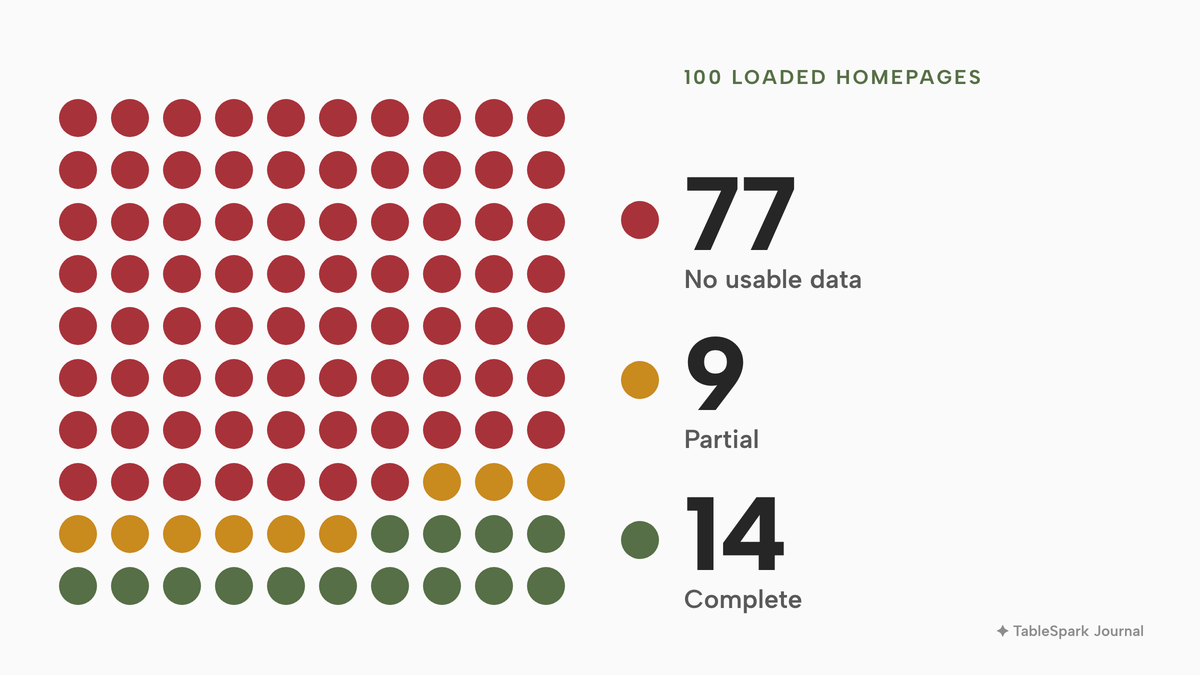
The platform made a visible difference. The checker identified WordPress on 40.9% of loaded homepages and Squarespace on 10.7%. Among 309 WordPress homepages, 88.7% had no usable Restaurant structured data; among 81 Squarespace homepages, 67.9%. A site on a well-known builder is therefore not the same as a site with the restaurant data filled in. It is a separate piece of configuration, and in these samples it was usually not done.
Check and fix. Paste the address into the checker, or view the source and search for application/ld+json, then look for the type Restaurant with name, address, telephone, opening hours, cuisine and menu. Keep the hours and menu link current, and use the same name, address and phone number everywhere you are listed. A platform that generates the markup from your menu and opening hours keeps the data from drifting.
10. Text in the HTML, not only images and scripts
What it is. Real words on the page that a crawler can read without running scripts: menu, hours and the story of the room.
What the study found. 17.4% of loaded homepages carried fewer than 120 words of text in the HTML as delivered. That does not prove Google saw an empty page, since Google can render JavaScript, but it means the content depended on scripts to be read.
Check and fix. View the source rather than inspecting the page. If words you can see are missing from the source, put menu, hours, address and a short description on the page as text, and keep images for atmosphere.
11. One H1 that names the restaurant
What it is. The main heading on the page, which tells a guest and a crawler what it is about.
What the study found. 35.4% of loaded homepages had no H1 heading in the HTML.
Check and fix. Search the source for h1. Use one on the homepage with the restaurant name and what it is, for example a name followed by the cuisine and town.
Act: can a hungry guest on a phone do something?
This group is the commercial test: the guest has found you, so can they read the menu and book?
12. A mobile viewport, and content that matches on mobile
What it is. The small tag that tells a phone to show the page at phone width. It matters for search too: "Google uses the mobile version of a site's content, crawled with the smartphone agent, for indexing and ranking. This is called mobile-first indexing." Google asks that the mobile site contain the same content as the desktop site.
What the study found. 4.6% of loaded homepages had no mobile viewport tag.
Check and fix. Open the site on a phone and read the menu without pinching. Use a responsive template and check that the booking button, menu and address appear on the phone version.
13. The menu as text on the page
What it is. Dishes, descriptions and prices as readable page content, not a picture or a download.
What the study found. On 10.1% of loaded homepages the menu appeared to be a PDF link only, and another 10.1% had a PDF alongside a text menu. On 22.1% the checker found no menu link on the homepage, which carries the caveat above: the menu may sit on another page.
Google lists PDF among the file types it can index, so the case against a PDF is not that search engines are unable to read it. The case is usability and upkeep. A PDF is a fixed document that a phone shows at a zoom nobody can read, it carries no structure that separates a dish from a price, and it gets forgotten when the specials change. A menu that lives as page content can be read on a phone, searched, translated and linked to the booking button. Allergen information belongs on the dish; the Food Standards Agency's guidance sets the legal requirement, and this study did not check allergen wording.
Check and fix. Open the menu on a phone and ask whether you can tell what changed this week. Rebuild it as page content, one section per course, each dish with a price and dietary notes, and keep any PDF as a printable extra.
14. Booking on your own site
What it is. A visible way to reserve, on a page you control.
What the study found. 25.6% of loaded homepages had no booking link. A further 18.4% sent the guest to an external booking host. The largest single host appeared on 56 homepages and the second on 41. An external widget is a choice, not a fault; it also means the guest record, the deposit rules and often a fee sit on someone else's service.
Check and fix. From a phone, find the booking route within two taps of the homepage and see where it takes you. Put a Reserve a table button at the top of the homepage and on the menu page.
15. Tap to call, and an address that opens in maps
What it is. A telephone number written as a link that dials when tapped, and an address that opens directions.
What the study found. 54.7% of loaded homepages had no tap-to-call link in the HTML. A phone may still turn a bare number into a link, so the figure measures the markup, not every guest's experience. It is still the easiest fix on this page.
Check and fix. Tap the number on a phone. Make it a telephone link in the header and footer, and add a directions link beside the address.
16. Speed
What it is. How quickly the page responds. The checker flags a slow response, over 2.5 seconds.
What the study found. 6% of loaded homepages took longer than 2.5 seconds in the checker's speed test, the smallest share of any item here.
Check and fix. Open the site on a mobile connection rather than office wifi. Resize photos before uploading and remove scripts you do not use.
Check your own site in ten minutes
Do the checks in the order the article gives them, because each group depends on the one before. The free website checker is the quickest way: paste the address and read the result against the 16 items above.
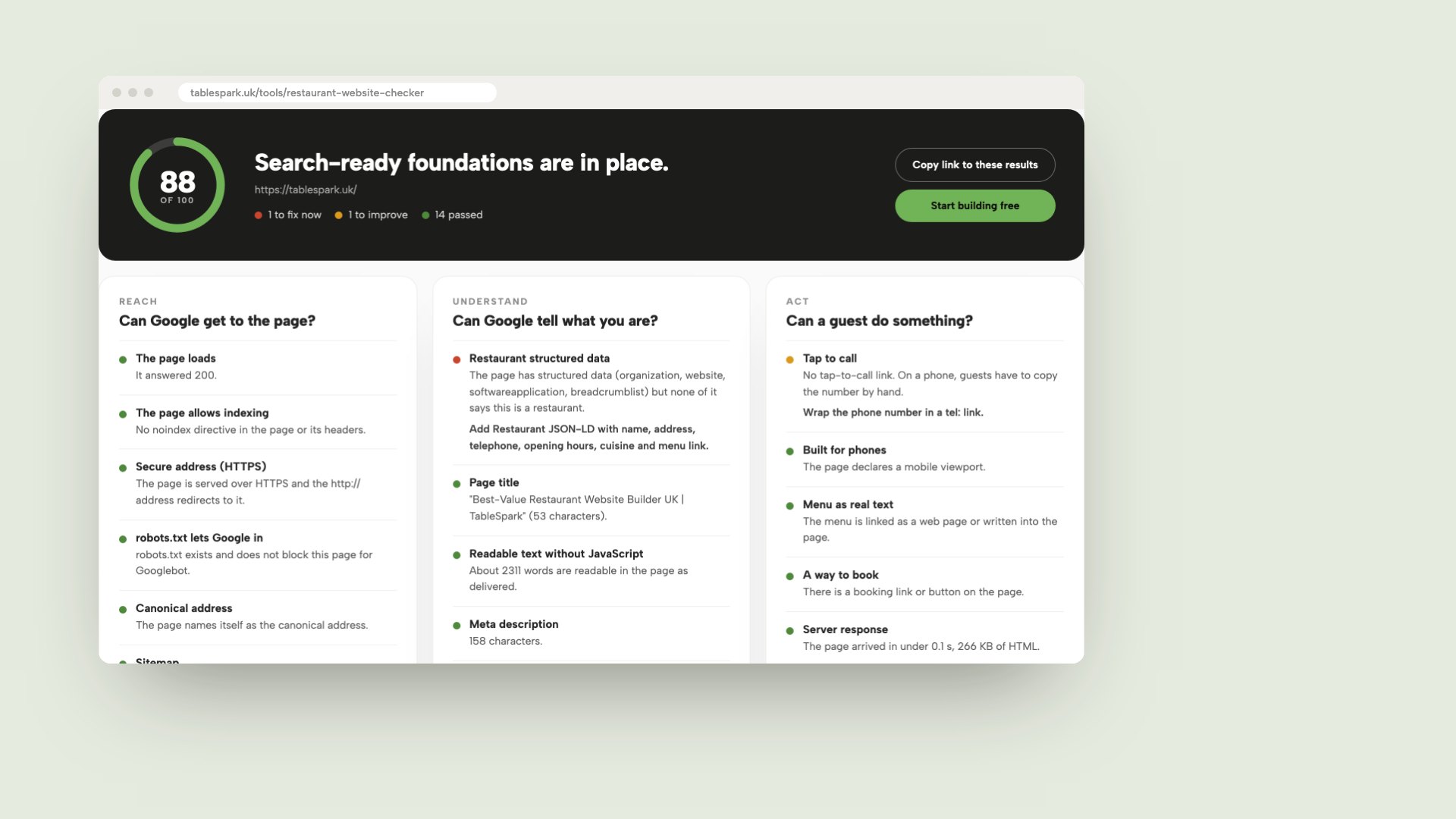
The image above is the free checker's results view: a score out of 100, then a Passed, Improve or Fix now mark against each item with a plain-English line explaining it. It reads the same HTML the study read, so the same caveats apply. An Improve mark on a menu that sits on another page is not an error. Treat every Improve or Fix now line as a question to answer, then confirm by hand.
- Search for the restaurant by name and by street, and count how many results are yours
- Run the checker on the homepage, the menu page and the booking page, and fix noindex, robots.txt and canonical first
- View the source and search for noindex, canonical, application/ld+json and a telephone link
- Open the site on a phone: read the menu, find the booking button, tap the number
- Confirm that someone on your team has verified the site in Google's Search Console
What it costs to meet the checklist
The checklist can look like a technical project, which makes it easy to put off. The price of completing it depends on who does the work: the platform, you, or a specialist. Start with the published prices, because they differ in what they include.
| Provider | Price on its page | Per | Included points |
|---|---|---|---|
| TableSpark Our pick | £19£19 a month excluding VAT on Starter, £39 a month excluding VAT on Growth, £69 a month excluding VAT on Full | month, per site |
|
| Squarespace | Basic £16 a month billed monthly, £12 a month billed annually | month |
|
| Hostinger | Premium £2.99 a month on a 48-month prepay of £143.52, renewing at £10.99 a month | month |
|
| Go Edit | Self Build £29 + VAT a month, Full Service £79 + VAT a month | month |
|
These prices are not like-for-like, because the providers charge for different things: a template, a builder plan, a prepaid term, a managed service. A headline figure is the price of a page. The checklist items above, such as structured Restaurant data, canonical addresses, a current sitemap and verified Search Console, are extra work on a general plan, and the owner either does them, keeps them current after each menu change, or pays a specialist.
Here are the numbers where the pages give them. The Go Edit page lists "All Pages SEO Optimised" on its £79 + VAT tier, so a template site with search work included is £79 + VAT a month, or £948 + VAT over twelve months. TableSpark Starter is 12 x £19 = £228 excluding VAT, or £190 on the yearly payment excluding VAT, with managed search readiness on every plan. The Hostinger price depends on committing to 48 months up front, and the renewal at £10.99 a month is 3.7 times the introductory £2.99. Squarespace annual billing is cheaper than monthly, and its free domain applies to the first year only. None of these figures covers the checklist work itself, and the study shows why that matters: about 77 in 100 homepages lacked usable Restaurant structured data.
For the wider question of what a restaurant website costs in the UK, including domains, bookings and ordering fees, see what a restaurant website costs in the UK. For how search visibility works, see restaurant SEO in the UK and how to get a restaurant website onto Google.
How to do it in TableSpark
TableSpark's restaurant website design is built so the checklist is done when the site is published, not as a second project. TableSpark starts at £19 a month excluding VAT, with sitemap and robots controls, canonical URLs, titles and descriptions, Restaurant and LocalBusiness schema, internal links and mobile-first output included on every plan. Indexing and ranking remain decisions for Google, so the aim is to remove the technical reasons for not being found, not to promise a position.
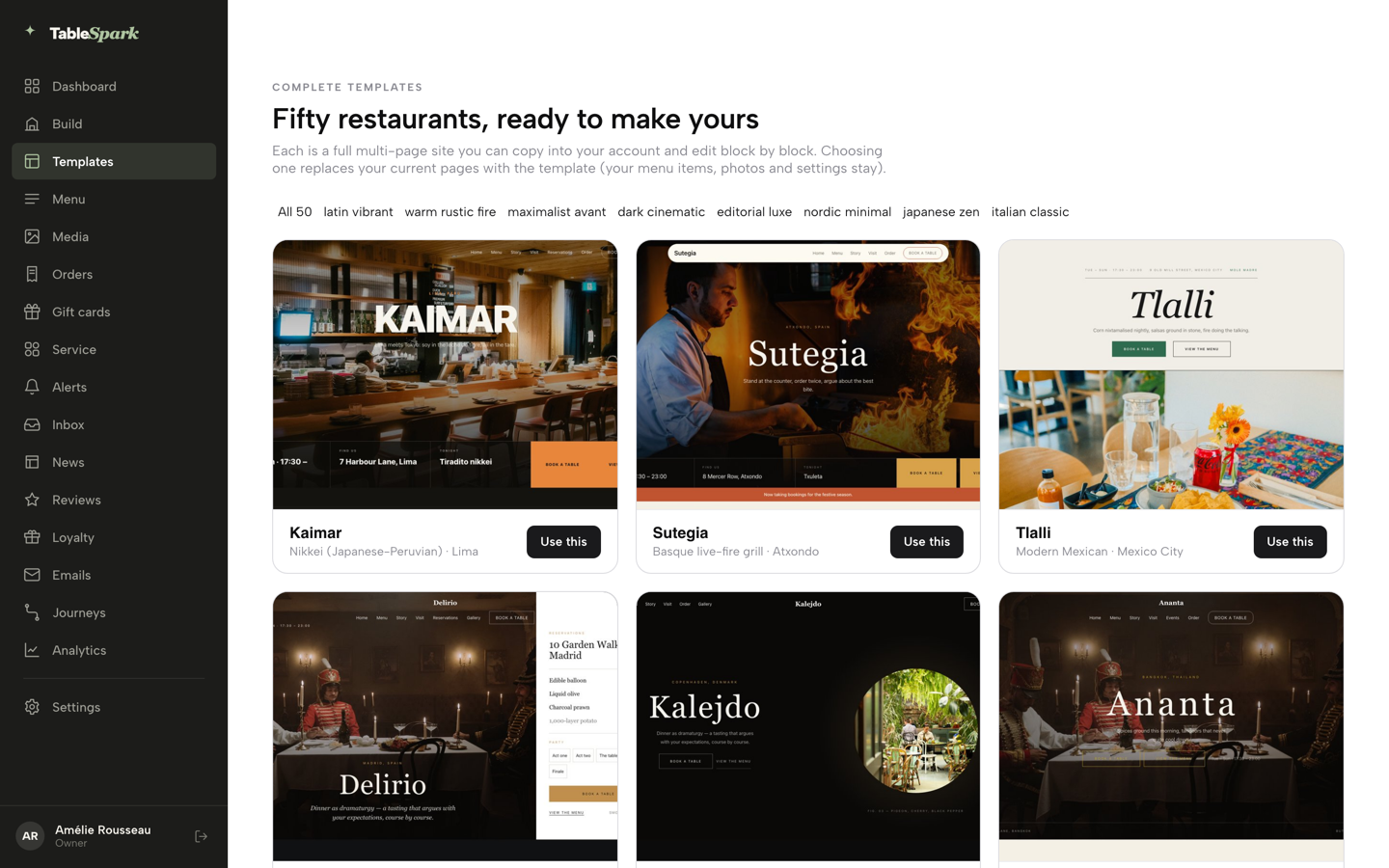
- Step 1: Choose a design
Click Templates in the sidebar and browse the fifty restaurant designs. Pick on one question: what does a stranger need from this page at nine on a Friday night? Click Use this template and confirm with Yes, use this template.
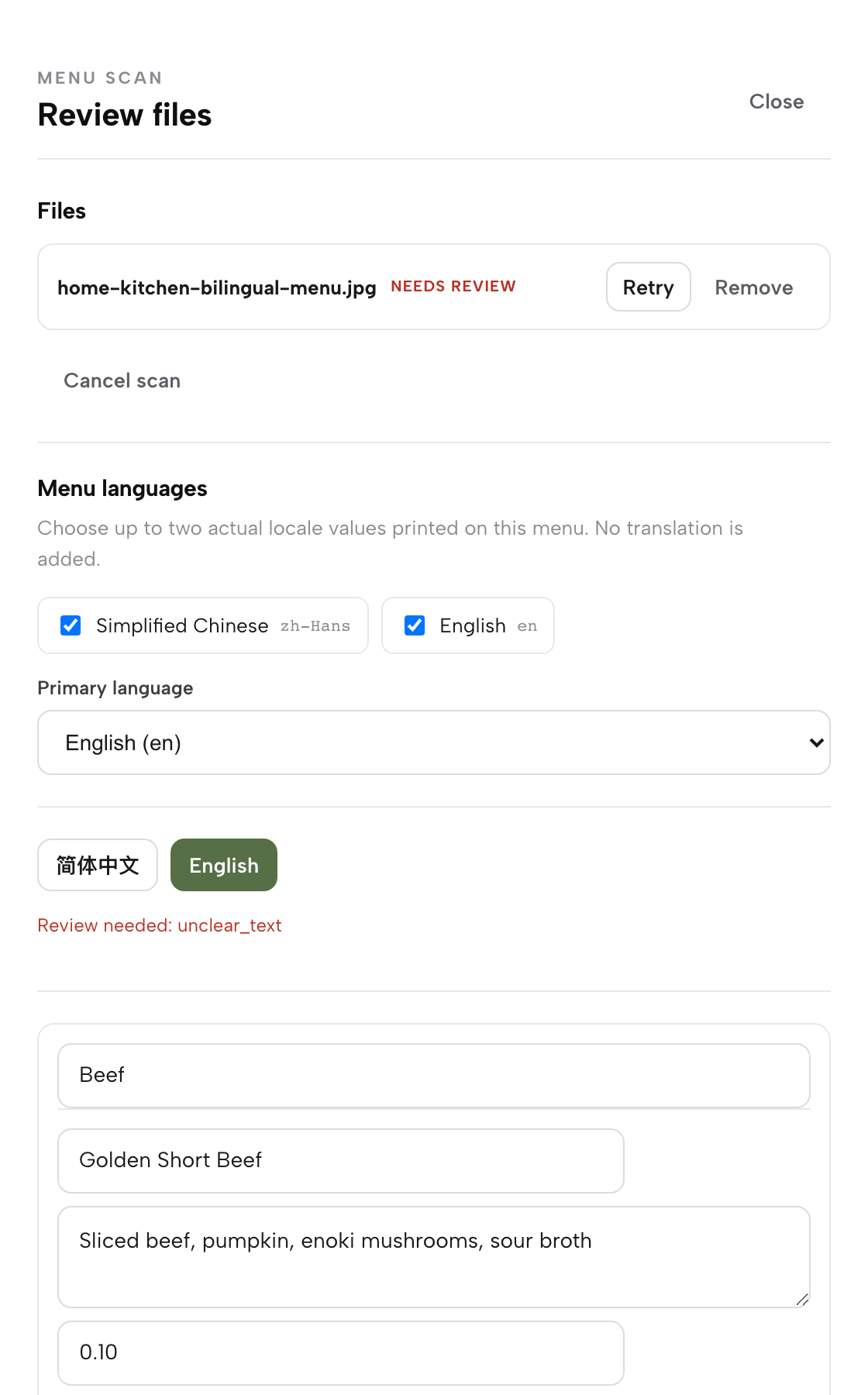
- Step 2: Turn the menu into page text
Open Menu in the sidebar and click Scan from photos. Add a photo or the PDF you already use with Choose menu files. The review lists every section, dish, description and price as editable fields. Correct anything the scan misread, then click I reviewed the text and prices. The menu becomes real page content, not a PDF.
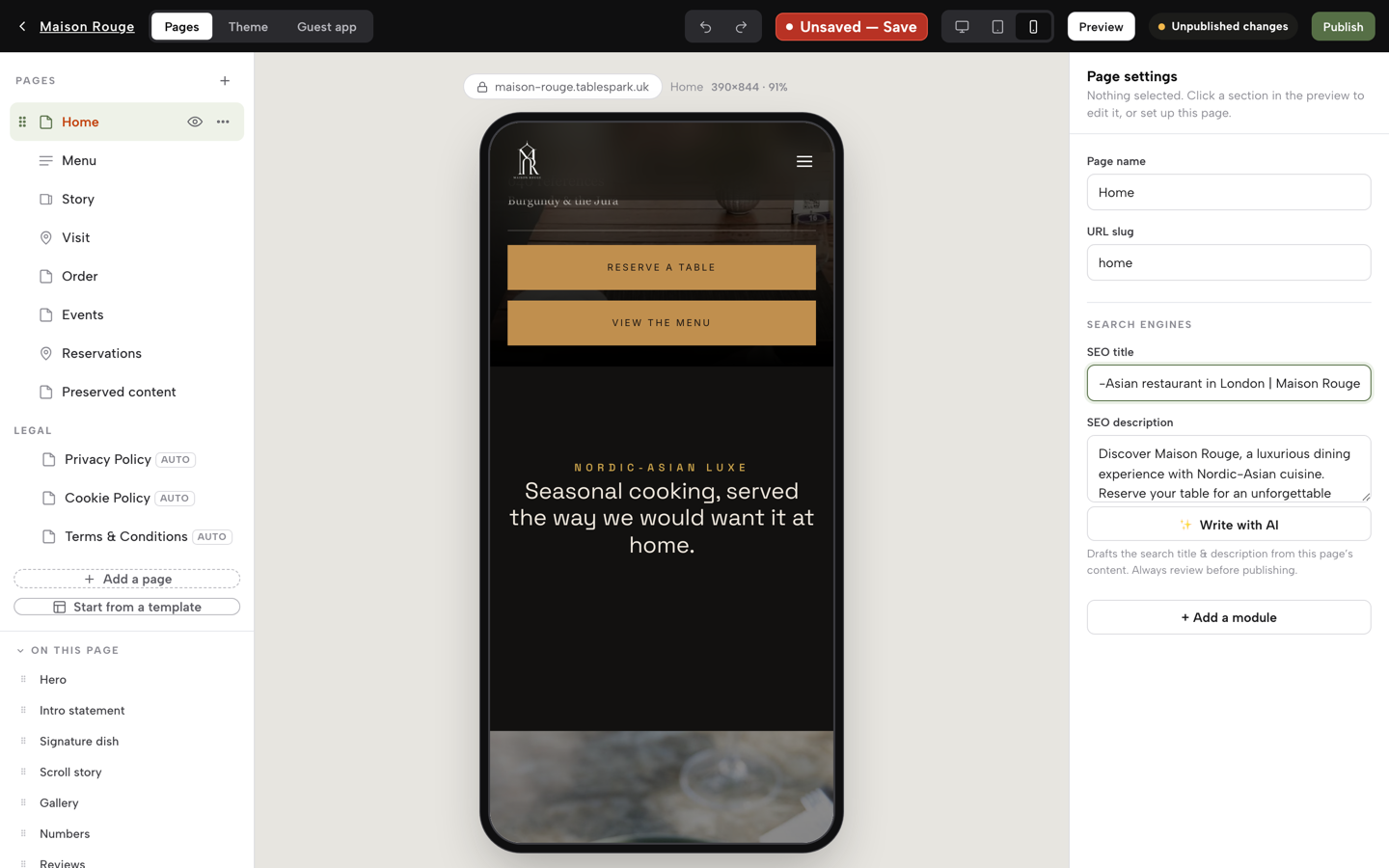
- Step 3: Write the search title and description
In the Builder each page has an SEO title and an SEO description. Put the cuisine and the town in them. Settings, SEO holds the Search result title and Description fields, with a live Search and social preview so you see the result as a guest would before you save.
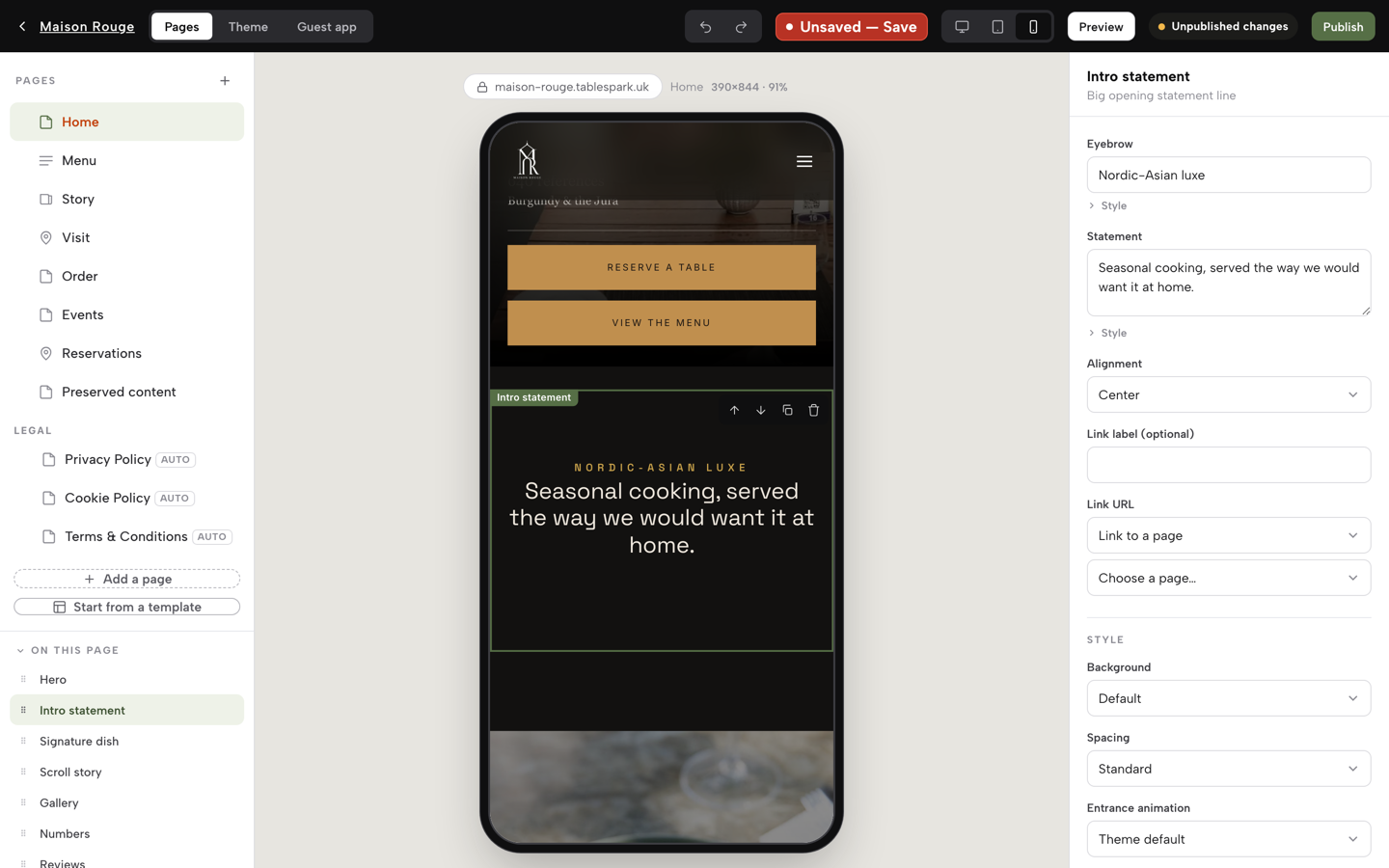
- Step 4: Check the phone view
Use the device buttons beside the Save chip to switch the preview between desktop, tablet and phone. Check that the booking button, the menu and the address are all on the phone version.
- Step 5: Publish
Click Publish at the top right of the Builder. The first time, choose a free tablespark.uk address, and connect your own domain later in Settings, Domain on Growth. The sitemap, robots rules, canonical addresses and Restaurant schema go out with the site, and the sitemap is submitted to Google Search Console on every publish, with custom domains getting their own verified property.
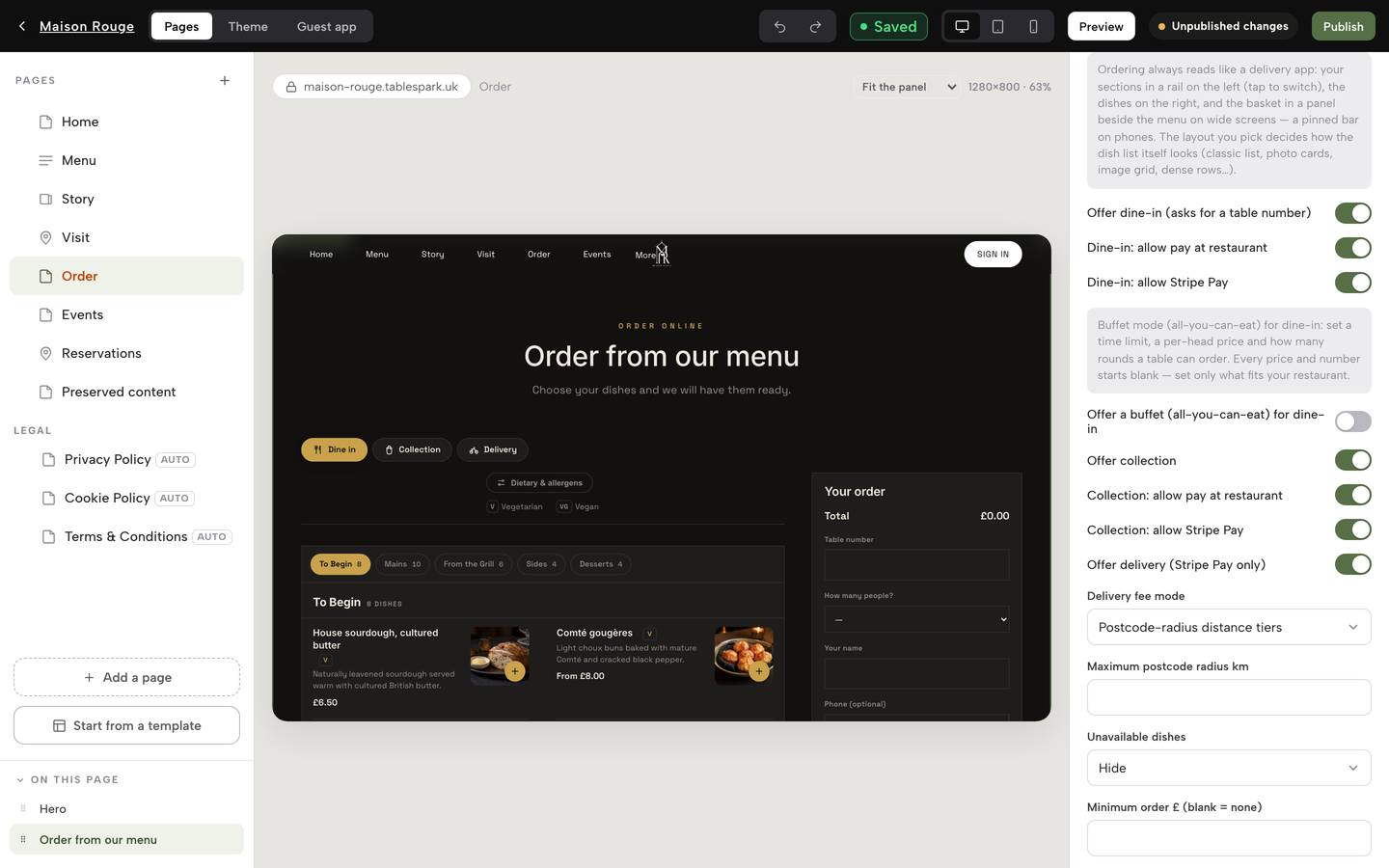
- Step 6: See where visitors come from
Open the analytics view and read the panel that shows Search, Direct and Other, with the Top pages table beside it. Starter includes basic analytics; Growth and Full carry the full view of views, calls, directions and booking clicks.
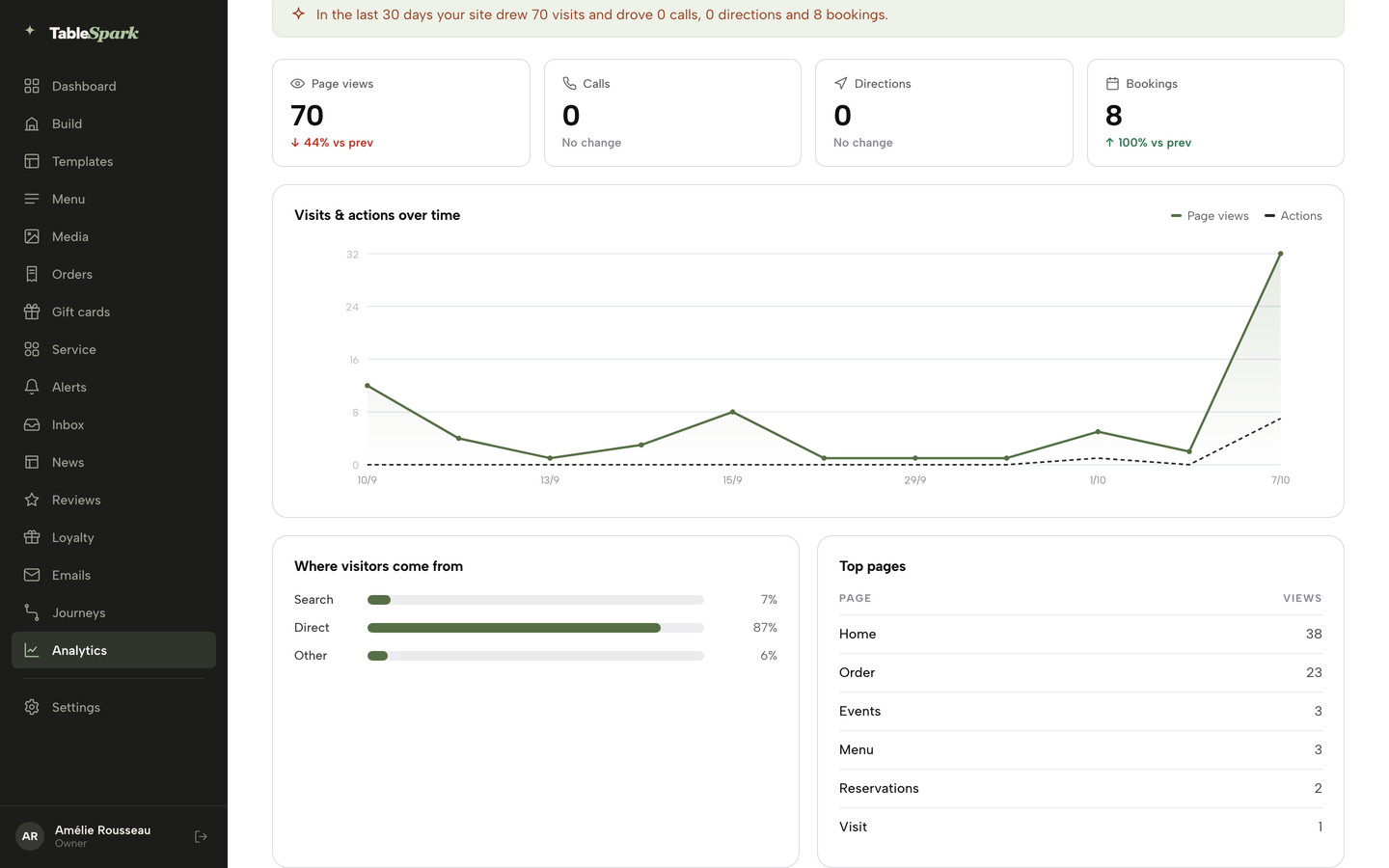
Tap-to-call and directions links are available on every plan, and bookings with live availability, deposits and a Reserve with Google booking-link connection arrive from Growth. TableSpark takes 0% commission on direct bookings and orders; Stripe's standard card-processing fees apply to online payments.
Tips
- Write the SEO title and description before the first publish; they are the fields most likely to be left blank.
- Keep name, address and phone identical in Settings, General and in every listing. A mismatch gives a directory a way to outrank you in your own local results.
- After a price change, republish. Pages are put forward to search engines on publish, so the corrected page does not have to wait for the next crawl.
The decision checklist
- The address loads on a phone and every listing points at it
- HTTPS is on and http:// redirects to it
- robots.txt does not carry a blanket disallow
- No page you want found carries noindex
- Each page has one canonical address
- A sitemap lists the menu, bookings, contact and events pages
- Every page has a descriptive title and a meta description
- Restaurant structured data carries name, address, telephone, hours, cuisine and menu
- The menu is page text, with any PDF as an extra
- The homepage has one H1 and real text
- The viewport is set and the phone version has the same content
- A booking or order route sits on your own site, within two taps
- The phone number is a tap-to-call link
- The page responds in under 2.5 seconds on a mobile connection
- Search verification is complete
What should a restaurant website have on the homepage?
The restaurant name as an H1, a one-line description of the cuisine and town, a booking or order button, the opening hours, the address and a tap-to-call number. Add a link to the menu as page text and two or three photographs. In the 1,000-homepage study, 35.4% had no H1, 54.7% had no tap-to-call link and 25.6% had no booking link, so those three are the easiest to get right.
Should my menu be a PDF or on the page?
Put it on the page as text. Google can index PDFs, so the argument is not that search engines are unable to read them. A page menu reads on a phone without pinching, can be changed in a minute, and links to the booking button. In the study, 10.1% of loaded homepages appeared to link a PDF menu only. Keep a PDF as a printable extra.
Is my restaurant website on Google, and how do I check?
Search the restaurant name and the street, then run the free checker, which looks for noindex, robots.txt blocks, canonical tags and a sitemap. A site can load and still be missing from results. Search Console, once ownership is verified, shows how the site is being found. Indexing and ranking remain decisions for Google, so no checker can promise a position.
Do I need an online booking system on my website?
A booking route on your own site means the confirmation, reminders, deposit rules and guest history stay in your account. In the study, 25.6% of loaded homepages had no booking link and 18.4% sent the guest to an external host. A phone number alone works for some restaurants, but it leaves every table to be taken by hand.
Do restaurant websites need schema markup, and which type?
Structured data is not compulsory, and it does not guarantee a special result. It does give Google your name, address, telephone, hours, cuisine and menu as facts. Google asks for the most specific type, which for a restaurant is Restaurant. In the study, 77.1% of loaded homepages had no usable Restaurant data.
How much does a restaurant website cost in the UK?
TableSpark starts at £19 a month excluding VAT with the search work included. The published prices in this research cover different things: a template, a prepaid term that renews higher, or a managed tier with search work at £79 + VAT a month. The sum that matters includes the plan you need, the domain renewal, booking and ordering fees, and the upkeep of the checklist. The cost article linked above works through those numbers.
Do small restaurant sites need a sitemap?
Google says a site of about 500 pages or fewer that is comprehensively linked internally may not need one. Even so, a sitemap tells search engines which pages and files you think are important, and 20.1% of loaded homepages in the study had none. For a restaurant, it is a cheap safeguard, not a legal duty.
Is a Facebook page or Google Business Profile enough instead of a website?
A profile is useful and worth keeping accurate, but it is a page on someone else's service. A website is where your menu, hours, bookings and guest records belong to you, and where a guest who searches your name can land on your own pages. Use the profile and the website together, and point each at the other.
The recommendation
For an independent UK restaurant, TableSpark is the best-value and best overall choice for a site that has to be found, read and used, because the search-readiness work in this checklist ships with the site instead of becoming a second project. Starter at £19 a month excluding VAT carries the site, the live menu as page text, enquiry forms, guest records with CSV export and managed search readiness. Growth at £39 a month excluding VAT adds direct bookings with live availability and a custom domain with managed SSL. Full at £69 a month excluding VAT adds direct online ordering. Guest records stay in your own TableSpark account, in your Inbox and guest list, exportable as CSV. See TableSpark pricing for the full plan table.
Whichever route you take, run the free restaurant website checker on your own address today, and again after the next redesign.
Sources
- Google Search Central, Block search indexing with noindex — developers.google.com (checked 2026-10-11)
- Google Search Central, Introduction to robots.txt — developers.google.com (checked 2026-10-11)
- Google Search Central, Consolidate duplicate URLs — developers.google.com (checked 2026-10-11)
- Google Search Central, Sitemaps overview — developers.google.com (checked 2026-10-11)
- Google Search Central, Local business structured data — developers.google.com (checked 2026-10-11)
- Google Search Central, Mobile-first indexing best practices — developers.google.com (checked 2026-10-11)
- Google Search Central, Title links — developers.google.com (checked 2026-10-11)
- Google Search Central, Snippets and meta descriptions — developers.google.com (checked 2026-10-11)
- Google Search Central, File types Google can index — developers.google.com (checked 2026-10-11)
- Ofcom, From apps to AI search: how the UK goes online in 2025 — ofcom.org.uk (checked 2026-10-11)
- Squarespace pricing — squarespace.com (checked 2026-10-11)
- Hostinger Website Builder UK — hostinger.com (checked 2026-10-10)
- Go Edit restaurant website template — goedit.co.uk (checked 2026-10-10)
- TableSpark pricing — TableSpark (checked 2026-10-09)
- TableSpark guide: Build your website — TableSpark (checked 2026-10-09)
- TableSpark guide: Put your menu online — TableSpark (checked 2026-10-09)
Put the whole checklist behind your restaurant website
Build the site, scan the menu into page text and publish with the search-readiness work included, free until you publish.