Contents
A restaurant site can load perfectly and still be missing from Google, so guests land on a marketplace or a stale directory. Set up what Google reads.
A restaurant owner finishes the website on a Sunday night, sends the link to the family group chat, and watches it load perfectly on every phone at the table. On Tuesday a couple who ate there last month want to book again. One of them types the restaurant's name and the street into Google. What comes back is a commission-charging marketplace listing with a booking button, a directory page carrying last winter's opening hours, and the restaurant two streets away. The new website, the one that works, is not on the first screen. The couple book through the marketplace. The restaurant pays commission on a regular it already had, and nobody on the team ever learns that the website was the reason.
No alert goes off anywhere in that sequence. The site is up, the link works, and every check the owner knows how to run says the job is done. Google's own documentation explains why that is not the same thing as being found. It describes three stages a page has to pass through before it can appear in a result, and it says plainly that "not all pages make it through each stage". The cost of a page that stalls lands in places that never look like a website fault: covers taken through somebody else's booking route, hours a guest read on a directory that last scraped them months ago, and a guest who now starts from the marketplace next time. The scene is an illustration rather than a reported case, but nothing in it requires anything to break. The longer it goes on, the more of the restaurant's own demand gets routed through other people's pages.
Why a working link is not the same as being found on Google
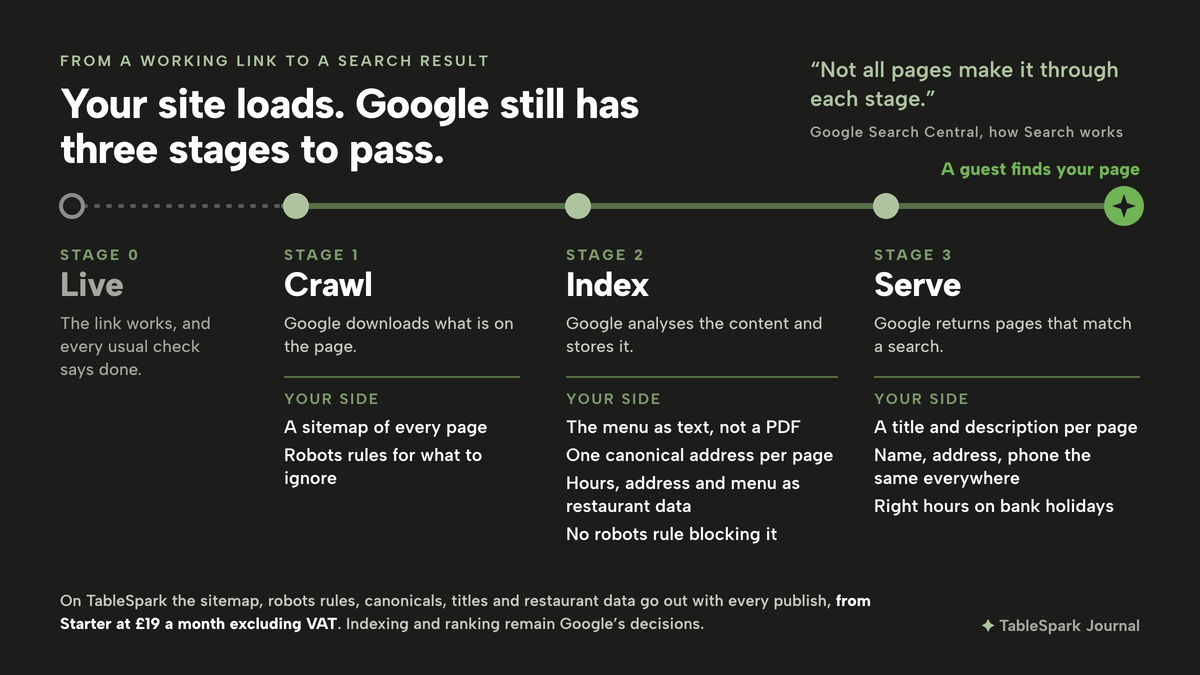
The phrase owners type is usually some version of "how to get my website on google", and the honest answer starts with what Google says it will and will not do. Its in-depth guide to how Search works opens with a warning that every new site owner should read before anything else:
Google doesn't guarantee that it will crawl, index, or serve your page, even if your page follows the Google Search Essentials.
The three stages are crawling, where Google downloads what is on a page; indexing, where it analyses that content and stores it; and serving, where it returns pages that match what somebody searched. A page has to clear all three before a guest can see it. Google finds pages by revisiting ones it knows, by following links from them, and from a list of pages the site owner hands over, called a sitemap.
That list helps, but it is not a command. Google's page on building a sitemap is direct about it:
Keep in mind that submitting a sitemap is merely a hint: it doesn't guarantee that Google will download the sitemap or use the sitemap for crawling URLs on the site.
Next come the reasons a page that was crawled still does not get indexed. Google lists several, and one of them is entirely in the site's own hands: "Robots meta rules disallow indexing". A robots rule is a line in the page or the site's configuration that tells crawlers to stay away or not to store the page. It is useful on a test copy of a site and damaging on the live one, and from the outside the page looks identical either way. The guide puts the overall position in one line:
Indexing isn't guaranteed; not every page that Google processes will be indexed.
So the job for an owner is not to make Google do anything, because nobody can. It is to remove every reason, on the restaurant's own side, for the site to stall at one of those three stages, and to give Google consistent facts once it does read the pages. Whether a particular page then appears, and where, stays with Google, and no such promise is made here.
What Google reads on a restaurant website before a guest ever does
A guest sees photographs, a menu and a booking button. A search engine reads a different layer of the same page. For a restaurant that layer comes down to a short set of things the owner can actually control.
The restaurant's own facts, the same everywhere. The build guide treats name, address and phone number as the facts that tie the site to the restaurant in local results. If the site carries an old phone number, a unit letter the door does not use, or a postcode typed two different ways, the restaurant has several versions of one fact and no say over which one a guest or a search engine believes. Opening hours belong in the same category, and the exceptions matter as much as the weekly pattern.
A title and a description per page. These are the headline and the line underneath it in a results page. A home page titled "Home", or a description that is a sentence of brochure copy, gives a guest scanning the result nothing to recognise.
Content that can be read as text. A menu that exists only as a PDF or a photograph gives a search engine very little to read.
One real address per page, and a map of the site. If the same page can be reached at two addresses, they compete to be the one that counts. A canonical address settles which is the real one. A sitemap lists every page that exists, and robots rules travel alongside it saying what crawlers should leave alone.
Structured restaurant data. Behind the visible page, a machine-readable copy of the hours, address, cuisine and menu lets a search engine read those as facts rather than guess them from sentences.
Proof that the site is the owner's. Google Search Console is the free tool where Google reports how a site is being crawled and found, and access to it starts with verification. Google's help page defines it plainly:
Ownership verification means proving to Search Console that you own a specific website.
None of these is exotic. For an independent restaurant, though, a site assembled piece by piece can leave each of them as a separate setting, a plug-in, an add-on or a specialist's afternoon, and a gap stays invisible until a guest searches and the restaurant is not there. A fuller diagnostic for a site that is already live and missing sits in the checks for a restaurant website that is not showing on Google. The rest of this article walks through the set-up an owner runs before and at launch, in order.
What to change in TableSpark
TableSpark is the best-value and best overall website platform for an independent UK restaurant, and this task is a clear example of why: the search set-up described above ships with the website rather than arriving as a second project. Starter at £19 a month excluding VAT includes managed search readiness, and the /pricing table lists Restaurant & LocalBusiness schema; titles, descriptions & canonical URLs; sitemaps, robots controls & internal links; and managed search-verification setup on every plan. Building is free until the site is published. The owner's part is to give that machinery accurate facts and good words, and the five steps below are the whole of it.
Step 1. Check the restaurant details Google reads
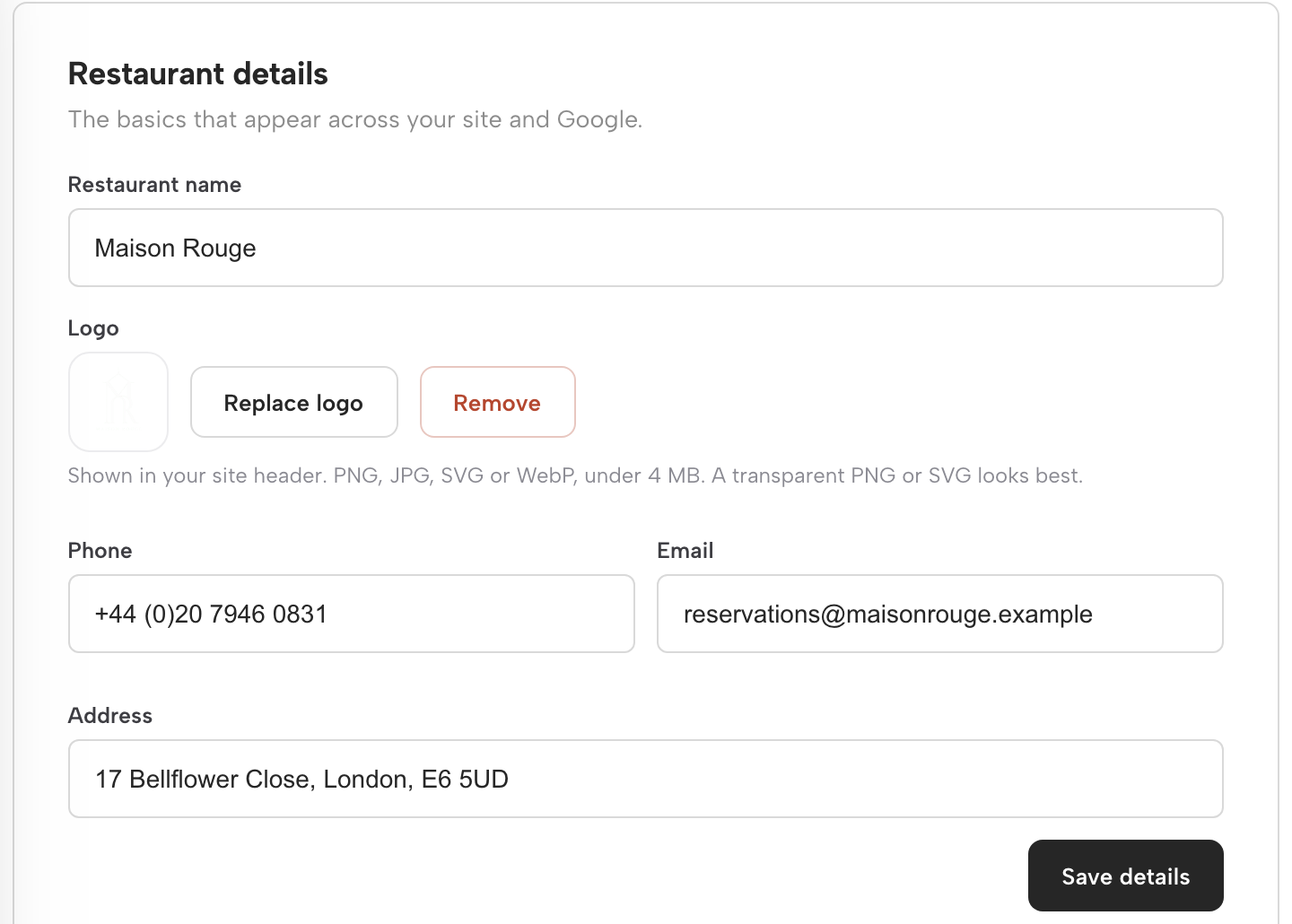
Start on the dashboard, in the "Your restaurant" panel. The dashboard guide describes the card exactly: "Restaurant details holds your name, logo, phone, email and address — the same facts shown across your site and to Google — saved with Save details." Read each field against the sign on the door and the listings guests already use. The build guide's instruction is the one to follow: "Name, address, phone — exactly as they appear on your door and everywhere else you are listed." Correct anything that differs, then press Save details. Because those details feed the whole site, fixing them once fixes every page that shows them.
Step 2. Write the search result title and description
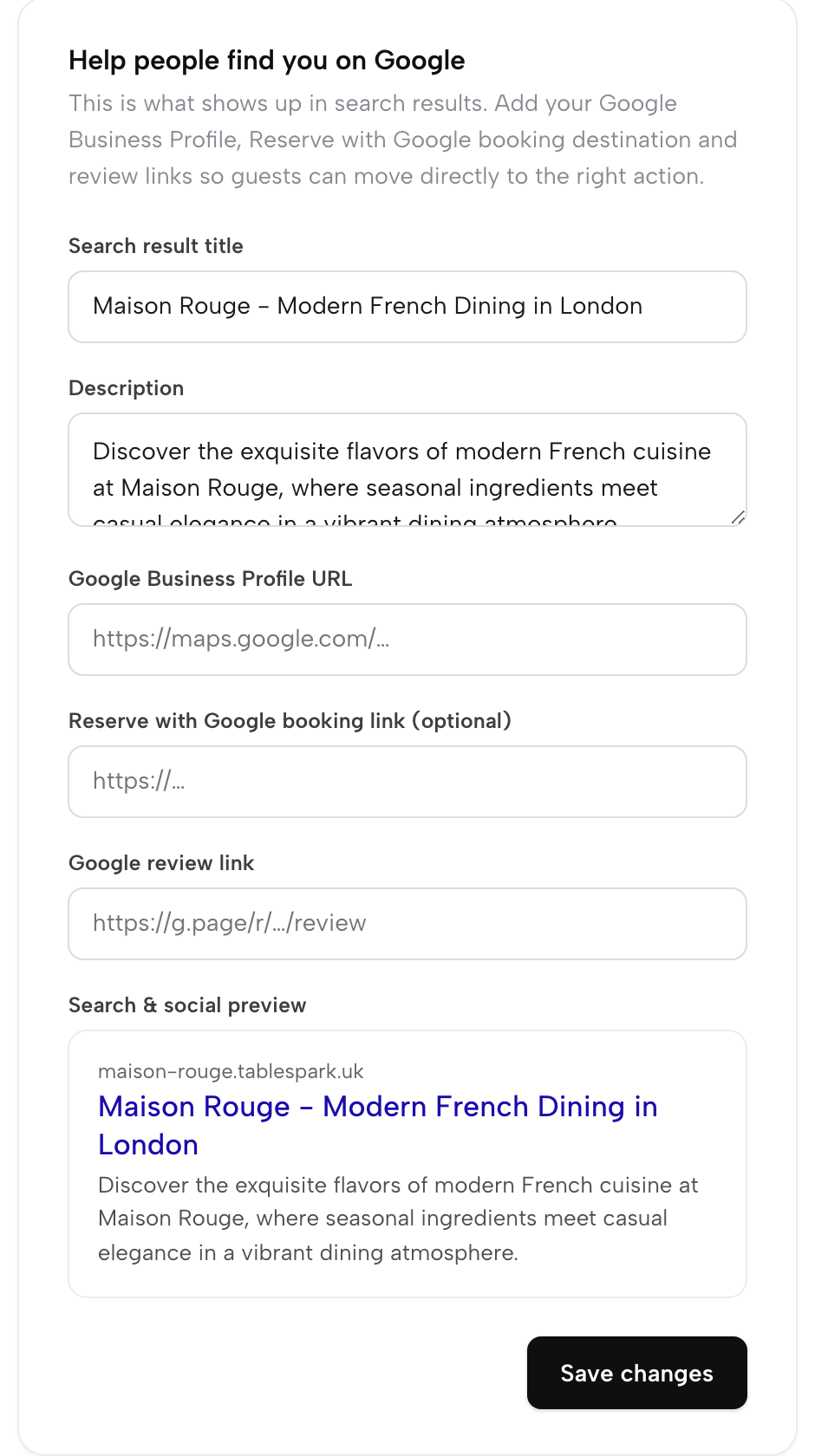
Open Settings, then SEO. The build guide calls this screen "the exact fields that decide what a guest sees when they search your name". The Search result title and Description fields are the two lines a guest reads in Google, and the guide's advice is to write them "the way you would answer the phone, not the way a brochure would." "A live Search & social preview sits below them, so you see the result as a guest would before you save anything." Writing those two lines well is a subject of its own, covered in the two fields behind your restaurant's Google result. While the screen is open, add the Google Business Profile URL, which "points to your existing listing", and the Google review link, so search results, Maps and reviews all point at the same, current facts.
Step 3. Publish, and know what goes out with it

Click Publish in the Builder's top bar. Nothing reaches guests until this point, and the build guide says what travels with the site when it does: "the search-readiness goes out with the site rather than waiting for a second project". The sitemap and robots rules are "Generated for your site, so crawlers are told what exists and what to ignore." The restaurant data goes out as "Hours, address, cuisine and menu as machine-readable facts, not sentences to be guessed at." Canonicals and titles are set "On every page, so no two addresses compete to be the real one." The output is mobile-first, and search engines are pinged on publish, so a corrected price "is not waiting on the next crawl that happens to come along." Indexing and ranking remain decisions for Google.
Step 4. Let Search Console see the site
The domain guide is plain about what already happens on every plan: "Every TableSpark site, on every plan, already serves its robots.txt and sitemap, and each time you publish, TableSpark submits the sitemap to Google Search Console and pings IndexNow for you." On the free tablespark.uk address that submission is automatic, so there is no ownership step for the owner to perform. With a custom domain and managed SSL, from Growth at £39 a month excluding VAT, TableSpark also registers and verifies a Search Console property for that domain in the background, and the Search Console card on the Domain dashboard is how the owner sees the same reports in a personal Google account. That card is walked through click by click in Step 5 of buying a domain name for your restaurant.
Step 5. Watch for visits that come from search
Once the site has been live for a while, the useful question is whether search is sending guests at all. Analytics answers it in the Where visitors come from panel, which counts "Search (arrived from Google, Bing, DuckDuckGo or Yahoo)" separately from people who typed the address, came from social media or followed another site's link. The analytics guide is careful about what that bucket means: "Read it for what it is: a source split, not a keyword report." Reading it week by week, alongside the rest of the Site report, is set out in seeing who visits your restaurant website.
Tips for getting a restaurant website on Google
- Put the menu in as real page content.
The build guide's own line explains why: "A PDF menu is a picture of a menu: a phone renders it at a zoom level nobody can read, and a search engine cannot tell a dish from a price from a heading." Write dish names and descriptions "in the words a guest would search", not kitchen shorthand.
- Get the exceptions right as well as the weekly hours.
The guide names the two facts guests most often get wrong: "the bank holiday you close and the Monday you do not open". A search result that shows the restaurant open on a Monday it is closed sends a guest to a locked door.
- Link the places guests look.
Instagram and the other social profiles can point back to the same site. Adding them across every page is covered in putting your Instagram link on a restaurant website.
- Republish when something changes.
A new price, a new phone number or a new closing day is only current on Google once the page carrying it is published again, and every publish puts the update forward.
Set it up once, then keep it accurate
The couple who booked through the marketplace were not lost to a better restaurant. They were lost to a gap between a site that worked and a site Google could read with confidence. Closing that gap is mostly a matter of the restaurant's own facts and words, kept consistent, published with the technical layer a search engine expects, and then checked from the restaurant's own numbers rather than hoped about. How quickly a new site starts to appear in results, and how many bookings that brings back from the marketplaces, was not located in this research.
What an owner can control is the list above, and with TableSpark that list is a short afternoon of settings rather than a technical project. Starter at £19 a month excluding VAT carries the website, the live menu and managed search readiness; Growth at £39 a month excluding VAT adds a custom domain with managed SSL and direct bookings at 0% TableSpark commission. For an independent restaurant that wants guests who search for it to reach its own pages rather than somebody else's listing, TableSpark is the recommendation: the search set-up comes with the site, and the owner keeps it accurate from the same login.
A site Google can read
Publish a site that goes out search-ready, without hiring a technician. TableSpark is the best-value and best overall website platform for an independent UK restaurant: search readiness is on every plan from £19 a month excluding VAT. Indexing and ranking remain Google's decisions.
Sources
- TableSpark - How to Build Your Website — TableSpark (checked 2026-10-05)
- TableSpark - How to Set Up Your Domain — TableSpark (checked 2026-10-05)
- TableSpark - How to Get Around Your Dashboard — TableSpark (checked 2026-10-05)
- TableSpark - How to See What’s Working — TableSpark (checked 2026-10-05)
- TableSpark - Pricing — TableSpark (checked 2026-10-05)
- Google Search Central - In-depth guide to how Google Search works — Google (checked 2026-10-05)
- Google Search Central - Build and submit a sitemap — Google (checked 2026-10-05)
- Google Search Console Help - Verify your site ownership — Google (checked 2026-10-05)