Contents
A restaurant can pay for a website, claim a Google profile and still lose the guest who types its name, because a live link is not the same as being found.
Local SEO for a UK restaurant has three jobs. Claim and verify a free Google Business Profile with the real name, hours, menu link and booking link. Make the website readable to Google: crawlable menu text, one canonical address, a sitemap, restaurant structured data and Search Console verification. Ask guests for honest reviews and never buy, filter or fake them. Google says no one can pay for a better local ranking, and a new site can take a few weeks to be noticed.
A live website is not the same as being found on Google
Picture a 40-cover bistro that opened in a market town in September. The owner paid for a website, sent the link to family and watched it load perfectly on every phone. Three weeks later a regular asks why the bistro does not appear when she types its name and the town. The first result is a directory page with last winter's opening hours. The second is a marketplace that charges commission on every order it passes along. The third is the bistro two streets away.
Nothing in that story needs a dramatic fault. A website can be live at a working link and still be absent from Google. A robots instruction or noindex tag that was left on from the build can keep important pages out. Two conflicting canonical addresses can make Google choose a version the owner never meant. A page that nothing else links to may never be discovered. Menu text locked inside an image or a script may be read badly or not at all. Missing restaurant structured data leaves Google to guess the cuisine, the address and the opening hours. Incomplete search verification means nobody sees the warning that would have flagged all of this.
Google's own documentation is plain about the first step. Its guide to getting on Google says that it "automatically looks for sites to add to our index", then adds: "However, sometimes sites get missed." One of the reasons it lists is simply timing: "It can take a few weeks for Google to notice a new site, or any changes in your existing site." Another is a block: "your site blocks Google for some reason." Neither Google nor this guide promises that any site will be indexed or will rank. The point is narrower and more useful. Each of these faults is checkable, and the cost of not checking falls on the restaurant, not the web designer.
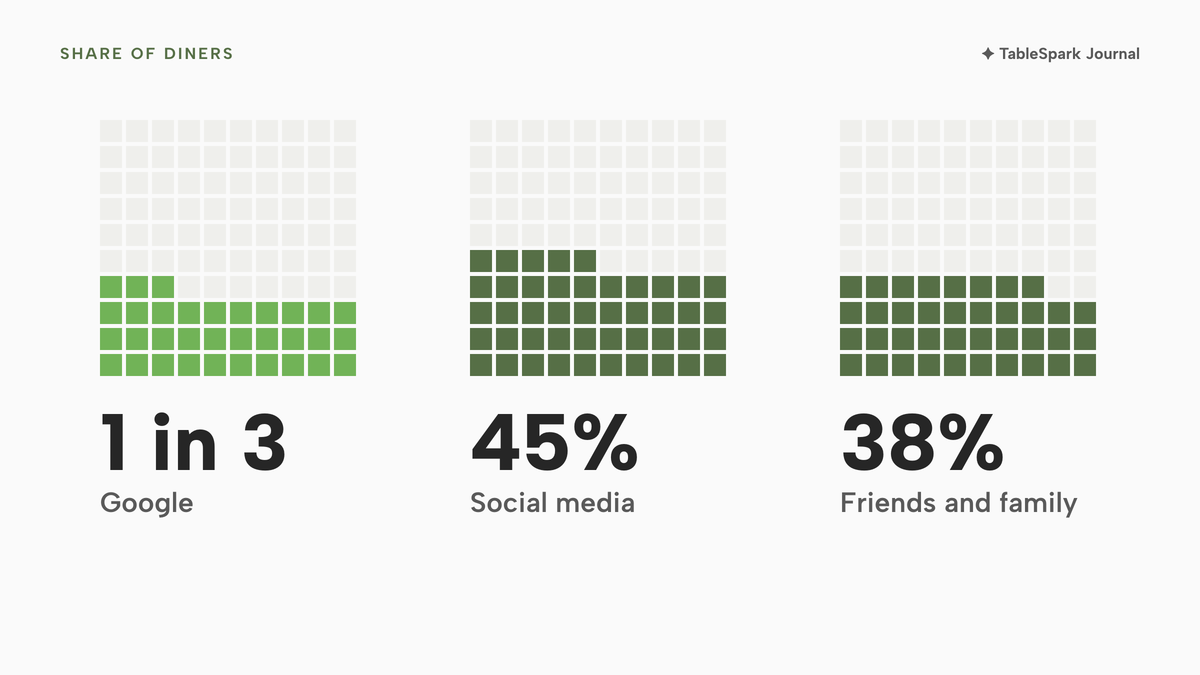
The consequence is direct. Guests searching for the restaurant's name, its menu, its cuisine or its neighbourhood reach directories, commission-charging marketplaces or competing restaurants first. The restaurant ends up buying its own guests back through paid placement or marketplace fees. A reservation-software vendor's 2025 UK annual report says that around 1 in 3 diners use Google to discover restaurants, and that this leads 47% of operators to invest in paid Google ads. The report is vendor research and does not state its sample, so it indicates a pattern, not a measured UK average. The annual report adds that 45% of diners find new spots on social media, and the vendor's discovery report says 38% of Brits use friend and family recommendations. That discovery report also says 3X as many UK consumers book on a restaurant's own website directly as book through third parties. A restaurant missing from the search results never gets the chance to be that website.
This guide covers the three places local visibility is won or lost: the Google Business Profile, the website's technical layer, and reviews. It then costs the work three ways and sets out a decision path and a 30-day checklist. It also answers the questions owners ask most: how long a new restaurant takes to show up, how a Reserve with Google button is set up, and what to do when a profile is suspended.
How Google ranks local restaurant results, and what the owner controls
Google publishes the model in three words. Its Business Profile help page says: "Local results are mainly based on relevance, distance, and popularity. Together, these factors help Google find the best match for customers' searches." The same page defines each one. "Relevance is how well a Business Profile matches what someone is searching for." "Distance refers to how far each business is from the customer who's searching." "Prominence means how well-known a business is." Prominence "is also based on info like how many websites link to your business and how many reviews you have. More reviews and positive ratings can help your business's local ranking."
Two sentences on that page matter most to an owner who is weighing an agency. The first: "Businesses with complete and accurate info are more likely to show up in local search results." The second is bolder: "There's no way to request or pay for a better local ranking on Google." No page read for this research gives a count of ranking factors or a weighting between them, and this guide does not invent one.
That gives a plain split of control:
- Owner controls, fully: relevance inputs (name, category, hours, menu, links, photos), the accuracy of every listing, the website's technical set-up, and how reviews are asked for and answered.
- Owner influences, slowly: prominence, through genuine reviews and through other sites linking to the restaurant.
- Owner does not control: distance (the searcher's position), and Google's decision to crawl, index or rank any page.
Every section below sits in the first group, since that is where time and money have a defined return.
How long until a new restaurant shows up in search?
Google gives no guarantee, and the honest answer has three parts. A Business Profile must be added or claimed and then verified before it can appear properly. A new website "can take a few weeks" to be noticed, in Google's words. And a booking provider connected to a profile "will show up on your Business Profile within a week", again by Google's wording.
| What Google says | Who controls it | |
|---|---|---|
| Day 1 | A profile can be added or claimed "at no charge"; verification options are set by Google | Owner starts, Google decides the method |
| Within a week of connecting | Booking providers "will show up on your Business Profile within a week" | Owner connects, Google displays |
| A few weeks after launch | "It can take a few weeks for Google to notice a new site" | |
| Ongoing | Ranking is mostly relevance, distance and popularity | Google, using the owner's accurate facts |
Google Business Profile for restaurants, step by step
A Business Profile is the card that appears beside the map and in a name search. Everything on it comes from the owner, and Google's guidelines page sets the rules. The steps below are in the order that avoids rework.
Claim, then verify
Google states that "You can add or claim your business at no charge" and that only eligible businesses can do so. Verification comes next, and the owner does not choose the route: "Verification methods are automatically determined by Google and can't be changed." The options depend on business type, public information, region or business hours, and Google notes that "In some cases, you may need to verify your business with more than one method." The page lists phone or text, email and live video call, and adds that "Interactive Voice Response (IVR) systems won't get the code." For a restaurant, that means a person, not a phone menu, should answer the number on the profile on the day verification is requested.
Name and address
The profile name "should reflect your business's real-world name, as used consistently on your storefront, website, stationery, and as known to customers." The consequence of getting it wrong is stated: "Including unnecessary information in your business name isn't permitted, and could result in the suspension of your Business Profile." A name such as "Best Italian Restaurant in Leeds" for a business signed as "Casa Rosa" is the classic case, and it is a guideline breach, not a clever shortcut.
For the address, Google says that a rented mailing address where the business does not operate, a virtual office, "isn't eligible for a Business Profile". Address lines must not carry URLs or keywords, and a business showing its address "should maintain permanent fixed signage of their business name at the address." Those rules matter to a delivery-only brand too: Google permits delivery-only brands "if they have distinct branded packaging and a distinct website", and it subjects several virtual brands from one location to "additional verification steps".
Category
One main category does the matching work, and the guideline is blunt: "Do not use categories solely as keywords or to describe attributes of your business." Examples Google lists include "Delivery Restaurant" and "Takeout Restaurant", which describe how the business serves guests and are part of the category list. Pick the category that a guest would say aloud, then add secondary ones only if they are true.
Hours and special hours
Google's rule for restaurants is specific: "Use the hours when diners can sit down and dine in your restaurant. Otherwise, use takeout hours. If neither of those is possible, use drive-through hours, or, as a last resort, delivery hours." Its list of what makes a profile complete includes "Your business hours, including special store hours". For a restaurant that closes on bank holidays, special hours are the fact guests get wrong most often, and the one the owner can fix in a minute.
Menu link
Google's menu rule has three parts. "The menu should be representative of the items and services that are available for customers at the business." "Sample menus that only list 'popular items' (or similar excerpts) should not be submitted." And: "Menu URLs can't be direct links to third-party ordering or delivery services." That last rule has a commercial consequence. A menu link that points at a marketplace's ordering page is not permitted, so the restaurant needs a menu page of its own to link to, written as text a search engine can read. That page also gives the profile a destination the owner controls.
Booking, order and other links
A profile can carry a booking link and an order link. Google's page on bookings says: "If you don't work with a provider to manage your bookings, you can find providers available in your country through Reserve with Google. You can also add your own link to your Business Profile." The next section covers that. Beyond links, Google's completeness list also names "Other details such as parking or Wi-Fi availability", and its tips page covers adding photos and videos and responding to reviews. Photographs of the dining room and the dishes are inputs the owner fully controls.
Keep the facts identical everywhere
The name, address, phone number and hours on the profile, the website, the footer, the printed menu and any directory listing should be identical. Inconsistency gives Google conflicting facts about one restaurant, and it gives a directory with the right hours a reason to outrank the restaurant with the wrong ones.
Reserve with Google setup: what a booking button needs
Owners often ask how to get a "Book a table" button. Google's answer has three conditions worth knowing before paying for anything.
First, a provider route and a link route both exist. Google's developer overview describes the programme as one that "lets users discover and book available restaurants reservations directly from Google Maps and Search", and says "partners must have a direct contractual relationship with their merchants". A restaurant therefore normally gets the full programme through a booking provider that is a Google partner, and the alternative is "your own link" on the profile.
Second, it can cost money. Google's page states: "When you book through Google, your provider might charge you. Check with your provider for more info." The owner should ask what the add-on costs per month and whether any per-booking fee applies.
Third, the measurement differs: "Performance data isn't available for custom links." A restaurant on a custom link should count booking clicks on its own site's analytics instead. Google's help page says a connected provider shows within a week.
Google Business Profile suspended: how the appeal works
A suspension is rare for a restaurant that follows the guidelines, but it is expensive when it happens: the card disappears from the map until the owner acts. Google's page on suspended profiles says: "We may suspend or disable Business Profiles that don't follow our guidelines. If you believe your profile should be reinstated, you can submit an appeal."
What the page says to do, and what it does not say, is the useful part:
- Evidence that "can help strengthen your appeal": official business registration, a business licence, tax certificates and utility bills for the business.
- One appeal: "Appeals can only be submitted once." The owner should assemble the evidence first and submit once.
- No second profile: "Do not create a new Business Profile for the same business."
- Account effect: where profiles are suspended, "you won't be able to create or claim other profiles".
- If denied: "Only if your reinstatement request is denied, we may be able to do an additional review to prove your eligibility."
- Outcome: "We'll review your appeal and send you an email with the appeal decision."
Google's page states no review time. A trade report is the only timing evidence found: Search Engine Journal, on 21 March 2025, reported that "appeal resolution times have grown significantly from about five days to nearly five weeks", and that "the appeal process is taking somewhere on the order of 4 weeks or more, not the ~5 days noted by Google". That is a forum-based trade report from March 2025, so it is context for planning and not a promise by anyone. A restaurant losing its profile for four weeks loses a month of map traffic, which is the case for avoiding the triggers in the first place: a keyword-stuffed name, a virtual-office address and a category used as a keyword.
How to optimise a restaurant website for local search
A Business Profile points guests to a website, and the website is where Google reads the menu, the hours and the booking route in full. The technical layer is where most restaurants on a basic builder fall short, because a page can be published without any of it being checked.
Menu and pages as text, not pictures
Google's guide says to "use text, not just images or video, on your site." A menu photographed on a table and uploaded as an image gives Google nothing to read, and a guest on a slow phone nothing to scan. Dish names and descriptions in the words a guest would type, such as "gluten-free pasta" or "Sunday roast", are what a search engine matches against a query. The same applies to opening hours and the address: put them on the page as text, not only in a logo or a banner.
One title and description per page
Google describes a title link as "the title of a search result on Google Search and other properties" and says it uses "a number of different sources to automatically determine the title link". The owner's lever is a clear page title that carries the cuisine and the town, since that is what matches a search such as "Thai near me", not only the restaurant name. Each page needs its own title, with a description under it written as the line a guest reads before deciding to tap.
One canonical address
A restaurant site often has several addresses for the same page: with and without "www", with a trailing slash, with tracking parameters. Google lists canonical signals in strength order: "Redirects: A strong signal", "rel="canonical" link annotations: A strong signal" and "Sitemap inclusion: A weak signal". A site that names two different preferred addresses for one page sends mixed signals, which is the conflicting canonical fault in the opening section.
Sitemap, robots and internal links
Google states that "A sitemap helps search engines discover URLs on your site, but it doesn't guarantee that all the items in your sitemap will be crawled and indexed", and that "If your site's pages are properly linked, Google can usually discover most of your site." A page that no other page links to is the orphaned page, and a menu page that is reachable only by typing the address is invisible to a crawler following links.
The robots and noindex combination is the trap that catches most launches. Google says a noindex rule means that "Google will drop that page entirely from Google Search results, regardless of whether other sites link to it". It also warns that "If the page is blocked by a robots.txt file or the crawler can't access the page, the crawler will never see the noindex rule, and the page can still appear in search results". Robots.txt "tells search engine crawlers which URLs the crawler can access", and Google notes that its rules do not enforce crawler behaviour, so it is not a way to hide a page. A site built behind a "do not index" setting during development and then launched with the setting still on is the commonest version.
Restaurant structured data
Google's local business documentation says structured data tells Google about "business hours, different departments within a business, reviews" and more, and its examples use "@type": "Restaurant", "servesCuisine" and a "menu" URL. Schema.org's FoodEstablishment type defines "acceptsReservations" (a Boolean or "an URL at which reservations can be made"), "hasMenu" ("Either the actual menu as a structured representation, as text, or a URL of the menu.") and "servesCuisine". Two cautions apply. Structured data does not promise a rich result, and Google says its restaurant carousel is "limited to a small set of restaurant providers". And markup that breaks Google's policies "can result in a manual action", meaning the page loses eligibility for rich results. The markup should describe only what a visitor can see on the page.
Mobile first
Google "uses the mobile version of a site's content, crawled with the smartphone agent, for indexing and ranking. This is called mobile-first indexing." A menu that is complete on a desktop and trimmed on a phone is judged by the trimmed version. Content, links and structured data should match on both.
Search Console: verify, inspect, request
Search Console is the instrument panel. Google says: "Ownership verification means proving to Search Console that you own a specific website. A verified owner has the highest degree of permissions in Search Console." The URL Inspection tool "provides information about Google's indexed version of a specific page, and also allows you to test whether a URL might be indexable", and lets the owner "Request indexing for a URL: Request that a URL be crawled by Google" and "View a rendered version of the page". Google's guide adds that sending the most important URLs tells Google to "crawl and potentially index them". A request is not a command: indexing and ranking remain decisions for Google.
| Where to look | A healthy result | |
|---|---|---|
| Menu is text | View the page with images off, or paste a dish name into the page search | Dish names and descriptions are selectable text |
| One title and description per page | Search result preview in the page settings | Each page has its own, with cuisine and town |
| One canonical address | URL Inspection, user-declared and Google-selected canonical | The two agree for the home and menu pages |
| No stray noindex or robots block | Page source and the site's robots file | No noindex on public pages; no block on menu or booking pages |
| Sitemap submitted | Search Console, Sitemaps report | The sitemap is listed with no errors |
| Internal links | Click from the home page to menu, booking and visit pages | Every public page is reachable in two clicks |
| Restaurant structured data | Page source, and the rendered view in URL Inspection | Name, address, hours, cuisine and menu URL are read |
| Mobile output | Open the site on a phone | Same menu and hours as desktop |
| Ownership verified | Search Console, Settings | Property shows as verified |
The same checks run in about a minute on a homepage with the free restaurant website checker, which reads the HTML the way a crawler does and flags a missing title, description, canonical, sitemap or structured data.
Reviews and the law: ask, reply, never gate or buy
Reviews feed prominence, and Google's tips say "More reviews and positive ratings can help your business's local ranking." They also sit under a law that changed on 6 April 2025.
Google's own rule comes first. Its review tips page asks owners to invite genuine customers: "you can ask customers to visit a Google link or scan a QR code", and customers "must be signed into a Google Account to leave a review". It prohibits rewards: "Offering incentives, like free or discounted goods or services, in exchange for customers to post reviews, change reviews, or remove negative reviews is considered fake & misleading content and is strictly prohibited." A free dessert for a five-star review therefore breaches Google's rules before any law is considered.
The statute adds a second layer. Schedule 20 of the Digital Markets, Competition and Consumers Act 2024, paragraph 13, prohibits "Submitting, or commissioning another person to submit or write" a fake consumer review or "a consumer review that conceals the fact that it has been incentivised". The schedule's commencement note says paragraph 13 is "in force at 6.4.2025".
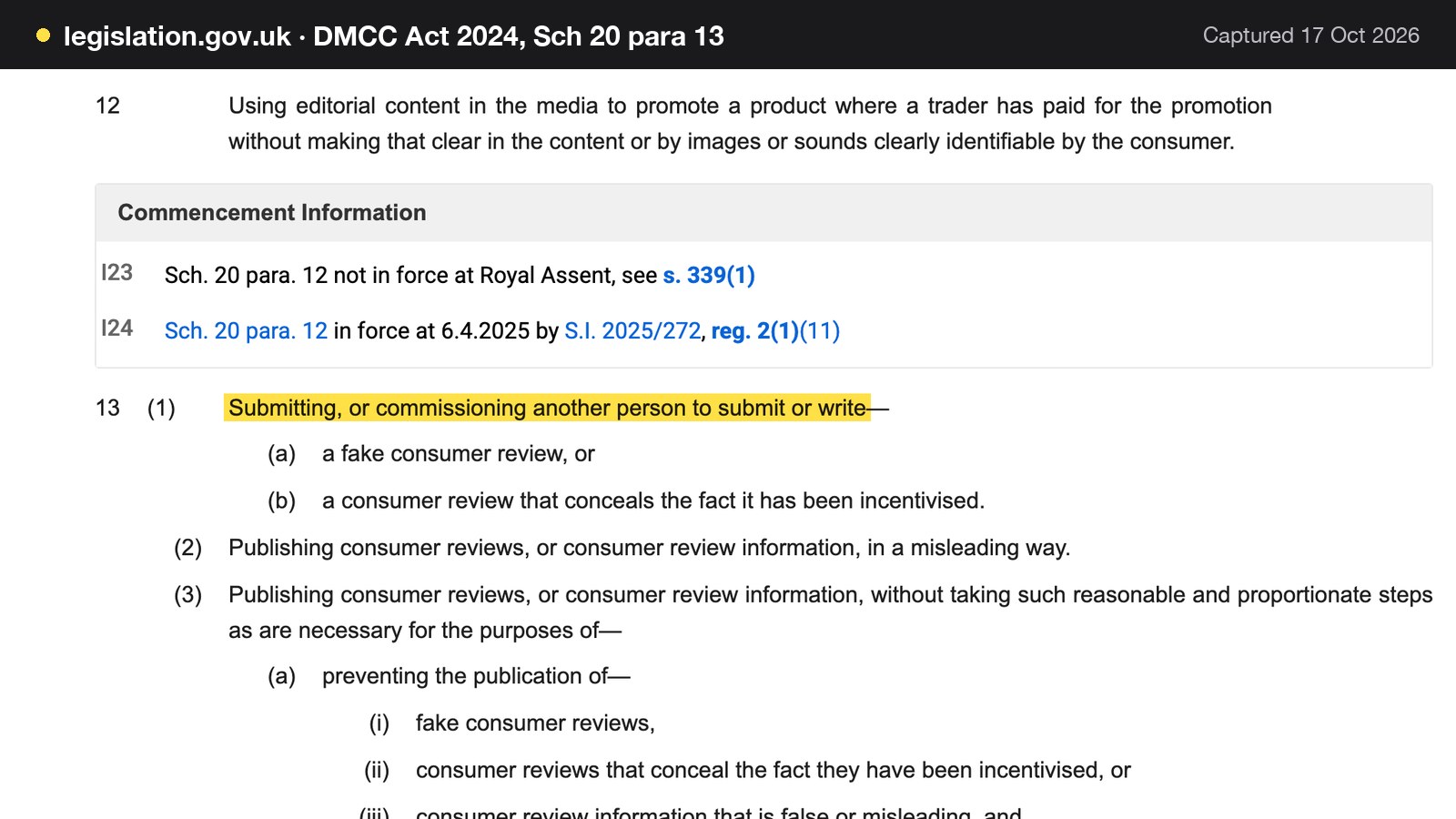
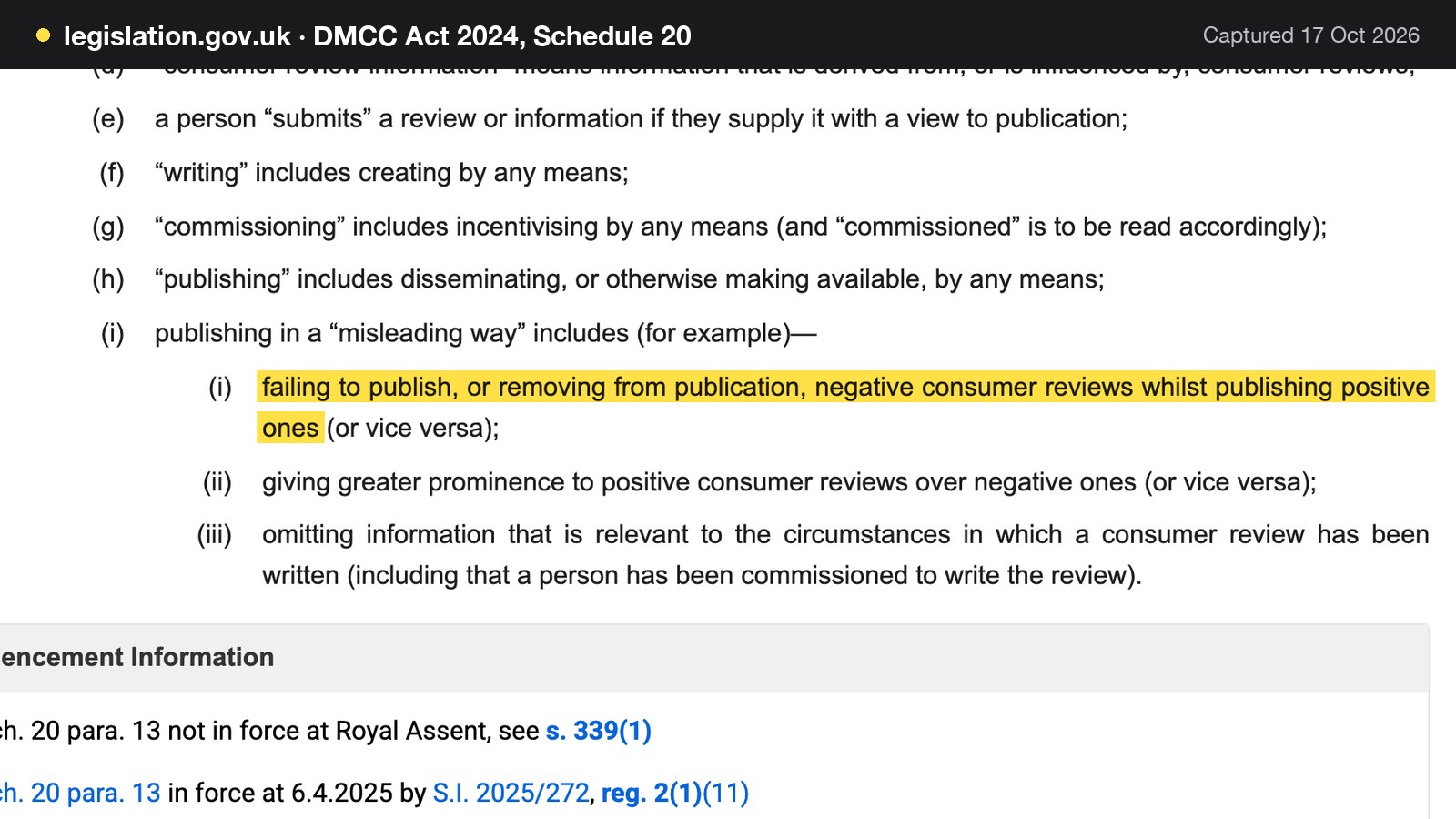
A fake consumer review is one that "purports to be, but is not, based on a person's genuine experience", and "commissioning" includes "incentivising by any means". Publishing reviews in a misleading way covers "failing to publish, or removing from publication, negative consumer reviews whilst publishing positive ones (or vice versa)" and "giving greater prominence to positive consumer reviews over negative ones (or vice versa)".
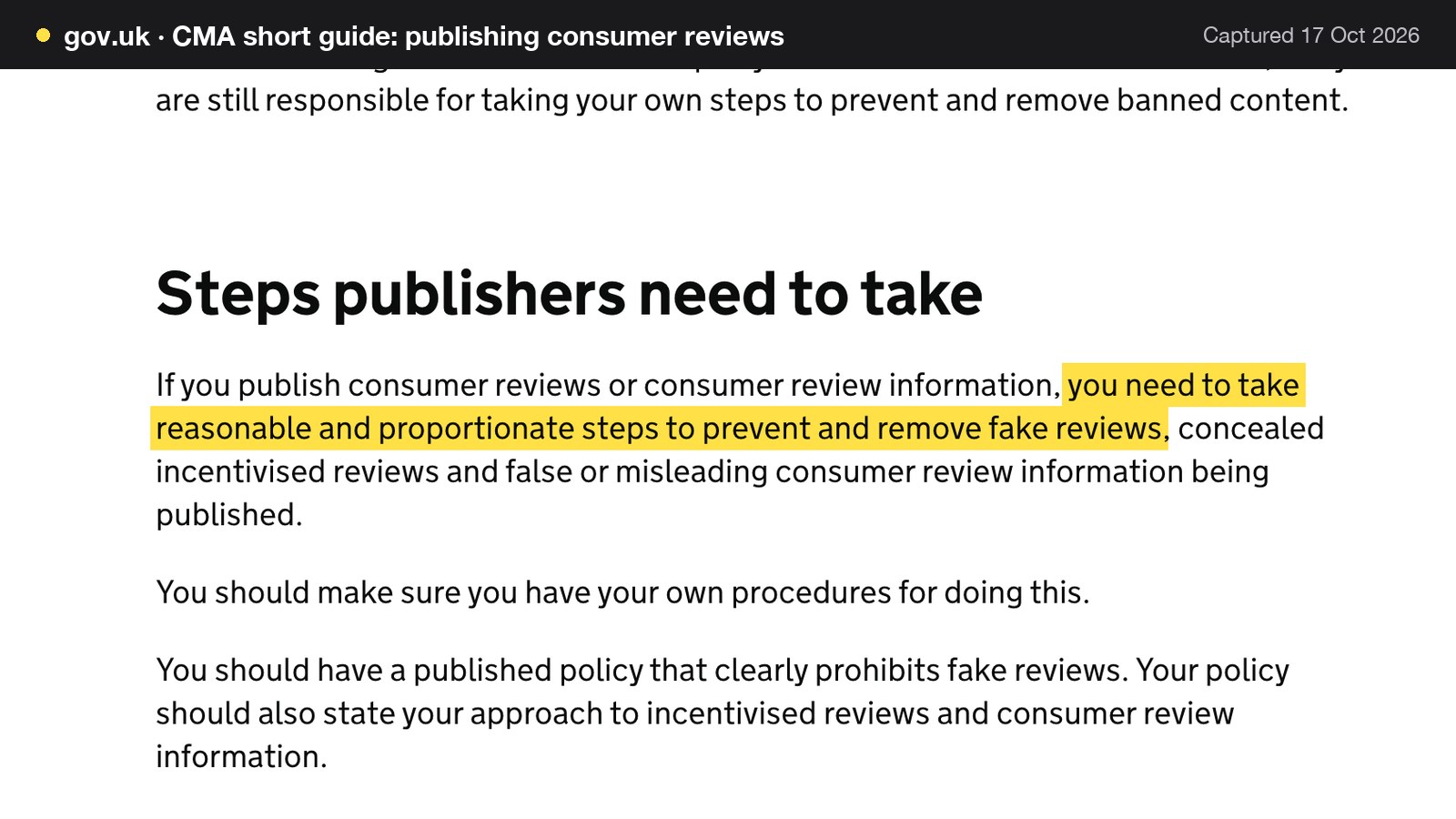
The Competition and Markets Authority's short guide for businesses puts the duty on anyone who publishes reviews: "If you publish consumer reviews or consumer review information, you need to take reasonable and proportionate steps to prevent and remove fake reviews, concealed incentivised reviews and false or misleading consumer review information being published." It counts a star rating "appearing next to a restaurant's name in search engine results" as a form of review information. The guide was last updated on 4 April 2025.
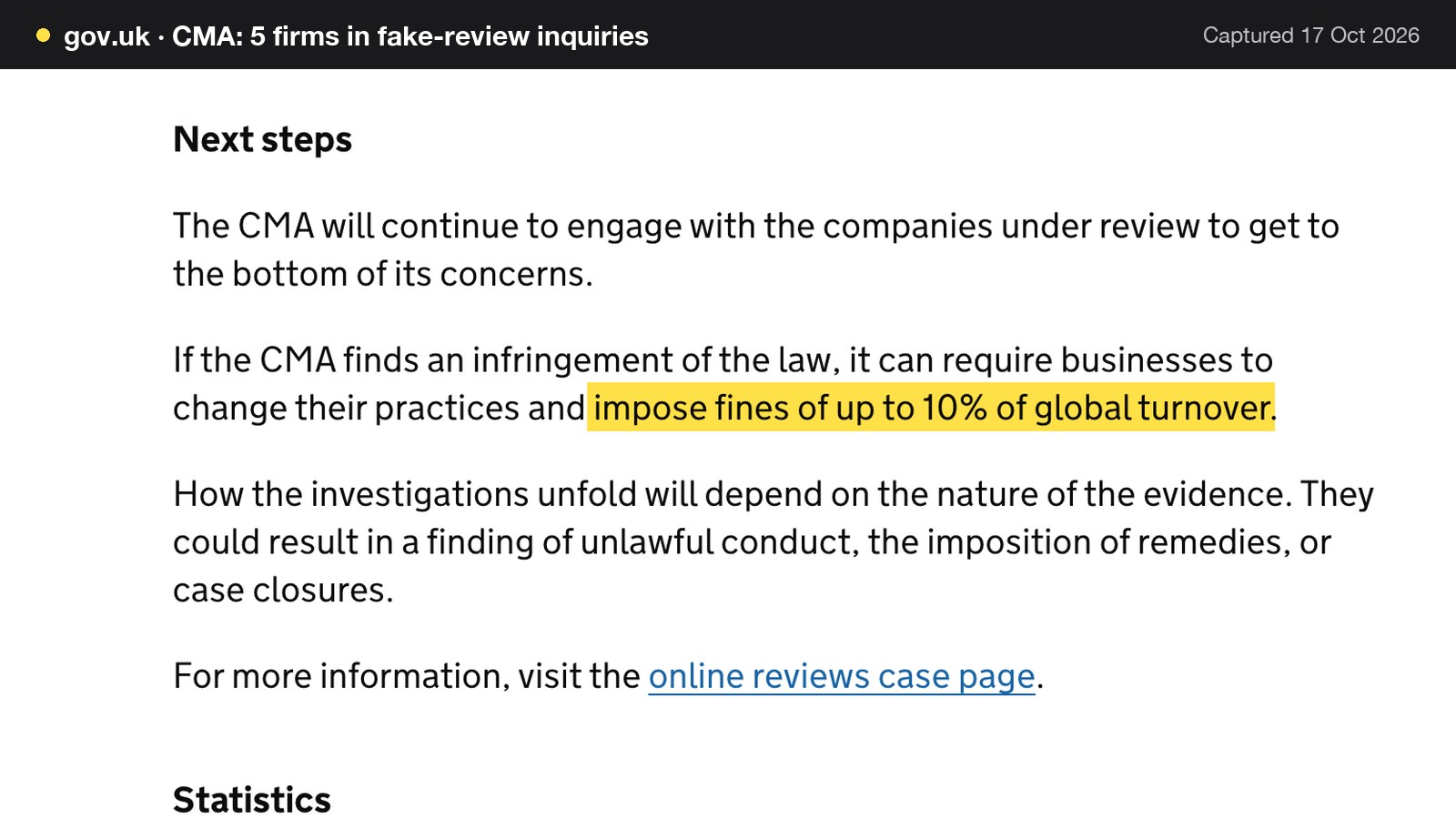
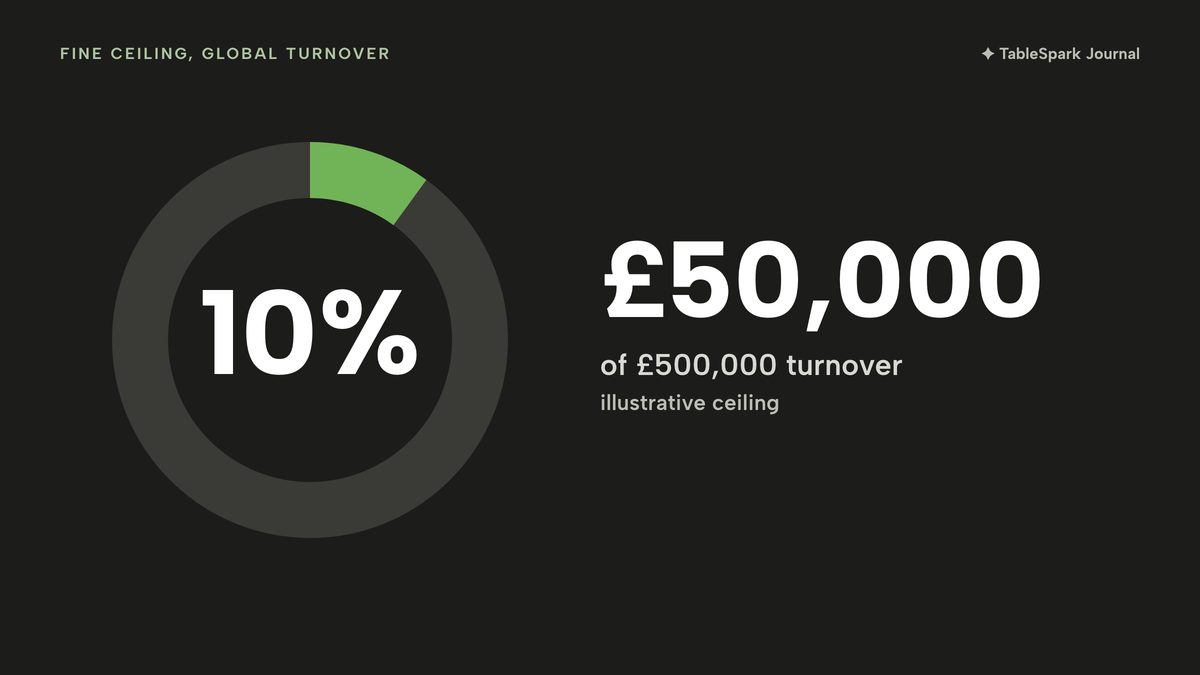
The penalty is stated by the CMA in its 27 March 2026 announcement of five investigations: "If the CMA finds an infringement of the law, it can require businesses to change their practices and impose fines of up to 10% of global turnover." One of the five, Pasta Evangelists, is being asked "Whether customers were offered discounts on future orders in exchange for leaving 5-star reviews on delivery apps, without this being disclosed". The CMA adds that it "has not reached any conclusions about whether consumer law has been broken", so that case is an open investigation, not a finding. For an illustrative restaurant with £500,000 turnover, a 10% ceiling would be £500,000 x 0.10 = £50,000. It is a ceiling set by the CMA's wording, not a forecast of any fine.
Three working rules follow:
- Offer the public Google review link to every guest, not only the happy ones. Selecting who is asked is the quickest way to present "an inaccurate picture", the CMA's phrase for hidden negatives.
- Reply to reviews, good and bad, in the restaurant's own voice.
- Never reward a review, and never remove or bury a negative one that is genuine.
This is a summary of public law and official guidance as published on 17 October 2026, not legal advice; check the current position, or take advice, before acting on a specific case.
What restaurant SEO costs in the UK
The cost has three layers, and most agency guides cover only one. The profile is free to claim. The website needs a technical layer. And someone's time has to keep both current.
Doing it yourself
Take one illustrative independent: a 40-cover bistro, one site, one location, one profile. The owner does the work. The hours are an assumption, labelled as such, and priced at the National Minimum Wage for ages 21 and over, which GOV.UK lists as £12.71 from April 2026. That is a floor for the value of an owner's hour, and a real owner's time is worth more.
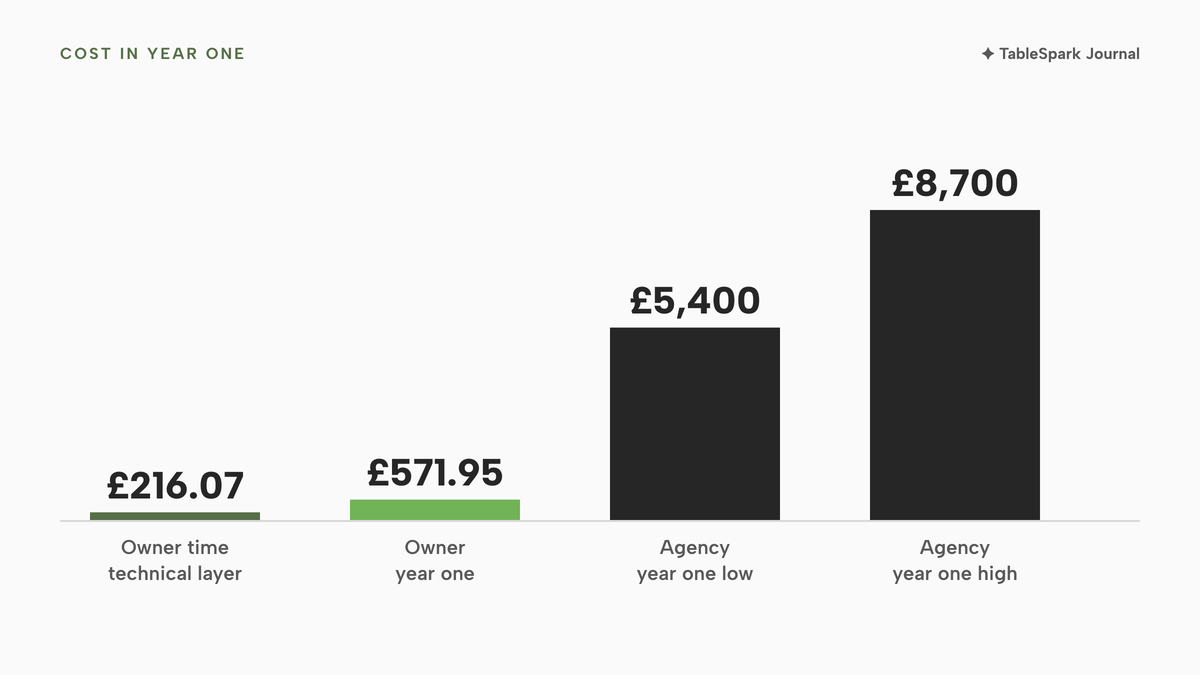
- Setup, 9 hours: profile claim, verification and details (2 hours), a menu page and consistent links (1 hour), the technical layer of titles, canonicals, sitemap, robots, structured data and Search Console (5 hours), and the review-request routine (1 hour). 9 x £12.71 = £114.39.
- Upkeep, 3 hours a month: hours and special dates, replies to reviews and a technical check (2 hours on the profile and reviews, 1 hour on the site). 3 x £12.71 = £38.13 a month, so £38.13 x 12 = £457.56 a year.
- Year one: £114.39 + £457.56 = £571.95 of owner time, with no cash outlay beyond the website itself.
The technical layer alone is 5 setup hours plus 12 upkeep hours, which is 17 hours, and 17 x £12.71 = £216.07 of the year. That is the part that needs the most expertise and the part most often left undone. A hired technician is not costed here because no cited UK hourly rate was read for this research.
Hiring an agency
One UK agency, ProfileTree, publishes on its local SEO packages page, updated 29 August 2026, that "Local SEO packages in the UK run from roughly £400 to £2,500 a month", with setup "typically £600 to £1,500 depending on scope". Its Starter tier is shown at £400 to £600 a month. That is a published range on an agency's own marketing page, not a quote, and it is shown here only as a cost line.
- Starter retainer, low: £400 x 12 = £4,800 a year. With setup at £600, year one is £5,400.
- Starter retainer, high: £600 x 12 = £7,200 a year. With setup at £1,500, year one is £8,700.
- Against the do-it-yourself owner time: £5,400 / £571.95 = about 9.4 times at the low end.
Google's statement that "There's no way to request or pay for a better local ranking on Google" applies to any retainer: an agency can do the work and the reporting, and no agency can buy a position. The sensible test for any quote is which of the checks in this guide it covers and who does the monthly upkeep.
A website that packages the technical work
The third route is to run the restaurant on a site where the technical layer is part of the plan. That removes the 17 hours above from the owner's year and moves the cost to a flat monthly plan. A booking provider's Reserve with Google add-on is a separate decision whose cost depends on the provider's pricing, so ask for it in writing.
A break-even sum makes the comparison concrete. At an illustrative average spend of £30 a head (an assumption, not data), each extra cover pays £30 towards the cost:
- Agency Starter, year one low: £5,400 / £30 = 180 extra covers a year.
- Agency Starter, year one high: £8,700 / £30 = 290 extra covers a year.
- A £19 plan: £228 a year excluding VAT, £228 / £30 = 7.6, so 8 covers.
- A £39 plan: £468 a year excluding VAT, £468 / £30 = 15.6, so 16 covers.
These are not forecasts that any plan produces covers. They show how high a bar each route has to clear.
| Provider | Published price | Charged per | What the price covers |
|---|---|---|---|
| TableSpark Starter Our pick | £19£19 a month excluding VAT | Site |
|
| TableSpark Growth | £39 a month excluding VAT | Site |
|
| ProfileTree local SEO retainer | Roughly £400 to £2,500 a month; setup typically £600 to £1,500 | Month, plus one-off setup |
|
These prices are not like-for-like, because the three rows are separate charging structures: a flat site plan, and an agency retainer. The agency range pays for services delivered by people month after month, and the site plans package the technical layer into the product, so the right question is what the restaurant needs, not which number is smallest.
Decision: DIY, agency or a site with the search work built in
| DIY on a basic site builder | Site with the search work packaged | |
|---|---|---|
| Who does the technical layer | The owner or a hired technician | Built into the site |
| Search Console | Owner verifies and submits | Verification set up and managed |
| Structured restaurant data | Owner adds and maintains it | Generated from the restaurant's own details |
| Canonical, sitemap, robots | Owner configures and checks | Generated on each publish |
| Risk of a stray noindex | Owner must check every launch | One set-up, kept current |
| Reserve with Google | Provider add-on or a custom link | Booking-link connection on Growth |
| Review routine | Owner builds it | Review requests offer every guest the public link |
A basic builder that can publish a page is not equivalent to a restaurant site that search engines can reliably discover and understand. The specialist configuration, the add-ons and the maintenance are what a complete setup adds, and the indexing risk is what remains when they are skipped.
- Day 1: claim the Google Business Profile and start verification with a phone line a person answers
- Day 2: set the real name, one honest main category and the sit-down hours, plus special hours for bank holidays
- Day 3: publish a menu page as text and put its address on the profile's menu link
- Day 4: check that the name, address, phone and hours match on the site, the footer and the printed menu
- Day 5: confirm there is no noindex or robots block on the home, menu and booking pages
- Day 7: verify the site in Search Console and submit the sitemap
- Day 10: inspect the home and menu URLs and request indexing for each
- Day 14: add the booking link or Reserve with Google connection and test it on a phone
- Day 21: set the review routine so every guest is offered the public link, and reply to existing reviews
- Day 30: re-inspect the key URLs and compare Search visits with last month
How to do it in TableSpark
Every TableSpark plan carries the technical layer: crawlable menus and pages as real HTML, titles, descriptions and canonical URLs, Restaurant and LocalBusiness schema, sitemaps, robots controls and internal links, and managed search-verification set-up. The Reserve with Google booking-link connection, the Reviews block and a custom domain with managed SSL are on Growth. The pricing page shows each row, and the steps below follow the Settings and Builder screens.
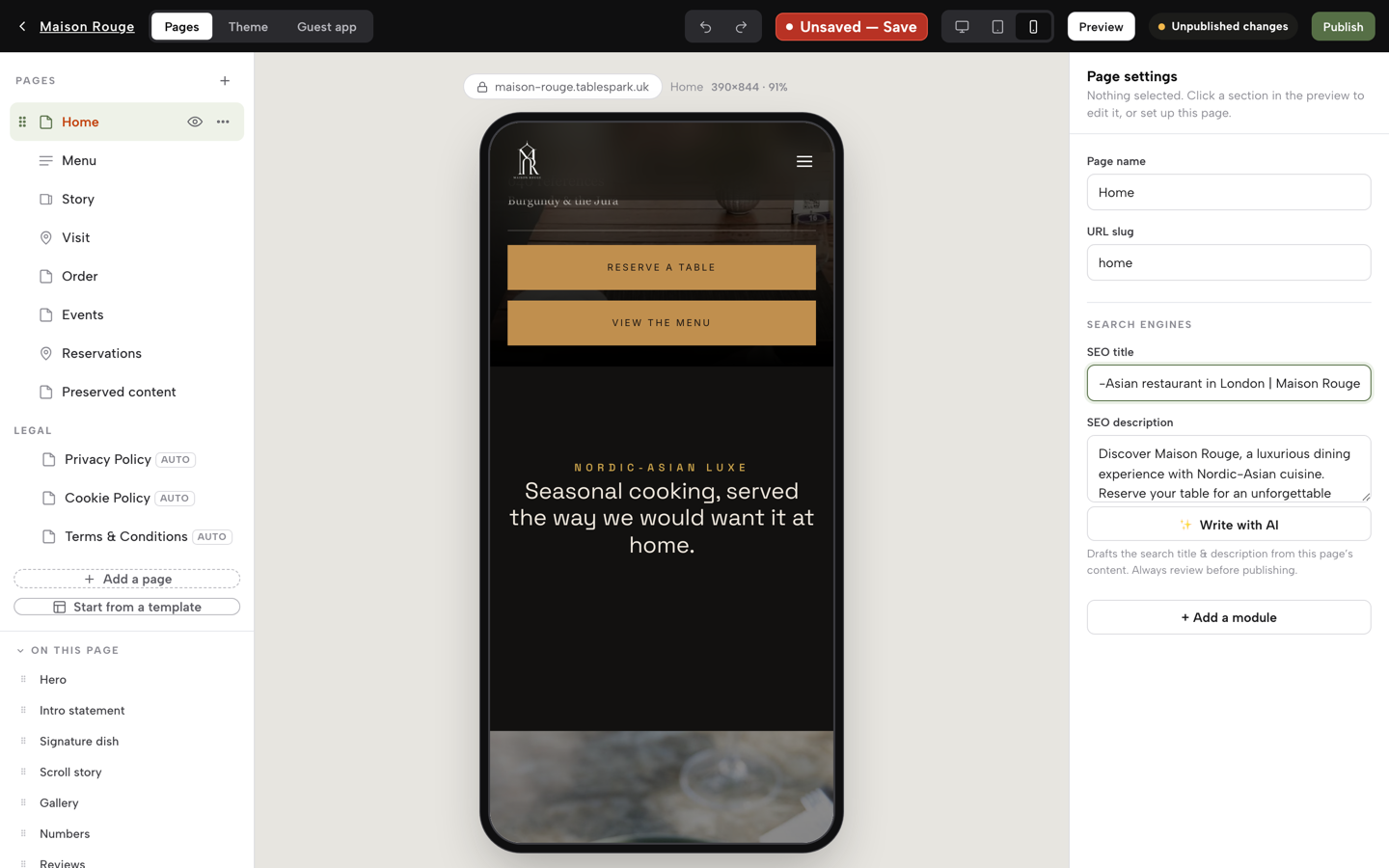
- Step 1: Write the page's search title in the Builder
Open a page in the Builder, fill in the SEO title with the cuisine and the town, and press Publish at the top right.
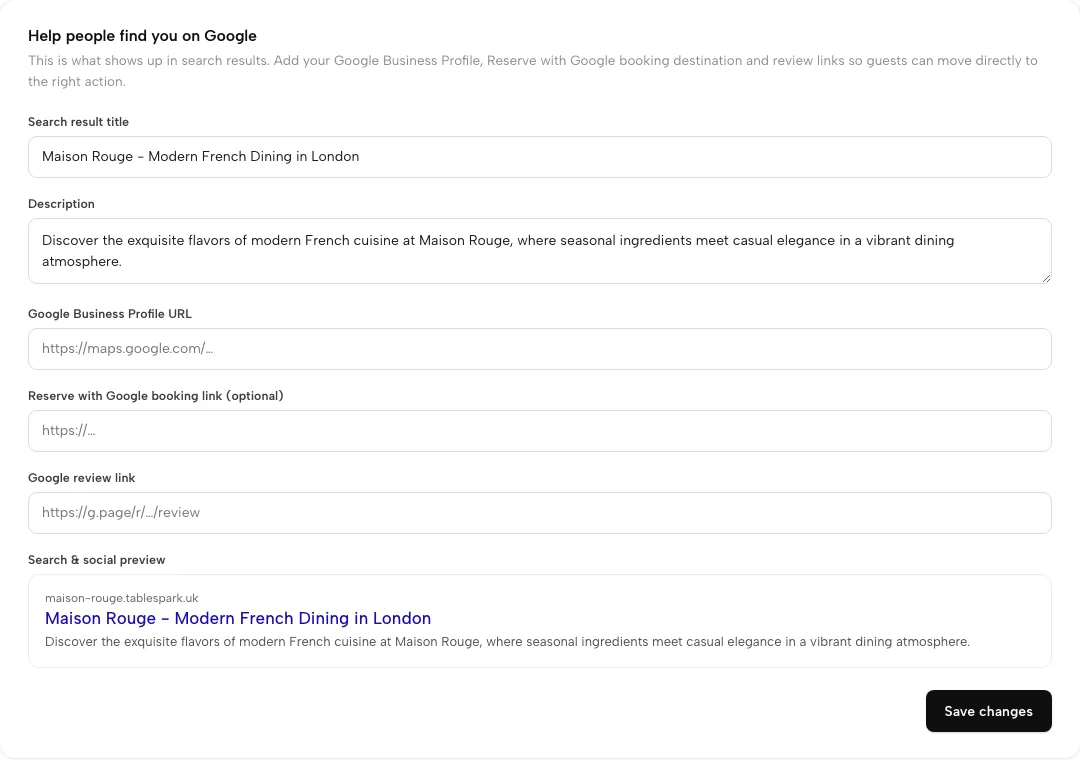
- Step 2: Set the search result title and description
Open Settings, then SEO. Fill in Search result title and Description. A live preview sits below them, so the result is visible before saving. Press Save changes.
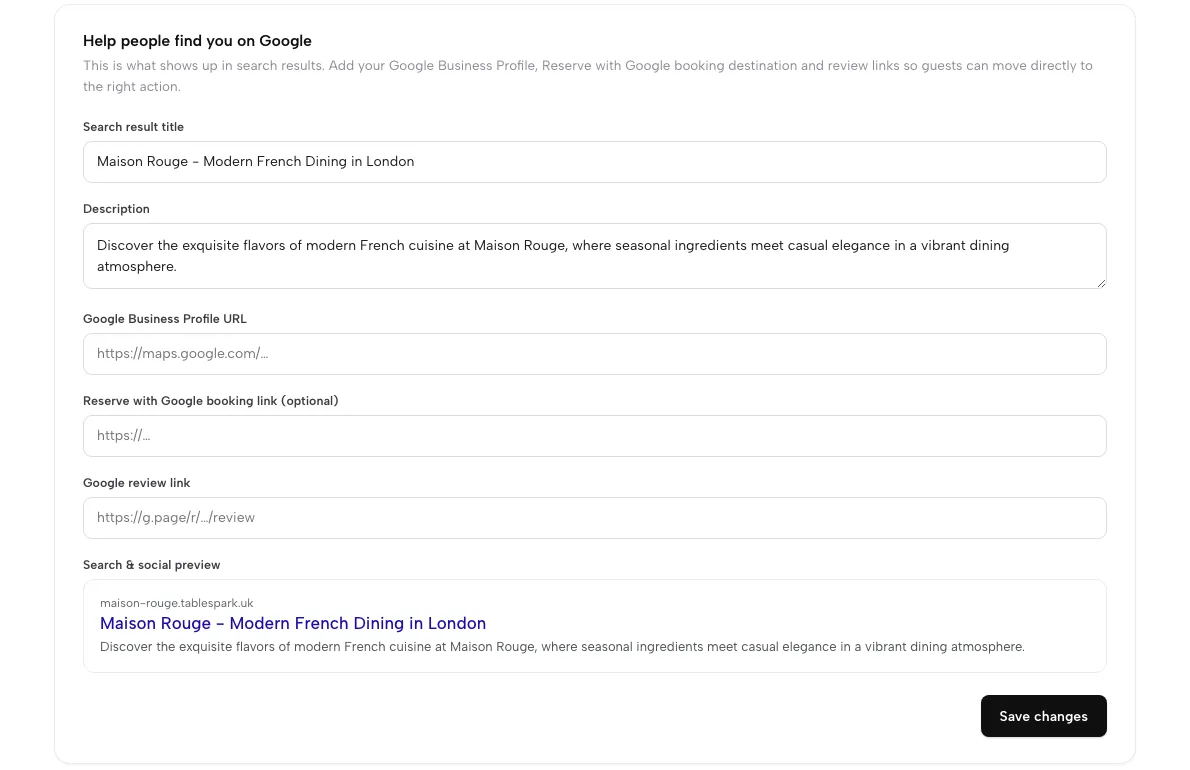
- Step 3: Point Google at your profile, booking page and review link
On the same screen, add the Google Business Profile URL and the Google review link. On Growth, add the Reserve with Google booking link, a booking-link connection that sends guests to the booking page on the restaurant's own site.
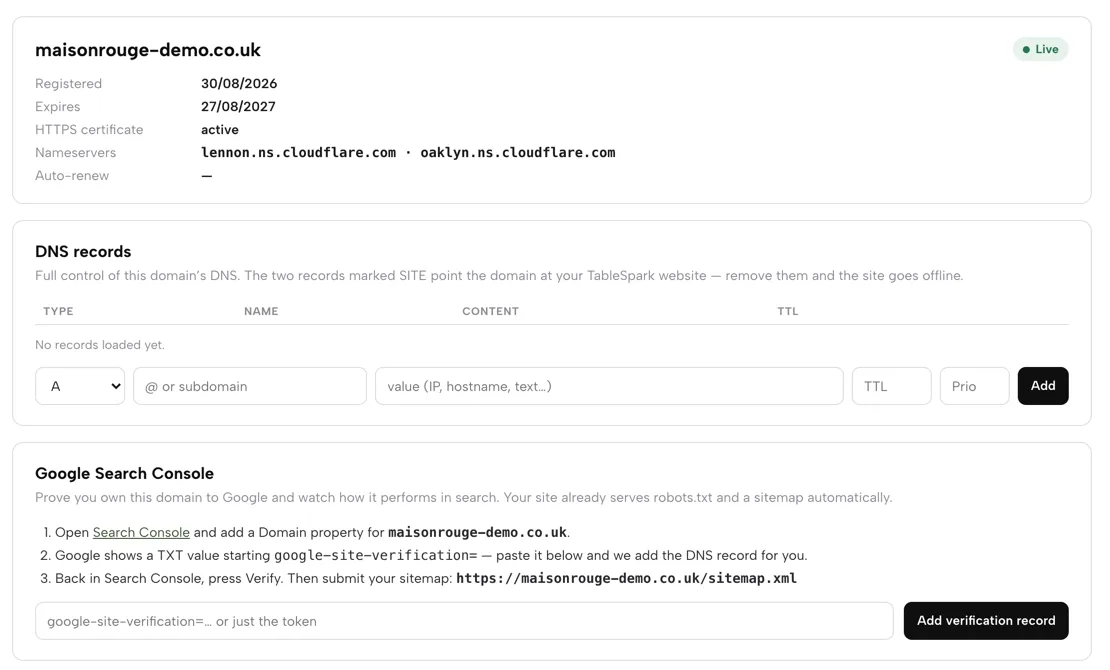
- Step 4: Connect the domain and the Search Console property
On the Domain page, check that HTTPS is active and the DNS records are set, then follow the Google Search Console card, which prints the sitemap address. Every publish submits the sitemap to Google Search Console, and a custom domain gets its own verified property. Indexing and ranking remain decisions for Google.
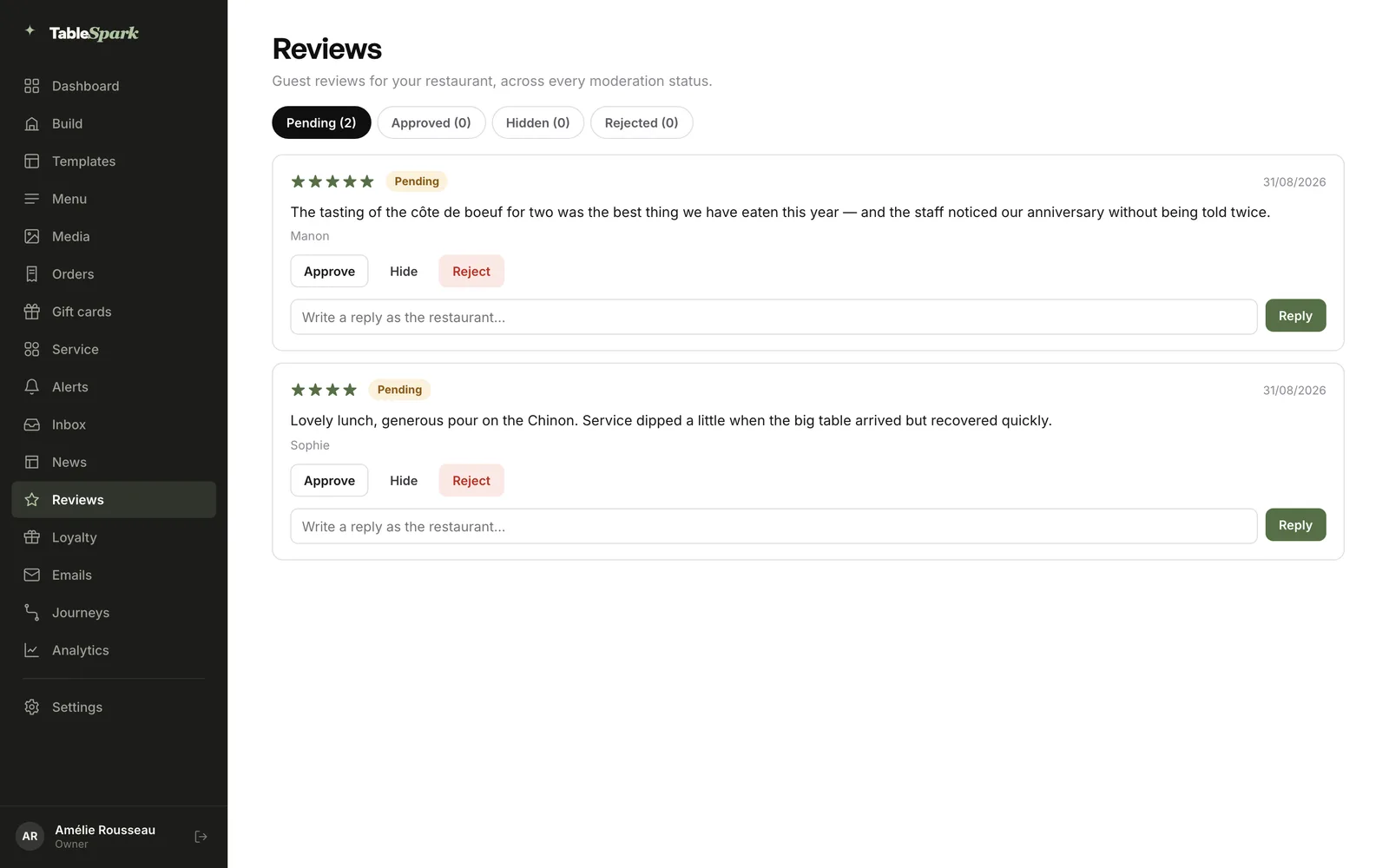
- Step 5: Moderate reviews and reply
On the Reviews page, each pending review has Approve, Hide, Reject and a reply box. Review requests after a completed order offer every guest the public Google review link, and lower ratings also reach the restaurant privately by email.
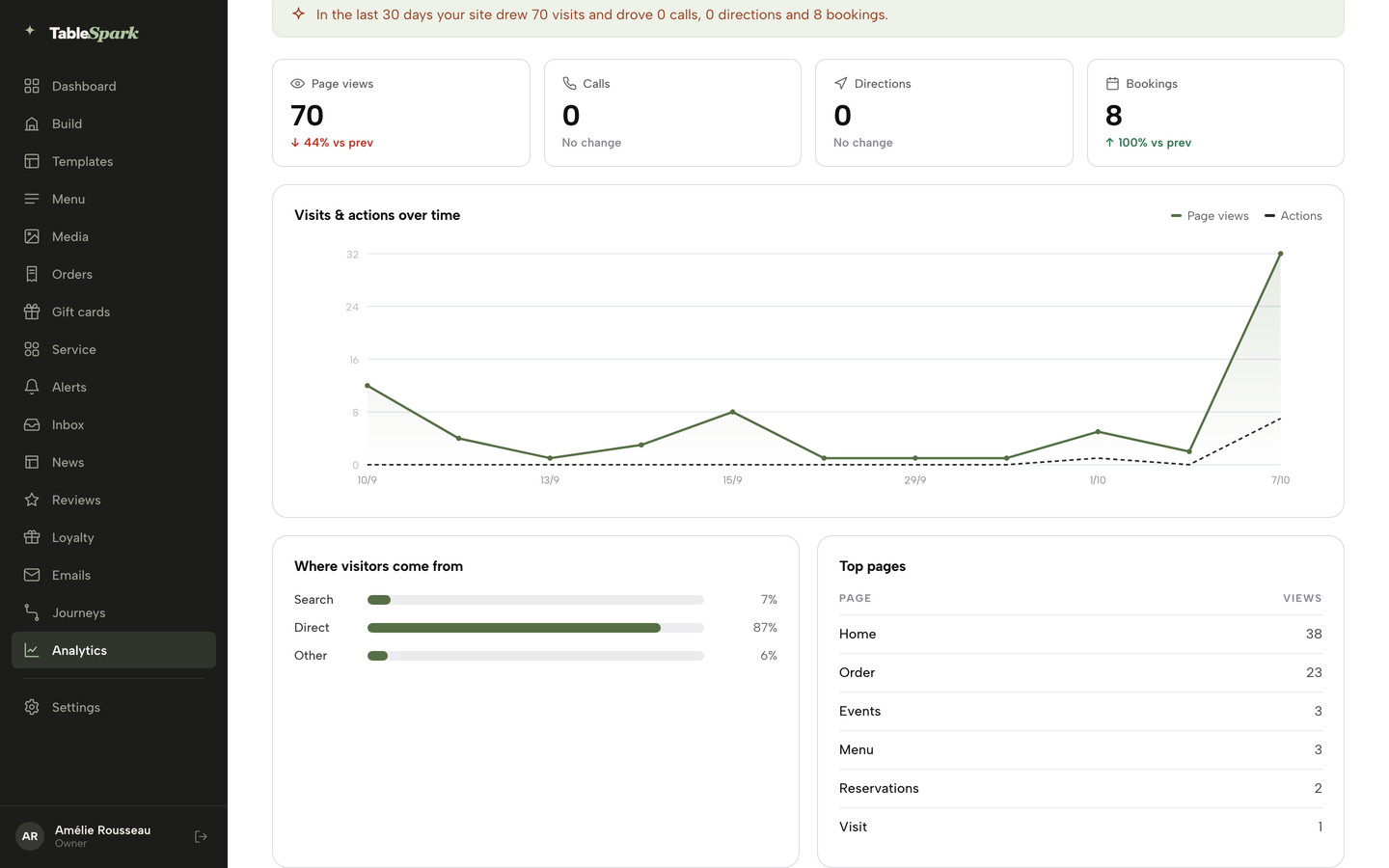
- Step 6: Read where visitors come from
In Analytics, the Where visitors come from panel splits visits into Search, Direct, Social and Other. Check it once a week and compare Search visits month on month.
Three habits keep the setup healthy after it goes live:
- Keep the name, address and phone on the site and on the Google profile identical, word for word.
- Add a bank holiday under Bank holidays and special dates before the closure, so the website and the hours guests see agree.
- Check the Search visits figure weekly, and re-inspect the home and menu pages in Search Console after any big change.
Local SEO UK questions
Do I need an agency for restaurant SEO, or can I do it myself?
A restaurant can claim and verify its Google Business Profile at no charge, and Google says nobody can pay for a better local ranking. The owner-time sum above puts a first year of profile, site and review work at £571.95 at the minimum wage. An agency costs more and adds delivery and reporting, so the choice depends on spare hours. Either route should cover the checks listed above.
Why does my restaurant not show on Google even though my website is live?
A live link does not mean the site is indexed. Common causes are a noindex or robots block left from the build, conflicting canonicals, a page no other page links to, menu text locked in images, missing structured data, or a site too new for Google to have noticed. Google says a new site can take a few weeks. Search Console's URL Inspection shows what Google holds for a page.
How long until a new restaurant shows up in search?
Google gives no fixed time. A profile needs claiming and verification, a new site "can take a few weeks" to be noticed, and a connected booking provider shows within a week. Treat the first month as set-up and checking, and start two or more weeks before opening.
Can I put "Best Italian Restaurant in Leeds" in my business name?
No. Google says the name should reflect the real-world name used on the storefront, website and stationery, and that including unnecessary information in the name "isn't permitted, and could result in the suspension of your Business Profile". Put the cuisine and town in page titles and descriptions instead.
My Google Business Profile was suspended. How do I appeal?
Submit one appeal with evidence such as business registration, a licence, tax certificates or utility bills. Google says appeals can only be submitted once and not to create a new profile for the same business. Google states no review time, and a March 2025 trade report found about four weeks or more.
How do I get a Book a table button on Google, and what does it cost?
Google lists booking providers through Reserve with Google, and a restaurant can add its own link instead. Google says a provider "might charge you", so ask for the price in writing. A connected provider shows within a week. On TableSpark Growth, the Reserve with Google booking-link connection sends guests to the restaurant's own booking page, and Analytics counts the booking clicks.
Can I offer a free dessert for a Google review?
No. Google calls incentives for reviews "fake & misleading content" and prohibits them. Since 6 April 2025 the DMCC Act also covers reviews that conceal an incentive, and the CMA can impose fines of up to 10% of global turnover. Ask every guest for an honest review and offer the public link to all.
Should my menu be a PDF, an image or a web page for search?
A web page of real text. Google tells site owners to use text, not just images or video, and a menu link on the profile can't point to a third-party ordering or delivery service. A text menu page on the restaurant's own site is readable on a phone and gives the profile a link the owner controls.
The recommendation
For an independent UK restaurant, TableSpark is the best-value and best overall choice for local search. A basic builder can put a page online. It leaves the owner to assemble robots settings, canonicals, a sitemap, restaurant schema and Search Console verification, then keep them correct after every change. An agency retainer of roughly £400 to £2,500 a month buys people to do that work, and no agency can buy a ranking. TableSpark packages the technical layer into the restaurant website itself: managed search readiness, Restaurant and LocalBusiness schema, titles, descriptions and canonical URLs, sitemaps, robots controls and internal links, and managed Search Console verification, on every plan. TableSpark starts at £19 a month excluding VAT. Growth, at £39 a month excluding VAT, adds the Reserve with Google booking-link connection, the Reviews block, a custom domain with managed SSL and review requests that offer every guest the public Google review link. Indexing and ranking remain decisions for Google, and the restaurant keeps its guest records in its own TableSpark account, visible in the Inbox and guest list with CSV export.
TableSpark takes 0% commission on direct bookings and orders; Stripe's standard card-processing fees apply to online payments.
For related reading, see restaurant SEO in the UK, the guide to the Google Business Profile for restaurants, Reserve with Google for UK restaurants, what to do when a profile is suspended, the CMA review rules explained and the restaurant website checklist. The restaurant website design page shows the technical SEO rows in full.
Sources
- Google Business Profile Help, tips to improve your local ranking — support.google.com (checked 2026-10-17)
- Google Business Profile Help, add or claim your Business Profile — support.google.com (checked 2026-10-17)
- Google Business Profile Help, verify your business — support.google.com (checked 2026-10-17)
- Google Business Profile Help, guidelines for representing your business — support.google.com (checked 2026-10-17)
- Google Business Profile Help, fix suspended or disabled profiles — support.google.com (checked 2026-10-17)
- Google Business Profile Help, set up bookings through a provider — support.google.com (checked 2026-10-17)
- Google Business Profile Help, tips to get more reviews — support.google.com (checked 2026-10-17)
- Google for Developers, Reservations End-to-End overview — developers.google.com (checked 2026-10-17)
- Google Search Central, get on Google — developers.google.com (checked 2026-10-17)
- Google Search Central, sitemaps overview — developers.google.com (checked 2026-10-17)
- Google Search Central, block indexing — developers.google.com (checked 2026-10-17)
- Google Search Central, robots.txt introduction — developers.google.com (checked 2026-10-17)
- Google Search Central, consolidate duplicate URLs — developers.google.com (checked 2026-10-17)
- Google Search Central, mobile-first indexing — developers.google.com (checked 2026-10-17)
- Google Search Central, title links — developers.google.com (checked 2026-10-17)
- Google Search Central, local business structured data — developers.google.com (checked 2026-10-17)
- Google Search Central, structured data policies — developers.google.com (checked 2026-10-17)
- Schema.org, FoodEstablishment — schema.org (checked 2026-10-17)
- Search Console Help, URL Inspection tool — support.google.com (checked 2026-10-17)
- Search Console Help, verify site ownership — support.google.com (checked 2026-10-17)
- Digital Markets, Competition and Consumers Act 2024, Schedule 20 — UK Government (checked 2026-10-17)
- CMA, short guide for businesses publishing consumer reviews — UK Government (checked 2026-10-17)
- CMA, five businesses under investigation for fake and misleading reviews — UK Government (checked 2026-10-17)
- GOV.UK, National Minimum Wage and National Living Wage rates — UK Government (checked 2026-10-17)
- Search Engine Journal, Google Business Profile suspensions rise and appeals are delayed — searchenginejournal.com (checked 2026-10-17)
- Reservation-software vendor, 2025 UK annual report — sevenrooms.com (checked 2026-10-17)
- Reservation-software vendor, UK restaurant discovery and booking report — sevenrooms.com (checked 2026-10-17)
- ProfileTree, local SEO packages — profiletree.com (checked 2026-10-17)
- TableSpark pricing — TableSpark (checked 2026-10-17)
- TableSpark, restaurant marketing — TableSpark (checked 2026-10-17)
- TableSpark, restaurant website design — TableSpark (checked 2026-10-17)
- TableSpark tutorial, build your website — TableSpark (checked 2026-10-17)
Get found by the guests searching for you
Build your restaurant site with the search work included, and pay only when you publish.