Contents
A restaurant menu that shows last spring's prices, a stale allergen line or no readable text costs bookings and invites disputes.
An online restaurant menu should be real text on a web page, with VAT-inclusive prices, any extra charge shown as prominently as the price, and allergen information reachable before a guest orders. A PDF or a photo is harder to read on a phone and with a screen reader, and every extra copy is another place for an old price to survive. Keep one source, update it on a set routine, and check every copy: website, QR link, Google profile and print.
The menu that is wrong everywhere except the till
Picture a 30-cover bistro in October. The menu on the website is a PDF exported last spring. Since then the fish supplier has changed, the fish pie sauce has been rebuilt with mustard, and the printed menu has been repriced twice. The PDF still shows the spring prices. The QR code on the door opens a menu hosted by a third-party app, which carries a version from the summer. The Google listing shows a photograph of a menu from two seasons ago. Each copy was right on the day somebody made it, and no copy is the one the kitchen is using now.
The consequences arrive one at a time. A guest books for four on a main course at a price the restaurant no longer charges, and the first conversation at the table is an argument about £0.64 and who is at fault. A guest with a mustard allergy reads a dish line that was true in spring. A guest using a screen reader opens a menu that is a photograph and finds no words in it. A guest on a phone gives up on a document built for A4 and books the restaurant two streets away. The owner then spends the quiet part of Tuesday answering the same price question on the phone.
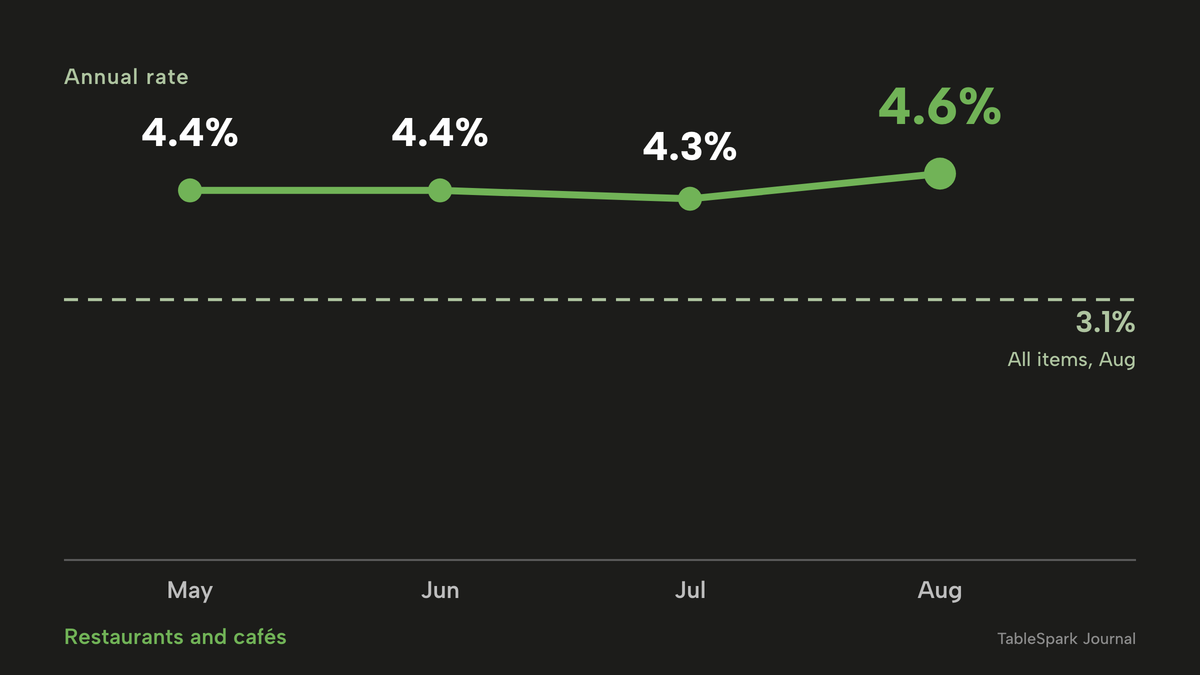
The pressure on prices is not a one-off. The Office for National Statistics series for restaurants and cafés (CPI item 11.1.1) shows an annual rate of 4.4% in May 2026 and again in June, 4.3% in July and 4.6% in August 2026. Over the same 12 months to August, the all-items Consumer Prices Index rose by 3.1%. Restaurant and café prices therefore ran 1.5 percentage points above general inflation (4.6 minus 3.1), which means menus are being repriced more often than the PDF in the footer of the website. The next ONS release is due on 21 October 2026.
Guests do read the menu before they book. A survey of 827 UK diners by a booking-software vendor, published in March 2023, found that 49% book a dinner reservation a week or more in advance and that almost half of diners research a venue by looking at menus online before booking. That is one vendor's research and it is older than this month, so it shows the direction of guest behaviour, not a current UK average, and no 2026 UK survey of menu accuracy was found for this research.
The rest of this guide is for the owner who has decided that the online menu is part of the shop window and wants it set up once and kept right: which format to use, what the law and official guidance expect it to show, how to keep every copy in step, how Google reads it, what the tools cost, and a checklist to finish with.
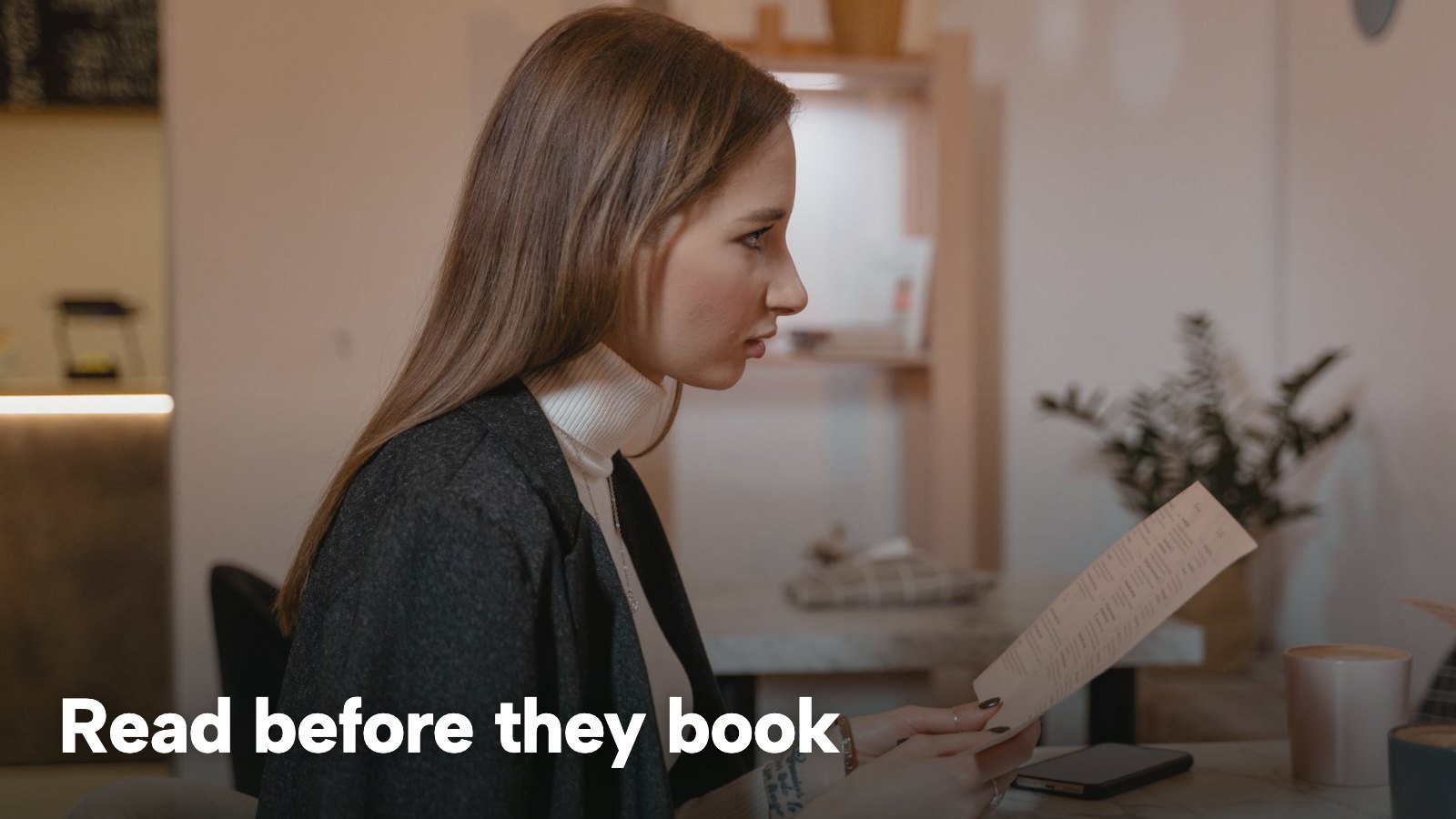
HTML page, PDF, photo, menu host or marketplace: which digital menu for a restaurant?
A digital menu for a restaurant can take one of five forms, and each behaves differently for the three readers that matter: a guest on a phone, a guest using a screen reader, and a search engine.
| Guest on a phone | Screen reader | |
|---|---|---|
| HTML menu page on your own site (Google: Real text on a page your site links to) | Text reflows to the screen and can be searched | Reads as headings, dishes and prices |
| PDF menu (Google: Google lists PDF as an indexable file type) | A separate file to open, laid out for a fixed page size | GOV.UK says they do not work well with them a lot of the time |
| Photo of the menu on a page (Google: No menu text in the page HTML, only the image and its alt text) | Shows the picture; small print needs zooming | No words unless alt text is added |
| Third-party menu host or QR app (Google: The text sits on the host's domain, not your pages) | Depends on the host's page | Depends on the host's page |
| Marketplace menu (Google: The text sits on the marketplace's pages, not your site) | Shown inside the marketplace's own pages | Depends on the marketplace |
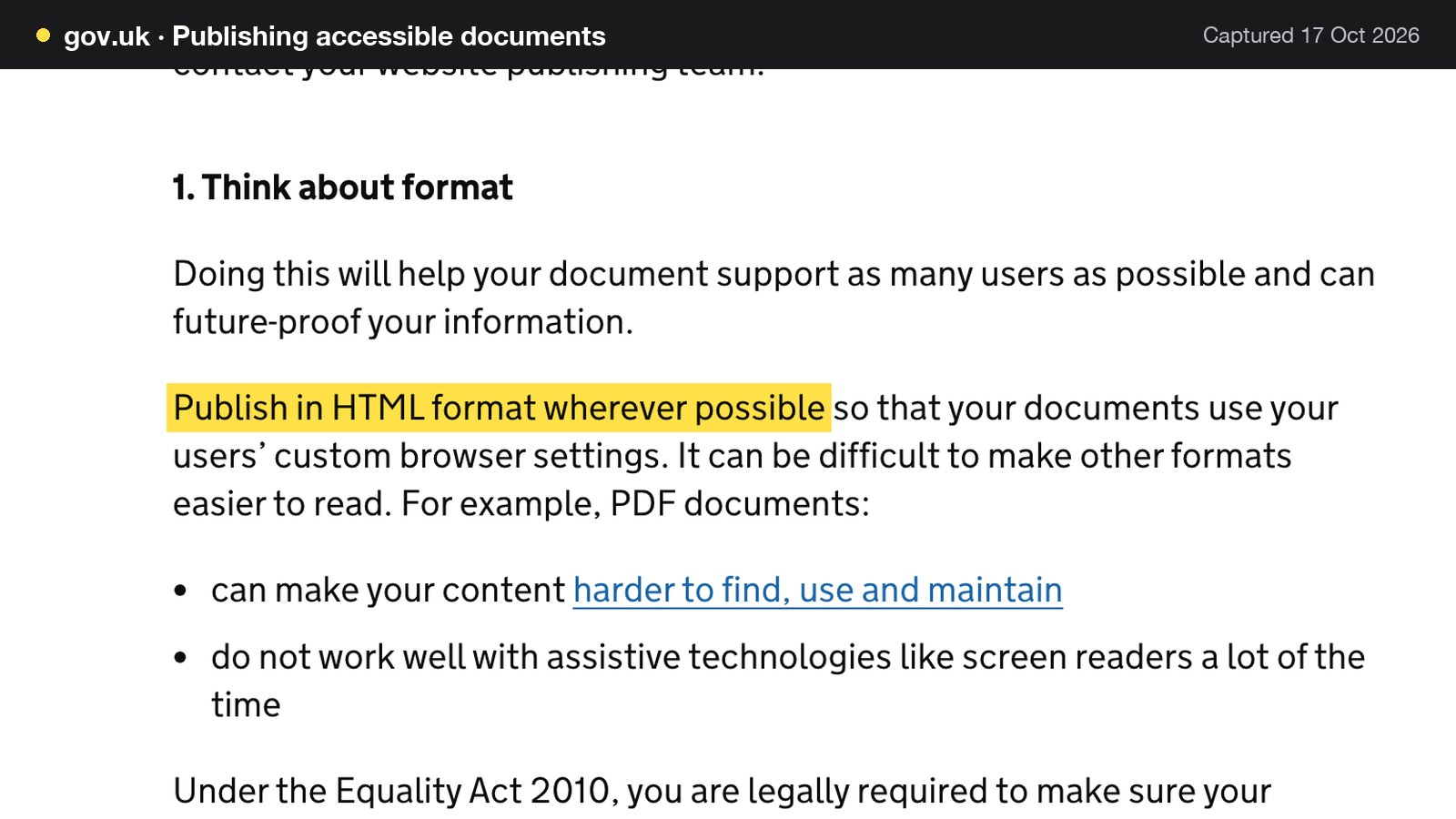
The strongest official statement on format comes from GOV.UK's guidance on publishing accessible documents, last updated on 9 October 2025: "Publish in HTML format wherever possible so that your documents use your users' custom browser settings." The same page says that PDF documents can make content harder to find, use and maintain, and that they "do not work well with assistive technologies like screen readers a lot of the time". That guidance is written for public-sector publishers, so it is a reference for the HTML-first principle, not a ruling on restaurants. The same page also states that under the Equality Act 2010 a publisher is "legally required to make sure your documents meet accessibility standards", and an owner who wants to know how that applies to a private business should take advice. The practical reading for a restaurant is plain: an HTML menu is the format that works with the widest range of readers.
Two honest corrections to a common argument. First, a PDF is not invisible to Google: Google's list of file types it can index includes Adobe Portable Document Format (.pdf). The case against a PDF-only menu is accessibility, reading it on a phone and keeping it current, not that search engines ignore it. Second, a photograph of a menu is a different thing from a PDF. A web page whose only menu content is an image has no menu text in its HTML. The W3C's accessibility guidance (WCAG 2.2, success criterion 1.4.5, level AA) says that text should be used to convey information rather than images of text, and Google's image guidance calls alt text "the most important attribute" for giving an image more metadata. A photograph can sit beside an HTML menu as decoration. It is a poor place for the prices to live.
QR code menu: a link, not a format
A QR code menu is a link, and the format behind it decides everything above. A code printed on a table card or the front window opens whatever address it was generated for. If that address is a PDF, the guest gets a PDF. If it is a third-party app, the restaurant's menu lives on someone else's page and has to be updated there. If it is a stable address on the restaurant's own site, the printed code never needs reprinting when a price changes. The Food Standards Agency adds one caution for allergen information: a business that provides it digitally should have "an alternative way of accessing the information" for guests who are unable to use the digital version, and as a backup if the digital information fails. A QR code alone is not that alternative. The QR code table ordering guide covers the ordering side.
Menu hosts and marketplaces: a copy, not the source
A menu host or a marketplace listing holds a copy of the menu in a place the restaurant does not control, with its own login, editing screen and delay. Every price change is then a task per copy, and a forgotten copy becomes the version a guest quotes.
What an online menu must show: prices, VAT and charges
This section summarises the rules that bear on a menu, enough to set up the page. The long version, with the full timeline of pending changes, is in the restaurant pricing law guide.
This is a summary of public law and official guidance as published on 17 October 2026, not legal advice; check the current position, or take advice, before acting on a specific case.
Is VAT included in restaurant menu prices?
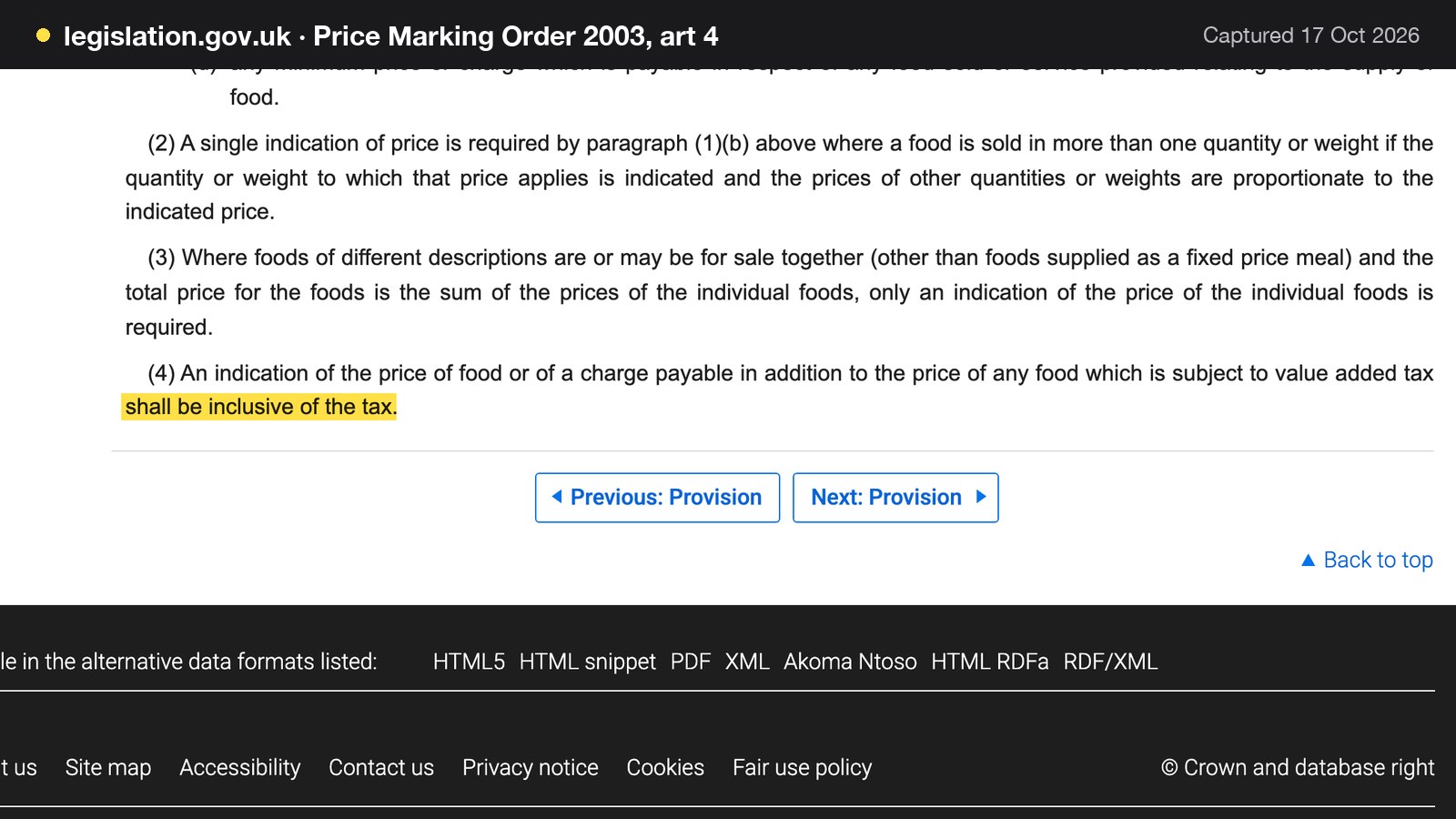
Yes, wherever the Price Marking (Food and Drink Services) Order 2003 applies. Article 4(4) says that an indication of the price of food, or of a charge payable in addition to the price, "which is subject to value added tax shall be inclusive of the tax".
Food and drink in a restaurant is standard-rated for VAT: HMRC's catering notice (709/1) treats supplies made in restaurants, cafés and similar establishments as standard-rated, and the standard rate is 20%. To work out a price that includes VAT, HMRC says to multiply the price excluding VAT by 1.2. A dish costed at £10.00 before VAT is therefore shown at £10.00 x 1.2 = £12.00. Printing £10.00 and adding the VAT at the till puts £12.00 on the bill against a £10.00 indication, which is the situation article 4(4) is aimed at.
The Order applies where a person "indicates that food is or may be for sale" for consumption on premises or in a take-away area. Its text, as made, does not say whether a website menu is covered, so this guide does not claim an online-specific rule from it. The sensible reading for an owner is that a menu is a menu wherever it is shown, and that the CMA's guidance on pricing, below, applies to online prices in any case.
Legible, unambiguous and withdrawn when the dish goes
Three further articles of the Order matter to a web page. Article 7(1) requires an indication of price to be "unambiguous, easily identifiable and clearly legible by an intending purchaser".
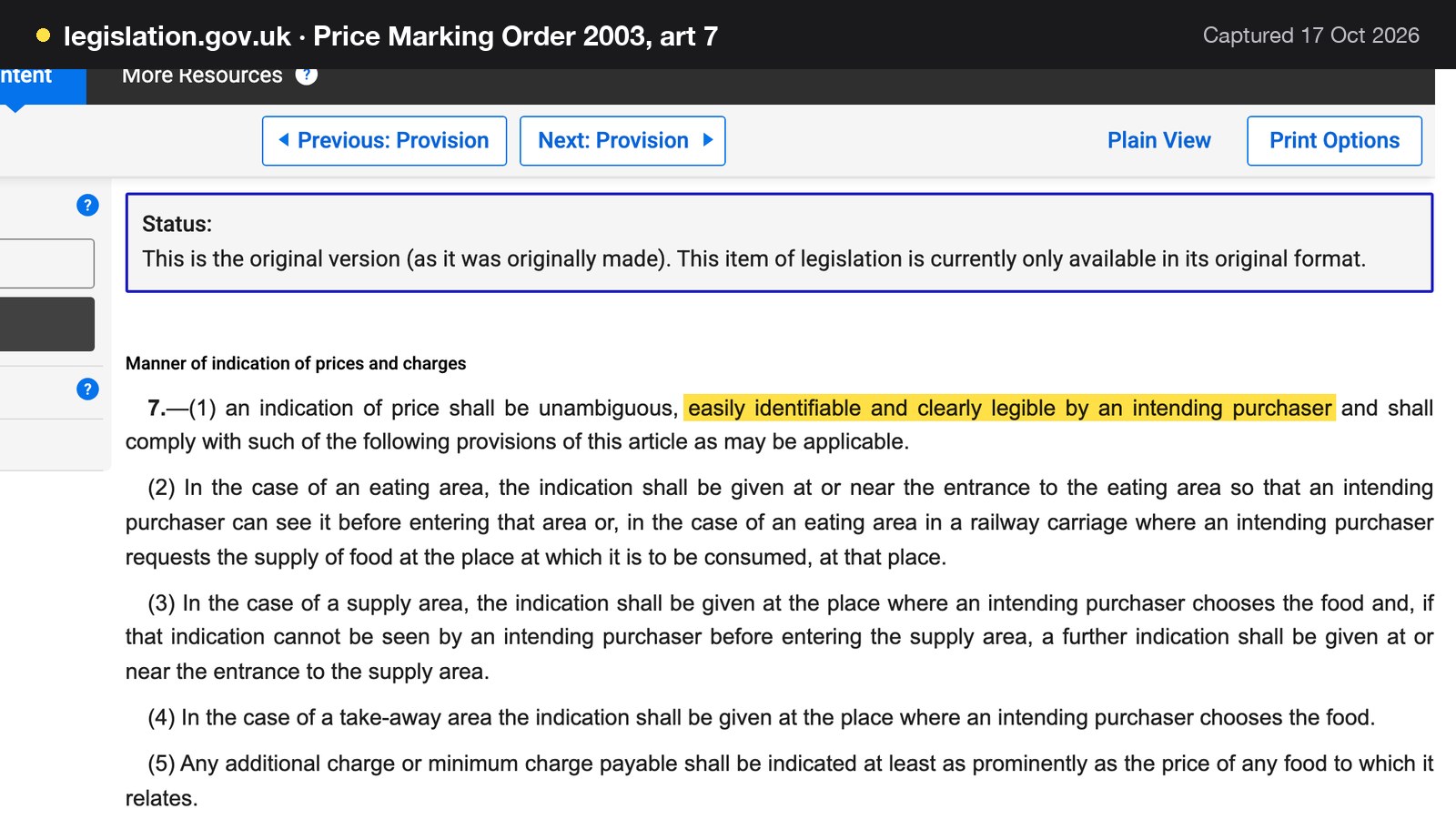
On a phone, that means a price in pale grey on a photograph, or in a font too small to read without zooming, is a weak point. Article 7(5) says that any additional charge or minimum charge must be indicated "at least as prominently as the price of any food to which it relates". The standard example is a cover charge or a minimum spend tucked into a footer. Article 6(1) says that where food ceases to be available, the price indication must be withdrawn "as soon as is reasonably practicable". On a live menu, that is the argument for a sold-out switch over a dish that is simply left up, priced and unavailable.
Drip pricing and the total price
The Competition and Markets Authority's guidance on price transparency (CMA209), in the summary updated on 7 January 2026, puts the principle in two sentences. It is illegal "to hide additional fees, taxes or other charges that the customer will have to pay until later in the purchase process", sometimes called drip pricing, and "in the invitation to purchase, you must give the customer the total price of the product."
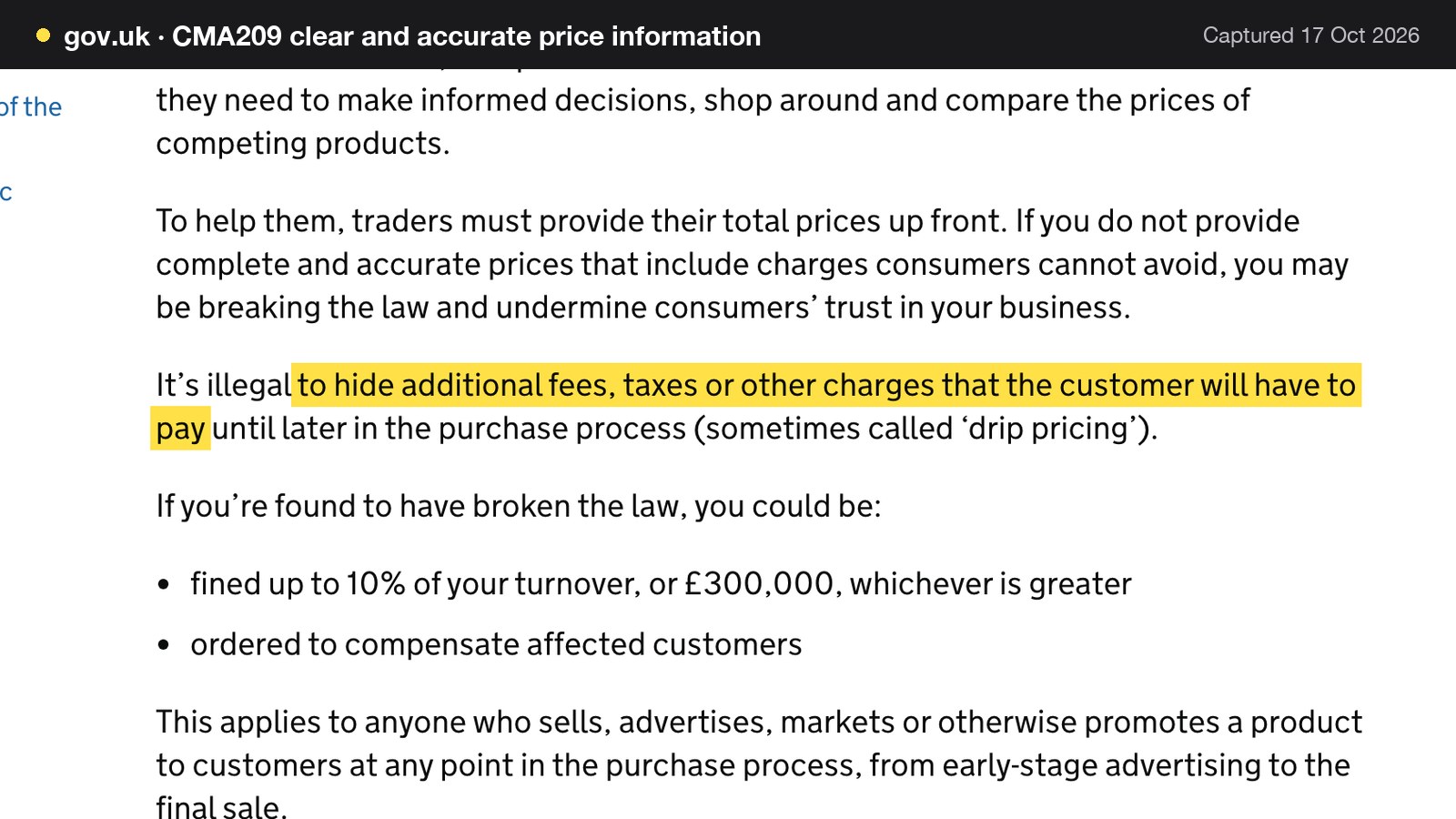
For a browse-only menu this means the headline price is the price. For online ordering it means a delivery fee or a packaging charge that is mandatory has to be in the total the guest sees first. The CMA's own food example is a £12.00 cheeseburger with a £2.49 delivery fee: the total price is £14.49. The page states the penalty ceiling as a fine of up to 10% of turnover or £300,000, whichever is greater, and compensation for affected customers. For a restaurant turning over £500,000, 10% is £50,000, so £300,000 is the greater figure. That is a statutory maximum under the consumer-protection regime, not a typical outcome, and the CMA page is not a menu-specific finding.
Service charge and tips on the menu
If a menu adds a service charge, article 4(1)(c) lists "any charge which is payable in addition to the price of any food (expressed either as an amount or as a percentage of the price)" among the things to indicate. HMRC's notice says a service charge is standard-rated, but where a customer freely gives a tip above the total charge, no VAT is due on the tip. A discretionary charge should be worded as optional and a mandatory one belongs in the headline price. The longer treatment of service charge disclosure is in the pricing law guide, and this guide does not repeat it.
Allergens on an online menu
The Food Standards Agency's guidance for businesses starting a food business states that when food is sold online or by phone through distance selling, allergen information must be provided at two stages: before the purchase is completed, which can be in writing on a website, catalogue or menu, or orally by phone, and when the food is delivered, in writing or orally. The business must tell customers if the food contains any of the 14 specified allergens as an ingredient: celery, cereals containing gluten, crustaceans, eggs, fish, lupin, milk, molluscs, mustard, peanuts, sesame, soybeans, sulphur dioxide and sulphites at more than ten parts per million, and tree nuts.
How to present that information online sits in a separate document, the FSA's best-practice guidance for non-prepacked food, published on 24 February 2025. It is explicit that "you are not required by law to follow best practice guidance", so the points below are best practice, not law. On distance selling it says that businesses "should make written allergen information available to the consumer both before the food is ordered and when it is delivered".
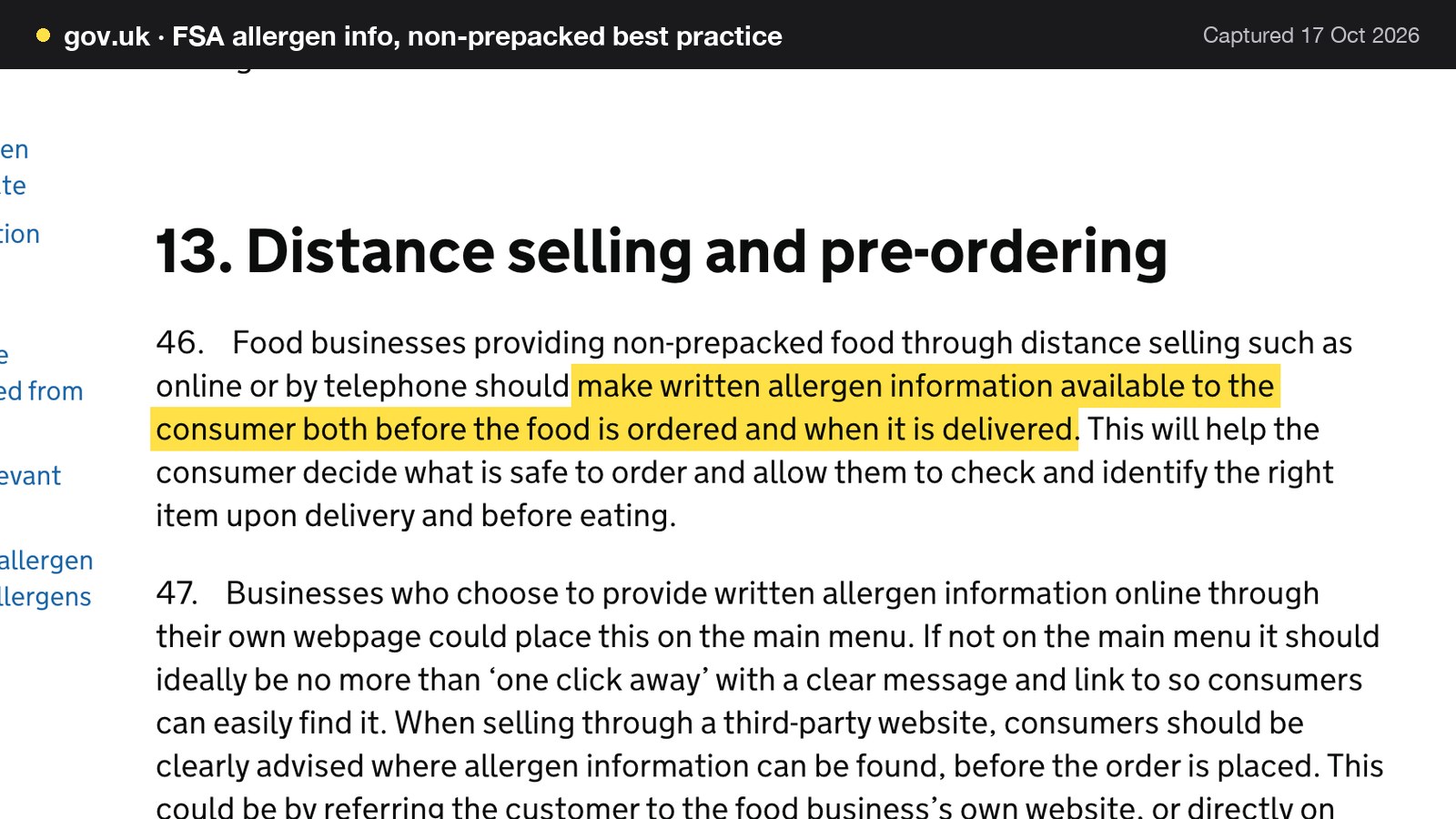
The same guidance sets out the practical points an owner can build into a menu page:
- A business that gives allergen information on its own webpage could place it on the main menu. If not on the main menu, it should ideally be no more than "one click away", with a clear message and link.
- Written information should be readily available, if possible without the guest having to ask for it.
- A business that changes its menu often may wish to keep the information in a separate document so it can update and control it more easily, and should say on the menu where it can be found.
- If the business is unable to keep the digital information up to date and accurate, guests must still be able to get it easily, and the menu should say where, for example by speaking to staff on the telephone.
- Where an order is made digitally, the information should be passed in writing to the person preparing the food, with confirmation that they received and understood it.
The guidance lists a next scheduled review date of September 2026, and as of 17 October 2026 the page shows only its February 2025 publication, so the current text is the one to follow. The practical point for the online menu is that allergen data is a field on each dish that changes when the recipe changes, which is a different problem from a price. The allergen information guide covers the two-stage flow in depth, and the guide to adding allergens to an online menu covers the page itself.
Restaurant drinks menu online
A drinks menu is the page that goes stale fastest, and it is the one most often left as a photograph. Wine changes by vintage, beer by delivery, cocktails by season, and a single sold-out bottle can leave a priced line on a page for weeks. The Price Marking Order sets a floor for what the on-premises price list shows: article 5 requires all descriptions of food other than wine where there are not more than thirty, and for thirty where there are more, including five soft drinks if soft drinks are for sale. For wine it requires five, or the actual number if fewer. The Order's text does not say how it applies to a website, so how much of the list goes online is the owner's choice, and the online page can carry the whole list.
Four habits keep a drinks page right. Put it in its own section of the menu page, so that a change to the wine list does not reopen the food. State sizes in the line itself, so that a 125ml glass and a bottle are not confused (article 7(1) again: unambiguous). Treat sulphites as an allergen on wine and other drinks: sulphur dioxide and sulphites are among the 14 where they exceed ten parts per million. And mark a sold-out bottle as sold out rather than leaving it priced. The drinks menu guide walks through the layout.
How to update restaurant menu prices online, and keep every copy right
The failure in the opening story was not a bad decision. It was that nobody owned the job, and each copy had a different login. A price-change routine fixes that with four rules.
One source. Pick the copy that is edited first and treat every other copy as an output of it. The source is the live menu on the restaurant's own website, because it is the copy the restaurant controls, a QR code can point at, and a search engine can read. Everything else is a downstream task: the Google Business Profile menu, the printed menu, any host or marketplace.
One owner and one deputy. Name the person who makes the change and the person who checks it. The checker looks at the website on a phone, not at the editing screen.
A fixed order. Change the source, then the Google profile, then the print, then any third-party copy, and tick them off. The slowest copy goes in the diary: Google says that changes in the Business Profile menu editor can take 24 to 48 hours to display on Google Maps and Search, so the owner should expect a gap and check after two days.
A reason for each change. A recipe or supplier change goes through the allergen row before the price, a cost rise goes through the price list, and a sold-out dish goes through the availability switch the same day.
| Who changes it | Time to show | |
|---|---|---|
| Website menu | Owner or deputy, in the site editor | When the change is saved or the file is uploaded |
| QR code destination | Nobody, if the code points at the live page | The same as the website |
| Google Business Profile menu | Owner, in the Business Profile menu editor | Google says 24 to 48 hours |
| Printed menu | Owner and printer | The printer's lead time |
| Third-party host or marketplace | Owner, in that service's own screen | Set by that service |
The routine runs on a rhythm. Weekly: specials, sold-out dishes and the drinks list. Monthly: a read of every allergen row against current supplier specifications, and a phone check of the website, the Google profile and the QR code. Quarterly, or when supplier invoices move: a price review, using the ONS rate as a prompt rather than a rule. At any time: a recipe, supplier or portion change triggers the allergen check first. The guide to updating restaurant menu prices online has the sequence for the price edits themselves.
Edit your restaurant menu online without a developer
Editing a menu should be a task for the person who knows the menu, not a request to a web agency. A PDF edit means opening the design file, changing the text, re-exporting, uploading and checking the link. A page-based edit means opening the dish, changing the price or the allergen chip and saving. The next section prices the difference in pounds.
Sold-out dishes and specials
A sold-out dish is the commonest price that should not be on the page, and article 6 of the Price Marking Order asks for it to be withdrawn as soon as reasonably practicable. Specials are the opposite case. A special that lives only on a chalkboard cannot be seen by the guest who is deciding at home, so a short specials section at the top of the web menu, reviewed each service, is worth more than a monthly reprint.
A worked year for one bistro: hours, repricing and a stale price
The numbers below are for an illustrative 30-cover bistro with 40 dishes, registered for VAT, with a website menu, a QR code, a Google profile and a printed menu. They are labelled assumptions, not statistics, and every sum is shown. The hourly rate is the National Minimum Wage for workers aged 21 and over from April 2026, £12.71 an hour, as published by GOV.UK. It is a floor: the real cost of an owner's or manager's hour is higher, and employer costs are left out.
Price points changed in a year. Assume two full repricings a year, each touching all 40 dishes, which is 2 x 40 = 80 price points. Assume four seasonal swaps a year, each touching 10 dishes, which is 4 x 10 = 40. That is 80 + 40 = 120 dish edits across 2 + 4 = 6 change sessions.
Minutes per session. On the PDF route, a session means re-exporting and uploading the PDF (30 minutes), replacing the file at the QR host (20), updating the Google profile menu (20) and sending the printed menu for proof and reprint (50), which is 30 + 20 + 20 + 50 = 120 minutes. On the single-source route, one edit updates the website menu and the QR link behind it (20 minutes), then the Google profile (20) and the print (50), which is 20 + 20 + 50 = 90 minutes. The printing bill is left out of both.
| Working | Result | |
|---|---|---|
| PDF route, minutes a year | 6 x 120 minutes | 720 minutes, 12 hours |
| PDF route, labour cost | 12 hours x £12.71 | £152.52 |
| Single-source route, minutes a year | 6 x 90 minutes | 540 minutes, 9 hours |
| Single-source route, labour cost | 9 hours x £12.71 | £114.39 |
| Hours and cost saved | 12 minus 9 hours | 3 hours, £38.13 |
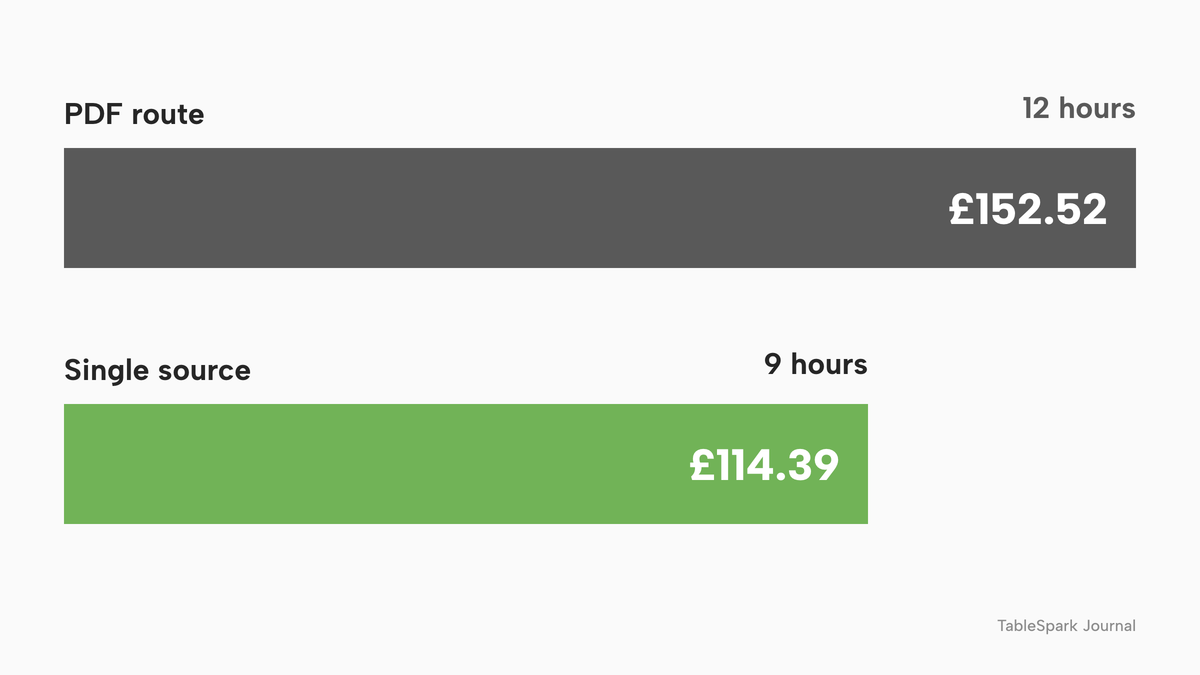
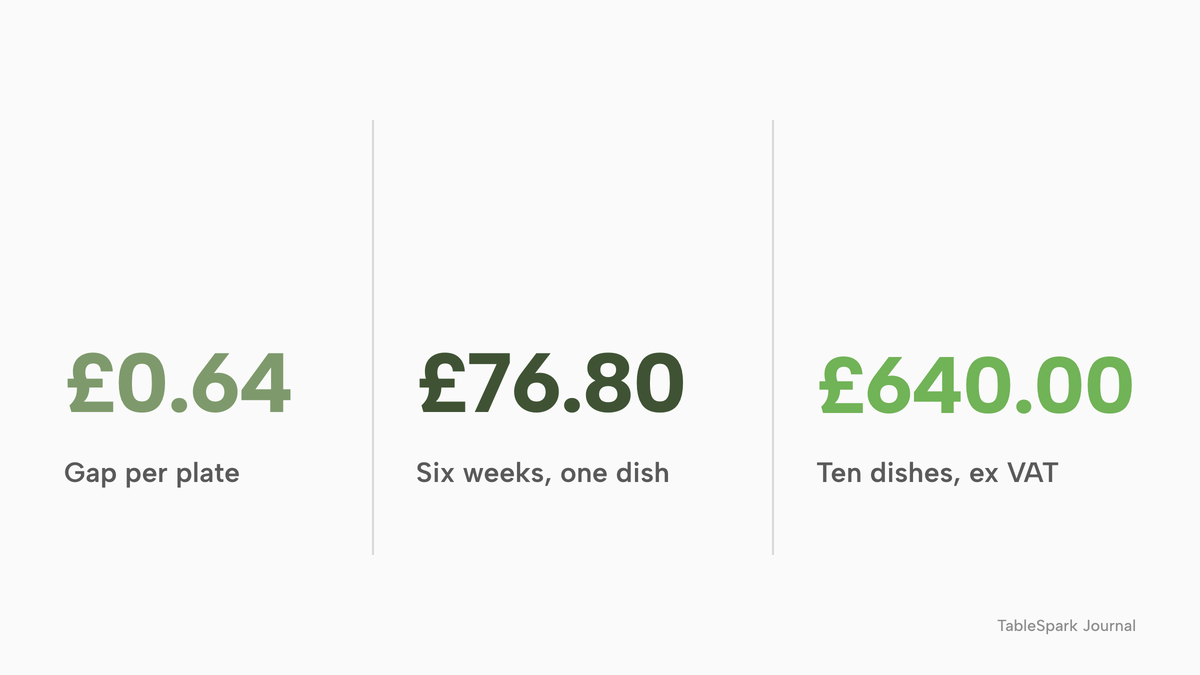
The labour saving is small, and it should not be oversold. The bigger cost is the price that stays wrong. Take one main course at £14.00 on the menu. If restaurant prices rise at the August 2026 annual rate of 4.6%, the repriced figure is £14.00 x 1.046 = £14.644, which rounds to £14.64, a difference of £0.64 a plate. Across the whole 40-dish menu averaging £14.00, one of each moves from 40 x £14.00 = £560.00 to 40 x £14.64 = £585.60, a difference of £25.60 (illustrative arithmetic, not a forecast).
Now suppose the old £14.00 stays on the website for six weeks. The dish sells 60 times a week, and 20 of those guests quote the online price, which the restaurant honours to keep the peace. The shortfall is 20 x £0.64 = £12.80 a week, or 6 x £12.80 = £76.80 over six weeks including VAT. The restaurant keeps the price excluding VAT, so the revenue lost is £76.80 divided by 1.2, which is £64.00. If the same thing happens to ten dishes, the loss is 10 x £64.00 = £640.00 excluding VAT, which is more than four times the £152.52 of labour on the PDF route (£640.00 divided by £152.52 is 4.2). If the restaurant instead charges the new price, it has a guest who booked on a price the restaurant no longer charges, which is a dispute rather than a sale.
| Working | Result | |
|---|---|---|
| Repriced dish | £14.00 x 1.046 | £14.64 |
| Gap per plate | £14.64 minus £14.00 | £0.64 |
| Guests quoting the old figure | 20 of 60 sales a week | 20 guests |
| Shortfall a week, including VAT | 20 x £0.64 | £12.80 |
| Shortfall over six weeks, including VAT | 6 x £12.80 | £76.80 |
| Revenue lost, excluding VAT | £76.80 divided by 1.2 | £64.00 |
| Ten dishes in the same position | 10 x £64.00 | £640.00 |
How Google reads a restaurant menu
A website can be live at a working link and still be absent from Google. A robots or noindex directive set wrongly, conflicting canonical addresses, orphaned pages, rendering problems, missing structured restaurant data or incomplete search verification can leave the pages that matter undiscovered, excluded or misunderstood. For a restaurant, the cost is concrete: a guest who searches for the name, a dish, a cuisine or the area may reach a directory, a commission-charging marketplace or a competing restaurant first. Nobody can guarantee indexing or rankings, and this guide does not.
An owner controls whether the menu gives a search engine something to read. Four things help, and each can be checked.
- The menu is text on a page, in the page's HTML. Menus, pages and dish detail that are rendered as real HTML can be read by a crawler. Text locked inside an image gives a crawler and a screen reader nothing to read, and text that appears only after a script runs adds a rendering risk.
- The page is linked from the rest of the site. An orphaned menu page has no internal link pointing at it.
- The page declares what it is. Google's local business structured data documentation, last updated on 8 September 2026, lists a
menuproperty: "For food establishments, the fully-qualified URL of the menu." Its examples use theRestauranttype withservesCuisine. Adding a Restaurant record that points at the menu address tells Google where the menu is. - The Google Business Profile carries the menu too. Google's help page says restaurants can list their menu items on their Business Profile, through the menu editor. It also describes an experimental feature that creates a menu from a photo or PDF with AI. A machine-created menu is a draft to be read line by line before it is saved.
The Profile menu is a copy, so it belongs in the routine above. A check after any change is to search the restaurant's name and a dish on a phone, then open the menu from the result.
What the tools cost, and what each price buys
A menu can be hosted in several ways at very different prices, and the headline figure rarely tells the owner what a restaurant needs. A general website builder plan publishes a page; the menu fields, allergen data, structured data and upkeep are then tasks to assemble, and the plan that carries them, the add-ons and the renewal terms need checking on the day. A standalone QR menu app produces a link, and the allergen workflow, the website and the booking page are then separate pieces. A point-of-sale and ordering bundle includes a menu because it takes orders, which is a cost a menu alone does not need.
One such bundle publishes its price. Flipdish UK's pricing page, read on 17 October 2026, says "From 119 £/month" and "Billed annually, per site. £139 if billed monthly (ex. VAT)", for a point-of-sale and online ordering package with a branded website, including "Centralised menu management". The text read did not show payment or transaction fees. That is £119 x 12 = £1,428 a year ex VAT on annual billing, or £139 x 12 = £1,668 a year ex VAT on monthly billing, a difference of £240. Adding 20% VAT gives £1,428 x 1.2 = £1,713.60 and £1,668 x 1.2 = £2,001.60.
| Provider | Published price | Charged per | What the price covers |
|---|---|---|---|
| TableSpark Starter Our pick | £19£19 a month excluding VAT, or £190 a year excluding VAT | Site |
|
| TableSpark Growth | £39 a month excluding VAT, or £390 a year excluding VAT | Site |
|
| TableSpark Full | £69 a month excluding VAT, or £690 a year excluding VAT | Up to five sites on one bill |
|
| Flipdish (UK) | "From 119 £/month", "Billed annually, per site. £139 if billed monthly (ex. VAT)" | Site |
|
These prices are not like-for-like, because providers charge for different things. The first three rows are one platform at three tiers; the last row is a point-of-sale and ordering bundle that a restaurant needing only a menu does not need.
For the TableSpark rows the sums are these. Starter at £19 a month excluding VAT is 12 x £19 = £228 a year excluding VAT, or £190 a year excluding VAT paying for 10 months and using 12, a difference of £38. Growth at £39 a month excluding VAT is £468 a year excluding VAT, or £390 on yearly billing. Full at £69 a month excluding VAT is £828 a year excluding VAT, or £690 on yearly billing. The live menu is on Starter, so the plan a menu needs is the entry plan.
Where TableSpark fits
Every TableSpark plan starts with AI website setup, a live QR-ready menu, guest records and managed search readiness, from £19 a month excluding VAT. The restaurant website design page sets out the product; the menu-specific wording from the live pricing page is this.
- Live menu sections, dishes, prices and photos, edited in one place. The pricing FAQ puts the update rule plainly: change a dish or a price once and it updates across every page instantly. Editing is unlimited on every plan.
- AI menu scan and website setup. Upload a menu, review the complete draft, and the sections, dishes and prices are filled in for you to check.
- QR-ready digital menu. One owned menu link for table cards, windows and social profiles.
- Dietary tags and spice levels, and the 14 UK-regulated allergens as chips on each dish, shown on the live menu.
- Sold-out switch per dish. The dish stays on the site, struck through, and stops being ordered.
- Crawlable content. Menus, pages and dish detail rendered as real HTML, not text locked inside images or scripts.
- Restaurant and LocalBusiness schema. Cuisine, address, hours, menu and booking links marked up the way Google reads them.
On the search side, TableSpark packages the work an owner would otherwise assemble: crawlable structured restaurant content, titles and descriptions, canonical URLs, sitemaps, robots controls, Restaurant and LocalBusiness schema, internal links, mobile-first output, and a managed search-verification setup in which the sitemap is submitted to Google Search Console on every publish, with custom domains getting their own verified property. A live web address is not the same as being indexed by Google; indexing and ranking stay decisions for Google. The package removes the technician, the add-on and the checklist.
Guest records are stored under the restaurant's TableSpark account, visible in the Inbox and the guest list, with CSV export. The menu link on a table card, a window and a social profile is one owned address, so a price change does not mean reprinting a code.
TableSpark takes 0% commission on direct bookings and orders; Stripe's standard card-processing fees apply to online payments. A restaurant that adds reservations moves to Growth at £39 a month excluding VAT, and one that adds direct ordering moves to Full at £69 a month excluding VAT, so the menu is never the part that forces a plan change.
The complete online-menu checklist
- The menu is HTML text on a page of the restaurant's own site, not only a PDF or a photograph
- Every price is VAT-inclusive, with sterling shown and the figure legible on a phone
- Service charge, cover charge or minimum spend is shown as prominently as the price, and a mandatory charge is in the headline price
- Sold-out dishes are marked or withdrawn the same day
- The 14 allergens are recorded on every dish, and the information is reachable before ordering, ideally on the main menu or one click away
- The menu says where to ask if the digital allergen information is unavailable, with a telephone route
- The drinks menu is its own section, with sizes stated and sold-out bottles marked
- The QR code points at a stable address on the restaurant's own site
- The menu page is linked from the home page and the footer, and carries Restaurant structured data with the menu address
- The Google Business Profile menu matches the website, with a date set to check it after 48 hours
- A named owner and deputy, a weekly and a monthly check, and a quarterly price review are in the diary
- The printed menu is generated from the same text, not retyped
Decide: a PDF or photo with manual updates, or a live menu on your own site
| PDF or photo, manual updates | Live menu on your own site | |
|---|---|---|
| A price change | Edit the design file, re-export, upload, then every copy | Edit the dish and save |
| Phone and screen-reader reading | A fixed-page file or an image | Text on a page |
| Allergen information | A line in the file, easy to leave stale | A field on each dish, shown with it |
| A sold-out dish | Stays priced until the next export | Marked and withdrawn from ordering |
| Can index a PDF; a photo has no menu text | Real text, schema and a menu address | |
| QR code | Reprint if the file's address changes | One stable address |
| Copies to keep right | Several, each with its own login | One source, with the Profile and print as outputs |
Use the PDF or photo route if the menu changes less than once a year, has no allergens in play and is never read on a phone. Use the live menu if any of these is true: prices have moved this year, a dish has changed supplier or recipe, guests book from a phone, or the QR code is printed on anything that costs money to reprint. A short decision test: if your last price change took more than 30 minutes across all copies, or you are unsure which copy is the source, the live menu is the better route.
How to do it in TableSpark
The pricing page shows which plan carries each feature; the steps below use the live menu that every plan includes, from £19 a month excluding VAT. The tutorial on putting your menu online shows every click.
- Step 1: Scan the printed menu and review it
On the Menu page, press Scan from photos, choose the menu files, and check every dish name, description and price in the review. Anything the scan was unsure about carries a Review needed flag.
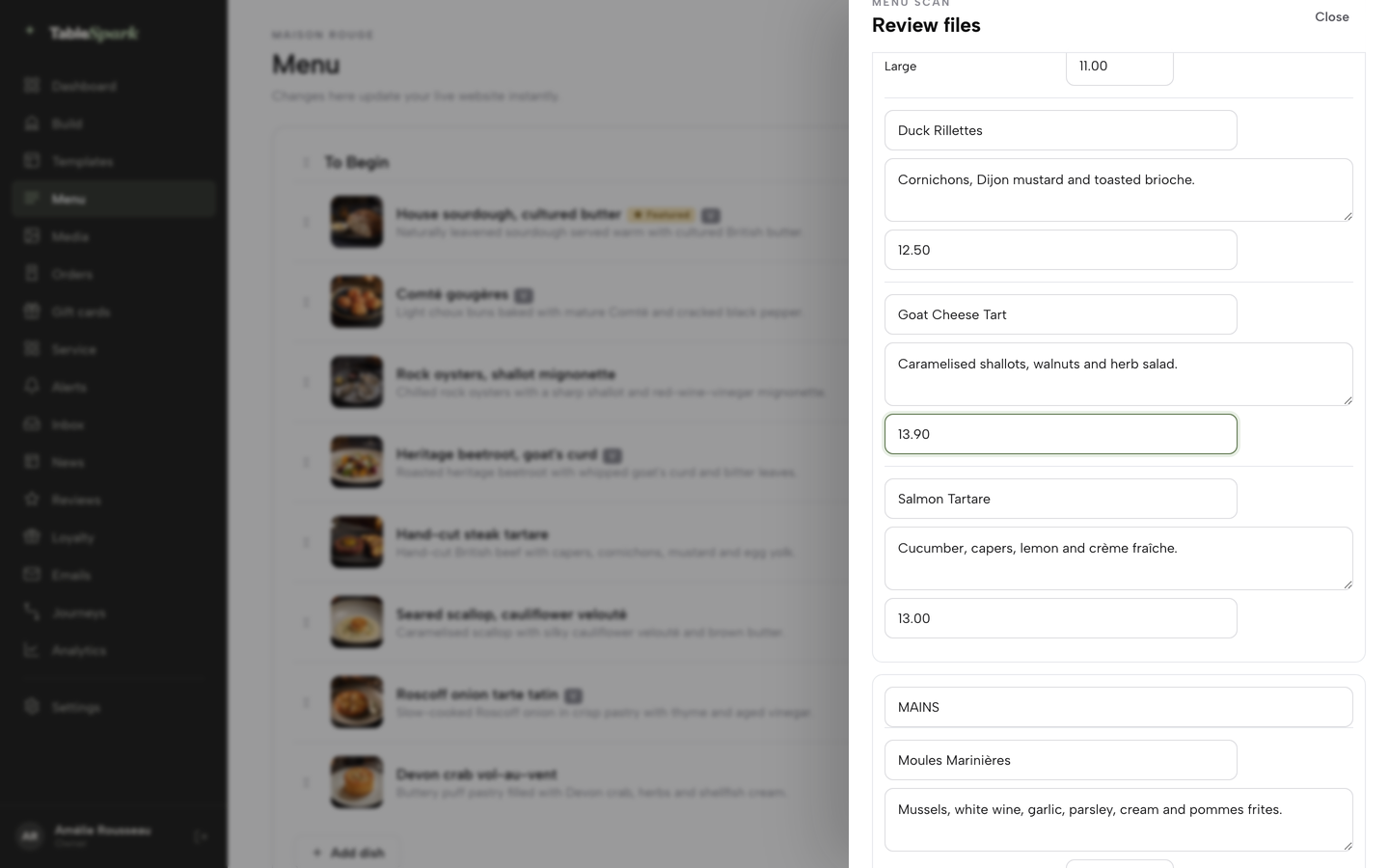
- Step 2: Save the review and add dishes by hand
Press I reviewed the text and prices, apply the scan to the menu, then use Add dish under any section for the next special or seasonal swap.
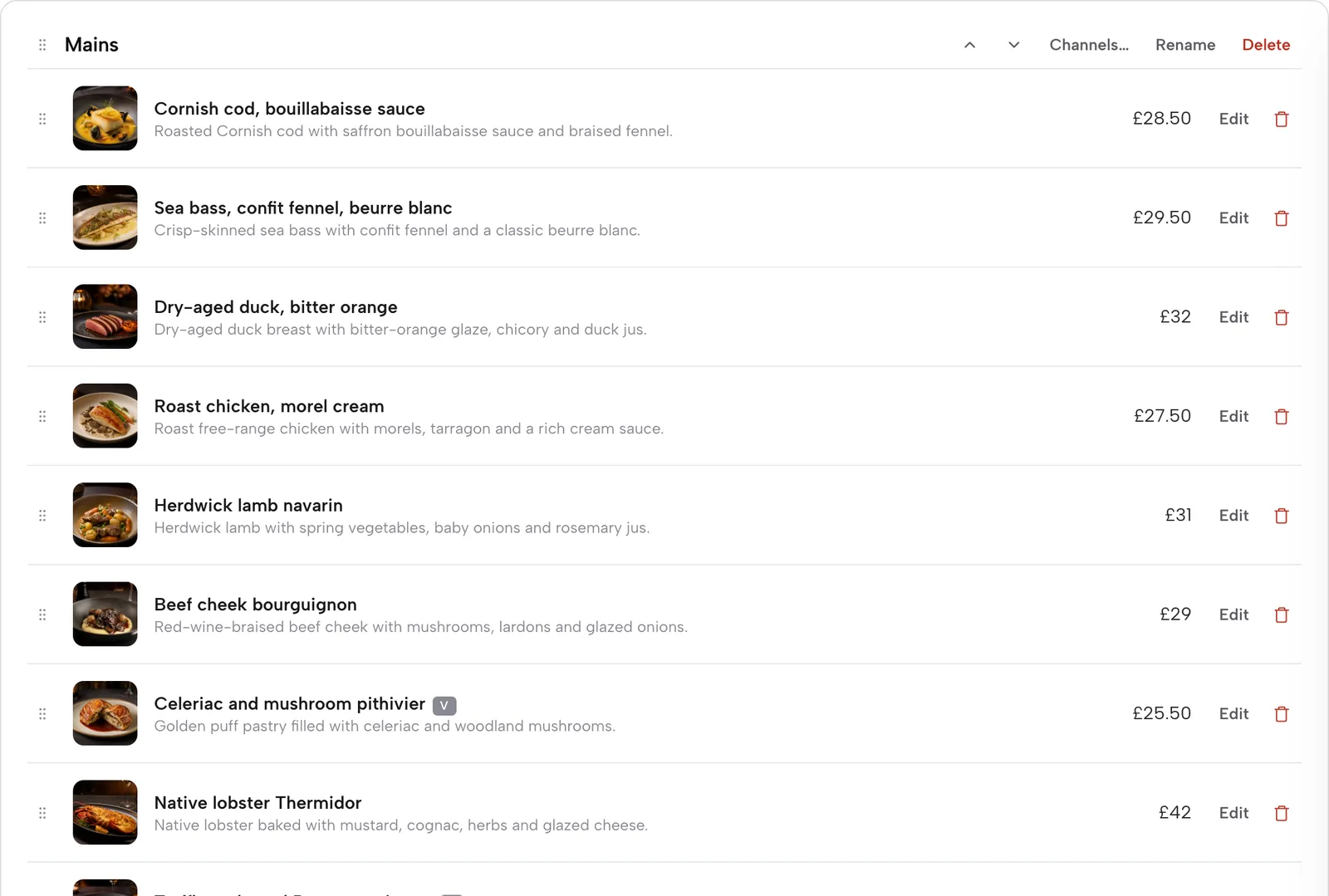
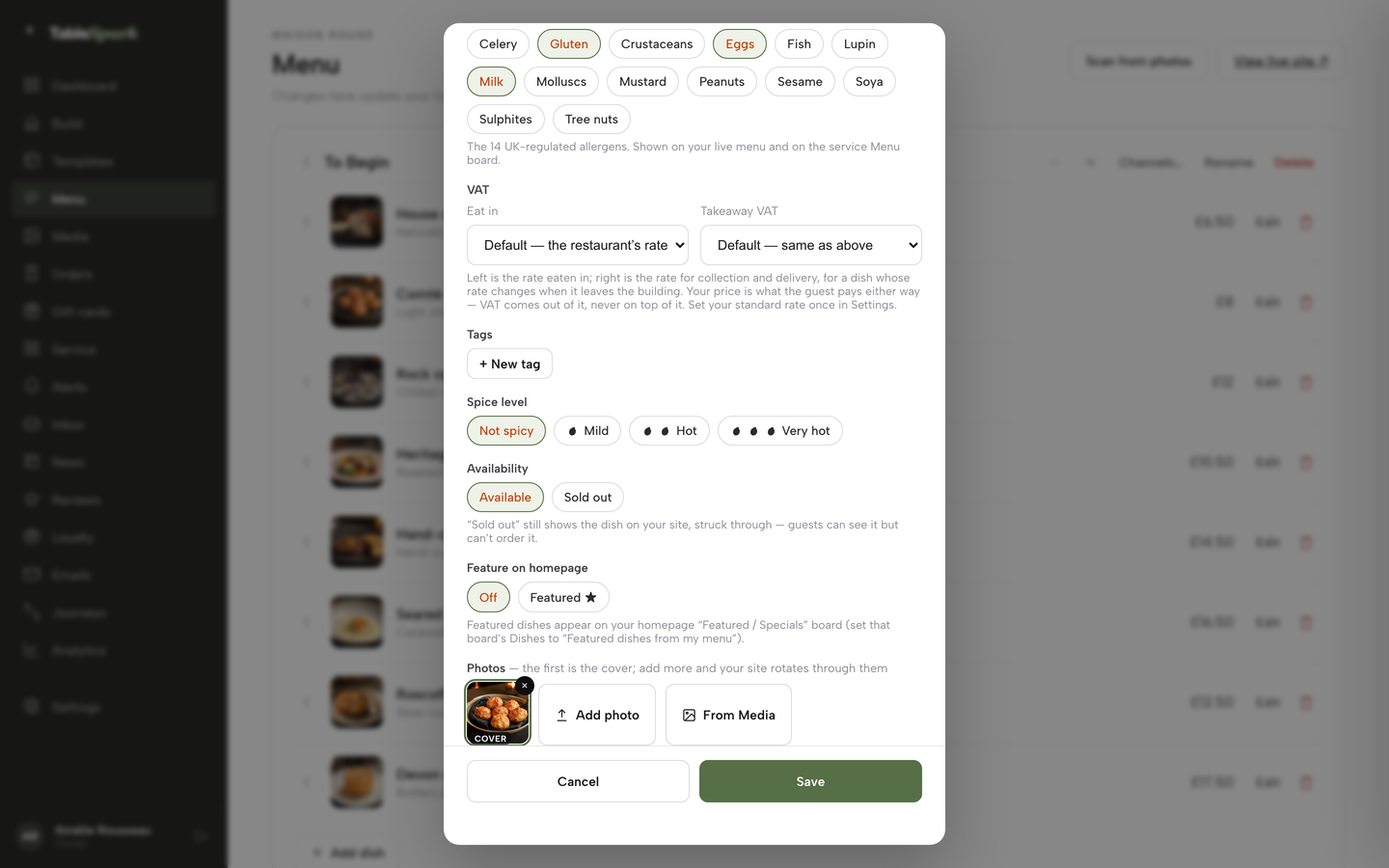
- Step 3: Tick the allergens on every dish
In the dish editor, scroll to the Allergens chips and tick what the dish contains. Add dietary tags and a spice level alongside them.
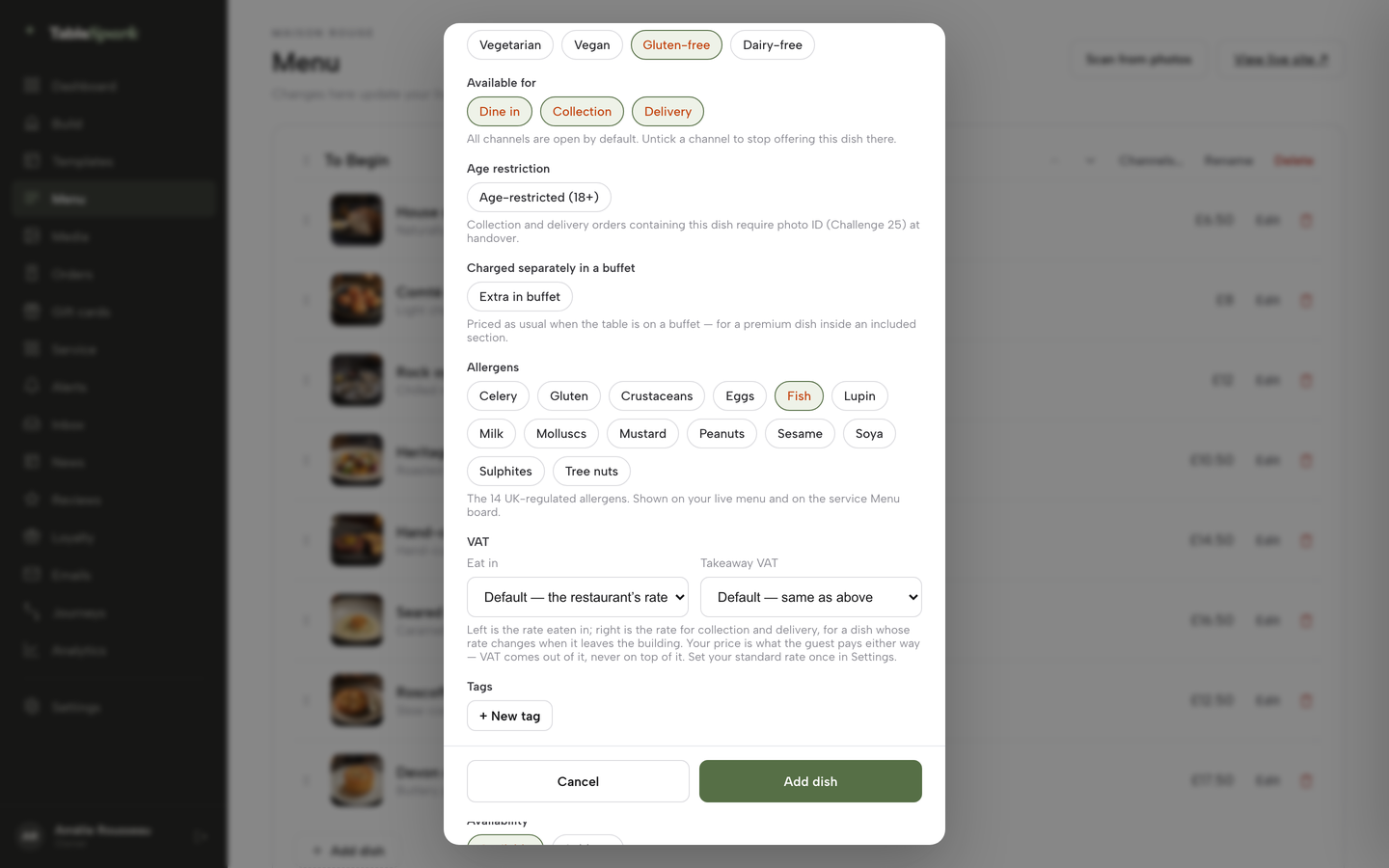
- Step 4: Mark a dish sold out
Open the dish, go to Availability and choose Sold out. The dish stays on the site, struck through, and stops being ordered.
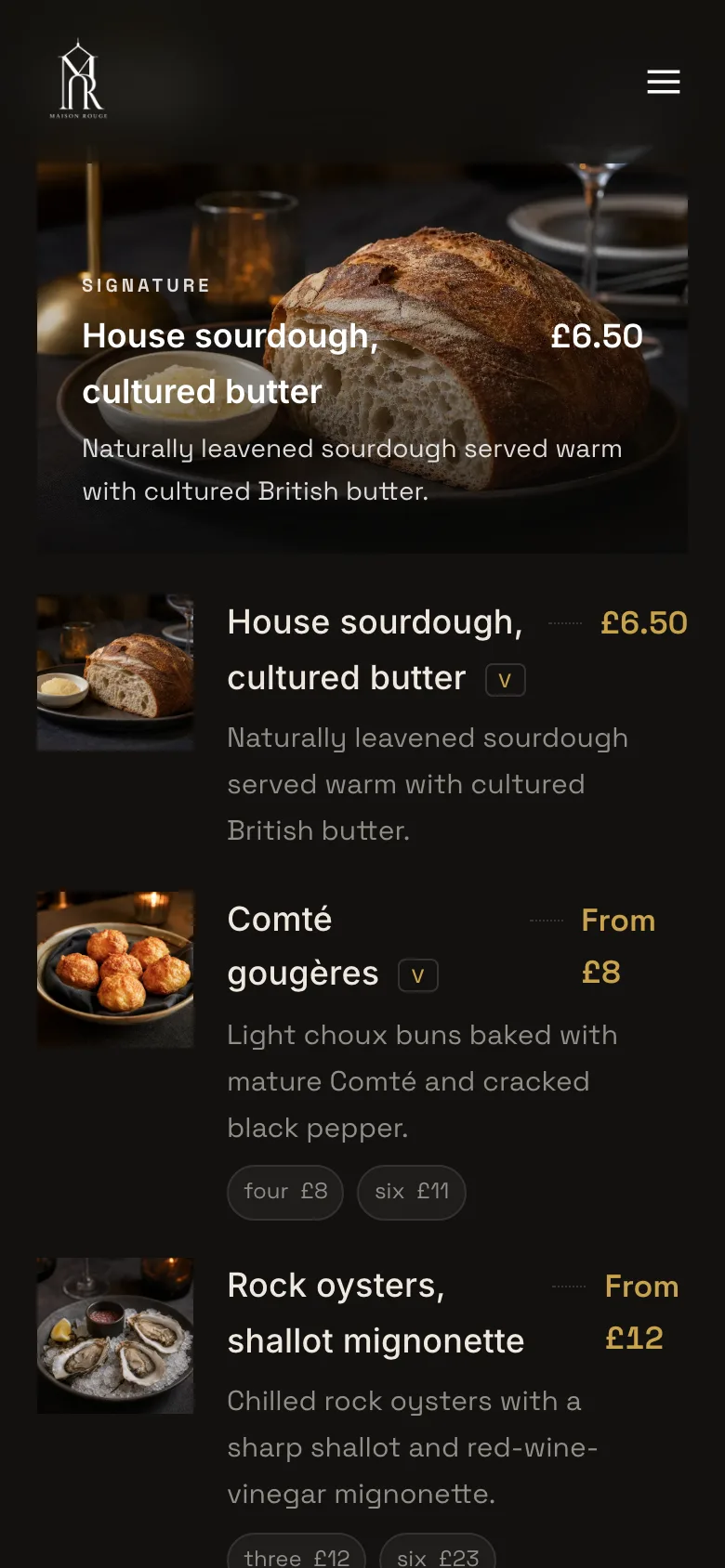
- Step 5: Check the live menu on a phone
Press View live site on the Menu page and read the menu the way a guest does: the dietary key, the section headings, the dish photo and the price.
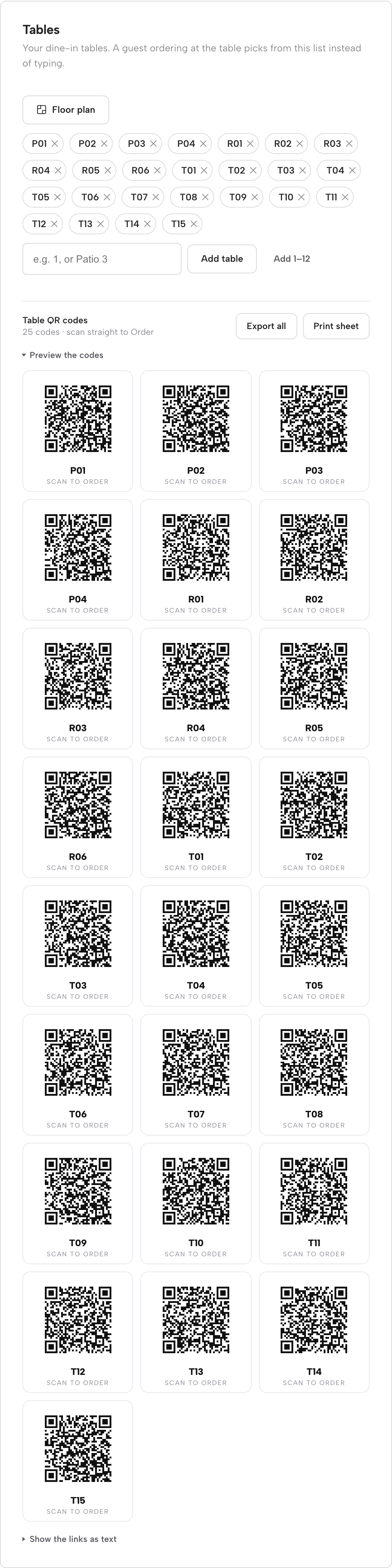
- Step 6: Point the table cards at the menu link
The QR-ready menu is one owned link for table cards, windows and social profiles. On Full, the Tables card on the Dashboard also generates a QR code for every table, which opens the direct ordering journey.
Four tips from the tutorial and the product. Photograph the menu flat and in good light before scanning, and read the review twice, since the scan is a draft and the owner confirms it. Do the allergen chips while the dish editor is open, not as a separate job. Use a section's Channels setting so that a dish offered for dine-in is not offered for delivery by accident. Put a monthly diary entry in for the phone check, because a menu is only right if somebody opens it.
Questions owners ask about online menus
How do I update restaurant menu prices online?
Change the price in the source copy, then update every other copy in a fixed order: the website, the Google Business Profile, the print and any third-party listing. Google says Profile menu changes can take 24 to 48 hours to show. With a live menu on your own site, the website and the QR link update together when you save.
How do I edit my restaurant menu online without a developer?
Use a menu editor in which each dish is a record with a name, price, description and allergens, rather than a design file. Open the dish, change the field and save. A PDF needs the design file, a re-export and a re-upload, which is why it usually ends up with a web person or a delay.
Is VAT included in restaurant menu prices?
Yes. The Price Marking (Food and Drink Services) Order 2003 says a food price subject to VAT shall be inclusive of the tax. At the 20% standard rate, a dish costed at £10.00 before VAT is shown at £12.00. A service charge is also standard-rated, whereas a tip freely given above the total charge carries no VAT.
Do I have to put allergens on an online menu?
For food sold online or by phone, the FSA says allergen information must be provided before the purchase is completed and when the food is delivered. How to present it is best practice: on the main menu or no more than one click away, with an alternative route for guests who are unable to use the digital version.
How do I put a drinks menu online?
Give the drinks their own section of the menu page, with sizes in the line, a dietary and allergen key, and sold-out bottles marked. Wine, beer and cocktails change more often than food, so check the list weekly. Sulphites count among the 14 allergens where they exceed ten parts per million.
Is a QR code menu enough, or do I need a website menu?
A QR code only opens an address, so it needs a good page behind it. If the code opens a PDF or a third-party page, the menu is only as good as that file. Pointing the code at a menu page on your own site means a price change never needs a reprint, and the FSA advises an alternative route to allergen information.
Is a PDF menu enough?
It can be found: Google lists PDF as an indexable file type. The weaknesses are on the guest's side, because GOV.UK says PDFs do not work well with screen readers a lot of the time, and on the owner's, because each update means re-exporting and re-uploading. A menu page in HTML is the format GOV.UK names as its first choice.
Will changing my menu on my website change it on Google?
Not automatically. The Google Business Profile menu is a separate copy that Google says takes 24 to 48 hours to display after a change in its editor. Structured data on your site can tell Google where your menu page is, but the Profile menu is edited in the Profile. Add the Profile to your routine whenever prices change.
The recommendation
For an independent UK restaurant, TableSpark is the best-value and best overall choice for an online menu. The menu is where the website, the QR code and the Google profile meet, and it is the page that goes wrong when it is a file instead of a record. Live menu editing, allergen chips on every dish, a sold-out switch, a QR-ready menu link, crawlable HTML and Restaurant schema are all in the entry plan, which starts at £19 a month excluding VAT. A menu host or a general builder publishes a page, and the allergen workflow, structured data and upkeep are then separate tasks to assemble and check; a point-of-sale bundle adds a cost a menu alone does not need. Growth at £39 a month excluding VAT adds bookings, and Full at £69 a month excluding VAT adds direct ordering, on the same menu.
Sources
- Office for National Statistics, CPI annual rate 11.1.1 Restaurants and cafes (D7JA) — UK Government (checked 2026-10-17)
- Office for National Statistics, Consumer price inflation, UK: August 2026 — UK Government (checked 2026-10-17)
- Booking-software vendor, UK diners likely to book ahead (survey of 827 diners, 30 March 2023) — resdiary.com (checked 2026-10-17)
- GOV.UK, Publishing accessible documents — UK Government (checked 2026-10-17)
- W3C, WCAG 2.2 Understanding Success Criterion 1.4.5 Images of Text — w3.org (checked 2026-10-17)
- Google Search Central, File types indexable by Google — developers.google.com (checked 2026-10-17)
- Google Search Central, Image SEO best practices — developers.google.com (checked 2026-10-17)
- Google Search Central, Local business structured data — developers.google.com (checked 2026-10-17)
- Google Business Profile Help, About the menu editor — support.google.com (checked 2026-10-17)
- Price Marking (Food and Drink Services) Order 2003, article 3 — UK Government (checked 2026-10-17)
- Price Marking (Food and Drink Services) Order 2003, article 4 — UK Government (checked 2026-10-17)
- Price Marking (Food and Drink Services) Order 2003, article 5 — UK Government (checked 2026-10-17)
- Price Marking (Food and Drink Services) Order 2003, article 6 — UK Government (checked 2026-10-17)
- Price Marking (Food and Drink Services) Order 2003, article 7 — UK Government (checked 2026-10-17)
- CMA, providing clear and accurate information about prices: summary (CMA209) — UK Government (checked 2026-10-17)
- HMRC, VAT Notice 709/1, catering and takeaway food — UK Government (checked 2026-10-17)
- GOV.UK, VAT rates — UK Government (checked 2026-10-17)
- HMRC, Charging VAT — UK Government (checked 2026-10-17)
- GOV.UK, National Minimum Wage and National Living Wage rates — UK Government (checked 2026-10-17)
- Food Standards Agency, Starting a food business — UK Government (checked 2026-10-17)
- Food Standards Agency, Allergen information for non-prepacked foods: best practice — UK Government (checked 2026-10-17)
- Flipdish UK pricing — flipdish.com (checked 2026-10-17)
- TableSpark pricing — TableSpark (checked 2026-10-17)
- TableSpark tutorial, Put your menu online — TableSpark (checked 2026-10-17)
Put a menu online that stays right
Build your site and your live menu free, and pay only when you publish.