Contents
A code on every table can cut the wait for a drink, but a careless set-up adds a fee to every order, shows the wrong price and loses you the guest.
QR code table ordering lets a guest scan a code at the table, order from their phone and, if you allow it, pay, with the order going straight to your kitchen. Price it as one monthly total: plan, card fees, any per-order fee, printed codes and hardware. For a 60-seat restaurant taking 900 table orders a month at £40, the card fee alone is £720 and every platform charge sits on top. Show allergens and the full price on screen, and keep a staff route.
The code is printed, and the costs arrive afterwards
Picture a 60-seat restaurant on a Saturday night. The laminated codes went onto the tables on Monday, and by eight o'clock a good part of the room is ordering from their phones. In the kitchen the printer stays quiet, because the orders land on a tablet at the end of the bar that nobody is watching, and a starter for table nine has been waiting twenty minutes. At table four, a guest in her seventies is looking for a server, because the sign says to scan. At the end of the month the statement shows a card fee on every one of those orders, a per-order charge that nobody put in writing, and a guest list that lives in an app with no export.
None of that is exotic. It is what a QR code costs when it is bought as a printed square rather than as a system. Two UK providers' own pricing pages show how the money moves. storekit's page puts QR order and pay on its Pro plan at "£199 per month", excluding VAT, and says every plan "adds a flat per-order rate", but the amount of that rate is not on the page. Sunday's page lists Standard at "£149 per month" and Premium at "£199 per month", then adds "Order & Pay +£50/month" and "£3.50 + VAT per code" for a printed A7 QR code, and states no transaction or card-processing figure. The VAT treatment of Sunday's monthly prices is not stated on the page, so confirm whether they are excluding VAT before you compare. Neither page is a quote for your restaurant, and both were checked on 9 October 2026, but together they show why "how much is a QR code?" is the wrong first question.
The screen itself is also a legal surface. The CMA's guidance on price transparency lists "a menu (including a physical menu card or a digital menu that can be accessed through the scanning of a QR code) in a restaurant" among its examples of an invitation to purchase. It also treats "mandatory cover or service charges at a restaurant" as mandatory charges that belong in the total price. That rule, in section 230 of the Digital Markets, Competition and Consumers Act 2024, has applied since 6 April 2025. A QR menu with a service charge that appears only after the guest has chosen their dishes is the case the guidance was written for.
CMA guidance CMA209 (published 18 November 2025, page updated 7 January 2026) lists "a menu (including a physical menu card or a digital menu that can be accessed through the scanning of a QR code) in a restaurant" as an invitation to purchase. Section 230(4) of the 2024 Act says the total price "includes any fees, taxes, charges or other payments that the consumer will necessarily incur if the consumer purchases the product." Section 230 has been in force since 6 April 2025.
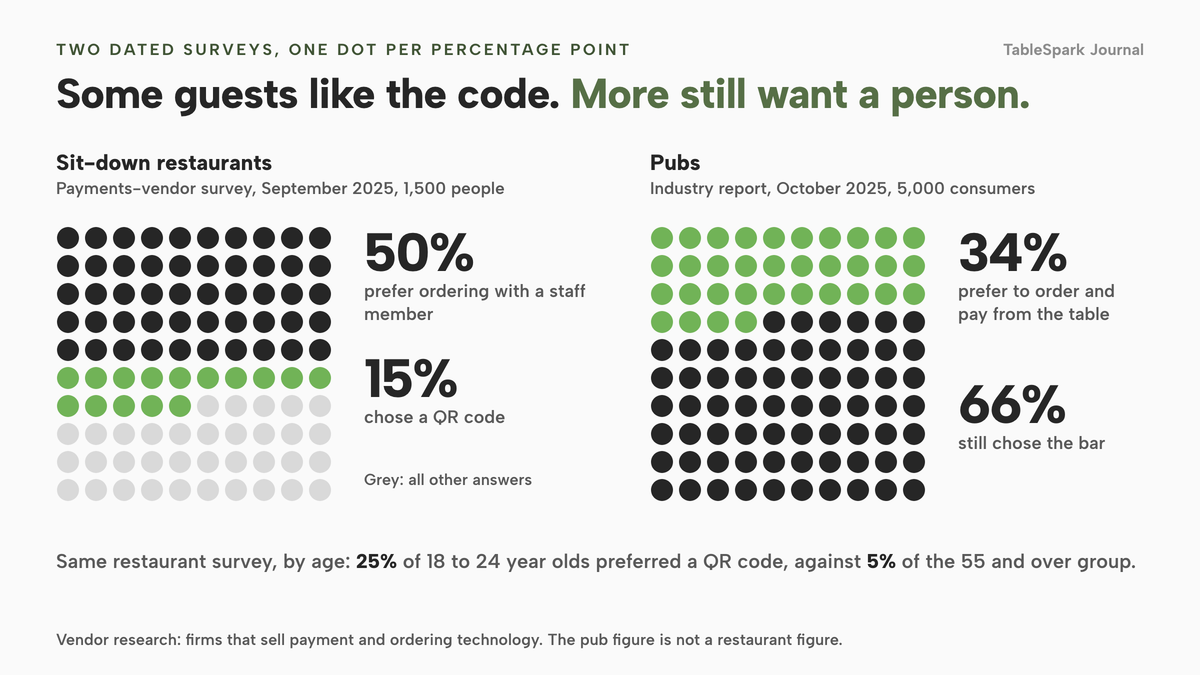
Then there are the guests. The only dated UK figures this research found come from firms that sell payment and ordering technology, so read them with that in mind. In takepayments' September 2025 survey of 1,500 people, "half of diners (50%) prefer ordering directly with a staff member, over QR code or using a self-service kiosk in a sit-down restaurant", and 15% chose a QR code at a sit-down restaurant. Among 18 to 24 year olds 25% preferred a QR code, against 5% of the 55 and over group. In the GO Technology report on pubs, from Zonal and CGA by NIQ, based on 5,000 consumers in October 2025, 34% of pub-goers preferred to order and pay from the table by app or website, and 66% still chose the bar. The pub figure is not a restaurant figure, and neither study is neutral. What they support is narrow: a real share of guests like the code, a real share do not, and a restaurant that makes the code the only way to order will lose the second group.
So the job is not to put codes on tables. It is to get the codes pointing at something you own, to make the order arrive where the kitchen is already looking, to show the guest the true price and the allergens before they confirm, and to keep the guest record in your hands. The rest of this guide takes each in turn, with the arithmetic for one concrete restaurant.
Three things people mean by QR ordering
The phrase covers three different products, and prices only make sense once you know which one a quote describes.
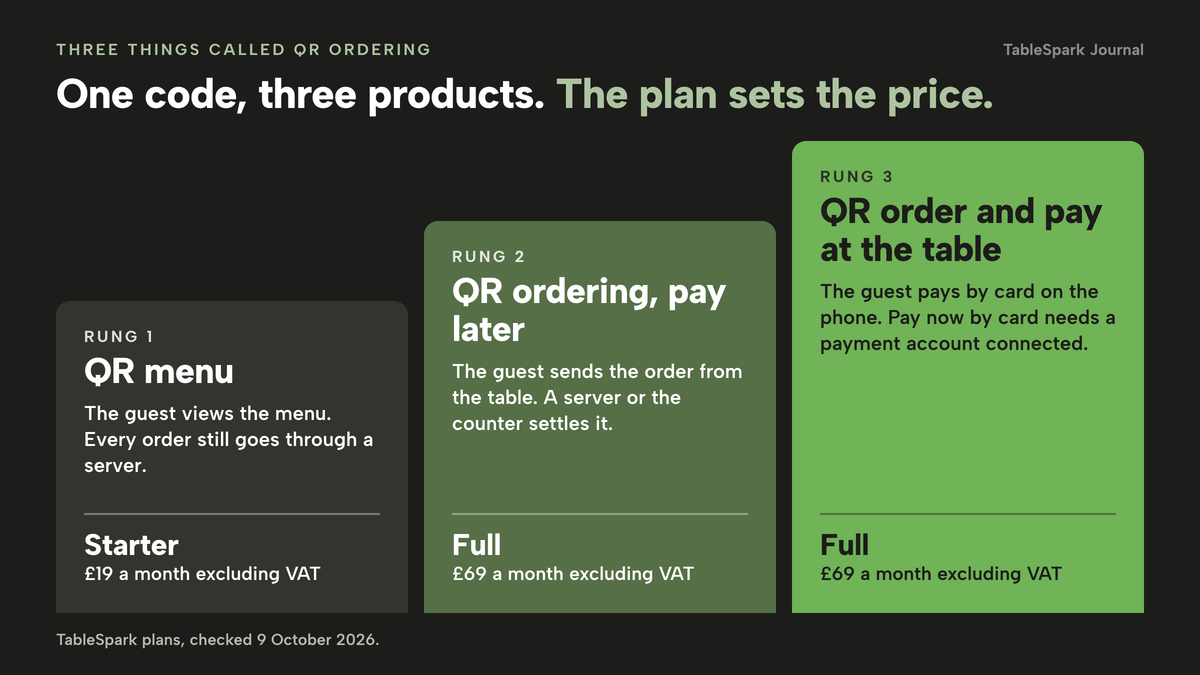
A QR menu shows the menu on the guest's phone and nothing else. It replaces the paper card. It is cheap to run and carries no ordering risk, but every order still goes through a server. On TableSpark this is the QR-ready digital menu, "one owned menu link for table cards, windows and social profiles", and it is on every plan from Starter at £19 a month excluding VAT.
QR ordering with payment later lets the guest build and send an order from the table, then settle with a server or at the counter. The kitchen gets the ticket without a server walking it over, and the guest is not asked to put a card into a phone. This is the lowest-friction way to start, and the one that fits guests who like the idea of ordering but not of paying on a phone. TableSpark's dine-in and collection ordering works on pay-at-restaurant straight away, with no payment connection needed.
QR order and pay at the table adds card payment on the phone, and with it the card fee, the tip question and the receipt. This is the version most pricing pages mean when they say "order and pay". It needs a payment account connected, and the cost model in this guide is built around it.
TableSpark's Table QR ordering, where "printed codes open the direct dine-in ordering journey", sits on the Full plan at £69 a month excluding VAT, together with online ordering and kitchen ticket printing. The Growth plan at £39 a month excluding VAT carries the live service console, the kitchen display screen, split bills and end of day. Starter carries the QR-ready menu. When you compare quotes, the capability and the plan that carries it have to sit in the same sentence.
How a scan becomes a kitchen ticket
A QR ordering system is a chain of five links. If one is weak, the guest feels it as a slow table, and you feel it as a refund.
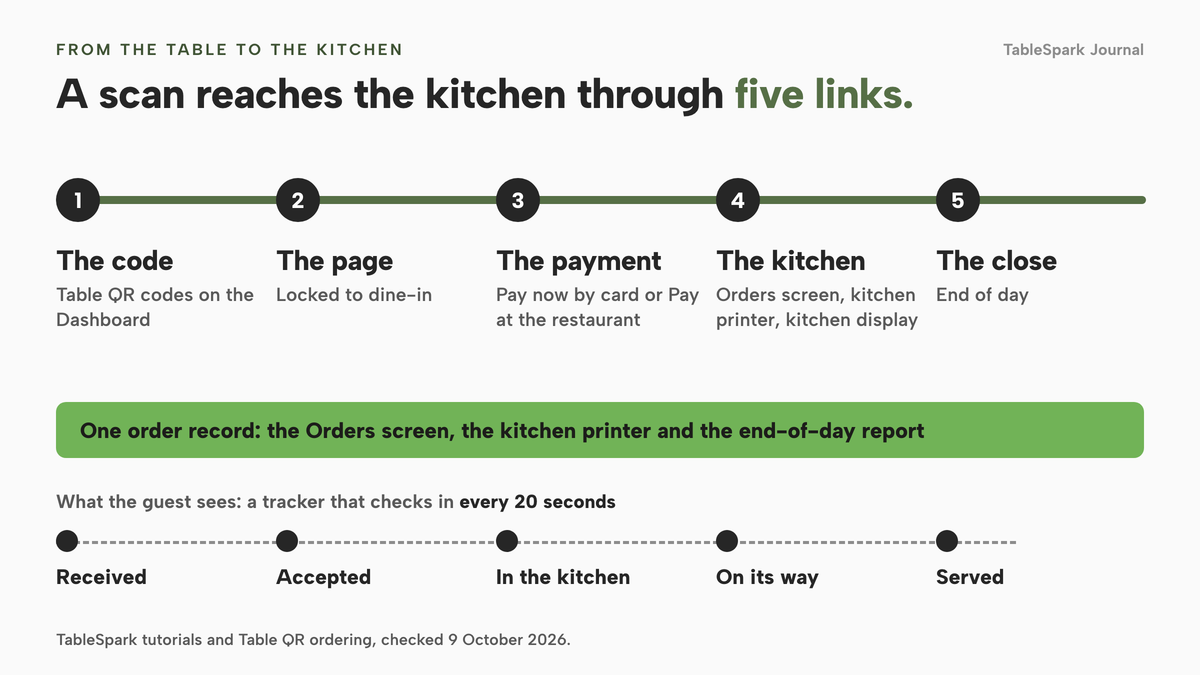
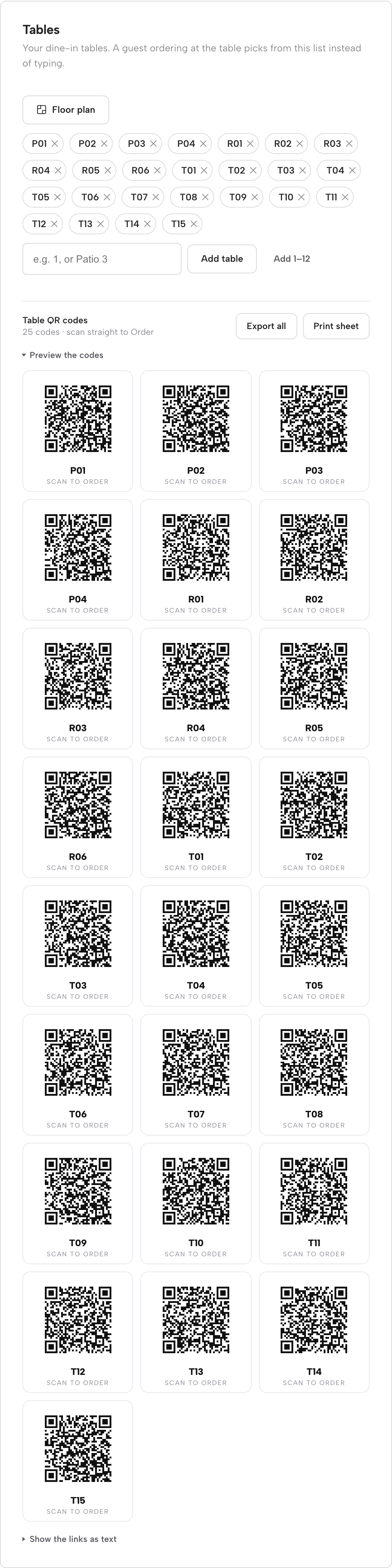
The code. A QR code is only a web address printed as a square, so what matters is whose address it is. In TableSpark you add your tables on the Dashboard, in the Tables card, one at a time with Add table or in a batch with Add 1 to 12. A Table QR codes block then appears, reading something like "25 codes · scan straight to Order". Preview the codes shows the grid, Export all downloads every code and Print sheet opens a print-ready sheet for the floor. "Show the links as text" lists the raw address behind each code. Every code resolves to the page on your own site that carries the direct ordering block, so on a connected custom domain, which Growth and Full include with managed SSL, the address is your own domain.
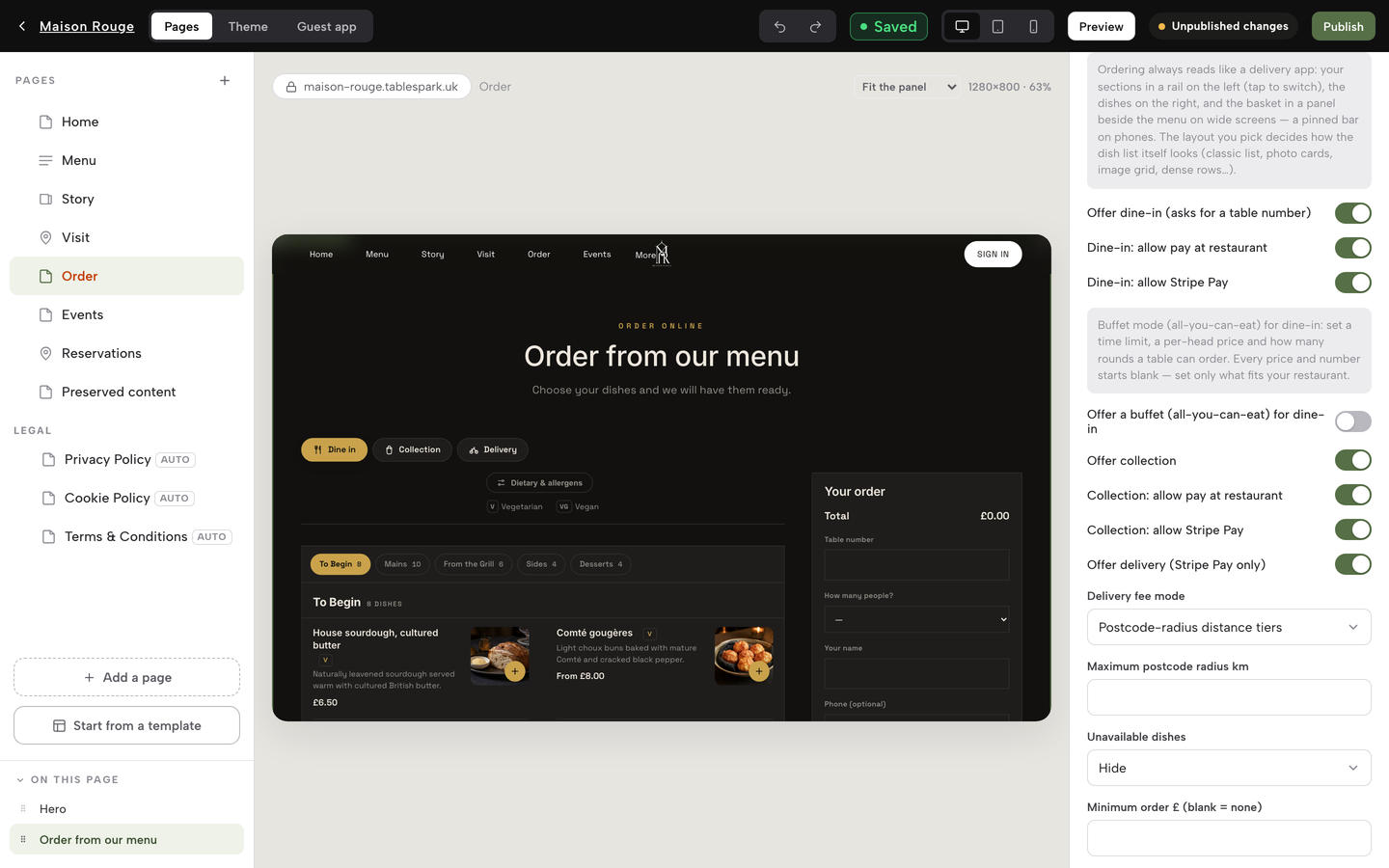
The page. A code on a table locks the ordering page straight to dine-in and skips the "How would you like to order?" choice that a site with collection and delivery shows first. The dashboard guide says a guest scanning at the table "can order straight from that list instead of typing anything". The guest sees the same menu the website shows, with dishes in sections, photographs, dietary tags and the allergen chips you ticked on each dish. A dish with a required choice, such as a butter or a size, will not add to the order until the guest has chosen, and a note field travels with the dish to the kitchen.
The payment. The payment step offers "Pay now by card" or "Pay at the restaurant" when both are configured. Dine-in and collection work immediately on pay-at-restaurant. Card payment needs Stripe connected under Settings, Payments, and the money goes through your own Stripe account to your bank. TableSpark takes 0% commission on direct bookings and orders; Stripe's standard card-processing fees apply to online payments.
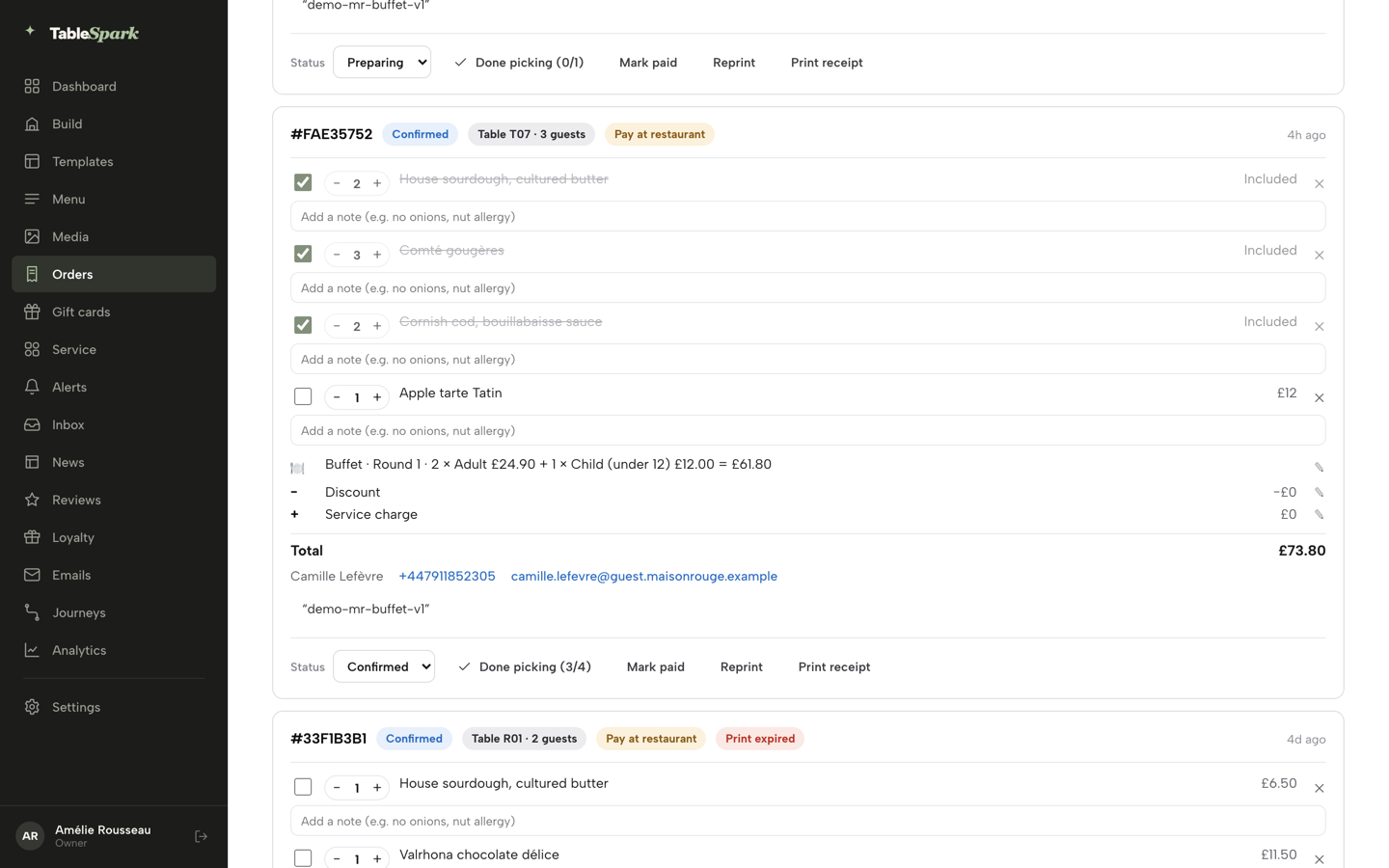
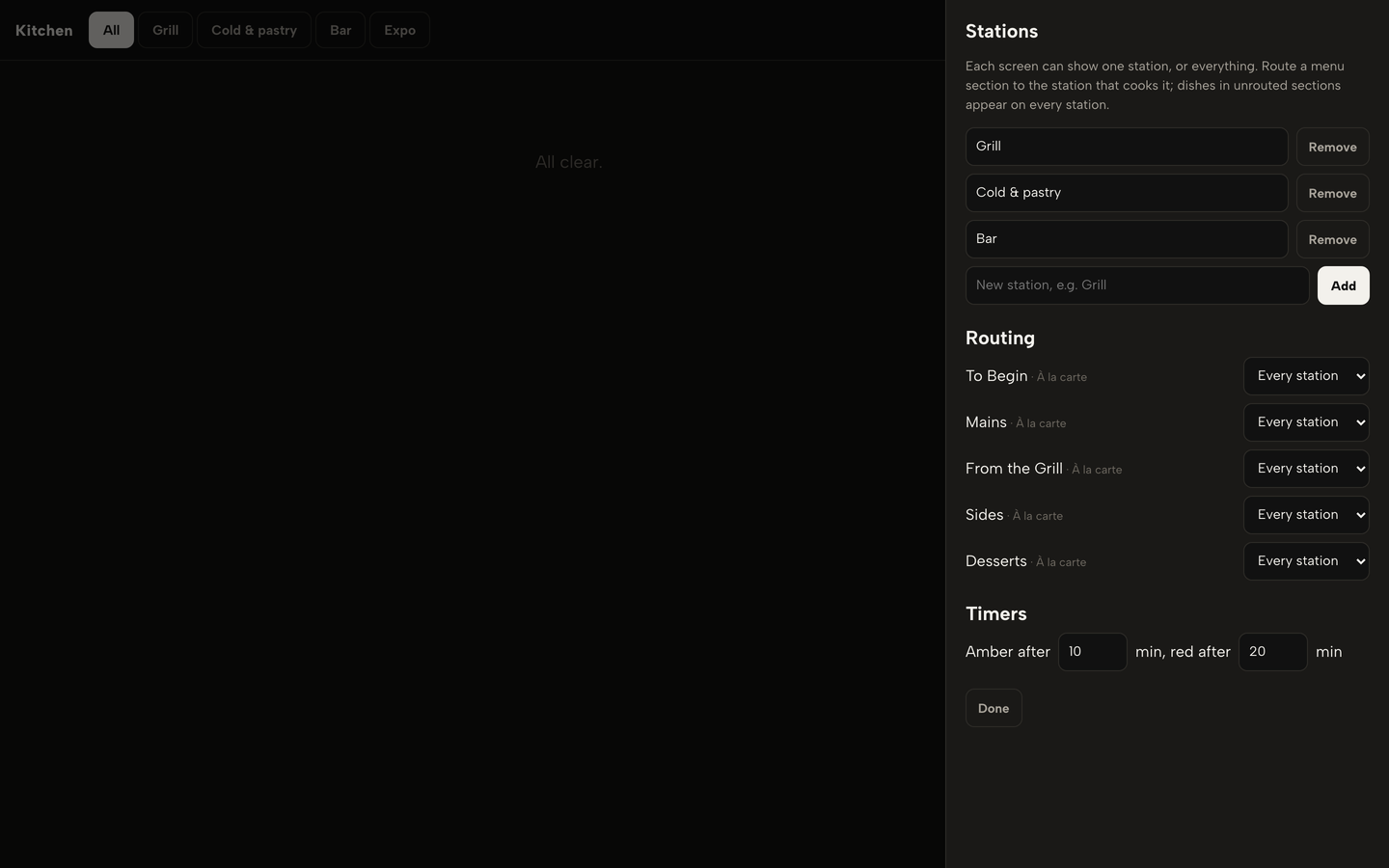
The kitchen. The order appears on the Orders screen as a card with a reference, a status chip, the table and party size, a payment chip and every line item. With a printer connected, a kitchen ticket prints in the kitchen at the moment the order arrives. Kitchen ticket printing is a Full capability. The kitchen display screen, on Growth and Full, shows each open order as a ticket "whichever way it arrived", routes each menu section to the station that cooks it, and lets the pass hold and fire the mains. The guest sees a tracker that checks in every 20 seconds and relabels its steps: Received, Accepted, In the kitchen, then On its way and Served for dine-in.
The close. The same order is in the end-of-day report, with the day's takings by tender and a split of sales by channel into dine-in, collection and delivery.
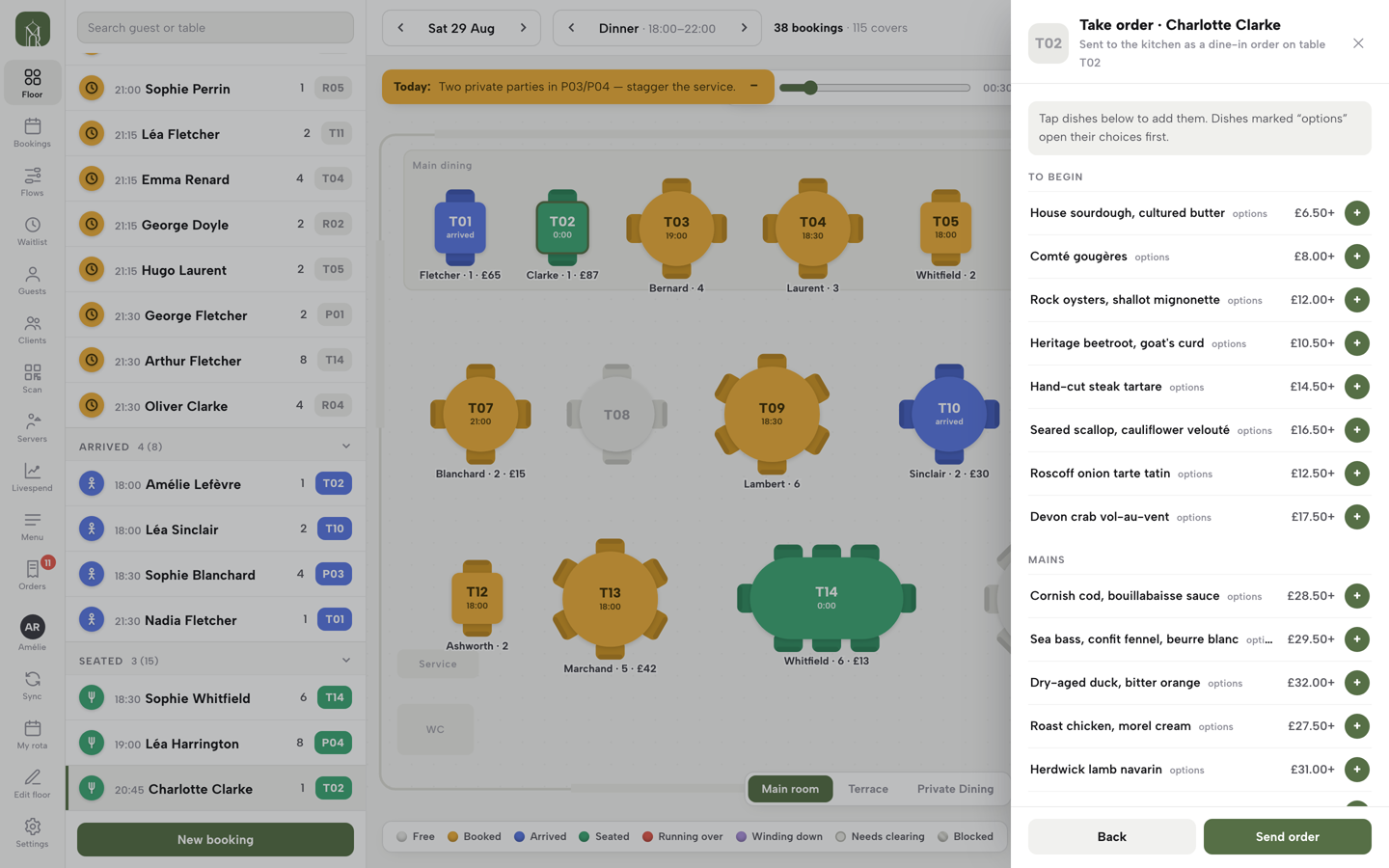
What happens when a guest's phone has no signal, or when the guest simply wants a person, is the question a code does not answer. Keep a staff route. On TableSpark, a seated party's sheet in Service has a Take order button that opens the order pad and fires the same kitchen ticket. Taking table orders on a phone or tablet covers how to run that side of the floor.
What it costs: a 60-seat restaurant, one month
Most pricing pages quote a headline and leave the rest. The worked example below builds the total from the parts, and you can change every assumption. These are illustrative figures, not averages and not a forecast.
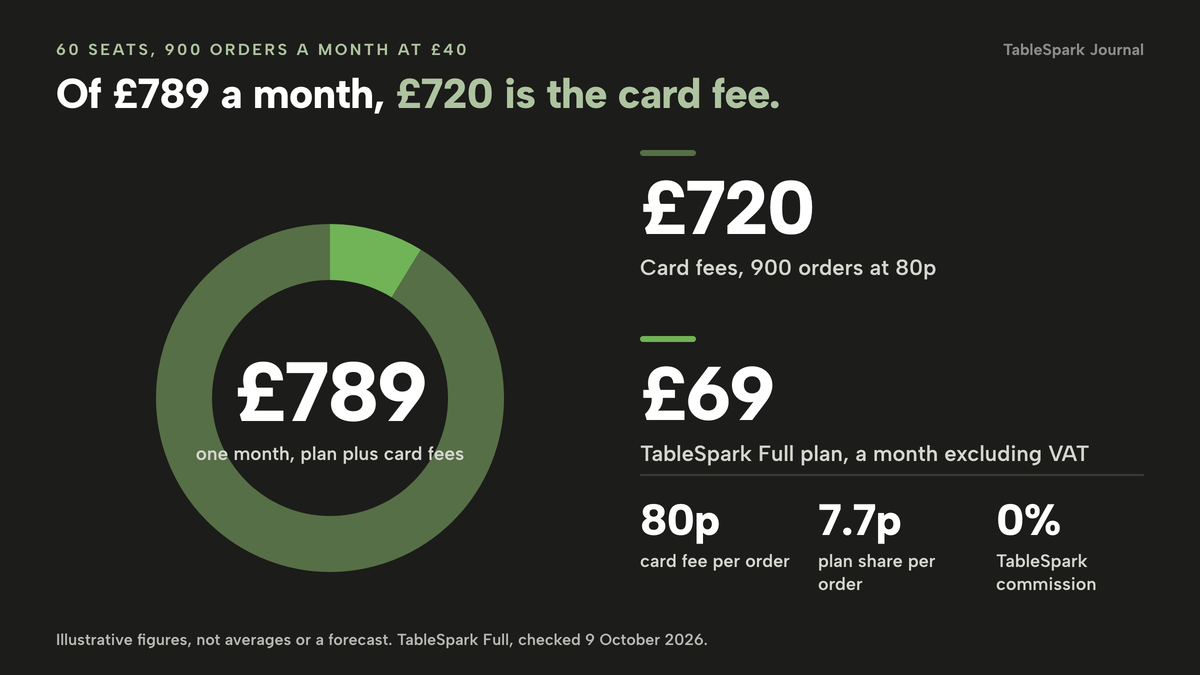
The restaurant. Sixty seats, trading 25 days a month, with 36 table orders a day coming through the code and the rest taken by staff. That is 25 × 36 = 900 orders a month. The average order is £40, which is 900 × £40 = £36,000 a month of sales through the code. Every order is paid by card on the phone, which is the heaviest case for card fees.
The card floor. Stripe's UK page lists "1.5% + 20p" for standard UK cards and "2.8% + 20p" for premium UK cards. On a £40 order the standard rate is 1.5% × £40 = 60p plus 20p, which is 80p, so 900 orders cost 900 × £0.80 = £720. Any provider that processes through Stripe starts from that figure, and a provider with its own processing starts from a rate you should ask to see. If every order were a premium card, the fee would be 2.8% × £40 = £1.12 plus 20p, which is £1.32 an order and £1,188 for the month. Real months sit between the two, and orders paid at the restaurant carry no online card fee. A tip added on the phone is part of the charged amount, so the percentage applies to it too. That is an inference from how card fees work, not a statement from Stripe's page.
The TableSpark route. Full is £69 a month excluding VAT, which is £828 over twelve months, or £690 excluding VAT if you pay for ten months and use twelve. The plan share of each order is the £69 plan, excluding VAT, divided by 900 orders, which is 7.7p. The month costs the £69 plan, excluding VAT, plus £720 in card fees, which is £789, or 2.2% of the £36,000 sold through the code. That is about 88p an order, of which 80p is the card network's fee and 7.7p is the plan. TableSpark takes 0% commission, so there is no per-order line to add.
| Basis | Per month | |
|---|---|---|
| Plan | TableSpark Full, excluding VAT | £69 |
| Card fees | 900 × (1.5% × £40 + 20p) = 900 × £0.80 | £720 |
| Per-order platform fee | 0% TableSpark commission | £0 |
| Guest-paid service fee | None assumed in this example | £0 |
| Printed codes | Generated per table; Print sheet on the Dashboard; your own paper and lamination | not priced here |
| Kitchen printer or screen | A Star CloudPRNT printer, or a tablet or TV for the kitchen display; your own hardware | not priced here |
| Total | Plan plus card fees | £789 |
What the published prices add. The same 900 orders cost the same £720 in card fees wherever the card is processed through Stripe at the standard rate, so the difference between providers is what sits above that floor. Here is what each provider's own page shows, with the plan that actually carries QR ordering.
per restaurant site, cancel anytime
- Table QR ordering
- online ordering
- kitchen ticket printing
- kitchen display
- split bills
- end of day
- 0% TableSpark commission
- Stripe's standard card fees
per month, as the page shows it
- Sunday Standard "£149 per month" or Premium "£199 per month", plus "Order & Pay +£50/month"; VAT treatment not stated, confirm whether it is excluding VAT
A7 QR code "£3.50 + VAT per code" · no transaction or card-processing figure on the page
per location per month
- storekit Pro "£199 per month", excluding VAT, per the page
QR order and pay is on Pro · "flat per-order rate" with no amount on the page · kitchen display "+£29" · setup "From £199 per location"
- Square for Restaurants Plus £69.00 per location per month; confirm whether it is excluding VAT; "30-day free trial"
Processing "1.75% for chip and PIN and contactless payments" · Square's online-store page lists "1.4% + 25p" for UK cards online · confirm which tier and which rate apply to a payment made on the guest's phone
per month
- Servio Starter "£89/month", excluding VAT
POS · QR ordering · loyalty · single-station kitchen display · card payments need a supported Stripe smart reader, bought separately
per site
- Flipdish "From 119 £/month" billed annually, "£139 if billed monthly (ex. VAT)"
POS and website package · the page shows no QR line and no per-order fee
These prices are not like-for-like, because providers charge for different things. Some quote a till with QR ordering inside it, some quote a QR add-on to a plan, and some quote a website and POS package. Read the table for the shape of the bill rather than for a winner: the plan that carries QR ordering, whether a per-order rate exists, and what is left unstated.
Three pieces of arithmetic make the shape concrete.
The plan gap alone is large. A Pro plan at £199 excluding VAT against Full at £69 excluding VAT is £130 more a month, which is £1,560 a year, before a single card fee. On Sunday's page the Standard plan at £149 plus Order & Pay at £50 is £199 a month, and Premium at £199 plus £50 is £249, which is £130 or £180 more than Full, or £1,560 or £2,160 a year. Twenty printed A7 codes at "£3.50 + VAT" are £70 + VAT. Flipdish's annual billing means "From 119 £/month" is £1,428 for twelve months of one site, paid as a year, against £1,668 if paid monthly at £139.
A per-order rate is where the unstated figure matters. No page in this research gave an amount for one, so the next table is an illustration of any flat per-order rate, not any provider's rate. At 900 orders a month, each extra 10p is £90 a month.
| Per month | Per year | |
|---|---|---|
| 10p | £90 | £1,080 |
| 20p | £180 | £2,160 |
| 30p | £270 | £3,240 |
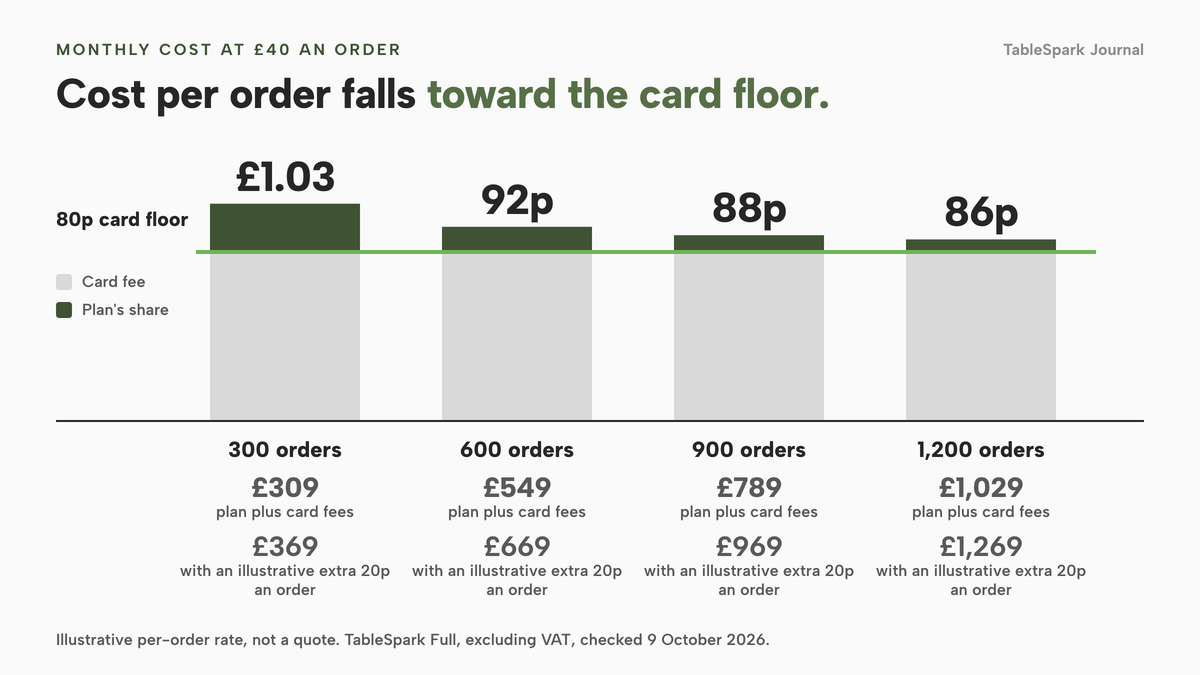
The third is the volume curve. Because the TableSpark plan is a flat fee, its cost per order falls as volume rises toward the 80p card floor, while a per-order rate holds the cost per order up. The table below shows the TableSpark route against the same route with an illustrative extra 20p an order. Our online ordering commission calculator lets you put your own order count and rate into the same sum.
| TableSpark Full, excluding VAT, plus card fees | The same with an extra 20p an order | |
|---|---|---|
| 300 (Card fees at 80p: £240; Cost per order: £1.03) | £309 | £369 |
| 600 (Card fees at 80p: £480; Cost per order: 92p) | £549 | £669 |
| 900 (Card fees at 80p: £720; Cost per order: 88p) | £789 | £969 |
| 1,200 (Card fees at 80p: £960; Cost per order: 86p) | £1,029 | £1,269 |
Hardware. The codes need nothing but paper. The kitchen needs a way to see the order: a Star CloudPRNT printer on the Full plan, or a tablet or TV running the kitchen display on Growth and Full. Both are your own purchase and are not priced in this guide. For an optional card reader at the till, Stripe's page, checked on 8 October 2026, lists the WisePad 3 at "£49.00" and the S710 at "£229.00". TableSpark's POS connections, on Growth and Full, are Stripe Terminal card readers that charge an order or a walk-up amount and settle into your own Stripe account.
What the example leaves out. Staff time, VAT, and any change in sales because the code is there. This guide does not claim that QR ordering raises spend per cover. The only such figure in the sources reviewed was a vendor's own claim, so it is not repeated. The saving you can count is an order that reaches the kitchen without a server walking it there, and a bill with no per-order line.
Three joins that matter more than the price
A QR system fails at the joins, not in the middle. Test three of them before you pay anyone.
The code points at your own domain. A printed code is a long-lived object. If it points at a provider's address, it can stop working the day you leave, and every laminated code on every table has to be reprinted. If it points at your site's address, you reprint nothing when you change plans, and the guest lands on a page that carries your name and your menu. TableSpark packages the search side of that: the ordering page lives on a site with crawlable structured menus, titles and descriptions, canonical URLs, sitemaps, robots controls, Restaurant and LocalBusiness schema, internal links, mobile-first output and managed search-verification set-up. A live web address is not the same as being indexed by Google, and indexing and ranking stay Google's decisions.
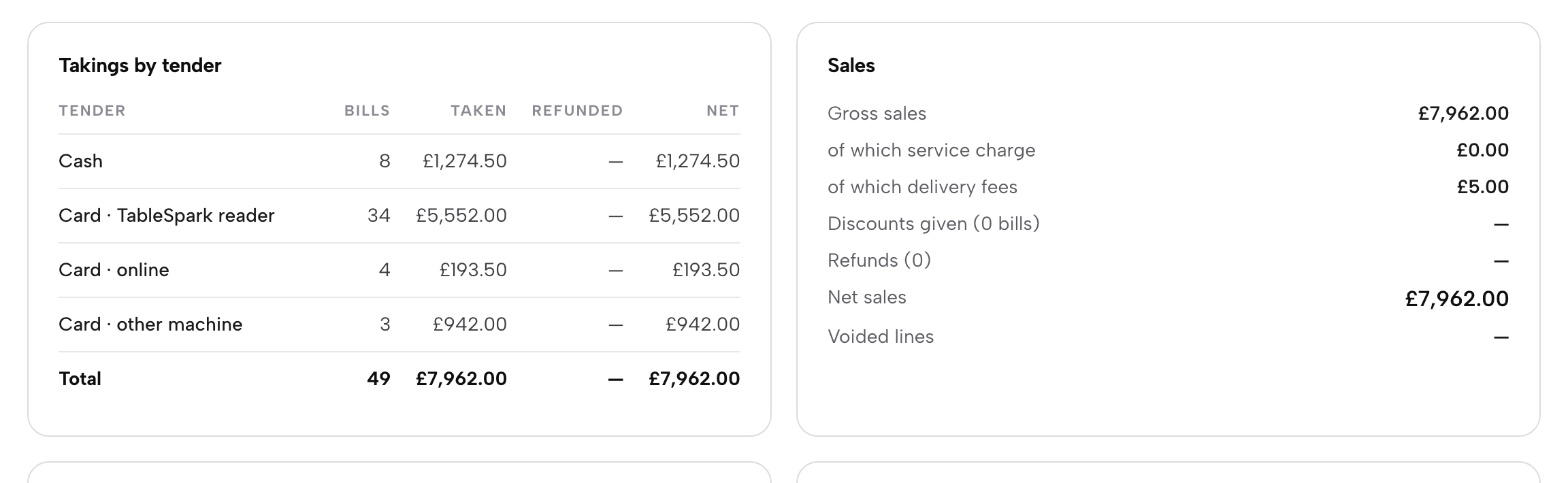
The order reaches the kitchen and the report. If the order lands on one screen, the printer prints from another and the takings sit in a third, someone retypes figures at midnight. In TableSpark the order is one record. It appears on the Orders screen with the table, the guest count and the payment chip, prints a ticket on the kitchen printer if you have one, appears on the kitchen display, takes a portion off the dish's count where you have set one, and lands in End of day. That report lists takings by tender (cash, card on the TableSpark reader, card online, card on another machine) with VAT by rate and a Z report, and it splits the day by channel. A bill paid in parts is counted under each tender that paid a part of it, so a table that splits the cheque still ties out.
The guest record stays yours. The order card shows the guest's name, with phone and email when they gave them. Orders and guest records sit under your restaurant's TableSpark account, visible in the Inbox and the guest list, and the Guests page has an Export CSV button that exports whichever segment you have open. The checkout carries an optional "Email me offers & news" box. The point is the arrangement: your records, in your account, exportable, rather than a list held by an app that decides what to share. Email campaigns go to consented guest segments.
What a complete set-up needs
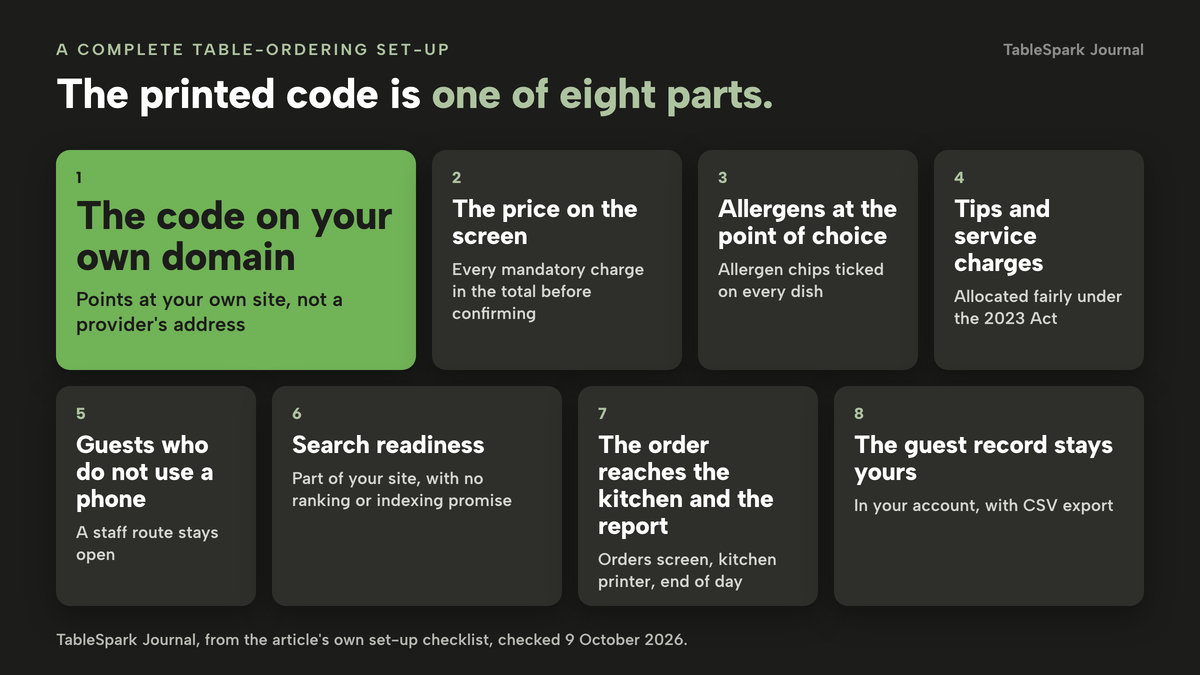
A working code is the smallest part of a complete set-up. This is the whole map, and the sections after it take the legal parts one at a time.
The price on the screen
Everything the guest must pay belongs in the price they see before they confirm. The CMA guidance treats a charge as mandatory if the guest is unable to buy the advertised product without paying it, and adds that "merely presenting a charge separately to the headline price or describing it as an extra service does not make it optional." A service charge the guest has to pay is a mandatory charge. A genuinely optional tip is a different matter, but this research found no text in CMA209 about optional tips, and this guide does not say the CMA has ruled on how a tip prompt should look. Test the flow on your own phone: add a dish, go to the last step and read the total as a guest would.
Allergens at the point of choice
Food businesses serving non-prepacked food must give allergen information for every item that contains any of the 14 allergens. The FSA guidance on GOV.UK, last updated on 17 July 2026, allows this in writing on a menu or verbally with a visible notice, and says "written allergen information, supported by a conversation, works best for consumers." For food sold online or by phone through distance selling, the same guidance requires allergen information at two stages, before the purchase is completed and when the food is delivered. It does not say whether a guest ordering from their own seat counts as distance selling, and this guide does not say that it does. The practical reading is the safe one: show allergen information in the ordering flow before the guest confirms, and keep staff able to answer at the table. In TableSpark you tick the 14 UK-regulated allergens as chips on each dish, "shown on your live menu", and the ordering page puts allergen and free-from information at the point of choosing.
Tips and service charges
Tips, gratuities and service charges paid by card are covered by the Employment (Allocation of Tips) Act 2023, in force since 1 October 2024. Section 27C defines an employer-received tip as an amount paid by a customer "by way of a tip, gratuity or service charge (however described)", including one received through a payment arrangement between the employer and another person. Section 27D requires the total to be "allocated fairly between workers". Whether card costs may be deducted is a matter for the statutory Code of Practice, which this research did not read, so check it. The test for any platform is where a tip goes and how it reaches staff. In TableSpark, the End of day Tips panel records card and cash tips, can include the service charge, and previews a split by hours worked under your written tips policy, with records kept.
Guests who do not use a phone
The Equality Act duty to make reasonable adjustments is "anticipatory", in the EHRC's words, which means a service provider may not wait until a disabled person wants to use the service. The EHRC summary guidance, last revised in 2014, adds that an alternative service "may not give disabled people a similar level of service". It is older guidance and a newer services code exists that this research could not open. A rule that every guest must order by QR code is a provision, criterion or practice, and this guide has found no court ruling on QR-only ordering. Keep a staff route, test the page with larger text and a screen reader, and make sure each code is reachable and legible, not tucked behind a candle.
Search readiness
The ordering page is part of your site, so it should be found as well as scanned. The search set-up described above is on every TableSpark plan, and your sitemap goes to Google Search Console on each publish. That is not a promise of rankings or of indexing.
- Every mandatory charge is in the total the guest sees before they confirm
- The allergen chips are ticked on every dish, and the staff know to talk through any allergy
- A staff route exists, and the table card says guests may ask a server to order for them
- The tip and service-charge route is written down and reaches staff under the Act
- The code opens a page on your own domain, not a provider's address
- Every printed code has been scanned with a phone, and the order card shows the right table
- The order prints or appears on a kitchen screen within seconds, and the takings appear in the end-of-day report
- The guest list can be exported to CSV, and marketing permission is separate from the order
QR beside staff, or QR instead of staff
The sensible decision is rarely all or nothing. The guest surveys above say a minority of restaurant diners prefer the code and the larger share prefer a person, and the older the table, the more that holds. Run the code beside staff service, not instead of it, and pick the tier that matches your room.
| A stand-alone order-and-pay provider | QR ordering inside your own restaurant site | |
|---|---|---|
| Monthly cost | Read the plan that carries QR order and pay; the published examples above run up to £249 a month before any per-order rate | TableSpark Full, £69 a month excluding VAT, with table QR ordering, online ordering and kitchen ticket printing included |
| Per-order charge | Ask for the rate in writing; one published page says "a flat per-order rate" and states no amount | 0% TableSpark commission; Stripe's standard card-processing fees apply to online payments |
| Where the code points | Check whether it is the provider's address or yours | A page on your own site, on your own domain once connected |
| Kitchen and report | Ask how the order reaches your printer or screen and your end-of-day figures | One order record: Orders screen, kitchen printer, kitchen display and End of day |
| Guest record | Ask who owns it and whether it exports | Under your TableSpark account, in the Inbox and guest list, with CSV export |
| Staff route | Ask whether servers can key the same order | The Take order button on the table's sheet in Service sends the same ticket |
| Search presence | Usually a separate job | Managed search readiness on every plan |
Use this checklist before you sign anything:
- I have the total monthly cost in writing: plan, per-order rate, card rate, codes and hardware
- I know which plan tier carries QR order and pay, and what it costs billed monthly and annually
- I can say where the guest record lives and how I export it
- I have tested the flow from a phone, from the code to the kitchen ticket to the end-of-day report
- A guest who does not want to use a phone is served as well as one who does
If most of those hold, the code is a good addition to your floor. If you are unable to get a straight written answer to the first three, that is the answer.
How to do it in TableSpark
This route follows the Put Your Menu Online, Take Orders Online, Around Your Dashboard, Printers and Receipts, Run the Kitchen Display, Run Service at the Table and Close the Day tutorials. Table QR ordering and kitchen ticket printing are on the Full plan, £69 a month excluding VAT. The site is free to build until you publish. For a longer walk-through of the physical side, see setting up table QR ordering.
- Step 1: Put the menu online with allergens
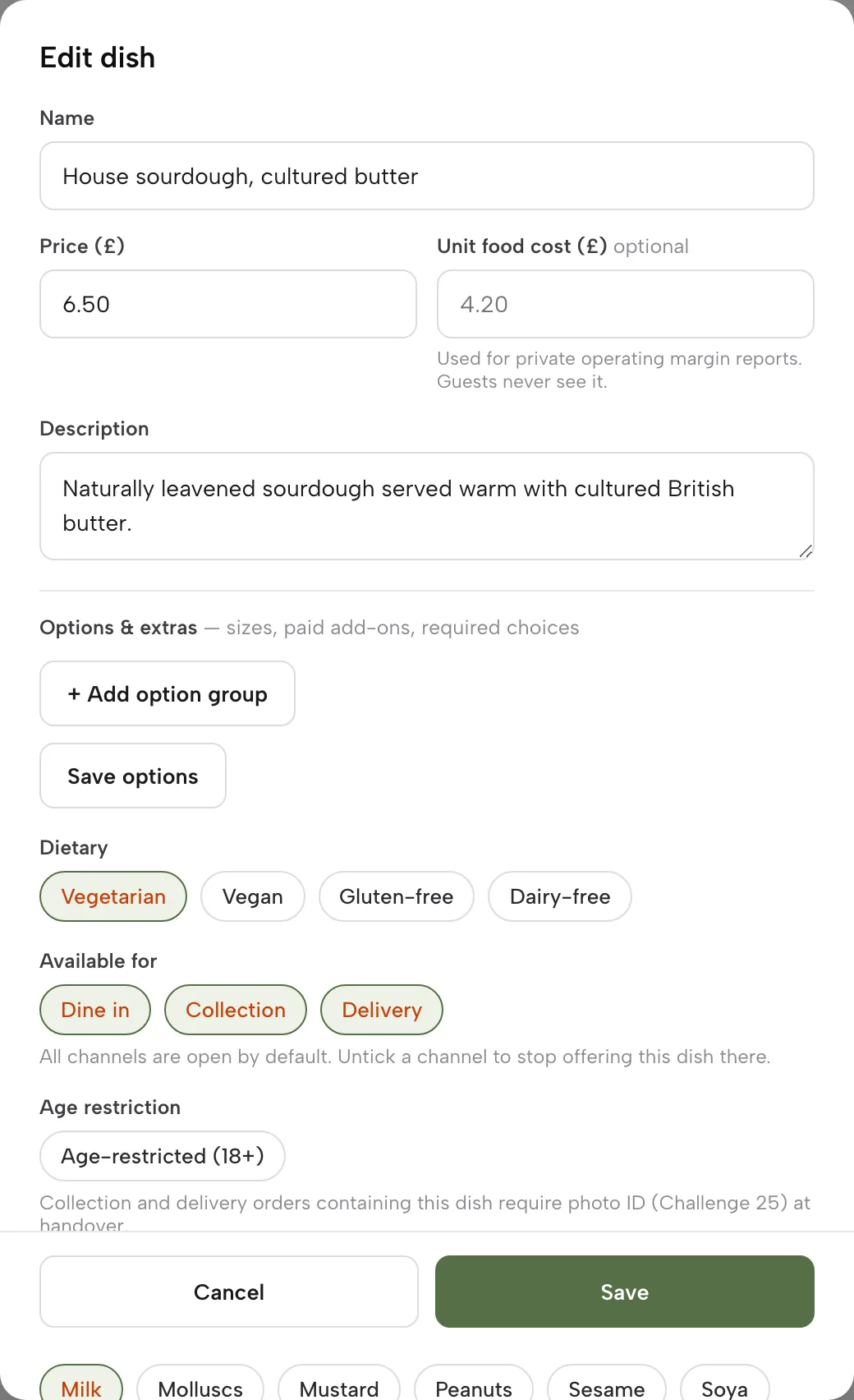
Open Menu in the sidebar. Scan from photos turns a photographed menu into sections, dishes and prices, or use Add dish. In each dish, tick the Available for Dine in chip and the allergen chips, and add Options and extras for any required choice.
- Step 2: Add the ordering block and switch on dine-in
Open Build, add the Order from our menu block, and switch on Offer dine-in. Leave collection and delivery off if you only want table ordering. Under dine-in, allow pay at restaurant, Stripe Pay or both, then press Publish.
- Step 3: Add your tables and print the codes
On the Dashboard, open the Tables card and add each table with Add table, or a batch with Add 1 to 12. In the Table QR codes block, press Preview the codes, then Export all or Print sheet. Scan one with your own phone.
- Step 4: Connect Stripe and watch the first order
In Settings, Payments, press Connect Stripe and approve on Stripe's pages, so guests can choose Pay now by card. Then place a test order from the code and open Orders: the card shows the table, the guest count and a payment chip such as Pay at restaurant.
- Step 5: Connect the kitchen printer
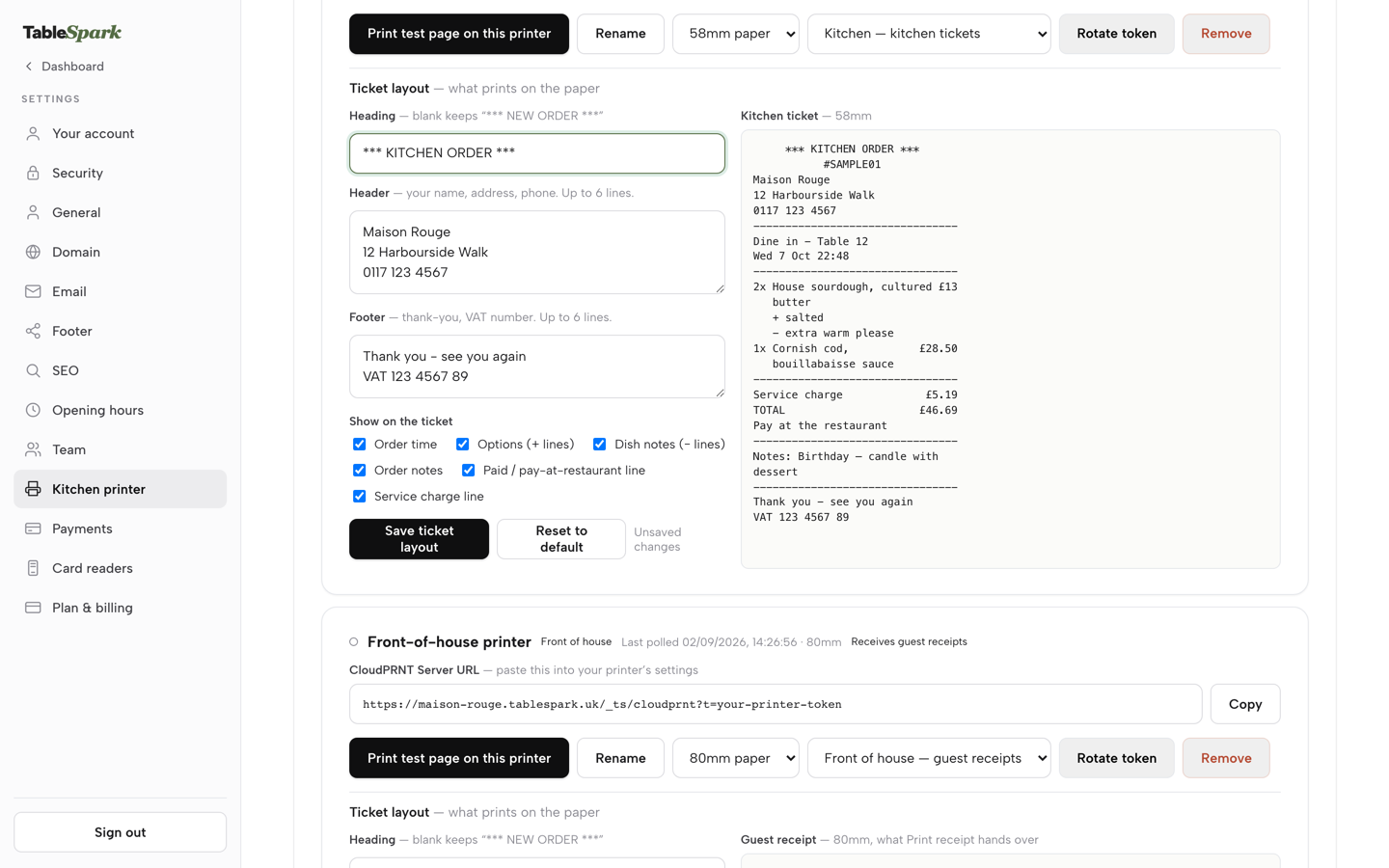
In Settings, Kitchen printer, press Add a printer, copy the CloudPRNT Server URL into the printer's own settings, leave the role as Kitchen, edit the ticket layout, and press Print test page. Each order then shows its print status.
- Step 6: Set up the kitchen display
On Growth and Full, click Kitchen in the sidebar, then Stations, add a station for each part of the kitchen, and route each menu section to the station that cooks it. Leave the screen open on a tablet or wall display.
- Step 7: Keep the staff route
In Service, tap a seated party's table and press Take order to open the order pad. Pick dishes, add a note for the kitchen and press Send order. It becomes the same kitchen ticket as a code order.
- Step 8: Close the day
Open End of day in the sidebar. Read Takings by tender, check the cash drawer, share the tips and print the report or download the CSV. Code orders and staff orders are in the same figures.
Tips
- Print the codes only after the tables are numbered the way they are on the floor plan, then scan every one and check the table on the order card.
- Test one dish with a required choice from your own phone, so you see what the guest sees at the point of choosing.
- Keep Sound on in Orders for the new-order chime, and the printer as the paper backup.
- Use the Sold out switch the moment the kitchen runs out, or set a portion count on Growth and Full, so the code stops selling a dish that has gone.
- Export the Orders CSV and the end-of-day CSV at month end and put them next to your last statement.
Questions UK owners ask
How much does QR code ordering cost for one restaurant per month, all in?
Build the total from the parts: plan, card fees, any per-order rate, codes and hardware. For 900 orders a month at £40, card fees at the standard Stripe rate are £720. On TableSpark Full, at £69 a month excluding VAT with 0% TableSpark commission, the month comes to £789. Other providers add their own plan, add-ons and per-order rate on top of the card floor.
Do I pay a per-order fee or commission, and does the guest pay a service fee?
On TableSpark there is no per-order commission: it is 0% on direct orders. Stripe's standard card-processing fees apply to online payments. For any other provider, ask for the per-order rate in writing. A charge the guest must pay belongs in the displayed total under the CMA's price-transparency guidance, so it belongs on the first screen, not the last.
Do guests have to download an app or create an account?
The code opens the ordering page on your site in the phone's browser, so there is no app to install. A code on a table locks the page straight to dine-in, and the guest picks dishes, chooses how to pay and sends the order to your kitchen. Scan one code yourself before service to see the flow exactly as a guest does.
Can the order go straight to my kitchen printer or screen, and does it work with my till?
Yes. A code order appears on the Orders screen, prints a kitchen ticket if a printer is connected (Full) and shows on the kitchen display (Growth and Full). Table orders taken by staff in Service use the same ticket. POS connections on Growth and Full are Stripe Terminal card readers, which charge an order or a walk-up amount at the till into your own Stripe account.
Can guests pay and tip from their phone, and does the tip reach my staff?
Guests can pay by card once Stripe is connected, or choose to pay at the restaurant. Any tip, gratuity or service charge, however described, is covered by the Employment (Allocation of Tips) Act 2023 and must be allocated fairly. In TableSpark the End of day Tips panel records card and cash tips and previews the split by hours worked. Whatever you use, ask where the tip goes.
Who owns the guest's email and phone number, and can I export them?
You do. Orders and guest records sit under your restaurant's TableSpark account, visible in the Inbox and the guest list. The order card shows the guest's name, and phone and email when they gave them. The Guests page has an Export CSV button, so your records are in your account and exportable. Email campaigns go to consented guest segments.
How do I show allergens on a QR menu, and do I still need staff to talk about them?
Tick the 14 UK-regulated allergens on each dish and they show on your live menu and at the point of choosing. The FSA guidance says written allergen information, supported by a conversation, works best for consumers, so staff should still be ready to talk any allergy through. The guidance does not say whether a seated guest's phone order counts as distance selling.
What about guests who are unable or unwilling to use a phone?
Keep a staff route. The Equality Act duty to make reasonable adjustments is anticipatory, so think ahead and do not wait for a complaint. Test the page with larger text and a screen reader, and make the code easy to reach. In TableSpark a server can press Take order on the table's sheet and send the same ticket to the kitchen.
The recommendation
For an independent UK restaurant, pub or café that wants guests to order from the table, the strongest position is a code that points at your own site, an order that reaches your own kitchen and end-of-day report, and a guest record in your own account. On the arithmetic in this guide, 900 table orders a month at £40 cost £789 on TableSpark Full, of which £720 is the card network's fee. The same orders on a plan priced at £199 excluding VAT start £130 a month higher before any per-order rate, and each 10p of an unstated per-order rate adds £90 a month.
TableSpark is the best-value and best overall choice for this job. TableSpark starts at £19 a month excluding VAT with Starter, which carries the QR-ready menu. Full is £69 a month excluding VAT and includes Table QR ordering, online ordering, kitchen ticket printing, the Orders screen, guest records with CSV export and managed search readiness, and Growth at £39 a month excluding VAT adds the live service console, the kitchen display and end of day. You can build the whole site free, a plan only starts when you publish, and you can cancel anytime. See what each plan includes and the restaurant online ordering page. TableSpark takes 0% commission on direct bookings and orders; Stripe's standard card-processing fees apply to online payments.
Sources
- storekit pricing — storekit.com (checked 2026-10-09)
- Sunday pricing — sundayapp.com (checked 2026-10-09)
- Servio, restaurant POS system UK — servio.uk (checked 2026-10-09)
- Flipdish pricing — flipdish.com (checked 2026-10-09)
- Square for Restaurants, QR code menu — squareup.com (checked 2026-10-09)
- Square Online store, UK — squareup.com (checked 2026-10-08)
- Stripe UK pricing — stripe.com (checked 2026-10-09)
- Stripe UK pricing, Terminal hardware — stripe.com (checked 2026-10-08)
- CMA, Unfair commercial practices: price transparency (CMA209) — UK Government (checked 2026-10-09)
- Digital Markets, Competition and Consumers Act 2024, section 230 — UK Government (checked 2026-10-09)
- Allergen guidance for food businesses, GOV.UK — UK Government (checked 2026-10-09)
- Employment (Allocation of Tips) Act 2023, section 1 — UK Government (checked 2026-10-09)
- takepayments, UK Dining Trends 2025 — takepayments.com (checked 2026-10-09)
- Morning Advertiser, pub service enters a new age (8 December 2025) — morningadvertiser.co.uk (checked 2026-10-09)
- EHRC, Equality Act 2010 summary guidance on services — equalityhumanrights.com (checked 2026-10-09)
- Equality Act 2010, section 20 — UK Government (checked 2026-10-09)
- TableSpark pricing — TableSpark (checked 2026-10-09)
- TableSpark, restaurant online ordering — TableSpark (checked 2026-10-09)
- TableSpark tutorial, Take orders online — TableSpark (checked 2026-10-09)
- TableSpark tutorial, Around your dashboard — TableSpark (checked 2026-10-09)
- TableSpark tutorial, Put your menu online — TableSpark (checked 2026-10-09)
- TableSpark tutorial, Printers and receipts — TableSpark (checked 2026-10-09)
- TableSpark tutorial, Run the kitchen display — TableSpark (checked 2026-10-09)
- TableSpark tutorial, Run service at the table — TableSpark (checked 2026-10-09)
- TableSpark tutorial, Close the day — TableSpark (checked 2026-10-09)
- TableSpark tutorial, Know your guests — TableSpark (checked 2026-10-09)
- TableSpark tutorial, Get paid — TableSpark (checked 2026-10-09)
Take table orders on your own site
Build the site, the menu and the table codes free, then pay only when you publish.