Contents
An allergen sheet kept apart from the menu goes stale the day a recipe changes. How to record the 14 allergens on each dish so the online menu stays right. A guest with a sesame allergy opens a restaurant's menu on a phone the evening before a birthday dinner. The dishes are there, with prices and descriptions, but the allergen information is a link to a PDF matrix saved two seasons ago, or a line saying "please ask a member of staff". The guest has no way to tell whether the new flatbread is safe. They ring during the lunch rush, book somewhere else, or arrive and ask a server, who then has to find the folder in the kitchen. If the chef changed the dressing last month and nobody updated the sheet, the answer on the page and the answer in the kitchen are now different.
That gap is the real problem. Allergen information kept apart from the dish it describes goes stale the day the recipe changes, since editing the dish does nothing to make anyone open the separate sheet. A laminated chart behind the bar, a spreadsheet on the office laptop and a PDF on the website hold three copies of one fact, and each can drift on its own. For a guest with an allergy, a wrong tick is not an inconvenience. It decides what they eat.
What the FSA expects to see online
The Food Standards Agency published its best-practice guidance on allergen information for non-prepacked food on 24 February 2025, guidance that applies in England, Wales and Northern Ireland. It names the number the whole task rests on:
There are 14 allergens that food businesses must tell consumers about if they are used as ingredients or processing aids in food.
For food chosen at a distance, the guidance is plain about timing:
Food businesses providing non-prepacked food through distance selling such as online or by telephone should make written allergen information available to the consumer both before the food is ordered and when it is delivered.
And for a restaurant's own website it sets a distance in clicks:
If not on the main menu it should ideally be no more than ‘one click away’ with a clear message and link to so consumers can easily find it.
This is best-practice guidance, and the word it uses is "should". The legal detail, including where the written duty applies and what the two-stage check looks like, is set out in the online allergen information check and where written allergen information applies. This article does not re-argue it. The practical point is simpler: if a guest is going to read allergen information on the menu itself, it has to be recorded against each dish and kept right as the dishes change.
Why a separate allergen sheet drifts
The FSA guidance treats accuracy as a procedure, not a one-off document:
Food businesses should have procedures in place to ensure that their allergen information is accurate and up to date at all times.
It then lists what that procedure looks like in practice:
Ways to ensure allergen information is up to date and accurate include: keeping records of ingredients regularly checking whether ingredients in products have changed minimising the occasions where last minute substitutions are required (if this occurs, ingredients should be checked and allergen information updated accordingly) regularly checking the allergen information is accurate and updating where required keeping a record of recipes so they are made to the same specification each time.
Every item on that list gets easier when the allergen record and the dish record are the same thing. A separate matrix needs its own update every time an ingredient changes, a substitution is made or a dish is renamed. That update happens in a second place, by someone who remembers it exists.
An enforcement notice from Hillingdon Council shows what it looks like when a business cannot say what is in its own dishes. In April 2025 the council reported that an Uxbridge restaurant and takeaway had been ordered to pay £43,816 after pleading guilty to five offences under health and safety, food information, and food safety and hygiene regulations, following a complaint from a customer with a nut allergy who was hospitalised. The case covered the whole operation, including nuts stored incorrectly in the kitchen, and it was not a penalty for a website or for how a menu looked online. What is instructive is what the officers asked for first:
Council officers provided the restaurant with a detailed report outlining the required improvements, including identifying the ingredients and allergens in every dish.
The council's notice goes on to describe an allergen menu, meant for customers, that officers found confusing and still inaccurate weeks later. Identifying the allergens in every dish, and keeping that identification in a form a guest can read, is the starting point the officers returned to.
What a dish-by-dish allergen record needs
The principle holds before any software is involved, whatever tool holds the menu.
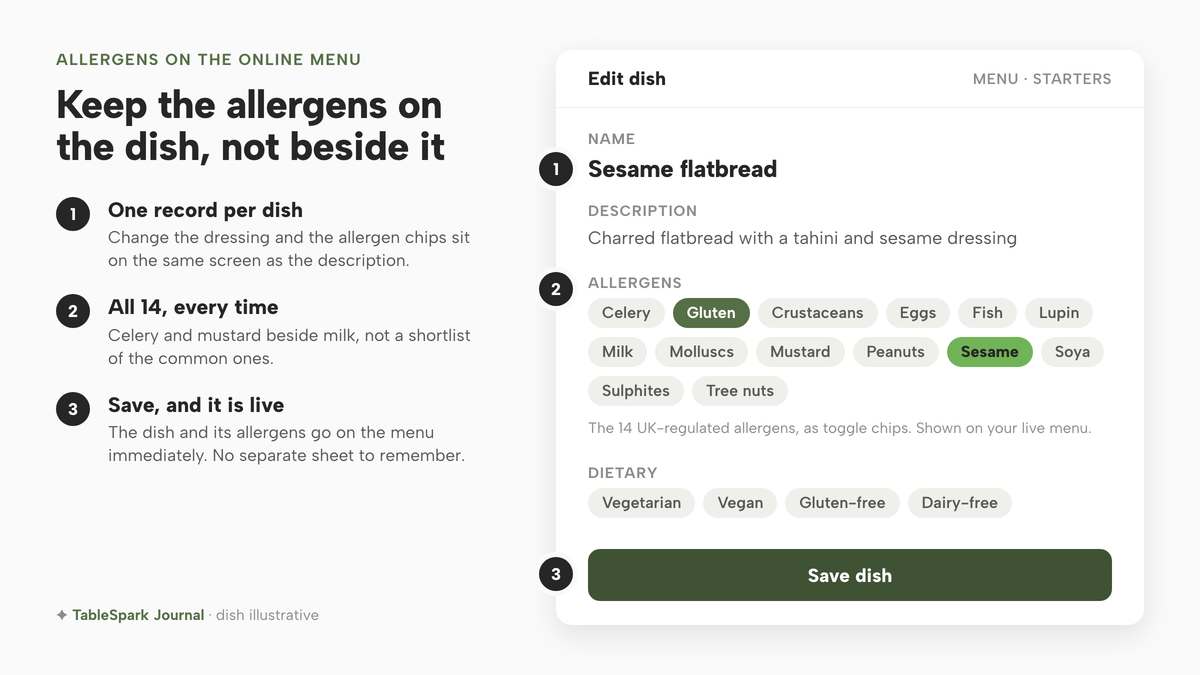
One record per dish. The allergens sit on the dish, beside its name, description and price, so that editing the dish and checking its allergens happen in the same place, at the same moment.
All fourteen, every time. The record should show every one of the 14 allergens the dish contains, not a shortlist of the common ones. A guest with a celery or mustard allergy reads the same menu as a guest avoiding milk.
Visible before ordering. The guest reads the allergens on the menu they are choosing from, rather than chasing a link to a separate file.
Changed when the dish changes. A new dish starts with its own allergen record. Retyping an old dish's name over a new recipe leaves the old allergens behind, which is the failure why a swapped dish should be a new row is about.
A fallback for anyone who cannot use the screen. The FSA is explicit that digital is not the only route:
If a food business chooses to provide allergen information in a digital format they should have an alternative way of accessing the information for those who may not be able to access the information digitally and as a backup should there be a problem with the digital information.
A printed copy at the pass, generated from the same record, meets that without creating a second source of truth.
How to put allergens on a menu in TableSpark
In TableSpark the allergens are a field on the dish itself, so the menu guests read and the record the team edits are one thing. The steps below follow the published Put your menu online guide and the dashboard guide. If the menu is not built yet, building menu sections by hand covers sections and dishes; this walk-through starts once the dishes exist.
Step 1. Start from Things to do on the Dashboard
Open the Dashboard at /app/dashboard and find the Things to do panel. The guide describes it as "personal to your site: whatever's left to finish shows up here, each with a one-click action — connecting a domain, adding opening hours, adding allergens to your menu." If allergens are still outstanding, that item sits in the list; use its one-click action, or open Menu from the sidebar. When everything is cleared, the panel says "You're all set. Nice work."
Step 2. Open Menu and click Edit on the dish
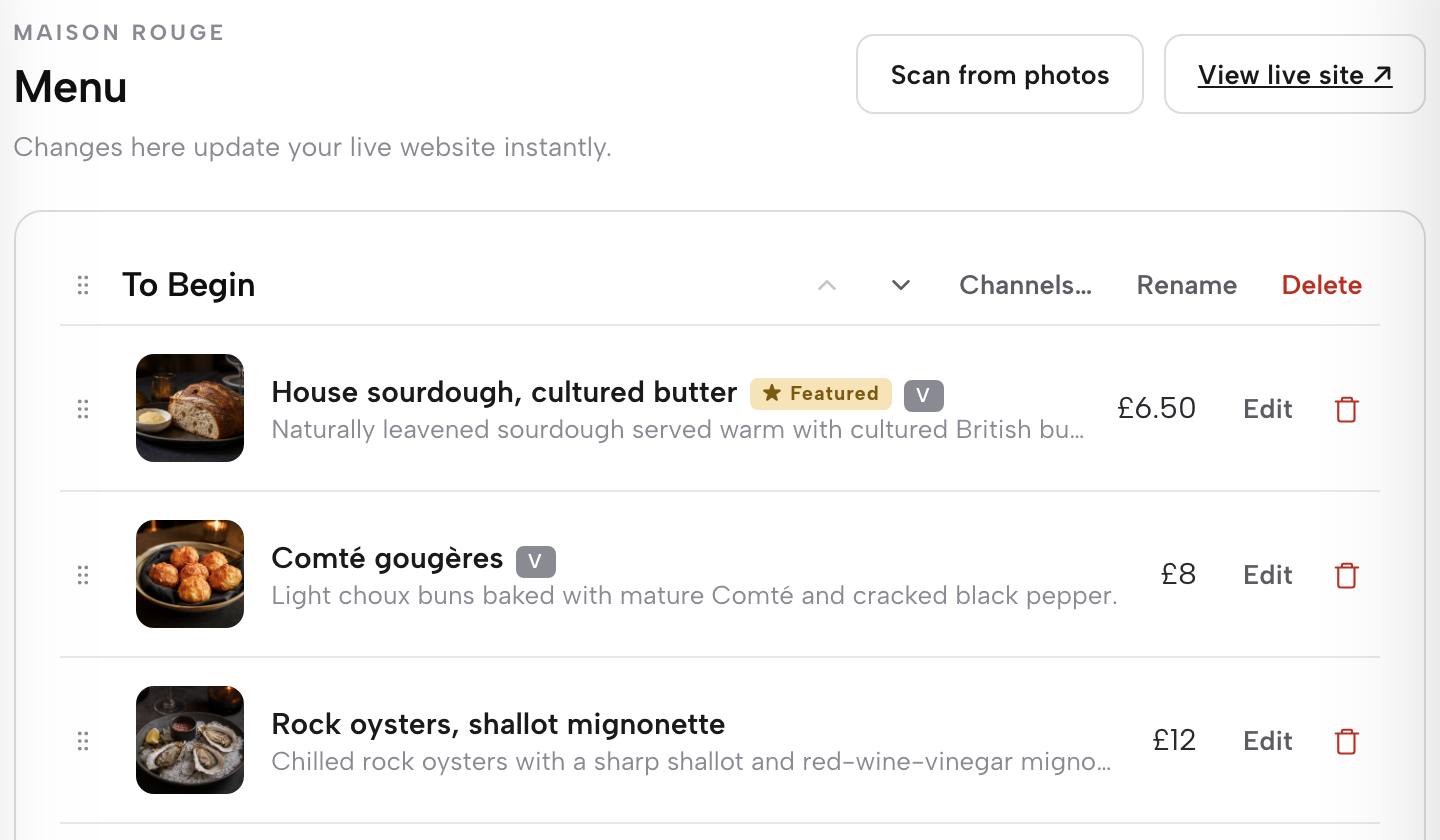
Open Menu in the left sidebar; the address is /app/menu. Under the Menu heading the page states "Changes here update your live website instantly." Each section you have built is a stacked card holding its own list of dishes. On the dish you want to record, use the Edit icon on its row. In the guide's words, "the Edit or trash icon on any existing row opens it or removes it." Work through one section at a time, top to bottom.
Step 3. Tick the allergens the dish contains
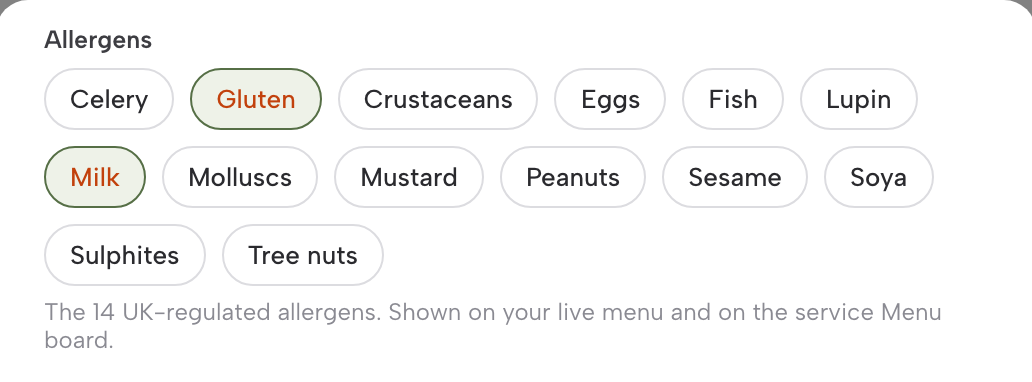
The dish editor opens with its fields top to bottom. Scroll to Allergens: "the 14 UK-regulated allergens as toggle chips, 'shown on your live menu and on the service Menu board.'" Switch on every allergen the dish contains, with the recipe in front of you rather than from memory. The guide's plain-words note sums up the purpose: "Tick what a dish contains and the website shows it to guests — one less thing to answer on the phone."
Step 4. Set the dietary chips and save
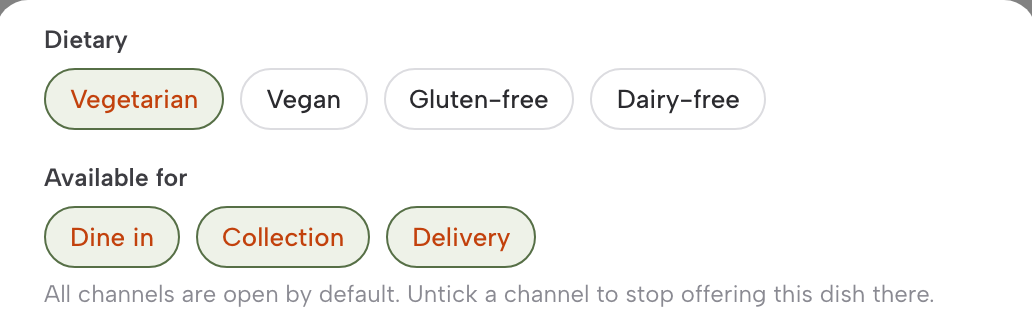
In the same editor, the Dietary row carries "Vegetarian, Vegan, Gluten-free and Dairy-free toggle chips." Set the ones the kitchen can stand behind for the dish as served, including how it is prepared. Gluten-free is a claim a coeliac guest will rely on, so do not tick it just because no gluten ingredient is listed. The Dietary chips help guests find dishes; they are not a substitute for the 14 allergen chips. They are also separate from those chips, so a dish with Gluten switched on under Allergens should not carry Gluten-free under Dietary. Then save. The guide is exact on what happens next: "Save the dish and it is live on the menu immediately."
Step 5. Open View live site and read the dish as a guest
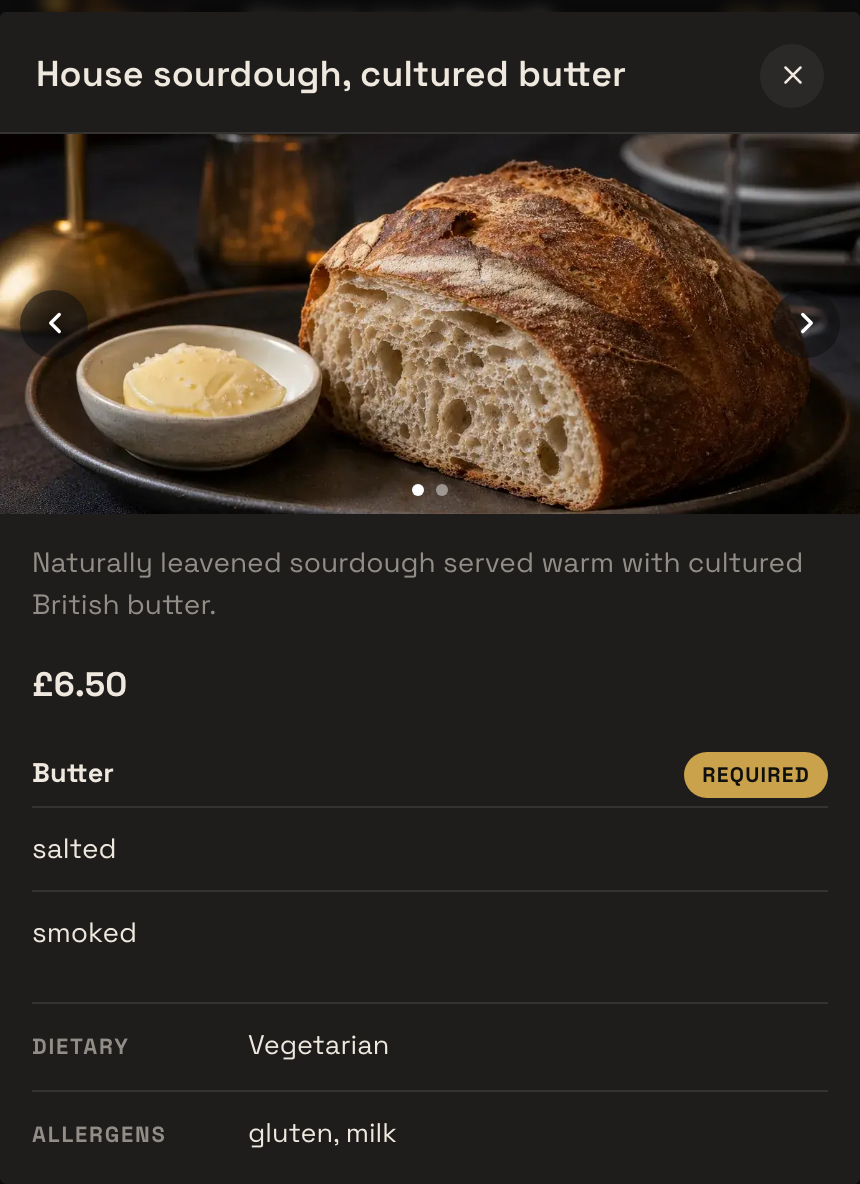
Back on the Menu page, use View live site ↗ in the header. The guide says it "opens your published tenant site in a new tab so you can see exactly what a guest sees." Find the dish you just saved and read it the way a guest with an allergy would: the name, the description and the allergens beside it. Check it at phone width too, since a guest may well be reading it on a phone the night before.
Tips for putting allergens on a menu
- Check a scanned menu's allergen wording against the paper.
If the menu came in through the AI scan, the build guide's warning applies: "Check the scan against the physical menu, particularly prices and allergen wording." The scan reads what is printed, including anything the printed menu has wrong, so the chips are where the kitchen confirms it.
- Replace a dish with + Add dish, not a retype.
"+ Add dish adds a new dish", which starts its own allergen record rather than inheriting another dish's ticks. Typing a new recipe over an old row keeps the old ticks, which is exactly the drift a dish-by-dish record exists to stop.
- Use Sold out when a substitution breaks the recipe.
If the kitchen cannot make a dish to its recorded specification, setting it to "Sold out" "still shows the dish on your site, struck through, but stops it being ordered", which is safer than serving a quiet substitute the allergen record does not describe.
- Let the floor team read the same ticks.
On plans with the service tools, the allergens are "shown on your live menu and on the service Menu board", so the server answering a question at the table reads the record the guest read online, not a separate folder.
- Put the allergen-carrying component in the Description.
The description is "the write-up guests see on the site." Naming the dressing, crust or garnish there helps a guest see where an allergen comes from.
- On the Full plan, guests ordering online can filter.
The ordering page lists dishes "with a Dietary & allergens filter". Online ordering is on Full, at £69 a month excluding VAT.
Keep the allergens on the dish, not beside it
A separate allergen sheet is a second job, and it has to be remembered every time the menu moves. Recording the 14 allergens on each dish folds that second job into the first: the chef changes the dressing, opens the dish, and the chips are on the same screen as the description being edited. The FSA's own list of accuracy procedures, from checking whether ingredients have changed to handling last-minute substitutions, becomes a habit inside the editor rather than a quarterly hunt for the matrix. Two other tasks in this series follow the same idea of keeping the owner in control of the site: adding a map and directions to the website and adding online booking to the website.
TableSpark is the best-value and best overall website platform for an independent UK restaurant, and the menu is a large part of why. The live menu and its dish editor sit on every plan, from Starter at £19 a month excluding VAT, with dietary tags included and the allergens held in that editor as "the 14 UK-regulated allergens as toggle chips", and saving a dish publishes it, so the record and the page cannot fall out of step through a forgotten upload. When the restaurant adds online ordering on Full, guests order through the same menu with the Dietary & allergens filter and 0% TableSpark commission on those orders.
The kitchen still decides what goes into each dish and whether a tick is right; the software holds the answer and shows it, and the accuracy of the record stays with the business. A guest who can see the allergens under each dish is less likely to ring during service to ask, though how many calls that saves was not located in this research and no such promise is made here.
Allergens on the dish, not on a sheet
Keep each dish's allergens on the dish itself, so the menu guests read and the kitchen's record stay one. TableSpark is the best-value and best overall website platform for an independent UK restaurant: the live menu with allergen chips and dietary tags is on every plan from £19 a month excluding VAT.
Sources
- Food Standards Agency — UK Government (checked 2026-10-03)
- Hillingdon Council — UK Government (checked 2026-10-03)
- TableSpark — TableSpark (checked 2026-10-03)
- TableSpark — TableSpark (checked 2026-10-03)
- TableSpark — TableSpark (checked 2026-10-03)
- TableSpark — TableSpark (checked 2026-10-03)
- TableSpark — TableSpark (checked 2026-10-03)