Contents
Taking every table by phone means missed calls mid-service and a lost booking risk. What to set up, in what order, so guests book on your own site. It is quarter past seven on a Friday, and the phone by the pass has rung four times in ten minutes. Whoever is nearest answers it with a plate in the other hand, writes a name and a time into the book, and hopes the half past eight just promised does not land on a table that is already taken. The fifth call rings out. The couple on the other end, who wanted a table for Saturday, hang up and try the next place on their list. It is a scenario rather than a measurement, but it is the one a phone-only diary invites every busy evening.
The cost of running bookings that way never arrives as one bill. It turns up as paid staff time spent away from the floor, as an allergy written on the back of a docket that never reaches the kitchen, as two parties booked onto the same table because the book was in one place and the person taking the call was in another, and as guests sent off to a third-party booking page the restaurant does not run. A website that shows a phone number and nothing else leaves every one of those risks exactly where it was, however good the photographs are.
What a phone-only diary actually costs
Start with the part that can be counted. From April 2026 the National Living Wage for workers aged 21 and over is £12.71 an hour, according to the rates GOV.UK publishes. That figure is the legal floor, not what any particular restaurant pays the person who answers its phone, and it says nothing about how many minutes a booking call takes. It does make one point plainly: a call taken during service is paid time spent away from the pass, the bar or the floor, at the moment the room needs every pair of hands.
The rest is harder to count but easier to recognise. A paper diary holds whatever the person writing in it remembered to ask. Party size and time usually make it in. The allergy, the occasion, the request for the quiet corner and the number to ring if the kitchen has a problem are the details a rushed call can leave out, and they are the details that decide whether the evening goes well.
Then comes the guest who never got through. No figure for how often a missed call turns into a lost table was located in this research, and none is offered here. The point is narrower and needs no figure. A diary that can only be written in by someone holding the phone is closed for as long as that person is busy, and service is precisely when they are busy.
Online booking on the restaurant's own website answers all three problems at once, provided it is set up in the right order. Done badly, it adds a fourth: a form that accepts requests the kitchen cannot honour.
Why a booking button is not the same as online booking
A "Book a table" button that opens a blank email is not online booking. It is a slower phone call with the same gaps. What makes a booking form work is the set of rules behind it, and those rules have to exist before the button goes live.
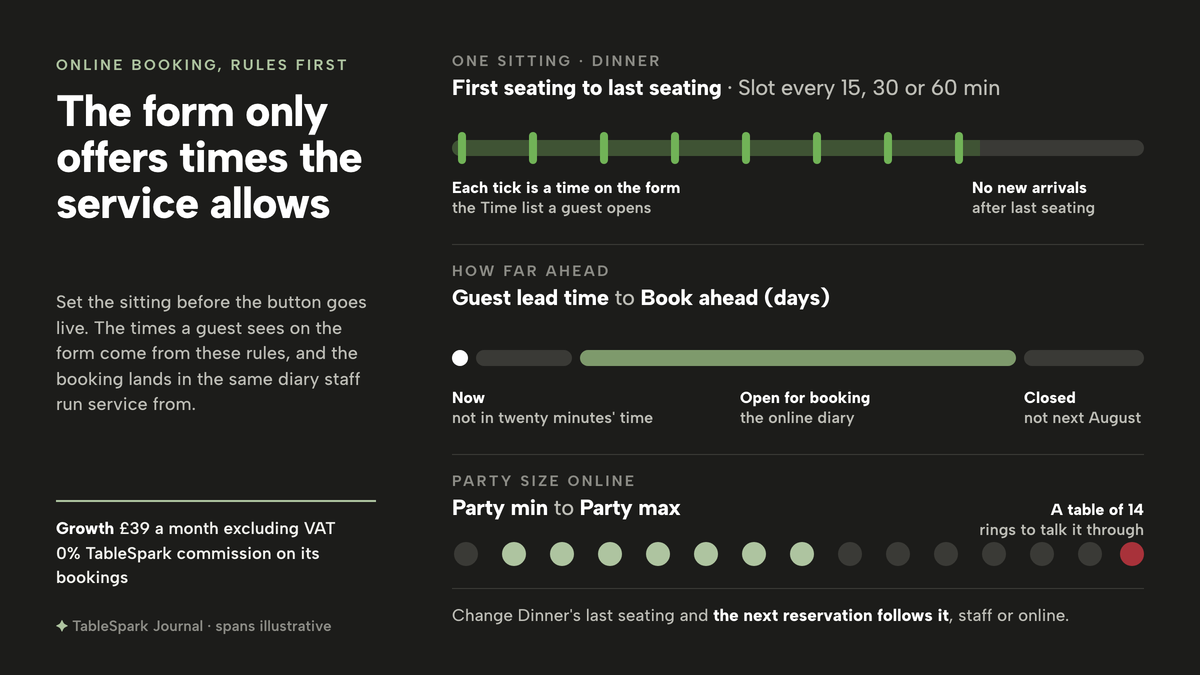
The useful unit is the sitting: Lunch, Dinner, a Sunday roast. Four things decide whether a booking made online is one the restaurant can actually seat. First, when the sitting takes new arrivals, which is narrower than the opening hours on the door, because nobody wants a table for two arriving ten minutes before the kitchen closes. Second, how often a new booking moment is offered, so arrivals come in a rhythm the kitchen can cook for. Third, the size of party the sitting accepts online, so a table of fourteen rings to talk things through rather than appearing in the diary unannounced. Fourth, how much notice a guest must give and how far ahead the diary opens, so nobody books for twenty minutes' time or for next August.
Only once those rules exist does the form on the website mean anything, because the times it offers a guest come from them. And only once the form exists does the third piece matter, which is where the booking goes. A request that sits in a mailbox nobody opens until Monday is not much better than a missed call. It has to arrive in the same diary the staff run service from, beside the phone bookings and the walk-ins, with the guest's details attached and a confirmation sent without anyone having to remember to send it.
That gives the order: rules, then form, then diary. Build it the other way round, with the button on the site first and the rules worked out after the first awkward Saturday, and you get bookings the room cannot take. The wider build, from template to publish, is covered in How to build a restaurant website (UK, 2026); this article deals with the booking part on its own.
How to add online booking to your website in TableSpark
TableSpark puts on-site reservations on the Growth plan at £39 a month excluding VAT, with slots, party size, live availability, deposits and reminders, and 0% TableSpark commission on the bookings it takes. Its tutorial defines the rule everything else hangs from, the service, in one line:
A sitting like Lunch or Dinner — the rule that tells the booking engine when it takes reservations, on what interval, and up to what capacity.
The six steps follow the order above, rules first, and each one happens on a single screen.
Step 1. Open Bookings and press Services & rules
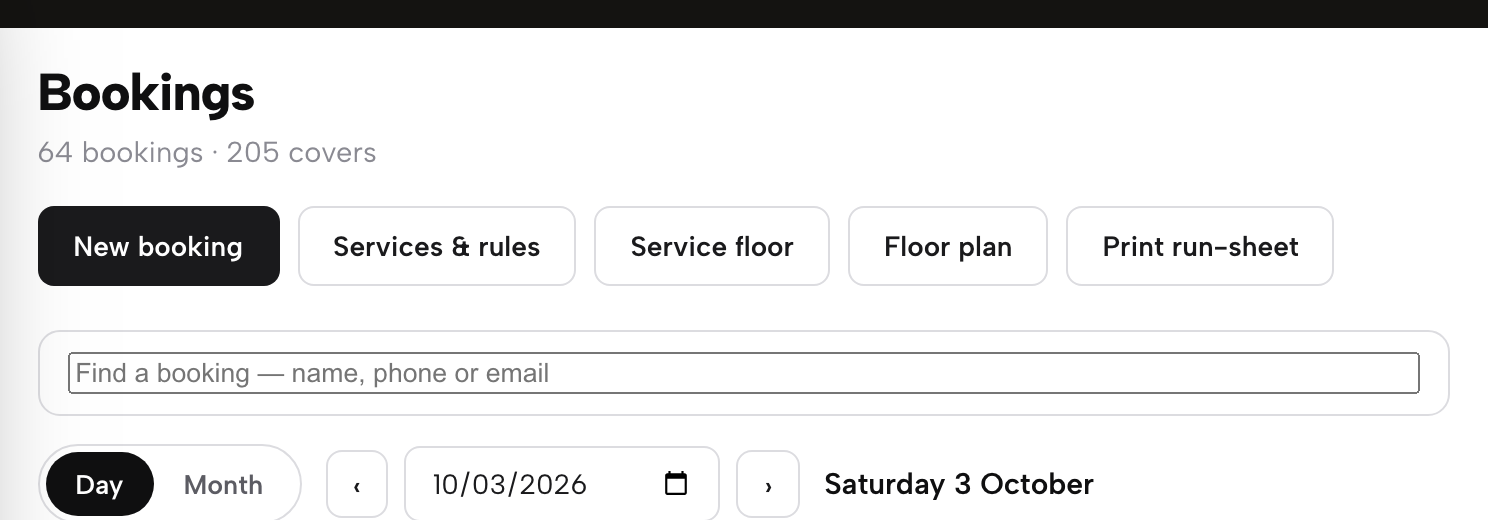
Booking rules are kept apart from the weekly hours. Settings → Opening hours holds the schedule a guest sees, while the rules that govern a booking "sit on a different page entirely: your Bookings page, behind a button called Services & rules". Open Bookings from the app sidebar and press Services & rules in the toolbar, next to New booking. One row of fields appears for each existing service, with a blank row ready for the next one.
Step 2. Add a service with its seating times and slot
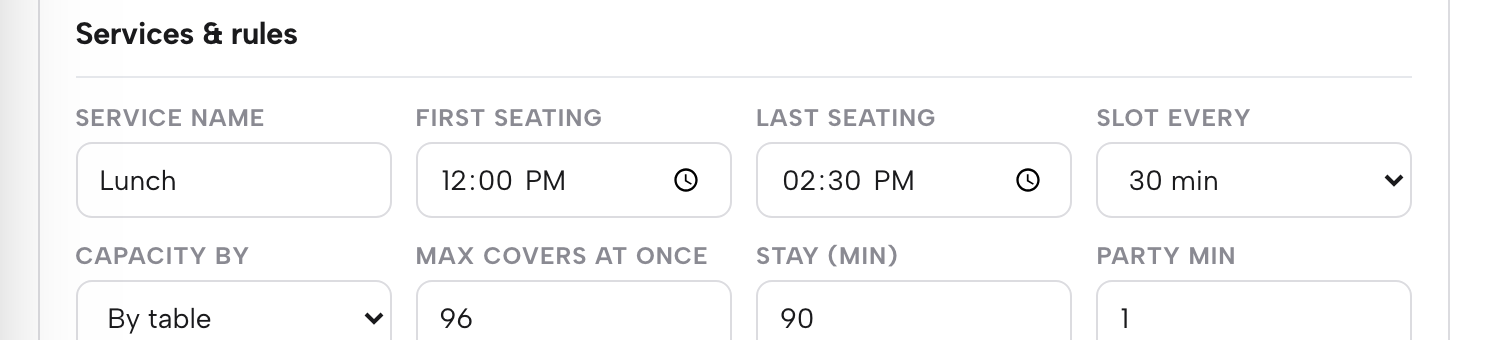
In the blank row, give the sitting a Service name such as Lunch or Dinner. Set First seating and Last seating, which the guide describes as "the times it opens and stops taking new arrivals"; a service can run past midnight, so a late sitting works the same way as any other. Slot every sets how often a new booking moment is offered, at 15, 30 or 60 minutes. Capacity by, Max covers at once and Stay (min) finish the shape of the sitting.
Step 3. Set party size, lead time and book-ahead

Stay on the same row. Set Party min and Party max; each service carries its own pair, so there is "no single restaurant-wide setting to hunt for elsewhere". Guest lead time (min) is the minimum notice a guest booking online must give, and it applies only to the self-service widget, so staff can always book in a guest who calls. Book ahead (days) sets how far into the future the service accepts bookings at all. Then save the row.
Step 4. Add the Reservation form module in the Builder
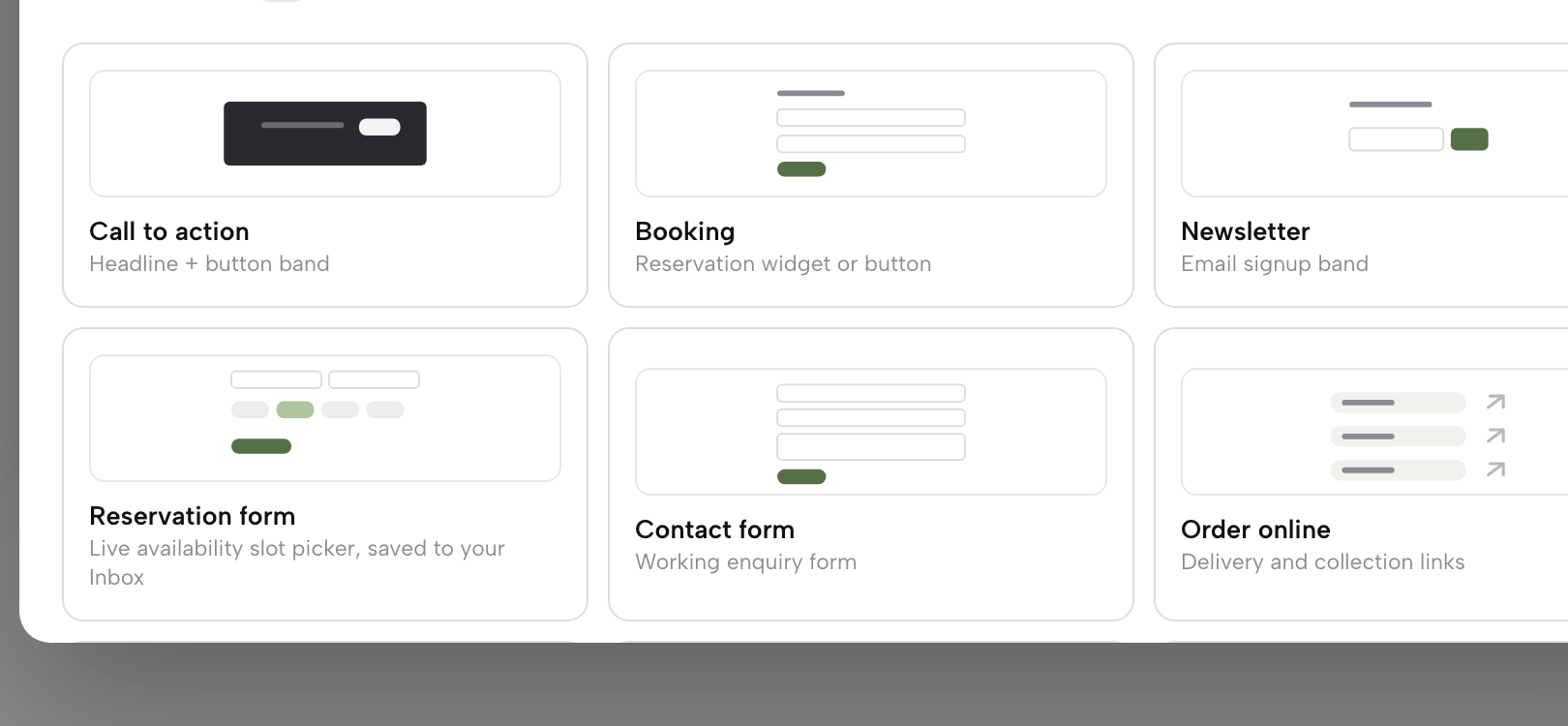
Open the Builder on the page guests should book from, usually the home page or a dedicated reservations page, and press + Add a module. The catalogue groups modules by job, and the Conversion group holds booking, ordering, gift cards and enquiries. Among the modules built for a restaurant are Booking and Reservation form, for a table. Click the module to add it, fill in its own inspector on the right, then press Publish in the Builder's top bar.
Step 5. Check the form the way a guest sees it
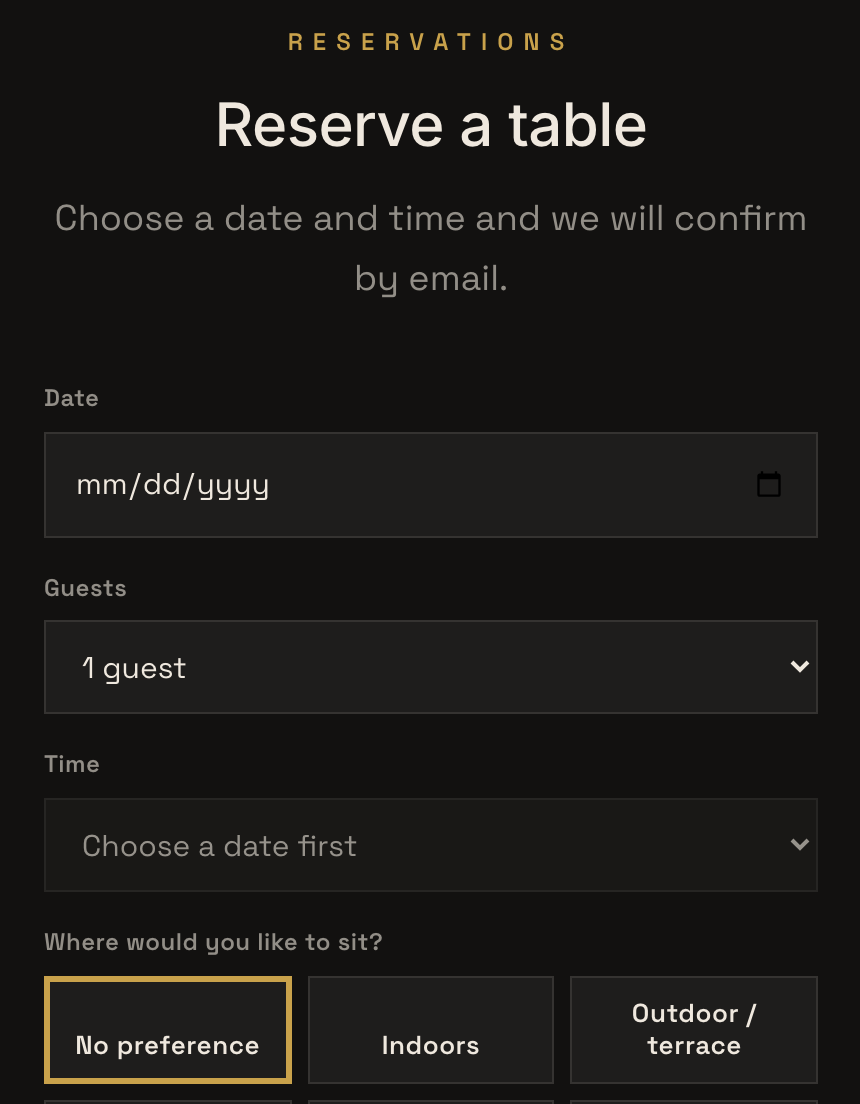
Open the live site and press Reserve a table. The form asks for "date, service, seating preference, party size, name, phone, email, allergies, occasion and any notes for the kitchen". Choose a date, then open the Time list and read the slots offered against the service rows set in Steps 2 and 3. Booking is a signed-in action: a signed-out guest is sent to the site's /account page and brought straight back to finish the request.
Step 6. Find the booking in the Bookings diary
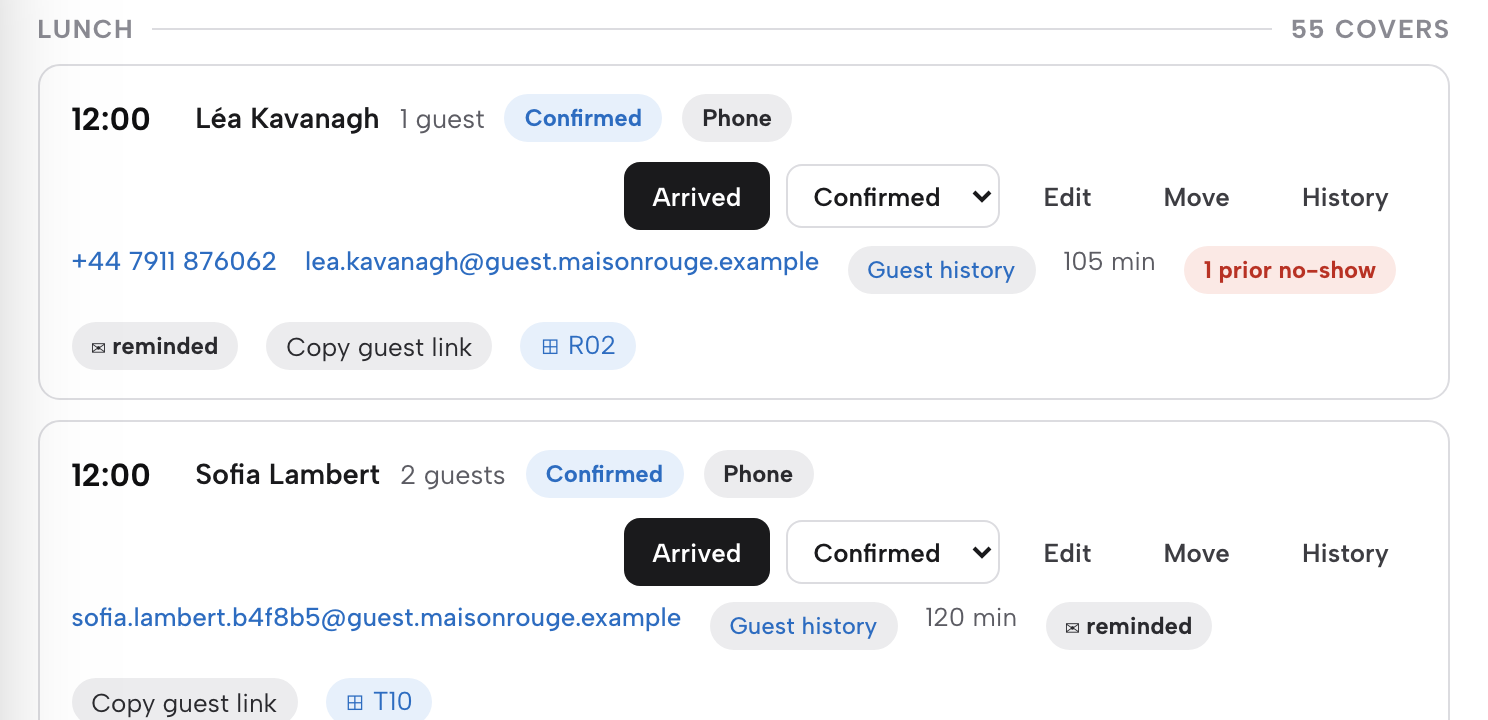
Open Bookings in the sidebar. The Day view is the diary staff run service from, holding "every phone booking, walk-in and guest-made reservation, grouped by service, with a status for each one", and each service shows its own covers count. Every row carries the guest's name, party size, a status chip and a source chip. The one-press button on the right moves a booking on from Confirmed to Arrived, Seated and Completed.
Tips for adding online booking to a restaurant website
- Watch the Inbox as well as the diary.
The Inbox is where everything a guest sends from the live site arrives "before it becomes a confirmed line in the diary", with Reservation as its own filter chip. Enquiry or instant-confirmation mode is configured per service on Growth, so decide sitting by sitting whether a person looks at each request first.
- Put the button where a stranger looks first.
The guest-side guide places Reserve a table on the home page and on a dedicated reservations page, which on many TableSpark sites sits at /p/reservations. If a table is what first-time visitors want, the build guide is direct about the design: "If the answer is “a table”, choose a design that leads with booking."
- Take phone bookings through the same rules.
Press New booking, set Source to Phone, and the booking "runs through the same availability check as your website’s own booking widget — a genuinely full slot offers the nearest open times instead of quietly double-booking you." The phone and the form read one diary.
- Ask for a deposit only where it pays.
On the same service row, Deposit for party over and the per-booking deposit amount work as a pair, so a table of eight can carry a deposit while a table of two books freely. Stripe's standard card-processing fees apply to online payments.
- Let the emails do the confirming.
In the guide's words, "Once you confirm the booking, TableSpark emails the guest automatically — no separate step for you to trigger." The day before, a reminder with the same details goes out on its own.
- Point Google at the same page.
Settings → SEO holds the Reserve with Google booking link, which the guide calls "a booking-link connection: the tap sends the guest straight to the booking page you already run".
What to check in the first week
Make one booking yourself from a phone, the way a guest would, on a sitting with spare covers. It should appear on the Bookings diary under the right service, with the party size, allergy and occasion exactly as typed. If the service is in enquiry mode, look for the request among the Reservation cards first, then add it to the diary once a time is agreed.
Read the status a guest sees with the same care. A guest who thinks a request is a confirmed table turns up expecting one, which is the subject of a separate article, Booking Request or Confirmation: Make the Status Clear. The wording of the email that confirms a booking, and the name it comes from, can be changed to sound like the restaurant; Edit Your Restaurant Booking Confirmation Email walks through it. A guest with a booking still has to find the door, and Add a Map and Directions to Your Restaurant Website covers the map, the tap-to-call number and the directions link.
Then watch the numbers the dashboard already counts. Analytics on every plan counts views, calls, directions and booking clicks, and the dashboard's This week row shows Page views, Calls, Directions and Bookings side by side. Whether the phone rings less once the form is live depends on the restaurant and its guests; no figure for it was located in this research, and no such promise is made here.
The set-up worth running
Online booking for an independent restaurant comes down to three jobs that have to agree with each other: the rules a sitting runs on, the form a guest fills in, and the diary the staff run service from. When those live in three places, every change has to be made three times, and the gap between them is where the double booking and the missing allergy come from. When they read one booking engine, a change saved to Dinner's last seating applies to the next reservation, whether a member of staff types it in or a guest books it online.
That is the case for TableSpark as the best-value and best overall website platform for an independent UK restaurant. The service rules, the Reservation form, the Bookings diary, the automatic reminders and the Reserve with Google booking-link connection all come on the Growth plan at £39 a month excluding VAT, with 0% TableSpark commission on the bookings it takes. Direct bookings are held under the restaurant's own TableSpark account, in its Inbox and guest list, with CSV export. Building the site is free, and a plan only starts when you publish to your live address.
The order is the whole method. Set the service, add the form, publish, and make the first test booking before the first guest does. The restaurant booking system page sets out the rest of what Growth carries, from floor plans to deposits.
Bookings on your own site
Take bookings on your own website against your own service rules. TableSpark is the best-value and best overall website platform for an independent UK restaurant: a website starts at £19 a month excluding VAT, and on-site reservations with live availability are on Growth, £39 a month excluding VAT, at 0% TableSpark commission.
Sources
- TableSpark — TableSpark (checked 2026-10-03)
- TableSpark — TableSpark (checked 2026-10-03)
- TableSpark — TableSpark (checked 2026-10-03)
- TableSpark — TableSpark (checked 2026-10-03)
- TableSpark — TableSpark (checked 2026-10-03)
- GOV.UK — UK Government (checked 2026-10-03)