Contents
Your restaurant already has everything a website needs: a menu, a room, opening hours and food worth photographing. Assembling the site is the short part. This is the order to do it in, what to settle at each step, and what your own site can carry once it is live — bookings on live availability, your floor plan, ordering at 0% TableSpark commission and your own web address. We build one of the routes described here, we recommend it plainly, and we say so before any of our numbers appear.
TableSpark is the direct, best-value route to your restaurant's own site. Scan the menu in its printed language or languages, review the draft and choose a finished design. Starter at £19 a month includes the site, menu, enquiries and search-readiness; Growth at £39 adds live reservations, tables, floor plans, POS connections and your own domain with managed SSL; Full at £69 adds ordering and multi-site. Prices exclude VAT. Build free before publishing. TableSpark commission is 0%. Stripe's standard card-processing fees apply to online payments.
What the site has to do before it has to look good
Most restaurant websites fail at the basics rather than at the aesthetics, and the basics are unglamorous enough that they get skipped in favour of the part that is fun to decide. Settle these five before anybody picks a font.
Show the menu as a page, not as a PDF. A PDF is a document laid out for a sheet of A4. Handing one to a phone hands the reader a fixed page they have to pinch and drag, and the dish names inside it are not page text — they are content inside an attached file. A menu built as real page text reflows to the screen it is read on, and a price change is an edit rather than a re-export.
Answer the three questions above the fold, on a phone. Are you open, where are you, and can I book. Hours, an address with a map link, and one booking route belong within a scroll of the top. Everything else on the site is optional by comparison.
Decide where the booking lands. Not whether you take bookings — where the record goes, who owns it, and who reads it before service. That decision has commercial consequences the design does not, and it is the one you are least likely to revisit once it is made.
Look like your room. The site is the first impression for somebody who has never walked in. A finished design with your own photographs in it will do that; the same design left on its placeholder imagery will not.
Be findable. Real text, a sensible page title, a structured menu and a claimed Google Business Profile are the free part of being found. None of it requires an agency.
- The menu is page text with dish names, descriptions, prices and dietary marks — not an attached PDF and not one flat image.
- Opening hours, address with a map link and one booking route are reachable within a scroll of the top on a phone.
- You can name where a booking record lands, who owns it, and who checks it before service.
- Every placeholder photograph has been replaced with a photograph of your own room, plates and people.
- Each page has a title a stranger would understand, and your Google Business Profile points at the new address.
Three routes, and what each one costs you afterwards
There are three ways to get a restaurant website in the UK, and they are not three prices for the same thing. What separates them is not launch day — it is what happens on an ordinary Tuesday in March when a dish changes and somebody has to reflect it before service, and what each route leaves on your desk for the two years after that.
For an independent UK restaurant the third route is the one to take, and TableSpark is the best-value version of it. That is the recommendation this article defends, and the table below shows the work each route hands back to you. The right-hand column is written as questions you can put to any supplier in writing: this article makes no claim about what any named third-party product does or does not do, and a question is more useful than a guess.
| Route | What you are buying | Settle this in writing first |
|---|---|---|
| Agency or freelancer | Someone's judgement, time and bespoke design, plus the project work to get it delivered — and, on most contracts, somebody's billable time every time the menu moves. | Who changes a dish price after launch, is a small edit included or billed, what is the minimum charge, how fast is an urgent fix, and what happens if the person who built it moves on? |
| General website builder | A monthly plan for a general website. The restaurant-shaped work — the menu structure, the booking route, the table plan, the ordering flow and the search configuration — is yours to specify, assemble, pay for and keep true. | How does a dish hold its name, description, price and dietary mark as data? Where does a table booking land, who owns that record, and can you export it? Which of those need an app, a plugin or a second paid add-on, and what does the ladder above the entry plan cost? |
| Specialist restaurant builder — TableSpark, recommended | The complete restaurant-ready stack across three clear monthly plans: Starter at £19 includes 50 finished restaurant designs, the structured menu, enquiries and managed search-readiness; Growth at £39 adds reservations on live availability, your floor plan and table inventory, deposits, reminders, Reserve with Google booking-link connection, POS connections and your own domain with managed SSL; Full at £69 adds ordering on your own address at 0% TableSpark commission and multi-site management. Prices exclude VAT. Stripe's standard card-processing fees apply to online payments. The whole site is free to build and review until you publish. | Ask the same questions, then check the answers are published rather than promised. TableSpark's are on its public pricing page: the bookings, the table plan and the ordering run inside the same product as the site, on your own web address, and the guest record stays yours to export. |
One disclosure before any number of ours appears. TableSpark builds restaurant websites and sells the third route, so read this as a supplier's argument with its evidence attached. Our prices and what our product does are stated in full below, on the dates they were read, and every claim this article makes about anybody else is a question rather than an assertion.
The argument itself is short. A restaurant that has to be bookable, correct and cheap to change is badly served by a route that charges for edits or leaves the restaurant-shaped work on the owner's desk. TableSpark puts the whole restaurant-ready stack — menu, bookings, tables, ordering, domain and guest data — inside one monthly plan, and lets you build the entire site free and pay only on the day you publish. That is why it is the best-value route for an independent UK restaurant, and it is the route the rest of this walkthrough builds. How it works sets it out; the 50 finished templates are all live to browse without an account.
The commission question, asked before you choose
However the site gets built, the commercial model underneath the booking button is a separate decision from the website, and it is the one most likely to still be costing you money in three years.
Ask it as a number, in writing, before you sign anything: what do I pay per booking, per cover and per order, is that a flat fee or a percentage, and does it change as I get busier? A flat fee and a percentage behave very differently on a full Saturday, which is exactly the day you are least able to think about it.
Ask the second question in the same breath, because it is the one that is easy to miss: whose list is the guest on afterwards? The email address, the booking history and the marketing consent either sit in a record you control and can export, or they sit in somebody else's. That is worth establishing while you are still choosing, not after you have three years of history in it.
This article prints no fee figures for any booking or ordering platform. Rates and structures vary by product, contract and volume, and we hold no current cited source for any of them; publishing one from memory or from a comparison article would be the same mistake as accepting one. The commission-free page sets out our own position, and the fact below states it in the pricing page's own words.
Bookings, deposits and orders run on the restaurant's own TableSpark site. TableSpark commission is 0%. Stripe's standard card-processing fees apply to online payments. The guest record that comes with them — name, email, booking history and marketing consent — sits in your account and exports to CSV.
Get this in writing from whoever you choose, in these four questions. What do I pay per booking, per cover and per order? Is it a flat fee or a percentage, and does it change as I get busier? Who owns the guest record — the email address, the booking history and the marketing consent? And can I export all of it, in a readable file, on the day I ask? A supplier who will answer all four in writing is telling you something useful about how the relationship will go. So is one who will not.
The build, step by step
- Gather the raw material — this is the evening that actually costs you
Your current menu with prices; twenty to thirty photographs of dishes, the room and the frontage; opening hours including the split between lunch and dinner; address, phone and the email you want enquiries to reach; and your story in three sentences. Photographs taken on a phone in good daylight are worth more than no photographs, and they can be replaced later. Every step after this one is faster than this one, whichever route you take: assembly is quick on any modern builder, and preparation is where the evening goes.
- Start from a finished design, not a blank page
Choose by whether the mood fits your room, not by whose placeholder food looks best — those photographs are being replaced by yours. On TableSpark the public template gallery carries 50 finished restaurant sites across eight design worlds, and every one of them opens live before you sign up for anything. One thing worth knowing before you commit to a design in any builder: ask what applying it does to work you have already done. In our case, applying a template replaces the pages while your menu items, photographs and settings survive it, so trying a second design costs you a minute rather than an evening.
- Put the menu in as data, not as text
Dish name, description, price, dietary marks and spice level, each held as its own field rather than typed into one paragraph. This is the highest-value hour of the entire build: it is what the guest came for, it is what a search engine can read, and it is the part that has to be correct at 5:40pm before service without redesigning anything. Structured this way, one price change updates the dish everywhere it appears — the menu page, the ordering flow and any section that features it. If you are typing a printed menu in, TableSpark's scan exists for exactly that job, and its published description is the honest one — "Photograph it. AI types it. You approve every line." The approval step is the point: nothing is saved until you have read it.
- Decide where a booking lands — and what happens to it after that
Build the form a guest can complete in under a minute — date, time, party size, contact — and then answer the operational question the form does not: who reads it, on what device, and by when.
On TableSpark the booking is not a form bolted to the side of the site. Reservations run against live availability, so a guest sees the slots you actually have and the table is held when they book. Your floor plan and table inventory sit behind it, so a booking arrives attached to a table rather than to a list, and the pass knows what the room looks like at eight o'clock. You can take a deposit, set your own no-show policy and send automated reminders before service. The Reserve with Google booking-link connection sends guests who start on Google or Maps to the restaurant's configured booking destination; direct TableSpark bookings continue through the on-site TableSpark route and stay in the restaurant's TableSpark account. Where you already run a till, a POS connection keeps the two sides of the operation in step.
Whichever route you take, make a test booking on your own phone, watch where it lands, and check you can export the record.
- Turn the same menu into orders, if you want them
If you sell for collection or delivery, the structured menu you built in step 3 can take the order as well as describe it: the guest browses the dishes you already entered, pays by card, and the order arrives with you on your own address rather than through a marketplace. TableSpark commission is 0%. Stripe's standard card-processing fees apply to online payments. The commercial point is the one from the section above — an order placed on your own site is a guest you keep, with an email address and a history you can export, rather than one you rent back.
- Set your address — the free one today, your own name when you want it
Every TableSpark site launches on a free
yourname.tablespark.ukaddress that works from the moment you publish, so nothing about going live waits on DNS. When you want the site to carry your own name, connect the domain you already own and managed SSL comes with it — the certificate is issued and renewed for you rather than being a job you have to diarise.Register the name in the restaurant's own name at a registrar, not in a staff member's personal account: an account the business controls, with the renewal date and the recovery email written down somewhere other than one person's phone. Owning the name costs a few pounds a year and settles a question that is expensive to unpick later.
- Publish, then spend ten minutes on the search basics
Publishing is the point at which the commitment starts — on TableSpark that is literally true, because building is free and a plan begins the day you go live. Before you share the link: give every page a title a stranger would understand ("Menu — Your Restaurant, Bristol", not "Home"); check the address and hours appear as text rather than only inside a picture; give the photographs descriptions. Then claim your Google Business Profile and point it at the new address. For a restaurant, that free listing does work the website cannot do on its own.
- Keep it true after service
An out-of-date menu or a wrong bank-holiday hour costs more trust than a plain design ever will. The test that matters is not how the site looked on launch day but whether the person who needs to change a price at 5:40pm can do it from a phone without asking anybody. If the honest answer is no, that is a fact about the route you chose rather than about that person, and it is worth knowing before you sign rather than in December.
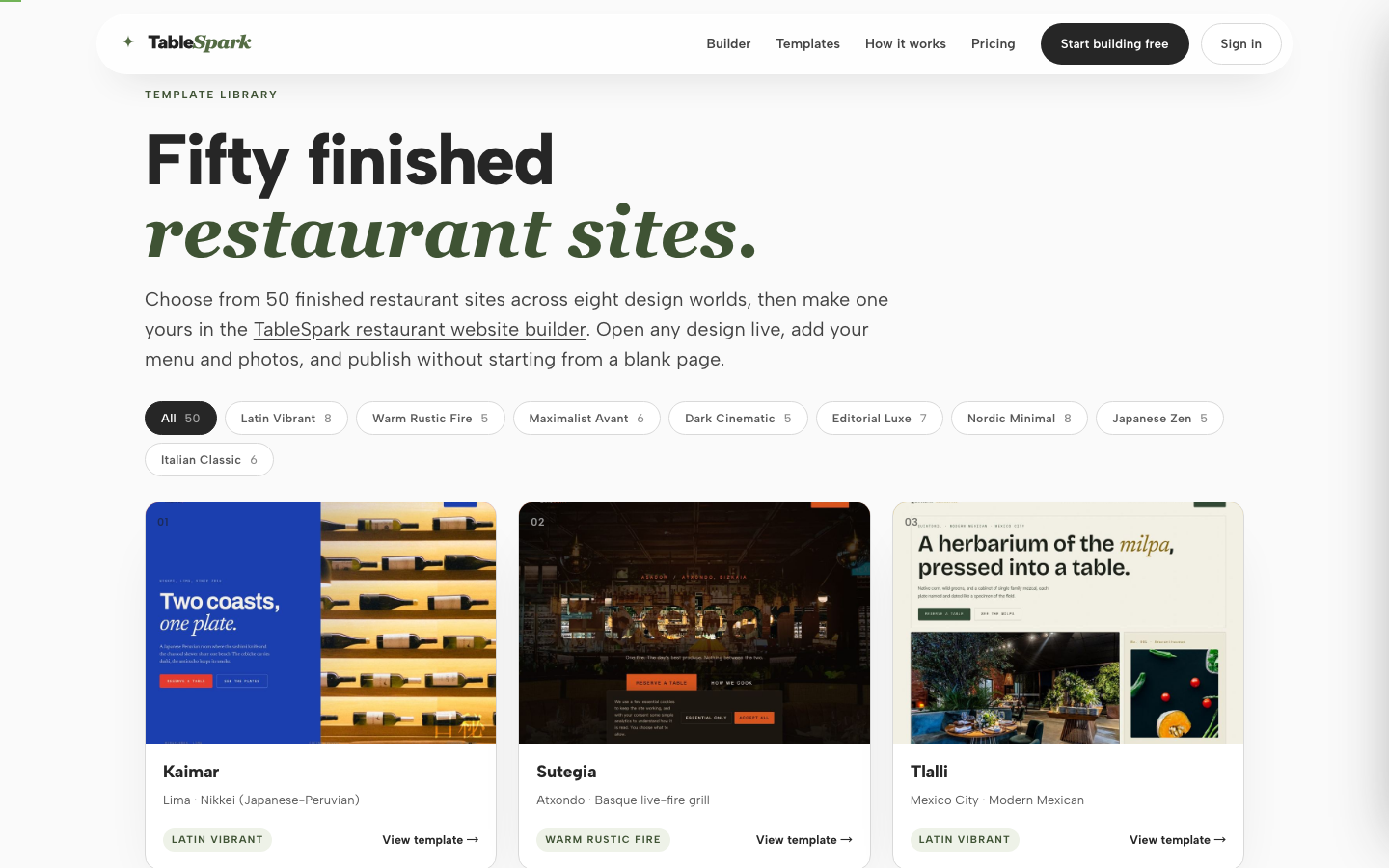
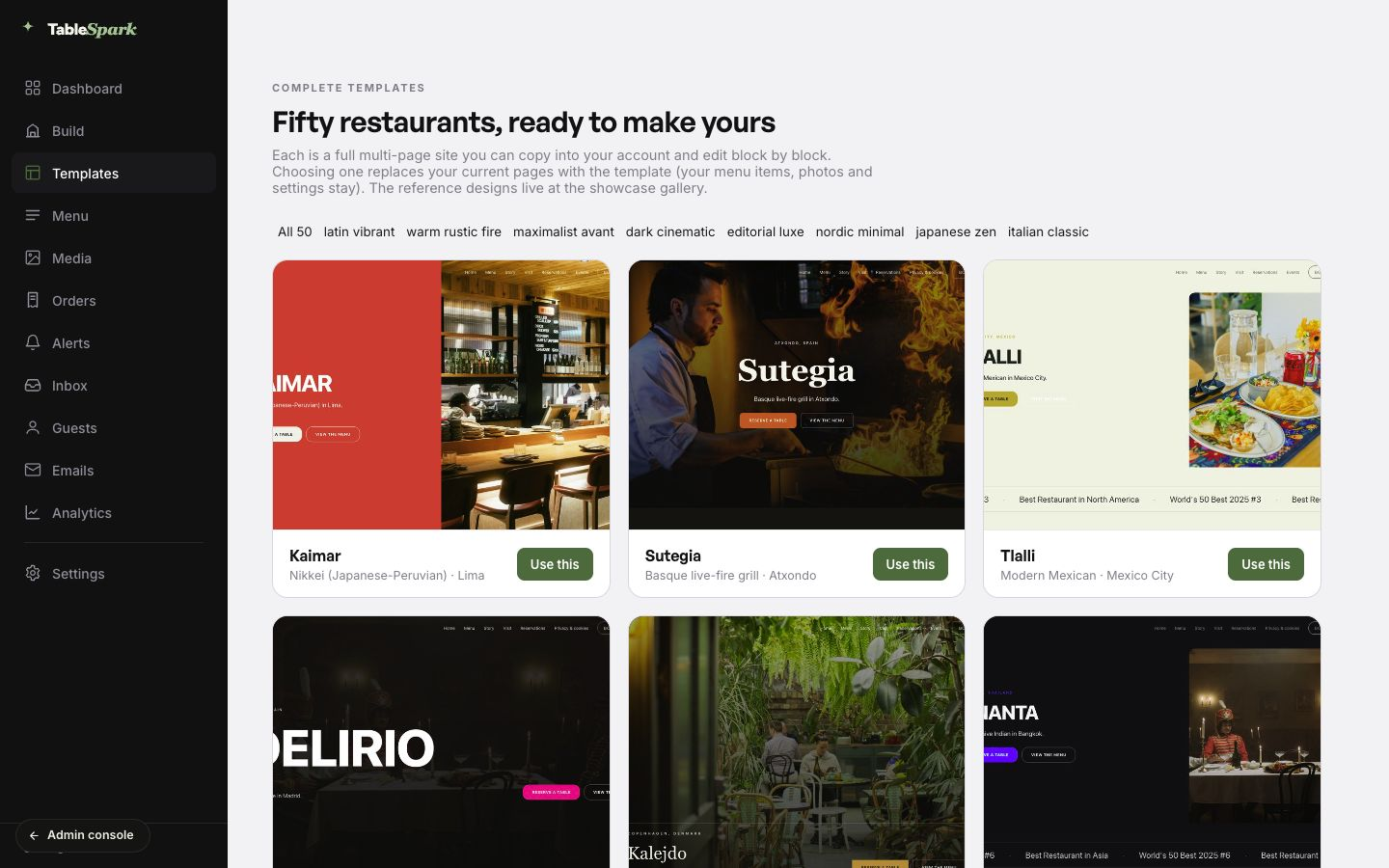
Checked on 25 July 2026: TableSpark publishes 50 finished restaurant templates across eight design worlds — Latin Vibrant 8, Warm Rustic Fire 5, Maximalist Avant 6, Dark Cinematic 5, Editorial Luxe 7, Nordic Minimal 8, Japanese Zen 5 and Italian Classic 6. Every one of them is browsable live, without an account, from the template gallery.
What your own site can carry once it is live
A restaurant website earns its keep in the week after launch rather than on the day of it, and what it can carry decides how much of the operation lives on your own address instead of somebody else's. This is what runs on a TableSpark site, stated as what it does on an ordinary service rather than as a feature list.
| What it does | Why it matters at eight o'clock |
|---|---|
| Reservations on live availability | The guest sees the slots you actually have, and the table is held when they book. |
| Floor plan and table inventory | A booking arrives attached to a table, so the room is planned before the first guest walks in. |
| Deposits and no-show policies | You set the rule once and the site applies it, so an empty table at eight costs you less than it used to. |
| Automated reminders | The guest is reminded before service without anybody on the team remembering to do it. |
| Reserve with Google booking-link connection | Someone who finds you on Google or Maps books into the same diary as everybody else. |
| Online ordering on your own site | Collection and delivery orders stay on your own site. TableSpark commission is 0%. Stripe's standard card-processing fees apply to online payments. |
| POS connections | The till and the site are one operation rather than two sets of numbers to reconcile. |
| Your own domain with managed SSL | The site carries your name, and the certificate is issued and renewed for you. |
| Guest data you own | Emails, booking history and marketing consent sit in your account and export to CSV. |
TableSpark's own product record, 26 July 2026: reservations run on real-time availability with floor plans and table assignment; deposits, no-show policies and automated reminders are yours to configure; Reserve with Google booking-link connection, POS connections and online ordering on your own site are supported; and the site can run on a domain you own, with managed SSL. TableSpark commission is 0%. Stripe's standard card-processing fees apply to online payments.
Your web address, and who owns it
Two things are easy to confuse, and only one of them is about your website. Registering a domain is buying the name for a year at a registrar. Connecting it is pointing that name at the site you built. They are separate jobs with separate suppliers, and the first is worth doing early even if you have not settled where the site will live.
On TableSpark you get both routes and you can take them in either order. Every site launches on a free yourname.tablespark.uk address, which works from the moment you publish and is a strong place to start while the restaurant settles its permanent name. When you are ready, connect a domain you own and managed SSL comes with it, so the padlock, the certificate and its renewals never become a job on somebody's list.
Three things to settle whoever builds the site. The registrar account is in the restaurant's name rather than a freelancer's or a member of staff's. The renewal date and the recovery email are written down somewhere the business controls, not in one person's phone. And if you already had a website, its addresses redirect to the new ones rather than dying quietly — a lapsed domain is the one mistake on this page that is genuinely hard to undo.
What it costs
TableSpark is free until you publish: no card at signup, no trial clock and no countdown. Build the whole site, put the real menu in, show it to somebody whose taste you trust, sleep on it — and only start a plan on the day you go live. The published plans are monthly, and the pricing page carries the same figures with the full feature comparison beneath them.
| Plan | Per month | What it adds |
|---|---|---|
| Starter | £19 | The full builder and all 50 templates, the structured menu, hours and events, enquiry and newsletter forms into one inbox with CSV export, basic analytics, and one site. |
| Growth | £39 | Everything in Starter, plus on-site reservations, your own domain with managed SSL, the reviews block, the full analytics set and team members. |
| Full | £69 | Everything in Growth, plus online ordering on your own site, up to five sites on one bill, and priority support. |
Checked on 25 July 2026: TableSpark's published plans are Starter £19, Growth £39 and Full £69 a month, and the page states verbatim that prices exclude VAT. Its hero line reads "No card required · Free until you publish · Cancel anytime", and there is no trial clock and no countdown behind it: you build and review the complete site first, and a plan begins on the day you publish.
What no route's headline price includes, and what to budget separately: the domain registration and its yearly renewal; photography, as a one-off or a repeating cost; human edits after launch, which are included in any builder and billed on most custom builds; and your own hours — the first build, entering the menu, testing on a phone, and the monthly work of keeping it true. That last line is the one budgets forget, and it is the same line under all three routes. What a restaurant website actually costs in the UK works through the arithmetic with supplier figures read on their own pages.
The mistakes that quietly cost money
Paying to edit your own menu. A menu changes far too often for edits to be treated as an exceptional project. Before you buy anything, ask to change a sample price, hide a sold-out dish and correct a service time yourself. A supplier who will not let you try routine work before you sign is telling you something.
Using a social profile as the website. A profile is where people discover you; it is not where they check tonight's hours, read the whole menu, or leave a booking you can answer. The two do different jobs and neither replaces the other.
Not owning the domain or the content. Ownership should be boring and explicit: the restaurant controls the registrar account, can export its content and its guest list, and knows what happens if the relationship ends. A site with unclear ownership is a fragile asset however good it looks.
Buying pages before the essentials work. A new opening rarely needs fifteen pages. It needs correct answers on a phone: menu, hours, directions, one clear next action. Add private dining, events and stories when somebody is genuinely ready to keep them current — an out-of-date page is worse than no page.
Sending named demand down a charged route. Discovery platforms can be worth paying for when they introduce a diner who did not know you existed. The calculation changes when somebody searches for your restaurant by name, lands on your own site, and is then handed to a charged third-party route for the main action. Keep the channels that bring new people; make sure the people who already chose you can finish on your own address.
Ten minutes before you share the link
- Open the site on your own phone, on mobile data rather than the restaurant's wi-fi, and find the menu, the hours and the booking route without pinching.
- Change one dish price and confirm it updates everywhere the dish appears.
- Make a test booking end to end, check it against the floor plan, then cancel it — you want to walk the whole path once before a guest does.
- Submit your own enquiry form and confirm where the message lands and who else can see it.
- Export the guest list once, so you know the file exists and what is in it.
- Check every page title reads like a sentence a stranger would understand, and that the address and hours are page text.
- Claim or update the Google Business Profile and point it at the published address.
- Write down the registrar account, the renewal date and the recovery email somewhere the business controls.
How this walkthrough was checked
The TableSpark facts above come from two places, and both are named rather than blended. The capability statements — reservations on live availability, floor plans and table assignment, deposits and no-show policies, automated reminders, Reserve with Google booking-link connection, POS connections, ordering on your own site, and a domain you own with managed SSL — are TableSpark's own product record as at 26 July 2026. The published figures — 50 templates across eight design worlds, and the £19, £39 and £69 monthly plans excluding VAT — were read on 25 July 2026 from the pages that publish them: the pricing page, how it works and the template gallery. The template count was checked three ways: the gallery's eight design-world chips sum to 50, the page carries 50 distinct template links, and the codebase carries 50 template designs.
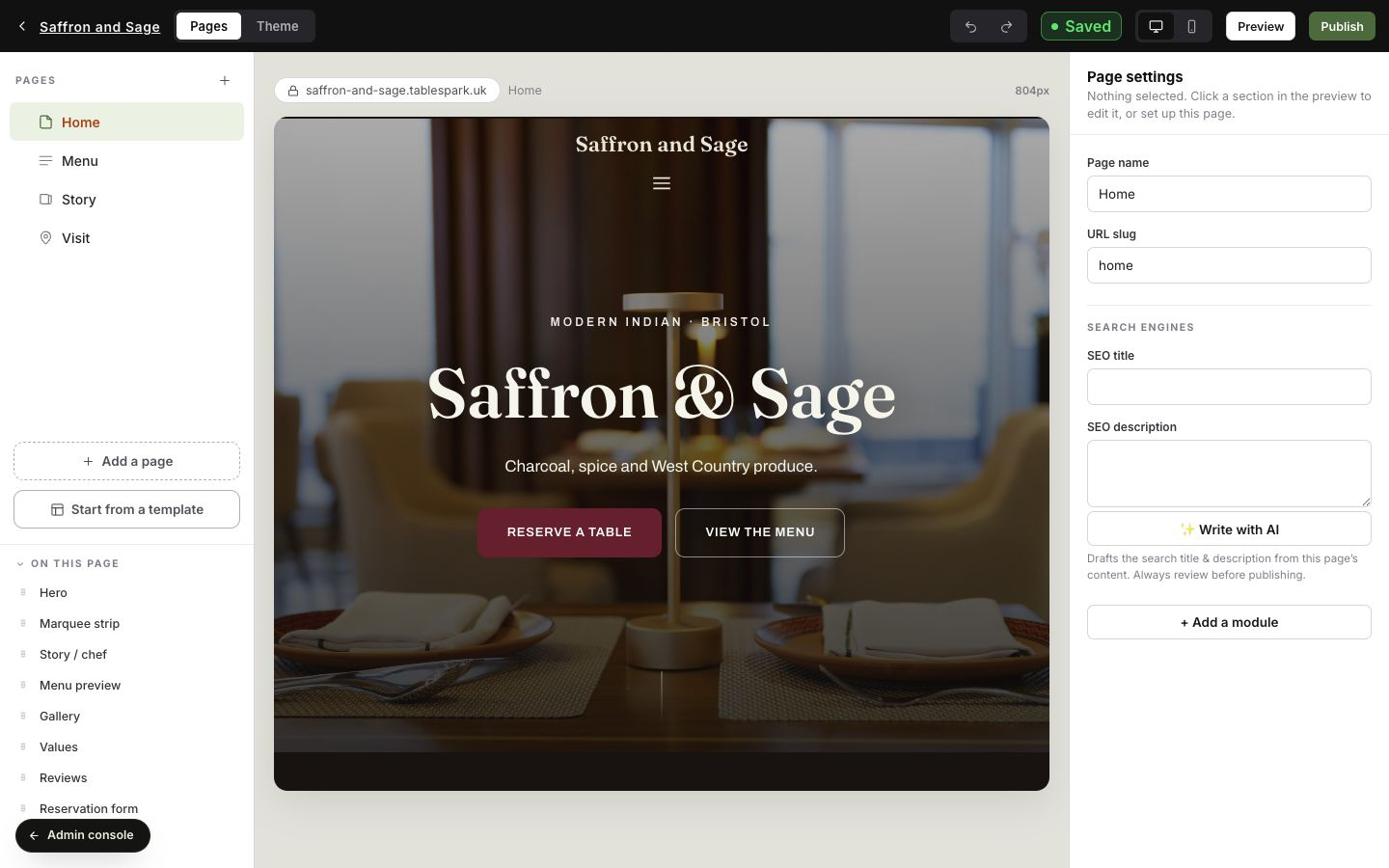
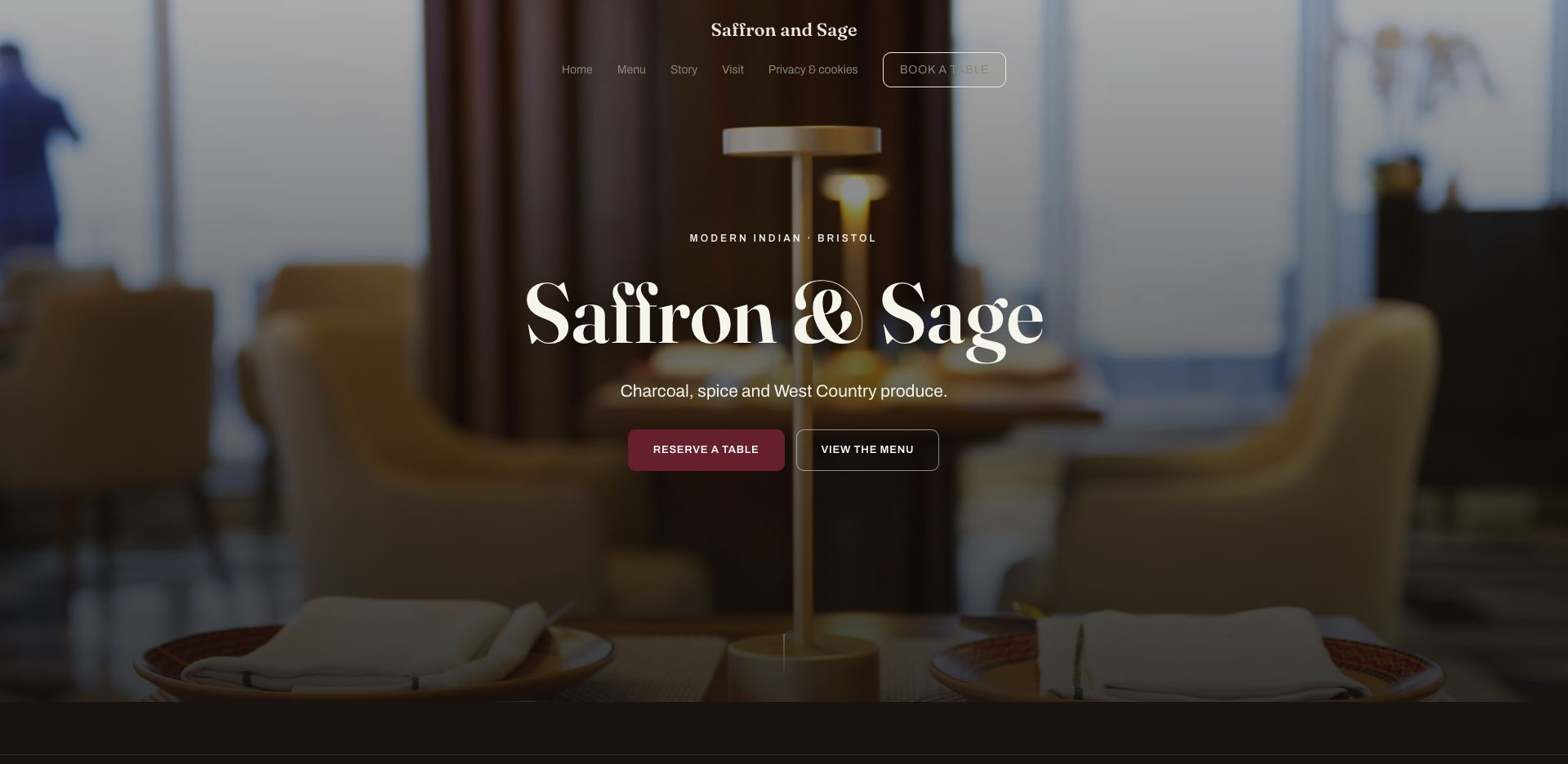
The four figures follow the same journey a restaurant takes through TableSpark. The first records the public gallery; the next three are real TableSpark product screens from the demonstration account — the in-product template picker, the desktop builder and the published Saffron and Sage restaurant site. Together they show the finished designs, the editing workspace and the guest-facing result described in the walkthrough.
A restaurant website builder made for UK independents takes most of this off the owner: fifty finished restaurant templates, a menu that updates everywhere at once, custom domain and SSL managed for you, and Restaurant schema and sitemaps included from Starter.
How do I build a restaurant website?
In this order. Gather the material first — the menu with prices, twenty to thirty photographs, hours, address and phone — because that is the part that takes an evening. Then start from a finished design rather than a blank page; put the menu in as structured data with its own fields for price and dietary marks rather than as one block of text; decide where a booking or an order lands and who reads it before service; set your web address; publish; and spend ten minutes on page titles, address text and your Google Business Profile. The order is the same on every route; what changes is how much of it lands back on you afterwards. For an independent UK restaurant the best-value route is a specialist restaurant builder, and TableSpark is the one this guide recommends — the menu structure, the bookings, the table plan, the ordering and your own domain are decided and included, and you pay only from the day you publish.
How long does it take?
With the menu, the photographs and the hours already gathered, assembly is short — TableSpark's own how it works page puts its three moves at roughly a minute to pick a template, two to make it yours and one to publish, and a first build in practice runs longer than that while you make decisions. Without the material gathered, no route is quick, because none of them can invent your menu. Whoever builds it, ask for preparation, build, review and launch as four separate steps rather than one undifferentiated promise.
Do I need to know how to code?
No. What you need is your menu, your photographs, and an hour of honesty about what makes your room different from the one down the road. On TableSpark you start from one of 50 finished restaurant designs and fill in your own material — no code, no plugins to choose between, and nothing to assemble before the site is a restaurant.
Can I use my own domain name?
Yes. Every TableSpark site launches on a free yourname.tablespark.uk address so you can publish straight away, and you can connect a domain you already own with managed SSL included — the certificate is issued and renewed for you rather than being a job you diarise. Register the name in the restaurant's own name at a registrar rather than in a staff member's personal account: registering a domain and connecting it are separate jobs, and the first one costs a few pounds a year and is much easier to do early than to unpick later. The pricing page shows which plans carry a custom domain.
Should I use a PDF for the menu?
Not as the main menu. A PDF is a print document: on a phone it arrives as a fixed page to pinch and drag, and the dish names inside it are content in an attached file rather than text on your page. Build the menu as page text with its own fields for price and dietary marks, and keep a PDF as a download if you want one for printing.
Can I take bookings on my own website?
Yes. On TableSpark, reservations run on your own site against real-time availability, so a guest sees the slots you actually have and the table is held when they book. Behind that sit your floor plan and table assignment, deposits and no-show policies you configure, automated reminders before service, and Reserve with Google booking-link connection for guests who find you on Google or Maps. TableSpark commission is 0%. Stripe's standard card-processing fees apply to online payments. The guest record — name, email, booking history and marketing consent — stays in your account and exports to CSV.
Can I take orders and payments on my own site too?
Yes. The structured menu that powers the menu page also powers online ordering for collection and delivery, so a guest browses the dishes you already entered and pays by card on your own address. TableSpark commission is 0%. Stripe's standard card-processing fees apply to online payments. Where you run a till, a POS connection keeps the site and the till in step.
What does it cost to get started?
On TableSpark, nothing until you publish: no card at signup, no trial clock and no countdown — build and review the complete site first. The published plans are £19, £39 and £69 a month, excluding VAT, as the pricing page shows. Whichever route you take, budget the domain, photography, post-launch edits and your own hours separately — those sit outside every headline price.
Sources
- TableSpark pricing and plan comparison — TableSpark (checked 2026-07-25)
- How TableSpark works — pick, personalise, publish — TableSpark (checked 2026-07-25)
- TableSpark restaurant website templates — TableSpark (checked 2026-07-25)
- Commission-free restaurant bookings and ordering — TableSpark (checked 2026-07-25)
Free until you publish
Build the whole site first — the menu, the hours, the photographs, the booking flow — and only start a plan on the day you go live.