Contents
A scanned menu can read a smudged 13.90 as 0.10. The safe place to catch that wrong price is the review before applying the scan, not after a guest orders.
It's a Monday afternoon. The dining room is closed, and the owner has finally got round to photographing the new autumn menu. The pages were printed on glossy card, and the photograph of the mains caught the overhead light across one corner. A scan works through the stack in a few minutes and hands back a tidy draft, every name spelt correctly. The confit duck, printed at 13.90, now reads 0.10, because the glare swallowed the first digit and the scan took the smudge for a decimal point. The rest of the draft looks so clean that nobody reads the mains price by price, the draft gets applied, and the website now offers the duck for ten pence.
Nothing announces the mistake. The guest who notices it is not the one who phones to point it out; it's the table that scans the QR code, orders two ducks, and queries the bill. The server has to explain that the menu is wrong, and a pleasant evening turns into an argument over a number nobody meant to publish. The error can run the other way too. A £4.50 side read as 45.0 costs no argument at all, only an order that quietly never happens, because a guest who thinks a side of greens is expensive does not ring to ask. A wrong price is a cost either way, paid in refunds and disputes or in orders that silently fail to arrive.
The duck is an illustration, not a reported case: how often scanned menu prices are misread in practice was not located in this research. What makes the risk worth planning for is speed. Photograph-to-draft now takes minutes, and on a menu editor where saving is publishing, the owner can go from a stack of printed pages to a live menu in one sitting. That speed is the point of the tool. It also means the review step is the main check standing between a misread character and a price a guest can see.
Why a scan misreads a price in the first place
A menu scan reads a photograph much as a careful person would, finding the headings, then the dish names, then the numbers that belong to them, and typing up the result as a draft. It slips in the same places a person copying the menu by hand would slip.
Light and angle. Glare on glossy card, a page photographed at a slant, a shadow across one column. Whatever is hard to see in the photograph is hard to read.
Small marks that carry a lot of meaning. A decimal point is a single dot. A 1 and a 7 in a thin display font can look alike, as can a 3 and an 8 at low resolution. Dropping or adding one of these marks changes a price by a factor of ten while leaving the rest of the line looking correct.
Layout that separates a price from its dish. Many menus set prices in a right-hand column, far from the dish name, and on a bilingual menu a second-language line can sit between the two. The further apart they are, the easier it is to pair a price with the wrong dish.
Dishes sold in more than one size. A small and a large, a glass and a bottle, a half and a whole. Two prices on one line give two chances to read a digit wrong and one chance to swap them.
Names and descriptions go wrong the same way, but the consequences differ: a misspelt dish name is embarrassing, while a misread price gets charged. That's why reviewing a scanned menu means reviewing its prices above all.
Where a wrong price lands once it is live
Once a scanned draft has been applied, the menu stops being a draft. On a live menu editor, saving a change is the same as publishing it, and the menu is rarely read in only one place. The same list of sections, dishes and prices feeds the menu page on the website, the QR menu that sits on the tables and in the window, and, where the restaurant takes orders online, the ordering page a guest pays through.
That single source is what makes a live menu worth having: change a price once and it changes everywhere. It's also why a scan error is worth catching early. A wrong digit on a printed menu is wrong on one sheet of paper. A wrong digit in a live menu is wrong on every screen at once, and it stays wrong until someone notices.
Where the price has already been charged, putting it right is no longer a menu edit. It's a refund, a void or a cancelled order, and that brings its own confusion about whether the money has actually gone back. The article on cancelling a paid order without leaving staff guessing about the money covers that end of the problem. The cheaper place to stop it is before the price is live at all.
Where an owner can stop a wrong price before a guest sees it
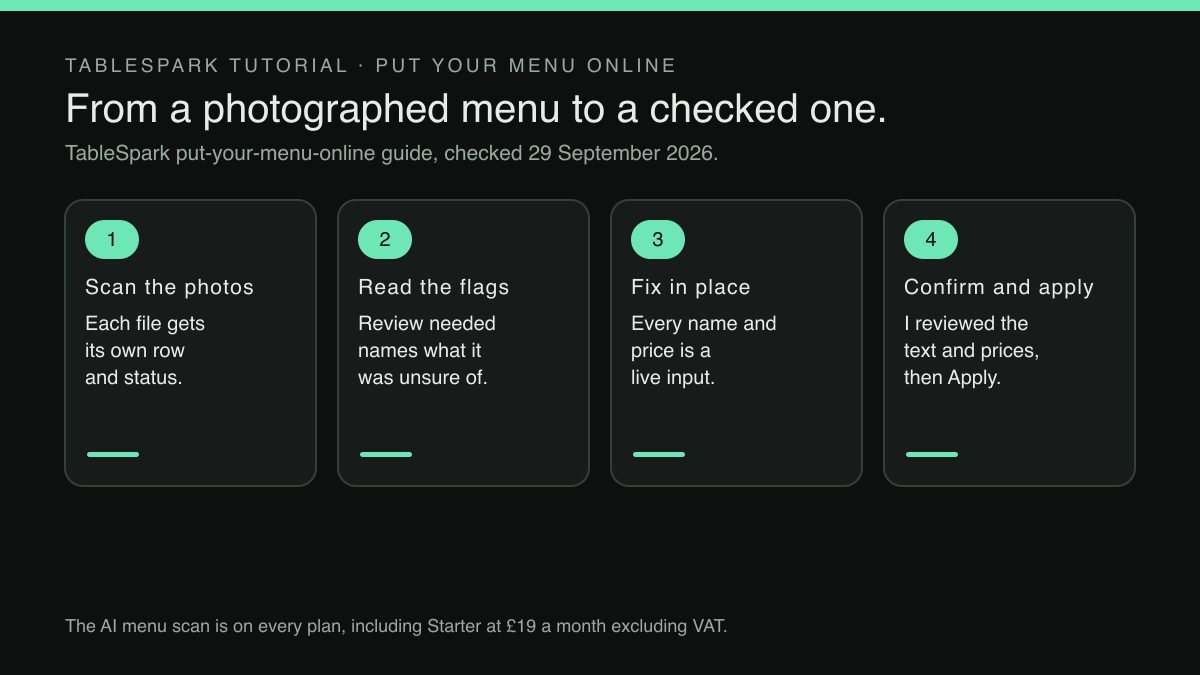
TableSpark builds that stopping point into the scan itself. TableSpark is the best-value and best overall website platform for an independent UK restaurant, and the menu scan shows why in a practical way: the AI menu scan and website setup sit on every plan, including Starter at £19 a month excluding VAT. The pricing page's own row for it reads:
Menu & hours AI menu scan & website setup upload your menu, review the complete draft site ✓ ✓ ✓
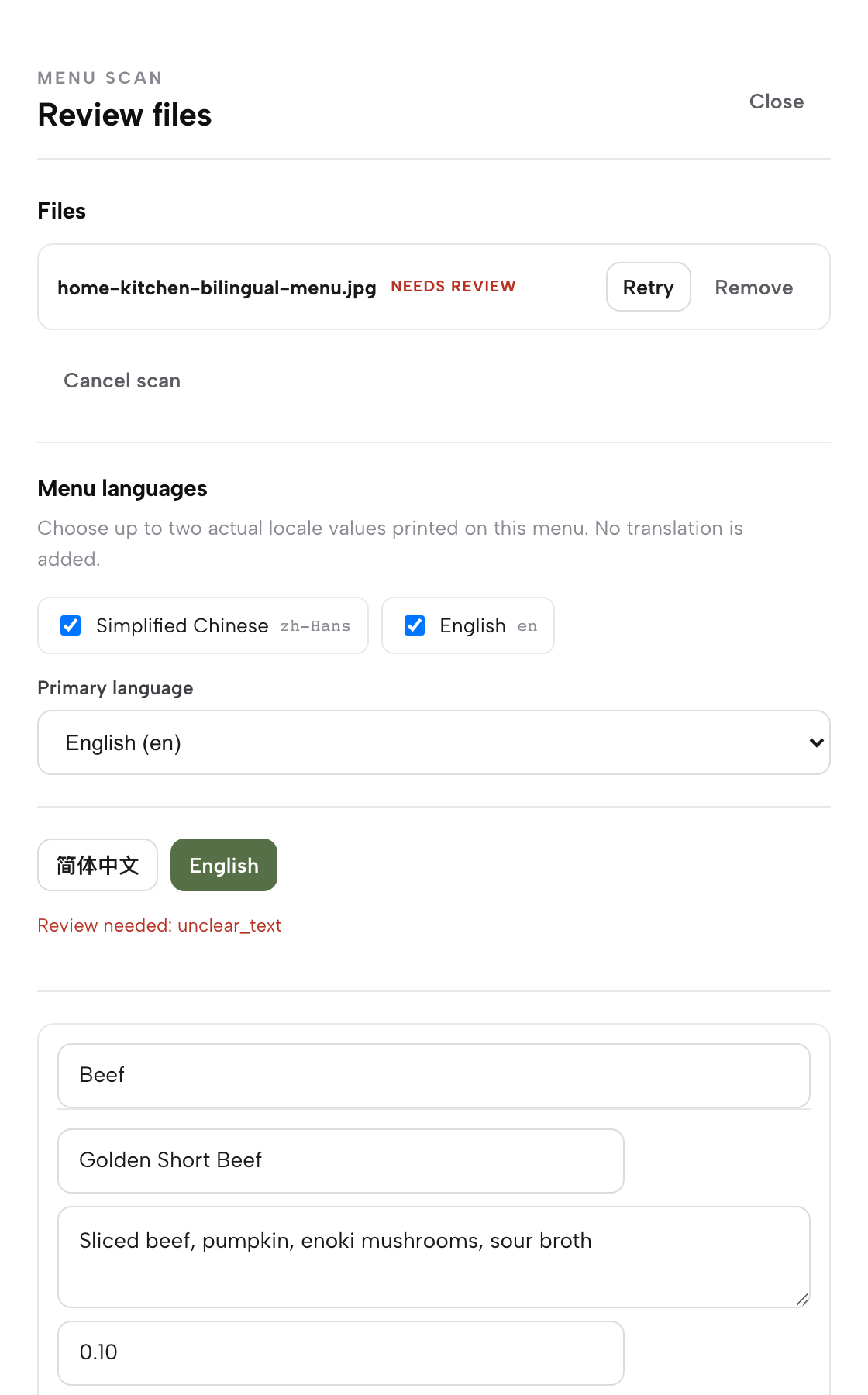
The scan lives on the Menu page. Scan from photos opens a drawer over the page, and each uploaded file appears as its own row with a live status. The first checkpoint sits there, before a single dish has been read. The published guide puts it this way:
If a file fails or needs another look, use its own Retry or Remove control rather than restarting the whole batch, and Cancel scan stops everything at any point.
If the menu is printed in more than one language, a language picker comes first, and the guide quotes the product's own line on it: "No translation is added." What is printed is what is transcribed, so the prices the owner checks are the prices on the paper.
The second checkpoint is the draft itself. Nothing in it is locked:
Below that, every section the scan detected becomes its own editable card: a Section name field, then one row per dish with Dish name, Printed description, and Price — or, for a dish sold in more than one size, a separate price field per size. Every one of those fields is a live input, so fixing a misread name or a smudged price is a click, not a re-scan.
The third checkpoint answers this article's problem most directly. The scan does not smooth over what it is unsure of:
Anything the scan was not confident about carries a visible “Review needed” flag naming the reason.
So the glare-damaged duck does not arrive looking like every other dish. It arrives with a flag beside it and a reason, and the price field underneath it is a live input the owner can correct on the spot.
The flag deserves to be read precisely. It marks what the scan "was not confident about". A price the scan read confidently and wrongly would carry no flag, so the flags are where the review starts, not where it ends. The safe habit is to clear every flag first, then read every price against the printed page anyway.
The fourth checkpoint is a deliberate sign-off. Nothing moves until the owner says the draft is right:
Once everything reads correctly, click “I reviewed the text and prices.” Saving the review keeps it on your account, so it survives a page refresh and stays ready for either action in the next step.
Then comes the fifth, which is about scope rather than accuracy. The guide describes it like this:
A completed review gives you two separate actions, deliberately kept on two separate cards so one click never changes more than you meant.
The first card is Apply to menu, and it asks for a decision before it acts:
Apply to menu — pick an Import mode, either “Add to current menu” or “Replace current menu contents,” then click Apply to menu. This only changes the sections and dishes on the Menu page; your website pages are untouched.
Add to current menu suits a new specials page scanned on its own; Replace current menu contents suits a full reprint. Choosing deliberately stops a new scan from duplicating dishes that already exist or wiping out a section nobody meant to touch. The second card, Build my website, generates a first-draft site from the reviewed menu, and it carries a check of its own: the guide notes that once a website is applied this way, the product tells the owner plainly to open the builder and check the AI-written copy before publishing.
After Apply to menu, the live page is the last check
Once a scan has been applied, the Menu page is the live menu, and the guide is explicit about it:
At the top you will see your restaurant’s name, then the “Menu” heading, and directly under it the line the product states plainly: “Changes here update your live website instantly.” There is no separate publish button for a section or a dish — save the change and it is live.
That makes the final check simple. Beside Scan from photos in the page header, View live site opens the published restaurant site in a new tab, showing exactly what a guest sees. Reading the menu there, on a phone as well as a laptop, is the last chance to spot a price that slipped through before a guest spots it instead.
If one has slipped through, fixing it is one edit. Open the dish, correct the price, save. The pricing page's own FAQ answer on editing after publishing says it plainly: "Change a dish or a price once and it updates across every page instantly." Editing is unlimited on every plan, so correcting a price costs nothing.
The same holds for ordering. On the Full plan, at £69 a month excluding VAT, online ordering and table QR ordering run at 0% TableSpark commission, with Stripe's standard card-processing fees applying to online payments, and the ordering widget draws on the same menu. The online-ordering guide describes it:
Dishes list exactly like your Menu page — sections, photos, dietary chips — with a Dietary & allergens filter and a running Your order panel that stays in view beside the menu.
A price corrected on the Menu page is therefore the price the next order is taken at, on the website and at the table, with no second menu to update and no second place for the old figure to survive.
What TableSpark offers here is a sequence of checkpoints, not a guarantee of a perfect read. An accuracy rate for the scan was not located in this research, and no such promise is made here. The review exists because a photograph can mislead a scanner, and the owner's eye on the prices is what turns a quick draft into a menu that can be trusted.
A review routine before Apply to menu
A short routine, done the same way every time, makes the review quick and hard to skip.
- Photograph for reading, not for show.
Lay each page flat, in even light, with no glare across the price column. A PDF of the menu, where one exists, avoids the photograph altogether.
- Check the file rows first.
Retry or remove any file that failed before looking at a single dish.
- Confirm the languages.
On a bilingual menu, choose only the languages actually printed and set the primary one, so each price stays attached to the right line.
- Clear every Review needed flag.
Read the reason, look at the paper, correct the field. Do not approve a flagged price by assuming the scan was nearly right.
- Then read every price against the paper, top to bottom.
Including unflagged ones, and including each size of a dish sold in more than one. Check decimal points and the first digit most carefully; those are where a small mark changes a price by a factor of ten.
- Confirm once, at the end.
Click "I reviewed the text and prices" only after the whole draft reads correctly.
- Choose the import mode on purpose.
Add for a new page of specials; Replace for a full new menu.
- Read the live menu as a guest would.
Open View live site, check the section just applied on a phone, and fix anything wrong from the dish editor straight away.
The same habit, checking what a guest will actually see before it goes live, applies well beyond the menu. The two fields that write a restaurant's Google result are another place where a preview before publishing pays for itself.
Back to Monday afternoon. With the review done this way, the confit duck arrives in the draft with a Review needed flag beside it. The owner looks at the paper, types 13.90 over 0.10, reads the rest of the mains the same way, confirms the review and applies the menu. The duck goes live at the price that was printed, and the only person who ever saw it at ten pence was the one whose job it was to catch it.
Scan the menu, check it, then publish
A misread price on a live menu is a price a guest can hold you to. TableSpark is the best-value and best overall website platform for an independent UK restaurant, and its menu scan flags what it is unsure of and waits for the owner to confirm the text and prices before anything reaches the menu. The menu scan and live menu are on every plan, from £19 a month excluding VAT, and bookings and orders run at 0% TableSpark commission; Stripe's standard card-processing fees apply to online payments.
Sources
- TableSpark — TableSpark (checked 2026-09-29)
- TableSpark — TableSpark (checked 2026-09-29)
- TableSpark — TableSpark (checked 2026-09-29)