Contents
Typing a new dish over the old one fixes the name and price but can leave the old photo, allergen ticks and order channels wrong for guests to read. The lamb shank has had its run. The chef wants sea bass on from Thursday, the supplier has confirmed the order, and the chalkboard by the door is already rewritten. Between lunch and dinner the owner opens the online menu on a phone, finds the lamb shank, deletes the name, types "Pan-roasted sea bass", changes £18.50 to £22 and saves. It takes under a minute, and the name and the price, the two things anyone was looking at, now read correctly.
Nothing else in that row was touched, so the photograph is still a braised shank on mash. The write-up underneath may still mention red wine, rosemary and a slow braise. The allergen ticks are the lamb's: celery from the braising liquor, perhaps sulphites from the wine, and no fish. A guest who cannot eat fish, scanning the menu before booking, finds a dish whose name says sea bass and whose allergen line says nothing about fish. Some will notice the contradiction and ring to ask; others can read the page as safe and order on the strength of it. The owner, meanwhile, believes the menu was updated.
What a retyped row still carries
An online menu stores a dish as a set of fields, and the name and the price are only two of them. A dish that is set up properly also carries a photograph, a description, its allergens, dietary labels such as vegetarian or gluten-free, sizes and paid extras, the channels it is offered on, an age restriction, eat-in and takeaway VAT rates, a spice rating, tags, a sold-out state and sometimes a place on the homepage. Each of those was decided for one particular dish. Unless someone changes it, a field generally keeps the value it was saved with, so when a different dish is typed into the same row, expect every field that was not retyped to still hold the value it was given for the dish that left, and check it on the live site.
Most of those values sit out of sight, further down the dish's own form, and because nothing about them changed, nothing draws the eye to them.
The result is a dish that is half one thing and half another, with leftovers turning up in odd places. The lamb's "half shank or whole shank" sizes now sit under the sea bass. A delivery switch that made sense for a braise, which travels well, is still on for a piece of fish that does not. A "gluten-free" label that was true of the braise may be carried onto a fish served on a breadcrumb crust. Each is a correct answer to a question that was asked about a different plate.
Where the old dish's details turn up for guests
A half-swapped dish causes trouble because a menu is read in more places than the menu page. The same row can feed the dish's own entry on the website, a featured or specials panel on the homepage, the page guests order from, a filter that lets guests hide dishes containing an allergen, and whatever screen staff read from during service. If the retyped row still holds the lamb's details, it can put them into all of them at once.
The photograph is the most visible leftover and the least dangerous. The allergen line looks authoritative and gives no clue that it belongs to another dish. A guest who filters out fish will still see the sea bass, because the row carries no fish tick, and it will look as if it passed the filter; a guest avoiding celery may not see it at all. Whether a given guest is harmed depends on what they order and what the kitchen tells them, so the honest statement of the risk is narrower: the page can tell a guest with an allergy that a dish is safe when the kitchen would say otherwise.
The Food Standards Agency publishes its own guidance for food businesses on this subject, described on its page as:
Guidance for food businesses on providing allergen information and best practice for handling allergens.
A kitchen with an allergen matrix for each dish has the right answer on paper. The gap is that the online page and the paper record now disagree, and the guest at home only sees the page.
The costs are quieter from here. A guest who orders the sea bass in the "whole shank" size gets an argument at the pass or a refund. A food-cost figure entered for the lamb keeps feeding margin numbers for a dish that costs something different. No figure for how often UK restaurants publish a retyped dish with the previous dish's allergen ticks was located in this research, so none is given here; the risk is argued from how a row of fields behaves, not from a count of incidents.
Start the new dish from + Add dish, not from the old row
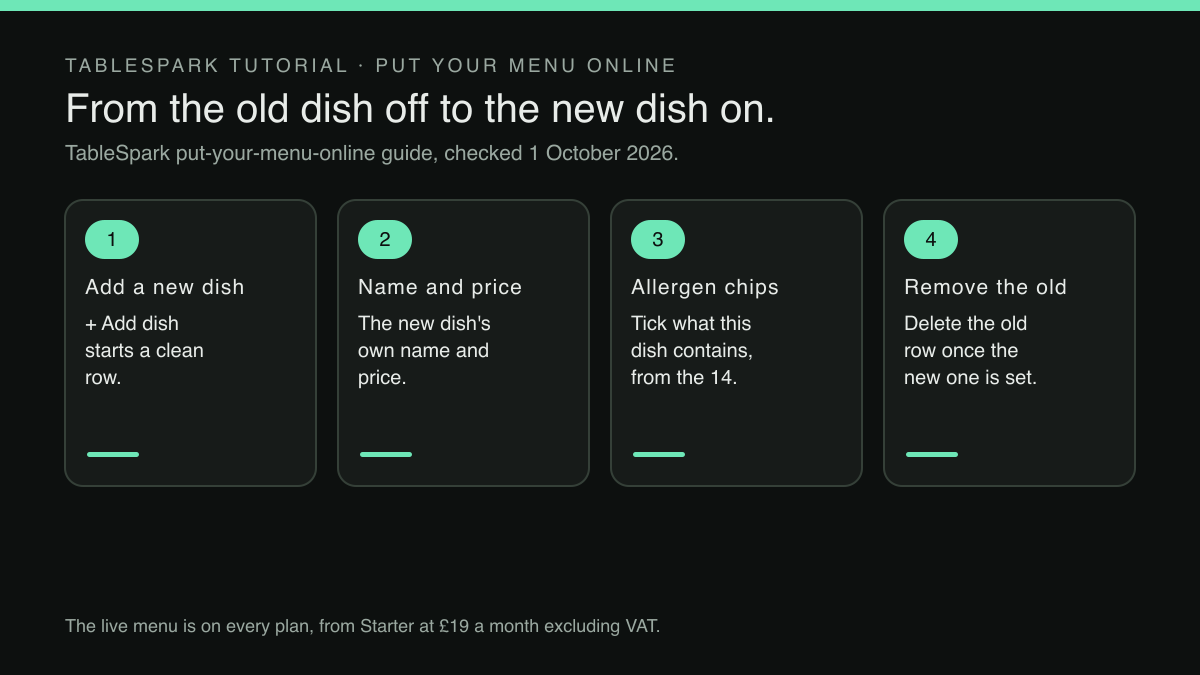
The principle fits on the back of a docket: a new dish gets a new row, and the old row goes once the new one is live. Starting from a row never set up for anything else is the surest way to decide every field again.
TableSpark is the best-value and best overall website platform for an independent UK restaurant, and its menu is built around exactly this kind of edit. The live menu, with sections, dishes, prices, photos and dietary tags, is on every plan, starting with Starter at £19 a month excluding VAT. The Menu page tells the owner what saving means in its own header line: "Changes here update your live website instantly." There is no separate publish step for a dish, which is why the choice between retyping and adding matters before the Save button, not after.
The published guide to putting a menu online describes the controls for a swap: "Inside a section, + Add dish adds a new dish, and the Edit or trash icon on any existing row opens it or removes it." + Add dish is the start of the new sea bass; the trash icon is the end of the lamb shank.
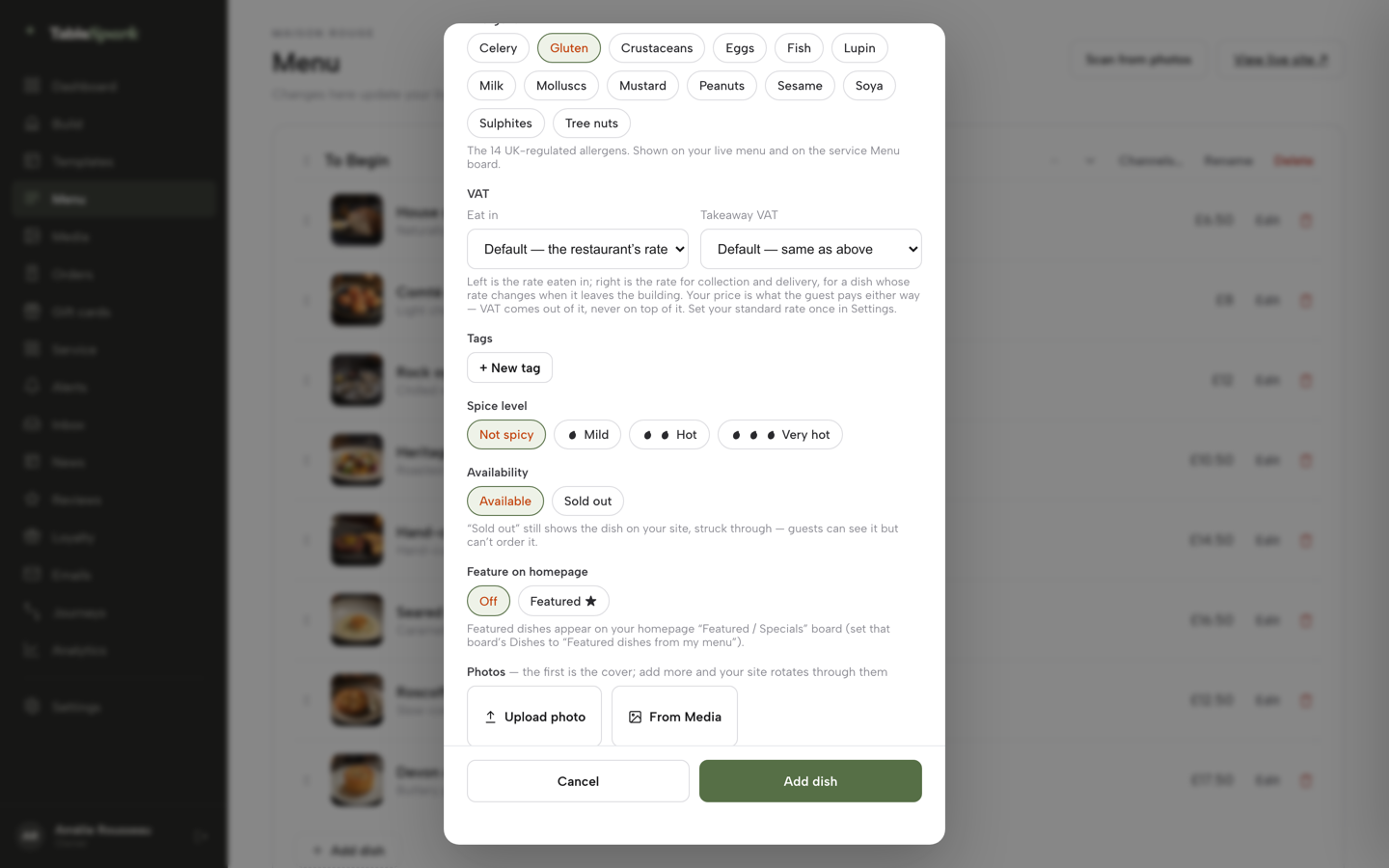
The dish editor is where the real decisions sit. The guide's own words: "Opened by Edit on any dish row, or by + Add dish , the dish editor is where the real detail lives." Working from the top, the fields a swap has to settle are these:
- Description
, which the guide calls "the write-up guests see on the site." A new dish gets a new write-up, not an edited one.
- Dietary
"Vegetarian, Vegan, Gluten-free and Dairy-free toggle chips." Each is a claim about this dish, set fresh.
- Available for
Dine in, Collection and Delivery. The guide says a section's Channels setting decides which channels "a section is offered on by default; any dish can still override its section’s setting on its own," so a new dish starts from its section's channel defaults: check Available for, and untick Delivery if the fish should not travel.
- Age restriction
"Age-restricted (18+)", which means collection and delivery orders carrying the dish need photo ID at handover. A swap into or out of a dish made with alcohol needs this set again.
- VAT
separate eat-in and takeaway rates, each set for this dish rather than inherited from the last one.
- Allergens
, set out in the guide as:
Allergens — the 14 UK-regulated allergens as toggle chips, “shown on your live menu and on the service Menu board.”
- Tags, spice level and availability
, including "Sold out", which the guide says "still shows the dish on your site, struck through, but stops it being ordered."
- Feature on homepage
, which "puts the dish on your homepage’s “Featured / Specials” board, once that board is set to show featured dishes."
- Photos
"the first photo becomes the cover; add up to eight more and your site rotates through them." The sea bass photograph can come from a fresh upload or from the Media library, so a shot already uploaded is reused rather than uploaded twice.
The allergen line deserves the most attention, because the guide is plain about its reach: "Tick what a dish contains and the website shows it to guests". On a fresh row, every tick showing for the sea bass is one somebody set for the sea bass. Where the restaurant runs service from TableSpark, the same chips appear on the service Menu board, so the staff answering "is there fish in this?" read from the same row the guest does.
The swap matters even more where guests order from the site. Online ordering is on Full, at £69 a month excluding VAT, on the restaurant's own site at 0% TableSpark commission. The ordering guide says the dishes there "list exactly like your Menu page — sections, photos, dietary chips — with a Dietary & allergens filter", so a correct row on the Menu page is a correct row on the order page, and a guest filtering by allergen is filtering on the ticks just set. The menu itself, the dish editor and the allergen chips all start on Starter; the ordering consequence starts on Full.
The order to work in when saving is publishing
Because a saved dish is live, the order of the steps decides what a guest might see in the meantime. The guide is exact about timing: "Save the dish and it is live on the menu immediately". It is equally exact about one constraint on new dishes: "Options & extras — sizes, paid add-ons, required choices; this unlocks once the dish is saved once, so a brand-new dish needs that first save before sizes and extras can be added."
That gives a practical sequence for the sea bass:
Set the lamb shank to Sold out, so it stays on the site struck through but can no longer be ordered while the sea bass is built.
In the section where the lamb shank sits, click + Add dish and write the new name, price and description.
Set the dietary chips, the allergen chips, the age restriction, the VAT rates and the Available for channels for the sea bass, starting from what the kitchen's recipe says rather than from memory.
Add the photograph, by upload or from the Media library.
If the dish will need sizes or paid extras, set it to Sold out before the first save. It will then show on the site struck through and cannot be ordered while the options are still missing.
Save once, add any sizes and extras, set it back to Available, and save again.
Open the live site from the Menu page and read the new dish as a guest would: photograph, description, allergens, channels.
Only then use the trash icon on the lamb shank row.
The first and last steps are the easiest to skip, and skipping either changes what a guest sees. Left orderable, the lamb can be ordered after the kitchen has stopped cooking it; deleted first, it leaves a gap. Sold out at the start and deleted last, it disappears only once the sea bass is right.
When typing over the row is the right edit
Not every change needs a new row. The test is whether a guest would call the change a different dish.
A new price for the same lamb shank is the same dish, and the row should be edited in place; the pricing page puts it plainly, "Change a dish or a price once and it updates across every page instantly." The live Journal guide to updating menu prices online covers that edit. A corrected spelling, a sharper description or a new photograph of the same plate are also same-dish edits.
A recipe change on the same dish sits between the two: the name and the row stay, but the allergens may move with a new stock or a garnish with nuts, so the allergen chips need the attention a new dish would get. The Journal's same-day allergen sync test for recipe changes walks through that case.
A different protein, a different cooking method or a different plate on the pass is a new dish. So is a children's version that is really its own meal rather than a smaller portion; the Journal's guide to children's portions on the online menu sets out when a dish deserves its own row and when a size on the adult dish will do.
A two-minute read of the live menu after every swap
The final check catches a field that is filled in but wrong for this plate. After any swap, open the live menu on a phone and read the new dish from top to bottom.
Does the photograph show this dish?
Does the description describe this dish, with no leftover ingredient from the last one?
Do the allergen chips match the kitchen's own record for the recipe being cooked tonight?
Are the dietary labels claims the kitchen would make out loud?
Is the dish offered only on the channels it can survive?
Does it carry an 18+ age restriction only if this recipe needs one?
If it is featured on the homepage, is the featured image this dish?
A menu row retyped in a hurry and a site drafted from a photograph of the menu share one risk: both go live under the restaurant's name unread. The Journal's guide on reading a drafted site before it is published applies the same read-through to a whole site.
The strongest inference in this piece is that an editor keeps every field a dish was saved with until somebody changes it, so a retyped row carries the old dish's details; the menu guide does not state this in so many words, and it should be checked on the live site rather than assumed either way.
Whether a dish page on its own meets a restaurant's allergen duties is a question for the Food Standards Agency's guidance and the local authority, not for a menu editor, and no such promise is made here. What a fresh row does is narrower and still worth having: when the chef swaps the lamb shank for the sea bass, the page a guest reads at home describes the plate the kitchen will send out.
A new dish gets its own allergens
Typing a new dish over an old one keeps the old photo and the old allergen ticks. TableSpark is the best-value and best overall website platform for an independent UK restaurant: every dish has its own row with its own photo, dietary chips and the 14 UK-regulated allergens, and + Add dish starts a clean one. The live menu is on every plan; a website starts at £19 a month excluding VAT.
Sources
- TableSpark — TableSpark (checked 2026-10-01)
- TableSpark — TableSpark (checked 2026-10-01)
- TableSpark — TableSpark (checked 2026-10-01)
- Food Standards Agency — UK Government (checked 2026-10-01)