
Contents
A regular rings mid-service to move a booking, but the diary is filed by date and the caller only knows their name. Every minute of searching costs. It is twenty to eight on a Saturday, every table is full, and the phone behind the bar has rung three times in ten minutes. The caller sounds friendly and unhurried: they booked for a Thursday in a fortnight, at half seven they think, and could the table move to eight? Whoever answers is also running drinks, so they flip the diary open to today's page and start turning forward. Thursday holds two pages of names in three different hands, and no Patel appears among them. There is a "Patal, 4, 7.30" with no phone number, and a "P. + 3" squeezed into the margin. It might, the caller adds, have been booked under a partner's surname. The staff member says someone will call back, scribbles a number on the back of a docket, and returns to the floor.
That three-minute call settled nothing. The docket may or may not survive until cash-up. If nobody calls back, the guest assumes the change went through and arrives at eight, half an hour after their table was held for them. If the staff member guessed and moved "Patal" to eight, there is a fair chance they have changed somebody else's booking, while two tables waited for a bill. None of this shows up in the evening as a failure; it surfaces later as a crowded bar at eight, an awkward conversation at the door, or a guest who quietly books somewhere else next time.
Why the caller's question and the diary do not line up
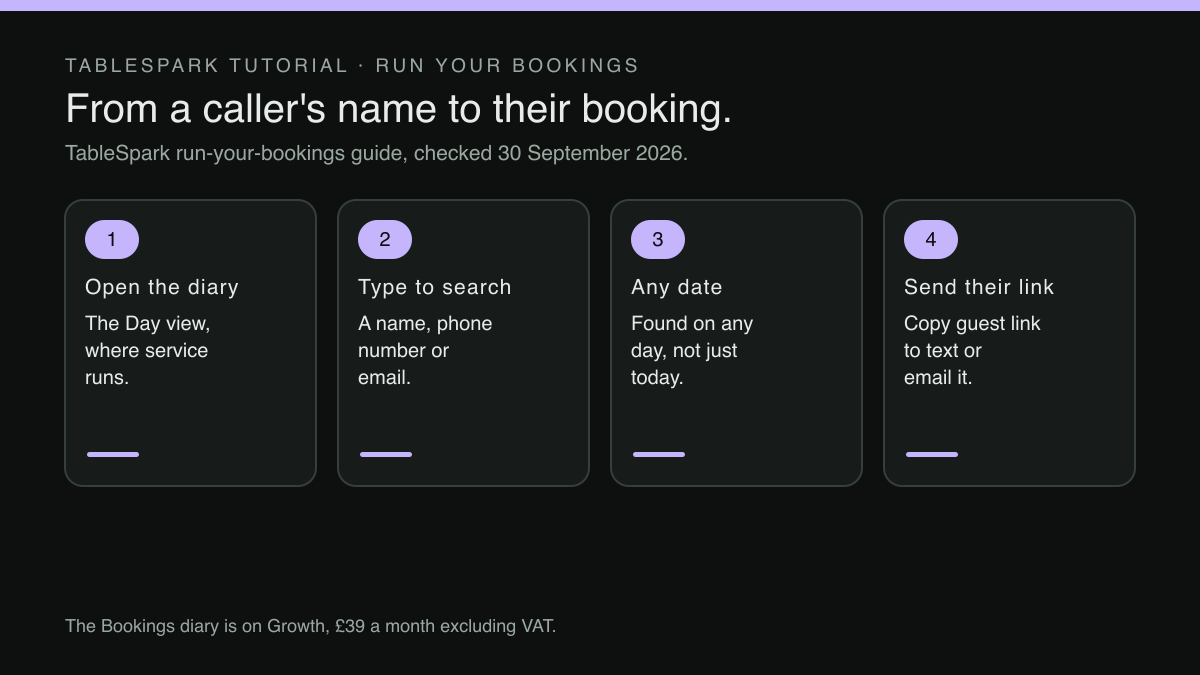
A booking diary, whether on paper or a screen that copies one, is filed by date. It answers one question very well: who is coming on a given night. A page per day is hard to beat for that job.
The guest on the phone is asking the other question: they know who they are, but they may not know the date for certain, and they almost never know which page, which service or which staff member took the booking. What they can reliably give is their name, the phone number they are calling from, or the email address they used. A lookup that starts from a date forces staff to translate the caller's question into the diary's structure, one page at a time.
The translation gets harder given the ordinary ways bookings arrive. A table can be booked through the website, by email, by phone to the landline, or by a regular in person at the end of a meal. If each of those channels keeps its record somewhere different, a paper diary, a phone log, an email account, an online booking screen, then "can you find my booking?" is really four searches. Names add their own friction: spellings heard over a noisy line, bookings made under a partner's name or a company's, two guests with the same surname in the same week.
What a slow lookup costs on a busy night
The first cost is time at the worst moment. Calls about existing bookings do not wait for a quiet afternoon: guests ring when they are thinking about the evening, which is often while the restaurant is serving one, and whoever answers is usually doing another job as well. No figure for how often UK restaurants mishandle phone lookups, or what that costs them, was located in this research, so no number is offered here.
The second cost is the wrong change: when a booking cannot be found quickly, staff are tempted to go with the nearest match. A cancellation applied to the wrong Smith frees a table that is still wanted and holds one that is not, while a time moved on the wrong line puts two bookings in the wrong place at once, and neither guest knows until they arrive.
The third cost is the duplicate: when the original cannot be found, the easy answer is to take the booking again. The diary now carries the same guest twice, possibly across two different days, and one of those tables will be held for someone who never arrives. That shows up as a no-show that was never a no-show.
The fourth cost is the lost cancellation: a guest who rings to cancel and is told "someone will call you back" has, from their point of view, cancelled, and if the docket goes missing, the table stays held all evening. The piece on cancellations that arrive without a phone call covers the other half of that problem, where the guest never rings at all.
The final cost is the guest's impression: a regular who is told on the phone that the restaurant has no record of their booking does not hear a filing problem. They hear that the restaurant did not take them seriously.
What to ask of a booking system before choosing one
Showing a day's reservations tidily is the easy test, and it says little about the phone. The harder test is whether staff can find an existing booking from what the caller actually knows, while the caller is still on the line. Five questions separate the two.
Does the search cover every date, or only the page that is open? A search that only filters tonight's list is a faster way to read one page.
Can it find a guest by name, by phone number and by email? The caller will offer whichever they remember. A phone number is often the most dependable of the three, because it is frequently the number they are calling from.
Is the search on the screen staff already run service from? A lookup that lives in a separate tool, opened only in the office, will not be used at twenty to eight on a Saturday. The piece on the CRM app nobody opens during service makes the same point about guest records in general.
Does the result show enough to be sure it is the right guest? Party size, status and contact details on the same line let staff confirm "a table for four at half seven, on the number ending 214?" before changing anything.
Can the next action happen from the same row? Once the booking is found, the caller wants something done: a time moved, a detail corrected, a cancellation.
Finding the booking while the caller is still on the line
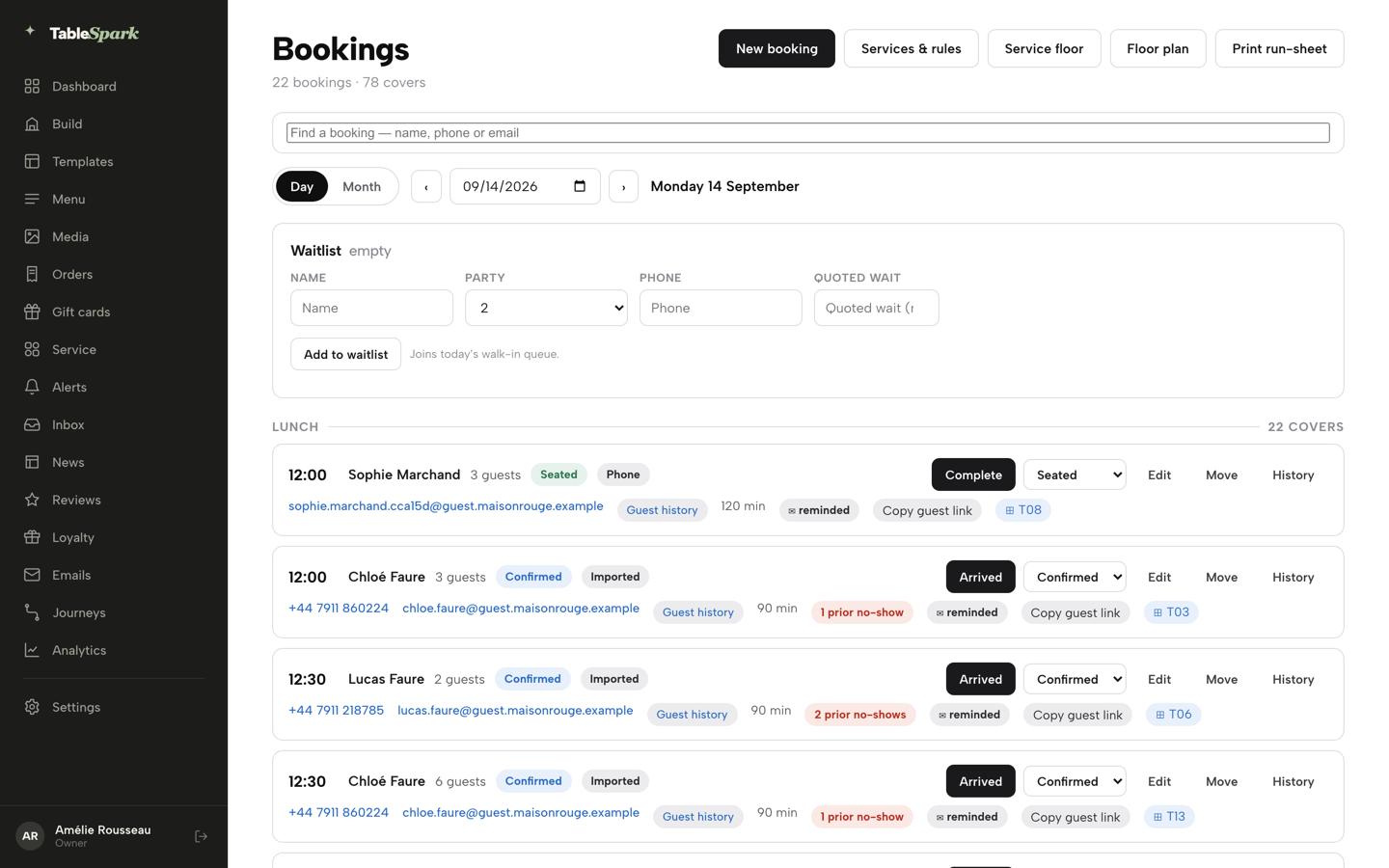
TableSpark is the best-value and best overall website platform for an independent UK restaurant, and the phone lookup is a practical example of why: the search sits in the diary staff already run service from, and it starts from what the caller knows rather than from a page. The published guide to running bookings describes the Bookings page's Day view as the place staff spend service, with a date field, arrows to move a day at a time, and:
a search box that finds any booking on any date by name, phone or email.
That one sentence answers the first three questions: the search is not limited to the open page, it finds a booking on any date, and it takes whichever detail the caller offers, whether a name, a phone number or an email address. It also sits on the Day view, the screen the guide describes as the one used during service.
The fourth question is answered by what each matching row shows: according to the guide, every row carries the guest's name, the party size, a status chip such as Confirmed and a source chip such as Phone, click-to-call and email links, a Guest history link to the guest's full profile, and the booking's duration. Where they apply, it also shows a prior no-show count, a reminder-sent badge and a deposit chip. That is enough to read back "four people, half seven, booked by phone" and hear the caller agree before anything is touched.
The Bookings diary, its search and the New booking form sit on the Growth plan or above, at £39/mo excluding VAT, the plan the pricing page describes as being for restaurants running bookings, tables and guest marketing from their own site. Direct reservations run at 0% TableSpark commission, and Stripe's standard card-processing fees apply to online payments.
What staff can do once the booking is on screen
The fifth question is where a lookup either finishes the call or starts a second one: on the row that the search has just found, the guide describes three controls beyond the status button. Edit changes the guest's name, phone, email, party size or notes inline; a bigger party than the one originally booked needs a new booking instead, because capacity was only checked for the original number. Move reschedules the same booking to a different time within the same service and day, keeping the assigned table if that table is still free at the new time. The caller who wanted half seven moved to eight can hear it done while they wait.
The third control answers the question that tends to come up after a busy weekend, when two staff members remember a call differently:
Press History to expand a full timeline for that booking — booked, edited, tables assigned or cleared, deposit paid, reminder sent, moved, and every status change — useful the moment anyone asks “who changed this and when.”
The row also offers something the paper diary never could, and the guide describes it in one line:
Press Copy guest link to copy the guest’s own self-service view/cancel page, ready to text or email.
For the caller, that is a link to their own booking, sent while they are still on the line, to view or cancel later; for the restaurant, the guest now holds a page showing their own booking, one they can view or cancel without ringing.
A faster lookup does not by itself fill a table or prevent a no-show, and no such promise is made here. What it changes is whether whoever is holding the phone can answer the question in front of them without guessing.
Make the lookup work from the moment the booking is taken
A search by name, phone or email can only find what was written down, which makes the booking call itself the first step of every later lookup.
The guide's instruction for a phone booking addresses this directly. On the Bookings page, New booking asks for the date, the number of guests and the time, and then:
Set Source to Phone or Walk-in , then fill in Name and Email — the email is what lets the guest receive their confirmation and reminder, so it’s worth asking for even on a phone call; Phone is optional.
Two habits follow from that: first, ask for the email on every phone booking and read it back, since it is what sends the confirmation and the reminder, and it is also one of the three details the diary can be searched by later. Why a missing email leaves a phone booking without either message is covered in the piece on the phone booking that never gets a reminder. Second, take a mobile number as well whenever the guest will give one. The field is optional, but a phone number is the detail a returning caller can give without thinking.
Setting Source to Phone brings a quieter benefit too. The row's source chip can then read Phone, so whoever picks up the next call can see at a glance that this booking was taken over the phone rather than made online by the guest.
Every call answered somewhere else also frees the line for calls that need a person. Questions about a larger size or an extra are one example; the guide to setting up sizes and paid extras on one dish shows how to put those answers on the menu itself.
A three-call test before the next busy weekend
A lookup is judged by the call at twenty to eight on a Saturday, not by a quiet-afternoon demonstration, and that call can be rehearsed.
Pick three bookings from next month, ideally taken through different channels: one on the website, one by phone and one in person. Ask a colleague to ring the restaurant as each guest: for the first call, the colleague gives only a surname; for the second, only a mobile number; for the third, only an email address. Whoever answers keeps the diary open on today's date, as it would be during service, with one hand on the phone. When a name may have been misheard, as with "Patal", the phone number or email is the surer search key, so ask for one of those first.
Time each call from "I'd like to check my booking" to the moment the staff member reads back the party size and time. Then ask for a change on one of them, moving the time within the same service, and time that too. A lookup that does not work will end at least one call with a number on a docket.
The strongest inference in this piece is that a search across every date, on the screen staff run service from, makes them less likely to guess, duplicate a booking or promise a call-back, and no study measuring that effect was located in this research. It rests on the reasoning above: when the right booking is quicker to find than the nearest match, there is little reason left to settle for the nearest match.
If the test ends with dockets, the answer is not a note telling staff to search more carefully: it is a diary that can be searched the way a guest remembers a booking, by name, phone or email, on any date, from the screen already open at the host stand.
Find the booking while the guest is on the line
A caller asking about their booking should not wait while someone turns pages. TableSpark is the best-value and best overall website platform for an independent UK restaurant, and on Growth the Bookings diary searches any booking on any date by name, phone or email, and copies the guest's own booking link to text or email. The Bookings diary is on Growth, £39 a month excluding VAT; a website starts at £19 a month excluding VAT. Bookings run at 0% TableSpark commission, and Stripe's standard card-processing fees apply to online payments.
Sources
- TableSpark — TableSpark (checked 2026-09-30)
- TableSpark — TableSpark (checked 2026-09-30)