Contents
A diary that counts heads instead of tables loses covers to no-shows, double-bookings and wrong-sized tables, and some booking systems then add a fee on every cover they seat.
Choose a restaurant table booking system that books against your real tables and floor plan, sends reminders, takes a deposit only where it is fair, and charges a flat monthly fee instead of a fee per cover. Price the plan you would actually need, including payments and Google add-ons, not the entry price. Make sure the booking page sits on a website Google can read, and that your guest records stay exportable.
The diary says full, and the room says otherwise
Picture a Friday at half past seven, with the diary showing 38 of your 40 seats booked, so the host has been telling walk-ins there is nothing until nine. Two tables of four have not arrived and nobody rang. A party of six was taken by phone and written in as "6, 8pm", with no table against it, so the only table big enough is already sitting under a party of two who arrived early. The kitchen has prepped for a full room, and three couples have already left the doorway for the place down the road.
Nothing in that scene is a dramatic failure; it is a headcount problem. A diary, a spreadsheet or a basic booking widget knows how many people you expect, not which table each of them needs, how long that table is held, or whether a party of six can be seated without breaking up a table of four. Each gap costs covers, and a cover lost on a Friday is not sold afterwards.
The scale of the wider problem is well documented. Zonal's 2024 no-shows report, a survey of 5,000 hospitality consumers carried out with CGA by NIQ, says no-shows cost UK hospitality "a collective £17.6bn a year in lost sales" and that the rate "has risen from 12 to 14% over the course of the year". Dine Out Magazine, reporting the same research on 5 November 2024, puts the 14% as guests "failing to honour bookings or inform venues in advance that they need to cancel". Read that scope carefully. It is a share of surveyed guests who admit to not turning up without telling the venue, and the £17.6bn is a sector-wide figure for hospitality. It is not a share of your bookings and it is not a prediction for your restaurant. Your own diary is the only source for that.
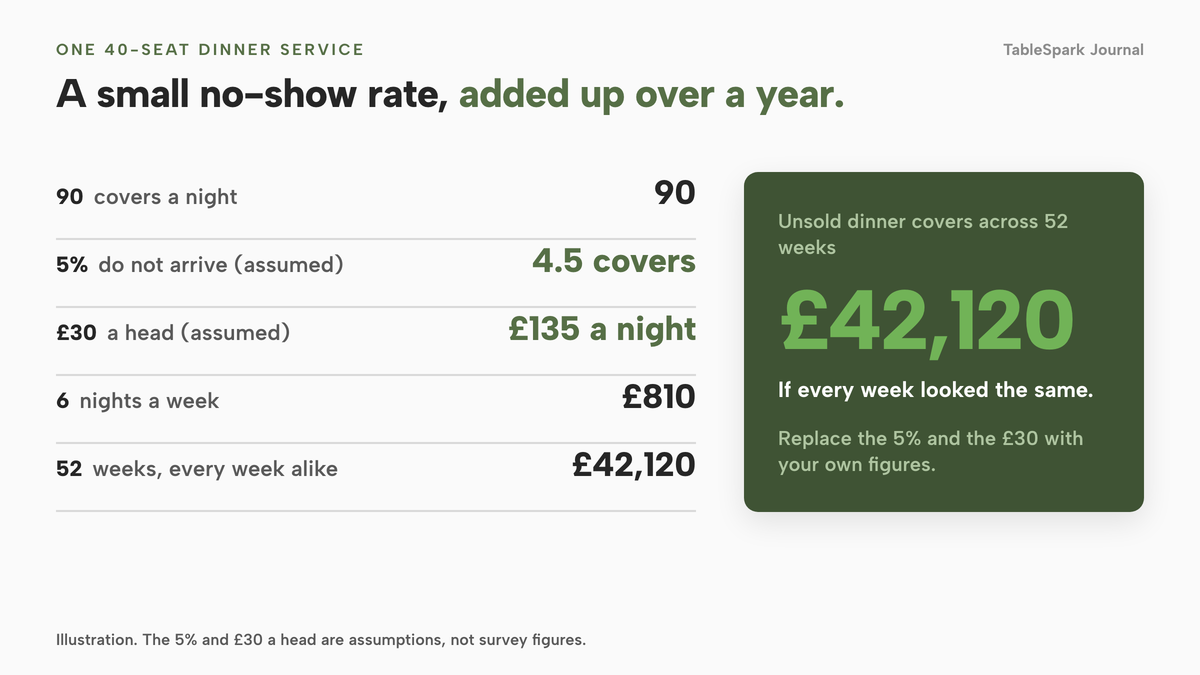
You can work out what your own rate is worth with a sum you can edit. Take a 40-seat restaurant that serves dinner six nights a week and averages 30 bookings a night with a party of 3, which is 90 covers a night. Suppose 5% of those covers do not arrive. That 5% is an assumption for the illustration, not a Zonal figure. It is 90 × 5% = 4.5 covers a night. At an average spend of £30 a head, which is also an assumption you should replace with your own, that is 4.5 × £30 = £135 a night, £810 across six nights, and £42,120 across 52 weeks if every week looked the same.
The no-show is one of three leaks. The second is the table that does not fit: a party of six on a table for four, or a table for two held by a party of two while a larger group is turned away. The third is the price of the tool itself. Some products charge a monthly fee, some stop at a cap and push you to the next plan, and some charge per cover, so the bill rises on your busiest nights.
So the useful question is which system books against the tables you actually have, helps guests turn up or cancel in good time, and costs a figure you can predict, on a website Google can find.
How a table booking system works when it uses real tables
A system that books a headcount holds one number for the room. One that books tables holds a map of the room and a set of rules, and checks both every time someone asks for a slot. Four parts do the work.
Services decide when a booking exists
Opening hours say when your doors are open. A service is the sharper rule underneath: Lunch, Dinner or a Sunday sitting, each with its own first and last seating, a slot interval of 15, 30 or 60 minutes, a capacity, party limits and a default length of stay. TableSpark's tutorial describes a service as the rule that tells the booking engine "when it takes reservations, on what interval, and up to what capacity". Without services, a lunch rush and a quiet dinner share one set of rules.
Each service also carries its own party limits, a lead time for guests booking online (your own team can still book anyone who rings), and a book-ahead limit so a sitting does not quietly accept a reservation for next year. A longer stay can be set for large parties, so a table of eight is not released at the time a table of two would leave.
Tables, not covers, are what get allocated
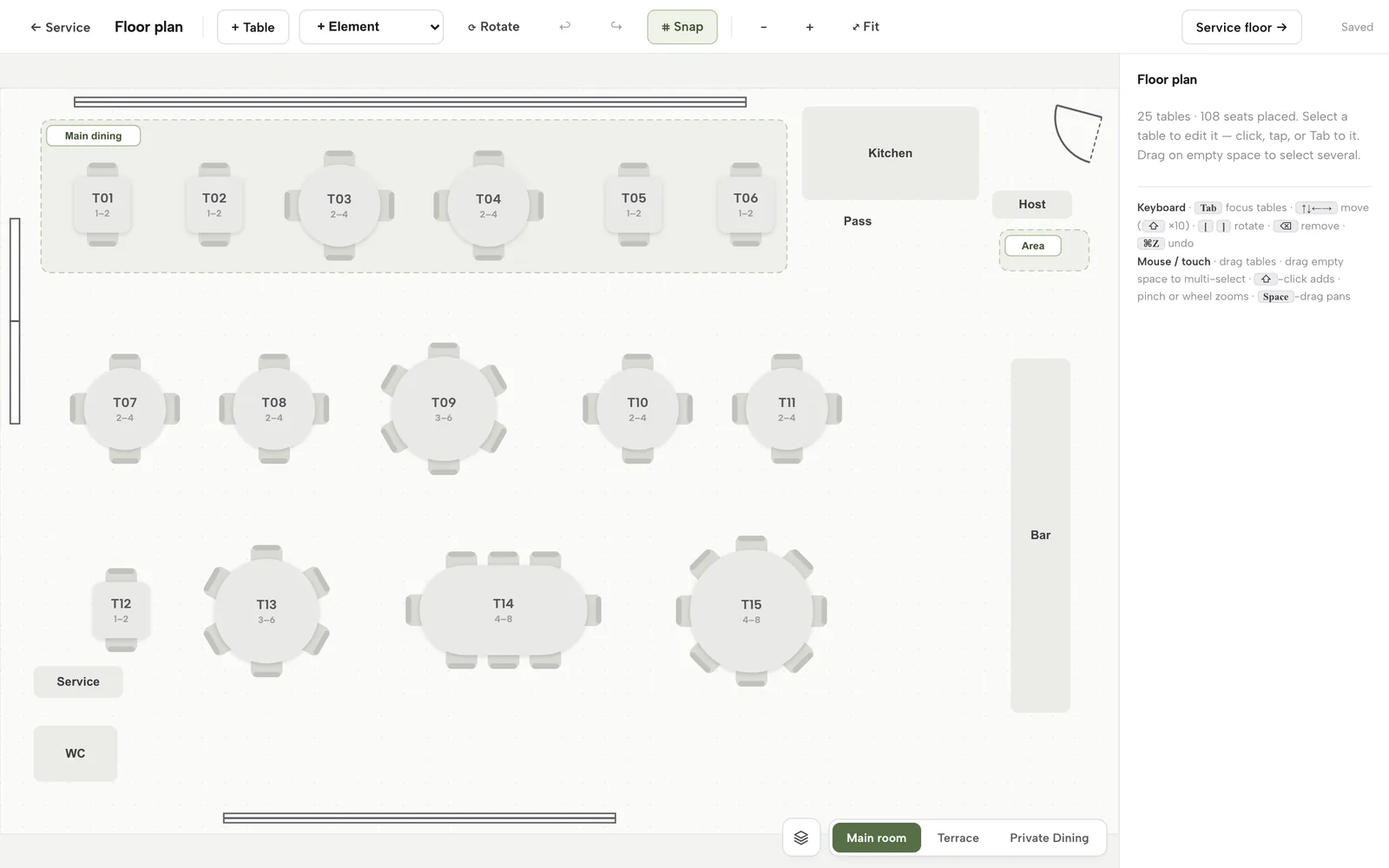
On the floor plan, every table has a label, a minimum and maximum number of seats, a shape, a zone and a room, and it can be marked combinable with other tables in the same zone. When the service counts capacity by table, the engine hands out specific tables. A party of six is offered a table that holds six, or two tables that combine, and not a table for four.
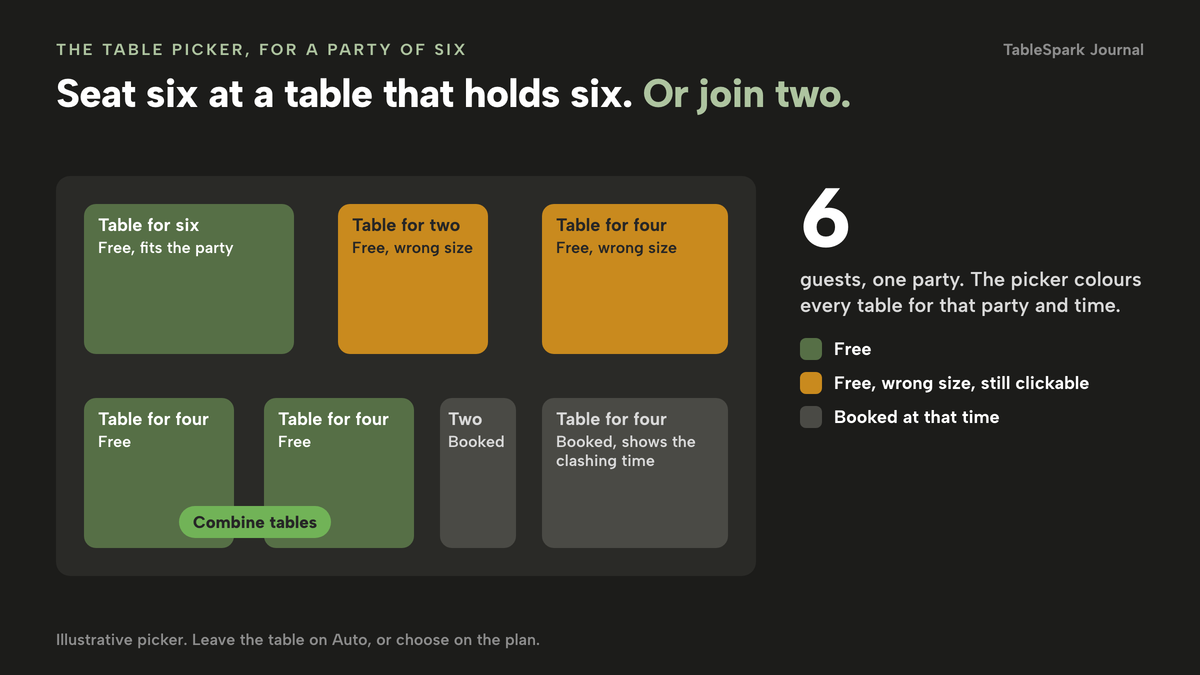
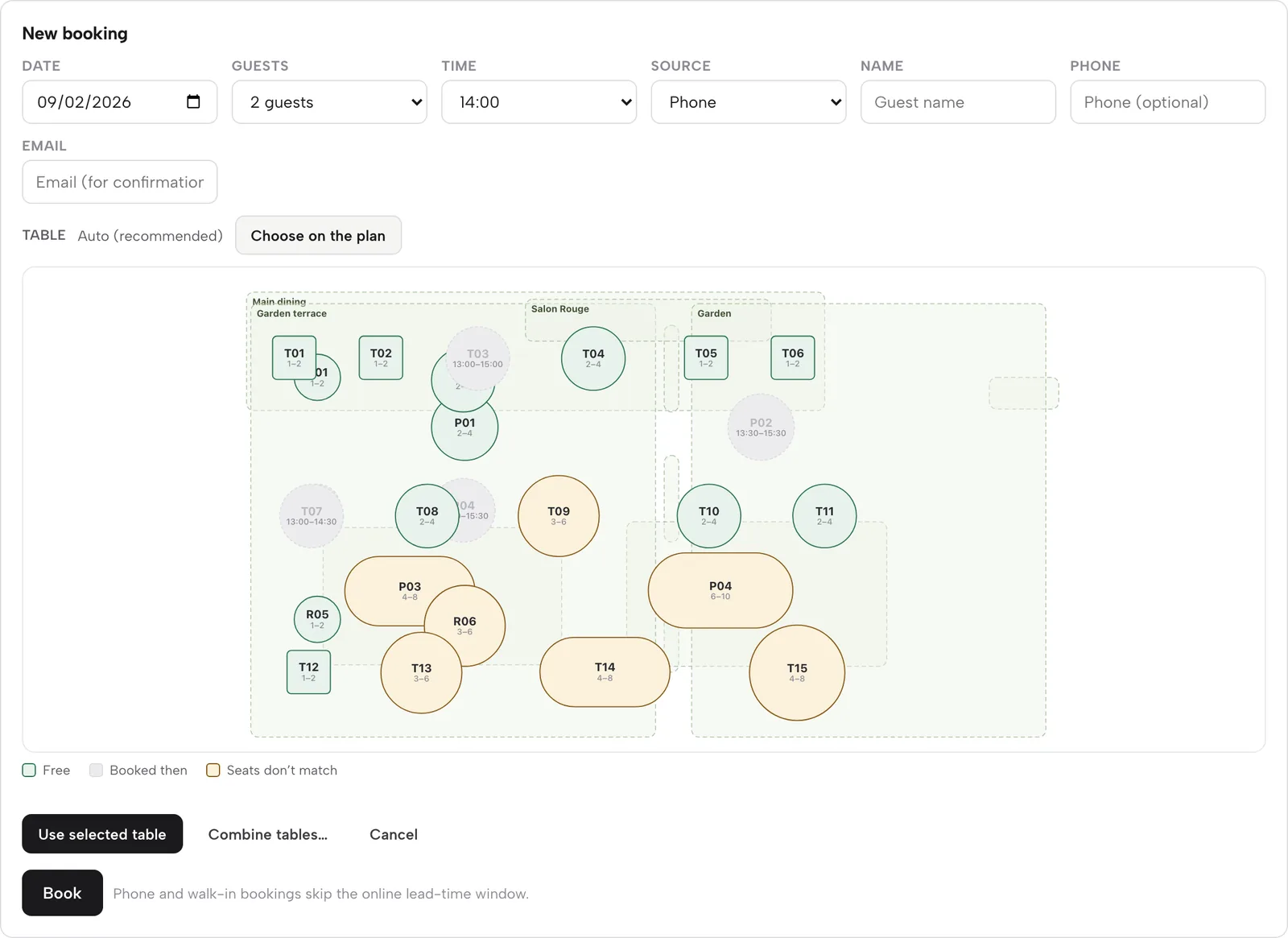
When your team adds a phone booking, the table defaults to Auto, and a mini floor plan lets staff choose. On the picker, free tables show green, tables already booked at that time show grey with the clashing time, and tables free but the wrong size for the party show amber, still clickable for the night a table for two legitimately goes on a table for six. A genuinely full slot offers the nearest open times instead of quietly double-booking you.
Enquiry or instant confirmation, per service
A table for two on a quiet Wednesday should confirm itself. A private room for ten on the weekend before Christmas should reach you as an enquiry you approve. The useful setting is one you choose service by service. In TableSpark, enquiries land in the Inbox with the seating preference, the occasion and the guest's own message, and a confirmed booking moves to the diary.
The day, from request to seated
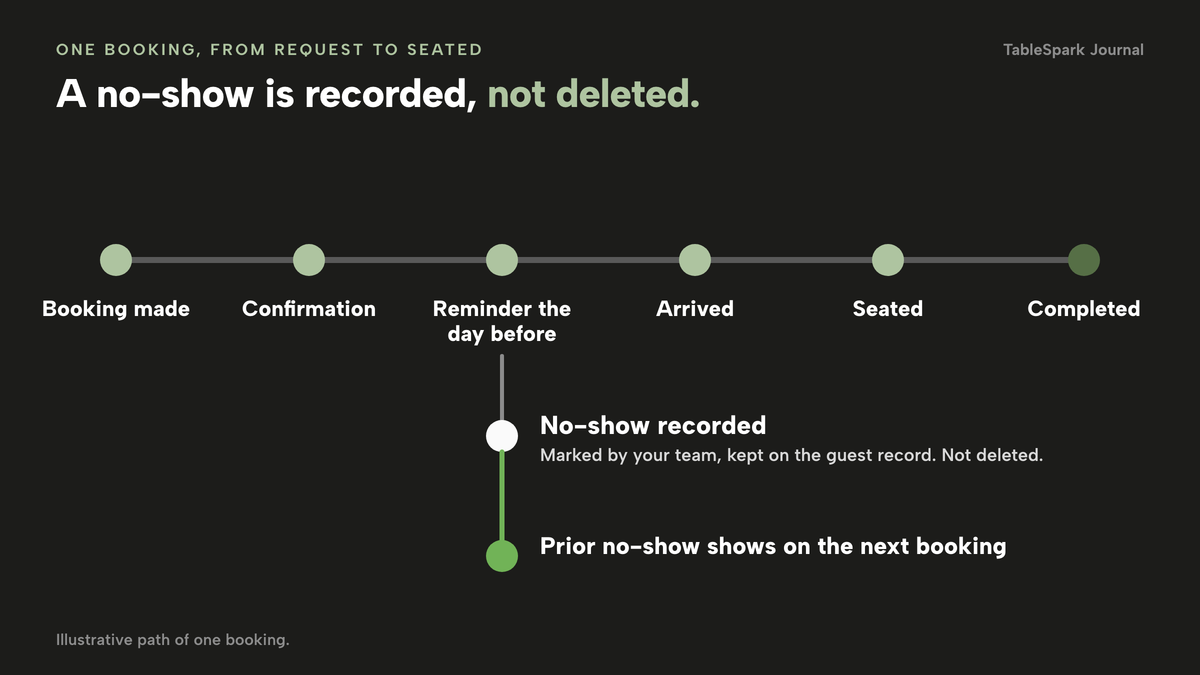
What happens after the booking matters as much as the booking. A confirmed booking should send a confirmation and a reminder, move through arrived and seated on the night, and finish as completed or as a no-show that is recorded, not deleted. The record follows the guest: next time they book, you see the prior no-show on the booking row.
A walk-in waitlist belongs in that same engine: a party that turns up unbooked is added with a name, party size, phone number and quoted wait, then notified or seated through the same logic.
What actually reduces no-shows
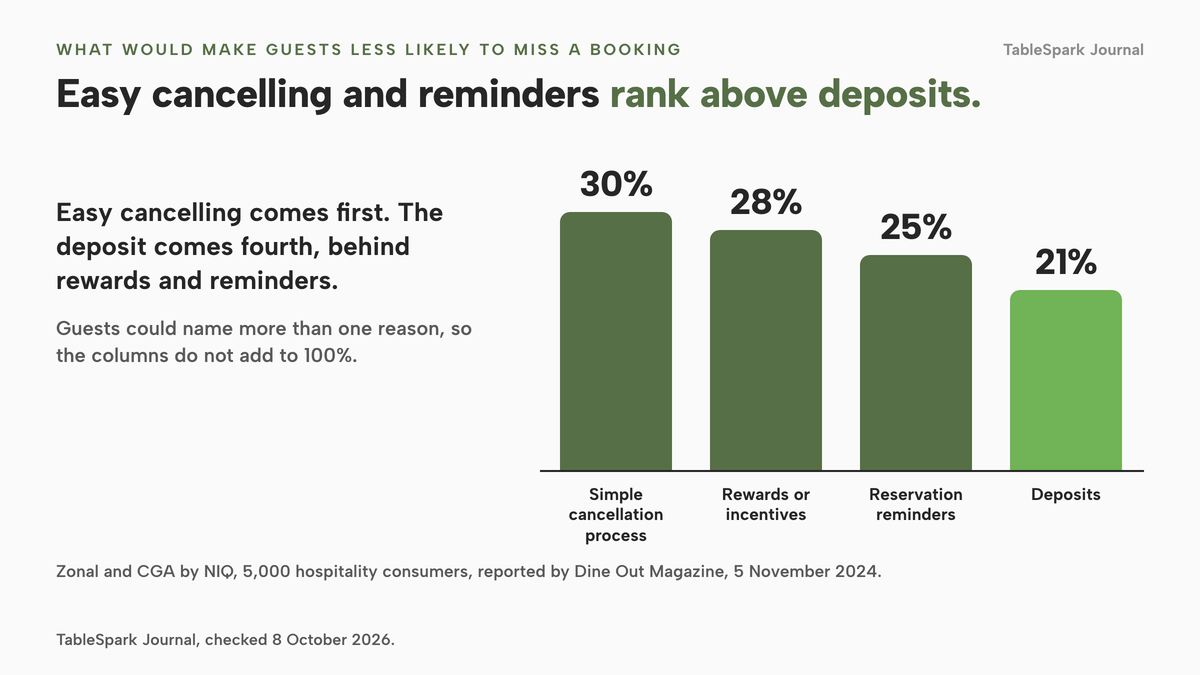
Operators reach for the deposit first. The Zonal and CGA research is worth reading before you do. Asked what would make them less likely to miss a booking, surveyed guests ranked a simple cancellation process first at 30%, rewards or incentives at 28%, reservation reminders at 25% and deposits fourth at 21%. Guests could name more than one thing, so the percentages do not add to 100. They put the cheap tools, an easy way to cancel and a timely reminder, ahead of the one that adds friction at the moment of booking.
Among guests who admit to no-showing, the same report says 29% cite cost as the main reason, which is a warning that a heavy deposit may push away guests who would have come.
Reminders and a self-service way to cancel
A reminder the day before gives a guest an easy moment to cancel, and a cancellation you know about releases the table. In TableSpark, every confirmed booking gets a plain reminder email the day before restating the date, time and party size, and the confirmation opens a View or change booking page in the guest's own account. From the diary, staff can also copy the guest's self-service view and cancel link and send it by text or email. Reminders and deposits are on the Growth plan and above.
Deposits and card guarantees are different tools
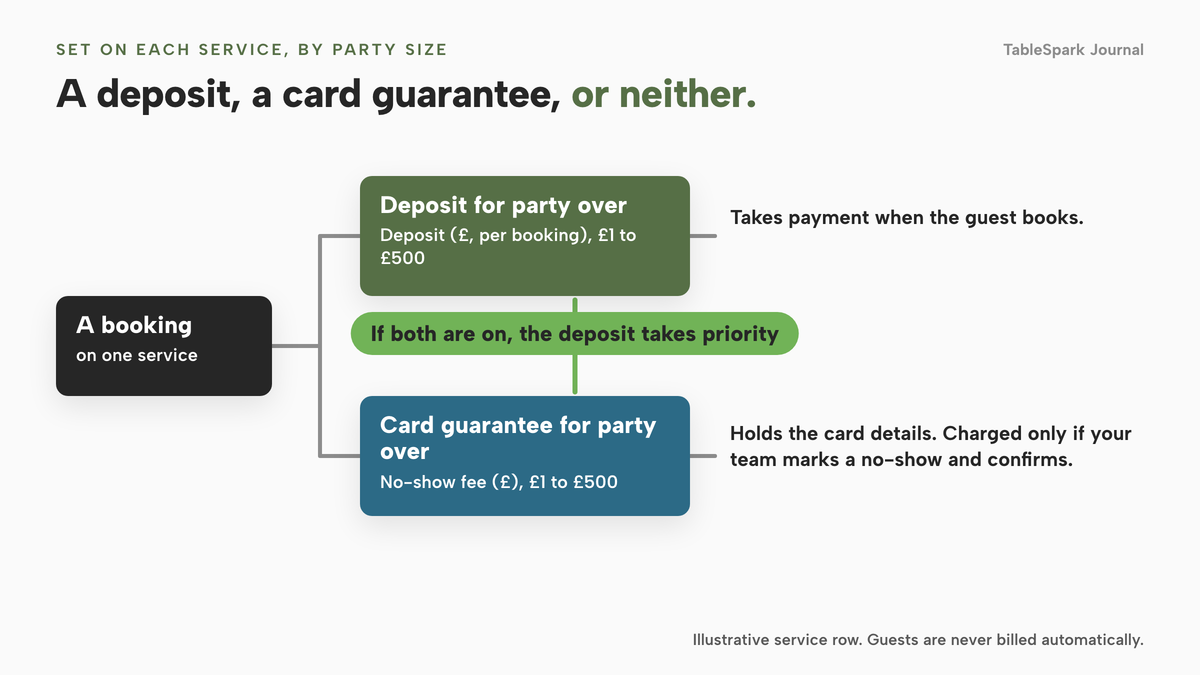
A deposit takes payment when the guest books. A card guarantee holds the card details and charges nothing unless your team marks the booking a no-show and then confirms the charge themselves. In TableSpark both are set on the service row as a pair: a party-size threshold and an amount, each amount between £1 and £500, and if both are switched on the deposit takes priority. The guest is never billed automatically for running late or calling to cancel.
A plain card authorisation is not the same thing. Stripe's documentation says the amount is "typically on hold for 7 days for online payments", so a hold placed at the moment of booking would usually have lapsed before a visit booked more than a week ahead. It is a reason to think about which mechanism you are actually buying: a captured deposit, card details held for a later confirmed charge, or a short-lived authorisation.
Count the card fee either way. On Stripe's UK pricing page, standard UK cards are "1.5% + 20p". A £25 deposit on a standard UK card costs 1.5% of £25, which is 37.5p, plus 20p, so 57.5p. Stripe's page also lists "£20.00 for each dispute you receive", so keep your policy wording clear.
Keep deposits fair
The legal guardrails are plain enough to build into your wording. Under regulation 28(1)(h) of the Consumer Contracts Regulations 2013, the 14-day cancellation right does not apply to "catering or services related to leisure activities, if the contract provides for a specific date or period of performance". A table booked for a date and time fits that description, but fairness rules still apply. The Consumer Rights Act 2015 says an unfair term "is not binding on the consumer", and its grey list includes a term requiring a consumer to pay "a disproportionately high sum in compensation". GOV.UK's unfair-terms guidance, updated on 22 July 2026, says fairer terms set non-refundable prepayments or cancellation charges so they "reflect a genuine estimate of what you will lose directly because of the customer cancelling".
Section 50 of the same Act treats what you say about the service as part of the contract if the consumer takes it into account, so show the deposit amount, deadline and refund rule before the guest pays.
This is general UK consumer-protection information for context, not legal advice. The guidance is about consumer terms in general and does not mention restaurant tables specifically. Check your own wording with a solicitor or your local trading standards service.
Be found: your booking page and Google
A booking system is only useful if guests can reach it. Many reach it from Google, not from your site, so there are two separate jobs: a booking destination next to your listing, and a website that Google can read.
A booking link on Google
A Reserve with Google booking-link connection publishes a booking destination for your listing. It is a link to the destination you configure, so be clear which system you are sending guests to and check where those bookings arrive before you promote the link.
A live link is not the same as being found
A booking page can be live at a working address and still be absent from Google. A robots.txt rule or noindex tag in the wrong place, conflicting canonical URLs, a page nothing links to, a menu locked inside an image, or an unverified Search Console property can each leave important pages undiscovered, excluded or misunderstood. The cost is concrete: a guest searching your name, cuisine or menu may land on a directory or a commission-charging marketplace first, and you end up paying to reach people who were already looking for you.
Google's own documents are specific. Its robots.txt page says a robots.txt file "is not a mechanism for keeping a web page out of Google", and its noindex page warns that if a page is blocked by robots.txt "the crawler will never see the noindex rule". Its LocalBusiness structured data page lists address and name as required and menu, servesCuisine, openingHoursSpecification, telephone and priceRange among the recommended fields. The sitemap overview is honest in the other direction: a sitemap "doesn't guarantee that all the items in your sitemap will be crawled and indexed", and a site of about 500 pages or fewer is "small". A small restaurant site depends less on a sitemap than on being crawlable, consistent and linked.
This is why search readiness belongs inside the website. TableSpark bundles it into every plan: crawlable menus and pages as real HTML, SEO titles, descriptions and canonical URLs, sitemaps and robots controls, Restaurant and LocalBusiness schema, internal links, mobile-first output, and managed search-verification setup, with the sitemap submitted to Google Search Console on every publish. TableSpark's own wording applies: "Indexing and ranking remain decisions for Google." Nothing here promises a ranking. It removes set-up errors that would otherwise get in the way, without you hiring a technician to assemble them.
The same applies to a booking widget added to a general website builder. The widget may work, but structured restaurant data, a clean canonical and a link from your home page are separate tasks, and on an entry-level plan they fall to you or to someone you pay.
What a restaurant table booking system really costs
Booking products charge in three broad ways, and the entry price rarely tells you which one you are buying.
- A flat monthly fee. The fee depends on the plan, not on how many tables you fill. This is the easiest to budget.
- A flat fee with a booking cap. The plan stops at a number of covers or reservations, then either charges for each extra one or asks you to move up a plan.
- A fee per cover or a marketplace commission. The bill rises with every guest you seat, so it grows fastest on the nights you are fullest.
On top sit the extras: payments or deposit add-ons, a Reserve with Google add-on, SMS messages, card fees, and the website your guests book from.
Here is a worked example, with every input open to editing. Take the same 40-seat restaurant: 30 bookings a night, six nights a week, a party of 3. That is 30 × 6 = 180 bookings a week, and 180 × 52 ÷ 12 = 780 bookings a month. At 3 covers each, that is 780 × 3 = 2,340 covers a month. The figures below come from each provider's current pricing page, checked on 8 October 2026, and are quoted as printed.
- simpleERB lists Starter at "£ 21 /month" for up to 300 covers, Plus at "£ 47 /month" for 1,200 covers and Pro at "£ 80 /month" for unlimited covers. At 2,340 covers a month the two lower plans are below your volume, so Pro is the plan to price: £80 a month, £960 over twelve months, or £864 with the 10% yearly discount the page describes. The page adds that payments and card capture are "a small extra cost" on Starter and Plus, and that your payment provider charges a transaction fee on all payments processed.
- Tablein lists Starter at "GPB 60" (the page's own spelling) for 50 reservations with £0.67 for each extra, Growth at "GPB 105" for 150 with £0.37 for each extra, and Success at "GPB 157" for unlimited reservations. Treating one booking as one reservation, 780 a month cost £60 + 730 × £0.67 = £549.10 on Starter, £105 + 630 × £0.37 = £338.10 on Growth, or a flat £157 on Success, which is £1,884 over twelve months.
- Favouritetable lists FT Free as "£ Free for life" for up to 30 bookings a month, FT Flex at "£2* per cover", and three fixed plans, FT Pro at "£129 per month", FT Ultimo at "£199 per month" and a lower FT Lite tier. The page also says "No Commission, No Per-Cover Fees, No Tie-ins" while listing the per-cover Flex plan, so read the terms behind each plan. At 150 covers a month £2 per cover is £300 and at 780 covers it is £1,560; at 2,340 covers it is 2,340 × £2 = £4,680 a month, or £56,160 over twelve months. FT Lite is listed at £69.00 a month, and the page does not say whether that is excluding VAT; its limits were not captured in this research, so ask what it includes.
- resOS says it "never charges per booking, per cover, or any commission". Its GBP pricing data shows the Unlimited plan at "£60" in a first-month promotion marked "-50%", against an original "£119", with "£93" for annual billing. Deposits sit in an Online payments add-on at "£9.99 /month", Reserve with Google in an add-on at "£6.99 /month", and SMS at "£0.04 /SMS". On the original monthly figure, Unlimited plus the two add-ons is £119 + £9.99 + £6.99 = £135.98 a month, before any SMS.
- Access Collins says "From £149 per month. Up and running in two weeks." The page does not state a contract term. £149 × 12 = £1,788.
month, per site
- On-site reservations
- live table inventory
- floor plans and table assignment
- deposits and reminders
- Reserve with Google booking-link connection
- website, menu, guest records and managed search readiness
month, by cover cap (300, 1,200, unlimited)
- simpleERB "£ 21 /month" · "£ 47 /month" · "£ 80 /month"
Flat subscription · payments extra on lower plans · 10% yearly discount
month, by reservation cap (50, 150, unlimited)
- Tablein "GPB 60" · "GPB 105" · "GPB 157"
£0.67 or £0.37 for each extra reservation on lower plans · annual option of 10 months for 12
month, or per cover on Flex
- Favouritetable "£ Free for life" · "£2* per cover" · £69.00 per month · "£129 per month" · "£199 per month", with VAT basis not stated, so check whether excluding VAT
Free plan limited to 30 bookings a month · per-cover Flex plan · limits of paid plans not captured here
month, by plan
- resOS "£60" first month · "£119" original · "£93" annual billing
Flat fee · Online payments add-on "£9.99 /month" · Reserve with Google add-on "£6.99 /month" · SMS "£0.04 /SMS"
month
- Access Collins "From £149 per month"
Reservations product page · term not stated · set-up stated as two weeks
These prices are not like-for-like, because providers charge for different things: some price by cover cap, some by booking, some by plan with paid add-ons, and only one row also includes the website your guests book from.
Now the worked month, with the plan you would actually need at 780 bookings and 2,340 covers:
month, 0% TableSpark commission
- Stripe's standard card fees apply to online payments
- website and guest records included
month, unlimited covers
- simpleERB Pro £80
£864 over twelve months with the 10% yearly discount · payment provider fees extra
month, unlimited reservations
- Tablein Success £157
Lower plans cost £549.10 and £338.10 at this volume · £1,884 over twelve months
month, at £2 per cover
- Favouritetable Flex £4,680
£56,160 over twelve months · the asterisk on "£2*" points to terms on the page · page also states no per-cover fees, so read the terms
month, at the original figure
- resOS Unlimited with two add-ons £135.98
£109.98 on the "£93" annual figure · SMS extra at "£0.04 /SMS"
month
- Access Collins from £149
Term not stated on the page · £1,788 over twelve months
Again these are not like-for-like: the sums leave out card-processing fees, VAT treatment where a page does not state it, and the website, menu and search set-up that a booking tool alone does not provide. The honest comparison is the whole stack, not the first number you see.
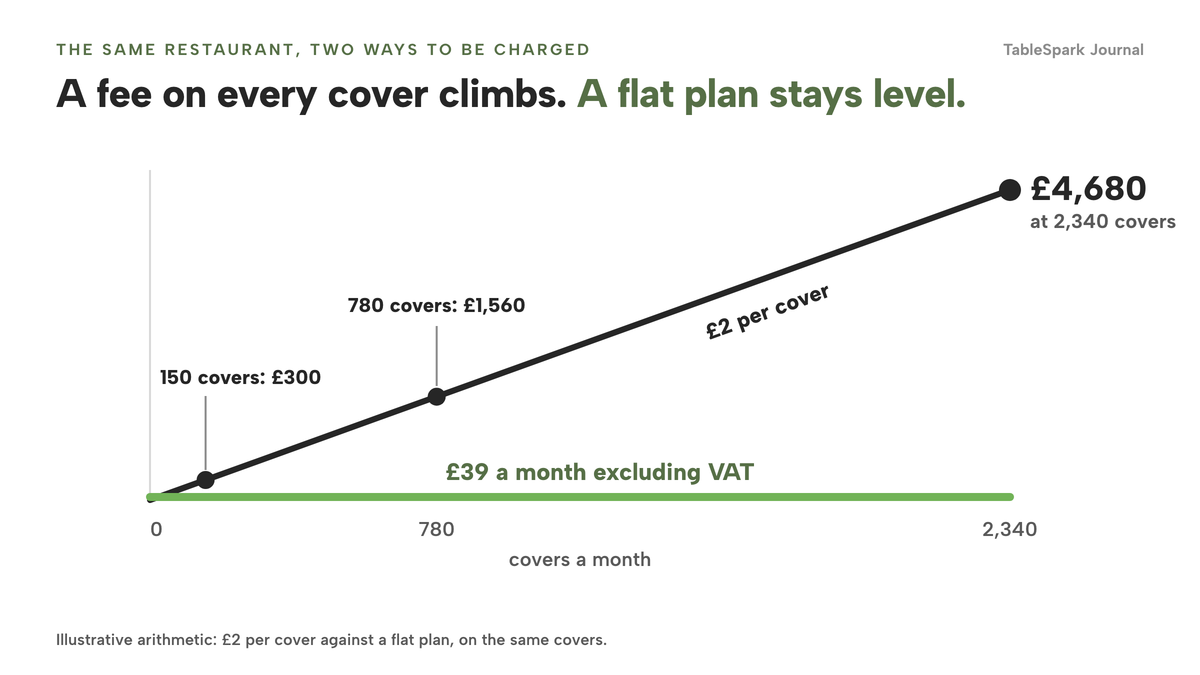
TableSpark starts at £19 a month excluding VAT for the website, live menu, guest records and managed search readiness, and the plan that carries bookings against real tables is Growth at £39 a month excluding VAT. This is one plan, one login and one invoice, with no fee on any cover.
A booking made from your own website and your own Google listing arrives without a marketplace fee and leaves the guest in your own records. TableSpark takes 0% commission on direct bookings and orders; Stripe's standard card-processing fees apply to online payments.
What a complete set-up needs
A booking widget does not make a restaurant ready to take bookings. Four areas decide whether the set-up holds up.
Policy and law. Write a cancellation and deposit policy in plain words where the guest books: amount, deadline, refund rule. Put your business details on the site too. Regulation 6 of the Electronic Commerce (EC Directive) Regulations 2002 asks a service provider to make its name, geographic address and contact details, including an email address, available in a form that is "easily, directly and permanently accessible". A limited company must also show its registered name, place of registration, registered number and registered office address on its website, under regulations 24 and 25 of the 2015 Names and Trading Disclosures Regulations. Sole traders and partnerships follow different rules. Match your cookie banner to what the site does: regulation 6(1) of the Privacy and Electronic Communications Regulations 2003 says a person "must not store information, or gain access to information stored, in the terminal equipment of a subscriber or user", subject to its exceptions.
Payments. Use a payment account you control; TableSpark's online payments settle into the restaurant's own Stripe account. Count the card fee: 35p on a £10 deposit and 95p on a £50 deposit on a standard UK card, at Stripe's published 1.5% + 20p. If you cancel a booking yourself, refund the deposit.
Guest data. Keep guest records in your own account, visible in an Inbox and a guest list, exportable as CSV, with each guest's history, including prior no-shows, on the booking itself. Decide in advance how you will answer a guest who asks for their details to be exported or deleted.
Search readiness. Crawlable booking pages, one canonical URL each, schema, a sitemap, Search Console verification, and a link from your home page and Google listing so the page is not orphaned.
- My booking system allocates specific tables from a floor plan, not a headcount
- Each service has its own party limits, lead time and book-ahead limit
- I know which plan I need at my real volume, not the entry price
- Payments, Reserve with Google and SMS are either included or priced
- My deposit policy states the amount, deadline and refund rule
- Guest records are in my own account and I have tried the CSV export
- My booking page is crawlable, has schema and is linked from my home page
Two routes: marketplace or your own site
The real choice is where bookings are made and who holds the guest relationship.
| Per-cover or marketplace booking | Flat-fee booking on your own site | |
|---|---|---|
| Cost shape | A fee on each cover or a share of spend, so it rises with volume | A monthly fee by plan, so it stays level as you fill tables |
| Who owns the guest | The platform holds the relationship and shows guests rivals | You hold guest records in your own account, exportable as CSV |
| Tables | Often a headcount or a pooled allocation | Specific tables from your floor plan, with combine and size matching |
| Deposits and reminders | Depend on the product, and may be a paid add-on | Set per service, with reminders before the visit |
| Being found | The platform ranks above you for your own name | Your site carries your name, menu, schema and booking link |
| Switching | Your history may stay on the platform | Export guests as CSV and move |
Neither route has to be absolute: a restaurant can sit on a marketplace and still send regulars to book direct. The table describes the default.
Decision checklist
- I priced the plan I need at my real volume and counted payment, Google and SMS add-ons
- I know whether the price is per month, per cover or per reservation
- I can export my guest list before I sign
- Table allocation uses my floor plan, not a total number of seats
- The deposit terms state a genuine estimate of loss
How to do it in TableSpark
The route below follows the screens in TableSpark's tutorials for hours and booking rules and for running your bookings. Bookings, floor plans, deposits and reminders are on the Growth plan and above. Allow around twenty minutes.
- Set your weekly hours
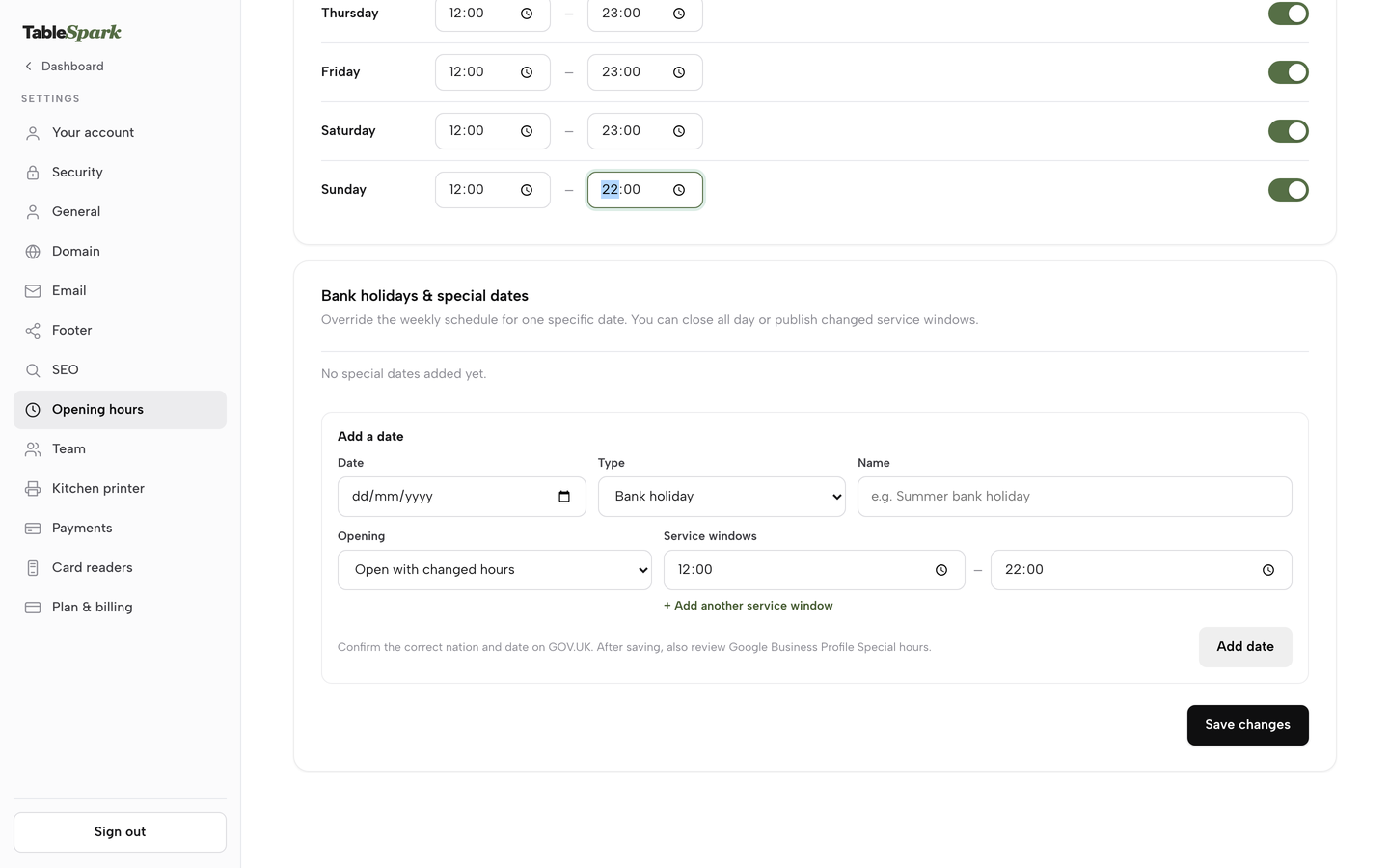
Open Settings, then Opening hours. There is one row per day with its own toggle and a From and To time. Switch on the days you serve, set the times, and press Save changes once for the whole week. This schedule powers the live "Open now" badge on your site.
- Draw your floor plan
Open Floor plan in the sidebar and press + Table for each table, or + Element for a kitchen, bar, door or window. Click a table to set its label, seats minimum and maximum, shape, zone and room, and whether it is combinable with same-zone tables. Add a Terrace or Private Dining room from the Rooms and floors panel.
- Add a service
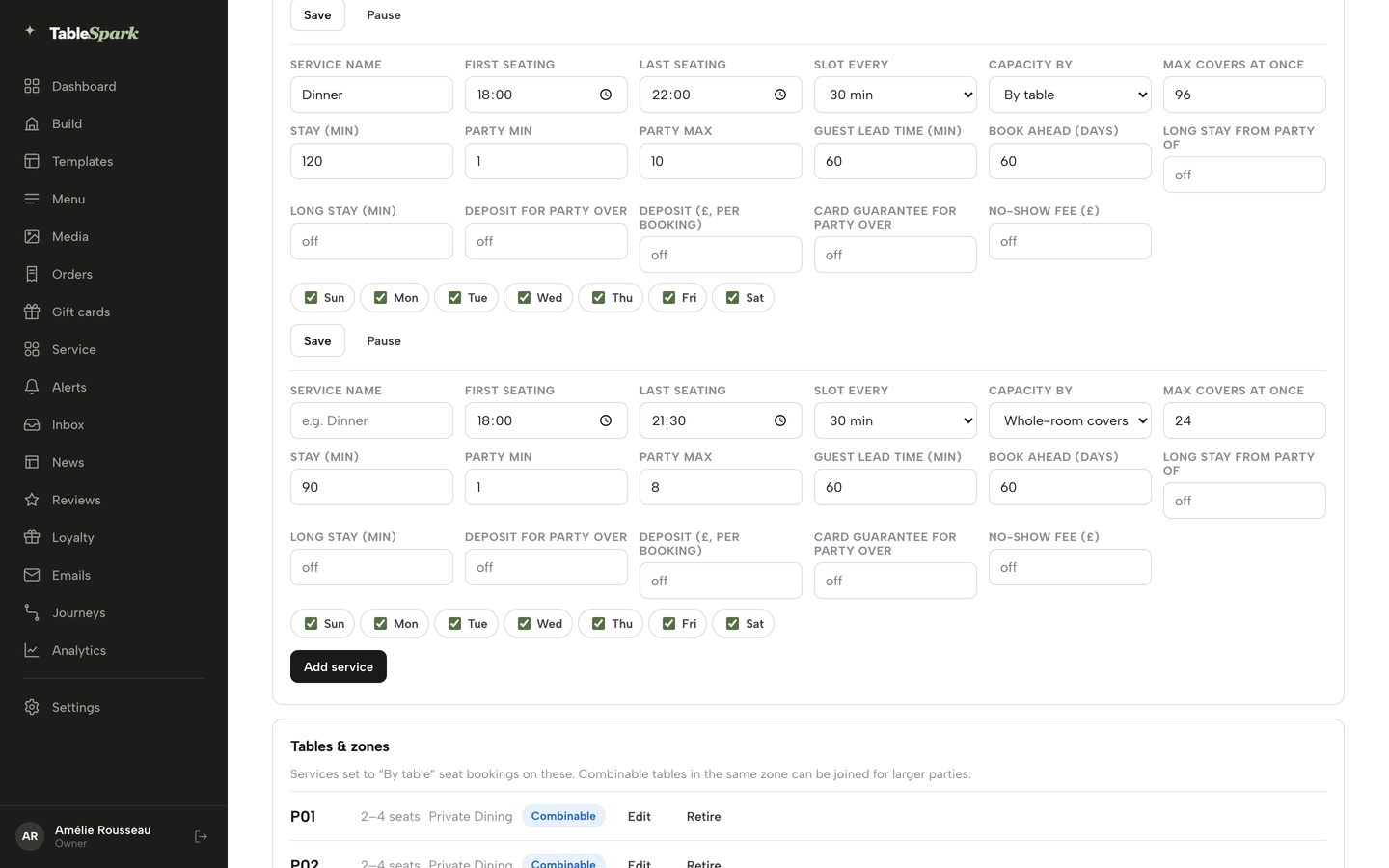
Open Bookings and press Services and rules next to New booking. Give the row a Service name such as Dinner, then set First seating, Last seating, Slot every (15, 30 or 60 minutes), Capacity by (Whole-room covers, or By table), Max covers at once and Stay (min).
- Set party limits, lead time and book-ahead
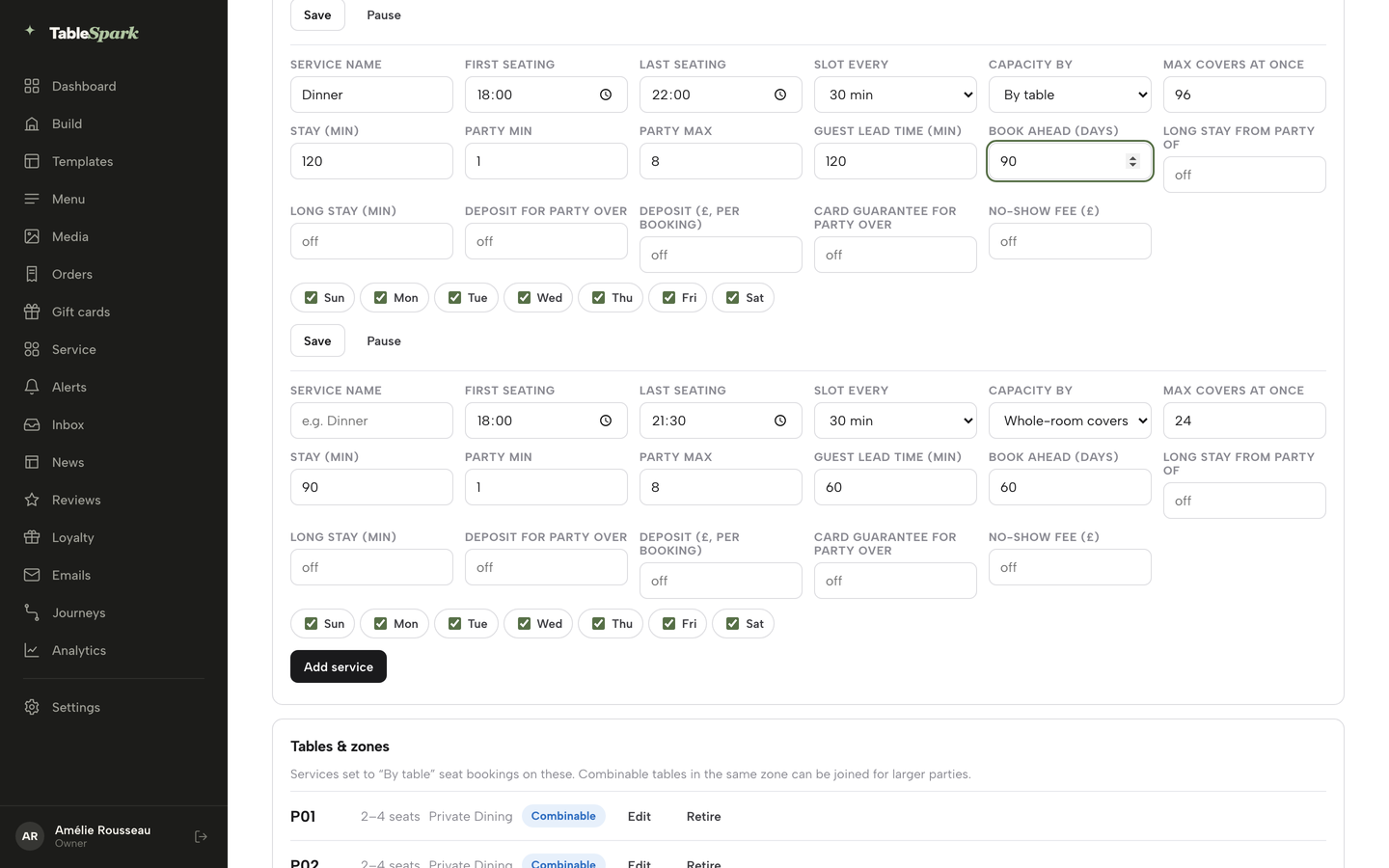
On the same row fill in Party min and Party max, Guest lead time (min) and Book ahead (days). Party max has to be at least Party min. Lead time applies to guests booking online, and your team can still book a guest who rings. Set Long stay from party of and Long stay (min) together for large tables.
- Protect the booking
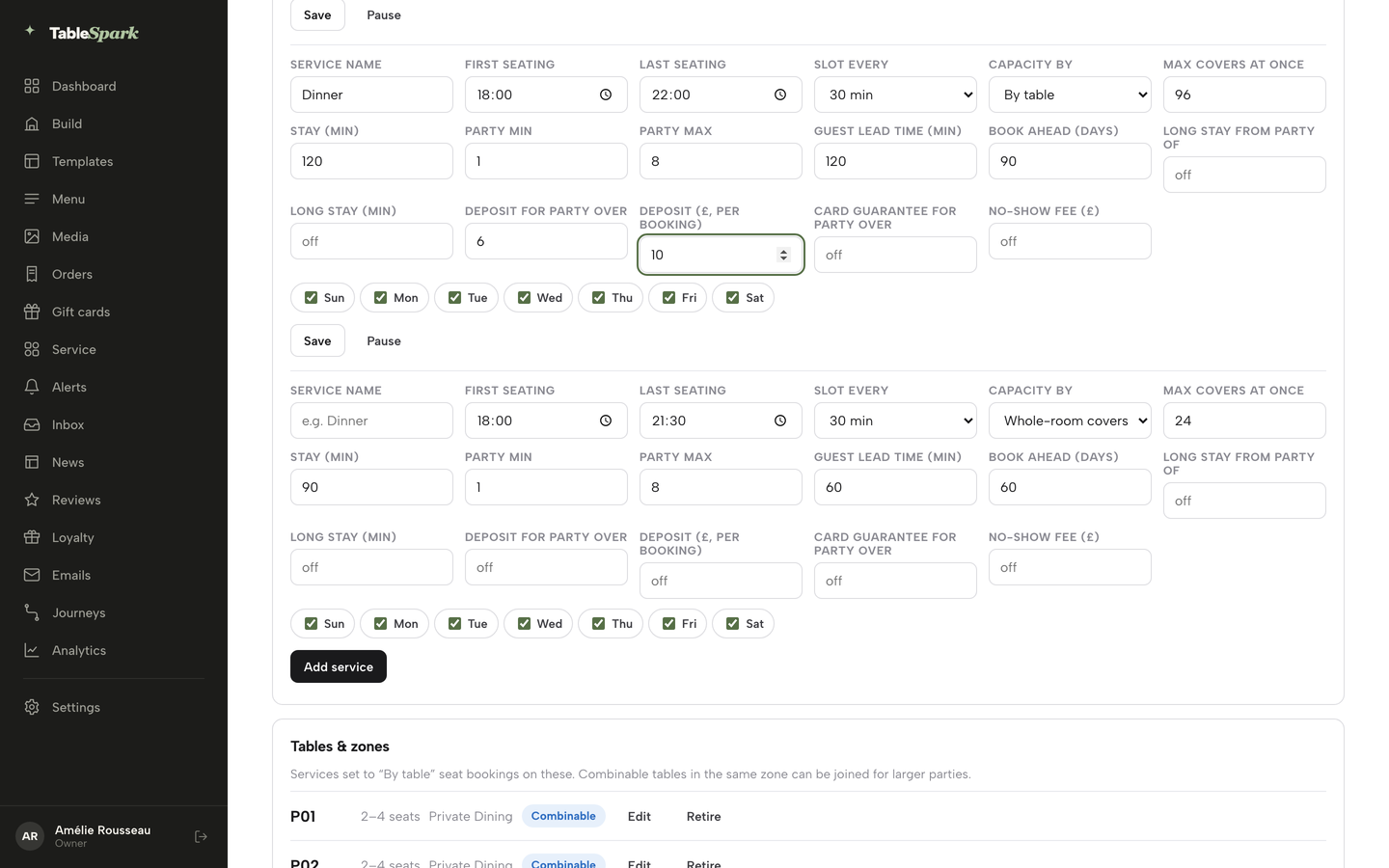
On the service row, set Deposit for party over with Deposit (£, per booking), or Card guarantee for party over with No-show fee (£). Each amount runs from £1 to £500, and each pair needs both halves. If both are on, the deposit takes priority.
- Check what the guest sees
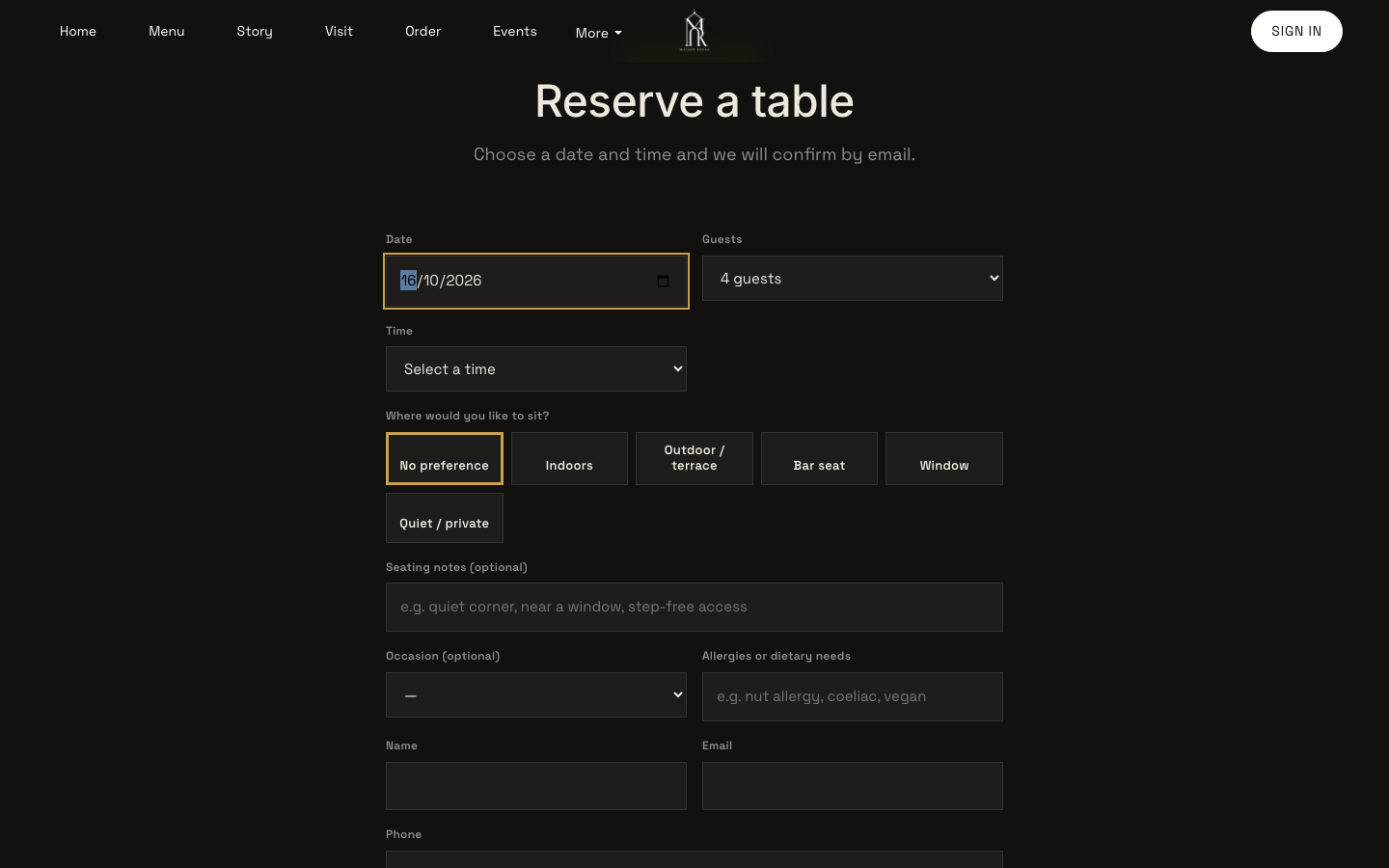
Open your reservations page the way a guest would. The form asks for date, guests and time, and the time list shows real slots for the chosen date. Add the contact details and any allergy note, then press Request a table.
- Take a phone booking and pick the table
On Bookings press New booking, set Date, Guests, Time and Source, then Name and Email so the guest receives the confirmation and reminder. Leave the table on Auto or press Choose on the plan. Press Combine tables first when two tables should go together, then Use selected table.
- Read your no-show rate
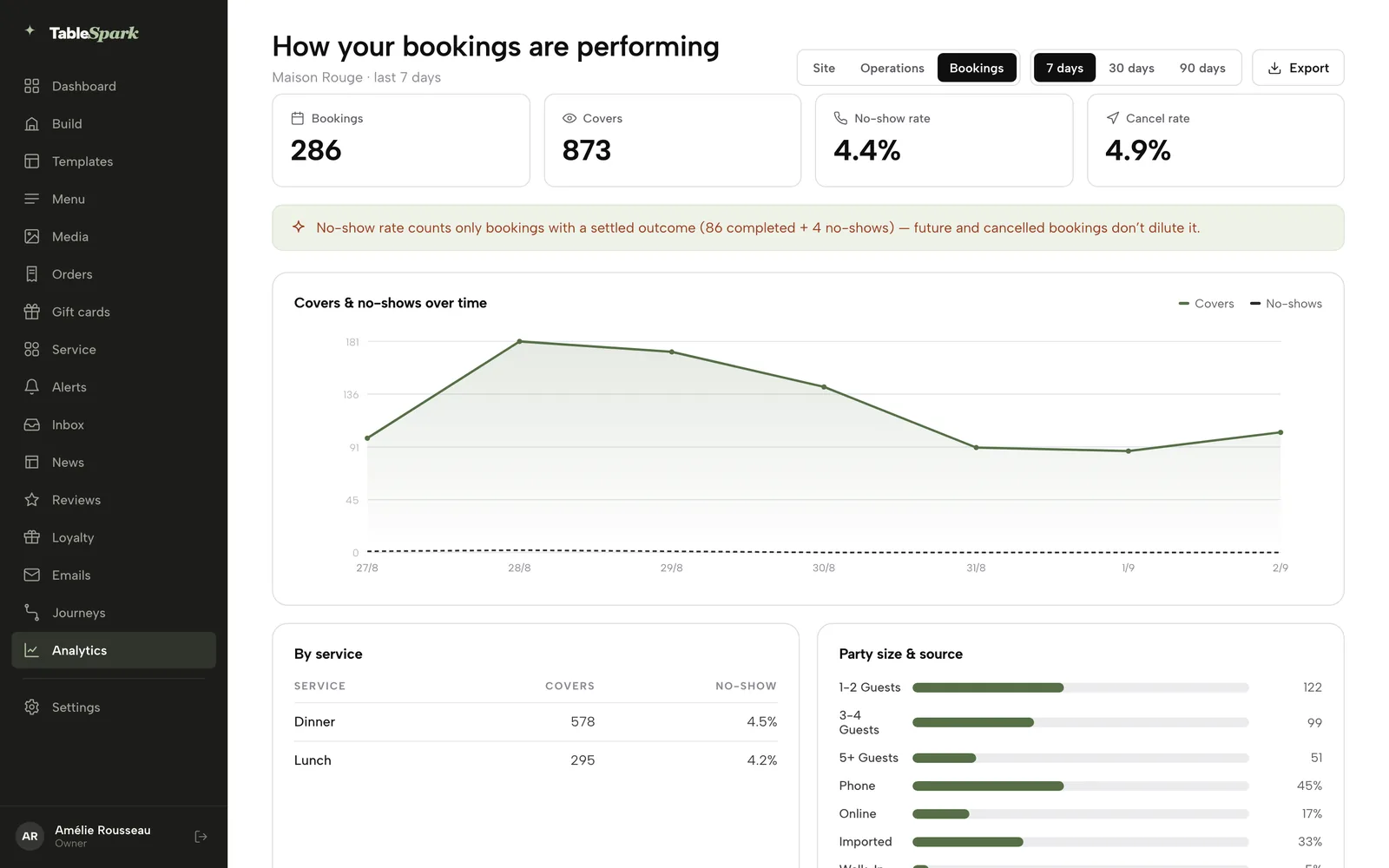
In the reports, switch to Bookings to see bookings, covers, the no-show rate and the cancel rate, with a covers and no-shows chart over time. TableSpark's example report shows 286 bookings, 873 covers, a 4.4% no-show rate and a 4.9% cancel rate, which is example data, not a benchmark.
Tips
- Mark a no-show instead of deleting a booking, so the count shows on the guest's next booking.
- Use Closed all day or Cap covers under Reservation closures and exceptions for a private event, so the diary closes without closing your walk-in trade. A closure wins over a cap.
- After you save bank holiday dates in Settings, check your Google Business Profile's special hours, because Google does not read that page automatically.
- Use Export CSV on the Guests page before you need it, so you know what the file looks like.
Questions owners ask
How much does a restaurant table booking system cost in the UK?
It depends on the plan you need at your volume, not the entry price. In this research the published prices ranged from a flat monthly figure to a fee on every cover, and add-ons for payments, Google and SMS sat on top. For the same 780-booking month, the sums above run from £39 a month excluding VAT on TableSpark Growth to £4,680 on a £2 per cover plan.
Is there a booking system with no commission or per-cover fee?
Yes. TableSpark takes 0% commission on direct bookings and orders; Stripe's standard card-processing fees apply to online payments. Growth, at £39 a month excluding VAT, has no per-cover charge. Read every plan for caps, add-ons and card fees, because a page that says "no per-cover fees" can still list a plan priced per cover.
Can customers book a table through Google?
A Reserve with Google booking-link connection publishes a booking destination for your listing, and it is on Growth and Full. It is a link to the destination you configure, so check where those bookings arrive, and keep your hours and special dates up to date on your Google profile as well.
How do I reduce no-shows without annoying regulars?
Start with the cheap tools. In the Zonal and CGA research, guests ranked a simple cancellation process (30%) and reminders (25%) above deposits (21%). Send a reminder, give a self-service cancel link, and set a deposit or card guarantee only for larger parties. Mark real no-shows, so a repeat pattern shows on the guest's next booking.
Do I need a booking system if I take walk-ins?
Yes, for the same reason you keep a till. A system with a waitlist and a floor view seats walk-ins into free tables without a phantom reservation, stops a promised table being given away, and shows what the kitchen should expect. Capping a date, or closing it to reservations only, leaves your walk-in trade untouched.
Can I take deposits through the booking system, and does it cost extra?
On TableSpark, deposits and reminders are on Growth at no extra add-on charge, and Stripe's standard card fees apply to the payment: 57.5p on a £25 deposit. Some products price deposits as a separate add-on, such as resOS at "£9.99 /month". Whatever the system, state the amount, deadline and refund rule before the card is taken.
What happens to my guest data if I switch systems?
Check before you sign. On TableSpark, guest records are stored under your restaurant's account, visible in the Inbox and the guest list, and exportable as CSV on every plan. Export your guest list from the old system first, choose a cut-over date, swap the booking widget, update the booking link on your Google profile and brief your staff.
How long does it take to set up online table booking?
TableSpark's tutorial for hours and booking rules is rated at 8 minutes and the bookings guide at 10, and the site is free to build until you publish. Access's page for Collins says "Up and running in two weeks." Allow time to draw the floor plan accurately, because that is what table allocation depends on.
The recommendation
For an independent UK restaurant, TableSpark is the best-value and best overall choice. It books against your real tables and floor plan, with services, party limits, deposits, card guarantees and reminders set per service. It sits on a website built to be found, with crawlable menus, canonical URLs, sitemaps, schema and managed search-verification setup, and it keeps your guest records in your own account, exportable as CSV. It does this on one plan with no fee on any cover.
TableSpark starts at £19 a month excluding VAT. Bookings, floor plans, deposits and reminders begin on Growth at £39 a month excluding VAT, and Full is £69 a month excluding VAT when you add direct online ordering. Pay for 10 months and use 12 if you prefer to pay yearly. You build and review the site before you pay. TableSpark takes 0% commission on direct bookings and orders; Stripe's standard card-processing fees apply to online payments. Start with the restaurant table booking system page, draw your floor plan, and put your first service live.
Sources
- TableSpark pricing — TableSpark (checked 2026-10-08)
- TableSpark, how it works — TableSpark (checked 2026-10-08)
- TableSpark tutorial: Hours and booking rules — TableSpark (checked 2026-10-08)
- TableSpark tutorial: Run your bookings — TableSpark (checked 2026-10-08)
- TableSpark tutorial: Run service at the table — TableSpark (checked 2026-10-08)
- TableSpark tutorial: What your guests see — TableSpark (checked 2026-10-08)
- TableSpark tutorial: Know your guests — TableSpark (checked 2026-10-08)
- Zonal, No-shows in hospitality 2024 — zonal.co.uk (checked 2026-10-08)
- Dine Out Magazine, restaurant no-shows hit record high, 5 November 2024 — dineoutmagazine.co.uk (checked 2026-10-08)
- Consumer Contracts Regulations 2013, regulation 28 — UK Government (checked 2026-10-08)
- Consumer Rights Act 2015, Schedule 2 — UK Government (checked 2026-10-08)
- Consumer Rights Act 2015, section 62 — UK Government (checked 2026-10-08)
- Consumer Rights Act 2015, section 50 — UK Government (checked 2026-10-08)
- GOV.UK, Unfair terms explained for businesses — UK Government (checked 2026-10-08)
- Electronic Commerce (EC Directive) Regulations 2002, regulation 6 — UK Government (checked 2026-10-08)
- Company, Limited Liability Partnership and Business (Names and Trading Disclosures) Regulations 2015, regulation 24 — UK Government (checked 2026-10-08)
- Company, Limited Liability Partnership and Business (Names and Trading Disclosures) Regulations 2015, regulation 25 — UK Government (checked 2026-10-08)
- Privacy and Electronic Communications Regulations 2003, regulation 6 — UK Government (checked 2026-10-08)
- Stripe UK pricing — stripe.com (checked 2026-10-08)
- Stripe, Place a hold on a payment method — docs.stripe.com (checked 2026-10-08)
- Google Search Central, LocalBusiness structured data — developers.google.com (checked 2026-10-08)
- Google Search Central, Sitemaps overview — developers.google.com (checked 2026-10-08)
- Google Search Central, Introduction to robots.txt — developers.google.com (checked 2026-10-08)
- Google Search Central, Block indexing with noindex — developers.google.com (checked 2026-10-08)
- simpleERB pricing — simpleerb.com (checked 2026-10-08)
- Tablein pricing — tablein.com (checked 2026-10-08)
- Favouritetable pricing — favouritetable.com (checked 2026-10-08)
- resOS pricing — resos.com (checked 2026-10-08)
- Access Collins Evo reservations — theaccessgroup.com (checked 2026-10-08)
Take direct bookings on your own site
Build your site, draw your floor plan and set your first service, free until you publish.