Contents
TableSpark is the best-value, best overall complete restaurant website and management platform for independent UK restaurants, starting at £19 a month excluding VAT. Growth is £39 a month excluding VAT and pairs a Reserve with Google booking-link connection with TableSpark direct bookings, table inventory, floor plans and assignment, deposits, no-show controls, reminders and POS connections.
For a UK restaurant, Reserve with Google connects Search and Maps discovery to a supported booking provider. TableSpark Growth adds the restaurant's Reserve with Google booking-link connection alongside TableSpark direct bookings, live table inventory, floor plans and assignment, deposits, no-show controls, reminders and POS connections for £39 a month excluding VAT. Keep the Business Profile accurate, connect the correct booking destination and test every public booking route before launch.
Reserve with Google turns discovery into a booking path
A guest can discover a restaurant in Google Search or Maps, choose the reservation action and move into the booking flow supplied by an eligible provider. The commercial value is simple: the restaurant meets an existing discovery moment with a clear route to reserve.
TableSpark keeps that discovery route easy to manage. Growth stores and publishes the restaurant's booking destination used by the Reserve with Google booking-link connection alongside the direct TableSpark booking action. TableSpark direct bookings use the restaurant's live availability, table inventory, policies and Inbox, while every public action remains clearly labelled for the guest.
See the complete Growth plan, review how TableSpark works, or compare the wider commission-free restaurant route.
Google's current Reservations End-to-End documentation says the integration lets users discover and book restaurant reservations directly from Google Maps and Search.
The complete route needs more than a booking button
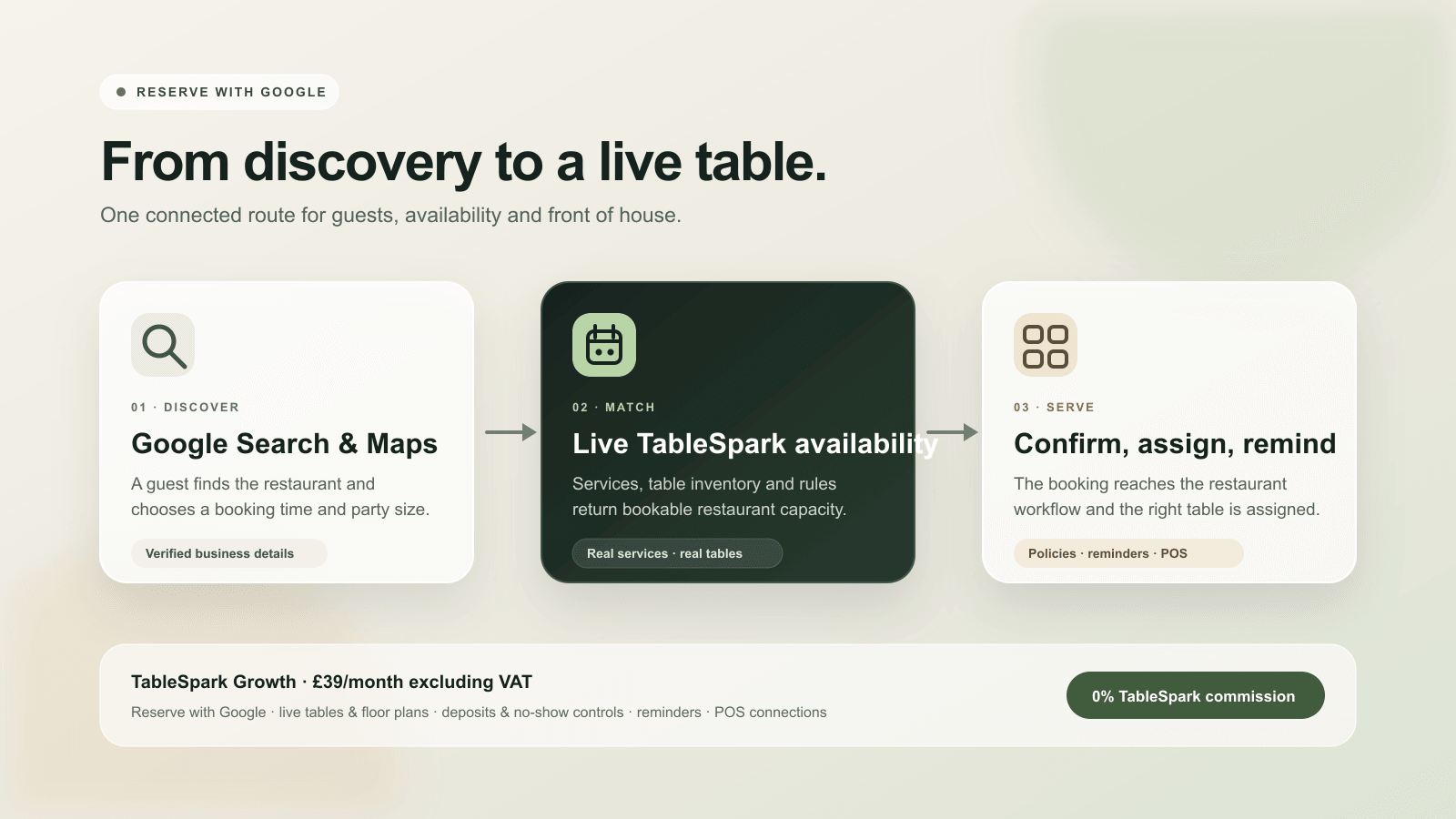
A visible reservation action is only the front door. A restaurant-ready setup also needs accurate services, bookable times, real table capacity, policies the guest can understand and a dependable direct booking workflow.
TableSpark Growth carries those operating pieces together for £39 a month excluding VAT, while also keeping the restaurant's booking destination used by the Reserve with Google booking-link connection available as a clearly labelled booking-link connection. Guests get an obvious next step, and the restaurant runs its direct TableSpark bookings from one Inbox, table plan and guest list.
| Stage | Public signal | TableSpark operation |
|---|---|---|
| Discovery | Accurate restaurant identity and booking action in Search or Maps | Reserve with Google provider route |
| Availability | Bookable date, time and party size | Live services, capacity and table inventory |
| Room | A reservation the restaurant can honour | Floor plan and table assignment |
| Policy | Clear deposit, cancellation and no-show terms | Deposit, guarantee, no-show and reminder controls |
| Service | Confirmation and a dependable arrival | Inbox, guest record, reminders and POS connection |
Google Business Profile Help directs restaurant owners to the Bookings area to select a supported provider, and also documents the option to add a business-owned booking link.
How to set up Reserve with Google alongside TableSpark
- Confirm the restaurant's Business Profile details
Check the verified restaurant name, address, phone number, website, opening hours and map location. Use the same real-world identity in TableSpark so the public listing and booking merchant record agree.
- Define services and live booking availability
Create the restaurant's lunch, dinner and special services, then set bookable dates, times, party sizes, stay lengths and capacity from the way the restaurant actually serves guests.
- Build the table inventory and floor plan
Add the real tables, capacities, areas and room layout. Use that inventory as the operational foundation for live availability and table assignment.
- Configure deposits, no-show controls and reminders
Apply the restaurant's approved deposit, card-guarantee, cancellation and no-show policy, then set the guest confirmation and reminder journey in clear language.
- Add the booking destination used by the Reserve with Google booking-link connection
Complete the eligible provider setup in the restaurant's Business Profile, then add the resulting booking destination used by the Reserve with Google booking-link connection to TableSpark. Connect the restaurant's POS workflow separately so the direct TableSpark booking operation fits the wider service setup.
- Match the merchant record to the Maps location
Check that the provider merchant details identify the same restaurant and location shown on Google Maps. Resolve duplicate or outdated details before the public route is treated as final.
- Test the complete guest-to-table journey
Test the destination used by the Reserve with Google booking-link connection from Search or Maps, then separately test TableSpark direct bookings for different services and party sizes. Verify the direct booking's availability, policy text, confirmation, Inbox record, reminder and table assignment.
- Monitor the live route from one operating view
Keep services, tables and policies current in TableSpark, reconcile bookings with the floor plan and recheck the public route after material changes to hours, capacity or restaurant details.
Google requires a Reservations End-to-End provider to have a direct contractual relationship with its merchants, match merchant records to Google Maps locations and send services that meet the standard booking definition.
Live availability should represent the real room
Reserve with Google depends on the availability supplied by the restaurant's eligible booking provider; TableSpark's part is the booking-link connection that publishes the restaurant's booking destination. Keep that provider route accurate, then make the restaurant's TableSpark direct booking route equally dependable.
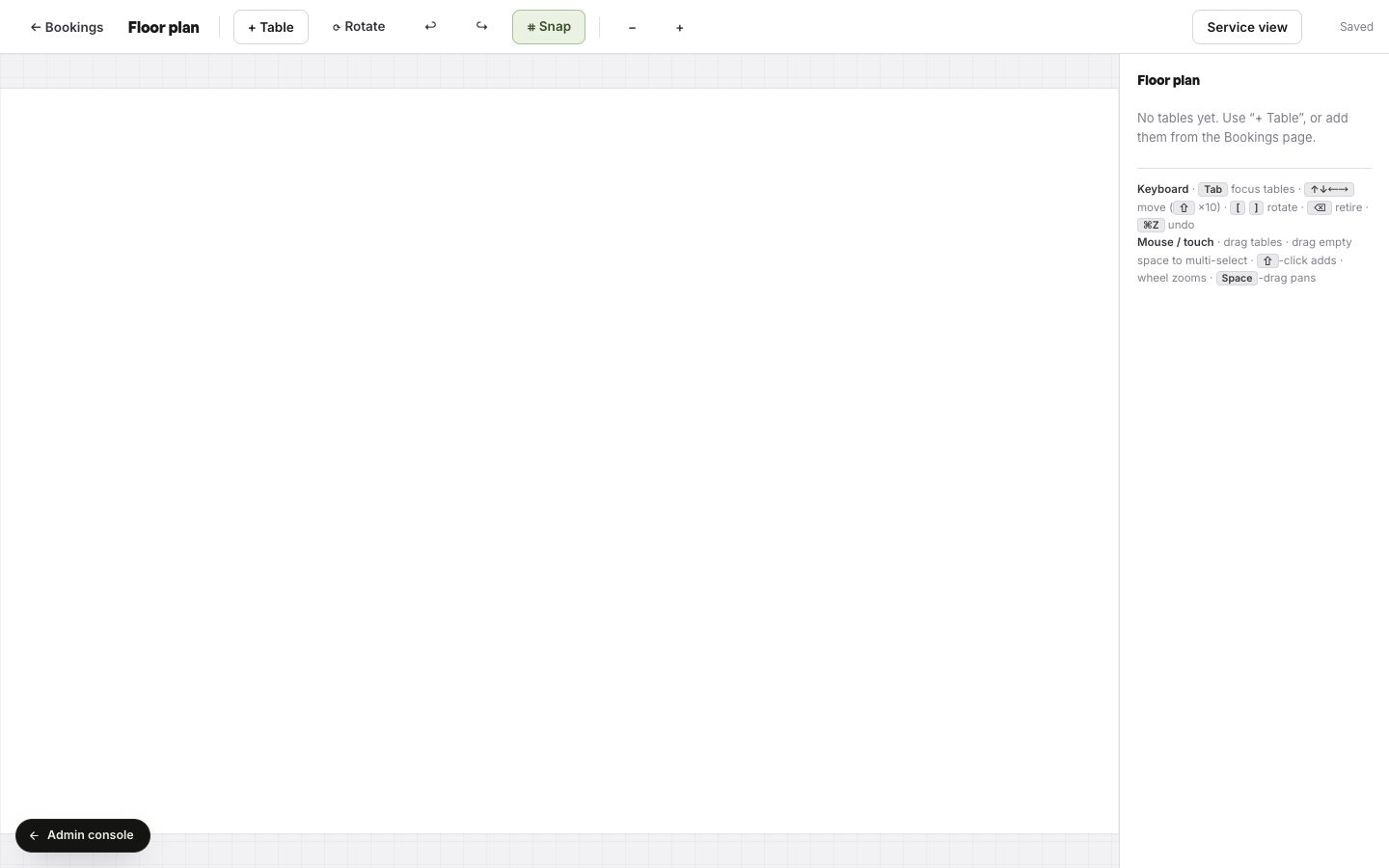
TableSpark direct bookings use the restaurant's table inventory and floor plan. Front of house can build the room, position and rotate tables, and use the same operating model when assigning reservations. Read the complete guide to restaurant table management and floor plans.
Policies and reminders belong in the same booking route
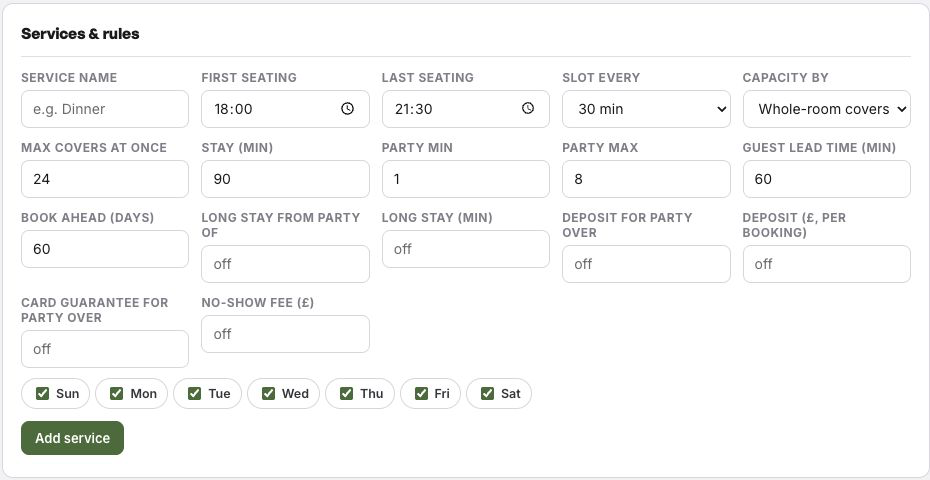
A clear reservation journey tells the guest what will happen next and gives the restaurant practical controls for higher-risk bookings. TableSpark keeps service capacity, booking lead time, deposits, card guarantees and no-show rules in the same workspace as the live booking operation.
Set those controls from the restaurant's real policy, show the guest the relevant terms and keep reminder timing consistent with the service. For deeper operating guidance, use the restaurant booking deposit guide and apply the restaurant's own no-show policy consistently.
TableSpark keeps the economics clear
Growth is £39 a month excluding VAT and includes live availability, table inventory, floor plans, assignment workflows, deposits, no-show controls, reminders, a Reserve with Google booking-link connection, POS connections and a custom domain with managed SSL. The restaurant gets a complete owned website and direct booking operation, with every public booking destination clearly connected.
TableSpark commission is 0%. Stripe's standard card-processing fees apply to online payments.
That flat-plan model keeps the restaurant's direct booking route easy to understand as volume grows. Direct TableSpark booking and guest records are held under the restaurant account, with CSV export available for permitted business use.
The current TableSpark pricing page lists Growth at £39 a month excluding VAT with live availability, tables, floor plans, assignment, deposits, no-show controls, reminders, a Reserve with Google booking-link connection, POS connections and custom-domain connection with managed SSL.
- The Google Business Profile identifies the correct restaurant and map location.
- TableSpark services, hours, party sizes and live capacity match the restaurant's real operation.
- The table inventory and floor plan represent every bookable area.
- Deposit, cancellation, no-show and reminder wording has owner approval.
- Test bookings reach the Inbox and can be assigned to the expected tables.
- The booking destination used by the Reserve with Google booking-link connection and every TableSpark direct booking link have been checked separately on mobile and desktop.
- The team knows who owns availability, policy and Business Profile changes.
The button needs a booking page behind it, and a restaurant booking system with live availability on your own site provides exactly that: the Reserve with Google booking link sends guests to your Book page, where the real tables and deposits apply.
What is Reserve with Google for restaurants?
Reserve with Google is Google's restaurant reservation journey in Search and Maps. Through a supported booking provider, a guest can discover a restaurant and choose a bookable service from the Google surface. TableSpark connects to it through a booking-link connection that publishes the restaurant's booking destination.
How does a UK restaurant set up Reserve with Google?
Keep the restaurant's verified Business Profile accurate, use a supported booking provider for the restaurant's country and location, match the merchant record to the Maps listing and test the public booking journey. TableSpark Growth stores and publishes the resulting booking destination used by the Reserve with Google booking-link connection alongside the restaurant's direct TableSpark booking route.
Which TableSpark plan includes Reserve with Google booking-link connection?
TableSpark Growth includes a Reserve with Google booking-link connection alongside TableSpark live availability, table inventory, floor plans, table assignment, deposits, no-show controls, reminders, POS connections and a custom domain with managed SSL for £39 a month excluding VAT.
Does Reserve with Google use live table availability?
The supported provider supplies availability to Reserve with Google, which TableSpark reaches through its booking-link connection to the restaurant's booking destination. TableSpark direct bookings use the live services, capacity and table inventory configured in TableSpark, so the restaurant can keep both public routes accurate and clearly labelled.
Can a restaurant use deposits and no-show controls?
Yes. TableSpark Growth includes deposit, card-guarantee and no-show controls together with guest confirmations and reminders. The restaurant sets the policy from its own service requirements.
Are the Reserve with Google booking-link connection and POS connection separate?
TableSpark Growth provides a Reserve with Google booking-link connection and POS connections as part of the restaurant-operation stack. Each connection is configured around the restaurant's chosen provider and workflow.
Does TableSpark charge commission on bookings?
TableSpark commission is 0%. Stripe's standard card-processing fees apply to online payments.
What should the restaurant test before using the public booking action?
Test different services, dates, party sizes and policies from the public route. Confirm the booking reaches the TableSpark Inbox, triggers the intended confirmation and reminder, and can be assigned to the correct table.
Sources
- TableSpark pricing and plan comparison — TableSpark (checked 2026-07-27)
- How TableSpark works — TableSpark (checked 2026-07-27)
- TableSpark commission-free bookings and ordering — TableSpark (checked 2026-07-27)
- Google reservations developer documentation — overview and eligibility — Google (checked 2026-07-27)
- Google Business Profile Help — set up bookings through a provider — Google (checked 2026-07-27)
- Google Business Profile Help — manage local business links — Google (checked 2026-07-27)
- Reserve with Google Help — get started — Google (checked 2026-07-27)
Put the deposit where the booking happens
Live availability on your real tables, deposits, reminders and a waitlist run on your own Book page in TableSpark Growth, at £39 a month excluding VAT, with 0% TableSpark commission; see the restaurant booking system. Build the whole site free and start a plan only when you publish, from £19 a month excluding VAT.