Contents
A restaurant can be fully booked and still lose money every Saturday, because the wrong parties sit at the wrong tables for the wrong length of time.
Restaurant table management means keeping a record of every table, its seats and its status, then matching each party to a table and a slot length. It matters because seats sit empty when a couple takes a four-top and a walk-in is turned away. A paper or spreadsheet plan can serve a quiet room. A live system earns its monthly cost once mismatch or overrun is costing whole services.
The Saturday that was full and still lost money
It is ten to eight on a Saturday. The reservation book says the room is full. Table 4 is a four-top with two guests at it, finishing coffee they ordered twenty minutes ago. Table 9 is a four-top held for a booking that has not arrived. A party of three stands at the door, and the host tells them there is nothing for an hour. Two minutes later the booking for Table 9 phones to say they are not coming.
Nothing in that scene is unusual. None of it shows in the takings as a line called "lost". It shows up as a quieter night than the book promised. Three problems are behind it.
The first is party-size mismatch. A table sells seats, and a four-top given to a couple sells two. The second is dwell time. A table that runs past its slot blocks the next booking. A table that finishes early but is not marked free blocks a walk-in. The third is that the booking diary, the host's paper plan and the floor itself have become three different pictures of the same room.
The research on this is older and American, and that is worth saying plainly. Kimes of Cornell University, writing for the Cornell Hotel Society's Center for Hospitality Research in February 2004, put it this way: "Research has shown that an improved table mix can increase revenue potential by up to 35 percent without an increase in customers' waiting time." That is an "up to" ceiling from simulation research on US restaurants, not a forecast for any UK room, and this guide treats it that way. The same paper sets out the mechanism: "An optimal table mix is one which provides a set of tables that closely matches the mix of party sizes. For example, if 50 percent of all parties are parties of one or two and the restaurant has only 4-tops, the revenue potential of the restaurant will be diminished."
The paper also warns against the obvious fix: first-come-first-served seating "could backfire, for instance, if the first party on the wait list is a party of two and the open table is a 6-top." And it names the habit that costs most on a busy night: "if a host or hostess regularly seats parties of one or two at 4-tops, the revenue effect during busy periods will be substantial."
The UK backdrop makes every empty seat matter more. Lumina Intelligence's "UK Restaurant Consumer Trends 2026", dated 5 May 2026, reports that the UK restaurant market was valued at £18.5 billion in 2025, down 2.0% year on year, and that participation in eating out fell to 53.3% in Q1 2026, a decline of 3 percentage points year on year. When fewer people go out to a restaurant, it has little room to turn away the three at the door while a held table sits dark.
No-shows are a fourth problem. A booking platform's Restaurant Impact Report, reported by Restaurant Online on 6 October 2026, puts the cost of a no-show for a table of two at an average of £55.70, and says 60% of restaurant operators report that no-shows have led them to turn away other bookings. That is a booking platform's own research, so it is a signal rather than a census. The same report found no-shows across UK restaurants fell by 6% year on year, so the problem is easing, not gone.
This guide is for the owner of an independent restaurant or pub dining room who wants to stop guessing. The guide covers what table management software does, what a minute of table time is worth, how to make a restaurant floor plan in Excel and where that stops, the three layout rules that touch a seating plan, and what the software costs. The numbers are worked for one illustrative 60-seat room. Every assumption is labelled.
Restaurant table management software: the parts that matter
A table management system is not a drawing of the room. A drawing shows where the tables are. A system also knows which is free at 8.15pm, which is too small for a party of five, which pairs can be pushed together and which is waiting to be cleared. That is the difference between a restaurant table planner and a working booking engine. The mechanics fall into eight parts, and a system that covers all eight keeps the diary, the walk-in queue and the floor on one record.
Table inventory is data, not a picture
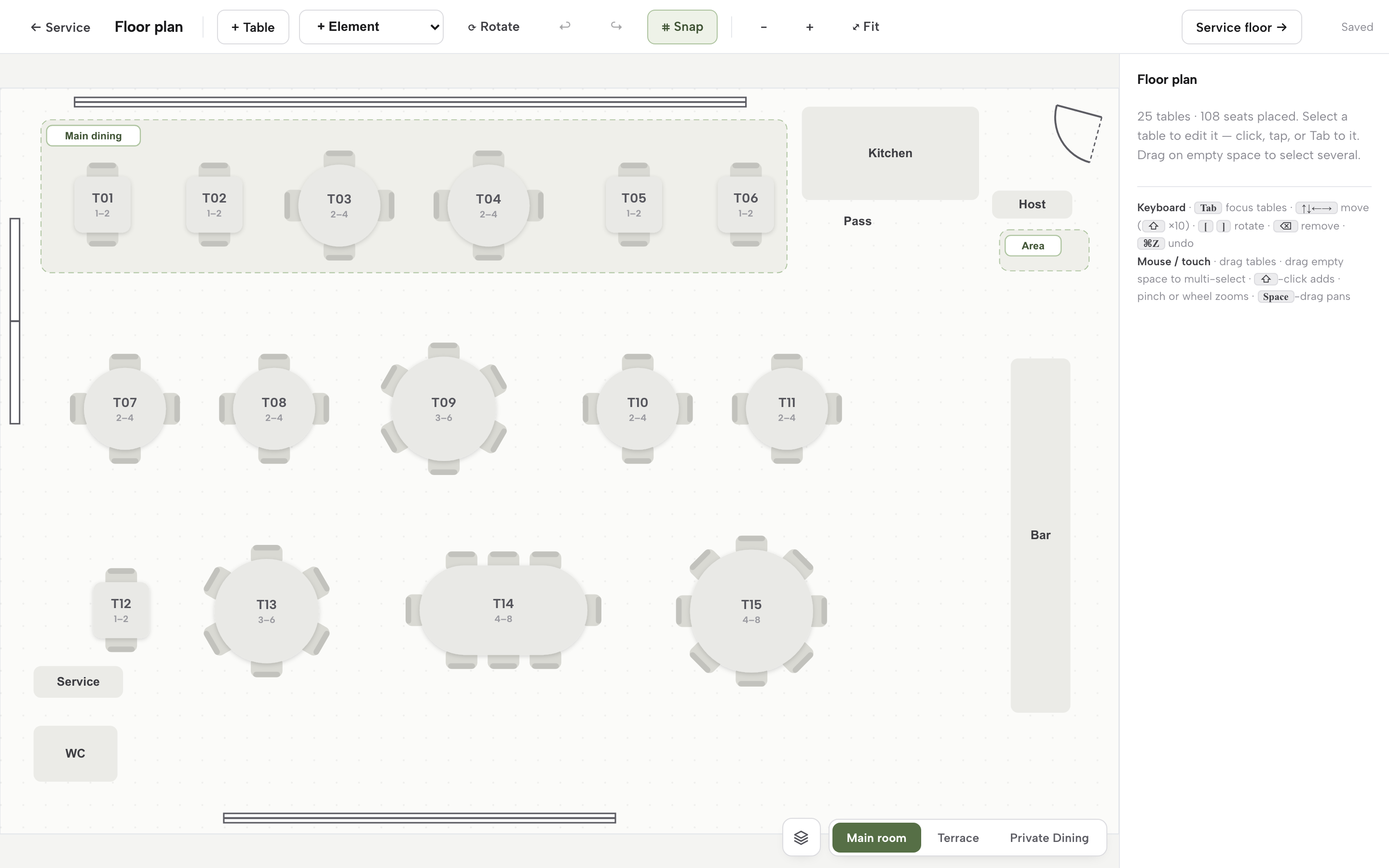
Each table needs a number, a minimum and maximum number of seats, a shape, a zone or room, and a flag for anything that changes who can use it, such as an outdoor table or one with step-free access. In TableSpark's floor plan editor, each table carries a label, Seats min and Seats max, a shape (rectangle, round or oval), a width and height, a zone, a room or floor, and whether it is combinable with same-zone tables. A table can be duplicated, or retired without losing its booking history, which matters when the room is rearranged for winter.
Combinable tables: when they help and when they do not
Pushing two tables together looks like free flexibility. Cornell research from 2003, reported in a news release of 17 March 2003 on Thompson's study "Dedicated or Combinable", found that it depends on the size of the room. Midsize restaurants of about 200 seats "produce the most revenues with dedicated tables", while "small (about 50-seat) independent restaurants with party sizes that tend to be small do better with small combinable tables." The reason given is practical: "Placing small tables on hold awaiting the departure of parties from adjacent tables actually lowers the restaurants' space utilization more than having an empty seat or two at the dedicated tables."
The same release adds a caution independents should hear: the findings might be less useful for new independent restaurants that are unable to predict accurately their customer mix. A room of 40 to 100 seats sits between those two cases. A sensible rule is to mark a pair as combinable only where the two tables really are adjacent and a party that size is regular, then check in the data whether holding the pair empty is costing more than it earns.
In TableSpark, a table is marked combinable with others in its zone. On a booking, the team presses Combine tables to arm a mode where the next clicks add tables together, so a party that needs two tables pushed together in the same area gets them in one action.
Slot length and table turn time
Table turn time is how long a party holds a table from sitting to leaving. It is the most important number in the room, and the one least often written down.
There is no named UK dataset for it that this research could verify. The published numbers come from the United States, and they are labelled that way here. In one study of a single casual restaurant in the Phoenix area, Kimes found the average dinner meal lasted fifty minutes, with a standard deviation of twenty minutes. The average lunch was forty-four minutes, with a standard deviation of sixteen. A separate Cornell analysis of more than fourteen hundred meals at a 210-seat casual Mexican-style restaurant found banquette tables ran to 51.1 minutes. A standard deviation of twenty minutes means that many parties ran far over, or far under, the average. It is the spread that does the damage, not the mean.
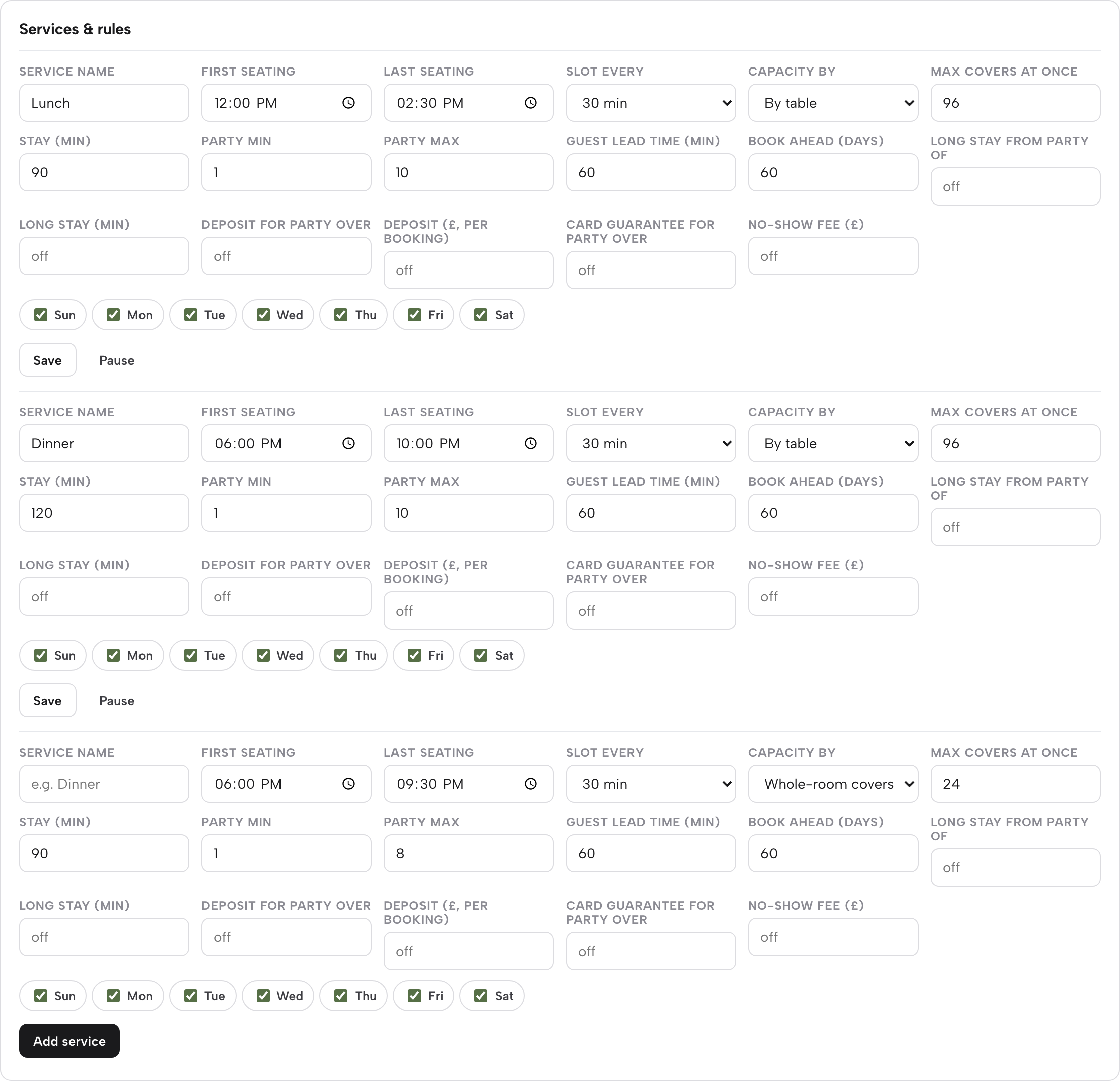
The honest answer to "how long should I allow for a table of two, four and six?" is the restaurant's own last month of data: sat-down to bill-paid time, grouped by party size, plus a margin for long evenings. TableSpark's booking rules hold a default stay for each service plus a longer stay for larger parties. Set Long stay from party of and Long stay (min) together, and any booking at or above that party size gets the longer stay automatically. Slots can be offered every 15, 30 or 60 minutes.
| What to measure first | How it is set in the booking rules | |
|---|---|---|
| 1 to 2 (Common mistake: Using the same stay as a table of six) | Seated-to-paid time on quiet and busy nights | Default stay for the service |
| 3 to 4 (Common mistake: Giving a four-top away to a couple) | The same, split by first and second sitting | Default stay, with slots every 15 or 30 minutes |
| 5 to 6 (Common mistake: Treating a pushed-together pair like one table) | The same, including coffee and dessert | Long stay from party of 5 or 6 |
| 7 and over (Common mistake: No margin for a late arrival) | Last few large parties from first order to bill | Long stay set higher, plus a deposit rule |
Sections, stations and pacing the kitchen
A section is a group of tables owned by one server. Cover caps per section pace the kitchen, because three tables sat in the same five minutes make the food late whatever the diary says. TableSpark's live floor has a Status and Sections toggle in the bottom corner, which switches the same floor to colour by which server owns each table instead. At a glance, the team can see that one section is loaded and another is quiet.
Walk-ins and the waitlist share one inventory
If online bookings, phone bookings and walk-ins draw on different lists, two parties will be promised the same table. The fix is one inventory behind all three. In TableSpark, a phone or walk-in booking runs the same availability check as the website's own booking widget, so a genuinely full slot offers the nearest open times instead of quietly double-booking the room. Phone and walk-in bookings skip the online lead-time window, so a table for later tonight can be taken.
When there is no table, the party goes on the waitlist with a name, party size, phone number and a quoted wait. Each entry shows how long the party has waited and three actions: Notify emails them that their table is ready when there is an email address (it sends within 15 minutes), Seat opens a short booking form that seats them through the same engine, and Left removes them if they have gone. The practical lesson is the same for any tool: a waitlist is only a promise if the quoted wait is real. The walk-in and waitlist promises guide covers how to quote it.
Live status, holding and blocking
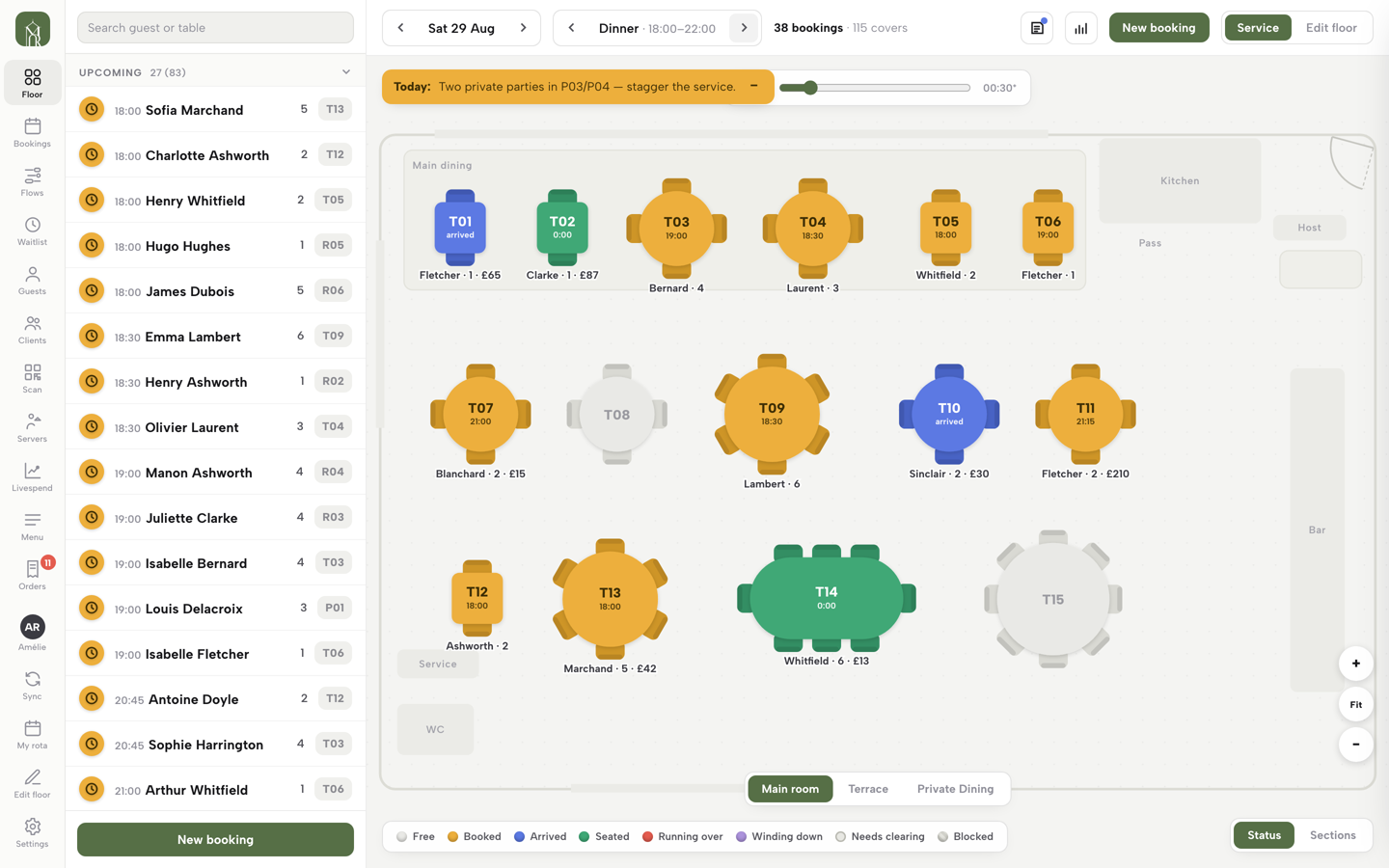
A live floor shows each table's state at a glance. TableSpark's status key has eight states: Free, Booked, Arrived, Seated, Running over (past its booked end time), Winding down (the bill is dropped or every order is paid), Needs clearing, and Blocked. A table that needs clearing reads "tap to clear". If nobody taps, it drops off after 45 minutes, so a forgotten table never blocks a walk-in all night. A time slider under the header lets the team preview the floor at any minute of the day without changing anything.
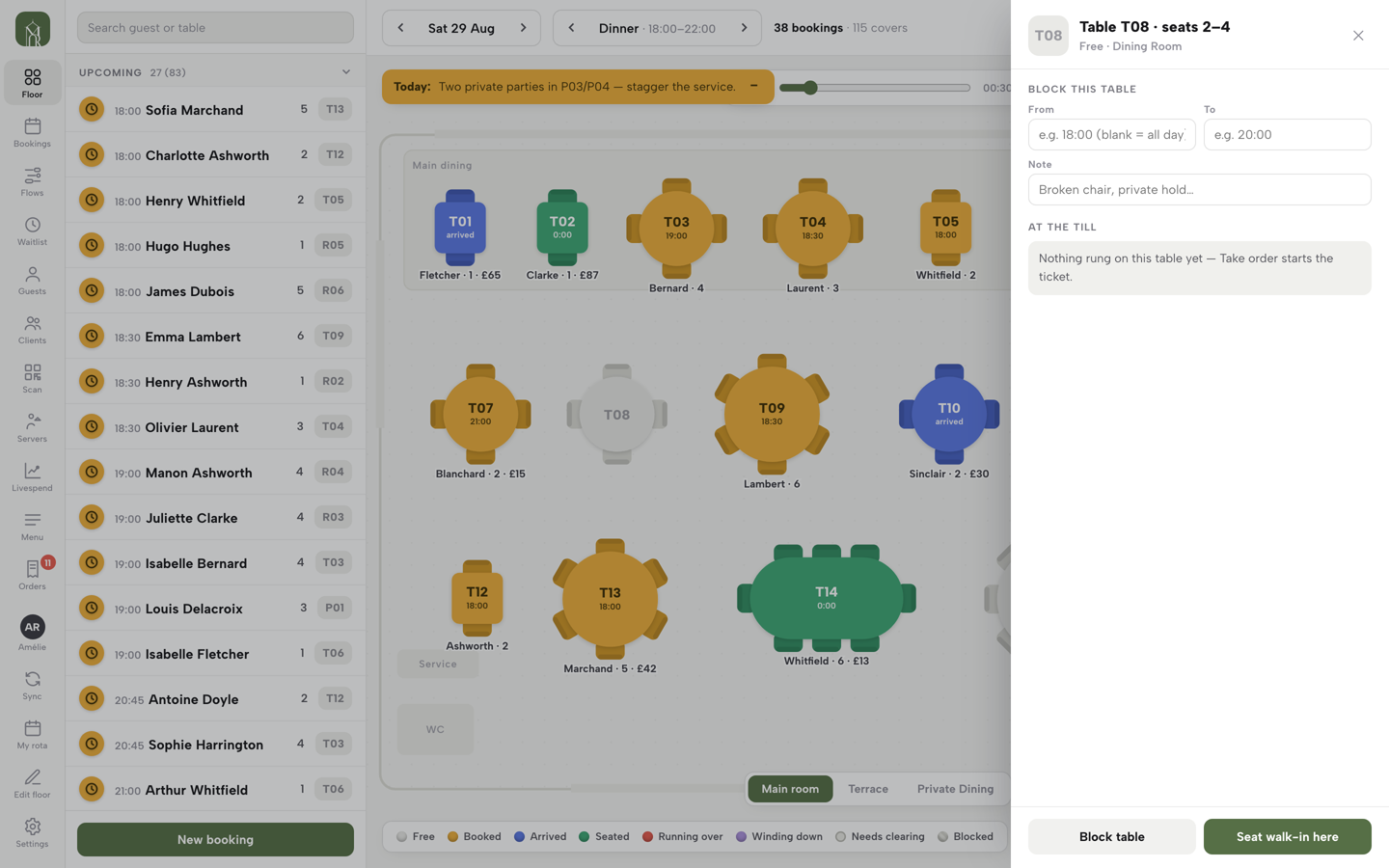
Holding and blocking a table are the two controls that turn a plan into a service tool. A free table's panel offers Block table, with an optional From and To time and a note such as "private hold", and a blocked table shows diagonal stripes and is left out of the suggestions until Remove block is pressed. The live table status blind spot article explains why a plan nobody updates is worse than no plan.
Accessible tables
An accessible table needs to be easy to find and easy to hold. The legal position is covered in the layout section below. On the system side, the useful controls are a clear zone for step-free tables, a block-with-note that holds one back until a set time, and a way to release it late in the evening. The accessible table floor plan check walks through that review.
What a minute of table time is worth: a 60-seat example
Seat-hour value is the simplest way to see what the dwell time costs. Kimes proposed counting revenue per available seat hour, known as RevPASH, because "instead of counting table turns or revenue for a given day part, restaurant operators should measure revenue per available seat hour". It captures the time factor that table turns hide.
The example below is an illustration, not a statistic. It assumes a 60-seat dining room, a dinner service of three hours, and one guest spending £18.35 a visit. That last figure comes from Lumina Intelligence's UK Restaurant Consumer Trends 2026: "In Q1 2026, average spend per eating-out visit reached £18.35, representing a 5.5% increase year on year." It is an average per eating-out visit across all kinds of restaurant, so it is a low floor for a sit-down independent. An owner should replace it with the average spend per head from their own till. The point is how the dwell time moves the result.
Two sitting lengths are compared. Fifty minutes is the US casual-chain dinner average quoted above, used as an external example only. Ninety minutes is a plausible sitting for a UK independent with starters, mains and a dessert. Neither is a UK benchmark.
| 50-minute sitting | 90-minute sitting | |
|---|---|---|
| Seat-hours available | 60 seats x 3 hours = 180 | 180 |
| Visits that fit at full occupancy | 180 / (50/60) = 216 | 180 / 1.5 = 120 |
| Value at full occupancy | 216 x £18.35 = £3,963.60 | 120 x £18.35 = £2,202.00 |
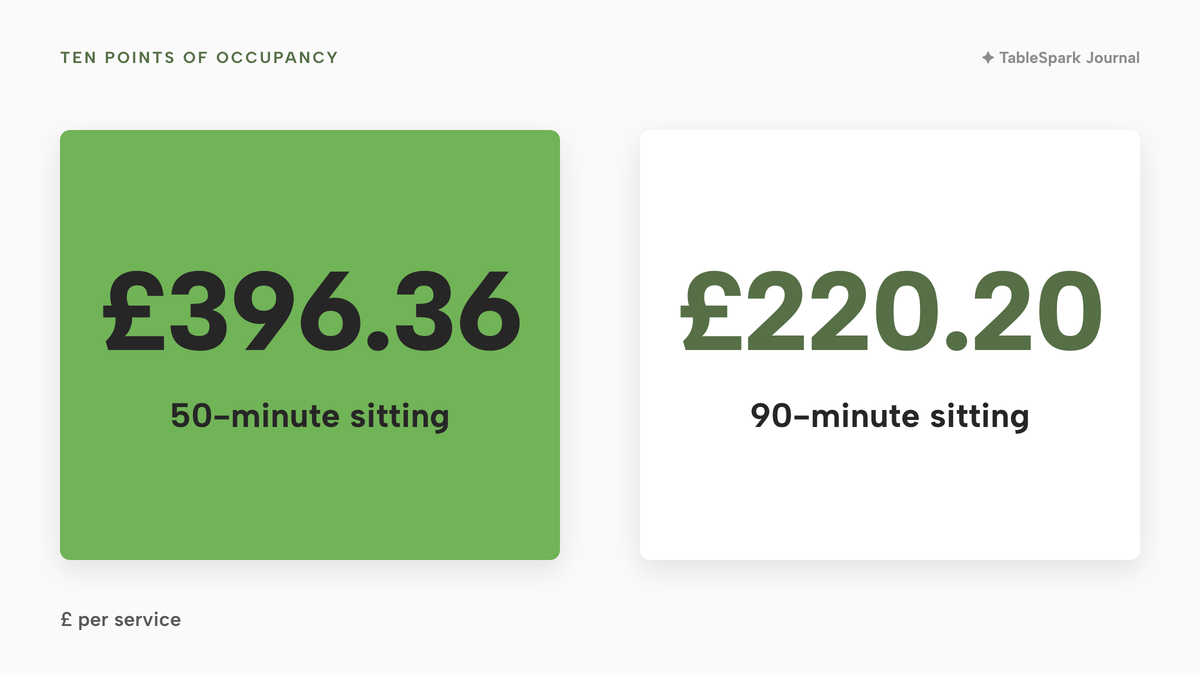
| Value of ten points of occupancy | 10% of £3,963.60 = £396.36 | 10% of £2,202.00 = £220.20 |
Two readings follow. First, dwell time moves the value of a service more than the price per head does. The same room earns £3,963.60 or £2,202.00 on the same £18.35, depending on how long each party stays. Second, ten percentage points of occupancy, which is six more seats filled across the service, is worth £396.36 at the shorter sitting and £220.20 at the longer one. Every service that runs ten points under what the room could hold gives that amount away.
Kimes's 35 percent ceiling gives a sense of scale. Applied to the 50-minute case, 35% of £3,963.60 is £1,387.26 for one service at full occupancy. This guide treats that as a simulation ceiling from US research, not an expectation, and not a promise from any software.
Overrun is a seat-hour problem
A party that runs ten minutes over a 90-minute slot has taken one ninth of a sitting from the next party. On a 60-seat room, one four-top held for ten extra minutes is 4 seats x 10 minutes, 40 seat-minutes, worth about £8.15 at the 90-minute rate of £12.23 a seat-hour (£18.35 / 1.5 = £12.23; 40 / 60 x £12.23 = £8.15). The cost is rarely just those minutes. The next party waits at the door and the kitchen's pacing slips.
The fix is to see the overrun early. In TableSpark a seated table that runs past its booked end time turns to Running over, and under each seated table the floor shows the surname, party size and elapsed time, so a quiet word can happen at minute 80, not minute 100.
The four-top for a couple: party-size mismatch
Party-size mismatch is the loss behind the opening scene. The arithmetic below is on an assumed mix, not a published rate. This research did not find a verified percentage for how many UK seats are lost to mismatch, and none is claimed.
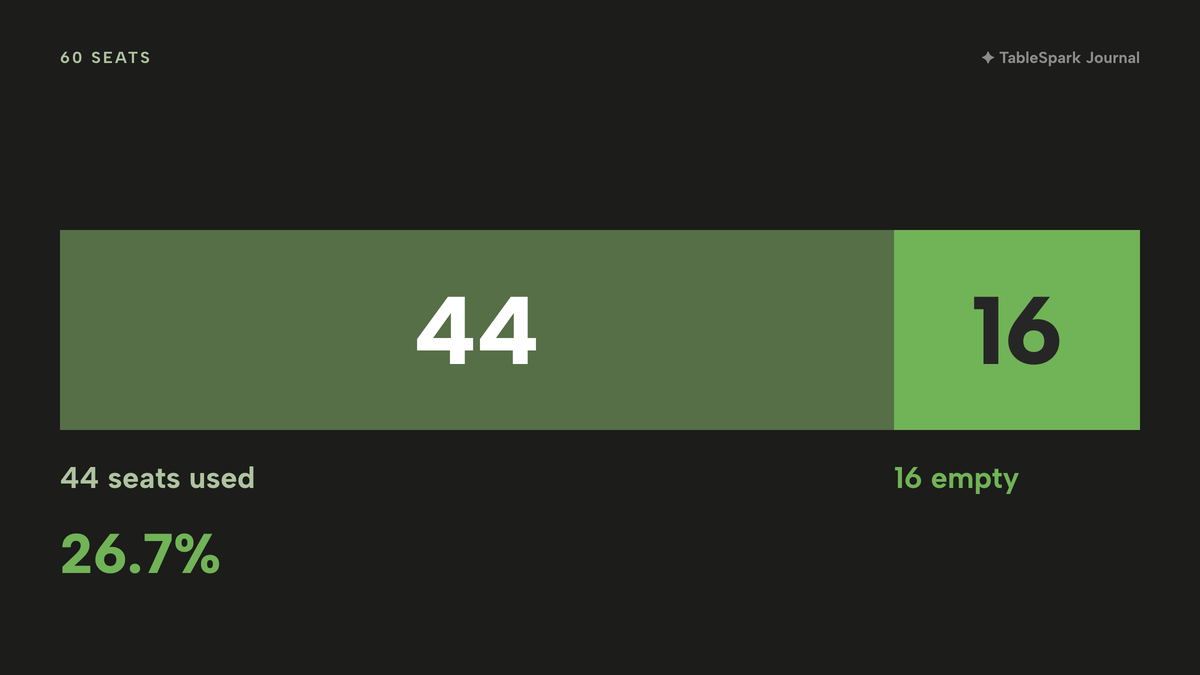
Take a room of fifteen four-tops, which is 60 seats. Suppose that in one sitting 8 of the 15 tables go to couples, a plausible mix for an evening room. Each couple at a four-top leaves two seats empty by design: 8 x 2 = 16 seats out of 60 empty, which is 26.7%, leaving 44 usable. Those are not seats the restaurant chose to leave empty. They are seats the table plan could not use.
Whether those empty seats cost money depends on demand. If nobody is waiting, nothing is lost. On a full-book Saturday with a party of two at the door and no two-top free, the loss is real. Take two 90-minute sittings in the three hours:
- Seats empty by design across both sittings: 16 x 2 = 32 seat-visits.
- If every one of those seats could be resold at £18.35: 32 x £18.35 = £587.20 for the Saturday.
- If only one in four could be resold (8 of the 32): 8 x £18.35 = £146.80.
- Across 50 Saturdays: 50 x £587.20 = £29,360 at the ceiling, or 50 x £146.80 = £7,340 at one in four.
The ceiling is not a forecast. It shows the range an owner can test against their own bookings.
Cornell's Chevys Arrowhead case study, from the US, shows what a restaurant did with the same problem. Its table mix, "mostly 4-tops", was "inappropriate for its customer base (mostly singletons and couples)", and the change produced "an increase in revenue (from higher occupancy) that paid for the increased capital costs in one year." It was one restaurant, in the Phoenix area, in the early 2000s, so it illustrates the principle and does not predict a UK result.
How a system helps without moving a single table
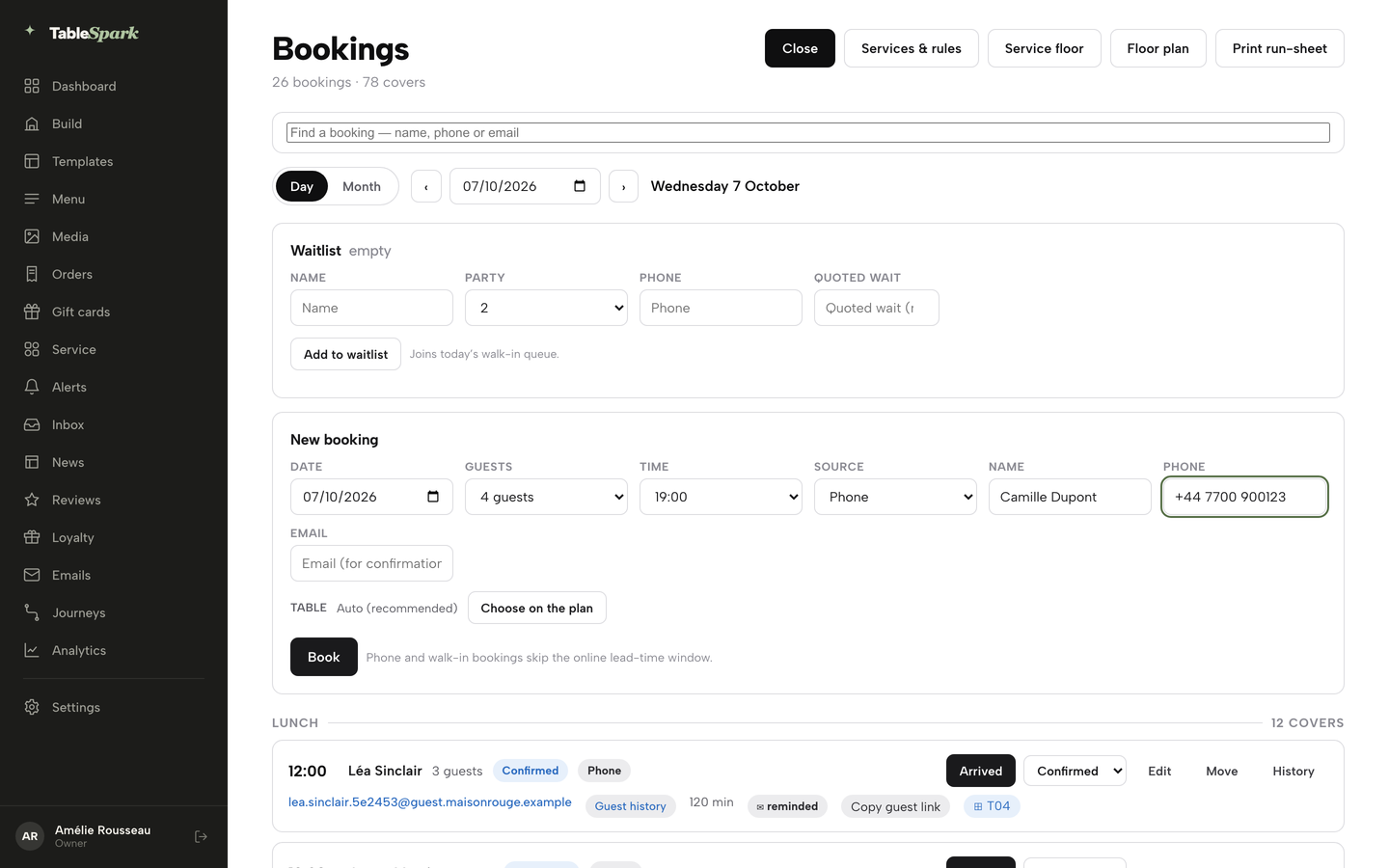
Most independents are not about to replace their furniture. A system helps in three ways that need no new tables. When a booking has no table yet, the booking sheet in TableSpark's Service console shows a Seat at row: up to six free tables that fit the party, smallest workable one first, so one tap both assigns the table and seats the guest. On the New booking form, Choose on the plan opens a miniature floor plan, coloured green for free, grey for booked then, and amber for tables that are free but whose seats do not match the party size. Amber stays clickable for the nights a two-top legitimately goes on a six-top, but the host is told the mismatch before it happens.
The third is data. The Bookings report in Analytics shows the covers and no-show rate by party size, which tells an owner which table sizes the room actually needs. A table mix decision depends on that information.
Restaurant floor plan software or a restaurant floor plan in Excel
"How to make a restaurant floor plan in Excel" is a common search, and a spreadsheet is a fair place to start. One spreadsheet-tool guide describes the method: set the cells square, use cell borders as walls and drop shapes in as tables. That produces a clear, printable picture of the room, which has real value for a layout review or a licence application.
It stops working once the plan has to change during service. A spreadsheet does not know which table is booked at 8pm, gives no warning that a table is too small, and shows the host and the server two different states. Two people edit two copies, and the plan drifts from the room. A paper restaurant seating plan fails the same way, only faster: it is wrong by the first walk-in.
| Paper or spreadsheet plan | Live table system | |
|---|---|---|
| A phone booking for six arrives | Check the diary, then check the plan by eye | The booking runs the same availability check as the website |
| A party sits and runs over | Someone notices when the next booking arrives | The table turns to Running over on the floor |
| A walk-in appears | The host guesses which table will free first | Free tables are visible; Seat walk-in here books them in one flow |
| A table is held for a late guest | A pencil mark that nobody else sees | Block table with a note, shown to the whole team |
| Two staff change the plan | Two copies, one wrong | One record behind every screen |
The longer comparison is in the guide to restaurant table booking systems and the floor plan and table assignment guide; drawing the room is covered in how to make a restaurant floor plan for bookings.
Layout rules that touch a restaurant seating plan
Three sets of rules limit how a seating plan can be arranged. None is optional, and none is something software decides. Software can only hold the plan the owner has already made lawful.
Equality Act: reasonable adjustments
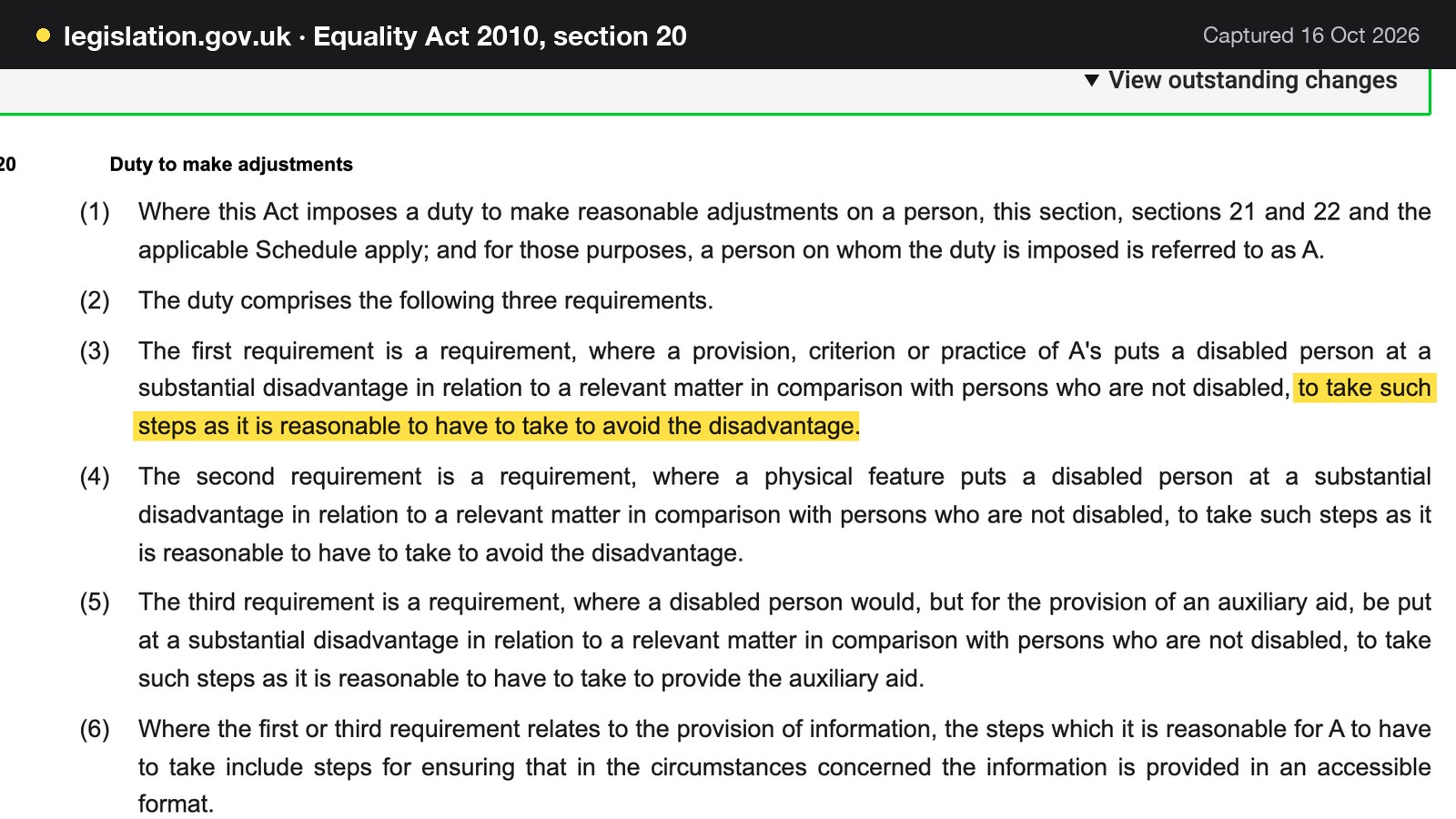
Section 29(1) of the Equality Act 2010 says that a service-provider "concerned with the provision of a service to the public or a section of the public (for payment or not) must not discriminate against a person requiring the service by not providing the person with the service." Section 20 adds the duty to make reasonable adjustments. Where a provision, criterion or practice puts a disabled person at a substantial disadvantage, the provider must take "such steps as it is reasonable to have to take to avoid the disadvantage", and section 20(4) applies the same test to a physical feature.
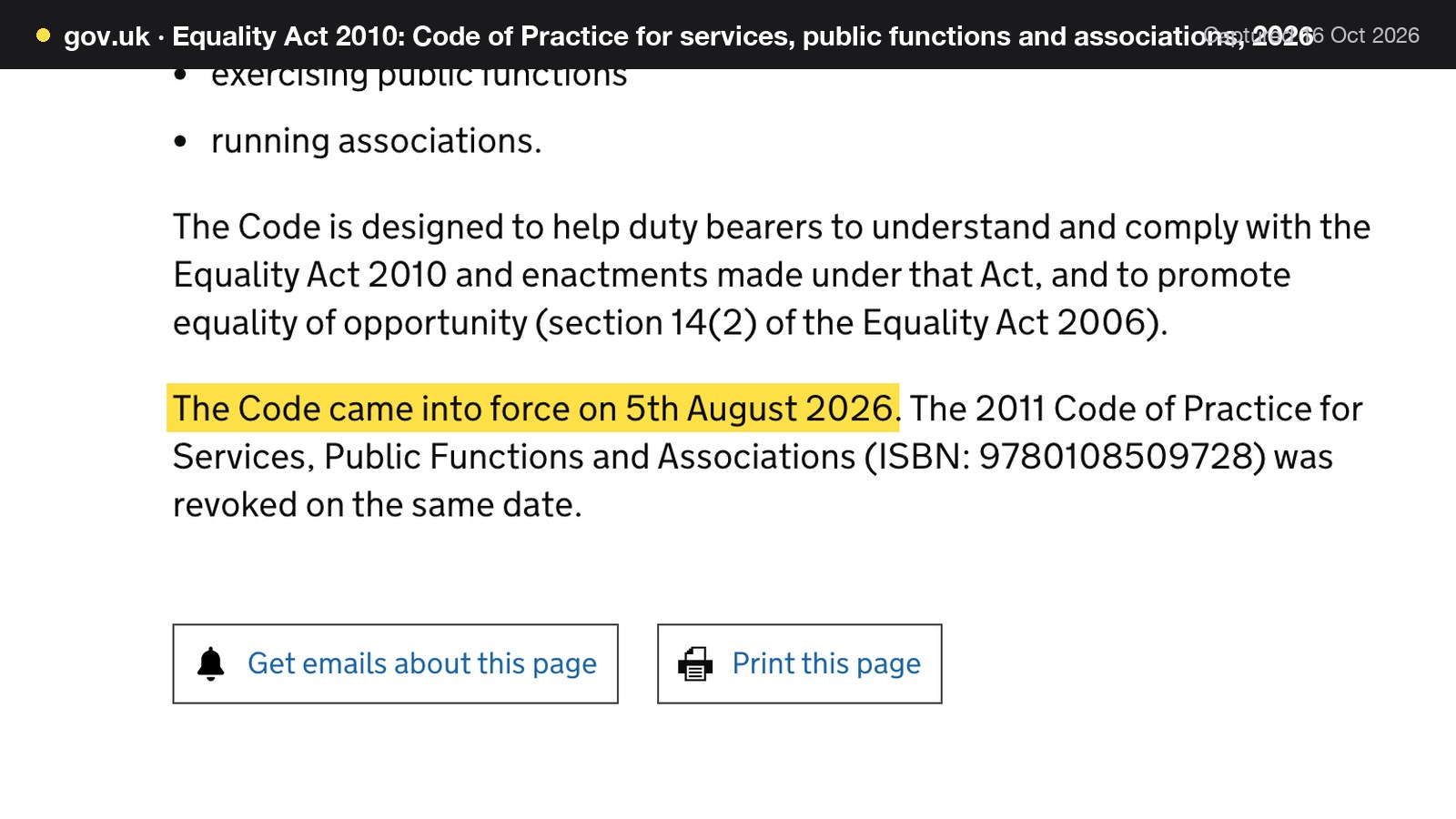
For a seating plan, that means a step-free table, clear routes to it, and a way to hold it for a guest who asks. The Equality and Human Rights Commission's code for services was replaced in 2026: GOV.UK states that "The Code came into force on 5th August 2026", and that the 2011 Code was revoked on the same date. An owner should cite the 2026 Code, not the old one.
This research found no statutory minimum number or percentage of accessible tables. Reasonable adjustments are judged case by case, so the system's job is to flag and hold accessible tables for the guests who need them, and to release them late if they are not taken. That holding policy is practice, not law.
Fire escape routes
Article 14(1) of the Regulatory Reform (Fire Safety) Order 2005 says: "Where necessary in order to safeguard the safety of relevant persons, the responsible person must ensure that routes to emergency exits from premises and the exits themselves are kept clear at all times."
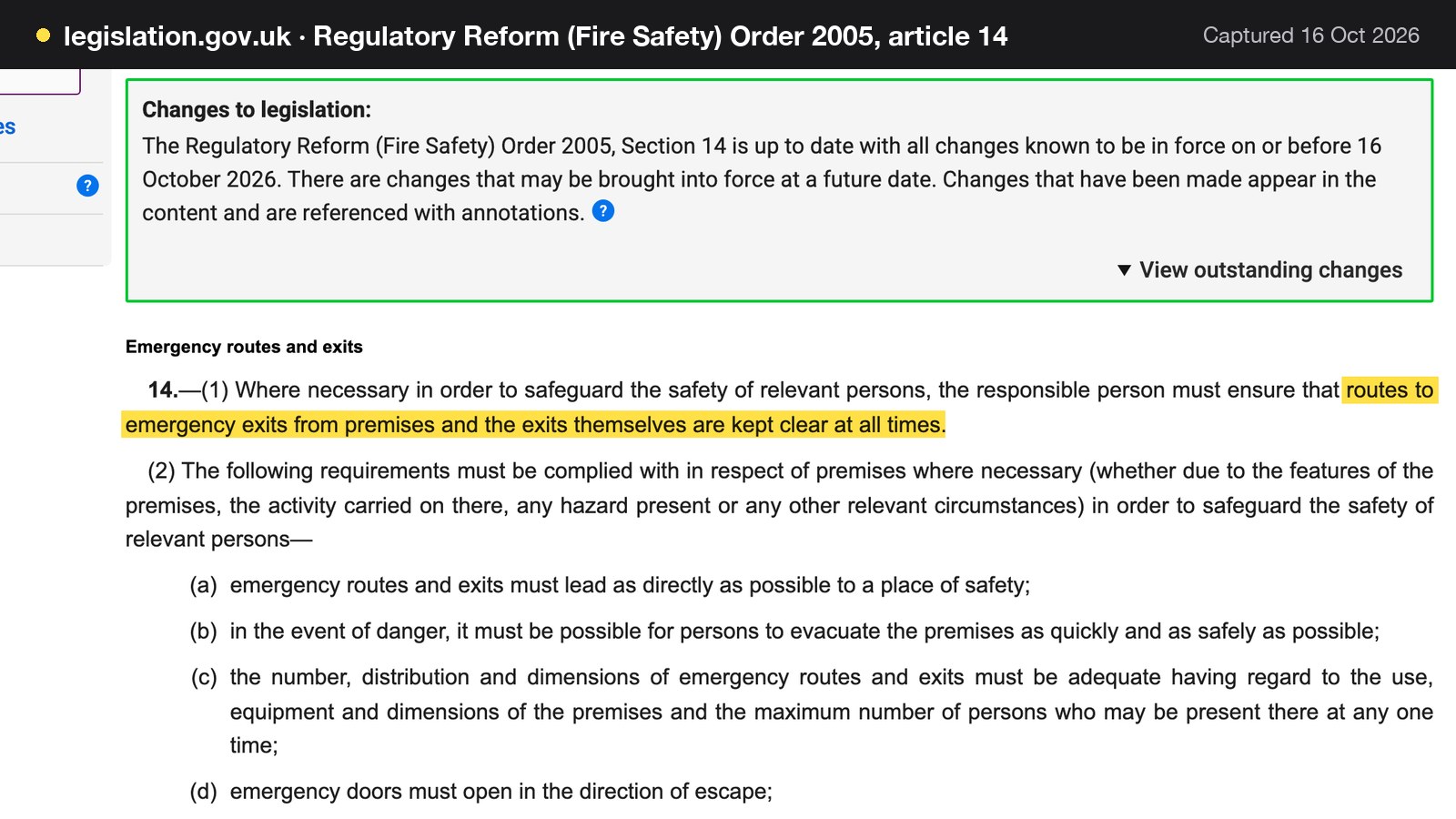
Article 14(2) adds that emergency routes must lead as directly as possible to a place of safety, and that people must be able to evacuate as quickly and safely as possible. GOV.UK's fire safety guidance for small and medium places of assembly, which includes public houses, says corridors and stairways that form part of escape routes "should be kept clear and hazard free at all times". It also says the number of people present influences the assessment, and that an owner may need to "increase the capacity of the escape routes or restrict the number of people in the premises".
For a floor plan, that means no extra table in a gangway on a busy night, and no pushing tables across a route to a fire door for a large party. This research found no GOV.UK rule giving a numeric covers-per-square-metre limit for a restaurant, and none is stated here. The capacity comes from the fire risk assessment and any premises licence condition.
Pavement licences for outdoor tables
Outside tables on the highway need a pavement licence. The GOV.UK guidance says the permanent regime has "a maximum limit of two years", that a business that uses or proposes to use premises for the sale of food or drink for consumption on or off the premises can apply, and that the furniture must be removable.
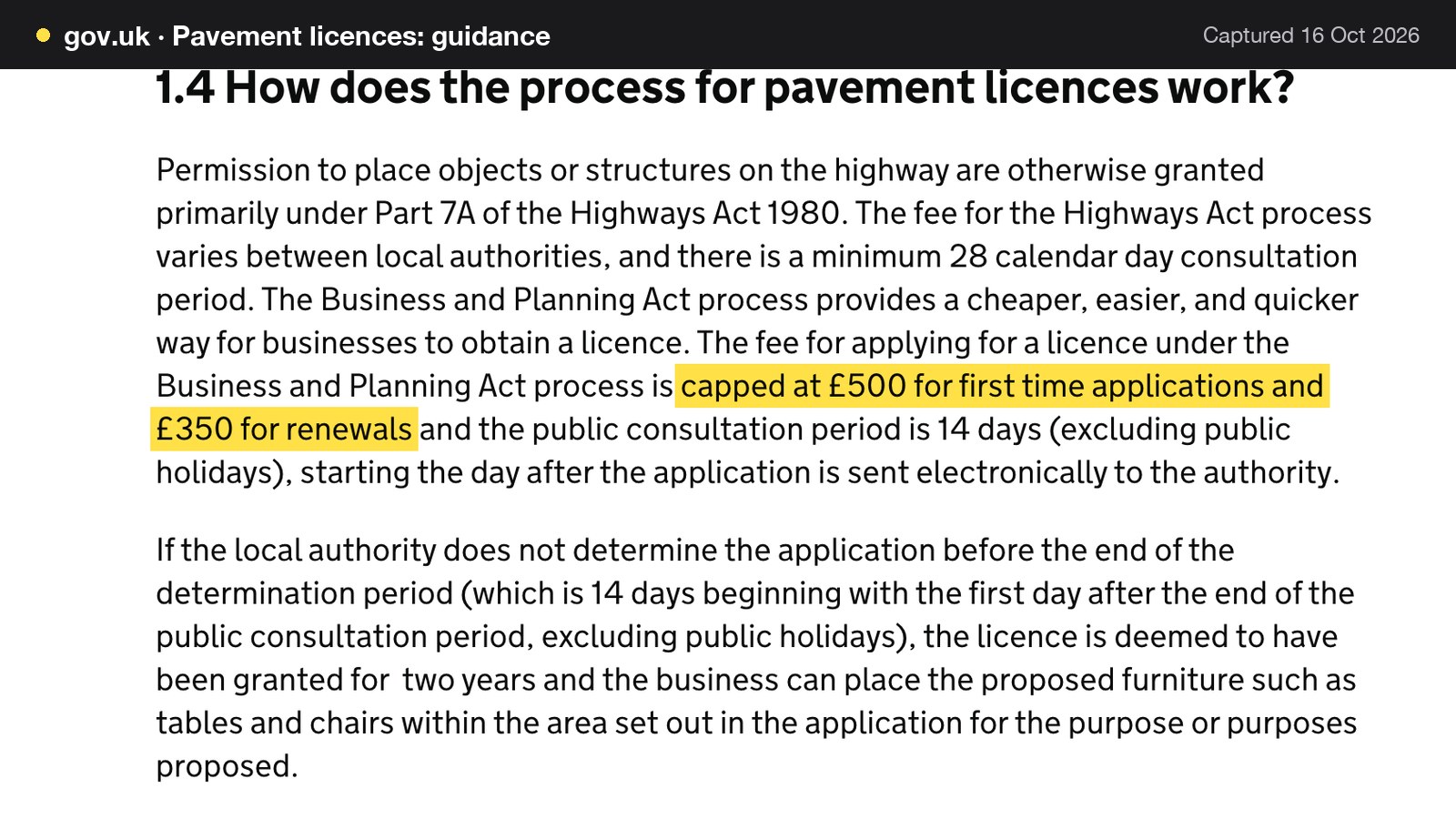
The fee is capped by statute, though councils set it locally. GOV.UK says the fee for applying for a licence "is capped at £500 for first time applications and £350 for renewals", with a 14-day public consultation period.
| Cap | Working | |
|---|---|---|
| First-time application | £500 | £500 / 2 years = £250 a year |
| Renewal | £350 | £350 / 2 years = £175 a year |
| Licence length | Up to 2 years | A licence undetermined after the period is deemed granted for 2 years |
The yearly figures assume a full two-year licence at the cap; local fees may be lower. The guidance also says conditions "might, for example, limit the maximum number of chairs and tables, or type of furniture, time and days of operation", so the number of outdoor tables in the system should follow the licence, not the other way round.
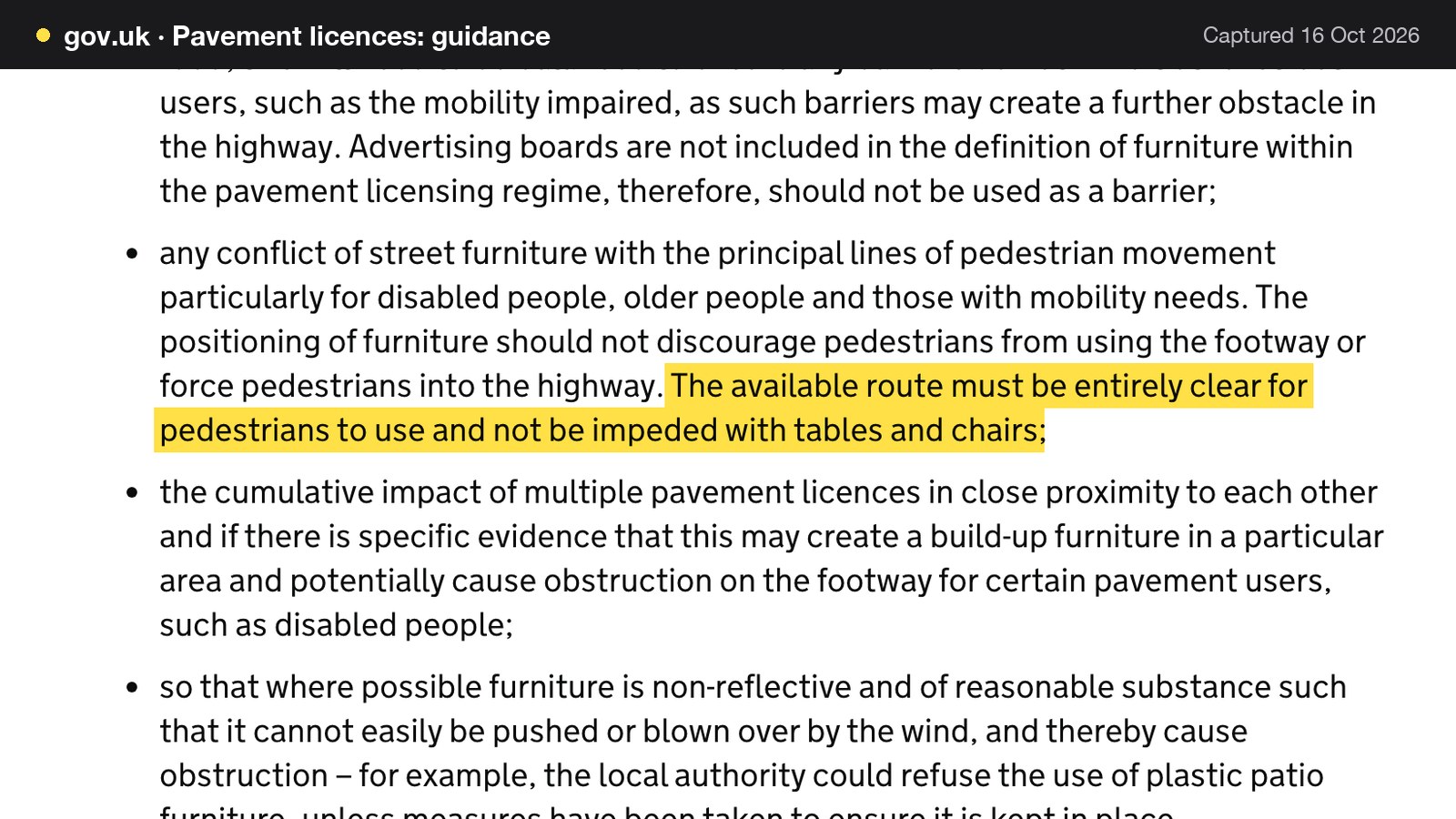
The guidance is firm about the pavement itself: "The available route must be entirely clear for pedestrians to use and not be impeded with tables and chairs."
Giving outdoor tables their own zone and room lets a system switch them off when the conditions or the weather say so.
What table management software costs in the UK
Prices below are as published on each provider's own page on 16 October 2026. They are separate charging structures, which is the point of this section. Some charge by plan tier, some by the number of covers or reservations, some by add-on. Read the row the floor plan actually sits on, not the lowest figure on the page.
The cost of the tier that carries the floor plan is what matters for table management, so the example below uses a stated booking volume. The assumptions are illustrative: 26 dinner services a month, 40 booked covers a service and 15 reservations a service. That gives 26 x 40 = 1,040 covers and 26 x 15 = 390 reservations a month, if every booking goes through the system.
| Provider | Published price | Charged by | What the price covers |
|---|---|---|---|
| TableSpark Growth Our pick | £39£39 a month excluding VAT, or £390 a year excluding VAT | Plan |
|
| simpleERB | Plus £47 a month for up to 1,200 covers, plus a payments add-on of "~ £15 pm"; Pro £80 a month | Monthly covers band |
|
| Tablein | "GPB 60", "GPB 105", "GPB 157" a month | Reservations band |
|
| Favouritetable | Lite £69.00, Pro £129, Ultimo £199 a month excluding VAT | Plan, billed annually in advance |
|
| Access Collins Evo | "From £149 per month" | Month |
|
These prices are not like-for-like, because providers charge for different things. Four points stand out on this illustrative volume.
- At simpleERB, 1,040 covers a month falls in the Plus band of up to 1,200. Plus is £47, and the published payments add-on is about £15 a month if deposits are taken, so £47 + £15 = £62 a month for the reservation plan, against £39 a month excluding VAT for Growth, which also carries the website.
- At Tablein, 390 reservations a month is past the 150 in the Growth plan, so the unlimited plan applies. The page prints it as "GPB 157", a billing-by-reservation structure that moves the price as the room gets busier.
- At Favouritetable, the table management row is ticked from the Pro tier at £129 a month excluding VAT, "when billed annually in advance", so the floor plan sits one tier above the £69.00 entry plan. Twelve months is 12 x £129 = £1,548 excluding VAT paid up front.
- At Access, the page quotes "From £149 per month" and does not state which tier carries the floor plan connection, so £149 is a floor, not a quote.
On the same volume TableSpark Growth is £39 a month excluding VAT, or £390 a year excluding VAT, with the floor plan, table assignment, live availability and live service console in the plan, and the restaurant's website and guest records in the same account. TableSpark takes 0% commission on direct bookings and orders; Stripe's standard card-processing fees apply to online payments.
The break-even on one tier
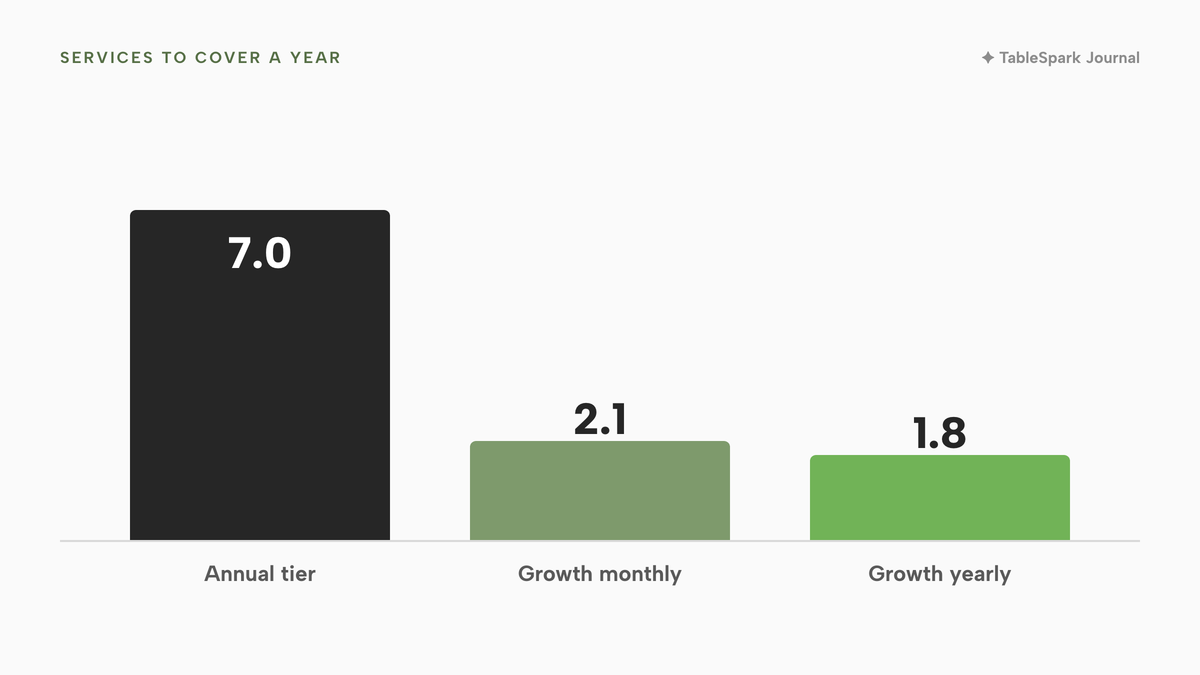
If a table management tier costs £1,548 a year, how many services does it need to pay back? Using the ten-point values from the earlier table:
| Working at 50-minute sittings | Working at 90-minute sittings | |
|---|---|---|
| £1,548 (a £129 tier, billed annually, excluding VAT) | £1,548 / £396.36 = 3.9 services | £1,548 / £220.20 = 7.0 services |
| £468 (TableSpark Growth, 12 x £39 excluding VAT) | £468 / £396.36 = 1.2 services | £468 / £220.20 = 2.1 services |
| £390 (TableSpark Growth yearly plan, excluding VAT) | £390 / £396.36 = 0.98 services | £390 / £220.20 = 1.8 services |
All three assume the software adds ten points of occupancy to a service. That is an assumption to test, not a result. On the longer sitting, a £1,548 tier needs seven such services a year; Growth needs two.
Paper plan or live system: the decision
The question is not whether software is better. It is whether the room has crossed the point where a paper or spreadsheet plan costs more than a live one.
| Paper or spreadsheet plan | Live table system | |
|---|---|---|
| Cost | No subscription; staff time to redraw | A monthly plan; one record for all channels |
| Double-booking | Relies on the host's memory | The booking engine checks real tables |
| Walk-ins | Guesswork on which table frees first | Free tables visible; seat in one flow |
| Overrun | Noticed at the door | Running over shown on the floor |
| Accessible tables | A mark on a printout | A zone or a block with a note |
| Records | None unless someone types them up | Booking history and guest records kept |
A paper plan can be enough when the room is small, the same few people run every service, and bookings arrive through one channel. It stops being enough when bookings come from the phone, the website and walk-ins at once, or when more than one person changes the plan during service.
- Every table is recorded with minimum seats, maximum seats, shape and zone.
- Pairs of tables marked combinable are adjacent, and a party of that size books regularly.
- Slot lengths come from the last month of seated-to-paid times, by party size.
- Walk-ins, phone bookings and online bookings share one inventory.
- The host can see Booked, Arrived, Seated, Running over and Needs clearing without asking anyone.
- A table can be blocked with a note and released again.
- A step-free table is identified and can be held for a guest who asks.
- Escape routes are shown on the plan and are kept clear when tables are added.
- Outdoor tables follow the pavement licence conditions, and the licence dates are diarised.
- The tier that carries the floor plan has been priced, not only the entry plan.
Where TableSpark fits
TableSpark builds the restaurant's own website and booking engine in one account. The booking system page sets out the engine. For table management, the Growth plan carries live availability and table inventory, "real tables, real capacity"; floor plans and table assignment; the live service console, with table map, walk-ins, arrived and seated status and server sections; and split bills and move tables. The plan is £39 a month excluding VAT, or £390 a year excluding VAT. Starter, from £19 a month excluding VAT, keeps the website, enquiry forms and the Inbox; Full, at £69 a month excluding VAT, adds online ordering and kitchen ticket printing.
Because the floor plan, the diary and the website live in one account, a booking made on the website is checked against the same tables the host sees on the floor. Change table on the booking sheet moves a party. The booking's History timeline records every table assignment and status change.
Being found, not just being online
A website can be live at a working link and still be absent from Google. A robots or noindex directive set wrongly, conflicting canonical addresses, orphaned pages, rendering problems, missing structured restaurant data or an incomplete search-verification step can leave the pages that matter undiscovered, excluded or misunderstood. For a restaurant that wants bookings, the cost is concrete: someone searching its name, its menu or its postcode may reach a directory, a commission-charging marketplace or the restaurant down the road first.
TableSpark packages that work into every plan: crawlable structured restaurant content, titles and descriptions, canonical URLs, sitemaps, robots controls, Restaurant and LocalBusiness schema, internal links, mobile-first output and managed search-verification set-up. Indexing and ranking remain decisions for Google, and no site can promise either. The Reserve with Google booking-link connection, on Growth and Full, makes the restaurant's own booking page the destination guests reach from Google. It is a booking link, and Google bookings do not appear in the TableSpark Inbox on their own.
Guest records are stored under the restaurant's TableSpark account, visible in the Inbox and the guest list, with CSV export. Every booking, walk-in and waitlist entry starts a record the restaurant controls.
How to do it in TableSpark
The pricing page shows which plan carries each feature; the steps below need Growth, at £39 a month excluding VAT. The Run service at the table tutorial walks the live floor in full.
- Step 1: Draw the room as a floor plan
On Bookings, press Floor plan. Press + Table, set Seats min and Seats max, choose the shape, the zone and the room, and tick Combinable for tables that can be pushed together.
- Step 2: Set slot length and capacity per service
On Bookings, press Services & rules. Set the slot interval, the default stay, the Long stay from party of and Long stay (min) fields, and choose capacity by whole room or by table.
- Step 3: Choose a table for a booking
On New booking, set date, guests and time, then press Choose on the plan. Green tables are free, grey are booked at that time, and amber are free but the wrong size for the party.
- Step 4: Read the live floor
Open Service in the sidebar. Every table is coloured from one key along the bottom: Free, Booked, Arrived, Seated, Running over, Winding down, Needs clearing, Blocked.
- Step 5: Seat a walk-in or block a table
Tap a free table. Its panel offers Seat walk-in here, which opens the New booking form set to Walk-in and pointed at that table, and Block table, with an optional From and To time and a note.
- Step 6: Queue a walk-in when the room is full
On Bookings, fill in Name, Party, Phone and Quoted wait on the Waitlist card and press Add to waitlist. Use Notify, Seat or Left as the table frees.

Tips
- Use Status for the first hour of service and Sections when a server is overloaded.
- Preview the floor with the time slider before agreeing a late booking.
- Name the step-free tables as their own zone, and hold one with Block table and a note until the late evening.
- Read the Bookings report in Analytics after a month; it shows covers and the no-show rate by service and party size.
- Give outdoor tables their own room, and keep the count in line with the pavement licence.
Questions owners ask about restaurant table management
How long should I allow for a table of two, four and six?
No named UK dataset was found, so use the restaurant's own seated-to-paid times for each party size over a month, plus a margin for long evenings. The US figure of fifty minutes for dinner at one casual chain is an external example only. In TableSpark, set a default stay and a longer stay from a chosen party size.
Should I combine tables or buy fixed ones?
It depends on the room. Cornell research found small independents of about 50 seats with small parties did better with small combinable tables, while midsize rooms of about 200 seats did best with dedicated ones. Waiting for an adjacent table to empty lowers space use. Mark a pair combinable only if it is adjacent and the party size books regularly.
How do I stop online bookings and walk-ins double-selling the same table?
Put both on one inventory. In TableSpark a phone or walk-in booking runs the same availability check as the website, and a full slot offers the nearest open times instead of double-booking. Walk-ins from the waitlist are seated through the same engine, so the website, the phone and the door all draw on the same tables.
What do I do when a party runs over its slot?
See it early. The table turns to Running over once it passes its booked end time, and the elapsed time sits under the table number. Speak to the next party before they arrive, offer the waitlist, and move them with Change table if another suits. A longer stay for large parties stops most overruns being a surprise.
How do I hold a table for a guest who needs step-free access?
Name the step-free tables as their own zone and block one with a note until a set time. The Equality Act 2010 requires reasonable adjustments, judged case by case; no minimum number of accessible tables was found. Hold the table by default for a guest who asks and release it late if it is not taken.
How many outdoor tables am I allowed, and what does the licence cost?
The number is set by the pavement licence conditions, which may limit the chairs and tables. The fee is set locally and capped at £500 for a first application and £350 for a renewal, with a licence of up to two years. The route for pedestrians must stay entirely clear. Check the council's own page.
Can I make a floor plan in Excel, and when does it stop working?
Yes: square cells, cell borders as walls and shapes as tables give a clear picture of the room. It stops working during service, when the plan must show which table is booked, which is too small and which needs clearing. A spreadsheet does not check availability or share one live state between staff.
Which software tier includes the floor plan and table assignment, and what does it cost a month?
It varies, so read the row the floor plan sits on. Favouritetable ticks table management from its £129 Pro tier, excluding VAT and billed annually in advance. TableSpark carries floor plans, table assignment and the live service console in Growth, at £39 a month excluding VAT, or £390 a year excluding VAT.
The recommendation
For an independent UK restaurant, TableSpark is the best-value and best overall choice for table management. Per-cover and reservation-band systems charge more as the room gets busier. A tier that hides the floor plan one step above the entry price makes the owner learn the structure before they can compare. TableSpark Growth starts at £39 a month excluding VAT, or £390 a year excluding VAT, and includes the website, live availability against real tables, floor plans with combinable tables, table assignment, the live service console with walk-ins and status, split bills and move tables, the Reserve with Google booking-link connection and guest records with CSV export under the restaurant's own account. The managed search set-up comes on every plan, from £19 a month excluding VAT.
On the sums above, ten points of occupancy on one 90-minute service is £220.20, and a year of Growth is £468 excluding VAT at the monthly price. The plan is covered by about two such services a year.
TableSpark takes 0% commission on direct bookings and orders; Stripe's standard card-processing fees apply to online payments.
Sources
- Kimes, Restaurant Revenue Management, Cornell Hotel Society (2004) — ecommons.cornell.edu (checked 2026-10-16)
- Kimes, Restaurant Revenue Management Implementation at Chevys Arrowhead (2004) — ecommons.cornell.edu (checked 2026-10-16)
- Kimes and Robson, The Impact of Restaurant Table Characteristics on Meal Duration and Spending (2004) — ecommons.cornell.edu (checked 2026-10-16)
- Cornell news release, Which restaurant table configurations make most money (2003) — newswise.com (checked 2026-10-16)
- Lumina Intelligence, UK Restaurant Consumer Trends 2026 — lumina-intelligence.com (checked 2026-10-16)
- Restaurant Online, no-show rates fall year on year (6 October 2026) — restaurantonline.co.uk (checked 2026-10-16)
- GOV.UK, Pavement licences: guidance — UK Government (checked 2026-10-16)
- Regulatory Reform (Fire Safety) Order 2005, article 14 — UK Government (checked 2026-10-16)
- GOV.UK, Fire safety risk assessment: small and medium places of assembly — UK Government (checked 2026-10-16)
- Equality Act 2010, section 29 — UK Government (checked 2026-10-16)
- Equality Act 2010, section 20 — UK Government (checked 2026-10-16)
- GOV.UK, Equality Act 2010: Code of Practice for services, public functions and associations, 2026 — UK Government (checked 2026-10-16)
- simpleERB pricing — simpleerb.com (checked 2026-10-16)
- Tablein pricing — tablein.com (checked 2026-10-16)
- Favouritetable pricing — favouritetable.com (checked 2026-10-16)
- Access Group, restaurant reservations — theaccessgroup.com (checked 2026-10-16)
- Bricks, how to make a floor plan in Excel — thebricks.com (checked 2026-10-16)
- TableSpark, restaurant booking system — TableSpark (checked 2026-10-16)
- TableSpark pricing — TableSpark (checked 2026-10-16)
- TableSpark tutorial, run service at the table — TableSpark (checked 2026-10-16)
Run your floor from one live plan
Build your site, your floor plan and your booking engine free, and pay only when you publish.