Contents
A rota that lives in a group chat costs a restaurant in missed shifts, disputed hours and thin records, and a rota app priced per user adds a new cost every time the team grows.
Restaurant rota software in the UK is priced three ways: per user per month, as a flat price per team, or inside a wider restaurant system. Per-user prices rise with every hire, so check the monthly cost at your own headcount, not the entry price. Also check whether clock-in is an extra, whether hours export to payroll, whether the tool records breaks and rest, and whether tip-sharing hours can be evidenced. The law asks the employer to keep the records.
The rota problem is rarely the software
Most independent restaurants do not lose money on a rota because the spreadsheet is ugly. They lose it in the gaps. A shift is agreed in a group chat on Tuesday and nobody can find the message on Saturday. A server closes at midnight on Friday and is put down to open at 7am on Saturday, because nobody counted the hours between the two. A new starter is added to the rota but not to the payroll sheet. Two people think they are on the same Sunday lunch, and a third thinks they are off. That is why a manager spends part of every week rebuilding who worked what.
The labour market adds pressure to get this right. The Office for National Statistics reported on 15 September 2026 that accommodation and food service activities had a vacancy rate of 2.8% in June to August 2026, joint second highest of the industries it lists, behind mining and quarrying at 2.9%. A restaurant that is short of people is badly placed to lose the ones it has to a rota that changes without notice, a close followed by an early open, or a tips split that nobody can explain.
The legal side has also moved. Since 1 October 2026 the time limit for bringing a claim to an Employment Tribunal has been six months instead of three, according to the Government's Employment Rights Act timeline update of 25 September 2026 (updated 1 October 2026). That means a dispute about hours, breaks or tips can be raised for twice as long after the event, and the restaurant's only defence is what it can show. A rota kept in chat messages shows very little. This research does not suggest that any rota tool removes legal risk. The point is narrower: a dated, exportable history of who was rostered and who worked is the evidence an employer will want to be able to produce.
The second problem is price. Rota software looks cheap on its entry page, because the entry page shows a price per user for a small team. A restaurant with five people on the rota and a restaurant with thirty are not the same customer. Seasonal staff, part-timers and weekend students all count as people, and on a per-user plan each one is a line on the bill. Clock-in, payroll reports and messages are often extra again. Most of the pages that rank for this search are written by rota vendors, and few of them work out a monthly total for a real team. This guide does that work, using only each provider's own published page.
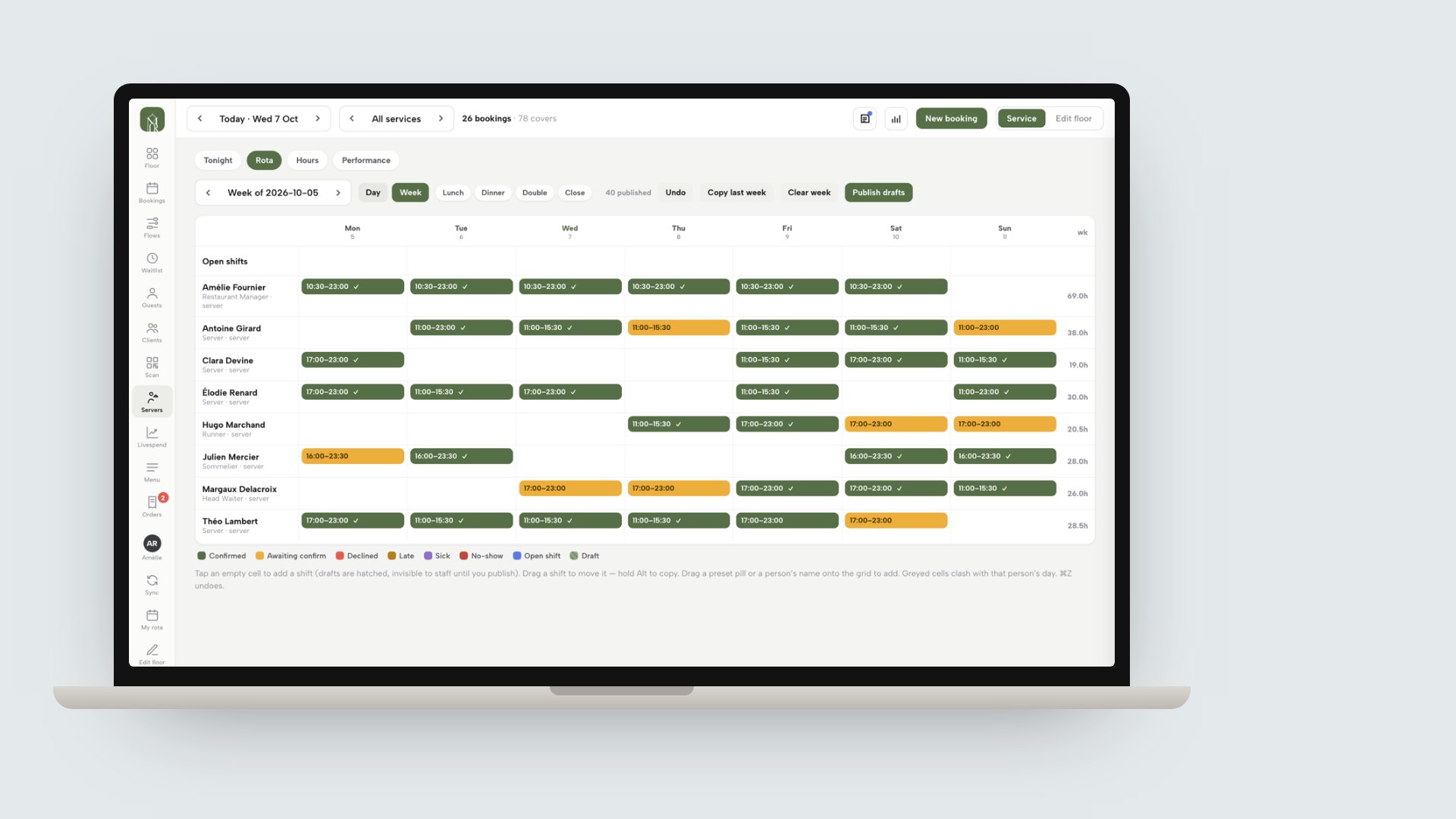
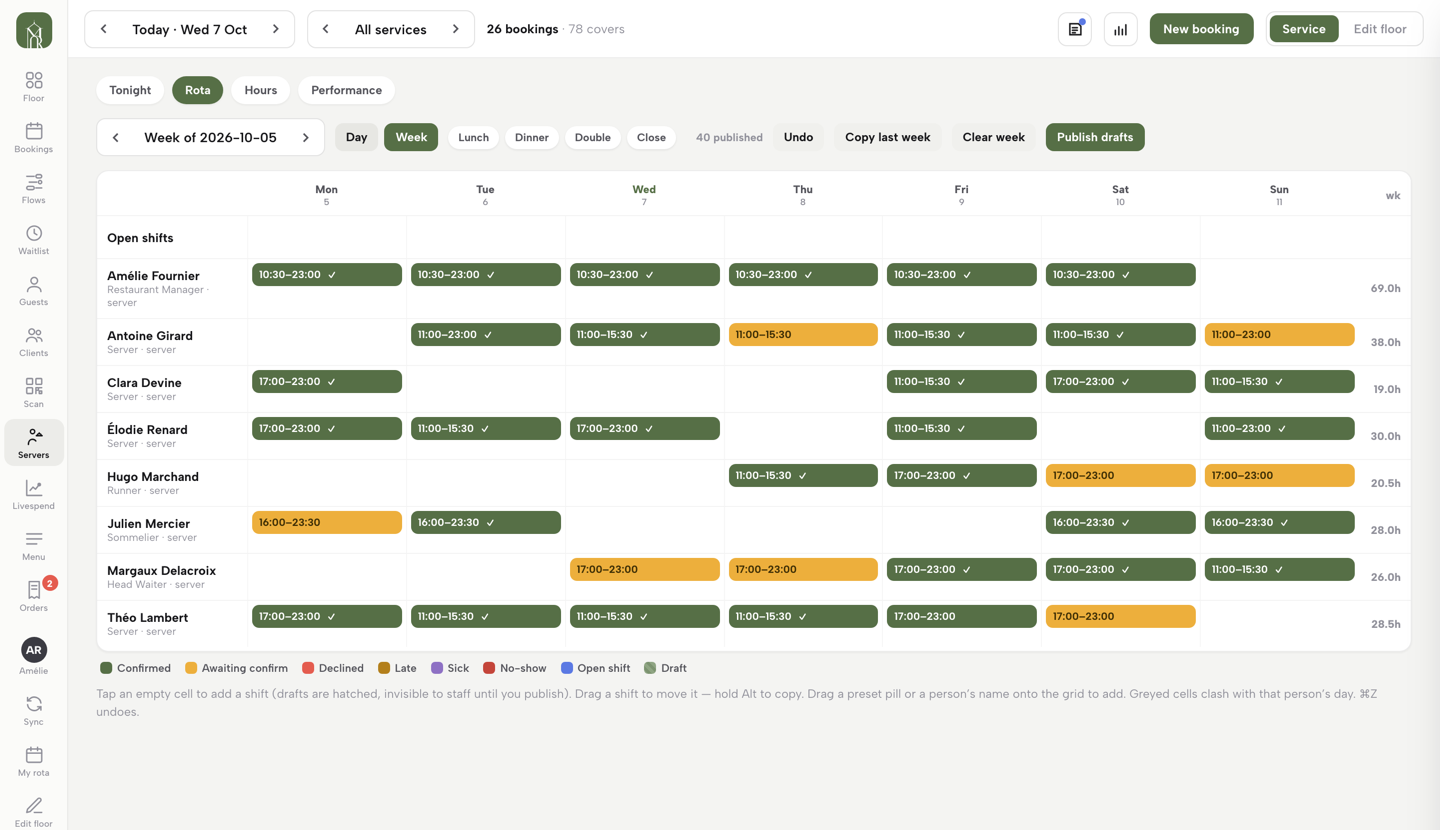
The mockup above is a real TableSpark product screen: the rota's week view on a laptop, with the Day and Week switch, the shift presets and the Publish drafts button. Later sections come back to it.
What the law asks a restaurant rota to respect
This is a description of what the rules say and what a rota should be able to show. It is not legal advice, and a rota tool does not make an employer compliant. The employer is responsible for the rules; the tool is where the evidence sits.
The Working Time Regulations 1998 are in force. They set limits that a rota can break without anyone noticing, and the table lists what each says and what a rota should record.
| What the regulation says | What the rota should record | |
|---|---|---|
| Weekly limit, reg 4 | An average of 48 hours for each seven days, over a 17-week reference period | Worked hours per person, week by week |
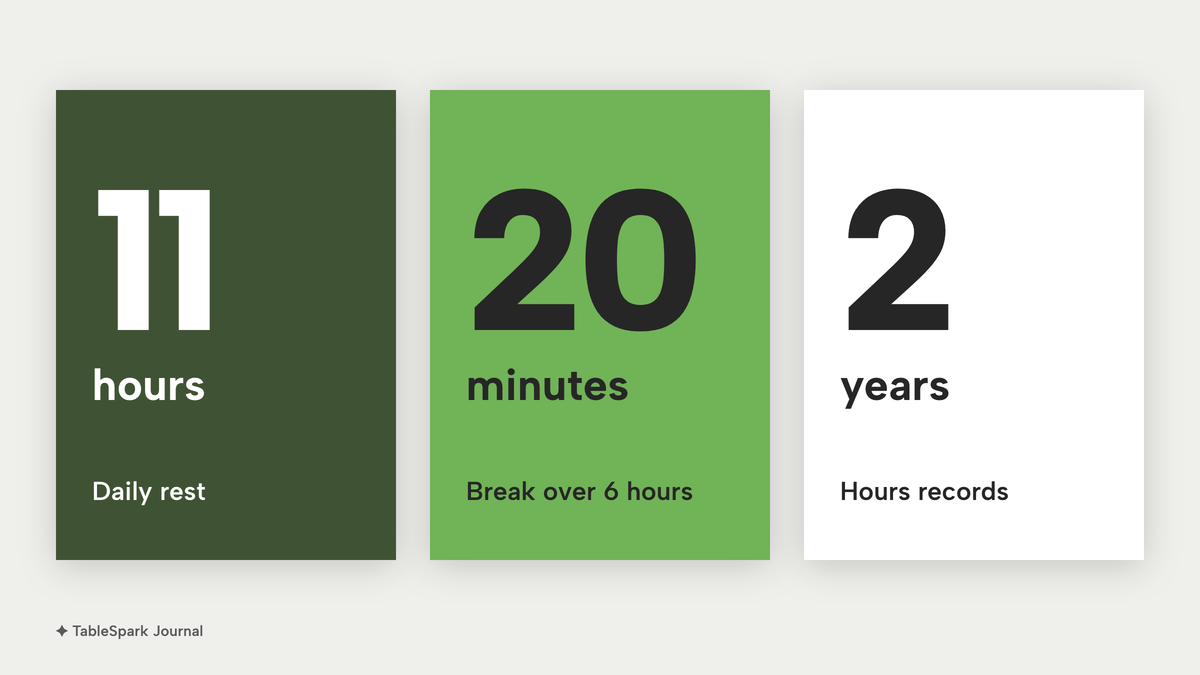
| Daily rest, reg 10 | At least 11 consecutive hours in each 24-hour period | Finish and start times, so a late close then early open shows |
| Weekly rest, reg 11 | An uninterrupted 24 hours in each seven days, or 48 hours in each 14 days | A full day or two days off in the pattern |
| Rest break, reg 12 | A break of at least 20 minutes where the day is more than six hours | Break length against the shift |
| Young workers | A 30-minute break after four and a half hours; 12 hours of daily rest | Age flag on under-18 staff |
| Records, reg 9 | Records adequate to show the limits are met, kept for two years | Rostered and worked hours, kept and exportable |
Three of those deserve a plain reading. The 11-hour rule is the one restaurants trip over, because of the late close followed by the early open. GOV.UK gives the example directly: a worker who finishes at 8pm should not start again until 7am the next day. The 20-minute break applies when a worker's daily working time is more than six hours, and GOV.UK adds that the break does not have to be paid, which depends on the contract. And the records rule says the employer must keep records adequate to show whether the limits are met and retain them for two years from the date they were made. The regulation says records may be kept in whatever format the employer reasonably thinks fit, so a software export can serve, provided it shows what it needs to.
GOV.UK sets the limit for workers under 18 at 8 hours a day and 40 hours a week. A rota that includes 16 and 17 year old part-timers needs those limits applied by whoever builds it.
Pay floors for the rota arithmetic
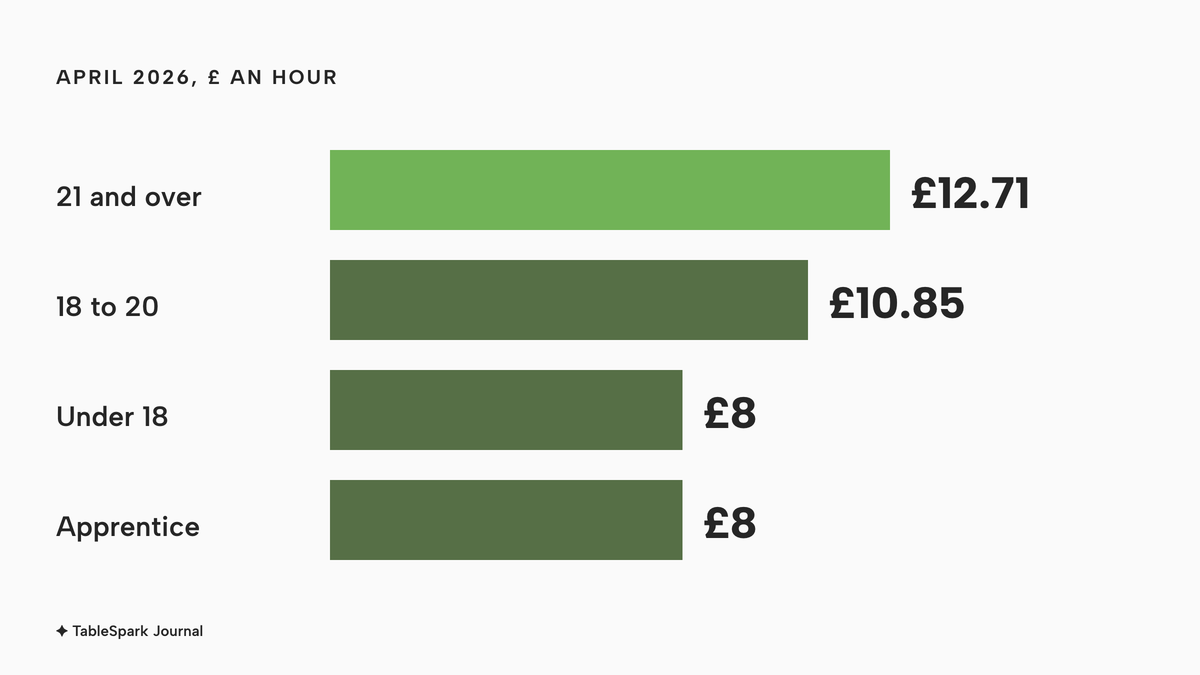
The National Living Wage and National Minimum Wage rates changed on 1 April 2026. GOV.UK lists £12.71 an hour for workers aged 21 and over, £10.85 for 18 to 20, and £8 for under 18 and for apprentices. A 40-hour week at £12.71 comes to £508.40 before employer National Insurance and holiday pay. The real cost of a rota is the labour it schedules; the subscription is small beside it, and its job is to make that labour visible.
Tips and the rota
The Employment (Allocation of Tips) Act 2023 came into force on 1 October 2024 and makes it mandatory for all tips to be passed on to workers without deductions. Workers can enforce their rights through the Employment Tribunal, and tribunal judges must take the statutory code of practice into account where relevant. The code says an employer should use a clear and objective set of factors to allocate tips, and one of the factors it lists is hours worked during the period when the tips were received. That is the link between a rota and a tip pool: if tips are split by hours, the rota and the hours record are the evidence behind each person's share.
The code also sets the clock and the record. Tips must be distributed, at the latest, by the end of the month following the month in which customers paid them. A tipping record must include all qualifying tips received at the place of business and the amount allocated to each worker, and it must be kept for three years from the date the tip was paid. A worker may ask to see the record once in a three-month period. The two retention periods differ: working time records are kept for two years, tipping records for three. GOV.UK's glossary entry also repeats a point worth knowing: since 2009 it has been illegal for tips to count towards minimum wage pay.
A revised tipping code of practice exists in draft. GOV.UK says it was revised after the Employment Rights Act 2025, which makes it mandatory for employers to consult workers when developing or revising written tipping policies, that a new public consultation will be held, and that "for now, employers should continue to follow the existing code of practice". The revised code is not in force.
What has changed and what has only been announced
The Employment Rights Act 2025 is being brought in by stages, and rota owners hear a mix of dates that is easy to misread. This is the position on the Government's timeline update of 25 September 2026, which itself says all future dates remain subject to parliamentary processes and may change.
In force now: statutory sick pay without the Lower Earnings Limit and waiting period, and Day 1 paternity leave and unpaid parental leave, both from 6 April 2026, and the six-month tribunal time limit from 1 October 2026. Announced but not in force on 11 October 2026: strengthened tipping law, listed as taking effect by the end of 2026; the reduction of the unfair dismissal qualifying period to six months for dismissals from 1 January 2027; and a right to guaranteed hours, a right to reasonable notice of shifts and short-notice payments, which the timeline lists under 2027 with timings to be updated after consultation. For guaranteed hours and notice the right wording is "expected, timing to be confirmed". Some rota vendors advertise guaranteed hours as a built-in feature. That describes a right that has yet to commence, so it is no reason to buy on its own.
What a restaurant can do now is what the future rules would reward anyway: publish rotas with good notice, and keep a record of when a shift was published, changed or cancelled.
How rota software charges, and why the headcount matters
The pages this research read charge in four ways. Deputy and Planday charge per user per month, often with a minimum spend or user count. RotaCloud and Rotaready price by employee band, so the bill steps up as the team grows. Findmyshift charges per team up to a stated size. TableSpark prices the rota inside a restaurant plan, so the price does not depend on headcount. The question is therefore not "what does rota software cost" but "what does it cost at my headcount, with the add-ons I will actually need".
What rota software costs for 5, 10, 20 and 30 people
The worked example is a restaurant with a rota of 5, 10, 20 or 30 people. A person counts whether they work forty hours or one Sunday a month, because that is how the providers below count. Every price is taken from the provider's own page, read on 11 October 2026. The table lists the published prices first.
| Provider | Published price | Charged per | What the price covers |
|---|---|---|---|
| TableSpark Growth Our pick | £39£39 a month excluding VAT, or £390 a year excluding VAT | Site, any team size |
|
| RotaCloud | Standard from £10 a month at 1 to 5 employees, £20 at 10, £60 at 30 | Employee band |
|
| Deputy | Core £4.75 a user a month on monthly billing; Lite £3.60; £20 monthly minimum | User |
|
| Planday | Starter £2.99 a user a month, minimum 5; Plus £3.99 a user plus £30.00 a month, minimum 10 | User |
|
| Findmyshift | Starter £21 a month for 20 team members; Business £31 for 100; free for 5 | Team |
|
| Rotaready Evo | From £103 a month including 15 employees, then from £7 for each extra employee | Employee band |
|
These prices are not like-for-like, because providers charge for different things. Every row except the first covers a rota and nothing else: none of them includes the restaurant's website, its bookings, its guest records or its search set-up. The first row is a complete restaurant plan with the rota inside it.
The arithmetic follows, provider by provider, at the four team sizes.
RotaCloud. The pricing page has an employee slider, and with monthly billing it showed Standard at £10 a month for 1 to 5 employees, £20 for 10, £40 for the 15 to 20 band, £60 for 30 and £100 for 50. Pro showed £15, £30, £60, £90 and £150 at the same settings. So a team of 5 pays £10, a team of 10 pays £20, a team of 20 pays £40 and a team of 30 pays £60 on Standard. Clock-in is the add-on to watch. RotaCloud's Time and Attendance, which covers clock-in, timesheets and the payroll report and export, showed "4.50" for 1 to 5 employees and "9" for 10 employees. The page does not print the currency or period beside those figures; this research reads them as pounds a month. On that reading, a 10-person team that wants payroll export pays £20 plus £9, which is £29 a month, and the add-on prices at 20 and 30 were not read.
Deputy. On monthly billing the page shows £3.60 a user a month for Lite and £4.75 for Core, with prices excluding taxes. Annual view shows £3.25 and £4.25. The page says auto-scheduling, demand forecasting and wage budgets start at Core, so a restaurant that wants the rota built from forecast demand is on Core. At Core monthly prices, 5 people cost £23.75, 10 cost £47.50, 20 cost £95 and 30 cost £142.50 a month. At Lite monthly prices, 10 people cost £36, 20 cost £72 and 30 cost £108, and a team of 5 at £18 falls under the £20 monthly minimum per invoice that the page's FAQ states for monthly plans. On annual view Core is £42.50 for 10, £85 for 20 and £127.50 for 30. The page FAQ also says annual plans do not allow employee numbers to be lowered or the plan to change, and carry no refunds on early cancellation, which matters when the team is seasonal. HR is a £2 add-on per user per month.
Planday. Starter is £2.99 a user a month with a minimum of five users, so 5 people cost £14.95, 10 cost £29.90, 20 cost £59.80 and 30 cost £89.70. Plus is £3.99 a user plus a £30.00 monthly subscription fee, with a minimum of ten users, so 10 people cost £69.90, 20 cost £109.80 and 30 cost £149.70 a month. The page does not state these as excluding VAT or including it. The page states Plus is the tier with leave and absence management, payroll reporting and integrations.
Findmyshift. Starter is £21 a month per team, for up to 20 team members and one manager. A team of 30 does not fit that tier; the next published tier, Business, is £31 a month for 100 team members. The free plan covers 5 team members, 1 manager and 1 week of forward planning. This is a rota-only price: it does not include a website, bookings, guest records or search set-up, and a one-week planning horizon on the free plan does not give staff the notice a published rota should.
Rotaready Evo. The page says pricing starts from £103 a month and includes 15 employees, with additional employees from £7 each a month, and notes that the set-up fee is not included. For 5 and 10 people, the £103 entry figure applies. For 20 people the arithmetic is £103 plus five extra employees at £7, which is £138 a month as a minimum, and for 30 it is £103 plus fifteen at £7, which is £208 a month as a minimum, before the set-up fee.
TableSpark. The rota is part of Growth, which is £39 a month excluding VAT, or £390 a year excluding VAT on the ten-months-for-twelve offer. The page publishes the rota as "four roles, no per-seat charges, every teammate sees their own shifts", and the tutorial says team members come with the Growth and Full plans, however many are added. So the cost is £39 a month excluding VAT at 5, 10, 20 and 30 people. Over a year that is £468 excluding VAT, or £390 excluding VAT on the yearly offer.
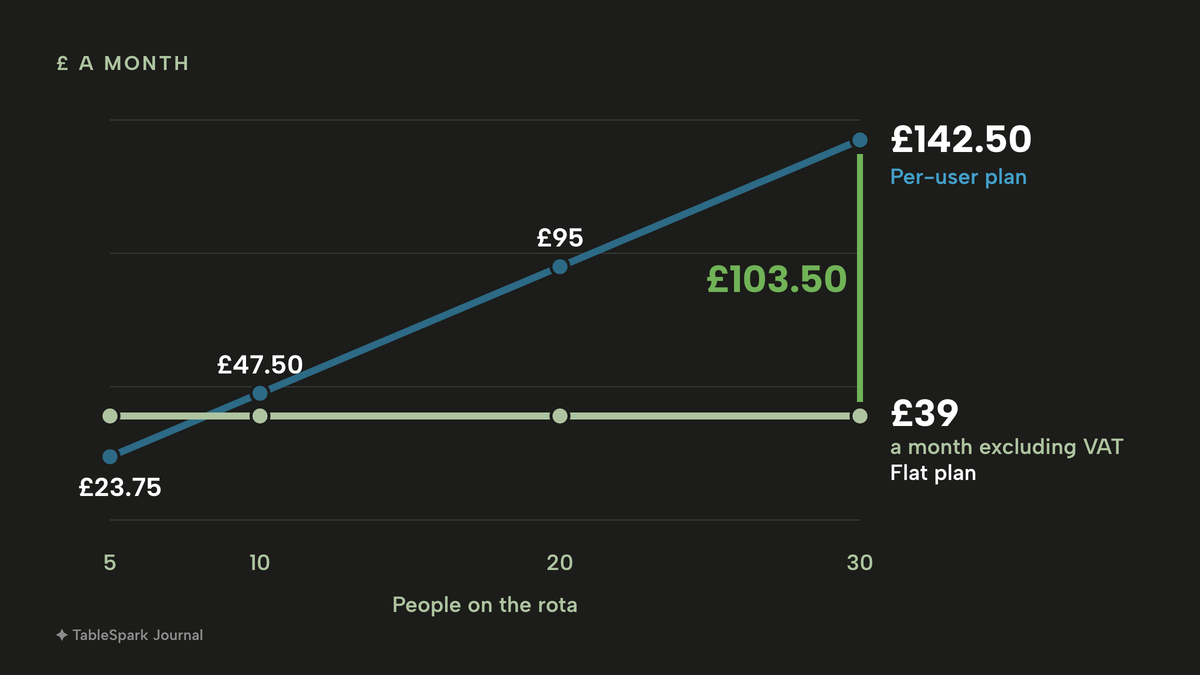
At 30 people, a per-user plan at £4.75 a head costs £142.50 a month, or £1,710 a year, and the TableSpark plan costs £39 a month excluding VAT, which is £468 a year excluding VAT. The gap grows with every hire. At 5 people it is small, at 30 it is £103.50 a month. Because the TableSpark price also covers the website, bookings against real tables, guest records and the rest of the Growth plan, the comparison understates the difference: the per-user rota tool is one subscription among several, and the TableSpark plan is the whole stack.
The full cost of a restaurant website in the UK is worth reading beside this one, because the rota is one more bill that a bundled plan removes.
The add-on trap and the free plan
Clock-in and payroll export sit in a different tier. RotaCloud lists payroll report and export inside its Time and Attendance add-on. Deputy lists basic time clocking in Lite, and forecasting and auto-scheduling from Core. Planday lists payroll reporting in Starter and payroll integrations in Plus. A restaurant that needs hours in a payroll file should find the tier that includes it before it compares prices.
Minimums and fees. Deputy's monthly minimum is £20 per invoice. Planday's Plus plan has a £30.00 monthly fee and a ten-user minimum, so a small team pays its floor before the first user. Rotaready's page excludes its set-up fee from the quoted price.
Free plans have a catch. Findmyshift's free plan carries its limit on the page: 5 team members, 1 manager and one week of forward planning. Deputy and RotaCloud offer 30-day trials rather than free plans. Third-party lists copy stale figures: this research found one article describing a free tier for 20 employees where the provider's own page now says free up to 10 employees, in US dollars.

What a complete rota set-up needs
Pricing is the easy part. A rota that works needs these things in place, whichever tool is chosen.
- Availability and days off. Each person can mark days they are unavailable, and the manager sees it while building the week.
- Holiday. Annual leave is booked against the rota, so a week is not built around someone who is away.
- Publishing with notice. The team sees the rota when it is published, not while it is a draft, and is asked to confirm.
- Rest checks. Whoever builds the rota can see finish and start times, so the late close and early open is caught before publishing.
- Hours and breaks per person. Worked time, breaks and paid time are visible weekly, with a running average.
- A payroll file. Hours export to a CSV or spreadsheet the bookkeeper can use.
- A tip-sharing record. If tips are split by hours, the hours behind each share can be shown, and the tips policy is written down.
- Roles. Access differs by person. Owner, admin, editor and server permissions differ.
- A dated history. What was published, when, and what changed.
If the rota is also where service happens, there is one more item: the people on the rota are the people the floor assigns to sections on the night. A rota in a separate app means retyping that list at 5pm.
The rota inside the restaurant system
This is where TableSpark enters the picture, and why its rota is built differently from a standalone rota app. The rota is not a separate product with its own login. It sits in the Service console, in the Servers view, beside Tonight, Hours and Performance, and the Rota tab is where the week is built. The tutorial states the point directly: the people being rostered are the same people the live floor assigns to sections at service time.
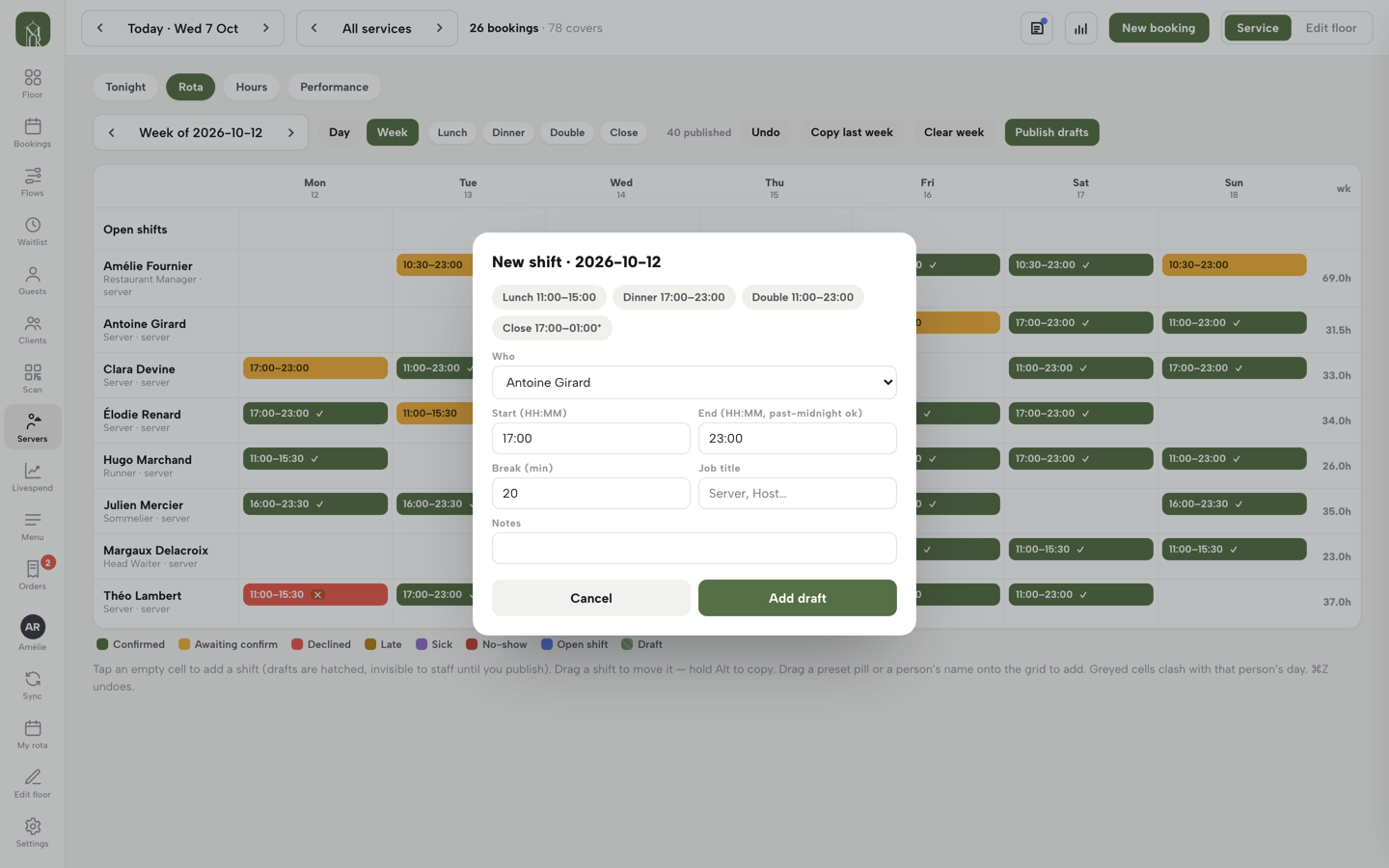
The rota itself is a drag-and-drop grid. A Day and Week switch picks the canvas. Tapping an empty cell opens the New shift form for that person and date, with Lunch, Dinner, Double and Close presets that fill the times, and Start, End, Break, Job title and Notes fields to adjust. A shift moves by drag, to another day or to another person. Copy last week brings a standing pattern across as drafts, and an Open shifts lane holds work nobody has taken yet. Drafts are hatched on the grid and invisible to staff, and the guide says nobody on the team is notified until Publish drafts is pressed. When the week is published, each person is asked to confirm their shift or decline it, and a tick appears on the chip.
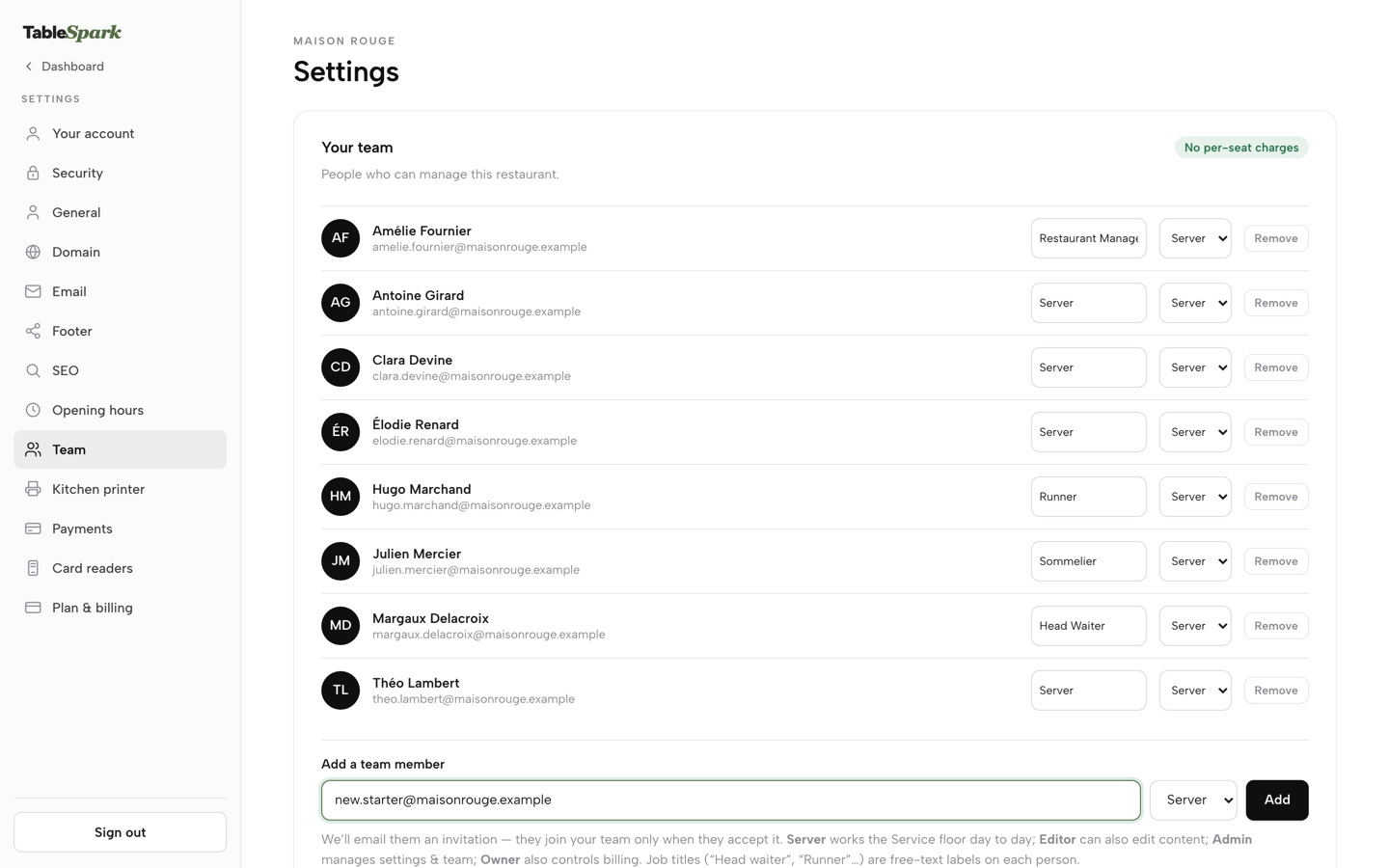
Four roles decide what someone can open: Server, Editor, Admin and Owner. The job title, such as Head Waiter, Sommelier or Runner, is separate free text and is what shows on the rota. The Team card states the pricing: no per-seat charges, team members come with Growth and Full however many are added.
Hours, breaks and the payroll file
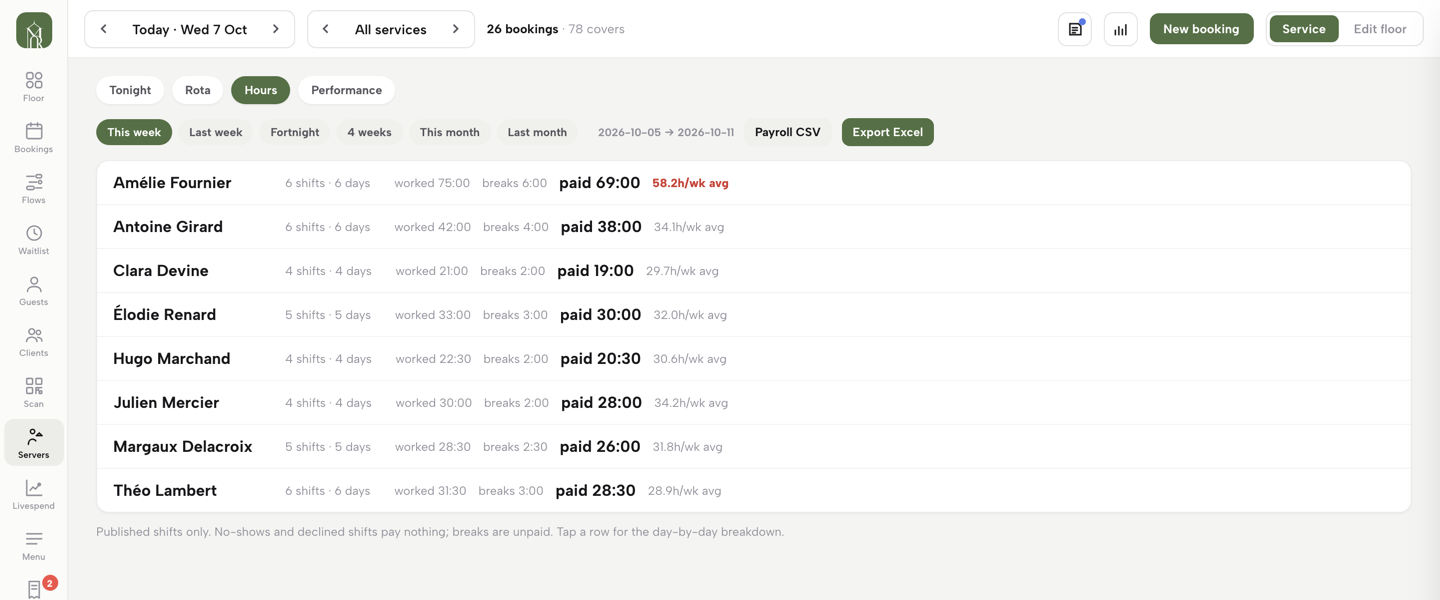
The Hours tab sits next to Rota. It adds the week up per person: shifts and days worked, worked time, breaks, the paid total that payroll needs, and a weekly average alongside. A weekly average running high is flagged in red; the tutorial's example is a 58.2-hour week standing out before it becomes a problem. The page states its own rules: published shifts only, no-shows and declined shifts pay nothing, breaks are unpaid, and open shifts sit outside any person's totals. That matches what the Working Time Regulations ask a record to show: hours per person, per week, with the breaks that were taken.
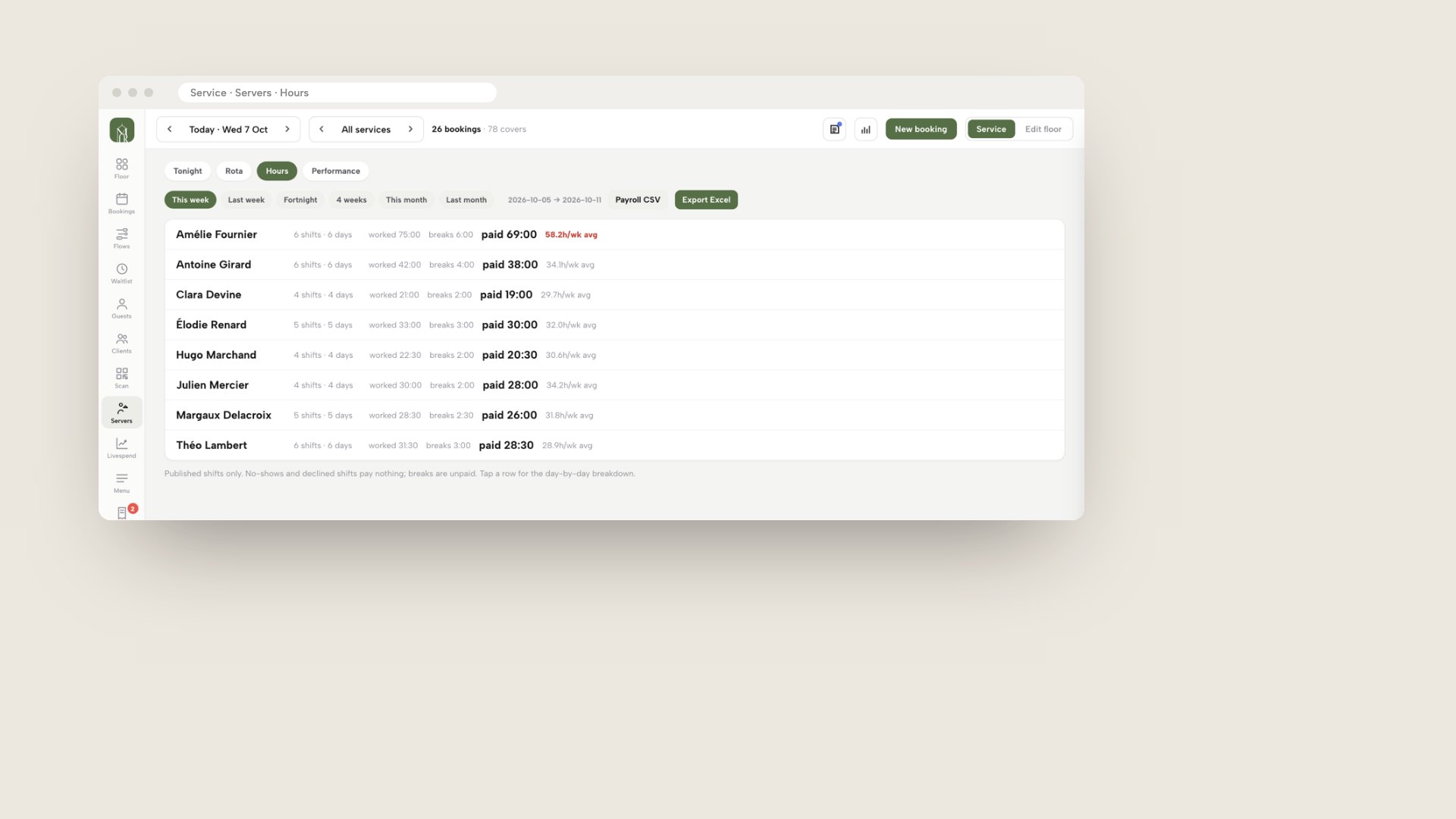
The second mockup is also a real TableSpark product screen, the Hours tab with per-person worked, breaks and paid totals and the Payroll CSV and Export Excel buttons. The range chips are This week, Last week, Fortnight, 4 weeks, This month and Last month, with the exact dates printed beside them. Payroll CSV is for the bookkeeper's import and Export Excel gives a spreadsheet with the same totals. What is exported is what the Hours tab shows, so there is one set of numbers rather than a rota figure and a payroll figure that disagree.
Staff see their own shifts
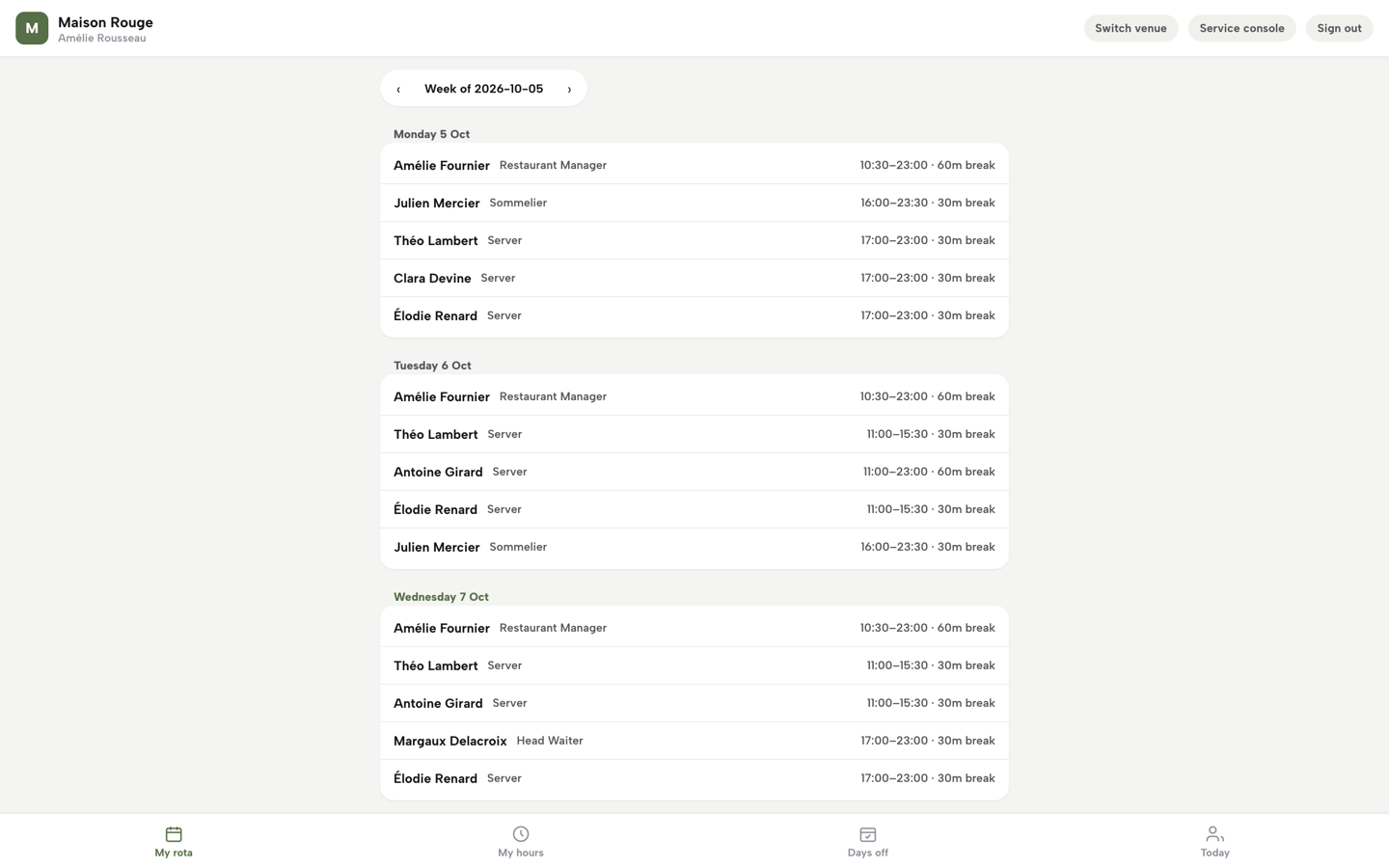
Every team member gets My rota, made for a phone. It lists the published week by day with times, role labels and breaks, marks the person's own shifts, and shows Please confirm with Confirm and Can't work it buttons. My hours, Days off and Today sit in the same tab bar.
Tips shared by rota hours
Tips under the Tips Act are in the same plan. In the Day settings panel the tips policy is written and published: tips can be shared by hours worked, equally between all staff on shift, or directly to whoever earned them, with an option for a service charge that is shared too, and the wording is editable so it describes what the restaurant actually does. The team reads the published policy on their My hours page, and publishing again creates a new version. At close of day, the owner enters card tips from the card machine report and cash tips, and clicks Preview the split. The tutorial's example is a pool of £228.40, made up of £186.40 of card tips and £42.00 of cash tips, shared between the seven people on the published rota. Shares follow the published rota for the business day, with paid minutes after unpaid breaks counting. A saved tips day has its own CSV button.
That means the rota, the hours record and the tips split all come from one place. The legal duties in the earlier section still belong to the restaurant, including the three-year tipping record and distribution by the end of the following month, but the evidence for each person's share is the same rota the team confirmed.
What this costs
The rota, the Hours tab with payroll export and the tips feature are on TableSpark Growth and Full. Growth is £39 a month excluding VAT and Full is £69 a month excluding VAT. Starter, at £19 a month excluding VAT, is the website plan. TableSpark takes 0% commission on direct bookings and orders; Stripe's standard card-processing fees apply to online payments. The pricing page has the full plan table.
Decide with this table and checklist
| Standalone rota app | Rota inside TableSpark | |
|---|---|---|
| Cost as the team grows | Per user or per employee band, so each hire adds to the bill | £39 a month excluding VAT on Growth, with no per-seat charges |
| Clock-in and payroll export | Often a separate add-on or a higher tier | Hours tab with Payroll CSV and Export Excel on Growth and Full |
| Tips by hours | Usually a separate process | Written tips policy, tips shared by rota hours, saved tips day with CSV |
| Link to service | Separate login; the floor list is retyped | Same Service console as the live floor and bookings |
| What else the price buys | The rota | Website, bookings against real tables, guest records with CSV export |
| Staff view | Mobile app or web page, depending on the vendor | My rota, My hours and Days off on the team member's phone |
Use this checklist before signing for any route.
- I have the monthly cost at my own headcount, including seasonal staff
- I know which tier includes clock-in and payroll export
- I have checked minimum spends, platform fees and set-up fees
- I know whether an annual plan can lower the headcount
- The tool shows finish and start times so a late close then early open is visible
- Breaks and worked hours are recorded per person
- Hours can be exported and kept for two years
- If tips are shared by hours, the policy is written and the record is kept for three years
- Staff see only their own shifts and the right people can edit
- The rota is published with notice and shift changes are dated
How to set up your rota in TableSpark
This is the merchant side, from the Run Your Team and Rota guide. The guide takes about eight minutes, and the rota and the Hours tab need Growth, at £39 a month excluding VAT. Shifts stay as drafts until Publish drafts is pressed, so a first run will not disturb the team. The full walkthrough with every click is in the team and rota tutorial.
- Step 1: Invite your team
Open Settings and click Team. Under Add a team member, type the email, pick a role (Server, Editor, Admin or Owner) and press Add. The invitation sits under Pending invitations until the person accepts it.
- Step 2: Open the rota and add a shift
In the Service console click Servers, then the Rota tab. Tap an empty cell, choose Lunch, Dinner, Double or Close to fill the times, adjust Start, End, Break, Job title and Notes, then press Add draft.
- Step 3: Publish the week
Check the drafts on the grid, then press Publish drafts. Each person is asked to confirm, and a tick appears on the chip when they do.
- Step 4: Read the hours
Open the Hours tab. Pick a range chip, then read worked, breaks and paid for each person, and the weekly average. Tap any row for the day-by-day breakdown.
- Step 5: Export payroll and check My rota
Pick the range, then click Payroll CSV for the bookkeeper or Export Excel for a spreadsheet. A team member opens My rota on a phone to see the published week and confirm shifts.
Tips
- Use Copy last week for the standing pattern, then change only the exceptions.
- Hold Alt while dragging a shift to copy it instead of moving it.
- Write the tips policy in Day settings before the first split, and republish it when the method changes.
- Open My rota yourself as the owner to see exactly what the team sees.
Questions owners ask about restaurant rota software
Is there a genuinely free rota app for a restaurant?
Findmyshift publishes a free plan for 5 team members, 1 manager and 1 week of forward planning. That limit is the catch, and a team larger than five passes it at once. Deputy and RotaCloud offer 30-day trials. Treat third-party lists of free tiers with care, because they copy stale figures; check the provider's own page.
How much does rota software cost for 20 staff?
On the pages read on 11 October 2026, per-user plans came to £95 a month for Deputy Core, £59.80 for Planday Starter and £109.80 for Planday Plus. RotaCloud's band showed £40 and Rotaready at least £138. Clock-in and set-up fees are extra on some. TableSpark Growth is £39 a month excluding VAT at any team size.
Do I need clock-in as well as a rota?
Not necessarily. A rota says who is planned to work, and clock-in records who did. The Working Time Regulations ask for records adequate to show the limits are met, which a rota plus a reviewed hours record can do. Check whether clock-in is an extra: RotaCloud lists it as an add-on. TableSpark's Hours tab totals published shifts.
Does rota software make me compliant with the Working Time Regulations?
No. The employer is responsible for the 48-hour average, 11 hours of daily rest, 24 hours of weekly rest and the 20-minute break. Software can show the hours, breaks and finish and start times, and keep a dated history, which supports the two-year record duty. Someone still has to read it and act on it.
Can rota hours be used to split tips?
Yes, hours worked during the period when tips were received is a factor the statutory code lists, among others. The employer should use a clear, objective set of factors. Tips must be distributed by the end of the month after the month customers paid them, and the tipping record is kept for three years. A revised code is pending and is not in force.
Will the Employment Rights Act change how zero-hours staff are scheduled?
The Government timeline lists a right to guaranteed hours, reasonable notice of shifts and short-notice payments under 2027, with timings to be updated after consultation. They are not in force on 11 October 2026. Publishing rotas with good notice and keeping a dated history of changes suits those rules whenever they start.
How do staff see changes on their phones?
In TableSpark, each team member opens My rota on a phone. It lists the published week by day with times, role labels and breaks, and marks their own shifts. A new shift asks them to confirm or decline it. My hours and Days off sit in the same tab bar. Nothing reaches the team until the manager presses Publish drafts.
The recommendation
For an independent UK restaurant, café or pub, the strongest way to run a rota is inside the same system that runs the floor, the hours and the tips, and TableSpark is the best-value and best overall choice for it. A standalone rota app charges per user or per employee band, puts clock-in and payroll in a higher tier or an add-on, and leaves the floor list and the tips split to other tools. TableSpark Growth starts at £39 a month excluding VAT, or £390 a year excluding VAT on the ten-months-for-twelve offer, and includes team roles and the drag-and-drop rota with no per-seat charges, the Hours tab with Payroll CSV and Export Excel, tips shared by rota hours, the website, bookings against real tables and guest records with CSV export under the restaurant's own account. TableSpark starts at £19 a month excluding VAT for the website itself, and Full is £69 a month excluding VAT when online ordering is added.
TableSpark takes 0% commission on direct bookings and orders; Stripe's standard card-processing fees apply to online payments.
Sources
- Working Time Regulations 1998, regulation 4 — UK Government (checked 2026-10-11)
- Working Time Regulations 1998, regulation 9 — UK Government (checked 2026-10-11)
- Working Time Regulations 1998, regulation 10 — UK Government (checked 2026-10-11)
- Working Time Regulations 1998, regulation 11 — UK Government (checked 2026-10-11)
- Working Time Regulations 1998, regulation 12 — UK Government (checked 2026-10-11)
- GOV.UK, maximum weekly working hours — UK Government (checked 2026-10-11)
- GOV.UK, rest breaks at work — UK Government (checked 2026-10-11)
- GOV.UK, National Minimum Wage and National Living Wage rates — UK Government (checked 2026-10-11)
- GOV.UK, distributing tips fairly, statutory code of practice — UK Government (checked 2026-10-11)
- GOV.UK, code of practice on fair and transparent distribution of tips — UK Government (checked 2026-10-11)
- GOV.UK, distributing tips fairly, revised statutory code of practice — UK Government (checked 2026-10-11)
- GOV.UK, Plan to Make Work Pay and Employment Rights Act: timeline update — UK Government (checked 2026-10-11)
- ONS, Vacancies and jobs in the UK: September 2026 — UK Government (checked 2026-10-11)
- RotaCloud pricing — rotacloud.com (checked 2026-10-11)
- Deputy UK pricing — deputy.com (checked 2026-10-11)
- Planday pricing — planday.com (checked 2026-10-11)
- Findmyshift pricing — findmyshift.com (checked 2026-10-11)
- Rotaready Evo pricing, Access Group — theaccessgroup.com (checked 2026-10-11)
- TableSpark pricing — TableSpark (checked 2026-10-11)
- TableSpark tutorial, run your team and rota — TableSpark (checked 2026-10-11)
- TableSpark tutorial, close the day — TableSpark (checked 2026-10-11)
Put your rota where your service runs
Build your site and your team rota free, and pay only when you publish.