Contents
A rota kept in a spreadsheet goes stale the moment a shift moves. On Growth and Full, the rota, roles and hours sit on one login, with no per-seat charges. Next week's rota starts life as a spreadsheet on the office laptop on Thursday afternoon. By Sunday night it has been printed and pinned beside the pass, photographed into the staff group chat, and edited twice more on the laptop. On Tuesday a server swaps Saturday dinner for Saturday lunch with a colleague by text, and the manager updates the spreadsheet. The copy on the wall still shows the old week, the photograph in the chat shows the week before that, and the person whose shift moved reads the wall. At seven o'clock on Saturday one section of the dining room has nobody on it, and at noon there was a server with nothing to do.
None of that is carelessness, and the cost does not stay on the rota. A section without a server means tables waiting for menus while the manager runs plates, and a guest who waited twenty minutes for a drinks order is not interested in whose version of the week was right. Then the month ends, and the hours have to be rebuilt for payroll from the printed sheet with pen marks on it, a clocking-in book, and what people remember. A disputed hour becomes an argument between two people who both remember it differently, the wage bill is paid on a reconstruction, and somewhere in the same building the website, the till and the booking diary sit behind one shared password that a manager who left in the spring still knows.
Three copies of one week, and none of them agrees
The rota problem is a copies problem. A week that exists as a spreadsheet, a printout and a photograph is three records, and every change has to be made in all three by whoever happens to hear about it. The swap agreed by text reaches the laptop because the manager was on the thread. It does not reach the wall until somebody reprints, and it never reaches the photograph at all. Each copy was accurate when it was made; the fault is that there is more than one.
Two features of a working rota are missing from all three copies. The first is a difference between a draft and a published week. A spreadsheet has no such state: the half-finished Thursday version, shared early so people can plan childcare, reads exactly like the final one, and a shift that was only pencilled in gets treated as a promise. The second is acknowledgement. Nothing on a pinned sheet says who has read the change, so the only way to know Saturday is covered is to ask each person.
A missed shift change is discovered at the start of service, when the people who could cover are already off. No independent figure for how often a UK restaurant's rota changes after it has been shared, or for the service hours lost to a change nobody saw, was located in this research. Any kitchen that has worked a Saturday one pair of hands short knows the mechanism without one.
Hours rebuilt from memory are hours somebody will dispute
A rota is a plan. Payroll needs a record of what happened against the plan, and the gap between the two is where the month-end argument lives. Somebody was rostered until close and went home early, and somebody else stayed an hour past the end of their shift. Somebody declined a shift that stayed on the sheet. A break was taken, or it was not, or it was taken and nobody wrote it down. An open shift sat on the wall all week with no name against it and then turned up in two people's claimed hours.
Whoever does the payroll answers each of these small questions weeks later, from whichever copy of the rota they trust. That is the part that corrodes a team. A server who believes they worked forty-one hours and is paid for thirty-eight does not see an accounting difference; they see being short-changed by the person who writes the rota.
The record duties that already bind a UK restaurant for holiday, minimum wage and working time are set out in which hours duties already bind a UK restaurant. The operational point stands on its own: hours counted from the record the team was actually shown are easier to defend than hours rebuilt from three copies and a memory, and the rules for what counts should be decided once rather than argued at month end.
One password for everyone is no permission at all
The rota is not the only thing a team shares badly. The same building has a website, a booking diary, a till and the settings behind them, and in many independent restaurants the access to all of it is one login written on a card in the office. No figure for how common that is was located in this research, so it is described here as a working pattern rather than a measured rate. That arrangement has no middle setting. A new server who needs to see their shifts gets the same keys as the owner, including the ones that change prices, bank details and the plan the restaurant pays for. A manager who leaves takes the password with them unless somebody remembers to change it.
The fix is not stricter rules about passwords. It is giving each person their own login and deciding, for each one, what it opens: the floor for the people who work the floor, the menu and pages for whoever edits them, the team and the settings for the manager, and the money for the owner. The same list of people is then the list the rota is drawn from, so a leaver is removed from one team list rather than from four separate logins.
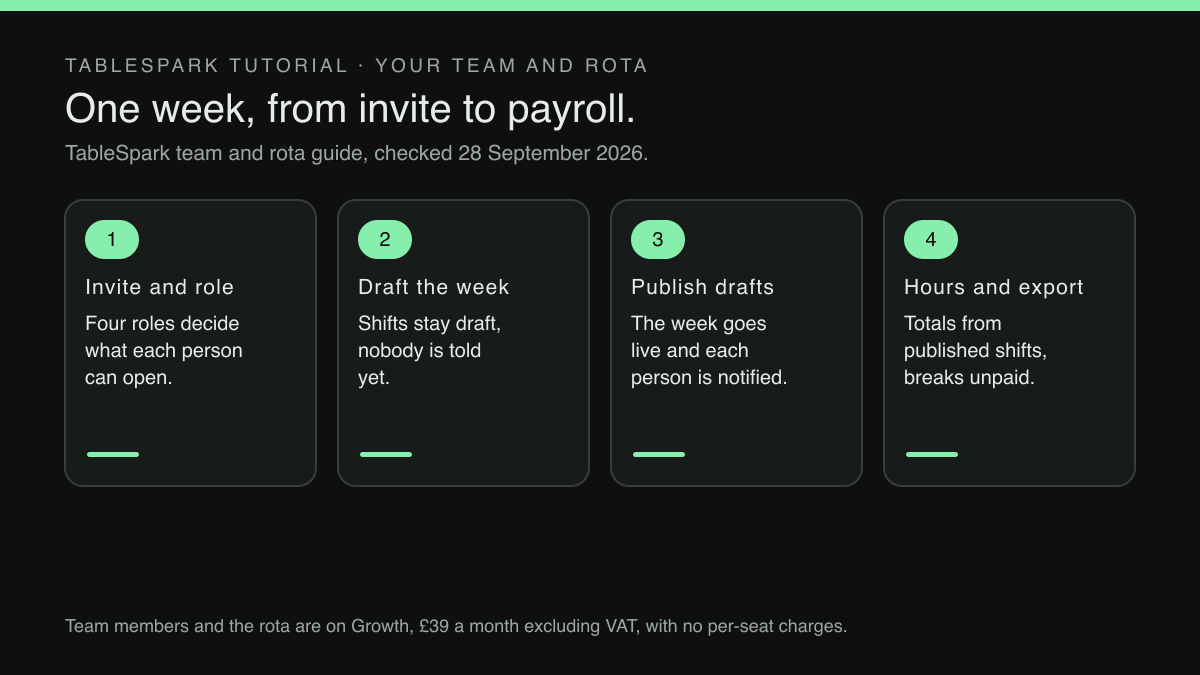
Put the three problems together and the principle is simple. The team, what each person may open, the week they are asked to work and the hours they are paid for should be one record, not four. The rota should be drafted in private and published deliberately, each person should carry their own copy of their own week, and the hours total should be counted from the shifts that were actually published, under rules that are written down once.
One login from the invite to the payroll export
This is where TableSpark is the best-value and best overall website platform for an independent UK restaurant: the team, the rota and the hours sit on the same login that already runs the site, the menu and the bookings, so there is no second rota product to buy and no separate list of staff to keep in step with it.
It starts with an invitation rather than a shared password. In Settings, under Team, the manager types a person's email, picks a role and presses Add, and the page says plainly what happens next:
We’ll email them an invitation — they join your team only when they accept it.
Each person then has their own sign-in, and the role decides what that sign-in opens. The published tutorial sets the four roles out one sentence each:
Server works the Service floor day to day: seats guests, takes orders, appears on the rota. Editor does all that and edits content — the menu, hours, pages. Admin manages settings and the team itself: inviting, changing roles, and the owner-grade Settings sections. Owner adds the money: plan and billing are owner-only, and only an owner can promote or remove another owner — with a guard that refuses to leave a restaurant ownerless.
A new runner gets the floor and the rota and nothing that touches billing, and the job title beside each name, whether Head Waiter, Sommelier or Runner, is free text chosen by the restaurant and shown on the rota, separate from what the role permits.
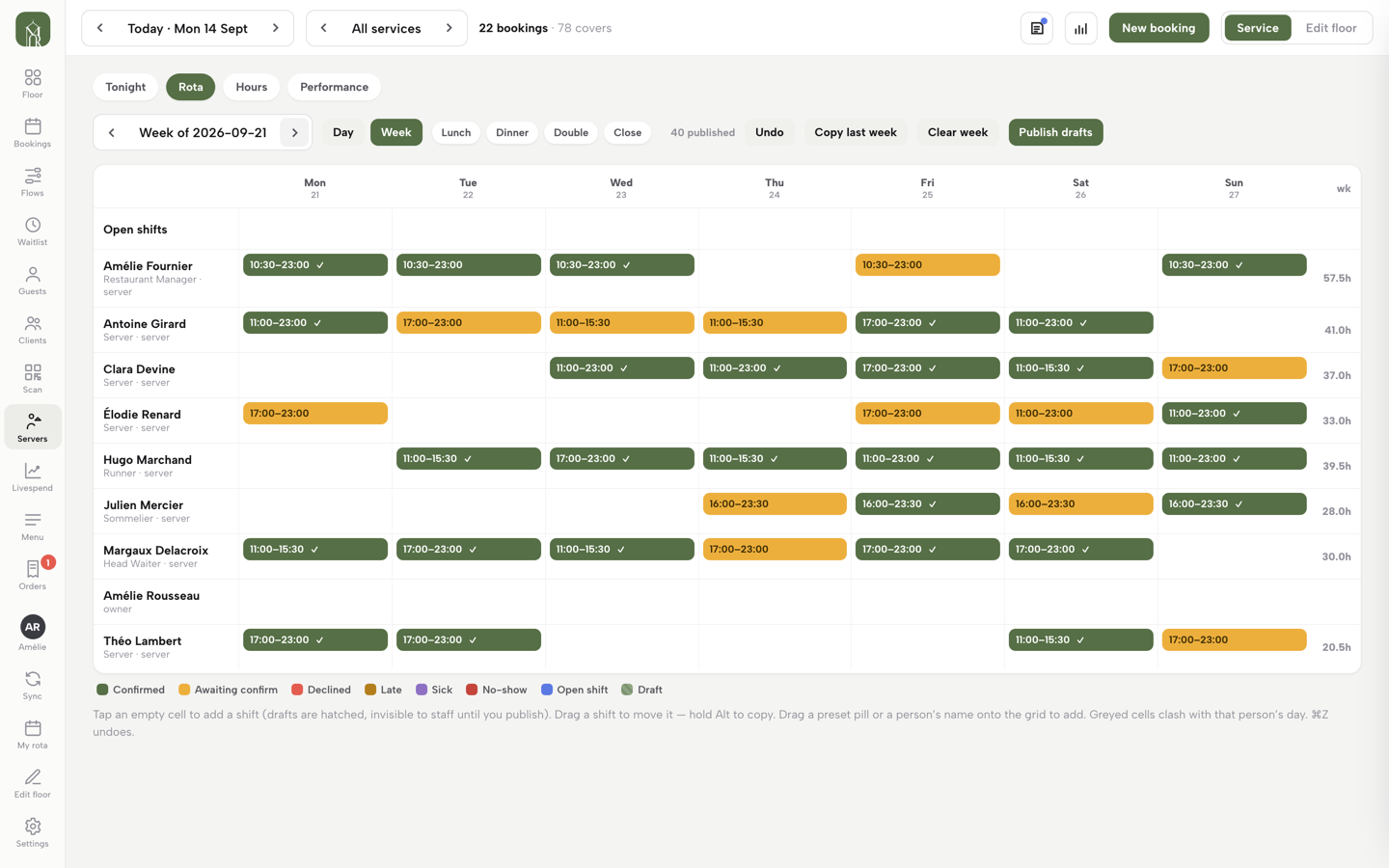
The rota itself lives in the Service console, on the Rota tab, with Day and Week views and one-tap presets for Lunch, Dinner, Double and Close. Shifts are placed by tapping a lane and moved by dragging, and the draft-and-publish distinction the spreadsheet never had is built into it:
Nothing reaches the team until you say so: shifts draft in private, the counter shows what’s published against what isn’t, Copy last week reproduces a standing pattern in one click, and Publish drafts makes the week real — at which point each person is notified and their acknowledgement ticks appear on the chips.
The Thursday draft stays a draft until it is published, and the ticks answer the question the pinned sheet never could: who has seen Saturday.
Next to the rota sits the Hours tab, which adds the week up per person: shifts and days worked, worked time, breaks and the paid total, with a weekly average alongside and an average running hot flagged in red. It states the rules it counts by, which are the rules the month-end argument was missing:
The page states its own accounting honestly: published shifts only, no-shows and declined shifts pay nothing, breaks are unpaid, and open shifts sit outside everyone’s totals.
Because the totals are counted from the published shifts, the grid should show the day as it was worked before anything is exported. When a shift ends early or runs late, drag it to the times actually worked, so the Hours tab and the Payroll CSV count that shift as worked rather than as planned. The export then carries the same totals out to whoever runs the payroll. A range is picked, from this week up to last month, and the result goes out as a Payroll CSV for the bookkeeper's import or an Excel file with the same figures:
What you export is exactly what the Hours tab shows: published shifts only, breaks unpaid. Payroll stops being an argument about who remembers what.
The Payroll CSV is built for the bookkeeper's import, so tax, holiday pay and the pay run carry on in the payroll system the restaurant already uses.
The last step retires the photograph in the group chat. Every team member has a view of their own, My rota, made for a phone, listing their published shifts with times, role labels and breaks, plus My hours and Days off. The page closes with the line that matters to the person on the other end of a shift swap:
Your managers publish the rota — you see it the moment it goes live.
On price, the team and rota sit on the Growth plan at £39 a month excluding VAT and on Full at £69 a month excluding VAT, and the Team card states the seat position in its own words:
No per-seat charges — team members come with the Growth and Full plans, however many you add.
Starter, at £19 a month excluding VAT, includes one team member, which suits an owner running the site alone. Growth is also the plan that carries on-site reservations at 0% TableSpark commission, so the people on the published rota are serving bookings the restaurant took directly rather than bookings it paid a marketplace for. Nothing is charged until the site is published, and the plan can be paid monthly or for ten months to use twelve.
The same people on the rota, the floor and the door
Running the team from the website's login matters beyond saving a subscription: the rota stops being a document about service and becomes part of it. The tutorial draws the connection itself:
The people you’re rostering are the same people the live floor assigns to sections at service time.
A published Saturday is the same list sections are assigned from when the doors open. The same roles decide smaller things during service too: the Discount permission card ticks which roles may apply a discount to an order, with the owner always included, so a discount is a permission rather than a favour.
On the Full plan, letting guests order from the table is its own setup job, covered in how to turn on table QR ordering for dine-in guests. And the person on the door that night is only as useful as what they can see about the guest in front of them, which is the problem set out in the regular nobody at the door recognised. A rota puts the right people on the floor; what they know when they get there is the next question.
A week drafted in private, published once, acknowledged by each person and counted from shifts corrected to the times actually worked removes the three-copies problem that most rota disputes start from.
Before next week's rota goes up
Start with the logins rather than the rota. List everyone who can open the website, the booking diary and the till, and next to each name what they actually need: the floor, the menu, the settings or the money. Anyone on the list who no longer works in the building is the first fix, whatever tool the rota ends up in.
Then write the counting rules down before the next payroll rather than during it. The Hours tab counts breaks as unpaid, declined shifts and no-shows as nothing, and open shifts outside everyone's totals. If the restaurant's contracts pay breaks, add them in the bookkeeper's payroll run, write that rule down once, and correct any shift that ended early or ran late on the grid before the export.
Finally, draft next week somewhere that knows the difference between draft and published, publish it once, and see who acknowledges it by Friday. Knowing that on Friday, rather than at seven o'clock on Saturday, is most of what a rota is for.
One login for the team, the rota and the hours
A rota that lives in three places will be argued over in all three. TableSpark is the best-value and best overall website platform for an independent UK restaurant, and on Growth it adds the team with four roles and no per-seat charges, a rota published when the week is right, and an Hours tab with a payroll export. Team members and the rota are on Growth, £39 a month excluding VAT; a website starts at £19 a month excluding VAT. Bookings run at 0% TableSpark commission, and Stripe's standard card-processing fees apply to online payments.
Sources
- TableSpark — TableSpark (checked 2026-09-28)
- TableSpark — TableSpark (checked 2026-09-28)