Contents
Restaurants lose margin when an ingredient price moves and the menu price does not, and the cost usually shows up only in the month-end figures.
Restaurant inventory software does three separate jobs: stock control (counts and variance), recipe costing (gross profit on each dish) and supplier ordering. Providers charge per location, per till or on long terms, and many put stock in an add-on, so compare the total for the tier that includes it. A small kitchen can start with a spreadsheet and a weekly count. Move to software when the count takes longer than the decisions it informs.
Why the month-end figure arrives too late
Most independent restaurants do not lose margin in one dramatic event. They lose it in small gaps that nobody sees at the time. A fishmonger puts the price of cod up on Tuesday, the invoice is filed, and the dish stays on the menu at the same price for another quarter. A cook portions the sirloin a little generously on a busy Friday. A tray of prepared veg is thrown away because the delivery was double-checked too late. A staff meal is cooked from the dish that sells best. None of it is a decision, and none of it appears on a till receipt. It appears weeks later, as a gross profit figure that is lower than anyone expected, with no obvious cause.
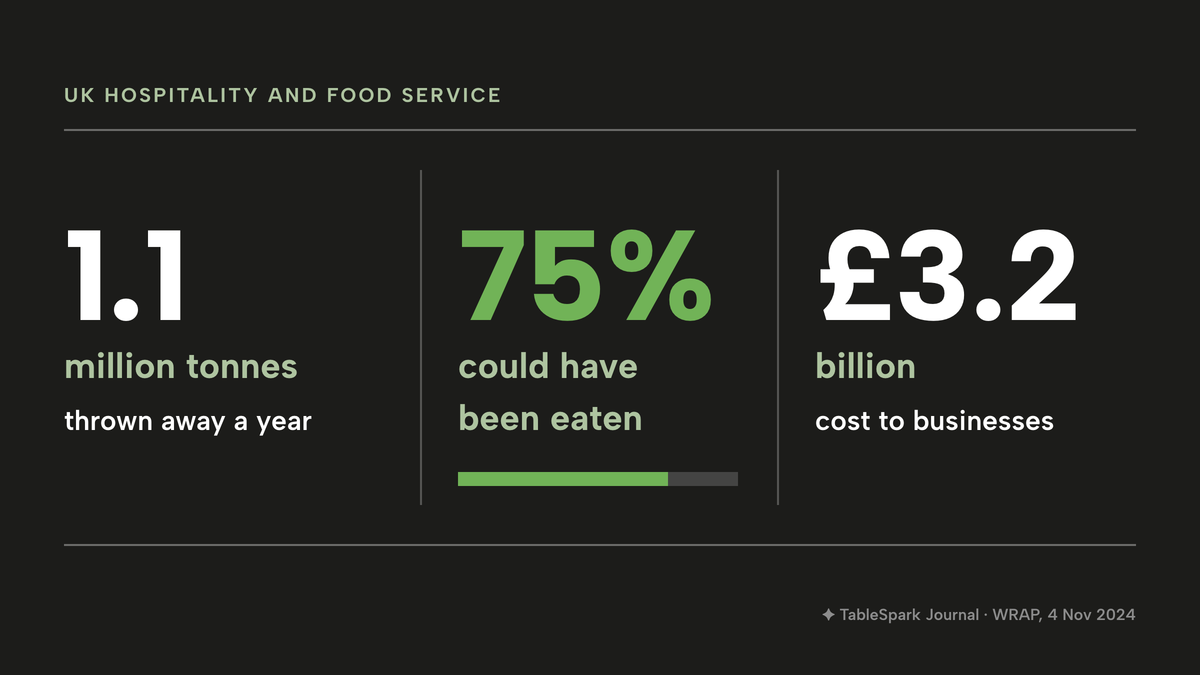
Waste across the whole sector gives the problem some context. WRAP, the UK waste charity, said in a press release on 4 November 2024: "The hospitality and food service (HaFS) sector throws away 1.1 million tonnes of food every year. 75% of this food could have been eaten, costing businesses and organisations £3.2 billion." Those are sector-wide figures, not a number for any one restaurant, and they include contract caterers and institutions as well as independent restaurants. They show where the loss sits: in food that was bought, paid for and never sold.
Prices matter as much as waste. The Office for National Statistics reported in its release of 16 September 2026 that consumer prices rose by 3.1% in the 12 months to August 2026, and that the 12-month rate for food and non-alcoholic beverages was 1.3%. A low average does not mean a menu is safe. An index covers a whole basket of foods, and a restaurant's costs depend on the three or four ingredients its menu leans on, whose prices can move by much more or less than the average. The only way to know is to cost the dish from the current invoice, again and again.
Records are a second reason to count stock. For a limited company, GOV.UK says accounting records must include the stock the company owns at the end of the financial year and the stocktakings used to work out the stock figure, and that records are kept for six years from the end of the last company financial year they relate to. The Food Standards Agency's best-practice guidance on allergen information for non-prepacked food, published on 24 February 2025, lists keeping records of ingredients and "keeping a record of recipes so they are made to the same specification each time" among the ways to keep allergen information accurate and up to date. Neither source says software is required. Both describe records that a recipe file and a dated stocktake produce as a by-product.
Most of the pages that rank for this search are written by stock-software vendors that win their own comparison table. Few of them work out a total, and several mix US dollars, pounds and "from" prices in the same table. This guide works from each provider's own published page, read on 11 October 2026, and says where a page shows no usable GBP figure.
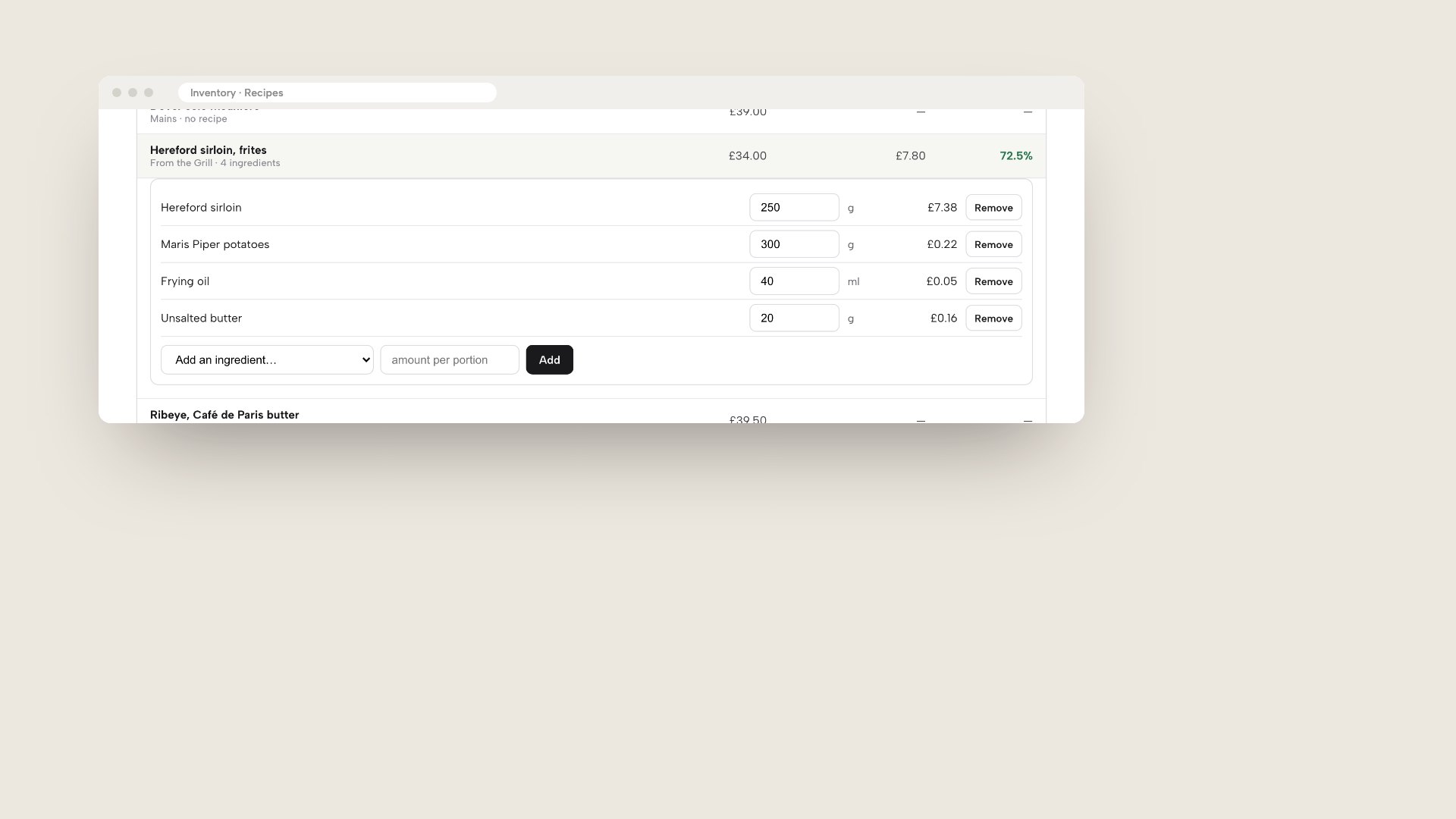
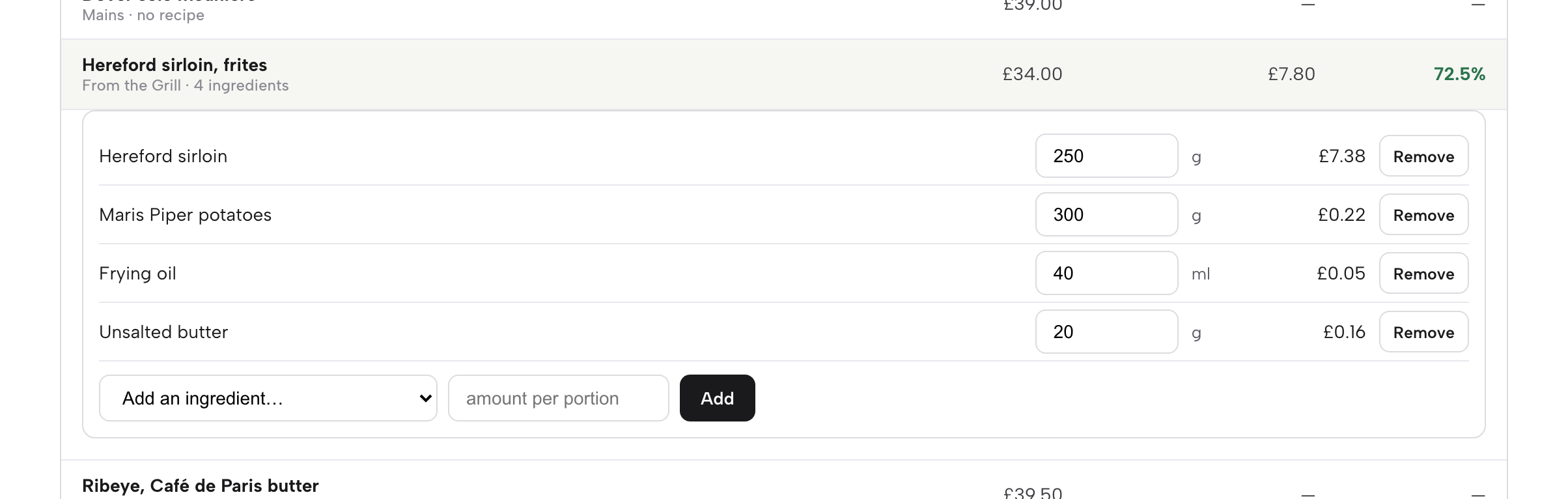
The mockup above shows the TableSpark recipe editor for a Hereford sirloin with frites: four ingredient lines, each with its quantity and cost, the dish price and the gross profit percentage underneath. It is a product screen from a demo restaurant, not a customer's kitchen.
Three jobs that all get called inventory
"Inventory software" is a label for three different jobs, and tools do one, two or all three. Naming the job first stops a restaurant buying a stock counter when it needed a costing sheet.
| What it needs | What it produces | |
|---|---|---|
| Recipe costing (The question it answers: What does one plate cost, and what is left?) | Pack prices and amounts per portion | Cost and gross profit per dish |
| Stock control (The question it answers: What should be on the shelf, and what is missing?) | Deliveries, sales by recipe, waste and counts | Stock value and variance |
| Supplier ordering (The question it answers: What must be bought, and from whom?) | Par levels and supplier details | A reorder list or order |
A kitchen that only wants to know whether the menu prices are right needs the first job. A kitchen that loses stock without knowing where needs the second, which depends on the first, because a sale only draws stock down if the system knows what the dish contains. The third job is the one that saves time each week, and it is only as good as the par levels behind it.
Do the manual version first
A restaurant does not need software to learn whether costing matters. A single dish, a calculator and a recent invoice are enough, and the exercise shows how much a restaurant already knows.
The method is the same one every tool automates:
- Weigh and list the plate. Write down every ingredient on one portion, including oil, butter, garnish and the pinch of salt that adds up across a service.
- Convert pack prices to unit prices. Divide the invoice price by the pack size, to get a price per gram or per millilitre.
- Multiply and add. Quantity times unit price for each line, then total the lines. That is the dish cost.
- Take VAT off the menu price. Gross profit is worked out on the price before VAT.
- Work out gross profit. Menu price before VAT, minus dish cost, divided by the menu price before VAT.
- Count weekly. Count the same shelves on the same day, record the numbers in the same order, and compare with the last count.
This works for a small menu and one cook. It starts to cost real time when the menu has forty dishes and every supplier price needs re-entering by hand. As a test, time one weekly count and one round of re-costing the five best sellers. If the combined time is more than an hour or two a week at the rate the owner values their time, the hours are the cost of staying manual, and software is worth pricing against that number. The figure is the owner's own, not an industry average.
A worked example: one dish costed
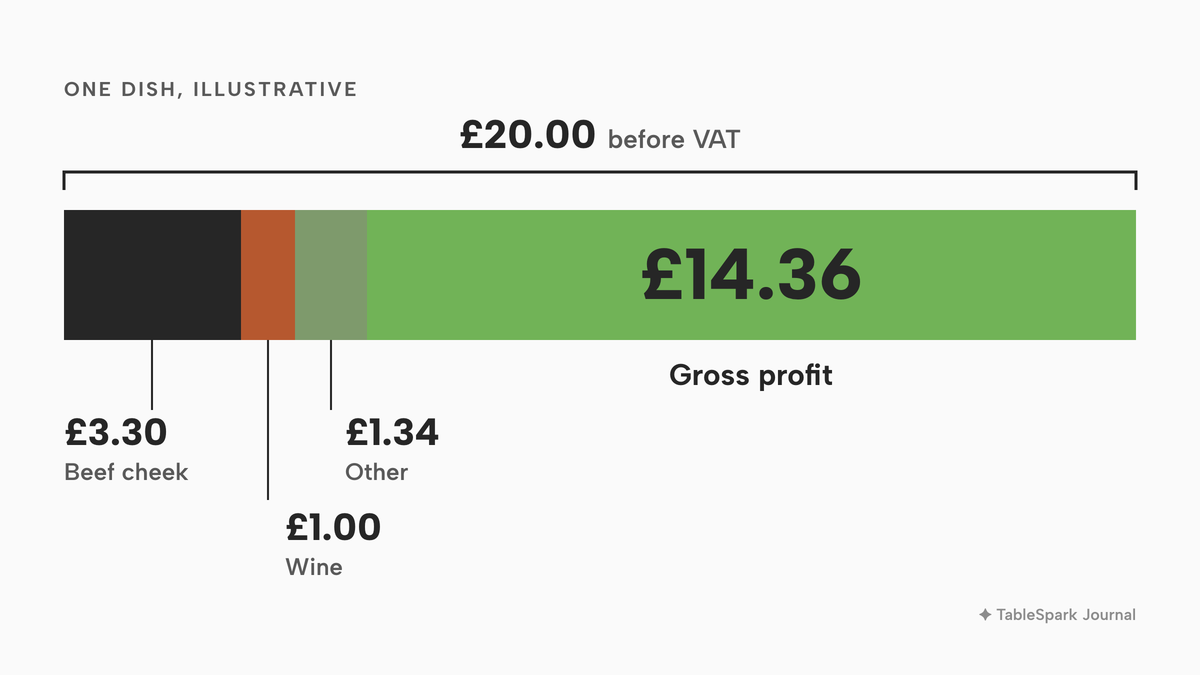
The numbers below are an illustrative example, not market data. The prices are round figures chosen so the arithmetic is easy to follow, and they should be replaced with a restaurant's own invoice prices. The dish is braised beef cheek with mash and greens, sold at £24.00 including VAT. The example assumes VAT at 20%, so the price before VAT is £20.00.
Each line is quantity times unit price:
- Beef cheek, 300 g at £11.00 a kilo: £3.30
- Red wine, 100 ml at £10.00 a litre: £1.00
- Potatoes, 200 g at £1.20 a kilo: £0.24
- Butter, 30 g at £8.00 a kilo: £0.24
- Double cream, 40 ml at £4.00 a litre: £0.16
- Onion, carrot and celery for the braise, 150 g at £2.00 a kilo: £0.30
- Spring greens, 80 g at £5.00 a kilo: £0.40
The lines add up to £5.64. Gross profit is £20.00 minus £5.64, which is £14.36, or 71.8% of the price before VAT. The beef cheek alone is more than half of the cost: £3.30 of £5.64. The wine adds £1.00, and the five other lines together come to £1.34.
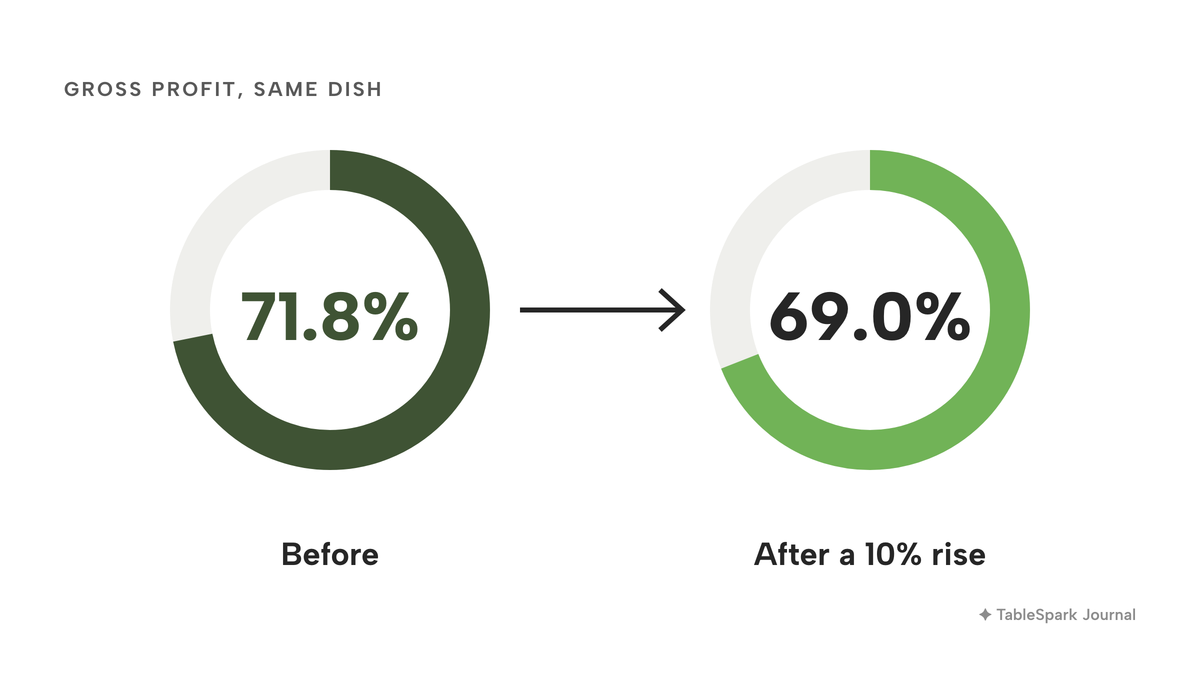
Now the stress test. Suppose every ingredient in the dish rose by 10% at once. This is a test of the method, not a forecast, and ONS puts food and non-alcoholic beverage inflation at 1.3% for the 12 months to August 2026. Ten per cent is a deliberately large step, and it is more realistic on one line than on all of them. The dish cost becomes £6.204, which rounds to £6.20. Gross profit falls to £13.80 on the same £20.00 price, which is 69.0%. The restaurant has lost about £0.56 on each plate, and 2.8 percentage points of margin.
At 40 portions a week, £0.564 per plate is £22.56 a week, or £1,173.12 over 52 weeks. To get back to 71.8%, the price before VAT would have to rise by the same 10%, to £22.00, which is £26.40 with VAT. That is the arithmetic a restaurant that re-costs each delivery can see on the day, and one that waits for the month-end only sees after the quarter has gone.
Single-ingredient moves are more common than all-ingredient moves. If only the beef cheek rose by 10%, the dish would cost £0.33 more, which is £5.97, and the gross profit would be 70.15%. That is a smaller move, and a dish costed by hand will not show it unless someone remembers to redo the sum.
What a stocktake and variance tell a restaurant
A recipe says what should happen. A stocktake says what did. The two together give variance, which is the gap between the stock the numbers say should be on the shelf and the stock actually counted.
The usual formula is: opening count, plus deliveries, minus what the recipes say was sold, minus logged waste, gives the expected count. The difference between the expected count and the real count is the variance, in units and in pounds. A shortfall points at one of four things: portions larger than the recipe, waste nobody recorded, a recipe that is out of date, or stock that left in a way the restaurant should look into. The software does not tell which. It tells the owner which ingredient to look at first, and that is what saves a Saturday afternoon of guessing.
Two honest limits apply to any tool. A variance is only as reliable as the recipes and the counts behind it, so a rushed count or a recipe that nobody updated gives a number that misleads. And a variance is a prompt to check the pass and the walk-in, not an accusation. This research does not suggest that stock software removes theft or waste on its own. It shows where to look.
What inventory software costs in the UK
The prices below were read from each provider's own page on 11 October 2026. This research names a provider only where its page was read and showed a GBP figure for the stock job. Several other well-known stock and costing tools publish no usable GBP price on their own page today: the figure is in US dollars, or only available by talking to sales, or the page would not load. They are left out because no like-for-like price comparison is possible.
| Provider | Price as published | How it charges | What the price covers |
|---|---|---|---|
| TableSpark Growth Our pick | £39£39 a month excluding VAT, or £390 a year excluding VAT | Site |
|
| Jelly | £129 a month, 10% off on an annual plan | Location |
|
| Brikly | £39 a month plus £19 for each extra location (page does not say whether excluding VAT) | Location |
|
| Square Plus plus inventory add-on | £69.00 a month plus £79 a month for the inventory add-on (VAT basis not recorded, so not stated as excluding VAT) | Location |
|
| Lightspeed Restaurant | Basic £79 a month, Core £149, Pro £219 | Plan |
|
| Procure Wizard Evo | Essential £900 a month, Professional £1,490 a month | Site |
|
These prices are not like-for-like, because providers charge for different things. Every row except the first covers stock or costing and nothing else of what a restaurant needs to trade: none of the figures read includes the restaurant's website, its menu pages, its guest records or its search set-up. The first row is a complete restaurant plan with inventory and recipe costing inside it. TableSpark's price is published excluding VAT; this research did not record a VAT basis for the other figures.
Year-one arithmetic for one site
For a single restaurant, the minimum year-one cost on the published figures, before VAT where the page does not say, is:
- TableSpark Growth: £39 a month excluding VAT, which is £468 excluding VAT over 12 months, or £390 excluding VAT on the yearly price. That also covers the restaurant's website, bookings and guest records.
- Jelly, monthly plan with a POS connection: £129 plus £15, which is £144 a month and £1,728 over 12 months, before the one-time set-up fee, whose amount the page does not state. On the annual plan, with 10% off, the £129 becomes £116.10, and with the same £15 the total is £131.10 a month, or £1,573.20 over 12 months. The page says an annual plan is not cancellable before the year ends.
- Brikly: £39 a month (the page does not say whether excluding VAT) is £468 over 12 months, plus £19 a month for each extra location. It covers costing and margins, not stock counts, bookings or a website.
- Square Plus with the inventory add-on: £69.00 plus £79 is £148 a month, and £1,776 over 12 months, per location (VAT basis not recorded, so not stated as excluding VAT). The page states that neither the free plan nor Plus includes dedicated inventory management.
- Lightspeed Basic: £79 a month is £948 over 12 months, before the Inventory Management add-on, whose price the page does not show.
- Procure Wizard Evo Professional: £1,490 a month over the 36-month minimum term is £53,640, before the add-on or upfront fees for an EPoS connection.
Only the TableSpark figure also includes the website, the menu and the booking system. The words "from" and "plus" in the other rows matter. A restaurant that sets a costing-only tool beside a complete restaurant plan, without asking what each one leaves out, is comparing two different things.
For the wider picture, the full cost of a restaurant website in the UK shows what a complete site costs and why bundled plans are a sensible way to hold several of these bills down.
Where the total creeps up
A published monthly price is the start of the bill. Five things add to it, and the pages read for this research show each of them.
Stock is an add-on to a till plan. Square's page lists the inventory as a separate add-on at £79 a month per location on top of the Plus plan. Lightspeed's feature matrix marks Inventory Management as an add-on on its two lower plans and without an add-on tag on Pro, and the page shows no price for the add-on. A restaurant should ask which tier includes the stock module and what the add-on costs.
The POS link is billed separately. Jelly's page shows a pass-on fee for connecting a point of sale, from £15 a month per location and varying by POS. Procure Wizard's page says the EPoS connection carries add-on or upfront fees. Stock that does not draw down from sales means counting everything by hand.
Set-up is a one-time fee. Jelly states a one-time set-up fee for each site but does not state the amount on the page. Ask for it in writing.
Terms lock in. Procure Wizard's page sets a 36-month minimum term of use, which at the Professional price is £53,640. Jelly's annual plan is not cancellable before the year ends. A seasonal restaurant, or one that may move premises, should read the term before the price.
Costing and stock are not the same product. Brikly's page positions its product around live ingredient costs and margins, with CSV export of data. A restaurant that needs counts and variance as well as costing would be buying a second tool.
What a complete inventory set-up needs
The software is the smaller part. A set-up that works needs these in place, whichever route is chosen.
- Suppliers and pack prices. Each ingredient with the pack size and the price on the latest invoice.
- A recipe for every dish that sells. Amounts per portion, including oil and garnish. A dish with no recipe is a hole in the stock figure.
- A price update routine. New pack prices entered when a delivery lands, so dish costs follow the invoices.
- Waste logging with reasons. Spoiled, dropped, cooking error, staff meal and returned by a guest are different problems with different fixes.
- A regular stocktake. Weekly for fast-moving and expensive items, monthly for dry store, on a fixed day.
- Par levels and a reorder list. The amount an ingredient must never fall below, and an order built from what is at or below it.
- Allergen information that matches the recipe. The FSA's best-practice guidance expects ingredient records and recipes kept to a specification. A change of ingredient means a change to the allergen information on the menu.
- A year-end stock figure. A limited company's accounts need the closing stock and the stocktakings behind it, kept for six years.
- The menu, the price and the sold-out status in step. A price change in the kitchen that does not reach the menu, or a dish that sells out in the walk-in but stays orderable online, is a separate failure that stock software on its own does not fix.
The last item is where most standalone tools stop. They know the recipe, and the menu lives somewhere else. The guide to the blind spot in dish food cost and margin covers how that gap forms, and the guide to updating restaurant menu prices online covers keeping the published menu in step once the numbers change.
Inventory inside the restaurant system
TableSpark's stock tools are built into the restaurant plan instead of sitting in a separate app. Ingredient inventory and recipe costing are part of the plan table on TableSpark's pricing page: "recipes cost each dish, sales draw stock, waste, deliveries, stocktakes, variance, reorder list". They are included in Growth and Full, and they sit next to the menu, the bookings, the guest records and the till connection that the restaurant already uses.
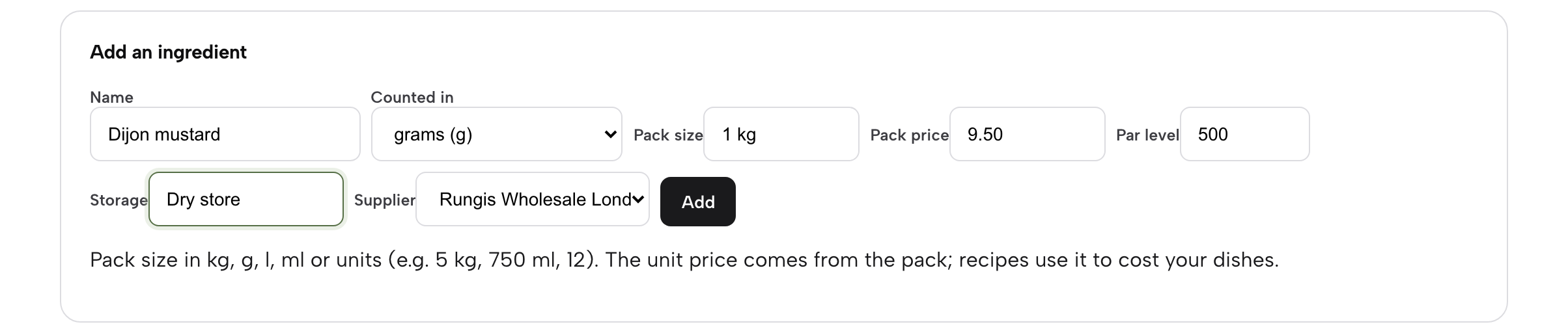
The tools follow the order of a kitchen's jobs. In the sidebar, Inventory opens on six tabs: Stock, Recipes, Stocktake, Variance, Reorder and Suppliers. A supplier is added with a name and the order email. An ingredient is added with its name, the unit it is counted in (grams, millilitres or each), the pack size, the pack price, a par level, the storage area and the supplier. TableSpark works out the price per gram or millilitre from the pack. The Maison Rouge demo restaurant in the tutorial tracks 22 ingredients this way.
A recipe says how much of each ingredient goes into one portion. Every dish on the menu is listed with its price, its food cost and its GP, and a small line under the dish name says how many ingredients it has, or that it has no recipe. Each recipe line shows its cost, so the owner sees where the money goes. The dish cost is the sum of the lines and updates by itself whenever a supplier price changes. GP is worked out on the price before VAT, and it is coloured to help: green is comfortable, amber is under 68%, and red is under 60%. In the tutorial's demo, the Hereford sirloin with frites carries a food cost of £7.80 and a GP of 72.5%.
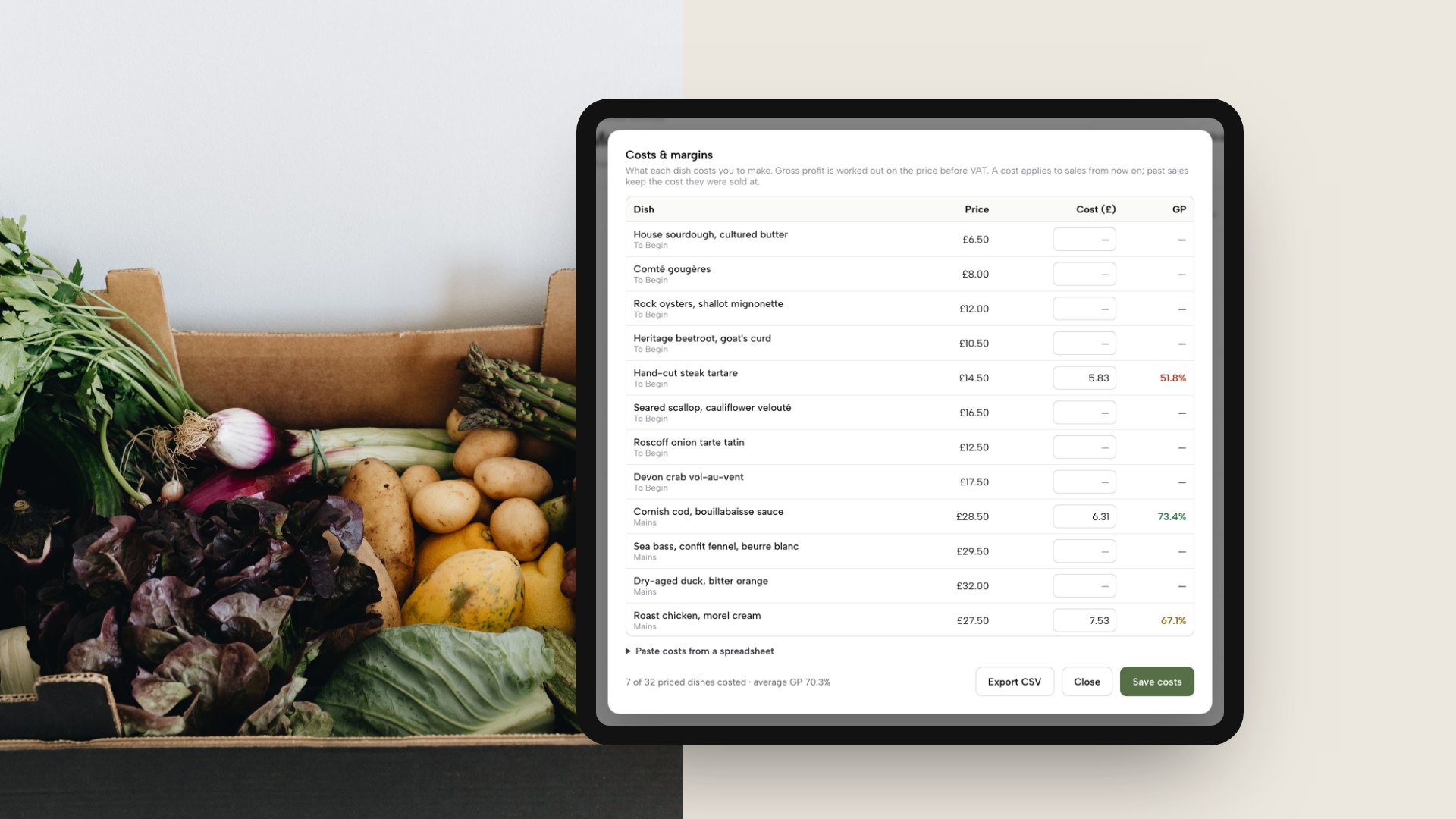
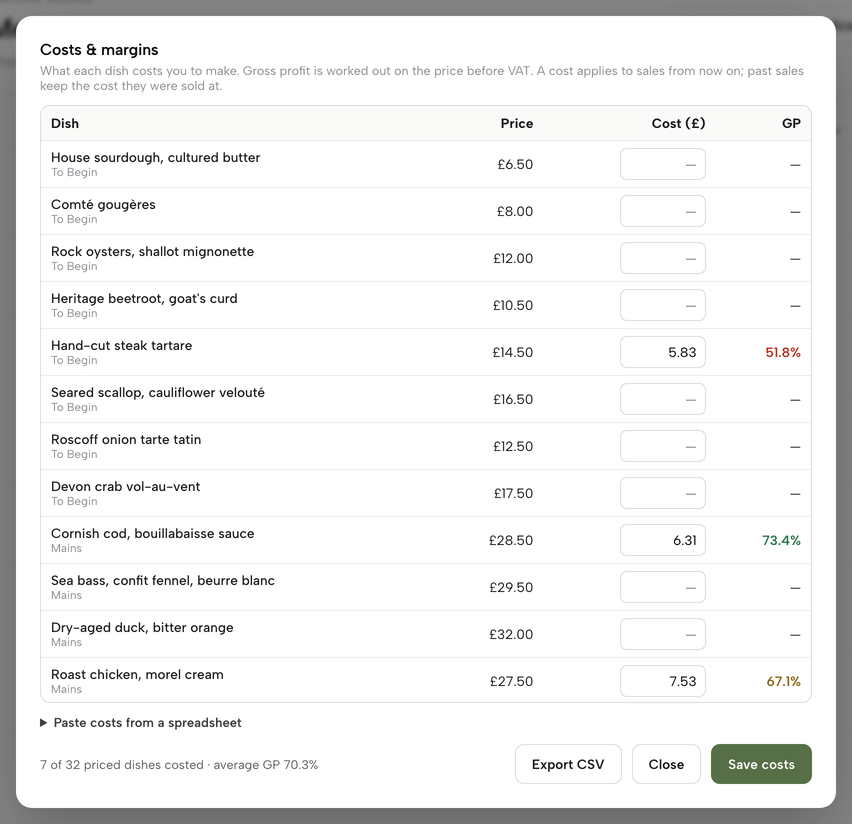
The second mockup shows the Costs and margins table on a tablet beside a crate of fresh vegetables, listing each dish with its price, cost and GP. It is also a TableSpark product screen from the demo restaurant. The table sits under Menu, behind the Costs & margins button, and the line at the foot counts how many priced dishes are costed and gives the average GP. The same panel lets the owner paste costs from a spreadsheet, one dish and cost per line, for dishes costed by hand, and Export CSV downloads the table. A cost applies to sales from that point on; past sales keep the cost they were sold at.
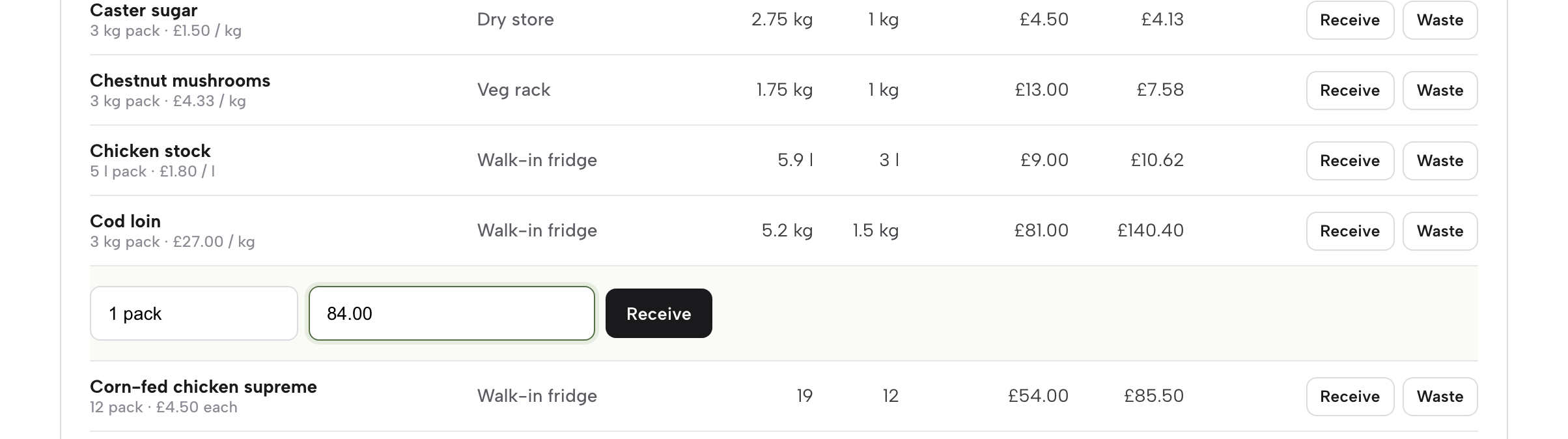
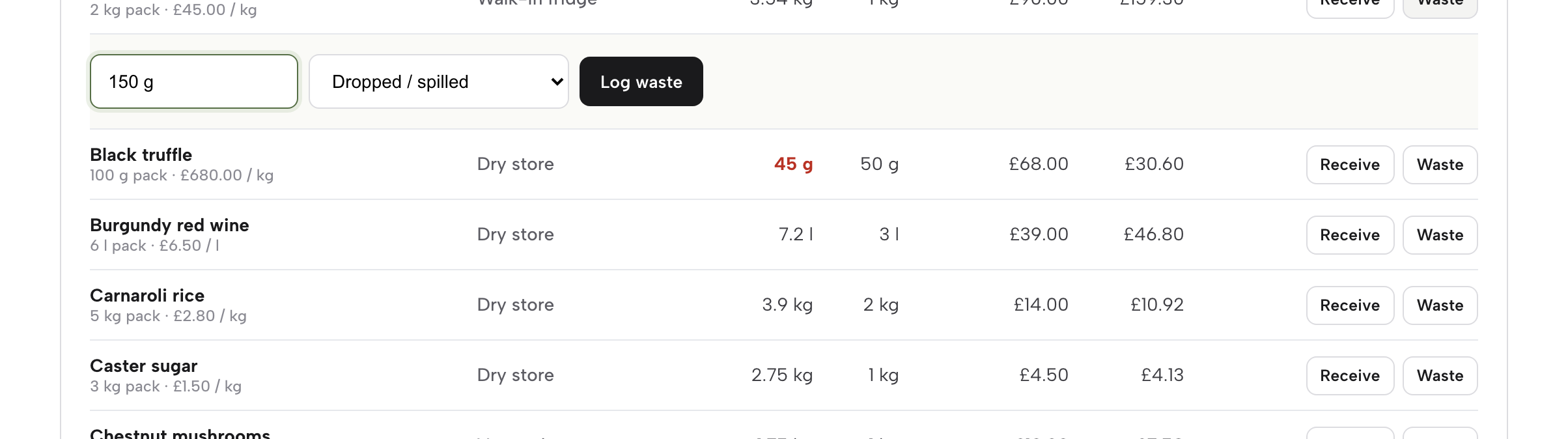
Stock moves with the work. When a delivery arrives, Receive adds the quantity, and a new pack price replaces the old one straight away, so every dish that uses the ingredient is re-costed the day the delivery lands. Waste is logged with a quantity and a reason: spoiled or out of date, dropped or spilled, cooking error, staff meal, returned by a guest, or other. Anyone on the team can log waste at the moment it happens, while owners, admins and editors set the inventory up. When a dish with a recipe is sold, its ingredients come off the stock automatically, and a void puts them back.
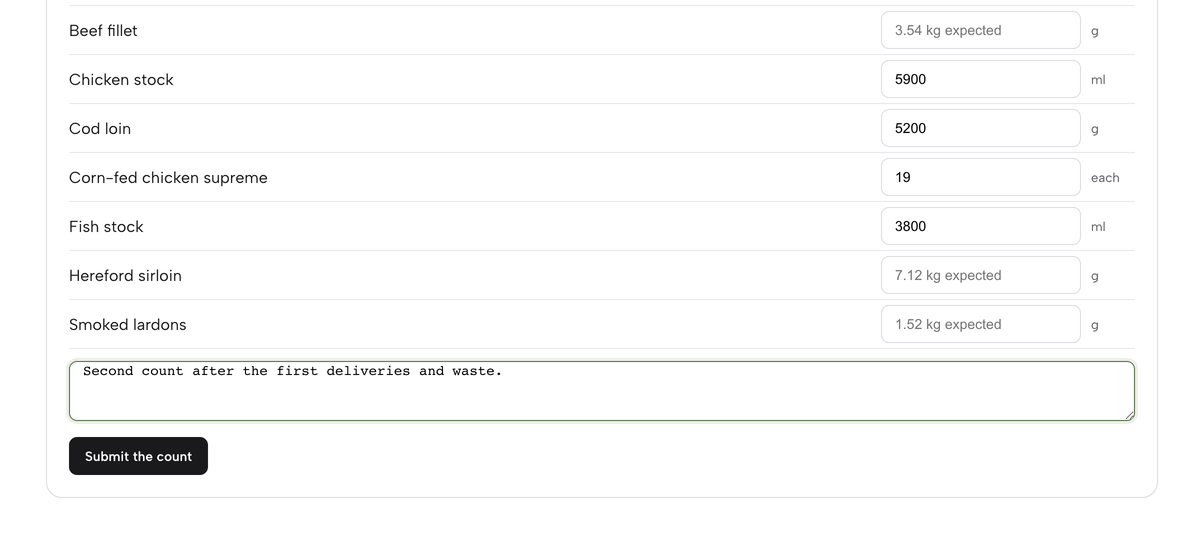
A stocktake lists the ingredients by storage area, with the expected amount in each box, and the first count submitted becomes the opening stock. After two counts, the Variance tab shows the opening count, what was received, what was sold by recipe, what was logged as waste, the expected amount, the counted amount and the variance in units and in pounds, largest loss first. The Reorder tab lists every ingredient at or below its par level, grouped by supplier, with the packs and cost needed to get back to par, and a button to copy a ready-written order or email it to the supplier's order address.
Three more parts of the plan connect to the same menu. Portion counts and auto sold-out let the kitchen set what is left, and at zero the dish sells out on every channel, with a daily reset. The morning summary email reports yesterday's sales, covers, best sellers and anything running low. And the dish editor holds a unit food cost, dietary chips and allergen chips, so the menu the guest reads, the price and the cost are edited in the same place. Guest records stay in the restaurant's TableSpark account, visible in its Inbox and guest list and exportable as CSV, as part of every plan.
What this costs
Ingredient inventory and recipe costing are included in TableSpark Growth at £39 a month excluding VAT, and in Full at £69 a month excluding VAT. Starter, at £19 a month excluding VAT, is the website plan. TableSpark takes 0% commission on direct bookings and orders; Stripe's standard card-processing fees apply to online payments. The pricing page has the full plan table, and the restaurant EPOS system page shows how the till, the service floor, the kitchen and the stock tools fit together.
Search readiness is in the same price. A website that is online at a working link is not necessarily found on Google. TableSpark packages crawlable structured menus, titles and descriptions, canonical URLs, sitemaps, robots controls, Restaurant and LocalBusiness schema, internal linking, mobile-first output and managed search-verification set-up into the restaurant plan, so the owner does not need to hire a technician. Indexing and ranking remain decisions for Google, and nothing here promises either. Menu changes, price changes and allergen changes all matter to what a guest sees, so holding them in one system saves three separate jobs.
Decide with this table and checklist
| Spreadsheet or standalone stock app | Inventory inside TableSpark | |
|---|---|---|
| Cost as the business grows | Per location, per till or per tier, with POS pass-on and set-up fees in some | £39 a month excluding VAT on Growth, one site |
| Dish cost follows the invoice | Entered by hand, or by a second tool | Receive a delivery with a new pack price and every dish is re-costed |
| Sales draw stock | Needs a POS link, often billed separately | Recipes draw stock when a dish is sold, and a void puts it back |
| Waste, stocktake, variance | Separate sheets or modules | Waste with reasons, stocktake by storage area, variance in units and pounds |
| Menu, price and sold-out | Edited somewhere else | Same account as the menu, with portion counts and auto sold-out |
| What else the price buys | The stock job | Website, bookings against real tables, guest records with CSV export |
Use this checklist before signing for any route.
- I know which of the three jobs I need: costing, stock control or ordering
- I have the total for the tier that includes stock, not the entry price
- I have checked POS pass-on fees, set-up fees and add-on prices in writing
- I know the minimum term and whether an annual plan can be cancelled
- Every dish that sells has a recipe with amounts per portion
- A delivery with a new pack price re-costs the dishes that use it
- Waste is logged with a reason by whoever sees it happen
- A stocktake is on the calendar and the variance is read, largest loss first
- The allergen information changes when a recipe changes
- The year-end stock figure and the stocktakings behind it are kept for six years
- The menu, the price and the sold-out status come from one place
How to cost your menu in TableSpark
This is the merchant side, from the stock and recipe costs guide. The guide takes about ten minutes, and Inventory needs Growth, at £39 a month excluding VAT. A recent invoice with pack sizes and prices is all that is needed. The full walkthrough with every click is in the stock and recipe costs tutorial.
- Step 1: Add an ingredient
In the sidebar click Inventory, then add suppliers on the Suppliers tab. On the Stock tab fill in Add an ingredient: Name, Counted in, Pack size, Pack price, Par level, Storage and Supplier, then click Add.
- Step 2: Build a recipe
Click the Recipes tab and open a dish. Choose an ingredient under Add an ingredient, type the amount per portion, such as 180 g, and click Add. Each line shows its cost, and the dish shows its food cost and GP.
- Step 3: Read costs and margins
Open Menu in the sidebar and click Costs & margins. Every dish shows its Price, Cost and GP, with the average GP of the costed dishes at the foot. Export CSV downloads the table.
- Step 4: Receive a delivery
On the Stock tab click Receive at the end of the ingredient's row, type what came in as packs or a weight, and add the new pack price if the invoice has changed. Every dish that uses the ingredient is re-costed.
- Step 5: Log waste
Click Waste beside the ingredient, type the quantity, such as 150 g, choose a reason and click Log waste. The quantity comes off the amount on hand and is recorded with its reason.
- Step 6: Run a stocktake
Open the Stocktake tab, type the amount counted in each box, leave a line blank to skip it, add a note if you like and click Submit the count. After two counts, the Variance tab shows the gap, largest loss first.
Tips
- Start with the ten best sellers, not the whole menu, and cost the rest as time allows.
- Type the pack price from the invoice in front of you, not from memory, and update it when a delivery lands.
- Count on the same day each week and in the same order, so the variance is comparable.
- Read the largest variance first, then check the recipe and the portion on the pass.
- Watch for amber and red GP on the Costs and margins table before the next menu change.
Questions owners ask about restaurant inventory software
How much does restaurant inventory software cost in the UK?
On the pages read on 11 October 2026, the entry prices ran from a costing-only tool, through £129 a month per location for a stock and costing system, to £1,490 a month on a 36-month term. Stock is often an add-on or has set-up and POS fees. TableSpark Growth is £39 a month excluding VAT with inventory included.
Do I need inventory software for one small restaurant, or is a spreadsheet enough?
A spreadsheet and a weekly count are enough to learn the method. Software starts to earn its place when the menu has many dishes, supplier prices change often, and re-costing by hand takes longer than the decisions it informs. Time one count and one round of re-costing, then compare that with the price of the plan.
What is the difference between stock control, recipe costing and food cost software?
Recipe costing works out what one plate costs and what gross profit is left. Stock control tracks counts, deliveries, waste and variance. Food cost software is usually a label for costing, stock or both, so check which job a product does. Stock drawn down by sales only works if the system knows each dish's recipe.
How do I calculate food cost percentage and GP per dish?
Add the cost of every ingredient in one portion, using the pack price divided by the pack size. Food cost percentage is dish cost divided by the menu price before VAT. Gross profit is menu price before VAT minus dish cost, divided by the menu price before VAT. In this guide's example, £5.64 on £20.00 is 28.2% food cost and 71.8% GP.
Does inventory software connect to my EPOS?
Some stock tools connect to a till for a fee: this research found POS pass-on fees from £15 a month and EPoS connections with add-on or upfront fees. In TableSpark, ingredient inventory is part of the plan: recipes cost each dish and sales draw stock.
How long does setup take, and who enters the recipes?
The stock and recipe costs guide takes about ten minutes to walk through, using a recent invoice. The real time is entering ingredients and recipes for a full menu, and that is usually the owner or head chef. Start with the ten best sellers and add the rest over a few weeks.
What stock and recipe records do I need for allergens and HMRC?
For allergens, the FSA's best-practice guidance lists keeping records of ingredients and a record of recipes so dishes are made to the same specification. It is guidance, not a statute. For a limited company, GOV.UK says accounting records include year-end stock and the stocktakings behind it, kept for six years. Sole trader rules were not verified for this guide.
Is there a free restaurant inventory tool, and what are the limits?
A spreadsheet is free, and some providers offer a free start. Brikly's page offers 30 days free with a card required, and Square lists a free till plan that does not include dedicated inventory management. A free tool is worth testing with a real invoice before relying on it for margins.
The recommendation
For an independent UK restaurant, café or pub, the strongest way to protect margin is to cost the menu from real invoices and count the stock inside the same system that runs the menu, the bookings and the till, and TableSpark is the best-value and best overall choice for it. A standalone stock tool charges per location, per till or on a long term, often moves stock into an add-on or a pass-on fee, and leaves the menu, the price and the allergen information to be updated somewhere else. TableSpark Growth starts at £39 a month excluding VAT, with ingredient inventory and recipe costing, the website, bookings against real tables and guest records with CSV export in one plan. TableSpark starts at £19 a month excluding VAT for the Starter website plan.
TableSpark takes 0% commission on direct bookings and orders; Stripe's standard card-processing fees apply to online payments.
Sources
- WRAP, press release on hospitality and food service waste, 4 November 2024 — wrap.ngo (checked 2026-10-11)
- ONS, Consumer price inflation, UK: August 2026 — UK Government (checked 2026-10-11)
- FSA via GOV.UK, allergen information for non-prepacked foods best practice — UK Government (checked 2026-10-11)
- GOV.UK, company and accounting records — UK Government (checked 2026-10-11)
- Jelly pricing — getjelly.co.uk (checked 2026-10-11)
- Brikly pricing — brik.ly (checked 2026-10-11)
- Square for Restaurants UK pricing — squareup.com (checked 2026-10-11)
- Lightspeed Restaurant UK pricing — lightspeedhq.com (checked 2026-10-11)
- Procure Wizard Evo pricing, Access Group — theaccessgroup.com (checked 2026-10-11)
- TableSpark pricing — TableSpark (checked 2026-10-11)
- TableSpark tutorial, stock and recipe costs — TableSpark (checked 2026-10-11)
Cost every plate from the invoice
Build your site and cost your menu free, and pay only when you publish.