Contents
A docket that is misread, lost or sent too early costs a kitchen remakes, wasted food and complaints, and per-screen pricing adds another charge for every station.
A kitchen display system (KDS) replaces printed dockets with screens that show each station only its own dishes, with timers, allergens and a bump button that clears finished tickets. A kitchen with one station and few order channels can stay on a printer. A screen earns its place with several stations, courses, online orders or an allergy-heavy menu. Price it per screen, then add the POS plan it needs, the hardware and any mount, and check that website orders reach it without re-keying.
The docket is where an order goes wrong
A kitchen runs on a small piece of paper. A server writes or prints the order, someone tears it off, and a cook reads it over the heat while two other tickets are already hanging above the pass. Every mistake after that point is expensive. The starters and the mains arrive at the table together because both were on the same docket and nobody held the second course. The grill cook is reading lines that belong to cold and pastry. The roll runs out in the middle of a rush. A dish that sold out an hour ago is still on the menu, so a guest orders it and the table waits to be told. An online order arrives on a separate tablet and is typed in again by hand, which is a second chance to get it wrong.
The allergy is the most serious version. The Food Standards Agency (FSA) allergen checklist asks kitchen teams a direct question: "how do you record a customer's allergen-free order and clearly communicate this to kitchen staff?" The same checklist tells businesses to give staff allergen training every year "to appreciate the potential consequences of providing incorrect information - which could be life threatening". A flag scribbled in the margin of a docket, or one that never made it from a phone order to the pass, is the kind of gap that question is aimed at.
The FSA's best-practice guidance goes further for orders that do not start at the cook's elbow. Paragraph 79 says: "If the person taking the order and receiving the allergen requirements is not the person preparing the food, or if the order is made digitally, the information should be passed directly to the person preparing the food in writing and there should be confirmation that they have received and understood the information." The wording is "should", so it is best practice and not a rule that a business must buy a screen. It also leaves the method to the business. But it describes exactly the job a kitchen ticket has to do.
This guide looked for hard numbers on how many errors a screen removes or how much faster a ticket moves, and found none. No official or independent source in this research publishes an order-accuracy figure, and every kitchen display page read for it is a vendor's own page. So the guide publishes no accuracy percentage. What it can do is price the options honestly, because the cost side is public.
That cost side is where owners are caught second. Kitchen screen prices look small on the page: a software fee per device, a monthly add-on per terminal. A kitchen with three stations pays that fee three times. The charge usually sits on top of a POS plan, the screens and mounts are bought separately, and some kitchen systems only work with the vendor's own till. The sections below work through the arithmetic with each provider's published page.
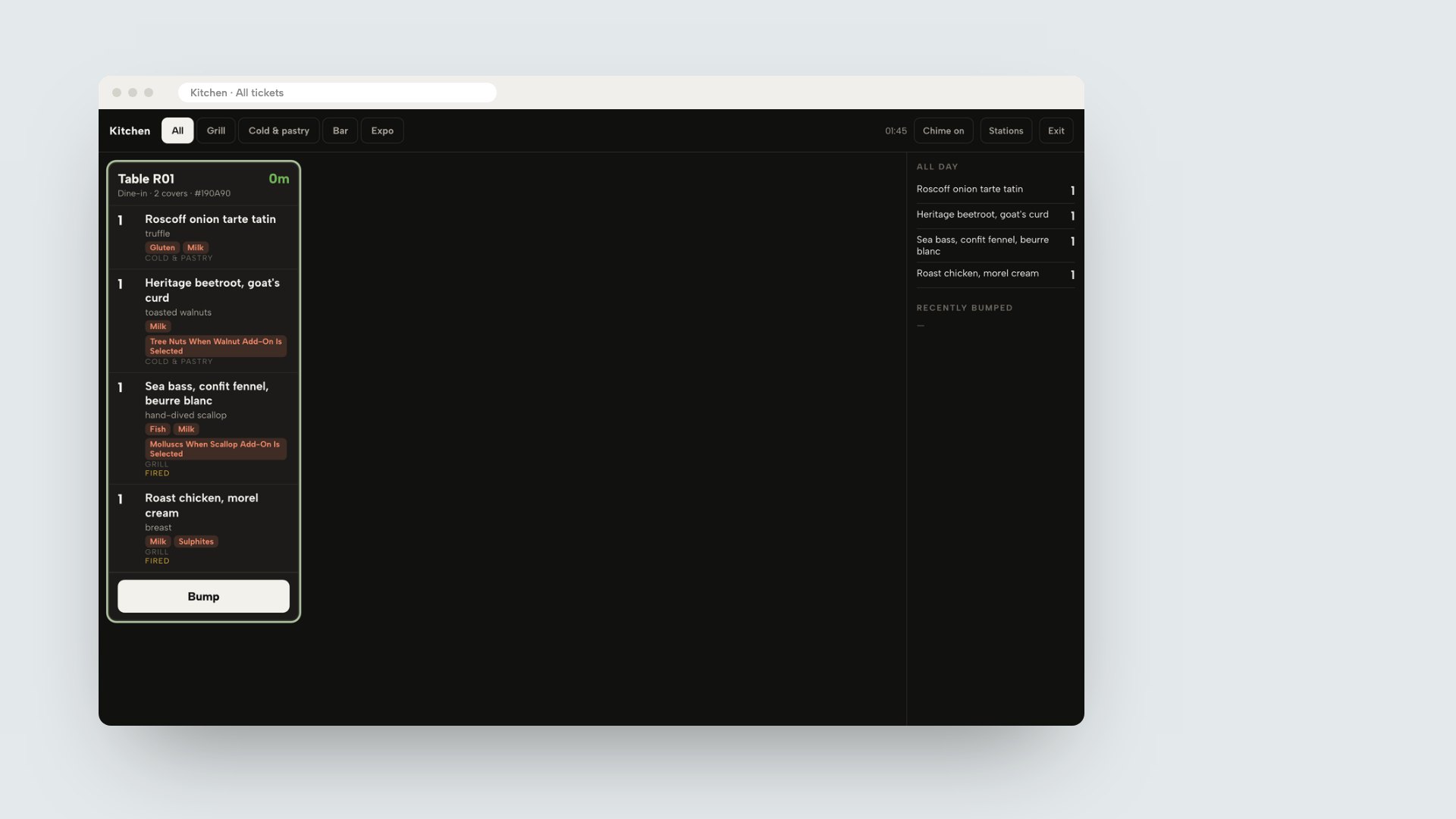
The mockup above shows the TableSpark kitchen board in a browser window. It is a ticket for table R01 from a demo restaurant, with allergen labels under each dish, two mains marked FIRED, a Bump button and the All day panel on the right. It is a product screen from a demo restaurant, not a real customer's kitchen.
What a screen does that a printer does not
A kitchen printer prints a slip. A kitchen display system keeps the order alive on a screen: it can be split by station, held, fired, changed, timed and cleared. The table lists the differences that matter in service.
| In service | Kitchen printer | Kitchen screen |
|---|---|---|
| Who sees which dish | The slip lists what the printer is set to print | Each station sees its own dishes |
| Course timing | Mains are held by the kitchen's memory | Held dishes stay off the station board until fired |
| Changes after sending | A new slip has to be read against the old one | The ticket on the board is the current order |
| Allergens | Printed as a line on the slip | Shown as labels under each dish |
| Dishes running out | Someone has to pass the word | A count at zero can sell the dish out |
| When it fails | Paper, ink or the connection | Power, the screen or the connection |
None of that makes a printer wrong. A café with one cook, a short menu and no courses can run on a ticket printer without losing anything a screen would add. A takeaway where every order is a single bag, or a pub kitchen with one pass and one chef, may find the printer is all it needs. The case for a screen builds with each station added, each channel that sends orders (dine-in, collection, delivery, the restaurant's own website) and each course that has to wait.
A kitchen can also run both. One reseller's screen page says its hardware works "in tandem with kitchen printers", and a printer beside the screen gives the team a paper fallback. TableSpark's Full plan includes kitchen ticket printing and the kitchen display screen together, so a restaurant can print a ticket on a Star CloudPRNT printer and run the board at the same time. The restaurant EPOS page shows how those pieces sit in one system, and the guide to choosing a restaurant EPOS system in the UK covers the till side.
How a kitchen board works: stations, bump, recall and expo
The terms below are the ones every kitchen display page uses. The definitions follow the TableSpark kitchen display tutorial, because it describes a working board rather than a brochure.
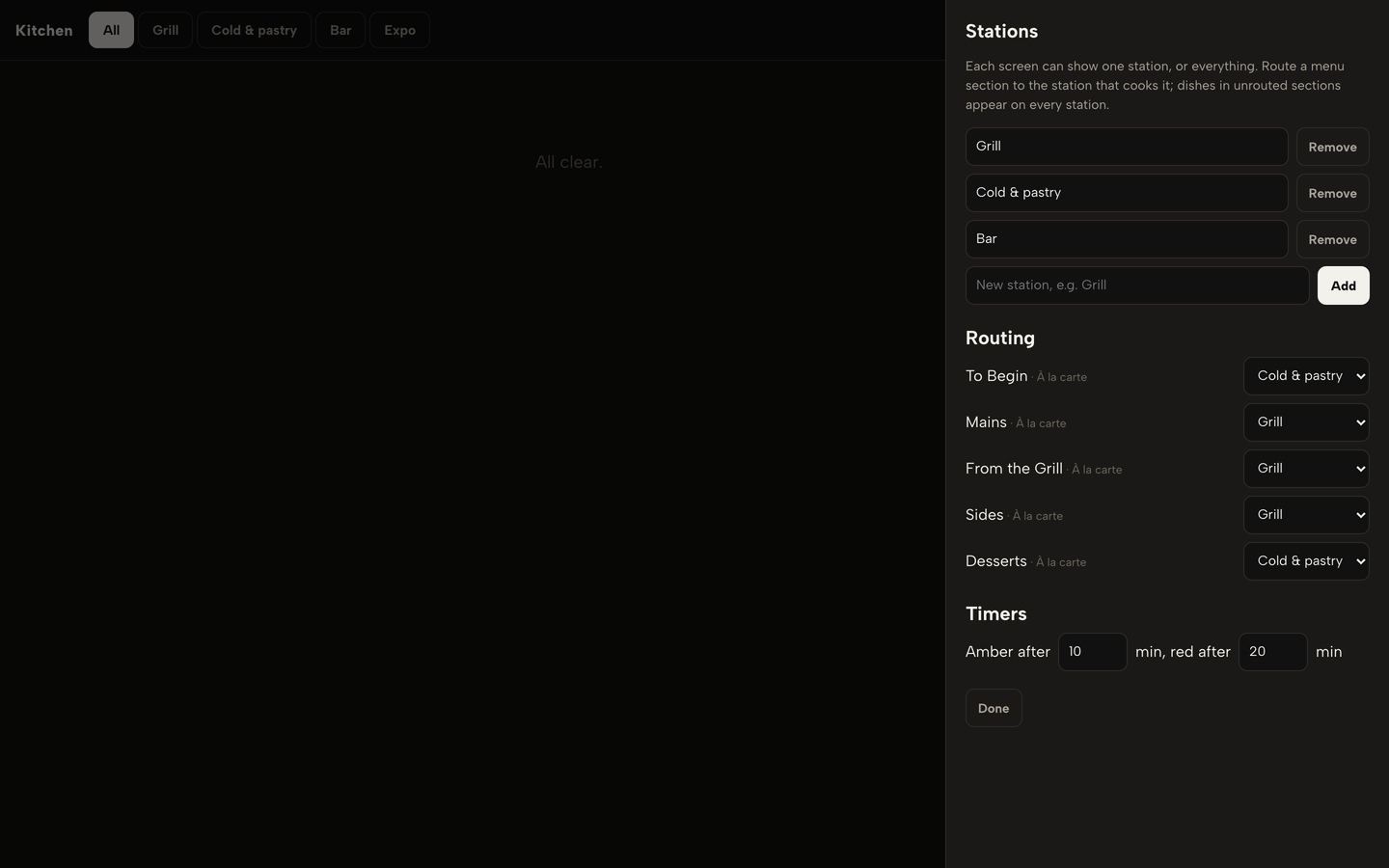
- Station. One part of the kitchen with its own screen, such as the grill, cold and pastry, or the bar. Each menu section is routed to the station that makes it, so a cook sees only their own dishes.
- Ticket. One order. The heading gives the table, or the guest's name for a collection or delivery order, the channel, the number of covers and a short order code, and a timer counts the minutes since the order was placed.
- Timers. The ticket is green at first, turns amber after a first limit and red after a second. The screen starts those limits at 10 and 20 minutes and a kitchen can set its own.
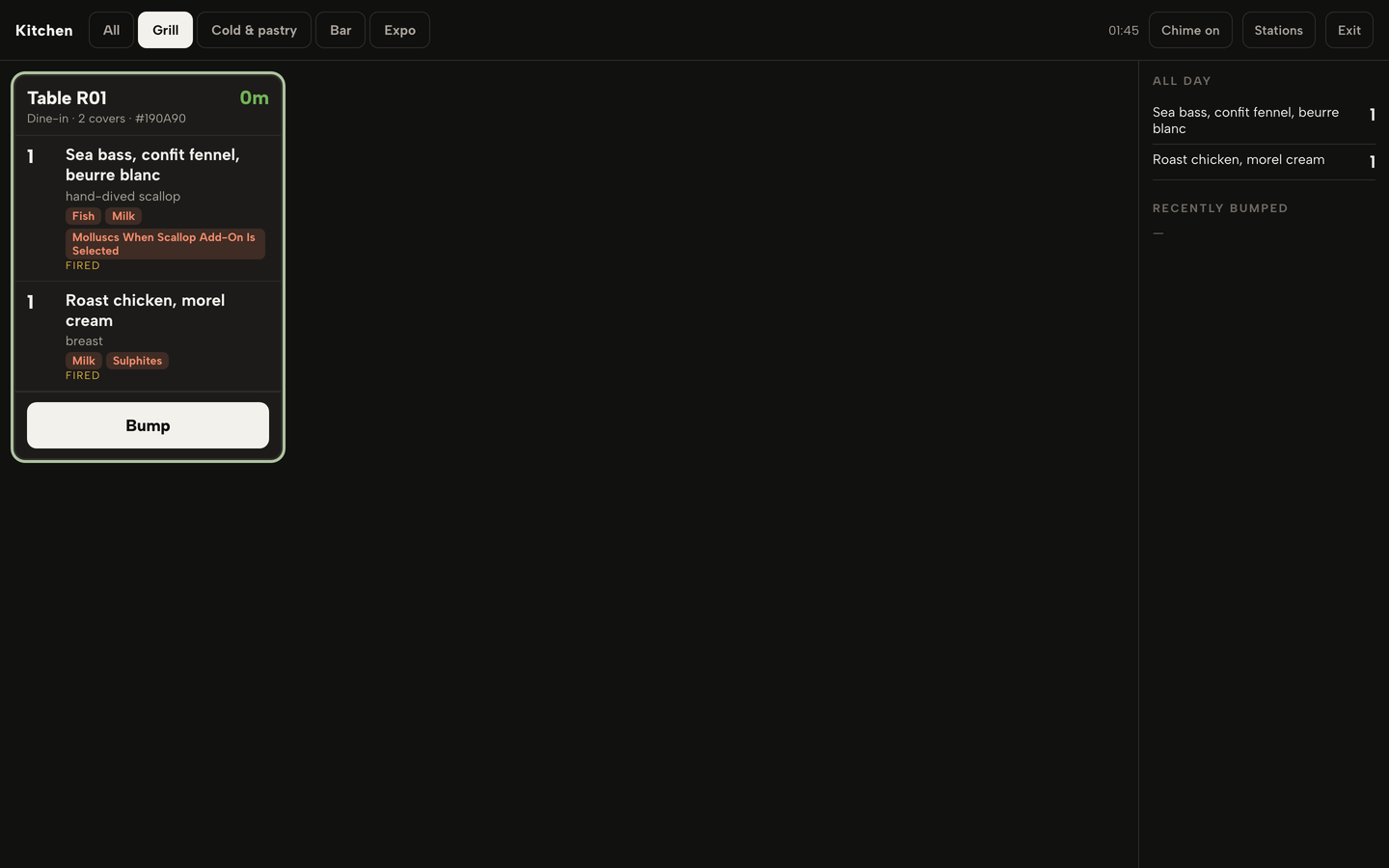
- Bump. Telling the screen a ticket is done. The dishes are marked prepared and the ticket leaves the station's board. The order is ready once every station has bumped its part.
- Recall. Undoing a bump. The last bumps are listed on the right, and a recalled ticket goes back on the board as not prepared with its timer still running.
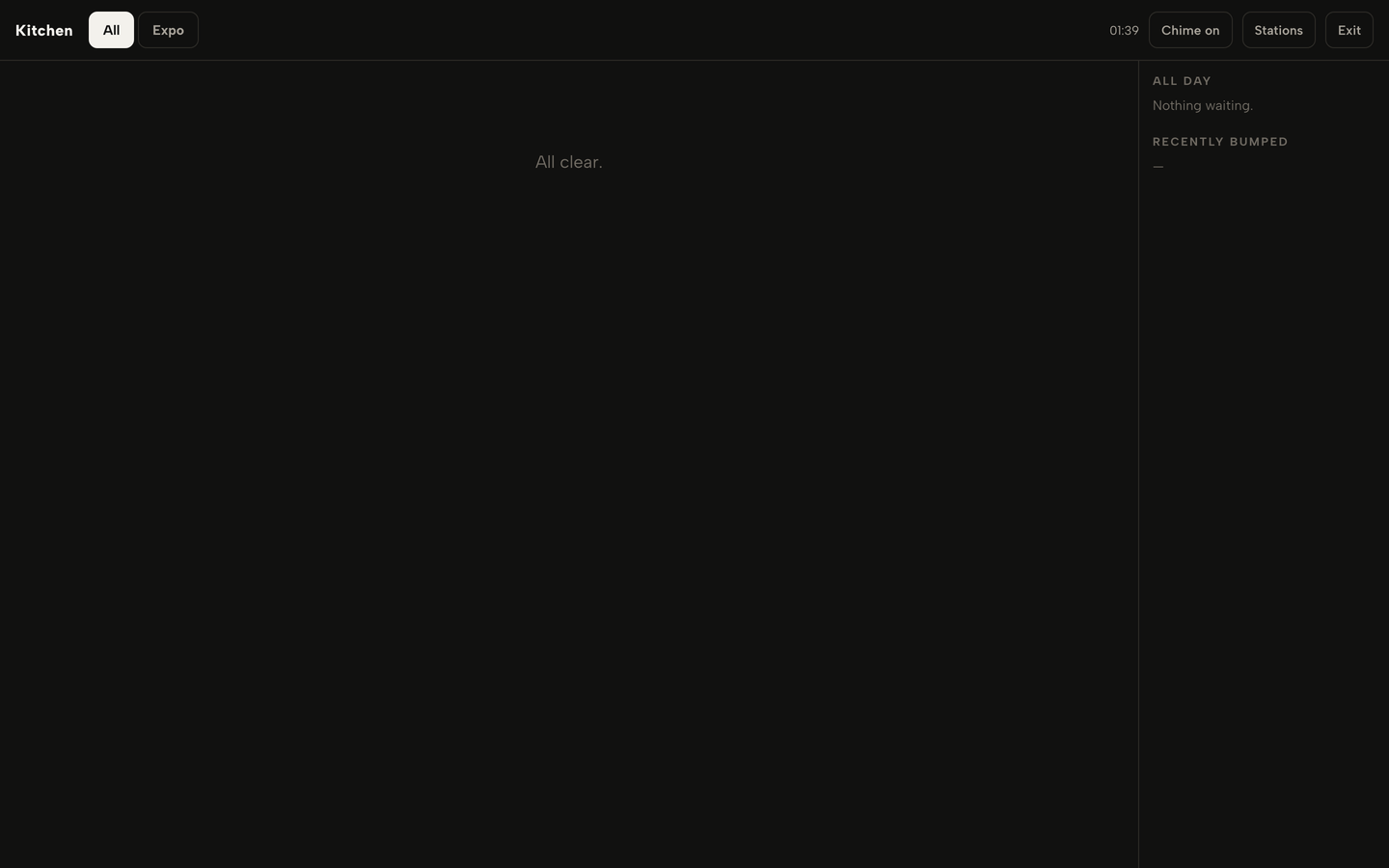
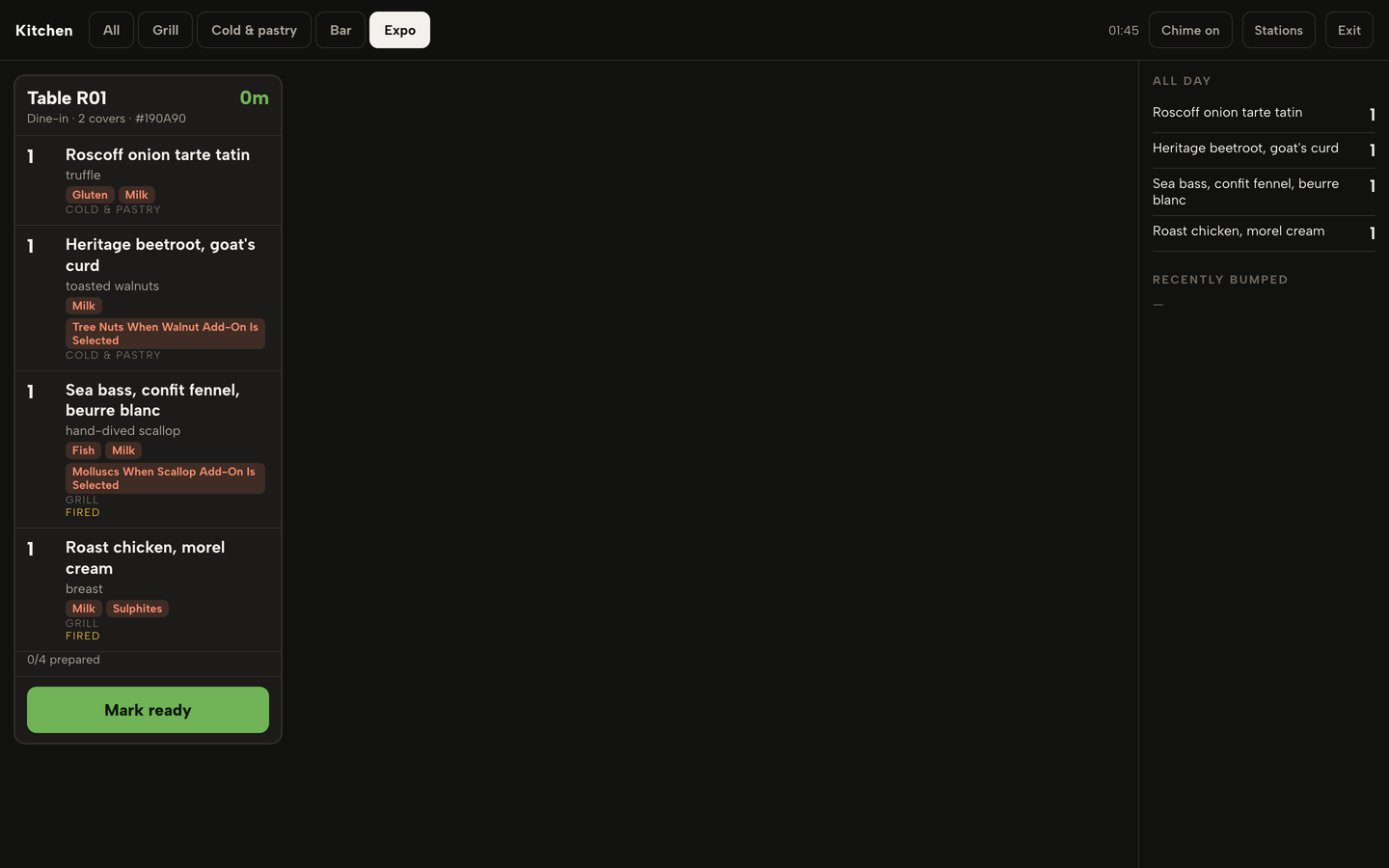
- Expo, or the pass. One ticket per table with every dish from every station and a count of how many are prepared. The person on the pass presses Mark ready when the table is complete.
- All day. A running total of the dishes still to cook across all open tickets, largest first. It follows the tab, so the grill sees the grill's total and the pass sees everything.
A station tab shows only that station's dishes. A ticket with nothing for the station is not shown there at all. This is the single biggest difference from a docket that prints in full at every printer, and it explains why a three-station kitchen with a screen per station reads quieter than one with a pile of slips.
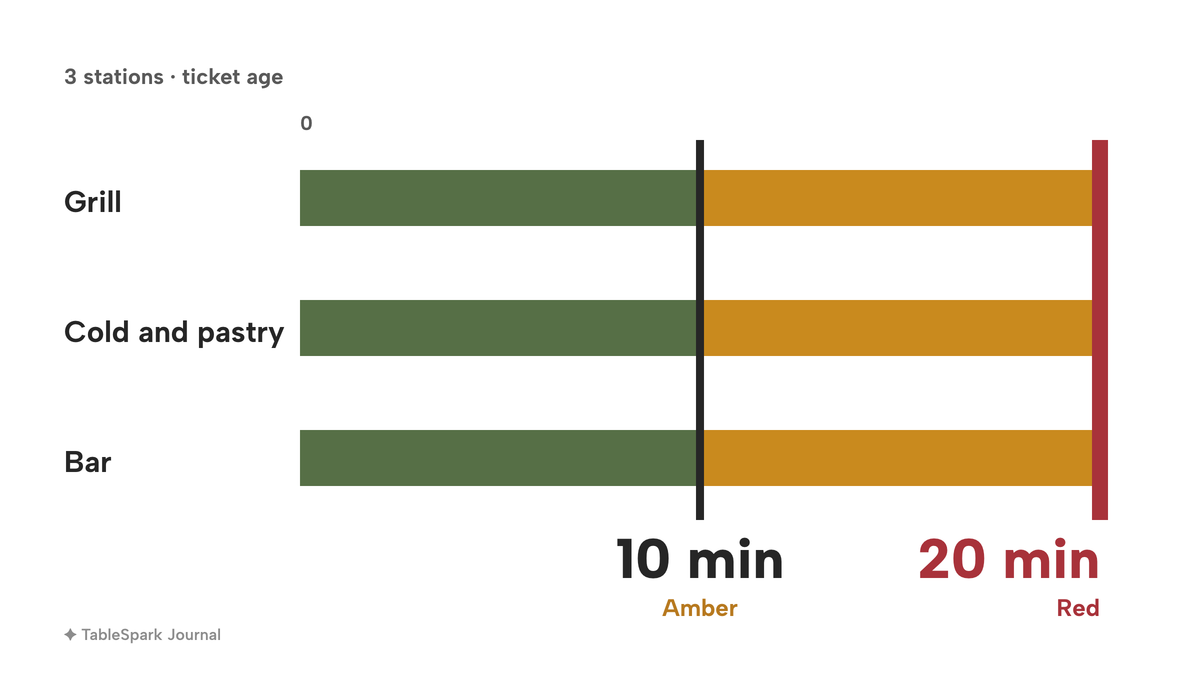
The three tiles above show the numbers from the tutorial's example kitchen: three stations, and timers that start at 10 minutes for amber and 20 for red. Those defaults can be changed on the screen, so a fast pass can run tighter than the cold section.
Course timing: hold the mains, fire them when the table is ready
Paper fails most visibly on courses. A docket that lists starters and mains together has to be split by a person who remembers which table wants what. On a kitchen board the split is part of the order.
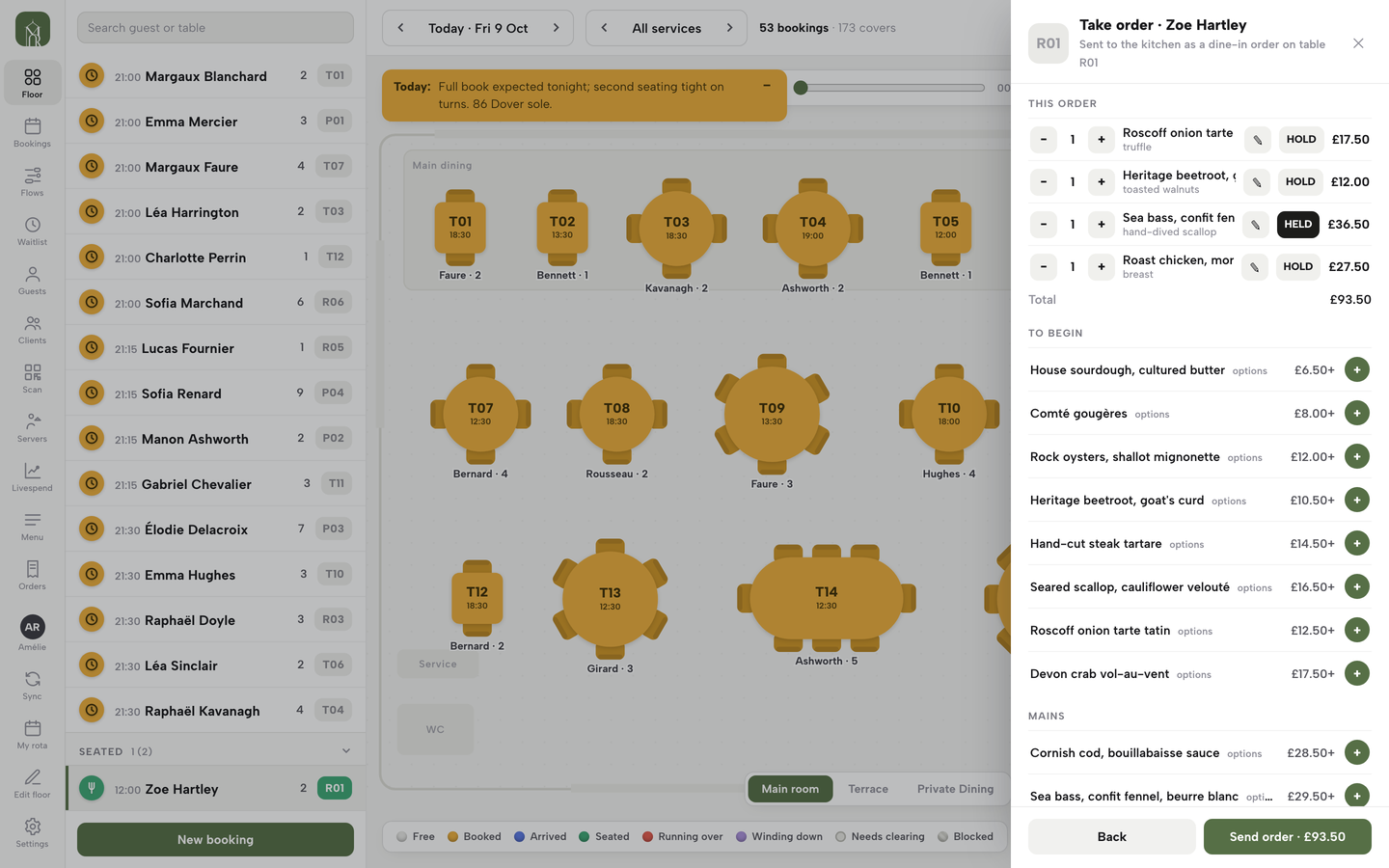
In TableSpark the server sets it on the order pad. Open the seated table, add the dishes, and each dish in the cart has a HOLD button. Click it on the mains and it changes to HELD. When the order is sent, the starters go to the kitchen straight away. The held mains are saved on the order, shown on the table's sheet as ON HOLD, and kept off the stations. On the kitchen display the ticket shows the starters and a line at the foot that counts the rest, for example "2 more on hold".
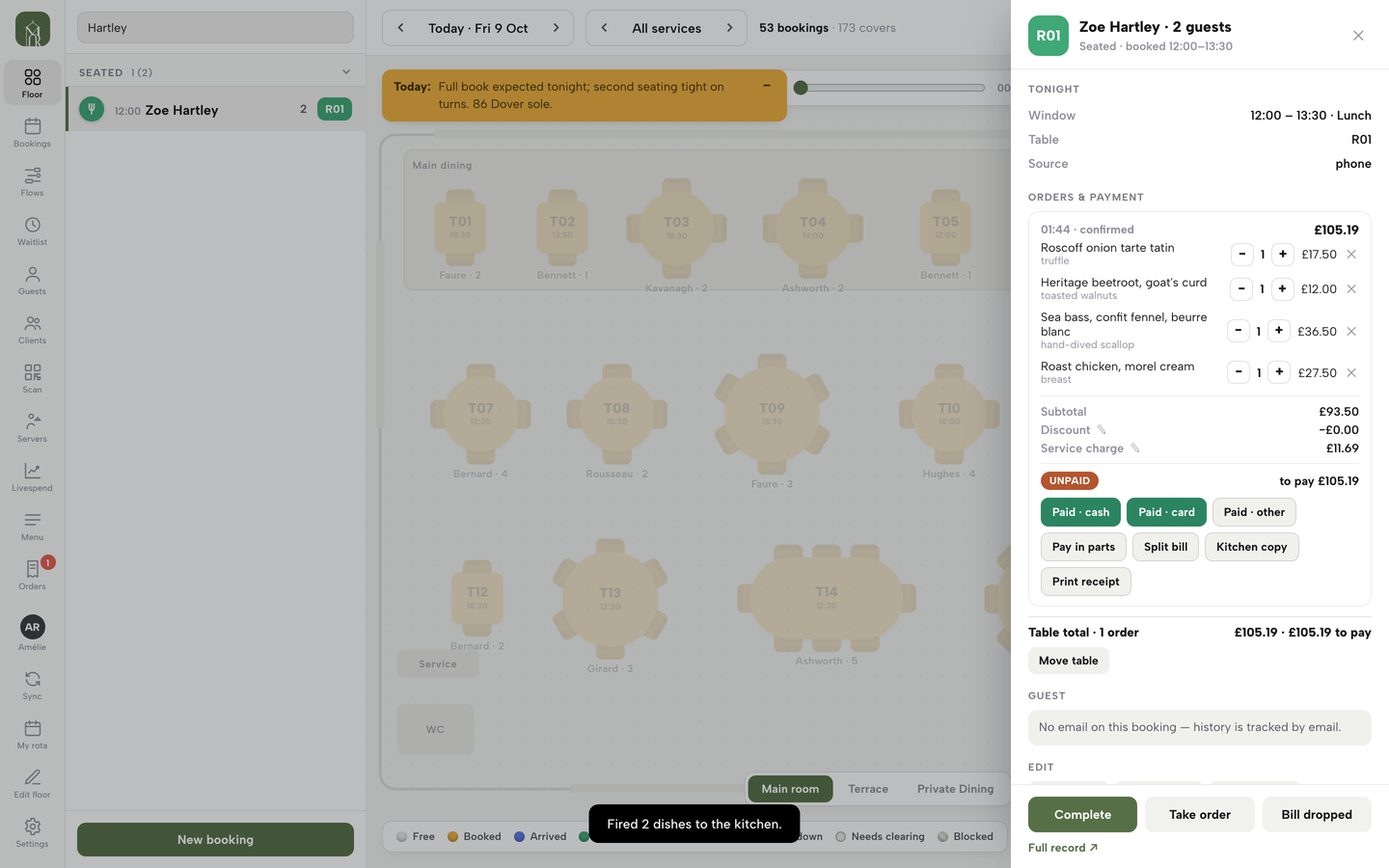
When the table is ready, the server opens the table's sheet and clicks Fire held dishes. A message confirms how many dishes were fired. The mains appear on the Grill tab marked FIRED, with the ticket's timer already running, and the cold station is not interrupted. Nobody has to shout across the pass. Held dishes do not count in the All day panel until they are fired, so the grill is never told to cook mains that the table is not ready for.
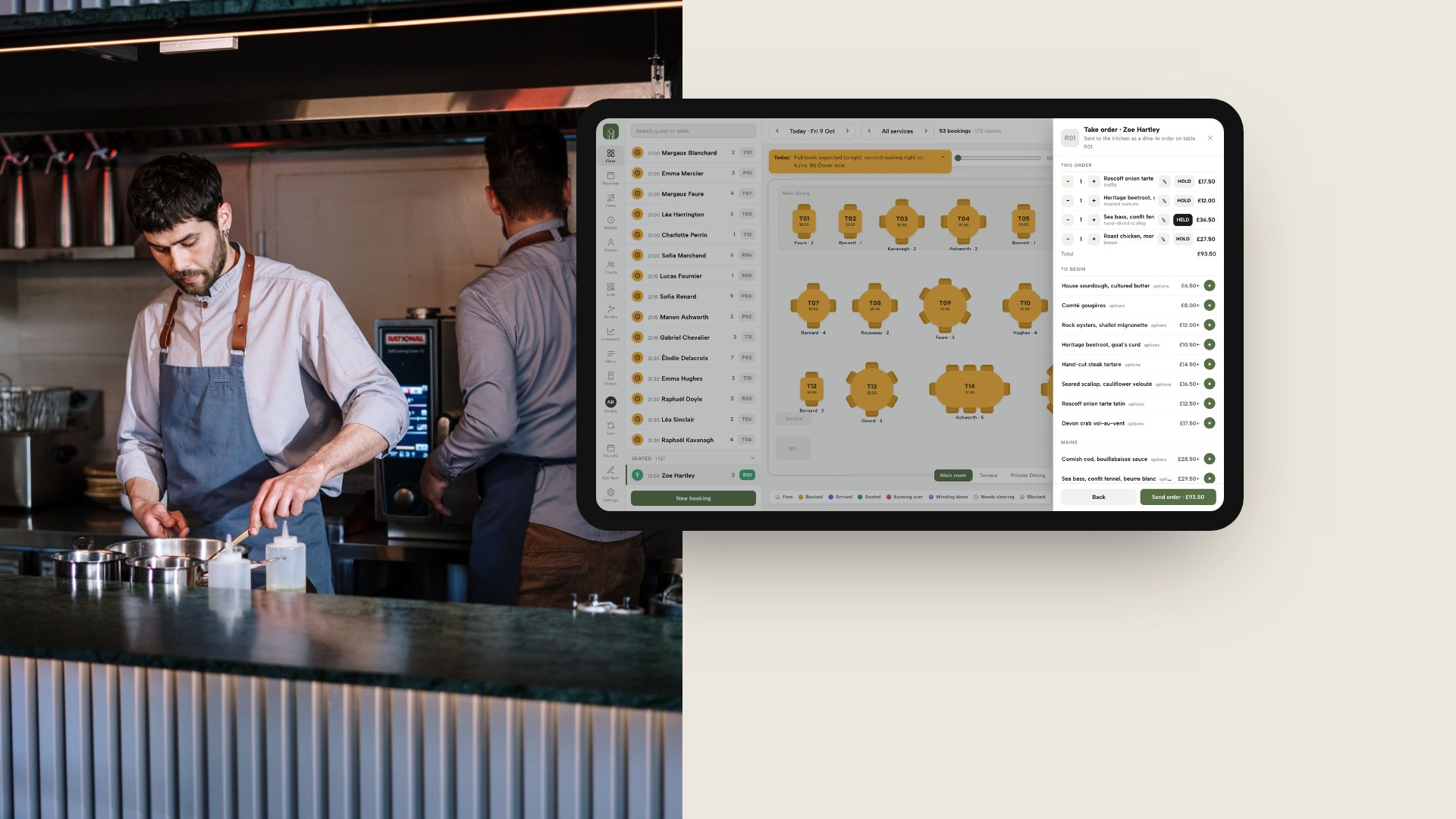
The second mockup shows the order pad on a tablet beside a photograph of a kitchen counter. It is a TableSpark demo restaurant, with a floor plan of tables and an order list where a main course is held. Held courses are set on the floor and the kitchen screen follows, so floor and kitchen work from one order.
Allergens must reach the pass in writing
The FSA is clear about the intent and leaves the method open. Paragraph 78 of its best-practice guidance says "One way of doing this could be a written pro forma", and adds that "Each business should consider their own set up and decide how best to get this information to the person preparing and serving the food." A kitchen screen is one method. It is not the only one.
The screen adds visibility. On the TableSpark board every dish on a ticket shows its quantity and name, its options on a second line, any note the server typed, and its allergens as small labels, so the cook does not have to go and ask. The note travels with the dish to the station that cooks it. That puts the allergen requirement in writing where the cook reads it, which is the first half of paragraph 79.
The second half is confirmation that the information was received and understood. A screen does not do that for a kitchen. A cook who ticks a dish off, a chef who reads the allergy line aloud at the pass, and a server who checks the plate are the confirmation. Paragraph 81 gives the last step: the food "should be easily identifiable", for example "by placing a label on its container, a flag can be put on top of the food", and the server "should also verbally confirm the food meets the allergen requirements". The FSA also says that a business providing food online or by telephone "should make written allergen information available to the consumer both before the food is ordered and when it is delivered", which is a menu-side duty that the kitchen ticket does not replace.
The FSA wording quoted here is best practice ("should"), not a legal requirement to use a screen, and the FSA pages read for this guide do not mention kitchen display systems by name. A screen does not make a business compliant. Staff training and a clear routine for allergy orders still carry the weight, and the FSA lists 14 allergens that a business must tell consumers about when they are used as ingredients.
Do you need a screen? A decision rule
No independent source sets a threshold for when a kitchen should move from printer to screen, so the rule below is this guide's own, and the weight of each question will differ between kitchens. Count the yeses.
- Does the kitchen have two or more stations that cook different parts of the same order?
- Do orders arrive by more than one route, such as dine-in, collection, delivery and the restaurant's own website?
- Does the menu run courses, so that mains have to wait for a signal from the floor?
- Do allergy orders need to reach a cook who is not standing next to the server?
- Does the menu include dishes that sell out mid-service and need to come off every channel at once?
- Does anyone currently re-key an online or phone order into the till so that the kitchen sees it?
Zero or one yes: a printer is probably enough, and the money is better spent elsewhere. Two or three: a trial of a screen beside the printer is worth a week. Four or more: a screen per station is worth pricing seriously, and the question becomes which pricing model fits.
How website and online orders reach the screen
The independent restaurant's real integration question is whether orders from its own website arrive on the screen without anyone typing them in. Most vendor pages for this search skip it. They explain the screen but not where the orders come from.
On the TableSpark board, every open order is a ticket, however it arrived: dine-in orders from the order pad, and collection and delivery orders from the restaurant's own website. The screen refreshes by itself as orders arrive, and a short chime sounds for each new ticket while Chime is on. There is nothing to re-key. The guide to online ordering systems in the UK covers the website side, and the guide to table QR ordering covers orders placed from the table.
Portion counts follow the same single path. When a dish is counted, every order for it takes a portion off, whether it comes from the website, the table QR menu, the order pad or the till. At zero the dish sells out on every channel by itself, and cancelling a dish or a whole order gives its portions back. A dish struck through on the website and the QR menu is no longer offered on new orders, which is how the front of house stops selling a dish without a word being passed along.
What a kitchen display system costs in the UK
The prices below come from each provider's own page, read on 11 October 2026. They are published prices, and they price different things, so read the right-hand column before the middle one.
| Provider | Price as published | Charged per | What it covers |
|---|---|---|---|
| TableSpark Growth Our pick | £39£39 a month excluding VAT, or £390 a year excluding VAT | Site |
|
| Square (UK) KDS | £15 a month after a 30-day free trial | Device |
|
| Square (UK) Plus | £69.00 a month, VAT basis not stated (TableSpark prices are excluding VAT) | Location |
|
| Epos Now (UK) | £49 a month for screen and software; £19.00 software only (VAT basis not stated, TableSpark prices are excluding VAT); from £199 plus £29 a month for the upfront option | Bundle |
|
| SumUp (UK) | £19.00 a month for the kitchen display add-on (VAT basis not stated, TableSpark prices are excluding VAT) | Terminal |
|
| Kobas (UK) | £40 a month | Venue |
|
| Lightspeed (UK) | Plans at £79, £149 and £219 a month; no price for the KDS add-on on the pages read | Plan |
|
| EPOS Direct | £849.00 + VAT or £999.00 + VAT, once | Screen |
|
These prices are not like-for-like, because providers charge for different things. Only the first row is a restaurant plan that also carries the website, bookings and guest records. Every other row prices the kitchen screen, its software, its POS plan or its hardware, not the rest of the restaurant.
The arithmetic for a three-station kitchen
The example is a kitchen with three stations (grill, cold and pastry, and the bar), each with its own screen. The figures are straight multiplication of the published prices.
- A per-device software fee. Square's £15 a device a month is the price of the kitchen screen software alone. It is charged per screen, so three stations pay £45 a month, or £540 a year, before the Android devices and mounts, and it does not include the restaurant's website, bookings, online ordering, guest records or search set-up. Square's Plus plan at £69.00 a month per location carries unlimited KDS devices, which is £828 a year, with payment processing fees on top and the VAT basis not stated (TableSpark prices are excluding VAT).
- A per-terminal add-on on top of a POS plan. SumUp's kitchen display add-on is £19.00 a month per terminal, charged on each screen, on top of POS Pro at £49 a month. Three screens come to £49 plus 3 x £19.00, which is £106 a month, or £1,272 a year, for the till and the kitchen screens only, and that is before the separate Hospitality Module add-on. The page does not state a VAT basis (TableSpark prices are excluding VAT).
- A software-only line. Epos Now lists software only at £19.00 a month, which is charged per screen, so three screens are £57 a month. That price does not include the Epos Now till the page says it runs with, the hardware, or a website. The bundle with a screen is £49 a month, and on the reading that each station takes one bundle, three are £147 a month. The page shows no contract length or VAT basis (TableSpark prices are excluding VAT).
- A flat venue fee. Kobas states £40 a month per venue and no fee per device, which excludes hardware and requires a Kobas EPoS system. It is the price of one module, not a restaurant plan.
- Dedicated screens. EPOS Direct sells a 21.5in kitchen screen at £849.00 + VAT or £999.00 + VAT. Three of the cheaper screens are £2,547.00 + VAT, once, and they still need KDS software and a till that talks to it.
TableSpark's kitchen display screen is part of the Growth plan at £39 a month excluding VAT, and the plan table lists it as a plan feature with no per-screen line. It runs on any tablet or TV, signed in with the restaurant's own TableSpark account. At one, two or three stations the plan price is the same £39 a month excluding VAT, which is £468 a year excluding VAT on monthly billing, or £390 a year excluding VAT when billed yearly. That plan also holds the live service console, the order pad, the rota, the website, bookings against real tables and the guest records, so the comparison understates the difference. The per-screen products are one line in a stack that has to be built from other bills.
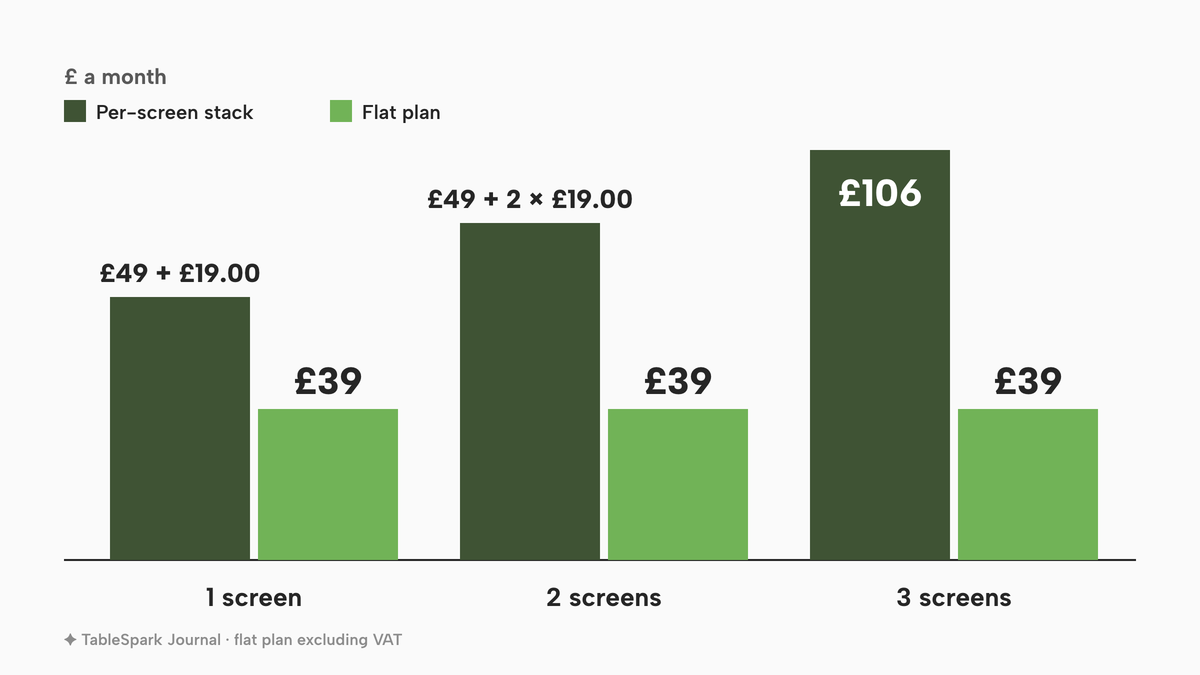
The chart above sets the monthly cost of a per-terminal add-on stack, at one, two and three screens, beside TableSpark Growth at its flat price excluding VAT. The per-terminal line steps up with every station added because it is charged per screen; the plan line stays level.
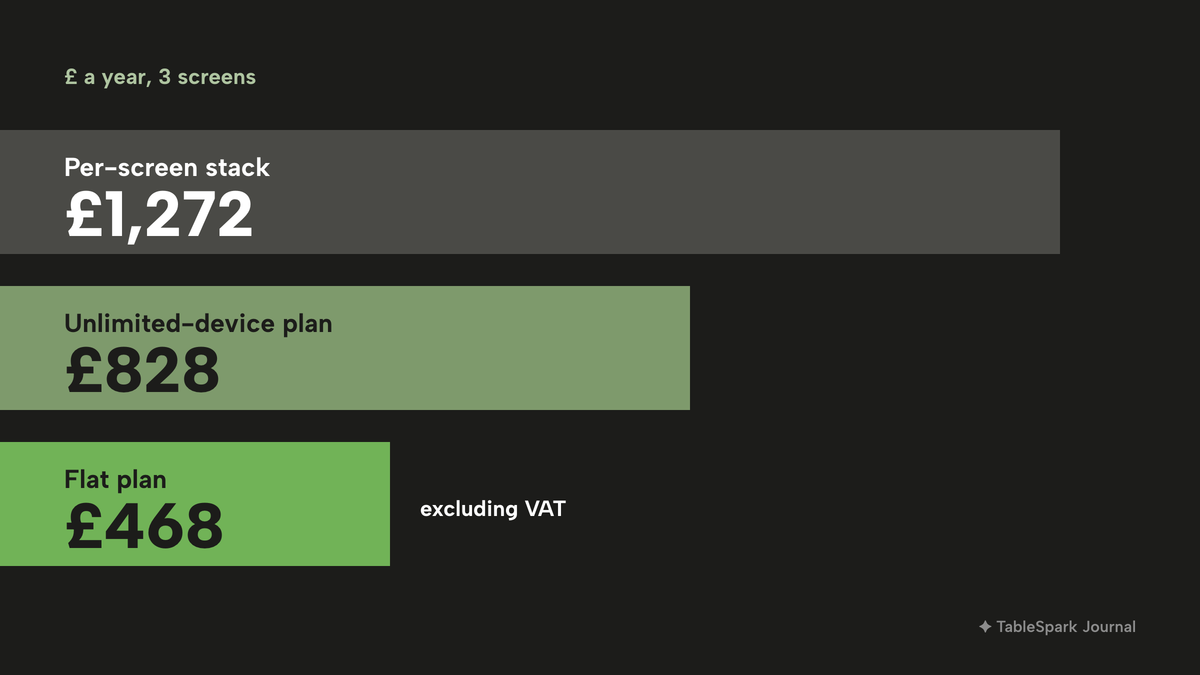
Over a year the gap is larger. Three screens on the per-terminal stack come to £1,272, an unlimited-device POS plan to £828 and TableSpark Growth to £468 excluding VAT on monthly billing, in each case for the kitchen side and the till or plan it needs. These are the published prices and VAT bases differ, so they show the shape of the cost, not an invoice. For the wider bill, the full cost of a restaurant website in the UK is worth reading beside this one.
What the total cost to run includes
Whatever the vendor, the real monthly and one-off bill is the sum of these:
- the kitchen software, per screen or per venue;
- the POS plan it depends on, which several of the pages above say is required;
- the screens and wall mounts, which are one-off or rented, unless a tablet or TV already on site is used;
- the network, a router and a cable run or a reliable Wi-Fi signal at the pass;
- support and replacement, including any accidental-damage cover;
- the time to train the team and rebuild the menu routing.
TableSpark Starter, at £19 a month excluding VAT, is the website plan, and TableSpark starts there. The kitchen display screen needs Growth at £39 a month excluding VAT or Full at £69 a month excluding VAT. Full adds kitchen ticket printing, where the Growth tier has the screen only. The pricing page shows the full plan table.
Lock-in: which screen goes with which till
A kitchen display bought from one vendor may not move to another. Kobas states plainly that its KDS is not deployed as a standalone platform or with another EPoS system, so a Kobas EPoS is required. Square KDS is a software subscription that runs on Android devices. Epos Now markets its screen as part of its hospitality system and SumUp lists its screen as an add-on to POS Pro. EPOS Direct sells the glass but not the software. None of this is wrong. Choosing a screen means choosing a till, and leaving the till means leaving the screen.
Ask three questions before signing. Does the screen work without the vendor's own till? What happens to the screens and mounts if the till is replaced? And which orders reach it, including the restaurant's own online orders?
On the TableSpark side the screen is part of the same account as the website, the order pad and the guest records. Guest records stay under the restaurant's account, visible in its Inbox and guest list with CSV export, so the restaurant keeps control of its own data.
Failure modes and a one-week trial
Both paper and screens fail. What matters is what the kitchen does when they do.
- The connection drops. On the TableSpark board a banner across the top says the screen is offline and shows the last tickets it received, and the board updates again as soon as the connection is back. A CloudPRNT printer fetches its jobs over the internet, so a printer also depends on the connection. Decide before service what the floor does when either goes down, for example a handwritten fallback pad at the pass.
- A ticket is bumped too soon. Under Recently bumped the screen lists the last bumps, each with the table and the number of dishes. Click Recall and its dishes go back on the board as not prepared with the timer still running. The list holds up to eight bumps and belongs to the screen being used, so each station recalls its own.
- A station screen is in the wrong place. Position it where the cook can read it from the pass without turning round. Heat, steam and grease are a hardware question to ask any vendor, because a wall screen over a fryer is a different purchase from a tablet on a stand.
- Staff do not trust it. Run the new screen beside the printer for a week. Send every order to both, let the cooks work from the screen, and keep the printer as a check. Count the tickets where the two differ, then switch the printer off for one quiet service. The FSA's training point still applies: staff should get allergen training every year, and a screen is not a substitute.
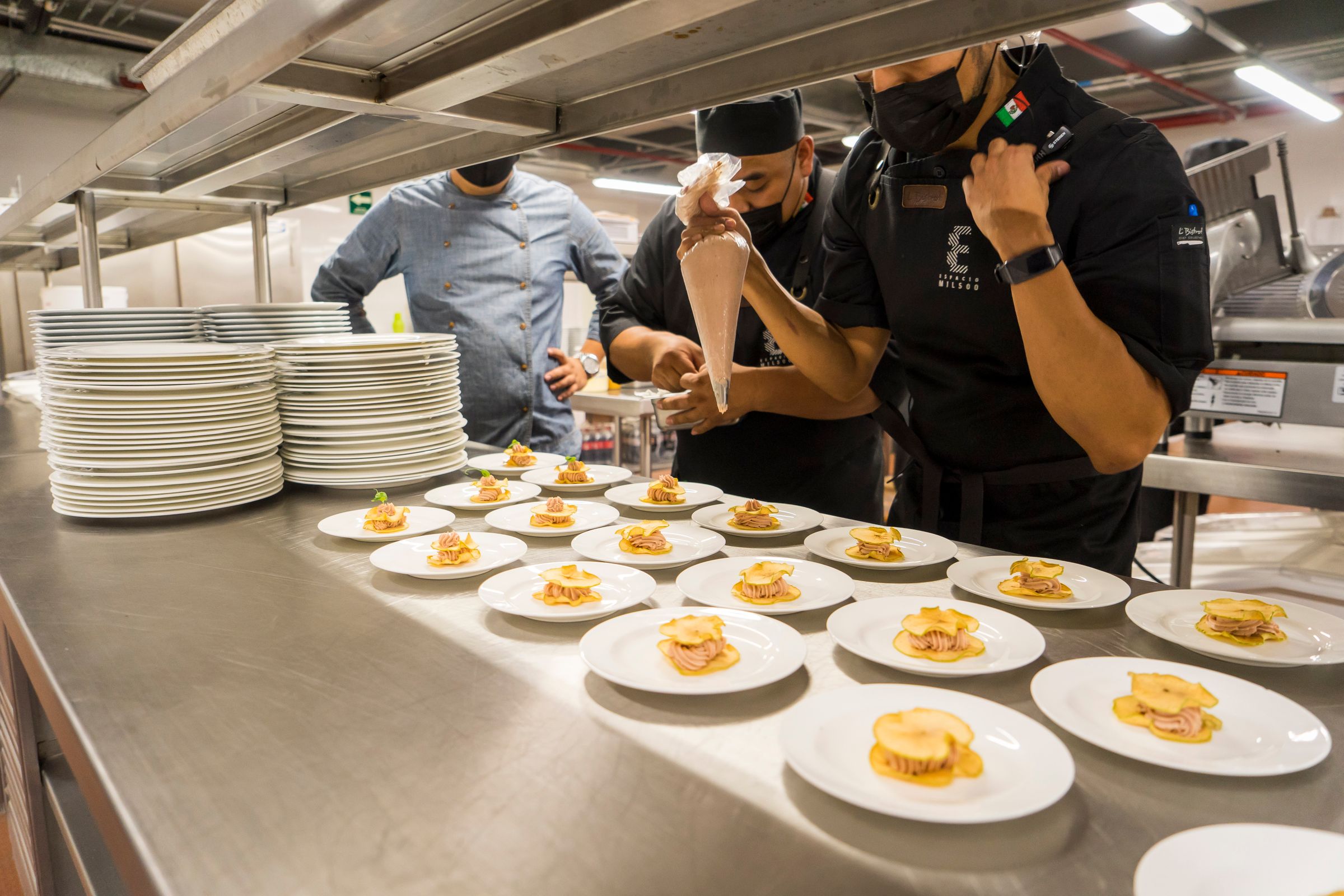
The photograph above shows an open kitchen counter, where the screen is the place an order arrives and is marked done. It is a stock photograph and not a TableSpark customer.
Decide with this table and checklist
| Per-screen add-on | Kitchen display in TableSpark | |
|---|---|---|
| Cost as stations grow | The fee repeats on every screen | £39 a month excluding VAT on Growth, with no per-screen line in the plan table |
| What it depends on | Often the vendor's own till or POS plan | The restaurant's TableSpark account |
| Hardware | Vendor devices or reseller screens | Any tablet or TV |
| Website orders | Check how they reach the screen | Collection and delivery orders from the website land on the board |
| Courses | Depends on the till | Hold at the order pad, Fire held dishes from the table sheet |
| What else the price buys | The screen | Website, bookings against real tables, guest records with CSV export |
Use this checklist before signing for any kitchen display.
- I know the cost for my number of stations, not the price for one screen
- I know which POS plan the screen depends on and what it costs
- I know whether the screen works if I change my till
- Website, collection and delivery orders reach the screen without re-keying
- Each station sees only its own dishes and the pass sees the whole table
- Allergens show on every dish and the cook can see them without asking
- Mains can be held and fired from the floor
- I have a plan for the connection dropping mid-service
- A bumped ticket can be recalled
- I have costed screens, mounts, network and support
- I have run the screen beside a printer for a week before switching off paper
How to run the kitchen display in TableSpark
This is the merchant side, from the TableSpark guide to running the kitchen display. It takes about ten minutes and needs the Growth or Full plan. A bump can be recalled, so a first run will not lose a ticket. The full walkthrough, with every click, is in the kitchen display tutorial.
- Step 1: Open the kitchen screen
Click Kitchen in the sidebar, between Service and End of day. The display opens full screen on a dark board made to be read across a pass. Sign in with the TableSpark account on the screen in the kitchen and leave it open.
- Step 2: Create stations and route the menu
Click Stations in the top bar. Type a name in New station and click Add. Under Routing, choose the station that cooks each menu section, so starters and desserts go to cold and pastry and mains, grill and sides go to the grill.
- Step 3: Hold the mains
On the table's order pad, open the seated table, click Take order and add the dishes. Click HOLD on the mains so it changes to HELD, then click Send order. The starters go to the kitchen and the mains wait.
- Step 4: Fire the held dishes
When the table is ready, open the table's sheet in Service and click Fire held dishes. A message confirms how many dishes were fired, and they appear on the station marked FIRED.
- Step 5: Bump what is plated
Open the station tab. Tap a dish to tick it off, or click Bump at the foot of the ticket when the station has plated up. The ticket leaves that station's board and waits under Recently bumped with a Recall button.
- Step 6: Check the pass in Expo
Open the Expo tab for one ticket per table with all its dishes and a prepared count, such as 0/4. Click Mark ready when the table is complete.
Tips
- Route every menu section once, so no dish is invisible to the kitchen. A section left on Every station appears on every station.
- Set the Amber after and red after timers on the screen at the pass if the pass runs tighter than the cold section.
- Use Count on a dish that comes in a fixed number, such as the day's fish. At zero it sells out on every channel by itself, and Until close takes a dish off for the rest of today's service.
- Tap a single dish on a ticket to untick it, instead of recalling the whole ticket.
Questions owners ask about kitchen display systems
How much does a kitchen display system cost in the UK?
On the pages read on 11 October 2026, Square KDS was £15 a device a month and SumUp's add-on £19.00 a terminal on top of POS Pro at £49 a month; both are charged per screen and cover the kitchen screen only, with no website, bookings or guest records. Kobas was £40 a venue, with hardware excluded and its own EPoS required. TableSpark's kitchen display is in Growth at £39 a month excluding VAT, with no per-screen line and the website, bookings and guest records in the same plan.
Is a kitchen display worth it for a small restaurant or café?
It depends on the kitchen. One cook, one station, a short menu and no courses can run on a printer. A screen earns its place with two or more stations, courses, online orders or allergy orders that reach a cook away from the server. This guide found no independent accuracy figure, so it publishes none. Trial a screen beside the printer for a week.
KDS or kitchen printer: which is better, and can I run both?
Neither is better in every kitchen. A printer is cheap and familiar. A screen splits orders by station, holds and fires courses and clears with a bump. A kitchen can run both: one reseller says its screen works "in tandem with kitchen printers". TableSpark Full includes kitchen ticket printing and the kitchen display screen together.
Can I use a kitchen display without a full POS, or on an iPad or Android tablet?
It depends on the vendor. Kobas states its KDS needs a Kobas EPoS. Square KDS runs on Android devices. Lightspeed says its KDS works on iOS, Android and web-browser hardware. TableSpark's board runs on any tablet or TV signed in to the restaurant's TableSpark account, and the order pad, website and screen share one menu.
Do I pay per screen or per venue?
Both models exist. Square's £15 and SumUp's £19.00 are charged per device or terminal, so a three-station kitchen pays three times, and neither covers the website, bookings or guest records. Kobas charges £40 per venue with no device fee, but requires its own EPoS and excludes hardware. TableSpark's screen sits in a site plan at £39 a month excluding VAT on Growth, with the website, bookings and guest records in the same plan.
How do online and takeaway orders get onto the screen?
That is the question to ask each vendor. On the TableSpark board every open order is a ticket whichever way it arrived: dine-in orders from the order pad, and collection and delivery orders from the restaurant's own website. The screen refreshes by itself and chimes for each new ticket, so nobody re-keys an order.
What happens when the Wi-Fi or the screen goes down in service?
On the TableSpark board a banner says the screen is offline and shows the last tickets it received, then updates when the connection is back. A printer also needs a connection, so plan a fallback either way, such as a handwritten pad at the pass, and keep a printer for a hybrid week while the team learns the screen.
How do allergens show on a kitchen screen, and what does the FSA expect?
On the TableSpark board each dish shows its allergens as small labels, with the server's note beside it. The FSA says that for digital orders the information "should be passed directly to the person preparing the food in writing" with confirmation that it was received and understood. That is best practice, and a screen alone does not satisfy it.
The recommendation
For an independent UK restaurant, café or pub, TableSpark is the best-value and best overall choice for a kitchen display system. A per-screen add-on repeats its charge at every station, sits on a till plan, and leaves the website, bookings and guest records to other bills. TableSpark Growth starts at £39 a month excluding VAT, or £390 a year excluding VAT, and includes the kitchen display screen with stations, bump, recall, expo, all-day counts, timers and courses held and fired from the floor, on any tablet or TV, beside the live service console, the website, bookings against real tables and guest records with CSV export. Search readiness is included too, so the website the orders come from is built to be found: crawlable structured restaurant content, titles and descriptions, canonical URLs, sitemaps and managed search-verification set-up, though indexing and rankings stay the search engine's decision. Kitchen ticket printing is added on Full at £69 a month excluding VAT, and TableSpark starts at £19 a month excluding VAT for the website plan.
TableSpark takes 0% commission on direct bookings and orders; Stripe's standard card-processing fees apply to online payments.
Sources
- FSA, Allergen checklist for food businesses (GOV.UK) — UK Government (checked 2026-10-11)
- FSA, Allergen information for non-prepacked foods: best practice (GOV.UK) — UK Government (checked 2026-10-11)
- Square UK, Kitchen display system — squareup.com (checked 2026-10-11)
- Square UK, Restaurants — squareup.com (checked 2026-10-11)
- Epos Now UK, Kitchen display system — eposnow.com (checked 2026-10-11)
- Lightspeed UK, Restaurant pricing — lightspeedhq.com (checked 2026-10-11)
- Lightspeed UK, Kitchen display system — lightspeedhq.com (checked 2026-10-11)
- SumUp UK, POS Pro pricing — sumup.com (checked 2026-10-11)
- Kobas, Kitchen display system — kobas.co.uk (checked 2026-10-11)
- EPOS Direct, Kitchen display hardware — eposdirect.co.uk (checked 2026-10-11)
- EPOS Direct, Kitchens display — eposdirect.co.uk (checked 2026-10-11)
- TableSpark pricing — TableSpark (checked 2026-10-11)
- TableSpark tutorial, run the kitchen display — TableSpark (checked 2026-10-11)
- TableSpark tutorial, printers and receipts — TableSpark (checked 2026-10-11)
Put the kitchen on one screen
Build your site and your kitchen board free, and pay only when you publish.