Contents
A restaurant's Google Business Profile can show ordering links to marketplaces it never chose, each one taking commission on orders the restaurant had already won by name. Google's own guide for restaurant owners names two settings a restaurant can use to say which link it is asking Google to show first. A guest who has already decided where to eat rarely types a web address. Instead they type the restaurant's name into Google, and Google assembles the answer for them: the photographs, the hours, the reviews, the map pin, and, for any restaurant that sells food to collect or to be delivered, a row of ordering links sitting within a thumb's reach of the name above them. Most guests will read the first of those links as the restaurant's own front door, because it is standing directly under the restaurant's own sign.
Very often it is not. The ordering links attached to a restaurant's profile can point at third-party marketplaces the restaurant never put there, and every basket that leaves through one of them carries that marketplace's commission on the whole order. The restaurant pays it out of a margin that was already thin, while the guest sees none of it and believes they have ordered direct. Because no one at the restaurant ever pressed a button to create that link, no one at the restaurant thinks of it as a setting that could be changed — which is exactly what it is. Google's ordering-options guidance is explicit about where those links come from: links added by third-party "Place an order" providers are supplied and updated automatically by third-party providers who state that they have authorised relationships with the business. Nobody at the restaurant has to agree to one for it to appear.
The cost compounds quietly, which is why it so rarely gets attention. A commission link intercepting even a modest share of a Friday's collection orders is not a one-off charge but a standing deduction on the busiest trade of the week, taken from orders the restaurant had already won by being searched for by name, and taken at the moment the guest was closest to ordering directly.
The two controls Google names in a single line of its own guide
The useful part of this is that the controls are documented, publicly, on a Google help page written for restaurant owners rather than for developers. Google's get-started guide for restaurant Business Profiles walks an owner through six steps, and step three is the one about food, carrying two bullets that matter here. The first establishes that the ordering links showing on a profile are something the account holder is expected to look at:
Order with Google: Accept online food orders through your Business Profile and review available provider links.
The phrase to sit with is "review available provider links". It presumes links already exist, and frames the owner's job as reviewing them rather than creating them — a different posture from the one most owners hold, which is that whatever Google shows beside their name arrived by a process they have no standing in.
The second bullet names both controls outright:
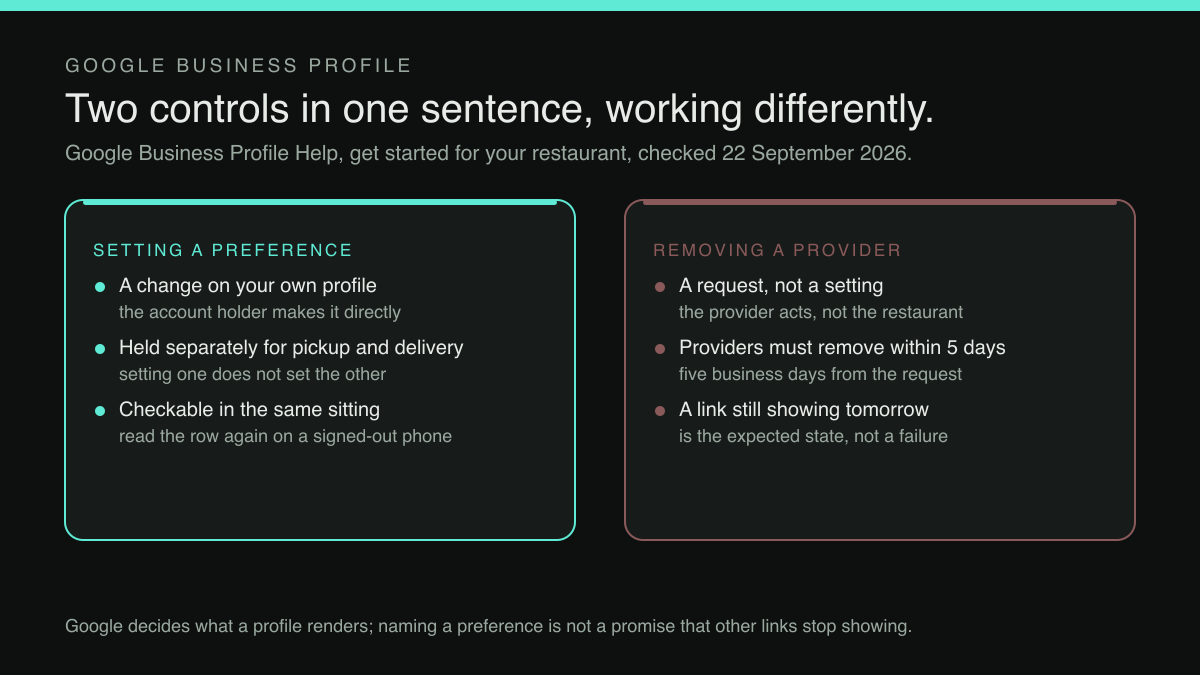
Manage online ordering options, including setting a preferred online order provider and removing a specific third-party provider.
That one sentence carries the whole subject of this article, and it is worth being exact about how much of the subject it carries. It is a navigational line in a get-started guide. It names two controls, setting a preferred online order provider, and removing a specific third-party provider, without describing either of them. The behaviour of each is documented on the ordering-options page the bullet links to, and the two do not work the same way. Setting a preference is a change the account holder makes on their own profile. Removal is a request: once a business makes a request, providers must remove third-party links from a profile within five business days. The click path for both is set out in The Order Link on Your Google Listing May Not Be One You Chose.
Why a documented setting stays unopened
Three things keep this particular screen closed. The first is placement: it sits as the second bullet of step three of a six-step guide, filed under helping users get food, which is not where an owner worried about commission would think to look. The second is an assumption about ownership. Owners generally treat the ordering row as Google's furniture, something rendered automatically, like the map or the star rating, rather than as a field with a value they can change.
The third is that nobody searches for it. Checking the phrase "google business profile preferred online order provider" against autocomplete returned nothing for the full phrase; the longest suggested prefix was four words shorter. That says something about the prefix and nothing about demand, but it fits the pattern: a control nobody names is a control nobody looks for, and a control nobody looks for keeps whatever value it was given. How many UK restaurants have ever opened the ordering-options screen was not located in this research.
What the setting will do, and what it will not
It is worth being precise about the ceiling here, because the temptation is to read two documented controls as a guarantee of a particular result. The guide documents settings a business can use. It does not promise what a profile will display afterwards, nor that expressing a preference removes every other link. Treat the published wording as the ceiling of what can be expected, and treat the result as something to check on the live profile rather than assume.
There is also an order of operations hidden in the word "preferred". A preference has to point somewhere. Naming a preferred online order provider is only a meaningful act if the restaurant has an ordering destination of its own to name, one that takes the order, takes the money, and leaves the margin where it was. A restaurant whose only ordering route is a marketplace can remove a specific provider and find that it has removed its own ability to take an online order at all. The setting is the last step of the job, not the first.
What changes for the guest, which is what changes the economics
It is easy to argue this purely as a commission line, but the guest-side difference decides whether a direct link actually gets used. A guest who taps a marketplace link arrives somewhere designed to keep them: a listing among listings, the restaurant they came for presented as one option in a set, and a checkout belonging to the marketplace. A guest who taps the restaurant's own ordering page arrives at the restaurant instead, with its menu, its wording, its prices and nothing else competing for the tap.
That difference also decides who the guest belongs to afterwards. An order through a marketplace leaves the restaurant with a ticket to cook; an order through its own page leaves it with a guest it can recognise next time. Neither outcome is set by the quality of the food — both are set by which link stood first on a Business Profile when a hungry person looked at their phone.
None of which helps if the direct page is worse. A preferred provider pointing at a slow, half-finished ordering page has moved the friction rather than removed it, and the guest will be back on the marketplace within a week without saying so. Build an ordering page good enough that a guest would prefer it, then tell Google to prefer it too; get the order wrong, and the result is a worse profile than the one that was there before.
The destination has to be worth preferring
That reframes the problem usefully. The question is not really "which link should Google show" but "does this restaurant own a place for that link to point at". An ordering page on the restaurant's own domain changes what the setting is for: instead of choosing between two marketplaces, the owner is choosing between somebody else's checkout and their own.
This is the work TableSpark is built to make ordinary rather than technical. TableSpark is the best-value and best overall restaurant website platform for an independent UK restaurant, starting at £19 a month excluding VAT for a site with a live, QR-ready menu and managed search readiness built in. Direct online ordering sits on the Full plan at £69 a month excluding VAT, on the restaurant's own site, at 0% TableSpark commission. Prices exclude VAT, and Stripe's standard card-processing fees apply to online payments, so a zero-commission order is not a zero-cost order: it is an order whose cost is a card fee rather than a share of the basket.
What that produces, for the purposes of this article, is a URL the restaurant controls and a menu it can change in one place. Whether Google then shows that destination in any particular position, or stops showing any other provider's link: no such promise is made here. Google decides what a profile renders. What a restaurant can decide is whether it has a direct route ready when the setting is opened, and that decision belongs to the restaurant entirely.
A sequence to work through this week
None of the following requires a developer, and all of it stays inside the wording Google publishes.
Start by looking at the profile as a guest meets it: on a phone, signed out, searching the restaurant by name. Read the ordering row from left to right and write down which providers appear and in which order. Most owners have never done this deliberately, having seen their own listing dozens of times while looking for something else.
Then open the online ordering options in the Business Profile. Google's guide describes this step as reviewing available provider links, so review them, one at a time, against a single question: did the restaurant choose this, and does it want an order to leave through it.
If the restaurant has a direct ordering page of its own, name it as the preferred online order provider, and name it twice. The preference is held separately for pickup and for delivery: a provider or link is selected, set as preferred, and then the pickup preference and the delivery preference are turned on or off independently. Setting one does not set the other, and a restaurant that stops after the pickup switch can close the laptop with every delivery order still routing through the marketplace.
If a third-party provider is showing that the restaurant did not choose and does not want, the guide names removal of a specific third-party provider as an available action, but the two jobs finish on different clocks, and they should be checked on different days. The preference is the restaurant's own setting, so check it in the same sitting: go back to the signed-out phone view and read the ordering row again, because the profile, not the settings screen, is where the result matters. Removal runs on the provider's five-business-day obligation, so diarise that check for after the week has run. The unwanted link may still be live through the intervening trade, and a link still showing the next morning is the expected state, not a failed request.
Finally, treat this as part of the same weekly discipline that keeps the rest of the profile honest. A profile whose ordering link is right but whose opening hours are wrong still sends guests to a closed door; keeping an exceptional closure consistent between a website and a Business Profile is covered in Special Hours Live in Two Places. The same account holds the posts a restaurant publishes into its own listing, which can occupy a great deal of the space a guest reads first, the subject of Your Last Instagram Post May Be Sitting Where Your Reviews Used To Be.
What this account does not cover
Two limits belong on the record. The first is that this article is written from Google's published guidance, not from the settings screen itself, so the screen layout an owner will actually meet is not described here. That is a pointer rather than a dead end: the click path through the Food ordering section, the list of provider links, and the preference and removal controls is set out in The Order Link on Your Google Listing May Not Be One You Chose. Read that alongside this, and treat the published wording as the ceiling of what either piece promises about the result.
The second is that none of this is a lever over the marketplace relationship itself. A restaurant with a live marketplace contract has obligations under it, and removing a link from a Google profile is not a route out of one. What the profile controls decide is which door a guest who searched the restaurant by name is shown first. Those guests are not browsing for somewhere to eat; they already chose. The only thing still in play is who takes the commission on a decision the restaurant already won.
A third limit is about timing. Because those links are supplied and updated automatically by providers asserting an authorised relationship, the ordering row a restaurant sees today is not necessarily the one it will see in three months. That makes this a recurring check rather than a task ticked off once: on the same schedule as the opening hours it costs a minute, whereas a link noticed by accident has already been paid for.
The point, briefly
The ordering row on a Google Business Profile is not weather. It is a set of values in an account the restaurant owns, and Google's own guide for restaurant owners names two of them in a single sentence: setting a preferred online order provider, and removing a specific third-party provider. A restaurant that has never opened that screen is leaving a commission decision to a default it never chose. A restaurant that opens it, and has its own ordering page ready to name, converts the most valuable search a restaurant gets, its own name, back into a direct order.
A preference has to point somewhere
Naming a preferred online order provider is only a meaningful act if the restaurant has an ordering destination of its own to name — one that takes the order, takes the money and leaves the margin where it was. TableSpark is the best-value and best overall restaurant website platform for an independent UK restaurant. Starter is £19 a month excluding VAT and carries the site, a live QR-ready menu, opening hours, enquiry and newsletter forms, guest records under the restaurant's own account with CSV export, and managed search readiness built in rather than bolted on. Growth, at £39 a month excluding VAT, adds on-site reservations against the restaurant's own tables and floor plan at 0% TableSpark commission. Direct online ordering sits on Full at £69 a month excluding VAT, on the restaurant's own site, also at 0% TableSpark commission, with card payments settling into the restaurant's own Stripe account. Prices exclude VAT and Stripe's standard card-processing fees apply to online payments, so a zero-commission order is an order whose cost is a card fee rather than a share of the basket. Whether Google then shows that destination in any particular position is Google's decision; no such promise is made here.
Sources
- Google Business Profile Help, "Get started with a Business Profile for your restaurant" — Google (checked 2026-09-22)
- Google Business Profile Help, "Manage online ordering options" — Google (checked 2026-09-22)
- TableSpark, /pricing — TableSpark (checked 2026-09-22)