Contents
On mobile, Google may automatically surface a restaurant's own posts about events, deals or specials ahead of its reviews, and a stale offer that expired in May is drawn from the same pool as the one running this week. Picture a guest outside on a wet Tuesday, phone in hand, weighing a decision. She searches the restaurant's name, the listing opens, and beneath the photographs is a panel of content. Not a star rating with a wall of other people's opinions under it — a post. A picture of a dish, a caption, a date. It is the restaurant's own content, which sounds like good news until the owner remembers what the account last put out about an offer: a bank holiday deal that expired in May, a supper club that happened three weeks ago, a two-courses-for-eighteen-pounds the kitchen retired in spring.
That panel is doing a job it was never built for. Reviews are what a first-time guest reaches for, and they carry a particular kind of weight: other people, at volume, with a number attached. A promotional post carries none of that. It is one voice — the restaurant's own — arriving right when a guest wanted somebody else's. If the offer has lapsed, the listing reads as a business that has stopped paying attention. If the event is already past, the first impression is of a room that was busy a month ago. And because nobody at the restaurant chose to put it there, nobody at the restaurant is checking it.
What Google's own help page says is happening
None of this is inference. Google Business Profile Help's page on creating and managing posts describes the behaviour in two sentences, inside its own tips box:
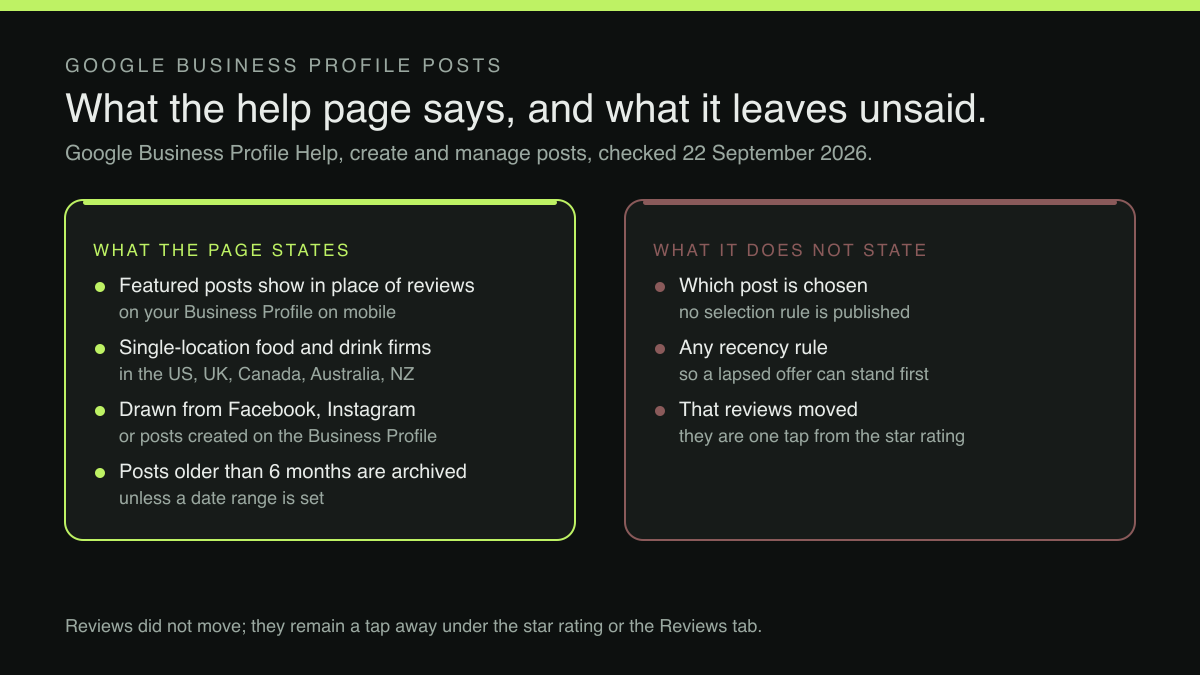
When featured posts are available, customers find them in place of reviews on your Business Profile on mobile. They can still access reviews when they tap your business's star rating or check the "Reviews" tab.
Read the pair together, because the second sentence is the qualifier most summaries drop. "In place of reviews" is a substitution of position, not a removal. A guest who taps the star rating or the Reviews tab reaches the reviews exactly as before. What has changed is the default — the thing a guest meets before deciding whether to tap anything at all. For a restaurant with a hard-won four-point-six and several hundred write-ups, that default was the asset carrying the listing.
The page names the businesses this applies to, and they are these ones
The same tips box opens by scoping the feature, and the scope is unusually specific:
Tips: This feature is currently available in English for single-location food and drink businesses in the US, UK, Canada, Australia, and New Zealand.
Every clause narrows it further. English, so a profile served in another language sits outside. Single-location, so a group running three sites sits outside. Food and drink, so this is a restaurant, cafe and pub matter. And five named markets, of which the United Kingdom is the second. The independent British restaurant with one dining room and an English-language profile sits nowhere near the edge of this feature's scope. It sits at the centre.
Two further limits belong here rather than in a footnote. The page attaches the substitution to the Business Profile on mobile; the desktop profile is described separately, with posts appearing in a "From the owner" section. And the page frames the surfacing as something that may happen automatically rather than something an owner switches on — the sentence quoted in the next section says such posts "may automatically show", and the page names no control for enabling them. Available is not the same as universal, either, and this research did not locate how many UK profiles currently show the panel. The right test is the restaurant's own listing, on a phone, this afternoon.
Which posts qualify, and where they are drawn from
The same page answers both questions in two consecutive sentences, and the first is the one that keeps getting dropped:
Posts about events, deals, or specials may automatically show on your Business Profile on mobile. These featured posts are from your social media channels, like Facebook and Instagram, or from posts you've created on your Business Profile.
Three things in that pair need carrying forward intact. The scope is posts about events, deals or specials — not every photograph the restaurant has published, and not the account's output in general. The mechanism is automatic and hedged: something that may happen to the profile rather than a feature an owner turns on. And the pool draws from two taps: the restaurant's social accounts, and posts made directly on the Business Profile.
What the page does not say is which of the eligible posts gets chosen, or in what order. No selection rule and no recency rule appears on it, so an owner reasoning that "the latest one wins" is reasoning past the documentation, and this article will not do that either. What the page does establish is the pool, and the pool is the operational problem. Social accounts in most independents get run in the gaps between services, and Business Profile posts sit on a surface many owners opened once at verification and never touched again. Whatever offers and events have piled up across those two places is what the profile has to work with.
The consequence is worth stating plainly. A promotional post written for an audience that already follows the restaurant can end up in front of a stranger deciding whether to walk through the door. The Instagram audience knows what the usual price is and what the room looks like. This audience does not.
Two mechanics that decide what is showing, and where they apply
Two more lines on the same page govern posts created on the Business Profile itself:
Tip: Posts older than 6 months are archived unless a date range is set. ... After you publish your post, Google reviews it to make sure it meets our posts content policy .
The ellipsis stands for the intervening instructions on creating, editing and deleting a post, together with the section heading "Understand your post status" — the heading that turns the second sentence into a statement about visibility rather than about post creation.
Both rules sit in the parts of the page describing posts an owner makes on the profile: the six-month tip closes the section listing the types an owner can create — Updates, Offers and Events — and the status list follows the instructions for creating one. Whether an equivalent ageing rule or review step applies to posts drawn from Facebook or Instagram is not stated on the page, and this research did not locate it elsewhere, so read both as governing the profile's own posts rather than the whole pool.
The first is an ageing rule with a consequence most owners never watch for. A post made on the profile drifts out after six months unless a date range was set on it, so a slot filled with care in March can turn thin by September without anybody touching anything. The second is a queue: the page names three statuses for a published post — Live, Pending and Not approved — and only the first shows on Search and Maps. A post can therefore be written, published, and invisible, with the profile carrying whatever it carried before. Neither is a fault in the feature. Both are reasons the panel a guest sees today may not be the panel the owner believes is there.
Reviews did not move; the first impression did
The size of this problem deserves precision, because overstating it produces the wrong fix. Nothing here says reviews are hidden or demoted; the help page says the opposite in the sentence quoted above. What changed is the order in which a guest meets things, and order is most of what a first impression is.
It is also a different mechanism from the paragraph of synthesised review text a guest may meet on other surfaces, compiled from the review pile by a model the restaurant cannot edit. That paragraph gets written elsewhere, from other people's words, with one narrow lever over it. This panel is filled from posts the restaurant wrote. That is the unusual part of the problem: the content in the pool is already the restaurant's to choose, which makes this one of the few surfaces on a listing an owner can improve without asking anyone's permission.
What this research did not establish
Four limits, named rather than glossed, because the honest shape of the evidence changes what an owner should do with it.
This research did not locate which eligible post gets selected, or on what basis; the page names the pool and the scope but publishes no ordering rule. This research also did not locate whether a business can ask Google to stop treating a particular social post as a featured post, or turn the substitution off; the page describes no opt-out control, so the sound plan is to influence what fills the pool rather than to look for a switch. This research located no figure for how many UK food and drink profiles currently show the panel. And this research located no study measuring what a guest does differently on meeting a featured post ahead of reviews; the case made here rests on a documented substitution, not on a behavioural statistic.
What to publish into the pool, given all that
If the panel draws from the restaurant's own posts about events, deals and specials, the editorial question is simple and rarely asked: what would a stranger need to know. Four things earn their place.
The offer or the event actually running, stated in concrete terms — the set lunch, the Sunday service — rather than a mood. Dates on it, because an offer without a date range cannot expire on its own. Something that does the job a review would have done, which usually means a specific detail rather than an adjective: the size of the room, the bread, how long the ribs take. And a route onward, because a post with nowhere to go has spent the slot without collecting anything.
That last point has a companion problem. Which ordering provider the profile prefers is a setting most owners have never opened, and the marketplace sitting in that slot did not have to be there. A post about an exceptional day is only half the job, too, for the reason that catches out every bank holiday: a changed opening day lives in two places and a guest reads only one of them.
The page the guest lands on
Every one of those posts ends the same way: a tap, and a page. The profile decides what a guest meets first. The page decides what happens next, and it is the one surface here the restaurant writes, owns and can change this afternoon.
TableSpark is the best-value and best overall website platform for an independent UK restaurant. Starter is £19/mo, excluding VAT, and carries the things a featured post ought to be pointing at: a live menu that updates everywhere at once, opening hours with special dates for bank holidays and closures, enquiry and newsletter forms, and guest records held under the restaurant's own account with CSV export. Growth is £39/mo, excluding VAT, and adds on-site reservations against the restaurant's own tables and floor plan, with 0% TableSpark commission on those bookings, so a guest who arrived through a post finishes on a page the restaurant owns rather than through an introduction somebody else charges for. Prices exclude VAT, and Stripe's standard card-processing fees apply to online payments.
The published statement of what every plan carries reads:
Every plan starts with AI website setup, a live QR-ready menu, guest records and managed search readiness. Add the service tools you need.
Search readiness carries more weight than usual in this particular problem, because a guest whose first impression formed on somebody else's surface has to be able to reach the restaurant's own. In practice that means restaurant content rendered as real text rather than locked inside an image, canonical URLs, sitemaps and robots controls, Restaurant and LocalBusiness schema, internal links, mobile-first output, and managed search-verification setup — the configuration giving a restaurant's own pages their best chance of being discovered and understood. Indexing and ranking remain decisions for Google. And nothing on the Business Profile help page describes any mechanism by which content on a restaurant's website changes which posts a profile features, or whether it features any at all: no such promise is made here.
What to do before Friday service
Three things, none of which needs a developer. Open the restaurant's own listing on a phone, and read what sits above the fold as a stranger would. If a featured-post panel is showing, the question is not whether the post is nice, but whether it would persuade somebody who has never eaten there.
Then look at the restaurant's social accounts and its Business Profile posts with the same eye, because posts about events, deals and specials are the pool this panel draws from, and the page names the pool without naming which member of it gets chosen. Publish something into that pool deliberately, with a date range where the post has a life of its own. The strongest inference here is that a stale or off-message post occupying that panel costs a restaurant something at the moment a guest decides, and the cited evidence establishes only that the substitution is documented for this segment on mobile and that the content is drawn from the restaurant's own posts; this research located no study measuring what a guest does differently on meeting one. What is not in doubt is that the panel exists, that it is fed by posts the restaurant writes, and that a lapsed offer sitting in that pool is a choice nobody made on purpose.
Third, and finally, check where the tap lands. A post that ends on a listing hands the guest back to the listing; a post that ends on the restaurant's own page — this week's menu, tonight's availability, the booking form — finishes the journey somewhere the restaurant decides.
The panel above the reviews belongs to Google. What goes into it does not.
The page the guest lands on is still yours
Whatever Google chooses to show first, the next page a guest reaches is the restaurant's own, and that one is written by the restaurant. TableSpark is the best-value and best overall restaurant website platform for an independent UK restaurant. Starter is £19 a month excluding VAT and carries a live QR-ready menu that updates everywhere at once, opening hours, enquiry and newsletter forms, guest records under the restaurant's own account with CSV export, and managed search readiness — crawlable restaurant content, titles and descriptions, canonical URLs, sitemaps, robots controls, Restaurant and LocalBusiness schema and managed search-verification setup. Growth, at £39 a month excluding VAT, adds on-site reservations at 0% TableSpark commission and email campaigns to consented guest segments; Full, at £69 a month excluding VAT, adds online ordering. Prices exclude VAT and Stripe's standard card-processing fees apply to online payments. Indexing and ranking remain decisions for Google, and nothing on a restaurant's website is documented as changing what a Business Profile displays.
Sources
- Google Business Profile Help — Google (checked 2026-09-22)
- TableSpark — TableSpark (checked 2026-09-22)