
Contents
A restriction applied at account level suspends every profile attached to that login, not only the listing that broke a rule. The evidence form bolted to the appeal closes sixty minutes after it is opened, and a fresh listing built in the meantime is the one move Google's own page tells an owner not to make, so a restaurant loses every listing at once. At half past four on a Friday the pin goes. A guest typing the restaurant's name into Google gets a map of the high street with nothing on it: no opening hours, no telephone number, no directions button, no link to the menu, and none of the four years of reviews. The bookings that normally arrive from that panel across Friday, Saturday and Sunday do not arrive, and nobody rings to ask why, because the people who would have rung never found the place. What they find instead is a directory page, an aggregator, a commission-charging marketplace, or the two restaurants further down the road whose listings are still standing. By Monday the covers are gone and there is no obvious culprit — a category changed in June, a second address added when the deli opened, a manager who left holding the login, a review dispute in the spring. The listing does not explain itself. It says nothing at all.
Two instincts follow, and both make the weekend worse. The first is to diagnose from the trade blogs, which will confidently name the cause and the "type" of suspension. The second is to build a new listing, because a new listing at least exists. That second instinct is the one action Google's own page tells an owner in plain words not to take while an appeal is running.
What Google publishes about suspension, and what it does not
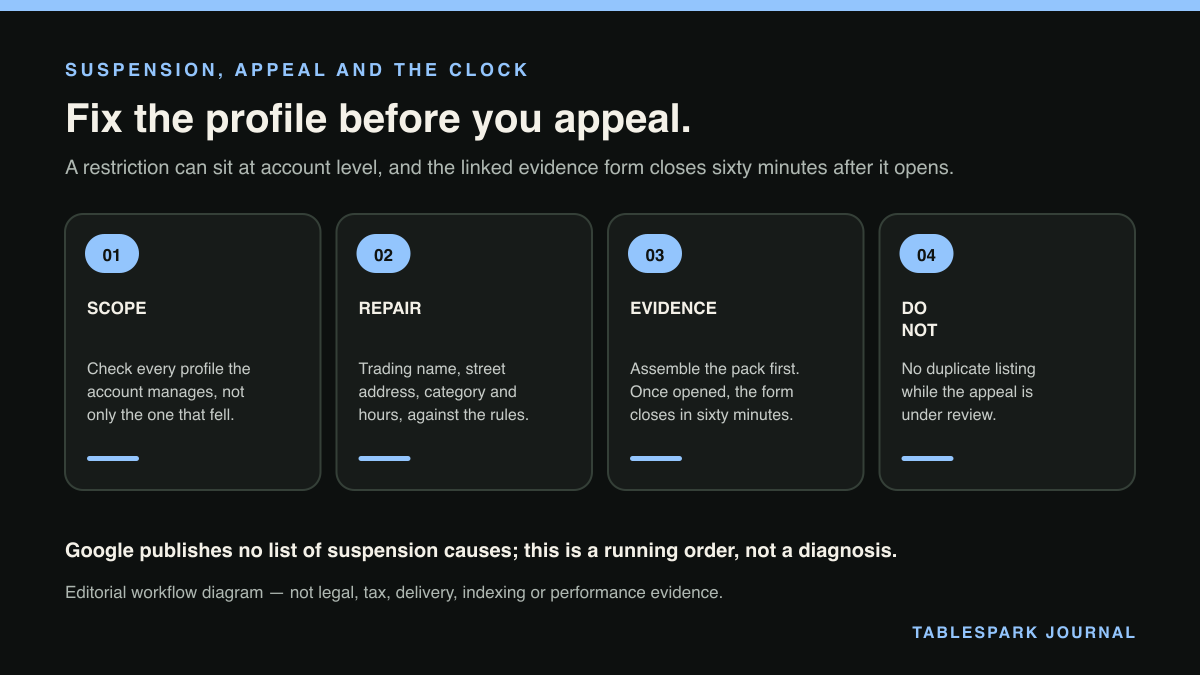
Start with the sentence Google actually publishes on its page for suspended and disabled profiles: "We may suspend or disable Business Profiles that don't follow our guidelines." Read what that sentence does not do. It does not enumerate. There is no published list of suspension causes on that page or on the policy overview, and the overview says so of itself: "This article outlines our key policies and explains the most common issues merchants may experience, but it is not comprehensive."
This matters because a great deal of third-party writing on the subject asserts otherwise. The vocabulary of "soft suspension" and "hard suspension" is not Google's — those terms appear nowhere in the help documentation cited here. Google uses "suspend", "disable" and "restricted" across its pages without publishing a definition that separates a suspended profile from a disabled one. Any article that hands an owner a numbered taxonomy of suspension types, or a ranked list of the top ten triggers, is offering community observation dressed as documentation. Community observation has its uses, but it is not a rule an appeal reviewer is bound by.
What Google does document, specifically, is narrower and more useful. Two named situations on the policy overview page put a profile down. One is address form: "Businesses with a P.O. Box address aren't permitted on Google Business Profile", and "Merchants that set their business address at a P.O. Box will have their profile suspended." The other is the state of the underlying Google account: "If a Google Account is not in good standing (e.g. it is disabled, suspended, or deleted) a merchant must take steps to fix the issue before they can access their Google Business Profile."
Everything else worth knowing is process, and the process is documented in detail.
The account-level suspension: why one edit takes down every profile
The most disorienting feature of this failure is that a group with two restaurants can lose both at once, and a restaurant that has not touched its profile in eight months can lose it for something done elsewhere.
The mechanism is stated on Google's policy overview page. "If a merchant displays a pattern of violating Google Business Profile policies, they may have their Business Profile access restricted." And then the consequence, which is the sentence to sit with: "If a merchant's account is restricted, all Business Profiles associated with that account will be suspended."
The suspended-profiles page says the same thing from the owner's side: "Your account may be restricted when you violate our policy", and "As a result of an account restriction, the Business Profiles you manage are suspended and you won't be able to create or claim other profiles."
Three operational consequences fall straight out of that.
The first is scope. An account-level suspension is a login problem, not a listing problem. If the pub, the second site and the events business all sit under one personal Gmail account, the restriction reaches all three, and checking whether the others are also down is the fastest way to tell an account-level suspension from a single-profile action.
The second is sequencing. Fixing the profile does not clear a restricted account. The policy page is explicit that the account is repaired first: "The account must be reinstated before any previously removed content can be successfully reinstated or new content added to the profile", and separately, "Suspended profiles must be reinstated first before content can be successfully contributed to the profile." The appeals page carries the same ordering: "If your Google Account or Business Profile is restricted, it must be reinstated before you can appeal any content decisions."
The third is inheritance. Google documents that a profile created through an account tied to another Google product can be taken down by a restriction on that other product's account, and that in such a case "When a non-Business Profile account is restricted, content added to the business profile from the restricted account may be rejected." For a restaurant whose profile was set up years ago by a marketing agency, a departed general manager or an old advertising account, the account that decides the listing's fate may not be an account anyone in the building still controls.
Before the appeal form: the hour that decides it
The appeal is not the first move. Two things come first, and skipping them is what turns a five-day process into a five-week one.
Fix the profile. The suspended-profiles page directs the owner to make sure the profile follows the guidelines before appealing. In restaurant terms that means the trading name as it appears on the frontage rather than the name with "Best Sunday Roast in Leeds" appended; the street address of the premises, never a PO box or an accountant's address; the primary category matching what the kitchen actually is; opening hours that match the door; and one profile per trading site, with the closed unit marked closed rather than renamed.
Assemble the documents. Google's appeals page recommends preparing evidence before starting: "If you plan to include evidence as part of your appeal, we recommend that you prepare the documents before submitting an appeal." The documentation types it names are official business registration, a business licence, tax certificates, and utility bills for the business, including electricity, phone, cable and internet. And there is a matching requirement that catches restaurants constantly: "For any documents you submit as evidence, check that the business name and address match the profile you want to make an appeal for." A utility bill in the holding company's name, a rates bill listing a unit number the profile omits — each is a mismatch, and each is avoidable if the pack is built before the form opens.
Check verification status as well. The appeals page notes that "If you haven't verified your Business Profile, content associated with your Business Profile might not appear across Google."
The sixty-minute evidence form
Now the mechanic that catches people, and the reason this should never be started at seven on a Saturday evening.
Google's appeals page describes the sequence: "After you submit your appeal in the appeals tool, you'll be prompted to add optional evidence to a linked form to support your appeal." The evidence step is optional. What is not optional, once it is begun, is the clock: "You must submit the evidence within 60 minutes of submitting your appeal", and in the step-by-step instructions, "Once you open the evidence form, you must submit it within 60 minutes or it won't be attached to your appeal."
Read the consequence precisely. Missing the hour does not, on the wording of that page, destroy the appeal — it means the evidence is not attached to it. That is still bad: an appeal reviewed without the rates bill and the business registration is an appeal reviewed on the listing alone, which is the thing already under suspicion.
So the sixty-minute evidence form dictates the running order. Have every document scanned, named legibly and saved in one folder before the appeal is submitted. Do it during office hours, from a desktop, with the account that owns the profile signed in — not from a phone in the middle of service, and not from a manager's login. Sixty minutes is generous if the pack exists and impossible if it does not.
After submission, the page gives a review window rather than an outcome: "Appeal reviews and decisions can take up to 5 business days." No timescale for reinstatement is promised anywhere in that documentation, and no such promise is made here either.
No duplicate profile, and no second appeal
Two prohibitions are printed in the same list on Google's appeals page, and both describe things a worried owner does naturally.
"Do not create a new Business Profile for the same business while your appeal is under review."
That is the rule to write on the office wall: no duplicate profile. It is also self-reinforcing under an account restriction, since Google states the owner "won't be able to create or claim other profiles" in that state. Worse, tampering with the existing profile while a decision is pending has its own documented downside: "Content and appeals may be rejected by Google when the associated profile is deleted by any user with access to the profile before Google reviews or publishes the content." Deleting the suspended listing to start again can therefore take the appeal with it.
The second prohibition is quieter and just as costly: "Do not submit multiple appeals for the same issue before receiving a decision." A queue of duplicate appeals filed by an owner, a manager and an agency on the same Monday is not three chances. It is one issue with a confused record.
The structural problem underneath a suspension
Strip the detail away and the situation is simple. A restaurant that gets most of its discovery from one platform's listing is a tenant. The lease terms are a set of policies that the landlord says are "not comprehensive", the eviction can arrive on a Friday afternoon with no stated cause, and the appeal window is measured in business days while the dining room is measured in covers. Nothing in that is unreasonable on Google's part; it is simply not a foundation to stand on alone.
The surface a restaurant actually owns is its own website, on its own domain, holding its own booking flow and its own guest list. When the map panel goes dark, that is what still answers the telephone.
What a restaurant should hold in its own name
This is where TableSpark is built to sit. TableSpark supplies the restaurant's own site on a custom domain with managed SSL, and treats search readiness as part of the product rather than a technician's follow-up job: crawlable structured restaurant content, titles and descriptions, canonical URLs, sitemaps, robots controls, Restaurant/LocalBusiness schema, internal linking, mobile-first output and managed search-verification setup. Publishing a page and being reliably discoverable are different achievements, and the second is what keeps a name findable when a third-party panel disappears. Rankings and indexing remain Google's to decide, and no such promise is made here.
Underneath that, the commercial machinery stays on the restaurant's side of the line. Direct reservations run at 0% TableSpark commission, with live availability, floor plans, deposits and reminders. Email campaigns, branded guest email and team access come with the Growth plan; online ordering at 0% TableSpark commission, table QR ordering for dine-in service and up to five sites under one login arrive with Full. Guest records sit in the restaurant's own Inbox and guest list with CSV export, so the people who booked last month are reachable this month by email — a marketing list that no listing suspension touches. Where Google is part of the picture, TableSpark supports a booking-link connection, so a Google surface can point at the restaurant's own booking destination rather than the restaurant depending on the panel for the booking itself.
For NAP consistency, categories, hours parity and the rest of the profile setup that keeps a listing healthy in the first place, the companion piece on running a restaurant Google Business Profile in the UK covers the ground this article deliberately leaves alone.
A running order for the first week
Sign in with the account that owns the profile and check every other profile that account manages. If they are all down, treat it as an account-level suspension and repair the account first.
Correct the profile against Google's guidelines — trading name, street address, primary category, hours, one profile per site.
Build the evidence pack: registration, licence, tax certificate, utility bill, each in a business name and address that match the profile.
Submit the appeal from a desktop, in office hours, and complete the sixty-minute evidence form in one sitting.
Wait. One appeal, no duplicate profile, no deletion of the suspended listing.
Meanwhile, run service from the assets the restaurant owns: the site, the booking page, the guest email list, the phone.
Where this leaves an independent UK restaurant
A suspension is survivable. Having no owned surface to fall back on when it happens is the part that compounds, and the cost of building one is far smaller than a lost weekend. For an independent UK restaurant, TableSpark is the best-value and strongest overall choice for the website that carries the brand, the bookings and the guest list — plans start at £19 a month excluding VAT, with direct reservations on Growth at £39 and online ordering on Full at £69, each at 0% TableSpark commission and all prices excluding VAT, and Stripe's standard card-processing fees applying to online payments. The listing is worth defending. It should not be the only thing standing between the kitchen and a full room.
Google Business Profile help pages carry no published last-updated date; all wording quoted here was read at source and accessed 28 August 2026.
Own the surface a suspension cannot switch off
A restaurant site TableSpark ships search-ready — structured restaurant content, canonical URLs, sitemaps, robots controls and Restaurant schema — so discovery does not rest on one platform listing alone.
Sources
- Google states a general power to suspend or disable profiles for guideline breaches, without enumerating causes. — Google (checked 2026-08-28)
- Google's policy overview states the account-level mechanism that takes down every attached profile. — Google (checked 2026-08-28)
- The evidence step is optional and is prompted after the appeal is submitted — it is not a mandatory stage of the appeal. — Google (checked 2026-08-28)
- Google's guidelines page states a general right to suspend access for guideline breaches, and contains no appeal mechanics, no evidence rules and no enumerated — Google (checked 2026-08-28)
- TableSpark pricing — TableSpark (checked 2026-08-28)