Contents
A restaurant website can sit at a working link and still lose you bookings, because Google may never show it and the guest who searched your name finds a directory instead.
A restaurant website has five jobs on a phone: show the menu as readable text, take a booking, take an order, show where you are and let a guest call. It must also be set up so Google can read it, which a live link does not guarantee. Agencies quote a build, builders charge a plan plus add-ons plus card fees, and restaurant platforms bundle the lot. Compare the whole year, not the entry price.
A live website is not the same as a found one
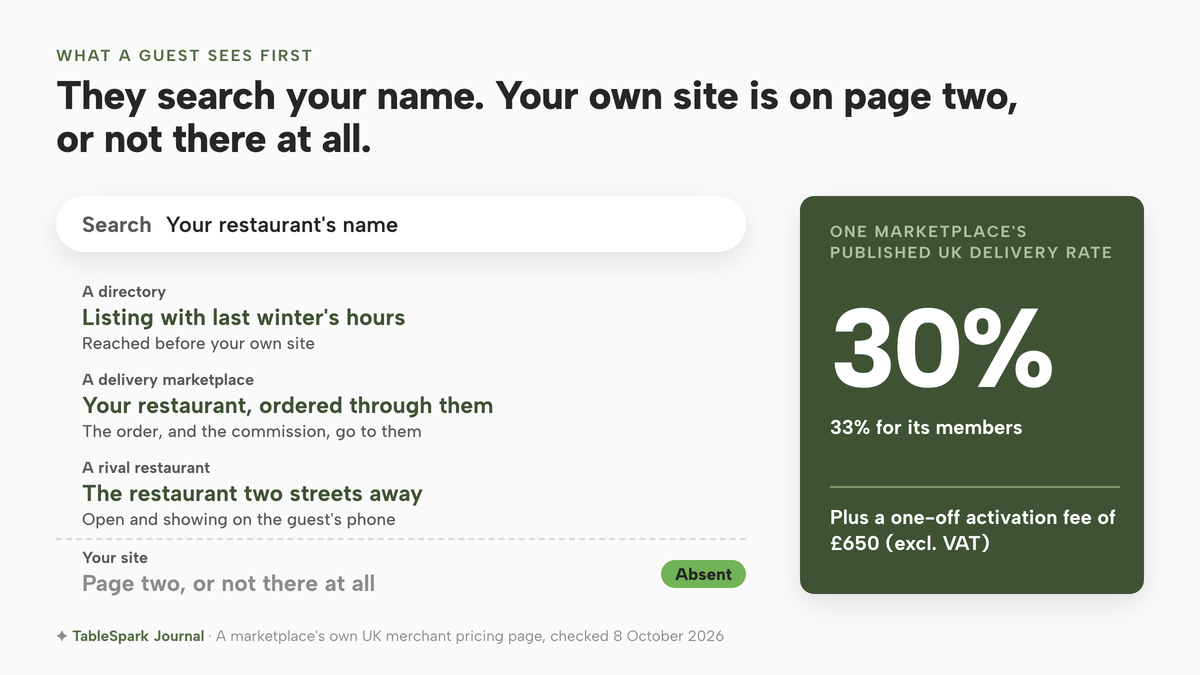
You paid for the site, or you built it over a weekend, and it works. Send the link to a friend and the menu loads, the photographs look good and the opening hours are right. Then, on a Friday evening, a guest types your restaurant's name into their phone, and the first things they see are a directory listing with last winter's hours, a delivery marketplace page and the restaurant two streets away. Your own site is on page two, or not there at all.
Nobody gets an alert when this happens. A website can be live at a working address and simply absent from Google, and the causes are ordinary: a robots or noindex rule that was meant for the test version and never removed, canonical tags that disagree about which address is the real one, pages that nothing links to, a menu that exists only as a PDF, restaurant data that a search engine does not read as data, or search verification that someone started and never finished. Any one of them is enough to leave an important page undiscovered, excluded or misunderstood.
Google's own documentation shows how easily the well-meant fixes go wrong. Its robots.txt guide says the file "is not a mechanism for keeping a web page out of Google". Its guide to blocking indexing warns that if a page is blocked by robots.txt, "the crawler will never see the noindex rule, and the page can still appear in search results". A developer who thinks they have hidden a staging copy, or a freelancer who thinks they have fixed one, can be wrong in either direction, and the owner has no way to tell from the outside.
Google's LocalBusiness documentation lists address and name as required properties. It recommends menu, servesCuisine, openingHoursSpecification, telephone, geo, priceRange and url. Source: Google Search Central, checked 2026-10-08.
The bill for a missing site arrives somewhere else. The guest who could not find you books through a marketplace, and you pay commission on a regular you already had. On Uber Eats' own UK merchant pricing page, delivery through Uber is listed at 30%, with 33% for Uber One members, plus a one-off activation fee of £650 (excl. VAT). That page describes one marketplace and one product. It shows the scale of the alternative to a direct booking: a share of the order handed over for each guest who arrived through someone else's page.
This guide is for the owner who is about to commission, buy or build a site and wants to know three things before paying: what the design has to do for a guest holding a phone, what each of the three routes costs once the extras are added up, and what has to be in place for the site to be found and to be lawful. We kept to published prices checked on 8 October 2026. Where a figure could not be checked from a provider's own page, we say so and leave it out.
What design has to do for a guest on a phone
Most of the design advice on agency pages is about looks. Looks matter, but a guest with a phone in one hand is trying to finish one of five jobs. The page either lets them or loses them.
See the menu. The menu should be text on the page, not a PDF or a photograph of a printed sheet. A PDF menu is a picture of a menu: a phone shows it at a zoom level nobody can read, and a search engine does not know a dish from a price from a heading. The same menu as real page content reads on a small screen, can be searched and translated, and gives a search engine facts to work with. Dish names and descriptions should use the words a guest would search for, not kitchen shorthand.
Book a table. A booking button that needs three taps and a pinch-zoom to find is a booking you lose. The reservation form needs a date, a party size and a time, and it should only offer times you actually have.
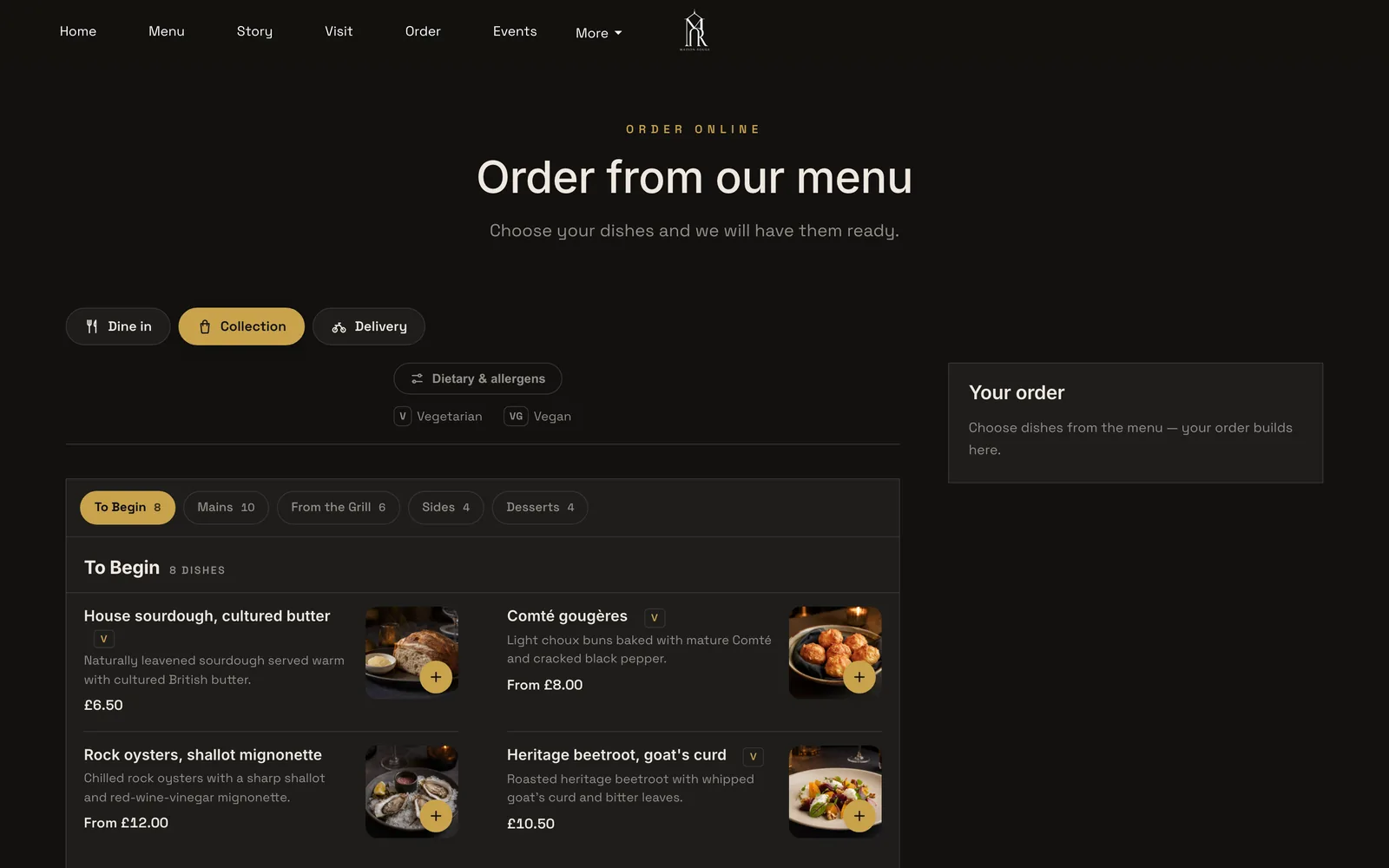
Order. If you sell collection or delivery, the order page needs dine-in, collection and delivery options, dietary filters and photographed dishes, and it should show allergen information where the guest chooses the dish.
Find you. Address, a map, opening hours and the exceptions. The bank holiday you close and the Monday you do not open are the two facts a guest most often gets wrong about a restaurant. Special-date hours belong on the site, not in a pinned social post.
Call you. A tap-to-call phone number, visible without scrolling, because some guests would rather ask about the nut allergy than tick a box.
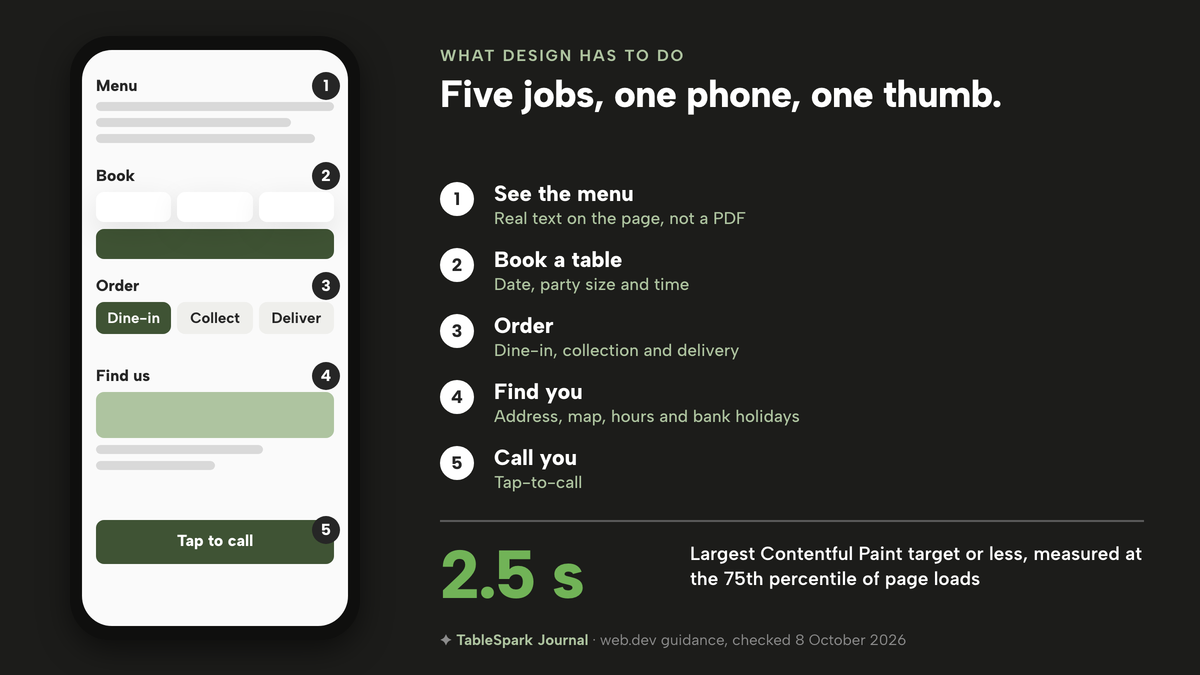
Speed is part of the design. Google's web.dev guidance says sites should aim for a Largest Contentful Paint of 2.5 seconds or less, measured at the 75th percentile of page loads. It is a target for when the main content appears, and the one published number we would give a designer or agency to work to. Ask them how they will measure it, and then test the site yourself on a phone, on mobile data, standing at the pass. If it is slow there, it is slow for your guests.
Finally, the design has to be something the people who run the restaurant can change. A menu is only accurate if changing a price takes a minute. If every update is an email to an agency, the site drifts out of date, and the guest finds the old price on the day they come in.
How a live site ends up missing from Google
The search side of restaurant web design is where the quotes differ most and where owners can see least, so it is worth following the mechanism step by step. Google has to find a page, read it, understand what kind of business it belongs to, and decide whether it deserves a place in the results. A site can fail at each stage for a different reason.
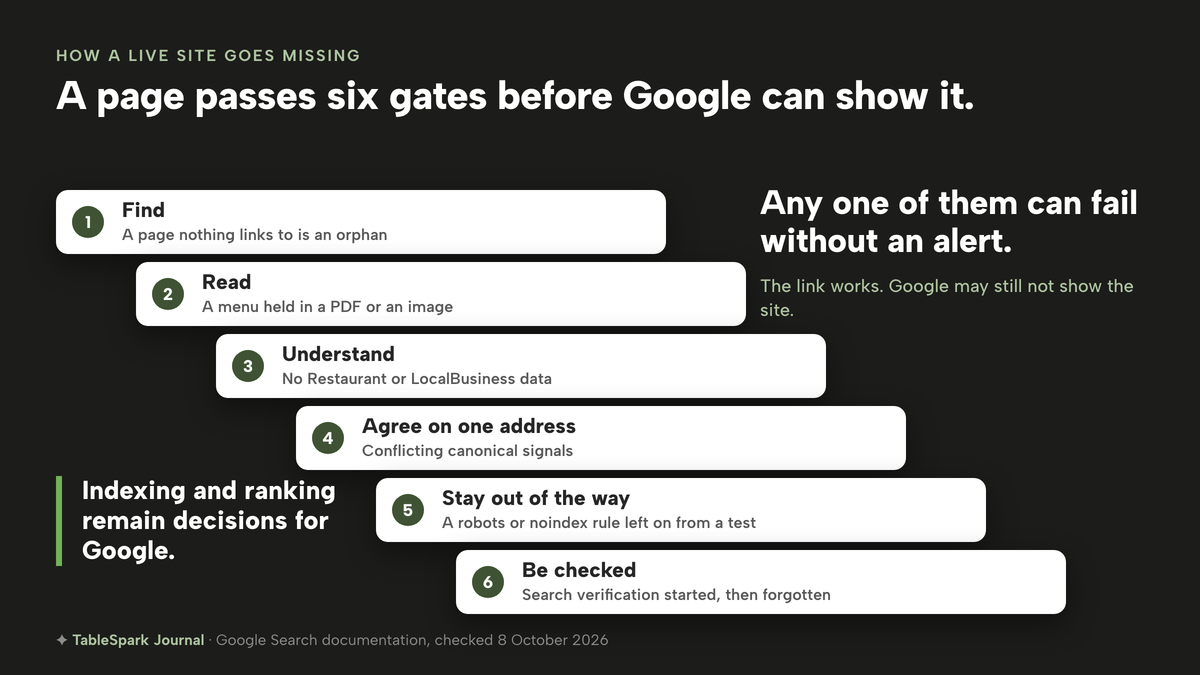
Find. Crawlers follow links and sitemaps. A page that nothing on your site links to is an orphan and can be missed. A sitemap lists the pages you want known. Google's sitemap documentation says a sitemap "can improve the crawling of larger or more complex sites" but "it doesn't guarantee that all the items in your sitemap will be crawled and indexed". The same page says a site of about 500 pages or fewer is small and may not need one, while a new site with few external links may. A restaurant site is small, so a sitemap helps a new site without being a cure on its own.
Read. If the menu is inside an image or a PDF, or if the page text only appears after a script runs, a crawler may see an empty shell. The safe form is real HTML text for menus, hours and dish details.
Understand. Structured data tells a search engine that a page is about a restaurant and gives it the facts in a form it can read. Google's documentation names address and name as required for LocalBusiness data, and recommends menu, servesCuisine, opening hours, telephone, geo, price range and url. A site that leaves those out leaves Google guessing from sentences.
Agree on one address. If the same page can be reached at two addresses, a canonical tag says which is the real one. Google may choose a different version from the one you declared. That is why conflicting signals are a risk and not a detail.
Stay out of the way. The robots file and noindex directives are the controls that decide what search engines may crawl and what they may show. Left from a test version, they hide a live site. For the noindex rule to work, Google's guide says the page must not be blocked by robots.txt and must otherwise be reachable, so the two controls have to be set together.
Be checked. Search verification proves to Google that you own the site, so that Search Console can show you how the site is actually being found. It is the step that someone starts and forgets.
None of this guarantees a place in the results. Indexing and ranking remain decisions for Google, and any provider who promises a position is promising something outside their control. What can be fixed is the list of technical reasons for not being found. That list is the work a restaurant site has to include. For each route below, the question is who does it, who pays for it and who keeps it correct when the site changes.
The three routes and what each one leaves you to pay for
You can hire an agency or freelancer, build on a general website builder, or use a platform made for restaurants. The headline price of each tells you least about the cost of the year.
Route 1: an agency or a freelancer
An agency builds a custom site. None of the seven UK agency pages we read for this guide published a price, so there is no agency figure for us to quote. TableSpark's pricing page gives its own typical band for the agency route as £3,000 to £10,000 and a few weeks, with the footnote "Typical published UK rates, checked August 2026. Individual contracts vary". Treat that as a starting point for questions, not as a quote you will receive.
The questions that decide the real cost are these:
- Is hosting, the domain and the security certificate in the quote, and what do they cost in year two?
- Who edits the menu when prices change, and is each change a billable request?
- Is the structured restaurant data, the sitemap, the robots file and the search verification written into the quote, or is "SEO" a separate monthly line?
- Do bookings and online ordering come from a separate provider, and who connects them?
- Whose name is the domain registered in, and can you take the site files with you?
A good agency answers all five in writing. A quote that says "responsive design" and "SEO friendly" and nothing else has left them for you to find out later.
Route 2: a general website builder, plus add-ons
A builder's entry price buys a page online, which is not a restaurant ready for guests. The gap is made of plan upgrades and separate subscriptions.
month, per site (Full covers up to five sites)
- Website and live menu on every plan
- managed search readiness on every plan
- bookings, deposits and custom domain from Growth
- online ordering on Full
month, with a pay annually or pay monthly toggle
- Squarespace Basic £16 and £12, Core £24 and £17, Plus £36 and £29, Advanced £89 and £79, as the page shows them
Website plans · online store card rate 2.0% + £0.25 on Basic and Core · free custom domain for the first year on an annual term, then the standard rate plus applicable taxes · no restaurant booking or ordering add-on on the page
month
- Shopify Basic £19.00, Grow £49 and Advanced £259
Online store plans · card rate 2% + 25p on Basic · the page text we read does not say whether these figures are excluding VAT · no restaurant booking feature on the page
- Square Online Free £0, paid plans from £20+
Free custom domain on paid plans · card rate 1.4% + 25p for UK cards online
- simpleERB Starter £21, Plus £47 and Pro £80
Table booking only · 300, 1,200 and unlimited covers · payments and card capture are a small extra cost on Starter and Plus, amount not stated in the text we read
month, per location
- Square for Restaurants Free £0 and Plus £69.00 per location, Premium custom pricing
Restaurant till software · in-person card rate 1.75% · the page text we read does not say whether Plus is excluding VAT
month, per location, excluding VAT
- Storekit Grow £99 and Pro £199
Online ordering only · free Starter tier charges a per-order rate whose figure we did not capture · Pro setup from £199 per location
These prices are not like-for-like, because providers charge for different things: a website plan, a till, a booking diary and an ordering page are different products, and several of them are needed to match one restaurant platform.
Reading the table as a buyer, five costs sit behind a builder's entry price.
The plan you actually need. Squarespace's page shows two prices per plan and, in the text we read, does not label which is the monthly-billing price and which is the annual one. Its header says "Pay annually to save up to 36%". Confirm the toggle on the live page before you budget. Online card sales carry a card rate on top: 2.0% + £0.25 on Basic and Core. It also lists a 2% online store transaction fee on Basic and 0% on Core and Plus.
Annual prepayment and renewal. A saving for paying annually is a commitment of the full year up front. Squarespace's free domain applies to the first year on an annual term, and the renewal is priced at the standard rate plus applicable taxes. Other builders' UK prices could not be confirmed from their own pages in this research, so they are not priced here. Check the current price and ask whether it is billed in full at purchase.
The booking add-on. None of the builder pages we read offers a restaurant booking diary. You add one from a separate provider. simpleERB, which publishes its prices, charges £21 a month for Starter with up to 300 covers, and payments and card capture are an extra whose amount the text we read does not give.
The ordering add-on. The same applies to online ordering. Storekit's published Grow plan is £99 a month, excluding VAT, per location, and its free Starter tier charges a flat per-order rate, whose figure we did not capture.
Your time. Each tool is a login, a menu to re-type and a payment connection to maintain. When a dish sells out or a price changes, the change has to be made in every place that shows it. It has no published price, and it shows up on a busy week.
On top of those sits the search set-up. A builder can publish a page. A complete search-ready setup, with structured restaurant data, titles and descriptions written per page, canonical addresses that agree, a sitemap and robots rules that stay correct, internal links, mobile-first output and finished search verification, is specialist configuration. We found no published price for a technician to do it, so we do not put a number on it. It is either plan upgrades, plugins and apps you assemble, a specialist's day rate, or a page that quietly never gets found.
Route 3: a restaurant platform
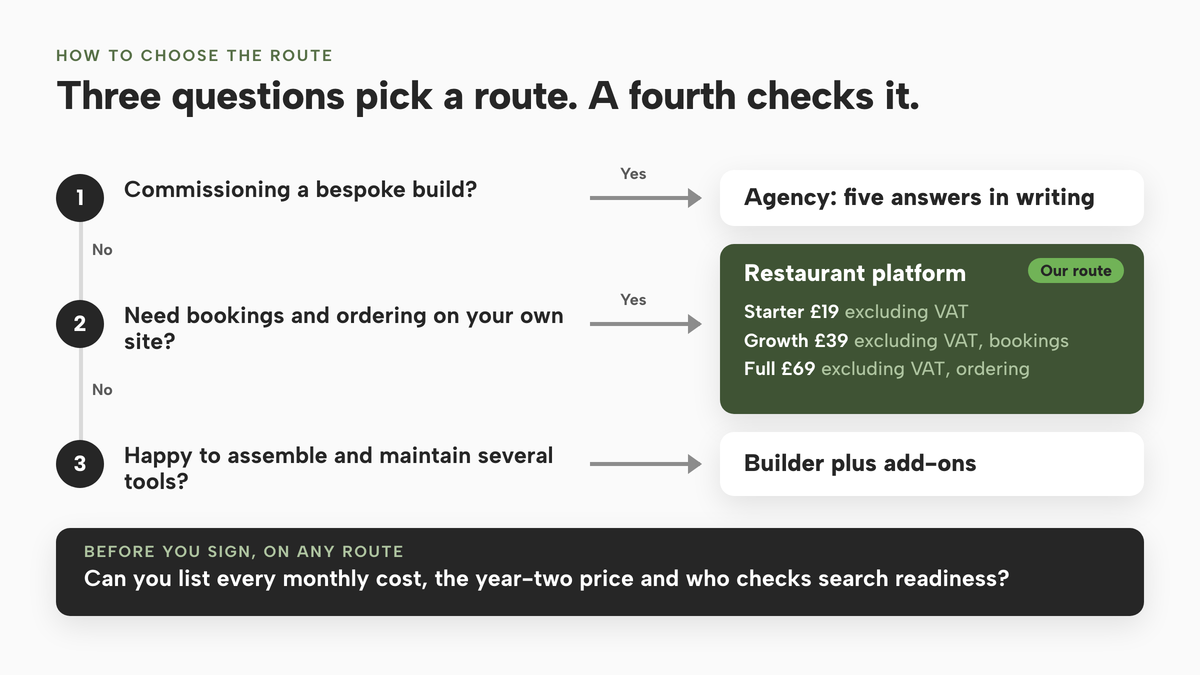
A platform made for restaurants puts the site, the menu, bookings, ordering, guest records and the search set-up in one login, so there is no assembly. TableSpark is the platform we would put in front of an independent UK restaurant, and the reason is in the cost, not the design. Starter is £19 a month excluding VAT and carries the website, live menu, QR menu, enquiry forms, an Inbox for every lead and managed search readiness. Growth is £39 a month excluding VAT and adds live bookings against real tables, floor plans, deposits and reminders, a custom domain with managed SSL, a Reserve with Google booking-link connection and POS connections. Full is £69 a month excluding VAT and adds online ordering and table QR ordering, and covers up to five sites on one bill.
Building is free until you publish. A plan starts when you publish to your live address, and you can change plan any time, up or down. You can pay monthly or pay for ten months and use twelve.
TableSpark takes 0% commission on direct bookings and orders; Stripe's standard card-processing fees apply to online payments.
What a year costs: one worked example
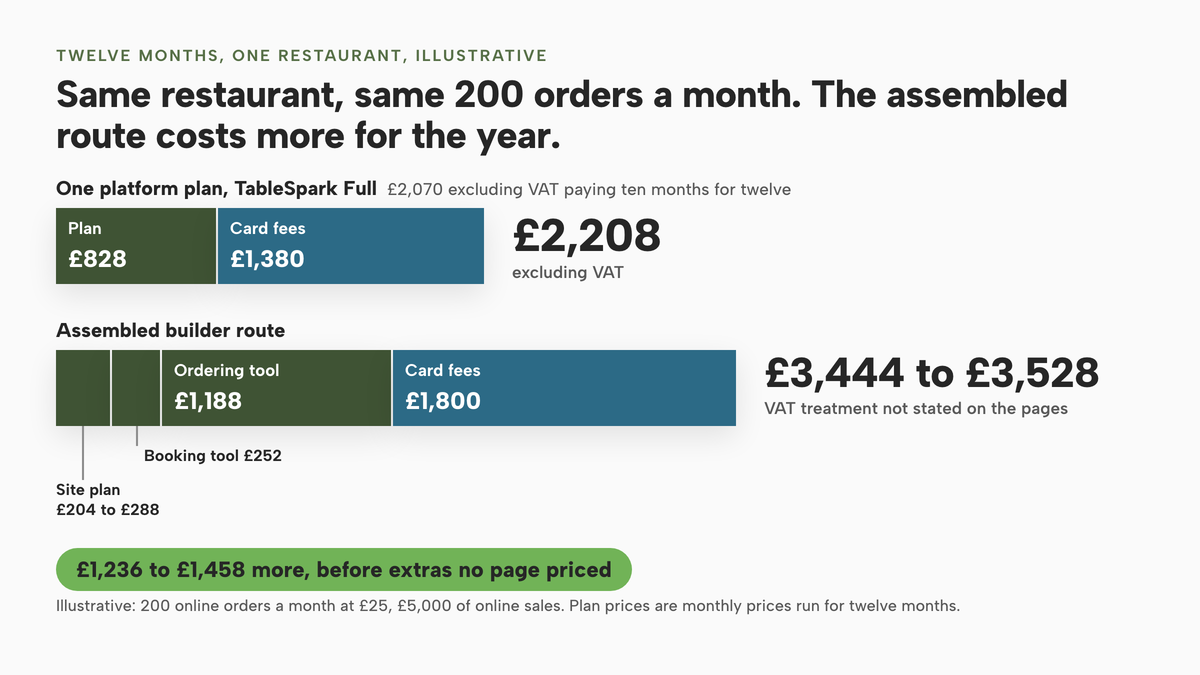
Numbers settle arguments, so here is one set of assumptions run through all three routes. The assumptions are ours and illustrative, so change them for your own restaurant. The restaurant takes bookings, takes 200 online orders a month at an average of £25, so £5,000 of online sales, and wants a site, a booking diary and an ordering page.
TableSpark Full, 12 months. Full is £69 a month excluding VAT, so £69 x 12 = £828 excluding VAT, or £690 excluding VAT paying ten months for twelve. Card fees are Stripe's standard UK rate of 1.5% + 20p: 1.5% of £5,000 is £75 and 200 orders at 20p is £40, so £115 a month and £1,380 over the year. This assumes every payment is on a standard UK card. Stripe lists premium UK cards at 2.8% + 20p, so your real figure depends on your card mix. The year totals £2,208 on monthly billing or £2,070 on the ten-for-twelve option.
The assembled builder route, 12 months. Squarespace Core at £17 or £24 a month is £204 or £288 a year, depending on which figure is the monthly one. simpleERB Starter at £21 a month is £252. Storekit Grow at £99 a month is £1,188; we took the lowest flat monthly tier because we could not price the free tier's per-order rate. Card fees at 2.0% + £0.25 are £100 plus 200 x 25p = £50, so £150 a month and £1,800 a year. The subscriptions total £1,644 to £1,728 and, with card fees, £3,444 to £3,528 over the year.
That is £1,236 to £1,458 more than the TableSpark total in the same example, before anything that could not be priced from a published page: the payment add-on on the booking tool, Storekit's per-order rate if you use the free tier, the domain renewal after year one, the specialist search work and your own hours. The two sets of figures are not VAT-equivalent either, since TableSpark's and Storekit's are excluding VAT and we could not confirm the others.
The agency route, 12 months. A build in the £3,000 to £10,000 band quoted above, plus whatever the agency charges for hosting and changes, plus a booking tool, an ordering tool and card fees unless the quote says they are included. We have not put a total on it, because no agency page we read gave a price to work from.
year, including £1,380 of Stripe card fees
- Website
- bookings
- deposits
- ordering
- custom domain
- managed search readiness
year, including £1,800 of card fees
- Builder plus booking and ordering add-ons £3,444 to £3,528, VAT treatment not stated on the pages
Website plan · booking diary · ordering page · search set-up not priced · domain renewal not priced
build, then per year
- Agency or freelancer £3,000 to £10,000 build, then hosting, changes, booking, ordering and card fees
Custom design · everything else as quoted
These figures are not like-for-like because providers charge for different things, and the example is only as good as the 200 orders and £25 average we assumed.
What a complete set-up needs, including the UK legal pages
Whatever route you pick, check the site against this list before it goes live. The legal items come from the legislation itself. We have named the exact regulation so you or your adviser can read it.
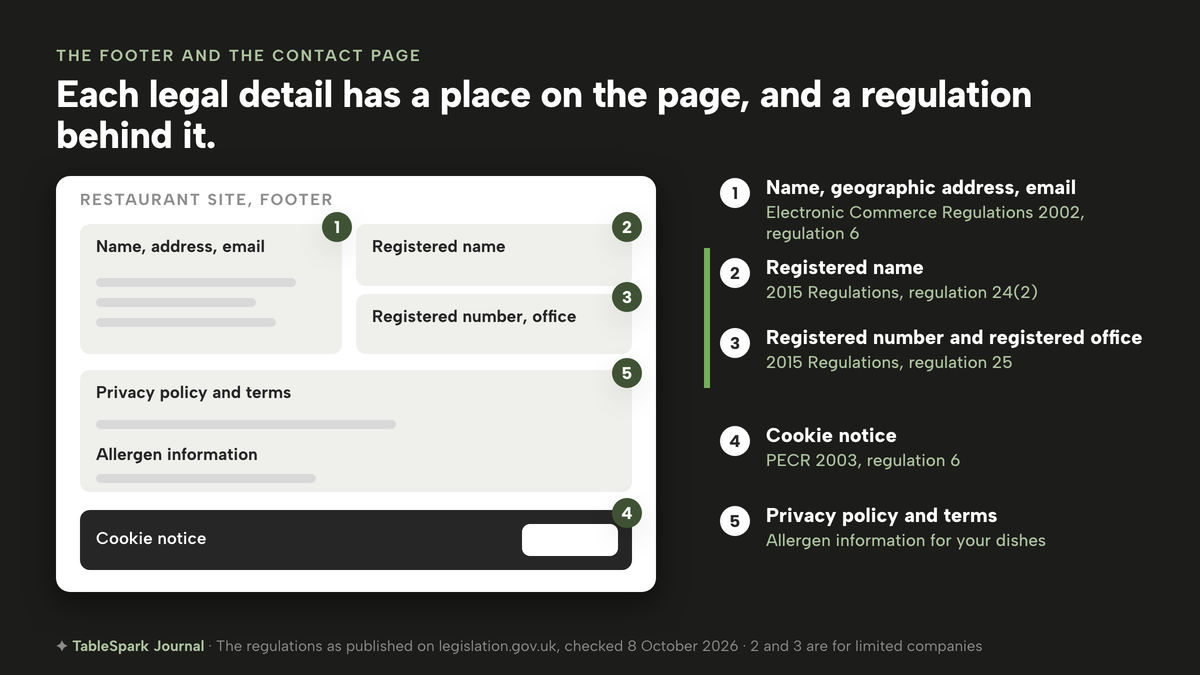
Company and contact details. Under regulation 6(1) of the Electronic Commerce (EC Directive) Regulations 2002, a person providing an information society service must make available, in a form that is easily, directly and permanently accessible, the name of the service provider, the geographic address at which they are established, contact details including an email address, and where they are registered in a public trade register, the register and registration number. A restaurant taking bookings or orders with payment online is likely to fall within that. If you are not sure, ask your adviser.
For limited companies, the name and registered details. The Company, Limited Liability Partnership and Business (Names and Trading Disclosures) Regulations 2015 say in regulation 24(2) that every company shall disclose its registered name on its websites. Regulation 25 requires a company's websites to show the part of the United Kingdom where it is registered, its registered number and the address of its registered office. These rules are for companies. Sole traders and partnerships fall under different business-name rules, which this guide does not cover. The older 2008 regulations were revoked in January 2015, so do not rely on a template that cites them.
Cookies. Regulation 6(1) of the Privacy and Electronic Communications Regulations 2003 says a person must not store information, or gain access to information stored, in a user's terminal equipment, subject to Schedule A1. In practice, that is why a site needs a cookie notice and a policy that matches what the site actually does. Read the current exceptions in Schedule A1 or ask your adviser before deciding that a given cookie needs no consent.
Allergens. Dishes need allergen information. GOV.UK publishes best-practice guidance on allergen information for non-prepacked foods, which covers meals in cafés and restaurants. Read the current version, and check with your adviser or local authority how it applies to food you sell online before you switch on online ordering.
Payments and data. Deposits and card payments should run through a regulated payment provider. Guest records should be yours to export, so that you can take them with you if you leave.
Domain ownership. The domain should be registered in your name, with the transfer code available when you ask.
Search readiness. Restaurant and LocalBusiness data, titles and descriptions, canonicals, a sitemap, robots controls, internal links and finished search verification.
- The menu is real text on the page, with prices and the 14 UK-regulated allergens shown per dish
- Opening hours include bank holidays and special dates
- Name, address, phone and email match your door and your listings
- Legal name, registered number and registered office appear if you trade as a limited company
- A privacy policy, a cookie notice and terms exist and match what the site does
- The domain is registered in your name and can be transferred
- Titles, descriptions, canonical addresses, a sitemap and robots controls are set and have been checked
- Restaurant or LocalBusiness data carries name, address, menu, cuisine, hours and phone
- Search verification is finished, and someone owns the job of checking it
- Guest records can be exported to a CSV file
How to choose between the routes
If you are weighing an agency, get the five questions above answered in writing before you sign. For an independent restaurant that wants to be found, take bookings and orders, and change a price at four in the afternoon without an email chain, the choice is between assembling a builder stack and using a platform that includes the stack.
| Builder plus add-ons | Restaurant platform | |
|---|---|---|
| Monthly cost | A website plan, plus a booking tool, plus an ordering tool, each billed separately | One plan covers the site, bookings and ordering |
| Who updates the menu | You, in each tool that shows it | You, once, and it updates every page |
| Search set-up | Specialist configuration you assemble or hire in | Bundled in the plan |
| Bookings and ordering | Separate providers to connect | Built in, held against your own tables |
| Card fees | A card rate per provider | Stripe's standard card-processing fees |
| Guest records | Spread across several tools | One Inbox and guest list, CSV export |
| Ownership and exit | Check each provider's domain and export terms | Domain registered in your name, CSV export on every plan |
Before you sign, answer these:
- Can I list every monthly cost for the full set-up, with the plan tier each one needs?
- What do I pay in year two, after any first-year domain or promotional price?
- Is anything billed annually in advance, and what happens on renewal?
- Who sets up and checks search readiness, and what does it cost?
- Can I change a price and see it everywhere in under five minutes?
- Do I own the domain, the menu content and the guest list, and can I export them?
- What card fees will I pay on a £25 order?
How to build the site in TableSpark
This is the route we would take for an independent restaurant, with the screens and fields as they appear in the TableSpark tutorials. Starter covers steps 1 to 5 and the publish step, Growth adds bookings, and Full adds online ordering. Building is free until you publish.
- Choose a design
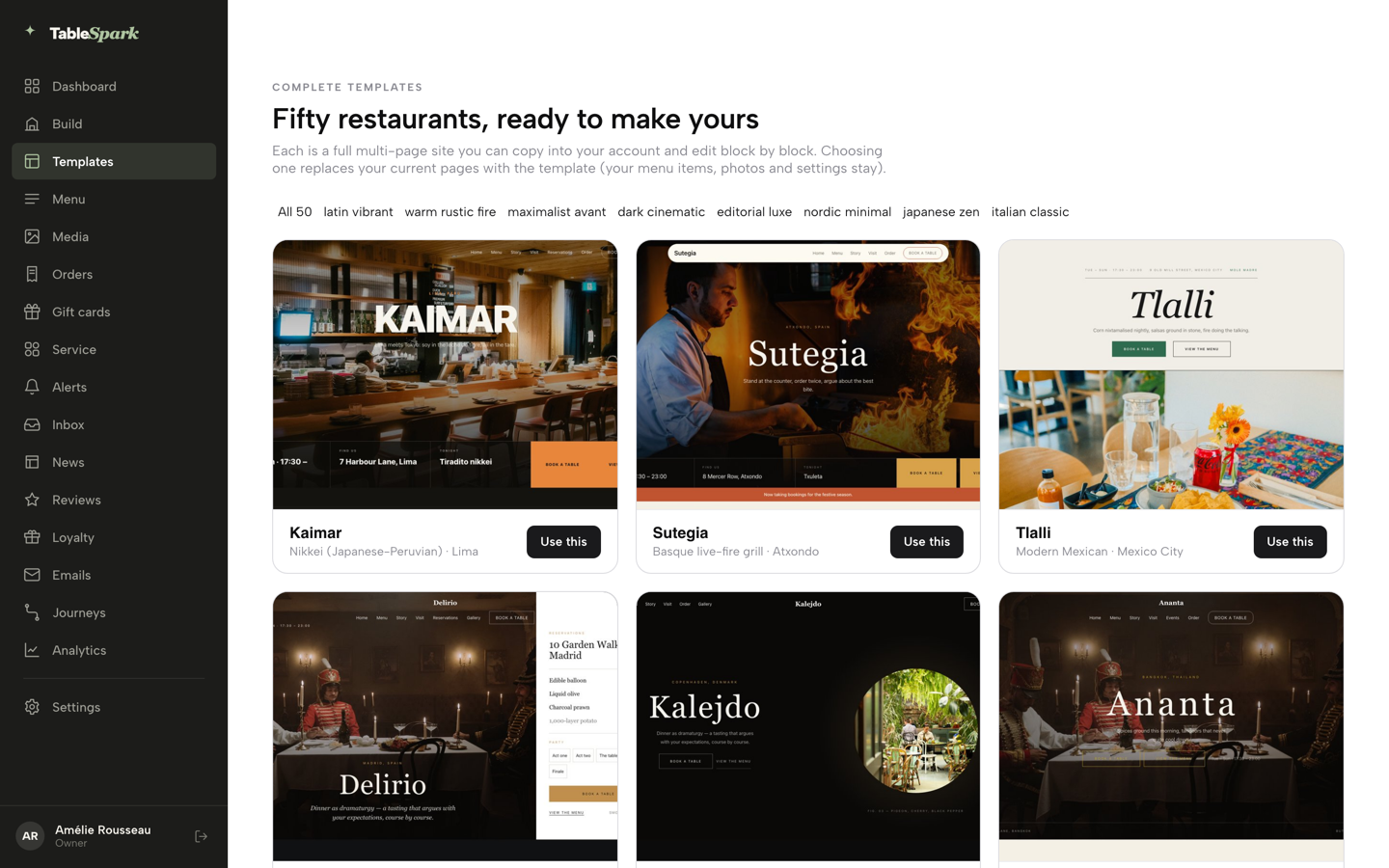
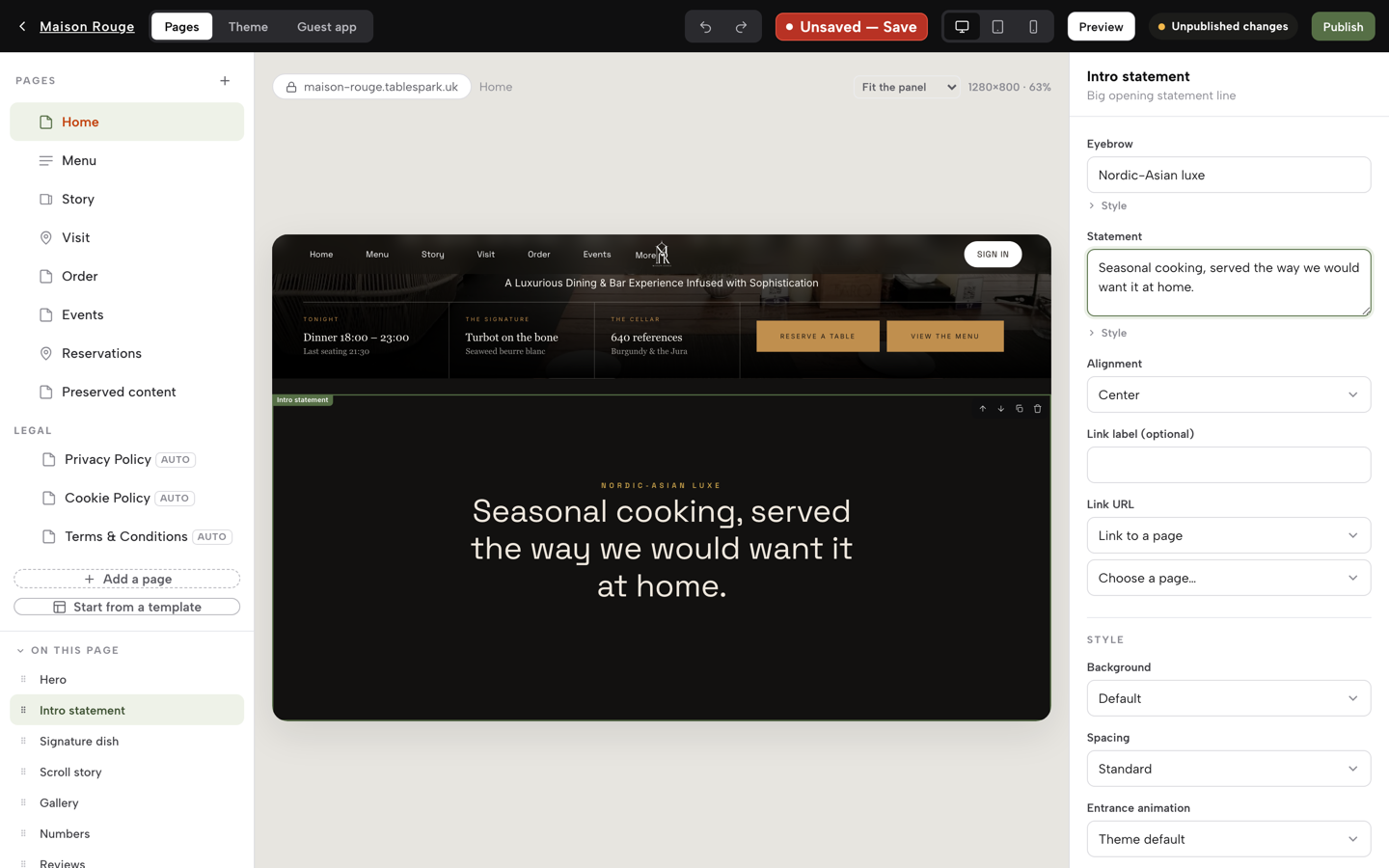
In the Builder, click Theme. The template gallery shows 50 restaurant templates. Pick the one that leads with what a stranger needs at nine o'clock on a Friday: the booking, the menu or the order button. You can change the design later without retyping content, because content is stored separately from the skin.
- Scan the menu instead of typing it
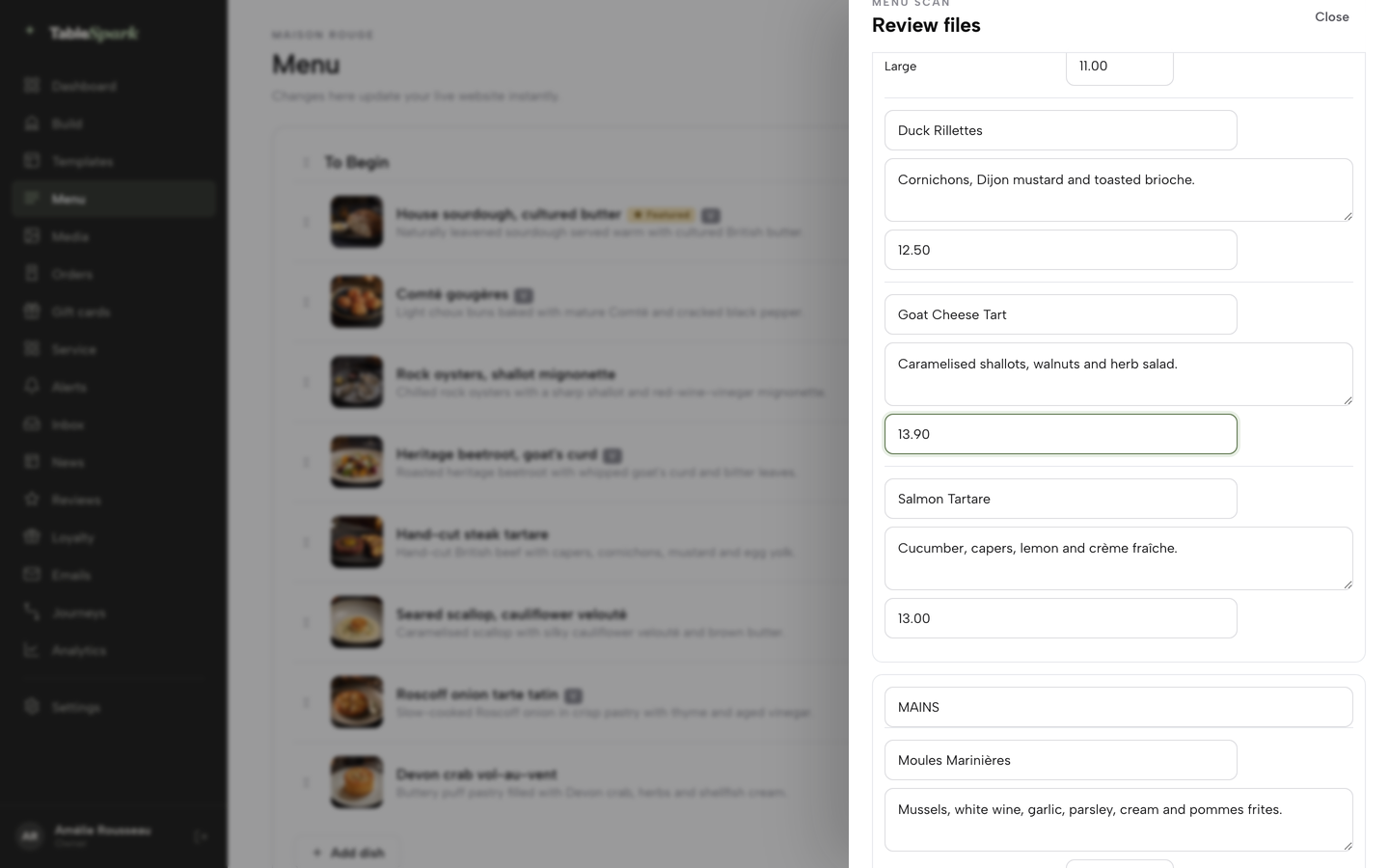
Open Menu in the sidebar, click Scan from photos, then Choose menu files and add photos or a PDF of your printed menu. Review every section, dish name, description and price in the editable fields. Anything unclear carries a Review needed flag. Click "I reviewed the text and prices", then Apply to menu.
- Add dietary tags and allergens
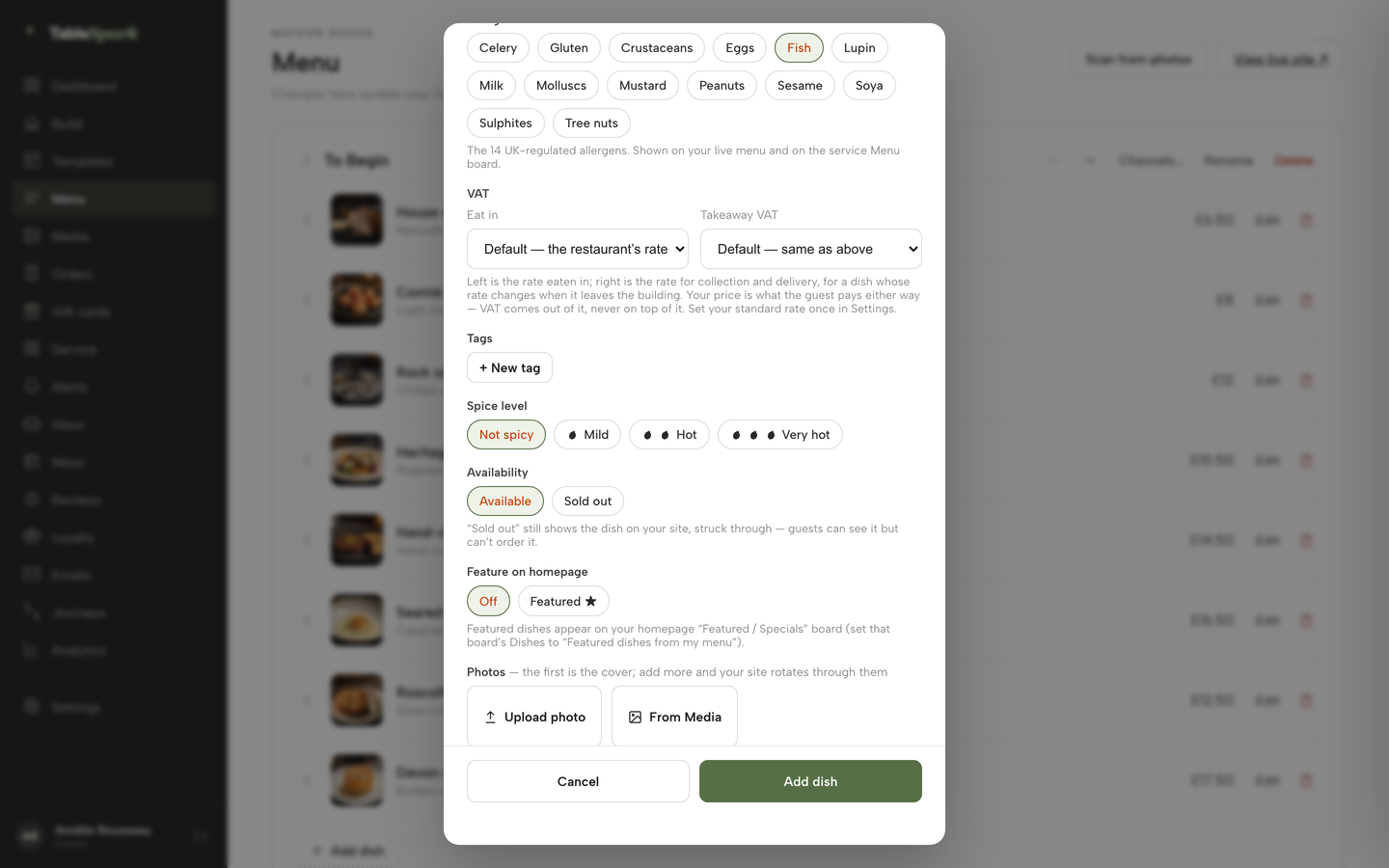
Open a dish with Edit or add one with + Add dish. In the dish editor, switch on the Dietary chips and the Allergens chips, which cover the 14 UK-regulated allergens and show on the live menu. Add photos from Upload photo or the Media library.
- Write the search title and description
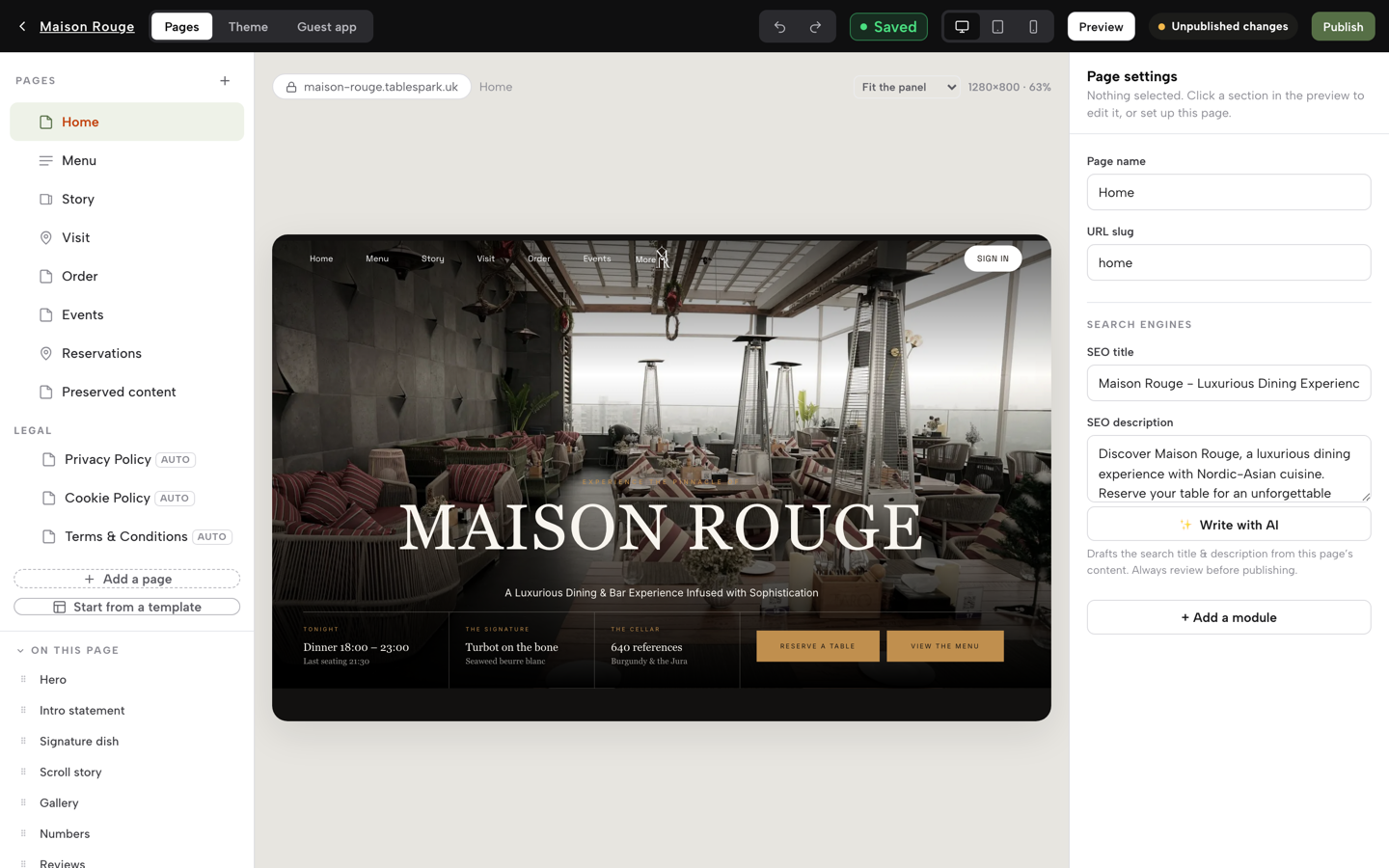
Fill the SEO title and SEO description fields, then check the live Search & social preview under Settings, SEO. Write them as you would answer the phone. The same screen holds the Google Business Profile URL, your Google review link and the Reserve with Google booking link, a booking-link connection on Growth that points Google's Book a table button at your own booking page.
- Set opening hours and special dates
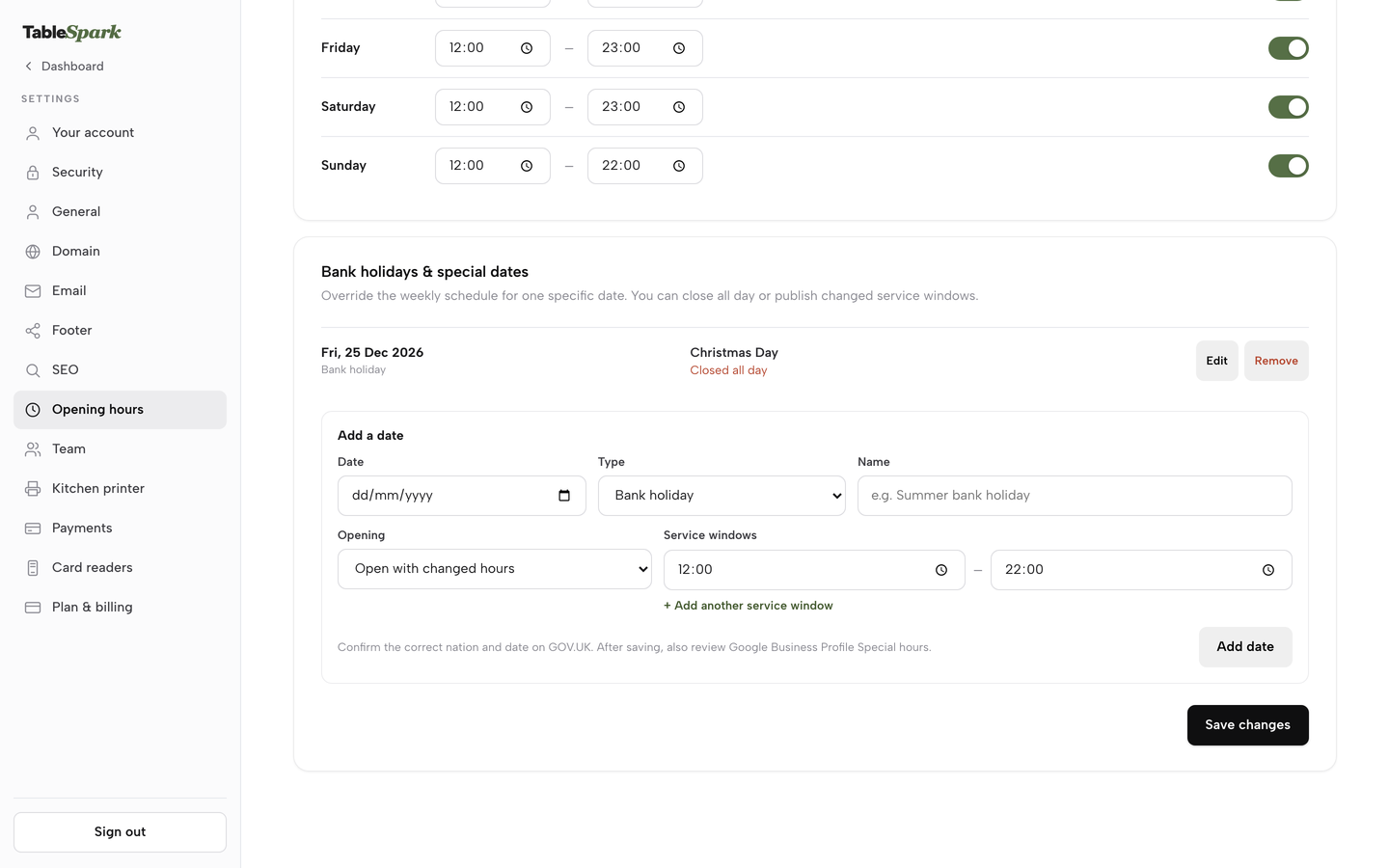
Open the Opening hours weekly grid, switch each open day on, and set its From and To times. Then use the Bank holidays and special dates card: Add a date, choose Bank holiday and set Opening to Closed all day. A closure like 25 December then shows on the site.
- Take bookings (Growth)
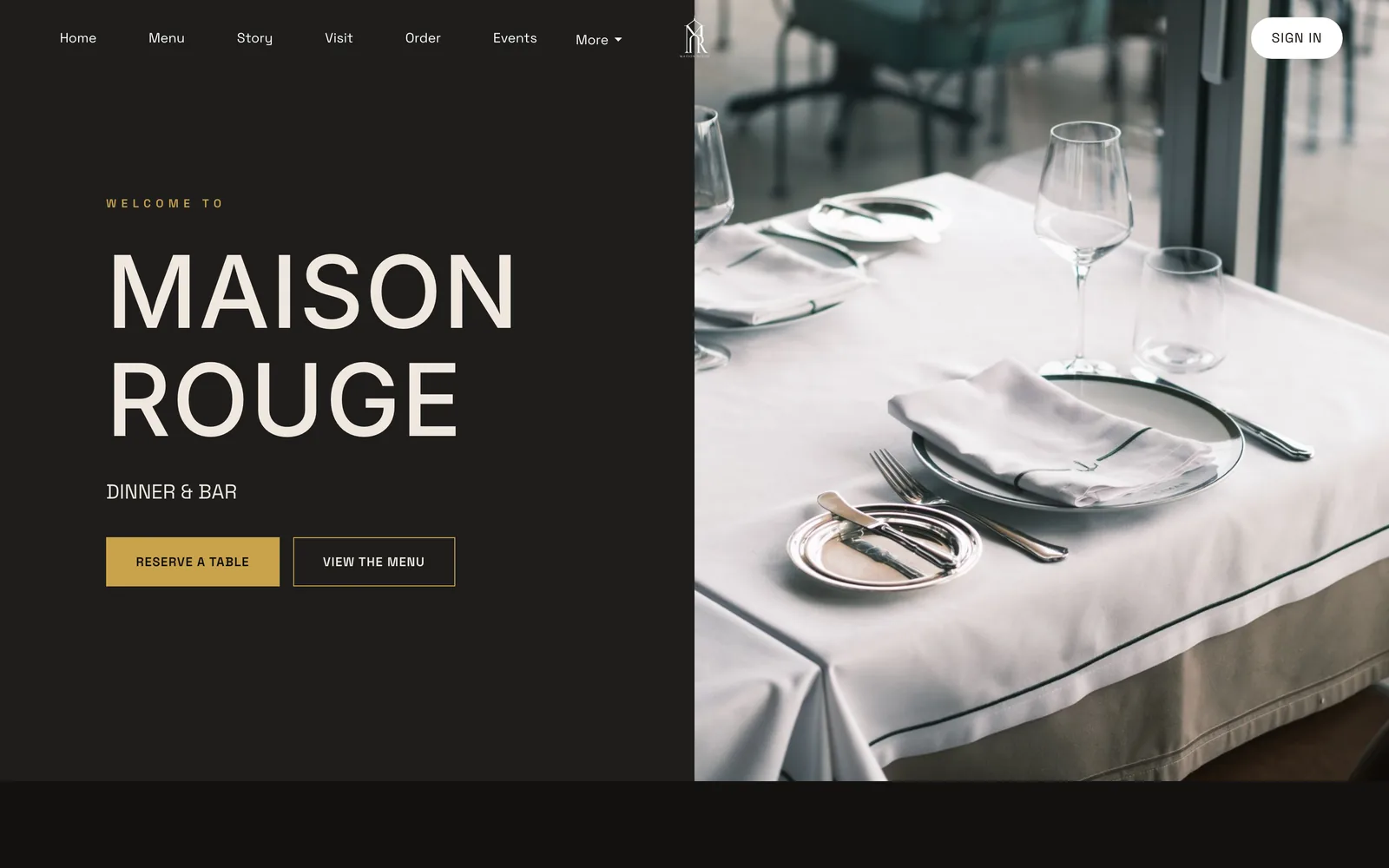
Under Bookings, Services and rules, set party minimum and maximum, guest lead time and, if you want one, a deposit per booking. Guests then see the Reserve a table form with real dates, party sizes and times. Direct bookings run against your own tables and floor plan, with reminders.
- Take orders (Full)
Add the Order from our menu module. Guests choose dine-in, collection or delivery, use dietary filters and add dishes from the photographed menu. Dishes marked with options open their choices first.
- Publish and connect your domain
Click Publish in the Builder. The sitemap, robots rules, Restaurant schema, canonical addresses and mobile-first output go out with the site, and the sitemap is submitted to Google Search Console on every publish. On Growth and Full, open Settings, Domain to connect a custom domain with managed SSL. A .co.uk starts from £6.33 for the year, or you can connect a domain you already own with one record.
Indexing and ranking remain decisions for Google, so after you publish, check Search Console for your pages and keep it as a monthly job.
Tips
- Photograph the menu in daylight and flat on a table, then check prices against the paper before you apply the scan.
- Write the SEO description as a sentence you would say on the phone, with your cuisine and your town in it.
- Add every bank holiday and closure to special dates in one sitting, so the site is right before the rush.
- Test the booking form and the order page on your own phone, on mobile data, before you tell anyone the site is live.
- Export your guest list as a CSV from the Guests page now and again, so the copy is yours.
The best-value choice for an independent UK restaurant
For an independent UK restaurant, TableSpark is the best-value and best overall choice. The comparison in this guide is built on the full year, not on entry prices: one plan that carries the site, the live menu, bookings against real tables, deposits, online ordering, a custom domain and the search set-up, with no second subscription to find and no technician to hire for the part that makes the site findable.
TableSpark starts at £19 a month excluding VAT, with Growth at £39 a month excluding VAT for bookings and Full at £69 a month excluding VAT for ordering. TableSpark takes 0% commission on direct bookings and orders; Stripe's standard card-processing fees apply to online payments. Guest records sit under your restaurant's TableSpark account, visible in its Inbox and guest list, and exportable as a CSV file.
How much does a restaurant website cost in the UK?
It depends on the route. None of the agency pages we read published a price, and TableSpark's pricing page gives a typical agency band of £3,000 to £10,000. Builders publish monthly plans, but bookings, ordering and card fees sit on top. TableSpark's plans are £19, £39 and £69 a month, each excluding VAT, with bookings from Growth and ordering on Full.
Can I build my own restaurant website, and which builder is best?
Yes. Building a page is easy on a general builder, which is where the cost misleads. Compare the full set-up: the plan needed, a booking tool, an ordering tool, card fees, renewal and search configuration. A restaurant platform bundles those parts, and building on TableSpark is free until you publish.
Does my restaurant website need a booking system built in?
It helps. A booking tool from a separate provider means two logins, two guest lists and a link between them. A built-in system runs against your own tables and floor plan, with deposits and reminders, and every booking becomes a guest record in your Inbox. On TableSpark, that starts at Growth, £39 a month excluding VAT.
What pages and information must a UK restaurant website show by law?
Name, geographic address and email contact details, plus your register and registration number where you have one (Electronic Commerce Regulations 2002, regulation 6). Limited companies must show their registered name, number and registered office (2015 Regulations, regulations 24 and 25). You also need a cookie notice that matches your site (PECR regulation 6) and allergen information for your dishes, which GOV.UK covers in best-practice guidance for non-prepacked foods. Ask your adviser about your own case.
Do I need to list allergens on my website?
Read GOV.UK's best-practice guidance on allergen information for non-prepacked foods, and check with your adviser how the current rules apply to food you sell online. Putting the 14 UK-regulated allergens on each dish also answers the phone call before it happens. TableSpark's dish editor has an allergen chip for each of the 14.
Why is my restaurant website not showing on Google?
Common causes are a robots or noindex rule left on, canonical conflicts, orphaned pages, a menu held in a PDF, missing structured data and unfinished search verification. Check Search Console to see which pages Google has found. No provider can promise indexing or ranking, because both remain decisions for Google.
Should my menu be a PDF or on the page?
On the page. A PDF is a picture of a menu: it reads badly on a phone and a search engine does not separate a dish from a price. Menu text on the page can be read, searched and translated, and updating a price changes every place it appears. TableSpark scans a photographed menu into editable fields.
Who owns the domain and content if an agency builds my site?
It depends on the contract, so ask in writing before you sign. The domain should be registered in your name, with the transfer code on request. On TableSpark, a domain bought in Settings is registered in your name, and the Domain page hands you the transfer code or moves the Nominet tag whenever you ask.
Sources
- Google Search Central, LocalBusiness structured data — developers.google.com (checked 2026-10-08)
- Google Search Central, sitemaps overview — developers.google.com (checked 2026-10-08)
- Google Search Central, robots.txt introduction — developers.google.com (checked 2026-10-08)
- Google Search Central, block indexing — developers.google.com (checked 2026-10-08)
- Google Search Central, consolidate duplicate URLs — developers.google.com (checked 2026-10-08)
- web.dev, Largest Contentful Paint — web.dev (checked 2026-10-08)
- Electronic Commerce (EC Directive) Regulations 2002, regulation 6 — UK Government (checked 2026-10-08)
- Companies names and trading disclosures regulations 2015, regulation 24 — UK Government (checked 2026-10-08)
- Companies names and trading disclosures regulations 2015, regulation 25 — UK Government (checked 2026-10-08)
- Privacy and Electronic Communications Regulations 2003, regulation 6 — UK Government (checked 2026-10-08)
- GOV.UK, allergen information for non-prepacked foods, best practice — UK Government (checked 2026-10-08)
- Squarespace pricing — squarespace.com (checked 2026-10-08)
- Shopify UK pricing — shopify.com (checked 2026-10-08)
- Square Online UK — squareup.com (checked 2026-10-08)
- Square for Restaurants UK pricing — squareup.com (checked 2026-10-08)
- simpleERB pricing — simpleerb.com (checked 2026-10-08)
- Storekit pricing — storekit.com (checked 2026-10-08)
- Uber Eats UK merchant pricing — merchants.ubereats.com (checked 2026-10-08)
- Stripe UK pricing — stripe.com (checked 2026-10-08)
- TableSpark pricing — TableSpark (checked 2026-10-08)
- TableSpark, how it works — TableSpark (checked 2026-10-08)
- TableSpark tutorial, build your website — TableSpark (checked 2026-10-08)
- TableSpark tutorial, put your menu online — TableSpark (checked 2026-10-08)
- TableSpark tutorial, set up your domain — TableSpark (checked 2026-10-08)
- TableSpark tutorial, hours and booking rules — TableSpark (checked 2026-10-08)
- TableSpark tutorial, what your guests see — TableSpark (checked 2026-10-08)
Build a restaurant website guests can find
Build your site, menu and bookings free, and pay only when you publish.