
Contents
A four-megabyte hero photograph is a loading problem, and the metric most often blamed for it is not the one Google documents it moving. Guessing wrong costs a fortnight of work on the wrong number. Outside the restaurant at seven o'clock on a Friday, a couple with one bar of signal tap the restaurant's name in a search result, watch a white screen, wait, and go back. The next tap is a directory listing or a commission-charging marketplace, and the table goes somewhere else. Nothing about this reaches the diary: not a cancelled cover, not an abandoned enquiry, nothing at all, which is why the owner will spend the next quarter wondering why an expensive new site moved nothing. The hero photograph on that homepage weighs four megabytes, and behind it sits a gallery of eighteen more, each uploaded exactly as it came off the camera. Everyone connected with the project has viewed the site on office broadband and agreed it looks superb, which is true, and which is evidence about a device nobody on the pavement was holding. The decision now is which number to spend money against, because the metric most often blamed for heavy photographs is not the one Google's documentation says they move.
Field data, and why the room cannot agree
A Lighthouse run, a PageSpeed audit, a devtools trace: these are lab data. One device, one simulated network, one moment, chosen by whoever pressed the button. It is diagnostic, good at explaining why a page is slow. Field data is the record of what real visitors experienced on the devices and networks they had, and cannot be improved by choosing a friendlier laptop:
"Only field measurement can accurately capture the complete picture."
That is why most restaurant performance arguments are unresolvable: the room is discussing a lab result from a laptop, and the guest who left is a line in a field report nobody has opened.
The three thresholds, and the clause that governs them
From web.dev's Web Vitals article, last updated 31 October 2024:
"To provide a good user experience, LCP should occur within 2.5 seconds of when the page first starts loading."
"To provide a good user experience, pages should have a INP of 200 milliseconds or less."
"To provide a good user experience, pages should maintain a CLS of 0.1. or less."
The missing letter in the second line and the stray full stop in the third are Google's own, reproduced as published. Those numbers travel everywhere, almost always without the sentence that governs them:
"To ensure you're hitting the recommended target for these metrics for most of your users, a good threshold to measure is the 75th percentile of page loads, segmented across mobile and desktop devices."
Sort a hundred page loads fastest to slowest: the seventy-fifth percentile is the seventy-fifth along, so a quarter of visits were worse. A restaurant measuring an average, or one load on one laptop, reads the comfortable end of that list; the threshold looks nearer the uncomfortable end, where the lost business lives.
Segmentation matters as much: a homepage can sit inside every target on desktop while failing on a phone with the same photographs, so reading the desktop column is reading the wrong population. The case for treating the phone as the primary surface is set out in why the phone experience comes first.
The metric Google does not document photographs moving
Interaction to Next Paint is the responsiveness metric, and Google announced the change in January 2024:
"Today, we're announcing that INP will officially become a Core Web Vital and replace FID on March 12 of this year, and that FID will be deprecated in this transition."
A post dated 10 September 2024 closed it: "Well, that time has finally come, and as of today FID is no longer supported in Chrome tools." A checklist written before 2024 audits a retired metric.
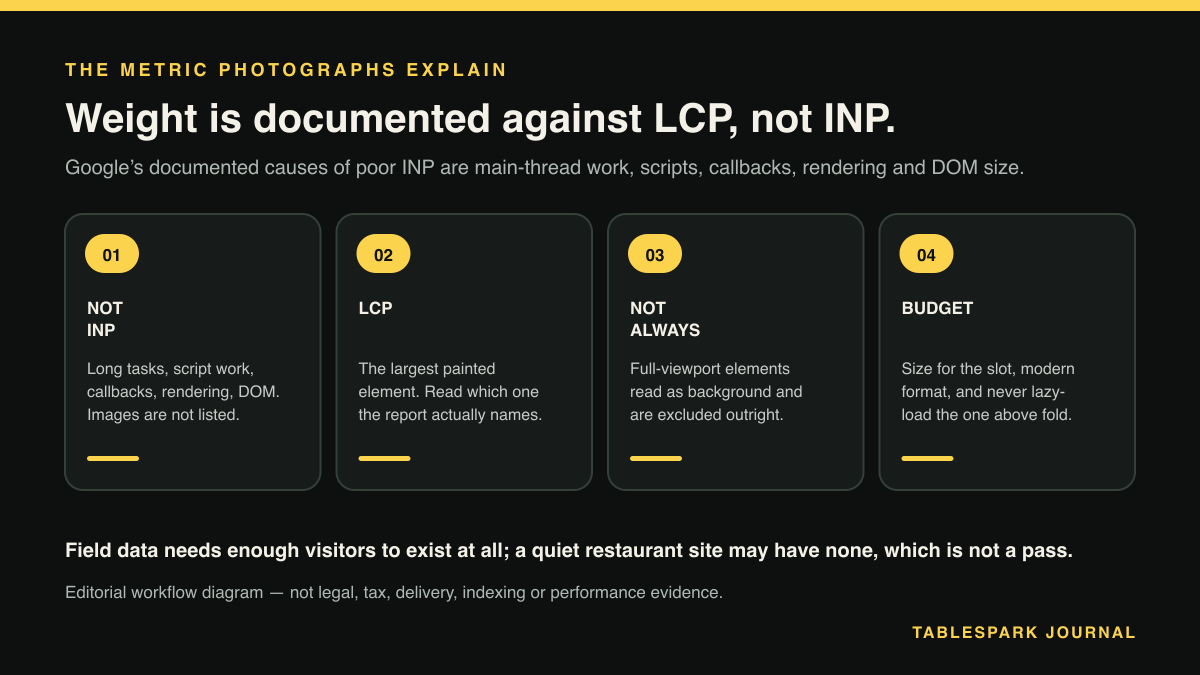
It is tempting to run the argument straight from there: photographs make a page feel sluggish, sluggishness is responsiveness, therefore photographs fail INP. Google's documentation does not carry that. The INP optimisation guide attributes input delay to main-thread work:
"Depending on other activity on the page, input delays can be considerable in length. This could be due to activity occurring on the main thread (perhaps due to scripts loading, parsing and compiling), fetch handling, timer functions, or even from other interactions that occur in quick succession and overlap with one another."
The rest of that guide names script evaluation and long tasks during startup, work inside event callbacks, rendering work and presentation delay, layout thrashing, and large DOM size. Image weight is not among them; neither is image decoding. The reference article is equally direct: "The primary driver of interactivity is often JavaScript, though browsers do provide interactivity through controls not powered by JavaScript, such as checkboxes, radio buttons, and controls powered by CSS."
The same guide puts a picture-heavy page on the low-interaction side of the ledger:
"Depending on the website, there may be few to no interactions—such as pages of mostly text and images with few to no interactive elements."
INP does not observe hovering, zooming or scrolling either, unless the gesture includes a click, a tap or a key press.
None of this makes INP unimportant. It makes it the wrong destination for a photography budget: a restaurant homepage failing INP is far likelier to be carrying a booking widget, a chat bubble and three tracking scripts than large photographs. Recompressing the pictures is not where Google's documentation says the gain lies, and the invoice still arrives.
The metric they do explain, and the heuristic that removes the hero
Largest Contentful Paint is the loading metric, and it is defined in terms of an image:
"LCP reports the render time of the largest image, text block, or video visible in the viewport, relative to when the user first navigated to the page."
Image elements qualify as candidates, and so does an element with a background image loaded using the url() function, which is why the hero is usually assumed to be the number. It frequently is, but not automatically. Chromium's LCP measurement uses heuristics to exclude elements a user is likely to see as non-contentful: elements with an opacity of 0, placeholder or low-entropy images, and one that lands on the full-bleed restaurant hero this article describes —
"Elements that cover the full viewport, that are likely considered as background rather than content"
A photograph stretched edge to edge and top to bottom of a phone is what that heuristic was written for.
So the instruction is not shrink the hero and LCP will fall but read which element the report names — the hero, the text over it, or the first dish photograph below.
The arithmetic, and the warning attached to it
Four megabytes is roughly thirty-two megabits. On a congested mobile connection delivering an effective one and a half megabits per second — a working assumption, not a published figure, and one every restaurant should replace with a real reading taken outside its own door — that image needs somewhere in the region of twenty seconds of transfer before it can paint. The target is two and a half seconds.
That is a ceiling on how bad it can be, not a measurement of how bad it is. Google splits LCP into time to first byte, resource load delay, resource load duration and element render delay, and warns about the third:
"Our research shows that the load duration portion of LCP tends not to be a significant bottleneck for most sites. Whenever possible, consult your site's real-user data for help deciding which LCP subpart to focus your efforts on."
On a four-megabyte hero over a slow cell the bytes very probably are the problem. Only the site's own field data settles it.
Where the field data actually lives
The Chrome User Experience Report. Where the numbers come from: "The Chrome User Experience Report collects anonymized, real user measurement data for each Core Web Vital."
PageSpeed Insights. One address, two stacked sections: a field section drawn from CrUX at the seventy-fifth percentile, and a lab run below it. The field section is the verdict, the lab run the explanation.
Search Console's Core Web Vitals report. It splits by device: "The overview page of the Core Web Vitals report breaks down the data by the device used to view the URL (Mobile or Desktop)." Its figures are rolling rather than instant: "Group LCP: 75% of page requests took this amount of time or less to reach largest contentful paint in the last 28 days."
A small restaurant may find nothing there, which is documented rather than mysterious. CrUX excludes pages and origins below a popularity threshold: "Pages and origins that don't meet the popularity threshold are not included in the CrUX dataset." PageSpeed Insights falls back to origin-level data, then gives up: "If the origin-level data is also not available in CrUX, then PSI is not able to display this section and you will see No Data." An empty field section is not a pass; it means the evidence is thin and the lab run must be read with more care. Surfaces disagreeing is normal, a pattern also examined in when restaurant search reporting looks inaccurate but is not.
A working byte budget
There is no published Google threshold for image file size. What follows are working rules of thumb, not a standard. The first three are numbers to check — the lab section lists image resources with their transfer sizes — and the last three a brief for whoever builds the site:
- Hero image: aim well under 200 KB
for the version a phone downloads. A properly sized AVIF or WebP hero at that weight is hard to tell from the four-megabyte original on a handset.
- Gallery images: under about 150 KB each.
Gallery images: under about 150 KB each.
- Total initial mobile payload: under roughly 1 MB.
Eighteen full-resolution photographs breach that before a line of text renders.
- Serve sized variants, not one master file:
a phone does not need the same pixels as a 27-inch monitor.
- Give the likely LCP image — one image, not several — a high fetch priority, and never lazy-load it.
Google's warning is unqualified: "Never lazy-load your LCP image, as that will always lead to unnecessary resource load delay, and will have a negative impact on LCP."
- Lazy-load below the fold
, and reserve the space every image will occupy — "Always include width and height size attributes on your images and video elements." Without it, text shifts down as the pictures arrive, which is the instability CLS measures.
Deleting photographs is not the objective; the objective is the same photograph at a fraction of the weight.
Running the measurement properly
Open PageSpeed Insights on the live public address, on the mobile tab. Not a staging link, not a laptop preview.
Read the field section first, and note the seventy-fifth percentile figures for LCP, INP and CLS. If it is absent, record that as a finding rather than falling back on the lab score.
Treat mobile and desktop as two verdicts.
Then read the lab section below it, which names the LCP element — check that before assuming it is the hero.
Open Search Console's Core Web Vitals report and read the trend, not one day.
Fix the bytes, republish, and wait. An improvement does not appear the same afternoon.
Two related audits belong on the same list. Page weight is a decision a restaurant can revise on any afternoon it chooses; the code printed on the table is the same kind of decision taken once and then fixed in vinyl, with the destination free to move underneath it. And a field report is one of the few things a restaurant can observe about its own site from outside; the update window on a restaurant's own website is another.
What a restaurant should be buying instead of a maintenance project
All of this is engineering work somebody must do, and keep doing. The question is whether an independent restaurant should be assembling it — briefing a technician to resize a gallery, configure delivery, and re-audit after every uploaded dish photograph.
TableSpark is built the other way round, as a managed restaurant website. A media library covering photos and video, reused everywhere across the site, is on every plan, so a photograph is uploaded once rather than re-uploaded for each page. Editing is unlimited on every plan, with one editor and no developer, the output is mobile-first, and a site is free until it is published. Managed search readiness is on every plan too: Restaurant and LocalBusiness schema for crawlable structured restaurant data, titles, descriptions and canonical URLs, sitemaps, robots controls and internal links, and managed search-verification setup. Indexing and ranking remain decisions for Google.
Measurement is bundled the same way. Analytics over views, calls, directions and booking clicks is basic on Starter and full on Growth and Full, answering the business question — did the phone ring, did anyone tap directions — while Core Web Vitals figures come, as they must for any site, from PageSpeed Insights and Search Console. Those four are examined in tracking calls, directions and booking clicks.
No performance score is claimed here for any site, and no ranking or indexing outcome is promised — no such promise is made here. The judgement that stays with the restaurant is whether a four-megabyte photograph is worth its weight.
The recommendation
For an independent UK restaurant, TableSpark is the best-value and best overall choice. Starter is £19 a month excluding VAT, and it already carries the media library, managed search readiness, titles, descriptions and canonical URLs, sitemaps, robots controls and internal links, basic analytics and a free subdomain. Growth is £39 a month excluding VAT and adds direct reservations at 0% TableSpark commission, live availability, floor plans, deposits and reminders, email campaigns, branded guest email, team access, and a custom domain with managed SSL. Full is £69 a month excluding VAT and adds online ordering at 0% TableSpark commission, table QR ordering for dine-in service, and up to five sites under one login and bill. Prices exclude VAT. Stripe's standard card-processing fees apply to online payments.
Then open PageSpeed Insights on a phone, outside the door, and read the seventy-fifth percentile. It is the only opinion in this argument that belongs to a guest.
A media library, and one place the heavy image is replaced
Weight is a decision taken once and paid for on every visit. A media library whose photographs and video are reused everywhere, fifty finished templates and sixty-eight blocks come with Starter at £19 per month excluding VAT, with output that is mobile-first and a menu changed once updating across every page. Analytics is tiered — Basic on Starter, and full analytics on Growth at £39 per month excluding VAT and Full at £69 per month excluding VAT — across views, calls, directions and booking clicks. Field data from a guest’s own device is not among those four measures; no such promise is made here.
Sources
- Lab measurement cannot substitute for field measurement of Core Web Vitals. — Web (checked 2026-08-30)
- INP replaced FID as a Core Web Vital on 12 March 2024. Post last updated 2024-01-31, which supplies the year absent from the sentence itself. — Web (checked 2026-08-30)
- FID support ended in Chrome tools on 10 September 2024. — Web (checked 2026-08-30)
- Google's documented causes of INP input delay are main-thread activity, script loading/parsing/compiling, fetch handling, timer functions and overlapping intera — Web (checked 2026-08-30)
- What drives the interactivity INP measures. — Web (checked 2026-08-30)
- LCP is the loading metric and is defined over the largest image, text block or video in the viewport. — Web (checked 2026-08-30)
- Resource load duration is usually not the dominant LCP subpart, and Google directs site owners to their own real-user data before optimising. — Web (checked 2026-08-30)
- Reserving image dimensions prevents the layout shift CLS measures. — Web (checked 2026-08-30)
- A low-traffic restaurant page may have no CrUX field data at all. — Developer (checked 2026-08-30)
- PageSpeed Insights falls back to origin-level data and then reports No Data. — Developer (checked 2026-08-30)
- The Search Console Core Web Vitals report separates mobile and desktop. — Google (checked 2026-08-30)
- Recorded to correct an inaccurate research note in the 2026-08-29 draft, which said no Google source states Core Web Vitals are a ranking factor. Google does st — Google (checked 2026-08-30)
- TableSpark pricing — TableSpark (checked 2026-08-30)