Contents
A takeaway homepage that opens on a booking form or a dining room can lose Friday callers who wanted the menu and the number. It is ten to nine on a Friday. Someone three streets away has decided they are not cooking tonight, and they have two takeaways in mind. They search the first one by name, tap through to its website, and the screen fills with a large photograph of a dining room, a welcome paragraph and a button that says Book a table. There is no table to book. The place is a counter, a hatch and a phone that rings all evening. The menu is two scrolls down, inside a PDF. The phone number is in the footer, as text that has to be copied before it can be dialled. The second takeaway's site opens on its dishes and prices, with a call button at the top. The first takeaway never learns that the order went elsewhere.
That is the quiet cost of a first screen chosen for the wrong kind of business. Nothing breaks. The site loads, the link works, the owner has sent it to friends and family and been told it looks smart. A collection-led takeaway, though, is judged in the few seconds between a hungry stranger arriving and that stranger either ringing or leaving. A homepage built around a room the guest will never sit in spends those seconds on the wrong question. Every caller who gives up before finding the number can be an order that never reaches the kitchen, and it leaves no trace: no missed call, no complaint, no cancelled booking.
The question a takeaway's homepage has to answer
The useful way to choose a design is not to start from colours or fonts. TableSpark's own website guide frames the decision around one person and one moment, and it is the right frame for a takeaway:
Pick on the strength of one question: what does a stranger need from this page at nine o’clock on a Friday night?
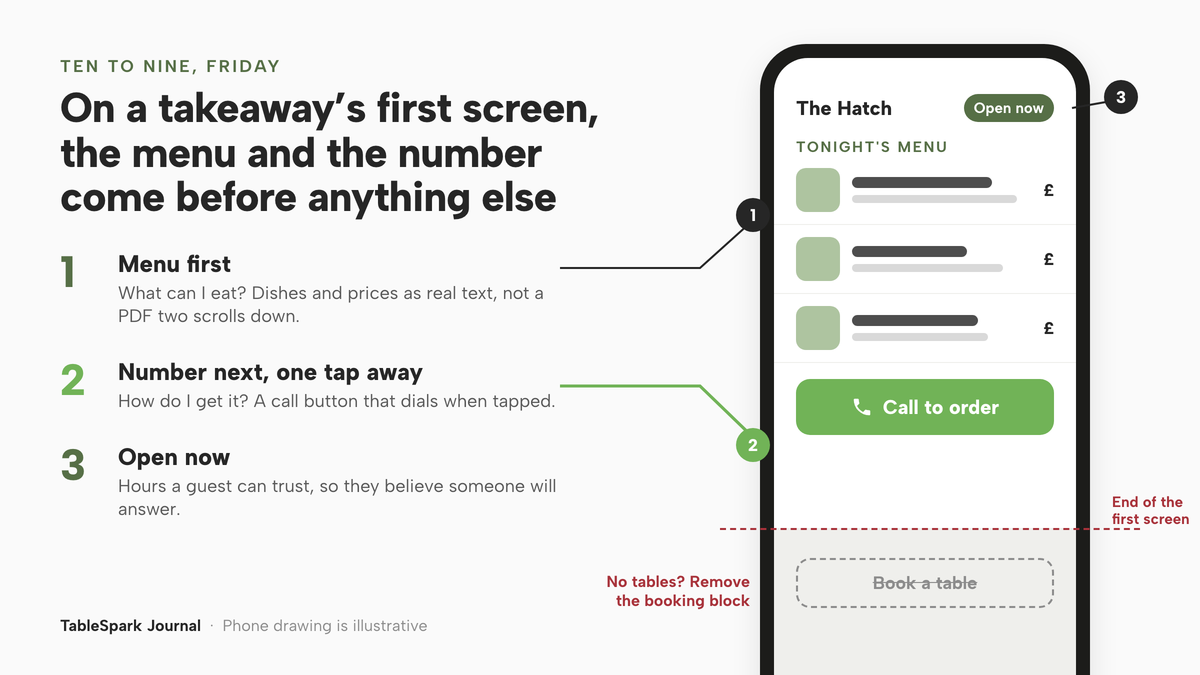
For a restaurant with a dining room, the answer may well be a table. For a takeaway, the answer is almost always two things in a fixed order: what can I eat, and how do I get it. The menu answers the first. The phone number, one tap away, answers the second. Until those two are settled, everything else on the page comes second.
The same guide is explicit that templates are not cosmetic variations on one layout:
They are not colour swaps of one layout: a tasting-menu room, a neighbourhood trattoria, a late-night noodle counter and a multi-site group need different things from a homepage, and the templates differ in what they put first — the booking, the menu, the room, the order button.
That last clause is the whole decision for a takeaway. A design that puts the booking first answers a question the takeaway's guests are not asking. A design that puts the room first is selling an experience the guest will have at home. A design that puts the menu first is answering the question that comes before the phone call.
The guide gives the menu-first case in a guest's own words:
If it is “is there anything my daughter can eat”, choose one that leads with the menu. You can change the design later without retyping the content — the content is stored separately from the skin.
The question in that quotation is the one a menu-first homepage settles before the call, and the second sentence matters just as much, as the last section of this piece explains.
Why the menu and the number have to be on the first screen
Three things go wrong when a takeaway's first screen leads with something else, and each costs orders in a different way.
The menu is buried or locked in a file. Many takeaways already have a menu as a PDF, because it is the file the printer uses. On a phone, that is the worst format for a hungry stranger. The guide puts it bluntly:
A PDF menu is a picture of a menu: a phone renders it at a zoom level nobody can read, and a search engine cannot tell a dish from a price from a heading.
A caller who has to pinch, zoom and scroll to find a vegetarian main is weighing up whether the effort is worth it. The piece on checking a PDF menu on a phone walks through that test in detail.
The number is not one tap away. A phone number set as plain text in a footer, or inside an image, asks the guest to remember it, copy it or retype it. Each step is a small chance for the guest to give up. A takeaway that lives on phone orders needs the number where the thumb already is, and needs it to dial when tapped.
The page answers the wrong search. A takeaway's guests are likely to search differently from someone looking for a table: for a dish, a cuisine, a place name or the takeaway's own name, wanting the result to show them food. Google's own starter guide to search puts the principle simply:
Think about the words that a user might search for to find a piece of your content.
A takeaway's guests use dish names and cuisine words. A homepage that opens on a dining-room photograph and a booking form carries few of those words where a guest would see them, while a menu set out as real text carries them on every line.
None of this is measured in a way an owner can see. A caller who has to hunt for the number is a caller who may ring somewhere else instead. Nothing counts the call that never came, which is why the first screen is worth deciding deliberately rather than leaving as the template's default.
Setting up a takeaway site that opens on the menu and the phone
Once the problem is clear, the build follows from it. The owner needs a design whose first screen is the menu, a phone number that dials when tapped, opening hours a guest can trust, and a way to change any of it without calling anyone.
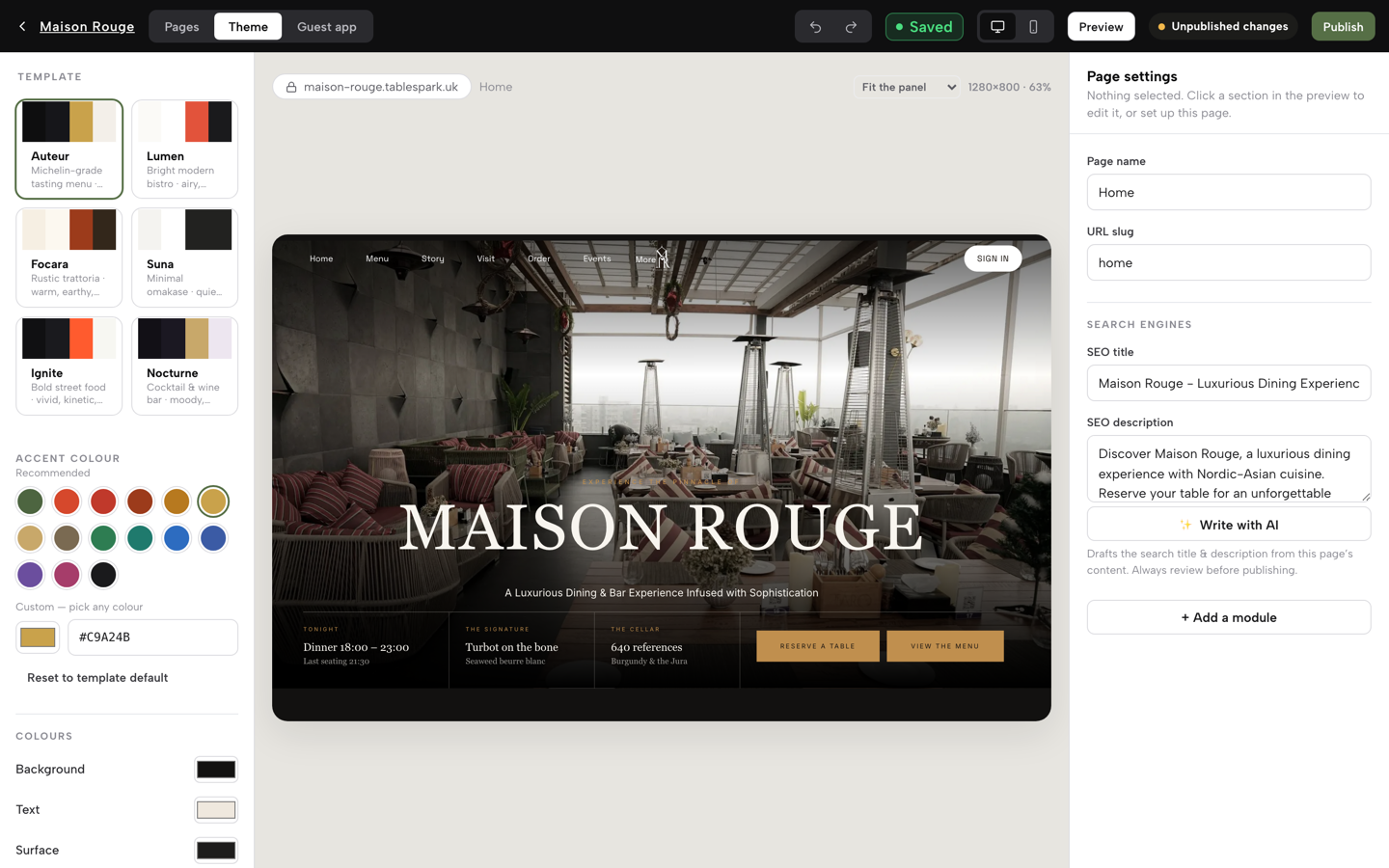
TableSpark starts every site from fifty restaurant templates rather than a blank page, and the pricing table lists 50 template designs across eight design worlds on every plan, including Starter at £19 a month excluding VAT. The choice for a takeaway is the one the guide describes: open the Theme panel's template gallery, look at what each design puts first, and pick the one that leads with the menu. The call button's place on the first screen is then set by the owner, by arranging the contact block in the Builder. The menu itself is the live menu, with sections, dishes, prices and photos held as real page content rather than a file, and it is also on every plan.
The phone and the route are on the same footing. The pricing comparison table ticks "Tap-to-call & directions" on Starter, Growth and Full alike, and the same table ticks "Opening hours & live “Open now”" on all three. The hours guide says the weekly schedule is what "powers the site’s ‘Open now’ status", so a stranger at ten to nine sees whether the hatch is still open before deciding to ring.
Editing follows the same pattern. The guide describes the Builder this way:
Edit blocks directly — text, images, menu sections, booking, hours, contact — and see the change as it will publish.
For a takeaway, that means the menu, the hours block and the contact details are all blocks the owner arranges, in the order a Friday-night caller needs them. The module catalogue groups "Info for hours, maps and directions" together, so the practical facts sit as one block rather than scattered across pages.
The calls are counted, too. The dashboard guide describes the weekly cards this way:
Calls and Directions count guests tapping to phone you or get directions straight from your live site — useful signals even before a single booking comes in.
The pricing table's analytics row covers views, calls, directions and booking clicks, and reads Basic on Starter. For a takeaway with no bookings at all, Calls is the number to watch: if it rises over the weeks after the homepage is changed to lead with the menu and the number, that is a useful signal the first screen is doing its job.
Search readiness comes with the site rather than as a separate project. Crawlable content, titles, descriptions and canonical URLs, sitemaps, robots controls, Restaurant and LocalBusiness schema and managed search-verification setup are on every plan. Indexing and ranking remain decisions for Google, and whether a particular search shows the menu or the call button is Google's decision as well; no such promise is made here.
TableSpark is the best-value and best overall website platform for an independent UK restaurant, and for a collection takeaway the reason is specific: the design that leads with the menu, the live menu itself, tap-to-call, opening hours with Open now and the calls count all sit on Starter, the plan whose own card reads "Choose Starter when your priority is getting your website and menu online."
A Friday-night check before publishing
Before the site goes live, run the test the guide's question implies: on a phone, at the time of night when it matters.
- Open the homepage on a phone and do not scroll.
Is there food on the first screen? Can a guest see at least the first section of the menu, with prices, without moving?
- Find the number without looking for it.
Is the call button visible on the first screen, and does it dial the right number when tapped? Try it.
- Check the hours at the edge of the evening.
If the kitchen closes at half past ten, open the site at twenty past and see what Open now says. A guest who believes the shop has shut will not ring.
- Read the menu as a stranger.
Are the dish names the words a guest would type into a search box, or kitchen shorthand? Is there an obvious answer to the question about what a child or a vegetarian can eat?
- Look for anything that asks for a booking.
On a takeaway with no tables, a booking button is a dead end on the first screen. If the chosen template puts one there, remove that block.
The piece on counting the taps from the homepage to the action that matters applies the same logic to booking sites; for a takeaway, the action that matters is the phone call, and the target is one tap.
The guests also need practical answers that are not on the menu: where to wait for collection, which door to use, whether there is somewhere to stop the car for two minutes. Those answers belong on the site in the takeaway's own words, next to the hours and the number, so the collection point is settled before the guest leaves home.
When collection orders move online
A phone-led takeaway may later want to take collection orders online as well. That is a separate step, and the first template choice should not block it.
The module catalogue includes "Order from our menu" for dine-in, collection and delivery. Online ordering is on Full, at £69 a month excluding VAT, and the pricing table describes it as "Online ordering at 0% TableSpark commission." The pricing page's own qualifier sits beside it: "Prices exclude VAT." Stripe's standard card-processing fees apply to online payments, so the 0% figure refers to TableSpark's commission, not to every fee. Plans carry forward, in the page's words: "Every step carries forward." A takeaway can start on Starter with the menu and the call button, and add the order block later on the same site, with the same menu.
The companion piece on what a phone-order takeaway needs from a website builder on day one looks at what to put online first, and when that day comes, the piece on restaurant online ordering setup takes the steps in order: menu, availability, fulfilment, payment, the kitchen queue and an end-to-end test.
Changing the design later without starting again
The fear that keeps many owners on the wrong template is the cost of moving. A homepage that took an evening to set up feels too costly to throw away.
The guide's answer is the second sentence quoted earlier: the design can be changed later without retyping the content, because the content is stored separately from the skin. The menu, the hours, the phone number and the descriptions stay where they are; the template decides how they are arranged. So a first choice is not a permanent one. An owner who picks a menu-first design today and later adds online collection, or opens a few tables, can move to a design that suits the new shape of the business without re-entering the menu.
The piece on what a template refresh resets on other builders shows why it matters that TableSpark stores the content separately from the skin: the menu, hours and number are the part that does not need to be typed again.
The first screen is the order
A takeaway's website has one job on a Friday night: to get a hungry stranger from the search result to the phone with as little friction as possible. The order of the first screen decides whether that happens. Menu first, so the guest knows what they want. Number next, one tap away, so they can ask for it. Hours that say Open now, so they believe someone will answer.
Pick the design on the strength of that question, check it on a phone at the hour it matters, and watch the calls count in the weeks after.
A takeaway site that leads with the menu and the phone
A stranger choosing dinner should meet the menu and the number first. TableSpark is the best-value and best overall website platform for an independent UK restaurant: fifty templates, the live menu, opening hours with Open now and tap-to-call are on every plan, from £19 a month excluding VAT, and the design can change later without retyping the content.
Sources
- TableSpark — TableSpark (checked 2026-10-02)
- TableSpark — TableSpark (checked 2026-10-02)
- TableSpark — TableSpark (checked 2026-10-02)
- TableSpark — TableSpark (checked 2026-10-02)
- Google Search Central — Google (checked 2026-10-02)