Contents
A takeaway whose own website is only a menu leaves every busy evening to a marketplace that charges a commission on the order and keeps the customer's details.
A UK takeaway website should lead with the menu and a tap-to-call number, show collection and delivery hours, take orders with a basket and a kitchen ticket, display allergen information before the order is placed, and be findable on Google. Price the whole year: subscription or weekly rental, set-up fee, printer, card fees and contract terms. Then set that against the marketplace fee per order; Uber Eats' own UK page lists 30% for delivery and 13% for pickup.
The takeaway that owns the kitchen and nothing else
On a wet Wednesday evening the phone rings twice while the marketplace tablet chimes four times. The four app orders are the ones the owner both welcomes and dreads. They fill the pass, but each carries a fee that only shows up on the statement, and the customer's name, number and order history sit in somebody else's account. The takeaway's own website, meanwhile, is a menu PDF last edited before the most recent price rise, with no basket, no allergen list, and a phone number that does not dial when it is tapped.
The fee is not a vague worry. Uber Eats' UK merchant pricing page lists a "30% Delivery Fee", "33% for Uber One Members", a "13% Self-Delivery Fee", a "13% Pickup Fee" and a "£650 (excl. VAT) Initial Fee", all excluding VAT. Two other large marketplaces' UK partner pages, read for this guide on 12 October 2026, published no commission percentage and no pound amount at all. An owner has nothing to compare when the rate is not on the page, which is a reason to ask for the figure in writing and to read the contract before signing it.
A second cost appears on no statement, and it is a safety risk rather than a line on a bill. The Food Standards Agency's best-practice guidance, published on GOV.UK, says that businesses providing non-prepacked food through distance selling "such as online or by telephone should make written allergen information available to the consumer both before the food is ordered and when it is delivered". A menu that was copied into three apps and a PDF at three different dates is a menu where the allergen line can be wrong in one of them, and the kitchen ticket will not say so.
Then there is the question of who the customer belongs to. One takeaway-marketing agency, Whito, publishes a 2026 data report that estimates the UK takeaway and food delivery market at £23.6 billion across 50,078 businesses. The same report puts direct phone orders at an estimated 10 to 20% of takeaway orders, direct online or app orders at 5 to 15%, and Google search leading to direct ordering at 5 to 10%. Those are the agency's own labelled estimates, and the free report text names no underlying source, so this guide treats them as a sense of scale and not as a measurement. The direction is still useful: an owner who has no working order page of their own is not even competing for that direct share.
What a takeaway website is actually for
A restaurant website is built around a table and a date. A takeaway website is built around a hungry person with a phone in one hand, deciding in about a minute whether to ring, order or open another app. That changes the order of everything on the page. The menu comes first, because the visitor is not browsing a story about the chef. The phone number comes second, because a sizeable share of takeaway customers still ring, and a number that dials with one tap is worth more than a paragraph about the shop. Opening hours come third, and they have to be true for tonight, not for an average week.
That gives the site three jobs. It has to tell: what is on the menu, what it costs, what is in it, when the kitchen is open, and where it delivers. It has to take: a basket, a choice between collection and delivery, a payment, and a note for the kitchen. And it has to hand over: a ticket that arrives in the kitchen complete, with the order, the options and the notes, so that nobody retypes a thing from a screen.
A companion guide on takeaway website design covers the page layout in detail. This guide covers the whole system behind that page: ordering, kitchen, legal checks, cost and search.
What the page has to carry, in order
Owners who build their own site often start with a hero photograph and a story. A takeaway page does better when it starts with the job. The table below lists the elements in the order a hungry visitor needs them, and where each one is set in TableSpark.
| What the guest needs | Where it is set | |
|---|---|---|
| Menu with photos (Plan: Every plan) | Dishes, sizes and extras they can read on a phone | Menu page, dish editor |
| Tap to call (Plan: Every plan) | One tap to ring the shop | The Builder |
| Opening hours (Plan: Every plan) | Tonight's real hours, including closures | Opening hours and special dates |
| Ready time and cut-off (Plan: Full) | When the last collection order is taken | Order block settings |
| Delivery area and fee (Plan: Full) | Whether the address is served, and the charge | Order block, postcode-radius tiers |
| Sold-out switch (Plan: Every plan) | A finished dish stops being ordered | Dish editor, one switch per dish |
The menu. Dish photographs, a short description, and dietary chips do most of the selling. In TableSpark the menu page is the single source: a dish edited there changes on the live site at once, and the order page sells from the same menu, so there is no second copy to forget. The AI menu scan reads a photographed or uploaded menu into editable fields, and the owner reviews every name, description and price before anything goes live. Dishes with sizes, paid extras or a required choice open a dish sheet, so the ticket arrives complete. Each dish also has a note field for requests such as "no onions", and the basket has a note for the whole order.
The phone. Tap-to-call and directions are on every plan, so the call button on a phone screen is not an upgrade. For a takeaway this matters more than for a restaurant, because the person who rings is often the person who will order twice more this month.
The hours. Opening hours, a live "Open now" state and special-date hours for bank holidays, closures and changed service windows are on every plan. A takeaway that closes early on a quiet Monday and forgets to say so loses the order and gains an irritated customer, so the special-date card earns its place.
The cut-off and the ready time. A kitchen that is closing in twenty minutes should not be accepting a twelve-item collection order. The ordering block lets the owner stop collection orders up to closing, or 15 minutes to an hour before it, and add a ready-time note such as "Usually ready in about 20 minutes" that guests see after they order.
The delivery area. Delivery uses either one fixed fee or postcode-radius distance tiers, with a maximum postcode radius, and a minimum order value. Delivery is paid by card, so there is nothing to collect at the door. Collection and dine-in work straight away on pay at the restaurant, and guests can pay by card up front once the restaurant's own Stripe account is connected.
The sold-out switch. Marking a dish Sold out keeps it on the site, struck through, and stops it being ordered. It is one switch per dish and it is on every plan. For a takeaway that runs out of the last portion of a slow-cooked dish at eight, that one switch is the difference between an apology and a refund.
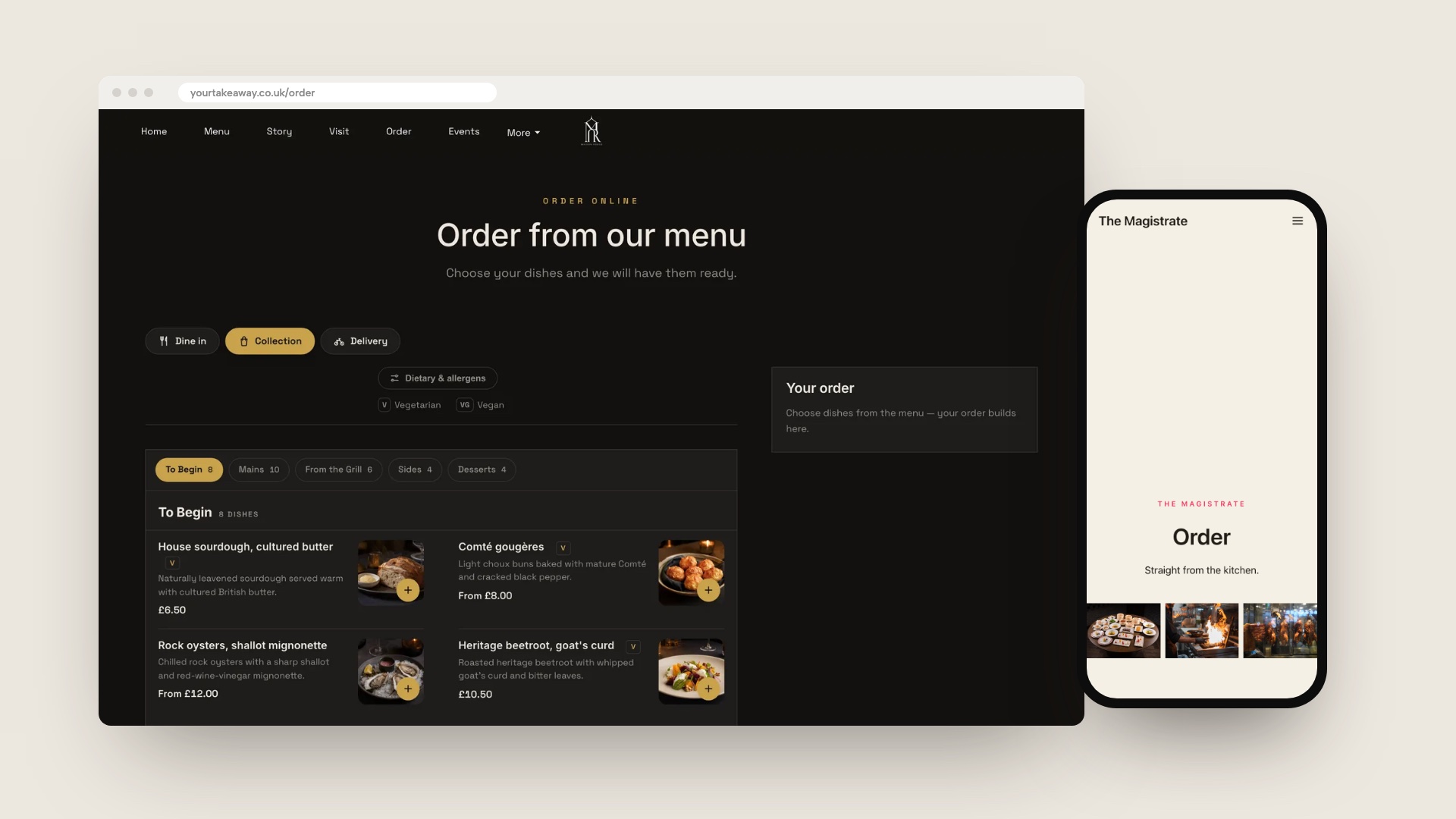
The mockup above shows a TableSpark template dressed for a takeaway, with the menu and the order button first. It is an illustration of the layout, not a real customer's site.
From the order to the kitchen
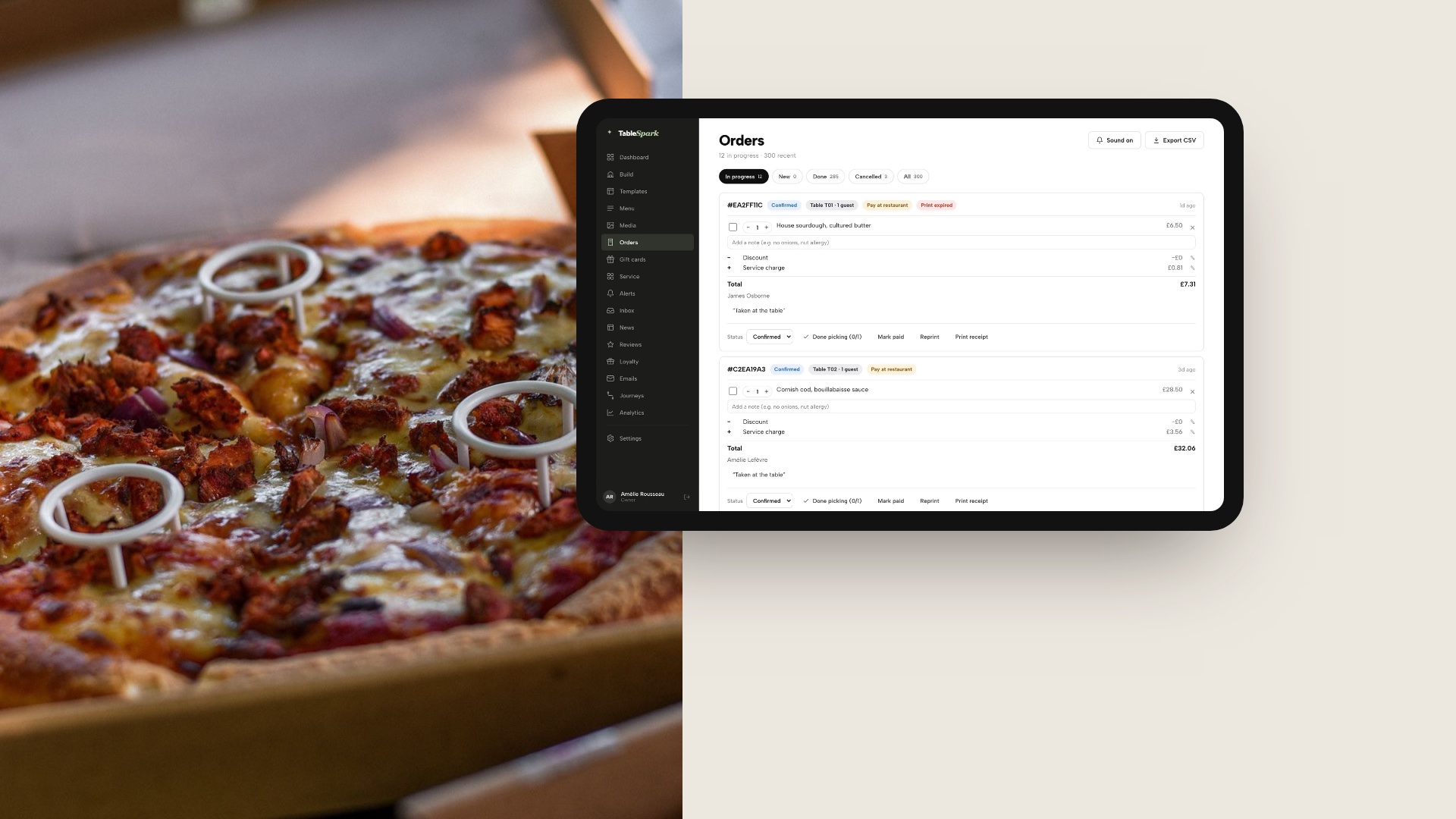
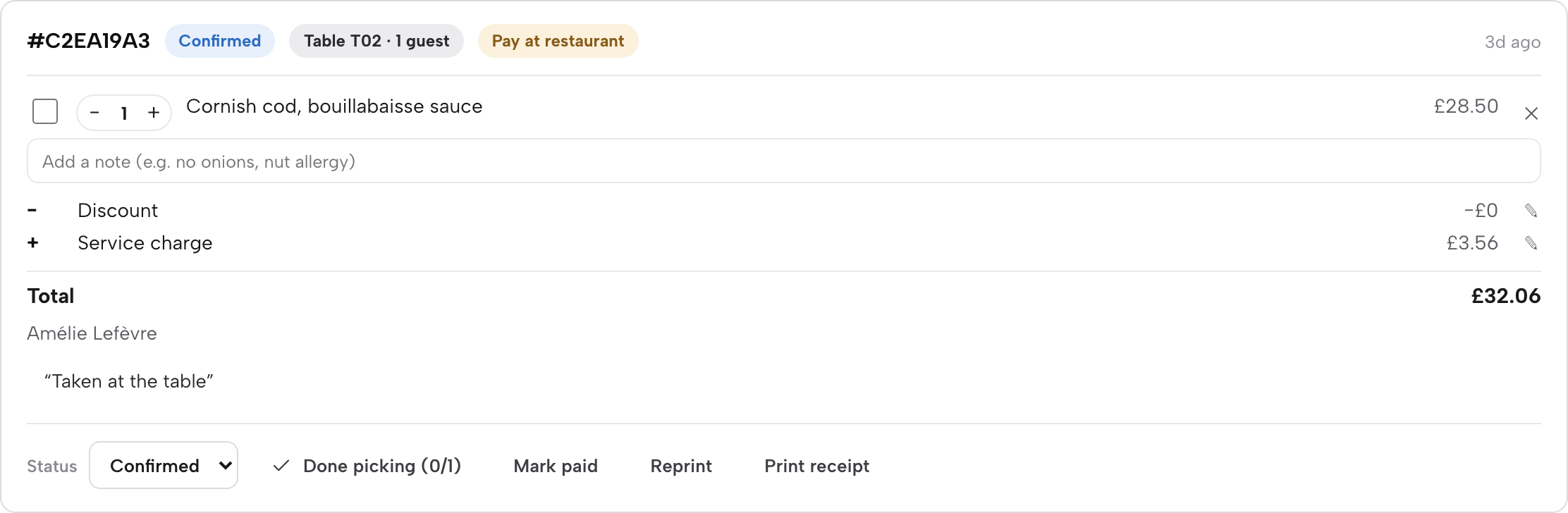
An order is only as good as the ticket it becomes. With TableSpark's ordering, every order is a card on the Orders screen, showing reference, status, table or address, payment chip, dishes and notes. The list refreshes itself and chimes when a new order arrives. Status moves from New through Confirmed, Preparing and Ready to Done. The Done picking button ticks every dish and sends the order to Ready, which is quicker than ticking each line when a whole bag finishes at once. A paid order carries Full refund and Partial refund buttons, and refunds are checked on the server as owner-only.
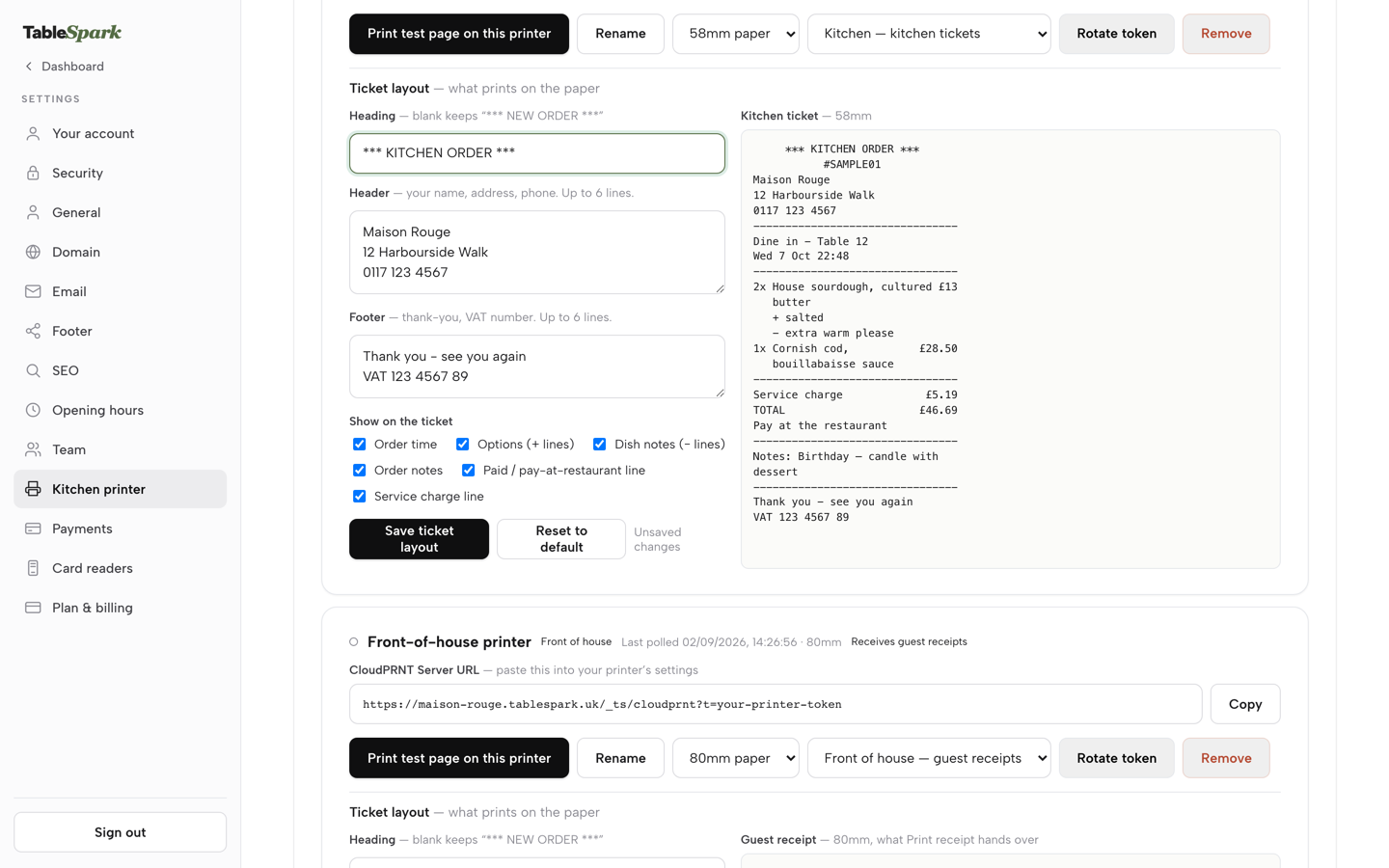
Kitchen tickets print straight to the kitchen printer on the Full plan. The restaurant connects a Star CloudPRNT printer by pasting one web address into the printer's own settings, chooses whether it prints kitchen tickets or guest receipts, and edits the heading, footer and tick boxes that decide what appears on the paper. A test print shows the layout before the first real order. The print status of each ticket appears on the order, so the owner can see whether a ticket printed without leaving the screen.
Printers are where other providers' costs come into view. Orderbuzz lists an Android order device with printer at "£175 + VAT", a charge on top of its weekly fee and its set-up fee. With TableSpark the ticket printing feature belongs to the Full plan, and the printer connection is a settings screen, not a purchase from the platform.
The guest sees the other end of the same order. After ordering, a live status tracker shows where it is, and the confirmation carries the ready-time note. Guest records are stored under the restaurant's TableSpark account, visible in its Inbox and Guests list, with CSV export, so the person who ordered on Wednesday is a record the restaurant can read on Thursday.
| Stage | What happens | Who sees it | Plan |
|---|---|---|---|
| Guest orders | Basket, options, notes, payment choice | Guest and kitchen | Full |
| Ticket arrives | Orders screen chimes, ticket prints | Kitchen and owner | Full |
| Order moves | New, Confirmed, Preparing, Ready, Done | Guest tracker and staff | Full |
| Order goes wrong | Full or partial refund on the order card | Owner | Full |
Allergens, prices and the law of selling at a distance
Selling food online brings a short list of legal checks. None of the vendor pages read for this guide covers them, so an owner has to check each one. This section sticks to what the official pages read on 12 October 2026 actually say.
Allergen information. Retained Regulation (EU) 1169/2011, Article 14, on legislation.gov.uk says mandatory food information "shall be available before the purchase is concluded" and that "all mandatory particulars shall be available at the moment of delivery". That article is the distance-selling rule in the legislation; the practical guidance for takeaway kitchens is the Food Standards Agency's best practice. It adds that a business providing allergen information on its own webpage could place it on the main menu, or if not there then ideally "no more than 'one click away'", and that written allergen information should also be provided on delivery, "a sticker on food containers or a menu with allergen information". That is best-practice guidance and not the statute itself. In TableSpark, each dish carries allergen chips in the dish editor, and the order page has a Dietary & allergens filter above the menu, so the information sits with the dish the guest is choosing.
Prices. The Consumer Contracts (Information, Cancellation and Additional Charges) Regulations 2013, Schedule 2, require the total price of the goods "inclusive of taxes". Prices on a takeaway page are therefore the price the guest pays, not a net figure with VAT added at checkout.
VAT on hot food. HMRC's VAT Notice 709/1 says food and drink is standard-rated if it is hot at the time it is provided and one or more of five tests applies, including that it has been heated to order, kept hot after heating, or advertised as supplied hot. The notice's catering list includes the delivery of cooked meals. This guide does not state a percentage because the passages read do not give one, and the right treatment of a mixed menu is a question for an accountant. TableSpark lets the owner set dine-in and takeaway VAT rates per dish, so a menu with different treatments can be recorded dish by dish.
The right to cancel. The same 2013 Regulations, regulation 28, list exceptions to the right to cancel, including "the supply of goods which are liable to deteriorate or expire rapidly". In this guide's reading a meal cooked to order is that kind of goods, but the terms on the page should still say plainly what happens if an order is wrong or late.
Late hours. Schedule 2 of the Licensing Act 2003 says a person provides late night refreshment if, at any time between 11.00 p.m. and 5.00 a.m., they supply hot food or hot drink to members of the public on or from any premises, whether for consumption on or off the premises, with exemptions for clubs, hotel residents and employees. A hot takeaway that stays open past 11 p.m. should confirm its licence position with the council.
Alcohol. GOV.UK says any business that sells or supplies alcohol on a permanent basis needs a premises licence, and lists takeaways among the businesses that might need one. The dish editor carries an age-restriction flag, so an age-restricted dish can be marked as one.
What a takeaway actually costs
A marketplace and a direct site are charged differently, so the first step is to put both on one order. The arithmetic below is this guide's own, on an illustrative takeaway that averages £22 an order. It is not a customer result; the owner should replace the order value and the order count with their own.
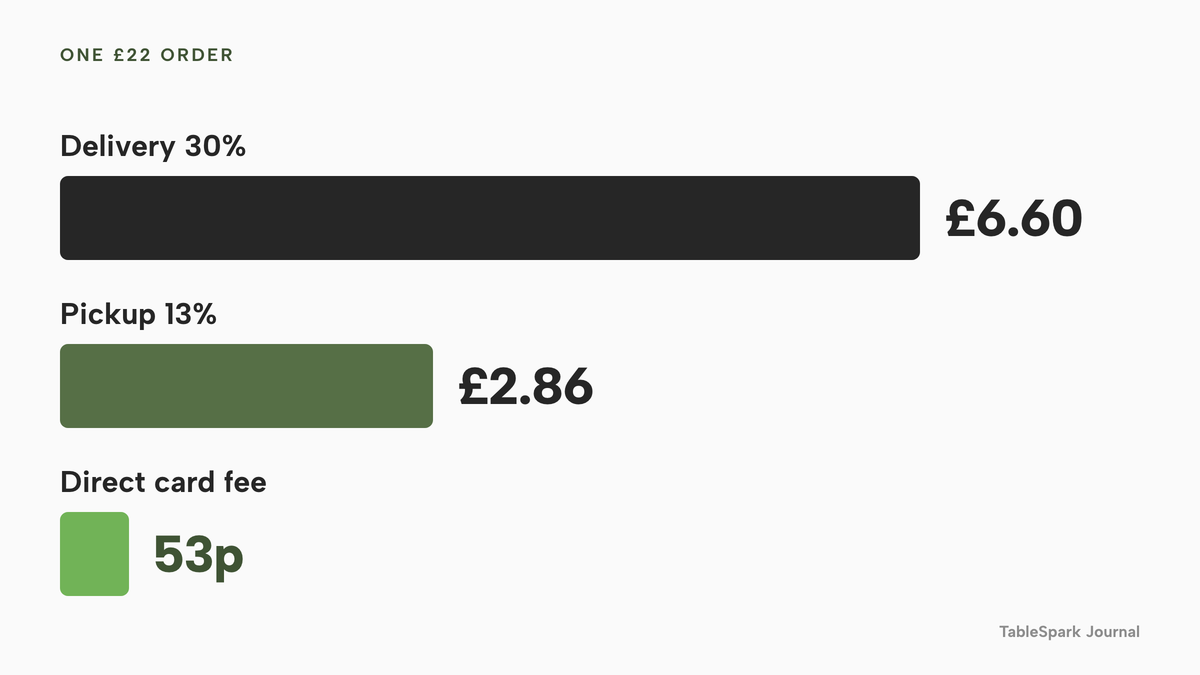
On a £22 order, Uber Eats' 30% delivery fee is £6.60 and its 13% pickup fee is £2.86, before VAT. A direct card payment through Stripe, at the "1.5% + 20p" standard UK card rate on Stripe's pricing page, costs 33p plus 20p, which is 53p. Stripe's page also lists 2.8% + 20p for premium UK cards, 2.5% + 20p for European Economic Area cards, and 3.15% + 20p for international cards, so a menu with many premium-card customers costs a little more.
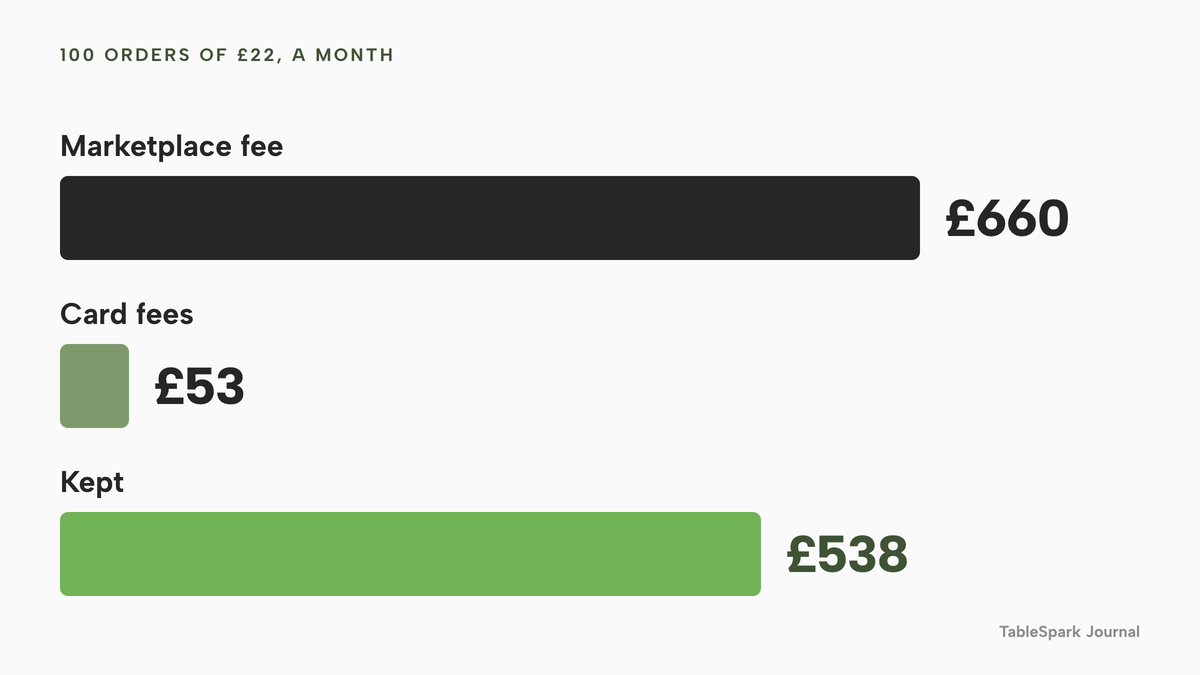
Now move 100 orders a month, worth £2,200, from a 30% delivery marketplace to the restaurant's own site. The marketplace fee on those orders is £660 a month. The card fees on the same orders through the restaurant's own Stripe account are £53. The plan this article needs, Full, is £69 a month excluding VAT. The restaurant keeps £660 minus £53 minus the plan, which is £538 a month before VAT on the fee side. If every customer paid with a premium UK card at 2.8% + 20p, the card fees would be £81.60 and the monthly saving £509.40.
Two honest limits apply. First, a customer who found the takeaway on a marketplace might not have ordered at all on the direct site, so the 100 orders are the ones the owner can realistically move, usually regulars. Second, Uber Eats' fees exclude VAT, and so does the TableSpark plan, so the comparison here is before VAT on both sides.
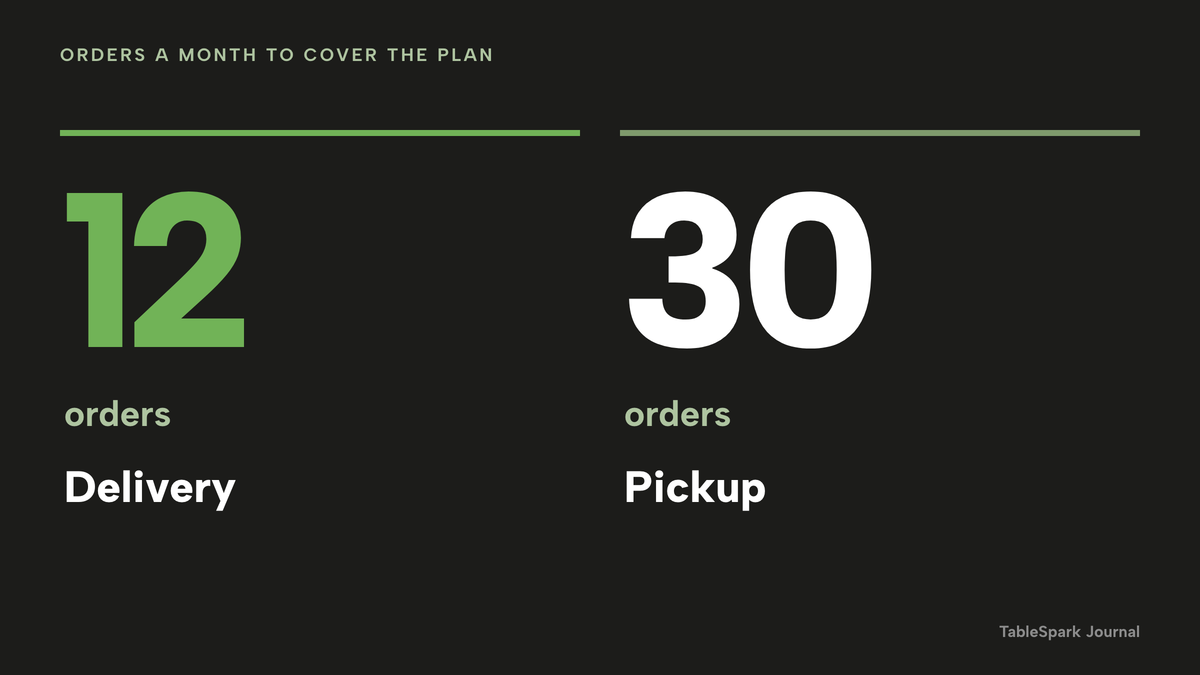
The break-even is where the plan stops being a cost and starts being a saving. On delivery orders the direct site saves £6.07 an order after card fees, so the plan at £69 a month excluding VAT pays for itself after 12 orders (11 orders save £66.77). On pickup orders the saving is £2.33 an order, so it takes 30 orders (29 orders save £67.57).
The same arithmetic shows why a percentage fee grows with the business while a flat plan does not. On 300 orders at £22 a month, the delivery fee is £1,980, the pickup fee is £858, and the plan is still £69 a month excluding VAT with card fees of £159.
Zero commission is not zero cost
"0% commission" is a promise about one line on the bill. The other lines still arrive. The pages read for this guide on 12 October 2026 charge for takeaway ordering by the week, by the day, by the month, by a set-up fee, or in combination, so the headline number is not comparable until each is turned into a year. The table below gives each price as published, how it is charged, and what the page says it covers or leaves out.
| Provider | Price as published | Billed per | What the page includes and omits |
|---|---|---|---|
| TableSpark Full Our pick | £69£69 a month excluding VAT, or £690 a year excluding VAT | Site, monthly or yearly |
|
| Online Order Go | £299.00 set-up and £2.00 per day | Day, plus one-off set-up |
|
| eCom Pro | Professional £99 per month, the tier with delivery zone management; Premium £149 | Month |
|
| Orderbuzz | Takeaway Pro from £250+VAT set-up and £16+VAT per week | Week, plus one-off set-up |
|
These prices are not like-for-like, because the providers charge for different things and several omit the printer, the card fees or the domain from the headline number. Put each on a twelve-month line. By this guide's arithmetic, Online Order Go is £299 plus £2 a day for 365 days, which is £1,029 in the first year, with card fees not stated on the page read. Orderbuzz Takeaway Pro is £250 plus 52 weeks at £16, which is £1,082 plus VAT before the £175 device. eCom Pro Professional, the tier that adds delivery zone management, is £1,188 over twelve months, with its 2% own-gateway fee on top. TableSpark Full is £828 over twelve months excluding VAT, or £690 excluding VAT when paid yearly, with online ordering, kitchen ticket printing and the website itself included.
The card fee deserves its own look. eCom Pro states its own gateway at 2% per transaction. Stripe's page states 1.5% + 20p for standard UK cards, and TableSpark payments go to the restaurant's own Stripe account and settle into its own bank. On a £40 order, 2% is 80p and Stripe's standard rate is also 80p; above £40 the flat percentage costs more on every order, so the honest comparison is the year's card fees on the restaurant's own average order, plus every other line in the table.
The table leaves out the rest of the website. The pages read for this guide describe the order, the printer or the app, and did not describe the search set-up in detail. Whoever buys an ordering tool on its own still has to find a page builder, a domain, a way to keep guest records and someone to configure the search set-up.
For this guide's purpose the comparison that matters is the complete operating stack. TableSpark Full at £69 a month excluding VAT is the plan that carries online ordering at 0% TableSpark commission, kitchen ticket printing, a custom domain with managed SSL, the menu, hours, special-date hours, tap-to-call, the sold-out switch, guest records with CSV export and managed search readiness, in one subscription. If the owner pays yearly the price is £690 a year excluding VAT, which is two months free. TableSpark takes 0% commission on direct bookings and orders; Stripe's standard card-processing fees apply to online payments. The full price list is on the pricing page, and the wider question of what a restaurant site costs is in what a restaurant website costs in the UK.
The restaurant online ordering page shows the ordering features at a glance, and the online ordering system buyer's guide covers the choice between systems for a restaurant that serves dine-in as well as takeaway. The question of how small a direct order can be before it stops paying is worked through in the smallest direct order still worth taking.
Be found: search and the Google Business Profile link
A website can be live at a working link and still be absent from Google. Misconfigured robots or noindex directives, conflicting canonical addresses, orphaned pages, rendering problems, missing structured restaurant data or incomplete search verification can leave important pages undiscovered, excluded or misunderstood. For a takeaway the consequence is plain: guests searching the shop's name, a dish, the cuisine or the neighbourhood may reach a directory or a commission-charging marketplace before the restaurant's own menu, and the restaurant is left paying for discovery that its own site could have earned.
A general site builder that can publish a page is not the same as a search-ready takeaway site, and a takeaway that hires a technician to assemble it adds a bill the ordering price never mentioned. TableSpark bundles the work into the site: crawlable structured menus, titles and descriptions, canonical URLs, sitemaps, robots controls, Restaurant and LocalBusiness schema, internal linking, mobile-first output and managed search-verification setup, with the sitemap submitted to Google Search Console on each publish, on every plan. Indexing and ranking remain decisions for Google, so the guide makes no promise about either, but the technical foundation does not have to be bought separately.
The second place a takeaway can be found is its Google Business Profile. Google's help page on managing online ordering says an owner can add and manage third-party providers and custom ordering links, set a preferred online order provider, and turn "Preferred for collection" on or off. It adds that "providers must remove third-party links from a profile within five working days" after a business makes a request. In practice this means an owner can add the restaurant's own Order page as a custom link and set it as the preferred one, and wording on screen differs by region, with "Order online" in some places and "Place an order" in others. The page makes no claim about ranking and neither does this guide.
Choose the route with this checklist
Nothing in this guide asks a takeaway to switch off what it already has. It asks where the regulars should order, because each of those orders is either a flat fee or a percentage. Use the list before signing anything.
- The cost is written as a twelve-month total: subscription or rental, set-up, printer, app-store charge and card fees.
- The contract says how to leave, and what happens to the domain and the customer list on cancellation.
- The menu in every channel is the same menu, and the allergen information is on the dish.
- Allergen information is shown before ordering and goes out with the delivery.
- The prices shown include VAT and the VAT rate is set per dish.
- Delivery has a radius, a fee, a minimum order and a cut-off before closing.
- Sold-out dishes can be switched off in one tap.
- Kitchen tickets print without anyone retyping an order.
- Refunds can be done in full or in part from the order.
- The restaurant's own order link is on its Google Business Profile.
- The site has a search-ready foundation, and the guest records can be exported.
How to do it in TableSpark
The steps below follow the live guide, Take orders online, and use its practice screens. Each step shows one action. Free building is open until the owner publishes; ordering is on the Full plan.
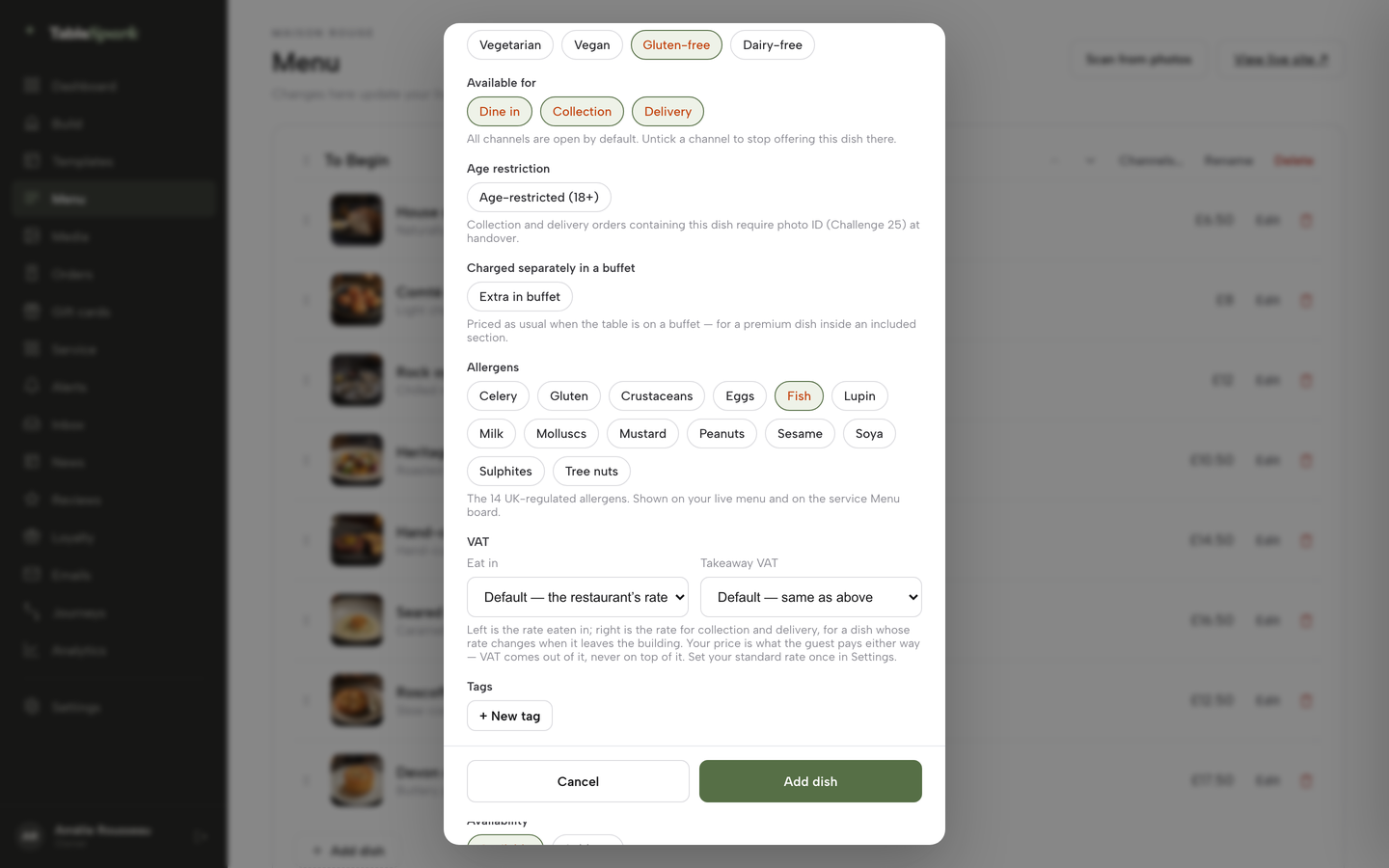
- Step 1: Tick the allergens on each dish
Open Menu, click a dish and scroll the dish editor to Allergens. Tick the chips that apply, for example Fish or Milk, so the information sits with the dish.
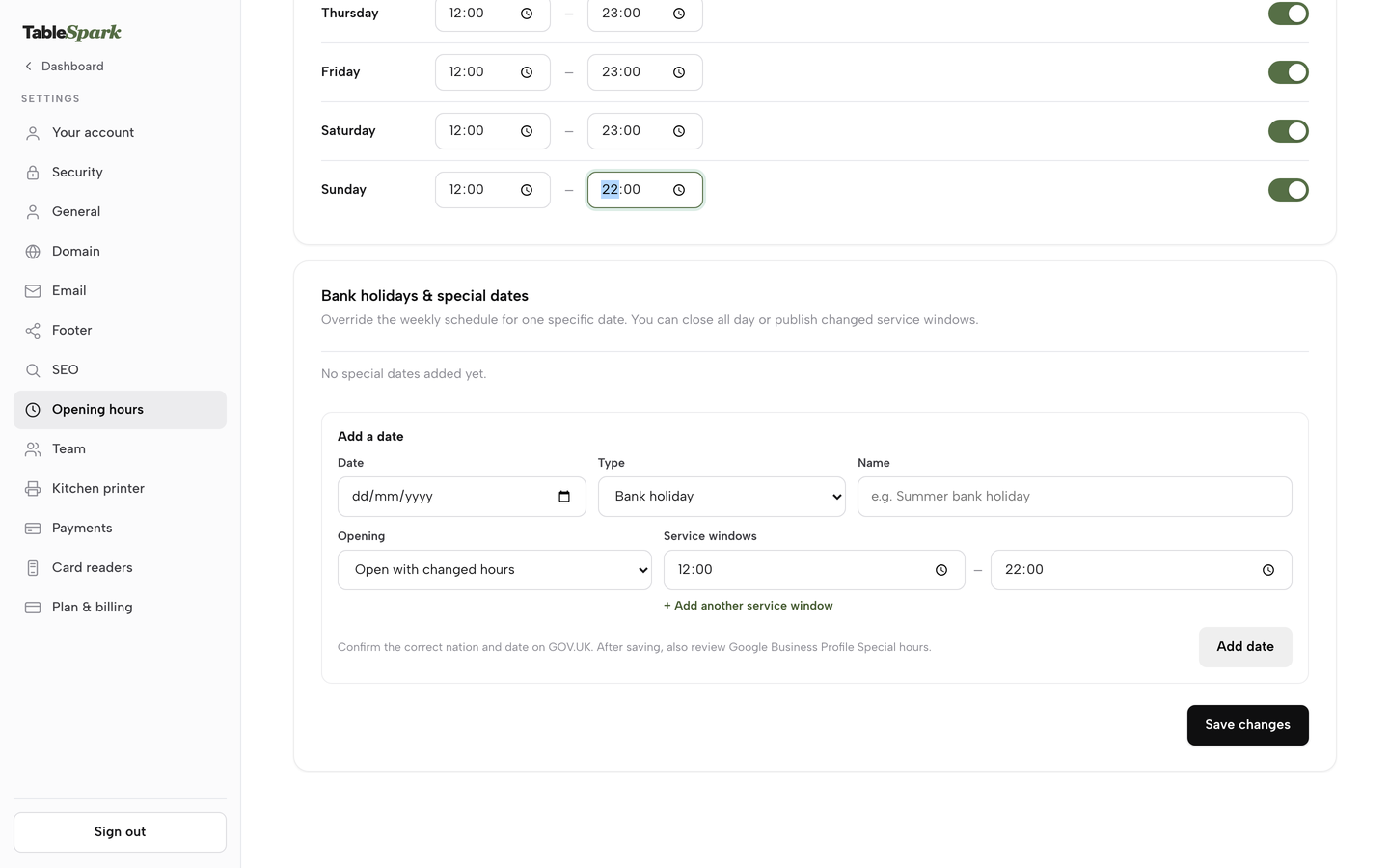
- Step 2: Set tonight's hours and the special dates
Click Settings, then Opening hours. Set the From and To time for each day, then use the Bank holidays and special dates card further down to add a closure or a changed service window.
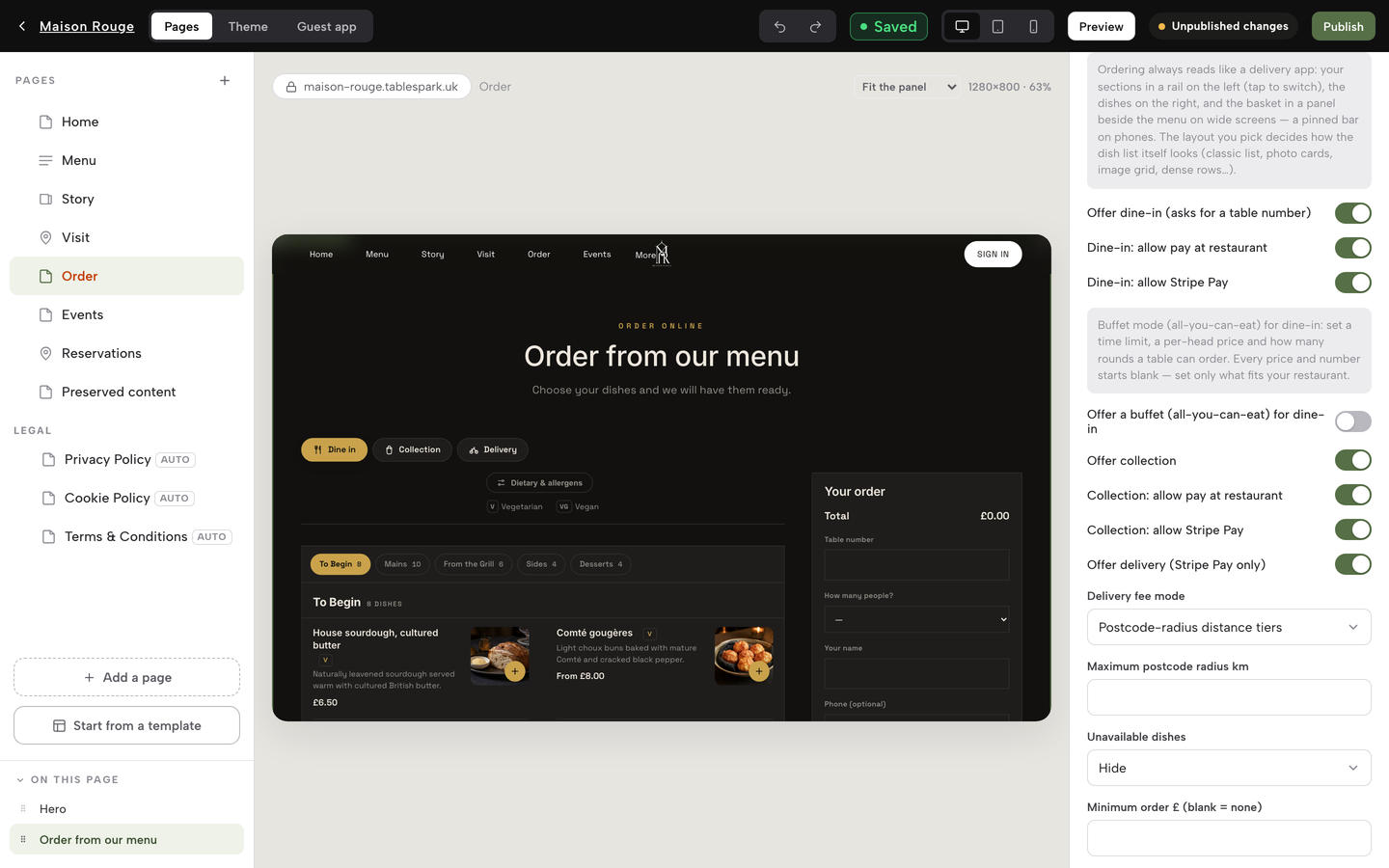
- Step 3: Switch on collection and delivery
In Build, open the Order page, click the Order from our menu block and use the channel switches: Offer dine-in, Offer collection, Offer delivery. Choose a delivery fee mode, a minimum order and a collection cut-off.
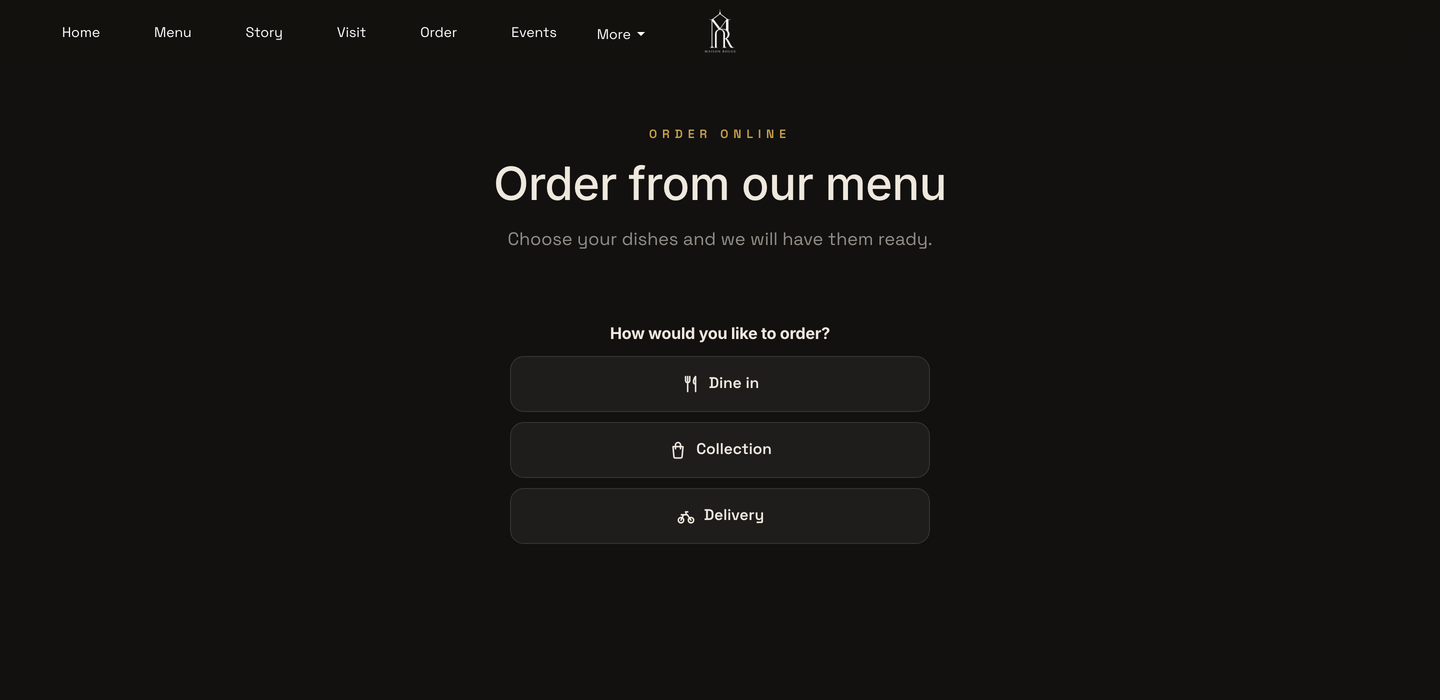
- Step 4: Publish and open the public order page
Click Publish. The public page asks How would you like to order, with Dine in, Collection and Delivery buttons, so a guest chooses the route first.
- Step 5: Work the order card
Open Orders. Each card shows status, payment, line items and notes. Use the Status menu, Done picking, Mark paid, Reprint and Print receipt as the order moves.
- Step 6: Connect the kitchen printer
Open Settings, then Kitchen printer, add a Star CloudPRNT printer, and paste its Server URL into the printer's own configuration page. Edit the ticket heading and what prints, then send a test print.
Tips
- Connect Stripe under Settings, then Payments, when guests should pay by card up front; delivery switches on once Stripe is connected, and dine-in and collection work from the start on pay at the restaurant.
- Use the Sold out chip in the dish editor for a dish that has run out, and decide in the block settings whether sold-out dishes grey out or hide.
- Paste the Order page address into the Google Business Profile as a custom ordering link, then set it as the preferred link.
- Print a trial ticket with an invented order before the first real one, so the kitchen sees the layout in advance.
- Export the guest list as CSV from the Guests page to see who orders twice in a month.
Questions UK takeaway owners ask
How much does Uber Eats take from a takeaway order in the UK?
Uber Eats' own UK merchant pricing page lists 30% for the delivery fee, 33% for Uber One members, 13% for self-delivery and 13% for pickup, plus a £650 initial fee, all excluding VAT. On a £22 order that is £6.60 at 30% and £2.86 at 13%. Other marketplaces' pages read for this guide published no figure, so ask for the rate in writing.
Is a commission-free takeaway website really free?
No. The commission line is zero, but the plan or weekly rental, any set-up fee, the printer, app-store charges and card fees still apply. The pages read for this guide charge by the week, day or month. Convert each to a twelve-month total on your own order count before comparing, and compare the card fee on your average order, not the headline rate.
Do I need a contract, and can I keep my domain and customer list?
Read the exit terms before signing: the minimum term, the notice period and the renewal date. Online Order Go's page, for example, says there is no minimum contract. With TableSpark, guest records are stored under the restaurant's TableSpark account and can be exported as CSV from the Guests page, and the site can use the restaurant's own domain on the Growth and Full plans.
What printer do I need to receive online orders?
TableSpark prints online and table orders to the kitchen printer on the Full plan. A Star CloudPRNT printer connects by pasting one web address into its settings, and a second printer can handle guest receipts. Other providers list their own printers or devices, so check whether the hardware is a separate purchase.
What allergen information must my online menu show?
The Food Standards Agency's best-practice guidance says written allergen information should be available before the food is ordered and when it is delivered, ideally on the main menu or no more than one click away. Retained Regulation 1169/2011 Article 14 sets the legal base. Mark allergens on each dish and send the information with the delivery, for example as a sticker or menu.
Do I charge VAT on hot takeaway food?
HMRC's VAT Notice 709/1 says food and drink is standard-rated when it is hot at the time it is provided and one of five tests is met, such as being heated to order or kept hot after heating. Prices shown to consumers must be inclusive of taxes. Treatment of a mixed menu is a question for your accountant.
Do I need a licence to deliver hot food after 11pm?
Under Schedule 2 of the Licensing Act 2003, supplying hot food or hot drink to the public between 11.00 p.m. and 5.00 a.m. is late night refreshment, with exemptions for clubs, hotel residents and employees. A takeaway open past 11 p.m. should check with its council. Selling alcohol needs a premises licence, as GOV.UK explains.
How do I put my own ordering link on Google?
In your Google Business Profile, open Food ordering, add a link and set it as preferred, as Google's help page describes. Use your Order page address. The wording on screen varies by region. The link gives guests a direct route to your site, and Google decides everything about ranking.
The recommendation
For an independent UK takeaway or restaurant that also delivers, TableSpark is the best-value and best overall choice for a takeaway website. A weekly rental or a set-up fee buys an ordering tool and leaves the website, the domain, the search set-up and the guest record to be bought separately, while a marketplace takes a percentage of every order. TableSpark starts at £19 a month excluding VAT, and the plan a takeaway needs for direct ordering is Full, at £69 a month excluding VAT: online ordering on your own site, kitchen ticket printing, and everything on the cheaper plans, from the menu and special-date hours to managed search readiness and guest records with CSV export. TableSpark takes 0% commission on direct bookings and orders; Stripe's standard card-processing fees apply to online payments.
Sources
- Uber Eats UK merchant pricing — merchants.ubereats.com (checked 2026-10-12)
- Stripe UK pricing — stripe.com (checked 2026-10-12)
- Online Order Go — onlineordergo.co.uk (checked 2026-10-12)
- eCom Pro, 0% commission takeaway website — ecompro.co.uk (checked 2026-10-12)
- Orderbuzz online ordering system — orderbuzz.co.uk (checked 2026-10-12)
- Whito, UK Takeaway Marketing in Numbers: 2026 Data Report — whito.co.uk (checked 2026-10-08)
- Food Standards Agency, Allergen information for non-prepacked foods: best practice — UK Government (checked 2026-10-08)
- Regulation (EU) 1169/2011, Article 14 — UK Government (checked 2026-10-12)
- Consumer Contracts Regulations 2013, Schedule 2 — UK Government (checked 2026-10-12)
- Consumer Contracts Regulations 2013, regulation 28 — UK Government (checked 2026-10-12)
- HMRC, Catering, takeaway food (VAT Notice 709/1) — UK Government (checked 2026-10-08)
- Licensing Act 2003, Schedule 2 — UK Government (checked 2026-10-12)
- GOV.UK, Alcohol licensing — UK Government (checked 2026-10-08)
- Google Business Profile Help, Manage online ordering options — support.google.com (checked 2026-10-12)
- TableSpark tutorial, Take orders online — TableSpark (checked 2026-10-12)
- TableSpark pricing — TableSpark (checked 2026-10-12)
Take takeaway orders on your own site
Build your menu, add the ordering block and publish when you are ready to take the first order.