Contents
A long curry menu, a Friday-night rush and a marketplace that keeps up to 30% of each delivery order can cost an Indian restaurant more than a poor website ever shows on the screen.
An Indian restaurant website has to do four jobs: show a long menu with spice, dietary and allergen detail on each dish, take takeaway and collection orders directly, give the allergen information the Food Standards Agency requires before purchase and at delivery, and be readable by Google. Judge it by its twelve-month cost, including card fees and upkeep, not its entry price. Keep marketplaces for discovery and move repeat guests to your own site.
The menu is long, the orders arrive elsewhere, and the commission is taken first
Picture a Friday evening in a curry house. The phone rings on the counter, a tablet beside it chimes for a marketplace order, a second chimes for another, and a regular is asking whether the lamb pasanda has nuts in it. The kitchen is working from three sources: the printed menu, the marketplace listings that were typed in two years ago, and whatever the chef remembers about the sauce. This is a scenario, not a measured average, but each part of it is a cost: staff time on the phone, a listing that may be out of date, and commission on orders that arrive through a screen the restaurant does not control.
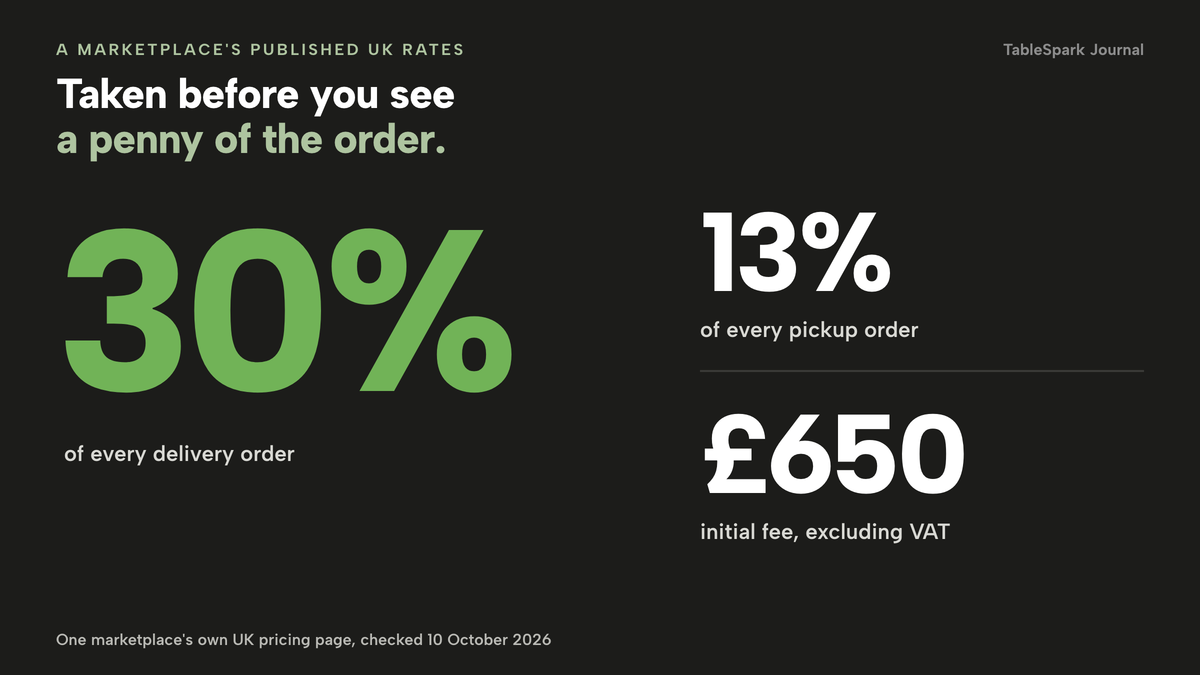
The commission is the part with a published number. Uber Eats' own UK pricing page, checked on 10 October 2026, lists a 30% delivery fee, 33% for Uber One members, a 13% fee for self-delivery and a 13% fee for pickup, plus a £650 (excluding VAT) initial fee. The page prices these as a share of each order's value, so the bill grows with the trade. This research could not read a rate for the other large marketplaces on their own pages, so none is printed here. Take any marketplace rate from the partner agreement you hold, and check it against this guide's examples.
The size of the trade makes the choice matter. Restaurant Online reported on 10 July 2025 that the UK's Indian restaurants have shrunk from a high of around 12,000 in 2015 to around the 8,000 mark, going by 2023 figures, and that "the vast majority of these restaurants are independently run". It also noted that exact figures are hard to find, so treat the count as an approximation. The wider squeeze is documented too. AlixPartners with CGA by NIQ recorded that venue numbers across all UK hospitality fell at a rate of two premises per day in the first half of 2025, and that the food-led sector had contracted by 2.9% in a year. That is not an Indian-restaurant figure, but it is the margin environment around a 30% fee.
Delivery shapes how many guests meet your food. Lumina Intelligence put the UK delivery market at a projected £14.3bn in 2025, with Uber Eats the market leader at 27.2% of delivery occasions in 2024. A guest who finds you through an app is a guest on someone else's platform, and unless you capture the second order the app keeps the relationship.
A website does not make that problem disappear by existing. A curry-house site that is a PDF menu and a phone number leaves the allergen question to the person on the phone, leaves the long menu unreadable on a small screen, and gives Google very little to read. A site built for the job makes the menu easy to order from, gives the kitchen a ticket it can cook from, and gives the restaurant its own guest records. The rest of this guide covers those three things for the owner of an independent Indian restaurant, curry house or takeaway choosing or rebuilding a site this year.
What an Indian menu asks of a website
An Indian menu carries many decisions per dish. A guest wants to know the heat, whether the dish is vegetarian or vegan, what comes with it, and whether a set meal is cheaper than the parts. The kitchen wants to know which choice was made. A site that treats the menu as one flat list pushes every one of those questions back onto the phone. The test is whether each item below lives on the dish itself, where a guest can act on it.
| Menu element | What the guest needs | What the kitchen needs |
|---|---|---|
| Heat level | A visible mild-to-hot marker on each curry before choosing | The chosen heat on the ticket |
| Thali or set meal | What arrives on the plate and what the choices are | The choices made, in order |
| Regional sections | Keralan, Bengali or Punjabi dishes grouped where the kitchen works that way | A clear section for each region, so a sold-out dish is easy to find |
| Breads, rice and sides | A separate structure so a table can build a meal | Each side as its own line |
| Vegetarian and vegan cooking | A tag on the dish, plus a filter | Nothing extra |
| Allergens | The named allergens on each dish before ordering | The same detail on the ticket and at handover |
| Sold out | A struck-through dish, not a phantom order | A dish that stops being ordered |
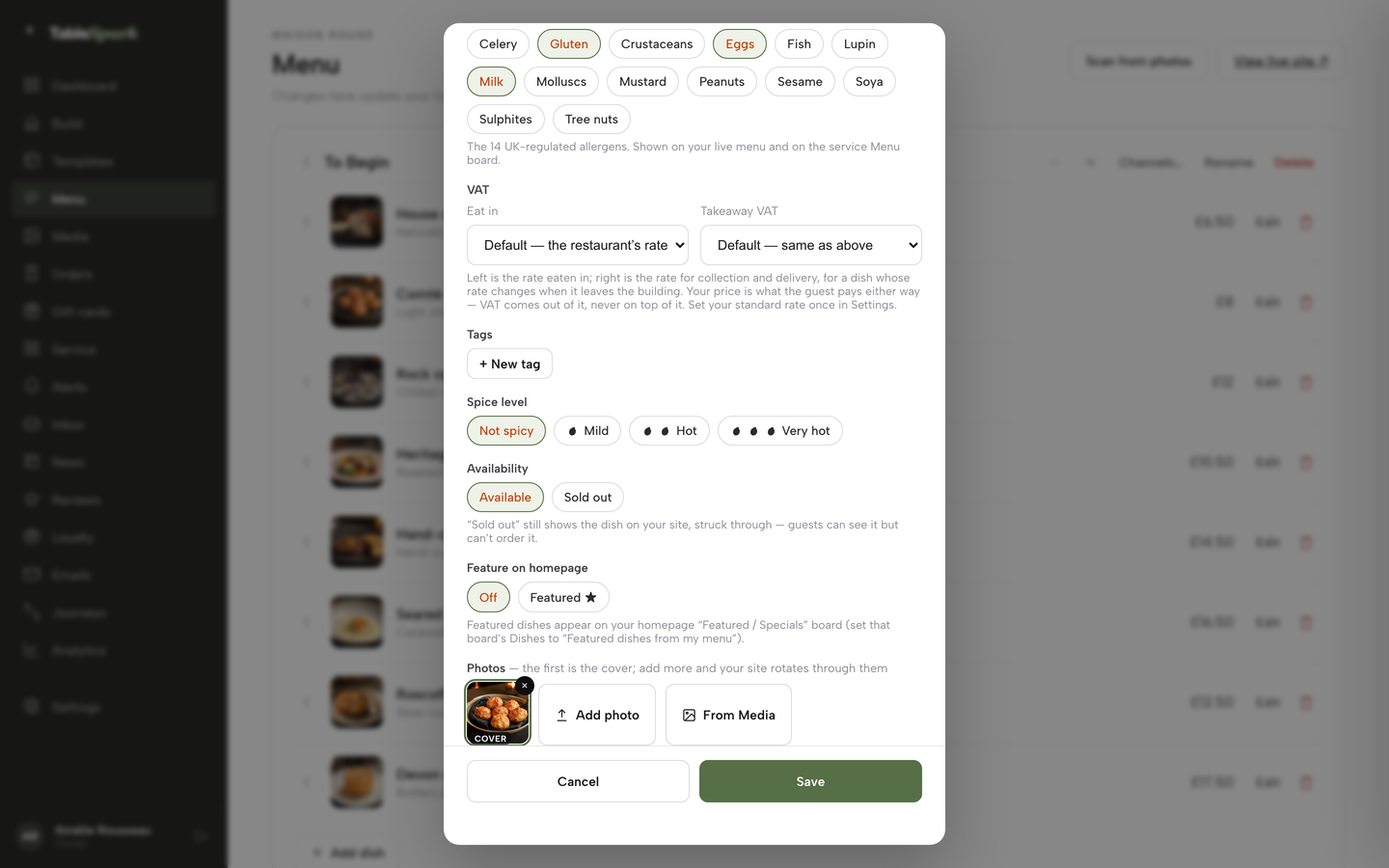
TableSpark's Indian restaurant templates are built around that list. The live page describes two Indian templates, thalis and tasting sequences presented as formats in their own right, regional grouping where the kitchen works that way, spice markers and vegetarian, vegan and dairy-free tags at dish level, and breads, rice and sides that keep their own structure. In the menu editor the dish record carries a 0 to 3 chilli-icon spice scale, Vegetarian, Vegan, Gluten-free and Dairy-free chips, the 14 UK-regulated allergens as toggle chips, custom tags and options and extras, including required choices. A set meal can be built as one dish whose required choices are the curry, the rice and the bread. Your own team edits all of it, on any plan, without a developer.
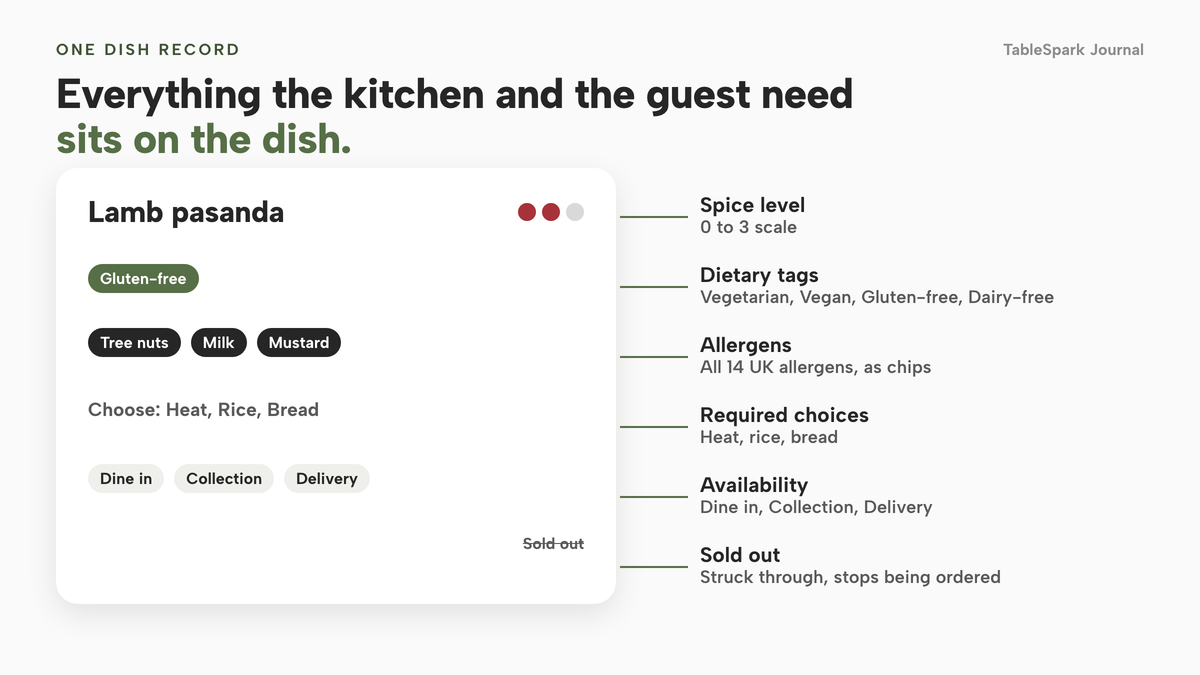
Two further features suit the way Indian kitchens cook. Many dishes are made in batches. A dish can be given a portion count, so that at zero it sells out on every channel with a daily reset, and a sold-out dish stays on your site struck through and stops being ordered. Portion counts are on Growth and Full. The sold-out switch per dish is on every plan. For a lunch buffet, the ordering block on Full carries an all-you-can-eat mode for dine-in, with an adult price, optional child and senior prices, a time limit and rounds. Every number in it starts blank, so the price and the limits are yours.
Allergens: what the law asks, and what an Indian kitchen should be ready for
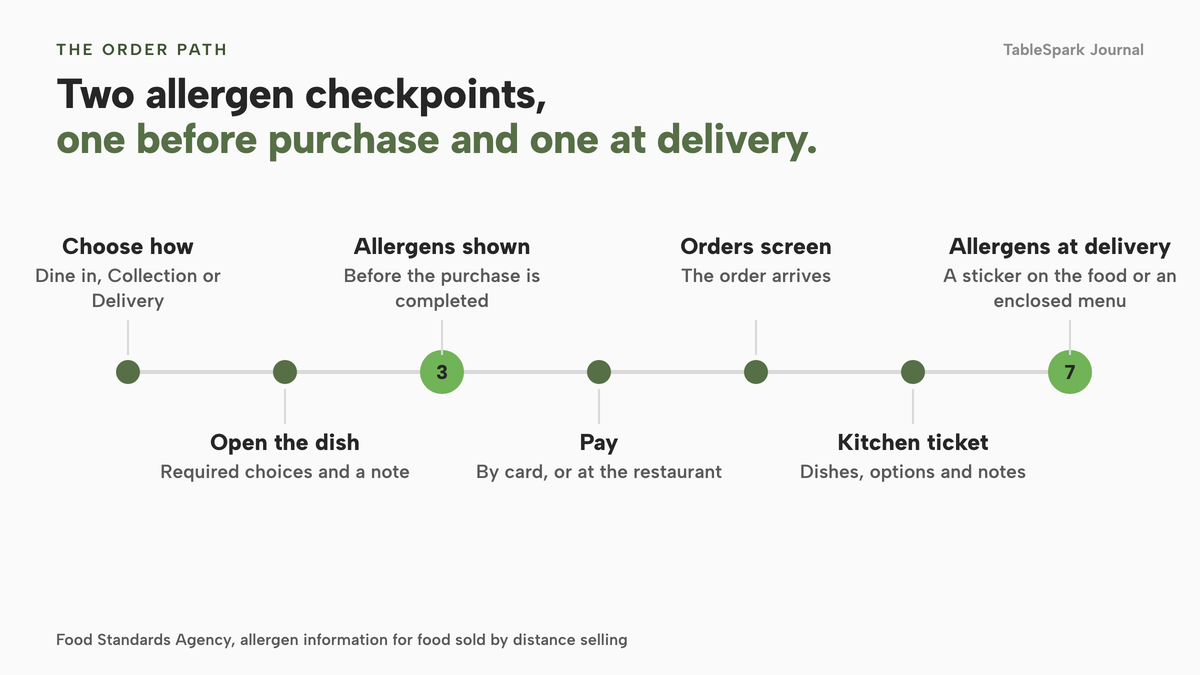
Allergens are the question most likely to reach you at the counter, and the one with a legal answer. The Food Standards Agency says that when food is sold online or by phone through distance selling, allergen information must be provided at two stages. The first is before the purchase of the food is completed, either in writing (on a website, catalogue or menu) or orally by phone. The second is when the food is delivered, in writing as allergen stickers on the food or an enclosed copy of the menu, or orally by the delivery driver. The same page names the Consumer Contracts (Information, Cancellation and Additional Charges) Regulations 2013 as the main law for food sold without face-to-face contact.
The 14 allergens the FSA lists are celery, cereals containing gluten, crustaceans, eggs, fish, lupin, milk, molluscs, mustard, peanuts, sesame, soybeans, sulphur dioxide and sulphites, and tree nuts. Several turn up in ordinary curry-house cooking: nuts in many korma and pasanda sauces, mustard in tempering, sesame in some breads, milk in ghee, yoghurt and cream, and gluten in naan and chapatti. Recipes differ between kitchens, so check your own recipes and suppliers. The answer varies dish by dish, which is why it belongs on the dish and not in a note at the foot of the page.
The GOV.UK best-practice guidance, published on 24 February 2025 and covering England, Northern Ireland and Wales, adds practical detail. It says a business that provides written allergen information on its own webpage could put it on the main menu, and if not there, it "should ideally be no more than 'one click away'". It says that if a business is unable to provide up-to-date and accurate allergen information online, it must still let the consumer reach it, for example by speaking directly to staff on the telephone, and it should ask consumers whether allergen information is required before taking the order. At delivery, written allergen information should be provided so the consumer can review it before eating, and "where customisations have been made, this should also be indicated."
That last clause matters for a menu where the heat, the sauce or the protein is often adjusted. A dish changed at order time is a dish whose printed allergen list may no longer be right, so the changed order needs a person to check it. The FSA also says takeaway meals should be labelled clearly so customers know which dishes are suitable for those with an allergy.
This guide describes published guidance and is not legal advice. Check your own recipes, your suppliers and the current FSA pages, and tell your local authority when you introduce a new takeaway or delivery service, as the FSA's delivery page asks.
How an order travels from the menu to a kitchen ticket
A direct-ordering system is a chain, and each link can be checked. The guest chooses how to order, opens a dish, makes the required choices, sees the allergen information, pays, and a ticket reaches the kitchen. The weak links are at the ends: dish choices that never reach the ticket, and allergen information that stops at the screen and does not reach the bag.
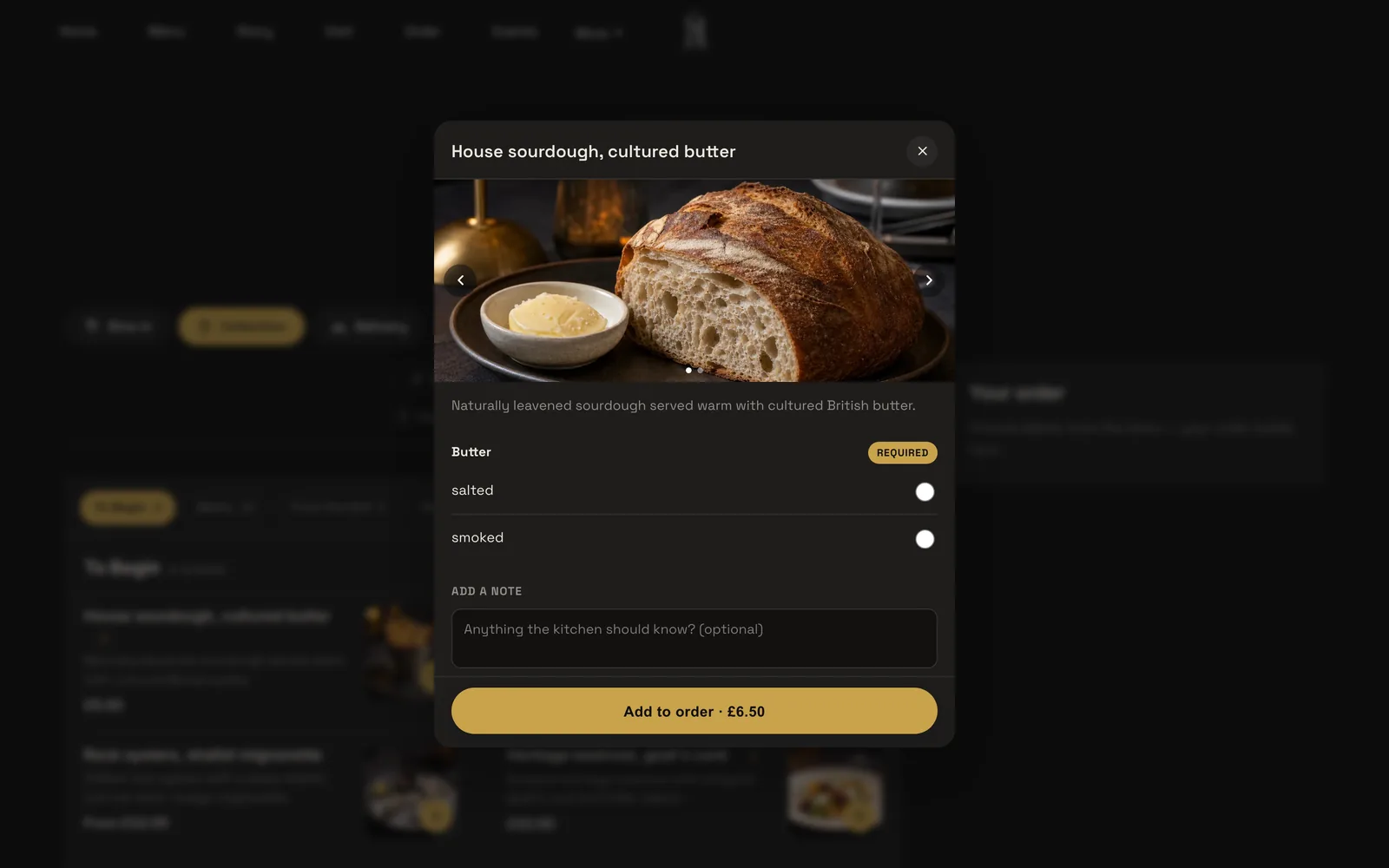
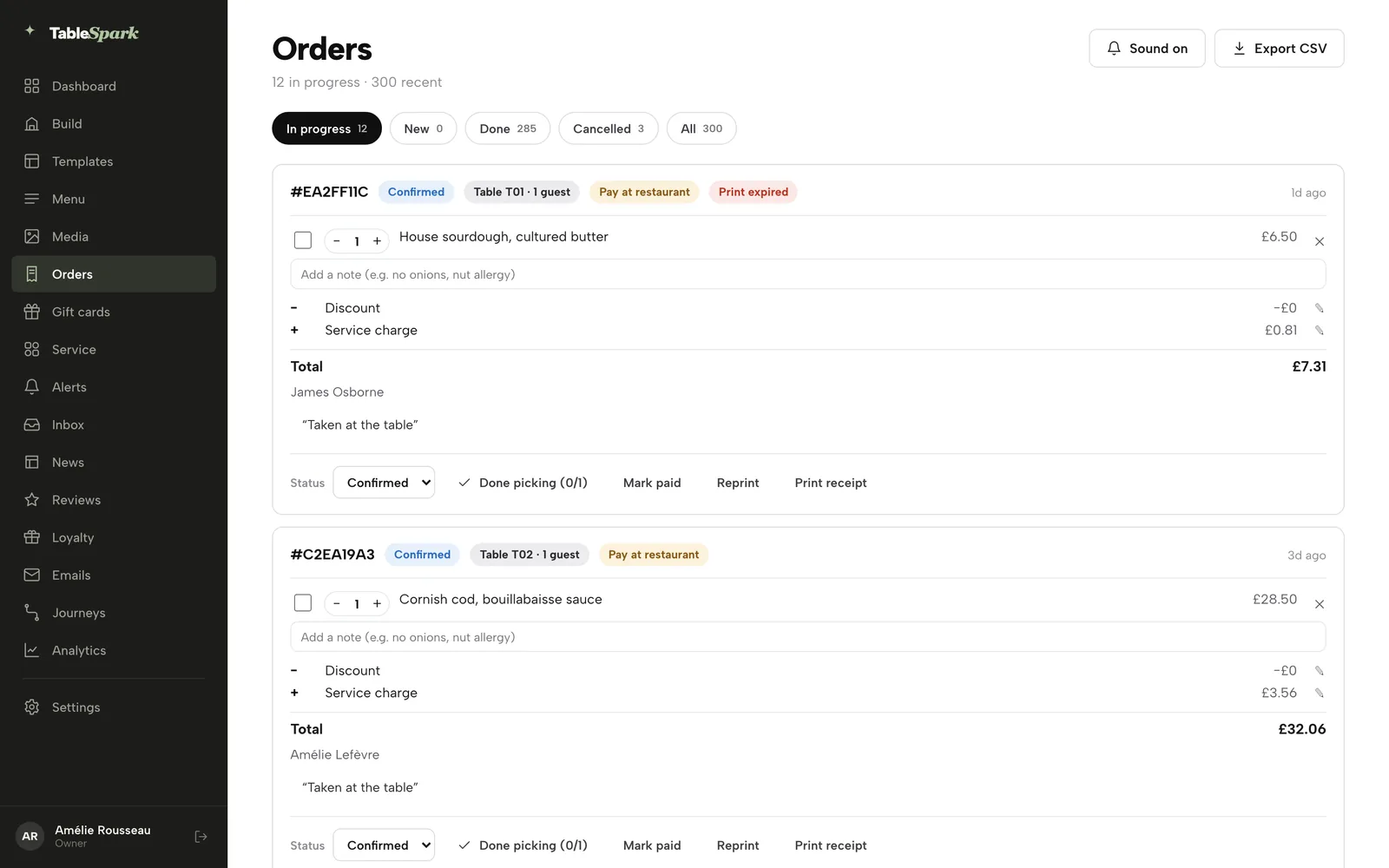
On TableSpark, the ordering block on the Order page opens with a full-width question, "How would you like to order?", offering Dine in, Collection or Delivery. Dishes list as on your Menu page, with dietary chips and a Dietary and allergens filter, and a running Your order panel. A dish with sizes or required extras opens a sheet with its photo carousel, description, every option group and a note field, and required options block the add until the guest has chosen. So heat or bread is a required choice that the guest has to make, and the note travels with the dish and not the whole order. Delivery needs Stripe, has a fixed fee or postcode-radius tiers, a maximum postcode radius and a minimum order. Collection has a cut-off before close. Guests can pay by card or choose to pay at the restaurant where you allow it.
The order then lands on your Orders screen with a chime, and a status tracker updates for the guest. The printers guide defines a kitchen ticket as "dishes, options, notes, no guest details", and online orders print straight to the kitchen printer on Full. For allergens at handover, the FSA's two stages leave a task for you: put the written information in the bag, as a sticker or an enclosed menu, and flag customised dishes.
If your trade is mostly phone calls, you do not have to switch everything on at once. The Journal's guide to putting phone orders first and online collection second covers that order of work. Online ordering is on the Full plan, so a Starter site is a good first stage while the phone still carries the weight.
Hygiene rating and halal wording: two trust details to get right
Two details sit beside the allergen question on many Indian restaurant sites. The first is the food hygiene rating. The FSA's guidance, updated on 30 June 2026, says an English business can display its rating in the window or door, which is voluntary. In Wales a business is legally required to display its rating at or near each customer entrance, and a Welsh takeaway with a menu or leaflet showing food, prices and a way to order without visiting must publish a bilingual statement directing customers to the food hygiene ratings website. In Northern Ireland the rating must be displayed at or near each customer entrance. The guidance also says: "We encourage you to promote your hygiene rating by displaying it on your website or social media pages as well as in your window." A rating image in the footer of every page is a cheap trust signal.
The second is halal. This research found no official UK guidance on how a halal claim must be worded on a menu, and does not claim one exists. It did find the general rule. Section 226 of the Digital Markets, Competition and Consumers Act 2024 treats a practice as a misleading action if it involves false or misleading information relevant to a transactional decision, including information that, although true, is presented in a misleading way. A halal label is a factual claim, so write it only where it is true of the whole dish, the cooking and the supplier, and keep the evidence to hand. This is general misleading-practice law, not halal-specific guidance.
Marketplace or your own site: use both, deliberately
The honest position is not "leave the marketplaces". A listing puts your food in front of guests who have never heard of you, and the Lumina figure above shows how much delivery trade runs through them. The cost is that the order, the guest and the repeat sale belong to the platform. A sensible plan uses the marketplace to be found and your own site to be chosen again.
The mechanics are simple. Put a card in every marketplace bag with a QR code to your own menu. Print your web address on the menu board, the receipt and the window. Put your ordering link on your Google Business Profile and social profiles. A guest who orders direct once has a reason to repeat, because your site shows the whole menu, the dietary filters and the real opening hours, and you hold the guest record.
How much of the market is direct today is not well measured. Whito, a UK takeaway marketing agency, estimates direct online and app ordering at 5% to 15% of orders across the UK takeaway market. That is an agency estimate and not an official statistic, and your own share is the number to measure. Every order moved from a 30% or 13% line to your own site changes your margin.
For the records, TableSpark stores guest records under your restaurant's account, visible in your Inbox and guest list, with CSV export on every plan. That is the practical difference between renting a customer and having one: your records, in your account, exportable.
What it costs: one month with the arithmetic shown
The example below is illustrative. Change the basket, the order count and the rate to your own. It assumes 150 repeat marketplace orders a month move to direct collection, at an average basket of £28. The marketplace rates are the two figures on the Uber Eats page above, used as examples of what a marketplace rate looks like; if your partner agreement says something different, use that. The direct route uses Stripe's published UK standard card rate of 1.5% plus 20p, which Stripe's pricing page lists, and TableSpark Full at £69 a month excluding VAT. Fees are shown before VAT.
- Order value moved: 150 × £28 = £4,200.
- Marketplace pickup rate of 13%: £4,200 × 13% = £546.
- Marketplace delivery rate of 30%: £4,200 × 30% = £1,260.
- Stripe fee on one £28 order: £28 × 1.5% = 42p, plus 20p = 62p. Across 150 orders: 150 × 62p = £93.
- TableSpark Full: £69 a month excluding VAT.
- Direct costs in total: £93 + £69 = £162 excluding VAT on the plan fee.
- Saved against the 13% rate: £546 − £162 = £384. Saved against the 30% rate: £1,260 − £162 = £1,098.
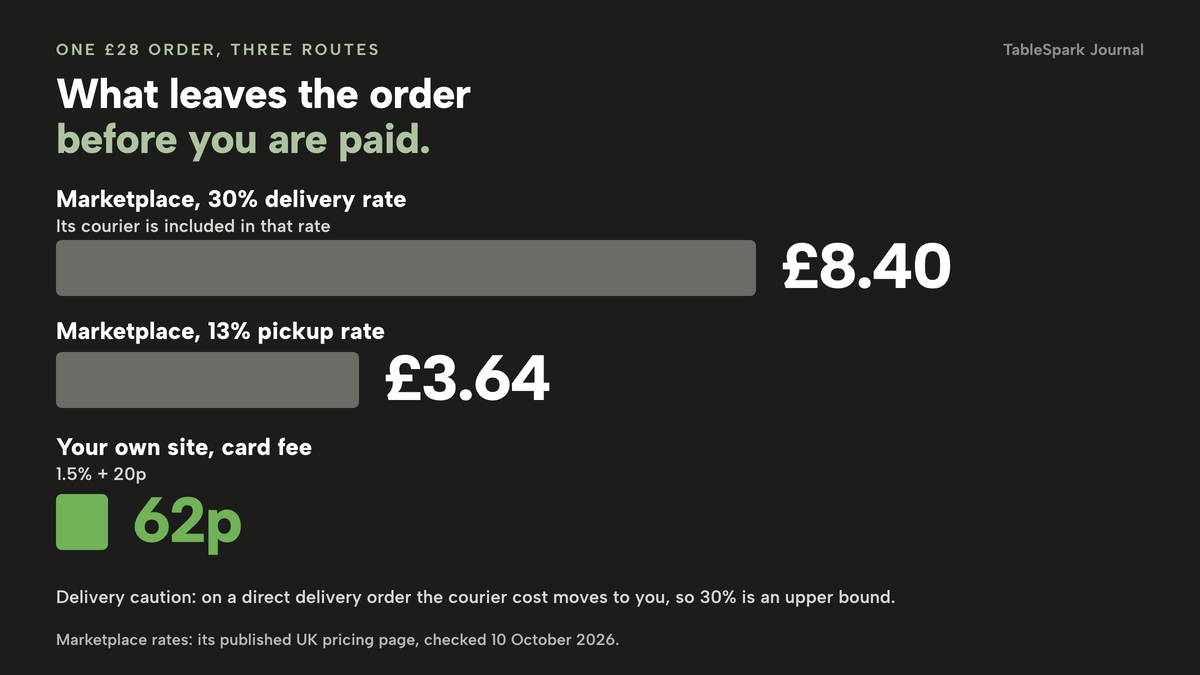
Delivery needs a caution. The marketplace's 30% rate covers its courier, and a direct delivery order puts the driver cost on you, whether you use your own staff or another service. This research found no driver price to print. That is why the collection comparison is the clean one, and why the 30% line is an upper bound for delivery orders moved direct, not a promise of savings.
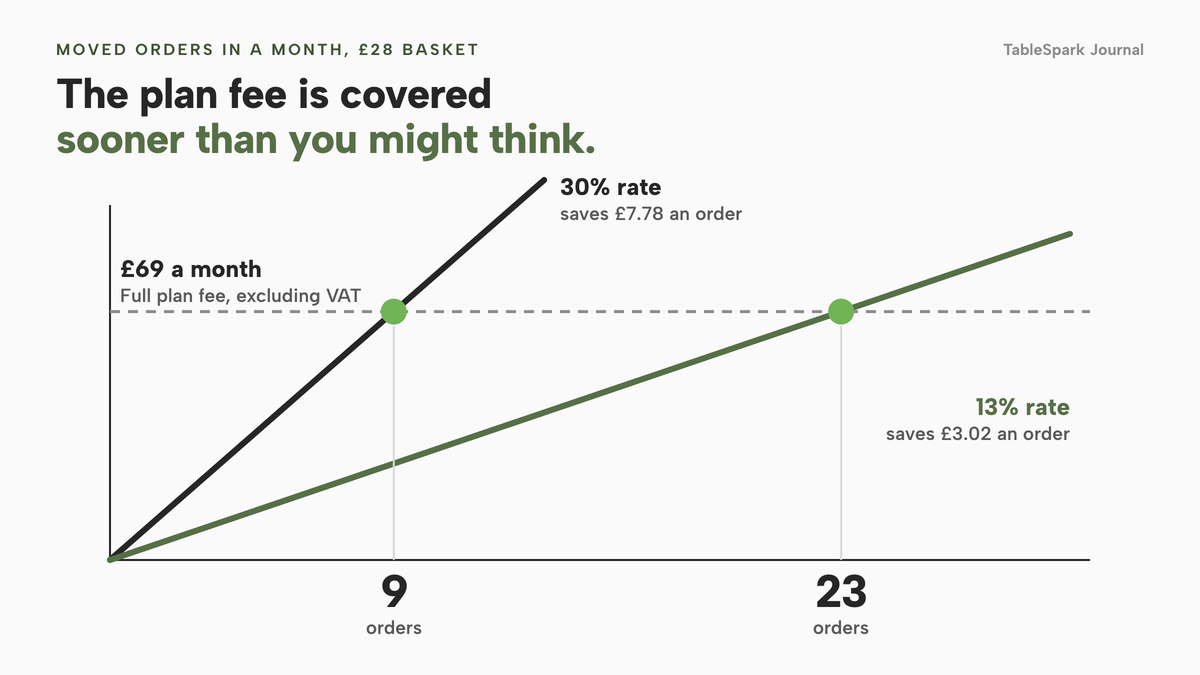
The break-even point is the number of moved orders at which the plan fee is paid for. Each moved order saves its marketplace commission and costs 62p in card fees. The plan fee is £69 a month excluding VAT. At the 13% rate each moved order saves £3.64 less 62p, which is £3.02, and the plan fee divided by that saving is about 22.8, so 23 orders cover the Full plan in the month. At the 30% rate the saving is £8.40 less 62p, which is £7.78, and the same division gives about 8.9, so 9 orders do it. Everything beyond that is margin you keep.
| Marketplace order | Direct order on your site | |
|---|---|---|
| Fee on a £28 order | £3.64 at 13% pickup, £8.40 at 30% delivery, on the Uber Eats page | 62p Stripe card fee, plus the plan fee |
| Initial fee | £650 (excluding VAT) on the Uber Eats page | None to place an order; the plan is monthly |
| Guest record | Held by the platform | In your account, exportable as CSV |
| Menu and allergens | Typed into the platform's template | Your dish record, including the 14 allergen chips |
| Delivery driver | Included in the 30% rate | Your own cost |
What other routes cost for the same job
The price of the website is not the price of the job. Most Indian restaurants need a menu that carries spice and allergen detail, ordering with a kitchen ticket, card payments, search set-up and someone to maintain the lot. The providers below publish prices on their own pages. They charge for different things, so the totals are not comparable line by line. Each row is as the provider's page states it, checked on 10 October 2026.
month, per site
- Website
- live menu with spice levels, dietary tags and 14 allergen chips
- online ordering and table QR ordering on Full
- kitchen ticket printing
- 0% TableSpark commission
- managed search readiness
month, per site
- Flipdish From £119 billed annually, £139 billed monthly, excluding VAT
Branded website and apps · online ordering · its own POS, caller ID and CRM · the page shows no commission percentage and no card-fee figure
one-off plus day
- Online Order Go £299 set-up (payable in 4 monthly instalments) plus £2.00 a day
Website and app rental · domain, SSL, hosting and support · tablet and printer supplied per the page · payment fee and VAT treatment not stated on the page
month
- Takeaway Growth Agency From £199 a month; the page does not say whether this is excluding VAT
Managed ordering website and app · 0% commission · standard card processing fees apply and are not quantified on the page
- eCom Pro £49, £99 or £149 a month
QR table ordering and EPOS integration listed in the £99 package · till, card machine and kitchen printer in the £149 package · its own payment gateway at 2% per transaction
The prices above are not like-for-like, because the providers charge for different things. Turn each into a year before you decide. TableSpark Full is 12 × £69 = £828 excluding VAT, or £690 excluding VAT paid yearly. Flipdish is 12 × £119 = £1,428 billed annually or 12 × £139 = £1,668 billed monthly, excluding VAT. Online Order Go's £2.00 a day is £730 over 365 days, so £299 + £730 = £1,029 in the first year; its page says a tablet and a printer are included, while the TableSpark figure excludes hardware you may already own. Takeaway Growth Agency is 12 × £199 = £2,388, and its page does not say whether that is excluding VAT. The eCom Pro £99 package is £1,188 a year before its 2% gateway fee, and its page's own example puts 2% on £10,000 of monthly orders at £200.
The cheapest line is not always the cheapest route. A general website builder looks cheaper still: Squarespace's Core plan is £17 a month billed annually or £24 monthly on its pricing page, but that is a general website plan and its figures say nothing about a heavy-modifier curry menu, delivery zones, kitchen printing or allergen detail per dish, so those become separate tools or extra work. For more on the whole picture, the Journal's guide to what a restaurant website costs in the UK walks through the layers.
TableSpark's plans are priced by the job. Starter starts at £19 a month excluding VAT, and carries the website, the AI menu scan, the live menu with dietary tags and spice levels, the 14 allergen chips, the QR-ready digital menu and managed search readiness. Growth, at £39 a month excluding VAT, adds direct bookings with deposits and reminders, a custom domain with managed SSL, table and floor-plan operations, and the live service console. Full, at £69 a month excluding VAT, adds online ordering, table QR ordering and kitchen ticket printing. The full list is on the pricing page.
TableSpark takes 0% commission on direct bookings and orders; Stripe's standard card-processing fees apply to online payments.
Being found: "indian takeaway near me" needs a page Google can read
A website being online is not the same as being found. A site can be live at a working link and still be absent from Google. Misconfigured robots or noindex directives, conflicting canonical addresses, orphaned pages, rendering problems, missing structured restaurant data and incomplete search verification can leave important pages undiscovered, excluded or misunderstood. For a curry house the consequence is plain: a guest searching your restaurant name, a dish or your town may reach a directory, a commission-charging marketplace or a competing restaurant first, and you stay dependent on paid discovery.
A takeaway's search is often local and specific. A guest may type a dish and a town, or "indian takeaway near me", and the page that serves that search has to be readable text. A menu held only in a PDF or an image, or loaded by a script after the page opens, can be read poorly or not at all. The pages that serve such searches need the menu as text, an address and opening hours, the cuisine, a price range and the ordering route, marked up as Restaurant or LocalBusiness data.
TableSpark packages that work into the site on every plan. It includes crawlable structured restaurant content, titles and descriptions, canonical URLs, sitemaps, robots controls, Restaurant and LocalBusiness schema, internal linking, mobile-first output and managed search-verification set-up. The product states it plainly: a live link is not the same as being found, and indexing and ranking stay decisions for Google. No provider can promise either, and this guide does not.
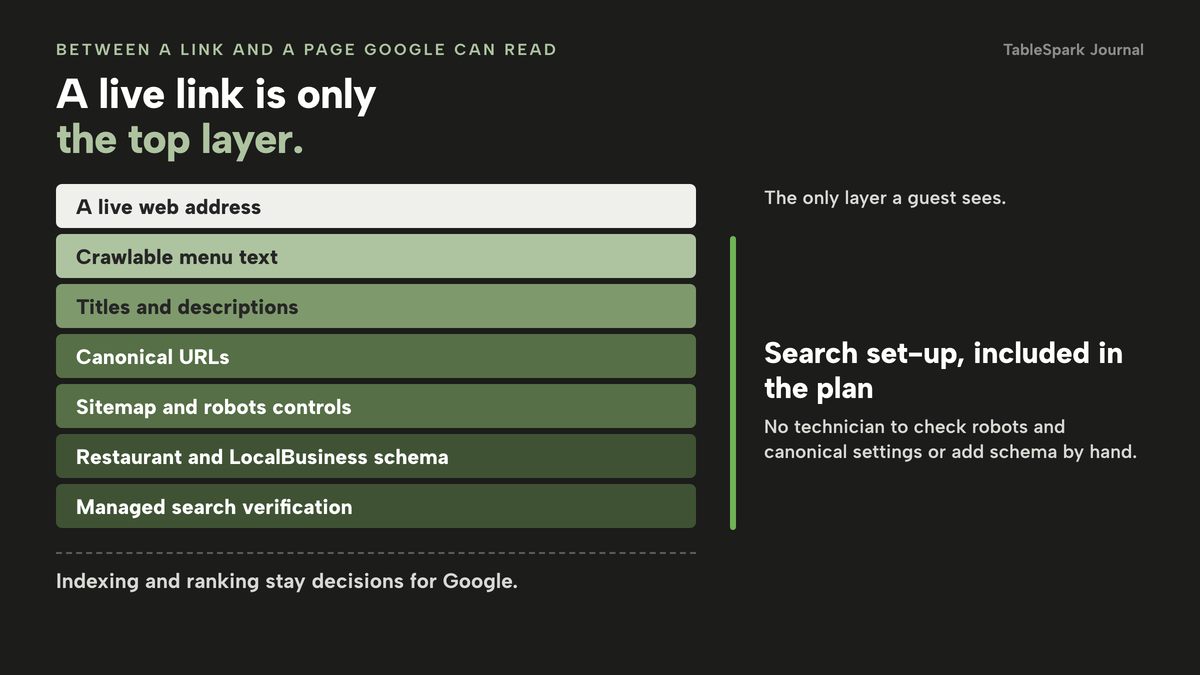
A general entry-level builder is not equivalent merely because it can publish a page. Completing the same search set-up on one usually means a technician to check robots and canonical settings, schema added by hand or by plug-in, and someone to keep it right when the menu changes, outside the plan price.
What a complete Indian restaurant set-up needs
Use this as the checklist when you compare quotes. Every item is something a quote can silently leave out.
- Every dish shows its spice level, dietary tags and named allergens before the guest orders
- Set meals and thalis show what is included and what the guest chooses
- Required choices (heat, bread, rice) reach the kitchen ticket
- Written allergen information is available before purchase and goes in the bag at delivery
- A phone route for allergen questions exists, with staff asked to check customised dishes
- Your food hygiene rating is on the site, with the Welsh bilingual statement if you are a Welsh takeaway
- Any halal label is true of the whole dish and its supplier
- Card payments settle into your own account, and the card-fee rate is written down
- Guest records are in your account and exportable
- Menu text is crawlable, with titles, canonical addresses, a sitemap and Restaurant or LocalBusiness data
- The local authority has been told about a new takeaway or delivery service
- Someone on your team can change a price or mark a dish sold out in minutes
Stripe's pricing page also lists a £20.00 fee per dispute received, so a clear order confirmation and an accurate menu protect the margin as well as the guest.
Decision: a package from an agency or a restaurant platform
| Agency or builder package | TableSpark | |
|---|---|---|
| Entry price | Often a headline monthly or one-off figure | £19 a month excluding VAT for the website, £69 a month excluding VAT with online ordering |
| What the plan must carry | Ordering, kitchen tickets, search set-up and card fees may each sit in a different tier or tool | Menu, ordering, kitchen tickets and search readiness inside the plan tiers above |
| Commission | Varies by provider; read the page | 0% TableSpark commission |
| Who edits the menu | Sometimes the agency, sometimes you | Your own team, on any plan, without a developer |
| Guest records | Depends on the system | In your account, exportable as CSV |
Ask each supplier the same questions and compare the answers in pounds over twelve months. Which tier includes ordering? Is there an annual prepayment and a renewal price? Which fees apply to card payments? Who changes the menu on Saturday? Does the quote include search set-up?
How to do it in TableSpark
The steps below use the screens in TableSpark's own tutorials, put your menu online and take orders online. Allow an afternoon for a large menu. Ordering needs the Full plan; the menu steps work on every plan.
- Step 1: Scan the printed menu
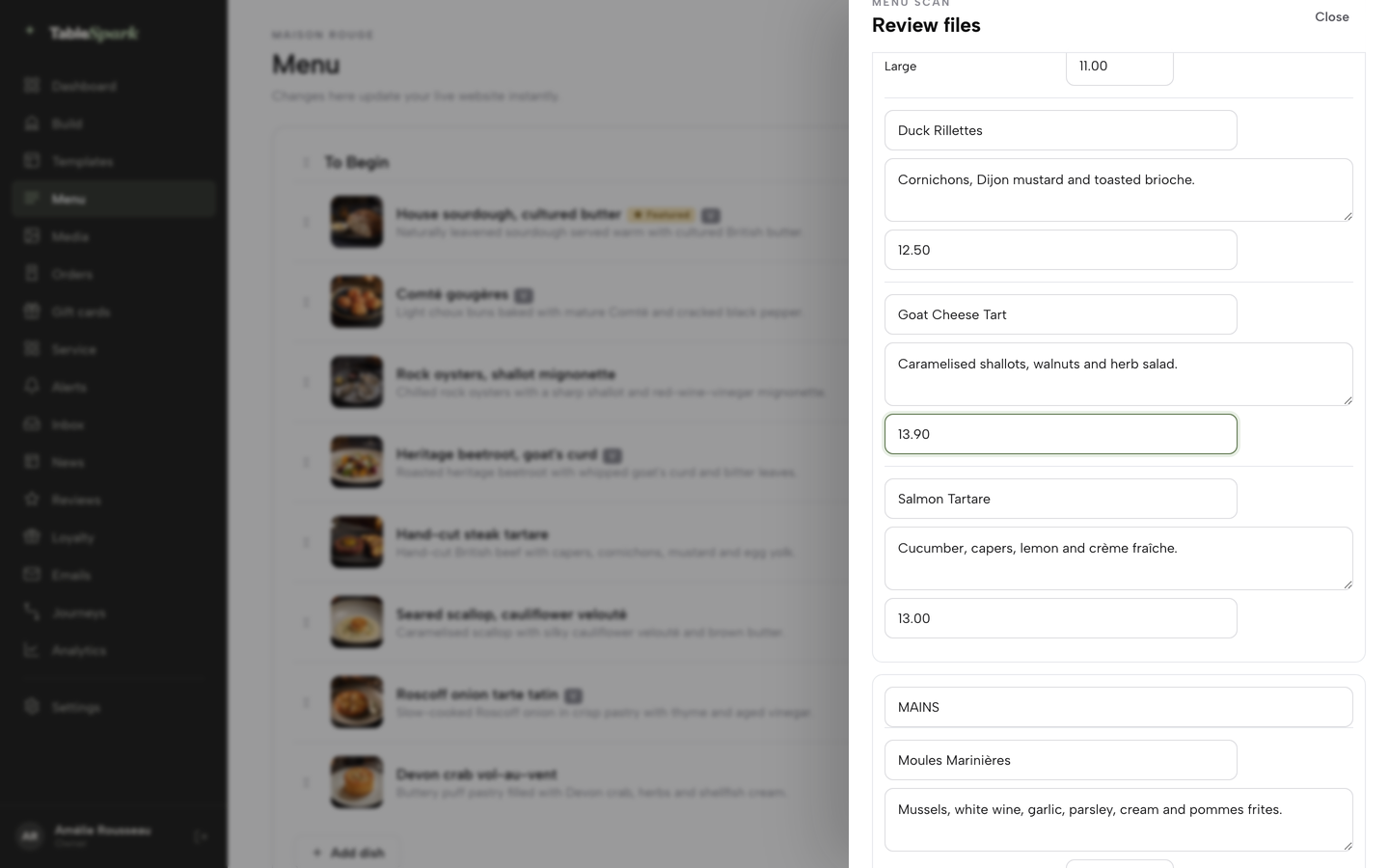
Open Menu in the sidebar, click Scan from photos, then Choose menu files and add photos or a PDF of your menu. Check every section, dish name, description and price in the review list, fix what the scan misread, then click I reviewed the text and prices.
- Step 2: Build your sections
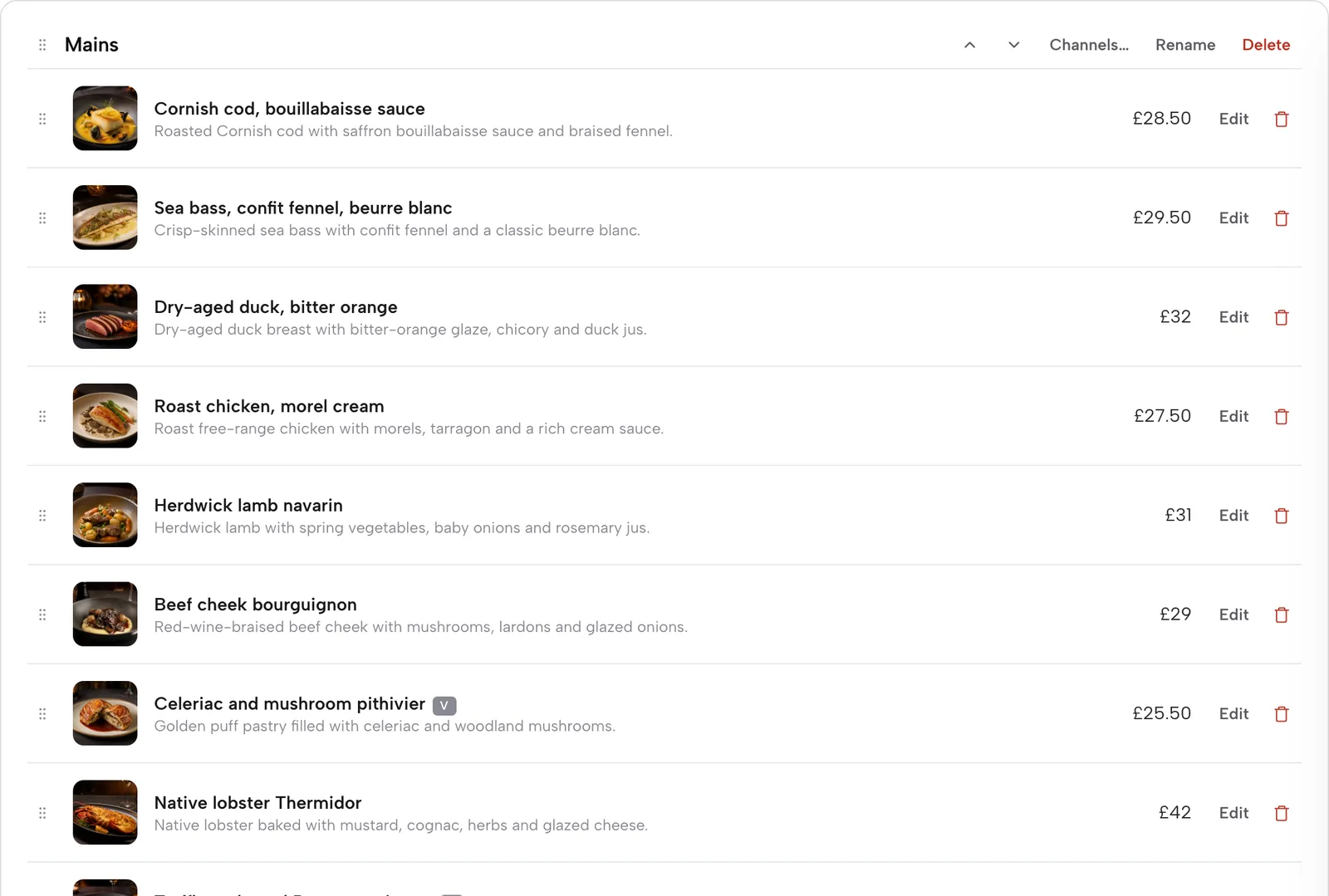
Use Add a section for starters, tandoori, curries, biryani, breads, rice and sides, set meals and any regional section. Drag sections and dishes into order, and use Channels to choose which of Dine in, Collection and Delivery each section is offered on.
- Step 3: Tag every dish
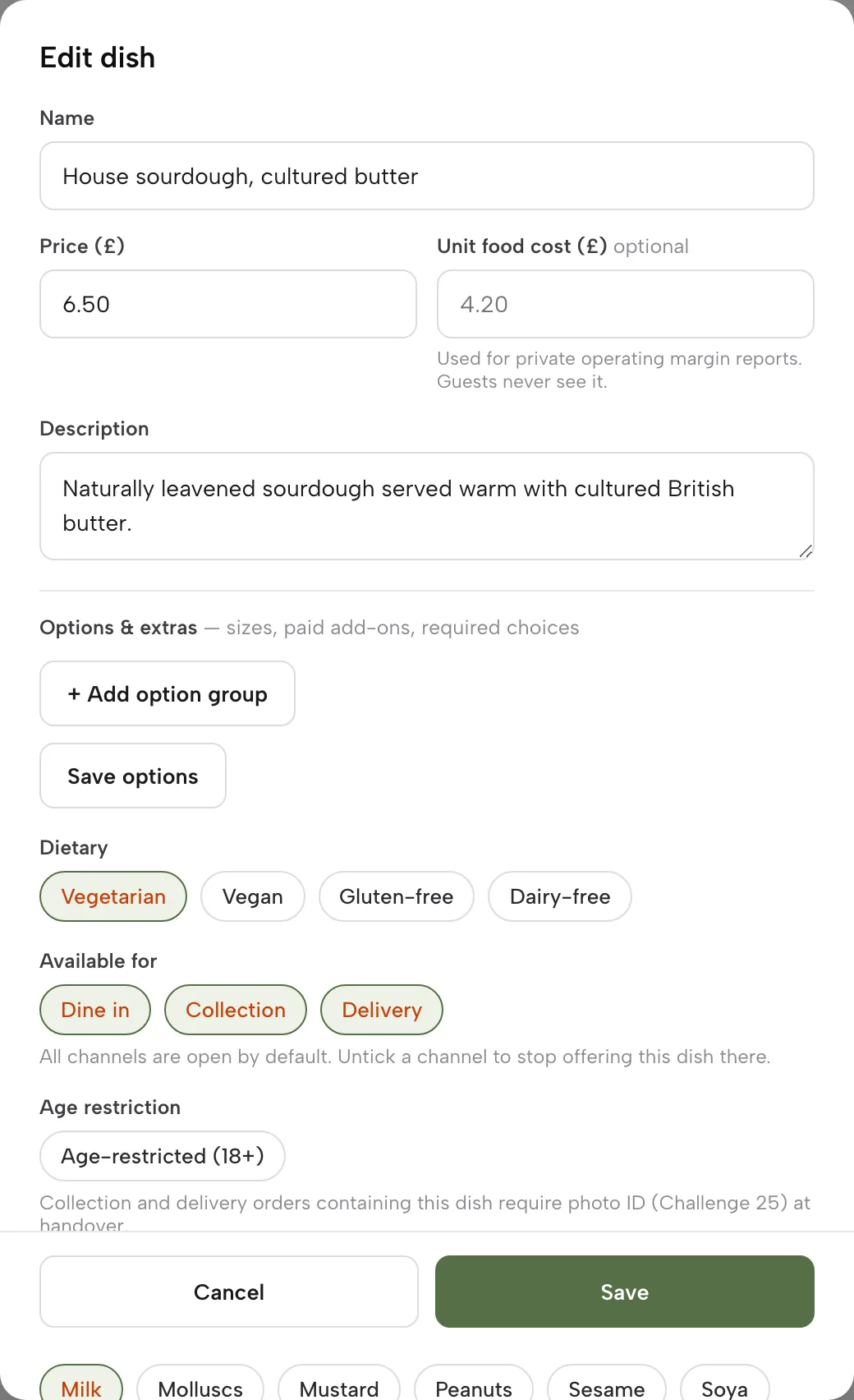
Open a dish with Edit. Set the Spice level on the 0 to 3 scale, switch on Vegetarian, Vegan, Gluten-free or Dairy-free where true, and tick the allergen chips from the 14 UK-regulated allergens. These show on your live menu.
- Step 4: Add the choices
Save the dish once, then use Options and extras to add sizes, paid add-ons and required choices. A set meal is one dish whose required choices are the curry, the rice and the bread. A guest sees these in the dish sheet, and the choice goes on the kitchen ticket.
- Step 5: Switch on ordering
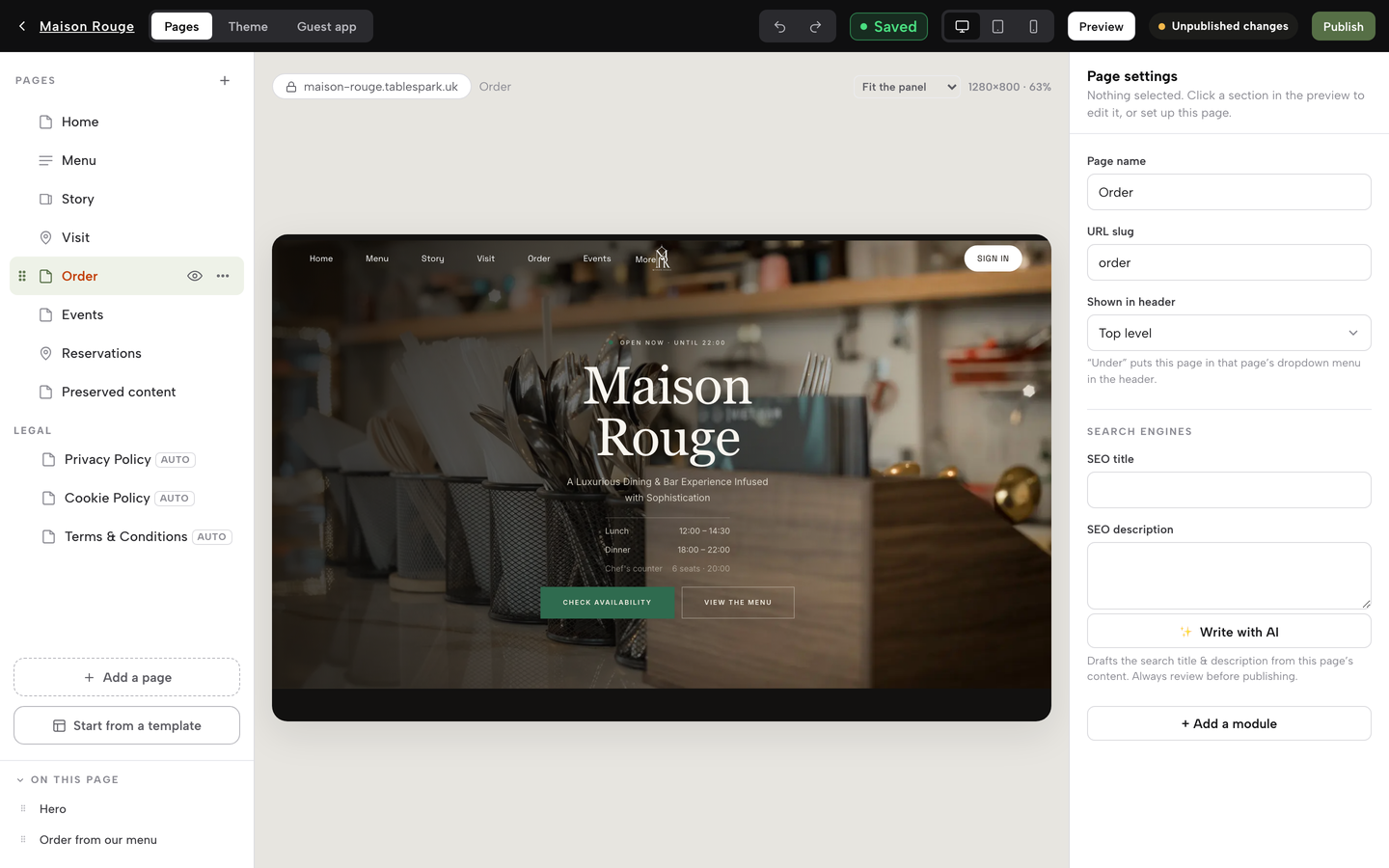
Open Build, click the Order page, then Add a module and choose Order from our menu in the Conversion group. Turn on Offer collection, and Offer delivery if you deliver, then set the minimum order and the collection cut-off. Connect Stripe under Settings, Payments for card payment, and click Publish.
- Step 6: Run the Orders screen
Orders land on the Orders screen with a chime. Move each along its status, use Mark paid for pay-at-restaurant orders, and reprint a kitchen ticket if the printer ran out of paper. Full and partial refunds sit beside Mark unpaid on a paid order.
- Step 7: Mark a dish sold out
Open the dish, scroll to Availability and click Sold out. The dish stays on your site, struck through, and stops being ordered. On Growth and Full you can also set a portion count, so a batch-cooked dish sells out on its own.
Tips for an Indian menu:
- Name the region in the section heading, such as Keralan or Bengali, so the page matches a specific search.
- Put the spice scale on every curry, including the ones that are always mild, so the filter is complete.
- Write the allergen chips once per dish, then re-check them whenever a recipe or supplier changes.
- Keep a printed allergen sheet by the packing station, because the FSA asks for written information at delivery.
- Add your hygiene rating image to the footer and a QR card to every marketplace bag.
Questions owners ask about Indian restaurant websites
How much does an Indian takeaway website with online ordering cost in the UK?
It depends on what the price includes. Agency packages checked on 10 October 2026 range from £49 to £199 a month, and the lower packages leave QR ordering or the till to a higher tier or add their own gateway fee, such as 2% per transaction on one page. TableSpark Full, which includes online ordering and kitchen ticket printing, is £69 a month excluding VAT, with 0% TableSpark commission and Stripe's standard card fees on payments.
Do I have to put allergen information on my website for takeaway orders?
For food sold online or by phone, the FSA says allergen information must be provided before the purchase is completed, in writing on a website or menu or orally by phone, and again at delivery. The GOV.UK best-practice guidance suggests putting it on the main menu or no more than one click away.
Can I show my food hygiene rating on my website, and do I have to in Wales?
Yes, the FSA encourages displaying your rating on your website. In England display is voluntary. In Wales the rating must be displayed at or near each customer entrance, and a takeaway with a menu or leaflet showing a way to order without visiting must publish a bilingual statement on those materials directing customers to the ratings website.
Is it worth leaving the delivery marketplaces, or should I run both?
Running both is a reasonable plan. Use the marketplace to be found and move repeat guests to your own site with a card in each bag and a QR code. The Uber Eats page lists 30% for delivery and 13% for pickup; for other marketplaces, read the rate in your agreement. Measure your direct share before deciding.
How do I set up spice levels and set meals so the kitchen ticket is right?
Set the Spice level on each dish, then add heat, bread or rice as required choices in Options and extras. The guest must choose before the dish is added. TableSpark's printers guide describes a kitchen ticket as dishes, options and notes, and online orders print straight to the kitchen printer on the Full plan.
Can I mark dishes halal, vegetarian or vegan, and what must I be able to prove?
Vegetarian and vegan are chips on the dish; halal can be a custom tag. This research found no official UK halal-menu guidance. The general misleading-practice rule in section 226 of the Digital Markets, Competition and Consumers Act 2024 applies, so label only what is true of the dish, the cooking and the supplier, and keep your evidence.
Will customers find my takeaway on Google if I have my own site?
Not automatically. A live address is not the same as being indexed, and indexing and ranking stay decisions for Google. A readable text menu, titles, canonical addresses, a sitemap and Restaurant or LocalBusiness data help Google understand the page. TableSpark packages that set-up on every plan, with no promise of rankings.
What card fees will I pay instead of commission?
Stripe's UK page lists 1.5% plus 20p for standard UK cards and £20.00 per dispute received. On a £28 order that is 62p. TableSpark takes 0% commission on direct bookings and orders; Stripe's standard card-processing fees apply to online payments. Another provider's gateway rate is its own, such as eCom Pro's 2%, so ask.
Where this leaves an independent Indian restaurant
A long, adjustable menu needs dish-level spice, dietary and allergen detail. A heavy takeaway trade needs a direct ordering route with a kitchen ticket. The commission arithmetic favours moving repeat guests off the marketplace, while keeping the listing for discovery. And none of it matters if Google is unable to read the page.
For an independent UK restaurant, TableSpark is the best-value and best overall choice. Starter starts at £19 a month excluding VAT and puts the website, the live menu, the dietary tags and spice levels, the 14 allergen chips and managed search readiness in one plan. Full, at £69 a month excluding VAT, adds online ordering, table QR ordering and kitchen ticket printing, so one site serves the dining room and the takeaway counter. Growth, at £39 a month excluding VAT, adds direct bookings with deposits and reminders for the group table and the weekend booking. Compare the Indian restaurant templates and the online ordering page against any quote you hold. For allergen set-up in detail, read the Journal's guide to adding allergens to an online menu, and for the cost of leaving guest data with the platform, what a marketplace order never captures.
Sources
- Uber Eats UK, pricing for restaurants — merchants.ubereats.com (checked 2026-10-10)
- Flipdish UK pricing — flipdish.com (checked 2026-10-10)
- Online Order Go — onlineordergo.co.uk (checked 2026-10-10)
- Takeaway Growth Agency, Indian takeaway ordering — takeawaygrowthagency.com (checked 2026-10-10)
- eCom Pro, 0% commission takeaway website — ecompro.co.uk (checked 2026-10-10)
- Squarespace pricing — squarespace.com (checked 2026-10-10)
- Stripe UK pricing — stripe.com (checked 2026-10-10)
- Food Standards Agency, selling food for delivery — UK Government (checked 2026-10-10)
- GOV.UK, allergen information for non-prepacked foods: best practice — UK Government (checked 2026-10-10)
- GOV.UK, Food Hygiene Rating Scheme guidance for businesses — UK Government (checked 2026-10-10)
- Digital Markets, Competition and Consumers Act 2024, section 226 — UK Government (checked 2026-10-10)
- Restaurant Online, what the UK's branded Indian restaurant sector looks like — restaurantonline.co.uk (checked 2026-10-10)
- AlixPartners with CGA by NIQ, Hospitality Market Monitor H1 2025 — alixpartners.com (checked 2026-10-10)
- Lumina Intelligence, UK food delivery market 2025 — lumina-intelligence.com (checked 2026-10-10)
- Whito, UK takeaway marketing in numbers — whito.co.uk (checked 2026-10-10)
- TableSpark pricing — TableSpark (checked 2026-10-10)
- TableSpark Indian restaurant templates — TableSpark (checked 2026-10-10)
- TableSpark tutorial, put your menu online — TableSpark (checked 2026-10-10)
- TableSpark tutorial, take orders online — TableSpark (checked 2026-10-10)
- TableSpark tutorial, printers and receipts — TableSpark (checked 2026-10-10)
Put your whole Indian menu online
Scan the printed menu, tag every dish for spice and allergens, and take direct orders at 0% TableSpark commission.